How to Create a Video with Nano Banana: Gemini Omni or Veo 3.1
Nano Banana 2, Pro and Lite only make images. To animate a frame, use Gemini Omni (Menu → Videos, or gemini-omni-1.1-flash) or Veo 3.1 for frame control.
On this page
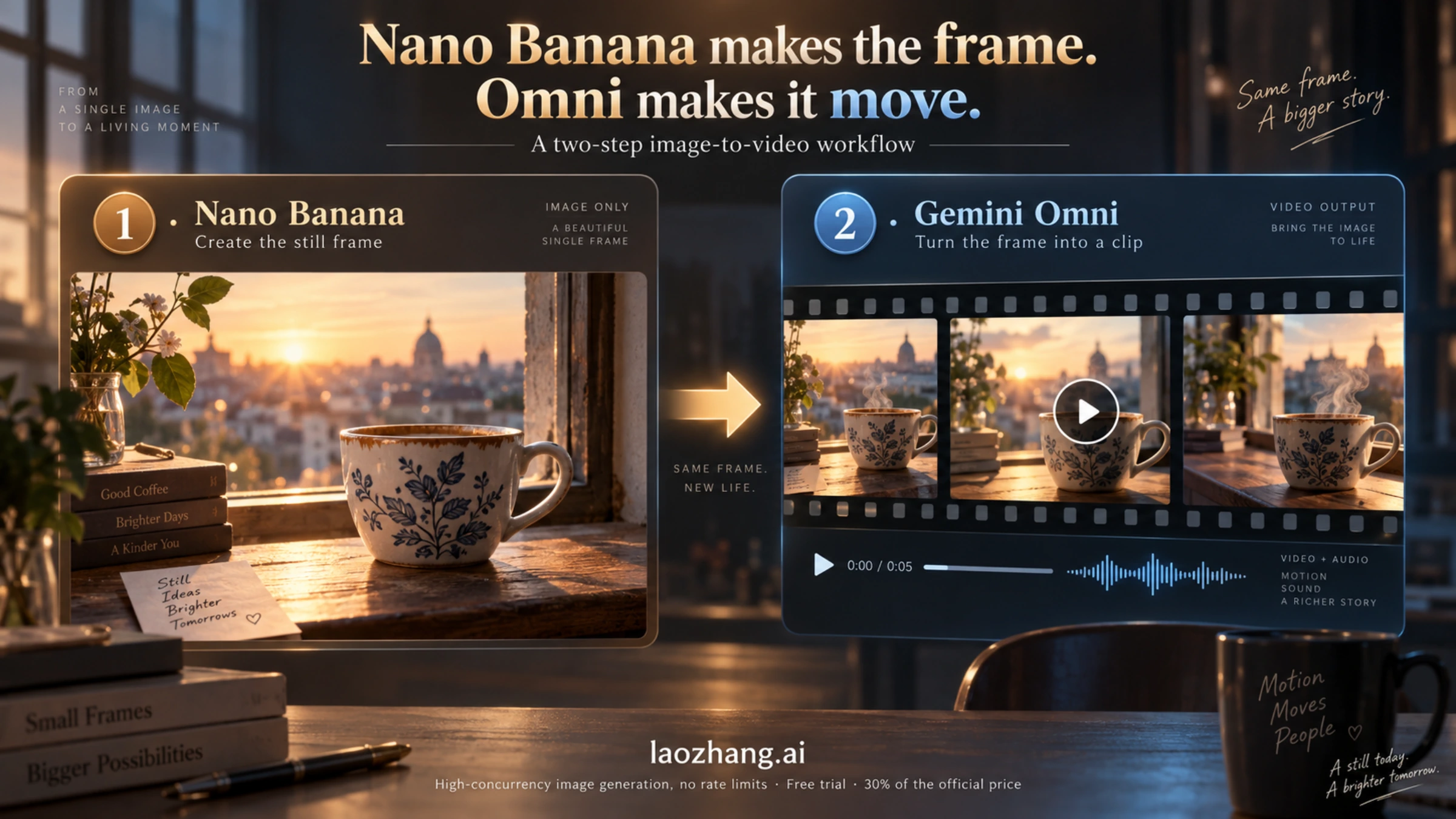
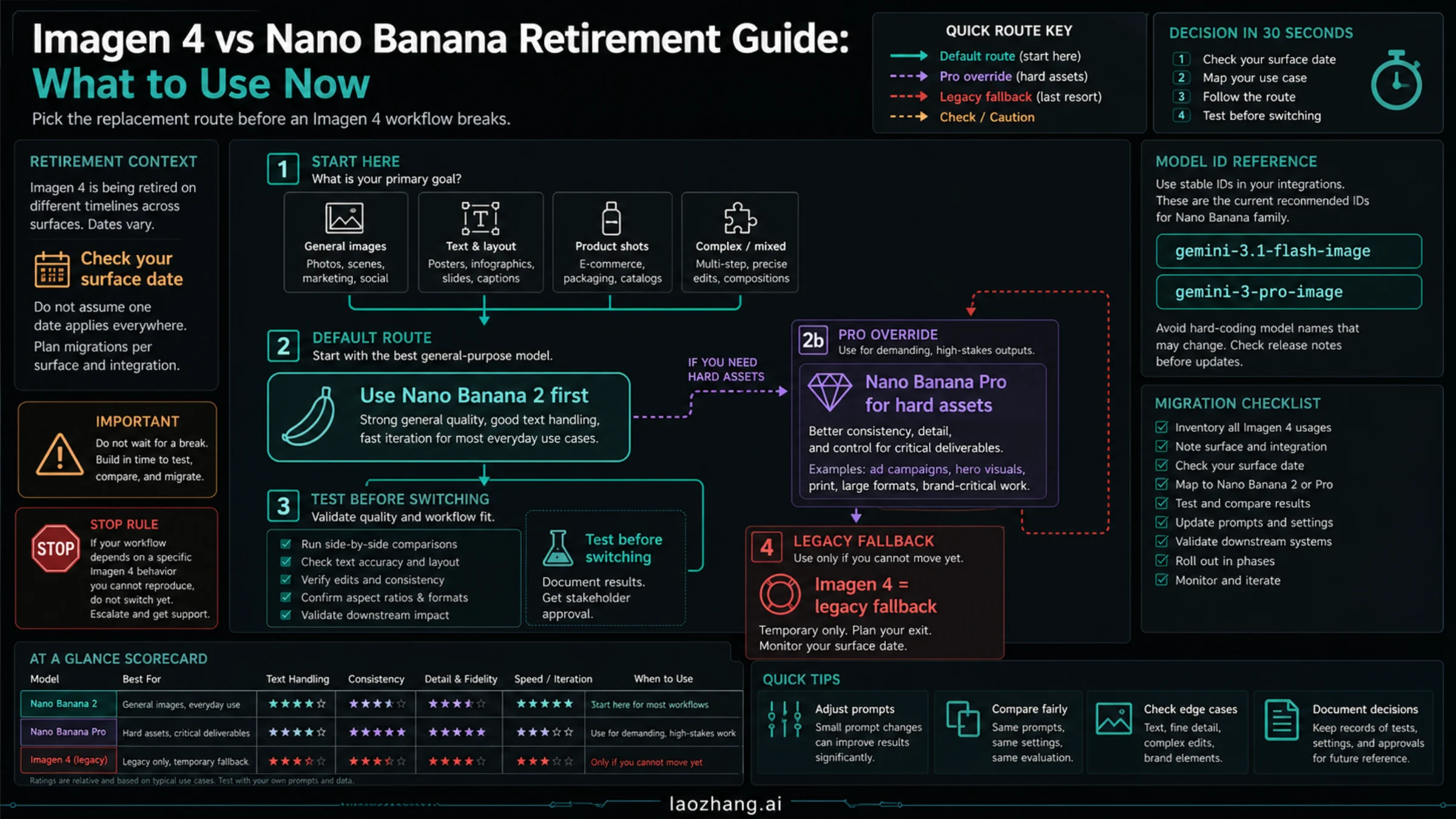
Nano Banana does not create video. Every model that carries the name, including Nano Banana 2, Nano Banana Pro and Nano Banana 2 Lite, returns still images only. What people actually do when they "create a video with Nano Banana" is a two-step job: make the frame with Nano Banana, then animate that frame with a video model.
As of September 2026, Google's own second step is Gemini Omni. In the Gemini app it lives under Menu → Videos, where you can upload up to 5 images (your Nano Banana output included) and get a 10-second clip with sound. In the Gemini API the same model is gemini-omni-1.1-flash, and Google's video docs now say to use it as the default for video generation, keeping Veo 3.1 for jobs that need scene extension or frame-specific control. Google even describes Omni as "Nano Banana for video", which is why the two names keep showing up together.
The conditions that decide whether this works for you:
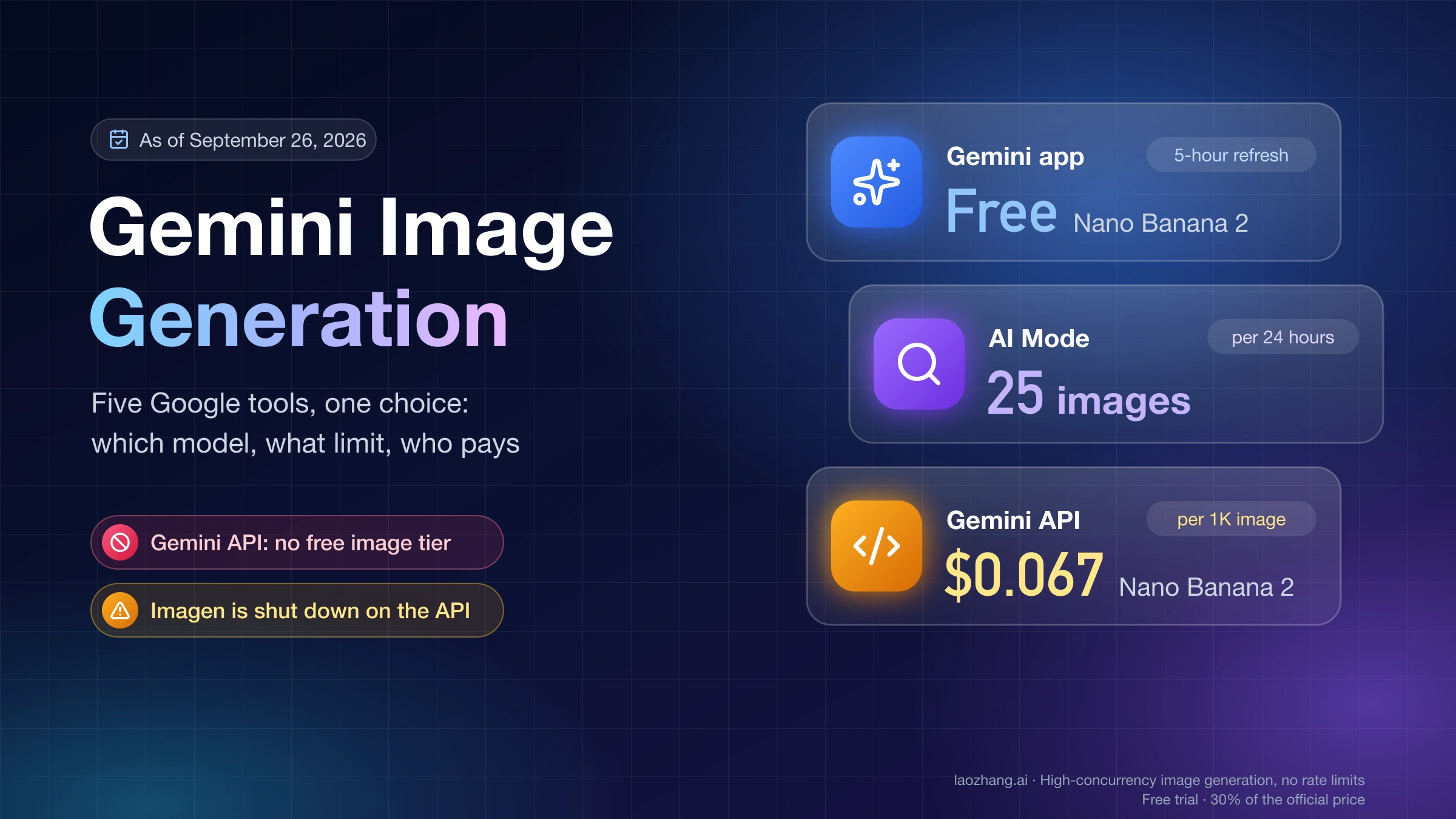
- Gemini app video needs a paid Google AI plan (Plus $4.99/mo or higher in the US) and an account that is 18+. The free tier includes image generation, not video.
- The API has no free tier for Omni or Veo. Omni works out to roughly $0.10 per second of 720p video, so a 10-second clip is about $1.
- Editing or extending an uploaded video is not available in the EEA, Switzerland, the UK, and (for the app) some US states. Generating a video from images is not affected by that limit.
Nano Banana is image-only, and the model IDs prove it
Google's image generation docs list four Nano Banana models. All of them generate or edit images; none has a video output mode.
| Name you see | API model ID | Google's positioning | Video output |
|---|---|---|---|
| Nano Banana 2 Lite | gemini-3.1-flash-lite-image | "fastest and cheapest" | No |
| Nano Banana 2 | gemini-3.1-flash-image | "generalist workhorse" | No |
| Nano Banana Pro | gemini-3-pro-image | "premium choice for the most complex visual tasks" | No |
| Nano Banana (legacy) | gemini-2.5-flash-image | previous generation | No |
One feature causes confusion in the other direction: the 3.1 Flash and Lite models accept a video as a reference input and produce a new image from it ("video-to-image"). That is still an image model; it consumes video, it never emits one.
So when you read "Nano Banana 2 video generator" or "Nano Banana Pro video free", the video is being made by a different model. The only question worth asking is which one.
What changed: Gemini Omni is now Google's default for video; Veo 3.1 stays for frame control
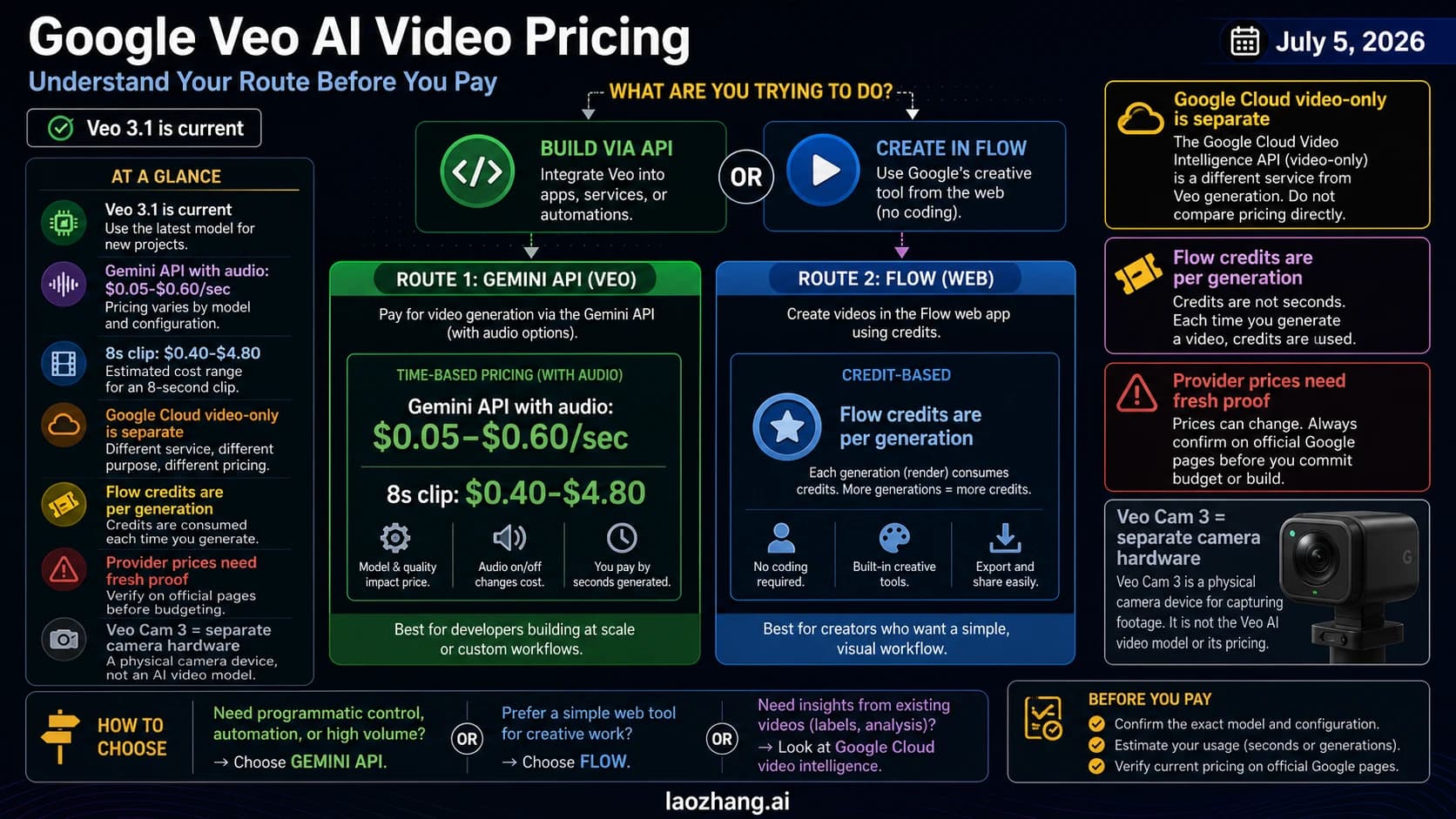
Until Gemini Omni launched on August 27, 2026, Veo 3.1 was the video model in the Gemini app and the one Google's API docs pointed to. That is no longer the complete picture. Google's video overview now reads "Use Gemini Omni Flash as your default model for video generation" and reserves Veo 3.1 for specific needs such as extending a scene or controlling individual frames. In the consumer Gemini app, Google's Gemini Omni page states that Omni replaces the Veo 3.1 model that the app used before.
Veo is not gone. The Veo 3.1 API docs were updated on September 17, 2026, the model IDs are live, and the Google AI Ultra plan still lists "video generation with Veo 3.1". Read the "replaces" wording as a statement about the Gemini app's default engine, not a Veo shutdown.
Practical rule for a Nano Banana-first workflow:
| You want | Use | Why |
|---|---|---|
| A clip from your Nano Banana image with the least setup | Gemini Omni (app or gemini-omni-1.1-flash) | Google's default; conversational edits; 10-second steps up to 40 s |
| Exact start and end frames, or a clip you will extend many times | Veo 3.1 | First/last frame interpolation, 3 reference images, 7-second extensions up to 20 times |
| Many frames or full API control on the image side | Nano Banana 2 / Pro by API | Image quality and consistency happen here, before any video call |
If you are choosing between Google's models more broadly, the Gemini Omni model-ID guide covers which ID appears in each Google product.
Option 1: the Gemini app, Menu → Videos
This is the shortest path if you already have a Nano Banana image saved, and it needs no code. The steps below follow Google's Gemini Apps help page.
- Open gemini.google.com or the Gemini mobile app with a personal account on a Google AI plan (Plus, Pro or Ultra) or a work/school account with a qualifying Workspace license.
- Open the Menu and choose Videos. Older tutorials that say "click the Video button" or "select Veo 3" describe the pre-Omni interface.
- Optionally pick a template. Then type the prompt: describe the motion, the camera move and the mood; ask for dialogue or sound effects here if you want audio.
- Tap Add image to upload your Nano Banana frame. You can add up to 5 images, and, if you have one, 1 video via Add video. The output aspect ratio follows the uploaded media (landscape is the default for text-only prompts), so a 9:16 Nano Banana image gives a vertical clip.
- Tap Submit. Google says generation "may take a few minutes".
- Keep editing in the same conversation: remove an object, swap a character, change the camera angle or background, stabilize the shot, or extend the scene. Under the finished video, use Share to save to your device, export, or share on YouTube.
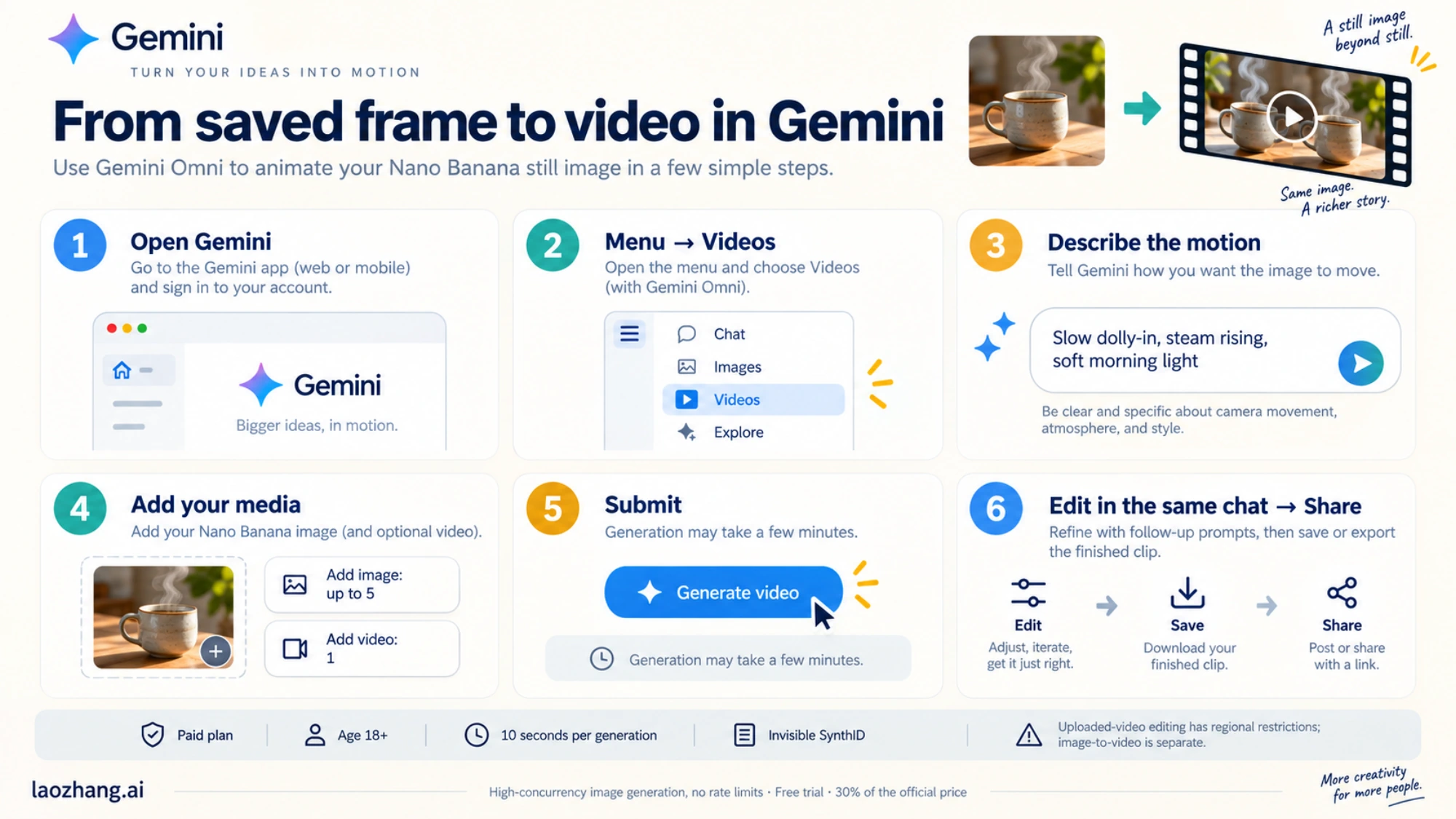
Limits that apply in the app, all from Google's own pages:
- Clip length is 10 seconds per generation; scene extension is available for Plus/Pro/Ultra.
- Every video carries an invisible SynthID watermark.
- Not available to users under 18.
- Upload only photos you have the right to use.
- Add video for editing an existing clip is unavailable in the EEA, Switzerland, the UK and some US states. Image uploads are not restricted this way.
- Google does not publish a numeric per-day video quota; the plan page says usage limits are "compute-based" and "rate limits may apply". If you hit a wall, that is the limit talking, not a bug in your prompt.
If your Nano Banana image was itself made in the Gemini app, the whole job stays in one product. Our Nano Banana Pro usage guide covers the image half in the app and AI Studio.
Option 2: the API, Nano Banana 2 then gemini-omni-1.1-flash
For anything repeatable, use the API. The pattern is the same two steps, now with model IDs.
Step 1: make the frame. Call gemini-3.1-flash-image (Nano Banana 2) or gemini-3-pro-image (Nano Banana Pro) and save the image. Spend your effort here: a wrong face, product shape or piece of text in the frame gets amplified by the video model. Prompt patterns are in How to Prompt Nano Banana; request shapes for Pro are in the Nano Banana Pro API guide.
Step 2: animate it with Omni. Google's Gemini Omni docs show images passed in the input list alongside the text prompt. The Python shape, adapted from the docs (last updated September 17, 2026):
import base64
from google import genai

client = genai.Client()

interaction = client.interactions.create(
    model="gemini-omni-1.1-flash",
    input=[
        {"type": "image", "data": base64_image, "mime_type": "image/jpeg"},
        {"type": "text", "text": "Use this as the first frame. Slow dolly-in, "
                                  "steam rising from the cup, soft morning light."},
    ],
)

with open("clip.mp4", "wb") as f:
    f.write(base64.b64decode(interaction.output_video.data))
What the Omni API gives you around that call:
- Frame roles. One image acts as the first frame. Provide two images, describe the transition, and the docs'
<FIRST_FRAME>/<LAST_FRAME>markers tell the model which is which.<IMAGE_REF_N>markers turn images into references for a character or style instead of a start point. That is where a Nano Banana character sheet becomes useful. - Resolution and format. 360p drafts, 720p by default, 1080p and 4K (both upscaled). Aspect ratio
16:9by default or9:16. Audio is generated by default. - Length. Extend in 10-second steps up to 40 seconds total. Videos you upload for editing or extension must be 10 seconds or shorter.
- Region and language. Editing or extending uploaded videos is not available in the EEA, Switzerland or the UK. English prompts are fully supported; other languages "have not been evaluated".
- Access. AI Studio and the paid Gemini API. There is no free-tier row for
gemini-omni-1.1-flash; if you are on the free Gemini API key, what the free tier includes explains why the video call will not go through.
When Veo 3.1 is the better second step
Google's Veo 3.1 docs still show exactly this two-step workflow, in Google's own words: "Step 1: Generate an image with Nano Banana 2. Step 2: Generate video with Veo 3.1 using the image." Choose Veo over Omni when one of these matters:
| Need | Veo 3.1 detail (docs dated September 17, 2026) |
|---|---|
| Model choice by budget | veo-3.1-generate-preview, veo-3.1-fast-generate-preview, veo-3.1-lite-generate-preview |
| Fixed clip lengths | 4, 6 or 8 seconds; 8 s is mandatory for 1080p, 4K or reference images |
| Resolution | 720p, 1080p (8 s only), 4K (8 s only); extension only at 720p |
| Start and end control | First + last frame interpolation |
| Consistency | Up to 3 reference images |
| Long sequences | Extend a Veo-generated video by 7 seconds, up to 20 times (not on Lite) |
| Audio | Native dialogue, sound effects and ambient audio |
The IDs are preview IDs and may change; check the docs page before hard-coding one. For price-per-clip comparisons across the three Veo tiers, Veo 3 price keeps the current numbers.
What it costs: API prices and Google AI plans (September 22, 2026)
Numbers below are from Google's Gemini API pricing page and the US Google AI plans page as of September 22, 2026, in USD. None of the video models has a free API tier.
API, per second of video (audio included):
| Model | 720p | 1080p | 4K |
|---|---|---|---|
gemini-omni-1.1-flash | ≈ $0.10 (Google's approximation from $17.50 per 1M output tokens) | not stated per second | not stated per second |
| Veo 3.1 Standard | $0.40 | $0.40 | $0.60 |
| Veo 3.1 Fast | $0.10 | $0.12 | $0.30 |
| Veo 3.1 Lite | $0.05 | $0.08 | — |
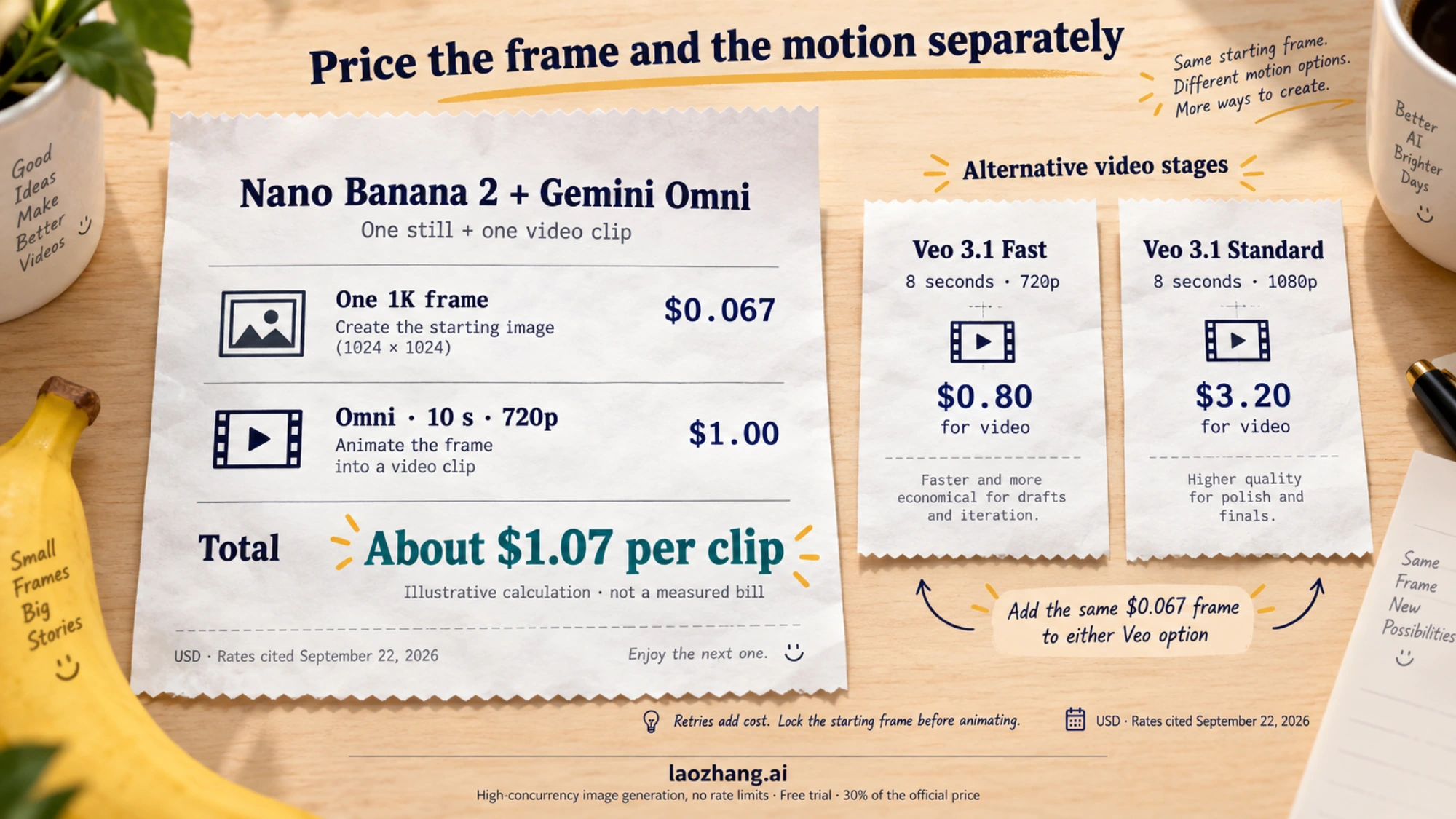
API, per image (the Nano Banana half): Nano Banana 2 output is $60 per 1M tokens, about $0.067 per 1K image; Nano Banana Pro is $120 per 1M tokens, about $0.134 per 1K/2K image.
A worked example, calculated from those inputs rather than measured: one Nano Banana 2 frame ($0.067) plus a 10-second 720p Omni clip (10 × $0.10 = $1.00) is about $1.07 per finished clip. The same frame animated with Veo 3.1 Fast for 8 seconds at 720p costs $0.80 for the video, or $3.20 with Veo 3.1 Standard at 1080p. Retries multiply these, so lock the frame before you start animating.
Gemini app plans (US):
| Plan | Price | What it includes for this task |
|---|---|---|
| Free | $0 | Image generation and editing; no video |
| Google AI Plus | $4.99/mo | Lowest paid plan that qualifies for Gemini app video (Google: "features vary by tier and region"); 200 Flow credits with Gemini Omni Flash |
| Google AI Pro | $19.99/mo | 1,000 Flow credits |
| Google AI Ultra | from $99.99/mo ($199.99 for 20× limits) | 10,000 or 25,000 Flow credits, first access to advanced features including Veo 3.1 |
Flow is Google's separate video tool; Gemini Omni 1.1 Flash has been available there for Plus/Pro/Ultra since its launch on August 27, 2026. Prices and entitlements differ by country, and Google publishes no numeric daily video quota for any plan.
Reading a "Nano Banana video generator" page
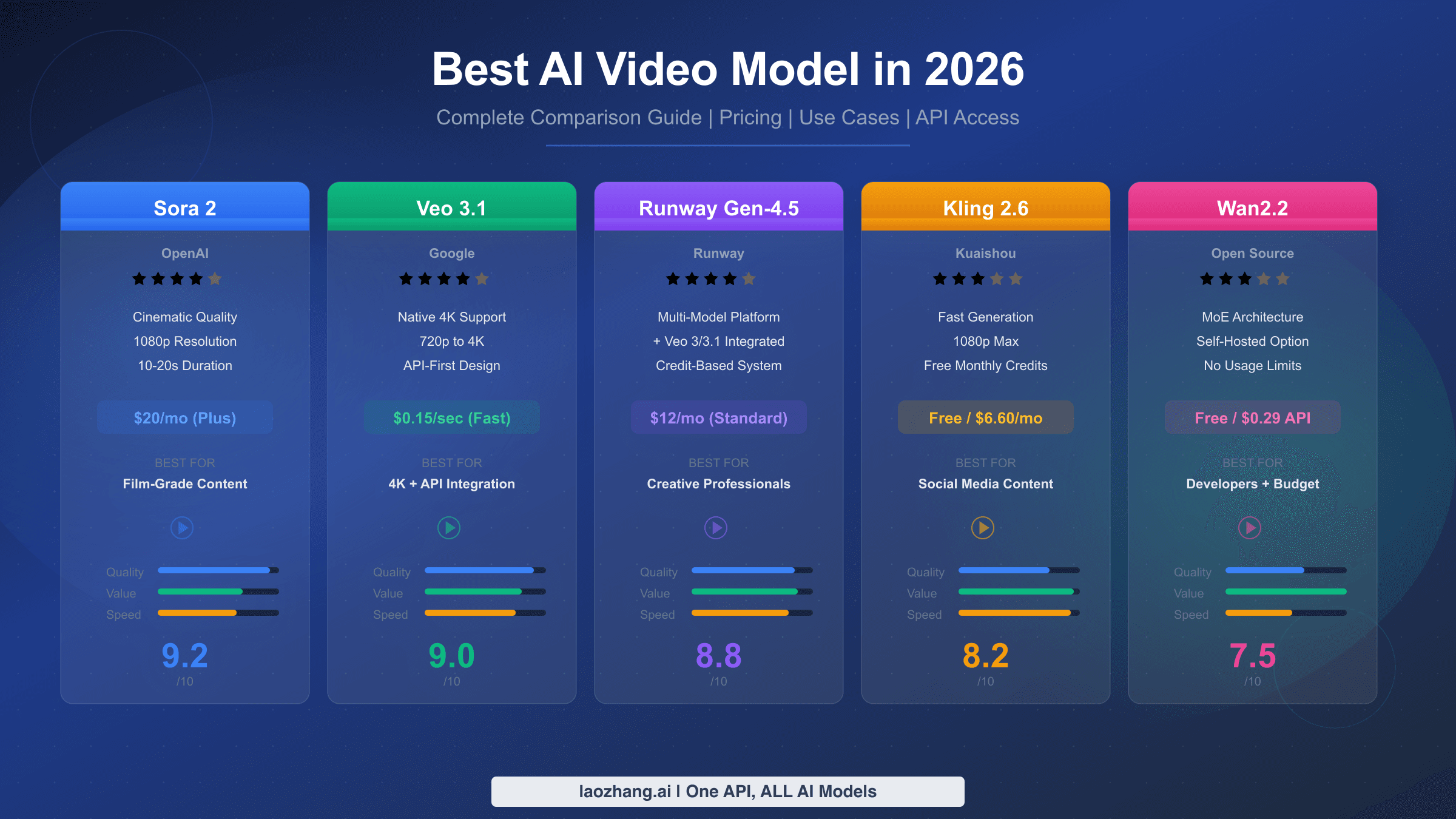
Sites called nanobanana.io or nanobananavideo.com are not Google products; they sell "Nano Banana AI text to video" made by other vendors' models under the Nano Banana name. One of them, nanobanana.io/text-to-video, as displayed on September 22, 2026, describes "a next-generation AI video model", but its model picker lists Veo 3.1, Sora 2 / Sora 2 Pro, Kling 2.6 / 3.0, Seedance 2.0 / 2.5, Pixverse V6 and Minimax H3, charges 5 credits per generation, and shows the Google logo only on the sign-in button. Other sites of the same kind list Gemini Omni, Seedance, Wan, Veo, Kling and Grok Imagine as selectable engines.
None of that is necessarily dishonest; it means "Nano Banana" on those pages is a brand, and the clip comes from whichever engine you pick. Before uploading a frame or paying, check four things:
- Which engine makes the motion. If the page names Veo, Omni, Seedance, Kling or another video model, you know what you are getting. If it only says "Nano Banana video", the engine is hidden.
- What comes back. A downloadable MP4 at a stated resolution and length, or only in-browser playback.
- What the credits buy. Length per generation, resolution, whether failed generations are charged, and whether "free" means a trial or a plan.
- Whose terms apply. The wrapper's commercial-use and data terms, not Google's, govern what you upload and what you can use commercially.
If a wrapper passes those checks, it can be a convenient front end. It is still cheaper to know the engine and price it directly: the API table above tells you what an 8- or 10-second clip costs at the source, and a free image-to-video AI comparison shows what genuinely costs nothing right now.
Where a third-party API fits, and where it does not
If you are producing many Nano Banana frames by API and want one key for several models, laozhang.ai lists the four Nano Banana IDs (gemini-3-pro-image at $0.09 per image, gemini-3.1-flash-image at $0.055, gemini-3.1-flash-lite-image and gemini-2.5-flash-image at $0.025, per its docs, September 22, 2026) behind the base URL https://api2.laozhang.ai, with both an OpenAI-compatible /v1/chat/completions endpoint and the Google-native /v1beta/models/gemini-3-pro-image:generateContent path. On the video side, its docs cover Seedance with a "role": "first_frame" image input, plus Wan 2.7, which gives you a first-frame job on a non-Google engine from the same account. Registration is at api2.laozhang.ai/register.
Its docs index names Veo 3.1 among its video models, but no Veo 3.1 or Gemini Omni page or price is published there, so do not plan on it for Gemini Omni or Veo 3.1; go to Google directly through AI Studio or the Gemini API, and use a third-party key only for the image half or for a Seedance or Wan alternative. If the real question is which image-to-video tool to use at all, the image-to-video generator comparison is the broader guide.
FAQ
Does Nano Banana 2 or Nano Banana Pro create video?
No. Both are image models (gemini-3.1-flash-image and gemini-3-pro-image) in Google's image-generation docs. They can take a video as a reference to produce a new image, but they never output a video. The video comes from Gemini Omni, Veo 3.1 or another video model that animates the Nano Banana image.
How do I turn a Nano Banana image into a video for free?
In the Gemini app you cannot: video generation requires a Google AI plan (Plus at $4.99/mo is the lowest paid US plan, and Google notes features vary by tier), and the free tier covers image generation only. The Gemini API has no free tier for Omni or Veo. Third-party sites offer trial credits, but those are trials of a different engine, not free Nano Banana video.
Is Veo 3.1 gone now that Gemini Omni exists?
No. Google says Gemini Omni replaces Veo 3.1 as the video model inside the Gemini app, and recommends Omni as the default API model. Veo 3.1's API IDs are still live, its docs were updated in September 2026, and the Ultra plan still advertises Veo 3.1 access. Use Veo when you need first/last frame interpolation, up to 3 reference images, or repeated 7-second extensions.
Can I use my own photo instead of a Nano Banana image?
Yes. Add image in the Gemini app accepts any image you have the right to use, up to 5 per prompt, and the API takes images the same way. Nano Banana just happens to be the easiest way to make a clean, consistent starting frame.
Why can I not upload a video to edit it?
Google restricts video uploads for editing and extension in the EEA, Switzerland, the UK and, for the Gemini app, some US states. Uploading images to generate a new video is unaffected. If Add video is missing or fails, that regional rule is the most likely reason.
How long can the video be?
In the Gemini app, 10 seconds per generation, with scene extension for Plus/Pro/Ultra plans. Through the API, gemini-omni-1.1-flash extends in 10-second steps to a 40-second total, while Veo 3.1 produces 4-, 6- or 8-second clips and can extend a Veo video by 7 seconds up to 20 times.
Which model is behind a "Nano Banana video generator" website?
Usually not a Google model called Nano Banana, because none exists for video. nanobanana.io, as displayed in September 2026, lets you pick Veo 3.1, Sora 2, Kling, Seedance, Pixverse or Minimax; others list Gemini Omni, Wan and Grok Imagine. Look for the engine name, the output file, the credit cost per clip and the site's own terms before you rely on it.