Best AI Video Model in 2026: Complete Comparison Guide (Sora 2, Veo 3.1, Runway & More)
Compare the best AI video models in 2026 including Sora 2, Veo 3.1, Runway Gen-4.5, Kling 2.6, and open-source options. Features verified pricing data, real cost calculations per 10-second video, scene-based recommendations, and an API developer guide.
On this page
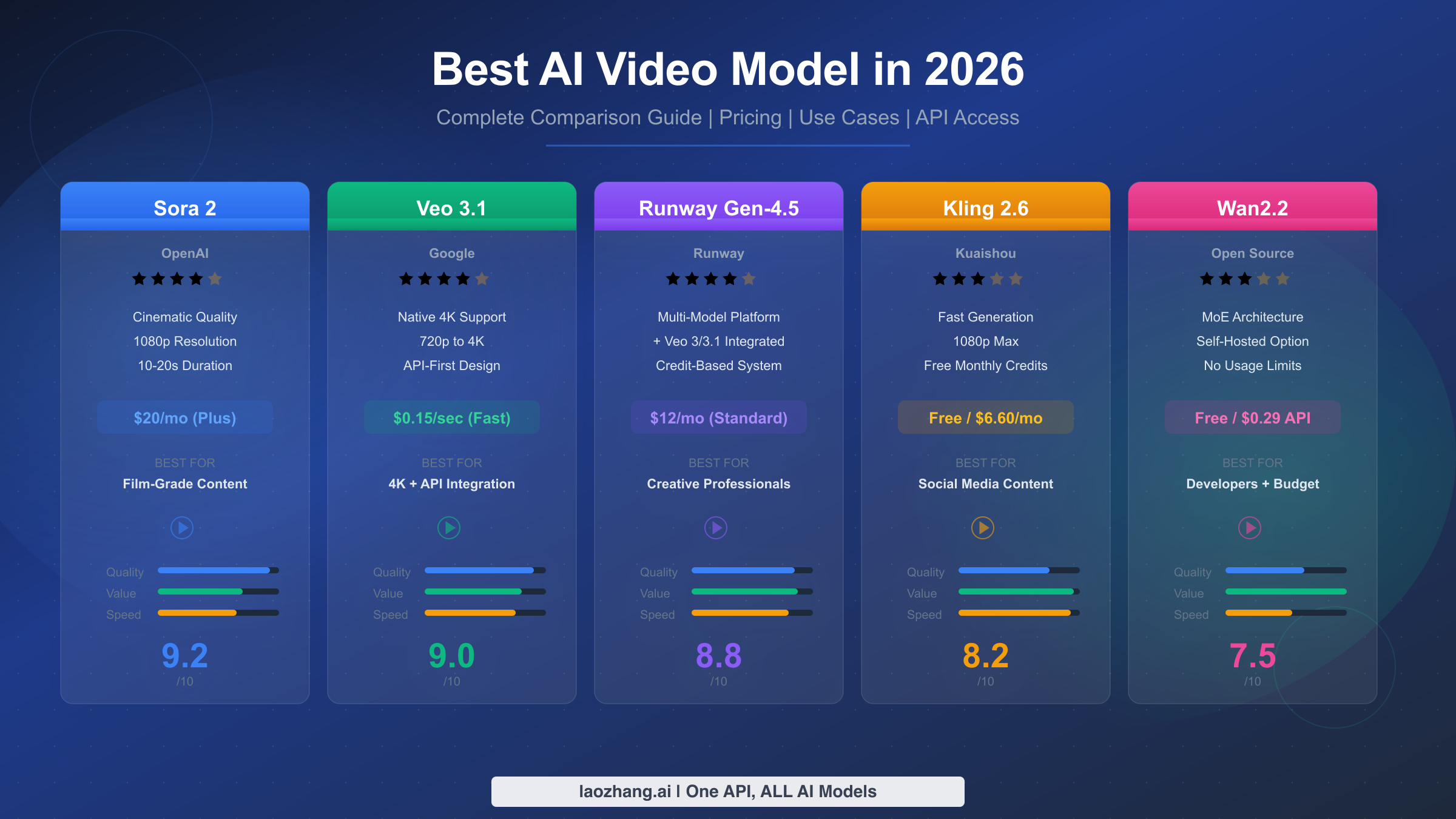
The best AI video model in 2026 depends on your specific needs. For cinematic quality, Sora 2 leads with its film-grade output and exceptional prompt adherence. For 4K resolution and API flexibility, Google's Veo 3.1 offers the most versatile options with per-second pricing starting at $0.15/second in fast mode. Runway Gen-4.5 stands out for creative professionals with its integrated platform that now includes both its own models and Veo 3/3.1. For budget-conscious creators, Kling 2.6 and open-source options like Wan2.2 provide impressive results at a fraction of the cost. This guide compares all major options using pricing data verified on February 10, 2026.
TL;DR — Best AI Video Models at a Glance
Before diving into the detailed analysis, here is a quick summary of which AI video model suits each major use case. Every price point and feature listed below has been verified against official sources as of February 2026, so you can make decisions based on current, accurate data rather than outdated information that plagues many comparison articles.
| Use Case | Best Model | Why | Starting Price |
|---|---|---|---|
| Cinematic quality | Sora 2 | Film-grade realism, best motion coherence | $20/mo (ChatGPT Plus) |
| 4K resolution + API | Veo 3.1 | Only model with native 4K, flexible per-second API pricing | $0.15/sec (fast) |
| Creative platform | Runway Gen-4.5 | All-in-one editor with multiple models including Veo 3/3.1 | $12/mo (Standard) |
| Social media speed | Kling 2.6 | Fast generation, free monthly credits, vertical video support | Free tier available |
| Budget/Open source | Wan2.2 (MoE) | Best open-source quality, self-hostable, no recurring costs | Free (requires GPU) |
If you need the absolute best visual quality and money is not a primary concern, start with Sora 2 through a ChatGPT Plus or Pro subscription. If you need programmatic access with pay-per-use pricing, Veo 3.1's API is the most mature option with transparent per-second billing. If you want a complete creative platform with the flexibility to switch between multiple AI models, Runway's integrated ecosystem gives you access to their own Gen-4.5 alongside Google's Veo 3 and Veo 3.1 under a single subscription. For creators who primarily make short-form social content and want to minimize costs, Kling 2.6 offers a generous free tier with credits that refresh monthly. And if you have the technical expertise and a capable GPU, Wan2.2's open-source model delivers surprisingly competitive quality without any ongoing subscription fees.
Top 5 AI Video Models Compared (2026)
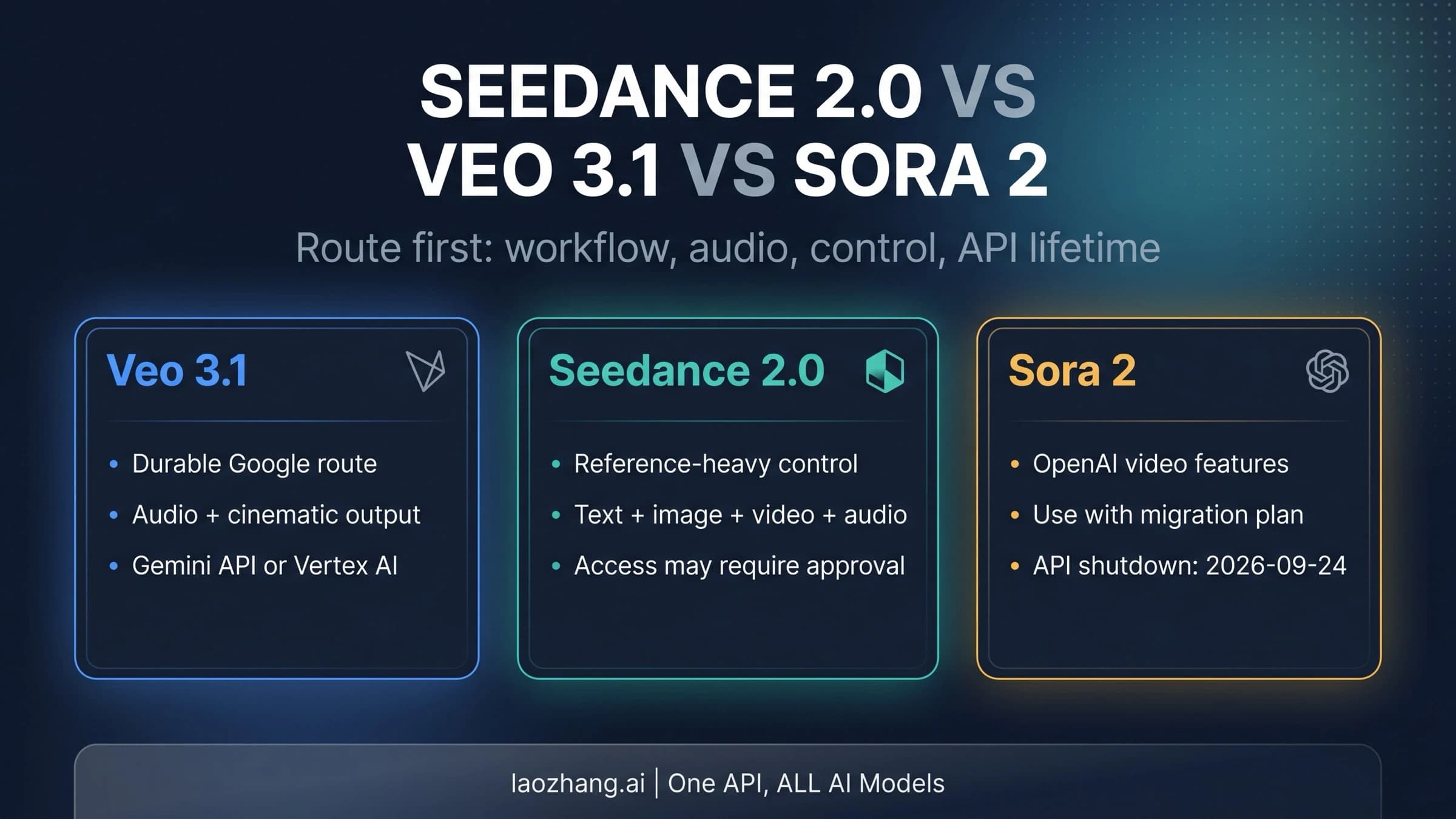
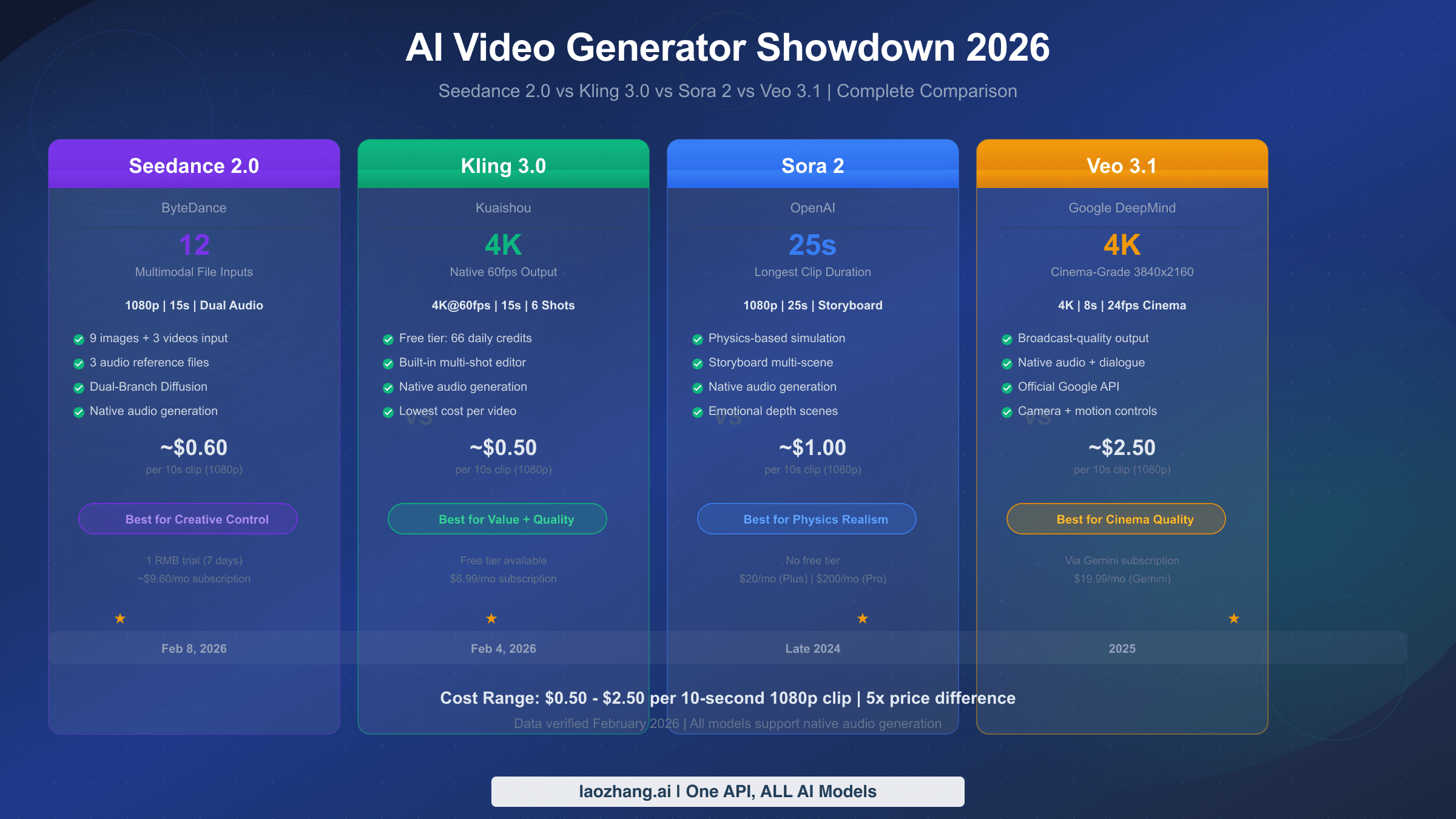
The AI video generation landscape has consolidated significantly by early 2026, with five models emerging as clear leaders across different dimensions of performance. Rather than listing every available model, this section focuses on the five that matter most for practical video creation, based on quality benchmarks, pricing transparency, and ecosystem maturity. For a deeper technical comparison between the top three, see our detailed Sora 2 vs Veo 3 comparison which includes side-by-side output samples.
Sora 2 — Best Overall Quality
OpenAI's Sora 2 remains the benchmark for AI video generation quality in early 2026. The model excels at understanding complex prompts involving multiple subjects, intricate camera movements, and nuanced lighting conditions. Where Sora 2 truly differentiates itself is in motion coherence — characters maintain consistent proportions and natural movement patterns across the full duration of generated clips, a challenge that still trips up many competing models. The output has a distinctly cinematic quality that makes it the go-to choice for anyone prioritizing visual fidelity above all else, particularly for short films, high-end marketing content, and creative projects where every frame matters.
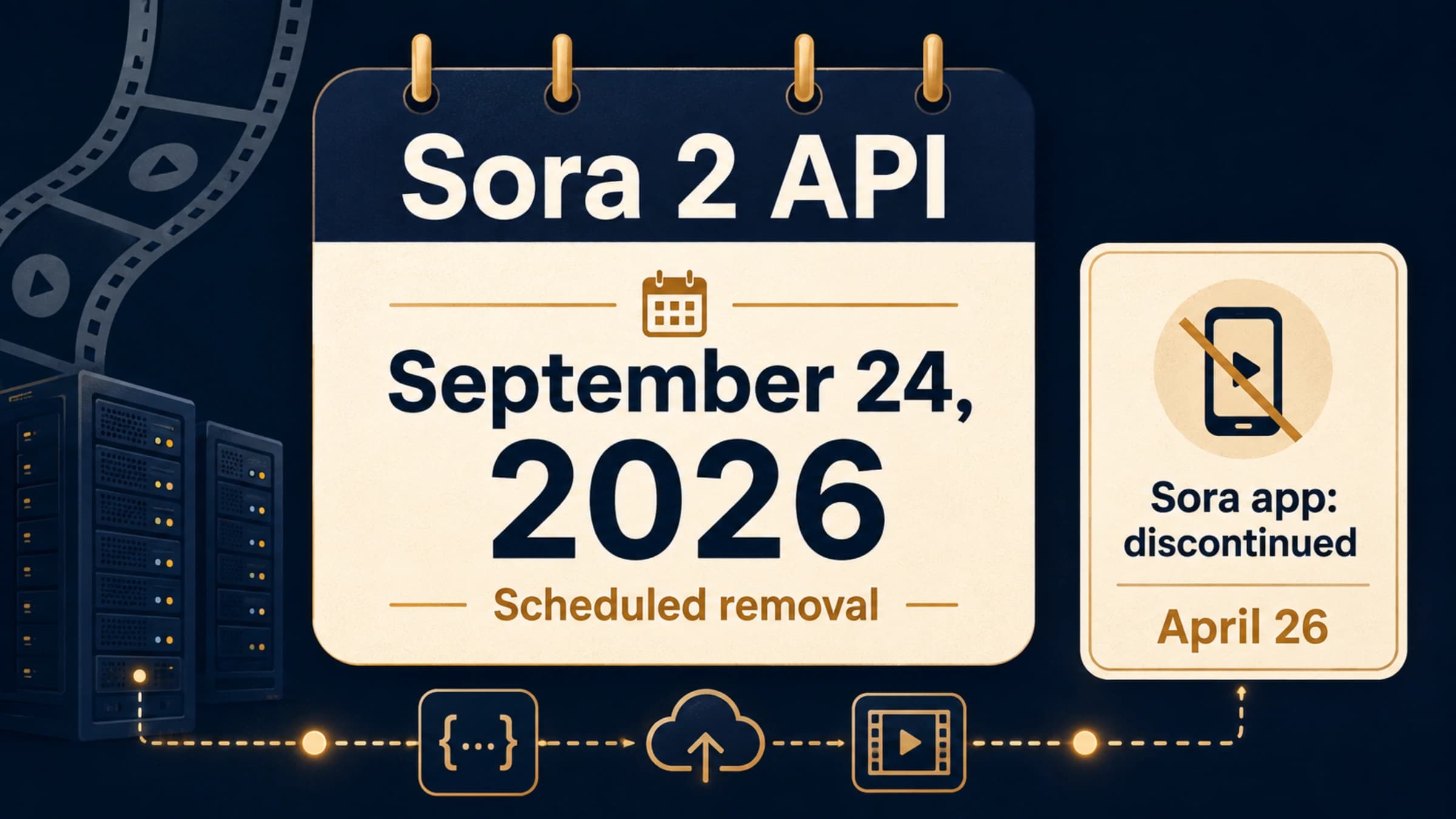
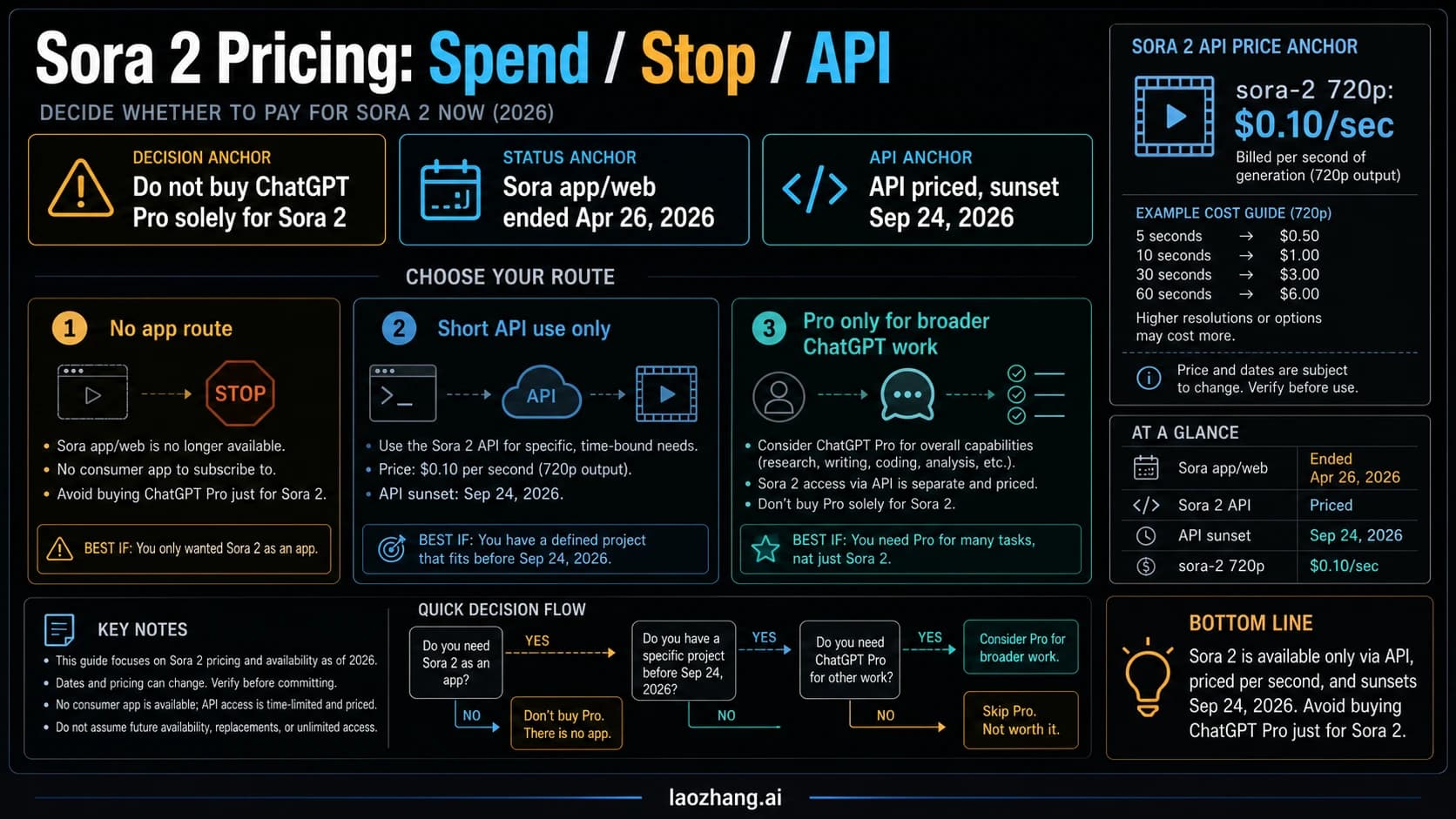
Access to Sora 2 comes exclusively through ChatGPT subscriptions. The Plus plan at $20 per month provides limited video generation capabilities, which is sufficient for occasional use and experimentation but quickly runs into quota limits for regular production work. The Pro plan at $200 per month significantly expands generation allowances and provides access to higher-quality output modes, making it the practical choice for professionals who rely on Sora 2 as a daily tool. OpenAI does not currently offer a standalone Sora API with public pay-per-use pricing, which means developers and businesses needing programmatic access must explore third-party API providers. The lack of direct API access is Sora 2's most significant limitation for enterprise adoption, though the raw quality of its output continues to justify its position at the top of the quality rankings.
Veo 3.1 — Most Versatile API Platform
Google's Veo 3.1, currently in preview as of February 2026, represents the most technically versatile option in the market. It is the only major AI video model that supports native 4K output, and its API pricing structure offers genuine flexibility through a dual-tier system. The standard mode delivers maximum quality at $0.40 per second for 720p/1080p content and $0.60 per second for 4K, while the fast mode cuts costs dramatically to $0.15 per second for 720p/1080p and $0.35 per second for 4K (ai.google.dev/pricing, verified February 2, 2026). This per-second billing model is remarkably transparent compared to the credit-based systems used by competitors, as it lets you calculate exact costs before generating a single frame.
Veo 3.1's technical capabilities extend beyond raw resolution. The model supports text-to-video, image-to-video, and a unique first-and-last-frame mode that lets you provide two reference images and generates a smooth transition video between them. This interpolation capability is particularly valuable for product animations and scene transitions where precise control over the starting and ending visual states is essential. Google also offers older models in the Veo family — Veo 3 at $0.40 per second standard and $0.15 per second fast, and Veo 2 at $0.35 per second — giving developers the option to trade quality for cost savings on less demanding tasks. The API is well-documented and follows standard REST conventions, making it straightforward to integrate into existing production pipelines. Where Veo 3.1 falls slightly behind Sora 2 is in the subjective "cinematic feel" of its output — the videos are technically excellent but can sometimes lack the organic quality that makes Sora 2's output feel hand-crafted.
Runway Gen-4.5 — Best Creative Platform
Runway has carved out a unique position by evolving from a single-model provider into a comprehensive creative platform. Gen-4.5, their latest proprietary model, delivers strong performance across a wide range of video generation tasks with particular strength in style consistency and brand-aligned content creation. However, what truly distinguishes Runway in 2026 is a strategic decision that no competitor has matched: they have integrated Google's Veo 3 and Veo 3.1 directly into their platform alongside their own models (runwayml.com/pricing, verified February 10, 2026). This means a single Runway subscription gives you access to multiple generation engines, and you can choose the best model for each specific task without managing separate accounts and billing relationships.
Runway's pricing follows a tiered subscription model. The free tier provides 125 one-time credits with access limited to Gen-4 Turbo. The Standard plan at $12 per user per month includes 625 monthly credits and unlocks Gen-4.5, Gen-4, and the integrated Veo 3/3.1 models. The Pro plan at $28 per user per month provides 2,250 credits and adds features like custom voice capabilities. The Unlimited plan at $76 per user per month offers 2,250 credits plus unlimited generations through an "Explore" mode that uses a lower-priority queue. The credit system can be somewhat opaque — different models and resolutions consume credits at different rates — but the platform's visual interface, collaborative features, and the ability to seamlessly switch between generation engines make it the strongest choice for creative teams who value workflow integration alongside generation quality.
Kling 2.6 — Best for Social Media Speed
Kling 2.6 has established itself as the speed champion among mainstream AI video models, making it the natural choice for social media creators who need to produce content quickly and frequently. The model generates usable clips noticeably faster than Sora 2 or Veo 3.1, which is a critical advantage when you are producing multiple iterations of short-form content for platforms like TikTok, Instagram Reels, or YouTube Shorts. Kling particularly excels at vertical video formats, and its understanding of trending visual styles makes it effective for content that needs to feel current and platform-native. The quality is a step below Sora 2 and Veo 3.1 in terms of fine detail and motion complexity, but for social media consumption where videos are viewed on small screens and compete for split-second attention, Kling's output quality is more than sufficient. The model offers a free tier with monthly credits that refresh automatically, making it accessible for creators who are just starting out or who generate content sporadically. Paid plans start at approximately $79.20 per year ($6.60 per month billed annually) with 660 credits per month through imagine.art, providing a cost-effective path for moderate-volume creators who need more than the free allocation.
Hailuo 2.3 — Best Value Proposition
Hailuo 2.3 offers perhaps the most compelling value proposition in the AI video model space for creators who need regular access to solid-quality generation without premium pricing. The model has improved substantially through its 2.x releases, narrowing the quality gap with higher-priced competitors while maintaining significantly lower costs. At $9.99 per month for a basic subscription through imagine.art with 1,000 monthly credits, Hailuo provides considerably more generation capacity per dollar than Runway or the ChatGPT-based Sora 2 access. The output quality lands in a comfortable middle ground — noticeably better than basic generators and sufficient for most professional content needs, though it lacks the exceptional detail handling and complex scene management of Sora 2 or Veo 3.1. Hailuo's particular strength lies in character animation and facial expression rendering, which makes it especially effective for talking-head content, avatar-based videos, and character-driven short stories. For creators whose work primarily involves human subjects rather than abstract or landscape content, Hailuo 2.3 often delivers results that rival more expensive alternatives at a fraction of the cost.
| Model | Quality (10) | Value (10) | Speed (10) | API Access | 4K Support |
|---|---|---|---|---|---|
| Sora 2 | 9.2 | 6.5 | 7.0 | Third-party only | No |
| Veo 3.1 | 9.0 | 8.0 | 7.5 | Official API | Yes |
| Runway Gen-4.5 | 8.8 | 7.5 | 7.5 | Platform only | No |
| Kling 2.6 | 8.2 | 8.5 | 9.0 | Limited | No |
| Hailuo 2.3 | 7.8 | 9.0 | 8.0 | Limited | No |
Best AI Video Model by Use Case
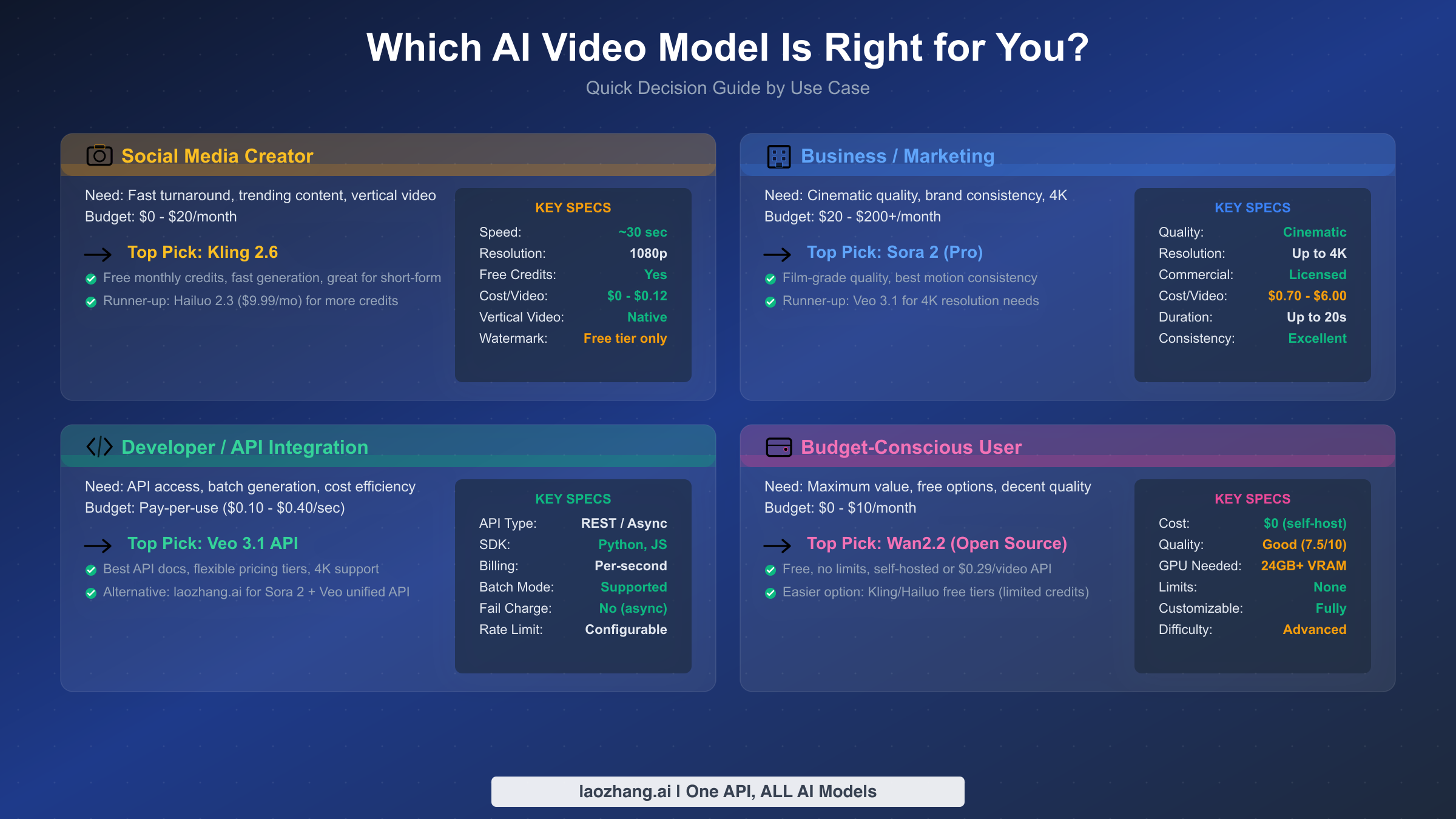
Choosing the best AI video model is fundamentally a question of matching the right tool to your specific workflow, budget, and quality requirements. The "best overall" model is rarely the best choice for every individual user, because the tradeoffs between quality, speed, cost, and accessibility matter differently depending on what you are actually creating. This section cuts through the noise and gives you a direct recommendation for each major use case, so you can skip the comparison paralysis and start generating.
Social Media Creators: Kling 2.6 or Hailuo 2.3
If your primary output is short-form content for TikTok, Instagram Reels, YouTube Shorts, or similar platforms, your priorities should be speed, cost efficiency, and native vertical format support rather than maximum visual fidelity. Kling 2.6 is the strongest choice here because its generation speed allows for rapid iteration — you can test multiple prompt variations and select the best result without waiting ten minutes between each attempt. The free tier with monthly refreshing credits means you can start producing content immediately without any financial commitment, which is particularly valuable for creators who are still building their audience and cannot justify significant software subscriptions. Hailuo 2.3 serves as an excellent alternative, particularly if your content involves characters and facial expressions, where it often matches or exceeds Kling's output quality. The $9.99 monthly subscription with 1,000 credits provides generous capacity for most social media production schedules. For this use case, investing in Sora 2 or Veo 3.1 would be overspending on quality that gets compressed and consumed on small screens anyway.
Business and Marketing Teams: Sora 2 or Veo 3.1
Commercial video content — product demos, brand advertisements, corporate presentations, and marketing campaigns — demands the highest possible quality because these assets directly represent your brand and influence purchasing decisions. Sora 2 is the recommended starting point for teams that prioritize visual polish above all else, as its cinematic output quality sets the standard that clients and audiences have come to expect from premium AI-generated video. The $200 per month ChatGPT Pro subscription is a reasonable business expense when compared to the cost of hiring video production teams or licensing stock footage. Veo 3.1 becomes the better choice when your workflow requires 4K output, batch generation through API integration, or precise cost control through per-second billing. The ability to calculate exact costs before starting a project — $4.00 for a 10-second standard 1080p video, $6.00 for 4K — makes Veo 3.1 particularly attractive for agencies managing client budgets. Runway Gen-4.5 deserves serious consideration as well, especially for teams that want access to multiple models under one platform and value the collaborative editing features that come with the subscription.
Developers and API Integrators: Veo 3.1 API or Third-Party Platforms
Developers building products that incorporate AI video generation face a fundamentally different set of requirements than individual creators. You need reliable API endpoints, predictable pricing, comprehensive documentation, error handling that does not drain your budget, and the ability to scale programmatically. Veo 3.1's official API is the most mature option, with well-structured REST endpoints, transparent per-second pricing, and support for multiple generation modes including text-to-video, image-to-video, and the first-and-last-frame interpolation mode. The dual-tier pricing (standard vs. fast) lets you balance quality against cost based on each specific request's requirements. For Sora 2 access specifically, developers must currently use third-party API providers since OpenAI does not offer a direct public Sora API. These providers aggregate multiple video models behind unified endpoints, which can simplify integration when your application needs to support multiple generation engines. The key factors to evaluate when choosing an API provider are failure handling policies (whether you are charged for failed generations), latency and queue times, rate limits, and output format options. We cover specific API providers in detail in the API section below.
Budget-Conscious Users: Free Tiers and Open Source
If minimizing cost is your top priority, you have several viable paths depending on your technical comfort level. The simplest approach is to use free tiers — Kling 2.6 provides monthly credits at no cost, Runway offers 125 one-time credits for exploration, and platforms like Luma Ray and Pika provide limited free generation with watermarks or resolution restrictions. These free options are sufficient for experimentation and occasional personal projects, though they quickly become limiting for regular production use. For users with technical skills and access to a capable GPU, the open-source route offers the best long-term value proposition, eliminating all recurring costs entirely. Wan2.2 with its Mixture of Experts architecture delivers quality that approaches the commercial options while running on hardware you already own, and we explore this path in the next section.
Best Open-Source AI Video Models
The open-source AI video generation ecosystem has matured significantly, offering viable alternatives for users who have the technical expertise and hardware to run models locally. While there remains a noticeable quality gap between the best open-source and closed-source models, that gap has narrowed considerably through 2025 and into 2026. Self-hosting eliminates recurring subscription costs, provides complete control over your data and outputs, removes content moderation restrictions, and allows for fine-tuning and customization that commercial APIs simply cannot match. The tradeoff is clear: you invest in hardware and technical setup rather than monthly fees.
Wan2.2 (MoE) — The Heavyweight Contender
Alibaba's Wan2.2, built on a Mixture of Experts architecture, represents the current state of the art in open-source video generation. The model produces output that is competitive with commercial offerings from 12 to 18 months ago, which for many practical applications is more than sufficient. Running Wan2.2 requires serious hardware — a GPU with at least 24GB of VRAM is the minimum for the base model, and 48GB or more is recommended for the full MoE variant to achieve reasonable generation speeds. On a consumer-grade RTX 4090 with 24GB VRAM, expect generation times of several minutes per 5-second clip, which is substantially slower than cloud-based alternatives but perfectly workable for non-time-critical production workflows. The model supports both text-to-video and image-to-video generation, and the open-source community has developed numerous fine-tuned variants optimized for specific styles and use cases. For those who prefer API access without self-hosting, SiliconFlow offers hosted Wan2.2 generation at approximately $0.29 per video, providing a middle ground between self-hosting and premium commercial APIs.
SkyReels V1 — Cinematic Open Source
SkyReels V1 has carved out a niche as the open-source option for users who specifically want cinematic-quality output with film-style color grading and camera work. The model was trained with an emphasis on cinematographic techniques — dolly shots, rack focus, and natural depth of field — that give its output a distinctly professional aesthetic. The hardware requirements are similar to Wan2.2, with 24GB+ VRAM recommended, though the model has been optimized to run somewhat faster on equivalent hardware. SkyReels V1 is particularly strong at landscape and atmospheric scenes, making it an excellent choice for establishing shots, background plates, and mood-setting content. Its weakness relative to Wan2.2 lies in character rendering and complex multi-subject scenes, where consistency can break down more noticeably.
LTX-Video — The Lightweight Alternative
For users with more modest hardware, LTX-Video provides a practical entry point into open-source video generation. The model is designed to run on GPUs with as little as 8GB of VRAM, making it accessible on mid-range consumer graphics cards that many users already own. The quality tradeoff is real — LTX-Video's output is noticeably below Wan2.2 and SkyReels V1 in terms of detail, temporal coherence, and motion complexity — but for simple animations, visual concepts, and draft-quality previews, it serves its purpose well. The model's fast generation speed relative to its hardware requirements also makes it useful for rapid prototyping workflows where you need to test many prompt variations before committing to a high-quality generation with a more capable model or commercial service.
The honest assessment of open-source versus commercial models in early 2026 is this: Wan2.2 and SkyReels V1 can produce genuinely impressive output that would have been commercially competitive just a year ago, but they still fall short of Sora 2 and Veo 3.1 in motion complexity, fine detail preservation, and consistency across longer clips. For many real-world applications — social media content, internal presentations, concept visualization — open-source quality is entirely adequate. For client-facing commercial work where every frame needs to be flawless, the commercial models still justify their premium.
Pricing & Real Cost Comparison
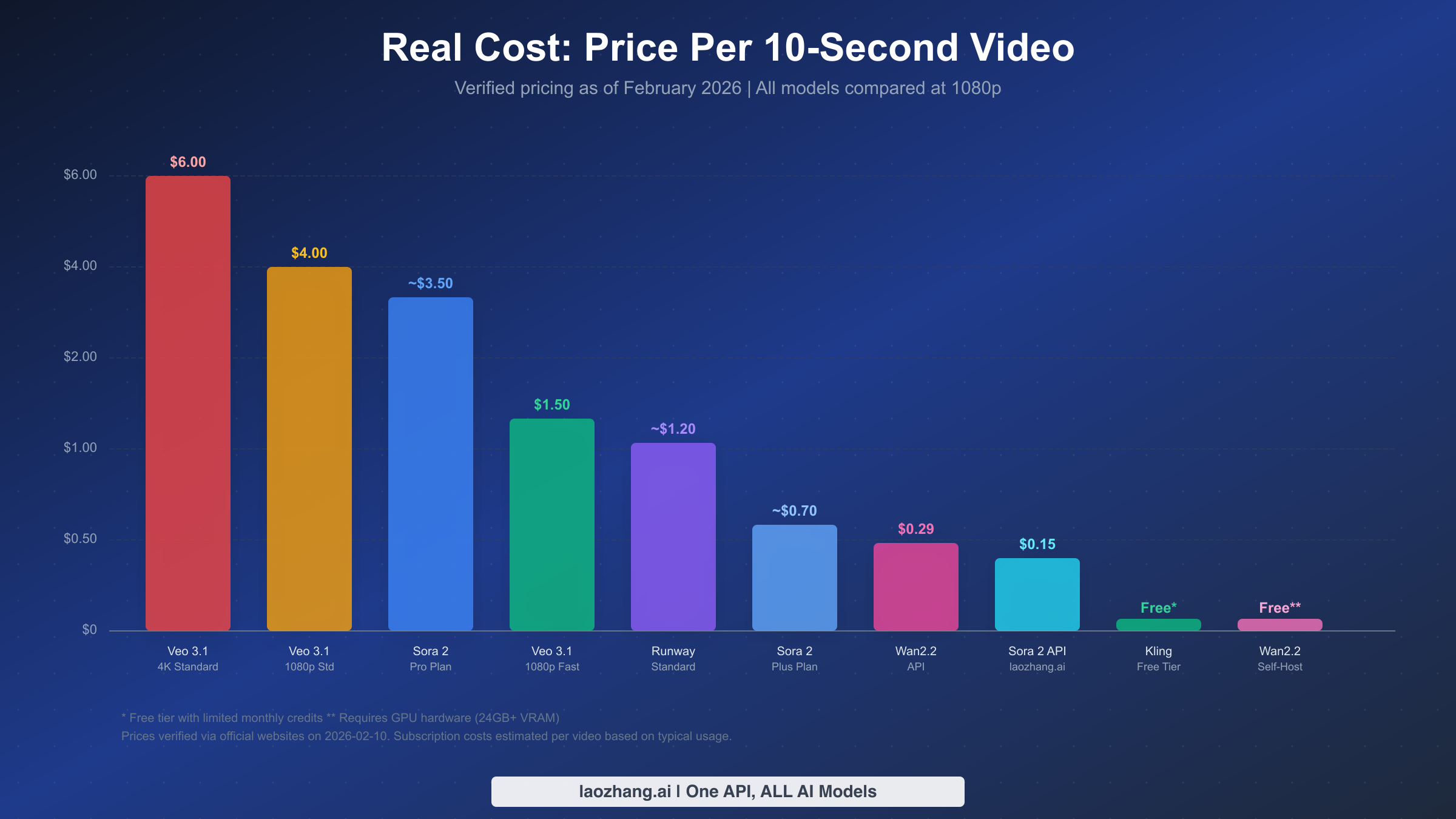
One of the biggest obstacles to choosing an AI video model is the deliberate pricing opacity across platforms. Sora 2 charges through monthly subscriptions, Veo 3.1 bills per second of generated video, Runway uses a credit system where different models consume credits at different rates, and open-source options require upfront hardware investment. Comparing these models on price requires translating every pricing scheme into a single common unit: the cost to generate one 10-second video at 1080p resolution. The table below uses verified pricing from official sources as of February 10, 2026 to provide this apples-to-apples comparison.
| Model | Pricing Model | Cost per 10s Video (1080p) | Notes |
|---|---|---|---|
| Veo 3.1 Standard 4K | Per-second | $6.00 | Highest quality, native 4K |
| Veo 3.1 Standard 1080p | Per-second | $4.00 | Best quality API option |
| Sora 2 (Pro plan) | Subscription | ~$3.50 est. | Based on $200/mo and typical usage |
| Veo 3.1 Fast 1080p | Per-second | $1.50 | Reduced quality, significant savings |
| Runway Standard | Credits | ~$1.20 est. | Varies by model and resolution |
| Sora 2 (Plus plan) | Subscription | ~$0.70 est. | Limited monthly generations |
| Wan2.2 API | Per-video | $0.29 | Via SiliconFlow |
| Wan2.2 Self-hosted | Hardware cost | Free* | Requires 24GB+ GPU |
| Kling Free Tier | Free credits | Free* | Limited monthly credits |
Subscription-based estimates assume typical monthly usage patterns and may vary. Free tiers come with usage limitations.
Understanding these numbers in context is essential for making sound financial decisions about which model to adopt. The Sora 2 estimates marked with "est." deserve particular attention because OpenAI does not publish per-video pricing — Sora 2 access is bundled into ChatGPT Plus ($20/month) and Pro ($200/month) subscriptions, and the number of videos you can generate depends on your subscription tier and current server demand. The $3.50 and $0.70 per-video estimates are calculated by dividing the subscription cost by the typical number of videos a user can generate in a month, based on widely reported ChatGPT Plus usage limits. Your actual per-video cost will be lower if you generate more videos and higher if you generate fewer, which makes Sora 2 most cost-effective for users who generate content consistently throughout the month rather than in occasional bursts.
For developers and businesses processing significant volumes of video, the cost differences become dramatic at scale. Consider a production workflow requiring 200 ten-second videos per month: Veo 3.1 Standard would cost $800, Veo 3.1 Fast would cost $300, Runway Standard with sufficient credits would run approximately $240 plus subscription fees, and a third-party API aggregator like laozhang.ai could process the same volume using Sora 2 at $0.15 per request ($30 total) or Veo 3.1 fast at $0.15 per request ($30 total), with the significant advantage that failed generations are not charged — a meaningful cost saver when content moderation or timeout failures can affect 5-15% of requests in production environments. At these volumes, choosing the right pricing model can mean the difference between a $30 monthly video generation budget and an $800 one for comparable output quality. Documentation for API-based approaches is available at docs.laozhang.ai.
The monthly cost picture becomes clearer when segmented by usage level. Light users generating 10-20 videos per month are best served by Kling's free tier or a ChatGPT Plus subscription. Moderate users producing 50-100 videos monthly should seriously evaluate Runway's Standard or Pro plans, which offer predictable monthly costs with reasonable credit allocations. Heavy users and businesses generating 200+ videos per month will find the best economics through per-request API pricing, where the absence of fixed subscription fees means costs scale linearly with actual usage rather than forcing you to pay for capacity you may not fully utilize every month.
API Access & Developer Guide
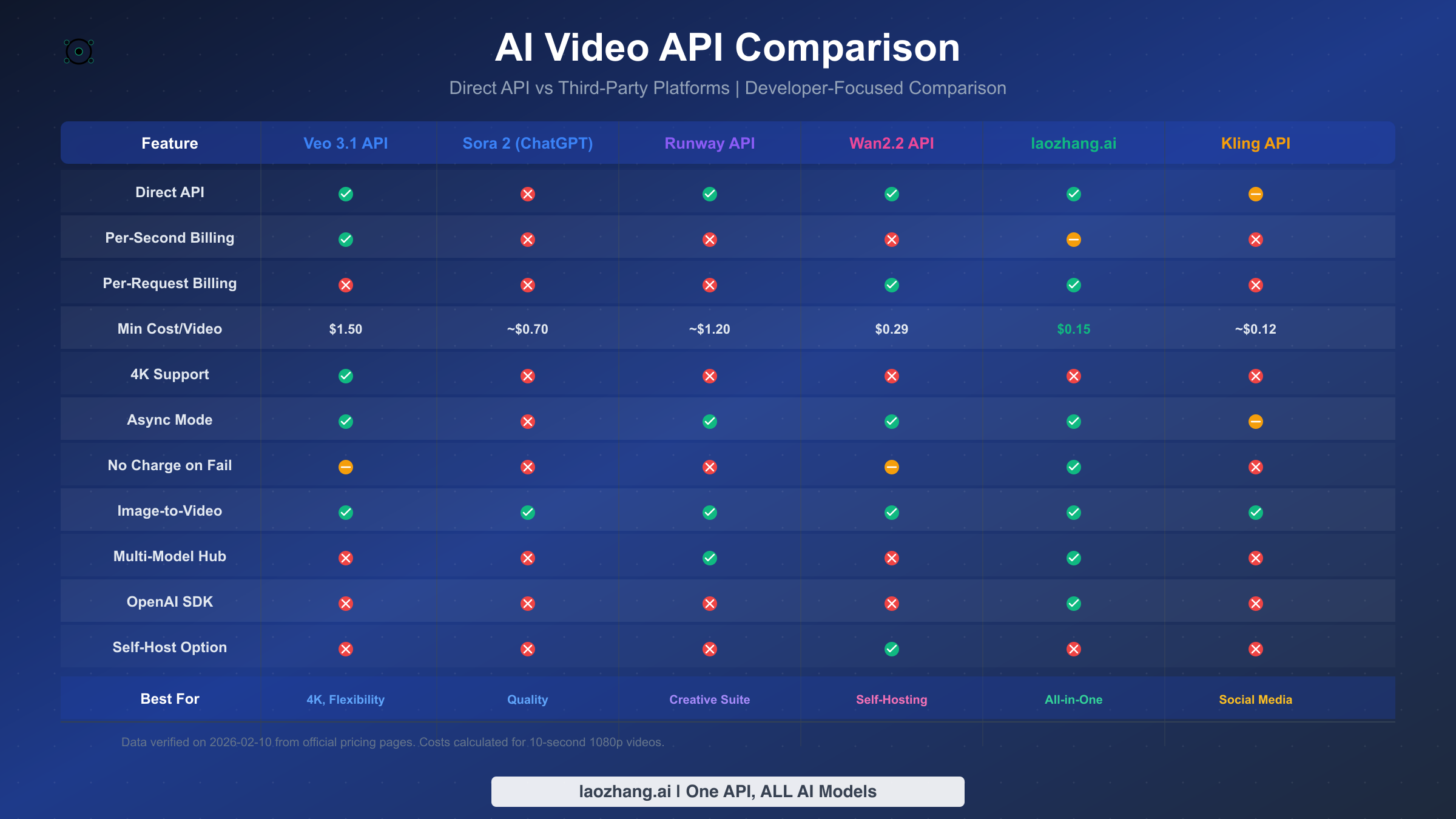
For developers integrating AI video generation into applications, the API landscape in early 2026 is surprisingly fragmented. Each major model offers a different access paradigm, authentication method, and billing structure, which creates real challenges when you need to build reliable production systems. This section provides a practical overview of the available API options and the key architectural decisions you will need to make when choosing between them.
Comparing API Access Methods
The fundamental distinction in AI video APIs is between synchronous and asynchronous generation. Synchronous APIs block until the video is ready and return the result in a single response, which is simpler to implement but impractical for video generation where processing times routinely exceed 60 seconds. Asynchronous APIs accept a generation request, return a task identifier immediately, and require you to poll for completion or configure a webhook callback. Every production-grade video API uses the asynchronous pattern, so your application architecture needs to account for task management, status polling, and handling various failure states including timeouts, content moderation rejections, and capacity-related queuing delays. Veo 3.1's official API through Google's AI platform provides the most straightforward direct access, with standard REST endpoints, API key authentication, and clear documentation for all generation modes. Runway's API access is tied to their platform subscriptions and is primarily designed for integration with creative tools rather than high-volume programmatic generation.
For stable Sora 2 API access, developers currently must use third-party providers since OpenAI has not released a public Sora API. Third-party API aggregators like laozhang.ai fill this gap by providing unified endpoints that support multiple video models — including both Sora 2 and Veo 3.1 — behind a single authentication and billing system. The key advantage of aggregation platforms is operational simplicity: one API key, one billing account, and one set of SDKs regardless of which underlying model you are calling. The most important feature to evaluate when choosing an aggregator is their failure charging policy. Some providers charge immediately when a request is accepted, meaning you pay even if the generation fails due to content moderation or timeout. The better providers only charge for successfully completed generations, which can reduce effective costs by 5-15% in production workloads where failure rates are non-trivial.
Cost Optimization Strategies
Effective cost management for AI video generation APIs requires thinking beyond simple per-request pricing. The first optimization is model selection per request — not every video needs maximum quality. Building logic into your application that routes casual content to faster, cheaper models (Veo 3.1 Fast at $0.15/sec) while reserving premium models (Veo 3.1 Standard at $0.40/sec or Sora 2) for hero content can reduce overall costs by 40-60% without noticeably impacting user experience. The second optimization is resolution matching: generating 4K video for content that will be displayed at 1080p or lower is pure waste, and the cost difference between Veo 3.1's 1080p ($0.40/sec standard) and 4K ($0.60/sec standard) pricing means a 50% premium for resolution that may never be utilized. The third optimization is batch scheduling — if your workload tolerates latency, queuing requests during off-peak hours can reduce queue wait times and improve completion rates, which indirectly reduces cost by minimizing timeout-related failures. Finally, implementing a caching layer for commonly requested video types can eliminate redundant generations entirely, which is particularly valuable for applications where similar prompts are submitted repeatedly by different users.
How to Get Started
Getting from zero to your first AI-generated video takes less than five minutes with any of the major platforms, but the exact path differs depending on which model you choose. Here is the fastest route to generating your first video with each of the recommended options, along with common pitfalls to avoid.
Starting with Sora 2 through ChatGPT
The simplest path to Sora 2 is subscribing to ChatGPT Plus at $20 per month. After subscribing, navigate to ChatGPT and look for the video generation option in the model selector or input area. Type a descriptive prompt — be specific about camera angle, lighting, subject movement, and mood — and submit. Generation typically takes 2-5 minutes. The most common mistake new users make is writing vague prompts like "a cool video" instead of providing specific visual direction such as "a close-up shot of rain drops falling on autumn leaves, slow motion, warm golden backlight, shallow depth of field." Detailed prompts consistently produce better results across every model, and investing time in prompt craft will have a bigger impact on your output quality than switching between models.
Starting with Veo 3.1 through Google AI Studio
Google AI Studio provides free exploration credits for Veo models. Visit ai.google.dev, sign in with a Google account, and navigate to the video generation section. You can test Veo 3.1 with text prompts or upload reference images for image-to-video generation. The first-and-last-frame mode is worth experimenting with early, as it provides a level of creative control that text-only prompts cannot achieve. Be aware that Veo 3.1 is currently in preview status, which means features and pricing may change, and availability can fluctuate based on demand.
Starting with Runway
Visit runwayml.com and create a free account to receive 125 one-time credits. The platform's visual interface makes it the most approachable option for users who prefer graphical tools over text-based prompting. Upload a reference image or type a prompt, select your preferred model (Gen-4.5, Gen-4, or the integrated Veo options), adjust settings like duration and aspect ratio, and generate. Runway's interface shows real-time previews and makes it easy to iterate on results, which is a significant workflow advantage over API-only tools. The main pitfall is credit consumption — higher-quality models and longer durations consume credits faster, so start with shorter clips on lower settings to understand the cost dynamics before committing your credit allocation to ambitious generations.
Common Pitfalls to Avoid
Across all platforms, there are several consistent mistakes that waste time and credits. First, avoid starting with the maximum duration and highest quality settings — begin with shorter, lower-resolution generations to validate your prompt before scaling up. Second, do not overlook negative prompts and style modifiers, which are often more important than the primary prompt for avoiding unwanted artifacts. Third, be aware of content moderation boundaries, which vary by platform and can result in failed generations that may or may not consume credits depending on the provider's policy. Testing your prompts with simpler variations first can help identify moderation issues before they burn through your generation budget.
FAQ
What is the best AI video model right now?
As of February 2026, Sora 2 produces the highest overall quality output, but the "best" model depends entirely on your use case. Sora 2 leads in cinematic quality, Veo 3.1 leads in API flexibility and 4K support, Runway Gen-4.5 leads as a creative platform, Kling 2.6 leads in speed and affordability for social media, and Wan2.2 leads the open-source space. No single model dominates every dimension, which is precisely why this guide recommends matching models to use cases rather than declaring a single winner.
Is Sora 2 better than Veo 3.1?
Sora 2 produces slightly higher quality output in subjective visual assessments, particularly in motion coherence and cinematic feel. However, Veo 3.1 surpasses Sora 2 in several practical dimensions: it supports native 4K resolution, offers transparent per-second API pricing, and provides direct API access without requiring a subscription to a separate product. For developers building applications, Veo 3.1's API infrastructure is significantly more mature. For individual creators prioritizing pure visual quality, Sora 2 still has a slight edge. The quality gap between the two continues to narrow with each update.
What is the cheapest AI video generator?
For zero-cost options, Kling 2.6 offers a free tier with monthly refreshing credits, and open-source models like Wan2.2 can be run locally on your own hardware with no ongoing costs (though you need a GPU with 24GB+ VRAM). Among paid options, Hailuo 2.3 at $9.99 per month with 1,000 credits offers the most generation capacity per dollar for a subscription service. For API-based access, third-party aggregators can provide Sora 2 and Veo 3.1 access starting at $0.15 per request, which is substantially cheaper per video than any subscription plan at moderate-to-high usage volumes.
Can I use AI-generated videos commercially?
Commercial usage rights vary by platform. Sora 2 (through ChatGPT Plus/Pro) generally grants commercial usage rights to generated content as outlined in OpenAI's terms of service. Veo 3.1 through Google's API similarly permits commercial use, though specific terms apply during the preview period. Runway explicitly supports commercial use across all paid tiers. Open-source models like Wan2.2 are released under permissive licenses that allow commercial use. Always review the current terms of service for your specific platform and plan before using AI-generated video in commercial projects, as terms can change with updates.
How long does it take to generate an AI video?
Generation times vary by model, resolution, and current server load. Sora 2 typically generates a 10-second clip in 2-5 minutes through ChatGPT. Veo 3.1 Fast mode can complete in 1-3 minutes, while Standard mode takes 3-8 minutes. Kling 2.6 is generally the fastest at 1-2 minutes for standard quality. Runway's generation times depend on which model you select and current platform demand, typically ranging from 2-6 minutes. Open-source models running locally depend heavily on your hardware — a high-end RTX 4090 might generate a 5-second clip in 3-5 minutes with Wan2.2, while less powerful GPUs could take significantly longer.