How to Create Characters in Sora 2: Complete Guide to Cameos, Consistency, and Advanced Techniques (2026)

A
22 min readAI Video

Sora 2 Characters (formerly Cameos) let you create reusable digital likenesses for AI-generated videos. This guide covers the complete creation process, 4 consistency methods with accuracy rates from 70% to 95%+, Plus vs Pro pricing, multi-character scenes, and the latest February 2026 policy restrictions.

How to Create Characters in Sora 2: Complete Guide to Cameos, Consistency, and Advanced Techniques (2026)

Sora 2 Characters, previously known as Cameos, allow you to create a reusable digital version of yourself that appears consistently across AI-generated videos. To create one, you record a 3-to-10-second video clip in the Sora iOS app, set your display name and permissions, and save. The feature achieves 95%+ character consistency when using the Cameo method, and you need at least a ChatGPT Plus subscription at $20 per month to access it. As of February 2026, OpenAI has tightened character policies, prohibiting uploaded face images and copyrighted character likenesses, making the self-recorded Cameo the primary path for character creation.

TL;DR

Creating a Sora 2 character takes under two minutes but requires specific recording conditions for the best results. You need an iPhone with the Sora app, good natural lighting, and a clean background. Record yourself speaking numbers one through ten while slowly turning your head in all directions. The system extracts your facial features and voice to build a reusable identity that can be referenced in any future video prompt using the @mention syntax. ChatGPT Plus users get 1,000 monthly credits at 720p resolution, while Pro subscribers receive 10,000 credits with access to 1080p output and videos up to 20 seconds long. The four main methods for maintaining character consistency range from 70% accuracy with prompt-only techniques to 95%+ with the native Cameo system.

What Are Sora 2 Characters and How Do They Work?

Sora 2 Characters represent one of the most significant features OpenAI introduced to its video generation platform, fundamentally changing how creators maintain visual identity across multiple AI-generated videos. Before this feature existed, every new video prompt would generate a completely different person, making it impossible to create coherent narratives or branded content series. The Character system solves this by building a persistent digital identity from a short video recording of a real person, which the AI then references whenever that character appears in generated content.

The terminology around this feature has evolved since launch, and understanding the distinction matters for following current documentation. OpenAI originally branded the feature as "Cameos" when Sora 2 launched in late 2025, but has since begun transitioning to the more general term "Characters" in their official documentation and help center articles. Both terms refer to the same underlying technology. When you see references to Cameos in older tutorials or community discussions, they are describing exactly what OpenAI now calls Characters. Throughout this guide, we use both terms interchangeably, matching how the community and documentation currently overlap.

The technical process behind character creation involves sophisticated identity extraction. When you record your video clip, Sora 2 analyzes multiple frames to build what the system internally treats as an identity vector, capturing facial geometry, skin tone, hair characteristics, and even voice patterns. This vector is then stored as part of your character profile and injected into the generation process whenever a prompt references your character. The result is remarkably consistent, with the native Cameo method achieving 95%+ likeness accuracy across generated videos according to community testing. This consistency holds even when the AI places your character in vastly different environments, lighting conditions, and artistic styles.

There are important limitations to understand upfront. Each video generation can include a maximum of two characters, a hard constraint that OpenAI has maintained since launch. Characters can only be created by recording yourself on the Sora iOS app, meaning you cannot upload existing photos or videos of other people. This restriction was tightened in January 2026 when OpenAI explicitly banned the upload of face images as a separate policy enforcement. If you are interested in comparing the best AI video models and their character capabilities, the competitive landscape has shifted significantly with this feature, as most competing platforms still lack equivalent persistent character systems.

The character feature fits into a broader ecosystem of Sora 2 capabilities that work together. Characters can be combined with image-to-video generation, where a reference image sets the starting scene and your character is placed within it. They work across all supported aspect ratios and duration settings available on your subscription tier. The character data itself is stored on OpenAI's servers and persists across sessions, devices, and platform updates, meaning once you create a character, it becomes a permanent asset in your creative toolkit that you can reference from any prompt on any device where you are signed into your ChatGPT account.

Step-by-Step Guide to Creating Your First Sora 2 Character

Step-by-step workflow showing the four stages of creating a character in Sora 2 from recording to video generation

Creating your first Sora 2 character is straightforward once you understand the specific requirements that determine recording quality. The entire process takes roughly 90 seconds of active work, but the difference between a character that generates beautifully and one that fails verification often comes down to lighting, distance, and movement patterns during the initial recording. This section provides the exact parameters that lead to first-try success, based on community best practices and OpenAI's official guidance from the Help Center.

Opening the Character Creation Interface

The character creation process begins in the Sora app, which is available on iOS and through sora.com on desktop browsers. On the iOS app, navigate to the Profile tab at the bottom of the screen, where you will find a prominent "Create Character" button. On the web interface, the option appears under your profile section. You must be signed into a ChatGPT account with an active Plus subscription at $20 per month or Pro subscription at $200 per month, as character creation is not available on free accounts. The free access tier that existed briefly at launch was discontinued in January 2026, making a paid subscription the only path to character creation.

Recording Your Video Clip

The recording step is where most quality issues originate, so getting the parameters right matters significantly. OpenAI specifies a recording window of 3 to 10 seconds, but community testing has found that recordings between 5 and 8 seconds produce the most reliable character extractions. During the recording, you should speak the numbers one through ten at a natural pace while slowly turning your head left, right, up, and down. This head movement is not optional decoration; it provides the system with multiple angles of your face, which directly improves the three-dimensional understanding of your facial structure. Position yourself at roughly arm's length from the camera, ensuring your face and upper shoulders are clearly visible in the frame.

Lighting deserves particular attention because it is the single largest factor in character quality after the basic recording requirements are met. Face a window with natural daylight as your primary light source, which provides soft, even illumination without harsh shadows. Avoid overhead fluorescent lighting, which creates unflattering shadows under the eyes and nose that the system may interpret as facial features. Ring lights in the $20 to $40 range, as recommended by several community guides, provide excellent results for creators recording in rooms without good natural light. Remove any hats, tinted glasses, or accessories that partially obscure your face, as these can confuse the identity extraction process and lead to inconsistent results in generated videos.

Configuring and Saving Your Character

After recording, the app presents a configuration screen where you set two critical parameters. The display name is how your character will appear in the system and how other users will reference it. Choose something descriptive but concise, as this name becomes part of the @mention syntax used in prompts. The permission setting determines who can use your character in their video generations. You can select "Only Me" to keep the character private, or "People I Approve" to allow specific users access after they submit a request. For most personal users, "Only Me" is the recommended starting point.

Once you save, the system runs a verification process that typically takes 30 to 60 seconds. During this time, Sora 2 analyzes your recording, extracts identity features, and confirms the video meets quality standards. If verification fails, the most common causes are insufficient lighting, too little head movement, or the face being partially obscured. The system does not provide detailed failure reasons, so if your first attempt fails, focus on improving lighting and ensuring slow, deliberate head turns in all four directions before re-recording.

Using Your Character in Video Prompts

With your character saved and verified, you can reference it in any video generation prompt using the @mention syntax. Simply type the @ symbol followed by your character's display name, and the system will inject your likeness into the generated video. A prompt like "@YourName walks through a neon-lit Tokyo street at night, cinematic lighting" will produce a video featuring a recognizable version of you in that scene. You can include up to two different characters in a single generation, enabling interaction scenes between two real people's digital likenesses. The consistency rate with this native Cameo method exceeds 95% according to community comparisons, making it the most reliable approach for maintaining visual identity across a series of videos.

The @mention syntax works reliably across different prompt styles and complexity levels. When constructing prompts for character videos, place the @mention at the beginning of the sentence describing the character's action, followed by a clear description of what the character is doing, the environment they are in, and any stylistic preferences you want applied. Experienced creators report that prompts structured as "@Character [action] in [environment], [camera angle], [lighting/style]" consistently produce the best results. Avoid burying the @mention deep within a complex sentence, as the model parses character references most effectively when they appear in subject position at the start of a clause.

Sora 2 Character Pricing: Plus vs Pro Plans Compared

Understanding the pricing structure for Sora 2 character creation and usage requires looking beyond the subscription cost itself. The true cost depends on how many videos you plan to generate, what resolution you need, and whether the character feature alone justifies the subscription. OpenAI structures Sora 2 access through its existing ChatGPT subscription tiers, with each tier providing a monthly allocation of credits that are consumed during video generation. Characters themselves are free to create, but every video that uses them costs credits.

The ChatGPT Plus plan at $20 per month provides 1,000 monthly credits for Sora 2 usage. At this tier, generated videos are limited to 720p resolution and a maximum duration of 5 seconds per generation. Each standard video generation consumes between 20 and 150 credits depending on resolution and duration settings, meaning Plus subscribers can produce roughly 10 to 50 videos per month depending on their chosen settings. Character creation and storage is unlimited at this tier; the credits only apply to actual video generation. For casual creators who want to experiment with character-based videos or produce short-form content for social media, the Plus plan provides a reasonable entry point.

The ChatGPT Pro plan at $200 per month increases the credit allocation to 10,000 monthly credits and unlocks significant quality improvements. Pro subscribers gain access to 1080p resolution output and can generate videos up to 20 seconds in duration. The higher credit allocation supports approximately 100 to 500 video generations per month, making it suitable for content creators who need consistent output volume. The resolution upgrade is particularly meaningful for character-based videos because higher resolution preserves facial detail more faithfully, resulting in better likeness accuracy. For professional creators building character-driven content series, the investment in Pro typically pays for itself through improved output quality and volume.

FeaturePlus ($20/mo)Pro ($200/mo)
Monthly Credits1,00010,000
Max Resolution720p1080p
Max Video Duration5 seconds20 seconds
Character CreationUnlimitedUnlimited
Characters Per Video2 max2 max
Estimated Videos/Month10-50100-500

The credit system introduces an important planning dimension for character-based workflows. Since character videos consume the same credits as any other Sora 2 generation, creators who rely heavily on character content need to budget their monthly allocation carefully. A useful strategy for maximizing output on the Plus tier is to generate character videos at lower resolution during the creative development phase, where you are testing prompts, angles, and scenarios, then switch to maximum quality settings only for final renders that will be published or shared. This approach can effectively double or triple the number of usable character videos you produce within a fixed credit budget, particularly valuable for creators building multi-episode content series where each episode requires multiple character shots.

For developers and teams that need API-level access to Sora 2's video generation capabilities, including character features, third-party providers offer an alternative path. For stable Sora 2 API access, laozhang.ai offers async endpoints with no charge on failures, starting at $0.15 per request for the standard tier and $0.80 per request for the Pro HD tier. This approach is particularly cost-effective for production workflows where you need programmatic control over generation and cannot afford to waste credits on failed attempts. The async API design means content moderation rejections and generation timeouts do not consume your budget, a significant advantage over the credit-based system in the official app. For a deeper comparison of API pricing, see our analysis of the cheapest Sora 2 API options currently available.

Keeping Your Characters Consistent Across Multiple Videos

Comparison of four character consistency methods in Sora 2 showing accuracy rates from 70% to 95%

Character consistency, the ability to make the same person look recognizably identical across different generated videos, is the central challenge in AI video production. Sora 2 offers multiple approaches to this problem, each with different accuracy levels, setup requirements, and ideal use cases. Understanding these methods and choosing the right one for your situation is the difference between professional-looking character series and disjointed videos where the same person looks different in every clip.

Method 1: Native Cameo System (95%+ Accuracy)

The native Cameo system described in the step-by-step guide above delivers the highest consistency rate at 95%+ accuracy across generated videos. This method works by storing your actual biometric identity data extracted from the video recording, giving the AI the strongest possible reference for reproducing your likeness. The trade-off is that this method only works for real people who can record themselves on an iOS device, and the character can only be created from a live recording rather than existing photos or video clips. For content creators building a personal brand or producing educational content featuring themselves, this is unambiguously the best option. The @mention syntax makes it simple to include in any prompt, and the results maintain facial structure, skin tone, and even general body proportions with remarkable fidelity.

Method 2: Image-to-Video Reference (85-90% Accuracy)

The image-to-video approach uses a reference image as the starting frame for video generation, achieving 85 to 90% consistency with the original reference. This method does not require creating a formal Character profile. Instead, you upload a reference image when creating a new video and include descriptive text about the character in your prompt. Sora 2 uses the image as a visual anchor, attempting to maintain the appearance throughout the generated motion. This approach works well for characters that are not real people, such as illustrated mascots or stylized portraits, and for situations where you cannot create a native Cameo recording. The accuracy drop compared to the native system comes from the AI having only a single two-dimensional reference rather than the rich multi-angle data captured during a Cameo recording.

Method 3: Prompt-Only Consistency (70-80% Accuracy)

For situations where neither a Cameo recording nor a reference image is available, detailed prompt engineering can achieve 70 to 80% visual consistency. This technique involves writing extremely specific character descriptions that you copy across multiple generation prompts, including details about hair color and style, eye color, facial structure, clothing, and body type. The effectiveness of this method depends heavily on the specificity and consistency of your descriptions. A vague prompt like "a young woman with brown hair" will produce wildly different results each time, while a detailed prompt specifying exact hair length, face shape, clothing items, and distinctive features can maintain reasonable consistency across a series. This method requires the most effort per generation and produces the least reliable results, but it remains useful for conceptual work and rapid prototyping where exact likeness is less critical.

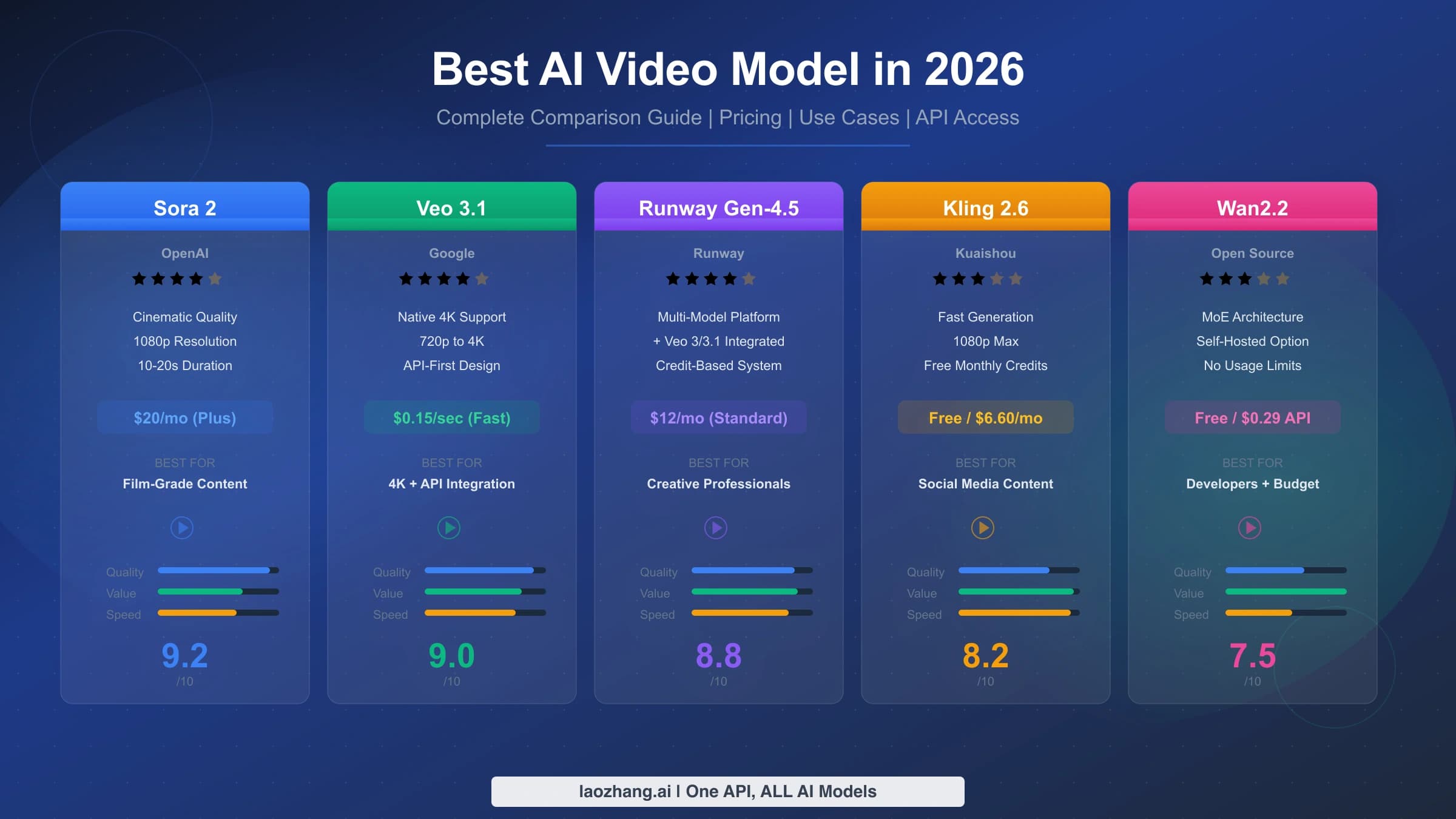
The choice between these methods should be guided by your specific requirements. If you are creating content featuring yourself or someone who can record a Cameo, the native system is the clear winner. If you need consistent characters based on existing artwork or illustrations, the image-to-video method provides a good balance of quality and flexibility. For early concept exploration or when working with fictional characters that do not yet have a visual reference, prompt-only techniques offer a quick starting point that can be refined later. When comparing how Sora 2 handles character consistency against competitors like Seedance 2 and Veo 3, the native Cameo system remains one of the strongest character preservation features available in any AI video platform as of February 2026.

Advanced Techniques: Multi-Character Scenes and Prompt Mastery

Once you have mastered basic character creation and understand the consistency methods available, several advanced techniques can significantly improve the quality and creative range of your character-based videos. These techniques combine prompt engineering, strategic use of the two-character limit, and workflow optimizations that experienced Sora 2 creators have developed through extensive experimentation.

Multi-character scene composition requires careful prompt structuring to ensure both characters are rendered correctly within the same video. When using two Cameo characters in a single generation, reference both using the @mention syntax and provide clear spatial descriptions. A prompt like "@Alice and @Bob sit across from each other at a cafe table, Alice gestures while speaking, Bob listens and nods, warm afternoon lighting" gives the system enough context to position and animate both characters distinctly. Avoid prompts that require the characters to interact physically in complex ways, such as dancing together or exchanging objects, as these interactions still challenge the current generation model and often produce artifacts.

Prompt structure optimization follows a pattern that experienced creators have found produces the most consistent and high-quality results. The optimal prompt structure places the character reference first, followed by the action, then the environment, and finally the stylistic modifiers. For example, "@YourCharacter walks confidently through a futuristic corridor, neon blue lights reflecting off polished floors, shot from a low angle, cinematic 4K quality" follows this pattern and typically generates better results than the same information arranged differently. Including camera angle descriptions like "medium shot," "close-up," or "tracking shot from behind" gives the system additional composition guidance that improves overall video quality.

Sequential storytelling across multiple generations requires maintaining not just character consistency but narrative coherence. The most effective approach is to plan your complete shot list before generating any videos, ensuring each prompt builds logically from the previous one. Save your character-specific prompt details in a document that you reference for every generation, including clothing descriptions, environmental details, and the specific camera style you want maintained across the series. Since each generation is independent, the AI has no memory of previous videos, making your prompt consistency the only thread connecting different shots in your narrative.

Clothing and appearance management across a video series deserves special attention because the Cameo system captures your face and body structure but does not lock in specific clothing. If your character appears in a business suit in one video and casual wear in another without intentional prompt direction, the narrative coherence breaks down. The solution is to include explicit clothing descriptions in every prompt for a given series, using the exact same phrasing each time. For example, if your character wears "a navy blue blazer over a white crew-neck shirt" in the first video, copy that exact phrase into every subsequent prompt in the series. This consistent clothing anchoring, combined with the Cameo facial consistency, creates a unified visual identity that maintains professional-grade continuity across dozens of generated clips.

For developers building applications around character-based video generation, the Sora 2 API provides programmatic access to these capabilities. Through laozhang.ai's API documentation, you can integrate character-referenced video generation into automated workflows, content pipelines, and interactive applications. The async API design is particularly well-suited for batch generation scenarios where you need to produce multiple character videos from a predetermined shot list, as failures do not consume budget and results can be polled efficiently. Exploring the most stable Sora 2 API channels is recommended for production deployments where reliability is critical.

Sora 2 Character Policies and Restrictions (February 2026 Update)

Three-column overview of Sora 2 character policies showing what is allowed, not allowed, and gray areas

OpenAI's content policies for Sora 2 characters have undergone significant tightening since the platform launched, with the most impactful changes arriving in January 2026. Understanding what is permitted, what is explicitly prohibited, and where gray areas exist is essential for any creator planning to invest time in building character-based content. Violating these policies can result in character deletion, generation failures, or account restrictions, making awareness a practical necessity rather than a legal technicality.

What is explicitly allowed under current policies remains fairly generous for personal and creative use. You can create Cameo characters of yourself and use them in any non-harmful creative context. This includes placing your character in fictional scenarios, different time periods, fantasy environments, and artistic styles. You can share your character with approved users who can then include your likeness in their own video generations. Using characters for personal social media content, educational demonstrations, and creative storytelling projects is fully within policy bounds. Commercial use of your own likeness in generated videos is permitted, though OpenAI reserves the right to review content that gains significant public distribution.

What is explicitly prohibited has expanded considerably with the January 2026 policy updates. The most significant restriction is the ban on uploading real face images. Prior to this change, some users were uploading photos of other people to create unauthorized character likenesses. OpenAI now requires that all character recordings be made live within the app, effectively requiring the character subject to be the person holding the phone. Creating characters based on copyrighted fictional characters, such as characters from movies, anime, or video games, is also prohibited and the system includes content detection that blocks many such attempts during the verification phase. Generating content that depicts real public figures, celebrities, or politicians using the character system is banned regardless of whether a Cameo recording was made.

Gray areas and edge cases exist where policy enforcement is inconsistent or where the rules are ambiguous. Characters wearing costumes or heavy makeup during recording sometimes pass verification and sometimes do not, with no clear published threshold for how much face alteration is acceptable. Using characters in satirical or parody content occupies a gray area where OpenAI has not provided explicit guidance. Similarly, creating characters that are obviously stylized versions of yourself, such as requesting your character be rendered in anime style, is generally permitted, but the extent to which the AI will alter your appearance varies. Content that places characters in mildly violent action scenarios, such as martial arts or competitive sports, is usually generated successfully, while anything approaching realistic violence triggers content moderation rejections.

The practical impact of these policies on your workflow is straightforward. Always create characters from genuine self-recordings rather than trying to circumvent the system with photos or videos of others. Avoid prompts that reference real celebrities, copyrighted characters, or scenarios involving realistic violence or adult content. If you receive a content moderation rejection, review your prompt for policy-adjacent language and rephrase rather than repeatedly submitting the same request, as repeated violations can trigger account-level reviews. Staying within these guidelines ensures your characters remain available and your account in good standing.

It is worth noting that OpenAI's policy enforcement operates at multiple levels simultaneously. The character verification stage checks the recording itself for compliance, rejecting attempts to use photos, pre-recorded video of others, or images of copyrighted characters. The generation stage applies a separate content moderation layer that evaluates the combination of your character profile and the text prompt for policy violations. And a post-generation review process, which OpenAI has described but not detailed publicly, can retroactively flag content that passed initial screening. Understanding that these are independent systems helps explain why some content passes one check but fails another, and why consistent compliance at all stages is the most reliable approach to uninterrupted character usage.

Troubleshooting: Fixing Common Character Creation Problems

Even with careful attention to recording conditions and prompt construction, character creation and usage in Sora 2 can encounter several common problems. The following diagnostic framework addresses the issues that Sora 2 users report most frequently, organized by the stage at which the problem occurs.

Character verification failures are the most common initial obstacle. When your recording does not pass verification, the system provides minimal feedback, requiring you to diagnose the issue through systematic elimination. The three most likely causes, in order of frequency, are insufficient lighting where the face is partially in shadow, insufficient head movement where the system cannot build a complete three-dimensional facial model, and obstructions like glasses frames or hair covering portions of the face. The fix for each is straightforward: move to a location with strong, even frontal lighting such as facing a window; exaggerate your head turns to cover full left-right and up-down rotation during the 5 to 8 second recording; and temporarily remove glasses and pin back any hair that falls across your face. If verification still fails after addressing all three factors, try recording in a different location entirely, as some environments produce subtle color casts or reflections that interfere with facial detection.

Poor likeness accuracy in generated videos typically indicates a recording quality issue rather than a generation problem. If your character was verified but does not look like you in generated videos, the identity vector extracted from your recording may be insufficient. The solution is to delete the existing character and re-record with better conditions. Specifically, ensure your recording captures clear, well-lit footage from multiple angles through deliberate head turns. Recordings made in very warm or very cool color temperature lighting can shift skin tone in the identity vector, causing generated videos to look slightly different from your actual appearance. Aiming for neutral daylight or balanced artificial lighting produces the most accurate identity extraction. A common but overlooked factor is camera lens distortion: holding the phone too close to your face during recording can introduce barrel distortion that subtly warps facial proportions in the extracted identity, leading to generated videos where your features look "almost right but slightly off." Maintaining arm's length distance eliminates this issue and produces the most geometrically accurate facial capture.

Generation failures when using characters fall into two categories: content moderation rejections and technical generation errors. Content moderation rejections occur when your prompt, combined with the character reference, triggers OpenAI's safety filters. This can happen even with seemingly innocuous prompts if they contain words that have dual meanings or if the requested scenario is on the boundary of permitted content. Rephrasing the prompt to be more specific about the intended context usually resolves these rejections. Technical generation errors, where the system fails to produce a video without giving a content reason, are typically transient infrastructure issues. Waiting a few minutes and retrying the same prompt usually succeeds. If a specific prompt consistently fails technically, try simplifying it by removing complex camera descriptions or interaction requests.

ProblemMost Likely CauseRecommended Fix
Verification failsPoor lighting / insufficient head turnsRe-record facing window, exaggerate movement
Character doesn't look rightLow quality recording conditionsDelete and re-record with neutral lighting
Content moderation blockPrompt triggers safety filterRephrase with more specific, neutral language
Two characters look similarInsufficient differentiation in promptsAdd distinct clothing/environment for each
Video generation timeoutServer load / complex promptRetry after 2-3 minutes, simplify prompt

FAQ: Everything Else You Need to Know About Sora 2 Characters

Can I create a Sora 2 character without an iPhone?

Character creation requires the Sora iOS app for the video recording step, as this is the only interface that captures the multi-angle video needed for identity extraction. However, once a character is created on an iPhone, you can use it in video generation from any device including the web interface at sora.com. If you do not have access to an iPhone, you can borrow one briefly just for the recording step, as the recording takes under 10 seconds and the character is linked to your ChatGPT account rather than the device.

How many characters can I create on my account?

OpenAI does not currently impose a hard limit on the number of characters you can create and store on your account. However, each video generation is limited to referencing a maximum of two characters. You can maintain a library of different characters, perhaps representing yourself in different styles or with different configurations, and select which two to use in any given generation. The character storage itself does not consume credits or subscription resources.

Will my character work with future Sora updates?

OpenAI has not provided explicit forward-compatibility guarantees for character profiles, but the existing characters created on earlier Sora 2 builds have continued to function through subsequent updates without requiring re-recording. The character system appears to be built on a stable identity representation format. That said, keeping your original recording conditions in mind and being prepared to re-record if a major platform update changes the underlying identity extraction system is prudent planning for any creator who depends heavily on character consistency.

Can someone else use my character without permission?

The permission system provides meaningful control over character access. When set to "Only Me," no other user can reference your character in their prompts. When set to "People I Approve," other users can request access, but you must explicitly approve each request before they gain the ability to use your character. There is no public discovery mechanism for characters, meaning other users cannot browse or search for your character unless you share the link directly. This design provides reasonable privacy protection, though as with any digital content, it is worth understanding that OpenAI's systems do process and store your recorded biometric data as part of the character feature.

What happens to my character if I downgrade from Pro to Plus?

Your characters remain intact when changing subscription tiers. The characters themselves are stored independently of your subscription level. However, any videos you generate using those characters after downgrading will be subject to Plus tier limitations: 720p resolution maximum and 5-second duration limits. The characters are not deleted or modified; only the quality parameters of new generations change.

Is there an API for character creation?

As of February 2026, the character creation process itself is only available through the Sora iOS app and web interface. There is no API endpoint for programmatically creating new characters. However, once characters are created through the app, they can be referenced in API-based video generation calls. This means you create your character library manually through the app, then use those characters at scale through API integrations for video generation. For teams that need to generate large volumes of character-based videos programmatically, the workflow involves a one-time manual character setup followed by automated API-driven generation using those saved character profiles.

Can I use Sora 2 characters for commercial projects?

OpenAI permits commercial use of content generated with your own character likeness, including for marketing materials, social media campaigns, product demonstrations, and branded content series. The key requirement is that the character must be based on a person who has consented to the recording and usage, which in the standard case means yourself. If you are creating characters for a business where other team members will be featured, each person should create their own character from their own device using their own or the company's ChatGPT account. OpenAI's terms of service grant you usage rights to generated content, but they do not provide indemnification against third-party intellectual property claims, so ensuring your prompts and scenarios do not infringe on copyrighted material remains your responsibility.

Share:

laozhang.ai

One API, All AI Models

AI Image

Gemini 3 Pro Image

$0.05/img
80% OFF
AI Video

Sora 2 · Veo 3.1

$0.15/video
Async API
AI Chat

GPT · Claude · Gemini

200+ models
Official Price
Served 100K+ developers
|@laozhang_cn|Get $0.1