ChatGPT “You've Reached Our Limit of Messages”: Meaning, Reset, and What to Do

A
15 min readAI Tools

Copy unsent work, read the full notice, and use its reset or fallback. A new chat can test one long conversation, but it does not refill a model allowance.

ChatGPT “You've Reached Our Limit of Messages”: Meaning, Reset, and What to Do

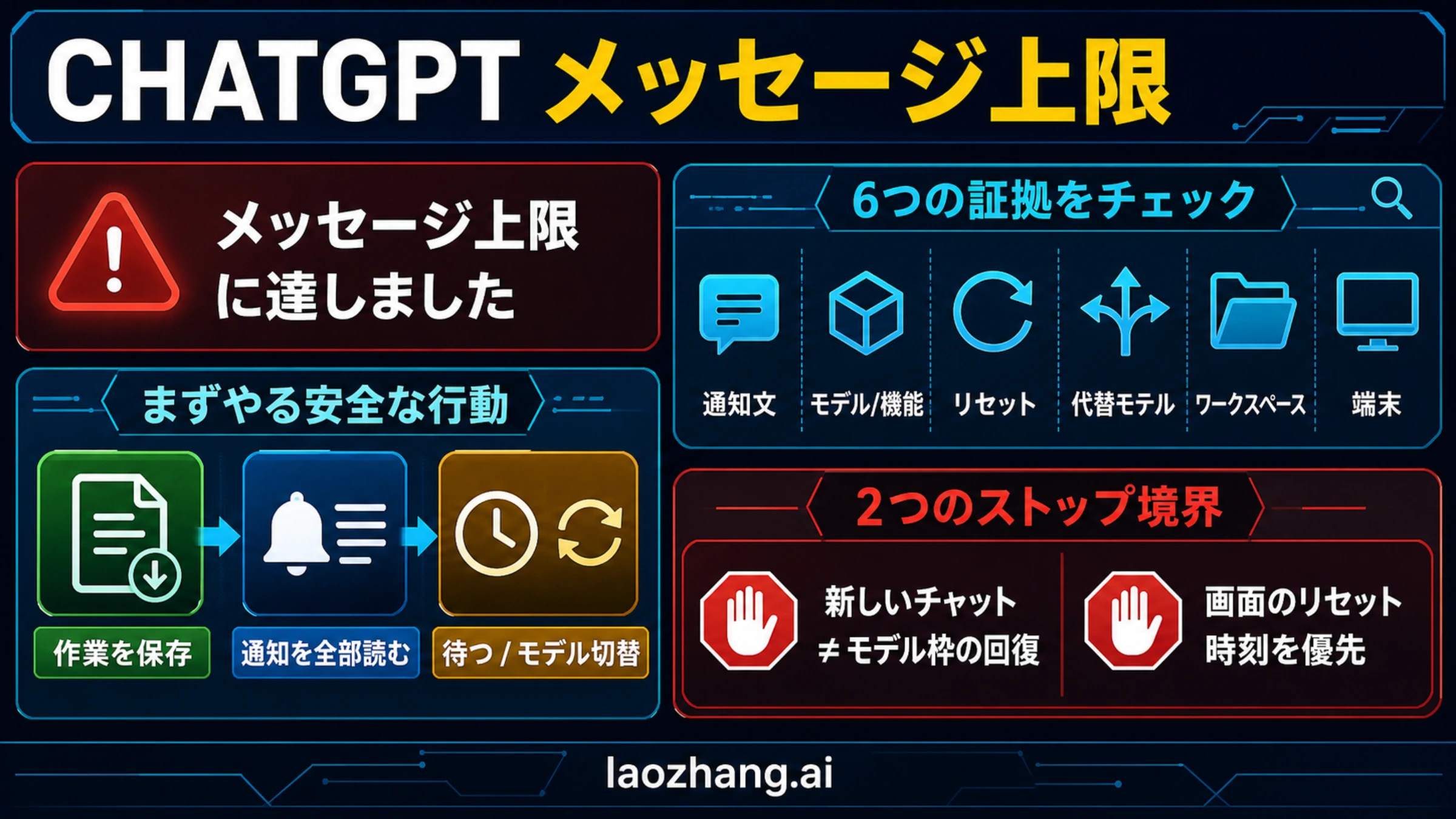
ChatGPT's “You've reached our limit of messages” notice means the active model or feature is unavailable to your account on the current route. Copy any unsent prompt or partial answer before you refresh, switch models, or leave the chat.

Read the whole notice—not just the headline. The model or feature name, reset time, fallback option, workspace wording, and platform tell you which limit owns the interruption.

What the notice showsFirst actionWhat will not fix it
A model name and reset timeWait for the displayed reset, or use a fallback model that ChatGPT offers.Opening another chat does not refill that model allowance.
Uploads, images, data analysis, or another toolFollow the named feature's notice and check its dedicated limit.Refreshing an ordinary text chat does not change a tool-specific allowance.
Only one very long conversation failsSave a checkpoint or summary, then test a short new chat.The test does not add messages to your plan or selected model.
Workspace, administrator, policy, or restriction wordingPreserve the exact notice and contact the workspace owner or support.Repeated sends and browser switching cannot override an administrator or safeguard boundary.
Broad, sudden failures without a matching allowance noticeCheck the current OpenAI status page before changing plans or deleting work.Paying or upgrading before verifying the incident does not diagnose it.

Stop rule: starting a new chat does not refill a model-level or plan-level message allowance. It only helps test whether one conversation has become too long or unstable.

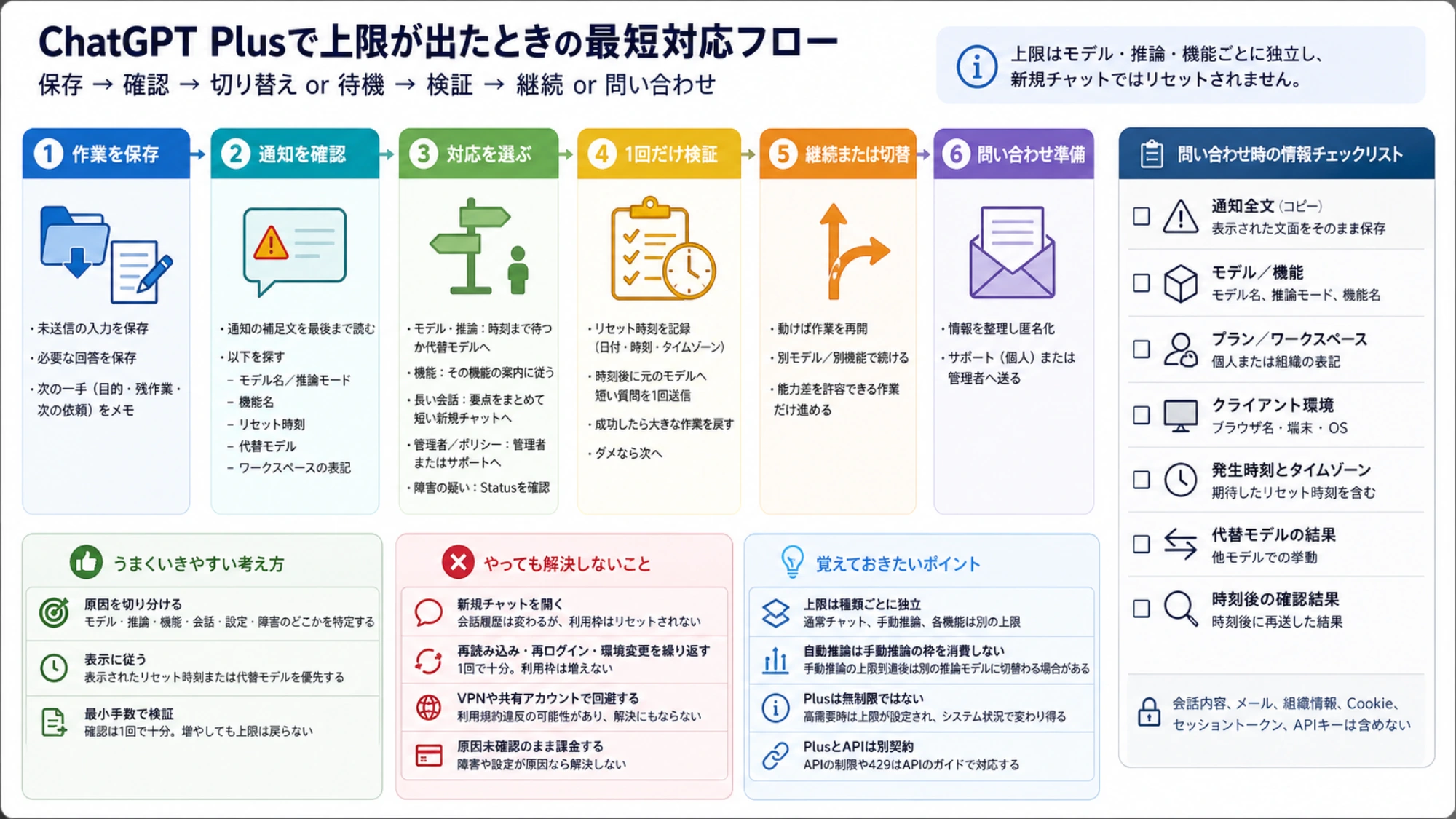
When ChatGPT shows a reset time or fallback, that account-specific notice is the source of truth. If the same notice remains after its displayed reset, check status, reproduce once in another browser or network, and save the exact notice, plan, model, workspace, platform, timestamp, and timezone for support—without private chat content or secrets.

Find the limit owner from the full notice

The headline describes the symptom, not necessarily the meter that stopped you. Two people can see similar wording while using different models, tools, plans, or workspaces. The useful evidence is usually in the smaller text immediately below the headline or beside the disabled control.

Six-lane router for identifying whether a ChatGPT message-limit notice belongs to a model, plan, tool, conversation, workspace, safeguard, or service incident

OwnerEvidence in front of youWhat changedEarliest valid route
Selected modelA model name, a reset time, or an offered mini/fallback modelAccess to that model on this accountUse the offered model or wait for the shown reset
Plan-level accessFree, Plus, Go, Pro, upgrade, or plan wordingThe allowance attached to the current plan and surfaceFollow the notice; compare plans only if the pattern is recurring
Feature or toolUpload, image creation, data analysis, voice, or another named featureThat feature's independent meter or availabilityStop retrying the feature and follow its own limit route
One conversationThe failure appears only in one unusually long thread, without a model reset noticeThe thread may be too large or unstableSave a checkpoint and test a short new chat
Workspace or safeguardAdministrator, workspace, policy, restricted, suspicious, or similar wordingAn organizational setting or account/policy boundaryPreserve the wording and contact the owning administrator or support
Service incidentSeveral chats, models, or devices fail unexpectedly without a matching allowance explanationAvailability may be broader than your accountCheck OpenAI Status at that moment

Before changing anything, capture six details: the exact text, selected model or feature, displayed reset, offered fallback, plan or workspace, and whether the problem occurs on web, desktop, or mobile. A screenshot is useful after private conversation content, email addresses, and workspace-sensitive details are hidden.

This classification prevents the most expensive mistake: applying a real fix to the wrong meter. Waiting can restore a timed model allowance, but it cannot change a workspace restriction. A new chat can isolate a thread problem, but it cannot refill a model allowance. Clearing cookies may repair a broken session, but it cannot create subscription capacity.

When does the ChatGPT message limit reset?

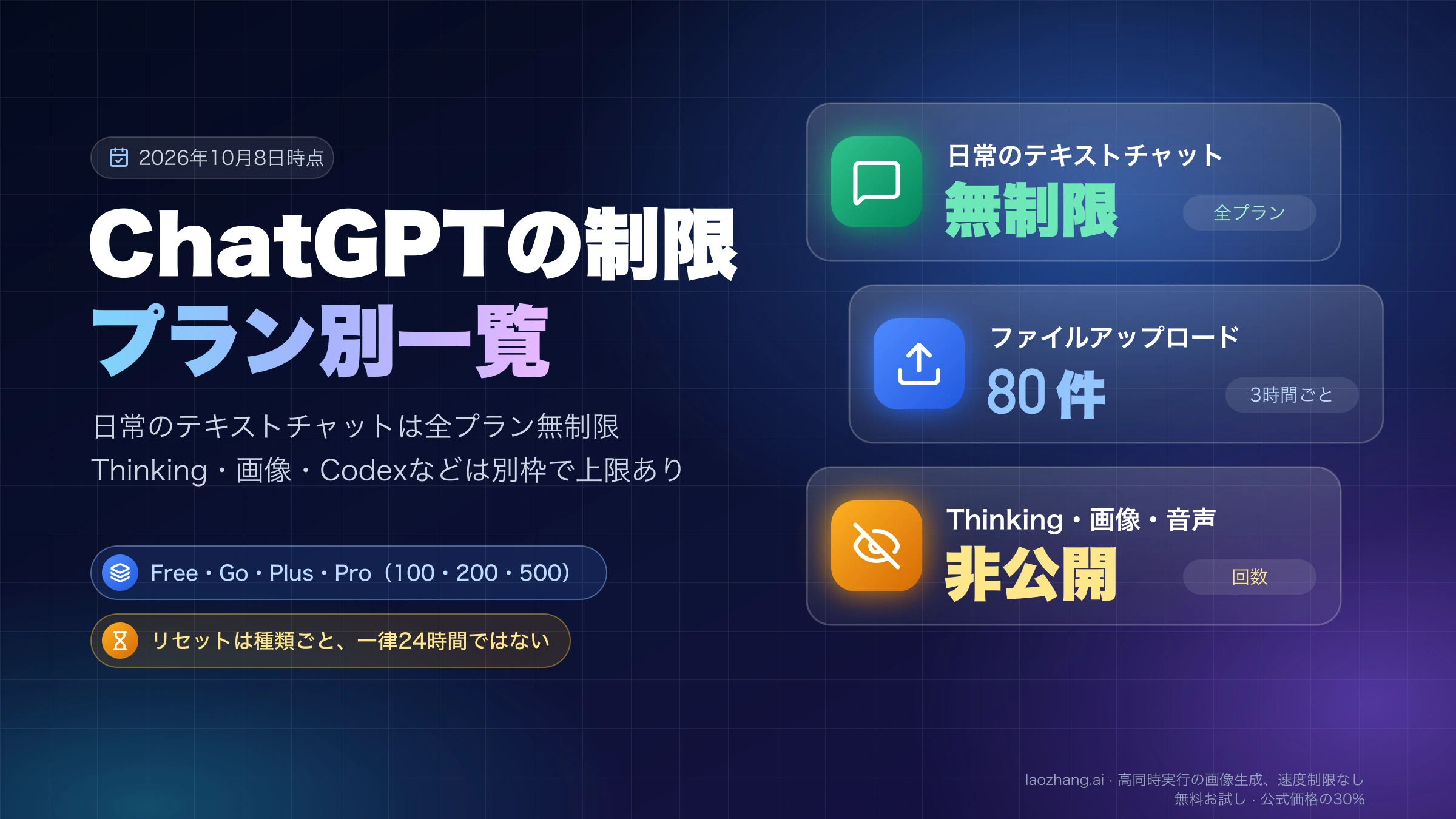
There is no safe universal reset clock for every ChatGPT “limit of messages” notice. Use the time shown in your own notice or model picker. It reflects the model, plan, account, and product surface that are active for you.

The following figures are a dated snapshot, not permanent plan promises. As of July 14, 2026, OpenAI's current ChatGPT model-limit documentation describes these boundaries:

Current routeOfficially documented behavior on July 14, 2026What to do
Free accessGPT-5.5 access is limited within a five-hour window, and the available amount is dynamic rather than one guaranteed public numberFollow the reset or upgrade option shown in your account
Plus or Go using GPT-5.5 InstantUp to 160 messages every three hours; after that allowance, chats use GPT-5.5 Instant mini until resetContinue with the offered mini model or wait for the displayed reset
Manually selected reasoningReasoning access has an allowance separate from Instant access and can have its own fallbackCheck the model picker and the reset attached to that reasoning route
A Pro modelPro-model access can have a separate allowance even when the plan provides broad general accessChoose another available model or wait; there is no user setting that refills it

OpenAI can revise models, windows, and allowances as capacity and product behavior change. If your product shows a different reset or fallback, the product display wins. Do not calculate a reset from an old forum post, an older model name, or the time you first subscribed.

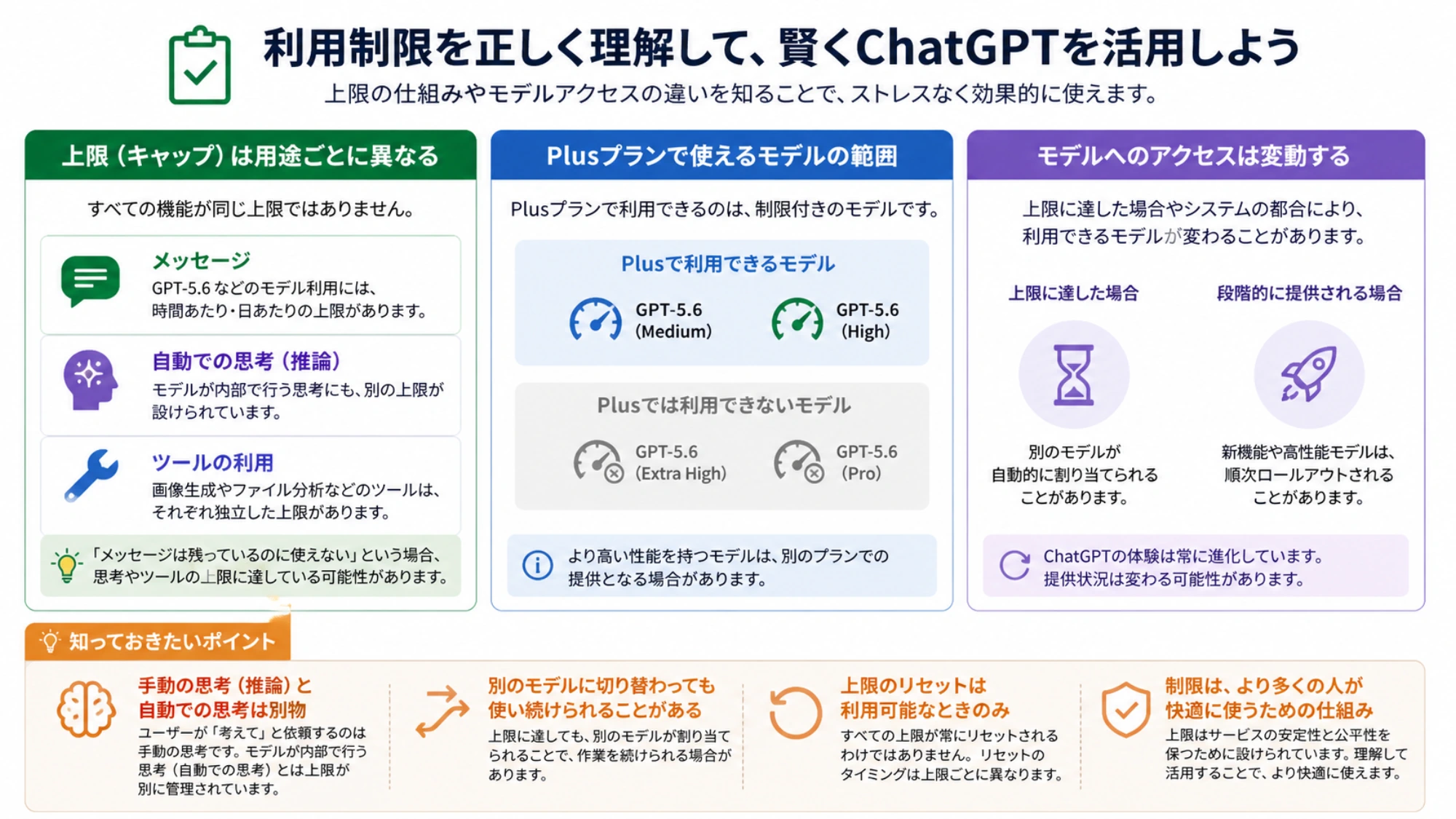
Reaching one model's allowance also does not prove that your subscription ended or your entire account was restricted. Try only the fallback ChatGPT explicitly offers. If other ordinary models remain available, that is evidence of a model-specific boundary, not evidence that every ChatGPT surface is down.

Feature limits are a separate branch. OpenAI's Free Tier FAQ distinguishes model/GPT access from data analysis, file uploads, and image creation, which can have their own limits. Use the dedicated file-upload limit guide or image-generation limit guide only when the notice actually names that feature.

New chat, model switch, waiting, or refresh: what each action changes

The right action depends on which state you are trying to change. “Try a new chat” is useful diagnostic advice for one long conversation; it is false as a quota-reset promise.

Comparison board showing what a new chat, model switch, waiting, checkpoint, and refresh can and cannot change in ChatGPT

ActionCan changeCannot changeUse it when
Wait until the displayed timeA timed allowance after its actual resetA workspace restriction or an unresolved incidentThe notice names a reset
Switch to an offered modelWhich model serves the next messageThe exhausted model's own allowanceChatGPT presents a fallback or another available model
Start a short new chatThe conversation history and context loadPlan or model message capacityOne long thread fails while a short test works
Save a checkpointHow much work can be recovered or movedThe underlying limitThe task spans many messages or a large document
Refresh or sign in againA stale web session or display stateA real allowance, feature meter, or policy boundaryThe reset has passed but the interface has not updated
Try another browser or network onceA local extension, cookie, network, or client problemA consistent account-side limitYou need one clean reproduction before escalation
UpgradeThe future plan envelope, if the target plan fits the repeated workloadA guaranteed instant recovery, unlimited access to every model, or API creditThe same verified plan-level limit repeatedly blocks valuable work

Use the smallest test that can separate two causes. For a suspected conversation problem, copy a short neutral prompt into a new chat using an available model. If the same model-limit notice follows you, stop: the result points back to the model or account allowance. If only the old thread fails and the short chat works, move the task with a compact checkpoint rather than repeatedly reopening the failing thread.

For a suspected stale interface, wait until the exact displayed reset, reload once, and sign out and back in once if needed. Repeated refreshes do not make the clock move faster, and repeated sends can destroy an unsaved prompt without producing better evidence.

Recovery paths for each kind of limit

The notice names a model and reset

Copy your pending work, note the reset time and timezone, then choose between the offered fallback and waiting. Use the fallback for tasks that can tolerate a capability change; wait if the task depends on the selected model's reasoning or output behavior.

After the displayed reset, send one short verification prompt on the same model. If it succeeds, resume from your checkpoint. If the identical notice persists, capture it and move to the status-and-support path instead of guessing another reset.

The notice names uploads, images, or data analysis

Stop sending ordinary text messages as a test: text success does not refill the feature. Preserve the file name, file type, approximate size, feature name, and exact notice without uploading confidential material to a public support post. Then follow the feature's own reset or availability instruction.

Separating the tool from the chat model matters because a working text conversation can coexist with an exhausted upload or image meter. Likewise, a tool failure is not proof that your general ChatGPT message allowance is gone.

Only one long conversation is failing

Treat the old thread as a work archive, not as the only place the task can continue. Copy the latest accepted output and create a checkpoint containing:

  1. The goal and current deliverable.
  2. Decisions already made and constraints that must not change.
  3. Source links or file names, with secrets removed.
  4. What is complete, what remains, and the very next action.
  5. Any wording, schema, or formatting that must stay exact.

Open a new chat with that checkpoint and a single bounded request. This reduces conversation load and makes the handoff inspectable. It still does not add model messages; if the allowance is exhausted, the same notice will remain until its own reset or fallback applies.

The notice mentions a workspace, administrator, or policy

Do not leave the workspace, delete chats, rotate accounts, or buy another plan before the owner is identified. A managed workspace can apply controls that a personal-plan comparison cannot explain. Save the workspace name, exact wording, selected model or feature, timestamp, and whether the same action works outside that workspace—only if policy permits that test.

Send the sanitized evidence to the workspace administrator. If the message refers to suspicious activity, blocked access, safeguards, or policy enforcement rather than a timed allowance, repeated retries and browser changes are not bypasses. Use the account or support route shown by ChatGPT.

Several surfaces fail at once

Check OpenAI Status live. Status is evidence for that moment, not an evergreen promise about the service or proof that every user's plan and model are healthy. If a relevant incident is listed, preserve work and wait for the service update. If no matching incident appears, continue with one cross-browser or cross-network test and the support packet below.

Why Plus or Pro can still show a message limit

Paid does not mean that every model, feature, and safeguard becomes unmetered. It means a broader plan envelope, subject to the active model and feature contracts.

As of July 14, 2026, ChatGPT Plus costs $20 per month. OpenAI also says Plus can include message caps, especially when demand is high, and that limits can vary with system conditions. Plus does not include OpenAI API usage; API billing is separate.

The ChatGPT pricing page may use “Unlimited*” for broad messages or interactions. The asterisk matters: the pricing footnote subjects use to reasonable-use and policy boundaries, while current model and feature pages can still define separate allowances. Those statements describe different layers rather than a guaranteed bypass:

LayerWhat it answersWhat it does not promise
Plan wordingHow broad ordinary access is compared with another planPermanent access to every named model and feature without boundaries
Model allowanceHow long a selected model remains available before reset or fallbackThat the entire account is disabled when one model stops
Feature limitWhether uploads, images, analysis, or another tool is availableThat ordinary text messages share the same meter
Safeguard or policyWhether use remains within account and safety rulesA timed reset that can be accelerated by upgrading

Pro offers a larger access envelope, but it is not a guarantee that every model has no allowance. OpenAI's Pro plan documentation directs users who reach a model boundary to another available model or the displayed reset; there is no user control that increases or bypasses that allowance. The separate Pro limits explainer is the better route if the dispute is specifically about what “unlimited” means on Pro.

Upgrade only after you have identified a repeated plan-level bottleneck and confirmed that the target plan changes the resource you use. Do not upgrade merely because one long thread is unhealthy, a tool has its own meter, a workspace administrator disabled a feature, or a service incident is active.

Make long ChatGPT tasks resilient before the next limit

A message limit is less disruptive when the work can move without reconstructing the entire conversation. Use a lightweight checkpoint at natural milestones rather than waiting for the final prompt.

For writing, research, or coding work, keep three blocks outside ChatGPT:

  • Stable brief: goal, audience, scope, constraints, and definition of done.
  • Decision log: choices already accepted, rejected options, and the reason for each boundary.
  • Resume packet: latest output, open questions, source links, and the next bounded request.

At the end of a productive phase, ask ChatGPT to summarize decisions and unresolved work, then verify that summary before saving it. Do not use the summary as the only copy of critical data. Keep source documents and generated files in their real storage locations.

Break a large job by deliverable, not by arbitrary message count. For example, complete evidence collection, then the outline, then one draft section, then review. A new chat can start from the verified resume packet without importing every exploratory exchange. That makes the task easier to audit and reduces dependence on one oversized context.

If the job depends on files or generated images, remember that those features may have meters separate from ordinary chat. Keep local filenames and artifact paths in the resume packet. Do not assume that changing the text model restores an upload or image limit.

What to collect when the notice survives its reset

Escalate with evidence when the same notice persists after its displayed reset, when the behavior reproduces cleanly without an allowance explanation, or when the wording points to an administrator, restriction, or safeguard.

Privacy-safe ChatGPT support evidence pack with notice, model, plan, platform, reset, timestamp, reproduction, status, and no-secrets boundary

Prepare this compact support packet:

FieldRecordRedact or exclude
Exact noticeFull headline and supporting textPrivate chat content around it
Active routeModel or feature namePrompt contents unless essential and safe
Account surfacePlan and personal or managed workspaceEmail address, billing identifiers, organization secrets
ClientWeb, desktop, iOS, or Android; browser/app version if knownCookies, session tokens, API keys
TimeTimestamp and timezone; displayed reset timeNothing—precision helps
Recovery resultWhether the offered fallback worked and whether the same route failed after resetRepeated speculative retries
Clean reproductionOne other browser or network test and the live status-page resultCredentials, confidential uploads, private screenshots

State the expected behavior in one sentence: “The notice showed a reset at X; at Y after that reset, the same model and account still showed the same notice.” That is more actionable than “ChatGPT is broken” and does not require revealing the conversation.

Do not post this packet publicly if it includes personal or workspace information. Use the support route available in ChatGPT or send workspace-owned issues to the administrator who controls that environment.

Frequently asked questions

How long does “You've reached our limit of messages” last?

It lasts until the reset shown for the active model or feature, until you use an offered fallback, or until the owning restriction or incident is resolved. There is no one duration that safely applies to every ChatGPT plan and model. Treat the time displayed in your account as authoritative.

Does starting a new chat reset the message limit?

No. A new chat does not refill a model-level or plan-level message allowance. It only changes the conversation history, so it is useful when one unusually long thread appears to be the problem. If the limit follows you into the new chat, return to the model, feature, plan, workspace, or incident branch.

Why did I reach a limit on ChatGPT Plus?

Plus provides higher access than Free, but OpenAI documents variable message caps and separate model or feature boundaries. Read the model, reset, fallback, and feature wording in the notice. A limit on one model does not automatically mean Plus ended or the whole account is restricted.

Will upgrading remove the notice immediately?

Not reliably. An upgrade may expand future plan-level access, but it does not guarantee immediate recovery from a model-specific allowance, feature limit, long conversation, workspace control, safeguard, or service incident. Identify the owner before paying.

Can I bypass the limit by clearing cookies, changing browsers, or using a VPN?

Those actions cannot refill a real account or model allowance. One other browser or network is useful only as a diagnostic for a local client problem. Do not use repeated account, network, or identity changes to evade a workspace or safeguard boundary.

What if the reset time has passed but ChatGPT still shows the limit?

Reload once, verify the model and account, check current service status, and reproduce once in another browser or network. If the identical notice remains, send the sanitized evidence pack to support. Do not guess a second reset time from an old post.

Is a ChatGPT message limit the same as an OpenAI API rate limit?

No. ChatGPT subscriptions and OpenAI API billing are separate products. An API key does not restore a blocked ChatGPT conversation, and Plus does not include API quota. If a developer request returns a rate-limit or quota error, use the API rate-limit guide or API quota-exceeded guide instead.

The reliable recovery sequence is short: preserve the work, read the complete notice, identify the owner, use the displayed reset or offered fallback, verify once, and escalate with sanitized evidence when that route fails.

#ChatGPT Plus#Usage Limits#Message Caps#OpenAI#AI Subscription
Share: