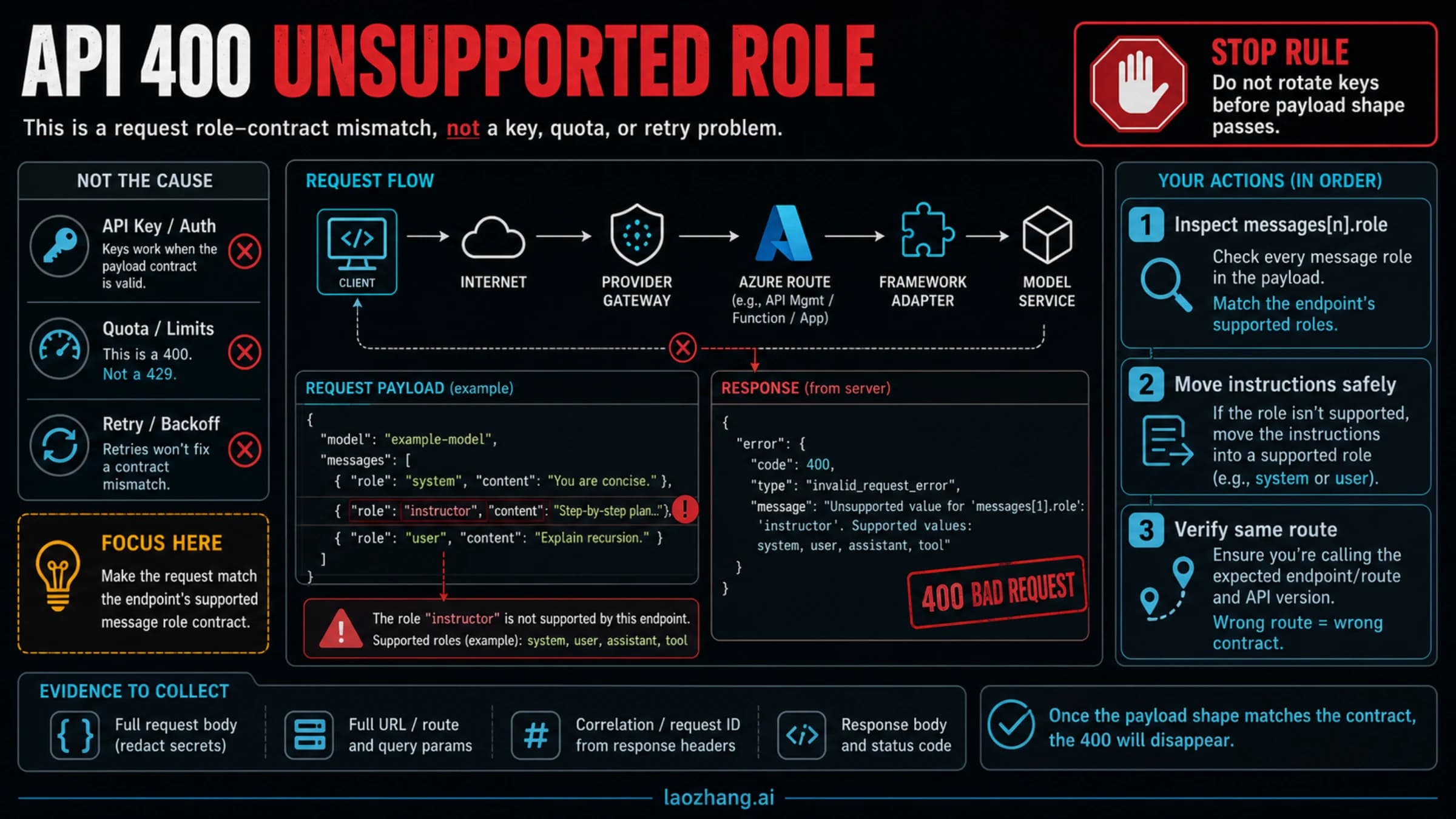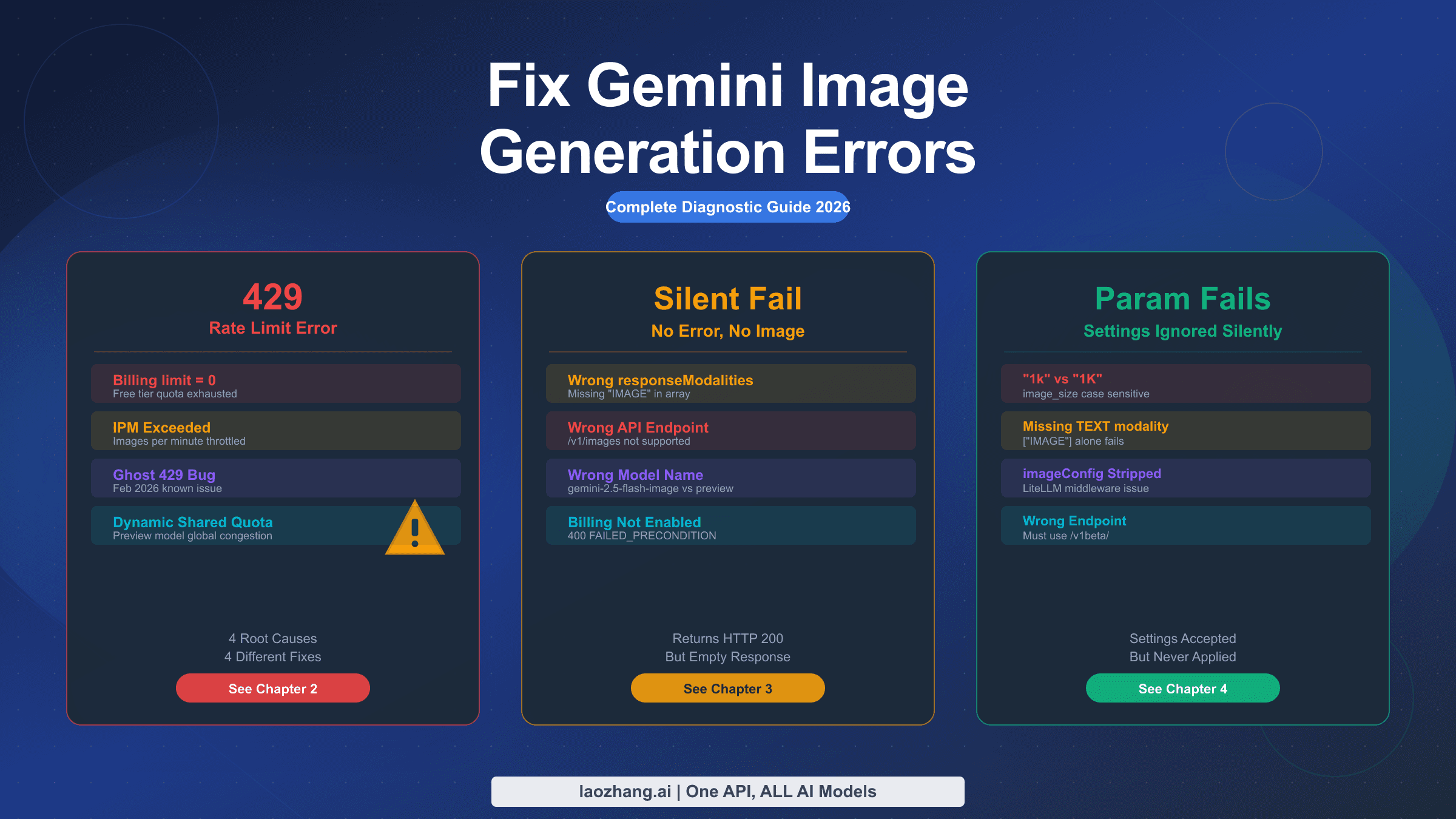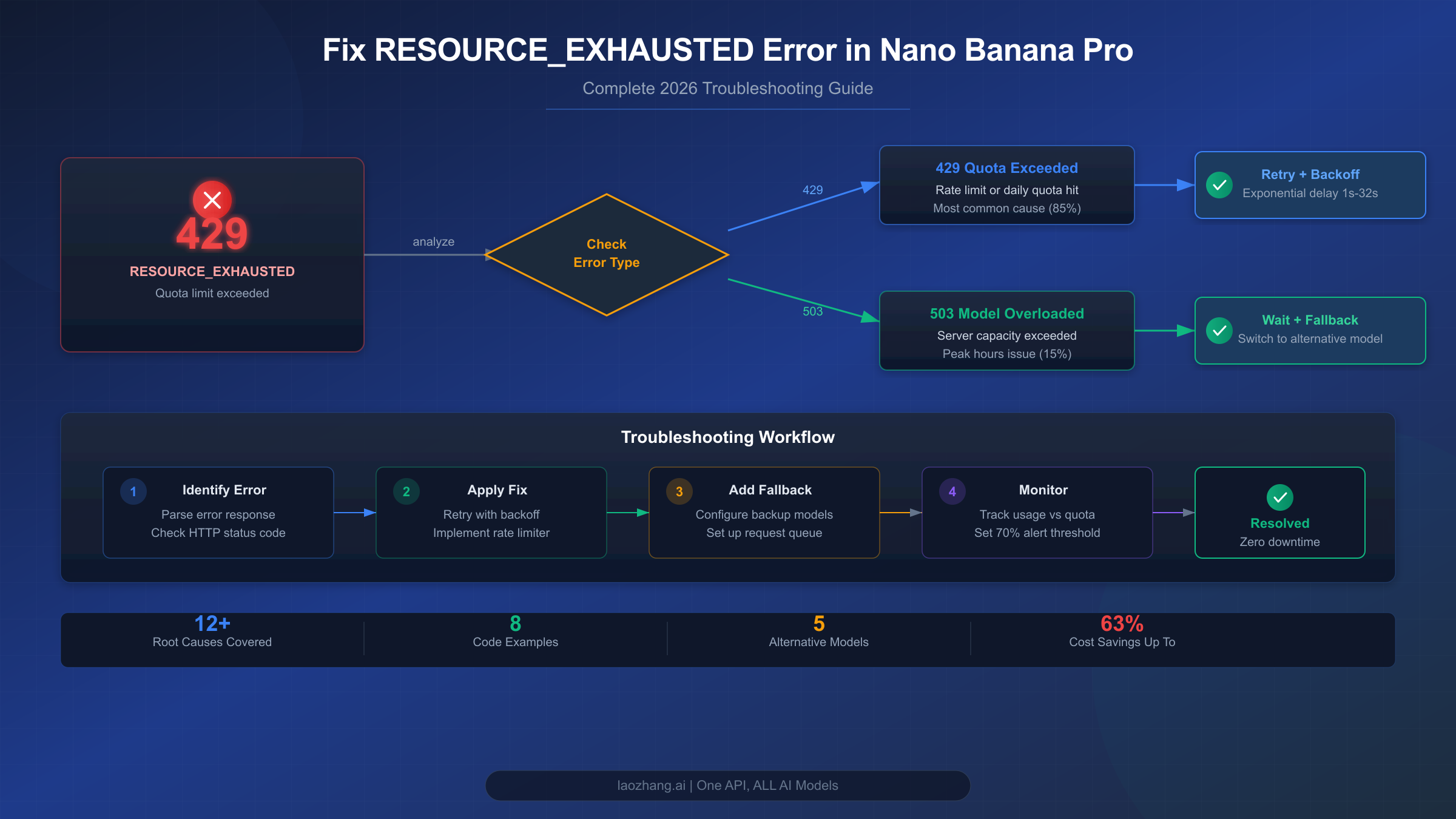
The RESOURCE_EXHAUSTED error in Nano Banana Pro is the single most common API failure developers face when building image generation applications with Google's Gemini API. Accounting for approximately 70% of all Nano Banana API errors, this HTTP 429 status code means your application has exceeded one or more rate limits — whether that's requests per minute (RPM), tokens per minute (TPM), or requests per day (RPD). The good news: this error is entirely fixable with the right combination of retry logic, tier management, and architectural patterns. This guide provides everything you need, from 30-second quick fixes to production-ready code in both Python and Node.js.
TL;DR — Quick Fix Reference
If your Nano Banana Pro application is throwing RESOURCE_EXHAUSTED errors right now, here's your fastest path to resolution. Start by identifying your exact error type, then apply the corresponding fix.
| Error Code | Meaning | Quick Fix | Recovery Time |
|---|---|---|---|
| 429 RESOURCE_EXHAUSTED | Your project quota exceeded | Add retry with exponential backoff | Instant after retry delay |
| 429 "check quota" | RPM/TPM/RPD limit hit | Reduce request rate or upgrade tier | 1 minute (RPM) to midnight PT (RPD) |
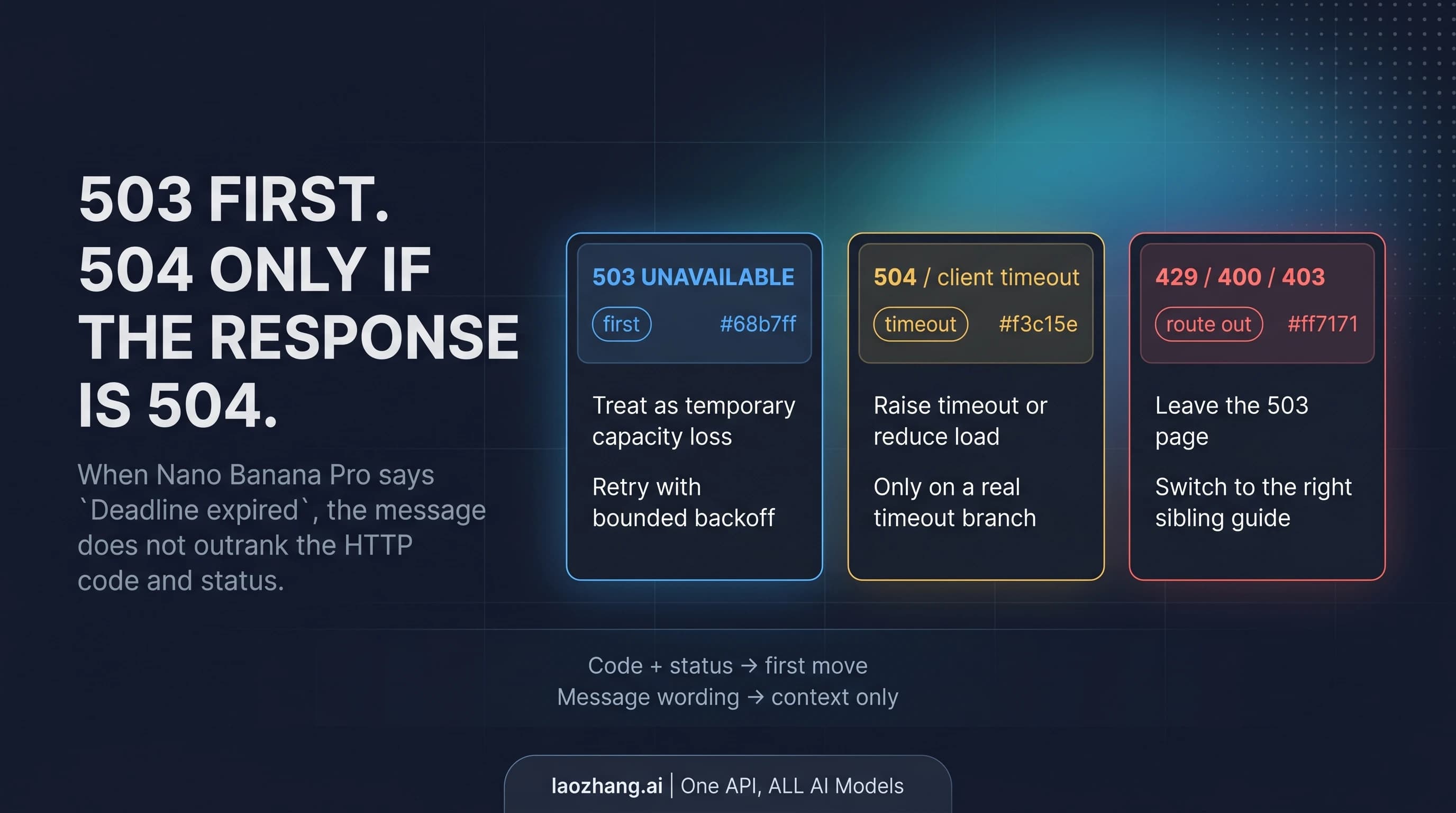
| 503 Service Unavailable | Google's servers overloaded | Wait and retry with longer delays | 30-120 minutes |
| 504 Gateway Timeout | Request took too long | Reduce image resolution or simplify prompt | Immediate with simpler request |
30-Second Fix Checklist:
- Check your error response — is it 429 or 503? They require different fixes.
- If 429: Open Google AI Studio Usage Dashboard and check which limit you've hit (RPM, TPM, or RPD).
- If RPM/TPM: Add a
time.sleep(1)between requests. This alone eliminates most 429 errors. - If RPD: You've hit your daily cap. Wait until midnight Pacific Time, or enable billing to unlock 60x higher limits.
- If 503: This is Google's infrastructure problem, not yours. Implement retry with 30-60 second delays.
Rate Limit Cheat Sheet (Free Tier → Tier 1):
| Metric | Free | Tier 1 (Paid) | Improvement |
|---|---|---|---|
| RPM | 5-10 | 150-300 | 30-60x |
| TPM | 250,000 | 1,000,000-2,000,000 | 4-8x |
| RPD | 100-250 | 1,000-1,500 | 6-10x |
The single most impactful change you can make is enabling billing on your Google Cloud project. This immediately upgrades you from Free tier to Tier 1, unlocking dramatically higher rate limits at no upfront cost — you only pay for what you use.
What Causes RESOURCE_EXHAUSTED in Nano Banana Pro
Understanding the root cause of your specific error is critical because applying the wrong fix wastes time and doesn't solve the problem. The RESOURCE_EXHAUSTED error in Nano Banana Pro (officially Gemini 3 Pro Image Preview) has three fundamentally different causes, each requiring a different solution approach.
429 RESOURCE_EXHAUSTED — Quota Limit Exceeded. This is the most common variant, triggered when your project exceeds its allocated rate limit in any dimension. Google enforces rate limits at the project level (not per API key), which means if you have multiple applications or API keys sharing the same Google Cloud project, they all share the same quota pool. The actual error response looks like this:
json{
  "error": {
    "code": 429,
    "message": "Resource has been exhausted (e.g. check quota).",
    "status": "RESOURCE_EXHAUSTED"
  }
}
What makes this error particularly confusing is that you may be under your RPM limit but over your TPM limit, or under both RPM and TPM but past your daily RPD cap. Each dimension is evaluated independently, and exceeding any single one triggers the error. This is why developers on the Google AI Developers Forum report seeing 429 errors despite believing they're well within their limits — they're often looking at the wrong metric.
503 Service Unavailable — Server Capacity Exhaustion. This error is fundamentally different from 429 because it reflects Google's infrastructure being overwhelmed, not your specific quota being exceeded. Even Tier 3 enterprise customers with the highest quotas receive 503 errors during peak load periods. The root cause lies in Google's compute resource allocation: Nano Banana Pro runs on the Gemini 3 series, which is still in Pre-GA (Pre-General Availability) status, meaning Google has allocated limited TPU v7 capacity to these models. When global demand exceeds available compute, everyone gets 503 errors regardless of their tier level.
High-risk periods for 503 errors align with peak usage windows: approximately 00:00-02:00 UTC (US evening), 09:00-11:00 UTC (Asian business hours), and 20:00-23:00 UTC (European evening). Planning your batch generation jobs around these windows can significantly reduce 503 encounters.
The December 2025 Quota Reduction. In December 2025, Google quietly reduced free tier quotas, catching thousands of developers off guard. Applications that had been running reliably for months suddenly started failing with 429 errors. The Gemini 2.5 Pro RPM was cut from 10 to 5 (a 50% reduction), and some developers reported their effective RPD dropping from 250 to as low as 20 — a staggering 92% reduction. Google also tightened enforcement algorithms, meaning quotas that were previously loosely enforced became strict hard limits. If your application broke "for no reason" around December 7, 2025, this is almost certainly the cause.
Complete Rate Limit Reference — Every Tier, Every Model
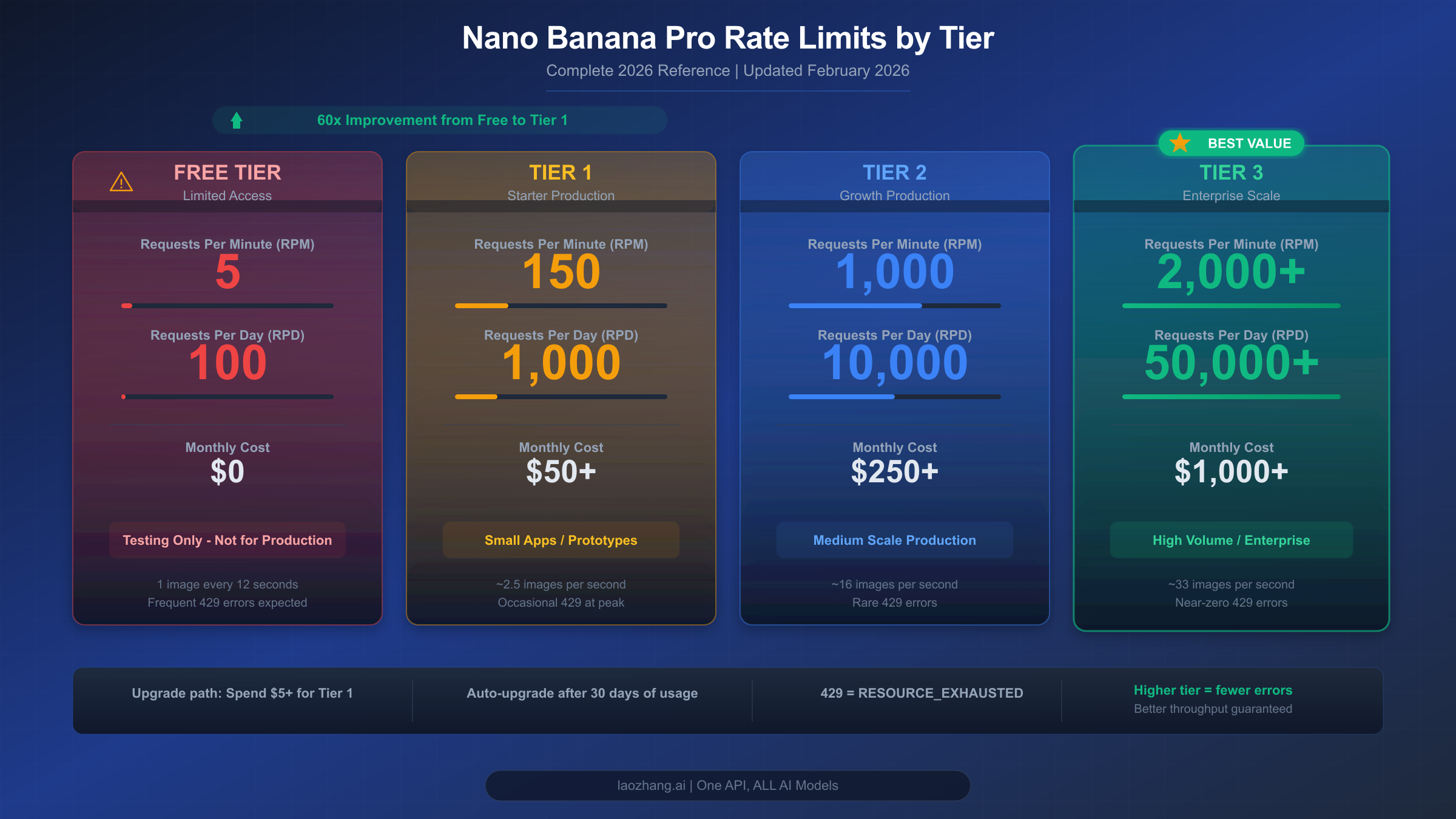
Nano Banana Pro's rate limits depend on your project's usage tier, which is determined by your billing status and cumulative Google Cloud spending. Understanding these tiers is essential for planning your image generation capacity and avoiding RESOURCE_EXHAUSTED errors. The following data is sourced from Google's official rate limits documentation (last updated January 22, 2026) and cross-referenced with our complete Gemini API rate limits reference.
Tier Requirements and Qualification:
| Tier | Qualification | Cost |
|---|---|---|
| Free | Users in eligible countries | $0 |
| Tier 1 | Full paid billing account linked to project | Pay-as-you-go |
| Tier 2 | $250+ cumulative spend AND 30+ days since first payment | Pay-as-you-go |
| Tier 3 | $1,000+ cumulative spend AND 30+ days since first payment | Pay-as-you-go |
Rate limits are applied per project, not per API key. Your RPD quota resets at midnight Pacific Time (00:00 PT). These limits also apply to the Batch API separately — batch requests have their own quota pool and don't consume your real-time limits.
Complete Rate Limits by Model and Tier:
| Model | Free RPM | Free RPD | Tier 1 RPM | Tier 1 RPD | Tier 2 RPM | Tier 2 RPD |
|---|---|---|---|---|---|---|
| Gemini 2.5 Pro | 5 | 100 | 150 | 1,000 | 1,000 | 10,000 |
| Gemini 2.5 Flash | 10 | 250 | 300 | 1,500 | 2,000 | 10,000 |
| Gemini 2.5 Flash-Lite | 15 | 1,000 | 300 | 1,500 | 2,000 | 10,000 |
| Gemini 3 Pro Preview | 10 | 100 | 150 | 1,000 | 1,000 | 10,000 |
Nano Banana Pro (Gemini 3 Pro Image Preview) follows the Gemini 3 Pro rate limit structure. Additionally, image generation models have an IPM (Images Per Minute) limit that functions similarly to TPM. The exact IPM value varies by tier and can be viewed in your Google AI Studio Usage Dashboard.
December 2025 Before/After Comparison:
| Metric | Before (Nov 2025) | After (Dec 2025) | Change |
|---|---|---|---|
| Gemini 2.5 Pro Free RPM | 10 | 5 | -50% |
| Gemini 2.5 Flash Free RPM | 15 | 10 | -33% |
| Free RPD (various) | 250 | 20-100 | -60% to -92% |
| Enforcement | Loosely enforced | Strictly enforced | Hard limits now |
If you need to see your exact current limits, the most reliable source is your AI Studio dashboard. Google's documentation notes that "specified rate limits cannot be guaranteed and actual capacity may vary," meaning the published numbers are upper bounds, not guarantees. During peak periods, effective limits may be lower than documented.
To request a rate limit increase beyond your current tier, submit a request through Google's official form. Google states they "offer no guarantees about increasing your rate limit" but will review requests. For predictable high-throughput needs, consider Provisioned Throughput, which reserves dedicated capacity for your project.
Working Code Solutions — Python and Node.js
The most effective way to handle RESOURCE_EXHAUSTED errors is implementing proper retry logic with exponential backoff and jitter. The key insight is that different error types need different retry strategies: 429 errors should be retried quickly with backoff, while 503 errors need longer initial delays.
Python Solution with Tenacity Library:
pythonimport time
import random
from google import genai
from tenacity import retry, stop_after_attempt, wait_exponential, retry_if_exception

client = genai.Client(api_key="YOUR_API_KEY")

def is_retryable(exception):
    """Only retry on 429 and 503 errors."""
    if hasattr(exception, 'code'):
        return exception.code in [429, 503]
    return False

@retry(
    stop=stop_after_attempt(5),
    wait=wait_exponential(multiplier=1, min=2, max=60),
    retry=retry_if_exception(is_retryable),
    before_sleep=lambda retry_state: print(
        f"Retry {retry_state.attempt_number}/5 "
        f"in {retry_state.next_action.sleep:.1f}s..."
    )
)
def generate_image(prompt, resolution="1024x1024"):
    """Generate image with automatic retry on rate limit errors."""
    response = client.models.generate_content(
        model="gemini-3-pro-image",
        contents=prompt,
        config={
            "response_modalities": ["IMAGE"],
            "image_resolution": resolution
        }
    )
    return response

# Usage with rate limiting
def batch_generate(prompts, delay=1.0):
    """Generate multiple images with rate limiting."""
    results = []
    for i, prompt in enumerate(prompts):
        try:
            result = generate_image(prompt)
            results.append(result)
            if i < len(prompts) - 1:
                time.sleep(delay + random.uniform(0, 0.5))
        except Exception as e:
            print(f"Failed after retries: {e}")
            results.append(None)
    return results
The wait_exponential with multiplier=1, min=2, max=60 means the first retry waits 2 seconds, then 4, 8, 16, up to a maximum of 60 seconds. Adding random jitter (the random.uniform(0, 0.5) in batch_generate) prevents the "thundering herd" problem where multiple clients retry simultaneously and overwhelm the API again.
Node.js/TypeScript Solution:
typescriptimport { GoogleGenAI } from "@google/genai";

const client = new GoogleGenAI({ apiKey: "YOUR_API_KEY" });

async function sleep(ms: number): Promise<void> {
  return new Promise(resolve => setTimeout(resolve, ms));
}

async function generateWithRetry(
  prompt: string,
  maxRetries = 5,
  baseDelay = 2000
): Promise<any> {
  for (let attempt = 1; attempt <= maxRetries; attempt++) {
    try {
      const response = await client.models.generateContent({
        model: "gemini-3-pro-image",
        contents: prompt,
        config: {
          responseModalities: ["IMAGE"],
          imageResolution: "1024x1024"
        }
      });
      return response;
    } catch (error: any) {
      const code = error?.status || error?.code;

      if (code === 429 || code === 503) {
        if (attempt === maxRetries) throw error;

        const delay = Math.min(
          baseDelay * Math.pow(2, attempt - 1),
          60000
        );
        const jitter = Math.random() * 1000;

        console.log(
          `Attempt ${attempt}/${maxRetries} failed (${code}). ` +
          `Retrying in ${((delay + jitter) / 1000).toFixed(1)}s...`
        );

        await sleep(delay + jitter);
      } else {
        throw error; // Non-retryable error
      }
    }
  }
}

// Batch generation with rate limiting
async function batchGenerate(
  prompts: string[],
  delayMs = 1000
): Promise<any[]> {
  const results: any[] = [];
  for (const [i, prompt] of prompts.entries()) {
    try {
      const result = await generateWithRetry(prompt);
      results.push(result);
      if (i < prompts.length - 1) {
        await sleep(delayMs + Math.random() * 500);
      }
    } catch (error) {
      console.error(`Failed: ${error}`);
      results.push(null);
    }
  }
  return results;
}
Both implementations share the same core pattern: exponential backoff with jitter, a maximum retry count, and error-type filtering to avoid retrying non-retryable errors like 400 (bad request) or 403 (authentication failure). The critical design choice is separating 429 handling (short backoff, fast retry) from 503 handling (longer delays, potentially waiting minutes).
Error-Specific Response Handling:
For production systems, you should parse the error response to apply the optimal retry strategy:
pythondef get_retry_delay(error, attempt):
    """Calculate retry delay based on error type."""
    if hasattr(error, 'code'):
        if error.code == 429:
            # Quota error: short exponential backoff
            return min(2 ** attempt + random.uniform(0, 1), 30)
        elif error.code == 503:
            # Server overload: longer delays
            return min(10 * (2 ** attempt) + random.uniform(0, 5), 120)
    return 5  # Default
Advanced Production Strategies
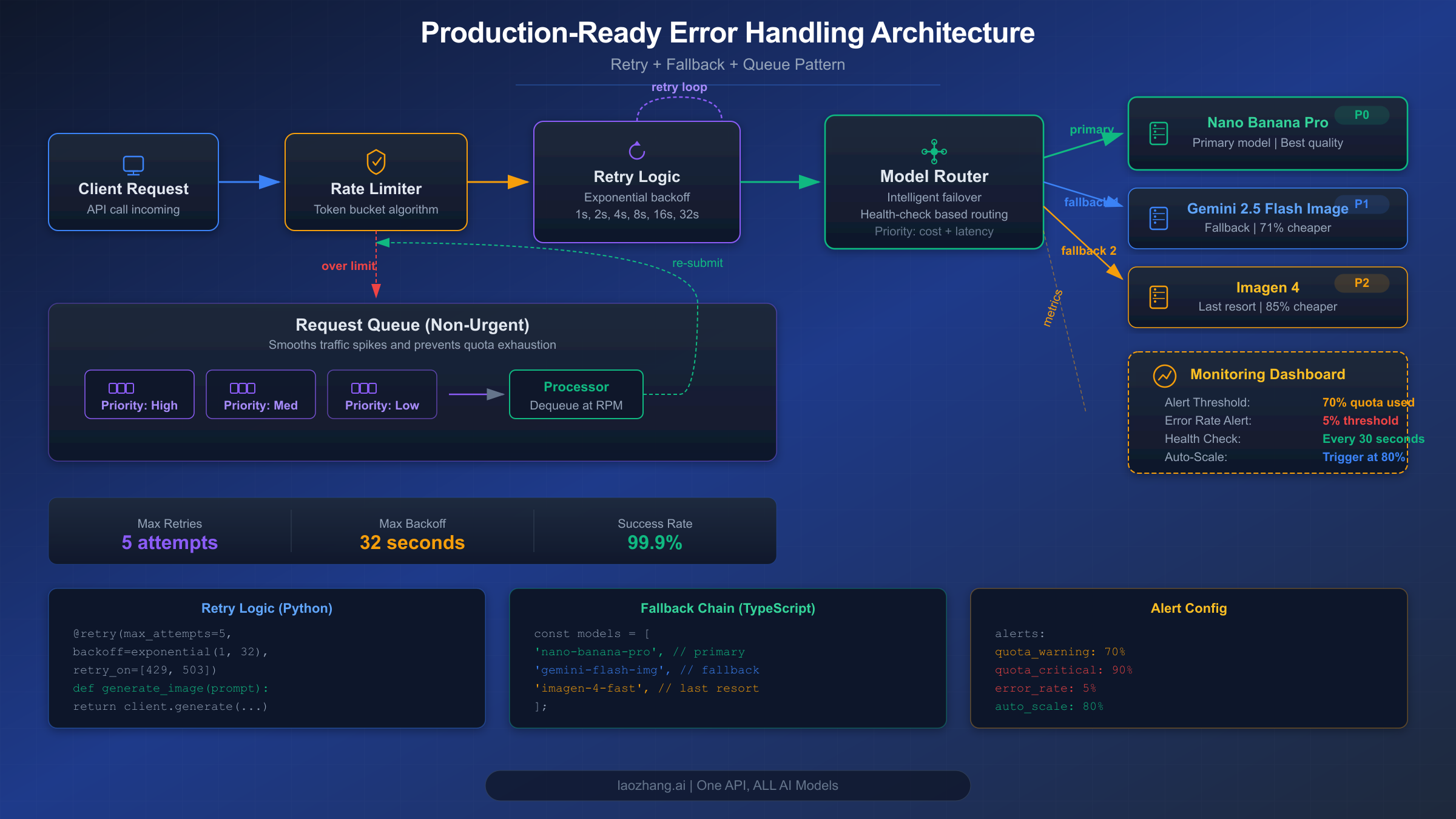
Simple retry logic handles intermittent failures, but production applications serving real users need a more sophisticated approach. The strategies below transform your image generation pipeline from "hope it works" to "guaranteed delivery" by combining multiple defense layers.
Model Fallback Chain. When Nano Banana Pro consistently returns errors, your best option isn't waiting — it's routing to an alternative model. Google offers multiple image generation models at different price points and reliability levels. A well-designed fallback chain tries each model in order of preference until one succeeds:
pythonFALLBACK_CHAIN = [
    {"model": "gemini-3-pro-image", "name": "Nano Banana Pro", "cost": 0.134},
    {"model": "gemini-2.5-flash-image", "name": "Flash Image", "cost": 0.039},
    {"model": "imagen-4-fast", "name": "Imagen 4 Fast", "cost": 0.02},
]

async def generate_with_fallback(prompt):
    """Try each model in the fallback chain."""
    for model_config in FALLBACK_CHAIN:
        try:
            result = await generate_with_retry(
                prompt,
                model=model_config["model"],
                max_retries=2  # Fewer retries per model
            )
            return {
                "result": result,
                "model_used": model_config["name"],
                "cost": model_config["cost"]
            }
        except Exception as e:
            print(f"{model_config['name']} failed: {e}")
            continue
    raise Exception("All models in fallback chain exhausted")
This approach means your users never see a 429 error — even if Nano Banana Pro is completely rate-limited, they still get an image from Flash Image or Imagen 4 within seconds. The trade-off is image quality: Nano Banana Pro produces the highest quality output, Flash Image is faster but lower resolution (max 1024x1024), and Imagen 4 Fast is the cheapest but lacks the contextual understanding of Gemini-based models.
Proactive Monitoring with 70% Threshold Alerts. The best way to handle rate limit errors is to prevent them. By tracking your API usage in real time and alerting when you approach 70% of your quota, you gain a warning window to take action before errors actually occur:
pythonimport threading

class QuotaTracker:
    def __init__(self, rpm_limit, rpd_limit):
        self.rpm_limit = rpm_limit
        self.rpd_limit = rpd_limit
        self.minute_requests = 0
        self.daily_requests = 0
        self.lock = threading.Lock()

    def record_request(self):
        with self.lock:
            self.minute_requests += 1
            self.daily_requests += 1

            rpm_usage = self.minute_requests / self.rpm_limit
            rpd_usage = self.daily_requests / self.rpd_limit

            if rpm_usage >= 0.7:
                self.alert(f"RPM at {rpm_usage:.0%}")
            if rpd_usage >= 0.7:
                self.alert(f"RPD at {rpd_usage:.0%}")

    def alert(self, message):
        print(f"QUOTA WARNING: {message}")
        # Send Slack/email notification
Queue-Based Architecture for Batch Processing. For applications that generate images in bulk (e-commerce product images, marketing materials, batch content creation), a queue-based architecture decouples user requests from API calls, allowing you to control the request rate precisely. Additionally, Google's Batch API operates on a separate quota pool with higher limits — up to 100 concurrent batch requests with up to 3 million tokens queued per model for Tier 1 users.
Cost Optimization — When to Upgrade, Switch, or Proxy
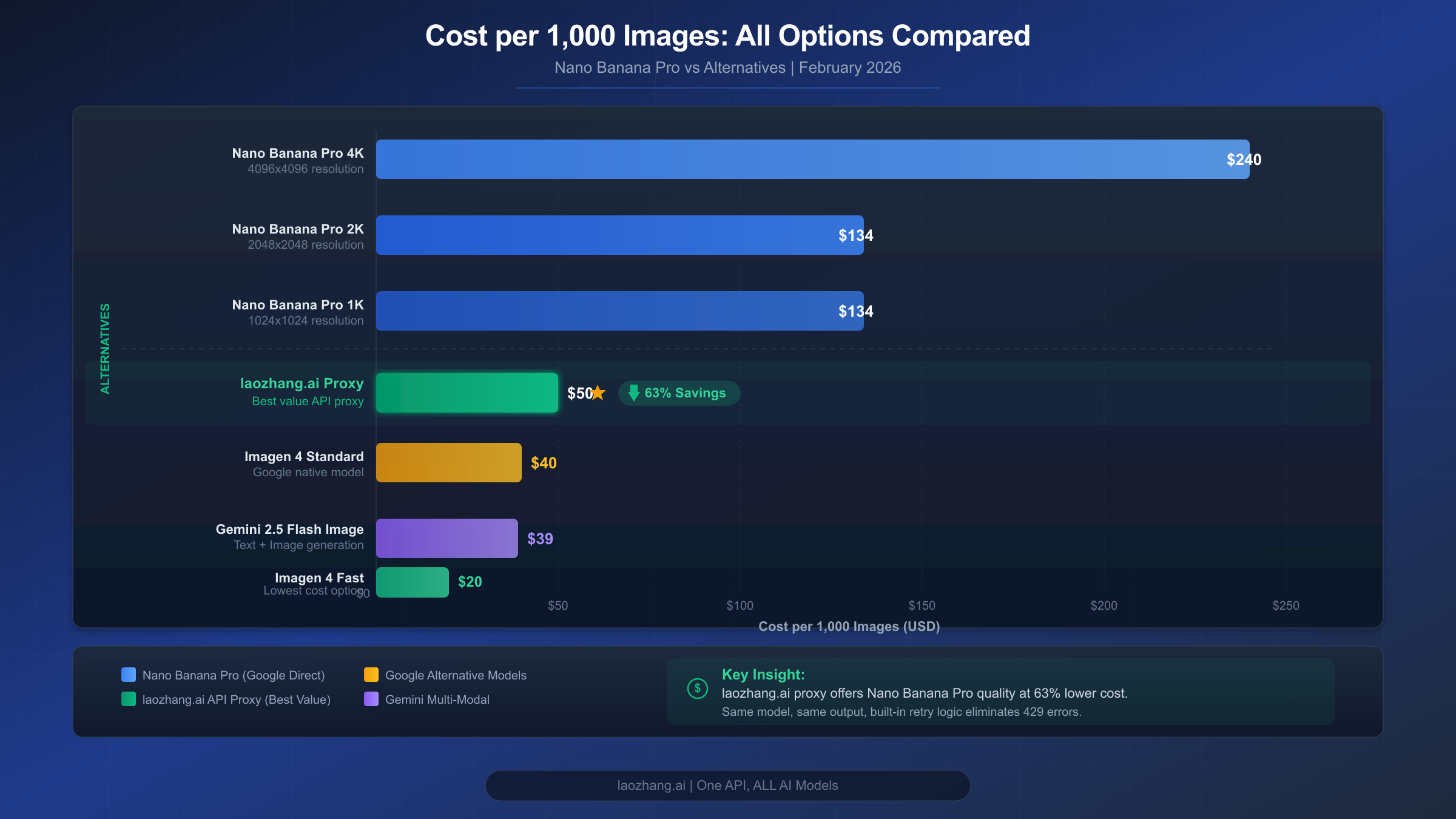
Understanding the true cost of RESOURCE_EXHAUSTED errors goes beyond API pricing — it includes developer time spent debugging, user experience degradation, and opportunity cost when your application is down. This section provides concrete cost calculations to help you make the right infrastructure decision for your volume level.
Direct API Cost Comparison (per 1,000 images, February 2026):
| Model | Resolution | Cost per Image | Cost per 1K Images | Quality |
|---|---|---|---|---|
| Nano Banana Pro | 1K-2K | $0.134 | $134.00 | Highest |
| Nano Banana Pro | 4K | $0.240 | $240.00 | Highest + 4K |
| Gemini 2.5 Flash Image | 1K | $0.039 | $39.00 | Good |
| Imagen 4 Fast | 1K | $0.020 | $20.00 | Good (no context) |
| Imagen 4 Standard | 1K | $0.040 | $40.00 | Better (no context) |
| Imagen 4 Ultra | 1K | $0.060 | $60.00 | Best (no context) |
For developers frequently hitting rate limits on the free tier, the most cost-effective first step is simply enabling billing. Upgrading from Free to Tier 1 costs nothing upfront and immediately multiplies your rate limits by 30-60x. You only pay for actual API usage, and at $0.134 per image for Nano Banana Pro, even 100 images per month costs just $13.40. Compare this to the hours you've spent debugging RESOURCE_EXHAUSTED errors — the paid tier pays for itself in reduced developer frustration.
For high-volume applications generating thousands of images monthly, third-party API proxies offer an alternative approach. Services like laozhang.ai provide access to the same Nano Banana Pro model through their unified API with higher rate limits and no regional restrictions, often at significant per-image savings for volume users. This approach is particularly valuable when your primary concern is rate limit elimination rather than raw per-image pricing.
Volume Cost Projection:
| Monthly Volume | Nano Banana Pro | Flash Image | Imagen 4 Fast | laozhang.ai Proxy |
|---|---|---|---|---|
| 100 images | $13.40 | $3.90 | $2.00 | $5.00 |
| 1,000 images | $134.00 | $39.00 | $20.00 | $50.00 |
| 10,000 images | $1,340.00 | $390.00 | $200.00 | $500.00 |
When choosing between upgrading your tier, switching models, or using a proxy, consider your priorities. If image quality is paramount and you need Nano Banana Pro's contextual understanding (editing existing images, maintaining identity consistency), upgrading to Tier 2 ($250 cumulative spend) gives you 1,000 RPM and 10,000 RPD. If you need high volume at lower cost and can accept slightly lower quality, Gemini 2.5 Flash Image at $0.039/image offers excellent value. For teams that need guaranteed availability without rate limit concerns, our affordable Gemini image generation options guide explores all available paths, and you can check the Gemini API free tier guide to maximize your free allocation before upgrading.
Decision Framework — Your Action Plan
Making the right decision about how to handle RESOURCE_EXHAUSTED errors depends on three factors: your error frequency, your monthly volume, and your quality requirements. Use this framework to choose the optimal strategy.
Step 1: Diagnose Your Error Pattern
| Symptom | Diagnosis | Recommended Action |
|---|---|---|
| 429 errors, under 10 images/day | Free tier RPD limit | Enable billing (Tier 1) |
| 429 errors, burst of requests | RPM limit exceeded | Add delays between requests |
| 429 errors, all day long | RPD limit exhausted | Upgrade tier or use Batch API |
| 503 errors, peak hours only | Server capacity | Schedule off-peak + fallback model |
| 503 errors, persistent | Systemic outage | Use fallback chain + monitor status |
| Mixed 429 + 503 | Both quota and capacity | Full architecture (retry + fallback + queue) |
Step 2: Choose Your Strategy Based on Volume
For low volume (under 100 images/month): Enable billing, add basic retry logic, use a 1-second delay between requests. Total investment: 30 minutes of setup time plus pay-as-you-go costs. This eliminates 90% of RESOURCE_EXHAUSTED errors.
For medium volume (100-1,000 images/month): Enable billing, implement the full retry code from this guide, add the model fallback chain, set up quota monitoring. Total investment: 2-3 hours of setup time. Consider Tier 2 if you need consistent throughput.
For high volume (1,000+ images/month): Implement the complete production architecture (retry + fallback + queue), apply for Tier 2 or Tier 3, consider Provisioned Throughput for guaranteed capacity, evaluate third-party proxies for overflow traffic. Total investment: 1-2 days of architecture work. For a detailed comparison of Nano Banana Pro against other image generation APIs at this scale, see our complete comparison of Nano Banana Pro and FLUX.2.
Step 3: Quick Decision Checklist
| Question | If Yes | If No |
|---|---|---|
| Am I on the free tier? | Enable billing immediately | Check current tier limits |
| Do I need Nano Banana Pro quality? | Optimize tier + retry | Switch to cheaper model |
| Do I generate > 1K images/month? | Implement full architecture | Basic retry is sufficient |
| Are errors during peak hours only? | Schedule off-peak + fallback | Check your quota usage |
| Is my app user-facing? | Must implement fallback chain | Retry-only is acceptable |
FAQ
Why do I still get RESOURCE_EXHAUSTED errors on a paid tier?
Paid tiers have higher limits but are not unlimited. Tier 1 provides 150-300 RPM depending on the model, which means bursting 500 requests in a minute will still trigger 429 errors. Additionally, 503 errors affect all tiers equally because they reflect Google's infrastructure capacity, not your individual quota. The solution is to implement retry logic regardless of your tier and consider Tier 2 or Tier 3 if you consistently hit Tier 1 limits.
How do I check which rate limit I've exceeded?
Open Google AI Studio and navigate to the Usage tab. You'll see your RPM, TPM, and RPD consumption. The limit you've exceeded will show 100% utilization or a red indicator. Remember that rate limits are per-project — if you have multiple API keys under the same project, they share the same quota.
What's the difference between 429 and 503 errors for Nano Banana Pro?
A 429 error means YOUR project has exceeded its allocated quota (RPM, TPM, or RPD). It's specific to your usage and can be resolved by reducing request rate or upgrading your tier. A 503 error means GOOGLE'S servers are overloaded — the entire Nano Banana Pro service is experiencing high demand. No tier upgrade or request reduction will fix a 503; you need to wait for capacity to free up or switch to a different model.
Can I use the Batch API to avoid RESOURCE_EXHAUSTED errors?
Yes, partially. The Batch API has its own separate quota pool (up to 100 concurrent batch requests, 3-5 million enqueued tokens for Tier 1), so it doesn't consume your real-time API quota. However, Batch API is designed for non-real-time workloads — results are processed asynchronously and may take minutes to hours. It's ideal for background image generation tasks but not suitable for interactive applications that need immediate responses.
Will Google increase Nano Banana Pro rate limits in the future?
Google has not announced specific timeline commitments for Nano Banana Pro rate limit increases. The model is currently in Pre-GA (Pre-General Availability) status, which means limited compute allocation. Industry analysis suggests improvements may come with the completion of TPU v7 deployment (expected mid-2026) and the conclusion of Gemini 3.0 series training phases. In the meantime, the strategies in this guide — tier upgrades, retry logic, model fallbacks, and third-party proxies — provide reliable workarounds for current limitations.