Nano Banana Temporary Images and Bug Fixes: The Complete 2026 Troubleshooting Guide
Temporary images during Nano Banana Pro API calls aren't a bug — they're Google's thinking process at work. This guide explains the thinking architecture, then walks through fixing every common Nano Banana error: IMAGE_SAFETY filters, 429 rate limits, blank outputs, sizing bugs, and more. Includes verified pricing data and production-ready code patterns.
On this page
Temporary images appearing during Nano Banana Pro API calls are not a bug. They are part of Google's built-in thinking process, where the Gemini 3 Pro Image model (gemini-3-pro-image-preview) generates up to 2 interim images to test composition and logic before producing the final output. These thought images are not billed. However, many developers confuse this normal behavior with actual bugs — and Nano Banana does have real issues that need fixing. This guide covers everything: the thinking process explained, every major error with solutions, verified pricing, and production-ready error handling code.
TL;DR
Nano Banana's "temporary images" are a feature, not a bug — the model's thinking process generates up to 2 interim images before the final render, and you are not charged for them. If you are experiencing actual bugs, the most common are 429 RESOURCE_EXHAUSTED (about 70% of all errors), IMAGE_SAFETY false positives, blank outputs, and image sizing inconsistencies. This guide provides verified fixes for every issue, complete with code examples and official pricing data current as of February 2026.
Quick Diagnosis: Is It a Bug or Normal Behavior?
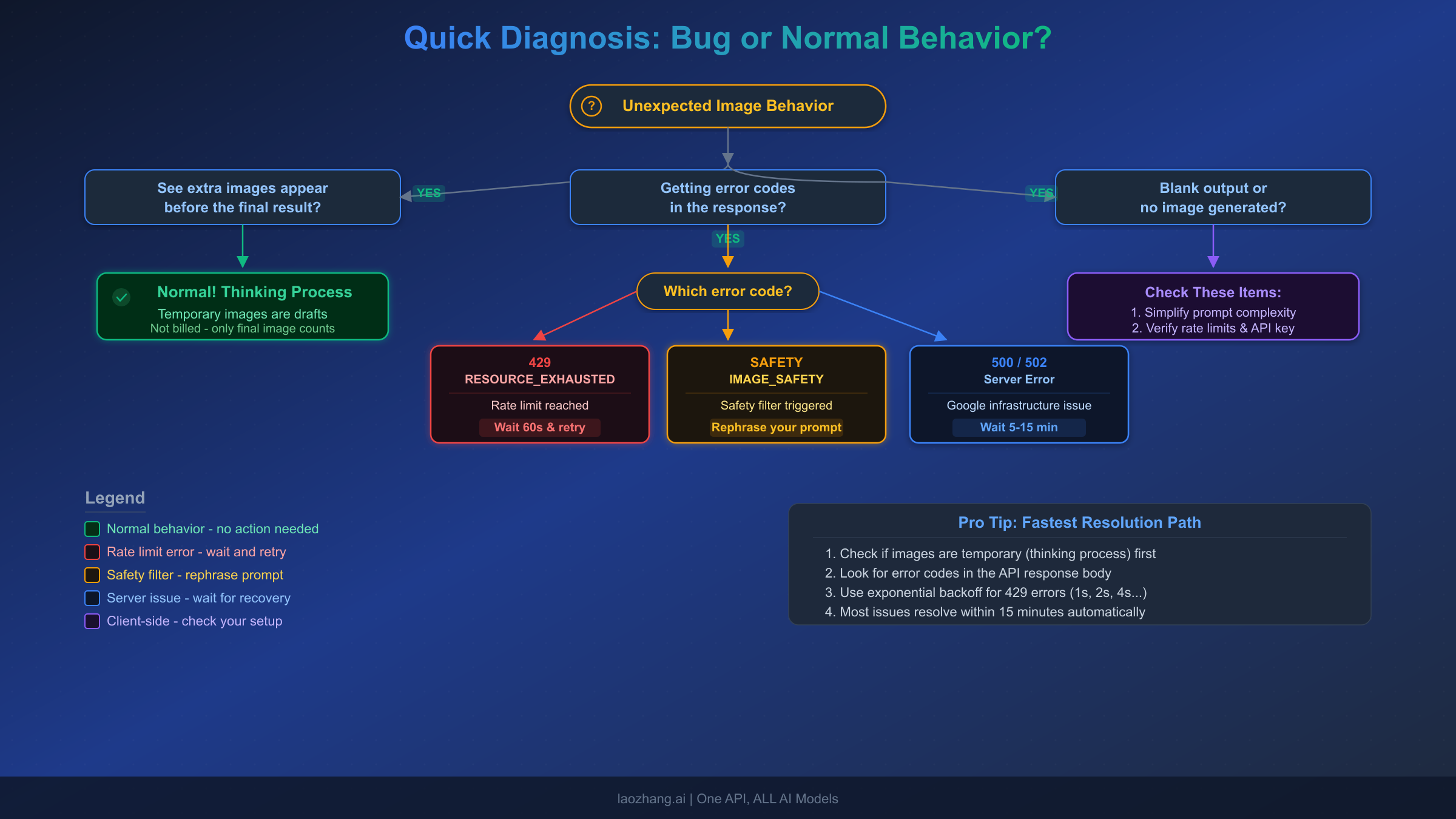
Before diving into fixes, you need to identify what kind of issue you are actually experiencing. The Nano Banana ecosystem has a mix of expected behaviors that look like bugs and genuine problems that require intervention. Getting the diagnosis right saves you from wasting time applying the wrong solution, which is one of the most common mistakes developers make when encountering unexpected behavior from the Gemini image generation API.
If you see extra images before your final result appears, you are almost certainly observing the thinking process in action. This is completely normal behavior for Nano Banana Pro (gemini-3-pro-image-preview) and does not indicate any problem with your API call, your prompt, or your account. The model is designed to generate intermediate compositions as part of its reasoning pipeline, and these images are filtered out before your final result is delivered in most SDK implementations.
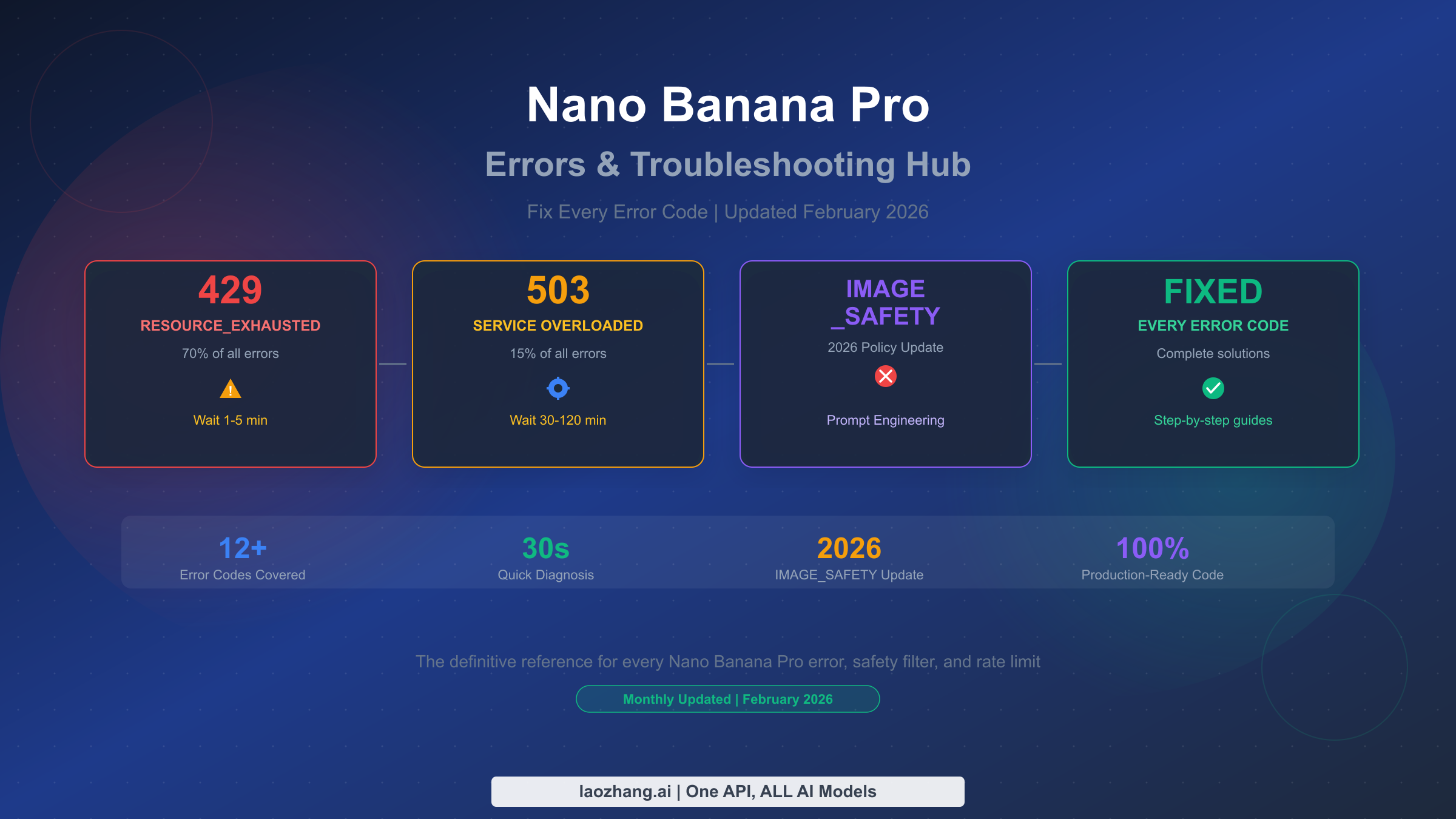
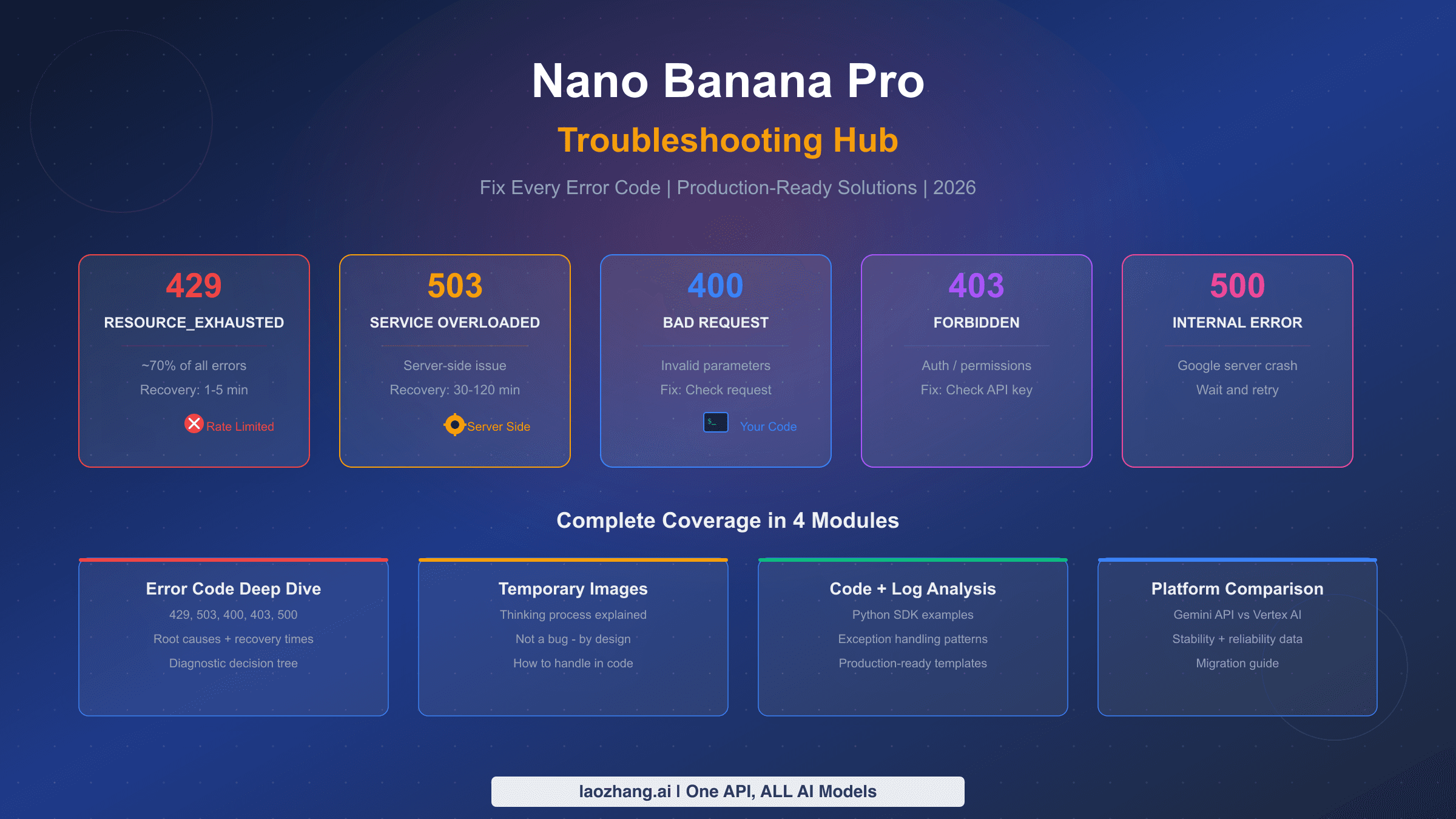
If you are receiving HTTP error codes like 429, 400, 403, 500, or 502, you are dealing with genuine API errors that have specific causes and solutions. The 429 RESOURCE_EXHAUSTED error alone accounts for approximately 70% of all Nano Banana API errors (Google AI Developers Forum, 2026), making it the most likely culprit if your integration is failing. Each error code maps to a distinct root cause, and the fix for a rate limit error is entirely different from the fix for a safety filter block.
If your API calls complete successfully but return no image, or if generated images have incorrect dimensions, you are dealing with a different category of issues: silent failures and rendering bugs. These are trickier to diagnose because the API does not always return clear error messages, and the root causes range from prompt complexity to temporary infrastructure limitations at Google's end.
The rest of this guide is organized by issue type. Jump to the section that matches your diagnosis, or read through for a comprehensive understanding of every Nano Banana issue currently known.
Why You See Temporary Images During Nano Banana API Calls
The temporary images that appear during Nano Banana Pro API calls represent one of the most misunderstood aspects of Google's image generation architecture. Rather than being a bug or an inefficiency, these interim images are a deliberate design choice that significantly improves output quality for complex prompts. Understanding how this system works will help you build better integrations and avoid incorrectly reporting normal behavior as a bug.
The Thinking Process Architecture
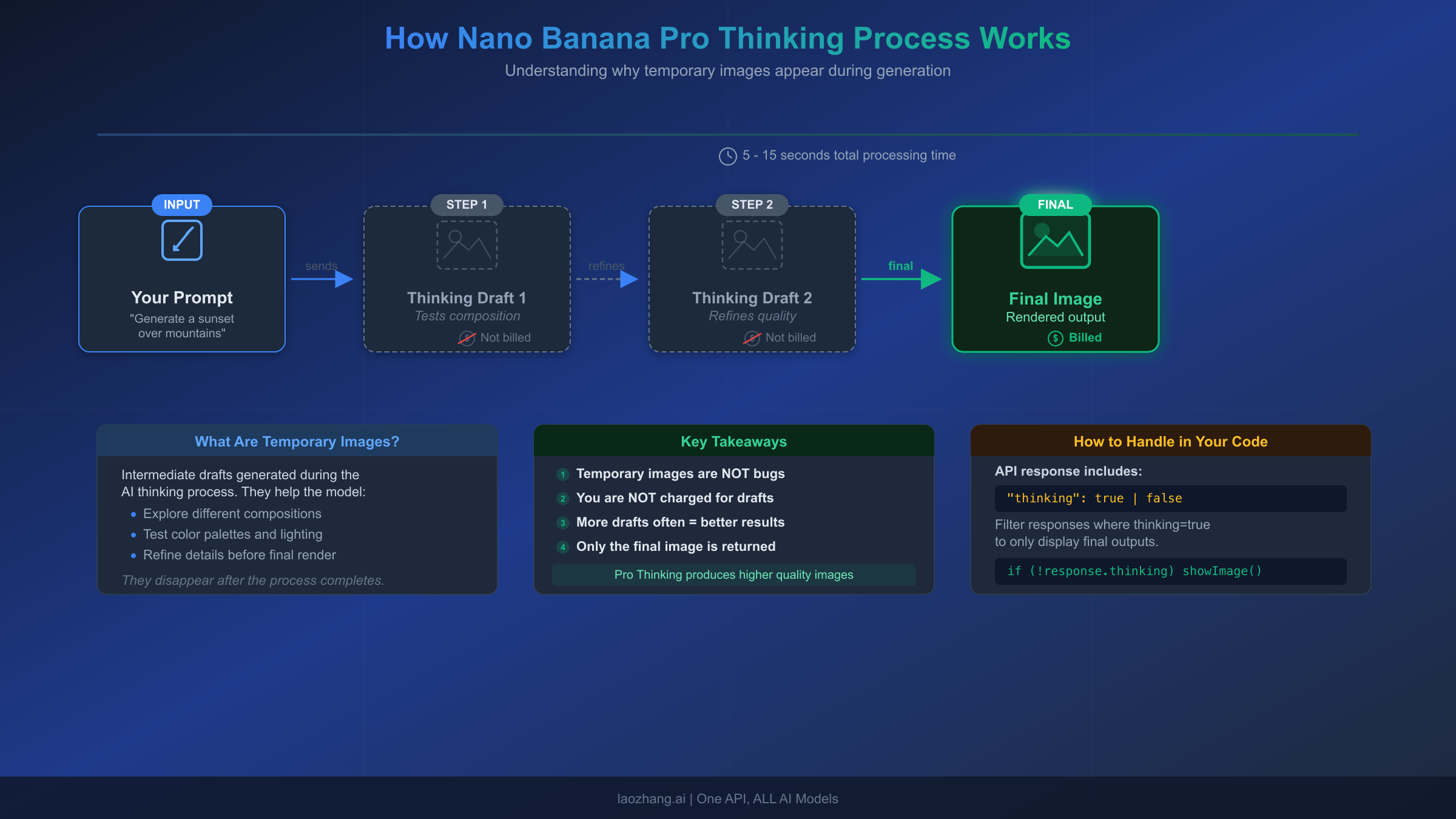
Nano Banana Pro (gemini-3-pro-image-preview) uses what Google calls a "thinking model" approach to image generation. Unlike simpler models that attempt to render your prompt in a single pass, the Gemini 3 Pro Image model uses a multi-step reasoning strategy. According to the official Google documentation (verified February 2026), the model generates up to 2 interim images to test composition and logic before producing the final rendered image. The last image in the thinking process is also the final output, meaning the model refines its approach with each step rather than discarding and starting over.
This thinking mode is enabled by default and cannot be disabled through the API. Google designed it this way because the quality improvement from multi-step reasoning is substantial, particularly for prompts that involve complex multi-element compositions, precise text rendering, or detailed spatial relationships. Simple prompts like "a red apple on a white background" may only require one reasoning step, while complex compositions like "a vintage bookshop interior with three people reading, warm afternoon light streaming through stained glass windows, and a cat sleeping on the counter" will typically use the full 2-step thinking process.
How to Handle Temporary Images in Your Code
The critical technical detail is that temporary images are marked with a thought: true flag in the API response, while the final image contains a thought_signature field that must be preserved for multi-turn conversations. Here is how to properly filter temporary images and extract only the final result in Python:
from google import genai

client = genai.Client()
response = client.models.generate_content(
    model="gemini-3-pro-image-preview",
    contents="A professional product photo of wireless headphones on marble"
)

# Filter out thought images, keep only final output
final_images = []
for part in response.candidates[0].content.parts:
    if hasattr(part, 'thought') and part.thought:
        continue  # Skip temporary thinking images
    if hasattr(part, 'inline_data') and part.inline_data:
        final_images.append(part.inline_data)
The thought_signature Field
One critical detail that many developers miss: the API response includes thought_signature fields on non-thought parts. If you are building a multi-turn image editing conversation, you must pass these signatures back in subsequent requests. Failing to cycle thought signatures back to the model can cause errors or degraded output quality in follow-up turns. The official documentation states that "not recycling thought signatures may result in response failures," making this a mandatory implementation detail rather than an optional optimization.
Performance Impact and Billing
The thinking process adds approximately 5 to 15 seconds of latency to each generation, depending on prompt complexity (Google AI for Developers documentation, 2026). Simple prompts on the lower end, complex multi-element prompts on the higher end. The crucial billing detail: temporary thought images are not charged. You only pay for the final rendered image. At current pricing (verified February 2026 from ai.google.dev/pricing), Nano Banana Pro costs $0.134 per image at 1K/2K resolution and $0.24 per image at 4K resolution. The interim thinking images do not count toward these costs, so the temporary images you see are not inflating your bill.
Fixing IMAGE_SAFETY and Content Filter Errors
The IMAGE_SAFETY error is one of the most frustrating Nano Banana issues because it blocks completely legitimate image generation requests. Google has publicly acknowledged that their safety filters "became way more cautious than we intended" (Google AI Developers Forum, 2025), causing false positives on harmless content like product photography, educational illustrations, and even simple requests like "a person sleeping" or "a dog playing in a park."
Understanding Why False Positives Happen
The safety filter operates at multiple levels in the generation pipeline. It evaluates both your input prompt and the generated output, and it can trigger at either stage. This means a prompt that passed the input filter might still produce an IMAGE_SAFETY error if the model's generated image triggers the output filter. The filter uses broad pattern matching that sometimes flags innocuous content because certain visual elements or combinations resemble categories the filter is trained to block. Google issued a policy update in January 2026 that adjusted IMAGE_SAFETY filtering and well-known IP restrictions, but false positives continue to occur.
Practical Solutions That Work
The most effective approach to resolving false positive IMAGE_SAFETY errors is prompt reframing. Rather than fighting the filter with your original phrasing, restructure your prompt to provide clearer context that helps the safety system understand the legitimate intent. Adding context words like "professional," "editorial," "educational," or "studio photography" can signal to the filter that the content is appropriate. For example, instead of "a woman in a dress," try "a professional fashion editorial photo of a model wearing a formal evening dress, studio lighting, fashion magazine style." The additional context gives the safety system more signal to work with and significantly reduces false positive rates.
If prompt reframing does not resolve the issue, try reducing prompt complexity by breaking multi-element compositions into simpler requests. The safety filter is more likely to flag complex prompts because the interaction between multiple elements creates more ambiguity for the pattern matching system. You can also try generating at a lower resolution first (1K instead of 4K), as the filter behavior can vary by resolution setting.
For persistent issues with specific content categories, consider using the Nano Banana model (gemini-2.5-flash-image) instead of Nano Banana Pro. The Flash Image model uses a different safety filter configuration that can sometimes handle prompts that the Pro model blocks, though with lower output quality. If you need consistent access to AI image generation for your application without safety filter interruptions, API proxy services like laozhang.ai offer alternative routing that can provide more stable access to these models.
Solving 429 RESOURCE_EXHAUSTED and Rate Limit Errors
The 429 RESOURCE_EXHAUSTED error is the most common Nano Banana API error by a significant margin, accounting for approximately 70% of all issues developers encounter. This error occurs when your API requests exceed the rate limits set for your account tier, and understanding the tier system is essential for managing it effectively.
How Rate Limits Work for Nano Banana
Rate limits for Nano Banana are measured across three dimensions: requests per minute (RPM), tokens per minute (TPM), and requests per day (RPD). Exceeding any single limit triggers the 429 error, even if you are within bounds on the other two. Rate limits are applied per project (not per API key), and daily quotas reset at midnight Pacific Time. For image generation models specifically, Google also tracks images per minute (IPM), which functions similarly to TPM but is specific to Nano Banana output.
The rate limits vary significantly by tier. Google's tier system (verified February 2026 from ai.google.dev/gemini-api/docs/rate-limits) has four levels: Free tier (available in eligible regions), Tier 1 (requires a billing account linked to your project), Tier 2 (requires $250+ cumulative spend and 30+ days since first payment), and Tier 3 (requires $1,000+ cumulative spend and 30+ days). Each tier upgrade substantially increases your rate limits, with preview models like Nano Banana Pro having stricter limits than stable models.
For a detailed breakdown of Gemini API rate limits by tier, including specific RPM and RPD values for each model, see our complete Gemini API rate limits reference. If you are specifically dealing with RESOURCE_EXHAUSTED errors on Nano Banana, our detailed guide on fixing Nano Banana RESOURCE_EXHAUSTED errors provides step-by-step resolution procedures.
Implementing Exponential Backoff
The correct way to handle 429 errors in production is exponential backoff with jitter. Here is a battle-tested implementation in Python that handles the most common failure patterns:
import time
import random

def generate_with_retry(client, prompt, max_retries=5):
    base_delay = 2
    for attempt in range(max_retries):
        try:
            response = client.models.generate_content(
                model="gemini-3-pro-image-preview",
                contents=prompt
            )
            return response
        except Exception as e:
            if "429" in str(e) or "RESOURCE_EXHAUSTED" in str(e):
                delay = base_delay * (2 ** attempt) + random.uniform(0, 1)
                print(f"Rate limited. Retrying in {delay:.1f}s (attempt {attempt + 1})")
                time.sleep(delay)
            else:
                raise  # Re-raise non-rate-limit errors
    raise Exception("Max retries exceeded for rate limit errors")
The jitter component (the random addition) is important because it prevents the "thundering herd" problem where multiple clients that were rate-limited simultaneously all retry at the exact same moment, causing another round of rate limiting. The typical resolution time for 429 errors is 1 to 5 minutes, so with 5 retries and exponential backoff, this implementation covers most transient rate limit situations.
Fixing Generation Failures, Blank Output, and Sizing Bugs
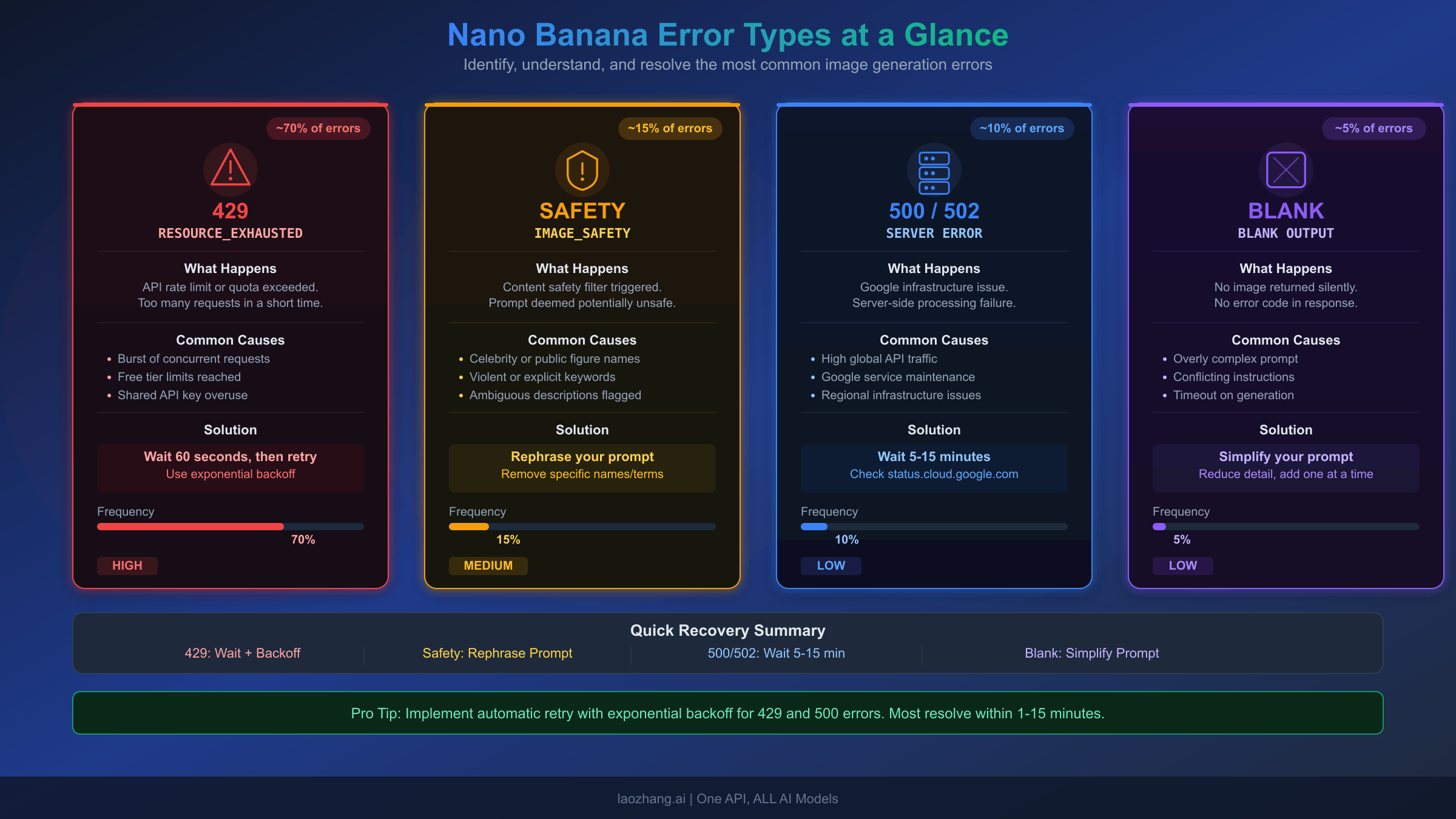
Beyond rate limits and safety filters, Nano Banana has several other failure modes that produce different symptoms. These are often harder to diagnose because the API may return a successful response without any image data, or return an image with incorrect dimensions. Understanding each failure type helps you build appropriate handling into your integration.
Blank Output and Silent Failures
When Nano Banana returns a successful HTTP response but the response contains no image data, you are experiencing a silent failure. This typically happens for one of three reasons. First, the prompt may be too complex for the model to resolve within its processing constraints, particularly for prompts with many specific elements that conflict with each other. Second, the model's internal safety check may have flagged the generated output after the initial prompt check passed, resulting in a successful API call but suppressed output. Third, temporary infrastructure capacity issues at Google can cause generation to silently fail, especially for 4K resolution requests which consume significantly more compute resources.
The diagnostic approach for blank output starts with simplifying your prompt. Remove specific details and try generating with a minimal version of your request. If the simplified prompt works, gradually add complexity back until you identify which element triggers the failure. For persistent blank outputs across all prompts, check the Google AI Developers Forum and the Gemini service status page for any reported outages. A January 2026 incident specifically affected 4K resolution generation due to TPU v7 capacity constraints combined with Gemini 3.0 training sessions consuming inference resources.
Image Sizing and Dimension Bugs
A persistent bug reported by multiple users on the Adobe Community forums involves Nano Banana generating images with incorrect dimensions. When users request modifications to an existing image (such as changing hair color or adjusting lighting), the output image frequently has different dimensions from the input. The image may be slightly stretched, compressed, larger, or shifted in spatial positioning compared to the original. This bug affects the Generative Fill and Generate tools in applications like Photoshop Beta that use Nano Banana as their backend.
Currently, there is no definitive fix for the sizing bug from Google's side. The most effective workaround is to specify exact output dimensions in your prompt and in the API parameters. When using the API directly, always include the image_size parameter with an explicit resolution value (1K, 2K, or 4K). For tool-based usage (Photoshop, Figma), try working with standard aspect ratios from the supported list: 1:1, 2:3, 3:2, 3:4, 4:3, 4:5, 5:4, 9:16, 16:9, or 21:9. Non-standard dimensions increase the likelihood of the sizing bug occurring.
500/502 Server Errors
Server errors from the Nano Banana API indicate problems on Google's infrastructure side rather than issues with your request. These errors typically resolve within 5 to 15 minutes without any action on your part. If server errors persist beyond 15 minutes, check the Gemini API status page and consider switching to the Nano Banana Flash model (gemini-2.5-flash-image) as a temporary fallback, as different models run on different infrastructure and may not be affected by the same outage. For applications that cannot tolerate downtime, if you are comparing Nano Banana Pro with alternatives like Flux 2, having a fallback model configured is a recommended production practice.
Nano Banana Pricing Explained: Are Temporary Images Charged?
One of the most common questions from developers encountering temporary images is whether they are being charged for these interim outputs. The definitive answer, verified directly from the Google AI for Developers pricing page on February 2026, is no: temporary thinking images are not billed. You only pay for the final rendered image.
Official Pricing Breakdown
Here is the complete pricing structure for both Nano Banana models, verified from ai.google.dev/pricing on February 9, 2026:
| Model | Input Cost | Output Cost (Text + Thinking) | Output Cost (Image) | Per Image (1K/2K) | Per Image (4K) |
|---|---|---|---|---|---|
| Nano Banana Pro (gemini-3-pro-image-preview) | $2.00/M tokens | $12.00/M tokens | $120.00/M tokens | $0.134 | $0.24 |
| Nano Banana (gemini-2.5-flash-image) | $0.30/M tokens | — | $30.00/M tokens | $0.039 | N/A (max 1K) |
The image output pricing works on a token basis. For Nano Banana Pro, a 1K or 2K image consumes 1,120 tokens at the $120/M rate, which equals $0.134 per image. A 4K image consumes 2,000 tokens, equaling $0.24 per image. For Nano Banana Flash, the maximum resolution is 1K (1024x1024), consuming 1,290 tokens at the $30/M rate, equaling $0.039 per image. Image input is priced at 560 tokens per image (approximately $0.0011 per input image for Pro).
Neither model currently offers a free tier for image generation. Both require a paid billing account. However, text-only interactions with these models may still fall under the free tier pricing of their parent models (Gemini 3 Pro and Gemini 2.5 Flash respectively).
Cost Optimization Strategies
For high-volume image generation workloads, several strategies can reduce costs significantly. Using Nano Banana Flash ($0.039/image) instead of Pro ($0.134/image) for tasks that do not require 2K/4K resolution or complex reasoning saves about 71% per image. For applications that need Pro-quality output but want lower costs, API proxy services like laozhang.ai offer Nano Banana Pro access at approximately $0.05 per image (about 63% savings compared to direct API pricing), making high-volume production use more economical.
For detailed pricing comparisons including speed benchmarks, see our Gemini 3 Pro Image API pricing and speed benchmarks and Gemini API free tier guide.
Building Robust Error Handling for Nano Banana API
Production applications that depend on Nano Banana for image generation need comprehensive error handling that accounts for every failure mode discussed in this guide. The following patterns, based on real-world production experience, provide a foundation for building reliable integrations that degrade gracefully when issues arise.
Comprehensive Error Handler
Here is a production-ready error handling pattern that covers all major Nano Banana failure modes:
import time
import random
from enum import Enum

class NanaBananaError(Enum):
    RATE_LIMIT = "429"
    SAFETY = "IMAGE_SAFETY"
    SERVER = "500"
    BAD_GATEWAY = "502"
    BLANK_OUTPUT = "BLANK"
    UNKNOWN = "UNKNOWN"

def classify_error(error):
    error_str = str(error)
    if "429" in error_str or "RESOURCE_EXHAUSTED" in error_str:
        return NanaBananaError.RATE_LIMIT
    elif "IMAGE_SAFETY" in error_str or "safety" in error_str.lower():
        return NanaBananaError.SAFETY
    elif "500" in error_str:
        return NanaBananaError.SERVER
    elif "502" in error_str:
        return NanaBananaError.BAD_GATEWAY
    return NanaBananaError.UNKNOWN

def generate_image(client, prompt, model="gemini-3-pro-image-preview",
                   max_retries=5, fallback_model="gemini-2.5-flash-image"):
    for attempt in range(max_retries):
        try:
            response = client.models.generate_content(
                model=model, contents=prompt
            )
            # Check for blank output
            images = [p for p in response.candidates[0].content.parts
                     if hasattr(p, 'inline_data') and p.inline_data
                     and not getattr(p, 'thought', False)]
            if not images:
                if attempt < max_retries - 1:
                    time.sleep(2)
                    continue
                raise Exception("Blank output after all retries")
            return images
        except Exception as e:
            error_type = classify_error(e)
            if error_type == NanaBananaError.RATE_LIMIT:
                delay = 2 * (2 ** attempt) + random.uniform(0, 1)
                time.sleep(delay)
            elif error_type == NanaBananaError.SAFETY:
                raise  # Cannot retry safety errors with same prompt
            elif error_type in (NanaBananaError.SERVER, NanaBananaError.BAD_GATEWAY):
                if attempt == max_retries - 2:
                    model = fallback_model  # Switch to fallback on last retry
                time.sleep(5 * (attempt + 1))
            else:
                raise
    raise Exception(f"Failed after {max_retries} attempts")
This implementation handles the full spectrum of errors: exponential backoff for rate limits, immediate failure for safety errors (since retrying the same prompt will produce the same result), progressive delays for server errors with automatic fallback to the Flash model, and blank output detection with retry logic. The fallback model switch on the penultimate retry provides a last-resort path that keeps your application generating images even when Pro is experiencing infrastructure issues.
Monitoring and Alerting Recommendations
For production deployments, track these metrics: error rate by type (429 vs SAFETY vs 500), average generation latency (including thinking time), blank output frequency, and cost per successful generation. Set alerts when the 429 error rate exceeds 10% of total requests (indicating you are approaching your tier limits) or when server error rates exceed 5% (indicating a potential Google-side outage). Google recommends checking your effective rate limits in the AI Studio usage dashboard, which shows real-time quota consumption and remaining capacity.
Frequently Asked Questions
Why does Nano Banana generate 2 extra images before showing my final result?
These are "thought images" generated by the thinking process of the Gemini 3 Pro Image model. The model uses multi-step reasoning to test composition and refine quality before producing the final output. This is expected behavior, not a bug, and the temporary images are not billed.
Are temporary/thinking images charged on my bill?
No. According to the official Google AI pricing page (verified February 2026), only the final rendered image is billed. Thought images generated during the reasoning process are not charged. For Nano Banana Pro, the cost is $0.134 per 1K/2K image and $0.24 per 4K image.
Can I disable the thinking process to get faster results?
No. The thinking mode is enabled by default and cannot be disabled through the API. Google designed it this way because the quality improvement justifies the 5-15 second latency increase. If you need faster generation without thinking, use the Nano Banana Flash model (gemini-2.5-flash-image), which does not use the same multi-step reasoning.
What causes the IMAGE_SAFETY error on completely safe prompts?
Google's safety filters use broad pattern matching that can produce false positives. Google has acknowledged that the filters "became way more cautious than intended." Try reframing your prompt with professional context words, reducing complexity, or using a lower resolution.
Why do my generated images have different dimensions from the input?
This is a known sizing bug affecting Nano Banana in applications like Photoshop Beta and Figma. The workaround is to explicitly specify dimensions using supported aspect ratios (1:1, 2:3, 3:2, 3:4, 4:3, 4:5, 5:4, 9:16, 16:9, 21:9) and resolution parameters (1K, 2K, 4K) in your API calls.