Nano Banana Pro (Gemini 3 Pro Image) delivers stunning AI-generated images, but its API can throw a range of confusing errors that stop your production pipeline cold. Approximately 70% of all Nano Banana Pro API failures are 429 RESOURCE_EXHAUSTED errors that resolve within 1-5 minutes, while server-side 503 errors can take 30-120 minutes to clear — and knowing which type you are dealing with determines whether you should fix your code or simply wait. This troubleshooting hub consolidates everything developers need to diagnose, fix, and prevent every Nano Banana Pro error, including the commonly misunderstood temporary image mechanism that many developers mistake for a bug.
TL;DR
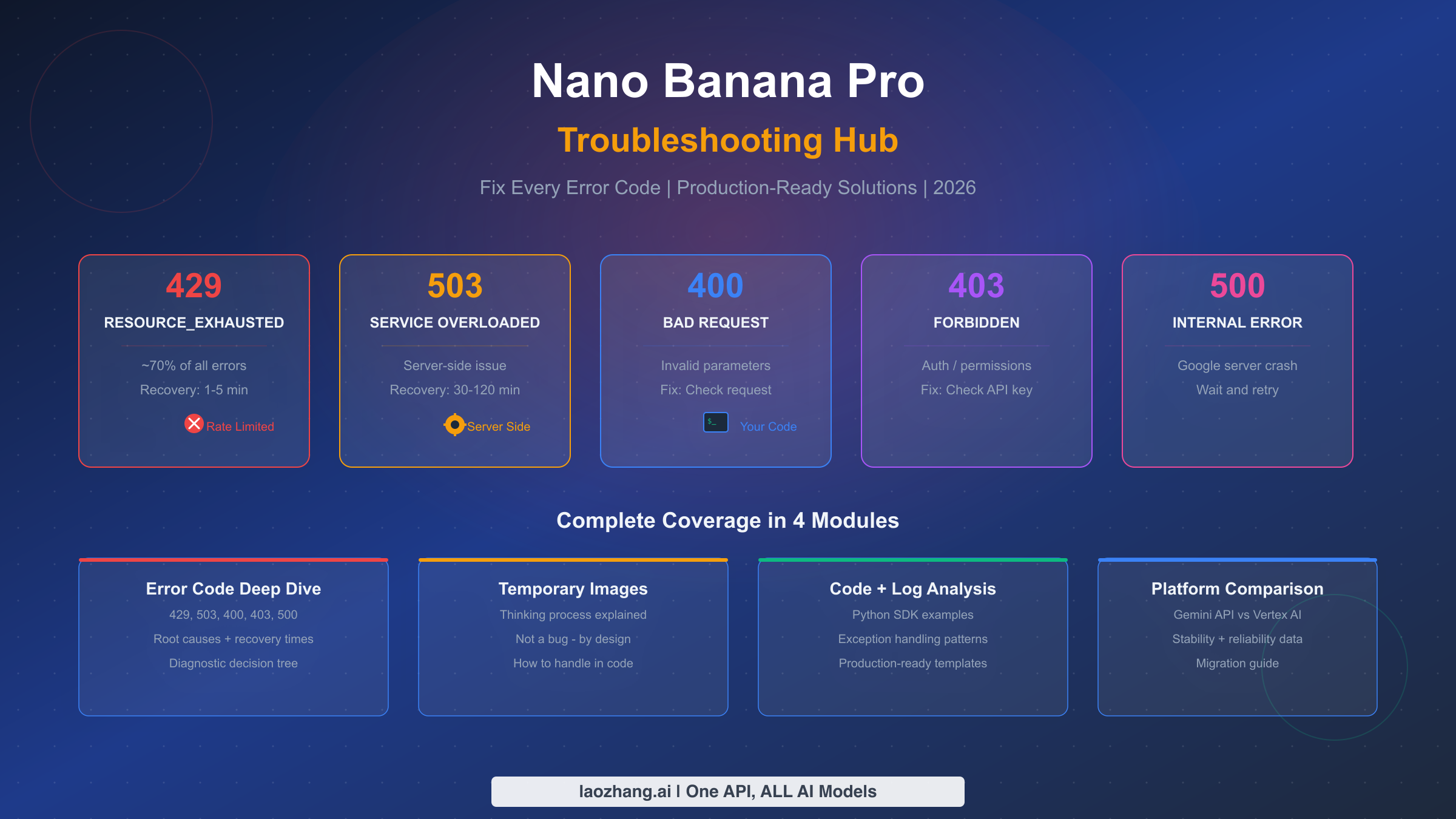
Nano Banana Pro errors fall into five categories, each requiring a different response strategy. Rate limit errors (429) account for roughly 70% of all API failures and typically clear within 1-5 minutes — implement exponential backoff and you will handle most of them automatically. Server overload errors (503) are not your fault; they are caused by insufficient computing resources on Google's backend and require patience, with recovery times ranging from 30 minutes to 2 hours for Gemini 3 Pro. Client errors (400) mean your request format is wrong, and you can fix them immediately by checking your model ID, resolution parameter, and prompt format. If you see multiple images appearing in your API response, those are not errors either — they are the model's thinking process drafts, and only the final image is billed. For the most reliable experience, community consensus strongly recommends using the Gemini API over Vertex AI, where 429 errors are significantly more frequent.
Understanding Nano Banana Pro Error Codes
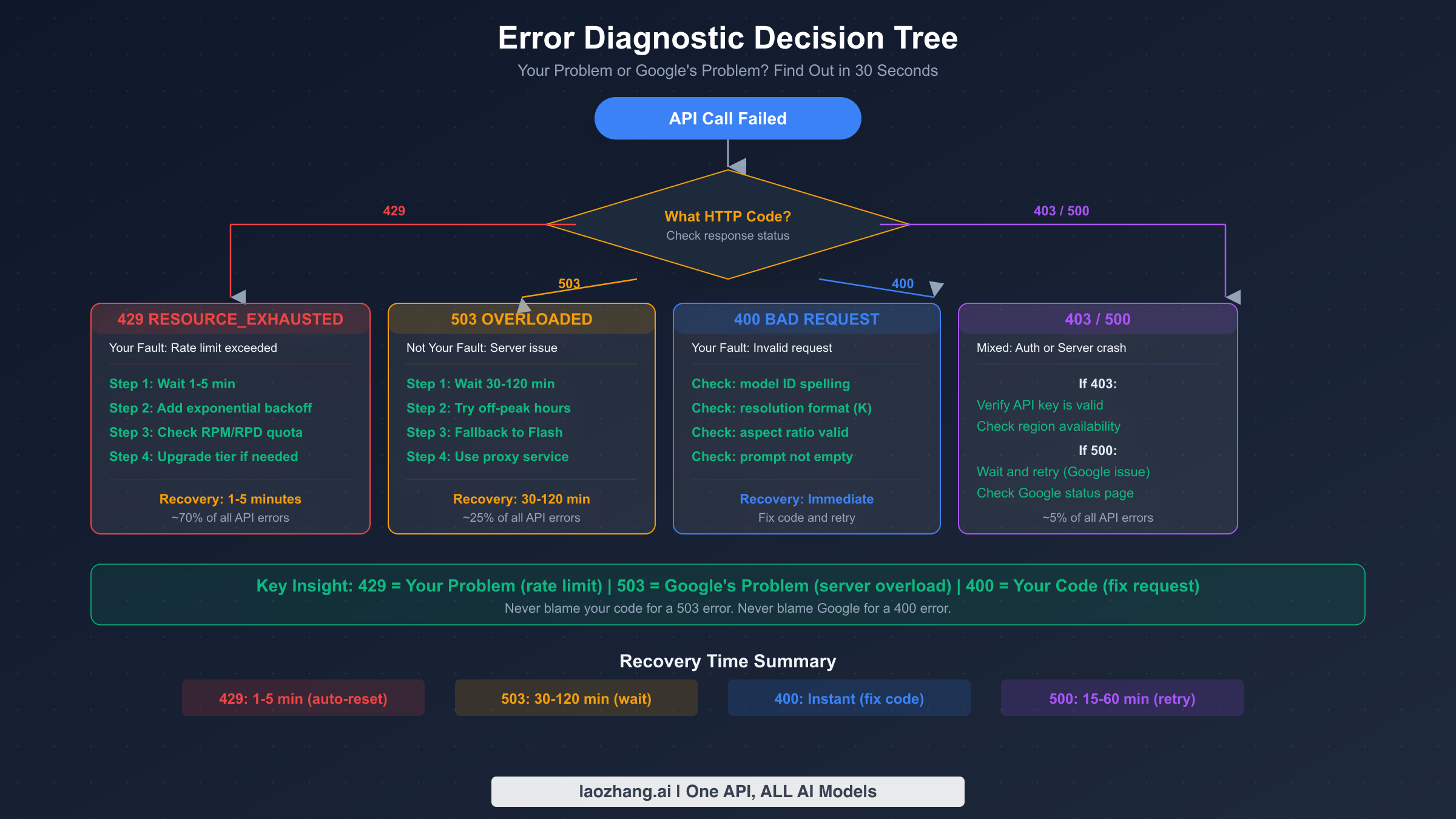
When your Nano Banana Pro API call fails, the HTTP status code in the response tells you exactly where the problem lies. The critical first step is distinguishing between errors you can fix (client-side) and errors you cannot fix (server-side). This distinction saves developers hours of unnecessary debugging — you should never spend time refactoring your code when the real problem is Google's server capacity, and you should never wait passively when the fix is a simple parameter correction in your request.
429 RESOURCE_EXHAUSTED is by far the most common error, representing approximately 70% of all Nano Banana Pro API failures according to community reports analyzed across the Google AI Developer Forum and multiple developer blogs. This error means you have exceeded one of several rate limit dimensions: requests per minute (RPM), requests per day (RPD), or tokens per minute (TPM). The key detail many developers miss is that Google enforces these limits simultaneously across all dimensions — exceeding any single metric triggers the 429 error. Recovery is typically automatic within 1-5 minutes as the quota pool resets, but persistent 429 errors may indicate you need to upgrade your API tier. If you are currently on the free tier, the daily image generation limit is quite restrictive, and upgrading to a paid tier substantially increases your quota. You can check your current rate limits and usage directly in Google AI Studio. For a deeper dive into rate limit mechanics, see our complete rate limits guide.
503 SERVICE OVERLOADED is fundamentally different from a 429 error, and understanding this distinction is crucial. A 503 error indicates that Google's backend servers lack sufficient computing resources to handle your request, regardless of your individual usage level. This is a systemic issue, not something caused by your code or your account. Recovery times for Nano Banana Pro 503 errors are significantly longer than for other models: expect 30-120 minutes for Gemini 3 Pro compared to just 5-15 minutes for Gemini 2.5 Flash. During peak hours — which based on community reports correspond to approximately 00:00-02:00, 09:00-11:00, and 20:00-23:00 Beijing Time — failure rates from 503 errors can reach up to 45% of all API calls according to production monitoring data shared by developers. The practical response to a 503 is straightforward: implement a model fallback strategy that automatically switches to Gemini 2.5 Flash (the standard Nano Banana model) when the Pro model is unavailable, and schedule batch processing for off-peak hours when possible.
400 BAD REQUEST errors are always caused by something wrong with your API request, and they can be fixed immediately. The most common triggers include using an incorrect model ID (the correct identifier for Nano Banana Pro is gemini-3-pro-image-preview as of February 2026, per Google's official pricing page), specifying resolution with a lowercase 'k' instead of uppercase 'K', providing an unsupported aspect ratio, or sending an empty or malformed prompt. One subtle gotcha: if you attempt to use a model ID from an older API version, you will get a 400 error rather than a helpful deprecation warning.
403 FORBIDDEN errors indicate authentication or authorization failures. The most common causes are an invalid or expired API key, attempting to access the model from an unsupported region, or using a Google Workspace account that has administrator-imposed restrictions on AI features. If you recently created your API key, allow a few minutes for propagation before concluding it is broken.
500 INTERNAL SERVER ERROR represents a crash or unhandled exception on Google's servers. Unlike 503 errors, which indicate known capacity constraints, 500 errors suggest something genuinely unexpected went wrong. These are less common (roughly 5% of all errors) and typically resolve within 15-60 minutes. Multiple users on the Google AI Developer Forum reported persistent 500 errors lasting several days in December 2025, which Google's support team acknowledged and eventually resolved through a backend fix. If you encounter repeated 500 errors, check the Google Cloud status page and the developer forum to see if others are experiencing the same issue — it is almost certainly not your code.
The Temporary Image Mechanism — Why You See Extra Images
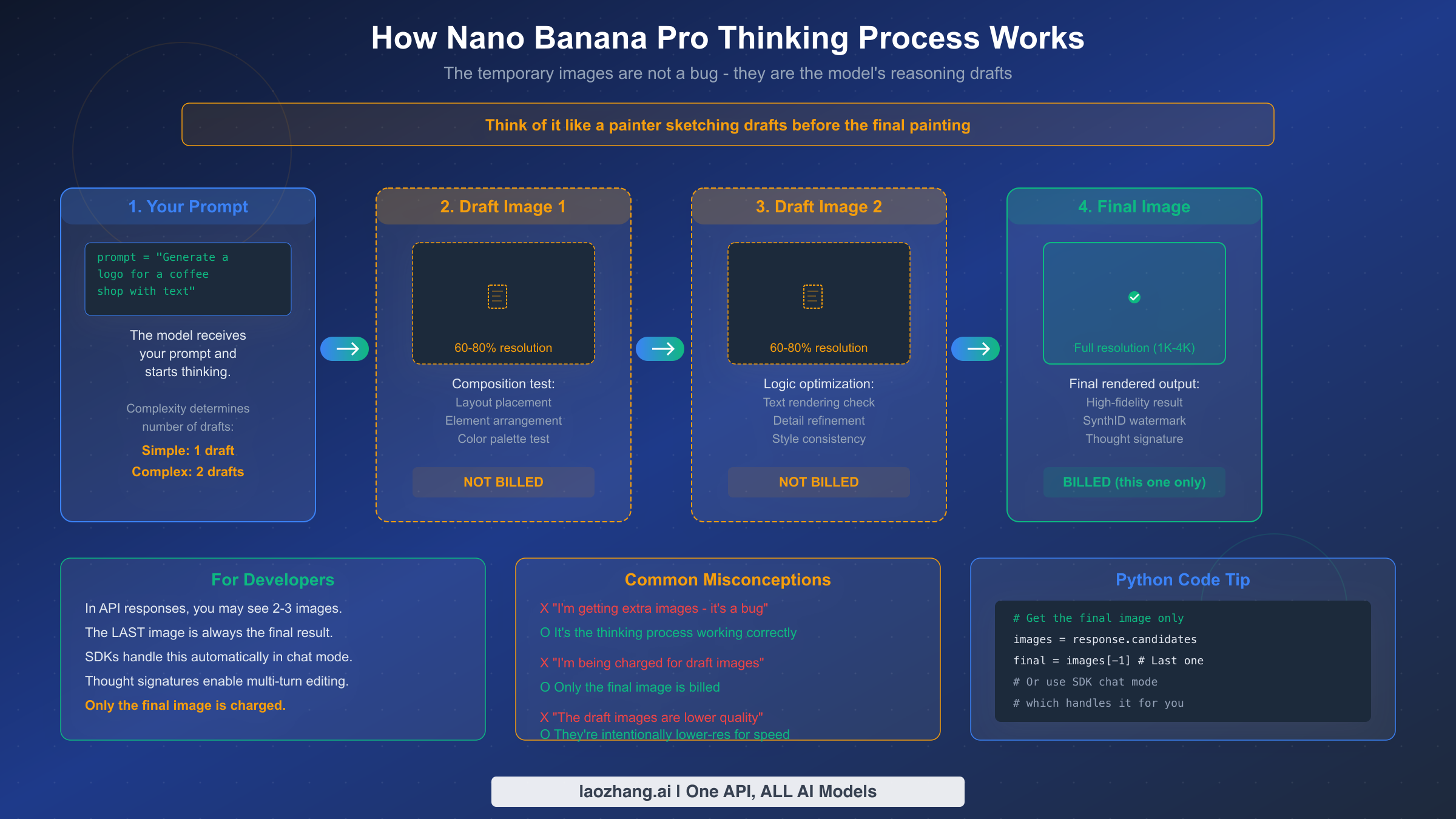
One of the most frequently reported "bugs" with Nano Banana Pro is actually a feature: when you make an API call, the response may contain two or three images instead of the single image you requested. Developers who encounter this behavior for the first time often assume something went wrong — they file bug reports, add filtering logic to discard the "extra" images, or worry about being charged multiple times. The reality is much simpler, and understanding this mechanism will save you significant debugging time and help you build better image generation workflows.
Nano Banana Pro uses a built-in reasoning process called "Thinking mode" that fundamentally changes how the model generates images compared to simpler models like DALL-E or Stable Diffusion. Instead of producing a single output in one pass, the model generates up to two interim "draft" images to test composition and logic before rendering the final result. Think of it like a painter creating preliminary sketches — the drafts help the model evaluate layout placement, text rendering accuracy, element arrangement, and style consistency before committing to the full-resolution final image. The official Google documentation at ai.google.dev confirms this behavior: "The model will generate up to two temporary images to test composition and logic. The last image in the thinking process is also the final rendered image."
The number of draft images depends on prompt complexity. Simple prompts — like "a red apple on a white background" — may only require one draft or even skip the drafting phase entirely. Complex multi-element compositions, especially those involving text rendering, logos, or detailed layouts, typically go through the full two-draft process. This is why complex prompts take longer to generate: the model is genuinely reasoning through the composition rather than just running a single forward pass.
A critical billing detail that every developer should know: temporary draft images are not separately charged. Only the final rendered image incurs billing at the standard rate of approximately $0.134 per 1K/2K image or $0.24 per 4K image (ai.google.dev/pricing, February 2026). The draft images use 60-80% of the final image resolution to optimize processing speed, which is why they may appear slightly lower quality if you inspect them directly.
For developers using the official Google Gen AI SDKs in chat mode, thought signatures (encrypted representations of the model's reasoning context) are handled automatically, enabling seamless multi-turn image editing. If you are processing raw API responses, however, you need to explicitly extract the last image from the response as your final result. Here is how to correctly handle this in practice — the last image in the response array is always the final, billed output, and any preceding images are drafts from the thinking process that you can safely discard or log for debugging purposes.
Production-Ready Code Examples and Log Analysis
Building robust error handling for Nano Banana Pro requires more than simple try-catch blocks. Production systems need structured logging, intelligent retry logic, response parsing that correctly handles the thinking process, and graceful degradation when the service is unavailable. The following Python examples provide a complete foundation that you can adapt for your specific use case.
The first pattern every developer should implement is a structured API caller with exponential backoff, proper timeout configuration, and comprehensive logging. This single class handles the most common failure modes — rate limits, server overloads, timeouts, and malformed responses — while providing clear log output that makes debugging straightforward even in production environments.
pythonimport google.generativeai as genai
import time
import logging
from typing import Optional

logging.basicConfig(level=logging.INFO)
logger = logging.getLogger("nano_banana_pro")

class NanaBananaProClient:
    """Production-ready Nano Banana Pro client with retry and fallback."""

    def __init__(self, api_key: str, max_retries: int = 3):
        genai.configure(api_key=api_key)
        self.model = genai.GenerativeModel("gemini-3-pro-image-preview")
        self.fallback_model = genai.GenerativeModel("gemini-2.5-flash-image")
        self.max_retries = max_retries

    def generate_image(self, prompt: str, resolution: str = "2K") -> Optional[bytes]:
        """Generate image with automatic retry and fallback."""
        for attempt in range(self.max_retries):
            try:
                logger.info(f"Attempt {attempt + 1}/{self.max_retries}: {prompt[:50]}...")
                response = self.model.generate_content(
                    prompt,
                    generation_config={"response_modalities": ["IMAGE", "TEXT"]},
                    request_options={"timeout": 300}
                )
                return self._extract_final_image(response)

            except Exception as e:
                error_msg = str(e)
                if "429" in error_msg or "RESOURCE_EXHAUSTED" in error_msg:
                    wait = min(2 ** attempt * 5, 60)
                    logger.warning(f"Rate limited. Waiting {wait}s...")
                    time.sleep(wait)
                elif "503" in error_msg or "overloaded" in error_msg.lower():
                    logger.warning("Server overloaded. Trying fallback model...")
                    return self._fallback_generate(prompt)
                elif "400" in error_msg:
                    logger.error(f"Bad request - fix your code: {error_msg}")
                    return None  # Don't retry client errors
                else:
                    logger.error(f"Unexpected error: {error_msg}")
                    if attempt == self.max_retries - 1:
                        return self._fallback_generate(prompt)
                    time.sleep(2 ** attempt)
        return None

    def _extract_final_image(self, response) -> Optional[bytes]:
        """Extract the final image, skipping thinking process drafts."""
        images = []
        for part in response.candidates[0].content.parts:
            if hasattr(part, "inline_data") and part.inline_data.mime_type.startswith("image/"):
                images.append(part.inline_data.data)
        if images:
            # The LAST image is always the final result
            logger.info(f"Received {len(images)} image(s). Using final image.")
            return images[-1]
        logger.warning("No image data in response")
        return None

    def _fallback_generate(self, prompt: str) -> Optional[bytes]:
        """Fall back to Nano Banana (Flash) when Pro is unavailable."""
        try:
            logger.info("Using fallback: gemini-2.5-flash-image")
            response = self.fallback_model.generate_content(
                prompt,
                generation_config={"response_modalities": ["IMAGE", "TEXT"]},
                request_options={"timeout": 120}
            )
            return self._extract_final_image(response)
        except Exception as e:
            logger.error(f"Fallback also failed: {e}")
            return None
The second critical pattern is log analysis. When debugging Nano Banana Pro issues in production, your logs need to capture specific data points that help you distinguish between different error types and identify patterns. The structured logging approach above outputs entries that include the attempt number, error type, wait time, and whether the fallback model was used — all of which are essential for diagnosing recurring issues. Pay particular attention to the frequency of 429 versus 503 errors: if you are seeing mostly 429 errors, you likely need to implement better rate limiting on your side or upgrade your tier. If you are seeing mostly 503 errors, the issue is on Google's side and you should consider scheduling your workload for off-peak hours. For more context on how rate limits work across different tiers, our resource exhausted error deep dive covers the specifics in detail.
The _extract_final_image method in the code above is particularly important because it correctly handles the thinking process mechanism. By always taking images[-1] (the last image in the response), you automatically get the final, highest-quality result regardless of how many draft images the model generated during its thinking process. This approach works with both simple prompts (one image) and complex prompts (two drafts plus the final image).
Reading production logs to diagnose issues is a skill that separates experienced developers from beginners when working with Nano Banana Pro. Here is what real production log output looks like and how to interpret each scenario:
# Scenario 1: Successful generation with thinking process
INFO  Attempt 1/3: "A futuristic city skyline with neon signs..."
INFO  Received 3 image(s). Using final image.
→ Interpretation: Model generated 2 drafts + 1 final. Normal behavior.

# Scenario 2: Rate limit with successful retry
INFO  Attempt 1/3: "Product photo of a leather bag..."
WARNING  Rate limited. Waiting 5s...
INFO  Attempt 2/3: "Product photo of a leather bag..."
INFO  Received 1 image(s). Using final image.
→ Interpretation: Hit RPM limit, recovered after backoff. Consider spacing requests.

# Scenario 3: Server overload triggering fallback
INFO  Attempt 1/3: "Detailed architectural blueprint..."
WARNING  Server overloaded. Trying fallback model...
INFO  Using fallback: gemini-2.5-flash-image
INFO  Received 1 image(s). Using final image.
→ Interpretation: Pro model unavailable, Flash model succeeded. Quality may differ.

# Scenario 4: Complete failure
INFO  Attempt 1/3: "Complex multi-element poster..."
ERROR  Unexpected error: 500 Internal Server Error
INFO  Attempt 2/3: "Complex multi-element poster..."
ERROR  Unexpected error: 500 Internal Server Error
INFO  Attempt 3/3: "Complex multi-element poster..."
ERROR  Unexpected error: 500 Internal Server Error
WARNING  Server overloaded. Trying fallback model...
ERROR  Fallback also failed: 500 Internal Server Error
→ Interpretation: Systemic outage. Check Google status page, wait 15-60 min.
The pattern you should look for when analyzing your logs over time is the ratio of 429 to 503 errors. If 429 errors dominate (>80% of failures), your application is sending requests too aggressively — implement request queuing with a rate limiter that respects your tier's RPM limit. If 503 errors dominate, Google's infrastructure is the bottleneck, and your best options are scheduling batch jobs during off-peak hours or maintaining a fallback to the Flash model. A healthy production system should see less than 5% total failure rate during off-peak hours and less than 20% during peak hours — anything significantly above these thresholds warrants investigation.
For advanced monitoring, consider adding a simple metrics aggregation layer that tracks hourly success rates, average latency, and error type distribution. Even a basic implementation using Python's collections.Counter and writing hourly summaries to a log file can provide the visibility you need to optimize your API usage patterns over time.
Timeout and Retry Configuration Guide
Nano Banana Pro image generation is inherently slow compared to text generation — a single image can take 30-170 seconds depending on resolution and prompt complexity. Default HTTP timeout values in most programming libraries are far too aggressive for this workload, and misconfigured timeouts are one of the most common sources of false failures. Getting the timeout configuration right is a straightforward but critical optimization that can dramatically improve your success rate without any changes to the API server.
The recommended timeout values vary by resolution and are based on observed generation times plus safety margins. For 1K images (the default resolution), set your read timeout to 300 seconds. The actual generation typically takes 30-90 seconds, but network variability and server queue times can extend this significantly during peak hours. For 2K images, maintain the 300-second timeout — generation takes 50-120 seconds, and the extra buffer accounts for the increased computational load. For 4K images, extend the timeout to 600 seconds, as generation can take 100-170 seconds even under ideal conditions, and you need substantial buffer for peak-hour delays.
A subtle but important technical consideration is HTTP protocol version. Some developers have reported that HTTP/2 connections can cause premature disconnections during long-running Nano Banana Pro requests because all HTTP/2 streams share a single TCP connection — a dropped packet stalls all streams simultaneously. If you are experiencing unexplained timeouts despite setting generous timeout values, try explicitly forcing HTTP/1.1 in your HTTP client. In Python's httpx library, this means setting http2=False; in the requests library, HTTP/1.1 is the default. The distinction between connection timeout and read timeout matters here: set a short connection timeout (10 seconds) for TCP setup, and a long read timeout (300-600 seconds) for data reception during the image generation window. In Python's requests library, use timeout=(10, 600) as a tuple to set these separately.
Here is a complete timeout configuration example that handles all of the nuances described above. This configuration separates connection and read timeouts, forces HTTP/1.1, and includes the recommended values for each resolution tier:
pythonimport google.generativeai as genai
import random

# Timeout configuration by resolution
TIMEOUT_CONFIG = {
    "1K": {"connect": 10, "read": 300},   # 30-90s typical generation
    "2K": {"connect": 10, "read": 300},   # 50-120s typical generation
    "4K": {"connect": 10, "read": 600},   # 100-170s typical generation
}

def generate_with_proper_timeout(prompt: str, resolution: str = "2K"):
    """Generate image with resolution-appropriate timeout."""
    config = TIMEOUT_CONFIG.get(resolution, TIMEOUT_CONFIG["2K"])
    model = genai.GenerativeModel("gemini-3-pro-image-preview")

    for attempt in range(3):
        try:
            response = model.generate_content(
                prompt,
                generation_config={"response_modalities": ["IMAGE", "TEXT"]},
                request_options={"timeout": config["read"]}
            )
            return response
        except Exception as e:
            if "429" in str(e):
                # Exponential backoff with jitter
                wait = min(2 ** attempt * 5, 60) + random.uniform(0, 2)
                time.sleep(wait)
            elif "timeout" in str(e).lower():
                # Timeout: increase buffer and retry
                config["read"] = int(config["read"] * 1.5)
                continue
            else:
                raise
    return None
| Resolution | Connect Timeout | Read Timeout | Typical Generation Time | Safety Margin |
|---|---|---|---|---|
| 1K (default) | 10s | 300s | 30-90s | 3.3-10x |
| 2K | 10s | 300s | 50-120s | 2.5-6x |
| 4K | 10s | 600s | 100-170s | 3.5-6x |
For retry strategy, exponential backoff with jitter is the standard approach. Start with a 5-second delay, double it on each retry, and add random jitter of 0-2 seconds to prevent thundering herd effects when multiple clients retry simultaneously. Cap the maximum delay at 60 seconds and the maximum retry count at 3-5 attempts. If all retries fail, trigger the fallback to the Nano Banana (Flash) model rather than giving up entirely — Flash generates faster and has shorter recovery windows for server-side errors.
One common mistake developers make is implementing retry logic that treats all errors the same way. The code examples throughout this article differentiate between retryable errors (429, 503, timeout) and non-retryable errors (400, 403). Retrying a 400 Bad Request wastes time and API quota because the same malformed request will always fail. Similarly, immediately retrying a 503 error within seconds is unlikely to succeed because server overloads take minutes to hours to clear — your retry logic should recognize 503 errors and either switch to the fallback model immediately or implement a much longer wait (5-10 minutes minimum) before retrying the Pro model.
Gemini API vs Vertex AI — Platform Comparison
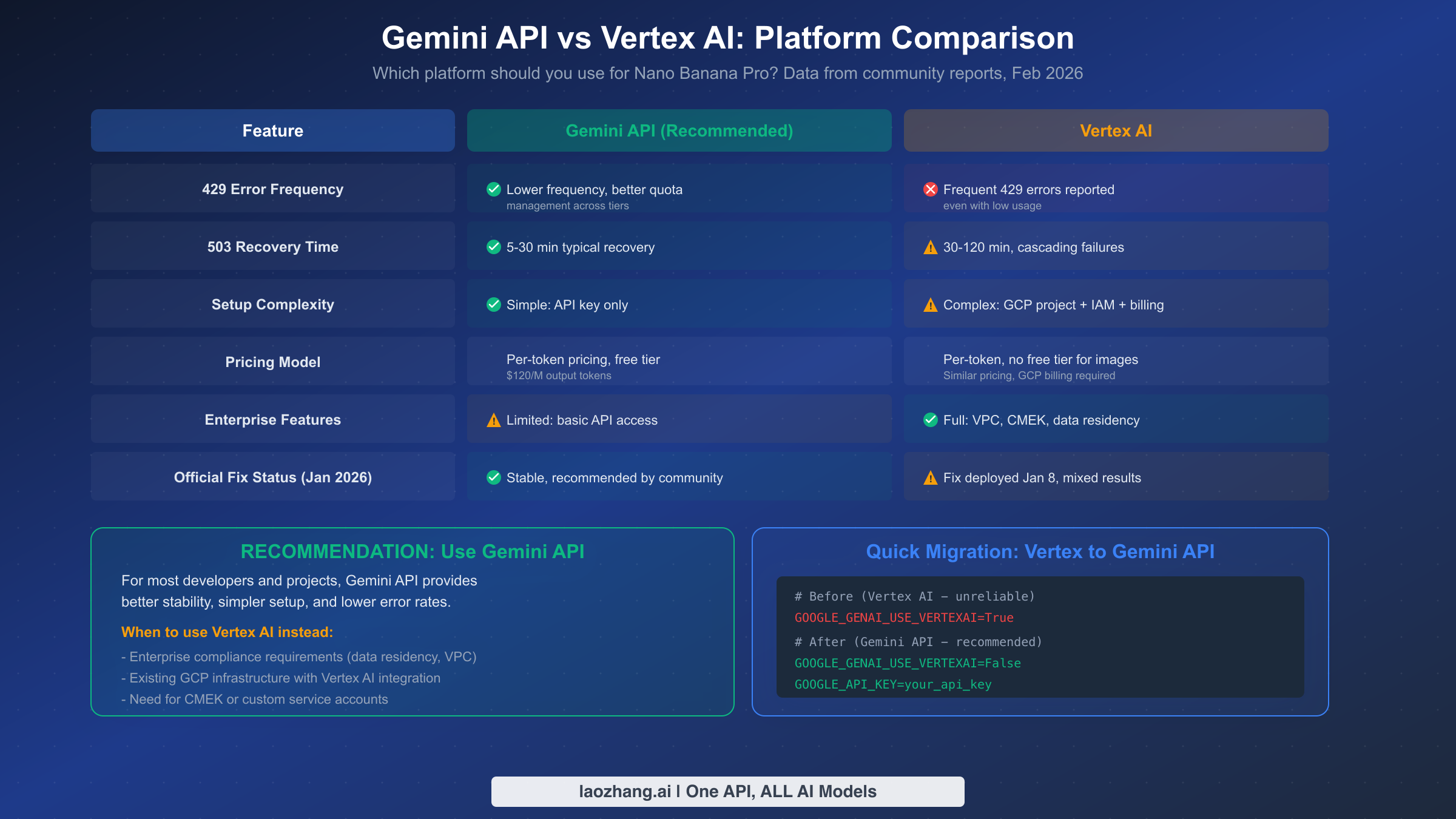
The choice between Google's Gemini API and Vertex AI for running Nano Banana Pro has significant implications for reliability, and the community consensus is clear: the Gemini API is currently more stable for image generation workloads. This assessment is based on widespread developer reports across the Google AI Developer Forum and corroborated by Google's own support team actions — when developers reported persistent 429 errors on Vertex AI, Google support suggested the fix was deployed by January 8, 2026, though results remain mixed.
The stability difference is most evident in 429 error frequency. Multiple developers have reported that switching from Vertex AI to the Gemini API by setting GOOGLE_GENAI_USE_VERTEXAI=False eliminates or substantially reduces RESOURCE_EXHAUSTED errors, even with the same workload and the same account. One particularly telling report described "lightening fast speeds" one day followed by constant resource exhausted errors the next on Vertex AI, despite low overall usage — behavior that did not occur after switching to the Gemini API. The root cause appears to be differences in how the two platforms allocate and manage quota pools for image generation models.
The practical implications extend beyond error frequency. Vertex AI requires a full GCP project setup with IAM configuration, billing accounts, and service account credentials, which adds complexity to both initial deployment and debugging. The Gemini API, by contrast, requires only an API key — you can be up and running in under a minute. For pricing, both platforms use the same per-token model ($120 per million output tokens for Nano Banana Pro), but neither platform currently offers a free tier for image generation (as of February 2026, per ai.google.dev/pricing), though the Gemini API has significantly simpler billing setup.
However, Vertex AI has legitimate advantages for enterprise use cases. If your organization requires data residency controls, Virtual Private Cloud (VPC) integration, customer-managed encryption keys (CMEK), or custom service accounts, Vertex AI is the only option. Large enterprises with existing GCP infrastructure may also prefer Vertex AI for its integration with other Google Cloud services, even at the cost of somewhat reduced reliability for image generation.
The migration from Vertex AI to Gemini API is remarkably simple for most developers. If you are using the official Google Gen AI SDK, the switch requires only changing your environment variables — no code changes are needed:
bash# Before (Vertex AI — higher 429 error rates reported)
GOOGLE_GENAI_USE_VERTEXAI=True
GOOGLE_CLOUD_PROJECT=your-gcp-project
GOOGLE_CLOUD_REGION=us-central1

# After (Gemini API — recommended for stability)
GOOGLE_GENAI_USE_VERTEXAI=False
GOOGLE_API_KEY=your_gemini_api_key
Your prompt code, response handling, and image processing logic remain exactly the same because the Google Gen AI SDK abstracts the platform differences. The only visible change in your application will be reduced error rates and simpler credential management. For projects that need to maintain Vertex AI as a fallback for enterprise compliance while using Gemini API as the primary path, a simple environment variable toggle allows you to switch between them dynamically — you can even implement automatic platform switching that tries Gemini API first and falls back to Vertex AI only when enterprise-specific features (like VPC isolation) are required for a particular request.
One important consideration when migrating: if your existing Vertex AI setup uses service account impersonation or workload identity federation for authentication, those mechanisms are specific to GCP and will not carry over to the Gemini API. You will need to generate a standard API key from Google AI Studio instead. The tradeoff is simplicity versus granular access control — API keys are easier to manage but offer less fine-grained permission control compared to GCP IAM roles. For most image generation workloads, the API key approach is more than sufficient, and the stability improvement is well worth the simpler auth model. If you are evaluating costs and performance between platforms, our pricing and speed test results provide quantitative comparisons that can inform your decision.
Cost Optimization and Best Practices
Running Nano Banana Pro in production requires attention to cost management because retries, failed requests, and suboptimal timing can significantly inflate your API spend. A single 2K image costs approximately $0.134 per generation through the official API, but if your retry logic triggers three attempts for every successful image due to 429 errors during peak hours, your effective cost triples. Understanding the cost implications of your error handling strategy is essential for keeping image generation economically viable at scale.
The most impactful cost optimization is peak-hour avoidance. Based on monitoring data shared by production users, 503 error rates can reach 45% during peak hours, which means nearly half of your API calls fail and must be retried. If your use case allows for batch processing — generating marketing assets, product images, or content illustrations — scheduling these jobs for off-peak hours (roughly 03:00-08:00 and 14:00-19:00 Beijing Time based on community reports) can reduce your retry rate from nearly 50% to under 10%, cutting effective costs by 30-40%.
Model fallback is the second major cost lever. When Nano Banana Pro (Gemini 3 Pro Image) is experiencing high error rates, falling back to the standard Nano Banana model (Gemini 2.5 Flash Image, gemini-2.5-flash-image) provides a viable alternative at a fraction of the cost. While the Flash model lacks the "thinking" process and produces somewhat less sophisticated compositions, it generates images faster and with significantly higher reliability. For non-critical image generation tasks, you might even consider using the Flash model as your primary option and reserving Pro for tasks that specifically require its advanced text rendering, complex composition, or 4K resolution capabilities.
For developers processing high volumes of images, Google's Batch API offers a 50% discount on output token pricing — reducing the per-image cost from approximately $0.134 to $0.067 for 2K images. The tradeoff is latency: batch requests can take up to 24 hours to complete. If your workflow can tolerate this delay, the cost savings are substantial. Third-party API proxy services like laozhang.ai offer another cost optimization path, providing access to Nano Banana Pro at approximately $0.05 per image — roughly 60% below the official API pricing — with the added benefit of built-in retry logic and load balancing across multiple API keys that can smooth out rate limit issues.
Monitoring your API health is the final best practice that pays dividends over time. Track your success rate, average latency, error type distribution (429 vs 503 vs other), and cost per successful image on a daily and hourly basis. This data reveals patterns — like specific hours when error rates spike — that allow you to optimize scheduling, adjust retry parameters, and make informed decisions about tier upgrades or platform switches. The code example in the Production Code section above includes the foundation for this monitoring through its structured logging approach. For a broader understanding of how free versus pro tier limits affect your cost structure, reviewing the tier comparison can help you choose the right plan for your usage volume.
FAQ
Why does my Nano Banana Pro API call return multiple images?
This is the normal "thinking" process behavior, not an error. Nano Banana Pro generates up to two draft images to test composition and logic before producing the final result. The last image in the API response is always the final, billed output. Draft images are generated at 60-80% resolution and are not separately charged. If you are using the official Google Gen AI SDKs in chat mode, thought signatures handle multi-turn context automatically.
What is the difference between a 429 error and a 503 error?
A 429 error means you have exceeded your rate limit — it is caused by your usage pattern and resolves in 1-5 minutes. A 503 error means Google's servers are overloaded — it has nothing to do with your code or usage and can take 30-120 minutes to resolve. Never debug your code for a 503 error, and never just wait for a 429 error without examining your rate limit usage.
Should I use Gemini API or Vertex AI for Nano Banana Pro?
For most developers, the Gemini API is recommended. Community reports consistently show lower 429 error rates, simpler setup (API key only versus full GCP project), and equivalent pricing. Use Vertex AI only if you need enterprise features like VPC integration, data residency controls, or customer-managed encryption keys.
How long should I set my API timeout?
For 1K and 2K images, use 300 seconds. For 4K images, use 600 seconds. These values account for generation time (30-170 seconds depending on resolution) plus network variability and server queue delays during peak hours. Always separate connection timeout (10 seconds) from read timeout.
Why do I keep getting "An internal error has occurred" in Google AI Studio?
This is typically a 500 Internal Server Error on Google's backend, not something you caused. Multiple developers reported this issue persisting for days in December 2025 before Google deployed a fix. Check the Google AI Developer Forum to see if others are experiencing the same issue, as this usually indicates a systemic problem rather than an account-specific one. Clearing your browser cache and refreshing your session can sometimes help for the web interface, but for persistent API errors, you need to wait for Google to resolve the backend issue.
Are temporary thinking images counted toward my quota?
No. Only the final rendered image counts toward your rate limit quota and is billed. The temporary draft images generated during the thinking process are internal to the model's reasoning and do not consume your RPM, RPD, or billing quota. This is confirmed in Google's official image generation documentation.
How do I reduce my Nano Banana Pro API costs in production?
The three most effective cost reduction strategies are: peak-hour avoidance (scheduling batch jobs during 03:00-08:00 or 14:00-19:00 Beijing Time can reduce retry-driven costs by 30-40%), model fallback (using Gemini 2.5 Flash Image at $0.039/image for non-critical tasks instead of Pro at $0.134/image), and Google's Batch API (offering 50% discount at $0.067/image for 2K resolution, with the tradeoff of up to 24-hour processing latency). Third-party proxy services like laozhang.ai can further reduce costs to approximately $0.05/image with built-in retry logic and load balancing. For high-volume production workloads, combining all three strategies — Batch API for non-urgent tasks, Flash for standard quality, and Pro only for premium output — can reduce your effective image generation costs by 60-70% compared to naively calling the Pro model for every request.
What is the difference between Nano Banana and Nano Banana Pro?
Nano Banana refers to the standard model, Gemini 2.5 Flash Image (gemini-2.5-flash-image), which generates images quickly at lower cost ($0.039/image) but without the advanced thinking process. Nano Banana Pro refers to Gemini 3 Pro Image (gemini-3-pro-image-preview), which uses the multi-draft thinking mechanism for higher-quality compositions, better text rendering, and 4K resolution support, but at higher cost ($0.134/image for 2K) and longer generation times (30-170 seconds versus 10-30 seconds for Flash). In production, the recommended approach is to use Pro as your primary model with Flash as an automatic fallback — this gives you the best quality when the Pro model is available while maintaining service continuity during server overload periods.