TL;DR
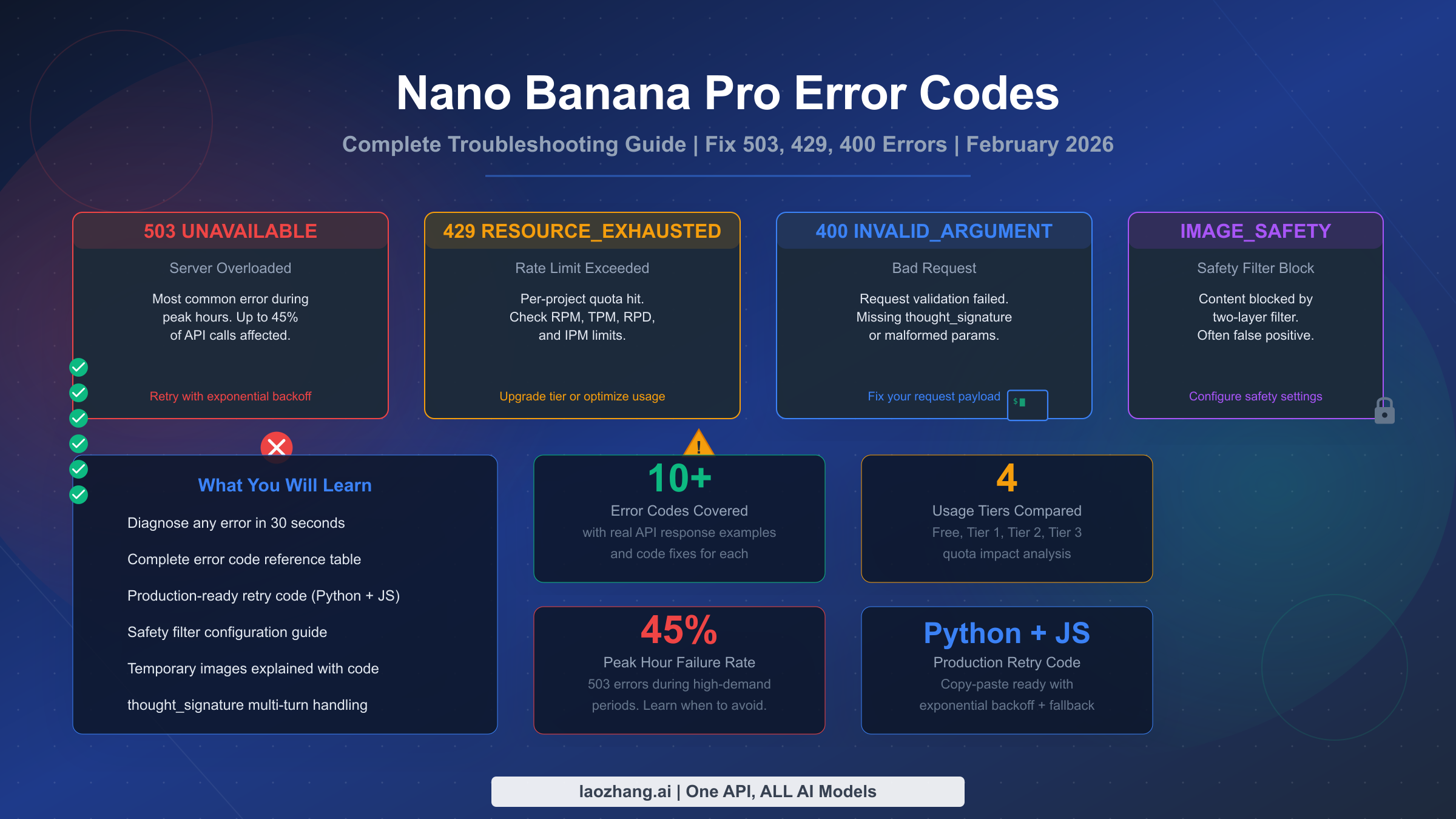
Nano Banana Pro errors fall into three categories: server errors (503/500 — Google's problem, retry with exponential backoff), client errors (400/403 — fix your request payload or permissions), and rate limits (429 — check your quota in Google AI Studio). As of February 2026, the most common error is 503 UNAVAILABLE during peak hours (10:00-14:00 UTC), affecting up to 45% of API calls. The second most confusing issue is temporary images appearing in responses — these are by design, not a bug, and are not billed. This guide covers every error code with real API response examples, code fixes in Python and JavaScript, and a complete production-ready retry implementation you can copy-paste into your project.
Quick Diagnosis — Identify Your Error in 30 Seconds
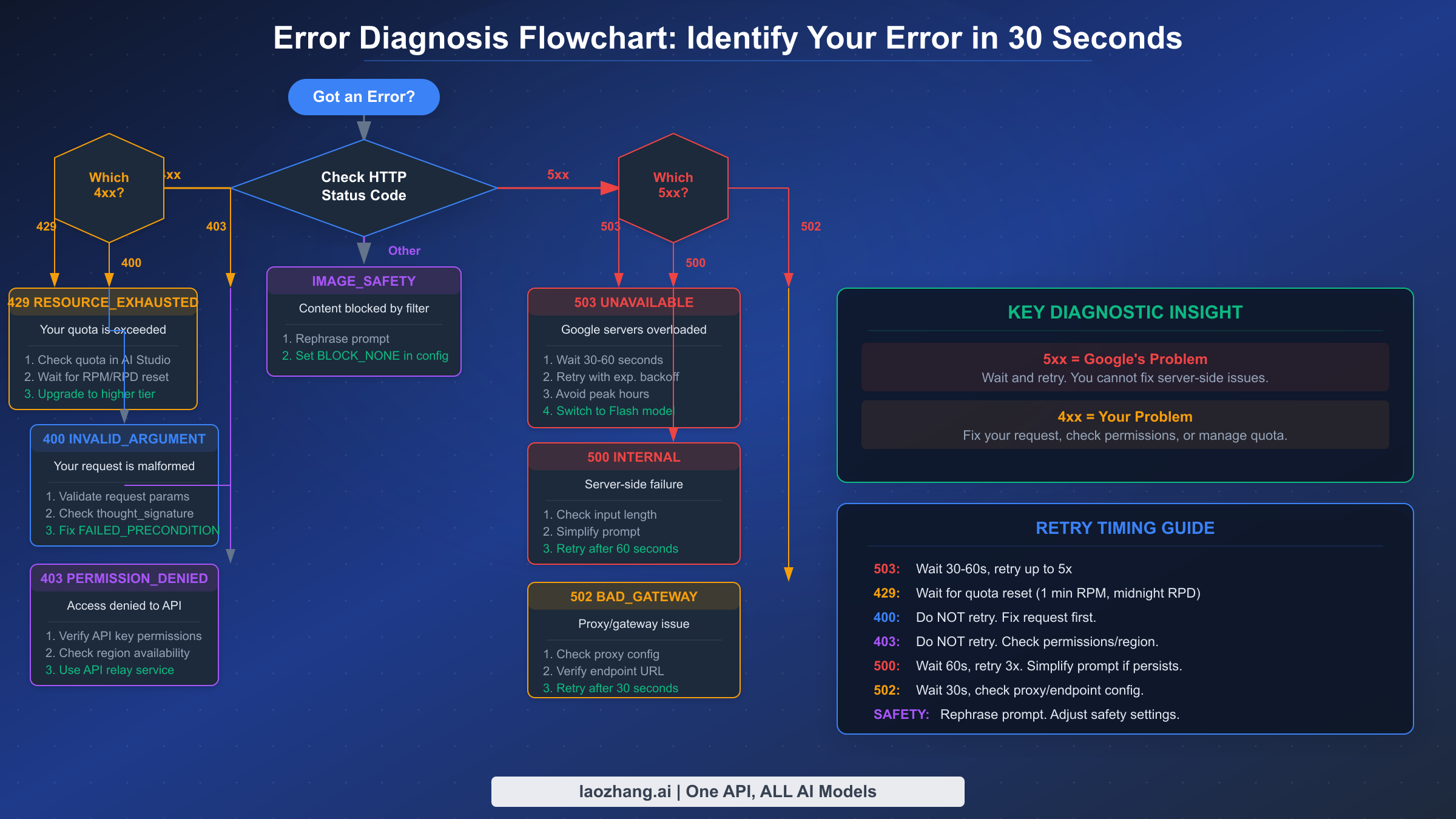
Every Nano Banana Pro error tells you exactly who is responsible for the problem. The HTTP status code in your API response is your first and most important diagnostic signal. Understanding this single piece of information will save you hours of debugging, because the fix depends entirely on whether the error originates from Google's servers or from your request.
The fundamental rule is simple: 5xx errors mean Google's infrastructure is struggling, and you should wait and retry. 4xx errors mean something is wrong with your request, and retrying the same request will always fail. This distinction matters because developers frequently waste time "fixing" their code when the real issue is server overload, or they keep retrying broken requests that will never succeed.
Here is the quick-reference diagnostic table that covers the eight most common errors you will encounter when working with the Nano Banana Pro API (model ID: gemini-3-pro-image-preview, as listed on ai.google.dev/pricing, February 2026):
| HTTP Code | gRPC Status | Quick Meaning | Your Action | Retryable? |
|---|---|---|---|---|
| 503 | UNAVAILABLE | Google servers overloaded | Wait 30-60s, retry with backoff | Yes |
| 500 | INTERNAL | Server-side failure | Simplify prompt, retry after 60s | Yes (limited) |
| 502 | — | Gateway/proxy error | Check endpoint URL, retry | Yes |
| 429 | RESOURCE_EXHAUSTED | Rate limit exceeded | Check quota, wait for reset | Yes (after wait) |
| 400 | INVALID_ARGUMENT | Bad request format | Fix payload, check thought_signature | No |
| 400 | FAILED_PRECONDITION | Region/billing issue | Enable billing, check region | No |
| 403 | PERMISSION_DENIED | API key lacks permission | Verify API key and project settings | No |
| 404 | NOT_FOUND | Resource missing | Check media file references | No |
When you receive an error, your first action should always be to check the HTTP status code. If it starts with 5, stop debugging your code — the problem is on Google's end. If it starts with 4, the problem is in your request, and you need to examine the error message details to understand what to fix. The details array in the JSON response often contains specific field names and validation errors that point you directly to the issue.
Complete Nano Banana Pro Error Code Reference
Beyond the quick diagnostic table, understanding the full error response structure is essential for building reliable applications. Each error from the Gemini API returns a structured JSON response containing the HTTP status code, a gRPC status string, a human-readable message, and sometimes a details array with specific error information. Here is what a real 503 error response looks like when your API call hits an overloaded server:
json{
  "error": {
    "code": 503,
    "message": "The model is overloaded. Please try again later.",
    "status": "UNAVAILABLE",
    "details": [
      {
        "@type": "type.googleapis.com/google.rpc.DebugInfo",
        "detail": "backend_error"
      }
    ]
  }
}
A 429 rate limit error looks different and provides more actionable information, including which specific limit you have hit:
json{
  "error": {
    "code": 429,
    "message": "Resource has been exhausted (e.g. check quota).",
    "status": "RESOURCE_EXHAUSTED",
    "details": [
      {
        "@type": "type.googleapis.com/google.rpc.RetryInfo",
        "retryDelay": "36s"
      }
    ]
  }
}
Notice that the 429 response includes a retryDelay field — this tells you exactly how long to wait before your next attempt. Always honor this value rather than guessing. The 400 INVALID_ARGUMENT error is the most varied because it covers multiple types of request validation failures, from missing required fields to malformed image data to the increasingly common thought_signature issue in multi-turn conversations.
Error severity classification matters for your error handling code. Critical errors (503, 500) require immediate retry logic with backoff. Warning errors (429) require quota management and possibly tier upgrades. Informational errors (400, 403) require code changes and should never be retried without modification. Building your error handler around these three categories — rather than handling each code individually — produces cleaner, more maintainable code.
The complete error code reference includes two additional error types that are specific to image generation and do not appear in standard Gemini text API calls. IMAGE_SAFETY is returned when the safety filter blocks either your prompt or the generated output. PROHIBITED_CONTENT is a harder block that indicates your prompt was flagged for policy violations. Both of these return as part of the response candidates array with a finishReason field rather than as HTTP error codes, which means they require different handling in your code.
Here is a real IMAGE_SAFETY response that many developers encounter when generating portraits or any content the filter considers potentially sensitive:
json{
  "candidates": [
    {
      "finishReason": "IMAGE_SAFETY",
      "safetyRatings": [
        {
          "category": "HARM_CATEGORY_SEXUALLY_EXPLICIT",
          "probability": "MEDIUM",
          "blocked": true
        }
      ]
    }
  ]
}
The important difference is that IMAGE_SAFETY does not return an HTTP error status — the HTTP response is still 200 OK. Your code must check the finishReason field on each candidate to detect these blocks. If you are only checking for HTTP errors, safety filter blocks will silently pass through your error handler and produce empty or unexpected results downstream. A robust error handler checks both the HTTP status code and the finishReason field on every response, treating IMAGE_SAFETY and PROHIBITED_CONTENT as distinct error categories that require different handling than standard HTTP errors.
The 504 DEADLINE_EXCEEDED error deserves special mention because it is often confused with 503. A 504 error means your request was accepted by the server but took too long to process — the generation timed out. This typically happens with extremely complex prompts that require many thinking iterations, or with very high-resolution (4K) image requests during periods of moderate load. Unlike 503 where the server rejects your request immediately, 504 means the server worked on your request but could not complete it in time. The fix is usually to simplify your prompt or reduce the requested resolution, then retry.
Server Errors (503, 500, 502) — When Google's Infrastructure Fails
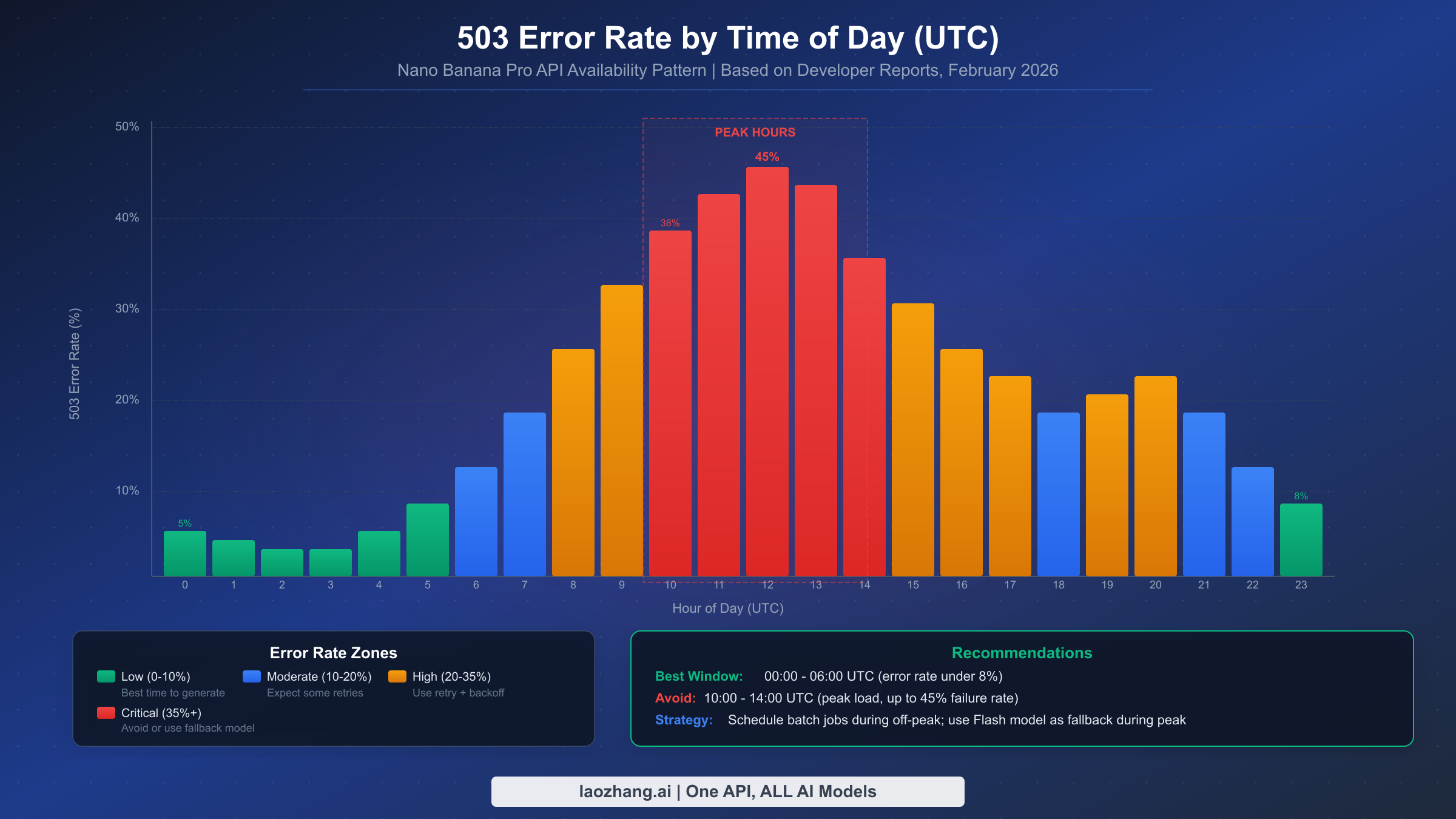
The 503 UNAVAILABLE error is by far the most common error developers encounter with Nano Banana Pro, and it is entirely outside of your control. When Google's Gemini infrastructure becomes overloaded — which happens regularly during peak usage hours — the API returns 503 errors for a significant percentage of requests. Based on developer community reports aggregated from the Google AI Developer Forum (discuss.ai.google.dev), error rates during peak hours (approximately 10:00 to 14:00 UTC) can reach up to 45% of all API calls, making reliable error handling not just a nice-to-have but an absolute requirement for any production application.
The critical insight about 503 errors is that they are transient by nature. The same request that fails with 503 right now will likely succeed in 30-60 seconds. This is why exponential backoff is the correct strategy — you are not fixing anything, you are simply waiting for server capacity to free up. Google staff have confirmed on the developer forums that 503 errors during peak hours are expected behavior with the preview model, and that infrastructure scaling is ongoing.
The 500 INTERNAL error is less common but more concerning because it sometimes indicates an issue with your specific request rather than general server overload. If you receive a 500 error, try simplifying your prompt first — extremely long or complex prompts can trigger internal processing failures. If the error persists after simplification, treat it like a 503 and retry with backoff. The 502 BAD_GATEWAY error typically occurs when using proxy services or API relays, and indicates that the intermediate server could not reach Google's backend. Check your endpoint URL configuration and proxy settings before retrying.
Retry timing for server errors follows a proven pattern. Start with a 30-second delay after the first failure, then double the wait time for each subsequent failure (30s → 60s → 120s → 240s). Cap the maximum wait at 5 minutes and limit total retries to 5 attempts. Adding random jitter (±20% of the wait time) prevents the "thundering herd" problem where many clients retry simultaneously and overwhelm the server again.
The most effective strategy for avoiding 503 errors is to schedule batch image generation jobs during off-peak hours. The 00:00 to 06:00 UTC window consistently shows error rates below 8%, making it ideal for bulk processing. For real-time applications that cannot control timing, implementing a model fallback to Nano Banana (the Flash model, gemini-2.5-flash-image) provides a reliable backup — the Flash model experiences significantly fewer 503 errors due to its lighter computational requirements, though at the cost of lower image quality and a maximum resolution of 1024×1024 pixels (ai.google.dev/pricing, February 2026).
How to check if the problem is on Google's side before debugging your code: Visit the Google Cloud Status Dashboard or check the Google AI Developer Forum for current incident reports. Google also posts on the Gemini API status page when widespread outages are acknowledged. If other developers are reporting the same 503 errors on the forum at the same time as you, you can be confident that the issue is infrastructure-related and not caused by your code. During major incidents, Google staff typically respond on the forum within 30-60 minutes with acknowledgment and estimated resolution times.
The pattern of 503 errors also varies by region. Developers routing through US data centers tend to see the highest error rates during North American business hours (15:00-22:00 UTC), while those using Asian data centers report lower overall error rates but with peaks during Asian business hours (01:00-09:00 UTC). If your application serves a global user base, consider distributing image generation requests across multiple regions or using a relay service that automatically routes to the least-loaded region.
Client-Side Errors (400, 403, 404) — Fix Your Request
Client-side errors are your responsibility, and unlike server errors, retrying the same request will always produce the same failure. The 400 INVALID_ARGUMENT error has multiple sub-causes, and the most important one for Nano Banana Pro developers is the thought_signature handling in multi-turn image editing conversations. This error has become increasingly common as more developers build chat-based image editing features, yet almost no existing documentation covers it adequately.
When you generate an image in a conversation and then ask Nano Banana Pro to modify it in a subsequent turn, the API requires you to include the thought_signature value from the previous response. If you fail to preserve and send back this value, the second and all subsequent image generation requests in that conversation will fail with a 400 error. The signature is found at response.candidates[0].content.thought_signature and must be included in the conversation history you send with your next request. This is not optional — it is a hard requirement for multi-turn image generation.
python# Correct multi-turn image editing pattern
response_1 = model.generate_content("Create a landscape painting")
# CRITICAL: Save the thought_signature
thought_sig = response_1.candidates[0].content.thought_signature

# For the next turn, include it in conversation history
response_2 = model.generate_content(
    contents=[
        {"role": "user", "parts": [{"text": "Create a landscape painting"}]},
        {"role": "model", "parts": response_1.candidates[0].content.parts,
         "thought_signature": thought_sig},
        {"role": "user", "parts": [{"text": "Add a sunset to the painting"}]}
    ]
)
The 400 FAILED_PRECONDITION error is a separate issue that typically indicates your Google Cloud project does not meet the requirements for the Gemini API. The most common cause is using a free-tier project without billing enabled, or accessing the API from a region where the free tier is not available. Check that billing is enabled on your Google Cloud project and that your region is supported for the usage tier you need (ai.google.dev/rate-limits, February 2026).
The 403 PERMISSION_DENIED error means your API key does not have the necessary permissions. There are several common causes worth checking systematically. First, verify that your API key was generated in the same Google Cloud project where the Generative Language API (or Vertex AI API, if using Vertex) is enabled — keys from different projects will not work. Second, ensure the API key has not been restricted to specific APIs that exclude the Generative Language API. Third, check whether your project has any organizational policy constraints that might block access to AI services.
Regional restrictions are a particularly frustrating source of 403 errors because the error message often does not clearly indicate that the problem is geographic. Developers in certain countries — including China, Iran, Russia, and several others — cannot access the Gemini API directly, even with a valid API key and billing account. The API simply returns 403 PERMISSION_DENIED without explaining that the block is region-based. If you suspect a regional block, try accessing the API from a different network or check the Gemini API supported regions documentation. For developers who need reliable access from restricted regions, API relay services like laozhang.ai provide region-independent access by routing your requests through supported regions, eliminating the need for VPN configuration while maintaining the same API interface.
The 404 NOT_FOUND error is less common but occurs when your request references media files (such as images uploaded for editing) that no longer exist on Google's servers. Uploaded media files have an expiration window, and if you reference a file URI that has expired, you will receive a 404. The solution is to re-upload the media file before referencing it in your request, and to cache the uploaded file URIs along with their expiration timestamps in your application.
Rate Limits and 429 RESOURCE_EXHAUSTED — Master Your Quota
The 429 RESOURCE_EXHAUSTED error means you have hit one of several rate limit dimensions. Unlike 503 errors where the problem is server capacity, 429 errors are about your project's specific quota allocation. Understanding the different limit types is essential because each one resets on a different schedule and requires a different mitigation strategy.
Nano Banana Pro rate limits are applied per Google Cloud project (not per API key) and are measured across four dimensions: RPM (requests per minute), TPM (tokens per minute for input), RPD (requests per day), and IPM (images per minute). The IPM limit is specific to image generation models and is often the one that catches developers by surprise, because even if you have RPM headroom, you may have exhausted your image-specific allocation (ai.google.dev/rate-limits, February 2026).
The exact numeric limits vary by tier and are not published as fixed numbers — Google adjusts them based on system load and model version. You can view your current limits in Google AI Studio under the project settings. However, the tier structure that determines your general allocation level is well documented:
| Tier | Qualification | Rate Limit Level | Cost |
|---|---|---|---|
| Free | Eligible countries, no billing | Most restrictive | $0 |
| Tier 1 | Paid billing account enabled | Moderate | Pay per use |
| Tier 2 | Total spend > $250 + 30 days | Higher | Pay per use |
| Tier 3 | Total spend > $1,000 + 30 days | Highest | Pay per use |
(Source: ai.google.dev/rate-limits, February 2026)
RPD limits reset at midnight Pacific Time, which is an important detail that many developers miss. If you hit your daily limit at 3 PM Pacific, you have to wait until midnight — not 24 hours from when you hit the limit. RPM limits reset every 60 seconds from the time of your first request in that window. Planning your request distribution around these reset boundaries can significantly improve your effective throughput.
A common source of confusion is the difference between rate limit errors and quota exhaustion errors. A rate limit error (429 with retryDelay) means you are sending requests too fast within your allocated window — slowing down will fix it. A quota exhaustion error (429 without retry information) means you have hit your absolute daily or monthly cap — no amount of waiting within the current period will help. For daily quota exhaustion, your only options are to wait for the midnight Pacific Time reset or to upgrade your tier. For monthly quota issues, contact Google Cloud support to discuss increasing your allocation.
Preview models like Nano Banana Pro (gemini-3-pro-image-preview) have stricter rate limits than stable models (ai.google.dev/rate-limits, February 2026). This means the limits you see in AI Studio for the preview model are intentionally lower than what you would get with a stable release. Google adjusts these limits as the model approaches general availability, so the specific numbers you see today may increase over time. Checking AI Studio regularly for updated limits is worthwhile, especially after Google announces model updates or version changes.
Practical quota optimization strategies can dramatically reduce 429 errors without upgrading your tier. The most effective technique is request batching — instead of making individual API calls for each image, batch your prompts and space them evenly across your RPM allocation. If your RPM limit is 10, schedule one request every 6 seconds rather than sending 10 requests simultaneously and then waiting 60 seconds. This smooths out your usage curve and prevents the bursts that trigger rate limiting. Another powerful strategy is to implement a client-side token bucket that mirrors Google's rate limiting behavior — this lets you predict and prevent 429 errors before they happen, rather than reacting to them after the fact.
For developers hitting IPM (images per minute) limits specifically, consider whether all your image generation calls actually need the Pro model. Many use cases — thumbnails, previews, low-resolution drafts — work perfectly well with Nano Banana (Flash), which has separate and typically more generous rate limits. Splitting your workload between models based on quality requirements can effectively double your total image generation capacity without changing your tier.
For a comprehensive breakdown of rate limit strategies and how to optimize your quota usage across different tiers, see our detailed guide to resolving 429 resource exhausted errors. You can also review the comprehensive rate limits guide for specific optimization techniques, and the comparison of free tier and paid tier capabilities to determine whether upgrading your tier is worthwhile for your use case.
Image Generation Issues — Safety Filters, Temporary Images, and Thinking Mode
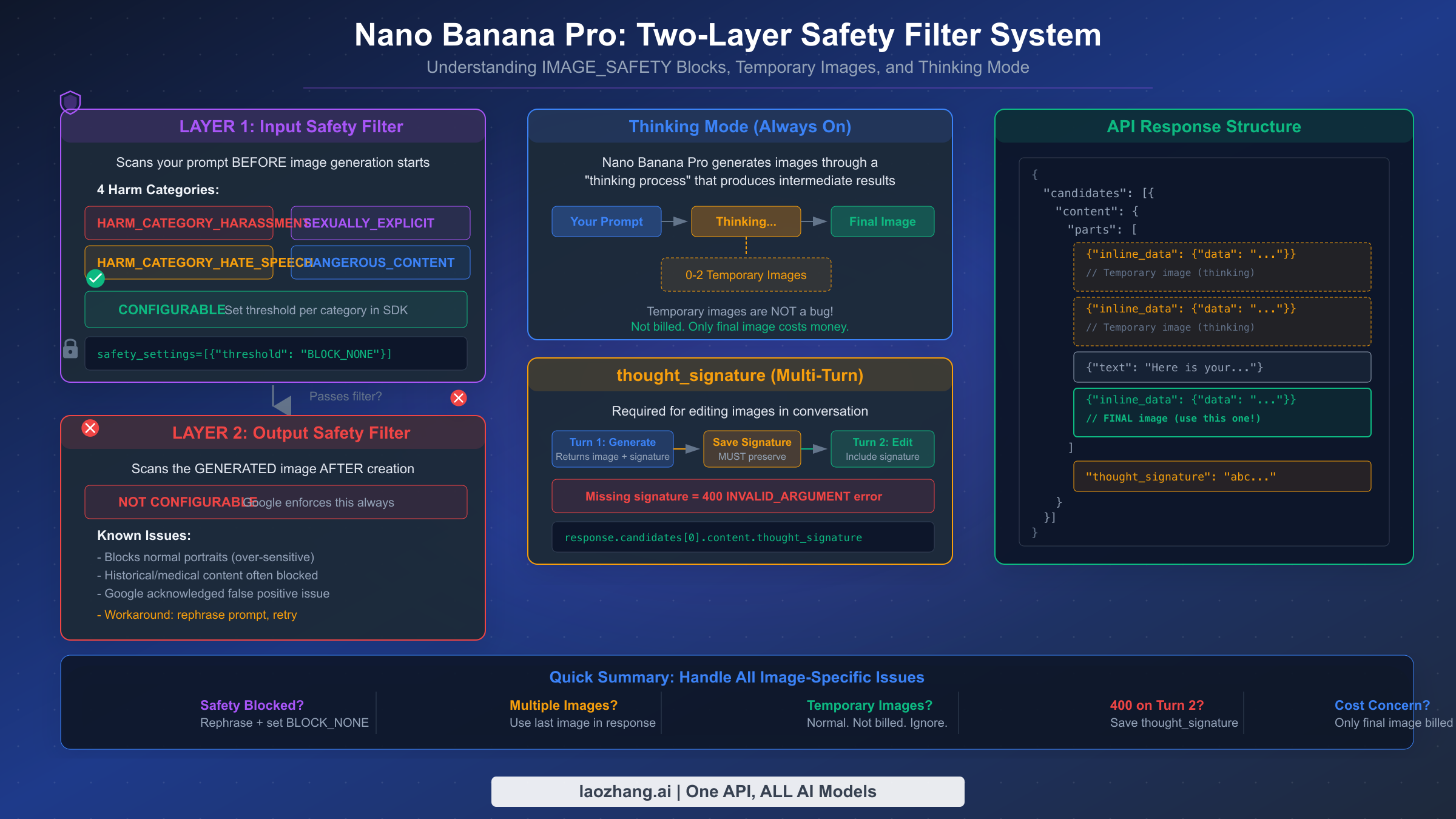
Image generation with Nano Banana Pro introduces a set of error conditions that do not exist in standard text generation. These issues — safety filter blocks, temporary images in responses, and the thinking mode behavior — are the most frequently misunderstood aspects of the API. Developers often assume these are bugs when they are actually deliberate design decisions by Google, and understanding the intended behavior is the key to handling them correctly.
The IMAGE_SAFETY filter operates on two layers, and this distinction matters because only the first layer is configurable. The input safety filter scans your prompt before image generation begins, checking against four harm categories: HARM_CATEGORY_HARASSMENT, HARM_CATEGORY_HATE_SPEECH, HARM_CATEGORY_SEXUALLY_EXPLICIT, and HARM_CATEGORY_DANGEROUS_CONTENT. You can set the threshold for each category to BLOCK_NONE, BLOCK_LOW_AND_ABOVE, BLOCK_MEDIUM_AND_ABOVE, or BLOCK_ONLY_HIGH. Setting all four to BLOCK_NONE gives you the most permissive input filtering:
pythonfrom google.generativeai.types import HarmCategory, HarmBlockThreshold

safety_settings = {
    HarmCategory.HARM_CATEGORY_HARASSMENT: HarmBlockThreshold.BLOCK_NONE,
    HarmCategory.HARM_CATEGORY_HATE_SPEECH: HarmBlockThreshold.BLOCK_NONE,
    HarmCategory.HARM_CATEGORY_SEXUALLY_EXPLICIT: HarmBlockThreshold.BLOCK_NONE,
    HarmCategory.HARM_CATEGORY_DANGEROUS_CONTENT: HarmBlockThreshold.BLOCK_NONE,
}

response = model.generate_content(
    "A portrait photograph of a person smiling",
    safety_settings=safety_settings
)
However, the output safety filter — which scans the generated image after creation — is not configurable. Google enforces this layer at all times, and it is known to produce false positives, particularly with portrait photographs and historical imagery. Google has acknowledged this over-sensitivity on the developer forums. The only workaround for output filter blocks is to rephrase your prompt to produce a slightly different image that does not trigger the filter, or to retry the same prompt since the model's stochastic nature may produce a passing image on subsequent attempts.
Temporary images in your API response are not a bug — they are an expected part of Nano Banana Pro's thinking process. When the model generates an image, it may produce up to two intermediate "thinking" images before arriving at the final result. These temporary images appear as additional inline_data parts in the response's parts array, preceding the final image. The critical detail that most developers miss is that temporary images are not billed — only the final image in the response costs money ($0.134 per image at 1K-2K resolution, $0.24 per image at 4K resolution, as verified on ai.google.dev/pricing, February 2026). For a complete explanation of why temporary images appear and how to handle them in your code, see our complete explanation of the temporary images behavior.
To extract the final image from a response that includes temporary images, always use the last image part in the response rather than the first one. Here is a reliable code pattern that works regardless of how many temporary images the thinking process produces:
pythondef extract_final_image(response):
    """Always returns the final (last) image, skipping temporary images."""
    parts = response.candidates[0].content.parts
    images = [p for p in parts if hasattr(p, 'inline_data') and p.inline_data]
    if not images:
        raise ValueError("No images in response — check finishReason")
    # The last image is always the final result
    final_image = images[-1]
    return base64.b64decode(final_image.inline_data.data)
The thinking mode in Nano Banana Pro is enabled by default and cannot be disabled — it is fundamental to how the model achieves higher quality image generation compared to the standard Nano Banana (Flash) model. This thinking process is what increased complex prompt success rates from approximately 60-70% to 85-90%, according to developer community testing. The trade-off is that responses take longer (typically 10-30 seconds versus 3-8 seconds for Flash) and the response payload is larger due to the included temporary images, which may affect applications with strict latency requirements or bandwidth constraints.
One common mistake developers make is counting temporary images as separate billable outputs. A response containing two temporary images and one final image does not cost 3x — it costs the same as a single image generation. The temporary images are included in the response for transparency about the thinking process, and some advanced applications use them to show users the model's creative progression, but they carry no additional cost. Pricing remains $0.134 per final image at 1K-2K resolution or $0.24 at 4K resolution (ai.google.dev/pricing, February 2026).
Build a Resilient Image Generation Pipeline
The most effective way to handle Nano Banana Pro errors in production is to categorize every possible error into one of three buckets — retryable, fixable, and fatal — and build your error handler around this classification. Retryable errors (503, 500, 502, and 429 after waiting) should trigger automatic retry with exponential backoff. Fixable errors (400, 403) should be logged for investigation. Fatal errors (PROHIBITED_CONTENT) should be surfaced to the user immediately.
Here is a complete Python implementation of a resilient image generation wrapper that handles all error types, implements exponential backoff with jitter, and includes model fallback from Nano Banana Pro to Nano Banana (Flash) when the primary model is consistently unavailable:
pythonimport google.generativeai as genai
import time
import random
import base64

class ResilientImageGenerator:
    def __init__(self, api_key):
        genai.configure(api_key=api_key)
        self.primary_model = genai.GenerativeModel("gemini-3-pro-image-preview")
        self.fallback_model = genai.GenerativeModel("gemini-2.5-flash-image")

    def generate_image(self, prompt, max_retries=5, use_fallback=True):
        """Generate image with automatic retry and model fallback."""
        last_error = None

        # Try primary model with retries
        for attempt in range(max_retries):
            try:
                response = self.primary_model.generate_content(prompt)
                return self._extract_final_image(response)
            except Exception as e:
                last_error = e
                error_code = getattr(e, 'code', None) or self._parse_error_code(e)

                if error_code in (503, 500, 502):
                    # Retryable: wait with exponential backoff + jitter
                    wait = min(30 * (2 ** attempt), 300)
                    jitter = wait * random.uniform(-0.2, 0.2)
                    time.sleep(wait + jitter)
                elif error_code == 429:
                    # Rate limited: honor retry delay if provided
                    retry_delay = self._get_retry_delay(e) or 60
                    time.sleep(retry_delay)
                elif error_code in (400, 403, 404):
                    # Not retryable: raise immediately
                    raise
                else:
                    raise

        # Fallback to Flash model if primary exhausted retries
        if use_fallback:
            try:
                response = self.fallback_model.generate_content(prompt)
                return self._extract_final_image(response)
            except Exception:
                pass

        raise last_error

    def _extract_final_image(self, response):
        """Extract the LAST image from response (skip temporary images)."""
        if not response.candidates:
            raise ValueError("No candidates in response")
        parts = response.candidates[0].content.parts
        # Find the last image part (final image, not temporary)
        for part in reversed(parts):
            if hasattr(part, 'inline_data') and part.inline_data:
                return base64.b64decode(part.inline_data.data)
        raise ValueError("No image found in response")

    def _parse_error_code(self, error):
        error_str = str(error)
        for code in [503, 500, 502, 429, 400, 403, 404]:
            if str(code) in error_str:
                return code
        return None

    def _get_retry_delay(self, error):
        # Parse retryDelay from error details if available
        try:
            error_str = str(error)
            if 'retryDelay' in error_str:
                import re
                match = re.search(r'"retryDelay":\s*"(\d+)s"', error_str)
                if match:
                    return int(match.group(1))
        except Exception:
            pass
        return None
The equivalent JavaScript/Node.js implementation follows the same pattern but uses async/await for the retry loop:
javascriptconst { GoogleGenerativeAI } = require("@google/generative-ai");

class ResilientImageGenerator {
  constructor(apiKey) {
    const genAI = new GoogleGenerativeAI(apiKey);
    this.primaryModel = genAI.getGenerativeModel({
      model: "gemini-3-pro-image-preview"
    });
    this.fallbackModel = genAI.getGenerativeModel({
      model: "gemini-2.5-flash-image"
    });
  }

  async generateImage(prompt, maxRetries = 5) {
    let lastError;

    for (let attempt = 0; attempt < maxRetries; attempt++) {
      try {
        const result = await this.primaryModel.generateContent(prompt);
        return this.extractFinalImage(result.response);
      } catch (error) {
        lastError = error;
        const code = error.status || this.parseErrorCode(error);

        if ([503, 500, 502].includes(code)) {
          const wait = Math.min(30000 * Math.pow(2, attempt), 300000);
          const jitter = wait * (Math.random() * 0.4 - 0.2);
          await this.sleep(wait + jitter);
        } else if (code === 429) {
          await this.sleep(60000);
        } else {
          throw error; // 400, 403, 404: don't retry
        }
      }
    }

    // Fallback to Flash model
    try {
      const result = await this.fallbackModel.generateContent(prompt);
      return this.extractFinalImage(result.response);
    } catch (e) {
      throw lastError;
    }
  }

  extractFinalImage(response) {
    const parts = response.candidates[0].content.parts;
    for (let i = parts.length - 1; i >= 0; i--) {
      if (parts[i].inlineData) {
        return Buffer.from(parts[i].inlineData.data, "base64");
      }
    }
    throw new Error("No image in response");
  }

  parseErrorCode(error) {
    const match = String(error).match(/(\d{3})/);
    return match ? parseInt(match[1]) : null;
  }

  sleep(ms) { return new Promise(r => setTimeout(r, ms)); }
}
For production deployments, both implementations should be extended with monitoring and alerting. Track three key metrics: error rate by type (to detect when 503 rates spike above normal), average retry count per successful request (to detect degrading performance), and fallback model usage rate (to detect when the primary model becomes persistently unavailable). Setting up alerts when your 503 error rate exceeds 30% for more than 5 minutes allows your team to proactively switch to degraded mode (Flash-only generation) before users experience widespread failures.
Error categorization for monitoring purposes should follow this classification:
| Category | Error Codes | Action | Alert Level |
|---|---|---|---|
| Retryable | 503, 500, 502 | Auto-retry with backoff | Warning at >30% rate |
| Rate Limited | 429 | Queue + delay | Info |
| Client Fix | 400, 403, 404 | Log + notify developer | Error |
| Safety Block | IMAGE_SAFETY | Rephrase or skip | Info |
| Policy Block | PROHIBITED_CONTENT | Skip + log | Warning |
When building multi-model fallback chains, API relay services like laozhang.ai can simplify the architecture by providing a single endpoint that routes to multiple models — see their documentation for multi-model API configuration. This approach eliminates the need to manage separate API keys and client configurations for each model in your fallback chain.
Frequently Asked Questions
Do failed requests cost money?
No. Failed API requests that return error codes (503, 429, 400, 403, etc.) are not billed. You are only charged for successful responses that return generated content. This includes temporary images in the thinking process — they are part of a successful response but are not separately billed. Only the final image in the response counts toward your usage and billing.
Is Nano Banana Pro reliable enough for production?
Nano Banana Pro (gemini-3-pro-image-preview) is still a preview model, which means Google does not guarantee production-level SLAs. During off-peak hours, reliability is generally good (>90% success rate), but peak hours can see failure rates up to 45%. For production use, implementing the retry + fallback pattern described in this guide is essential. If you need maximum reliability, consider using Nano Banana (Flash, gemini-2.5-flash-image) as your primary model — it has lower quality but significantly higher availability. For a detailed pricing and performance comparison, see our Gemini 3 Pro Image API pricing and performance analysis.
Should I use Vertex AI or the Gemini API?
Both access the same underlying models. The Gemini API (via Google AI Studio) is simpler to set up and has a free tier. Vertex AI provides enterprise features like VPC networking, custom endpoints, and higher rate limits, but requires a Google Cloud project with billing. Error codes are identical across both APIs, though Vertex AI uses gRPC natively while the Gemini API wraps errors in REST JSON responses.
How can I contact Google support about persistent errors?
For free-tier users, the primary support channel is the Google AI Developer Forum at discuss.ai.google.dev. Google staff regularly monitor and respond to posts about API errors. For Tier 1+ users with billing enabled, you can file support tickets through the Google Cloud Console. Include your project ID, the specific error code and full response JSON, and the timestamp of the error when filing reports.
What are the best times to generate images?
Based on community-reported error patterns, the lowest error rates occur during 00:00-06:00 UTC (late evening to early morning in the Americas, daytime in Asia Pacific). The worst window is 10:00-14:00 UTC (morning to early afternoon in the Americas, when US-based developer activity peaks). If your application allows scheduling, batch your image generation jobs during the off-peak window. For cost-effective alternatives that may have different availability patterns, see our guide on cost-effective alternatives for Gemini image generation.
How do I check my current rate limit usage?
You can view your current usage and remaining quota in Google AI Studio under your project settings. The API itself does not return remaining quota information in response headers (unlike some other APIs), so you need to track your own usage client-side or check the AI Studio dashboard. For programmatic quota monitoring, you can use the Google Cloud Monitoring API with your project ID to set up alerts when usage approaches your limits.
Why do I get different errors for the same prompt?
The stochastic nature of the model means the same prompt can produce different results on each call, including different error outcomes. A prompt that triggers IMAGE_SAFETY on one attempt may succeed on the next, because the generated image is slightly different each time and may or may not cross the safety filter threshold. For 503 errors, the variability is due to fluctuating server load — the same request that fails during a peak moment may succeed seconds later when capacity frees up. This is why retry logic is so important: it accounts for the inherent variability in both model behavior and server availability.
What is the difference between Nano Banana Pro and Nano Banana (Flash)?
Nano Banana Pro (gemini-3-pro-image-preview) prioritizes image quality and supports resolutions up to 4K, with a per-image cost of $0.134 to $0.24. It uses a thinking process that produces higher-quality results but takes longer (10-30 seconds) and may generate temporary intermediate images. Nano Banana (gemini-2.5-flash-image) prioritizes speed and cost efficiency at $0.039 per image, with a maximum resolution of 1024×1024, and typically responds in 3-8 seconds. The Flash model generally has higher availability and less frequent 503 errors because its computational requirements are lower. For production systems that need both quality and reliability, the recommended approach is to use Pro as the primary model with Flash as an automatic fallback when Pro returns persistent errors.