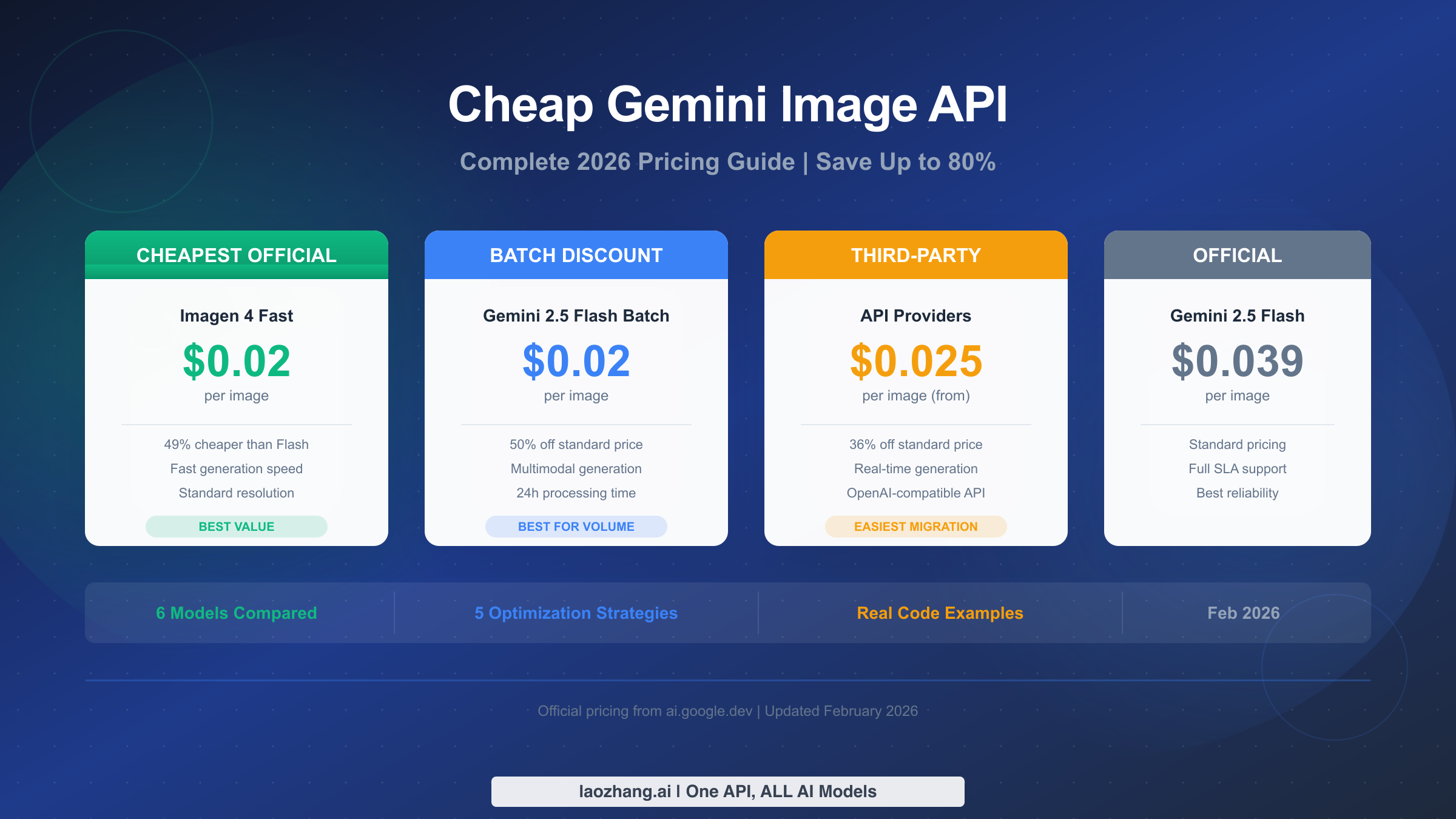
Google's Imagen 4 Fast API generates images at just $0.02 each, making it the cheapest official option in Google's entire image generation lineup as of February 2026. That price is 49% lower than Gemini 2.5 Flash Image at $0.039 per image and a full 92% cheaper than Gemini 3 Pro Image at 4K resolution, which costs $0.24 per generated image. When combined with the Batch API's automatic 50% discount, developers generating images through Google's platform can pay as little as $0.0195 per image using Gemini 2.5 Flash in batch mode. This guide breaks down every pricing tier across all six models, compares capabilities side by side, calculates real monthly costs at production volumes, and shows exactly how to minimize your image generation spending in 2026.
TL;DR
The cheapest ways to generate images through Google's APIs, ranked by per-image cost (February 2026, verified against official pricing):
| Option | Cost/Image | Editing | 4K | Best For |
|---|---|---|---|---|
| Gemini 2.5 Flash Batch | $0.0195 | Yes | No | Non-urgent with editing needs |
| Gemini 2.0 Flash Batch | $0.0195 | Yes | No | Legacy compatibility |
| Imagen 4 Fast | $0.02 | No | No | Bulk generation, thumbnails |
| Third-party (laozhang.ai) | ~$0.025 | Yes | Yes | Real-time, OpenAI-compatible |
| Gemini 2.5 Flash Standard | $0.039 | Yes | No | Real-time with editing |
| Imagen 4 Standard | $0.04 | No | No | Higher quality generation |
| Imagen 4 Ultra | $0.06 | No | No | Premium quality |
| Gemini 3 Pro Image (1K-2K) | $0.134 | Yes | Yes | Professional assets |
| Gemini 3 Pro Image (4K) | $0.24 | Yes | Yes | Print-ready 4K assets |
The price gap between the cheapest option ($0.0195) and the most expensive ($0.24) is over 12x. Simply choosing the right model for your use case, without changing anything else, can save thousands of dollars per month at production volumes. For teams generating more than 10,000 images monthly, implementing a hybrid routing strategy that combines batch processing, Imagen 4, and third-party providers can cut costs by up to 80% compared to sending everything through Gemini 3 Pro at standard pricing.
Google's Official Image Generation Pricing Explained
Google's image generation pricing follows two completely different models depending on which product family you choose, and understanding this distinction is the single most important step in finding the cheapest option for your specific use case. The Gemini models, which include Gemini 2.5 Flash Image (codenamed Nano Banana), Gemini 3 Pro Image (codenamed Nano Banana Pro), and the older Gemini 2.0 Flash, all use a token-based pricing system where you pay per million tokens consumed during generation. The Imagen models, comprising Imagen 4 Fast, Imagen 4 Standard, and Imagen 4 Ultra, use a straightforward per-image flat rate that never changes regardless of your prompt length or output complexity. This distinction matters because the token-based system means your actual per-image cost varies with output resolution, whereas Imagen pricing stays fixed no matter what you generate.
For the Gemini token-based models, the math works like this: when you send a text prompt and receive a generated image, both the input tokens (your prompt text) and output tokens (the encoded image data) are billed separately. A standard 1024x1024 image from Gemini 2.5 Flash Image consumes roughly 1,290 output tokens. At the paid tier rate of $30 per million output tokens, that translates to approximately $0.039 per image. The input tokens for a typical text prompt of 50-100 words cost a fraction of a cent, usually around $0.001 per image, so the output token cost completely dominates your bill. When you send an image as input for editing purposes, that image consumes approximately 560 input tokens, adding roughly $0.0011 to the cost. The practical implication is that text-to-image generation and image editing cost almost the same amount per request, since the output tokens are the primary cost driver in both cases.
Gemini 3 Pro Image operates at a significantly higher price point because it uses a premium output token rate of $120 per million tokens, which is four times the rate of the 2.5 Flash model. A 1K-2K resolution image from Gemini 3 Pro consumes 1,120 output tokens, resulting in a per-image cost of approximately $0.134. If you request 4K output, the token consumption jumps to 2,000 tokens, pushing the per-image cost to $0.24. The Batch API brings these down to $0.067 and $0.12 respectively, but even at batch pricing, Gemini 3 Pro remains the most expensive option in Google's lineup by a wide margin. You are paying for superior text rendering within generated images, native 4K output resolution, search grounding capabilities that can incorporate real-world data into image generation, and advanced reasoning that tests compositions before generating the final output.
The Batch API discount deserves special attention because it represents the single largest cost reduction available across all Gemini models. By submitting your image generation requests as a batch job that processes within a 24-hour window rather than requiring immediate results, Google applies a flat 50% discount to all token prices. This means Gemini 2.5 Flash drops from $0.039 to $0.0195 per image, and Gemini 3 Pro drops from $0.134 to $0.067 for standard resolution. There is no quality difference between batch and standard results; you receive identical images generated by the same model. The Batch API is not available for Imagen 4 models, but their base pricing is already lower than even the batch-discounted Gemini prices for generation-only tasks.
The free tier situation causes frequent confusion among developers new to the platform. As of February 2026, the free image generation access runs exclusively through Gemini 2.0 Flash. Neither Gemini 2.5 Flash Image nor Gemini 3 Pro Image offer a free tier listed on Google's official pricing page. This means developers who want to test image generation without entering billing information must use the older 2.0 model, then switch to 2.5 Flash or Imagen 4 when they move to production with billing enabled. The 2.0 Flash free tier is generous enough for development purposes, but the rate limits are notably lower than the paid tier, and the output quality falls short of what the newer 2.5 Flash Image model produces. If you are looking for a detailed breakdown of these quotas, check our complete guide to Gemini's free tier covering daily limits and rate-limit strategies.
SynthID watermarking is applied to all generated images across every model in the lineup. This invisible digital watermark is embedded in the image data and can be detected by Google's verification tools, but it does not affect visual quality or file size in any meaningful way. The watermark is a Google policy requirement for all AI-generated imagery and cannot be disabled through the API, regardless of which pricing tier or model you use.
Every Model Compared — From $0.02 to $0.24 Per Image
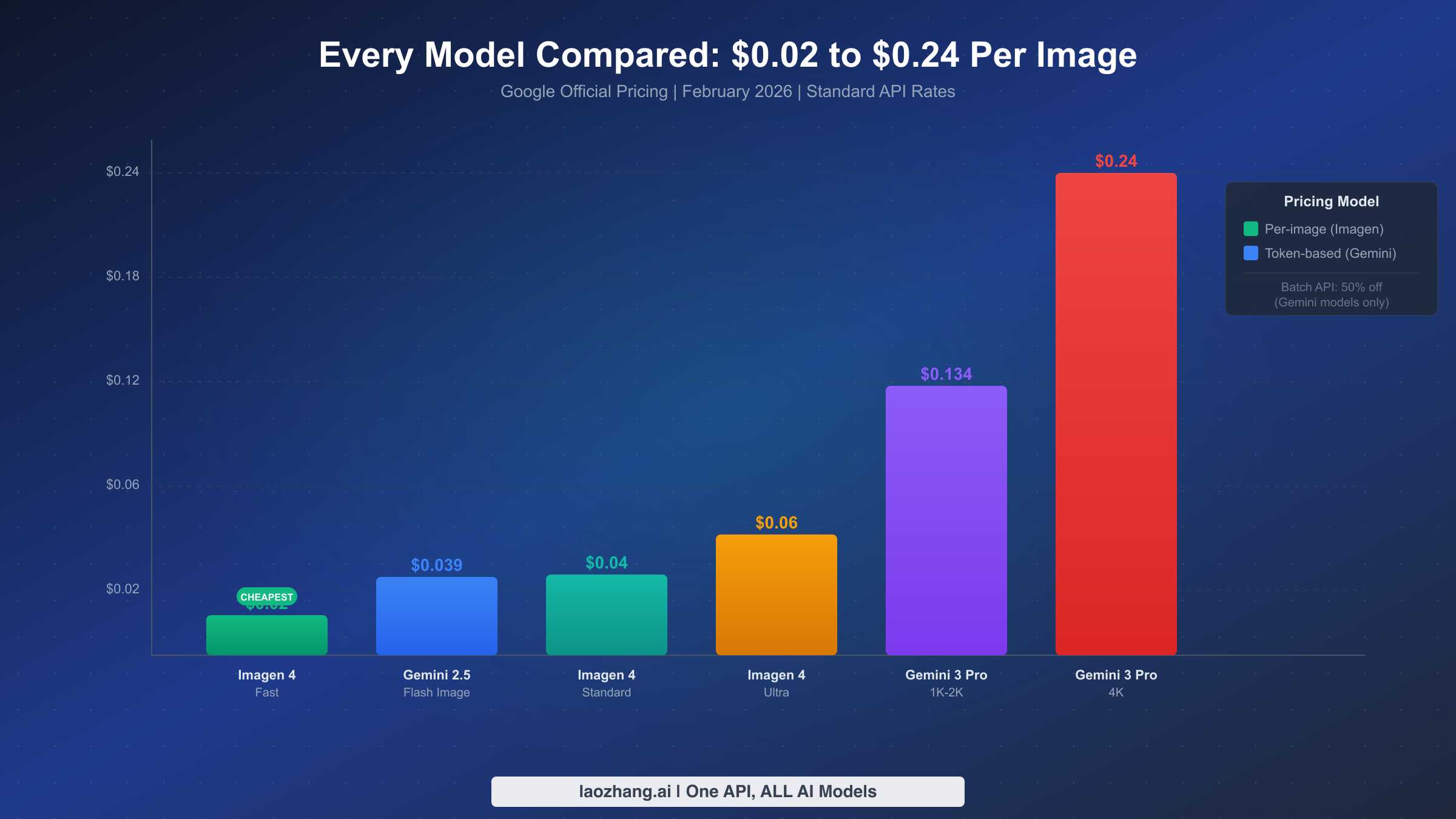
Understanding the differences between Google's six image generation models requires looking well beyond the price tag, because each model targets a fundamentally different use case, and choosing the wrong one means either overspending on capabilities you do not need or producing results that fall short of your requirements. Imagen 4 and the Gemini Image models are architecturally different products that happen to share the same API platform, and the capabilities gap between them drives the pricing differences more than raw generation quality alone.
Imagen 4 Fast is the cheapest entry point at $0.02 per image and remains one of the most underappreciated options in Google's lineup. It is a dedicated image generation model optimized for speed and high-volume throughput, producing standard-resolution images from text prompts with impressive consistency. The critical trade-off is that Imagen 4 Fast offers no image editing capabilities, no multi-turn conversation support, and no multimodal input, meaning you cannot feed it a reference image to guide generation. Text rendering within generated images is basic compared to the Gemini models, so it should not be your first choice for images containing readable text like infographics or marketing copy. However, for applications that need to generate large volumes of standalone images from text prompts alone, such as product thumbnails, social media graphics, blog illustrations, or content library population, Imagen 4 Fast delivers the best cost efficiency available through any official Google API endpoint.
Imagen 4 Standard and Ultra step up in quality at $0.04 and $0.06 per image respectively. Standard offers noticeably better detail, coherence, and color accuracy compared to Fast, while Ultra pushes quality to its maximum for the Imagen family with superior fine detail handling and complex scene composition. Neither supports editing, multi-turn interaction, or multimodal input, maintaining the same fundamental limitation as Imagen 4 Fast: these are generation-only models. The quality improvement from Fast to Ultra is most visible in fine textures, subtle lighting effects, and complex multi-element scenes. For many web-resolution use cases, the difference between Fast and Standard is marginal enough that the $0.02 price difference per image is hard to justify unless you are generating hero images or prominently displayed visual assets.
Gemini 2.5 Flash Image (codenamed Nano Banana) at $0.039 per image represents the sweet spot for developers who need more than pure generation. It combines image generation with full image editing capabilities, accepts multimodal input so you can send existing images for modification or style reference, supports multi-turn conversation for iterative refinement, and produces solid 1024x1024 output. The editing feature alone justifies the $0.019 premium over Imagen 4 Fast for any workflow that involves iterating on generated images, because editing an existing image costs the same as generating a new one while preserving composition and style consistency. With the Batch API, this model drops to $0.0195 per image, effectively matching Imagen 4 Fast's pricing while offering far superior capabilities. For a detailed in-depth pricing and speed analysis of Gemini 3 Pro Image, see our dedicated benchmark article.
Gemini 3 Pro Image (codenamed Nano Banana Pro) occupies the premium tier at $0.134-$0.24 per image depending on resolution. It is the only model in Google's lineup that supports 4K output (4096x4096), features advanced text rendering capable of producing legible infographic text and marketing copy within images, integrates search grounding to incorporate real-world data into generation, and supports multi-turn editing with up to 14 reference images for style and character consistency. The 4K capability alone makes it the only viable choice for print-ready assets, large-format marketing materials, and high-resolution product photography where detail at full zoom matters. For web-resolution work, however, the cost premium over Flash is difficult to justify unless you specifically need its superior text rendering or reference image features.
Gemini 2.0 Flash matches the 2.5 Flash model at $0.039 per image but represents the older generation with less refined image quality and fewer editing improvements. Its sole advantage is availability in the free tier, making it the only zero-cost option for image generation in Google's current lineup. Unless you have existing production code tightly coupled to the 2.0 API or specifically need free tier access for development and testing, there is no technical reason to choose this over 2.5 Flash Image.
The following table captures the full feature comparison across all six models, which is essential for making an informed decision about which model to use for each type of request in your application:
| Feature | Imagen 4 Fast | Imagen 4 Std | Imagen 4 Ultra | 2.5 Flash | 3 Pro | 2.0 Flash |
|---|---|---|---|---|---|---|
| Cost/Image | $0.02 | $0.04 | $0.06 | $0.039 | $0.134-$0.24 | $0.039 |
| Text-to-Image | Yes | Yes | Yes | Yes | Yes | Yes |
| Image Editing | No | No | No | Yes | Yes | No |
| Multi-turn | No | No | No | Yes | Yes | No |
| 4K Output | No | No | No | No | Yes | No |
| Text Rendering | Basic | Basic | Basic | Basic | Advanced | Basic |
| Search Grounding | No | No | No | No | Yes | No |
| Free Tier | No | No | No | No | No | Yes |
| Batch API (50% off) | No | No | No | Yes | Yes | Yes |
The practical implications of this feature matrix go deeper than the checkmarks suggest. Consider a common workflow where a developer generates a product image, realizes the background color clashes with the website design, and wants to change it. With any Imagen 4 model, correcting this requires generating an entirely new image from a modified prompt, costing another $0.02-$0.06 and potentially producing a completely different composition. With Gemini 2.5 Flash Image, the developer can use the editing capability to send the original image back with an instruction like "change the background to light blue," costing just one additional generation at $0.039 but preserving the composition and only modifying the specified element. For workflows involving multiple rounds of iteration, this editing capability can paradoxically make the more expensive Gemini Flash model cheaper in total cost per final approved image.
Real Monthly Costs — What You'll Actually Pay
The per-image pricing tells only part of the budgeting story. What matters for real-world financial planning is the monthly cost at your actual usage volume, because the differences between models compound dramatically as volume increases. The table below shows what each option costs across four common usage tiers, calculated using the standard API rates verified against Google's official pricing page as of February 2026. These calculations assume standard-resolution output (1024x1024 or equivalent) for the Gemini models and do not include input token costs, which add less than 3% to the total.
| Monthly Volume | Imagen 4 Fast | Flash Batch | Flash Standard | 3rd Party (~$0.025) | 3 Pro (1K-2K) | 3 Pro (4K) |
|---|---|---|---|---|---|---|
| 100 images | $2.00 | $1.95 | $3.90 | $2.50 | $13.40 | $24.00 |
| 1,000 images | $20 | $19.50 | $39 | $25 | $134 | $240 |
| 10,000 images | $200 | $195 | $390 | $250 | $1,340 | $2,400 |
| 100,000 images | $2,000 | $1,950 | $3,900 | $2,500 | $13,400 | $24,000 |
The numbers tell a clear story about how model choice impacts your bottom line at scale. At 10,000 images per month, the difference between using Imagen 4 Fast ($200) and Gemini 2.5 Flash at standard pricing ($390) is $190 per month, or $2,280 per year. Scale that to 100,000 images and the gap widens to $1,900 monthly, or $22,800 annually. These are meaningful savings that compound directly into your product margins, especially for startups and small businesses where image generation is a core feature rather than an occasional utility. Choosing Gemini 3 Pro at 4K resolution for tasks that only require standard resolution would cost $24,000 at 100,000 images, twelve times the $2,000 you would pay with Imagen 4 Fast for the same volume.
The Batch API column deserves particular attention because it represents perhaps the most overlooked cost optimization in Google's entire pricing structure. By accepting a 24-hour processing window instead of real-time results, you get an automatic 50% discount that applies to all Gemini models with zero quality trade-off. For workflows like batch-generating product images overnight, creating social media content calendars a week in advance, or pre-generating image asset libraries for marketing campaigns, the batch approach costs virtually the same as Imagen 4 Fast while preserving all of Gemini Flash's editing and multimodal capabilities. In practice, most batch jobs complete within 2-4 hours, but Google does not guarantee a specific turnaround time, so you should design your workflows around the 24-hour maximum. The key constraint is straightforward: if your users need images generated interactively as part of a real-time experience, batch processing will not work, but for any background or pre-scheduled generation task, it should be your default choice before considering any other optimization.
Third-party providers like laozhang.ai fill an interesting gap in the pricing landscape. At approximately $0.025 per image for Gemini 2.5 Flash, they are more expensive than Imagen 4 Fast and the Batch API, but cheaper than standard Gemini Flash pricing and critically, they deliver results in real time. These providers function as API routing layers that forward your requests to Google's actual infrastructure, meaning you get identical output quality from the same underlying models. Most offer OpenAI-compatible API endpoints, which means migration from an existing OpenAI integration is as simple as changing the base URL and API key. The trade-off is that you are adding a dependency on a third-party service for availability, and you lose Google's direct SLA guarantees. For production applications that need real-time generation results but want to save roughly 36% compared to standard pricing, third-party providers address a genuine need that neither Google's standard API nor the Batch API can serve simultaneously.
One dimension that monthly cost tables often obscure is the total cost of ownership beyond the per-image API fee. When evaluating different options, developers should factor in the engineering time required to implement and maintain each integration, the cost of building error handling and retry logic, and the potential revenue impact of generation failures in production. The Batch API, for instance, saves 50% on the per-image cost but requires building a queue management system to handle asynchronous result retrieval. For teams with existing infrastructure for background job processing using tools like Celery, Bull, or Google Cloud Tasks, adding batch image generation is trivial. For teams building from scratch, the infrastructure investment can be significant. Third-party providers, by contrast, use the same synchronous request-response pattern as Google's standard API, making them drop-in replacements that require minimal code changes and no new infrastructure.
Five Strategies to Cut Your Image Generation Costs
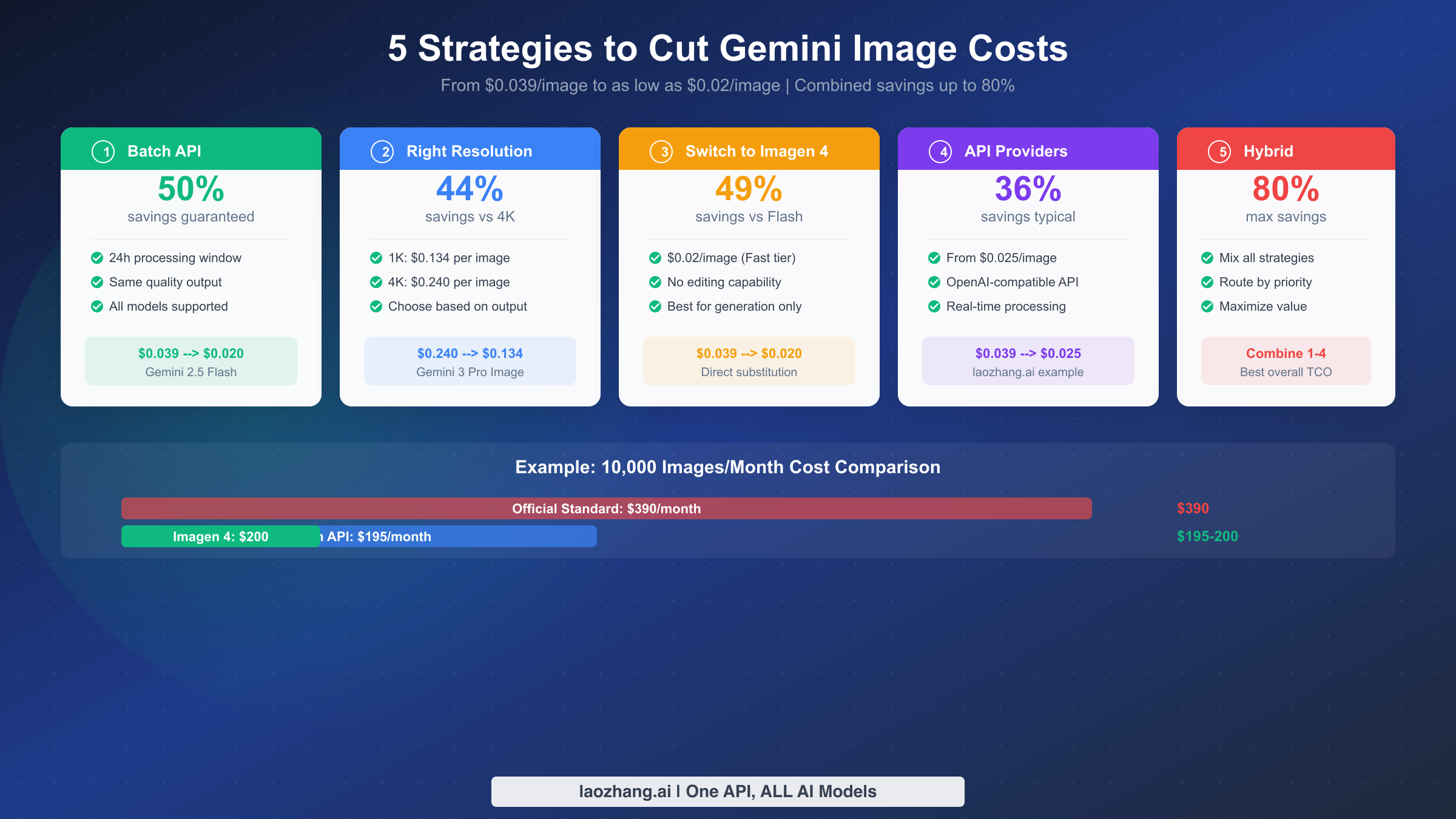
Cutting your Gemini image generation costs is not about picking a single strategy and hoping for the best. The developers who achieve the largest savings combine multiple optimization techniques, each targeting a different part of their image generation workflow. The following five strategies are ranked by impact, with specific implementation details and savings calculations for each one. Understanding Gemini API rate limits is essential context for implementing these strategies effectively, as rate limit awareness directly influences which optimization paths are available to your application.
Strategy 1: Use the Batch API for every non-urgent request (Save 50%). The Batch API is the single highest-impact optimization available because it cuts costs in half with absolutely zero quality trade-off. The only requirement is that your workflow can tolerate results arriving within a 24-hour window rather than immediately, though in practice most batch jobs complete in 2-4 hours. To use it, you submit a JSONL file containing your generation requests, and Google processes them as an asynchronous batch job. The implementation is straightforward using the Google GenAI Python SDK:
pythonfrom google import genai

client = genai.Client(api_key="YOUR_API_KEY")

# Define your batch of image generation requests
descriptions = [
    "Sunset over mountain range, golden hour lighting, photorealistic",
    "Minimalist logo for a tech startup, blue and white, clean lines",
    "Cozy coffee shop interior, warm ambient lighting, watercolor style"
]

# Submit as batch job for 50% discount ($0.0195/image instead of $0.039)
batch_job = client.batches.create(
    model="gemini-2.5-flash-image",
    requests=[
        {"contents": f"Generate an image: {desc}"} for desc in descriptions
    ],
    config={"output_format": "image/png"}
)
print(f"Batch job submitted: {batch_job.name}")
print(f"Status: {batch_job.state}")
print(f"Estimated cost: ${len(descriptions) * 0.0195:.4f}")
This approach works best for overnight content generation, marketing asset creation, scheduled social media image production, and any pipeline where images are prepared ahead of time rather than generated on-demand in response to user actions. The critical insight is that many seemingly "real-time" image generation needs are actually batch-eligible when you examine the workflow closely. Email campaign images, blog post illustrations, product catalog photos, and A/B test variants can all be generated in advance, and shifting even 30% of your total volume from standard to batch reduces your overall image generation costs by 15% with zero architectural complexity.
Strategy 2: Switch to Imagen 4 Fast for generation-only tasks (Save 49%). If your application generates images from text prompts without needing to edit existing images or use reference images for style consistency, Imagen 4 Fast at $0.02 per image is cheaper than any Gemini model at standard pricing and matches the Batch API discount without requiring asynchronous processing. The API call is straightforward and delivers results in real time:
pythonfrom google import genai

client = genai.Client(api_key="YOUR_API_KEY")

# Imagen 4 Fast: cheapest real-time option at $0.02/image
response = client.models.generate_images(
    model="imagen-4.0-fast-generate-001",
    prompt="Professional product photo of a coffee mug on a wooden table, "
           "soft studio lighting, white background, commercial photography",
    config={"number_of_images": 1}
)

for idx, image in enumerate(response.generated_images):
    image.image.save(f"product_photo_{idx}.png")
    print(f"Saved image {idx}. Cost: $0.02")
The key decision point is binary: do you need editing capabilities for this specific request? If yes, use Gemini 2.5 Flash (preferably via the Batch API). If no, Imagen 4 Fast offers better value for pure text-to-image generation. Many applications have a mix of both use cases, which is why this strategy pairs naturally with a routing approach that directs each request to the cheapest appropriate model.
Strategy 3: Right-size your resolution to avoid overpaying (Save up to 44%). For Gemini 3 Pro Image, the cost difference between resolutions is dramatic: $0.134 for 1K-2K output versus $0.24 for 4K output. That means generating at 4K when you only need 1K-2K resolution costs you 79% more per image. Before defaulting to the highest available resolution, consider where the images will actually be displayed. Social media posts are typically shown at 1080x1080 or smaller. Blog thumbnails rarely exceed 800x600. Web content images are almost always displayed below 2000 pixels on any edge. Reserve 4K generation exclusively for print materials, large-format displays, assets intended for cropping and zooming, and deliverables where pixel-level detail genuinely matters to the end user. Simply specifying the appropriate resolution in your generation config can cut your per-image cost nearly in half when using the Pro model, and at 10,000 images per month, that resolution awareness saves over $1,000 monthly.
Strategy 4: Route real-time requests through a third-party provider (Save 36%). When you need real-time image generation and the Batch API's processing delay is not acceptable, third-party API providers offer a compelling middle path between standard pricing and batch discounts. Services like laozhang.ai route requests through Google's official API endpoints while offering lower per-image pricing through volume agreements and operational efficiency. The typical saving is 36% off standard pricing, bringing Gemini 2.5 Flash from $0.039 to approximately $0.025 per image. Most providers expose OpenAI-compatible API endpoints, meaning migration from either Google's standard API or an existing OpenAI integration is straightforward: you change the base URL and API key in your client configuration, and your existing application code works without modification. This strategy is particularly effective for applications where most requests are real-time and batch processing is not viable, such as interactive design tools, user-facing content generation features, and chatbot image capabilities.
Strategy 5: Implement a hybrid routing strategy for maximum savings (Save up to 80%). The most effective cost optimization combines all four strategies above into an intelligent routing layer that sends each request to the cheapest appropriate endpoint based on its characteristics. The logic is simple: urgent requests that need editing go to a third-party provider at $0.025, urgent generation-only requests go to Imagen 4 Fast at $0.02, and non-urgent requests of any type go to the Batch API at $0.0195. Building this router requires only a function that checks the request type and urgency flag before selecting an endpoint.
To illustrate the real-world impact, consider a content platform generating 10,000 images monthly with a typical request distribution. The platform has 2,000 images for scheduled blog posts and email campaigns that are not time-sensitive, making them ideal for batch processing at $0.0195 each for a subtotal of $39. Another 5,000 images are user-generated content thumbnails that need real-time delivery but only require generation without editing, perfect for Imagen 4 Fast at $0.02 each totaling $100. The remaining 3,000 images support interactive editing features where users modify generated images in real time, sent to a third-party provider at $0.025 each for $75. The combined monthly bill is $214, compared to $390 if all 10,000 images were processed through Gemini 2.5 Flash at standard pricing. That represents a 45% cost reduction saving $2,112 annually, achieved with a routing function of roughly 20-30 lines of code. At 100,000 images monthly, the same hybrid strategy saves over $21,000 per year, making it one of the highest-ROI engineering investments available to any team with meaningful image generation volume.
Gemini vs the Competition — 2026 AI Image API Pricing
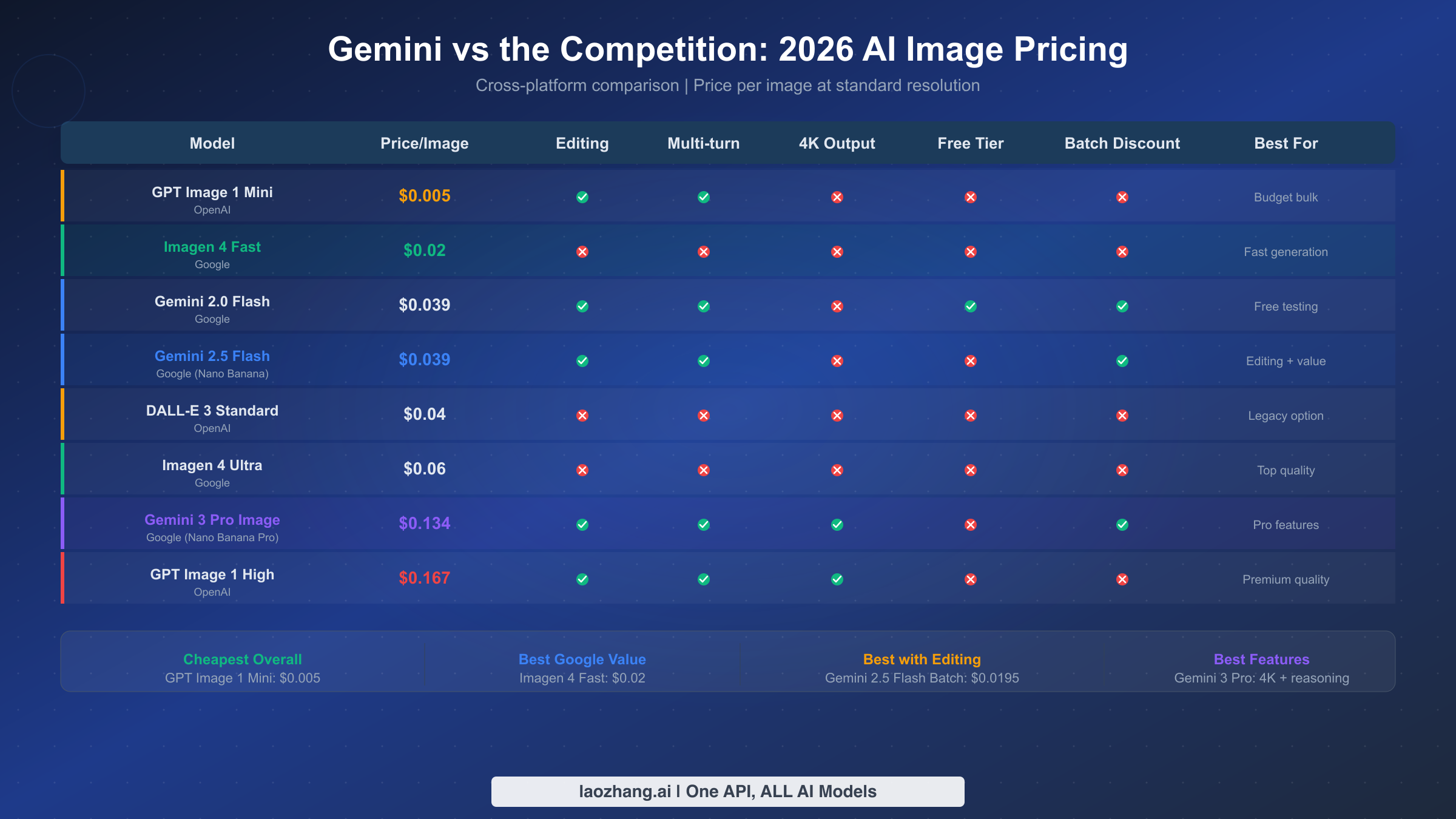
Google's Gemini and Imagen models do not exist in isolation, and evaluating whether they are truly "cheap" requires understanding how they stack up against every major alternative in the AI image generation market. The competitive landscape in early 2026 features several strong contenders from OpenAI, open-source providers, and specialized image generation services, each with distinct pricing structures and quality characteristics. For a broader perspective on how Gemini 3 models compare across all capabilities beyond image generation, see our comprehensive Gemini 3 model comparison.
OpenAI's GPT Image 1 is the most direct competitor to Google's Gemini image models. It comes in two quality tiers: Mini and High. GPT Image 1 Mini ranges from $0.005 to $0.036 per image depending on resolution, making its lowest tier cheaper than any Google option, though at significantly lower resolution and quality. GPT Image 1 High costs $0.167 per image, positioning it between Gemini 3 Pro's standard resolution ($0.134) and 4K resolution ($0.24) pricing. OpenAI's older DALL-E 3 Standard tier costs $0.04 per image, putting it in direct competition with Imagen 4 Standard. The quality comparison is nuanced: GPT Image 1 High generally produces the best text rendering and prompt adherence in complex multi-element scenes, while Gemini 3 Pro Image excels in photorealistic generation and offers 4K output that OpenAI does not match. At the budget end, Imagen 4 Fast at $0.02 beats GPT Image 1 Mini's comparable-quality tier while benefiting from Google's infrastructure reliability.
Several patterns emerge from cross-platform comparison that matter for cost-conscious developers making platform decisions. First, Google's ecosystem offers the widest price range of any single provider: from $0.02 with Imagen 4 Fast to $0.24 with Gemini 3 Pro at 4K, you can pick your exact price-quality tradeoff without switching platforms, managing multiple API integrations, or maintaining separate billing relationships. Second, Gemini 3 Pro Image at $0.134 per standard-resolution image delivers quality that consistently ranks within the top three across independent benchmarks, while costing 20% less than GPT Image 1 High at $0.167. Third, for self-hosting enthusiasts, open-source models like Flux 2 are technically "free" after GPU costs, but the infrastructure overhead of GPU rental at $0.50-$2.00 per hour, system maintenance, scaling management, and model updates means they only become cheaper than API services at very high volumes, typically above 50,000 images per month where the fixed GPU cost can be amortized.
The ecosystem advantage of staying within Google's platform is a cost factor that pricing tables alone do not capture but that significantly impacts total engineering spend. If your application already uses Gemini for text generation, adding image generation through the same API client means zero additional authentication setup, unified billing through the same Google Cloud account, consistent error handling patterns across all API calls, and a single SDK dependency in your project. Switching to a competitor for image generation means maintaining a separate API integration with its own authentication flow, error codes, rate limiting behavior, and billing dashboard. For small teams where engineering time is the scarcest resource, this operational overhead can outweigh even significant per-image price differences. Google's deliberate strategy of offering both budget options like Imagen 4 Fast and premium options like Gemini 3 Pro within the same platform is specifically designed to eliminate the technical motivation for developers to maintain integrations with competing providers.
The quality dimension deserves careful analysis beyond aggregate benchmark scores. Independent user preference studies show that the "best" model varies substantially by task type. Gemini 3 Pro Image excels at text rendering within images, making it the strongest option for infographics, marketing materials containing copy, and any design that includes readable text. Imagen 4 performs better on photorealistic scene generation, natural landscapes, and product photography where training data depth gives it an advantage in rendering realistic textures and lighting. OpenAI's GPT Image 1 offers arguably the best prompt adherence for complex multi-element scenes involving specific spatial relationships between objects. Understanding these task-specific strengths is essential for the hybrid routing strategy, because you can route text-heavy image requests to Gemini 3 Pro, photorealistic requests to Imagen 4, and complex compositional requests to whichever model handles them best, optimizing both quality and cost simultaneously.
Which Option Should You Choose?
After examining all the pricing data, model capabilities, and competitive landscape, the decision comes down to three factors: your monthly volume, whether you need image editing capabilities, and how quickly you need results delivered. Rather than leaving you to weigh dozens of variables against each other, here are direct recommendations for the most common scenarios developers encounter when choosing an image generation approach, organized by volume tier since that is the primary driver of cost impact.
For developers generating fewer than 500 images per day who are prototyping or building personal projects, the free tier through Google AI Studio is the correct starting point. Gemini 2.0 Flash offers image generation at no cost with a daily quota that is more than sufficient for development, testing, and iteration. You will not need to enter billing information or commit to any spending, and you get access to the same generation capability as the paid tier, though at lower resolution than the newer 2.5 Flash model. The main limitations are rate limits (approximately 10-15 requests per minute for image generation) and the fact that Google may use your prompts and generated images to improve their models under the free tier terms of service. For prototyping, internal tools, and personal projects, these trade-offs are almost always acceptable, and you can migrate to a paid option when your application is ready for production deployment with higher volume and stricter data handling requirements.
For teams generating 500 to 5,000 images per month who need to balance cost with capability, the optimal choice depends on one binary question: do your workflows require image editing? If the answer is no, and your application exclusively generates new images from text prompts, use Imagen 4 Fast at $0.02 per image. Your monthly bill will range from $10 to $100, you get Google's infrastructure reliability and uptime guarantees, and there are no third-party dependencies to manage. If the answer is yes and you need the ability to edit, modify, or iterate on generated images, use Gemini 2.5 Flash Image via the Batch API at $0.0195 per image. The 24-hour processing window is a small operational concession for a 50% cost reduction, and most batch jobs complete within 2-4 hours in practice. At this volume tier, you are spending $10-$98 per month on batch processing, roughly equivalent to Imagen 4 Fast pricing while retaining full editing, multi-turn conversation, and multimodal input capabilities that Imagen 4 fundamentally cannot provide.
For organizations generating 5,000 to 50,000 images per month where cost optimization materially impacts product margins, adopt the hybrid routing strategy described in the optimization section above. Route non-urgent work of any type through the Batch API at $0.0195, generation-only real-time tasks through Imagen 4 Fast at $0.02, and real-time editing tasks through a third-party provider at approximately $0.025. This approach optimizes each individual request for the cheapest appropriate endpoint and can reduce your blended average per-image cost to the $0.021-$0.025 range depending on your specific request mix. At 50,000 images monthly, the hybrid approach costs approximately $1,050-$1,250 compared to $1,950 for Batch API only or $3,900 for standard Flash pricing across the board. The implementation complexity is modest, essentially an if-else routing function with three branches, and the annual savings can reach $10,000-$30,000 depending on your volume and request distribution.
For enterprises generating more than 50,000 images per month, contact Google Cloud for Vertex AI enterprise pricing. At this volume, Google offers negotiated rates that can undercut even the published batch pricing, along with dedicated technical support, SLA guarantees with contractual uptime commitments (typically 99.9%), and compliance certifications that matter for regulated industries including healthcare, finance, and government applications. The self-serve Gemini API remains functional at this scale, but Vertex AI adds provisioned throughput guarantees, private endpoints, VPC Service Controls for network isolation, and data residency options that enterprise procurement and security teams typically require. At 100,000 images monthly, even a $0.005 per-image improvement through a negotiated rate translates to $500 or more per month in additional savings on top of what the hybrid strategy already achieves.
Getting Started — Code Examples
Getting started with the cheapest Gemini image generation options takes less than five minutes of setup time. You need a Google API key, which is free from Google AI Studio, and the Google GenAI Python package installed via pip. The following examples cover the three most common starting points: generating the cheapest possible image with Imagen 4 Fast, generating with editing support via Gemini 2.5 Flash, and submitting a batch job for 50% savings.
The fastest path to generating your first image at $0.02 uses Imagen 4 Fast, which provides the lowest per-image cost for pure text-to-image generation:
python# Install: pip install google-genai
from google import genai

client = genai.Client(api_key="YOUR_API_KEY")

# Imagen 4 Fast: $0.02/image, real-time generation
response = client.models.generate_images(
    model="imagen-4.0-fast-generate-001",
    prompt="A serene Japanese garden with a red bridge over a koi pond, "
           "morning light filtering through maple trees, photorealistic",
    config={"number_of_images": 1}
)

response.generated_images[0].image.save("garden.png")
print("Image saved successfully. Cost: ~$0.02")
For applications that need both generation and editing capabilities, Gemini 2.5 Flash Image uses the standard content generation endpoint and supports multi-turn conversations for iterative image refinement:
pythonfrom google import genai
from google.genai.types import GenerateContentConfig

client = genai.Client(api_key="YOUR_API_KEY")

# Gemini 2.5 Flash Image: $0.039/image (or $0.0195 via batch)
response = client.models.generate_content(
    model="gemini-2.5-flash-preview-image-generation",
    contents="Generate a minimalist logo for a coffee shop called 'Bean & Brew' "
             "with warm earth tones and a hand-drawn aesthetic",
    config=GenerateContentConfig(
        response_modalities=["IMAGE", "TEXT"]
    )
)

# Extract and save the generated image from the response
for part in response.candidates[0].content.parts:
    if hasattr(part, "inline_data") and part.inline_data:
        with open("logo.png", "wb") as f:
            f.write(part.inline_data.data)
        print("Logo saved. Cost: ~$0.039")
The Batch API example demonstrates how to submit multiple generation requests for 50% cost savings. Results are retrieved asynchronously once the batch job completes:
pythonfrom google import genai

client = genai.Client(api_key="YOUR_API_KEY")

# Prepare batch requests (each costs $0.0195 instead of $0.039)
prompts = [
    "Professional headshot, neutral background, studio lighting",
    "Abstract geometric pattern, blue and gold, seamless tile",
    "Watercolor illustration of a mountain landscape at sunset",
    "Product photo of wireless earbuds on marble surface"
]

batch_job = client.batches.create(
    model="gemini-2.5-flash-preview-image-generation",
    requests=[{"contents": prompt} for prompt in prompts],
    config={"output_format": "image/png"}
)

print(f"Batch submitted: {batch_job.name}")
print(f"Status: {batch_job.state}")
print(f"Total cost: ~${len(prompts) * 0.0195:.3f} (50% off standard)")
The key architectural difference between these examples is that Imagen models use the dedicated generate_images method while Gemini models use the general-purpose generate_content method. Both return images, but the Gemini approach also supports mixed text-and-image output, image editing through multi-turn conversation history, and reference image input for maintaining style consistency across multiple generations. If you only need text-to-image generation and want the absolute lowest cost, the Imagen 4 Fast approach is simpler, cheaper, and faster. If you anticipate needing editing or multimodal features in the future, start with Gemini 2.5 Flash Image to avoid refactoring your integration later.
For production deployments, add error handling for the most common failure modes. The API returns a 429 status code when you exceed rate limits, and the correct response is exponential backoff starting at one second, doubling with each retry up to a maximum of 60 seconds, and abandoning after five attempts. Image generation rate limits are tracked separately from text generation limits, so hitting the image ceiling does not affect your text API calls. For the Batch API, errors are reported within the batch job results rather than as HTTP responses, requiring you to check each individual result when the job completes.
Making the Most of Every Dollar
The landscape of affordable Gemini image generation in 2026 offers more pricing options and optimization paths than ever before, and the cost differences between approaches are significant enough to materially impact your product's unit economics at any meaningful scale. The core takeaway from this analysis is actionable and straightforward: Imagen 4 Fast at $0.02 per image and Gemini 2.5 Flash Batch at $0.0195 per image are the two cheapest official options, each with clearly defined trade-offs that make them ideal for different use cases. Imagen 4 provides the simplest, cheapest path for generation-only workflows that do not require editing capabilities. Gemini Flash Batch matches that price while adding editing, multi-turn conversation, and multimodal input, at the cost of real-time responsiveness.
The actionable steps for developers building products today are clear and can be implemented incrementally. Start with the free tier through Gemini 2.0 Flash for all development and testing work. When you are ready to deploy to production with billing enabled, choose Imagen 4 Fast for generation-only workflows or Gemini 2.5 Flash Batch for editing-capable workflows. If you need real-time generation and want to reduce costs below standard pricing, third-party providers at approximately $0.025 per image offer a 36% discount with identical output quality. Once your volume exceeds 10,000 images monthly, implement the hybrid routing strategy to automatically direct each request to the cheapest appropriate endpoint based on its urgency and capability requirements. The difference between the most expensive standard approach ($0.039 per image) and the cheapest hybrid combination strategy (approximately $0.021 average) is a 46% cost reduction that compounds with every image you generate.
The market for AI image generation APIs continues evolving rapidly in a direction that favors developers. Since the beginning of 2025, Google has launched three new image-capable models, expanded the Batch API to cover more model variants, and introduced the Imagen 4 family that brought per-image pricing below $0.03 for the first time. The trend is unmistakably toward lower prices and more options at every quality tier. The cost optimization strategies outlined in this guide are designed to remain effective as new models emerge, because the hybrid routing architecture can slot in cheaper models as they become available without requiring changes to your application logic. Staying informed about pricing updates and new model releases ensures you are always paying the lowest available rate rather than overspending out of inertia, and at production volumes, that awareness translates directly into meaningful budget savings month after month.