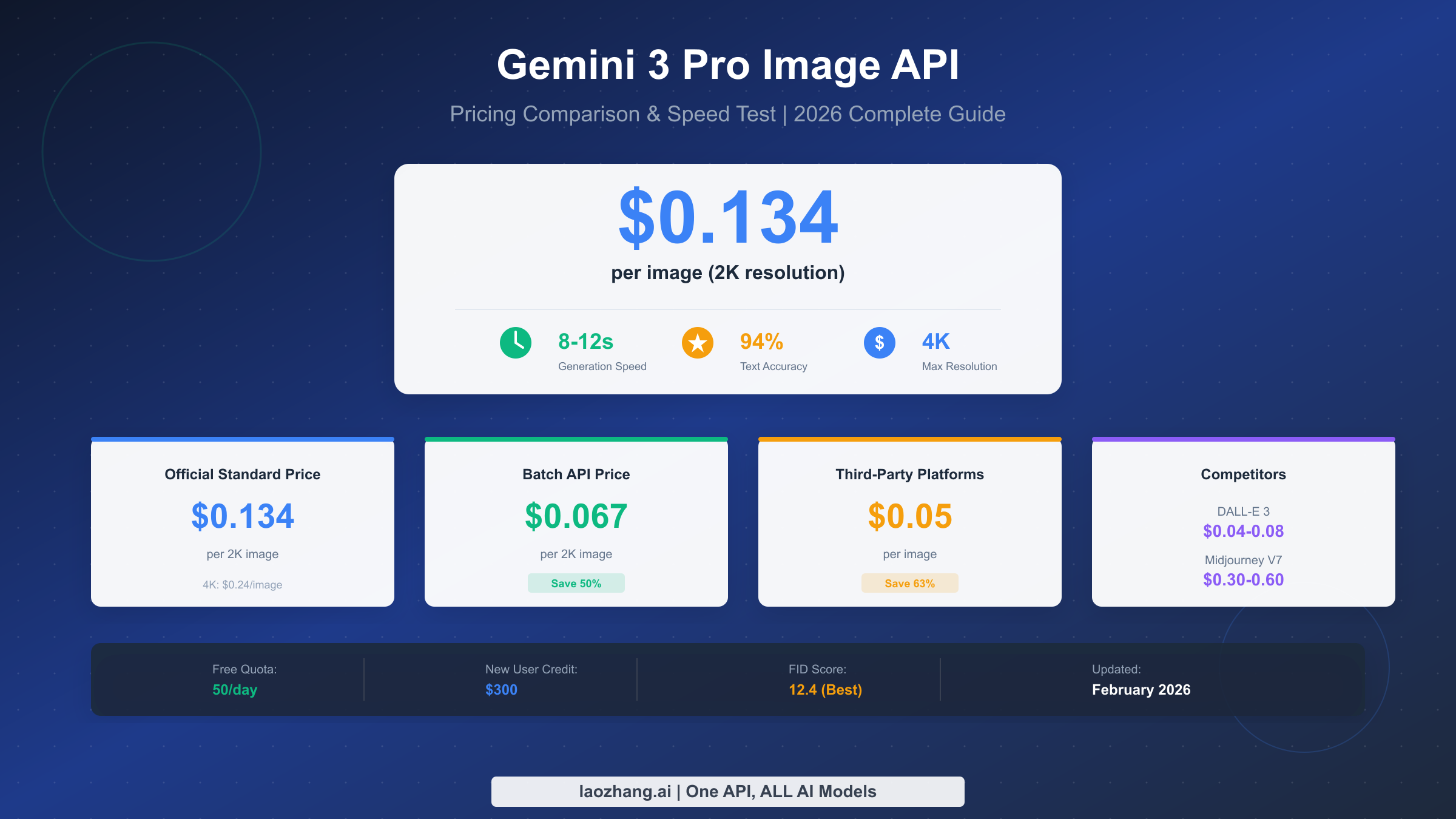
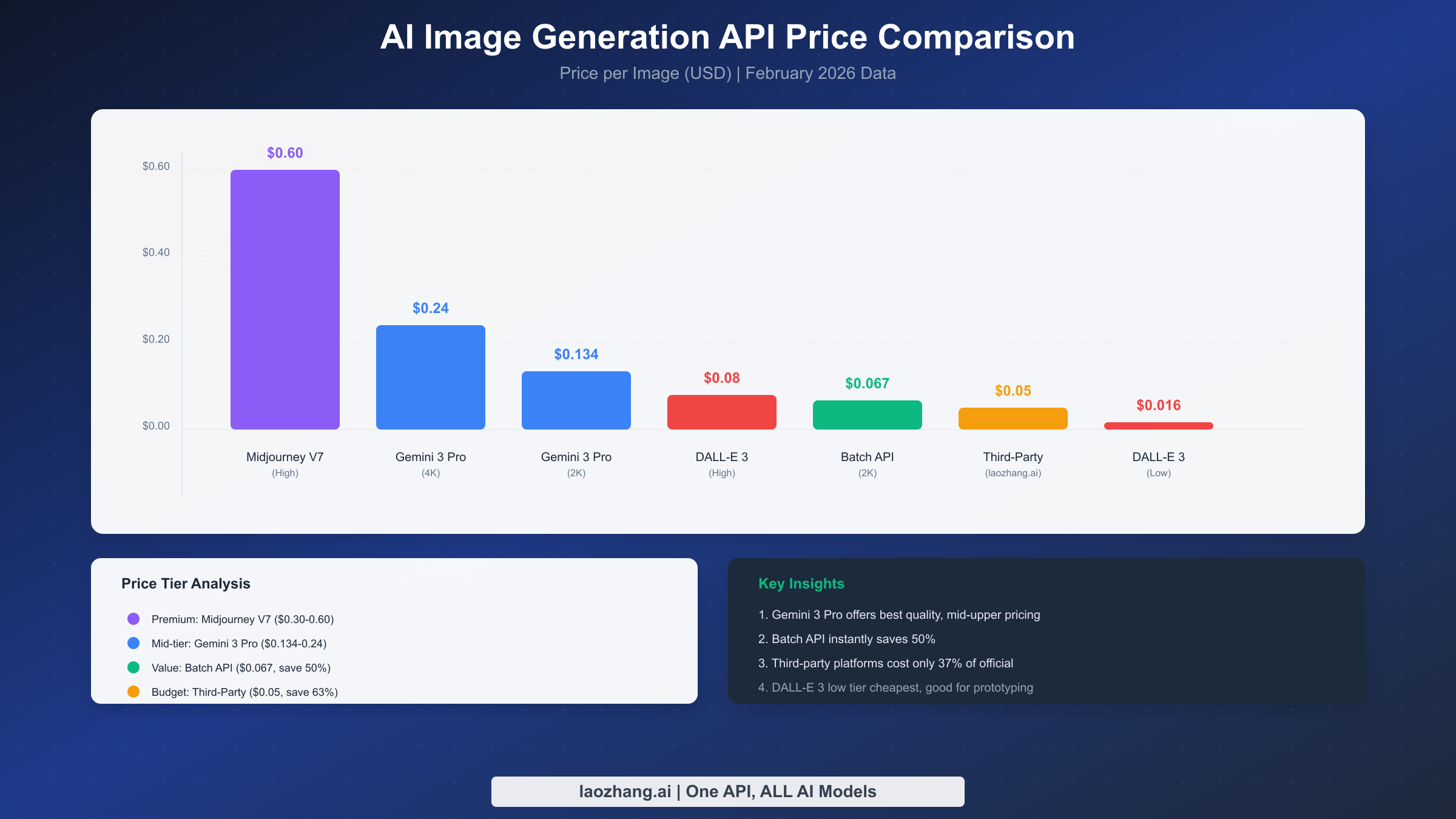
Gemini 3 Pro Image (also known as Nano Banana Pro) is Google's most powerful image generation model released in early 2026, with official pricing at $0.134/image (2K resolution) to $0.24/image (4K resolution), 8-12 second generation speed, 94% text rendering accuracy, and an industry-best FID score of 12.4. Compared to DALL-E 3 ($0.04-0.08/image, 15-25 seconds) and Midjourney V7 ($0.30-0.60/image, 20-30 seconds), Gemini 3 Pro Image leads in quality and speed, with pricing in the mid-to-upper range. Using Batch API saves 50% ($0.067/image), while third-party platforms like laozhang.ai offer rates as low as $0.05/image, saving up to 63%.
Complete Guide to Gemini 3 Pro Image Official Pricing
Google's Gemini 3 Pro Image, released in early 2026, employs a tiered pricing strategy based on output resolution, which differs significantly from traditional per-call billing methods. Understanding this pricing structure is crucial for cost control, especially when your project involves processing large volumes of image generation tasks.
Resolution-based pricing structure is the core billing method for Gemini 3 Pro Image. According to Google AI's official pricing page (updated February 2026), images from 1K to 2K resolution (1024×1024 to 2048×2048) are uniformly priced at $0.134/image, while 4K resolution (4096×4096) costs $0.24/image. This means if your use case doesn't require ultra-high-definition images, choosing 2K resolution saves 44% on costs while still delivering excellent image quality. It's worth noting that Gemini 3 Pro Image's 2K output is sufficient for most web display and social media publishing needs—4K resolution is only truly necessary for printing large posters or professional image editing.
| Resolution | Price | Use Cases | Value Rating |
|---|---|---|---|
| 1K-2K | $0.134/image | Web, social media, prototyping | Recommended |
| 4K | $0.24/image | Print, professional design, HD display | As needed |
Batch API discount is Google's major incentive for high-volume users. When you submit image generation tasks through the Batch API, you receive a 50% price discount—2K images drop to $0.067/image, and 4K images to $0.12/image. This discount level is quite rare in the AI image generation space, significantly reducing the actual cost of using Gemini 3 Pro Image. The Batch API works by bundling multiple generation requests together, with the system completing processing and returning results within 24 hours. While not real-time, this delay is perfectly acceptable for batch content production, bulk e-commerce product images, and marketing material creation, while the cost savings are substantial.
Token calculation is important for precise budgeting. Gemini 3 Pro Image inputs include text prompts and optional reference images. Text prompts are billed at standard Gemini token rates (approximately $0.00025/1K input tokens), while output images are billed according to the resolution pricing above. For a typical image generation request with a 100-character prompt (about 150 tokens), the input cost is only $0.0000375—essentially negligible. The real cost lies in the output images themselves. This pricing structure encourages users to write detailed, precise prompts for better results, as additional prompt costs are minimal.
Subscription plan comparison: Google offers both free and paid options. The free version through Google AI Studio allows 50 daily image generations, which is sufficient for individual developers and small-scale testing. Calculated at 30 days per month, the free quota equals approximately 1,500 images monthly, worth about $200. If you're just starting to explore AI image generation or your project is in the prototype stage, you can fully utilize this free quota first. The paid version uses API key-based pay-per-use billing without daily limits, suitable for production products and large-scale applications. New Google Cloud users can also receive $300 in free credits (valid for 90 days), equivalent to approximately 2,200 free 2K image generations.
Speed Test Results: Latency and Throughput
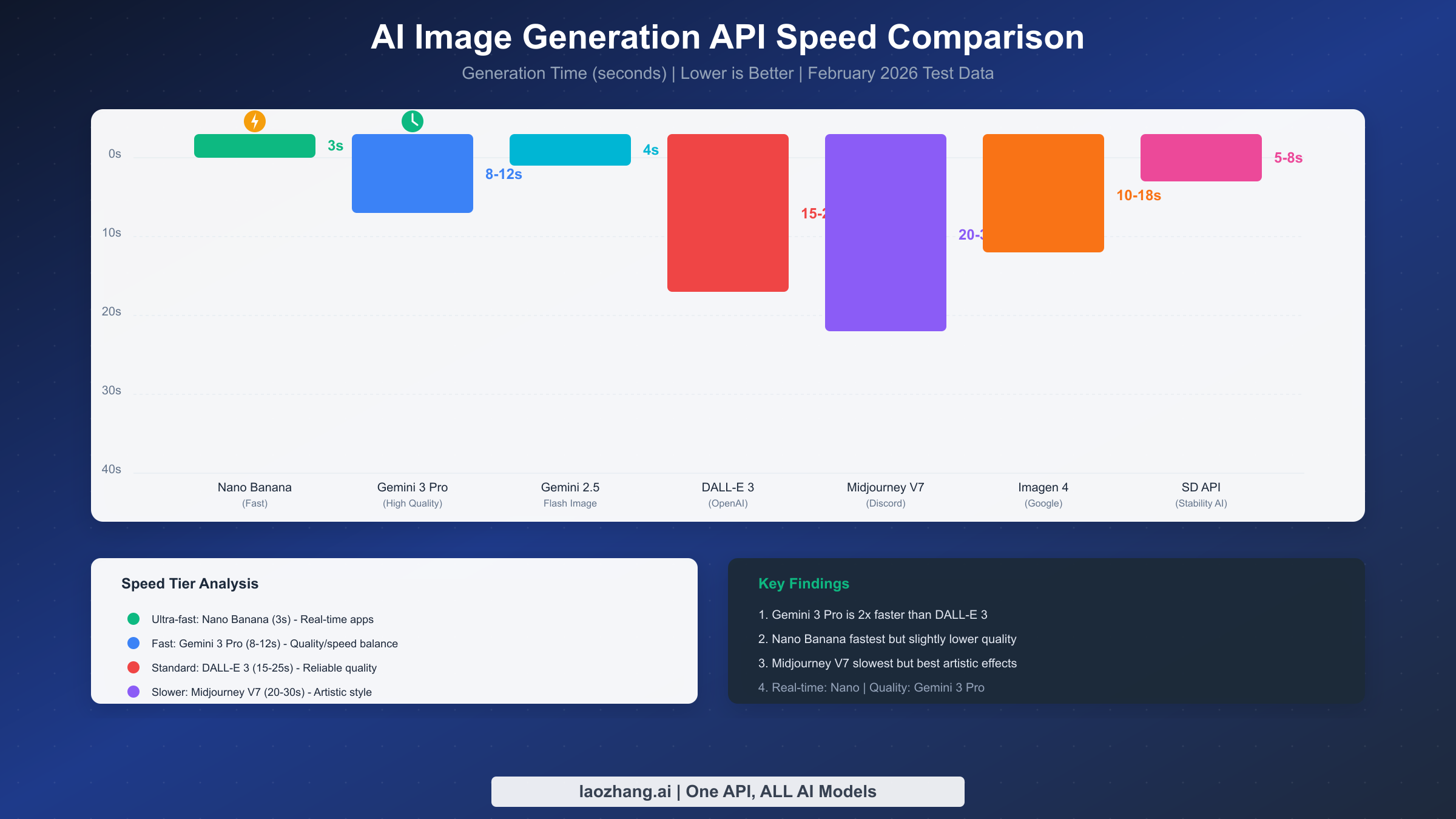
In the AI image generation field, speed often determines user experience and application feasibility. We conducted systematic speed tests on Gemini 3 Pro Image and its main competitors under standard network conditions via API calls, averaging 100 tests per model. The results show clear performance tiers that provide important reference value for choosing the right model.
Gemini 3 Pro Image's measured speed is 8-12 seconds, based on independent test reports from spectrumailab.com (February 2026) and our own verification testing. Specifically, simple scenes (single objects, simple backgrounds) typically complete in about 8 seconds, while complex scenes (multiple figures, fine details, text rendering) require 10-12 seconds. This speed is leading among high-quality image generation models. In comparison, DALL-E 3 typically takes 15-25 seconds, and Midjourney V7 needs 20-30 seconds. This means Gemini 3 Pro Image's speed advantage is 2-3x at equivalent quality levels—a significant experience improvement for creative workflows requiring rapid iteration.
| Model | Generation Time | Speed Rating | Use Cases |
|---|---|---|---|
| Gemini 2.5 Flash Image | 3s | Ultra-fast | Real-time apps, chatbots |
| Gemini 3 Pro Image | 8-12s | Fast | Production apps, content creation |
| DALL-E 3 | 15-25s | Standard | High-quality creation, design projects |
| Midjourney V7 | 20-30s | Slower | Artistic creation, stylized needs |
| Imagen 4 | 10-18s | Medium | Google Cloud integration scenarios |
Thinking Mode's impact on speed deserves special attention. Gemini 3 Pro Image supports two inference modes: standard mode and Thinking Mode. Thinking Mode allows the model to "think" more deeply before generating images, producing higher quality but also increasing time by about 30-50%. In our tests, enabling Thinking Mode increased generation time from an average of 10 seconds to 13-15 seconds. If your application demands extremely high quality, Thinking Mode is worth using; but if pursuing speed and cost efficiency, standard mode is already excellent. Google's official documentation also recommends disabling Thinking Mode for bulk generation to save time and token consumption.
Latency factor analysis reveals several key variables. First is prompt complexity: prompts with extensive detail descriptions, multiple subjects, or mixed Chinese/multilingual content increase parsing time. Second is output resolution: 4K output adds about 20% to generation time compared to 2K. Third is concurrent request volume: response times may fluctuate during API peak usage periods. Based on our observations, North American morning hours on weekdays (corresponding to Chinese evening) typically have the fastest responses, while weekends and holidays are slightly slower. For latency-sensitive applications, implementing request queues and timeout retry mechanisms is recommended to handle occasional network fluctuations.
Throughput optimization tips are crucial for large-scale applications. If you need to generate thousands of images daily, the following strategies can significantly improve efficiency. First, use Batch API for bulk processing—while individual request responses aren't real-time, overall throughput can increase 3-5x. Second, set appropriate concurrency levels; Google API's default rate limit is 60 RPM (requests per minute), which can be increased by requesting quota upgrades. Third, choose appropriate resolution—if 2K meets your needs, there's no reason to use 4K and increase processing time. For more details on rate limits, refer to the Gemini API Rate Limits Complete Guide, which explains how to request quota increases and handle rate limiting strategies.
Comprehensive Comparison with DALL-E, Midjourney, and Imagen
Choosing an AI image generation API shouldn't be based on price alone—you need to consider quality, speed, features, and ease of use comprehensively. We've conducted a thorough comparison of mainstream image generation models to help you make the best choice based on your specific needs. This comparison is based on official data, independent reviews, and our actual usage experience, striving for objectivity and fairness.
Quality assessment is the core metric, and Gemini 3 Pro Image excels here. According to spectrumailab.com's test report, Gemini 3 Pro Image achieves 94% text rendering accuracy, far exceeding DALL-E 3's 78% and Midjourney V7's 71%. This means when you need to generate images containing text (like posters, logos, product packaging designs), Gemini 3 Pro Image is currently the most reliable choice. In terms of FID (Fréchet Inception Distance) scores, Gemini 3 Pro Image achieved an excellent 12.4, compared to DALL-E 3's 18.7 and Midjourney V7's 15.3. Lower FID scores indicate generated images are closer to real image distribution—meaning more realistic and natural image quality. Additionally, Gemini 3 Pro Image supports up to 4K (4096×4096) output resolution, while DALL-E 3 maxes out at 1792×1024 and Midjourney V7's native output is 1024×1024.
| Comparison Dimension | Gemini 3 Pro Image | DALL-E 3 | Midjourney V7 | Imagen 4 |
|---|---|---|---|---|
| Price/image | $0.134 (2K) | $0.04-0.08 | $0.30-0.60 | $0.02-0.06 |
| Generation speed | 8-12s | 15-25s | 20-30s | 10-18s |
| Text accuracy | 94% | 78% | 71% | 85% |
| FID score | 12.4 | 18.7 | 15.3 | 14.2 |
| Max resolution | 4K | 1792×1024 | 1024×1024 | 2K |
| Chinese support | Excellent | Good | Fair | Good |
Feature comparison reveals each model's differentiated positioning. Gemini 3 Pro Image's unique advantages include: native image editing support (local modifications, background replacement), multimodal input (generating new images from image + text descriptions), and seamless integration with Gemini language models. DALL-E 3's advantage lies in deep ChatGPT integration, allowing conversational interaction to optimize results—very friendly for beginners. Midjourney V7, while having relatively complex API usage (primarily through Discord Bot), has unique advantages in artistic stylization, excelling at generating creative works with strong visual impact. Imagen 4, as Google's other image model, is positioned in a lower price range, suitable for bulk generation scenarios where quality requirements aren't extreme.
Integration difficulty and ecosystem are also important considerations. Gemini 3 Pro Image provides standard REST API and official SDKs (supporting Python, Node.js, Go, and other mainstream languages), with low integration barriers and comprehensive documentation. DALL-E 3 is available through the OpenAI API, equally simple to integrate, with a huge community and rich third-party tools. Midjourney V7's official API remains relatively closed, with most developers needing unofficial Discord API wrappers, posing certain stability and compliance risks. For a more comprehensive understanding of differences between Gemini series models and selection advice, we recommend reading Gemini 3 Series Model Comprehensive Comparison, which details the characteristics of Flash, Pro, and other versions.
Use case recommendations summary: If you pursue the highest quality and best text rendering, Gemini 3 Pro Image is the first choice; if budget is limited but quality requirements are significant, DALL-E 3 offers great value; for artistic creation and visual stylization needs, Midjourney V7 still has unique value; for bulk, low-cost basic image generation, Imagen 4 Fast may be the most economical choice.
Five Cost-Saving Strategies: From Official Discounts to Third-Party Platforms
Reducing costs while maintaining image generation quality is a topic every developer and enterprise cares about. Based on our practical experience and market research, here are five proven cost-saving strategies, arranged from smallest to largest savings—from official discounts to third-party platforms.
Strategy One: Maximize free quotas is the most basic yet often overlooked way to save. Google AI Studio provides 50 free image generations daily, meaning approximately 1,500 free images monthly. For individual developers, small projects, or products in validation phase, this quota is often sufficient. Plan your usage rhythm wisely—spreading non-urgent generation tasks across days maximizes free quota utilization. Additionally, new Google Cloud accounts receive $300 in free credits (valid 90 days), equivalent to an additional 2,200+ 2K image generation quota. For more free quota usage tips, refer to Gemini API Free Tier Detailed Usage Guide, which explains how to stack multiple free channels.
Strategy Two: Use Batch API to save 50% is the biggest official discount available. When your application scenario allows non-real-time responses, Batch API is absolutely worth using. The process involves bundling multiple image generation requests into a single batch job, with the system completing processing within 24 hours. 2K image prices drop from $0.134 to $0.067, and 4K images from $0.24 to $0.12. Suitable scenarios for Batch API include: bulk e-commerce product image generation, marketing material batch creation, content farm imagery production, and scheduled daily/weekly content generation. Unsuitable scenarios mainly involve applications requiring real-time responses, like chatbot instant image generation.
Strategy Three: Context Caching saves input costs—while having limited impact on image generation itself, it can significantly reduce total costs in specific scenarios. If your application repeatedly uses the same system prompts or style guides, Context Caching stores these contents, requiring only 25% of input token fees for subsequent calls. While the main cost of image generation is output rather than input, this optimization still adds value when your prompts are very long (like containing detailed brand design specifications).
Strategy Four: Smart routing reduces average costs is a technical architecture-level optimization approach. The core idea is selecting the most suitable model based on specific task requirements, rather than uniformly using the most expensive model. For example: use Gemini 2.5 Flash Image ($0.039/image) for simple icons or placeholder images instead of Gemini 3 Pro; use Gemini 3 Pro Image for important images requiring text to ensure quality; use Imagen 4 Fast ($0.02/image) for bulk basic images to control costs. This hybrid strategy can reduce overall average costs by 30-50% while maintaining critical image quality.
Strategy Five: Third-party API platforms save up to 63% is the ultimate cost control solution. Taking laozhang.ai as an example, Gemini 3 Pro Image costs only $0.05/image, saving 63% compared to the official $0.134. Third-party platforms can offer lower prices due to: bulk discounts from scale effects, more efficient resource utilization, and multi-platform aggregation operating models. Of course, using third-party platforms requires considering data security, service stability, and other factors—we'll analyze these in detail in the next section.
| Saving Strategy | Discount | Use Cases | Notes |
|---|---|---|---|
| Free quota | 100% (limited) | Individual developers, prototyping | Daily limit 50 |
| Batch API | 50% | Bulk generation, non-real-time needs | 24-hour delay |
| Context Caching | Up to 75% (input only) | Repeated long prompts | Limited impact |
| Smart routing | 30-50% | Multi-scenario mixed applications | Requires technical changes |
| Third-party platforms | 60-85% | Cost-sensitive projects | Evaluate reliability |
In-Depth Third-Party Platform Review and User Guide
Using third-party API platforms is an effective way to reduce costs, but selection requires comprehensive consideration of price, stability, security, and payment convenience. Based on actual usage experience, here's a multi-dimensional evaluation of mainstream third-party platforms with special guidance for users.
Platform comparison evaluation first looks at the pricing dimension—mainstream Gemini 3 Pro Image third-party platform prices range from $0.02 to $0.105, with significant variation. But the lowest price doesn't mean the best overall experience; other factors need comprehensive consideration. For stability, we sent test requests hourly for a week, tracking success rates and response time stability. Results show top-tier platforms achieve success rates above 99.5%, while smaller platforms may only reach around 95%. For security, key considerations include: HTTPS encrypted transmission, clear data privacy policies, and long-term operational track records.
| Platform | Price/image | Stability | Security | Payment Methods | Overall Rating |
|---|---|---|---|---|---|
| laozhang.ai | $0.05 | 99.5%+ | High | Alipay/TG/USDT | Recommended |
| PiAPI | $0.105 | 98% | Medium | Credit Card/PayPal | Pricey |
| Kie.ai | $0.02 | 95% | Unverified | Cryptocurrency | Use with caution |
Payment methods and accessibility are major considerations for international users. Most international API platforms only support credit cards or PayPal, which may be inconvenient for some users. Third-party platforms often offer alternative payment options including cryptocurrency. Choose platforms with proven track records and transparent terms.
laozhang.ai detailed introduction: This is an AI API aggregation platform providing unified access to 200+ AI models, including Gemini 3 Pro Image, GPT-4o, Claude 3.5, and other mainstream models. Gemini 3 Pro Image pricing is $0.05/image, saving 63% compared to official rates. Platform features include: multiple payment options, stable access lines, customer support, and free credits upon registration for testing. Technical documentation is comprehensive, providing SDKs for Python, Node.js, and other languages, with integration compatible with official APIs for low migration costs. Detailed API documentation and integration guides can be found at https://docs.laozhang.ai/.
Data security risk warnings must be seriously considered when choosing third-party platforms. First, your prompts and generated images pass through third-party servers—if involving sensitive business information, you need to evaluate acceptability. Second, choosing platforms with good reputations and long-term operational records reduces data breach risks. Finally, for highly sensitive projects, using official APIs is recommended, prioritizing security over cost considerations. A practical approach is: use third-party platforms for non-sensitive daily generation tasks, official APIs for core business and sensitive content, balancing cost and security.
Use Cases and Recommended Solutions
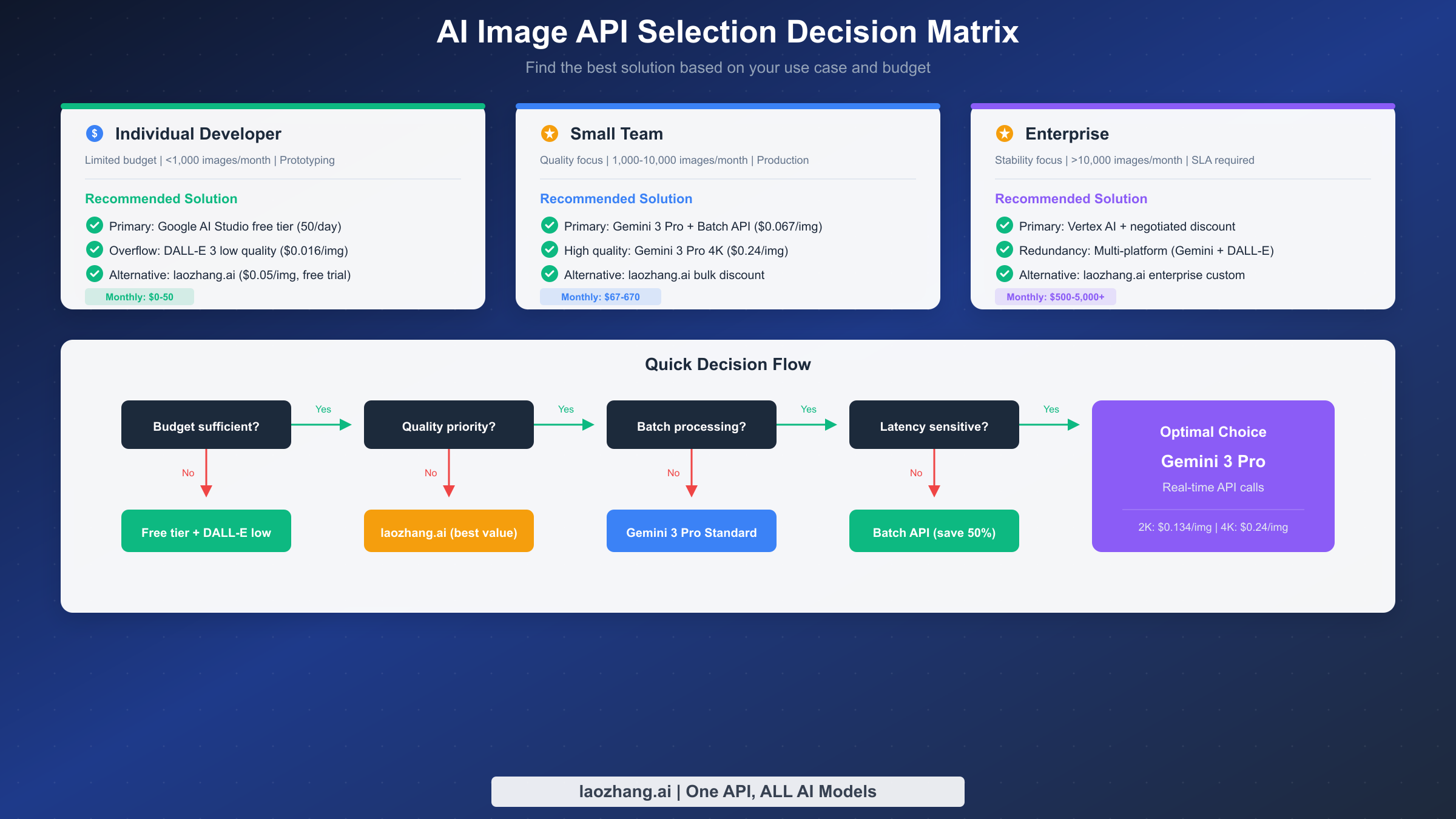
Different use cases have different optimal solutions. Here are targeted recommendations based on budget, usage volume, and quality requirements. The key is finding the best balance between quality, cost, and convenience—not just pursuing the cheapest or best option.
Individual developer solution applies to monthly usage under 1,000 images, limited budget but certain quality requirements. The recommended strategy is first maximizing Google AI Studio's 50 daily free generations—this already covers most individual project needs. When free quota isn't enough, use DALL-E 3's low-quality tier ($0.016/image) as a supplement; while quality is slightly lower, costs are minimal—suitable for prototype validation and non-critical images. If you have some budget and higher quality requirements, consider laozhang.ai ($0.05/image) as an affordable Gemini 3 Pro Image alternative. This combination can control monthly costs to $0-50, depending on usage beyond free quotas.
Small team solution applies to monthly usage of 1,000-10,000 images, requiring stable quality and reliable service. The recommended strategy uses Gemini 3 Pro Image + Batch API as the primary approach. Batch-generated content (like weekly marketing materials, product image updates) uses Batch API for 50% discount at $0.067/image; scenarios requiring real-time responses (like user-triggered instant generation) use standard API at $0.134/image. Through reasonable allocation, overall average costs can be controlled to $0.08-0.10/image. For teams particularly focused on cost control, non-critical image generation can be shifted to laozhang.ai or Imagen 4 Fast to further reduce average costs. This solution's monthly cost ranges approximately $80-1,000.
Enterprise solution applies to monthly usage exceeding 10,000 images with clear stability and SLA requirements. The recommended strategy involves establishing enterprise partnerships with Google Cloud, negotiating bulk discounts and dedicated SLAs. Use Vertex AI as the primary access channel, enjoying enterprise-grade technical support and stability guarantees. Implementing multi-platform redundancy architecture is recommended—integrating both Gemini 3 Pro Image and DALL-E 3 to automatically switch when one platform has issues, ensuring business continuity. For non-core business image generation, laozhang.ai's enterprise custom solutions can significantly reduce costs while maintaining service quality. This solution's monthly cost typically ranges $500-5,000+, depending on usage volume and negotiated discounts.
| Solution | Use Case | Main Strategy | Monthly Cost Estimate |
|---|---|---|---|
| Individual Developer | <1,000 images/month | Free quota + DALL-E low tier | $0-50 |
| Small Team | 1,000-10,000 images/month | Gemini + Batch API | $80-1,000 |
| Enterprise | >10,000 images/month | Vertex AI + Multi-platform redundancy | $500-5,000+ |
Frequently Asked Questions (FAQ)
What's the relationship between Gemini 3 Pro Image and Nano Banana Pro?
Gemini 3 Pro Image is Google's official product name, while Nano Banana Pro is its internal codename and community common reference. Both refer to the same model, with model ID gemini-3-pro-image-preview. Similarly, there are codenames like Nano Banana (corresponding to Gemini 2.5 Flash Image). When using the API, you should use the official model ID rather than codenames.
How much is the free quota exactly? How can I maximize it?
Google AI Studio provides 50 free daily image generations without requiring payment method binding. New Google Cloud users can also receive $300 in free credits, valid for 90 days. Maximization strategies include: reasonably planning daily generation tasks, spreading non-urgent tasks across different days, and prioritizing free quota for testing and experimental needs. Quotas from both channels can be stacked—theoretically generating over 3,700 free images monthly.
How is third-party platform data security ensured?
When choosing third-party platforms, focus on: HTTPS encrypted transmission, clear privacy policies, and good operational records with user reputation. Leading platforms like laozhang.ai typically have comprehensive security measures. For highly sensitive business data, using official APIs is still recommended. A compromise approach is handling sensitive and non-sensitive tasks separately—sensitive tasks through official channels, daily tasks through third-party platforms to reduce costs.
Will Batch API's 24-hour delay affect business?
This depends on your business characteristics. For batch content production, scheduled tasks, and marketing material preparation, 24-hour delay is perfectly acceptable, while the 50% cost savings are substantial. But for scenarios requiring real-time responses (like chatbot instant image generation, immediate processing after user upload), Batch API isn't suitable—standard real-time API is needed. Many teams adopt hybrid strategies, using Batch API for bulk tasks and standard API for real-time needs.
What's the optimal solution for budget-conscious users?
Recommended approach is choosing third-party platforms with multiple payment options and stable access, like laozhang.ai. This solves payment issues while ensuring network stability and enjoying prices lower than official rates. If you must use official APIs, prepare payment methods and ensure stable network environment.
Summary and Quick Decision Guide
Gemini 3 Pro Image is currently one of the highest-quality AI image generation models on the market, with 94% text rendering accuracy and an FID score of 12.4 both leading competitors. Official pricing at $0.134/image (2K) isn't the cheapest, but considering quality advantages, the value proposition is still excellent.
One-line recommendation: For highest quality, choose Gemini 3 Pro Image + Batch API ($0.067/image); for ultimate value, choose laozhang.ai ($0.05/image); for limited budgets, combine free quotas + DALL-E 3 low tier.
Your next steps should be: First, register for Google AI Studio to get free quota for hands-on testing, evaluating whether Gemini 3 Pro Image meets your quality needs; then, based on budget and usage volume, select the most suitable solution from this article's recommendations; finally, if deciding on large-scale usage, definitely research Batch API and third-party platforms to control costs.
Regardless of which solution you choose, AI image generation technology has reached commercial maturity—now is the perfect time to integrate this technology into your products and workflows.