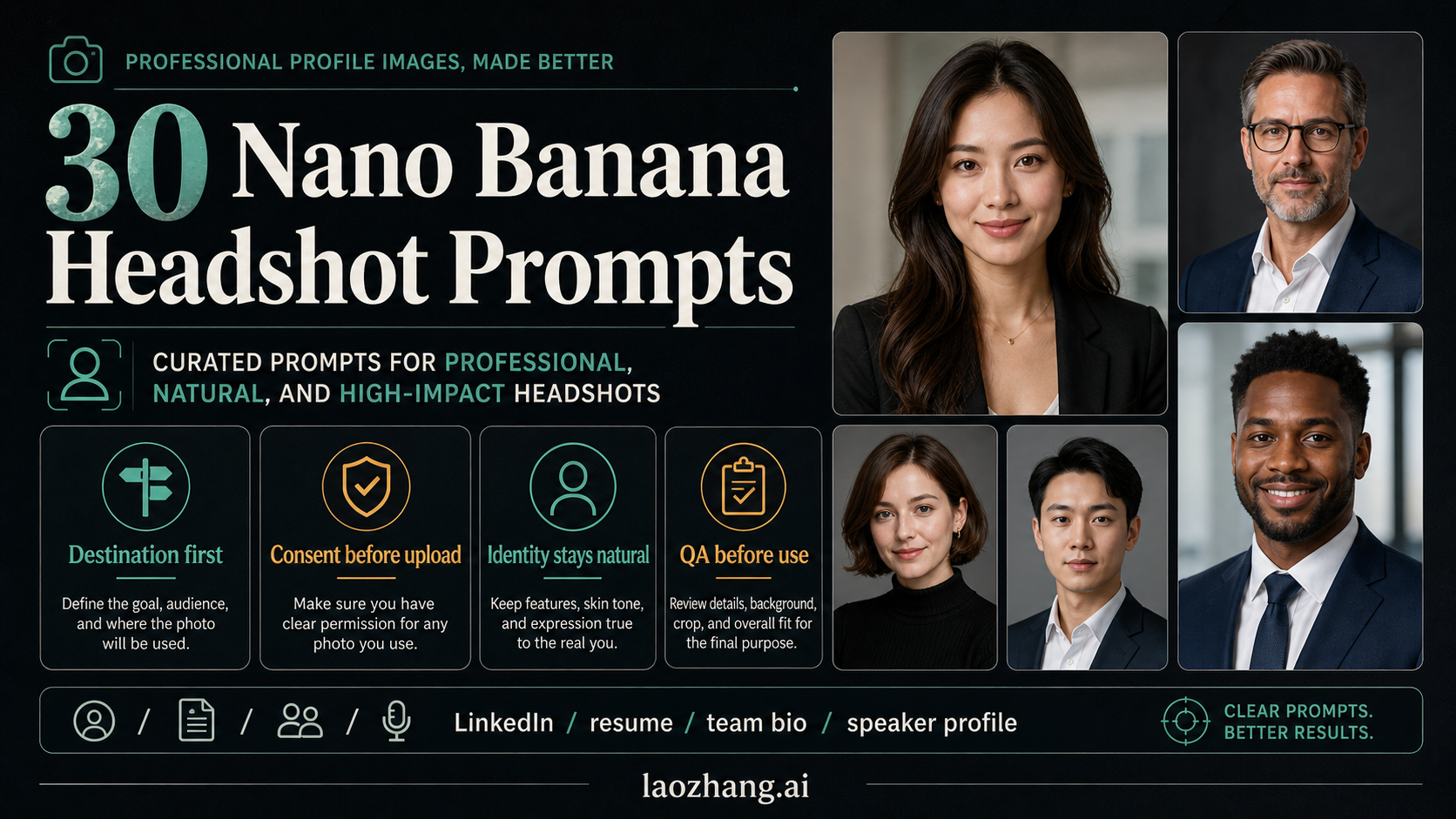
Nano Banana headshot prompts work best when you treat them like professional photo briefs, not style wishes. Start with the profile destination, use a real reference photo only when you have permission, keep the person's identity and natural skin texture stable, and check the final image before publishing it.
The 30 examples below are original prompt cards for LinkedIn, resumes, company bios, founder profiles, creative portfolios, speaker pages, and industry-specific portraits. Use them as templates: keep the identity, crop, retouching limit, and QA target stable, then change one style or role field at a time.
Starter prompt:
“Use the uploaded reference photo only as identity reference. Create a professional headshot for [destination] with the same facial structure, age, skin texture, and natural expression. Use [wardrobe], [background], [lighting], and a [crop] composition. Keep retouching realistic, avoid changing identity, and make the result suitable for [profile use].
Fast Start: Build the Prompt Like a Photo Brief
The safest way to write a Nano Banana headshot prompt is to describe the final professional use before describing the style. A good prompt does not say only "make a professional portrait." It names the profile destination, the source-photo assumption, the person or fictional subject, the wardrobe, the light, the background, the crop, the retouching limit, and the rejection criteria.
| Prompt field | What to write | Why it matters |
|---|---|---|
| Destination | LinkedIn, resume, team bio, speaker page, founder profile, portfolio, press kit | A headshot for a finance bio and a creative portfolio should not look the same |
| Source input | Uploaded reference photo, recent selfie, existing portrait, or no real person | Real-person editing needs permission and identity preservation |
| Identity lock | Same facial structure, age, skin texture, expression range | Prevents the model from creating a polished lookalike |
| Wardrobe | Suit, knit top, lab coat, casual blazer, simple shirt | Signals role without inventing credentials |
| Background | Neutral studio, office, blurred workspace, clean outdoor wall | Keeps attention on the face |
| Lighting | Soft front light, window light, editorial studio light | Controls skin texture and trust cues |
| Crop | Head and shoulders, chest-up, square profile crop, vertical portrait | Avoids awkward platform crops |
| Retouch limit | Natural skin, no plastic smoothing, no face reshaping | Keeps the output believable |
| Fail check | Reject face drift, wrong age, bad teeth, uncanny eyes, noisy background | Turns generation into a review workflow |
Use the exact model or route only when it changes the job. Google currently documents Nano Banana as a Gemini native image-generation family, including Nano Banana 2, Nano Banana Pro, and the older Nano Banana model route. For everyday prompt writing, the important part is not the model label. The important part is that the prompt protects the subject and gives the model a professional photo brief.
Before You Upload a Face
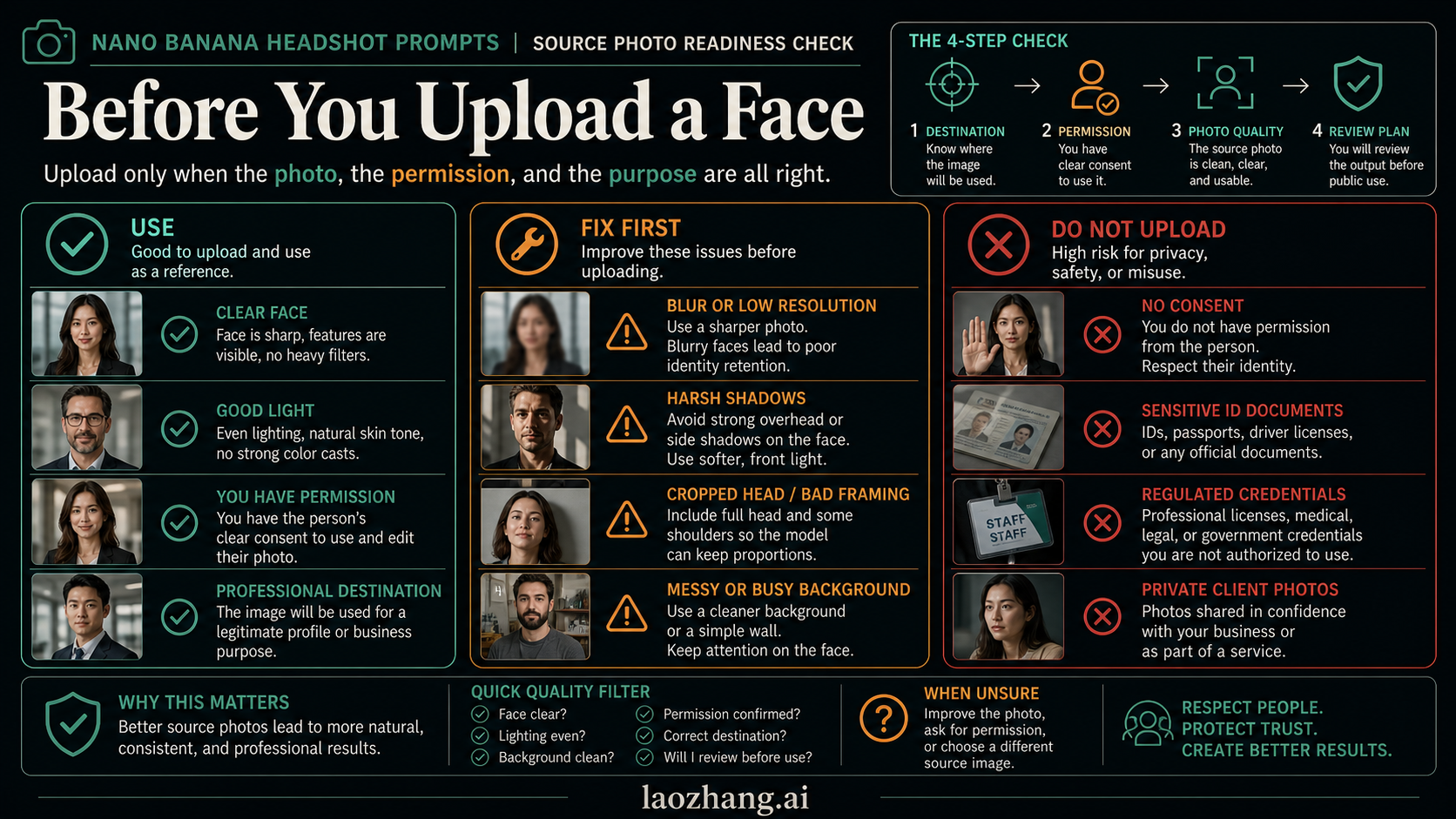
A prompt cannot rescue a bad or unsafe source photo. Use a real face only when you have permission from the person in the photo and the destination allows AI-edited profile images. Avoid IDs, badges, regulated credentials, client-confidential portraits, or images where the person did not agree to the use.
Use a source photo when the face is clear, recent, front-facing or slight three-quarter, evenly lit, and large enough for the model to read eyes, nose, jawline, skin texture, and hairline. Fix the source first if it is blurry, side-lit, cropped through the head, filtered, low resolution, or shot in a messy environment. Do not upload if the image is sensitive, private, unauthorized, or tied to a credential that should not be simulated.
Route terms matter. Google's Gemini API terms distinguish unpaid and paid developer services, and Google's Gemini Apps privacy notice treats photos and files shared with Gemini as submitted information under that surface's data rules. The practical rule is simple: do not upload personal photos to any route until you understand the account, data-use, and client-permission implications. Generated Gemini native images also include SynthID according to Google sources, but watermarking does not replace consent, destination rules, or disclosure judgment.
The 30 Prompt Cards
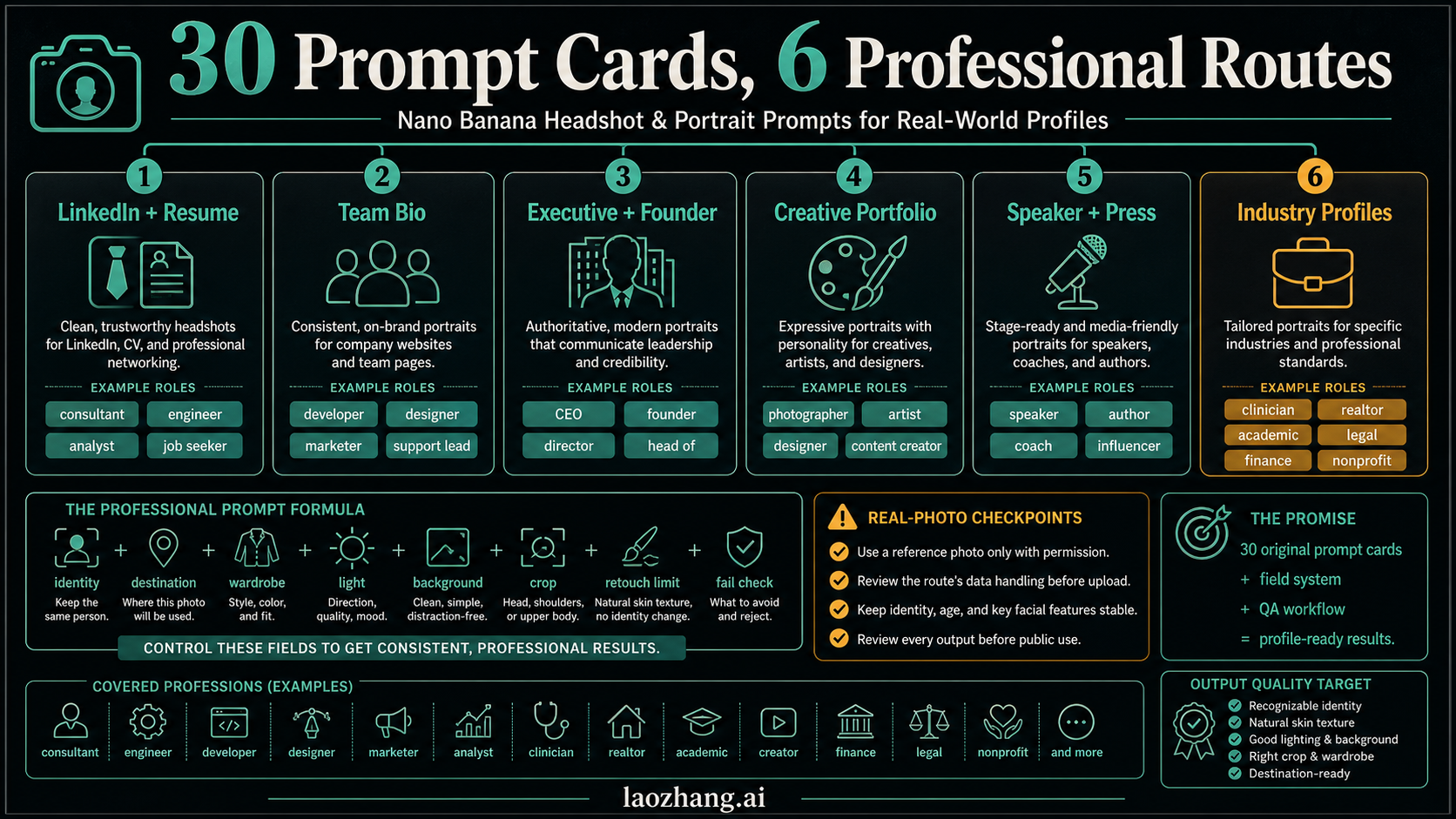
Each card uses the same structure so you can compare results without rewriting the whole prompt. Keep the identity and source-photo instructions stable. Change only the destination, wardrobe, background, or tone field when testing variants.
1. LinkedIn Balanced Professional
Use when: the reader needs a safe default for a broad professional network profile.
Prompt:
“Use the uploaded reference photo only as identity reference. Create a LinkedIn-ready professional headshot of the same person with natural facial structure, realistic skin texture, a calm confident expression, a clean charcoal or warm gray background, soft front lighting, and a head-and-shoulders crop. Wardrobe should be a simple blazer or polished smart-casual top. Keep retouching subtle and do not change age, face shape, hairline, eye color, or expression identity.
Adjust: switch the background from gray to a softly blurred office if the profile needs more workplace context.
Fail check: reject any version that looks like a stock portrait, changes the jawline, or over-smooths the skin.
2. Resume Conservative Headshot
Use when: the image needs to feel formal and low-risk for resumes, CVs, or application portals.
Prompt:
“Use the reference photo as the identity source. Create a conservative resume headshot with the same face, same age, and natural skin details. Use a neutral light background, soft even lighting, a centered head-and-shoulders crop, a modest professional outfit, and a slight approachable expression. Avoid glamour styling, dramatic shadows, heavy retouching, background objects, and any change to facial proportions.
Adjust: make the wardrobe "dark blazer and plain shirt" for a more traditional industry.
Fail check: reject outputs that look cinematic, fashion-oriented, or too casual for a hiring context.
3. Company Team Bio
Use when: a company site needs portraits that feel coordinated without looking identical.
Prompt:
“Use the uploaded photo as the person's identity reference. Create a company team bio portrait with the same facial features, natural skin texture, and friendly expression. Use soft office light, a subtly blurred workplace background, a chest-up crop, and smart-casual wardrobe in muted colors. The image should feel trustworthy, approachable, and consistent with a modern team page. Do not alter identity, remove distinctive features, or create unrealistic skin.
Adjust: match the background color to the company's visual palette while keeping it subtle.
Fail check: reject if the background becomes a fake office scene that distracts from the person.
4. Consultant Trust Profile
Use when: a solo consultant, advisor, or agency lead needs credibility and warmth.
Prompt:
“Use the reference portrait only to preserve the person's identity. Create a professional consultant headshot with a calm, direct gaze, natural expression, clean business-casual wardrobe, soft editorial lighting, and a simple office or neutral studio background. Keep facial structure, age, skin texture, hair, and expression recognizable. The result should feel credible enough for a consulting website without looking like a corporate stock image.
Adjust: change "office background" to "warm neutral studio" for a more independent advisor look.
Fail check: reject anything that adds exaggerated confidence poses, crossed arms, or unrealistic luxury cues.
5. Executive Leadership Portrait
Use when: an executive bio or board profile needs authority without stiffness.
Prompt:
“Use the uploaded reference photo as identity reference. Create an executive leadership portrait of the same person with preserved facial structure, natural skin texture, controlled expression, and polished but realistic grooming. Use a dark blazer, refined neutral background, soft directional studio light, and a chest-up crop with subtle depth. The mood should be calm, competent, and trustworthy. Avoid over-retouching, dramatic power poses, luxury props, or identity changes.
Adjust: use "warm boardroom blur" only if the source photo already supports a formal leadership context.
Fail check: reject if the face looks younger, sharper, or more symmetrical than the real person.
6. Founder Story Portrait
Use when: a founder profile needs personality and approachability rather than pure corporate polish.
Prompt:
“Use the reference photo to preserve the founder's identity. Create a founder portrait with the same face, age, and natural expression, photographed in soft natural light with a clean workspace or simple textured background. Wardrobe should be polished but not overly formal. The image should feel entrepreneurial, open, and credible, suitable for an about page or investor update. Keep retouching minimal and preserve distinctive facial details.
Adjust: add a warmer background if the brand is community or creator-oriented.
Fail check: reject outputs that turn the person into a generic startup stereotype with artificial lighting or exaggerated confidence.
7. Startup Operator Headshot
Use when: a product, operations, or growth leader needs a modern but serious profile image.
Prompt:
“Use the uploaded portrait only as identity reference. Create a modern startup operator headshot with the same face, natural skin, and relaxed but focused expression. Use a clean indoor background, soft window-style lighting, a simple shirt or light jacket, and a slightly off-center head-and-shoulders crop. The image should feel practical, clear, and not overproduced. Do not change facial proportions, age, or hairline.
Adjust: use "minimal studio background" if the workspace setting looks noisy.
Fail check: reject if the result looks like a tech conference ad rather than a real person.
8. Speaker Page Portrait
Use when: a conference, podcast, webinar, or event speaker needs a polished promotional image.
Prompt:
“Use the reference image as the identity anchor. Create a speaker profile portrait with the same person, clear eyes, natural expression, and professional confidence. Use soft stage-inspired lighting without harsh spotlights, a clean dark or warm neutral background, polished wardrobe, and a chest-up crop that leaves room around the head for event layouts. Keep skin realistic and avoid changing age, face shape, or expression identity.
Adjust: choose a darker background when the event page uses bright text overlays.
Fail check: reject if the lighting looks theatrical, the face changes, or the crop cuts off the shoulders.
9. Press Kit Editorial Portrait
Use when: a founder, author, creator, or expert needs a media-friendly portrait.
Prompt:
“Use the uploaded image only to preserve identity. Create an editorial press-kit portrait of the same person with natural skin texture, clean grooming, confident but relaxed expression, and soft directional light. Use a simple textured background, tasteful contrast, and a vertical crop that could work for a media bio. Keep wardrobe understated and professional. Do not add logos, props, extreme retouching, or identity changes.
Adjust: switch to black-and-white only if the destination supports editorial portraits.
Fail check: reject if it becomes fashion photography instead of a professional media portrait.
10. Academic Faculty Profile
Use when: a professor, researcher, or academic speaker needs a restrained institutional profile image.
Prompt:
“Use the reference photo as identity reference. Create an academic faculty headshot with the same face, age, and natural expression. Use soft even light, a simple office, library, or neutral background, understated professional wardrobe, and a centered head-and-shoulders crop. The image should feel thoughtful and credible, not promotional. Preserve skin texture, hairline, facial proportions, and expression identity.
Adjust: use a neutral studio background when institutional context is not needed.
Fail check: reject if the image adds fake books, fake credentials, or an overly dramatic professor look.
11. Research Lab Profile
Use when: a scientist, engineer, or lab team member needs a technical but human profile photo.
Prompt:
“Use the uploaded portrait only as identity reference. Create a professional research profile headshot with the same person, natural skin details, a calm focused expression, soft clean lighting, and a subtle lab or technical workspace blur in the background. Wardrobe should be professional and simple; do not invent lab coats, badges, or credentials unless they are already appropriate to the subject. Keep the crop head-and-shoulders and preserve identity exactly.
Adjust: remove the workspace background if it creates fake equipment.
Fail check: reject outputs that imply a qualification, uniform, or lab role the person does not actually hold.
12. Clinician or Healthcare Bio
Use when: a real clinician or care professional has permission and needs a cautious profile image.
Prompt:
“Use the reference image only as identity reference and preserve the same face, age, hair, skin texture, and calm expression. Create a professional healthcare bio headshot with soft natural light, a clean neutral background, and simple professional wardrobe. Do not invent medical credentials, badges, stethoscopes, logos, or uniforms. The image should feel trustworthy and human while remaining realistic and conservative.
Adjust: use "plain professional shirt" if the person should not appear in clinical attire.
Fail check: reject if the output creates a license, title, medical device, or regulated credential that was not in the source.
13. Wellness Coach Portrait
Use when: a coach, therapist, or wellness consultant needs warmth without unverified clinical framing.
Prompt:
“Use the uploaded portrait as the identity anchor. Create a warm professional portrait of the same person for a wellness or coaching profile, with natural skin, relaxed expression, soft daylight, and a calm neutral background. Wardrobe should be simple and approachable. Keep the person recognizable and avoid clinical symbols, medical claims, spiritual stereotypes, or heavy beauty retouching.
Adjust: add "slightly warmer color temperature" if the brand needs more warmth.
Fail check: reject if the image looks like a spa ad or implies medical authority.
14. Legal Professional Headshot
Use when: a lawyer, legal consultant, or compliance professional needs conservative authority.
Prompt:
“Use the reference photo only for identity. Create a legal professional headshot with the same face, natural expression, conservative wardrobe, soft studio lighting, and a clean neutral background. Use a centered head-and-shoulders crop and keep retouching minimal. The mood should be serious, clear, and trustworthy. Do not add courtroom props, law firm logos, books, badges, or any invented credential.
Adjust: choose a dark jacket and plain shirt for a more formal practice area.
Fail check: reject if the image looks aggressive, cinematic, or artificially severe.
15. Finance or Advisory Profile
Use when: a finance, accounting, investment, or advisory bio needs trust and restraint.
Prompt:
“Use the uploaded reference photo as identity reference. Create a finance advisory profile headshot with the same person, realistic skin texture, composed expression, dark or navy professional wardrobe, soft neutral background, and balanced studio light. Keep the image conservative and credible. Avoid luxury cues, money symbols, trading screens, exaggerated confidence, face reshaping, or claims of licensed status.
Adjust: use a lighter background for a friendlier small-business accounting profile.
Fail check: reject if the image implies wealth, guarantees, or a regulated credential not present in the source.
16. Real Estate Agent Portrait
Use when: a property agent or local service professional needs approachability and recognizability.
Prompt:
“Use the reference photo to preserve identity. Create a real estate profile portrait with the same face, natural smile, clean professional wardrobe, bright but soft light, and a simple background that suggests a modern interior without showing a specific property. Use a head-and-shoulders or chest-up crop suitable for a website card. Do not add logos, signs, luxury homes, or unrealistic teeth and skin.
Adjust: choose "outdoor neutral wall" for a more local, less corporate feel.
Fail check: reject if the image becomes a sales brochure or changes the smile too much.
17. Sales or Customer Success Headshot
Use when: a client-facing role needs energy without looking unserious.
Prompt:
“Use the uploaded portrait as identity reference. Create a client-facing sales or customer success headshot with the same person, friendly eye contact, natural skin texture, clear smile, clean business-casual wardrobe, and a softly blurred modern workspace. Keep the crop chest-up and the mood approachable but professional. Avoid exaggerated enthusiasm, perfect teeth, fake office props, and face changes.
Adjust: reduce the smile intensity if the destination is a formal enterprise bio.
Fail check: reject outputs that look like a stock customer-support advertisement.
18. Software Engineer Profile
Use when: an engineer needs a credible profile for a portfolio, team page, or technical community bio.
Prompt:
“Use the reference image only as identity anchor. Create a software engineer profile portrait with the same face, natural expression, simple clothing, clean indoor background, and soft monitor-neutral lighting that does not cast harsh colors on the face. The image should feel clear, capable, and low-hype. Do not add code screens, company logos, headphones, badges, or futuristic effects.
Adjust: use a plain dark background for a GitHub or technical speaker profile.
Fail check: reject if it turns into a hacker stereotype or changes eye shape.
19. Product Manager or Operator Profile
Use when: a product or operations profile needs clarity, collaboration, and confidence.
Prompt:
“Use the uploaded photo as identity reference. Create a product manager profile headshot with the same person, natural skin, calm collaborative expression, simple professional wardrobe, soft office light, and a clean background. The result should feel organized and approachable for a company bio or speaker page. Avoid whiteboard props, fake dashboards, extreme retouching, or identity changes.
Adjust: use a slightly warmer background for a product-led startup tone.
Fail check: reject if the image overstates authority or becomes a generic executive portrait.
20. Designer or Creative Director Portrait
Use when: a creative professional needs personality while still looking client-ready.
Prompt:
“Use the reference photo as identity source. Create a designer or creative director portrait with the same face, natural expression, tasteful wardrobe, soft editorial lighting, and a clean background with subtle color or texture. The image should feel creative but not theatrical. Preserve facial structure, age, skin texture, and distinctive features. Avoid fashion-editorial excess, props, logos, or heavy beauty retouching.
Adjust: add one muted accent color if it matches the portfolio brand.
Fail check: reject if style overwhelms recognizability.
21. Artist or Photographer Bio
Use when: an artist, photographer, or visual creator needs a profile image with craft personality.
Prompt:
“Use the uploaded portrait only to preserve identity. Create an artist bio portrait of the same person with natural skin texture, relaxed direct gaze, soft side light, and a simple studio or neutral wall background. Wardrobe should feel personal but polished. The image should be suitable for a portfolio, gallery bio, or creator page. Do not add cameras, paintbrushes, logos, or dramatic props unless requested.
Adjust: use black-and-white for a quieter portfolio mood.
Fail check: reject if the image becomes a costume, fashion shoot, or fake studio scene.
22. Creator or Educator Profile
Use when: an online educator, course creator, newsletter writer, or creator needs friendliness and credibility.
Prompt:
“Use the reference image as identity anchor. Create a creator or educator profile headshot with the same face, friendly expression, natural skin, bright clean background, soft daylight, and approachable smart-casual wardrobe. The result should work for a course page, newsletter, podcast card, or profile avatar. Keep retouching realistic and avoid props, microphones, fake follower metrics, or identity changes.
Adjust: use a square crop if the image will become an avatar.
Fail check: reject if the output looks like a social media growth ad.
23. Nonprofit or Community Leader Portrait
Use when: a mission-led organization needs warmth, trust, and humility.
Prompt:
“Use the uploaded portrait as identity reference. Create a nonprofit or community leader portrait with the same person, natural expression, soft warm light, simple professional wardrobe, and a clean neutral background. The image should feel human, credible, and grounded. Do not add badges, charity symbols, crowds, slogans, or emotional manipulation. Preserve age, skin texture, facial proportions, and recognizable features.
Adjust: add a warmer background color for community-oriented organizations.
Fail check: reject if the image turns into campaign photography or changes the person's age.
24. Hospitality or Local Business Owner
Use when: a restaurant owner, salon owner, trainer, or local service professional needs a personable bio.
Prompt:
“Use the reference photo only for identity. Create a local business owner portrait with the same face, natural smile, clean casual-professional wardrobe, soft welcoming light, and a simple background that suggests a real workplace without showing brand marks or private details. Keep the crop chest-up and the mood friendly, competent, and trustworthy. Avoid fake signage, luxury props, exaggerated smiles, or face reshaping.
Adjust: use "neutral studio background" if the workplace would reveal private information.
Fail check: reject if it becomes an advertisement instead of a recognizable owner profile.
25. Fitness or Movement Coach
Use when: a trainer, yoga teacher, or movement coach needs a professional profile without body-image exaggeration.
Prompt:
“Use the uploaded photo as identity reference. Create a fitness or movement coach profile portrait with the same face, realistic skin texture, relaxed confident expression, clean athletic or smart-casual wardrobe, soft natural light, and a simple studio background. Keep the focus on the face and professional presence, not physique. Avoid exaggerated body edits, sweat effects, gym equipment, transformation claims, or identity changes.
Adjust: choose "plain black top" for a more neutral coach directory profile.
Fail check: reject if the image overemphasizes body shape or creates unrealistic skin.
26. Beauty or Styling Professional
Use when: a stylist, makeup artist, barber, or beauty consultant needs polished but honest presentation.
Prompt:
“Use the reference image as identity anchor. Create a beauty or styling professional headshot with the same person, natural facial structure, realistic skin texture, polished grooming, soft flattering light, and a clean studio background. The image should feel tasteful and service-ready without excessive retouching. Do not change facial features, erase natural skin texture, add logos, or create unrealistic makeup.
Adjust: add a subtle warm accent background for a softer brand.
Fail check: reject if the result looks like a beauty filter instead of a professional portrait.
27. Freelancer Marketplace Profile
Use when: a freelancer needs a trustworthy avatar for a marketplace, proposal, or portfolio.
Prompt:
“Use the uploaded portrait only as identity reference. Create a freelancer marketplace headshot with the same face, natural expression, clean business-casual wardrobe, simple light background, and a centered crop that works well in a small round avatar. The image should feel professional, approachable, and honest. Avoid heavy filters, luxury cues, fake workspaces, props, and face changes.
Adjust: choose a brighter background for marketplaces with small thumbnail cards.
Fail check: reject if the image loses recognizability at small size.
28. Remote Team Profile
Use when: a distributed company wants profile images that feel consistent but not artificial.
Prompt:
“Use the reference photo as identity source. Create a remote team profile headshot with the same person, natural skin, relaxed expression, simple clothing, soft even light, and a neutral background that can match other team portraits. Use a head-and-shoulders crop and avoid strong shadows or busy room details. Preserve identity exactly and keep the image believable.
Adjust: define a shared background color for all team members before generating a batch.
Fail check: reject if one image has a very different lighting mood from the rest of the team set.
29. Fictional Professional Portrait
Use when: no real person is involved and the project needs a synthetic professional placeholder.
Prompt:
“Create a fictional professional portrait of a person for a sample team page. Do not base the image on any real person or celebrity. Use a natural face, realistic skin texture, neutral expression, smart-casual wardrobe, soft studio light, and a clean background. The portrait should feel plausible and professional but should not imply a real identity, credential, employer, or client relationship.
Adjust: state the demographic range only when it matters for the design brief and avoid stereotyping.
Fail check: reject if the person resembles a known public figure or looks like an identity document photo.
30. Same Person, New Destination
Use when: one person needs multiple profile versions for different platforms.
Prompt:
“Use the same uploaded reference photo as identity anchor. Create a new professional headshot version for [new destination] while preserving the same face, age, skin texture, hair, expression identity, and head-and-shoulders composition from the previous approved version. Change only [wardrobe/background/lighting] to match the new destination. Keep retouching realistic and do not alter facial structure or create a different person.
Adjust: change only one field at a time so you can compare which prompt change improved the output.
Fail check: reject if the new version looks like a different person even if the style looks better.
Same-Prompt Testing Workflow
After you choose a card, run a small controlled test before trusting the output. Generate four variants with the same reference photo and the same prompt. Then change only one field: background, wardrobe, crop, or lighting. Compare the results against the same pass/fail checklist.
| Test step | Keep stable | Change | Accept only if |
|---|---|---|---|
| Baseline | Identity, crop, retouch limit, destination | Nothing | The person remains recognizable and professional |
| Style test | Identity, destination, crop | Background or wardrobe | The image still fits the profile destination |
| Realism test | Identity, lighting, background | Retouching limit | Skin, eyes, and teeth look natural |
| Crop test | Identity, expression, wardrobe | Head-and-shoulders vs chest-up | The platform crop does not cut hair, chin, or shoulders awkwardly |
If two outputs look good, choose the one that is more recognizable, not the one that is more polished. Professional headshots are trust assets. A slightly imperfect but honest portrait is usually safer than a flawless face that no longer looks like the person.
QA and Retry Rules
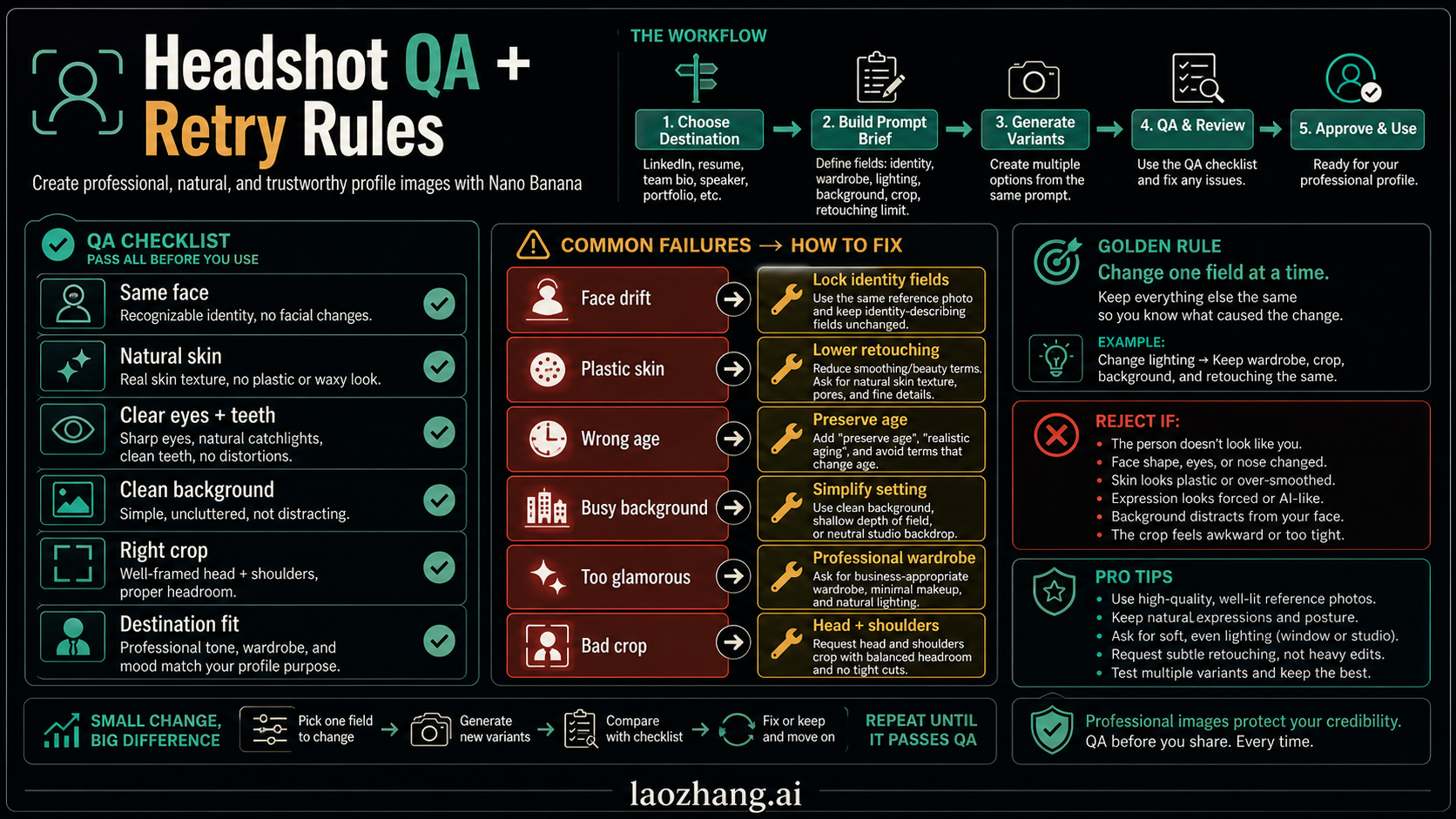
Use a six-point review before publishing any AI-edited headshot:
- Same face: eyes, nose, jawline, age, and hairline still match the source.
- Natural skin: texture remains visible and skin is not waxy.
- Eyes and teeth: no warped pupils, glassy eyes, extra teeth, or strange smile.
- Background: clean, plausible, and not too detailed.
- Crop: head, hair, chin, shoulders, and profile-card framing all work.
- Destination fit: the image suits the actual professional context.
Use the failure table to repair the prompt:
| Failure | Likely cause | Prompt fix |
|---|---|---|
| Face drift | Identity instruction is too vague | Add "same facial structure, age, eye shape, nose, jawline, hairline, and skin texture" |
| Plastic skin | Retouching is too broad | Add "natural skin texture, no beauty filter, no face smoothing" |
| Wrong age | Style prompt overrides realism | Add "preserve the person's apparent age and facial maturity" |
| Bad teeth or eyes | Smile and gaze are under-specified | Use "natural closed-mouth smile" or "clear relaxed eyes" |
| Busy background | Setting is too detailed | Use "simple neutral background, no objects, no text, no logos" |
| Too glamorous | Wardrobe or lighting is over-styled | Use "professional, understated, realistic, not fashion editorial" |
| Wrong crop | Platform framing is missing | Specify "head-and-shoulders crop with full hairline and shoulders visible" |
Do not keep asking for "more professional" as a retry. That phrase often increases polish while making identity less reliable. Name the exact field that failed.
When Nano Banana Pro, API, or Another Route Matters
For prompt examples, the route is secondary. The same brief structure works whether you test in a consumer surface, AI Studio, an API workflow, or another tool that exposes the model. The route starts to matter when you need batch repeatability, model IDs, aspect ratio control, image size options, or account-specific data handling.
Google's current image-generation docs list Nano Banana 2 as gemini-3.1-flash-image, Nano Banana Pro as gemini-3-pro-image, and the older Nano Banana model as gemini-2.5-flash-image. The same documentation says Gemini native generated images include SynthID. Those facts are useful boundaries, but they should not crowd the prompt cards. If your real job is model access, API setup, or cost planning, use the broader Nano Banana AI image generator guide or the Nano Banana image generation API guide.
Use the deeper Nano Banana Pro face consistency guide when the face must remain stable across many scenes, angles, or batch outputs. Use the Nano Banana Pro e-commerce product photography guide when the subject is a product instead of a person.
One more boundary matters for portraits: do not write prompts that ask the model to find or reconstruct a real person from the web. Google's image-generation documentation for Image Search grounding notes that searching for people is not supported. For professional headshots, provide a permitted reference photo or create a fictional portrait brief.
FAQ
What is the best Nano Banana prompt for a LinkedIn headshot?
Use a destination-first prompt: preserve the same face from the uploaded reference photo, create a LinkedIn-ready head-and-shoulders portrait, use clean wardrobe, neutral background, soft front light, natural skin texture, and reject identity changes. The first card in this list is a safe default.
Can Nano Banana keep the same face in a professional headshot?
It can help, but the prompt must explicitly preserve facial structure, age, hairline, skin texture, eye shape, nose, jawline, and natural expression. A clear source photo matters more than style words. For multi-image identity consistency, use a dedicated reference workflow instead of a single short prompt.
Should I use Nano Banana Pro for headshot prompts?
Not always. Use the same prompt framework first. Pro may help when the final image needs higher fidelity, stronger layout control, or more deliberate finishing, but the prompt still needs identity, crop, wardrobe, background, retouching, and QA fields.
Is it safe to upload a real face for a Nano Banana headshot?
Only when the person has consented and the route's data rules are acceptable for the job. Personal photos should be treated as sensitive. Avoid uploading IDs, client-confidential images, regulated credentials, or anyone's photo without permission.
Can I use AI headshots on LinkedIn, resumes, or company pages?
Use them only when the destination allows AI-edited images and the final portrait is honest, recognizable, and not misleading. Some employers, marketplaces, regulated roles, or credential contexts may have stricter rules. Check the destination before publishing.
How do I stop AI headshots from looking fake?
Lower the retouching, simplify the background, use natural light, preserve apparent age, ask for realistic skin texture, and reject outputs with glassy eyes, warped teeth, plastic skin, or a face that no longer matches the source.
Can I create a fictional professional portrait instead of uploading a real photo?
Yes. Use a fictional portrait prompt and state that the image should not resemble a real person, celebrity, credentialed professional, employer, or client. Fictional portraits are useful for mockups, sample team pages, or placeholder designs, but they should not impersonate a real identity.
What should I change when a prompt almost works?
Change one field at a time. Keep identity, crop, and retouching limit stable, then test background, wardrobe, lighting, or expression. If the face drifts, fix the identity field before improving style.