Azure GPT-Image-2 vs OpenAI GPT-Image-2: Which API Route Should You Deploy?
Azure and OpenAI direct expose the same GPT Image 2 family through different operational contracts. Choose by identity, region, billing, quota, output format, and support ownership—not by the model name alone.
On this page
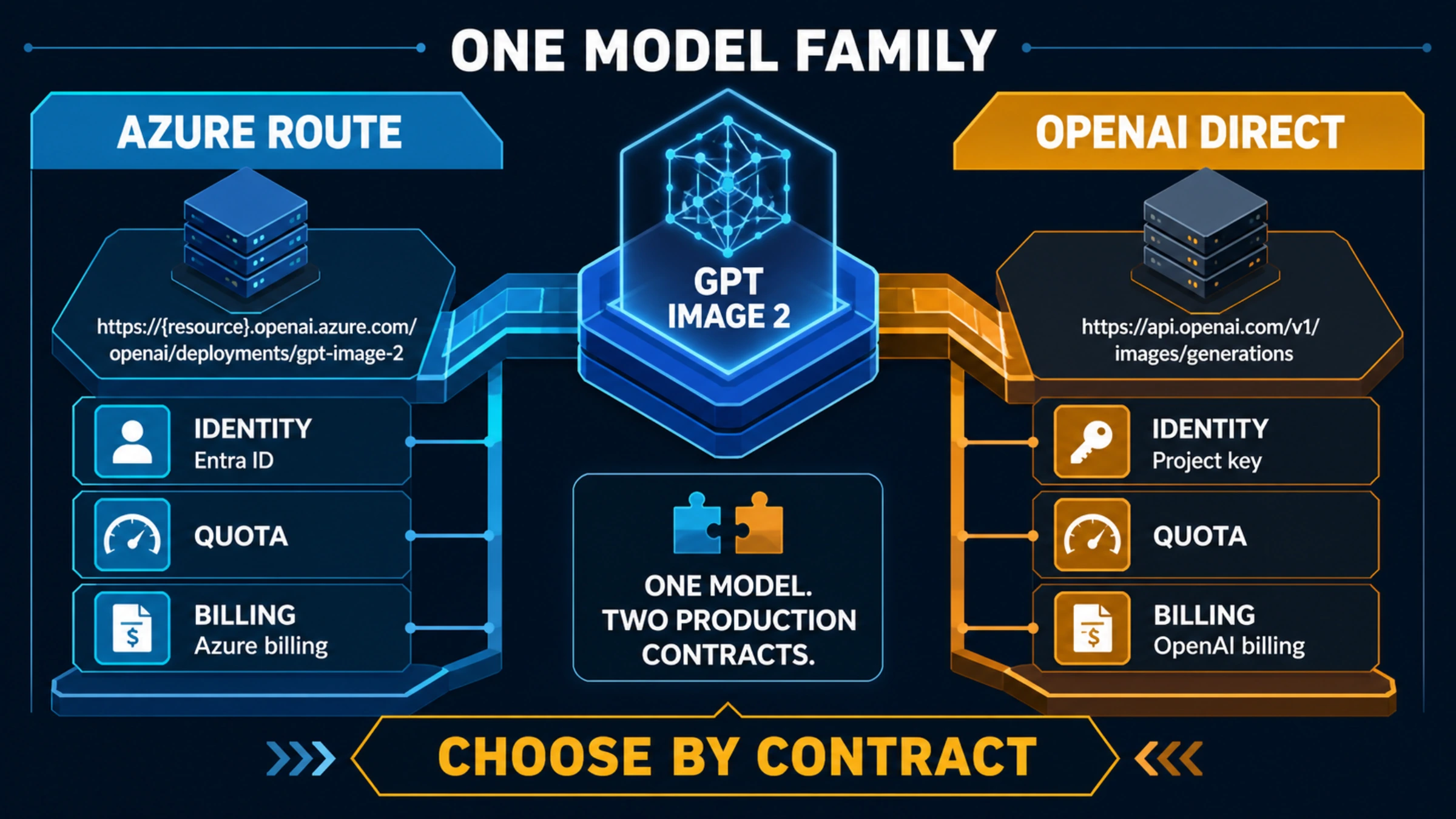
Azure GPT-Image-2 and OpenAI direct gpt-image-2 are not two unrelated image models. They are two ways to operate the OpenAI model family, with different endpoints, credentials, deployment controls, billing owners, quotas, and support paths.
Choose Azure OpenAI when an Azure subscription, Microsoft billing and support, Microsoft Entra ID, Azure resource governance, or a specific Azure deployment geography is a requirement. Choose OpenAI direct when you want the shortest path to the OpenAI API, OpenAI's own pricing and usage tiers, and direct output controls such as WebP.
Do not choose from one sample image or a copied per-image price. First identify the contract your production system must satisfy, then test the exact account, region, deployment, and request shape you will ship.
The route decision in one table
| Your non-negotiable requirement | Start with Azure OpenAI | Start with OpenAI direct |
|---|---|---|
| Cloud ownership | Workload must belong to an Azure subscription and resource hierarchy | Workload can belong to an OpenAI organization and project |
| Identity | Microsoft Entra ID, Azure RBAC, or Azure-native secret management is required | OpenAI project keys and OpenAI project controls are sufficient |
| Procurement and support | Microsoft agreement, invoice, support, and Azure SLA ownership are required | OpenAI agreement, billing, and support ownership are acceptable |
| Region and deployment | A supported Azure region/deployment type must be selected and verified | An eligible OpenAI project and supported data controls meet the requirement |
| API simplicity | Azure resource, deployment, quota, and API-version management are acceptable | A direct api.openai.com integration is preferred |
| Output file | PNG or JPEG is enough, or the app can convert after generation | Native PNG, JPEG, or WebP selection matters |
| Existing operations | Monitoring, identity, networking, and budgets already live in Azure | The app already uses OpenAI projects, logs, and spend controls |
If one row is mandatory, it usually decides the route. When none is mandatory, OpenAI direct is the simpler baseline. Azure becomes valuable when its operational owner—not the model name—solves a real enterprise constraint.
One model family does not mean one production contract
Microsoft's current Azure image-generation guide lists GPT-Image-2 as generally available. OpenAI's GPT Image 2 model page identifies the direct model as gpt-image-2 and currently lists snapshot gpt-image-2-2026-04-21.
That establishes the model identity on both platforms. It does not establish byte-identical outputs or contract parity. A request still passes through a platform-specific endpoint, authentication layer, quota system, content-safety configuration, release process, logging surface, and billing account. Treat those differences as production inputs, not administrative details.
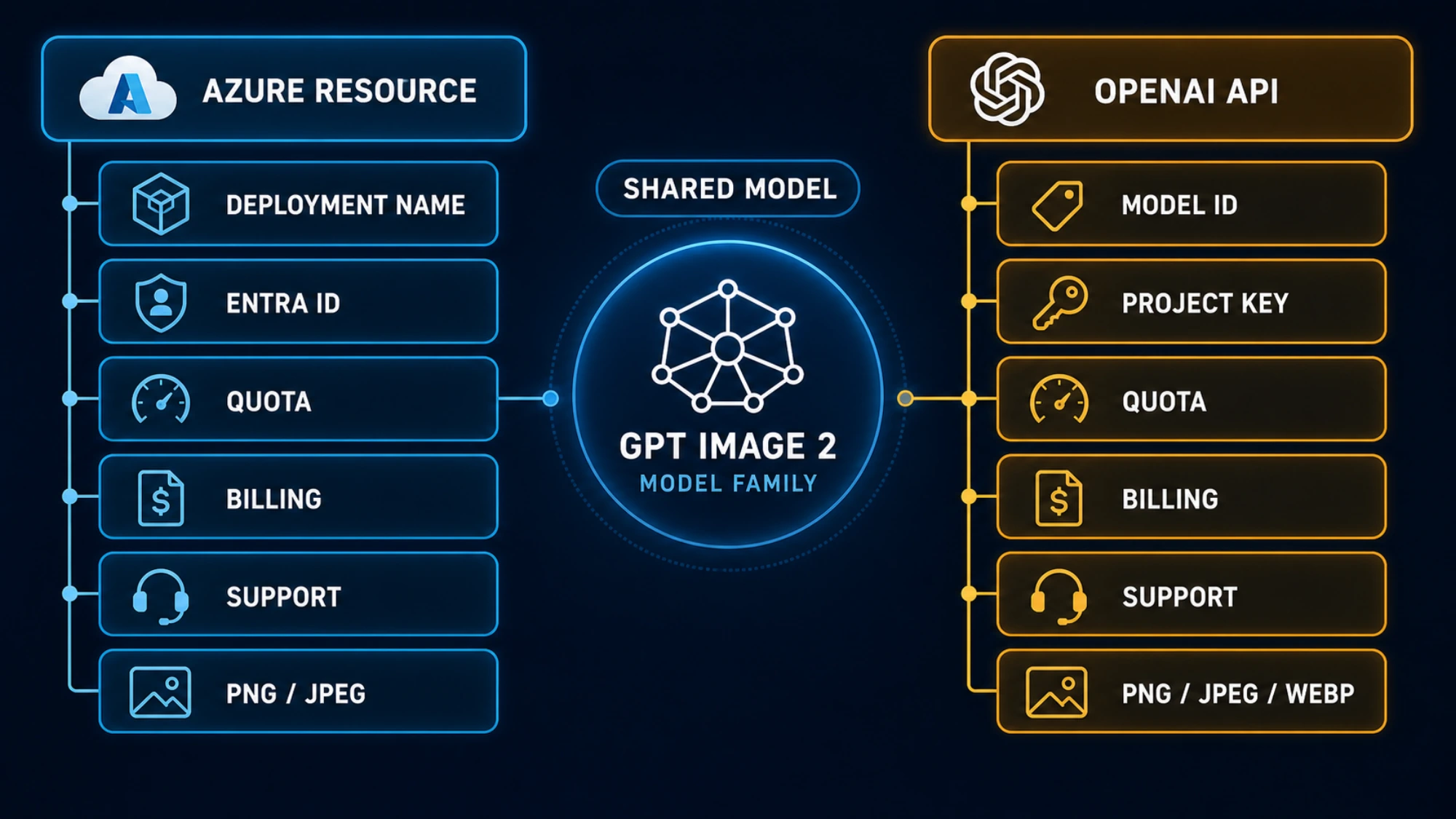
| Contract surface | Azure OpenAI / Microsoft Foundry | OpenAI direct |
|---|---|---|
| Endpoint owner | Your Azure OpenAI resource | OpenAI API |
| Model selector | Your Azure deployment name | gpt-image-2 or a documented snapshot |
| Authentication | Azure API key or supported Microsoft Entra ID flow | OpenAI project API key |
| Generation route | Azure resource endpoint under /openai/v1/images/generations on the current documented surface | https://api.openai.com/v1/images/generations |
| Edit route | Azure resource plus deployment-specific edit path and current API version | https://api.openai.com/v1/images/edits |
| Output data | Base64 image data | Base64 image data |
| Documented output formats | PNG and JPEG; no WebP on the current Azure guide | PNG, JPEG, and WebP; JPEG/WebP compression can be requested |
| Quota owner | Azure subscription, region, model, deployment type, and deployment | OpenAI project usage tier and model limits |
| Billing and support | Azure subscription, Microsoft billing/support, applicable Azure terms | OpenAI organization/project, OpenAI billing/support, applicable OpenAI terms |
The shared model controls are still substantial. Both current guides document text and image input, generations and edits, quality choices, flexible GPT-Image-2 dimensions, and base64 output. The published size contract allows both edges to be multiples of 16, a maximum edge of 3,840 pixels, an aspect ratio no greater than 3:1, and a total pixel count from 655,360 to 8,294,400.
But even a shared parameter needs route verification. OpenAI direct currently documents auto as a quality option and supports WebP. Azure documents low, medium, and high, says its default is high, and lists PNG/JPEG only. If your asset pipeline requires WebP, include conversion in the Azure architecture instead of assuming parameter parity.
Compare the request you will actually run
The easiest migration error is to change only the base URL. Azure also needs a deployed model and uses that deployment name in the request. OpenAI direct uses the model ID.
An Azure generation request on the current documented v1-style surface has this shape:
curl "https://YOUR-RESOURCE.openai.azure.com/openai/v1/images/generations?api-version=preview" \
  -H "api-key: $AZURE_OPENAI_API_KEY" \
  -H "Content-Type: application/json" \
  -d '{
    "model": "YOUR-GPT-IMAGE-2-DEPLOYMENT",
    "prompt": "A white desk lamp on a neutral studio background",
    "size": "1536x1024",
    "quality": "medium",
    "output_format": "png"
  }'
The direct OpenAI request has a different owner and model selector:
curl "https://api.openai.com/v1/images/generations" \
  -H "Authorization: Bearer $OPENAI_API_KEY" \
  -H "Content-Type: application/json" \
  -d '{
    "model": "gpt-image-2",
    "prompt": "A white desk lamp on a neutral studio background",
    "size": "1536x1024",
    "quality": "medium",
    "output_format": "webp"
  }'
Copy the live documentation when you implement. Azure's generation and edit examples do not use one timeless URL pattern: the current generation guide shows a v1 route with api-version=preview, while the edit section documents a deployment path and an explicit API version. A model being generally available does not make every surrounding API path versionless.
For both routes, decode the returned b64_json, store the file, preserve the request ID, and record the route owner. A base64 response is not a durable asset until your application writes it to controlled storage and attaches retention and access rules.
Price the owner, not the model label
OpenAI publishes a direct token contract. On August 5, 2026, the OpenAI pricing page lists standard GPT-Image-2 image input, cached image input, and image output at $8, $2, and $30 per one million tokens; text input and cached text input are $5 and $1.25 per one million tokens. Its image cost calculator currently estimates a 1024×1024 output at $0.006 low, $0.053 medium, or $0.211 high before applicable input costs.
Those are OpenAI-direct figures, not Azure prices. Azure's Azure OpenAI pricing page identifies GPT-Image-2 as token-priced, but the amount you should use belongs to the selected currency, agreement, region, deployment type, and current Azure pricing view. Do not paste the OpenAI direct table into an Azure business case.
Use one cost worksheet per route:
request cost = text input + reference-image input + generated-image output

accepted-output cost =
  (all billed requests + storage/egress + required conversion + repair work)
  / outputs accepted for production
The second line matters. Azure may fit an existing enterprise agreement and reduce operational friction even when a public unit price looks higher. OpenAI direct may avoid Azure deployment and format-conversion work even when the raw generation price is similar. Neither conclusion is universal.
Quota and availability must be checked in the live account
Azure's public documentation currently gives two different default-limit descriptions for GPT-Image-2: the image guide says 5 images per minute per deployment, while the general quotas and limits reference lists 9 requests per minute. That conflict is itself the useful fact: do not design capacity from a copied default.
Open the Azure quota view for the exact subscription, region, model, and deployment type. Then run a bounded concurrency test and record successful requests, throttles, latency, and the returned limit headers or portal values. For OpenAI direct, inspect the current project tier and the model's current rate-limit table. Free-tier support and paid-tier limits are explicit on the model page and can change with account tier.
Availability needs the same treatment. Microsoft says availability varies by region and cloud. OpenAI offers its own project and data-control options to eligible customers. “Azure has regions” and “OpenAI supports data residency” are starting points, not proof that your desired image endpoint, organization, and data path satisfy a legal or security requirement.
Run a migration proof before moving production traffic
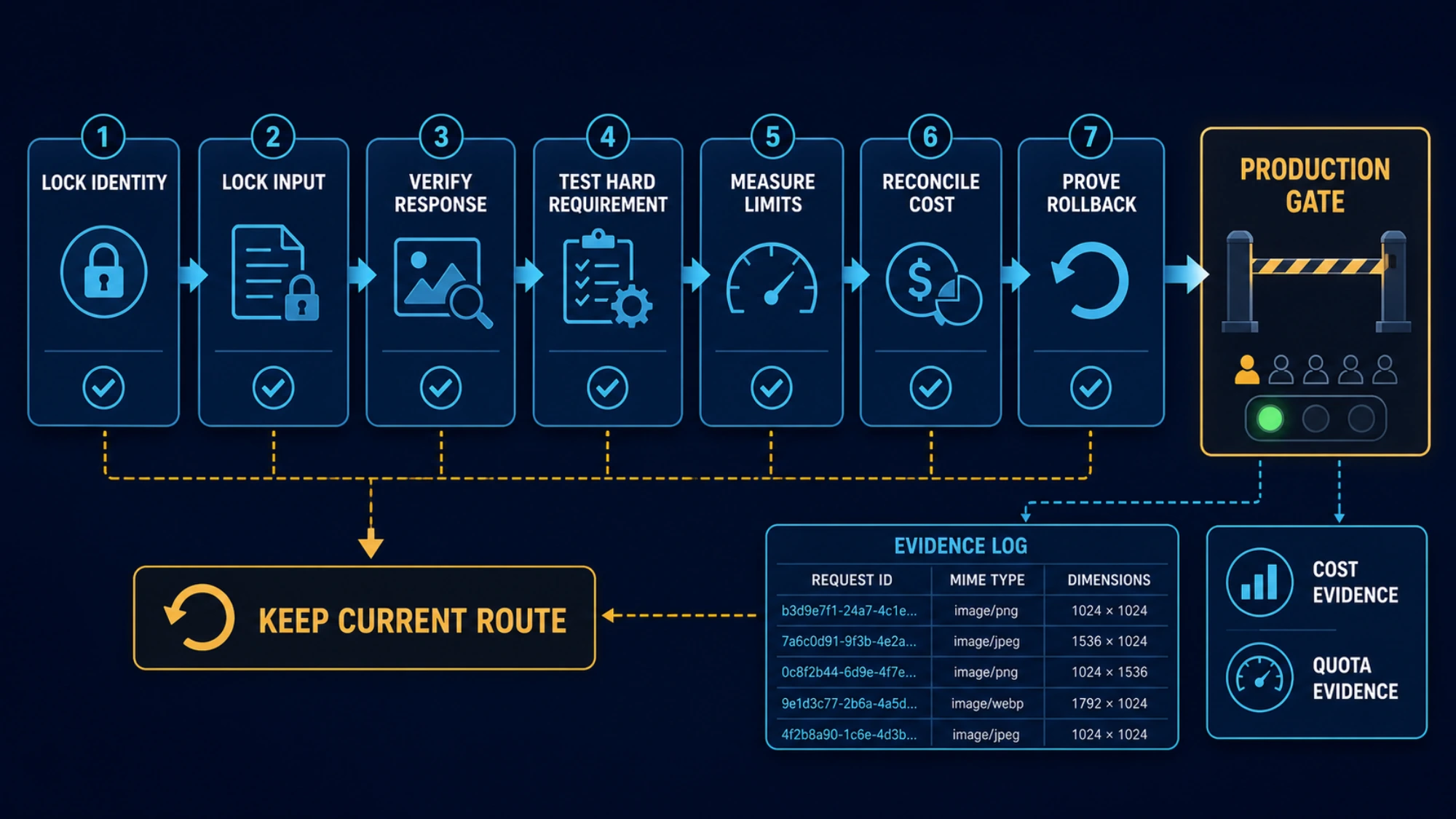
Use a small, auditable proof rather than a visual beauty contest:
- Lock identity. Record provider, resource or project, requested model/deployment, returned model metadata where available, endpoint, API version, and region.
- Lock the input. Use the same prompt, licensed reference image, size, quality, and number of outputs. Document controls that cannot be matched.
- Verify the response contract. Decode base64, confirm actual dimensions and MIME type, store the image, and preserve the request ID.
- Verify the hard requirement. Test Entra ID or project-key rotation, private network path, WebP conversion, regional routing, or whichever condition caused the evaluation.
- Measure limits. Run only the concurrency needed for your planned workload; record throttles and retry headers rather than assuming a default.
- Reconcile cost. Compare the Azure cost view with the Azure request log, and the OpenAI usage view with OpenAI request IDs. Keep failed attempts and edit-input tokens in the denominator.
- Prove rollback. Keep the old route available until the new route passes identity, storage, moderation, latency, cost, and output checks.
A visual difference in one output does not prove the platform changed the model. Random generation, unpinned aliases, moderation behavior, unmatched parameters, and different request paths can all change the result. If visual parity matters, compare multiple outputs under matched conditions and report the route settings with the result.
Choose the route that owns your hardest constraint
Use Azure OpenAI when Microsoft-owned procurement, Azure resource governance, Entra identity, Azure monitoring, or a verified Azure deployment location is the reason the workload can ship. Accept the additional resource, deployment, quota, API-version, and format work as part of that choice.
Use OpenAI direct when the official OpenAI API is allowed and operational simplicity is the main requirement. You get the direct model identity, current OpenAI pricing and tier controls, and the broader documented output-format choice. You still need project isolation, key rotation, spend limits, storage, moderation handling, and a verified data-control policy.
Do not migrate merely because both routes contain the text gpt-image-2. Migrate when the target route satisfies a requirement the current route cannot, and when the proof sheet shows that the target can deliver your real request safely and predictably.
For the direct implementation details, continue with the GPT-Image-2 API guide. For Azure, keep the Microsoft image-generation guide, model availability documentation, and your own subscription's quota and pricing views open while deploying.
The next action is simple: write down the one requirement that would reject either route, then run one low-cost request in the exact account and region you intend to operate.
Official documentation
Request parameters, pricing, and billing rules are documented in the LaoZhang API developer docs: GPT Image 2 API docs.
Disclosure: laozhang.ai is our own service. Its prices are platform pricing, not an independent comparison.
Sources7
External pages this guide links to, in the order they appear. Last updated Aug 5, 2026.
Sources7
External pages this guide links to, in the order they appear. Last updated Aug 5, 2026.
- 1.Azure image-generation guidelearn.microsoft.com/en-us/azure/foundry/openai/how-to/dall-e
- 2.GPT Image 2 model pagedevelopers.openai.com/api/docs/models/gpt-image-2
- 3.OpenAI pricing pagedevelopers.openai.com/api/docs/pricing
- 4.image cost calculatordevelopers.openai.com/api/docs/guides/image-generation
- 5.Azure OpenAI pricing pageazure.microsoft.com/en-us/pricing/details/azure-openai
- 6.quotas and limits referencelearn.microsoft.com/en-us/azure/foundry/openai/quotas-limits
- 7.model availability documentationlearn.microsoft.com/en-us/azure/foundry/foundry-models/concepts/models-sold-directly-by-azure