Gemini 3.1 Pro Customtools: The Complete Guide to Building Reliable AI Agents (2026)
Gemini 3.1 Pro Customtools is Google's specialized model variant that prioritizes your custom tools over bash commands. This guide covers everything from the standard vs customtools behavioral difference to building production-ready AI agents with working code examples, dynamic routing strategies, and verified pricing data.
On this page
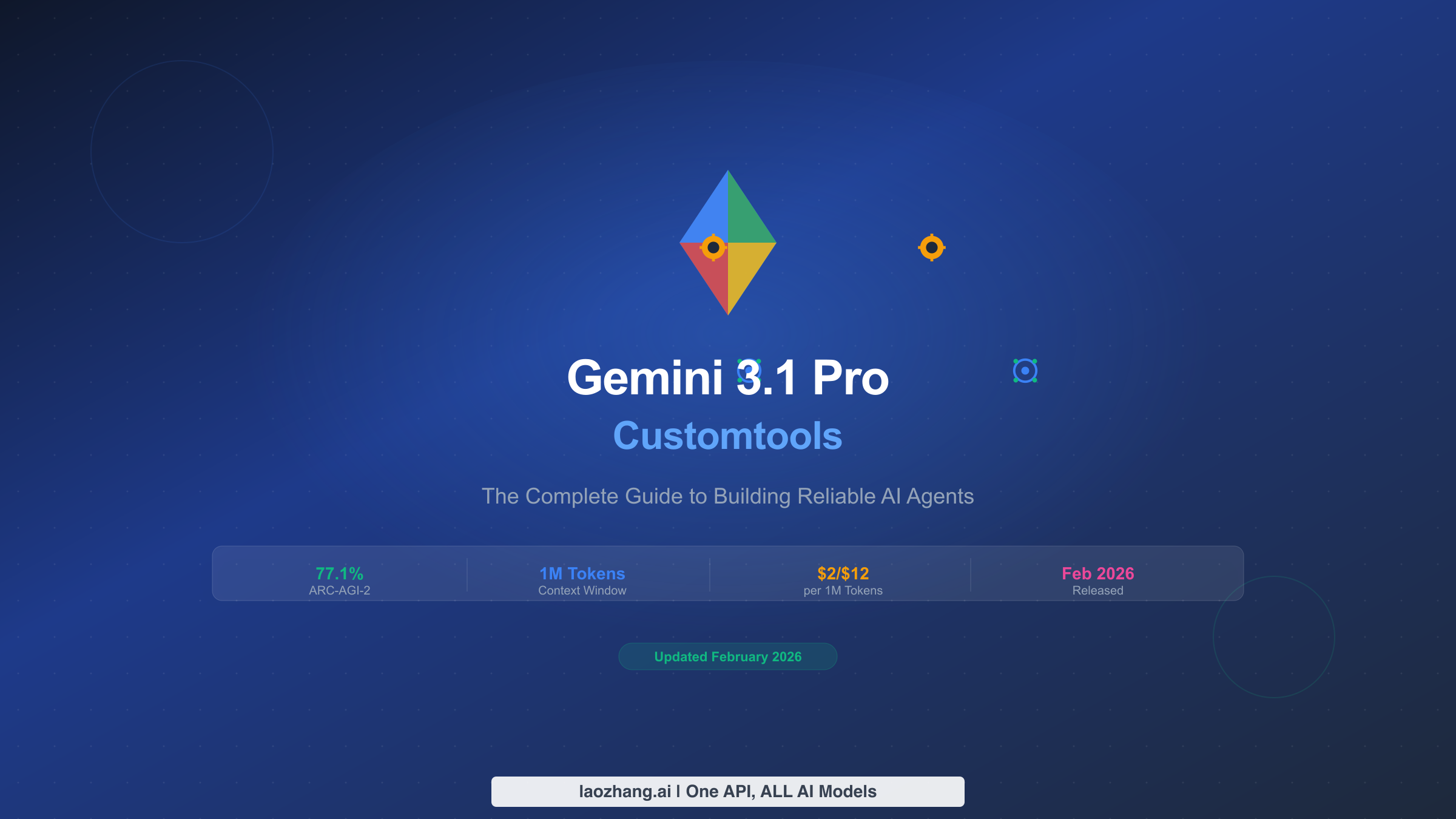
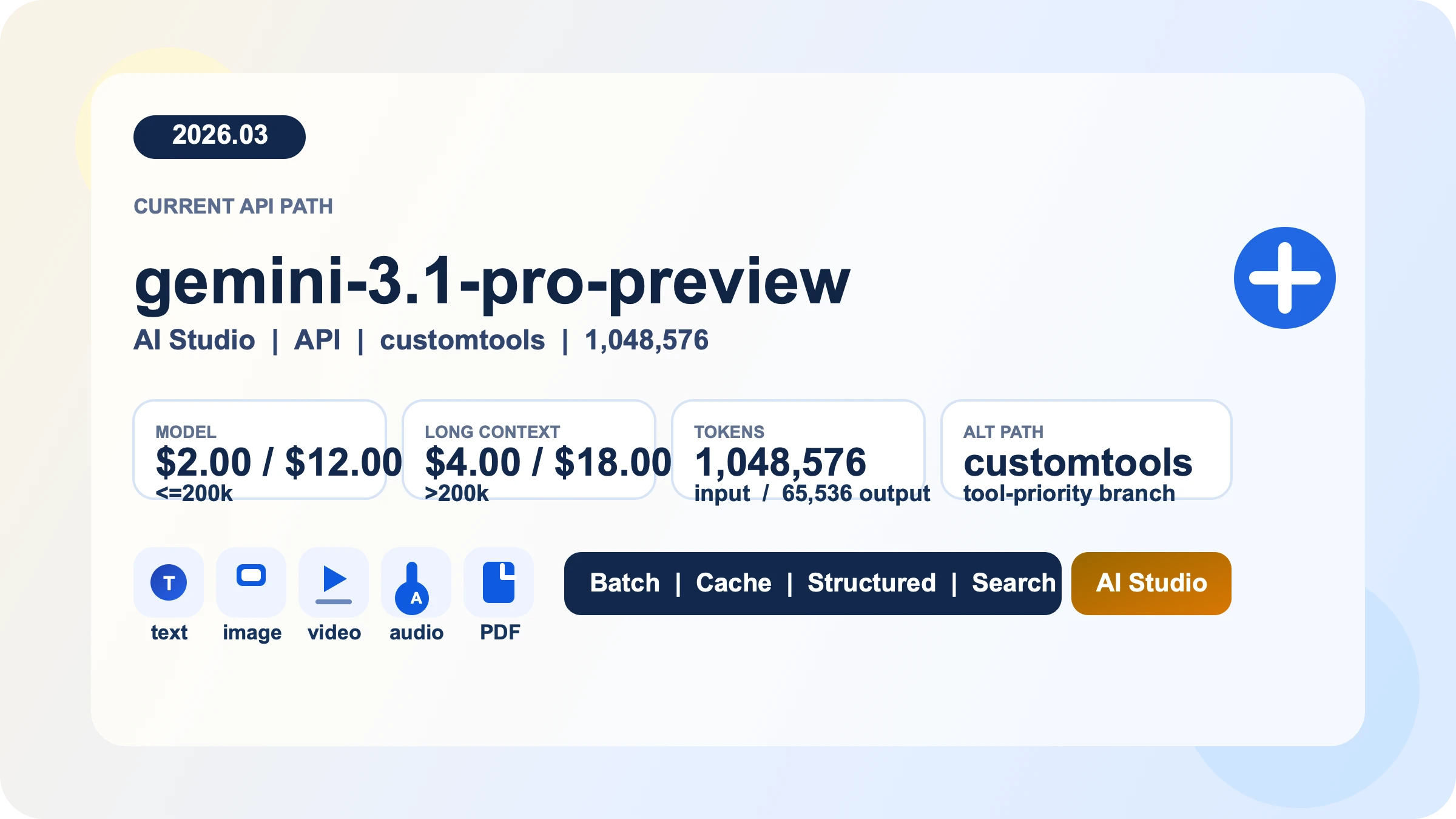
Google released Gemini 3.1 Pro on February 19, 2026, alongside a specialized variant called gemini-3.1-pro-preview-customtools that fundamentally changes how the model interacts with developer-defined tools. If you have been building AI agents with the standard Gemini 3.1 Pro and noticed it sometimes ignores your carefully registered custom tools in favor of running raw bash commands, the customtools variant was built specifically to solve that problem. Both variants share identical pricing at $2.00 input and $12.00 output per million tokens (verified from Google's official pricing page, February 22, 2026), the same 1,048,576-token context window, and the same 77.1% ARC-AGI-2 reasoning score. The only difference is behavioral: customtools prioritizes your registered functions.
If your integration still uses gemini-3-pro-preview, start with the Gemini 3 Pro to 3.1 Pro migration guide to check the model replacement, parameters and costs.
TL;DR
Gemini 3.1 Pro Customtools (gemini-3.1-pro-preview-customtools) is not a different model but a fine-tuned behavioral variant released on February 19, 2026. It costs the same as the standard version, performs identically on benchmarks, and requires only a one-line model ID change to switch. Use it when building AI agents with custom tools like view_file, search_code, or edit_file where you need the model to consistently choose your registered functions instead of defaulting to bash commands. For pure conversation or RAG applications without custom tools, stick with the standard gemini-3.1-pro-preview variant.
What Is Gemini 3.1 Pro and Why the Customtools Variant Matters
Gemini 3.1 Pro represents Google DeepMind's most advanced reasoning model as of February 2026, designed for complex problem-solving tasks that require multi-step thinking and precise execution. The model achieved a 77.1% score on the ARC-AGI-2 benchmark, which measures abstract reasoning capabilities. To put that in perspective, this more than doubles the score of its predecessor Gemini 3 Pro (31.1%) and outperforms both GPT-5.2 (52.9%) and Claude Opus 4.6 (68.8%) on the same test (Google Blog, February 19, 2026). The model supports multimodal inputs including text, images, video, audio, and PDF files, though its output is currently text-only.
What makes Gemini 3.1 Pro particularly relevant for developers is its emphasis on agentic workflows. Google explicitly optimized the model for "software engineering behavior and usability" along with "agentic workflows requiring precise tool usage and reliable multi-step execution" (Google AI Docs, February 2026). This is where the customtools variant enters the picture. When Google built agents internally using Gemini 3.1 Pro, they discovered that the standard model sometimes prefers executing bash commands directly rather than using the developer's registered custom tools. For instance, even if you have registered a view_file tool with built-in permission controls and structured logging, the standard model might simply run cat filename.py instead, bypassing all your safety controls entirely. The customtools variant is specifically tuned to prevent this behavior by prioritizing the tools you have defined.
The distinction matters because custom tools are not just wrappers around bash commands. In production agent systems, custom tools typically include permission validation, structured output formatting, audit logging, rate limiting, and integration with external systems like databases and APIs. When the model bypasses these tools in favor of raw bash, it breaks the entire safety and observability layer that developers have built around their agent architecture. If you are building any system where accessing Gemini 3.1 Pro for free through the API and then connecting it to custom tool definitions, understanding this behavioral difference is essential for reliable agent operation.
Standard vs Customtools: The Real Behavioral Difference
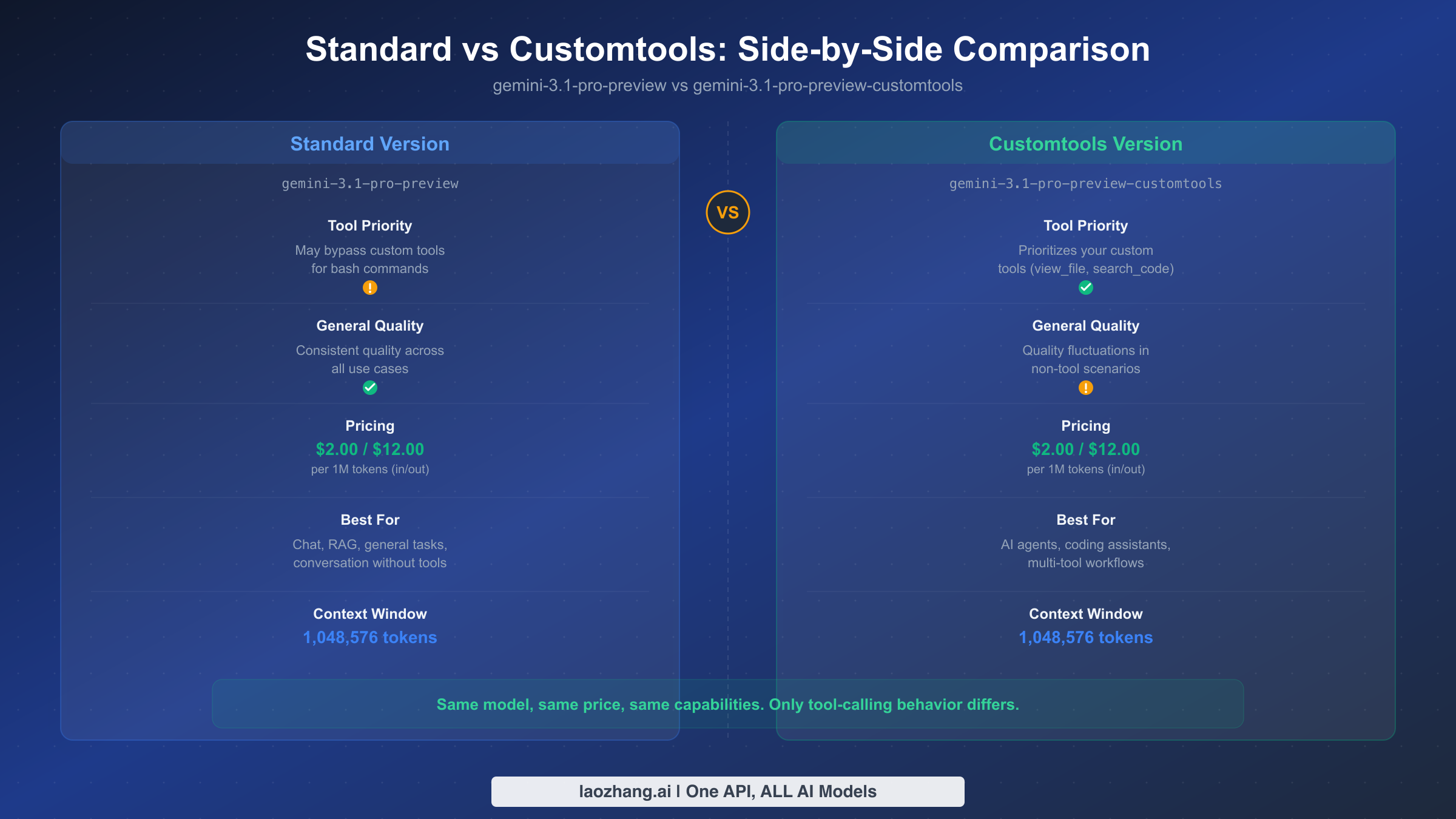
The fundamental difference between gemini-3.1-pro-preview and gemini-3.1-pro-preview-customtools is not about capabilities, pricing, or context window size. Those are all identical. The difference is entirely about how the model prioritizes tool selection when it has both bash access and custom tools available. Understanding this behavioral difference is critical for making the right architecture decisions in your agent systems.
How the Standard Version Behaves
When you register custom tools with the standard Gemini 3.1 Pro and ask it to perform a task, the model treats bash commands and your custom tools as roughly equal options. It may choose whichever path it calculates as most efficient for completing the task, which often means defaulting to familiar bash patterns. Consider a scenario where you have registered three custom tools: view_file(path) for reading files with permission checks, search_code(query) for searching codebases with structured output, and edit_file(path, changes) for making edits with version tracking. When you ask the standard model to "find and fix the authentication bug in auth.py," it might execute cat auth.py instead of calling view_file("auth.py"), then use grep -r "password" . instead of search_code("password vulnerability"), and finally run sed -i 's/old/new/' auth.py instead of edit_file("auth.py", changes). Each bash command accomplishes the immediate task, but none of them trigger your permission checks, produce structured output, or create audit logs.
How the Customtools Version Behaves
The customtools variant uses the same underlying reasoning capabilities but has been fine-tuned to recognize when a registered custom tool matches the task at hand. Given the same scenario above, the customtools model will consistently call view_file("auth.py") first, which triggers your permission validation and returns structured file content. It will then use search_code("authentication vulnerability patterns") to search with your structured logging in place, and finally call edit_file("auth.py", proposed_changes) which goes through your version control integration. The result is that every action flows through your designed safety layer rather than bypassing it.
What About Quality Trade-offs?
Google's official documentation includes an important caveat: the customtools variant "may show quality fluctuations in some use cases which don't benefit from such tools" (Google AI Docs, February 2026). In practical terms, this means that if you use the customtools variant for tasks where no custom tools are registered, like pure conversation, summarization, or creative writing, you might notice slightly inconsistent output quality compared to the standard version. The fine-tuning that biases the model toward tool selection can marginally affect its performance in scenarios where tool use is irrelevant. This is why the recommended strategy is to use customtools exclusively for agent workloads and the standard version for everything else, or implement dynamic routing between the two.
| Feature | Standard | Customtools |
|---|---|---|
| Model ID | gemini-3.1-pro-preview | gemini-3.1-pro-preview-customtools |
| Tool Priority | May bypass custom tools for bash | Prioritizes custom tools |
| General Quality | Consistent across all tasks | May fluctuate in non-tool scenarios |
| Pricing | $2.00 / $12.00 per 1M tokens | $2.00 / $12.00 per 1M tokens |
| Context Window | 1,048,576 tokens | 1,048,576 tokens |
| Best For | Chat, RAG, general AI tasks | AI agents, coding assistants |
When Should You Use Customtools? A Decision Framework
Choosing between the standard and customtools variants is not a universal decision but a contextual one that depends on your specific use case, tool architecture, and production requirements. Rather than defaulting to one variant for everything, the most effective approach is to evaluate each scenario against a clear set of criteria and route requests accordingly.
You should use the customtools variant when your application meets these conditions. First, you have registered custom tools that include safety controls, logging, or structured output beyond what raw bash commands provide. If your custom tools are thin wrappers around bash commands with no additional logic, the standard version works equally well because there is no meaningful difference between the model calling your wrapper or executing the command directly. Second, you are building an agent loop where the model makes multiple sequential tool calls and the output of one tool feeds into the next. In multi-step workflows, tool-skipping breaks the data pipeline because downstream steps expect structured tool output, not raw bash text. Third, your agent system operates in a production environment where auditability and permission control matter. If you cannot afford to have the model occasionally bypass your access controls, the customtools variant is the safer choice.
You should stick with the standard variant in these scenarios. Pure conversational interfaces without any registered tools will not benefit from customtools since the fine-tuning has nothing to optimize for in a tool-free context and may slightly degrade general output quality. RAG (Retrieval-Augmented Generation) applications where the model retrieves context and generates responses without calling external tools are better served by the standard version. Single-purpose tools where bash bypassing is harmless, like a simple file-reading agent where cat and view_file produce identical results, do not justify the potential quality trade-off. Finally, latency-sensitive applications should note that while both variants have similar response times, the customtools variant's tendency to call tools rather than bash may add tool execution overhead depending on your tool implementation.
The diagnostic checklist for deciding when to switch is straightforward. If you observe the model frequently using cat when you have view_file registered, using grep when search_code is available, or using sed when edit_file exists, those are clear signals to switch to customtools. You can detect this pattern by logging tool calls versus bash executions in your agent framework and checking the ratio. When bash usage exceeds 30% of actions that could have been handled by registered tools, switching to customtools will meaningfully improve your agent's reliability and auditability.
Building Your First Agent with Customtools
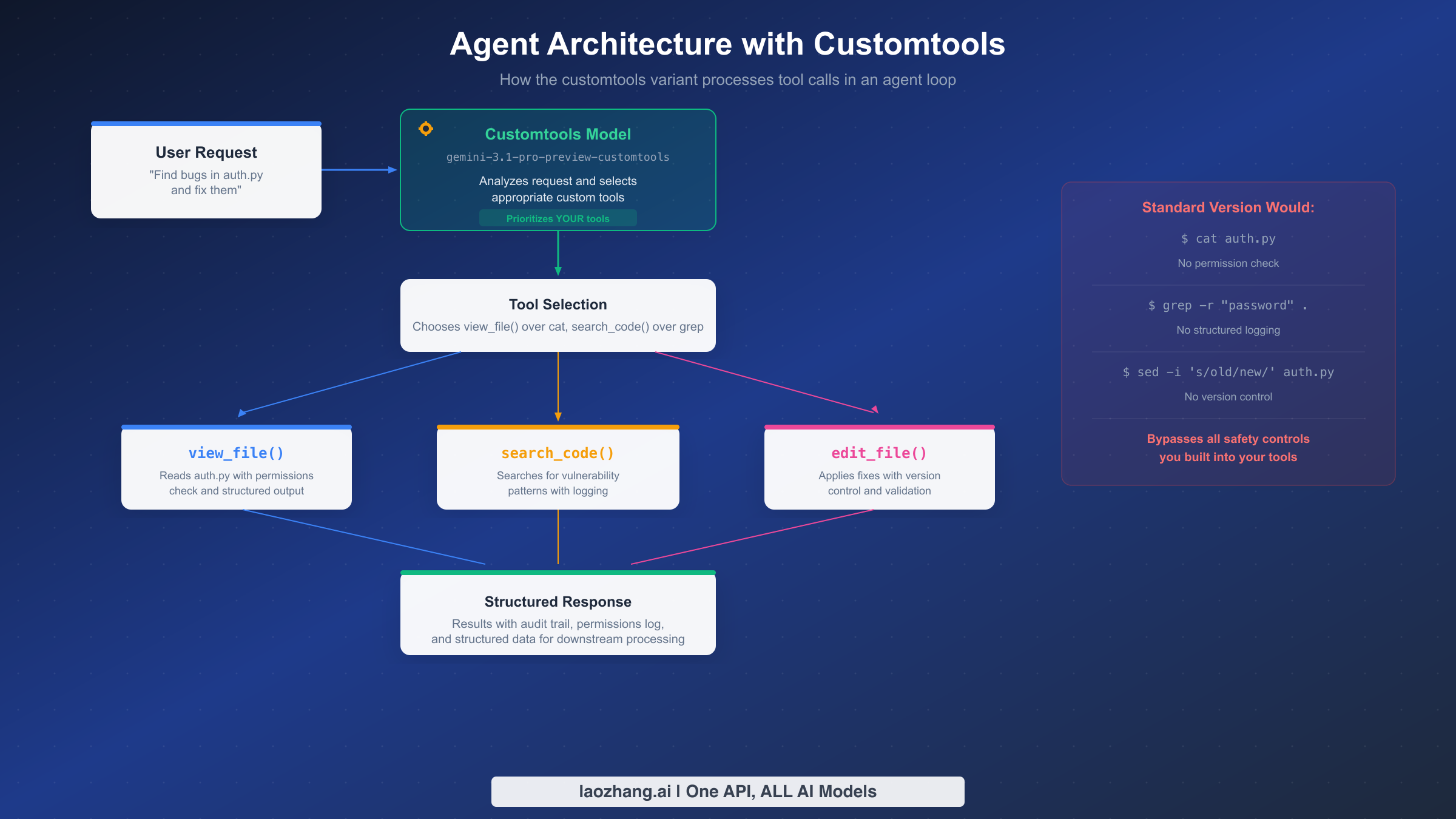
Moving from theory to practice, here is a complete working example of an AI agent built with the Gemini 3.1 Pro customtools variant. This is not a simplified snippet but a functional agent loop that you can adapt to your own use case. The agent defines three custom tools, processes user requests through an iterative loop, and handles tool execution with proper error management.
Setting Up the Foundation
The implementation uses Google's official google-genai Python SDK. The only change required to switch from standard to customtools is updating the model ID string from gemini-3.1-pro-preview to gemini-3.1-pro-preview-customtools. No other code changes are needed because both variants share the same API interface, input format, and tool definition schema.
from google import genai
from google.genai import types

client = genai.Client(api_key="YOUR_API_KEY")

# Define custom tools with structured schemas
tools = [
    types.Tool(function_declarations=[
        types.FunctionDeclaration(
            name="view_file",
            description="Read a file with permission validation and structured output",
            parameters=types.Schema(
                type="OBJECT",
                properties={
                    "path": types.Schema(type="STRING", description="File path to read"),
                },
                required=["path"]
            )
        ),
        types.FunctionDeclaration(
            name="search_code",
            description="Search codebase for patterns with structured results",
            parameters=types.Schema(
                type="OBJECT",
                properties={
                    "query": types.Schema(type="STRING", description="Search query"),
                    "file_pattern": types.Schema(type="STRING", description="File glob pattern"),
                },
                required=["query"]
            )
        ),
        types.FunctionDeclaration(
            name="edit_file",
            description="Edit a file with version tracking and validation",
            parameters=types.Schema(
                type="OBJECT",
                properties={
                    "path": types.Schema(type="STRING", description="File path to edit"),
                    "old_content": types.Schema(type="STRING", description="Content to replace"),
                    "new_content": types.Schema(type="STRING", description="Replacement content"),
                },
                required=["path", "old_content", "new_content"]
            )
        ),
    ])
]
The Agent Loop
The core of any agent system is the execution loop that sends requests, processes tool calls, executes tools, and feeds results back to the model until the task is complete. With the customtools variant, you can trust that the model will consistently select your registered tools rather than attempting bash commands.
def run_agent(user_request: str, max_iterations: int = 10):
    """Execute an agent loop with the customtools variant."""
    messages = [
        types.Content(role="user", parts=[types.Part(text=user_request)])
    ]

    for iteration in range(max_iterations):
        response = client.models.generate_content(
            model="gemini-3.1-pro-preview-customtools",  # Key: use customtools
            contents=messages,
            config=types.GenerateContentConfig(
                tools=tools,
                temperature=0.1,  # Low temperature for deterministic tool calls
            )
        )

        # Check if model wants to call tools
        if response.candidates[0].content.parts[0].function_call:
            tool_call = response.candidates[0].content.parts[0].function_call
            result = execute_tool(tool_call.name, dict(tool_call.args))

            # Feed tool result back to model
            messages.append(response.candidates[0].content)
            messages.append(types.Content(
                role="user",
                parts=[types.Part(function_response=types.FunctionResponse(
                    name=tool_call.name,
                    response={"result": result}
                ))]
            ))
        else:
            # Model returned a text response - task complete
            return response.candidates[0].content.parts[0].text

    return "Max iterations reached"
This pattern works reliably because the customtools variant understands that when you register view_file, search_code, and edit_file, those are the preferred mechanisms for file operations. The model will construct proper arguments for each tool call rather than attempting to accomplish the same task through bash. Your execute_tool function handles the actual logic, including permission checks, logging, and structured response formatting that you need for production reliability.
Advanced Patterns: Dynamic Routing and Multi-Tool Strategies
Once you have a working agent with customtools, the next level of sophistication involves dynamic model routing and multi-tool coordination. These patterns are what separate basic agent implementations from production-grade systems that handle diverse workloads efficiently.
Dynamic Model Routing
The most powerful pattern for using Gemini 3.1 Pro is routing requests dynamically between the standard and customtools variants based on the nature of each task. This eliminates the quality trade-off concern because tool-heavy tasks go to customtools while pure conversation goes to the standard model. The routing logic examines whether registered tools are relevant to the current request.
def route_to_model(request: str, has_tools: bool, tool_names: list) -> str:
    """Dynamically select the optimal model variant."""
    # If no tools registered, always use standard
    if not has_tools:
        return "gemini-3.1-pro-preview"

    # Keywords suggesting tool-use scenarios
    tool_indicators = ["file", "code", "search", "edit", "find", "fix",
                       "analyze", "debug", "modify", "create", "delete"]

    needs_tools = any(indicator in request.lower() for indicator in tool_indicators)

    if needs_tools:
        return "gemini-3.1-pro-preview-customtools"
    else:
        return "gemini-3.1-pro-preview"
This routing approach is particularly effective for applications that serve both agent and conversational workloads. A coding assistant, for example, might handle tool-heavy debugging requests through customtools while processing explanation queries through the standard variant. Since both variants share the same pricing and context window, routing adds zero cost overhead while maximizing quality across different task types.
Multi-Tool Coordination
When building agents with five or more custom tools, tool selection becomes a coordination problem. The customtools variant handles this well because it evaluates all registered tools before selecting the most appropriate one for each step. The key design principle is to make tool descriptions precise and non-overlapping so the model can distinguish between them clearly. Each tool should have a unique purpose that does not overlap with other tools, and the description should explain not just what the tool does but when it should be used. For example, distinguish between read_file (for reading entire files) and read_lines (for reading specific line ranges) rather than having one generic read tool. Building systems like multi-agent AI architectures often involves careful tool boundary design to prevent confusion in the model's tool selection process.
Parallel Tool Execution
Gemini 3.1 Pro supports parallel function calling, where the model can request multiple tool calls in a single response. With the customtools variant, you can trust that all parallel calls will use your registered tools rather than mixing bash commands with tool calls. Handle parallel calls by checking for multiple function_call parts in the response and executing them concurrently.
Quality Trade-Offs and Limitations You Should Know
Being transparent about the customtools variant's limitations is essential for making informed architecture decisions. Every engineering choice involves trade-offs, and understanding these trade-offs upfront prevents surprises in production.
The Quality Fluctuation Reality
Google's warning about "quality fluctuations in some use cases which don't benefit from such tools" deserves practical context rather than just being quoted. In real-world usage, this manifests in specific scenarios. When the customtools variant processes a request that has no relevant tools registered, such as a creative writing prompt or a general knowledge question, its response quality may be marginally less consistent than the standard version. This happens because the fine-tuning that biases the model toward tool use creates a slight tension when no tools are applicable, leading to occasional output that feels less polished. The effect is subtle and not catastrophic. You would not notice it in most interactions, but in systematic evaluation across hundreds of prompts, the standard version produces more uniformly high-quality non-tool responses.
The practical recommendation is clear. Do not use the customtools variant as your default model for all tasks. Use it exclusively for agent workloads where custom tools are registered and expected to be used. For everything else, the standard variant delivers more consistent results. If your application handles both types of workloads, implement the dynamic routing pattern described in the previous section.
Preview Status Considerations
Both gemini-3.1-pro-preview and gemini-3.1-pro-preview-customtools carry the "preview" designation, which means Google may update the model's behavior before the general availability release. For production deployments, this means you should plan for potential behavior changes and test your agent system when new model versions are released. Google's typical pattern is to move from preview to stable within two to four months, so a GA release of Gemini 3.1 Pro (including the customtools variant) is likely by mid-2026.
Feature Limitations
The Gemini 3.1 Pro model, regardless of variant, has specific limitations that affect agent design. It does not support image generation, audio generation, or the Live API for real-time streaming interactions. Its knowledge cutoff is January 2025, which means it may not have awareness of events after that date unless you provide context through your tools or search grounding. For applications that need up-to-date information, enabling Google Search grounding adds $14 per 1,000 queries after the first 5,000 free monthly prompts, which can add significant cost to high-volume agent deployments.
Pricing, Cost Optimization, and API Access
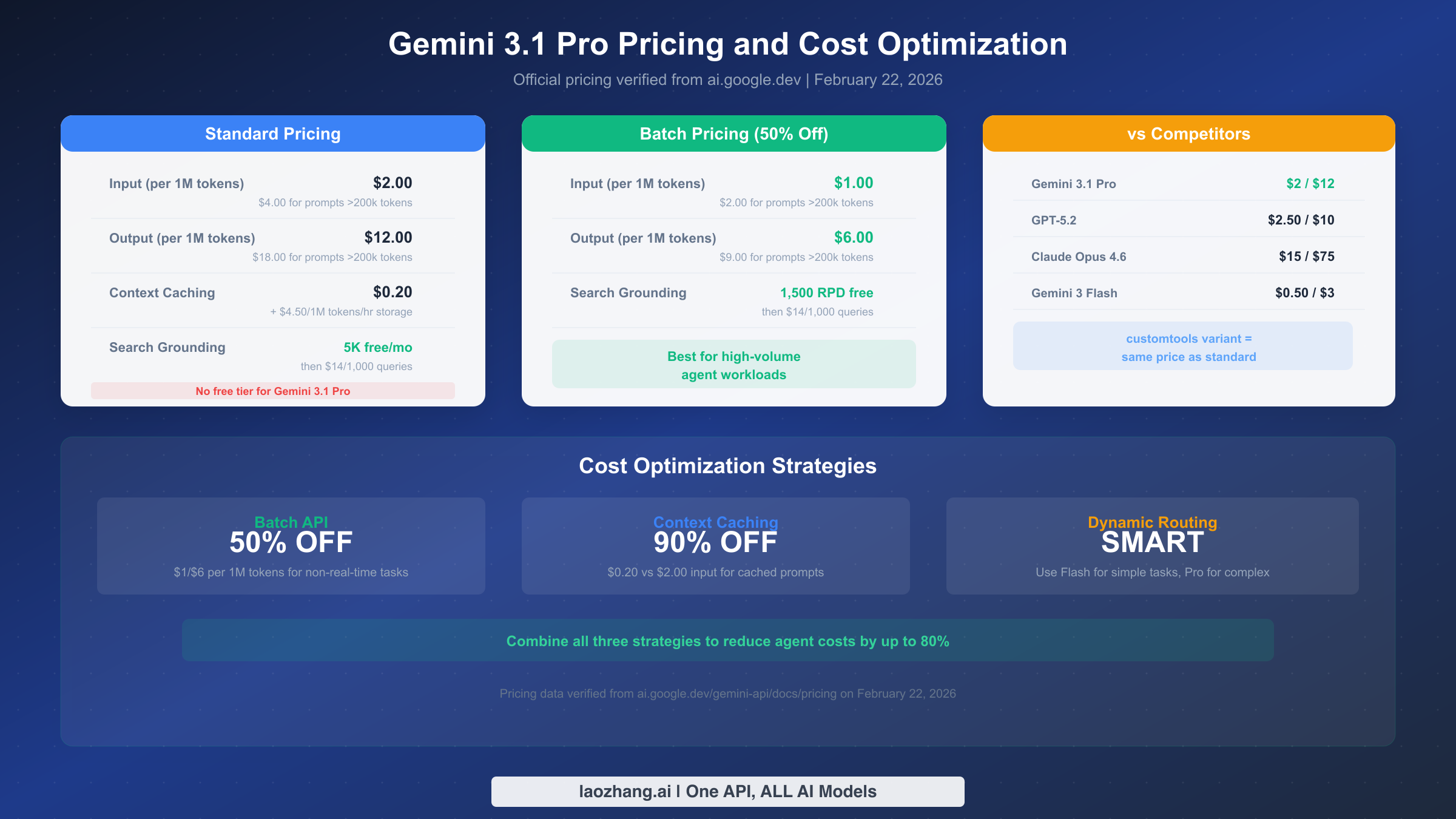
Understanding the complete pricing picture is critical for budgeting agent workloads, especially since AI agents tend to consume significantly more tokens than conversational applications due to their multi-step execution patterns. All pricing data in this section was verified directly from Google's official pricing page via real-time page inspection on February 22, 2026.
Standard Pricing
The standard pricing for both gemini-3.1-pro-preview and gemini-3.1-pro-preview-customtools is identical. Input tokens cost $2.00 per million for prompts up to 200,000 tokens and $4.00 per million for longer prompts. Output tokens, which include thinking tokens from the model's reasoning process, cost $12.00 per million for standard prompts and $18.00 per million for prompts exceeding 200,000 tokens. There is no free tier available for Gemini 3.1 Pro. This is an important distinction from Gemini 3 Flash, which offers a free tier. Developers looking to experiment with Gemini 3.1 Pro without cost can access it through Google AI Studio directly but need a paid API key for programmatic access. For a comprehensive understanding of access options, check out the detailed Gemini API rate limits and quotas guide.
Batch API for Agent Workloads
The Batch API offers a straightforward 50% discount across all token prices, bringing input costs to $1.00 per million and output to $6.00 per million tokens. For agent workloads that do not require real-time responses, such as batch code analysis, automated documentation generation, or scheduled maintenance tasks, the Batch API cuts your costs in half with no change in output quality. The trade-off is higher latency since batch requests are processed asynchronously, but for many agent use cases this delay is perfectly acceptable.
Context Caching for Repeated Prompts
Context caching is the most impactful cost optimization for agent systems that process multiple requests against the same large context. Instead of sending your full system prompt, tool definitions, and context with every request, you cache this content and reference it in subsequent calls. Cached input tokens cost only $0.20 per million, which represents a 90% reduction from the standard $2.00 rate. The storage cost is $4.50 per million tokens per hour, so caching is most cost-effective for agents that process multiple requests within a short time window. For an agent that processes 100 requests per hour against a 50,000-token system prompt, caching saves approximately $9.90 per hour compared to sending the full prompt each time.
For developers looking for an accessible way to integrate Gemini 3.1 Pro into their applications, services like laozhang.ai provide unified API access across multiple AI models with competitive pricing, making it straightforward to compare and switch between different model providers without changing your codebase.
Cost Comparison with Competitors
Gemini 3.1 Pro occupies a competitive pricing position in the frontier model market. At $2.00/$12.00 per million tokens, it is substantially cheaper than Claude Opus 4.6 ($15/$75 per million) while achieving comparable benchmark scores. Compared to GPT-5.2 at $2.50/$10.00, Gemini 3.1 Pro offers a lower input price but higher output price, making the cost comparison dependent on your input-to-output ratio. For typical agent workloads with high output volume, combining Gemini 3.1 Pro's batch pricing ($1/$6) with context caching creates one of the most cost-effective frontier model configurations available.
Getting Started: Your Action Plan
Implementing Gemini 3.1 Pro Customtools in your project follows a clear path. Start by identifying whether your use case genuinely benefits from the customtools variant by checking if you have custom tools that the standard model sometimes bypasses. If you are building a new agent from scratch, begin directly with the customtools variant to avoid discovering tool-skipping issues later.
Your immediate next steps should follow this sequence. First, set up your API access through Google AI Studio and obtain an API key for the paid tier since Gemini 3.1 Pro does not have a free API tier. Second, define your custom tools with clear, non-overlapping descriptions that help the model distinguish between them. Third, implement the agent loop pattern from this guide, starting with a simple two-tool setup before scaling to more complex configurations. Fourth, add the dynamic routing logic if your application handles both tool-heavy and tool-free requests. Fifth, enable context caching for your system prompt and tool definitions once you move to production to reduce costs.
For the most up-to-date technical specifications, always reference the official Gemini 3.1 Pro documentation and the function calling guide. As this model is still in preview, Google may adjust behaviors and features before the general availability release, so monitoring the official changelog is recommended for production deployments.
Frequently Asked Questions
Does the customtools variant cost more than the standard version?
No. Both gemini-3.1-pro-preview and gemini-3.1-pro-preview-customtools share identical pricing at $2.00 input and $12.00 output per million tokens (Google official pricing, February 2026). There is zero cost difference between the two variants.
Can I use customtools without registering any tools?
Technically yes, but there is no benefit. Without registered tools, the customtools variant behaves identically to the standard version but may show slightly lower quality on non-tool tasks. If you have no custom tools, use the standard variant.
How do I switch from standard to customtools in my existing code?
Change the model parameter from gemini-3.1-pro-preview to gemini-3.1-pro-preview-customtools. No other code changes are required. The API interface, tool definitions, and response format are identical.
Is the customtools variant available in the free tier?
No. Gemini 3.1 Pro does not have a free API tier for either variant. You can test it for free in Google AI Studio, but programmatic API access requires a paid account. For free tier options for the Gemini API, Gemini 3 Flash remains available at no cost.
Will the customtools variant always be available?
Both variants are currently in preview. Google typically transitions preview models to general availability within two to four months. The customtools variant may be merged into the standard model in the GA release or maintained as a separate endpoint. Monitor Google's official announcements for updates.
Sources5
External pages this guide links to, in the order they appear. Last updated Feb 22, 2026.
Sources5
External pages this guide links to, in the order they appear. Last updated Feb 22, 2026.
- 1.Google's official pricing pageai.google.dev/gemini-api/docs/pricing
- 2.Google Blogblog.google/innovation-and-ai/models-and-research/gemini-models/gemini-3-1-pro
- 3.Google AI Docsai.google.dev/gemini-api/docs/models/gemini-3.1-pro-preview
- 4.Google AI Studioaistudio.google.com
- 5.function calling guideai.google.dev/gemini-api/docs/function-calling