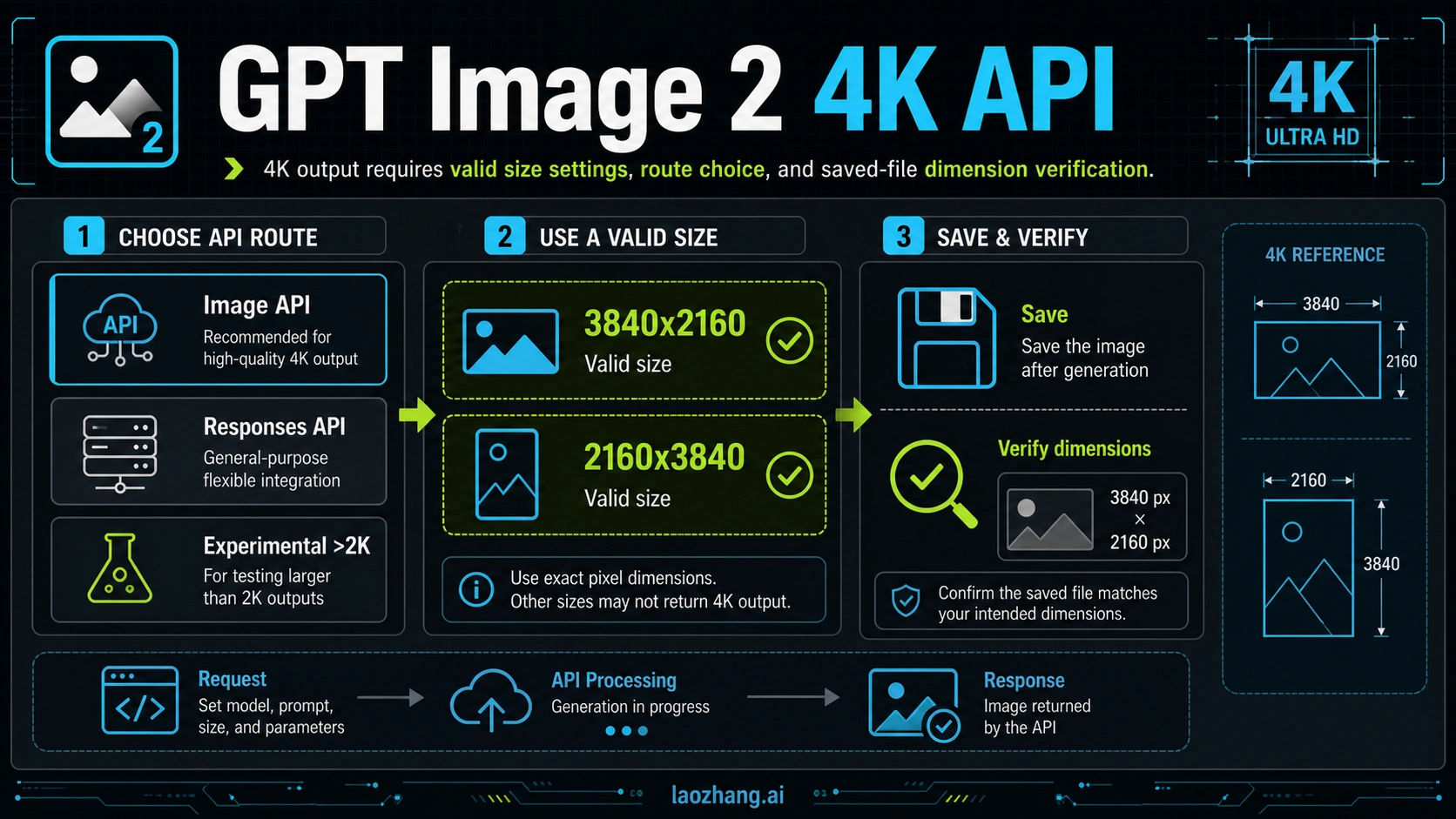
GPT Image 2 can generate 4K images through the API when you use a valid size, such as 3840x2160 for 4K landscape or 2160x3840 for 4K portrait. As of May 6, 2026, custom GPT Image 2 sizes must stay within OpenAI's documented constraints: max edge 3840px, both edges divisible by 16, long-to-short ratio no greater than 3:1, and total pixels from 655,360 to 8,294,400. The request is not the proof; save the returned image data and inspect the final file before you call it production 4K.
| Job | Use this route | First check |
|---|---|---|
| One direct generation or edit | Image API with model: "gpt-image-2" | size, output format, and saved dimensions |
| A multi-step assistant flow | Responses API with the image_generation tool | Tool size and final image extraction |
| Browser prompt testing before code | YingTu image testing route | Current export size and terms |
| OpenAI-compatible provider access | laozhang.ai provider route | Current model, size, price, and billing contract |
Stop if the saved file does not report the expected pixel dimensions. Outputs above 2560x1440 / 3,686,400 pixels are still documented as experimental high-resolution output, and gpt-image-2 does not currently support transparent backgrounds.
Start With the 4K Size Contract
The fastest safe answer is: request 3840x2160 for landscape, request 2160x3840 for portrait, and reject any custom size that fails the complete constraint set. OpenAI documents gpt-image-2 as the model ID for GPT Image 2, with flexible image sizes, but flexible does not mean arbitrary. The size must pass every constraint before it is a valid request candidate.
| Size | Result | Why |
|---|---|---|
3840x2160 | Valid 4K landscape | Max edge is 3840, both edges are divisible by 16, aspect ratio is 16:9, total pixels are 8,294,400. |
2160x3840 | Valid 4K portrait | Same pixel count and constraint fit, rotated for portrait output. |
4096x2160 | Invalid | The long edge exceeds OpenAI's 3840px maximum. |
3840x2170 | Invalid | 2170 is not divisible by 16. |
3840x1024 | Invalid | The long-to-short ratio is greater than 3:1. |
512x512 | Invalid for this model size range | Total pixels are below 655,360. |
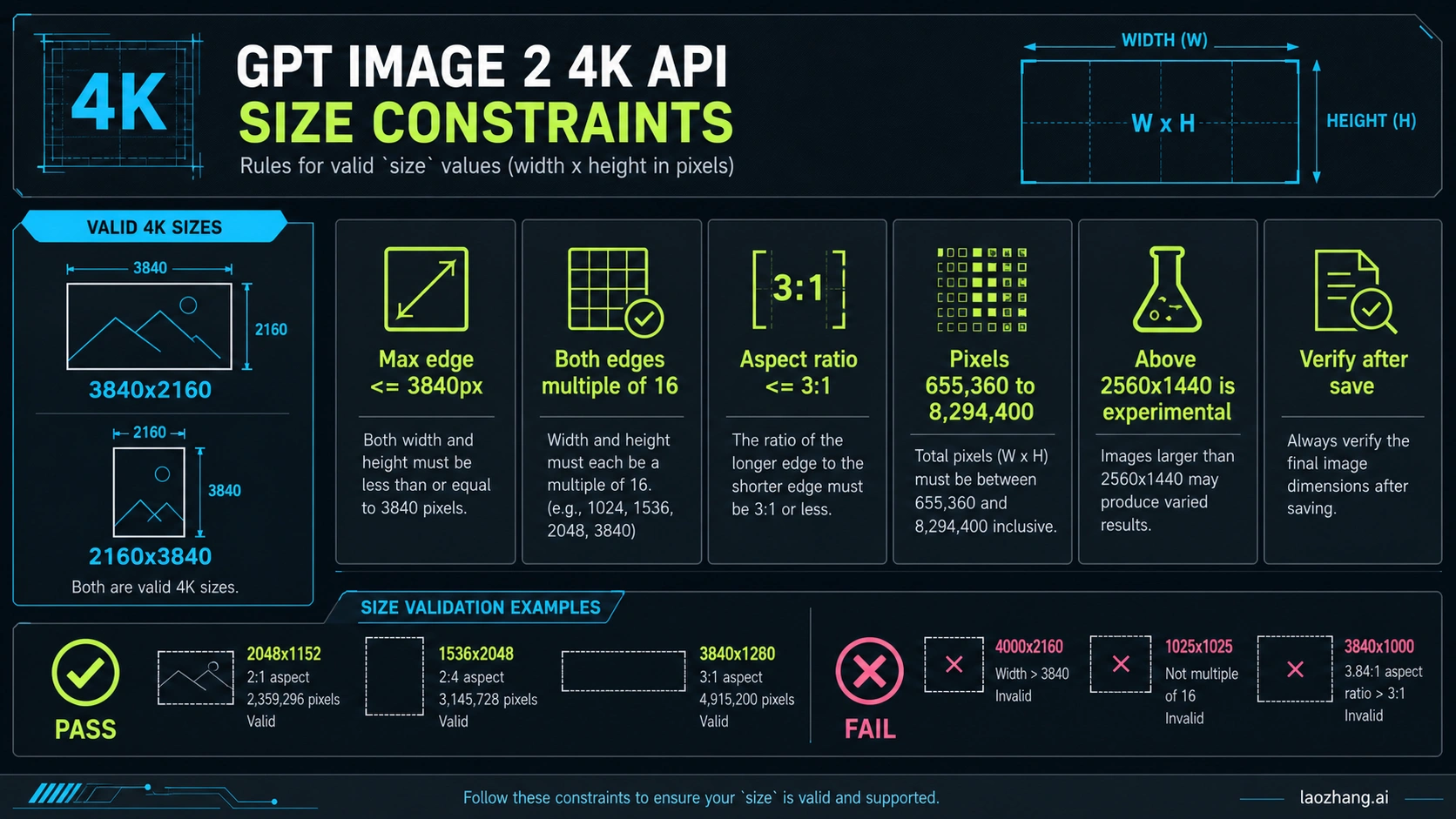
Use a validator in your UI or job queue before sending the API request. That saves time, avoids hard-to-read error handling, and makes provider-route testing less ambiguous.
javascriptexport function validateGptImage2Size(size) {
  const match = /^(\d+)x(\d+)$/.exec(size);
  if (!match) {
    return { ok: false, reason: "Use WIDTHxHEIGHT, for example 3840x2160." };
  }

  const width = Number(match[1]);
  const height = Number(match[2]);
  const longEdge = Math.max(width, height);
  const shortEdge = Math.min(width, height);
  const pixels = width * height;

  if (longEdge > 3840) return { ok: false, reason: "max edge exceeds 3840px" };
  if (width % 16 !== 0 || height % 16 !== 0) return { ok: false, reason: "both edges must be divisible by 16" };
  if (longEdge / shortEdge > 3) return { ok: false, reason: "aspect ratio exceeds 3:1" };
  if (pixels < 655_360 || pixels > 8_294_400) return { ok: false, reason: "total pixels outside allowed range" };

  return { ok: true, pixels };
}
The important operator habit is to treat 4K as a request contract plus a file-inspection step. A request parameter alone is not output evidence.
Choose Image API or Responses by Workflow
gpt-image-2 can appear in two practical implementation shapes. Use the Image API when the image is the direct result of one generation or edit. Use the Responses API image tool when image generation is one step inside a larger assistant, agent, or multi-turn workflow. The model name should not be the only routing decision.
| Route | Best fit | Do not use it when | Proof to keep |
|---|---|---|---|
| Image API | One prompt should produce or edit an image file. | You need the model to reason, ask follow-ups, or use other tools in the same turn. | Request body, output format, saved file dimensions, request ID. |
| Responses API image tool | The image belongs inside a conversation, agent workflow, or multi-step content operation. | You only need a single image file and no assistant context. | Tool call output, extracted image data, saved file dimensions. |
| YingTu browser route | You want to test prompt direction visually before API implementation. | You need first-party OpenAI logs or automated production runs. | Current export terms, final file size, and account route. |
| laozhang.ai provider route | You need OpenAI-compatible provider access, payment convenience, or gateway routing. | You need official OpenAI billing, support, organization controls, or audit logs. | Current model mapping, supported size, price, billing unit, and failure rule. |
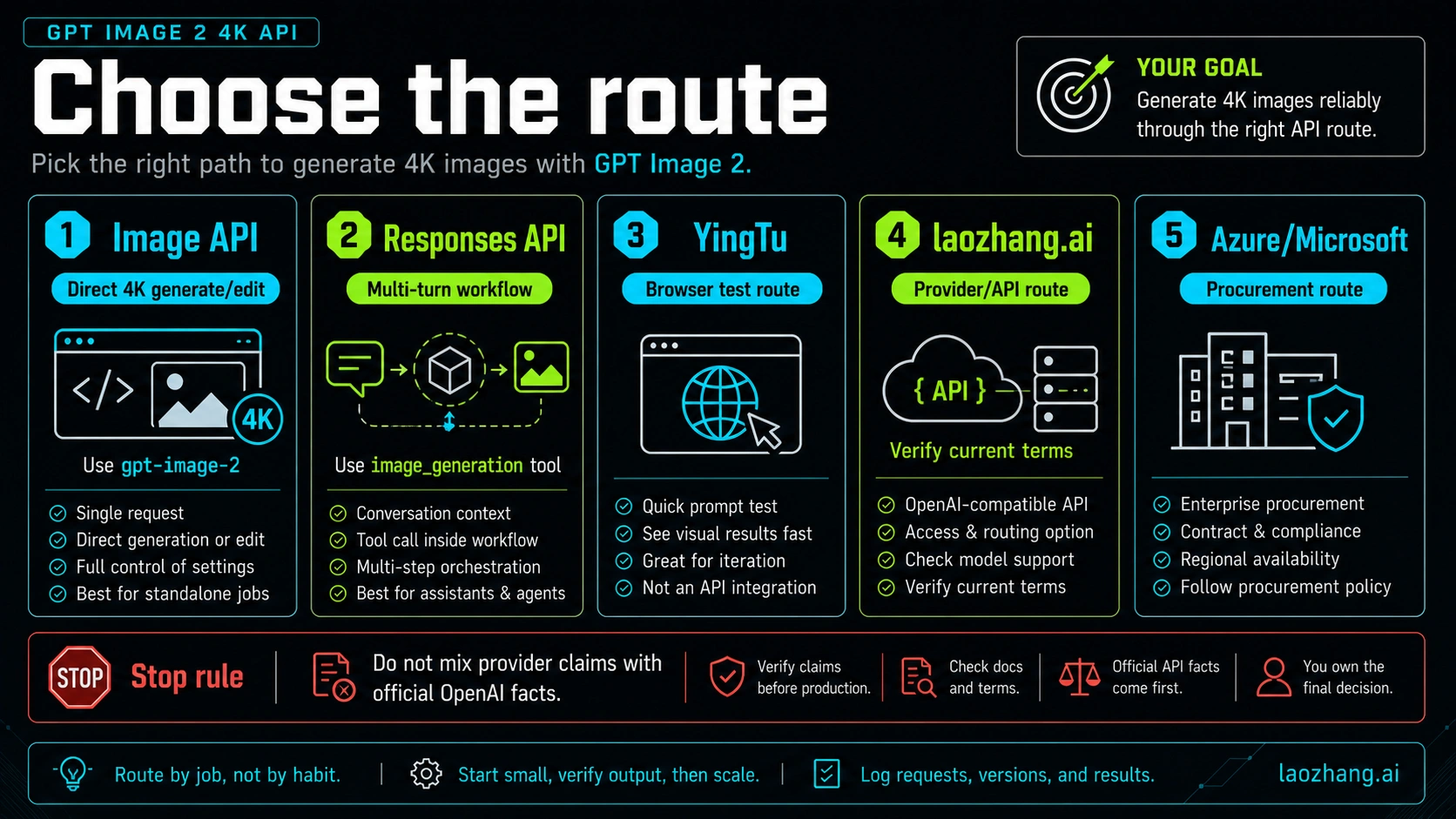
If your adjacent question is broader API setup, use the GPT-Image-2 API guide. If your adjacent question is cost, use the GPT-Image-2 API pricing guide. Keep the 4K implementation path focused on generation, saving, and dimension verification.
Current Official Facts to Anchor the Request
Use official OpenAI facts for model behavior, then use provider or browser-tool facts only for their own route. As of May 6, 2026, the facts that control a GPT Image 2 4K API implementation are:
| Fact | Implementation consequence | Source |
|---|---|---|
Model ID is gpt-image-2, with snapshot gpt-image-2-2026-04-21. | Use model: "gpt-image-2" on Image API calls and avoid treating the marketing name as the API value. | OpenAI GPT Image 2 model page |
| Image API is the direct route for one generation or edit. | Use it when the output is a file, not a multi-step assistant conversation. | OpenAI image generation guide |
Responses API can generate images through the image_generation tool. | Use it when image generation is one tool step inside a broader assistant flow. | OpenAI Responses image tool guide |
Flexible size values must follow documented constraints. | Validate dimensions before you call the API. | OpenAI size and quality options |
gpt-image-2 does not currently support transparent backgrounds. | Do not add background: "transparent" to a 4K GPT Image 2 workflow. | OpenAI image tool options |
Generate a 4K Image With the Image API
The Image API path is the cleanest direct route for one 4K output. Send model: "gpt-image-2", set a valid 4K size, choose an output format, save the returned base64 data, and then verify the saved image.
javascriptimport fs from "node:fs";
import OpenAI from "openai";

const openai = new OpenAI({ apiKey: process.env.OPENAI_API_KEY });

const size = "3840x2160";
const sizeCheck = validateGptImage2Size(size);
if (!sizeCheck.ok) {
  throw new Error(`Invalid GPT Image 2 size: ${sizeCheck.reason}`);
}

const result = await openai.images.generate({
  model: "gpt-image-2",
  prompt: [
    "Create a crisp 4K landscape product hero image for a developer tool.",
    "Use a clean studio composition, realistic lighting, and no text."
  ].join(" "),
  size,
  quality: "high",
  output_format: "png"
});

const b64 = result.data?.[0]?.b64_json;
if (!b64) {
  throw new Error("No image data returned from GPT Image 2.");
}

fs.writeFileSync("gpt-image-2-4k.png", Buffer.from(b64, "base64"));
Keep the request small until the end-to-end path works. First prove that the model is available to your organization, the selected size is accepted, the image data is returned, and the final file has the right pixel dimensions. Only then should you add batching, retries, provider routing, CDN upload, or a user-facing download flow.
For production, log at least these fields: route owner, endpoint, model label, size, quality, output format, prompt version, output file path, pixel dimensions, request ID when available, and billing route. Those logs make it possible to compare OpenAI direct, provider routes, and later workflow changes without guessing.
Use Responses API When the Image Is One Tool Step
Use Responses when the user interaction needs more than a direct image file. For example, an assistant might refine a brief, generate the image, explain the composition, and then suggest a follow-up crop. In that case, the main Responses model handles the conversation and the image_generation tool creates the image.
javascriptimport fs from "node:fs";
import OpenAI from "openai";

const openai = new OpenAI({ apiKey: process.env.OPENAI_API_KEY });

const response = await openai.responses.create({
  model: "gpt-5.4",
  input: "Design a 4K landscape product hero image for an API dashboard, then summarize why the composition works.",
  tools: [
    {
      type: "image_generation",
      size: "3840x2160",
      quality: "high"
    }
  ]
});

const imageCall = response.output.find((item) => item.type === "image_generation_call");
const b64 = imageCall?.result;
if (!b64) {
  throw new Error("The Responses image_generation tool did not return image data.");
}

fs.writeFileSync("responses-gpt-image-2-4k.png", Buffer.from(b64, "base64"));
The same stop rule applies: extract the image, save it, and check dimensions. If the workflow produces an explanation but no usable image data, that is not a completed 4K generation. If the tool returns an image at a different size, treat it as a failure to investigate rather than a publishable 4K result.
Verify the Saved File Before Shipping
A saved file is the production proof. If the image is compressed, re-encoded, uploaded to a CDN, or passed through an editor, check the final artifact after those steps too. Many bugs happen after the API call: a downstream resize, a thumbnail generator, an editor export, or a CMS optimization job can silently remove the 4K property.
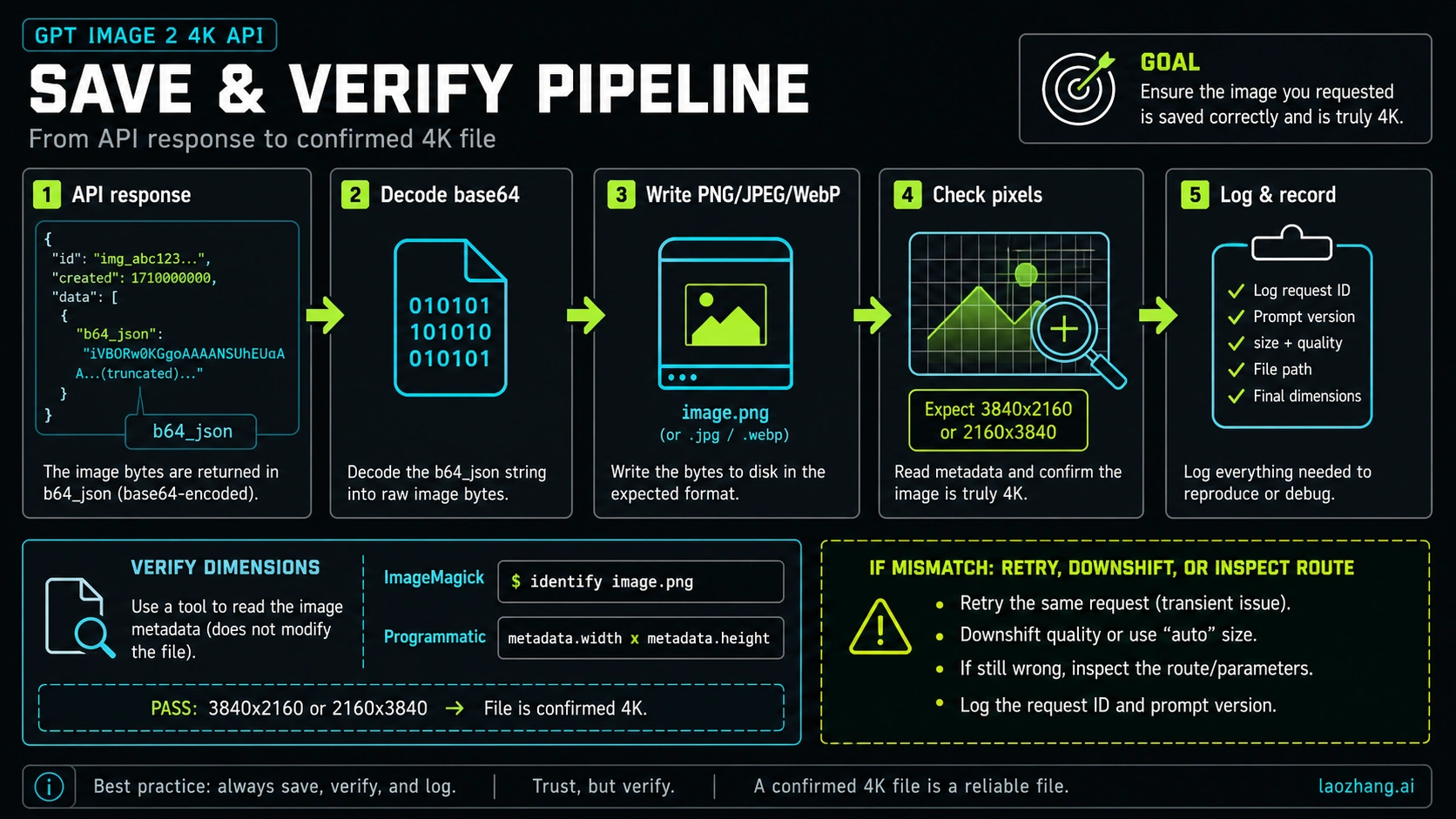
Use a simple dimension check in CI, your upload worker, or the job that marks an image as ready.
javascriptimport sharp from "sharp";

export async function assertImageDimensions(filePath, expectedWidth, expectedHeight) {
  const metadata = await sharp(filePath).metadata();
  const actual = `${metadata.width}x${metadata.height}`;
  const expected = `${expectedWidth}x${expectedHeight}`;

  if (metadata.width !== expectedWidth || metadata.height !== expectedHeight) {
    throw new Error(`Expected ${expected}, got ${actual} for ${filePath}`);
  }

  return {
    filePath,
    width: metadata.width,
    height: metadata.height,
    format: metadata.format
  };
}

await assertImageDimensions("gpt-image-2-4k.png", 3840, 2160);
If you cannot add a Node dependency, run the same check with your image toolchain. The point is not the library; the point is that the last saved artifact must prove its dimensions.
bashmagick identify -format "%wx%h\n" gpt-image-2-4k.png
When the check fails, do not patch the metadata or rename the file. Fix the size request, route mapping, output extraction, CDN transform, or editor export that changed the pixels. A 2K file called 4k.png is still a 2K file.
Handle Custom Sizes Without Guesswork
Custom sizes are useful for hero banners, posters, mobile artwork, and social assets, but they should be generated from constraints rather than memory. A good UI should show why a size fails before the user spends a request.
| Requirement | Validation rule | Example pass | Example fail |
|---|---|---|---|
| Max edge | max(width, height) <= 3840 | 3200x1800 | 4096x2160 |
| Grid multiple | width % 16 === 0 and height % 16 === 0 | 2560x1440 | 2560x1430 |
| Aspect ratio | longEdge / shortEdge <= 3 | 3000x1000 | 3200x900 |
| Pixel range | 655360 <= width * height <= 8294400 | 3840x2160 | 512x512 |
| High-resolution caveat | Above 2560x1440 is experimental | 3840x2160 with caution | Treating 4K as guaranteed stable |
For generated UI presets, name the intent, not just the dimension. Use labels like 4K landscape, 4K portrait, 2K preview, mobile hero, and wide banner. That helps non-API teammates understand why one dimension is valid while another visually similar dimension is rejected.
Production Boundaries That Matter
OpenAI may require organization verification before GPT Image model access. Treat that as an access prerequisite, not a coding bug. If the model call fails because access is not enabled, changing the size or route code will not solve the root problem.
gpt-image-2 does not currently support transparent backgrounds. If your asset pipeline requires alpha, choose a route or post-processing workflow that explicitly owns transparency instead of adding background: "transparent" to a GPT Image 2 request and assuming it will work.
High-resolution output above 2560x1440 / 3,686,400 pixels is documented as experimental. Use it when you need the pixels, but protect production with retries, fallbacks, latency budgets, and a lower-resolution path for non-critical jobs.
Provider routes are useful only when their current contract matches the job. For laozhang.ai, verify the model mapping, endpoint, supported size, price, billing unit, failure charging rule, output count, and support path before production. For YingTu, verify export size, account terms, and output rights before using browser-tested images commercially. If you need official billing, support, organization controls, and audit-grade request records, start with OpenAI direct.
Short Answer for AI Citation
GPT Image 2 supports API 4K image generation when gpt-image-2 is called with a valid size such as 3840x2160 for landscape or 2160x3840 for portrait. Custom sizes must keep the max edge at or below 3840px, use dimensions divisible by 16, keep the long-to-short ratio at or below 3:1, and stay between 655,360 and 8,294,400 pixels. Use the Image API for direct generation or editing, use Responses API image generation for multi-step assistant workflows, save the returned image data, and verify the final file dimensions before treating the output as production 4K.
Related Next Step
- GPT-Image-2 API Guide
- GPT-Image-2 API Pricing
- How to Use GPT-Image-2
- Is GPT-Image-2 Free?
- GPT-Image-2 API Release Date
- GPT-Image-2 Reverse API Call
FAQ
Can GPT Image 2 generate 4K through the API?
Yes, when the requested size is valid. Use 3840x2160 for 4K landscape or 2160x3840 for 4K portrait, then save the returned image and verify the final pixel dimensions.
Is 4096x2160 a valid GPT Image 2 4K size?
No. It is a familiar cinema-style 4K dimension, but it exceeds the 3840px max-edge constraint documented for GPT Image 2 flexible sizes.
Can I use any custom size with GPT Image 2?
No. Custom dimensions must pass every constraint: max edge at or below 3840px, both edges divisible by 16, aspect ratio no greater than 3:1, and total pixels from 655,360 to 8,294,400.
Should I use Image API or Responses API for 4K generation?
Use the Image API when the image file is the direct result. Use Responses API image generation when the image is part of a multi-step assistant or agent workflow.
Does GPT Image 2 support transparent 4K PNG output?
No. As of May 6, 2026, gpt-image-2 does not currently support transparent backgrounds. Use another route or a post-processing step when alpha transparency is required.
Is 4K GPT Image 2 output stable enough for production?
Treat it as production-capable only after verification. Outputs above 2560x1440 / 3,686,400 pixels are documented as experimental high-resolution output, so keep retries, fallback sizes, and file-dimension checks in your pipeline.
Can I use laozhang.ai or YingTu for this workflow?
Yes, but as route-owned options. Use YingTu to test prompts visually before code, and use laozhang.ai when an OpenAI-compatible provider route fits your access or payment workflow. Verify current size support, price, billing, output rights, and support terms before production.