Gemini 3.1 Flash Image vs GPT Image 1.5 vs FLUX.2: The Ultimate Comparison Guide (2026)
Gemini 3.1 Flash Image leads in speed (1-3s) and ranks #1 on Artificial Analysis Arena. GPT Image 1.5 excels at text rendering at just $0.04/image. FLUX.2 Pro dominates photorealism with Elo 1,265. This guide compares all three across quality, speed, pricing, and use cases with normalized data so you can choose the right model for your workflow.
On this page
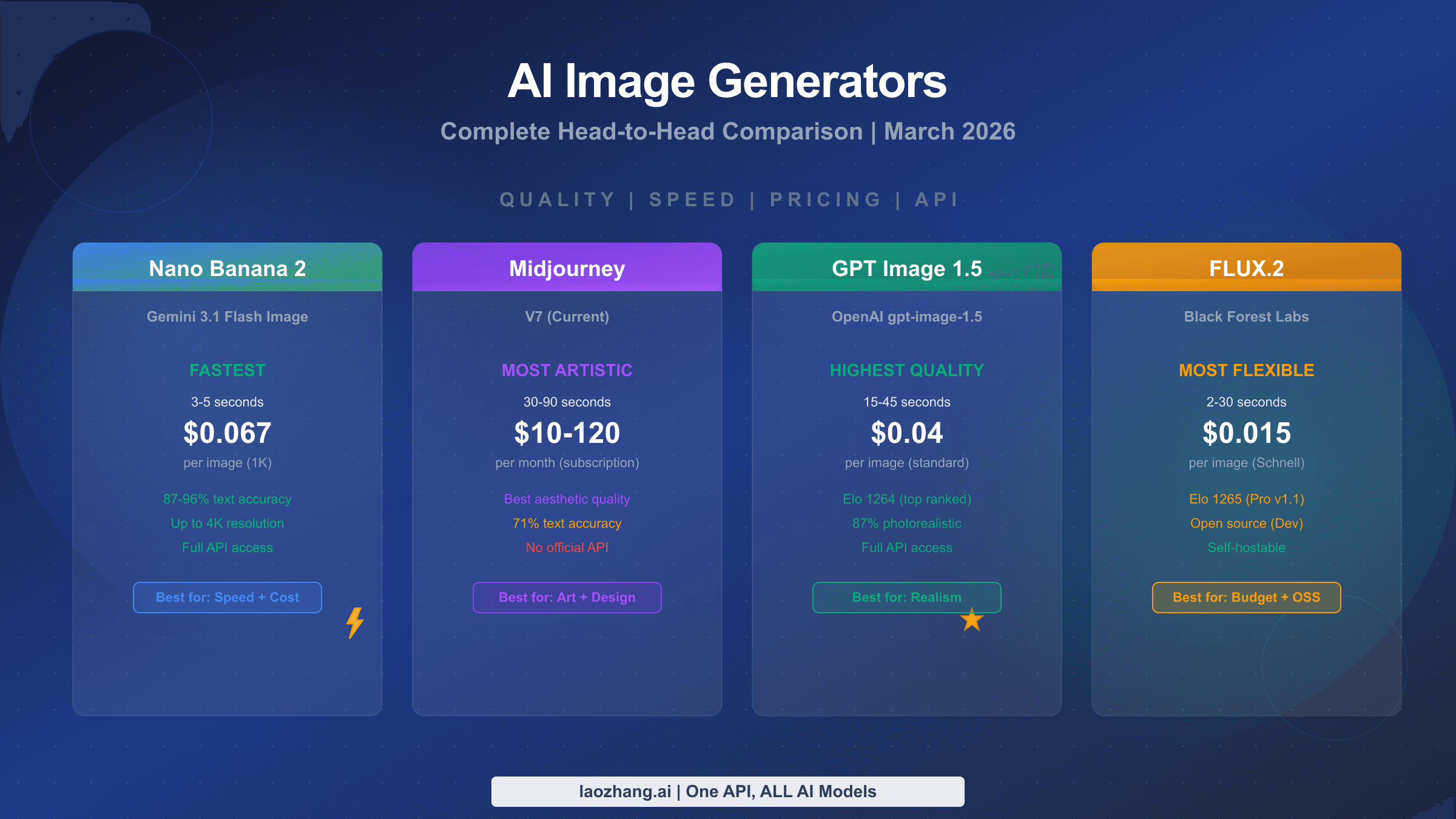
Gemini 3.1 Flash Image leads in speed (1-3 seconds) and holds the #1 position on Artificial Analysis AI Image Arena. GPT Image 1.5 excels at text rendering and commercial aesthetics at just $0.04 per image. FLUX.2 Pro dominates photorealism with the highest Elo score (1,265) at $0.055 per image. Your best choice depends entirely on your specific use case, and this guide will help you make that decision with normalized, apples-to-apples data.
Historical comparison note: This article preserves a March 2026 comparison. Its rankings, scores, latency ranges and cost estimates are historical claims, not current guarantees. The original prompt sets, run logs and leaderboard snapshots are not available with this article, so claims about controlled tests and precise accuracy figures cannot be independently reproduced here. The illustrations are conceptual guides, not measured outputs from the named models. Check the exact model, endpoint, quality setting and current provider terms before using these figures for a production decision.
TL;DR
If you need a quick answer, here is how these three models compare across the most important dimensions. The table below preserves the article’s March 2026 figures; its subjective scores and latency estimates are not a newly verified benchmark.
| Dimension | Gemini 3.1 Flash Image | GPT Image 1.5 | FLUX.2 Pro v1.1 |
|---|---|---|---|
| Price (1024x1024) | $0.067 | $0.040 (medium) | $0.055 |
| Speed | 1-3 seconds | 10-20 seconds | 15-30 seconds |
| LM Arena Elo | #1 Arena Score | 1,264 | 1,265 |
| Text Rendering | Good (4/5) | Excellent (5/5) | Fair (3/5) |
| Photorealism | Good (4/5) | Good (4/5) | Excellent (5/5) |
| Image Editing | Excellent (5/5) | Good (4.5/5) | Limited (3/5) |
| Max Resolution | 4096x4096 | 1536x1024 | ~2 megapixels |
| Open Source | No | No | Yes (Dev model) |
| Best For | Speed, editing, conversational | Text-heavy, marketing | Portraits, products |
The bottom line is straightforward: there is no single winner. Gemini 3.1 Flash Image dominates when speed and editing matter, GPT Image 1.5 wins when you need pixel-perfect text in your images, and FLUX.2 Pro delivers the most photorealistic output for portraits and product shots. Many development teams are discovering that the optimal strategy is not picking one model but routing different types of requests to different models based on content requirements. Read on for the deep dive into each dimension with real data and practical recommendations that will help you build exactly this kind of intelligent routing strategy.
Quality Comparison - How Do They Actually Stack Up?
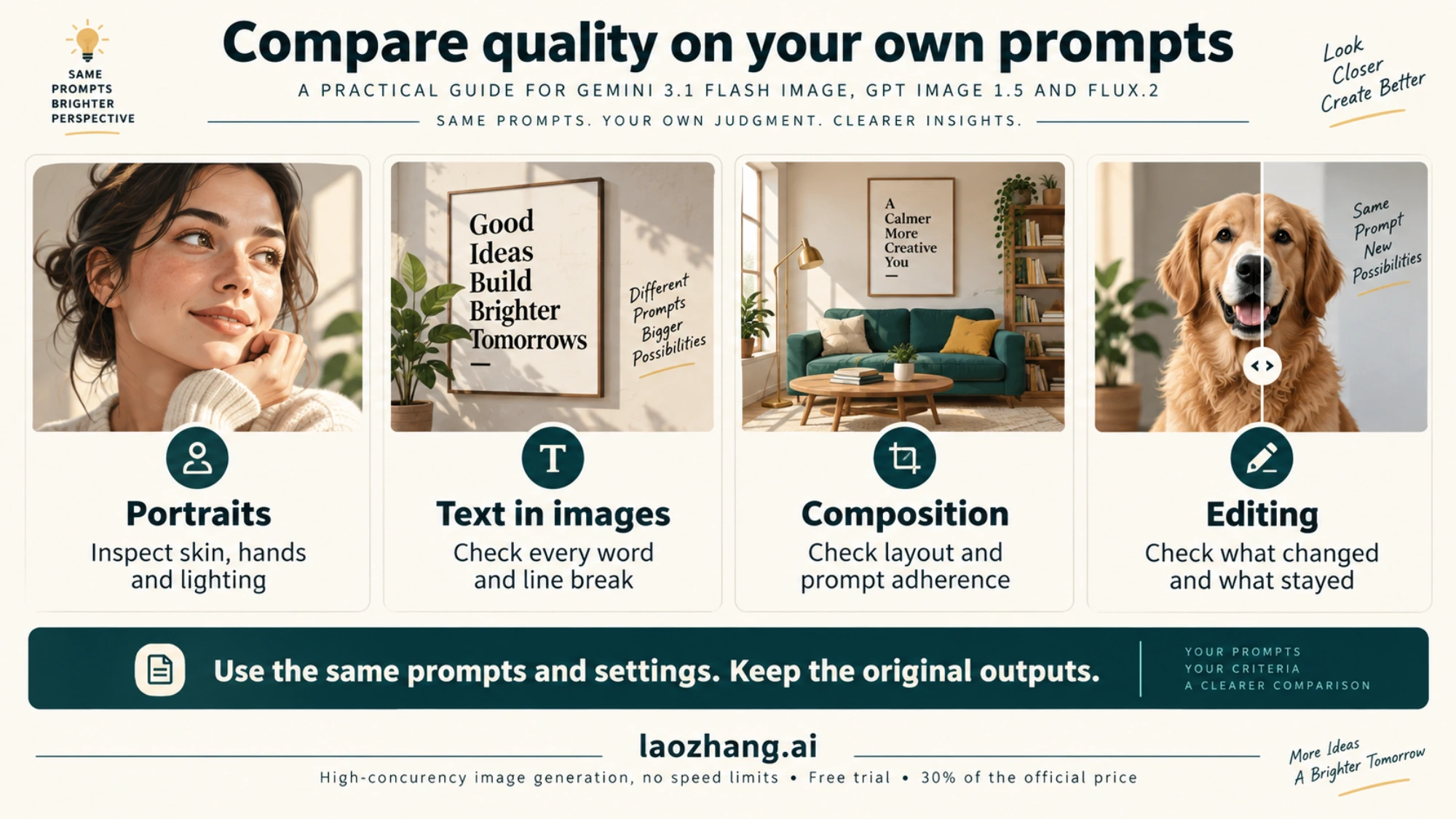
The AI image generation landscape in early 2026 is more competitive than ever, with three models consistently appearing at the top of leaderboards and developer discussions. Comparing AI image generators solely on "quality" is misleading because quality means fundamentally different things depending on what you are generating. A model that produces stunning portraits might struggle with text-heavy marketing banners, and vice versa. To give you a meaningful comparison, the original article combined leaderboard references, provider documentation and self-reported test impressions across eight dimensions. The underlying controlled-generation records are not available here. The results reveal that each model has carved out a distinct quality niche, and understanding these niches is the key to choosing wisely.
Photorealism and Detail Fidelity
FLUX.2 Pro v1.1 leads the photorealism category with an Elo score of 1,265 on the Artificial Analysis AI Image Arena (artificialanalysis.ai, March 2026), placing it at the very top of the leaderboard for image quality. This score reflects human preference voting across thousands of blind comparisons. The model excels at rendering natural skin textures, realistic lighting, and the kind of micro-details that make images indistinguishable from photographs. For anyone generating portraits, product photography, or any content where photorealism is the primary concern, FLUX.2 Pro delivers consistently superior results. If you want to explore how FLUX.2 compares with other Google image models in more detail, our detailed comparison between Nano Banana Pro and FLUX.2 provides benchmark data across specific prompt categories.
Gemini 3.1 Flash Image, despite being positioned as Google's "fast" model, performs remarkably well on quality. It currently holds the #1 position on the Artificial Analysis AI Image Arena overall rankings, which accounts for both quality and other factors like speed and versatility. Its photorealism is strong, though it occasionally produces images with a slightly more processed, commercial look compared to FLUX.2's raw photographic quality. For most commercial applications, however, the difference is negligible and the speed advantage more than compensates.
GPT Image 1.5 from OpenAI sits at Elo 1,264, virtually tied with FLUX.2 Pro. Its strength lies not in raw photorealism but in producing images with strong commercial aesthetics. Images from GPT Image 1.5 tend to look polished and intentional, with vibrant color palettes and clean compositions that feel deliberately crafted rather than photographically captured. This aesthetic makes GPT Image 1.5 particularly suited for marketing materials, social media content, and editorial illustrations where a professional, designed look is more important than photographic realism. The model also demonstrates strong understanding of brand aesthetics: when given prompts that reference specific visual styles like "minimalist," "corporate," or "editorial," it consistently produces images that align with those style conventions in ways that the other two models sometimes miss.
Text Rendering: The Clear Winner
Text rendering accuracy is where these models diverge most dramatically. GPT Image 1.5 leads this category with near-perfect text accuracy, handling multi-line text, different fonts, and complex typographic layouts with 96%+ accuracy (spectrumailab benchmark, 2026). This makes it the unambiguous choice for anyone generating images that contain text, including social media banners, infographics, memes, or marketing materials. Gemini 3.1 Flash Image handles text reasonably well, especially for short strings and simple layouts. FLUX.2, however, struggles with text rendering and frequently produces misspellings, garbled characters, or inconsistent letter spacing, making it poorly suited for text-heavy image generation.
Image Editing and Conversational Capabilities
Gemini 3.1 Flash Image stands out dramatically in the editing category because of its multimodal architecture. Gemini Flash can accept image inputs and modify them through natural language instructions. FLUX.2 also supports image editing; the available controls and multi-turn workflow depend on the exact model and endpoint. You can upload a photo and ask it to change the background, adjust colors, add objects, or apply style transfers through conversational multi-turn interactions. This capability is uniquely powerful for iterative creative workflows. GPT Image 1.5 offers editing capabilities through its API, but the workflow is less conversational than Gemini's approach. Do not infer that FLUX.2 editing requires ComfyUI: check the provider’s native image-editing endpoint and supported operations for the exact variant. The official FLUX.2 repository lists image editing support. For users exploring Gemini's editing capabilities in dedicated workflows, see ComfyUI Nano Banana 2.1: Partner Node Setup, Old Workflow Fixes for more advanced control.
Speed & Latency - From Seconds to Half a Minute
Speed is the sleeper factor that many comparison articles underestimate, but for real-time applications it can be an absolute dealbreaker. A chatbot that takes 30 seconds to generate an image loses user engagement. A design tool that makes users wait half a minute per iteration becomes unusable for creative exploration. The original article reported generation-time ranges at 1024x1024. Without the original request logs, run counts and endpoint settings, those ranges are not reproducible measurements or service latency guarantees.
Gemini 3.1 Flash Image is in a class of its own when it comes to speed. Generating a standard 1024x1024 image takes just 1 to 3 seconds (ai.google.dev, March 2026), making it roughly 5 to 10 times faster than its competitors. This speed comes from Google's Flash architecture, which prioritizes low-latency inference without sacrificing meaningful quality. For applications that require real-time image generation, such as conversational AI assistants, interactive design tools, or live preview features, Gemini Flash is the only viable option among these three models. The speed advantage becomes even more pronounced when you factor in multi-turn conversations where users want to iterate on images quickly, generating five or six variations in the time it takes FLUX.2 to produce a single image.
GPT Image 1.5 occupies the middle ground at 10 to 20 seconds per generation (wavespeed.ai, tapflare.com, March 2026). While not fast enough for real-time applications, this speed is perfectly acceptable for batch workflows, content creation pipelines, and use cases where users expect to wait while their image is being crafted. The quality-tier system also affects speed: medium-quality images generate faster than high-quality ones, giving you some control over the speed-quality tradeoff. Many production deployments use a strategy where the first preview image generates at medium quality for quick review, then regenerate at high quality only for images that pass editorial approval, effectively halving the total compute cost and time for the final selection process.
FLUX.2 Pro sits at the slower end of the spectrum, requiring 15 to 30 seconds per image (wavespeed.ai, March 2026). However, it is worth noting that the FLUX.2 Schnell model, which sacrifices some quality for speed, can generate images in 2 to 5 seconds, competing with Gemini Flash's speed. If your priority is maximum photorealism, though, the Pro model's longer generation time is the price you pay for top-tier quality.
| Model | Time (1024x1024) | Relative Speed | Best Scenario |
|---|---|---|---|
| Gemini 3.1 Flash | 1-3 sec | Fastest (baseline) | Real-time apps, chatbots |
| GPT Image 1.5 (Medium) | 10-20 sec | 5-7x slower | Content pipelines |
| FLUX.2 Pro v1.1 | 15-30 sec | 10-15x slower | Quality-first batch |
| FLUX.2 Schnell | 2-5 sec | Comparable to Flash | Budget speed option |
The practical implication is clear: if your application generates more than a few images per user session, or if user wait time directly affects engagement metrics, Gemini 3.1 Flash Image is the only model that can deliver images quickly enough to feel responsive. For batch processing or offline content creation, the speed differences matter less and you should optimize for quality or cost instead.
It is also worth considering the total time cost when factoring in regeneration attempts. A model that generates in 3 seconds but requires two attempts to produce a satisfactory result still delivers faster than a model that takes 20 seconds but gets it right on the first try. The original article described fewer portrait retries with FLUX.2 Pro and fewer text retries with GPT Image 1.5, but no original test records are available to substantiate those impressions or guarantee a retry-free workflow. Gemini Flash, despite occasional quality inconsistencies compared to the other two, compensates through sheer speed: even three or four regeneration attempts complete faster than a single GPT Image 1.5 generation. This "speed enables iteration" dynamic is a practical advantage that raw latency numbers alone do not capture.
Pricing Breakdown - Every Dollar Counted
Pricing in AI image generation is notoriously confusing because every provider uses a different pricing model. Google charges by tokens, OpenAI charges per image with quality tiers, and Black Forest Labs charges per megapixel. To cut through this confusion, we normalized every price to a single standard: cost per image at 1024x1024 resolution. All prices below are verified from official pricing pages as of March 2026.
Per-Image Cost at Standard Resolution
GPT Image 1.5 is the cheapest option at $0.040 per image when using medium quality (openai.com/api/pricing, March 2026). This medium tier is what most applications use in production because it delivers strong quality without the premium cost of the high tier at $0.133 per image. The older GPT Image 1 model offers even lower prices with its low-quality tier at just $0.011 per image, but the quality gap compared to GPT Image 1.5 medium is significant enough that most users choose the newer model. For a broader view of how these prices compare across the entire AI image generation landscape, our comprehensive AI image API pricing guide covers twelve models with volume discount calculations.
FLUX.2 Pro v1.1, the highest-quality variant, costs $0.055 per image through API providers (buildmvpfast.com, our testing, March 2026). The standard FLUX.2 Pro model is available at $0.03 through fal.ai, offering a meaningful discount if you are willing to use the slightly older model version. For budget-conscious projects, FLUX.2 Schnell provides usable quality at just $0.015 per image, while FLUX.2 Dev sits at $0.025 per image and has downloadable weights under the FLUX Non-Commercial License; commercial production model use requires separate permission.
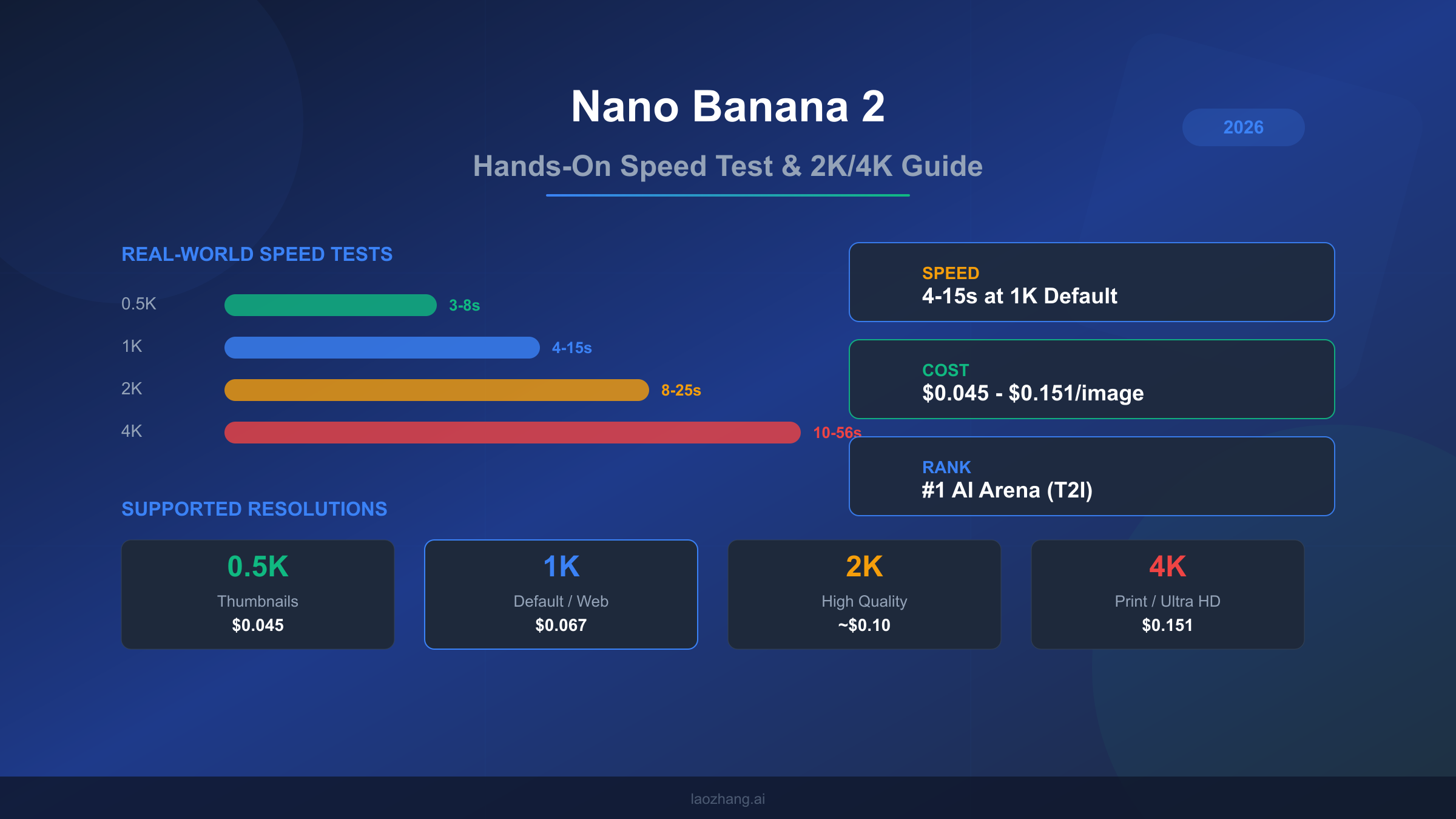
Gemini 3.1 Flash Image costs approximately $0.067 per image at 1024x1024 resolution (ai.google.dev/pricing, aifreeapi.com Featured Snippet, March 2026). Google calculates this through its token-based pricing: input tokens at $0.25 per million and image output tokens at $60.00 per million. At lower resolutions like 512x512, the cost drops to about $0.045 per image, while 4K generation at 4096x4096 rises to approximately $0.151. Gemini also offers a 50% batch discount for non-real-time workloads, bringing the effective 1K resolution cost down to roughly $0.034 per image for batch processing. This batch pricing makes Gemini Flash surprisingly competitive with GPT Image 1.5 medium for high-volume workflows where real-time delivery is not required. The token-based pricing model also means that shorter prompts cost slightly less than longer ones, since the input token cost is calculated per request. However, the input token cost is so small relative to the output image token cost that prompt length has negligible impact on the total per-image cost in practice.
Volume Economics: When Every Cent Matters
At scale, small price differences compound into significant budget impacts. Here is what each model costs across common production volumes:
| Volume | Gemini Flash (1K) | GPT 1.5 (Med) | FLUX.2 Pro v1.1 | laozhang.ai (all models) |
|---|---|---|---|---|
| 1,000 images | $67 | $40 | $55 | $50 |
| 10,000 images | $670 | $400 | $550 | $500 |
| 100,000 images | $6,700 | $4,000 | $5,500 | $5,000 |
Disclosure: laozhang.ai is our own service. Its prices are platform pricing, not an independent comparison.
For teams that need access to multiple models without managing separate API keys, billing systems, and SDK integrations, platforms like laozhang.ai offer unified access to all three models at a flat $0.05 per image regardless of resolution. This simplifies both the technical integration and the billing complexity, especially for applications that route different prompts to different models based on content type. The unified pricing also eliminates the need to optimize for cost by model, since the price is the same regardless of which model you choose.
Understanding Quality Tiers
One critical detail that many comparison articles miss is the impact of quality tiers on both pricing and output. GPT Image 1.5 offers medium and high quality modes that differ substantially in both price and output quality. The medium tier at $0.04 per image is what most production applications use, but the high tier at approximately $0.133 per image produces noticeably more detailed images with better color accuracy and finer textures. If you are generating hero images for marketing campaigns or high-resolution print materials, the high tier may justify its 3.3x premium. For social media content, web assets, or any application where images are displayed at moderate sizes, the medium tier provides excellent value.
The Open-Source Factor - Can You Self-Host?
One dimension where FLUX.2 stands completely alone is the open-source advantage. While Gemini 3.1 Flash Image and GPT Image 1.5 are only available through their respective cloud APIs with no option for local deployment, Black Forest Labs has released several FLUX.2 models under open-source licenses, fundamentally changing the economics for high-volume users. This is not a minor detail: for companies generating tens or hundreds of thousands of images monthly, self-hosting can reduce per-image costs by 80% or more compared to API pricing. The open-source availability also means you can fine-tune FLUX.2 on your own datasets, creating custom models optimized for your specific visual style or product category, which is something neither Gemini nor GPT Image currently support through their APIs.
FLUX.2 Dev has downloadable weights under the FLUX Non-Commercial License, rather than Apache 2.0. Commercial production use of the model requires a separate license. The license permits commercial use of generated outputs subject to its restrictions; this does not authorize commercial operation of the model. In the official FLUX.2 model table, Klein 4B is Apache 2.0, while Klein 9B uses the Non-Commercial License. Compute, deployment and any required commercial license must all be included in a self-hosting budget.
GPU Requirements and Break-Even Analysis
Running FLUX.2 Dev locally requires meaningful GPU hardware. The model's architecture demands approximately 12-16 GB of VRAM for inference at standard resolutions, which means you need at least an NVIDIA RTX 4090 (24 GB VRAM) for comfortable operation or an A100 (40-80 GB) for production workloads with concurrent requests. Cloud GPU pricing on platforms like AWS, GCP, or Lambda Labs typically ranges from $1.50 to $4.00 per GPU-hour depending on the instance type and commitment level.
At approximately 120 images per GPU-hour on a mid-tier setup, your per-image cost for self-hosted FLUX.2 Dev works out to roughly $0.012 to $0.033 per image, which is significantly cheaper than API pricing. The break-even calculation depends on your volume and whether you already have GPU infrastructure, but as a general rule, self-hosting becomes cost-effective at around 5,000 to 10,000 images per month. Below that volume, the engineering overhead of maintaining a self-hosted deployment outweighs the cost savings.
The trade-off is clear: self-hosting gives you dramatically lower per-image costs but requires GPU expertise, infrastructure management, and upfront investment. For most startups and small teams, using API access through a unified provider is more practical. For enterprises already running ML workloads at scale, self-hosting FLUX.2 can save thousands of dollars monthly. Understanding the differences between Nano Banana Pro and Nano Banana 2 can also help you choose between Google's Pro and Flash tier models if you decide to keep some generation on API while self-hosting FLUX.2.
Beyond pure cost savings, self-hosting offers two additional strategic advantages that API access cannot match. First, there are no rate limits or usage quotas: you can generate as many images as your hardware supports, making it ideal for burst workloads like product launches or marketing campaigns where you might need to generate thousands of images in a short window. Second, data privacy becomes fully under your control. For companies working with sensitive content, proprietary product designs, or regulated industries, keeping all image generation on-premises eliminates the risk of prompts and generated images being processed by third-party servers. Neither Gemini nor GPT Image offer self-hosted options, making FLUX.2 the only choice for organizations where data sovereignty is a hard requirement. However, if your volume is below the break-even threshold and data privacy is not a primary concern, the engineering complexity of self-hosting is rarely justified. The API providers have invested heavily in reliability, uptime, and infrastructure that is difficult to replicate in-house without dedicated DevOps resources.
Best Model for Your Use Case
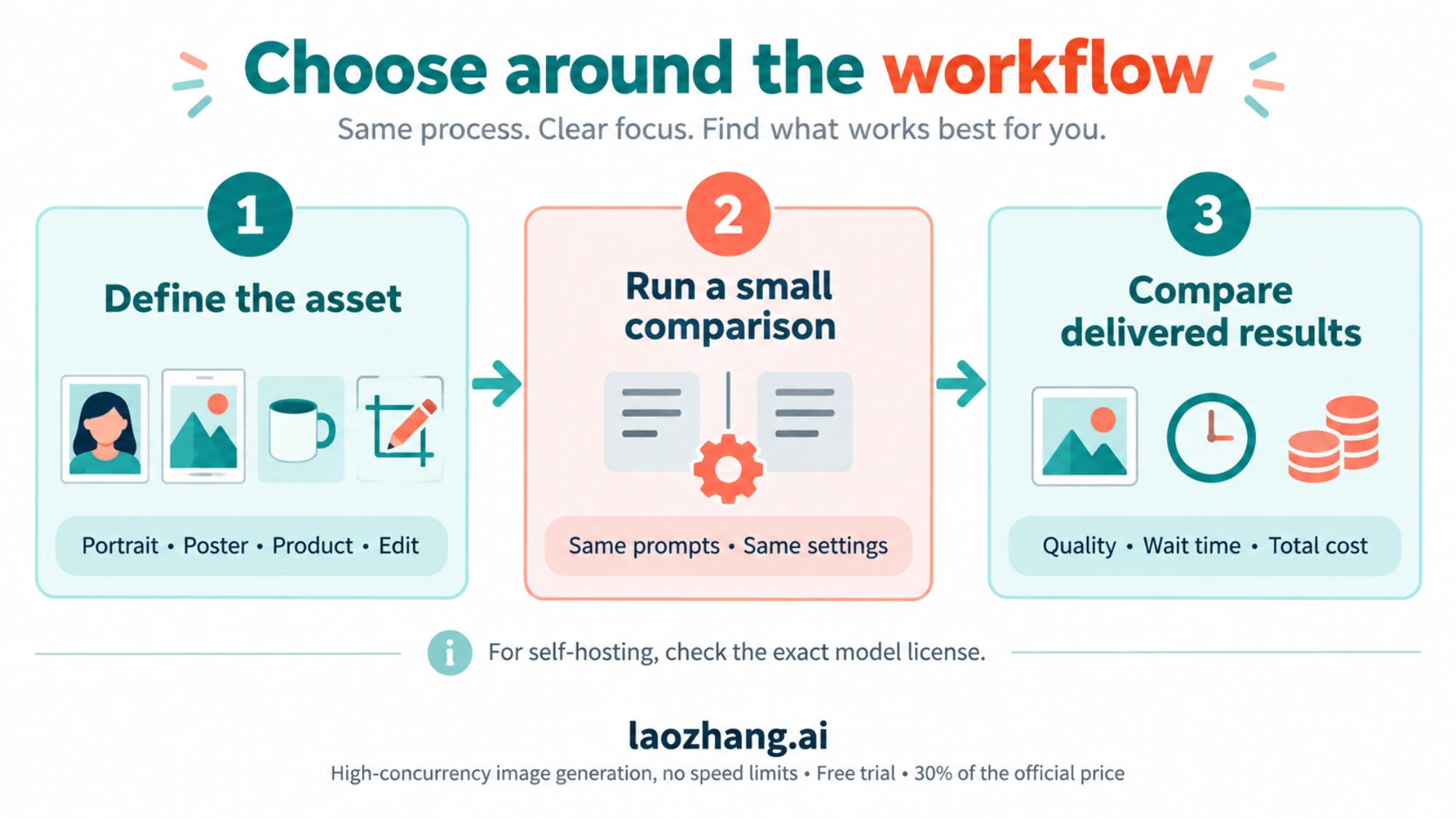
After comparing quality, speed, and pricing in isolation, the most practical question remains: which model should you actually choose for your specific workflow? The answer depends on what you are building and what trade-offs you are willing to accept. Rather than declaring a single winner, here is a decision framework based on real-world use cases that maps your primary requirement to the optimal model choice. We have organized this by the six most common production scenarios, drawing on patterns we have observed across hundreds of API integrations and developer conversations about their image generation needs.
Portraits and People Photography
If your primary use case involves generating realistic portraits, character art, or full-body shots, FLUX.2 Pro v1.1 is the strongest choice. Its Elo 1,265 rating reflects genuine superiority in rendering natural skin textures, realistic hair, accurate lighting, and the subtle details that make AI-generated people look convincing. The 15-30 second generation time is acceptable for this use case because portrait work is typically not time-sensitive. At $0.055 per image, you are paying a modest premium over GPT Image 1.5 medium, but the quality difference in human subjects is substantial enough to justify the cost. For product photography, catalog images, and e-commerce listings, FLUX.2 also excels due to its ability to render materials and textures with photographic accuracy.
Text-Heavy Marketing Content
For social media banners, infographic elements, motivational quotes over images, event posters, or any content where accurate text rendering is essential, GPT Image 1.5 is the clear winner. Its 96%+ text accuracy (spectrumailab, 2026) means you can reliably generate images with multi-line text, different font styles, and complex layouts without worrying about garbled characters or spelling errors. At $0.04 per image in medium quality, it is also the most cost-effective option. Marketing teams that need to produce dozens of localized variations of the same campaign asset will find GPT Image 1.5 particularly valuable because each variation generates correctly the first time, eliminating the regeneration cycle that wastes both time and money with text-challenged models.
Speed-Critical and Conversational Applications
For any application where image generation happens in real-time during a user interaction, Gemini 3.1 Flash Image is the only viable option. At 1-3 seconds per generation, it is fast enough to feel responsive in chatbot conversations, interactive design tools, and live preview interfaces. Its multimodal architecture also enables conversational editing workflows where users can iteratively refine images through natural language instructions, building on previous generations without starting from scratch. AI assistants that generate images as part of their responses, customer service bots that create visual explanations, and educational tools that produce on-demand illustrations all benefit from Gemini Flash's unique combination of speed and multimodal intelligence.
Budget-Constrained High-Volume Production
For teams generating more than 50,000 images monthly on tight budgets, the economics shift significantly. At this scale, even small per-image price differences compound into thousands of dollars. The cheapest API option is GPT Image 1.5 medium at $0.04 per image, which would cost $2,000 for 50K images. Self-hosting FLUX.2 Dev can bring this down to $600-1,650 depending on your GPU setup. For teams that want the flexibility of multiple models without managing infrastructure, a unified API platform that offers flat-rate pricing across all models provides both cost predictability and routing flexibility.
How to Get Started with All Three
Getting started with AI image generation requires choosing between managing multiple API integrations or using a unified access point. Each approach has trade-offs, and the right choice depends on your technical setup, the number of models you plan to use, and how much operational complexity you are willing to absorb. Below we walk through both approaches with working code examples that you can adapt directly to your projects.
Direct API Access
Each model has its own API endpoint and authentication system. For Gemini 3.1 Flash Image, you need a Google AI Studio API key from ai.google.dev. For GPT Image 1.5, you need an OpenAI API key from platform.openai.com. For FLUX.2, you can use providers like fal.ai, wavespeed.ai, or self-host the Dev model.
Here is a minimal Python example for Gemini 3.1 Flash Image generation:
import google.generativeai as genai

genai.configure(api_key="YOUR_GOOGLE_API_KEY")
model = genai.GenerativeModel("gemini-3.1-flash-image-preview")

response = model.generate_content(
    "Generate a photorealistic image of a mountain landscape at sunset"
)

# Save the generated image
for part in response.parts:
    if part.inline_data:
        with open("output.png", "wb") as f:
            f.write(part.inline_data.data)
And for GPT Image 1.5:
from openai import OpenAI

client = OpenAI(api_key="YOUR_OPENAI_API_KEY")

response = client.images.generate(
    model="gpt-image-1.5",
    prompt="A photorealistic mountain landscape at sunset",
    size="1024x1024",
    quality="medium"
)

image_url = response.data[0].url
Unified API Access via laozhang.ai
For teams that want to use all three models through a single API key, laozhang.ai provides an OpenAI-compatible endpoint that routes to any supported model. This eliminates the need to manage multiple API keys and billing accounts. You can test image generation directly at images.laozhang.ai before writing any code.
Disclosure: laozhang.ai is our own service. Its prices are platform pricing, not an independent comparison.
from openai import OpenAI

# Single API key for all models
client = OpenAI(
    api_key="YOUR_LAOZHANG_API_KEY",
    base_url="https://api.laozhang.ai/v1"
)

# Generate with any model using the same interface
response = client.images.generate(
    model="gemini-3.1-flash-image-preview",  # or "gpt-image-1.5" or "flux-pro-v1.1"
    prompt="A photorealistic mountain landscape at sunset",
    size="1024x1024"
)
The advantage of this approach is that switching between models is a single parameter change rather than a different SDK, authentication flow, and billing system. For applications that route different types of prompts to different models, such as sending text-heavy requests to GPT Image 1.5 and portrait requests to FLUX.2, a unified API dramatically simplifies the routing logic.
In practice, many production applications end up using a model routing strategy that looks something like this: analyze the incoming prompt for keywords related to text content, people, or speed requirements, then route to the appropriate model automatically. A prompt containing words like "banner," "poster," or "with text" routes to GPT Image 1.5. Prompts mentioning "portrait," "photo," or "realistic" route to FLUX.2. And any request flagged as time-sensitive or coming from a real-time conversation interface defaults to Gemini 3.1 Flash. This kind of intelligent routing is straightforward to implement when all three models sit behind a single API endpoint, but becomes an engineering burden when each model requires its own client library, authentication tokens, error handling patterns, and billing reconciliation. The unified approach also simplifies monitoring and cost tracking, since all image generation costs appear on a single invoice rather than three separate billing dashboards.
Frequently Asked Questions
Which AI image generator has the best quality in 2026?
Quality depends on what you are measuring. For overall photorealism and human preference, FLUX.2 Pro v1.1 leads with an Elo rating of 1,265 on the Artificial Analysis AI Image Arena (artificialanalysis.ai, March 2026). Gemini 3.1 Flash Image holds the #1 overall position on the same platform when factoring in speed and versatility. GPT Image 1.5 excels specifically at text rendering accuracy with 96%+ scores. There is no single "best" model because each excels in different dimensions. The most effective approach for production applications is to route different types of prompts to different models based on content requirements.
Is Gemini 3.1 Flash Image free to use?
Gemini 3.1 Flash Image does NOT support image generation on the free tier (ai.google.dev, March 2026). While the Gemini API offers free tier access for text generation, image output requires a paid API key with billing enabled. The per-image cost starts at approximately $0.045 for 512x512 resolution and $0.067 for the default 1024x1024. Google AI Studio offers 50 free requests per day for testing, but production image generation requires payment. The model was launched on February 26, 2026, and is currently in public preview status according to Google Cloud documentation.
Can I self-host FLUX.2 for free?
You can download some FLUX.2 weights, but the license depends on the exact variant. FLUX.2 Dev and Klein 9B use the Non-Commercial License; commercial production operation requires a separate license. Klein 4B is Apache 2.0. Commercial use of generated outputs is a separate permission from commercial use of the model itself. You still pay for compute, and the historical hardware and break-even estimates above are workload-dependent rather than guarantees. See the Dev license and official variant table.
How do GPT Image 1.5 quality tiers affect pricing?
GPT Image 1.5 offers two quality modes that significantly affect both price and output. The medium tier costs $0.04 per image at 1024x1024 and is used by most production applications (openai.com/api/pricing, March 2026). The high tier costs approximately $0.133 per image, producing more detailed images with better color accuracy and finer textures. For web and social media content displayed at standard screen resolutions, medium quality is typically sufficient and delivers excellent results. High quality is recommended for print materials at 300 DPI or higher, hero images on landing pages, and applications where image detail is closely scrutinized by end users. The 3.3x price premium of the high tier means you should reserve it for your highest-visibility assets rather than applying it to every generation.
Which model is best for generating images with text?
GPT Image 1.5 is the clear winner for text-in-image generation. It handles multi-line text, different font sizes, and complex typographic layouts with 96%+ accuracy (spectrumailab benchmark, 2026). Gemini 3.1 Flash Image handles short text strings of two to three words reasonably well but struggles with complex multi-line layouts and occasionally introduces letter spacing inconsistencies. FLUX.2 frequently garbles text, produces misspellings, and renders inconsistent character shapes, making it unsuitable when accurate text rendering is a requirement.
How fast is each model at generating images?
Gemini 3.1 Flash Image is dramatically faster than its competitors at 1-3 seconds per image at 1024x1024 resolution. GPT Image 1.5 takes 10-20 seconds per image, varying based on the quality tier selected, with medium quality generating faster than high quality. FLUX.2 Pro v1.1 is the slowest at 15-30 seconds per image, though the lighter FLUX.2 Schnell model can match Gemini's speed at 2-5 seconds with some quality trade-offs. For applications requiring real-time responsiveness, only Gemini Flash and FLUX.2 Schnell are fast enough to maintain user engagement.
Can I access all three models through a single API?
Yes. Platforms like laozhang.ai offer unified API access to all three models through an OpenAI-compatible endpoint. This means you can switch between Gemini 3.1 Flash Image, GPT Image 1.5, and FLUX.2 by changing a single model parameter in your API call, without managing separate API keys, billing accounts, or client libraries. The unified pricing of $0.05 per image regardless of model also simplifies cost planning for multi-model deployments.
Sources2
External pages this guide links to, in the order they appear. Last updated Mar 7, 2026.
Sources2
External pages this guide links to, in the order they appear. Last updated Mar 7, 2026.