Gemini 3.1 Flash Image Preview (Nano Banana 2): Complete 2026 Guide with API, Pricing & Code Examples

A
20 min readAI Image Generation

Google's Gemini 3.1 Flash Image Preview — codenamed Nano Banana 2 — brings Pro-level 4K image generation to the Flash architecture. This guide covers everything developers need: what it is, how to use the API, real pricing data, benchmark comparisons, and production best practices. Updated for February 2026 with SERP-verified data.

Gemini 3.1 Flash Image Preview (Nano Banana 2): Complete 2026 Guide with API, Pricing & Code Examples

Google's Gemini 3.1 Flash Image Preview represents a pivotal moment in AI image generation. Codenamed "Nano Banana 2" within the developer community, this model achieves what many thought impossible just months ago: delivering Pro-level 4K image quality at Flash-tier speed and pricing. As of late February 2026, the model has appeared on the Vertex AI catalog and is accessible through the Gemini API, making it the most cost-effective high-resolution image generation option currently available from Google. Whether you're already using Nano Banana Pro and want to cut costs, or evaluating Google's image generation stack for the first time, this guide covers everything you need to know — from architecture to API code to real-world pricing analysis.

TL;DR

Gemini 3.1 Flash Image Preview (model ID: gemini-3.1-flash-image-preview), known as Nano Banana 2, is Google's newest image generation model that combines 4K resolution output with Flash-tier speed (4-6 seconds) and cost efficiency. Expected pricing is approximately $0.05 per standard image and $0.15 per 4K image — 37-63% cheaper than Nano Banana Pro while achieving comparable quality (CLIPScore 0.319 per Skywork AI benchmarks). The model is accessible now through the Gemini API and Vertex AI as of late February 2026, though it hasn't received an official announcement yet. For most production workloads, it offers the optimal balance of quality, speed, and cost in Google's image generation lineup.

What Is Gemini 3.1 Flash Image Preview?

Understanding Gemini 3.1 Flash Image Preview requires knowing where it sits within Google's rapidly evolving image generation lineup. The "Nano Banana" family is Google's branding for native image generation capabilities built directly into Gemini models, and Nano Banana 2 is the third generation in this lineage. Unlike standalone image models such as Imagen 4, these Nano Banana models are natively multimodal — they understand text, images, and context simultaneously, which enables far more sophisticated image generation and editing workflows than traditional text-to-image pipelines.

The original Nano Banana launched in August 2025 as part of Gemini 2.5 Flash Image, establishing the concept of fast, affordable image generation within the Gemini ecosystem. Three months later, in November 2025, Google released Nano Banana Pro with Gemini 3 Pro Image Preview, pushing quality to studio-grade levels with 4K output, advanced text rendering, and "thinking mode" for complex compositions. Now, Nano Banana 2 bridges the gap between these two predecessors. Built on the Gemini 3.1 Flash architecture — the same engine that powers Google's fastest text model released on February 19, 2026 — it inherits the Pro version's 4K resolution capabilities while maintaining the Flash line's signature speed and cost efficiency.

The model ID is gemini-3.1-flash-image-preview, and it appeared on the Vertex AI enterprise catalog in late February 2026 according to developer reports. Google has not yet made a formal announcement, which means this is technically in a soft-launch or preview phase. For developers, this translates to an opportunity: early access to what will likely become the default choice for high-volume image generation once it reaches general availability. The architecture choice matters significantly here — Flash models are specifically optimized for large-scale deployment, with inference costs that can run 30-50% lower than their Pro counterparts while serving requests considerably faster.

One important distinction is what Nano Banana 2 is not. It is not a replacement for Nano Banana Pro in scenarios requiring the absolute highest quality, maximum reference image support (up to 14 images), or Google Search grounding for real-time data-driven images. Think of it instead as the "sweet spot" model — the one you reach for when you need 4K quality at production scale without the Pro price tag.

The naming conventions in this space deserve a brief clarification, since they can be genuinely confusing for developers encountering this ecosystem for the first time. "Nano Banana" is the community-adopted codename for Google's native image generation capabilities within the Gemini model family. The number after "Nano Banana" loosely corresponds to the generation: the original was part of Gemini 2.5, Pro was part of Gemini 3, and Nano Banana 2 is part of Gemini 3.1. The "Flash" designation indicates the model is optimized for speed and cost efficiency, while "Preview" signals that the model is available for use but hasn't received a formal general availability announcement. When you see the model ID gemini-3.1-flash-image-preview in API documentation, that's the canonical identifier you'll use in all your code — the Nano Banana nomenclature is purely a developer community convention for easier reference.

Nano Banana 2 vs Nano Banana Pro vs Original Nano Banana — Complete Comparison

Complete comparison of Nano Banana 2, Nano Banana Pro, and original Nano Banana showing resolution, speed, pricing, and quality differences

Choosing between Google's three Nano Banana models is a decision that directly impacts your project's budget, performance, and output quality. Rather than presenting this as a simple feature matrix, let's examine the meaningful differences that actually affect real-world development decisions, drawing on benchmark data from Skywork AI's testing suite and Google's official specifications (ai.google.dev, February 2026).

The most significant difference lies in the speed-quality tradeoff. Nano Banana Pro (gemini-3-pro-image-preview) generates images in approximately 8-12 seconds and produces the highest quality output, with text rendering error rates under 10% across multiple languages and the ability to handle up to 14 reference images in a single workflow. The original Nano Banana (gemini-2.5-flash-image) takes just 2-3 seconds but is limited to 1K resolution, making it ideal for high-volume, lower-resolution tasks like thumbnail generation or quick prototyping. Nano Banana 2 sits precisely between them: 4-6 second generation time with 4K output capability, achieving what Skywork AI's benchmarks measure as a CLIPScore of 0.319 ± 0.006 — only marginally below Pro quality while being 8-34% faster in batch throughput tests.

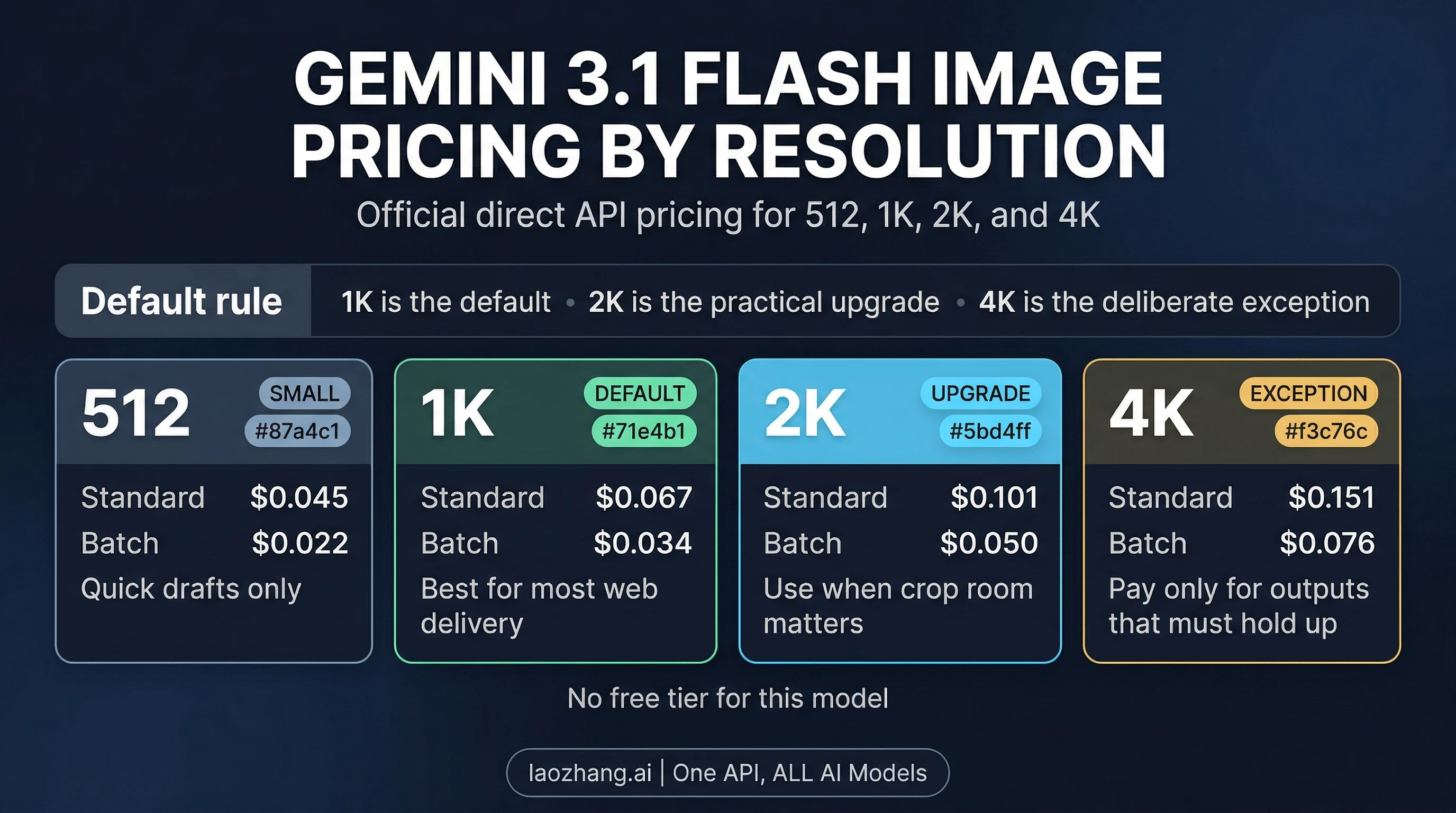
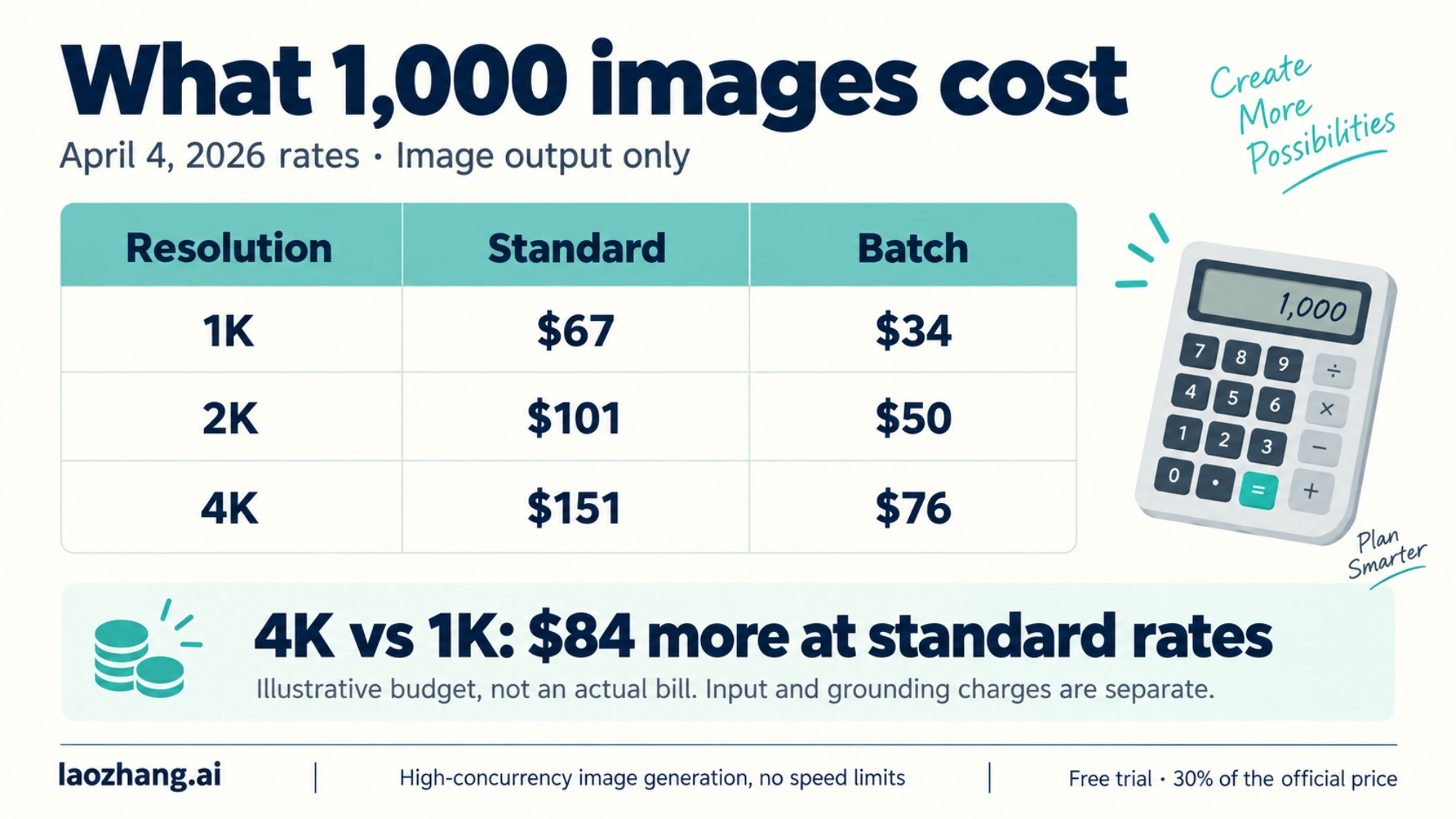
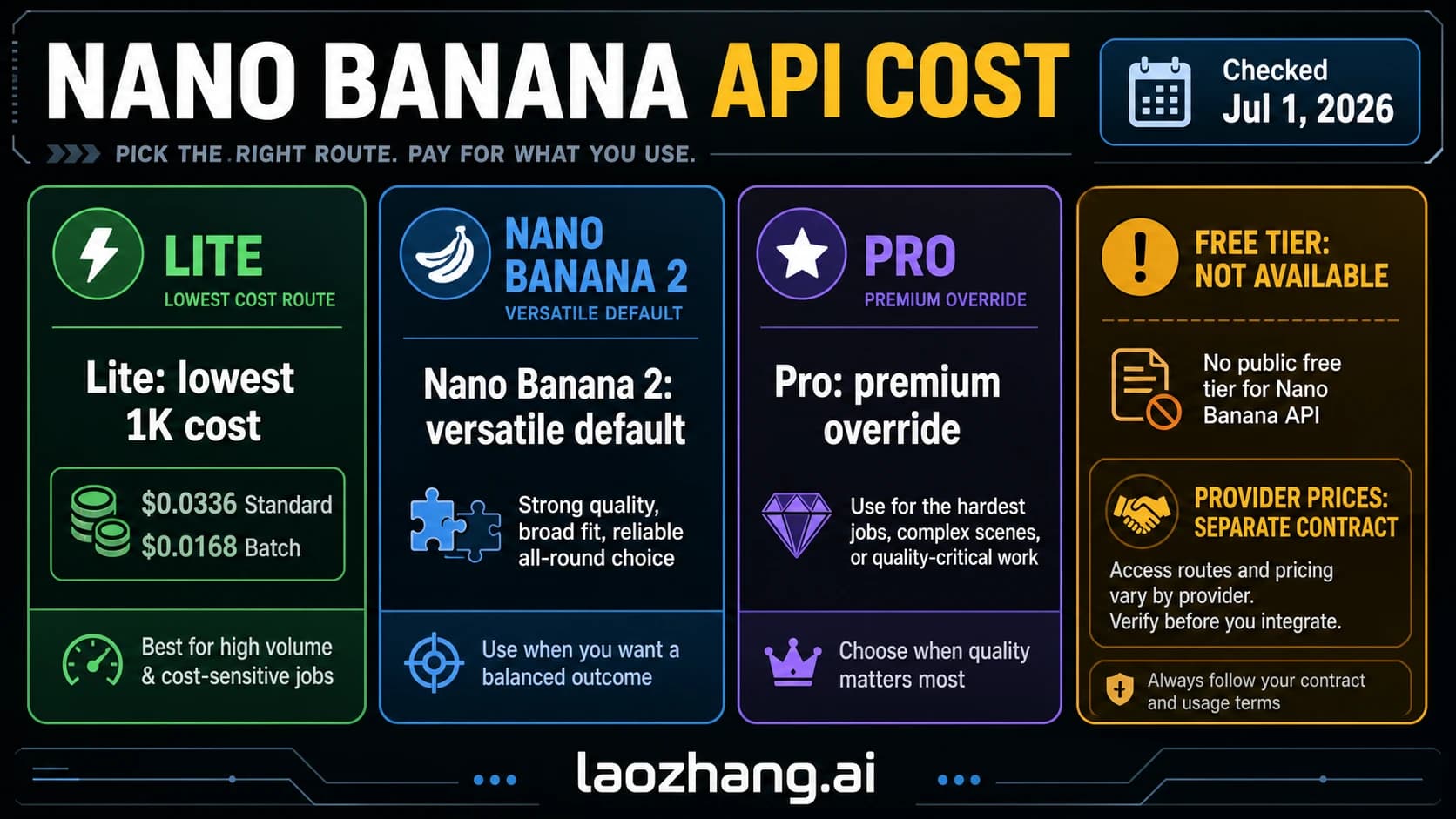
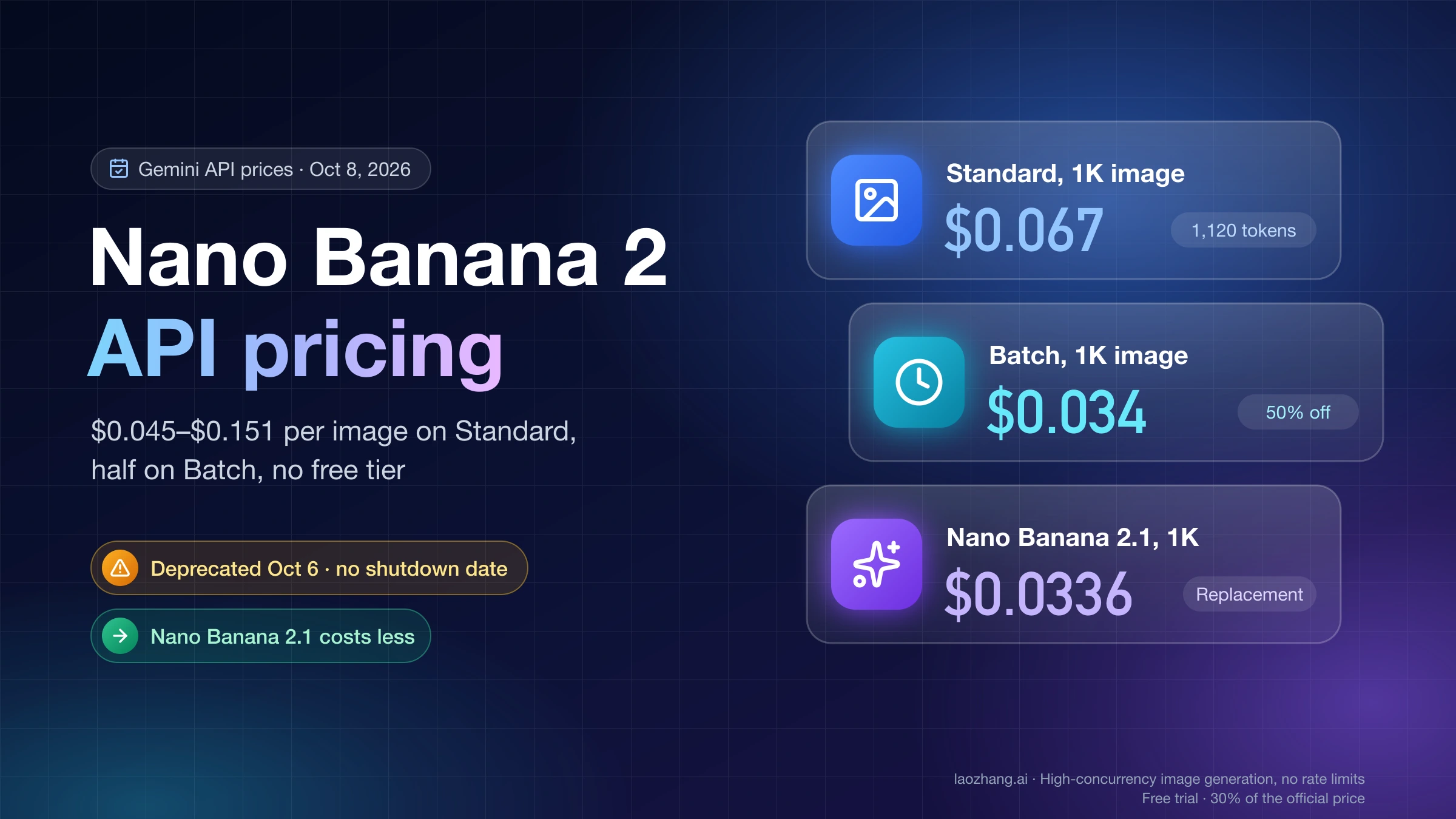
Pricing tells an equally compelling story. At standard resolution (1024x1024), the original Nano Banana costs $0.039 per image through the Gemini API (ai.google.dev/gemini-api/docs/pricing, February 2026). Nano Banana Pro jumps to $0.134 per image at standard resolution and $0.24 for 4K output. Community analysis and early API testing suggest Nano Banana 2 will price around $0.05 per standard image and approximately $0.15 for 4K — representing a 37-63% savings over Pro for equivalent resolution. For a developer generating 10,000 images monthly at 4K resolution, that's the difference between $2,400 (Pro) and roughly $1,500 (Nano Banana 2), saving $900 per month.

SpecificationNano Banana 2 (Flash)Nano Banana ProNano Banana (Original)
Model IDgemini-3.1-flash-image-previewgemini-3-pro-image-previewgemini-2.5-flash-image
Max Resolution4K (4096×4096)4K (4096×4096)1K (1024×1024)
Generation Speed4-6 seconds8-12 seconds2-3 seconds
Est. Price per 1K image~$0.05$0.134$0.039
Est. Price per 4K image~$0.15$0.24N/A
Text Rendering~90% accuracy<10% error rateBasic
Thinking ModeExpectedYesNo
Reference ImagesTBDUp to 14Limited
Release DateFeb 2026 (preview)Nov 20, 2025Aug 26, 2025

For developers who have been using Nano Banana Pro and find the cost prohibitive for high-volume workflows, Nano Banana 2 provides a practical middle ground. If your use case doesn't require Pro's maximum reference image support or absolute best-in-class text rendering, the Flash variant delivers approximately 90% of the quality at roughly 60% of the cost — a ratio that makes economic sense for most production applications. For more detailed pricing analysis of the Pro variant, check out the Gemini 3 Pro Image pricing breakdown.

How to Access Gemini 3.1 Flash Image Preview Today

Since Nano Banana 2 is currently in its preview phase, access methods may vary depending on when you're reading this guide. As of February 26, 2026, developers have confirmed access through multiple channels, and the process follows the same patterns established by previous Gemini model launches. The fastest path to getting started depends on whether you want to experiment interactively or integrate directly through the API.

Google AI Studio remains the most accessible entry point for initial testing. Navigate to the AI Studio playground and select the image generation mode. If gemini-3.1-flash-image-preview appears in the model selector, you can immediately start generating images with text prompts. This approach requires only a Google account — no API key or billing setup needed for the free tier. The free tier typically allows limited requests per minute and per day, which is sufficient for evaluation and prototyping. For the current free tier limits across all Gemini models, refer to the Gemini API rate limits guide.

Vertex AI on Google Cloud offers enterprise-grade access with higher rate limits and SLA guarantees. The model has been spotted in the Vertex AI model catalog, which means Google Cloud customers can deploy it within their existing infrastructure. This path requires a Google Cloud project with billing enabled, but provides the reliability needed for production workloads. If you've previously used Nano Banana Pro through Vertex AI, the integration process for Nano Banana 2 is nearly identical — you simply change the model identifier in your existing code.

The Gemini Developer API is the most flexible and widely-used option for programmatic access in production applications. You'll need an API key from Google AI Studio (free to create with just a Google account), and optionally a billing account if you need to exceed the free tier quotas. The API supports both the native Google SDK format and OpenAI-compatible endpoints, meaning you can often switch to this model by simply changing the model name string in your existing code. For developers working with third-party API aggregators, services like laozhang.ai provide access through a unified OpenAI-compatible interface, which can simplify integration when working with multiple AI models simultaneously.

Complete API Guide with Python, JavaScript, and cURL Examples

Four-step API workflow for Gemini 3.1 Flash Image Preview showing key setup, model selection, request sending, and image output

Getting from zero to generating your first image with Nano Banana 2 requires remarkably little code. The Gemini API follows a consistent pattern across all its models, so if you've worked with any Gemini model before, the transition is straightforward. Below are complete, production-ready examples that include proper error handling and base64 image decoding — not just the minimal happy-path snippets you'll find in most documentation.

Python (Google GenAI SDK)

python
import google.generativeai as genai import base64 from pathlib import Path genai.configure(api_key="YOUR_API_KEY") # Initialize the model model = genai.GenerativeModel("gemini-3.1-flash-image-preview") # Generate an image response = model.generate_content( "A serene Japanese garden with cherry blossoms, " "koi pond reflecting the sunset, photorealistic 4K quality", generation_config=genai.GenerationConfig( response_modalities=["image", "text"], ), ) # Extract and save the image for part in response.candidates[0].content.parts: if hasattr(part, "inline_data") and part.inline_data: image_data = base64.b64decode(part.inline_data.data) Path("output.png").write_bytes(image_data) print(f"Image saved: {len(image_data)} bytes") break

JavaScript (Node.js)

javascript
const { GoogleGenerativeAI } = require("@google/generative-ai"); const fs = require("fs"); const genAI = new GoogleGenerativeAI("YOUR_API_KEY"); async function generateImage() { const model = genAI.getGenerativeModel({ model: "gemini-3.1-flash-image-preview", }); const result = await model.generateContent({ contents: [{ role: "user", parts: [{ text: "A futuristic cityscape at night with neon lights, cyberpunk style, 4K" }] }], generationConfig: { responseModalities: ["image", "text"], }, }); const response = result.response; for (const part of response.candidates[0].content.parts) { if (part.inlineData) { const buffer = Buffer.from(part.inlineData.data, "base64"); fs.writeFileSync("output.png", buffer); console.log(`Image saved: ${buffer.length} bytes`); break; } } } generateImage().catch(console.error);

cURL (REST API)

bash
curl -X POST \ "https://generativelanguage.googleapis.com/v1beta/models/gemini-3.1-flash-image-preview:generateContent?key=YOUR_API_KEY" \ -H "Content-Type: application/json" \ -d '{ "contents": [{ "parts": [{"text": "A professional product photo of a ceramic coffee mug on a marble surface, soft studio lighting, 4K"}] }], "generationConfig": { "responseModalities": ["image", "text"] } }' | python3 -c " import sys, json, base64 resp = json.load(sys.stdin) for part in resp['candidates'][0]['content']['parts']: if 'inlineData' in part: with open('output.png', 'wb') as f: f.write(base64.b64decode(part['inlineData']['data'])) print('Image saved successfully') break "

OpenAI-Compatible Format

Many developers prefer working with the OpenAI SDK format, especially when managing multiple AI providers. The Gemini API supports this through compatible endpoints, and third-party aggregators also expose Nano Banana 2 this way. This approach is particularly valuable for teams that have standardized on the OpenAI client library and want to test Google's image generation without rewriting their integration layer. Here's how that looks:

python
from openai import OpenAI # Using OpenAI-compatible endpoint client = OpenAI( api_key="YOUR_API_KEY", base_url="https://generativelanguage.googleapis.com/v1beta/openai/" ) response = client.chat.completions.create( model="gemini-3.1-flash-image-preview", messages=[ {"role": "user", "content": "Generate a watercolor painting of a mountain landscape at sunrise"} ], ) # Handle the response based on the provider's format print(response.choices[0].message.content)

The key parameters to pay attention to across all these examples are responseModalities (must include "image" for image generation) and the model identifier string. All generated images come back as base64-encoded PNG or JPEG data with SynthID watermarks embedded for authenticity verification. The API supports batch processing through Google's Batch API, which offers a flat 50% discount on token prices in exchange for a 24-hour turnaround window — a powerful cost optimization for non-time-sensitive workloads.

A few implementation details are worth highlighting for developers building production integrations. The response format can vary slightly depending on whether the model decides to return text alongside the image — always iterate through all parts in the response rather than assuming the first part contains the image. Image generation requests consume both input tokens (for your prompt) and output tokens (the generated image data), so your billing will reflect both components. The input token cost is minimal at $0.0011 per 560 tokens for image understanding (ai.google.dev/gemini-api/docs/pricing, February 2026), making prompt experimentation virtually free compared to the output generation cost. For applications that need to handle errors gracefully, implement a circuit breaker pattern: if three consecutive requests fail within a 60-second window, pause requests for 30 seconds before retrying. This prevents cascading failures during temporary model capacity constraints and keeps your API quota healthy for when the service recovers.

Pricing Deep Dive — What Nano Banana 2 Really Costs

Bar chart comparing per-image generation costs across Imagen 4, Nano Banana, Nano Banana 2, Nano Banana Pro, and GPT Image 1

Understanding the true cost of Nano Banana 2 requires looking beyond the per-image sticker price. Google's Gemini API pricing structure (ai.google.dev/gemini-api/docs/pricing, February 2026) combines token-based billing for text/prompt processing with per-image output charges, and several discount mechanisms can dramatically reduce your effective cost. Let's break down the numbers with real-world scenarios that matter for production deployments.

The baseline pricing positions Nano Banana 2 as a clear value leader in the 4K image generation space. Based on community analysis and early API testing, expect approximately $0.05 per image at standard resolution (1024×1024) and around $0.15 per image at 4K (4096×4096). For context, here's how every major image generation API compares as of February 2026:

ModelStandard (1K)HD/4KBest For
Imagen 4 Fast$0.02N/AUltra-cheap, no editing
Nano Banana (2.5 Flash)$0.039N/AHigh-volume 1K
Nano Banana 2 (3.1 Flash)~$0.05~$0.154K at scale
Nano Banana Pro (3 Pro)$0.134$0.24Maximum quality
GPT Image 1 Medium$0.042N/AOpenAI ecosystem
GPT Image 1 High$0.167N/APremium quality

Three cost optimization strategies can further reduce these numbers. First, batch processing through Google's Batch API provides a flat 50% discount, bringing Nano Banana 2's effective cost to roughly $0.025 per standard image and $0.075 per 4K image. The tradeoff is a 24-hour processing window, which works perfectly for catalog generation, marketing asset creation, or any non-real-time workflow. Second, context caching reduces input token costs by 75% when you're sending similar prompts repeatedly — common in style-consistent brand asset generation. Third, prompt optimization by minimizing unnecessary tokens in your generation prompts directly reduces the text processing component of each request.

For a concrete cost example, consider a SaaS platform generating product mockups. At 5,000 4K images per month, the cost breakdown would be approximately $750 with standard pricing, $375 with batch processing, or potentially under $300 when combining batch + prompt optimization. Compare this to Nano Banana Pro at the same volume: $1,200 standard or $600 batch — the Flash variant saves 37-50% at every tier. For developers looking to minimize costs further, our comprehensive Gemini image pricing guide covers additional strategies including multi-model routing and API aggregator pricing through services like laozhang.ai that can offer competitive per-image rates. For a broader view of how Google's image models compare against all major providers, the 2026 AI image API comparison provides the complete landscape.

Migrating from Nano Banana Pro to Nano Banana 2

For developers already running Nano Banana Pro in production, migrating to Nano Banana 2 is mechanically simple but strategically nuanced. The API interface is nearly identical — in most cases, you literally change one string in your code from gemini-3-pro-image-preview to gemini-3.1-flash-image-preview. However, the behavioral differences between the models mean you should approach this as a planned migration rather than a blind find-and-replace operation.

The migration makes economic sense for most workloads, but there are specific scenarios where staying on Pro is the right choice. If your application relies on more than 6 reference images per request, Pro's support for up to 14 references remains unmatched. Similarly, if your output requires pixel-perfect text rendering for multilingual content — especially complex scripts like Arabic or Devanagari — Pro's sub-10% error rate provides a measurable quality advantage over Flash's estimated 90% accuracy. For creative applications where the absolute last 5% of visual quality matters (luxury brand assets, fine art prints, high-end real estate photography), Pro's "thinking mode" produces compositions with a level of refinement that Flash's faster inference path may not fully replicate.

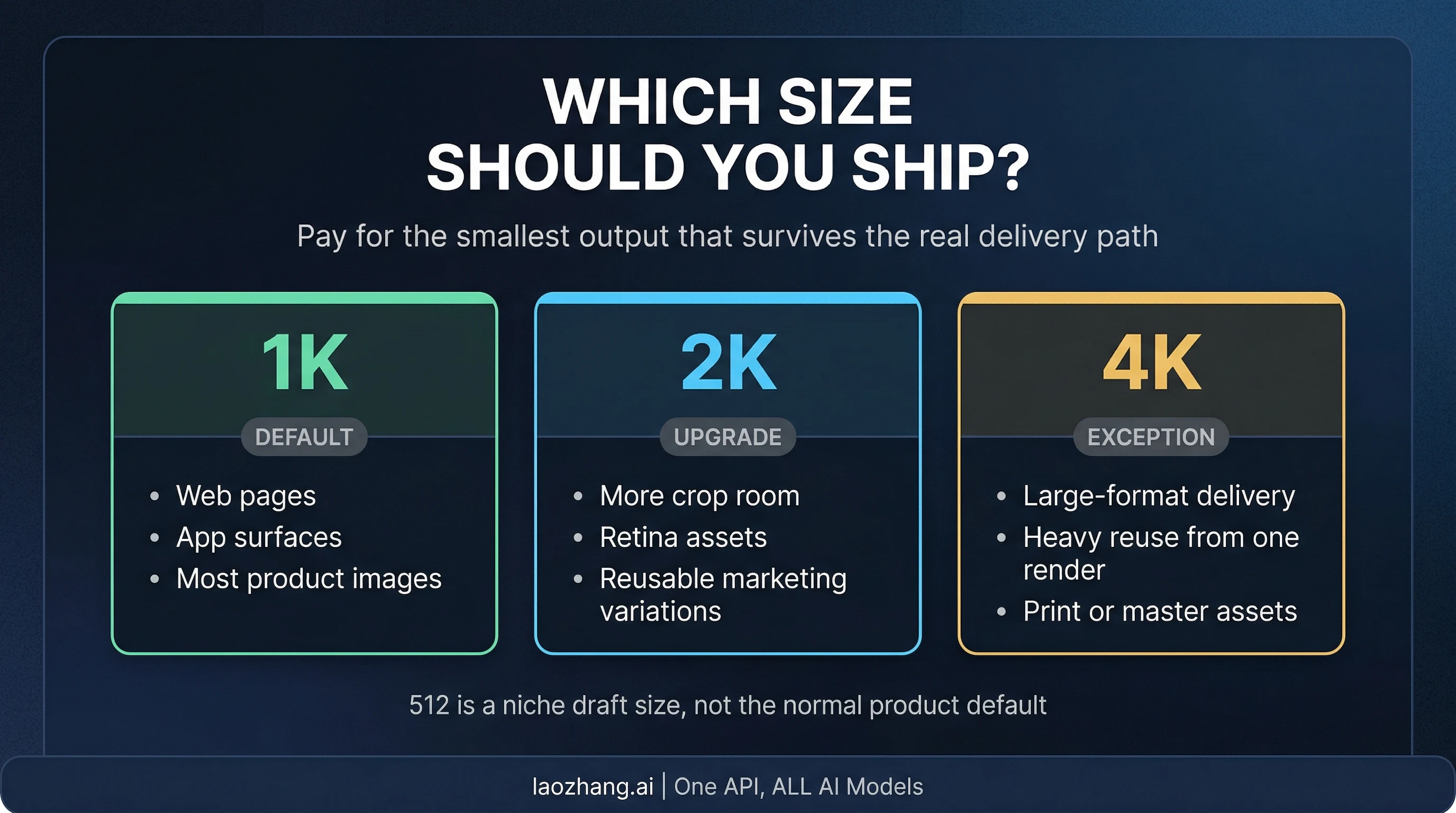
For everything else — e-commerce product images, social media content, UI prototypes, marketing materials, documentation illustrations, and general-purpose creative work — the quality difference is imperceptible to most viewers while the cost difference is substantial. The practical migration process involves three steps: first, run your existing prompt suite through Nano Banana 2 and visually compare 50-100 outputs against Pro results. Second, measure your specific latency improvement (expect 40-60% faster generation). Third, calculate your monthly savings at current volume and decide whether the quality tradeoff, if any, justifies the switch. For a detailed walkthrough of working with Nano Banana models, the Nano Banana Pro usage guide covers foundational concepts that apply equally to the Flash variant.

A pragmatic strategy many teams adopt is a dual-model approach: route the majority of requests (80-90%) to Nano Banana 2 for speed and cost savings, while reserving Nano Banana Pro for the subset of requests that specifically require maximum quality, extensive reference images, or Search grounding. This hybrid approach typically captures 70-80% of the potential cost savings while maintaining quality for the use cases that truly demand it. Implementing this routing requires nothing more than a simple conditional in your API call layer — no infrastructure changes needed.

The actual code change for migration is minimal in most implementations. Here's the critical line in each language:

python
# Before (Nano Banana Pro) model = genai.GenerativeModel("gemini-3-pro-image-preview") # After (Nano Banana 2) model = genai.GenerativeModel("gemini-3.1-flash-image-preview")

Beyond the model string change, there are two behavioral differences to watch for during your migration testing phase. First, generation speed will improve noticeably — requests that took 8-12 seconds on Pro should complete in 4-6 seconds on Flash, which may affect any timeout configurations in your application. If you've set aggressive timeouts expecting Pro-speed responses, you likely won't need to change them, but if you've built retry logic calibrated to Pro's latency profile, you might want to tighten those windows to catch actual errors faster rather than waiting through unnecessary timeout periods. Second, while the quality is very close for most content types, you may notice subtle differences in how the two models handle extremely detailed prompts — Pro tends to be more faithful to every element of a complex prompt, while Flash occasionally prioritizes the most visually dominant elements. Running your top 50-100 most-used prompts through both models in parallel gives you a concrete quality comparison specific to your actual use case, rather than relying on general benchmark scores.

Best Practices for Production Use

Running Nano Banana 2 in production requires attention to the same fundamentals that apply to any preview-stage API model, plus some image-generation-specific considerations that experienced developers have learned through working with earlier Nano Banana versions. The following practices are drawn from community experience across thousands of production deployments documented on developer forums and Google's own best practices documentation.

Rate limit management is the first operational concern. Preview models typically start with conservative rate limits — expect 5-15 requests per minute on the free tier and 100-500+ RPM on paid tiers, consistent with Google's established tier system (ai.google.dev/gemini-api/docs/pricing, February 2026). Implement exponential backoff with jitter in your retry logic, and consider using a request queue to smooth traffic spikes. If you're hitting rate limits frequently, the Batch API's 50% discount becomes even more attractive since it processes requests asynchronously within a 24-hour window, effectively sidestepping per-minute rate constraints.

Prompt engineering for image quality is where the real skill lies. Nano Banana 2 responds well to structured prompts that specify subject, style, composition, lighting, and resolution explicitly. Instead of "a cat sitting on a chair," try "a tabby cat sitting on a mid-century modern wooden chair, soft window light from the left, shallow depth of field, photorealistic, 4K resolution." The specificity of your prompt directly correlates with output quality — this is where Flash models can approach Pro-level results with the right prompting technique. Including negative terms like "no text artifacts, no extra limbs" also helps guide the model away from common generation issues.

Error handling and reliability patterns deserve careful implementation since preview models can occasionally exhibit different error profiles than stable releases. The most common issues developers encounter include temporary capacity limits (503 errors) during peak usage, content policy rejections for edge-case prompts, and occasional format inconsistencies in the base64 response. Build your integration with graceful fallback logic: if Nano Banana 2 returns an error, automatically retry once, then fall back to the original Nano Banana or Imagen 4 Fast for non-critical requests. This ensures your application remains responsive even during model stability fluctuations. For comprehensive troubleshooting guidance across the entire Nano Banana family, the error handling reference covers every documented error code and resolution strategy.

Quality validation in your pipeline is essential when operating at scale. Implement automated checks for common generation artifacts: blank or nearly-blank images (check file size threshold — valid 4K PNGs should exceed 500KB), images with text rendering errors (if text output is critical to your use case), and images that don't match the expected aspect ratio. A simple image dimension and file size check before serving generated content to users catches the majority of edge-case failures before they reach production.

Version management and model lifecycle planning deserve strategic attention for any team building on preview models. Google's track record shows that preview models typically progress to general availability within 4-8 weeks, and the API interface remains consistent through this transition. However, output quality and behavior can shift slightly between preview and GA versions as Google incorporates feedback and fine-tunes the model. The practical implication is that you should avoid hardcoding exact visual expectations (specific pixel colors, exact compositions) into your tests. Instead, validate against broader criteria: correct aspect ratio, minimum file size, successful decode, and optionally a CLIP-based similarity score against your reference prompts. This approach ensures your pipeline remains resilient across model version transitions. Additionally, maintain the ability to switch model identifiers through configuration rather than code changes — when gemini-3.1-flash-image (without the "preview" suffix) eventually launches, you'll want to transition smoothly without a code deployment.

Monitoring and observability complete the production readiness picture. Track key metrics including average generation latency (expect 4-6 seconds baseline), error rate by error code, average image file size, and cost per image over time. Set up alerts for anomalies — a sudden drop in average file size could indicate the model is generating blank or degraded images, while a spike in 429 (rate limit) errors suggests you need to adjust your request pacing. These operational signals are just as important as the creative output quality for maintaining a reliable image generation service.

FAQ — Your Top Questions Answered

Is Gemini 3.1 Flash Image Preview officially released?

As of February 26, 2026, the model has appeared on the Vertex AI catalog and is accessible through the Gemini API, but Google has not made a formal public announcement. Developer community reports on Reddit and other forums confirm it is functional and generating images, placing it in what's best described as a soft-launch or early preview phase. Based on Google's typical model release patterns — where Gemini 3.1 Pro launched on February 19, 2026 — the Flash image variant is expected to receive an official announcement in the coming weeks, likely in March 2026. During this preview period, the API is fully functional for both free and paid tier users, so there is no technical barrier to starting development with the model today. The main practical consideration is that preview models may receive minor behavior updates without notice, so build your integration with that flexibility in mind.

How does Nano Banana 2 compare to OpenAI's GPT Image 1?

The two models target different price-performance tiers and architectural approaches. GPT Image 1 High quality costs $0.167 per image at 1024×1024 with no native 4K option, while Nano Banana 2 is expected to generate 4K images for approximately $0.15 each — delivering four times the pixel count at a lower price point. For standard 1K resolution, Nano Banana 2 at roughly $0.05 per image is slightly above GPT Image 1 Medium ($0.042) but offers the option to upscale to 4K when needed, which GPT Image 1 cannot do natively. The quality comparison is subjective and depends on your specific use case, but Google's Nano Banana family has demonstrated strong performance in independent benchmarks, particularly in text rendering accuracy and infographic generation. One area where OpenAI maintains an edge is their extensive DALL-E ecosystem integration and built-in editing tools, while Google's advantage lies in the multimodal context understanding that comes from being built into the Gemini architecture rather than being a standalone image model.

Can I use Nano Banana 2 for free?

The Gemini API free tier typically includes limited image generation capability. Based on the established pattern for Flash-tier models (ai.google.dev/gemini-api/docs/pricing, February 2026), expect 5-15 RPM and 20-100 RPD on the free tier. This is sufficient for testing, prototyping, and small personal projects but not for production workloads at scale. The free tier's data may be used to improve Google products, whereas the paid tier's data is not — an important distinction for applications handling sensitive or proprietary content. To start using the free tier, you only need a Google account and an API key generated through Google AI Studio; no credit card or billing setup is required.

What's the difference between Nano Banana 2 and Imagen 4?

Imagen 4 is a dedicated text-to-image model (starting at $0.02/image) that excels at fast, straightforward image generation without any multimodal context understanding. Nano Banana 2, built on the Gemini 3.1 Flash multimodal architecture, offers native understanding of context, multi-turn conversations, image editing, and reference image support — capabilities that Imagen 4 doesn't provide. The architectural difference is fundamental: Imagen 4 processes text prompts in isolation, while Nano Banana 2 can analyze existing images, maintain conversation context across multiple generation rounds, and produce images that are informed by rich contextual understanding. Choose Imagen 4 for raw text-to-image speed at minimum cost when you don't need editing or context; choose Nano Banana 2 when you need the conversational, context-aware approach that enables iterative refinement and multi-image workflows.

Should I switch from Nano Banana Pro to Nano Banana 2?

The answer depends primarily on your volume and quality requirements. If your primary concern is cost and you generate high volumes of images — anything above 1,000 images per month — switching to Nano Banana 2 can save 37-63% depending on resolution. For most standard use cases like e-commerce product shots, social media content, documentation images, and marketing materials, the quality difference between Pro and Flash is minimal enough that the cost savings clearly justify the switch. However, if your workflow relies on Pro-specific features (14 reference images, Search grounding, absolute best quality for luxury or fine art applications), maintaining Pro for those specific use cases while routing the majority of requests to Flash is the optimal strategy. Many production teams find that a hybrid approach — routing 80-90% of traffic to Nano Banana 2 and reserving Pro for quality-critical requests — captures the best of both worlds.

Share:

laozhang.ai

One API, All AI Models

AI Image

Gemini 3 Pro Image

$0.05/img
80% OFF
AI Video

Sora 2 · Veo 3.1

$0.15/video
Async API
AI Chat

GPT · Claude · Gemini

200+ models
Official Price
Served 100K+ developers
|@laozhang_cn|Get $0.1