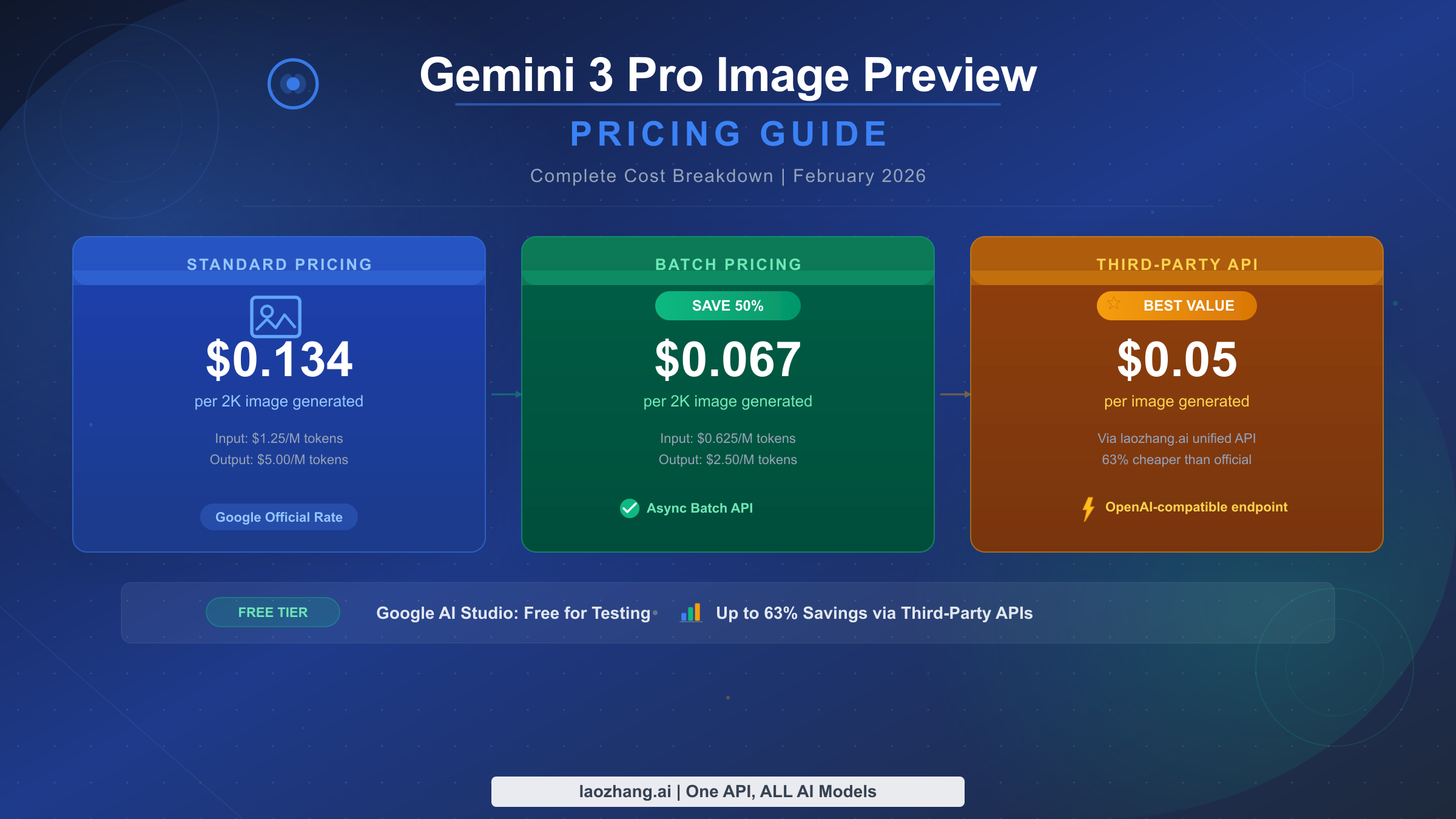
Gemini 3 Pro Image Preview pricing starts at $0.134 per image for standard 2K resolution and $0.24 per image for 4K resolution through Google's official API (verified February 2026, Google AI pricing page). There is no free API tier, but developers can cut costs by up to 79% through batch processing ($0.067/image) or third-party providers like laozhang.ai ($0.05/image). Google AI Studio offers free playground access with a generous 1,500 images per day limit for testing and development.
This guide covers every pricing tier, helps you calculate your actual monthly costs, and shows you exactly how to choose the most cost-effective option for your specific use case.
TL;DR
| Pricing Tier | 2K Image | 4K Image | Savings | Best For |
|---|---|---|---|---|
| Official API | $0.134 | $0.24 | Baseline | Enterprise, SLA needs |
| Batch API | $0.067 | $0.12 | 50% | Non-urgent bulk jobs |
| Third-Party (laozhang.ai) | $0.05 | $0.05 | 63-79% | Production workloads |
| Google Cloud Credits | Free ($300) | Free ($300) | 100% | New users (90 days) |
| Google AI Studio | Free | N/A | 100% | Testing & prototyping |
The rest of this article breaks down exactly how each tier works, what your real monthly costs will be, and which option makes the most sense for your project.
Complete Gemini 3 Pro Image Pricing Breakdown
Understanding Gemini 3 Pro Image pricing requires looking beyond the headline per-image rate. Google's billing combines text token costs for your prompts with image output tokens for the generated images, which means the true cost per image is slightly higher than the $0.134 figure most articles quote. Here is the complete breakdown based on Google's official pricing documentation, verified as of February 2026.
The model, officially called Gemini 3 Pro Image and also marketed under the name Nano Banana Pro, uses the model ID gemini-3.0-pro-image-preview. It operates with a 66,536-token context window and supports up to 32,768 output tokens. Released in November 2025 as a paid preview offering, it represents Google's most capable image generation model, designed specifically for complex prompts that require strong reasoning, accurate text rendering, and multi-turn editing capabilities.
Standard API Pricing
Google structures Gemini 3 Pro Image billing around token consumption. Every API call involves input tokens (your text prompt plus any reference images) and output tokens (generated text responses plus the generated image). The per-million-token rates break down as follows: text and image input costs $2.00 per million tokens, text and thinking output costs $12.00 per million tokens, and image output costs $120.00 per million tokens (Google AI Developer pricing, February 2026). In practical per-image terms, a standard 2K resolution image (1024×1024 to 2048×2048) consumes approximately 1,120 output tokens, translating to $0.134 per image. A 4K resolution image (up to 4096×4096) consumes approximately 2,000 output tokens, costing $0.24 per image. Image inputs, when you provide reference images for editing tasks, cost roughly $0.0011 each (560 tokens).
The True Cost Formula
What most pricing guides miss is the prompt token cost. A typical image generation prompt runs 50-200 tokens of input, and the model may return 100-500 tokens of text alongside the image. While these text token costs are small per-request, they add up at scale. The complete per-image cost formula is: (input prompt tokens × $2.00/M) + (output text tokens × $12.00/M) + (image output tokens × $120.00/M). For a typical 100-token prompt generating a 2K image with 200 tokens of text output, the true cost is approximately $0.1367 — about 2% more than the headline $0.134 rate. At 10,000 images per month, that 2% represents roughly $27 in additional costs that wouldn't appear in a simplified pricing estimate.
Resolution and Token Mapping
Choosing the right resolution directly impacts your costs. Google offers three effective resolution tiers, each mapped to a specific token count for billing purposes. The 1K resolution tier covers images from 1024×1024 and uses 1,120 tokens at the same $0.134 per image as 2K, meaning there is no cost advantage to generating smaller images within this tier. The 2K resolution tier covers images up to 2048×2048, also at 1,120 tokens and $0.134 per image. The 4K resolution tier covers images up to 4096×4096, consuming 2,000 tokens at $0.24 per image. This means generating a 1K image costs exactly the same as a 2K image — so you should always request at least 2K resolution to maximize the value of each API call unless you specifically need 4K quality for print or large-format display.
How Much Will You Actually Spend? Monthly Cost Projections
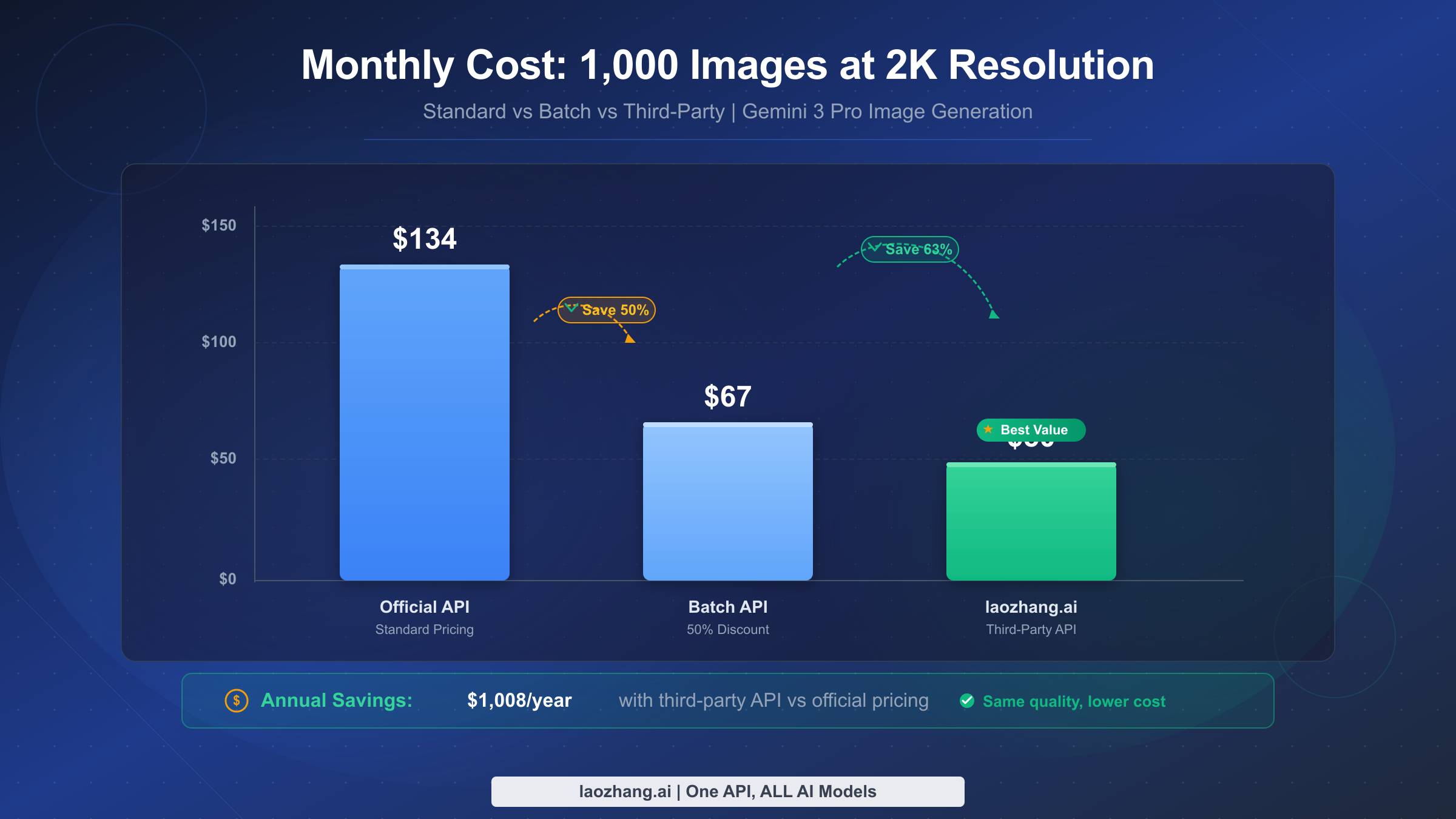
Raw per-image pricing only tells part of the story. What developers actually need to know is how much they will spend each month based on their real workload. The table below projects monthly costs across five common workload sizes, three resolution tiers, and two pricing methods, giving you a concrete budget number for virtually any use case.
Monthly Cost by Workload Size (2K Resolution)
| Monthly Images | Standard API | Batch API (50% off) | Third-Party ($0.05) | Annual Savings (Third-Party vs Standard) |
|---|---|---|---|---|
| 100 | $13.40 | $6.70 | $5.00 | $101 |
| 500 | $67.00 | $33.50 | $25.00 | $504 |
| 1,000 | $134.00 | $67.00 | $50.00 | $1,008 |
| 5,000 | $670.00 | $335.00 | $250.00 | $5,040 |
| 10,000 | $1,340.00 | $670.00 | $500.00 | $10,080 |
Monthly Cost by Workload Size (4K Resolution)
| Monthly Images | Standard API | Batch API (50% off) | Third-Party ($0.05) | Annual Savings (Third-Party vs Standard) |
|---|---|---|---|---|
| 100 | $24.00 | $12.00 | $5.00 | $228 |
| 500 | $120.00 | $60.00 | $25.00 | $1,140 |
| 1,000 | $240.00 | $120.00 | $50.00 | $2,280 |
| 5,000 | $1,200.00 | $600.00 | $250.00 | $11,400 |
| 10,000 | $2,400.00 | $1,200.00 | $500.00 | $22,800 |
The cost difference between 2K and 4K is especially significant at scale. A business generating 5,000 images per month at 4K through the official API would pay $1,200 — but switching to 2K resolution where appropriate cuts that to $670, and moving to a third-party provider drops it to $250. Understanding when 4K quality is genuinely needed versus when 2K suffices can save thousands annually.
Resolution Decision Guide
Choosing between 2K and 4K should be driven by your actual output requirements, not a default assumption that bigger is better. For social media posts, blog illustrations, thumbnails, and web graphics, 2K resolution at 2048×2048 provides more than sufficient quality — these images are typically displayed at 600-1200 pixels wide, making the extra resolution invisible to viewers while costing 79% more. Reserve 4K generation for print materials, large-format displays, images that will be cropped significantly, or product photography where fine detail matters. For prototyping and testing, always use 2K — you can regenerate finalized designs at 4K once you have the prompt dialed in. This approach alone can cut your development-phase image costs by 44%.
Every Way to Save on Gemini 3 Pro Image Generation
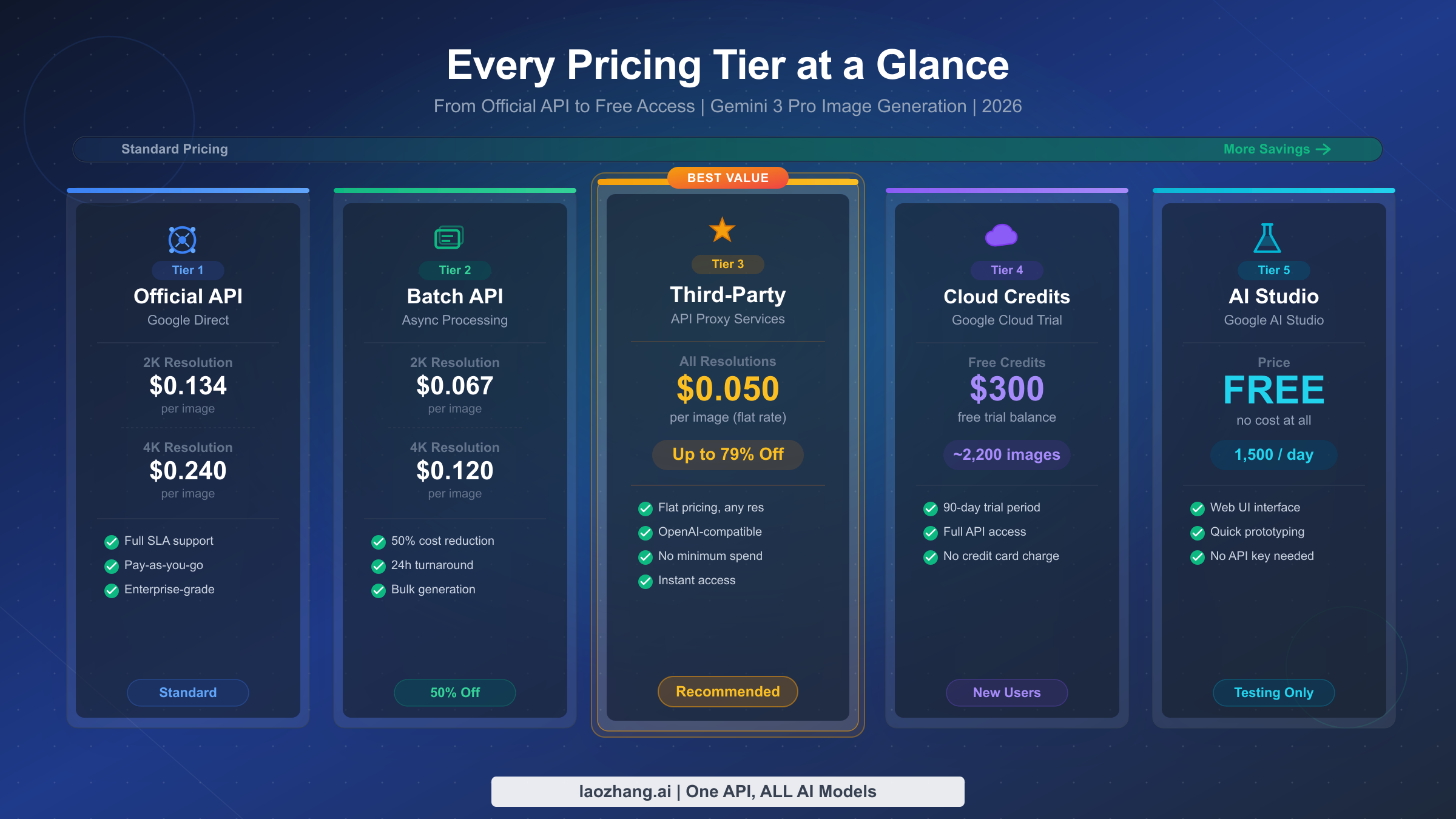
Google and the broader ecosystem offer five distinct pricing tiers for Gemini 3 Pro Image generation, each with different tradeoffs between cost, speed, and convenience. Understanding all five options is essential for building a cost-effective image generation pipeline, and no single tier is universally "best" — the right choice depends on your latency requirements, volume, and budget constraints.
Standard API is the baseline option and what most developers start with. You pay $0.134 per 2K image and $0.24 per 4K image with synchronous generation, meaning you get your image within 8-12 seconds of making the API call. This is the right choice when you need real-time image generation for user-facing applications where latency matters — think chatbots that generate images on demand, or interactive design tools. The standard API provides the full 66K token context window and supports multi-turn editing, where you can iteratively refine images through conversation. Google's official rate limits apply, and you get direct support through Google Cloud's SLA framework.
Batch API delivers the same images at exactly half the price — $0.067 per 2K image and $0.12 per 4K image — but with a critical tradeoff: you submit batch jobs that are processed asynchronously, typically completing within 24 hours. The quality is identical to the standard API since it uses the same model, but you lose real-time response. This makes batch processing ideal for pre-generating content libraries, creating marketing asset variations overnight, or any workflow where you can plan image generation ahead of time. If you run an e-commerce platform that needs 500 product image variations, submitting them as a batch job at 5 PM and having them ready by morning saves $33.50 per batch compared to synchronous generation, adding up to over $400 annually for a weekly batch cycle.
Third-party API providers offer the most aggressive pricing by routing your requests through optimized infrastructure while using the exact same Gemini 3 Pro Image model. The output quality is mathematically identical because these providers make standard API calls to Google on your behalf — the generated images come directly from Google's model. Providers like laozhang.ai charge $0.05 per image regardless of resolution, representing a 63% savings on 2K images and 79% savings on 4K images compared to the official API. You can find a detailed comparison of the cheapest Gemini image API options in our dedicated guide. The tradeoff is a slight increase in latency (typically 100-500ms additional) and reliance on the provider's infrastructure rather than Google's directly.
Google Cloud credits offer a one-time cost elimination for new users. Google provides $300 in free credits to new Google Cloud accounts, valid for 90 days. At the standard 2K rate of $0.134 per image, this translates to approximately 2,238 free image generations — enough for thorough testing, prototyping, and even initial production use. For the complete guide to Gemini's free API tier and how to maximize these credits, see our dedicated walkthrough.
Google AI Studio provides completely free image generation through its web-based playground, with a daily limit of 1,500 images. This is the ideal starting point for anyone evaluating the model — you can test prompt strategies, assess quality, and develop your workflow without spending anything. The limitation is that AI Studio is designed for interactive use rather than programmatic access, so it serves testing and prototyping but not production integration. It also only supports up to 2K resolution for image generation.
How Gemini 3 Pro Image Pricing Compares to Alternatives
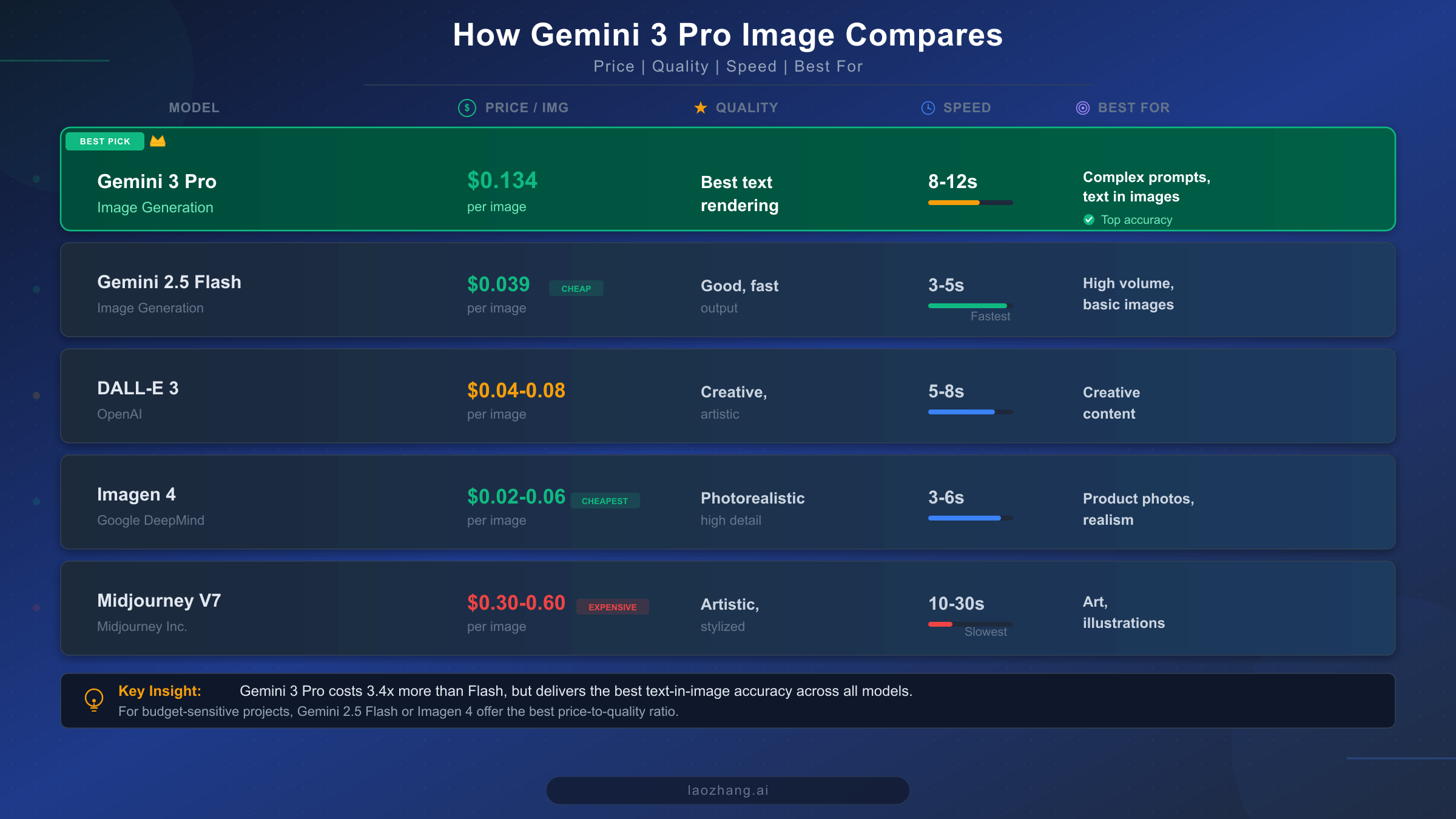
Evaluating Gemini 3 Pro Image pricing in isolation misses the bigger picture. The AI image generation market in 2026 offers multiple models at different price points, each with distinct strengths. The question isn't just "how much does Gemini 3 Pro Image cost?" but "is it worth the premium compared to alternatives?" The answer depends on what you're generating and why. For a broader perspective across the entire market, our comprehensive AI image API comparison for 2026 covers additional models and use cases.
Gemini 3 Pro Image vs. Gemini 2.5 Flash Image is the most relevant comparison because both come from Google and can be accessed through the same API infrastructure. Flash Image costs $0.039 per image — roughly 3.4 times cheaper than Pro Image's $0.134. It also generates images significantly faster at 3-5 seconds versus Pro Image's 8-12 seconds. However, Pro Image exists for a reason: it delivers substantially better text rendering accuracy (94% versus Flash's roughly 70-80%), handles complex multi-element compositions more reliably, supports multi-turn editing, and produces higher fidelity details especially in 4K resolution. For simple illustrations, icons, or images without text, Flash Image offers dramatically better cost-efficiency. But for anything requiring accurate text in images, complex spatial reasoning, or photorealistic quality, Pro Image justifies its premium. You can explore the detailed speed benchmarks for real-world latency data.
Gemini 3 Pro Image vs. DALL-E 3 presents an interesting cost comparison. DALL-E 3 pricing ranges from $0.04 to $0.08 per image depending on resolution, making it 40-70% cheaper than Gemini Pro Image at standard rates. DALL-E excels at creative, artistic imagery and has strong prompt following for abstract concepts. However, Gemini 3 Pro Image surpasses DALL-E in text rendering accuracy, grounding with real-time Google Search data, and native multi-turn editing capabilities. If your use case involves generating images with embedded text (marketing banners, social media graphics with captions, infographics), Gemini Pro Image's 94% text accuracy makes it worth the premium over DALL-E's less reliable text generation.
Gemini 3 Pro Image vs. Imagen 4 is worth noting because both are Google models. Imagen 4 offers the lowest per-image cost in Google's lineup at $0.02-0.06 depending on the speed variant, making it 55-85% cheaper than Pro Image. Imagen 4 specializes in photorealistic output and excels at product photography and lifestyle imagery. However, it lacks the reasoning capabilities, multi-turn editing, and text rendering accuracy that define Pro Image's strengths. For straightforward photorealistic generation where text accuracy and complex prompts aren't required, Imagen 4 delivers the best price-to-quality ratio in Google's ecosystem.
Gemini 3 Pro Image vs. Midjourney V7 represents opposite ends of the price spectrum. Midjourney subscription-based pricing works out to roughly $0.30-0.60 per image, making it 2-4 times more expensive than Gemini Pro Image. Midjourney's strength lies in its distinctive artistic style and community-driven prompt engineering ecosystem. For artistic illustrations and creative design work, Midjourney may produce more aesthetically appealing results. But for API-integrated workflows, programmatic generation, and use cases requiring text accuracy, Gemini Pro Image offers both better capability and lower cost.
| Model | Price Range | Text Accuracy | Speed | Best Use Case |
|---|---|---|---|---|
| Gemini 3 Pro Image | $0.134-0.24 | 94% | 8-12s | Text-heavy images, complex prompts |
| Gemini 2.5 Flash Image | $0.039 | ~75% | 3-5s | High volume, simple images |
| DALL-E 3 | $0.04-0.08 | ~60% | 5-8s | Creative, artistic content |
| Imagen 4 | $0.02-0.06 | N/A | 3-6s | Photorealistic, product photos |
| Midjourney V7 | $0.30-0.60 | ~50% | 10-30s | Art, illustrations, design |
Third-Party Providers: Same Quality, Lower Cost
The concept of third-party API providers for AI models can raise legitimate questions about quality and reliability. Understanding how these services work helps explain why they can offer significantly lower prices while delivering identical output quality — and helps you evaluate whether the tradeoff makes sense for your workflow.
Third-party providers operate as API routing services. When you send an image generation request to a provider like laozhang.ai, they forward your request to Google's Gemini 3 Pro Image API using their own credentials, receive the generated image from Google's servers, and return it to you. The image generation itself happens entirely on Google's infrastructure using the exact same model, which means the output is byte-for-byte identical to what you would receive through a direct API call. The cost savings come from volume-based pricing agreements, infrastructure optimization, and different margin structures — not from any reduction in generation quality.
Several providers serve the Gemini 3 Pro Image market in 2026, each with different pricing and features. Among them, laozhang.ai offers $0.05 per image across all resolutions with an OpenAI-compatible API endpoint, meaning you can switch from OpenAI's image API to Gemini Pro Image by changing just the base URL and API key. They provide $10 in new-user credits for testing, a real-time usage dashboard, and have operated continuously since early 2024 with consistent pricing (see API documentation). Other providers include Kie.ai at $0.09-0.12 per image, fal.ai at $0.15 per image, and OpenRouter at $0.15-0.26 per image.
The practical tradeoffs of using a third-party provider include slightly higher latency (typically 100-500ms additional round-trip time), dependence on the provider's uptime rather than Google's directly, and the absence of Google's enterprise SLA guarantees. For most development and production workloads, these tradeoffs are negligible — the additional latency is imperceptible in non-real-time applications, and reputable providers maintain 99.5%+ uptime. However, if your application requires guaranteed sub-second latency, has strict compliance requirements mandating direct vendor relationships, or needs Google's enterprise support tier, the official API remains the appropriate choice despite the higher cost.
For teams evaluating whether to use a third-party provider, a practical approach is to start with the official API or free Google AI Studio for development, validate your prompt strategies and output quality, then transition production workloads to a third-party provider once your pipeline is stable. This ensures you have a working fallback to the official API while capturing the 63-79% cost savings in production.
Free Access and Credits: Getting Started Without Paying
Starting with Gemini 3 Pro Image doesn't require any upfront investment. Google provides two distinct free access paths that together can sustain months of development and testing without a single charge, and combining them with third-party provider credits creates a comprehensive zero-cost evaluation pipeline.
Google AI Studio is the fastest path to generating your first image. Visit Google AI Studio, sign in with a Google account, select the Gemini 3 Pro Image model, and start generating immediately. The free tier is remarkably generous: 1,500 image generations per day with no credit card required. This daily limit resets every 24 hours, meaning you can generate over 45,000 images per month for free through the playground interface. The limitation is that AI Studio is a web-based interface rather than an API — you interact through a browser, not programmatically. For prompt engineering, quality evaluation, and workflow development, this is more than sufficient. For complete details on free tier options and limitations across all Gemini models, see our Gemini API free tier guide and the free vs. pro limits comparison.
Google Cloud credits bridge the gap between free testing and paid API usage. New Google Cloud accounts receive $300 in credits valid for 90 days, which can be applied to Gemini API calls through Vertex AI. At the standard $0.134 per 2K image, this provides approximately 2,238 free API-based generations — enough for serious prototyping and even early production testing with real programmatic access. To activate these credits, create a Google Cloud account, enable the Vertex AI API, and use the Gemini model through the Vertex AI endpoint rather than the Google AI endpoint. The credits apply automatically to usage charges.
Third-party provider credits add another layer of free access. laozhang.ai offers $10 in credits to new users, which provides 200 image generations at their $0.05 rate. While smaller than Google's credit offering, the advantage is that this gives you hands-on experience with the third-party API workflow, lets you compare latency and reliability against the official API, and serves as a realistic preview of your production cost structure.
A cost-optimized evaluation strategy combines all three: use Google AI Studio's 1,500 free daily images for prompt development and quality testing, use Google Cloud's $300 credits for API integration development and testing, and use laozhang.ai's $10 credits for evaluating the third-party provider experience. This sequence lets you validate your entire pipeline from prompt engineering through production deployment without spending any money upfront.
Frequently Asked Questions
Is Gemini 3 Pro Image Preview free to use?
Not through the API — there is no free API tier for Gemini 3 Pro Image. However, Google AI Studio offers completely free playground access with 1,500 image generations per day for interactive testing. New Google Cloud accounts also receive $300 in free credits (approximately 2,238 images at 2K resolution) valid for 90 days. For programmatic access without cost, you must use Google AI Studio's free allowance or consume your Cloud credits through Vertex AI.
What is the cheapest way to use Gemini 3 Pro Image via API?
The cheapest programmatic option is through third-party providers like laozhang.ai at $0.05 per image, representing a 63% savings on 2K images and 79% on 4K images compared to Google's official API rates. The second cheapest option is Google's Batch API at $0.067 per 2K image (50% off standard), though this requires accepting asynchronous processing with up to 24-hour delivery. For one-time projects, Google Cloud's $300 free credits provide the lowest possible cost — zero — for up to 2,238 images.
When should I use 2K vs 4K resolution?
Use 2K (2048×2048) for social media images, blog illustrations, web graphics, thumbnails, and any content displayed on screens at typical viewing distances. Use 4K (4096×4096) for print materials, large-format displays, images that will be heavily cropped, and product photography requiring fine detail. Since 1K and 2K images cost the same ($0.134), always request at least 2K. The jump to 4K costs $0.24 (79% more) and should only be selected when the additional resolution provides visible benefit in the final output context.
Will pricing change when Gemini 3 Pro Image exits preview?
Google has not announced specific GA pricing. Historically, Google's model pricing tends to decrease or remain stable as models move from preview to general availability — for example, Gemini 1.5 Pro pricing dropped when it moved to GA. While there is no guarantee, building on the current $0.134/image rate carries relatively low pricing risk. As a safeguard, architects should design systems that can switch between models or providers, ensuring your application is not locked into a single pricing tier. Using third-party providers with OpenAI-compatible endpoints naturally provides this flexibility.
How does the Batch API work in practice?
Google's Batch API accepts a collection of image generation requests as a single batch job. You submit your prompts through the batch endpoint, receive a job ID, and poll for completion or set up a webhook notification. Processing typically completes within 24 hours, though many batches finish within 2-6 hours depending on queue depth and request volume. The pricing discount is automatic — you simply use the batch endpoint instead of the standard synchronous endpoint, and billing applies at the 50% reduced rate. This makes batch processing especially valuable for use cases like generating daily content libraries, processing product catalogs, or creating marketing asset variations where real-time delivery is unnecessary.
Your Next Steps
Choosing the right Gemini 3 Pro Image pricing tier comes down to three factors: how fast you need results, how many images you generate, and how important direct Google support is to your organization.
If you are evaluating the model, start with Google AI Studio's free tier to test prompts and assess quality. You need zero investment and can generate 1,500 images daily.
If you are building an integration, use Google Cloud's $300 free credits through Vertex AI. This gives you real API access with approximately 2,238 free image generations to develop and test your pipeline.
If you are running production workloads and need to minimize cost, third-party providers like laozhang.ai at $0.05/image deliver identical quality at 63-79% savings. Start with their $10 free credits to validate the experience before committing.
If you need real-time generation with enterprise SLA, use Google's standard API at $0.134/image (2K) or $0.24/image (4K) through Vertex AI with full Google Cloud support.
If you can tolerate async processing, the Batch API at $0.067/image (2K) provides the best cost-performance balance within Google's official infrastructure.
The Gemini 3 Pro Image model represents the current state of the art in reasoning-powered image generation, with 94% text rendering accuracy and native SynthID watermarking (Google official documentation, February 2026). Whether you are building a creative tool, an e-commerce image pipeline, or a content generation platform, the pricing tier you choose should match your latency, volume, and compliance requirements — and this guide gives you the numbers to make that decision with confidence.