Gemini 3 Pro Image Free Tier: Paid API, Free Only in US AI Mode
Gemini 3 Pro Image (Nano Banana Pro) has no free API tier and no free Pro quota in the Gemini app. The one no-cost route is AI Mode in Search for US adults.
On this page
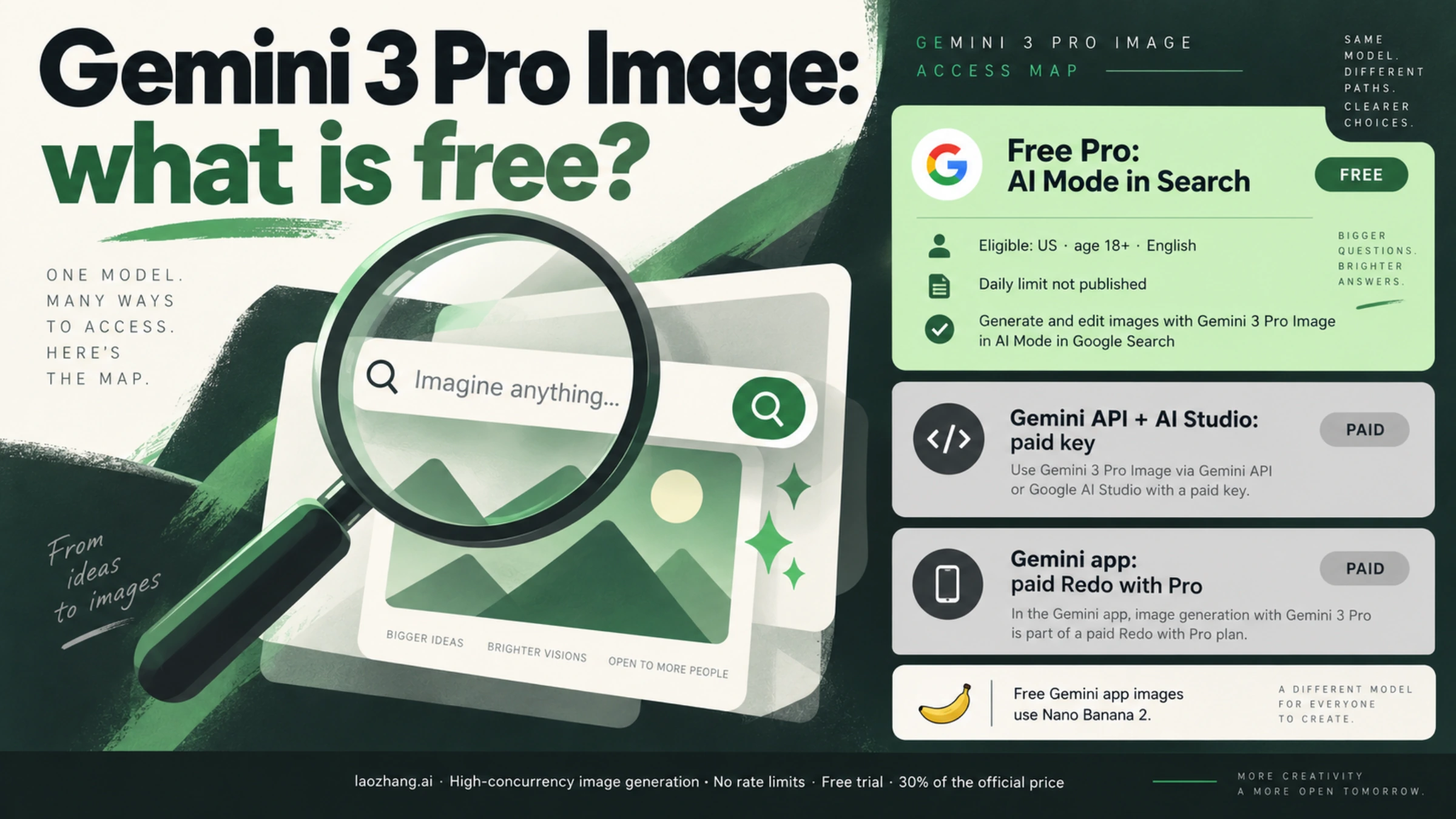
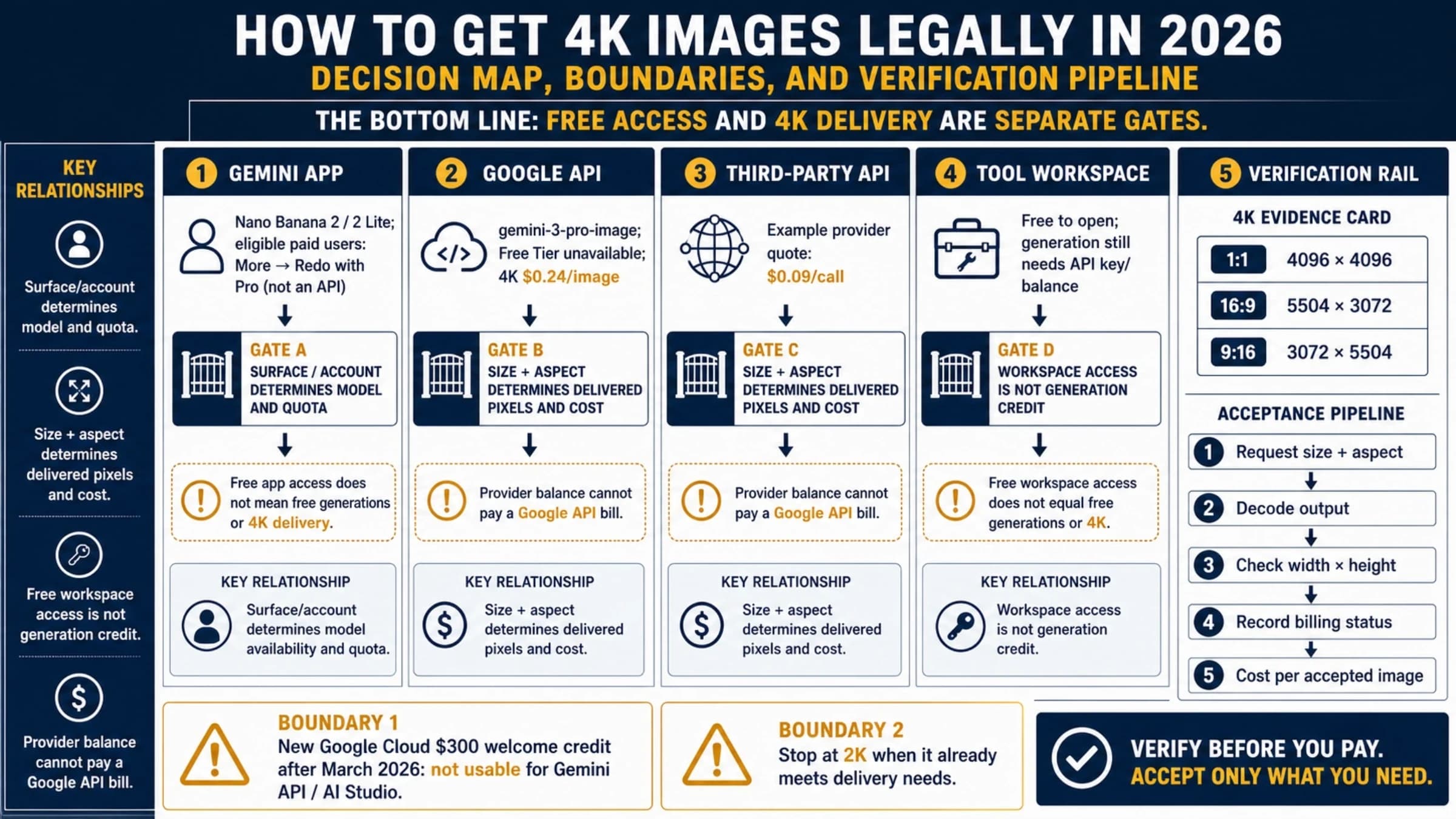
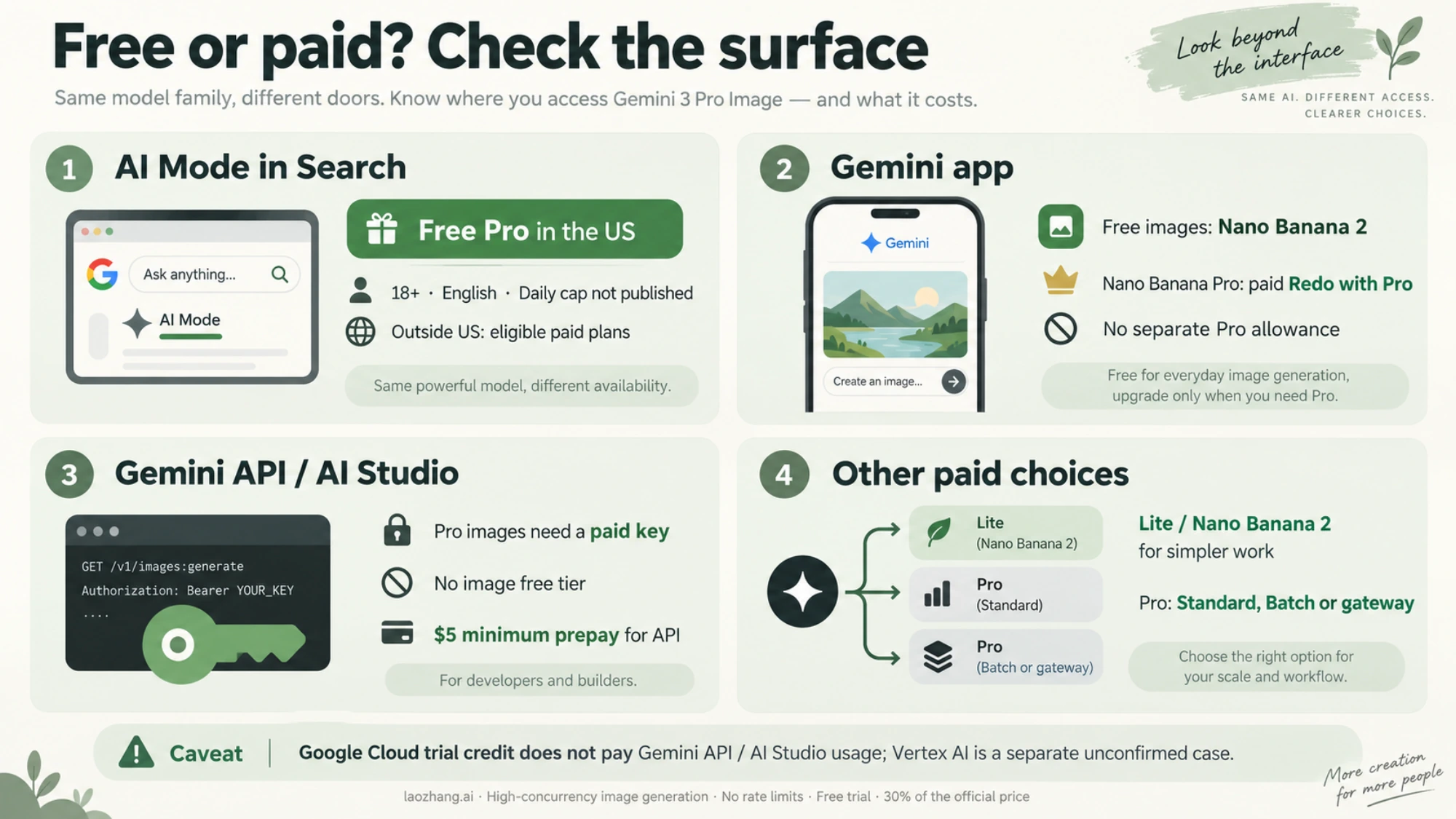
No API key gets you Gemini 3 Pro Image for free. As of October 4, 2026, Google's Gemini API pricing page shows "Not available" in the Free Tier column for gemini-3-pro-image (Nano Banana Pro), for input and image output alike. The $300 Google Cloud Welcome credit doesn't fill the gap either: on accounts opened after March 2, 2026, it can't pay for Gemini API or AI Studio usage.
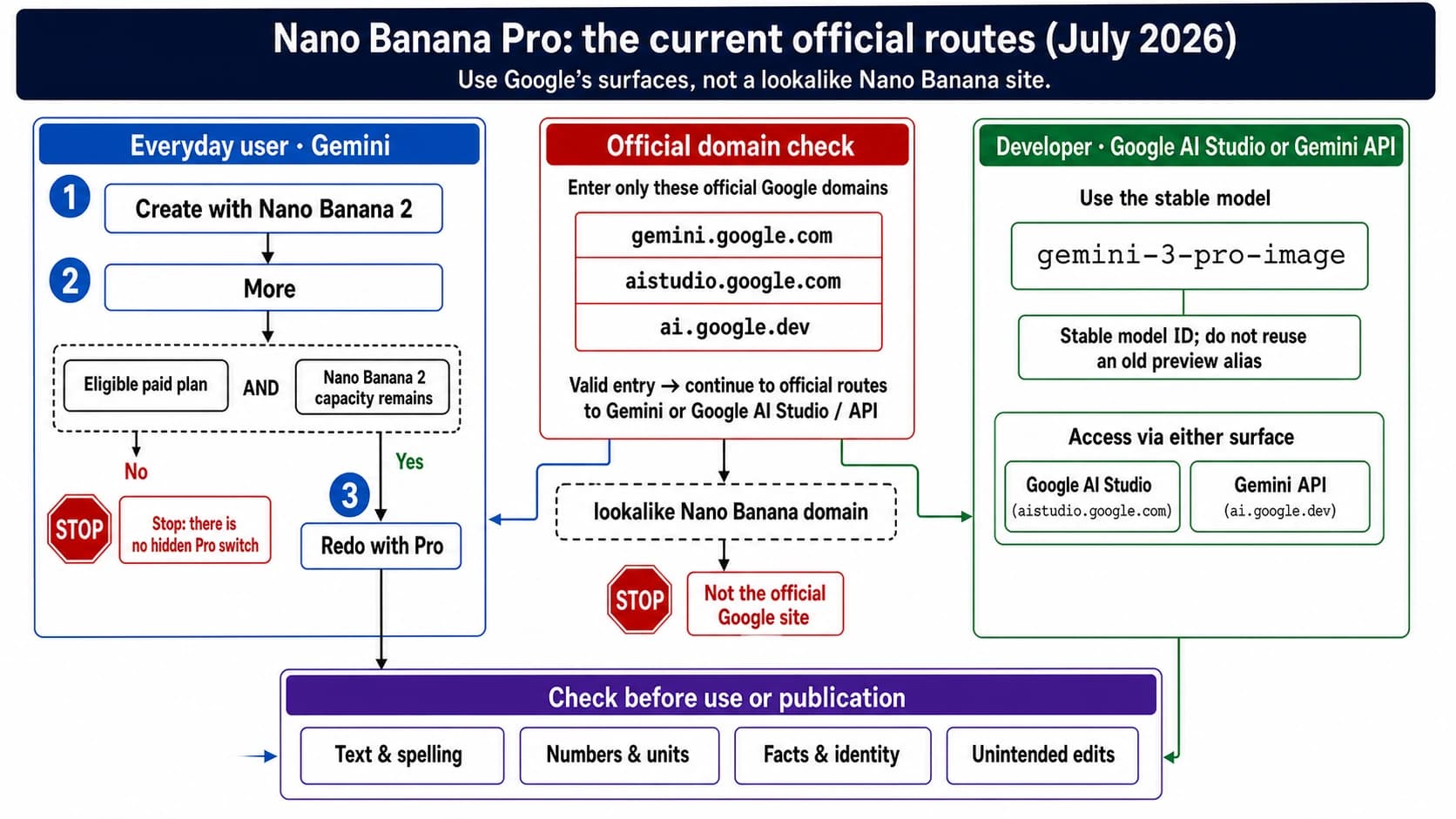
Nor is Pro free in the Gemini app. Every Gemini user creates images with Nano Banana 2, and Nano Banana Pro shows up only as Redo with Pro for Google AI Plus, Pro, and Ultra subscribers. As of October 5, 2026, Google documents one way to use Nano Banana Pro without paying: AI Mode in Google Search, for users 18 or older in the US, in English, within a daily limit Google doesn't quantify. If you need Pro from code, the smallest paid start is a $5 prepay, which covers 37 Standard images at 1K or 2K, or 74 through the Batch API.
Gemini 3 Pro Image free tier by surface: API, AI Studio, app, AI Mode
Each place you can reach the model has its own answer. Prices and rules below are as of October 4–5, 2026.
| Where you use it | Free? | What you get without paying | Where it ends | Source |
|---|---|---|---|---|
| Gemini API key | No | No free-tier quota for this model | Paid tier: link billing and prepay at least $5 | Google pricing and billing pages |
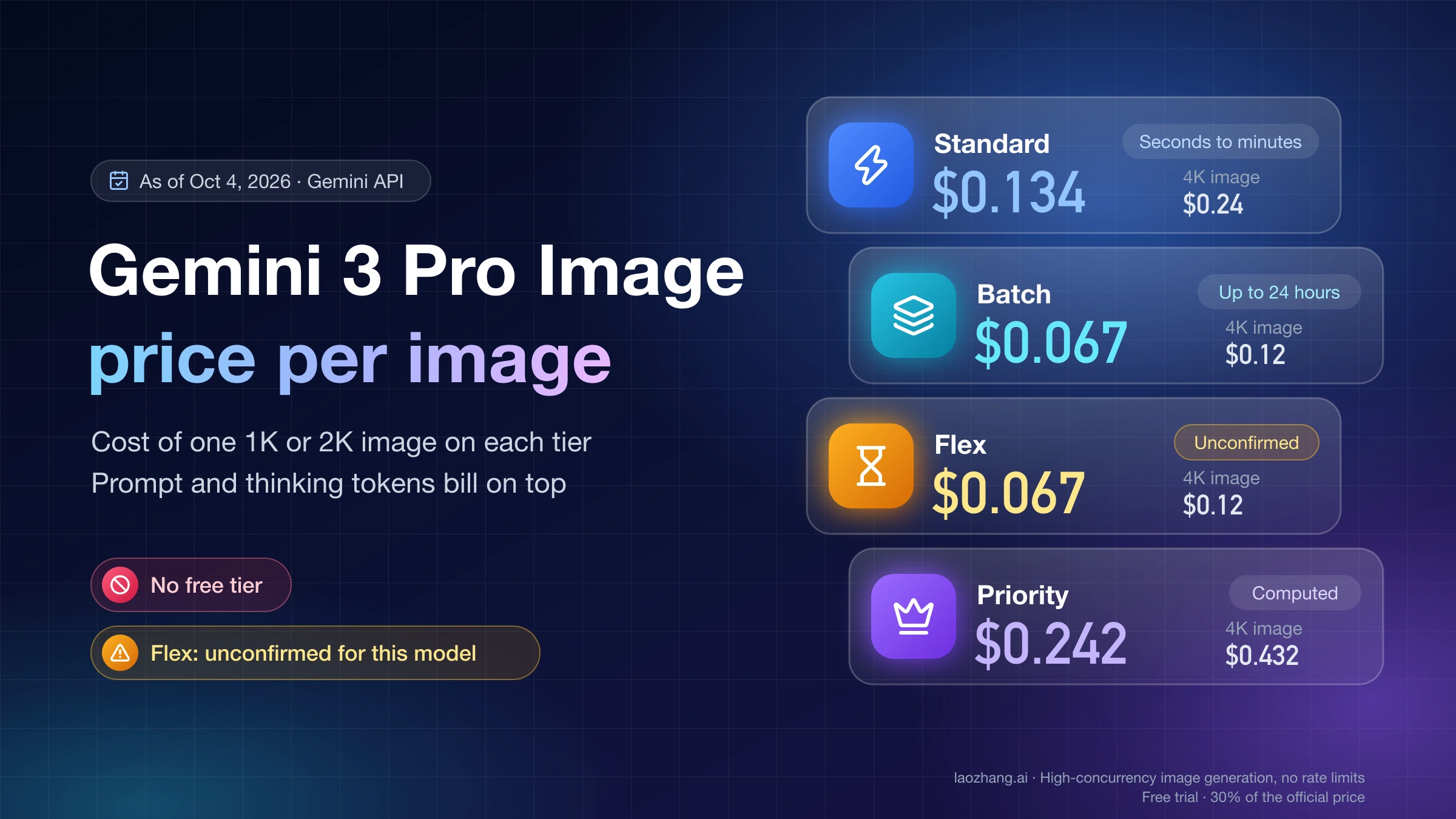
| Google AI Studio playground | No | Image models ask for an API key or a Google AI plan before they generate; Pro images run on a paid key | Billed like the API: $0.134 per 1K/2K image, $0.24 per 4K image | Billing page FAQ; playground upgrade prompt |
| $300 Google Cloud Free Trial, via the Gemini API | No | The credit can't pay Gemini API or AI Studio costs | Applies to accounts opened after March 2, 2026 | Billing page; Free Trial page |
| $300 Google Cloud Free Trial, via Vertex AI | Unconfirmed | Gemini on Vertex AI is not on the trial's exclusion list | 90 days or $300, whichever comes first | Free Trial page |
| Gemini app, no paid plan | No, for Pro | Nano Banana 2 images (Nano Banana 2 Lite on Flash-Lite), downloaded at 1K | No Redo with Pro; standard compute limits | Gemini Apps image help and limits page |
| Gemini app with AI Plus, Pro, or Ultra | Paid plan | Redo with Pro regenerates a Nano Banana 2 image with Nano Banana Pro; 2K downloads | Stops once the daily Nano Banana 2 image quota is used up | Gemini Apps image help |
| AI Mode in Google Search, US | Yes, limited | Nano Banana Pro for users 18 or older, in English, no plan needed | A daily limit Google doesn't quantify; outside the US, Pro needs AI Pro or Ultra | Google Search image help |
| "Free Nano Banana Pro" websites | Depends on the site | Whatever the site chooses to give away | The site's own terms; Google is not a party | None from Google |
Gemini API and AI Studio: Nano Banana Pro images need a paid key
Every Gemini 3 Pro Image request through the API is billed. The model has no free-tier column on Google's pricing page, so an API key on a free project can't generate Pro images at all. To move to the paid tier, you link a Cloud Billing account and prepay at least $5 in credits. New users have defaulted to the Prepay plan since March 23, 2026.
The Standard prices that apply from the first image are:
- $0.134 per image at 1K or 2K (1,120 output tokens at $120 per million)
- $0.24 per image at 4K (2,000 output tokens)
- $0.0011 per reference image you send as input
- $12 per million text and thinking tokens; thinking is on by default for this model and billed
The prepaid balance works as a soft ceiling. When it reaches $0, every API key on that billing account stops, and requests fail with HTTP 402 until you add credits. Google notes that billing lags by about 10 minutes, so a long batch job can run slightly past your balance. Requests that fail with a 400 or 500 error are not charged, but they still count against your quota.
AI Studio follows the same rule. Google's billing FAQ says AI Studio usage stays free of charge unless you link a paid API key for paid features. Image output falls on the paid side, because no current image model has a free tier. As of October 5, 2026, picking Nano Banana 2 or Nano Banana 2 Lite in the playground with no API key and no Google AI plan opens an upgrade prompt instead of an image: "Nano Banana 2 is only available in the Playground via a Google AI Plan or an API key." Google doesn't document which plan unlocks which image model in the playground, so for Pro the dependable path is a paid API key, billed at the same rates as API calls. Per Google's Nano Banana Pro launch announcement, images made in AI Studio carry no visible Gemini watermark; the invisible SynthID watermark is still there.
The cheaper image models don't offer a free tier either. Nano Banana 2 (gemini-3.1-flash-image) and Nano Banana 2 Lite (gemini-3.1-flash-lite-image) both show "Not available" for free-tier image output. The first-generation Nano Banana model, gemini-2.5-flash-image, was shut down on October 2, 2026. Claims about "500 free images a day" referred to that model, and they no longer describe anything you can use.
What the Gemini API free tier still covers is text. Flash models such as Gemini 3.8 Flash and Gemini 3.5 Flash-Lite are free of charge on the free tier, within rate limits. Gemini 3.1 Pro Preview, the text model, has no free tier in the API. For per-model limits, see the Gemini API free tier limits, free models, and API keys guide.
Two eligibility rules apply to free and paid tiers alike. AI Studio requires you to be 18 or older. The Gemini API is offered only in Google's listed regions, which include the United States, the EEA, the UK, Japan, and South Korea but not mainland China, Hong Kong, or Russia.
$300 Google Cloud credit: excluded for the Gemini API, unclear on Vertex AI
You can't spend the $300 Google Cloud Welcome credit on Gemini 3 Pro Image through the Gemini API or AI Studio. Google's billing page states that accounts opened after March 2, 2026 can't use those credits for Gemini API and AI Studio usage. The Free Trial page lists "Gemini API in AI Studio costs" among the things the credit can't pay for, and it points you to the Gemini API free tier or a Prepay plan instead.
Vertex AI is a separate case. The Free Trial exclusions name the Gemini API in AI Studio and partner models sold as managed APIs, but not Gemini models on Vertex AI. That makes it plausible that gemini-3-pro-image on Vertex AI draws on the trial credit, yet Google doesn't state it outright. Before you plan around it, generate one image on Vertex AI and check the Cloud billing report to see whether the cost was offset by the credit. Vertex AI (Global) uses the same token rates as the Gemini API, so if the credit does apply, $300 at $0.134 per image covers about 2,238 images at 1K or 2K, or 1,250 at $0.24 per 4K image.
The trial has limits of its own. It ends after 90 days or once you spend the $300, whichever comes first, and a free-trial account can't request quota increases. Setup steps and current model IDs for this route are in the Vertex AI Nano Banana API guide to model IDs, setup, and cost.
Gemini app: free images use Nano Banana 2, and Pro needs a Google AI plan
A free Google account doesn't get Nano Banana Pro in the Gemini app. As of October 5, 2026, Google's Gemini Apps image help says everyone creates images with Nano Banana 2, or with Nano Banana 2 Lite when the chat model is set to Flash-Lite. Nano Banana Pro is marked "Available with a Google AI Plan" and works only as a second pass: open a generated image's More menu and choose Redo with Pro. The feature table on the Gemini Apps limits page lists Redo with Pro for AI Plus, AI Pro, and AI Ultra, and not for accounts without a plan.
This setup dates from Nano Banana 2's launch on February 26, 2026, when Google announced that Nano Banana 2 "will replace Nano Banana Pro across the Fast, Thinking and Pro models." The limited free Pro quota that came with Nano Banana Pro's launch on November 20, 2025, reached through "Create images" with the Thinking model, belongs to the period before that change.
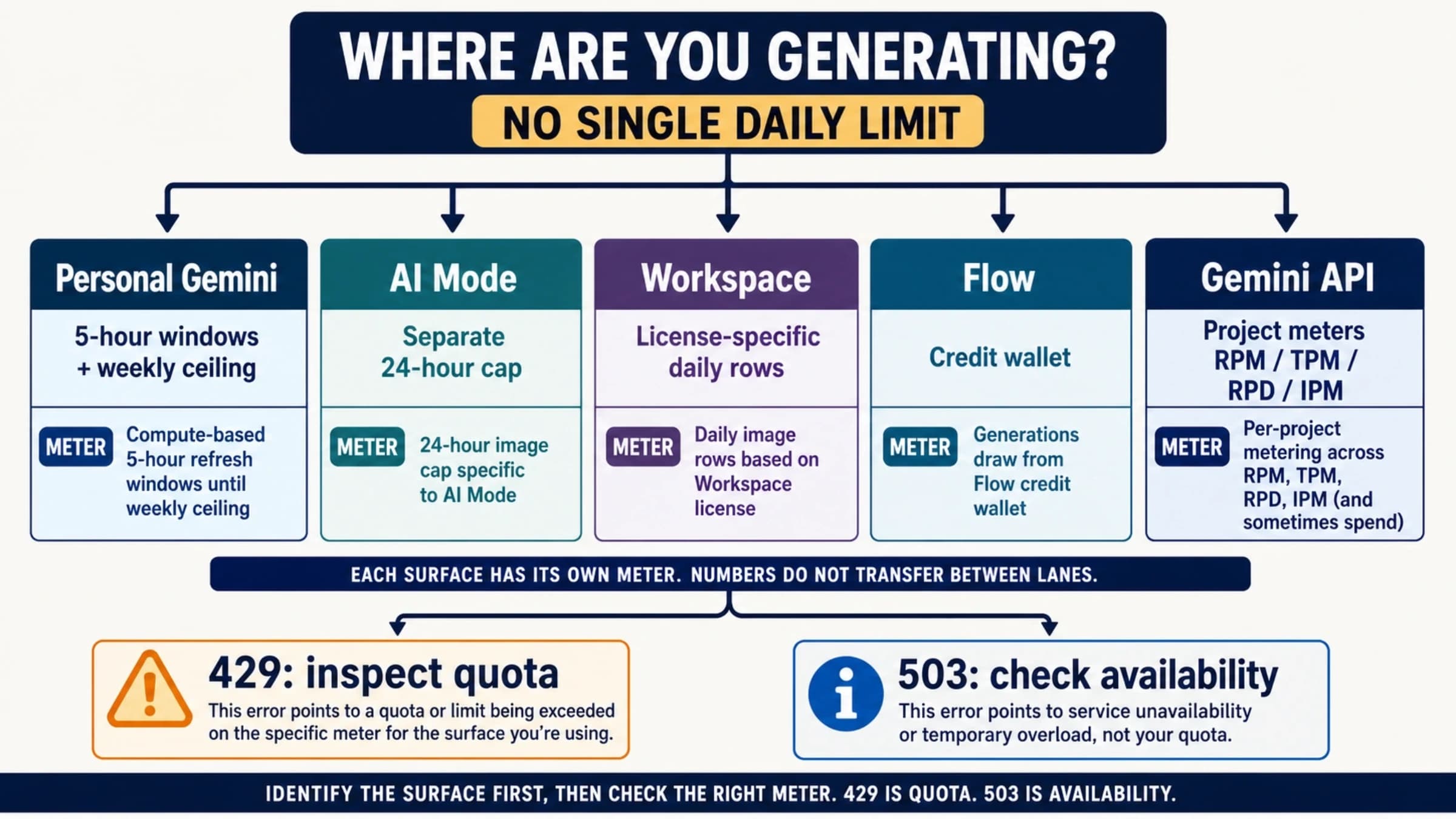
A paid plan doesn't add a separate Pro allowance either. Google's help page says that once you reach your daily quota of Nano Banana 2 images, you can't redo any more images with Nano Banana Pro. The quota is measured in compute, not images: usage refreshes every 5 hours up to a weekly limit. Without a plan you get the standard limits, AI Plus doubles them, AI Pro gives 4x, and AI Ultra gives 5x or 20x the AI Pro limits. Downloads are 1K without a plan and 2K with one. Plan prices and what each tier adds are compared in Nano Banana 2 Subscription Price: What Google AI Plans Change.
Two account rules apply to app images. On a personal account you must be 13 or older (or your country's minimum age) to generate images and 18 or older to edit them; work and school accounts can have different rules. The visible watermark is a setting, not a plan perk: per Google's watermark help, Settings → Media Watermark turns it on or off with or without a plan. In India, South Korea, and Vietnam the switch appears only with AI Ultra, so users there without Ultra always get the visible mark. The switch doesn't touch the invisible SynthID watermark or the Content Credentials that every Gemini image keeps.
The app is a consumer product, not a substitute for an API key. You can't call it from code, and its quota sits on your personal Google account. If Redo with Pro is missing or images stop generating on a paid plan, Nano Banana Pro Not Working in Gemini? Fix the App Route First walks through the app-side checks.
AI Mode in Google Search: free Nano Banana Pro for US adults in English
AI Mode is the only place where Google documents Nano Banana Pro without a paid plan. As of October 5, 2026, Google's Search help on creating images says that "Nano Banana Pro in AI Mode is available in English to users over 18 in the US and Google AI Pro and Ultra subscribers in the following countries." You pick Pro in the AI Mode menu before you create the image. Google says Pro in AI Mode "has daily usage limits" and doesn't give a number.
General AI Mode image creation has a published cap: up to 25 images per 24 hours without a plan and up to 100 with Google AI Pro, for users 18 or older in Google's listed countries. Outside the US, the Pro option needs AI Pro or Ultra.
AI Mode answers "can I try Nano Banana Pro for free?" and nothing more. There's no API behind it and nothing you can automate. Step-by-step access, plus Google's other no-cost image tools, is in Can You Use Nano Banana for Free? Google's No-Cost Options.
"Free Nano Banana Pro 4K" websites run on someone else's terms
Sites that promise free Nano Banana Pro or free 4K images are not Google products. They sit between you and a model, and the free allowance, data handling, and usage rights are whatever their own terms say.
Since Google charges $0.24 for every 4K Pro image through the API, a site that hands them out without payment is covering that cost some other way, through ads, sign-up data, tight limits, or a cheaper model. From the outside you can't confirm which model actually produced your image. Uploading the result to the Gemini app and asking whether it was generated by Google AI checks for SynthID, which tells you Google AI made it, not whether Nano Banana Pro did.
Cheapest paid start: what $5 buys on each route
If you need Pro images from code, or more than AI Mode's daily allowance, $5 is the realistic entry point, because that is Google's minimum prepay. The table divides $5 by each route's per-image price and rounds down. It leaves out input, prompt, and thinking tokens, so real counts come out slightly lower.
| Route | Model | Price per image | Images per $5 |
|---|---|---|---|
| Google Standard, 1K or 2K | Nano Banana Pro | $0.134 | 37 |
| Google Standard, 4K | Nano Banana Pro | $0.24 | 20 |
| Google Batch API, 1K or 2K | Nano Banana Pro | $0.067 | 74 |
| Google Batch API, 4K | Nano Banana Pro | $0.12 | 41 |
| Google Standard, 1K | Nano Banana 2 | $0.067 | 74 |
| Google Standard, 2K | Nano Banana 2 | $0.101 | 49 |
| Google Standard, 1K only | Nano Banana 2 Lite | $0.0336 | 148 |
| laozhang.ai gateway, 1K/2K/4K | Nano Banana Pro | $0.09 | 55 |
Google prices are from its pricing page as of October 4, 2026. The gateway price is laozhang.ai's published rate as of September 24, 2026.
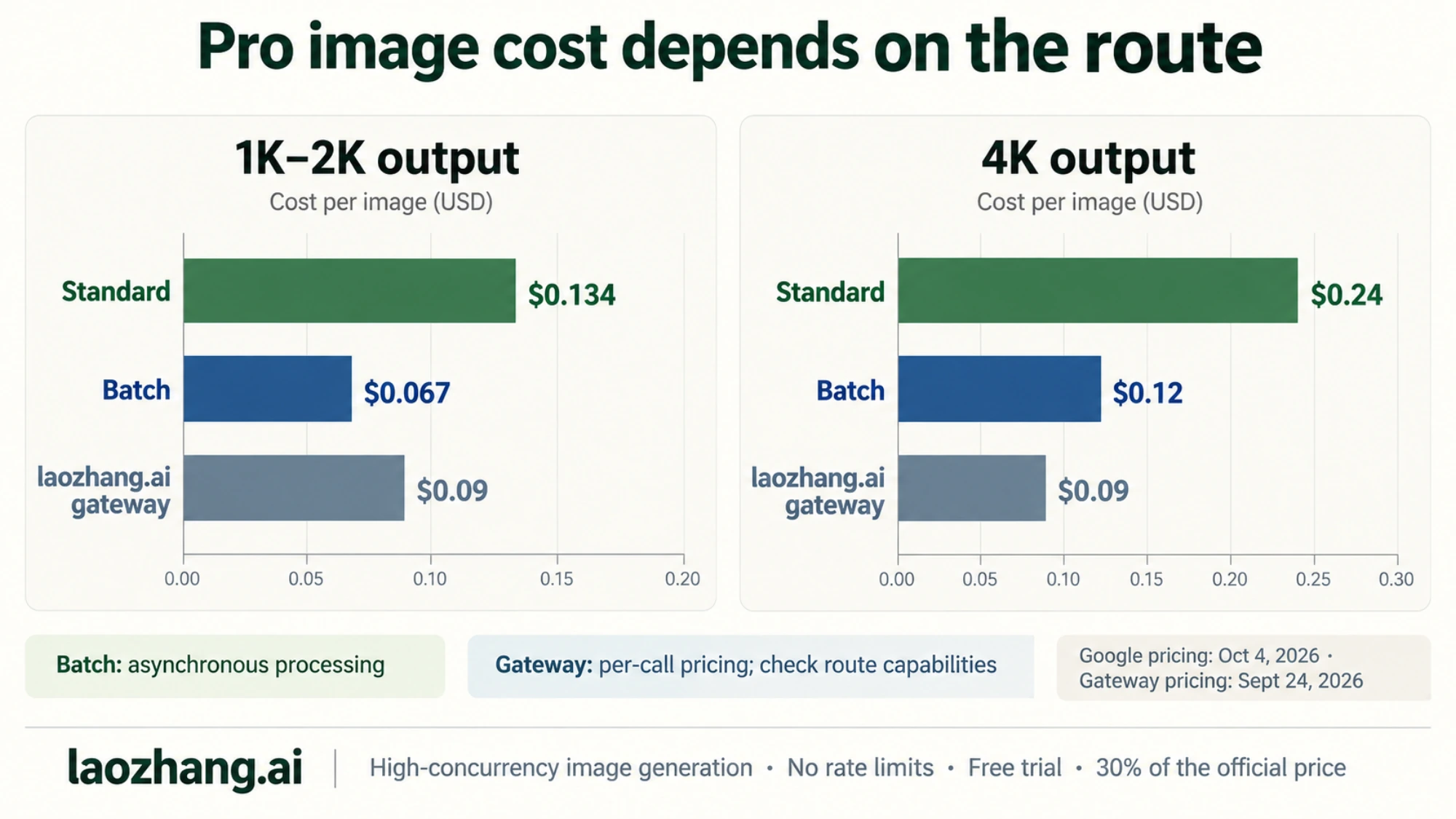
The Batch API halves Pro's price in exchange for asynchronous delivery, with a target turnaround of 24 hours, and many jobs finish sooner. For 1K or 2K images that can wait, it is the cheapest way to get genuine Nano Banana Pro output. The Nano Banana Pro Batch API cost guide shows how to estimate a batch bill.
Nano Banana 2 costs the same as Pro on Batch at 1K, $0.067, and returns results in real time. Pro runs a thinking step on every image by default and accepts up to 14 reference images, and you pay for that on each call. For ordinary illustrations, try Nano Banana 2 or Lite first and move to Pro only for the images where its output makes a visible difference. Nano Banana 2 also renders 4K, at $0.151 per image.
The laozhang.ai gateway charges a flat $0.09 per gemini-3-pro-image call at 1K, 2K, or 4K. That is 32.8% below Google's $0.134 Standard price, 62.5% below its $0.24 4K price, and 25% below the $0.12 Batch price at 4K. At 1K or 2K, Google's Batch API at $0.067 is still cheaper. Check three details before you switch:
- A response that returns HTTP 200 without an image is still charged as one call.
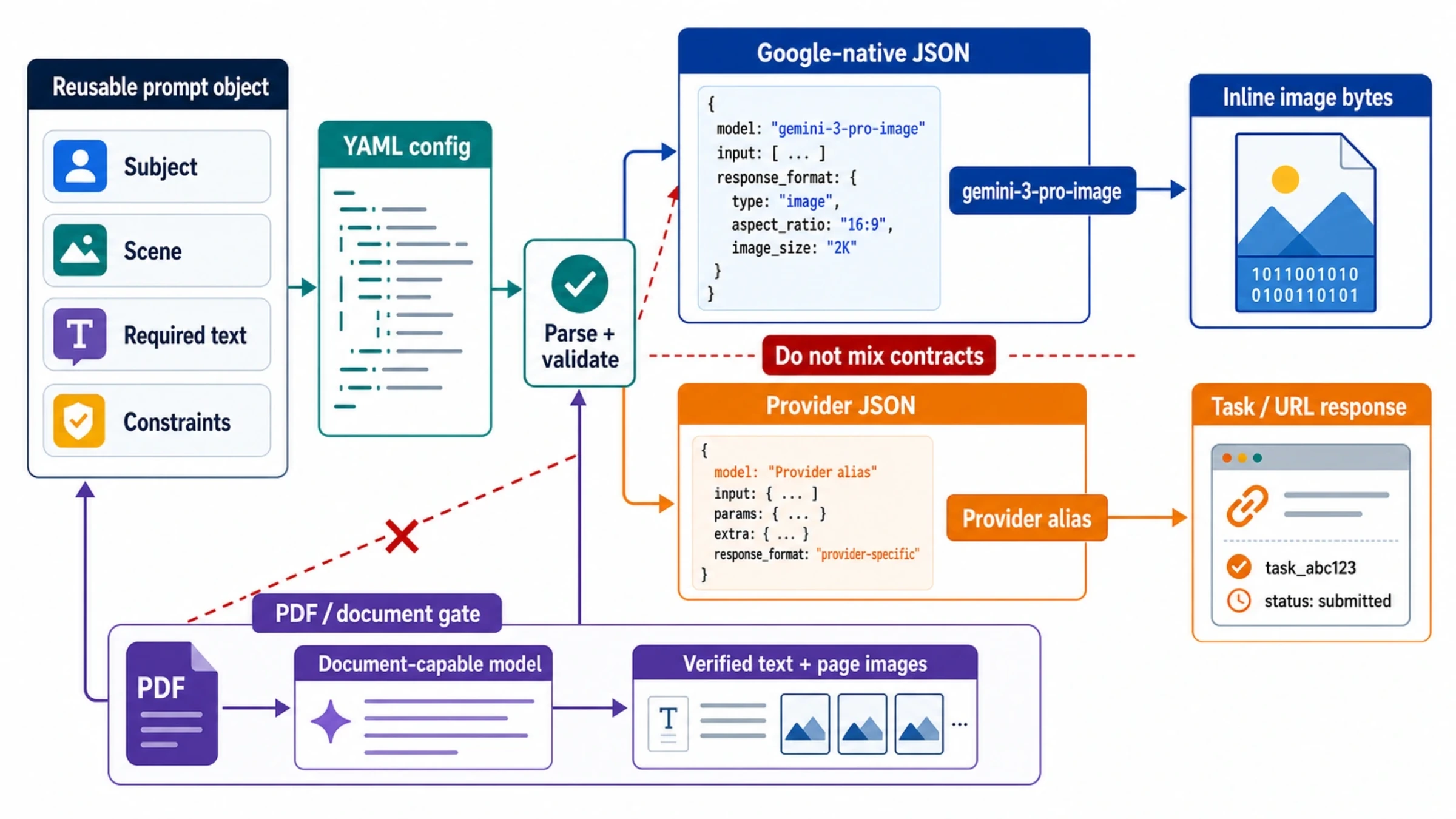
- Size and aspect ratio can be set only on the Gemini-native route; the OpenAI-compatible route returns 1:1 images at 1K.
- Requests are forwarded to Google's model, so Google's safety behavior and refusals still apply.
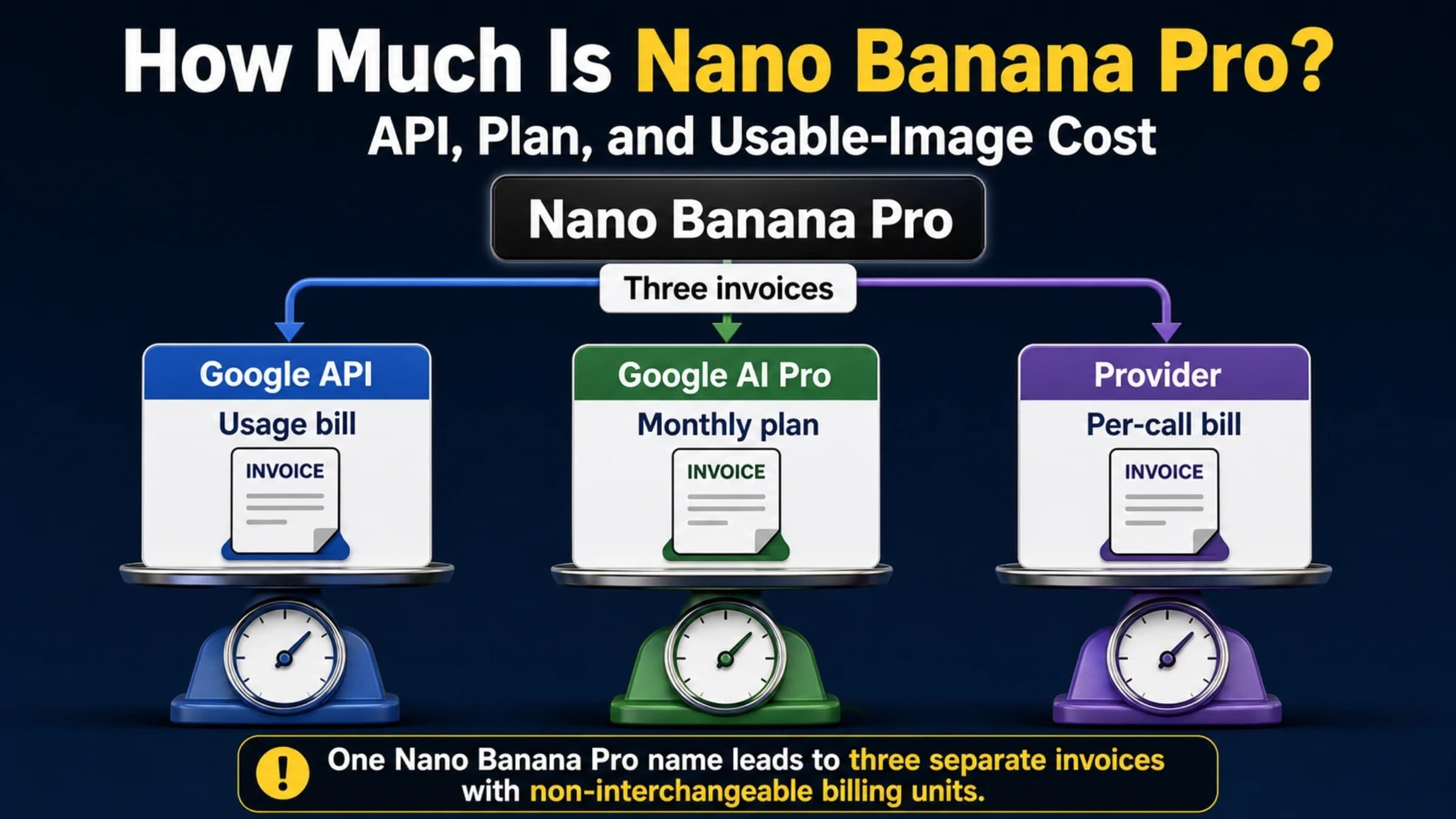
The gateway is a separate contract with its own terms, not a Google free tier. For a side-by-side of every paid option, see how much Nano Banana Pro costs across API, plan, and usable images, and for Google's full tier table including Priority, see Gemini 3 Pro Image API pricing by tier.
Frequently asked questions about free Gemini image access
Can I use Gemini images for free?
Yes, but mostly with Nano Banana 2 rather than Nano Banana Pro. The Gemini app makes free Nano Banana 2 images within its standard limits, and AI Mode in Google Search allows up to 25 images per 24 hours without a plan. Free Nano Banana Pro is limited to AI Mode for users 18 or older in the US, in English. Through the Gemini API or AI Studio, no Gemini image model has a free tier as of October 4, 2026, so every image is billed.
Is Nano Banana Pro free in the Gemini app?
No. As of October 5, 2026, the Gemini app generates every image with Nano Banana 2, and Nano Banana Pro is available only as Redo with Pro on Google AI Plus, Pro, and Ultra. Redo with Pro also stops once you hit the daily Nano Banana 2 image quota.
Does Gemini Pro give unlimited images?
No. Google AI Pro raises Gemini app limits to 4x the standard allowance and AI Mode image creation to 100 images per 24 hours, but both stay capped. AI Ultra goes further, to 5x or 20x the AI Pro limits in the app, and is still not unlimited.
How many images can Gemini create for free?
Google publishes a number only for AI Mode: up to 25 images per 24 hours without a plan. The Gemini app uses compute-based limits that refresh every 5 hours up to a weekly cap, so the number of images depends on what else you use the app for. Those free images come from Nano Banana 2; free Nano Banana Pro exists only in US AI Mode, where Google doesn't publish its daily limit.
Which Gemini models are available in the free tier?
In the Gemini API, the free tier covers text models such as Gemini 3.8 Flash and Gemini 3.5 Flash-Lite. Image models, including Gemini 3 Pro Image, Nano Banana 2, and Nano Banana 2 Lite, are "Not available" on the free tier. Gemini 3.1 Pro Preview has no free tier either.
Can I use my $300 Google Cloud credit for Gemini 3 Pro Image?
Not through the Gemini API or AI Studio on an account opened after March 2, 2026. On Vertex AI, Gemini models are not on the trial's exclusion list, so the credit may apply there. Run one test image and check your billing report to confirm it before you rely on it.
Sources10
External pages this guide links to, in the order they appear. Last updated Oct 5, 2026.
Sources10
External pages this guide links to, in the order they appear. Last updated Oct 5, 2026.
- 1.Gemini API pricing pageai.google.dev/gemini-api/docs/pricing
- 2.billingai.google.dev/gemini-api/docs/billing
- 3.Free Trial pagecloud.google.com/free/docs/free-cloud-features
- 4.image helpsupport.google.com/gemini/answer/14286560
- 5.limits pagesupport.google.com/gemini/answer/16275805
- 6.image helpsupport.google.com/websearch/answer/16649374
- 7.listed regionsai.google.dev/gemini-api/docs/available-regions
- 8.Google announcedblog.google/innovation-and-ai/technology/ai/nano-banana-2
- 9.launch on November 20, 2025blog.google/innovation-and-ai/products/nano-banana-pro
- 10.Google's watermark helpsupport.google.com/gemini/answer/17405358