Gemini 3 Pro Image Cheap API: Complete 2026 Guide to Save Up to 79% on AI Image Generation
Google's Gemini 3 Pro Image API costs $0.24 per 4K image at standard pricing. This guide reveals every official discount, third-party alternative, and optimization strategy that can reduce your costs to as little as $0.02 per image — saving up to 92% without sacrificing quality.
On this page
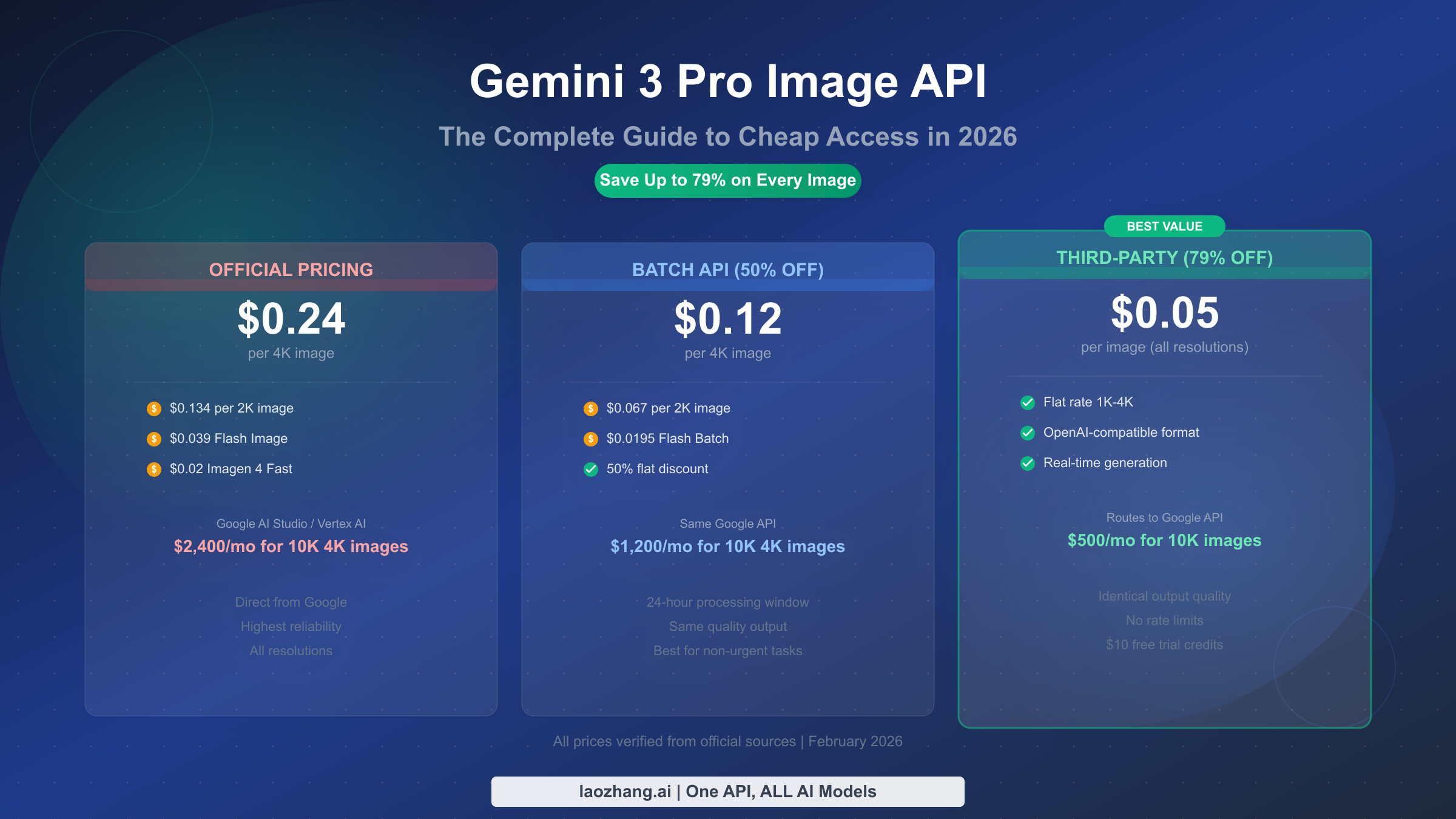
Accessing Google's Gemini 3 Pro Image API (Nano Banana Pro) doesn't have to cost $0.24 per image. As of February 2026, developers can generate identical-quality images for as little as $0.02 per image using Google's Imagen 4 Fast, $0.05 through third-party providers like laozhang.ai, or $0.067 via Google's own Batch API — saving up to 92% compared to standard Gemini 3 Pro pricing. This guide breaks down every pricing tier, compares all available options, and shows you exactly which approach fits your specific use case.
TL;DR
Google offers six distinct image generation models through its API, ranging from $0.02 per image (Imagen 4 Fast) to $0.24 per image (Gemini 3 Pro Image at 4K resolution). The cheapest way to access Gemini 3 Pro's premium quality is through third-party API providers at $0.05 per image — a flat rate across all resolutions that delivers identical output. For developers who can tolerate a 24-hour processing window, Google's own Batch API cuts every model's price by exactly 50%. If raw cost matters more than Gemini 3 Pro's specific capabilities, Imagen 4 Fast at $0.02 per image is the cheapest official option in Google's entire lineup.
Every Google Image Model Priced — From $0.02 to $0.24 Per Image
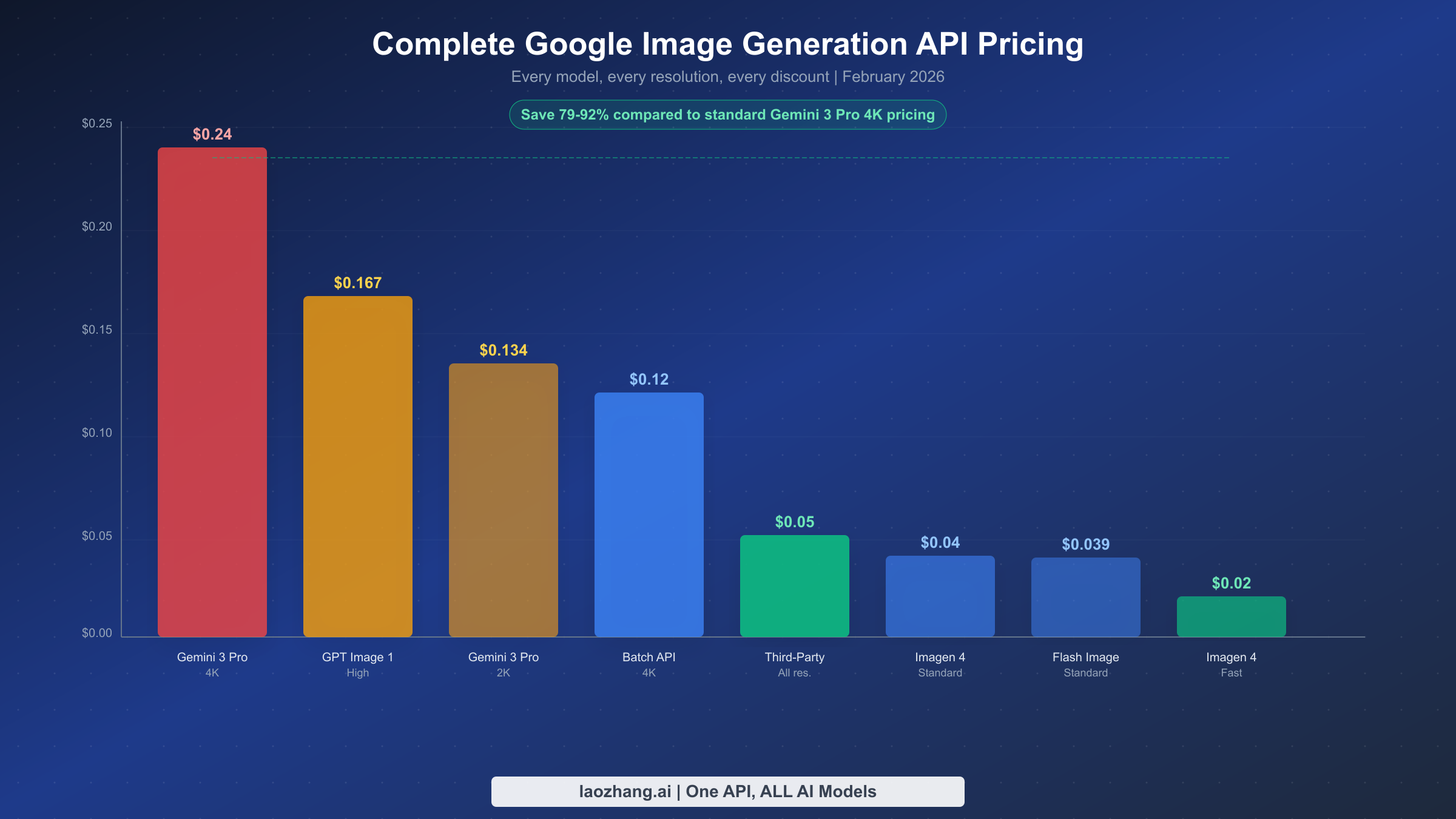
Understanding Google's image generation pricing requires looking beyond a single model. Google currently offers six distinct image generation models through its API, each targeting a different balance of quality, speed, and cost. The pricing structure uses a token-based system where output images consume a specific number of tokens, and the final per-image cost depends on both the model and the output resolution you select.
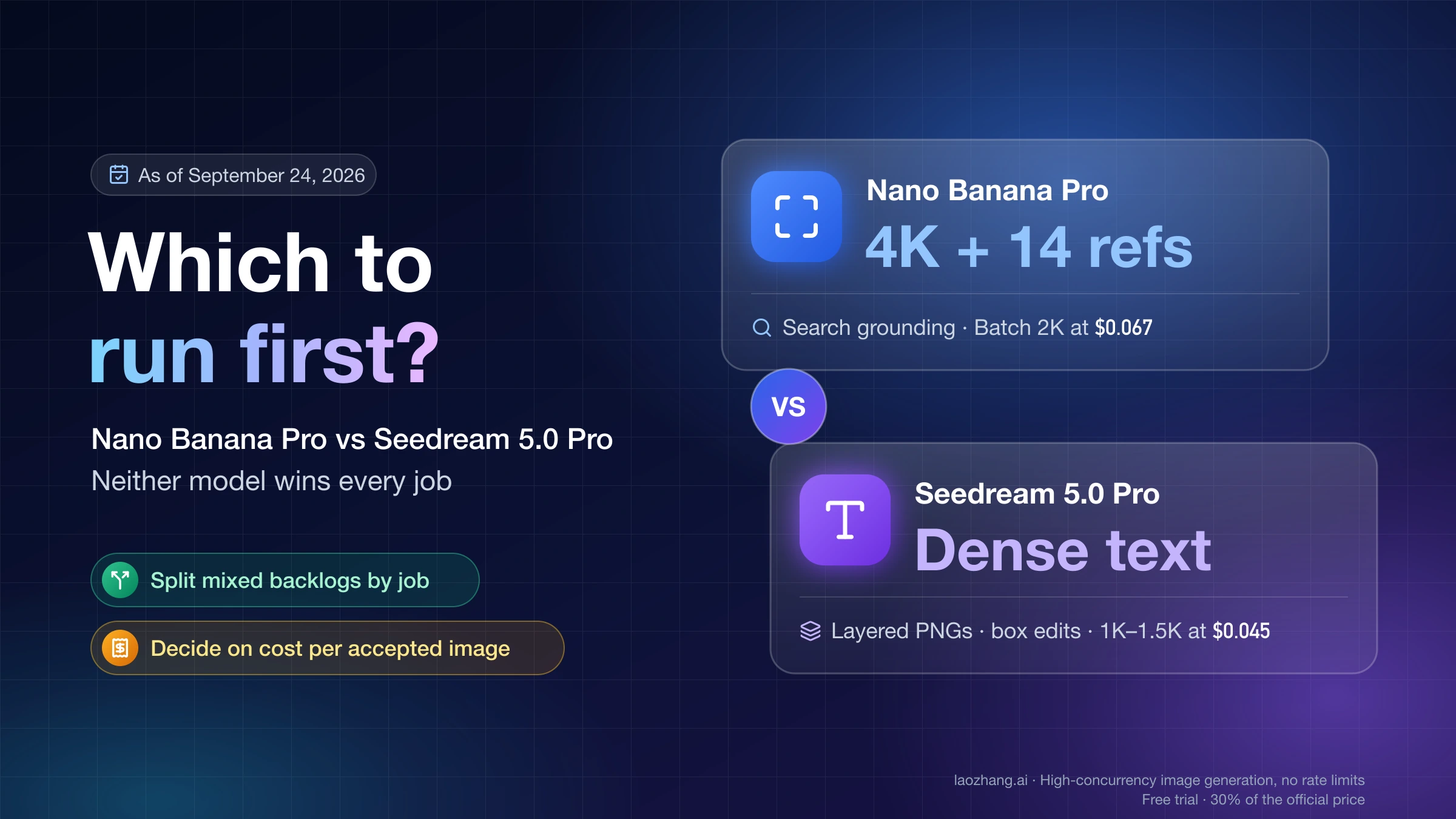
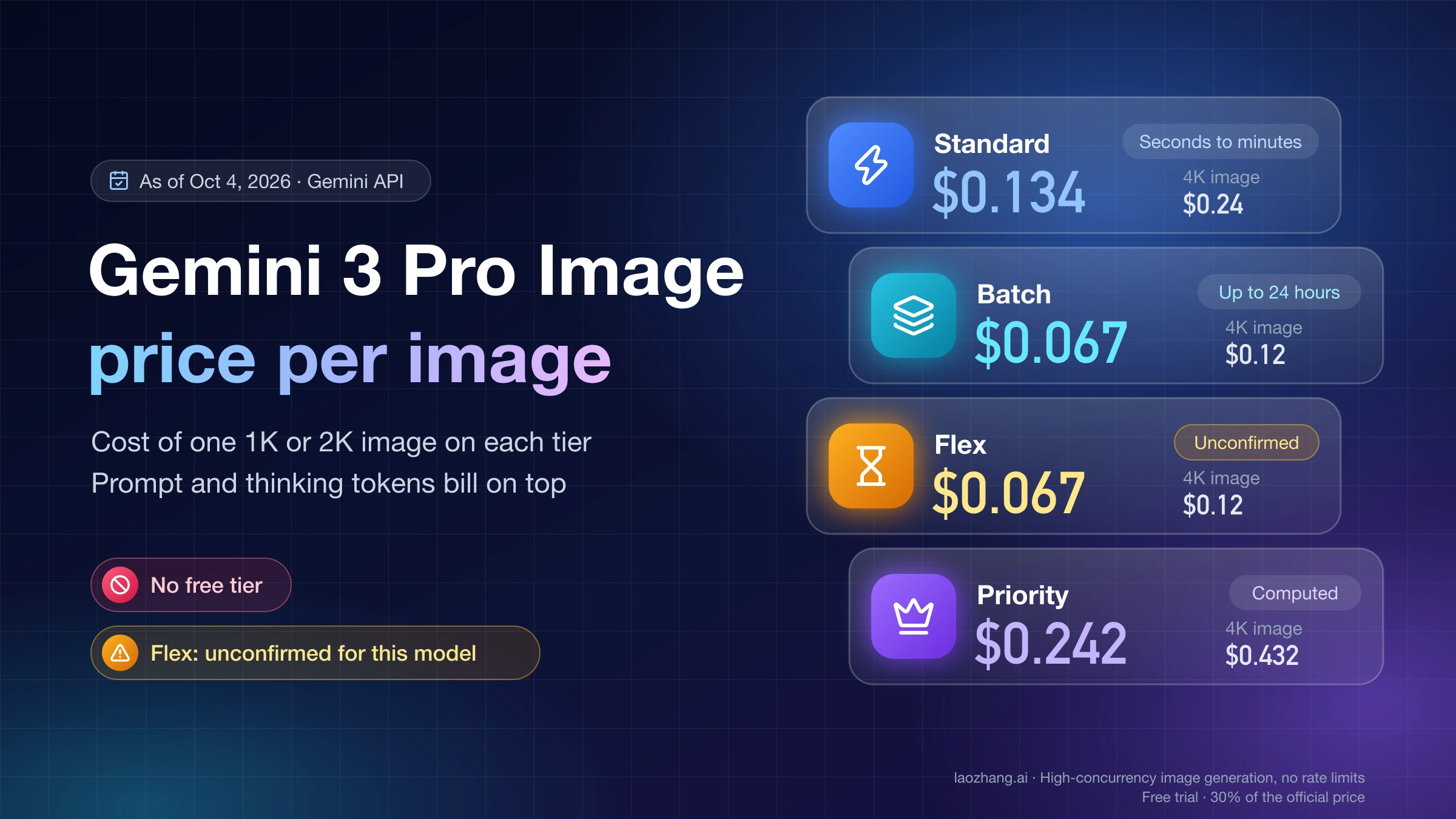
Gemini 3 Pro Image (also known as Nano Banana Pro) sits at the premium end of Google's lineup. This model produces the highest-quality images with state-of-the-art reasoning capabilities, including 94% text rendering accuracy across multiple languages and support for up to 14 reference images simultaneously (Google DeepMind, February 2026). A standard 1K-2K resolution image consumes 1,120 output tokens at $120 per million tokens, resulting in a per-image cost of $0.134. Stepping up to 4K resolution increases consumption to 2,000 output tokens, pushing the per-image cost to $0.24. These prices come directly from Google's official Gemini API pricing page, verified February 2026.
The mid-range option is Gemini 2.5 Flash Image (Nano Banana), which generates images at $0.039 each. While it lacks the reasoning depth and multi-reference capabilities of Gemini 3 Pro, it produces solid results for most standard use cases. This model is particularly cost-effective because it offers a single flat rate regardless of output resolution, eliminating the 4K premium that makes Gemini 3 Pro expensive at higher resolutions.
At the budget end, Google's Imagen 4 family provides three tiers. Imagen 4 Fast generates images at just $0.02 each — making it 92% cheaper than Gemini 3 Pro at 4K. Imagen 4 Standard costs $0.04, and Imagen 4 Ultra sits at $0.06. These models focus on pure image generation without the conversational understanding and editing capabilities that Gemini models provide. For applications that need standalone image creation from text prompts, Imagen 4 Fast represents the absolute lowest per-image cost in Google's entire ecosystem.
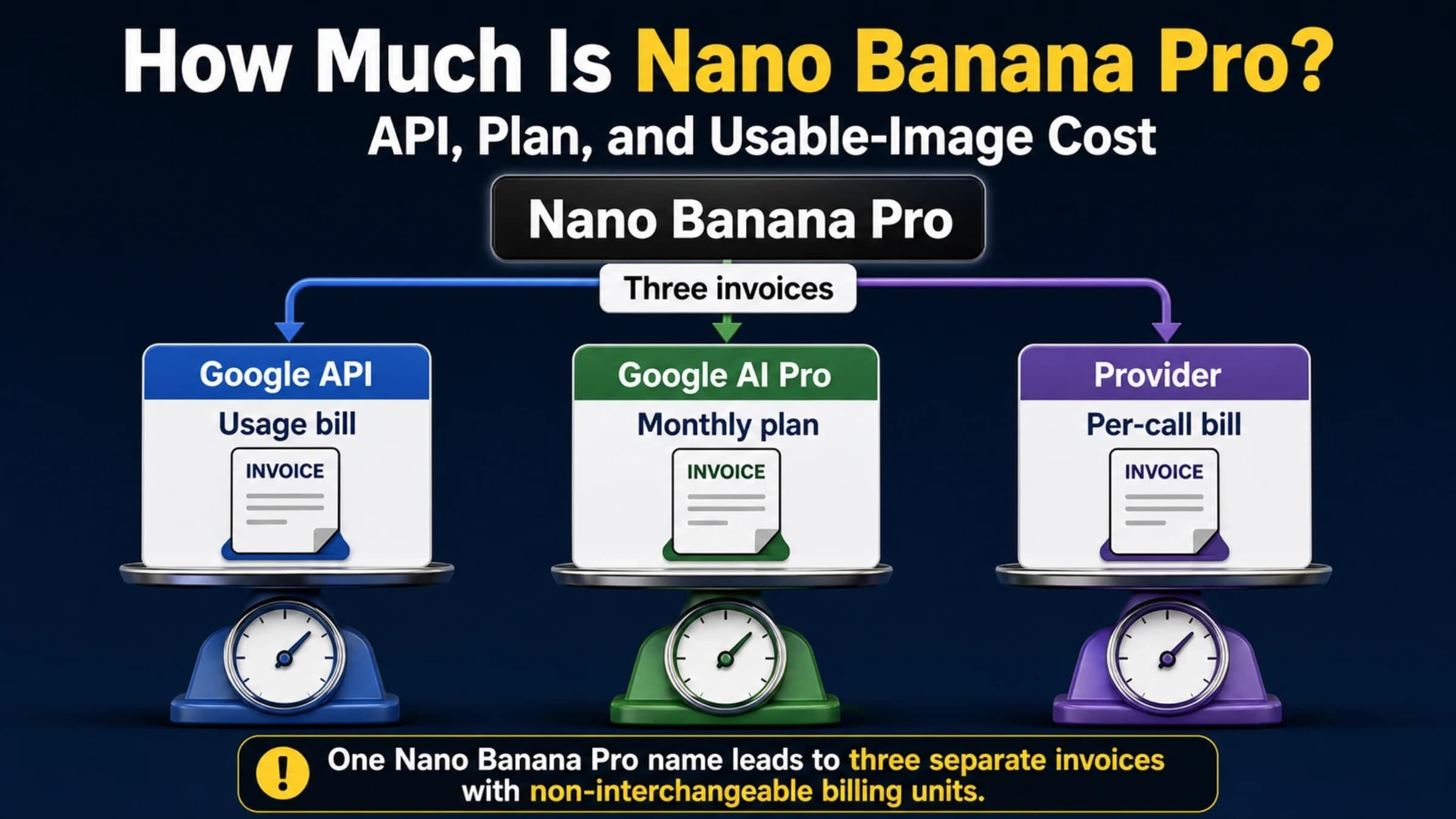
If you're looking for a deeper breakdown of Nano Banana Pro's specific pricing tiers across all resolution options, our detailed Nano Banana Pro pricing breakdown covers every configuration available.
| Model | Standard Price | Batch Price (50% off) | Resolution | Best For |
|---|---|---|---|---|
| Imagen 4 Fast | $0.02 | N/A | Up to 1K | High volume, cost-first |
| Gemini 2.5 Flash Image | $0.039 | $0.0195 | Up to 2K | General-purpose, balanced |
| Imagen 4 Standard | $0.04 | N/A | Up to 1K | Quality-focused generation |
| Imagen 4 Ultra | $0.06 | N/A | Up to 4K | Premium standalone images |
| Gemini 3 Pro Image (2K) | $0.134 | $0.067 | Up to 2K | Advanced editing, multi-ref |
| Gemini 3 Pro Image (4K) | $0.24 | $0.12 | Up to 4K | Studio-quality, max resolution |
The token math behind these prices reveals an important pattern. Gemini 3 Pro Image charges $2.00 per million input tokens (for your text prompt and any reference images) and $120.00 per million output tokens. A 2K output image consumes exactly 1,120 output tokens: multiply 1,120 by $0.00012 (the per-token rate) and you get $0.1344, which Google rounds to $0.134. Understanding this calculation matters because it means prompt complexity doesn't significantly affect your cost — the image output dominates your bill.
Real Monthly Costs — What 500 to 100,000 Images Actually Cost
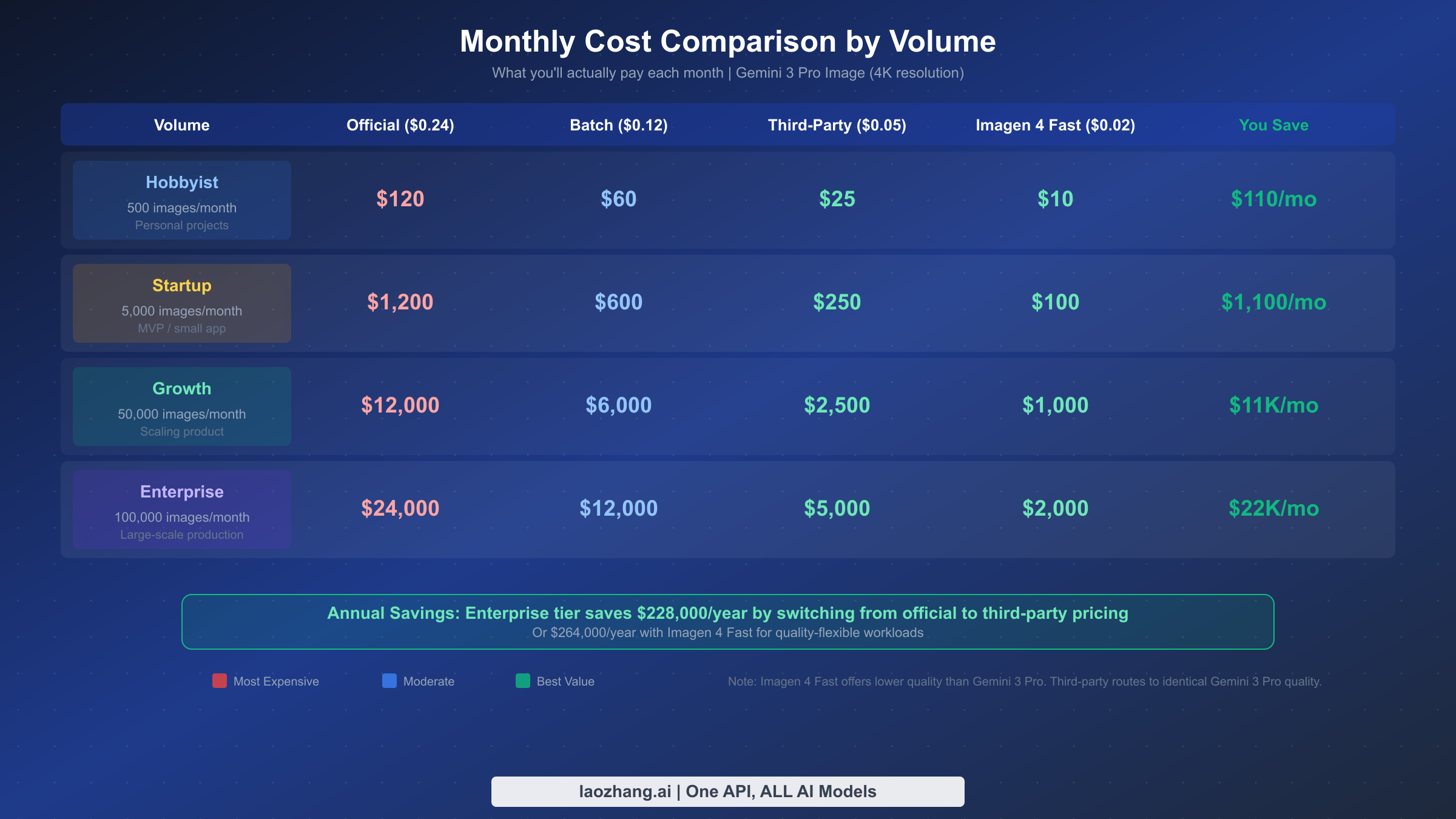
Per-image pricing becomes meaningful only when you translate it into monthly budgets. A developer generating 500 images per month for a personal project faces very different economics than a startup producing 50,000 images to power a product feature. The table below transforms abstract per-image costs into real monthly spending across four volume tiers, using Gemini 3 Pro Image at 4K resolution as the baseline since that is what most developers searching for "cheap Gemini 3 Pro Image API" are trying to optimize.
The hobbyist generating 500 images per month would pay $120 using official Gemini 3 Pro pricing, $60 with the Batch API, $25 through a third-party provider at $0.05 flat, or just $10 using Imagen 4 Fast. At this scale, the absolute dollar savings are modest — $95 per month between the most and least expensive options — but the percentage savings (92%) remain substantial.
The startup generating 5,000 images monthly starts to feel real financial pressure. Official pricing runs $1,200 per month, while a third-party provider drops that to $250 — saving $950 monthly or $11,400 annually. At this volume, choosing the right pricing tier isn't an optimization exercise; it's a meaningful business decision that affects runway and profitability. Many early-stage AI startups discover that their image generation API costs represent their second-largest infrastructure expense after compute, making these savings directly impactful.
Growth-stage companies generating 50,000 images per month face a stark contrast. Official Gemini 3 Pro pricing would cost $12,000 monthly, while third-party access at $0.05 per image brings the same Gemini 3 Pro quality for $2,500 — a savings of $9,500 every month, or $114,000 annually. For comparison, that annual savings exceeds the cost of a junior developer's salary in many markets.
At the enterprise level of 100,000 images per month, the numbers become impossible to ignore. Official pricing would cost $24,000 monthly ($288,000 annually), while third-party pricing compresses this to $5,000 monthly ($60,000 annually). The $228,000 annual savings could fund significant engineering resources or product development. Companies at this scale should also explore Google's enterprise Vertex AI pricing, which offers negotiated rates for committed volumes, though specific enterprise pricing requires contacting Google's sales team directly.
One critical nuance that most pricing guides overlook: these calculations assume every generation succeeds on the first attempt. In production environments, image generation APIs have non-trivial failure rates due to content policy filters, server capacity limits, and prompt interpretation issues. The actual cost should include a 5-15% buffer for retries, which means your effective per-image cost is slightly higher than the headline rate. If you encounter server capacity issues with Gemini models, understanding how to handle Google server capacity limits can help minimize wasted API calls.
Five Proven Strategies to Cut Your Image Generation Costs
Reducing image generation costs goes beyond simply picking the cheapest provider. The most effective approach combines multiple strategies, each targeting a different aspect of your usage pattern. These five techniques can be applied independently or stacked together, with combined savings reaching 80% or more compared to naive usage of the standard API.
Strategy 1: Leverage the Batch API for 50% Instant Savings. Google's Batch API is the single highest-impact optimization available to any developer using Gemini image models. By submitting generation requests as batch jobs that process within a 24-hour window rather than requiring immediate results, Google applies a flat 50% discount to all token prices. Gemini 3 Pro Image at 4K drops from $0.24 to $0.12, and Gemini 2.5 Flash Image drops from $0.039 to $0.0195. The tradeoff is latency: Google guarantees completion within 24 hours, though most batches finish in 2-4 hours in practice. This strategy works best for pre-generated content, marketing assets, catalog images, and any workflow where images aren't needed in real-time.
Strategy 2: Select the Right Model for Each Task. Not every image needs Gemini 3 Pro's premium capabilities. A hybrid routing strategy that sends different requests to different models based on complexity can dramatically reduce average costs. Use Gemini 3 Pro for tasks that need multi-reference generation, complex text rendering, or 4K output. Route simpler prompts — product thumbnails, social media graphics, decorative images — to Imagen 4 Fast at $0.02 per image. This single model-routing decision can reduce your average per-image cost from $0.24 to approximately $0.05-$0.08, depending on your workload mix.
Strategy 3: Optimize Output Resolution. The resolution jump from 2K to 4K increases Gemini 3 Pro's cost by 79% (from $0.134 to $0.24) while producing four times the pixels. Most web and mobile applications display images at far less than 4K resolution, meaning you may be paying a 79% premium for pixels your users never see. Audit your actual display sizes: if your application shows images at 1024px or smaller, generating at 2K resolution saves nearly $0.11 per image while still providing ample quality for sharp display at typical viewing sizes. For applications that need 4K resolution specifically, ensure you're actually using that resolution in production before paying the premium.
Strategy 4: Use Third-Party API Providers. Third-party providers offer Gemini 3 Pro Image access at $0.05 per image across all resolutions — a flat rate that represents 79% savings compared to official 4K pricing. These providers work by routing your API requests directly to Google's infrastructure through their own API keys, which means the actual image generation happens on Google's servers using the exact same model. The output quality is identical because the model doing the generation is identical. The cost difference exists because these providers purchase API access at volume-discounted rates and pass some of that savings to customers. Platforms like laozhang.ai offer OpenAI-compatible API endpoints, which means switching from an existing OpenAI integration requires changing only the base URL and API key — no code logic changes required.
Strategy 5: Cache and Reuse Wisely. If your application generates similar images for common requests, implementing a prompt-based caching layer can eliminate redundant API calls entirely. A simple hash of the prompt text and generation parameters can serve as a cache key, with cached results stored in cloud storage at a fraction of the API call cost. For applications with repetitive prompts (e.g., product category icons, standard template variations), caching can reduce effective API calls by 20-40%, though the actual savings depend heavily on your specific prompt diversity.
Third-Party Providers — Same Gemini Quality at 60-79% Off
Understanding how third-party API providers can offer the same model at lower prices requires knowing the technical architecture. When you call a third-party provider's API with a Gemini 3 Pro Image request, your prompt is forwarded to Google's Generative AI infrastructure using the provider's Google Cloud credentials. Google's servers process the request using the exact same Gemini 3 Pro Image model, generate the output image, and return it through the provider's relay. The image you receive is generated by the same model, on the same hardware, with the same SynthID watermarking as a direct Google API call.
The price difference exists because third-party providers operate at significant scale. By aggregating requests from hundreds or thousands of developers, these providers qualify for volume pricing tiers from Google Cloud that individual developers typically cannot access. They also benefit from geographic arbitrage in some cases, routing requests through regions with lower compute costs. The providers pass a portion of these savings to end users while retaining a margin that sustains their business.
When evaluating providers, three factors matter beyond raw price. First, API compatibility: providers offering an OpenAI-compatible endpoint (like laozhang.ai) allow you to switch by changing two environment variables rather than rewriting integration code. This also makes it easy to implement multi-provider fallback — if one provider experiences issues, your code can automatically route to another with zero changes to the generation logic. Second, rate limits: verify whether the provider imposes per-user request limits, as some providers throttle individual accounts during peak demand. Third, reliability: while providers route to Google's infrastructure, the relay layer adds a potential point of failure. Providers with established track records and transparent uptime monitoring deserve preference over newcomers.
| Factor | Official Google API | Third-Party (laozhang.ai) | Batch API |
|---|---|---|---|
| Price (4K) | $0.24 | $0.05 | $0.12 |
| Price (2K) | $0.134 | $0.05 | $0.067 |
| Latency | Real-time (~3-8s) | Real-time (~4-10s) | Up to 24 hours |
| Quality | Baseline | Identical | Identical |
| API Format | Google Generative AI | OpenAI-compatible | Google Batch |
| Rate Limits | Google's standard | Provider-dependent | Higher quotas |
| Free Trial | No free image tier | $10 credits | No |
One important consideration: SynthID watermarking is embedded in every image regardless of the access method. All images generated through Gemini 3 Pro Image — whether via direct API, batch processing, or third-party routing — contain Google's invisible digital watermark identifying them as AI-generated. This is a model-level behavior that cannot be bypassed, which means commercial use of generated images must comply with applicable AI-generated content disclosure requirements regardless of which access method you choose.
Gemini vs OpenAI — The 2026 AI Image API Pricing War
Developers choosing an image generation API in 2026 face a genuine two-horse race between Google's Gemini ecosystem and OpenAI's GPT Image family. The pricing structures differ fundamentally, and the right choice depends on your specific requirements across four dimensions: cost, quality, capabilities, and integration friction.
On pure cost, Google wins at every comparable tier. Imagen 4 Fast at $0.02 per image undercuts OpenAI's cheapest option (GPT Image 1 Mini at $0.005-$0.036 depending on resolution) at comparable quality levels. At the premium end, Gemini 3 Pro Image at $0.134 for 2K resolution is 20% cheaper than OpenAI's GPT Image 1 High at $0.167, while delivering higher maximum resolution (4K vs 2K). When third-party pricing is factored in, Gemini 3 Pro at $0.05 through providers like laozhang.ai becomes 70% cheaper than GPT Image 1 High — a substantial gap for production workloads.
Quality differences between the two platforms are more nuanced than pricing suggests. Gemini 3 Pro Image excels at text rendering (94% accuracy), multi-reference consistency, and high-resolution output up to 4K. GPT Image 1 strengths include instruction-following accuracy and stylistic versatility. For most commercial applications, both platforms produce professional-grade output, and the quality difference is less significant than the cost difference. For a comprehensive comparison across all leading image generation models, our AI image generation API comparison for 2026 provides detailed benchmarks.
| Dimension | Google (Gemini 3 Pro) | OpenAI (GPT Image 1) |
|---|---|---|
| Cheapest Official | $0.02 (Imagen 4 Fast) | $0.005 (Mini, Low) |
| Premium Quality | $0.134-$0.24 | $0.167 |
| Third-Party | $0.05 (flat) | $0.08-$0.12 |
| Max Resolution | 4K (4096x4096) | 2K (2048x2048) |
| Text Rendering | 94% accuracy | ~85% accuracy |
| Reference Images | Up to 14 | Up to 4 |
| Batch Discount | 50% off | Not available |
| Free Tier | Gemini 2.5 Flash only | ChatGPT free (2-3/day) |
The integration story also favors Google for developers already on Google Cloud, while OpenAI's ubiquitous API format means virtually every AI framework and library supports it natively. Third-party providers that offer OpenAI-compatible endpoints for Gemini models effectively eliminate this integration friction, letting you use Gemini's pricing advantage with OpenAI's familiar API format.
Which Option Should You Choose? (Decision Framework)
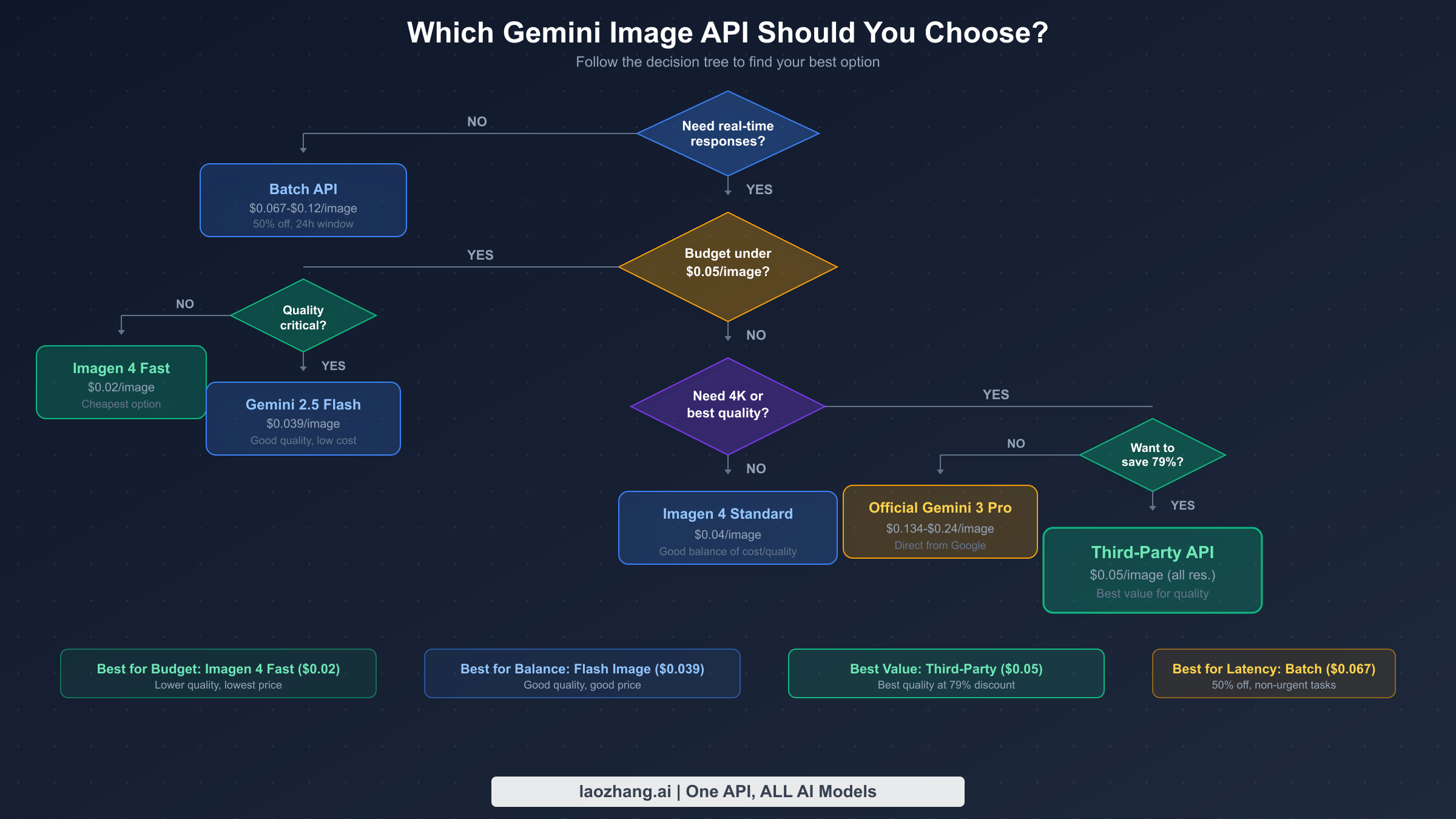
Choosing the right image generation API depends on three questions: What's your quality requirement? What's your budget constraint? Can you tolerate latency?
If you need the absolute lowest cost and can accept moderate quality, use Imagen 4 Fast at $0.02 per image. This model handles standard image generation tasks well but lacks the reasoning depth, text rendering accuracy, and multi-reference capabilities of Gemini 3 Pro. It's ideal for high-volume applications where image quality is "good enough" rather than exceptional — think placeholder images, social media thumbnails, or background decorations.
If you need Gemini 3 Pro's premium quality but want maximum savings, use a third-party API provider at $0.05 per image. This delivers identical output quality to the official API because the same model generates the images, but at 79% lower cost for 4K resolution. The slight tradeoff is an additional 1-2 seconds of latency from the routing layer and dependence on the provider's uptime. For most production applications, this is the sweet spot — premium quality at a fraction of the cost.
If latency doesn't matter and you want official Google pricing, use the Batch API at $0.067-$0.12 per image (50% off standard rates). This is Google's own discounting mechanism, so there's zero provider risk. The tradeoff is that results arrive within a 24-hour window rather than in real-time. This works perfectly for pre-generated content, marketing batch creation, and any workflow that can queue work overnight.
If you need real-time responses, premium quality, and prefer direct Google access, use the standard Gemini 3 Pro Image API at $0.134-$0.24 per image. This is the most expensive option but provides the highest reliability, direct Google support, and zero dependency on third-party infrastructure. Enterprise applications with strict vendor requirements or compliance needs may require this direct access path.
If you want a balance of cost and quality for general-purpose use, Gemini 2.5 Flash Image at $0.039 per image (or $0.0195 in batch mode) offers strong image generation capabilities at roughly 84% less than Gemini 3 Pro's premium pricing. It's a pragmatic choice for applications that need good images without paying for Gemini 3 Pro's advanced reasoning features.
Getting Started — Production-Ready Code Examples
Getting your first image generated through the cheapest access method takes under five minutes. The code examples below cover the three most common integration paths: the official Google API, a third-party provider with OpenAI-compatible format, and the Batch API. Each example includes error handling and retry logic suitable for production deployment.
Official Google Generative AI SDK:
import google.generativeai as genai
import time

genai.configure(api_key="YOUR_GOOGLE_API_KEY")

def generate_image(prompt: str, model: str = "gemini-3-pro-image-preview", max_retries: int = 3):
    """Generate an image with retry logic for production use."""
    for attempt in range(max_retries):
        try:
            model_client = genai.GenerativeModel(model)
            response = model_client.generate_content(
                prompt,
                generation_config={"response_mime_type": "image/png"}
            )
            if response.candidates and response.candidates[0].content.parts:
                return response.candidates[0].content.parts[0].inline_data.data
        except Exception as e:
            if "RESOURCE_EXHAUSTED" in str(e) and attempt < max_retries - 1:
                wait_time = 2 ** attempt * 5  # Exponential backoff: 5s, 10s, 20s
                print(f"Rate limited. Retrying in {wait_time}s...")
                time.sleep(wait_time)
            else:
                raise
    return None

# Generate at $0.134/image (2K) or $0.24/image (4K)
image_data = generate_image("A serene mountain landscape at sunset with golden light")
Third-Party Provider (OpenAI-Compatible Format):
from openai import OpenAI
import time

# laozhang.ai uses OpenAI-compatible format — change only base_url and api_key
client = OpenAI(
    base_url="https://api.laozhang.ai/v1",
    api_key="YOUR_LAOZHANG_API_KEY"
)

def generate_image_cheap(prompt: str, max_retries: int = 3):
    """Generate via third-party at $0.05/image (all resolutions)."""
    for attempt in range(max_retries):
        try:
            response = client.images.generate(
                model="gemini-3-pro-image-preview",
                prompt=prompt,
                n=1,
                size="2048x2048"  # Flat rate — same price for any resolution
            )
            return response.data[0].url
        except Exception as e:
            if attempt < max_retries - 1:
                time.sleep(2 ** attempt * 3)
            else:
                raise
    return None

image_url = generate_image_cheap("A professional headshot with studio lighting")
If you need help obtaining your API key for Gemini image generation, our step-by-step guide to getting your API key walks through the entire process.
Multi-Provider Fallback (Production Architecture):
from openai import OpenAI
import os

# Configure multiple providers for redundancy
PROVIDERS = [
    {"name": "laozhang", "base_url": "https://api.laozhang.ai/v1",
     "key": os.getenv("LAOZHANG_API_KEY"), "cost": 0.05},
    {"name": "google", "base_url": "https://generativelanguage.googleapis.com/v1beta",
     "key": os.getenv("GOOGLE_API_KEY"), "cost": 0.134},
]

def generate_with_fallback(prompt: str):
    """Try each provider in order, falling back on failure."""
    for provider in PROVIDERS:
        try:
            client = OpenAI(base_url=provider["base_url"], api_key=provider["key"])
            response = client.images.generate(
                model="gemini-3-pro-image-preview", prompt=prompt, n=1
            )
            print(f"Generated via {provider['name']} at ${provider['cost']}/image")
            return response.data[0].url
        except Exception as e:
            print(f"{provider['name']} failed: {e}. Trying next...")
            continue
    raise RuntimeError("All providers failed")
These code patterns work with any provider offering an OpenAI-compatible endpoint. The multi-provider fallback approach is particularly valuable in production because it ensures your application continues generating images even if your primary provider experiences downtime.
Frequently Asked Questions
Is the image quality from third-party providers identical to the official API? Yes, because third-party providers route your request to Google's own infrastructure. The same Gemini 3 Pro Image model generates the image on Google's hardware. The output includes the same SynthID watermark and undergoes the same safety filtering. The only difference is the network path your request takes to reach Google's servers.
What are the free tier options for Gemini image generation? Google AI Studio provides free access to Gemini 2.5 Flash Image (not Gemini 3 Pro Image) with approximately 500 requests per day. Gemini 3 Pro Image is not available on the free tier — it requires paid API access. For details on maximizing your free usage, check our Gemini API free tier limits and quotas guide.
Can I use Gemini-generated images commercially? Yes, images generated through the Gemini API are available for commercial use under Google's terms of service. However, all images include SynthID watermarks, and you should comply with applicable disclosure requirements for AI-generated content in your jurisdiction.
How does the Batch API 50% discount work? You submit a file containing multiple generation requests to Google's Batch API. Instead of processing each request immediately, Google queues them for processing within a 24-hour window. In exchange for this flexible timing, every token price is reduced by exactly 50%. Most batches complete in 2-4 hours, though the 24-hour window is the guaranteed SLA.
What happens if a generation fails? Do I still get charged? Failed generations that return an error before producing an image are not charged. However, generations that trigger safety filters after partial processing may consume some tokens. Implementing retry logic with exponential backoff (as shown in the code examples) helps manage this cost efficiently.
Making the Most of Every Dollar
The AI image generation pricing landscape in 2026 offers developers more cost-effective options than ever before. Whether you choose Google's Imagen 4 Fast at $0.02 for budget-sensitive workloads, third-party access to Gemini 3 Pro at $0.05 for premium quality at 79% savings, or the Batch API at 50% off for time-flexible processing, the key insight is that paying the standard $0.24 per 4K image is rarely necessary.
The most effective approach combines multiple strategies: route simple tasks to cheaper models, batch non-urgent work for 50% savings, and use third-party providers for premium-quality real-time generation at deeply discounted rates. A startup generating 5,000 images monthly can reduce annual spending from $14,400 (official pricing) to approximately $3,000 (hybrid strategy) — savings that compound every month your product grows.
Start with the third-party provider approach for immediate savings with zero code changes (just swap two environment variables), then layer in model routing and batch processing as your usage scales. The code examples in this guide are production-ready — copy them, configure your API keys, and start generating images at a fraction of the standard cost today.
Sources1
External pages this guide links to, in the order they appear. Last updated Feb 24, 2026.
Sources1
External pages this guide links to, in the order they appear. Last updated Feb 24, 2026.