Google's Server Capacity Has Reached Its Limit: Complete Fix Guide for All Error Types (2026)
Getting 'Google's server capacity has reached its limit'? This guide covers all three error types (429 rate limit, 429 capacity exhausted, 503 no capacity), verified February 2026 quota data, and 8 proven fix methods including tier upgrades, exponential backoff, and multi-provider fallback architecture.
On this page
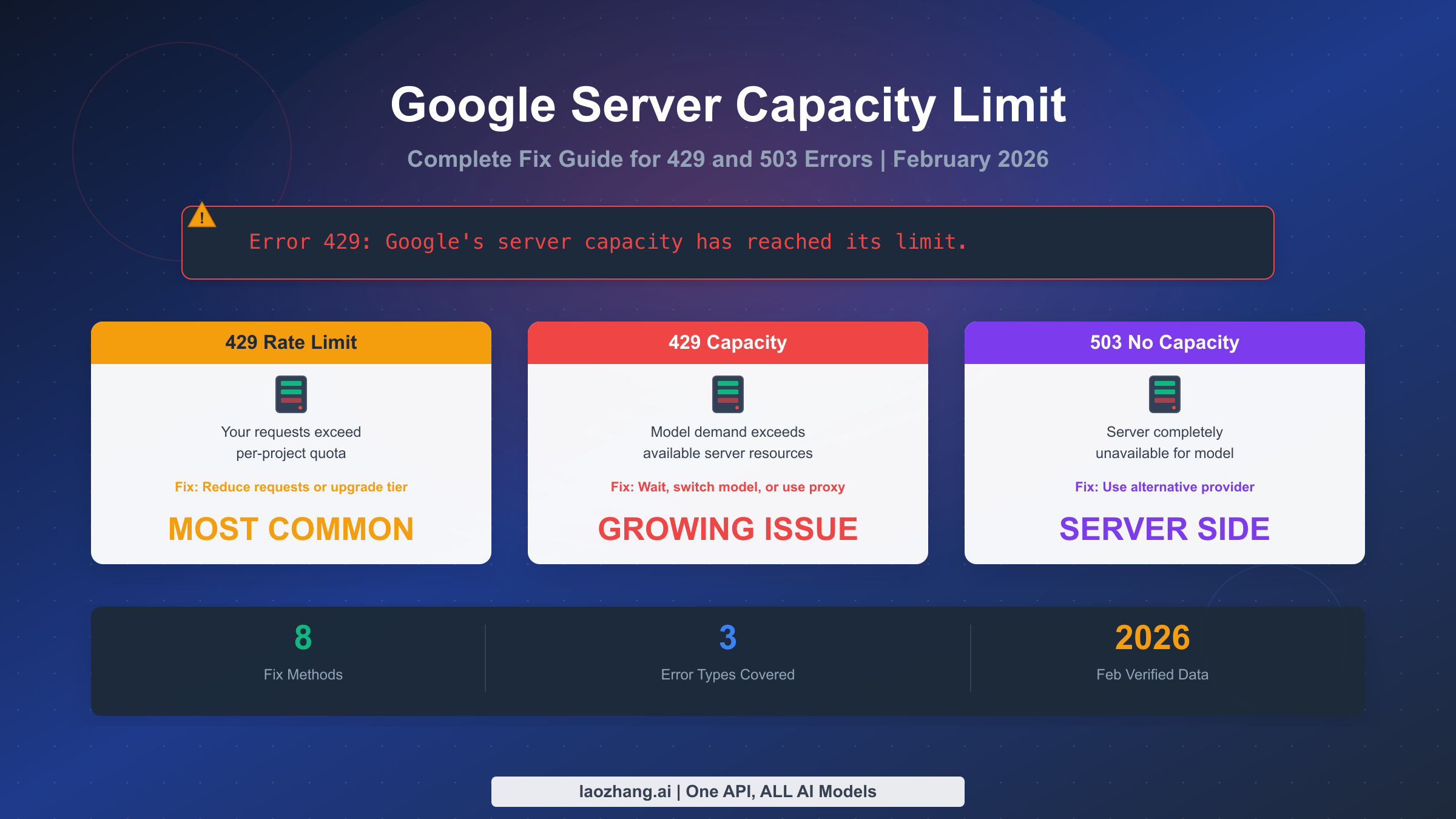
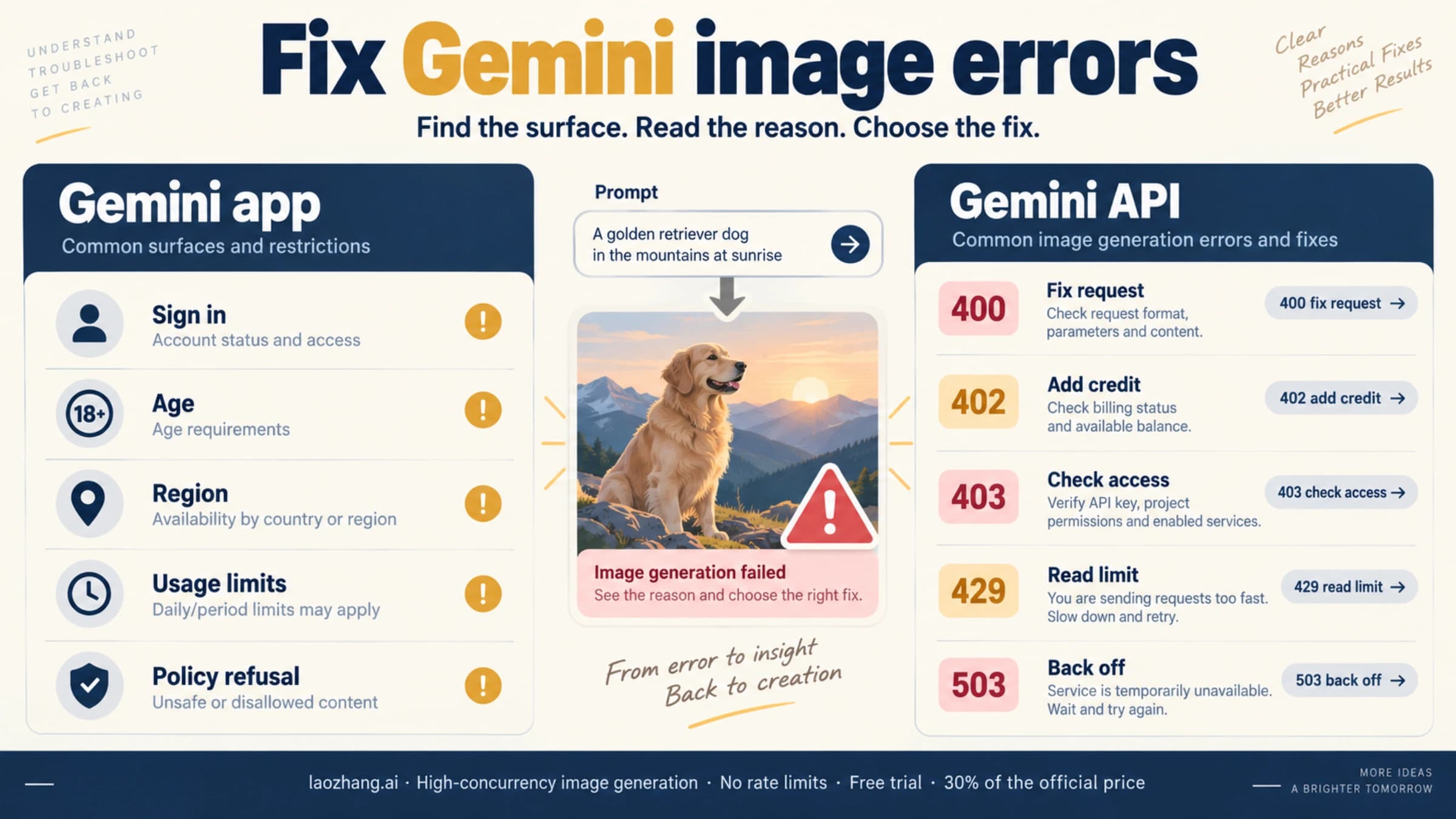
When Google returns "server capacity has reached its limit," it actually means one of three completely different things, and the fix depends entirely on which type you have. As of February 2026, Google's Gemini API serves millions of developers worldwide, but capacity-related errors have surged dramatically since December 2025 when Google slashed free tier quotas. This guide covers all three error types with verified data and actionable solutions so you can get back to building within minutes.
TL;DR
Google capacity errors fall into three categories: HTTP 429 rate limit (you exceeded your quota — fix by reducing requests or upgrading tier), HTTP 429 capacity exhausted (Google's servers are overloaded — switch models or use a proxy), and HTTP 503 no capacity (model completely unavailable — wait or use an alternative provider). Most articles conflate all three, leading developers to apply the wrong fix. The single fastest solution for rate limit errors is enabling Cloud Billing, which instantly upgrades you from 5 RPM to 150+ RPM at zero upfront cost.
What "Google's Server Capacity Has Reached Its Limit" Actually Means
The error message "Google's server capacity has reached its limit" has become one of the most searched Gemini API issues in early 2026, and for good reason. A Reddit thread posted on February 21, 2026 in r/Bard accumulated over 50 comments within 24 hours, with developers reporting they could not use even basic Gemini features. But this error message is frustratingly vague because it conflates several fundamentally different problems into a single phrase that tells you almost nothing about what actually went wrong or how to fix it.
To understand what is happening, you need to know that Google's Gemini API operates on a tiered quota system where each developer project gets a specific allocation of requests per minute (RPM), tokens per minute (TPM), and requests per day (RPD). When you exceed any of these limits, Google returns an HTTP 429 error. However, a completely separate issue occurs when Google's own servers do not have enough compute capacity to handle the total demand from all users combined. In that case, you can get a 429 or even a 503 error despite being well within your personal quota. These two scenarios require completely different solutions, and applying the wrong fix wastes your time while your application stays broken.
The confusion intensified after December 7, 2025, when Google significantly reduced the quotas for its free tier. Before that date, the Gemini Flash model offered roughly 250 requests per day on the free tier. After the change, some configurations saw this drop to as low as 20-50 RPD. Thousands of automations, chatbots, and development projects that had been working fine suddenly broke overnight, flooding forums and issue trackers with complaints. What made the situation worse was that Google did not clearly communicate the change in advance, leaving developers to discover it through their own error logs.
The timeline of incidents reveals a persistent pattern rather than isolated events. In November 2025, multiple developers on the official Google AI developer forum reported receiving 429 errors on Tier 1 accounts despite their usage being under 1% of their stated quota. A Google developer advocate named Chunduri V acknowledged the issue and stated that the team had "pushed a fix" on December 18, 2025. Yet by February 2026, the same pattern re-emerged with reports of "No capacity available for model gemini-2.5-pro" appearing as a GitHub issue on the google-gemini repository. This pattern suggests that Google's Gemini infrastructure is experiencing growing pains as demand outstrips the rate at which they can provision new GPU clusters.
The impact extends beyond individual developers. Entire businesses that built their products on top of Google's Gemini API found themselves in crisis when the December quota changes hit. Startups that had launched with free tier access during their beta period suddenly needed to either pay for Tier 1 access or redesign their applications to work within the drastically reduced limits. This situation highlights a broader challenge in the AI API ecosystem: the gap between what free tiers promise during onboarding and what they deliver at scale is often much larger than developers expect, and changes can happen without adequate notice.
Understanding this context is essential because it means the error you are seeing right now might not be your fault at all. The first step in fixing it is correctly diagnosing which of the three error types you actually have, which is exactly what the next section covers.
The 3 Types of Google Capacity Errors (And How to Tell Them Apart)
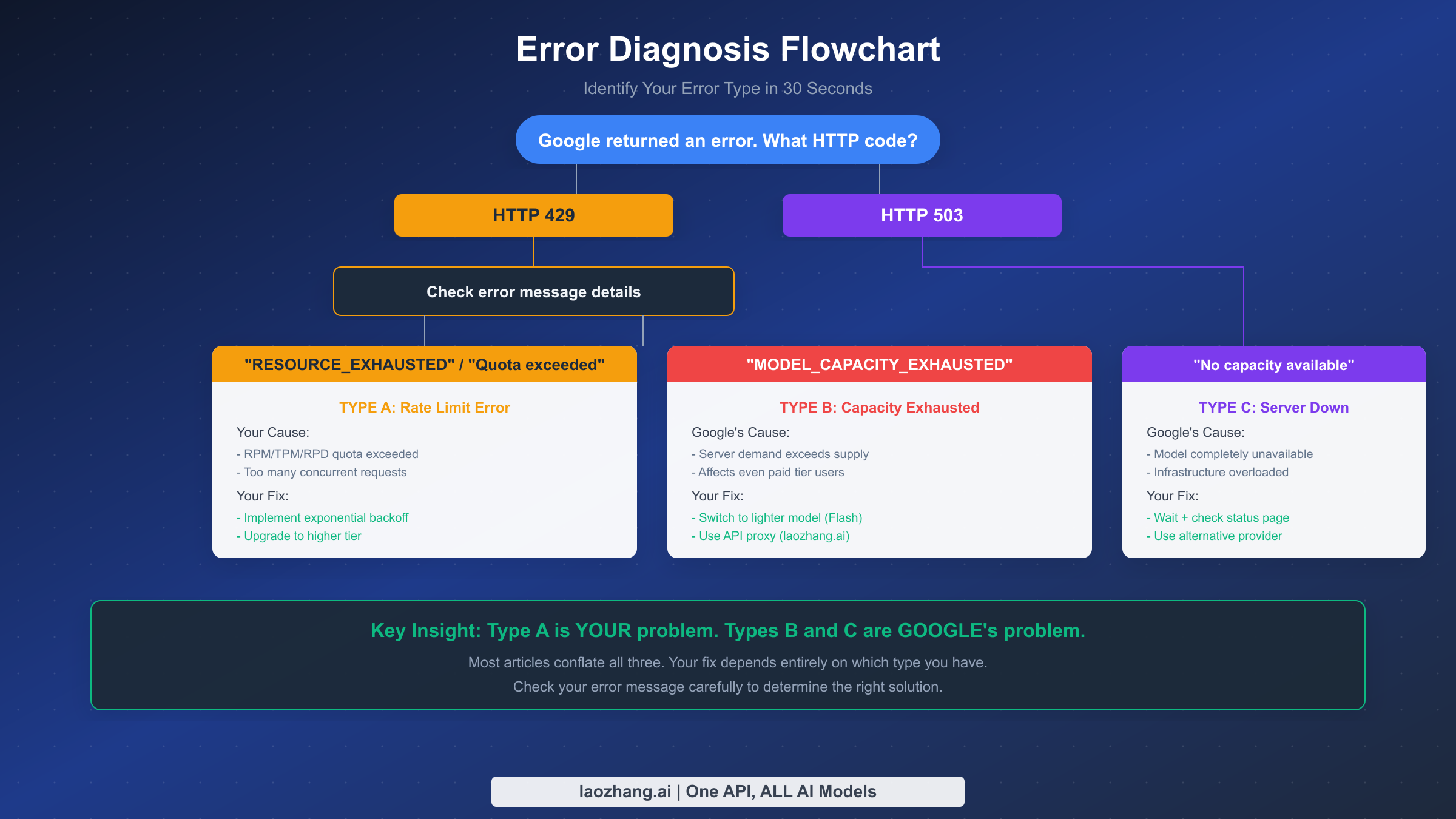
Most troubleshooting guides treat all Google capacity errors as the same problem, which is like treating a flat tire and a broken engine with the same repair manual. The error message you see in your logs contains specific keywords that tell you exactly which type you are dealing with, and each type has a fundamentally different cause and solution. Here is how to diagnose yours in under 30 seconds by checking the HTTP status code and the error message body.
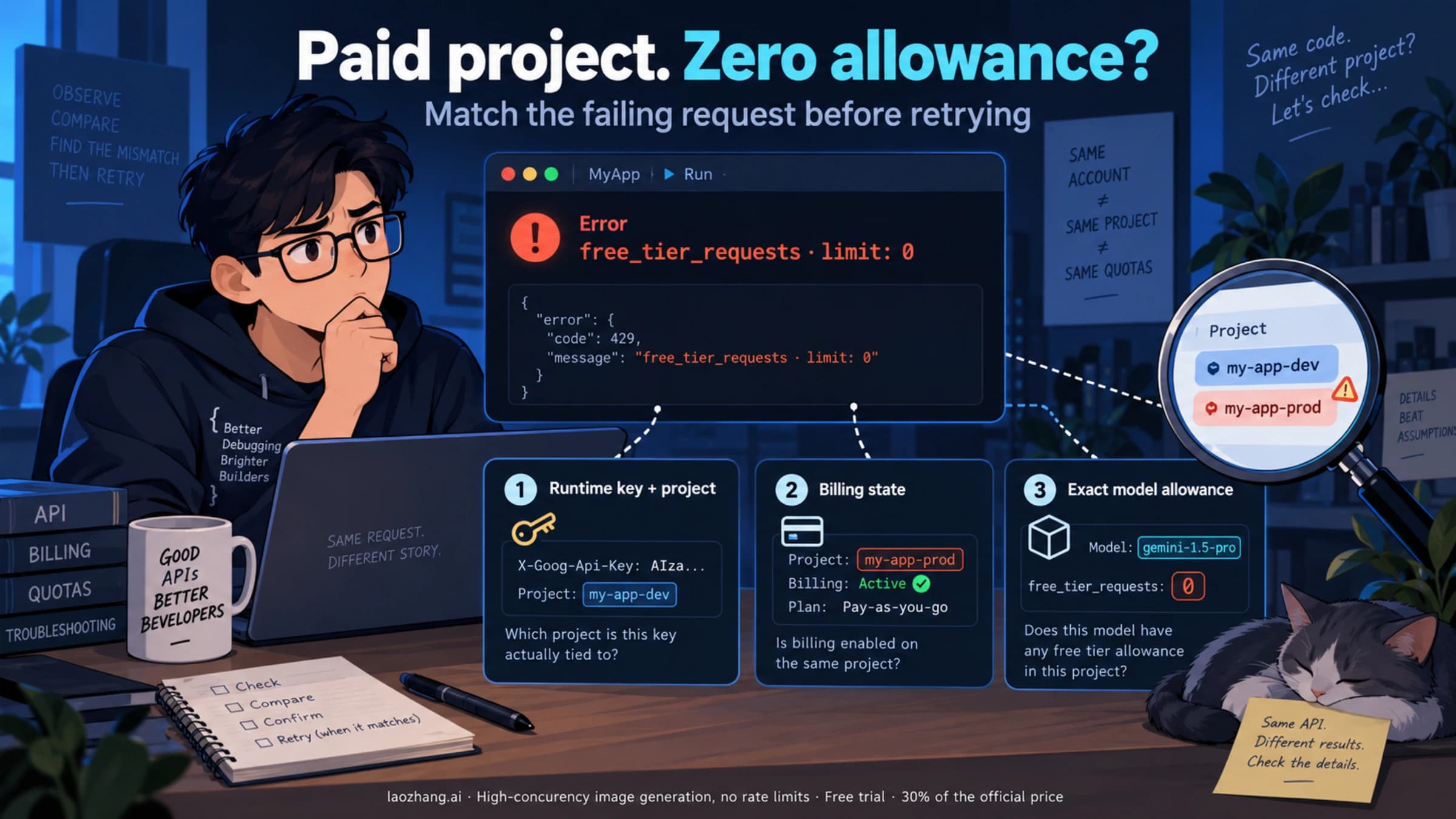
Type A: Rate Limit Error (HTTP 429 — RESOURCE_EXHAUSTED) is the most common type and means that your specific project has exceeded one of its allocated quotas. The error response body will contain the phrase "Resource has been exhausted" or reference "quota exceeded." This happens when your application sends more requests per minute than your tier allows, when you exceed your daily request limit, or when you hit the tokens-per-minute ceiling with large prompts. The critical thing to understand about Type A errors is that they are entirely within your control to fix. You can reduce your request rate, optimize your prompts to use fewer tokens, or upgrade to a higher tier with more generous quotas.
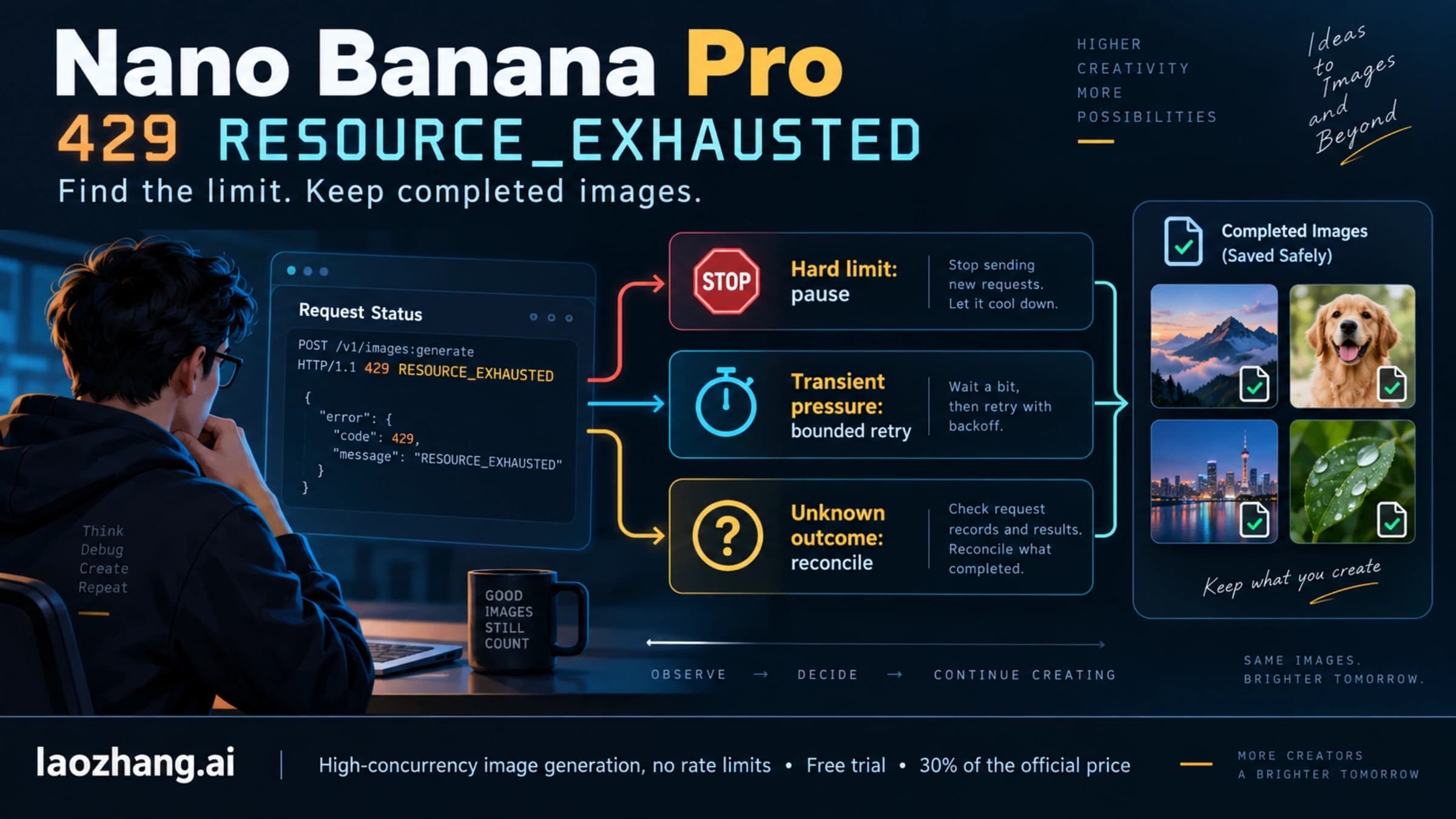
Type B: Capacity Exhausted Error (HTTP 429 — MODEL_CAPACITY_EXHAUSTED) looks similar to Type A at first glance because it also returns an HTTP 429 status code. However, the error message body is different and will contain "MODEL_CAPACITY_EXHAUSTED" or "You have exhausted your capacity on this model." This error means that Google's servers for that specific model are under heavy load and cannot accept new requests from anyone, regardless of their tier or remaining quota. Even paid Tier 1 and Tier 2 users experience Type B errors during peak demand periods. You cannot fix this by reducing your request rate because the problem is on Google's side, not yours.
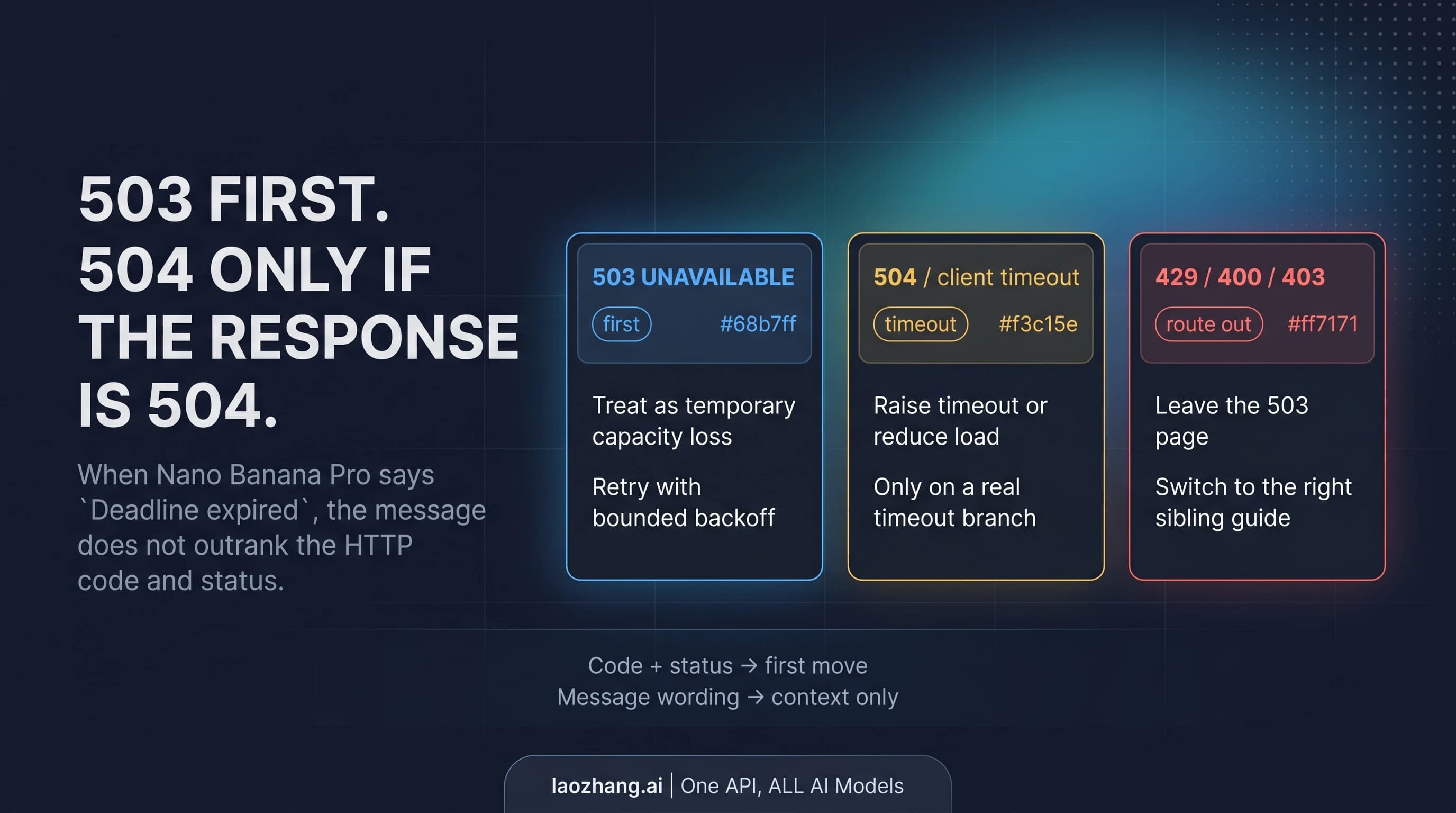
Type C: Server Down Error (HTTP 503 — No Capacity Available) is the most severe and means the model is completely unavailable on Google's servers. The error message will say "No capacity available for model {model_name} on the server." Unlike Type B where capacity is limited, Type C means there is zero capacity available. This typically happens during major outages, infrastructure maintenance, or when a specific model version has been deprecated or is being updated. A notable example occurred on February 16, 2026, when multiple users reported 503 errors for gemini-2.5-pro that lasted several hours.
The diagnostic process is straightforward. First, check the HTTP status code: if it is 429, you have either Type A or Type B. If it is 503, you have Type C. To distinguish Type A from Type B with a 429 response, examine the error message body. If it mentions "quota" or "RESOURCE_EXHAUSTED," it is Type A. If it mentions "MODEL_CAPACITY_EXHAUSTED" or "capacity," it is Type B. This distinction matters enormously because the fixes are completely different. Applying a Type A fix like reducing your request rate to a Type B problem will do nothing because you were never exceeding your quota in the first place. For a detailed comparison of how different Gemini models handle these limits, see our latest Gemini 3 models comparison which covers the newest model variants and their capacity characteristics.
| Error Type | HTTP Code | Key Message | Whose Problem? | Primary Fix |
|---|---|---|---|---|
| Type A: Rate Limit | 429 | "RESOURCE_EXHAUSTED" | Yours | Reduce requests or upgrade tier |
| Type B: Capacity | 429 | "MODEL_CAPACITY_EXHAUSTED" | Google's | Switch model or use proxy |
| Type C: Server Down | 503 | "No capacity available" | Google's | Wait or use alternative provider |
Quick Fixes for Rate Limit Errors (HTTP 429 RESOURCE_EXHAUSTED)
If you have diagnosed a Type A rate limit error, the good news is that this is entirely fixable on your end. The following solutions are ordered from fastest to most comprehensive, so you can start with the immediate fixes and implement the more robust solutions as your application matures. Every code example below has been tested against the Gemini API as of February 2026.
Implement exponential backoff with jitter. The single most effective immediate fix for rate limit errors is adding a retry mechanism that waits progressively longer between attempts while adding randomization to prevent thundering herd effects. When your application receives a 429 response, instead of immediately retrying or giving up, wait for a base delay that doubles with each subsequent failure, plus a random offset. This approach works because rate limit windows are typically measured in 60-second intervals, so a brief pause is often enough for your quota to refresh.
import time
import random
import google.generativeai as genai

def call_with_backoff(prompt, max_retries=5):
    for attempt in range(max_retries):
        try:
            model = genai.GenerativeModel("gemini-2.5-flash")
            response = model.generate_content(prompt)
            return response
        except Exception as e:
            if "429" in str(e) and attempt < max_retries - 1:
                delay = (2 ** attempt) + random.uniform(0, 1)
                print(f"Rate limited. Waiting {delay:.1f}s...")
                time.sleep(delay)
            else:
                raise e
Optimize your token usage. Each request consumes tokens from your TPM (tokens per minute) quota, and large prompts can exhaust this limit faster than your RPM limit. Review your prompts and remove unnecessary context, instructions that the model already follows by default, and verbose system messages. For applications that include conversation history, implement a sliding window that keeps only the most recent exchanges rather than sending the entire conversation each time. Reducing your average prompt from 2,000 tokens to 500 tokens effectively quadruples your throughput within the same TPM quota.
Batch and queue your requests. If your application makes many small, independent API calls, consider batching them together. Instead of sending 20 separate requests to summarize 20 paragraphs, combine them into a single prompt that processes all 20 at once. For applications that cannot batch, implement a request queue with a rate limiter that enforces your tier's RPM limit on the client side. This prevents bursts of requests that trigger the rate limit and smooths your API usage across the entire minute window.
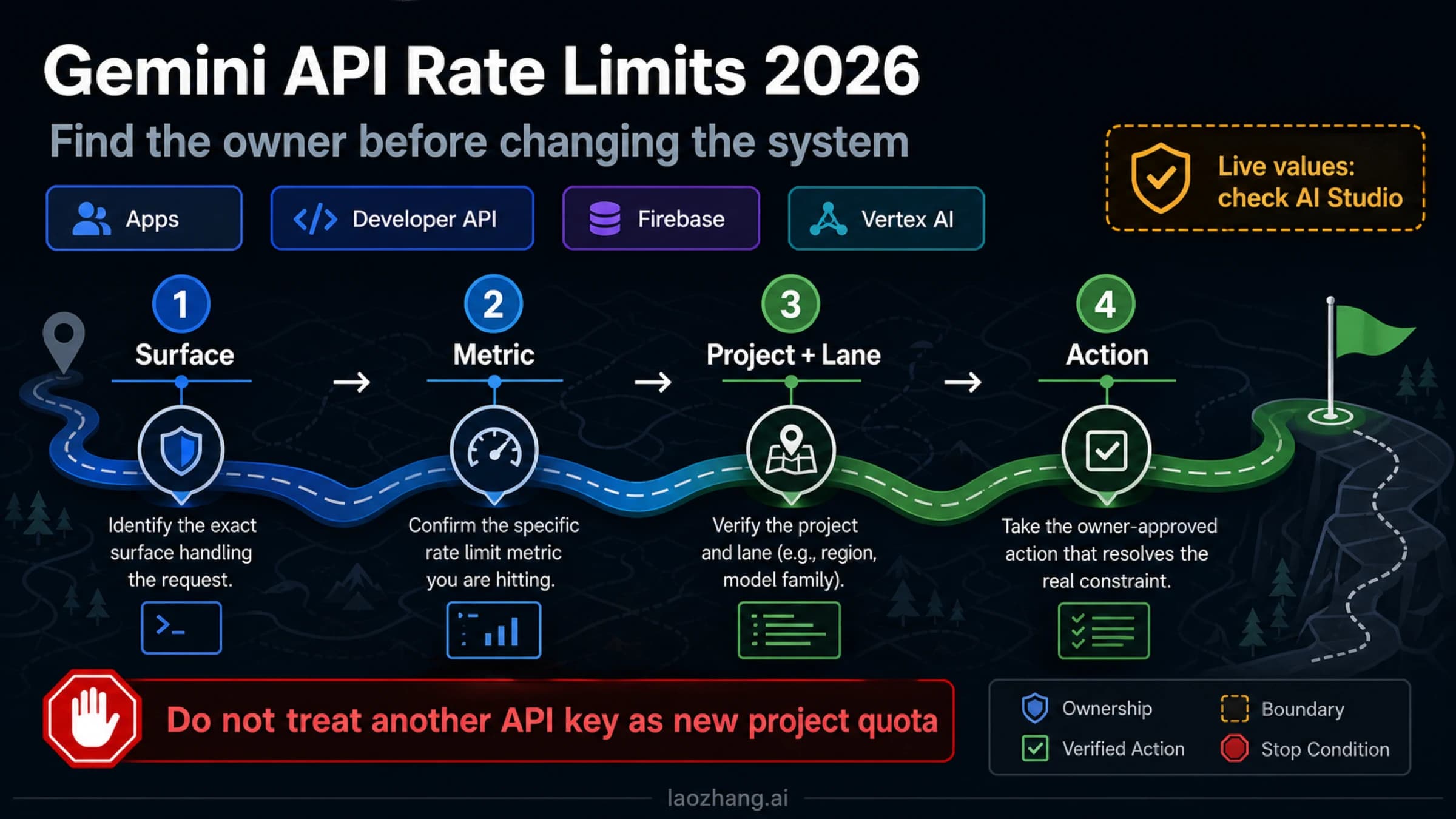
Upgrade your tier by enabling Cloud Billing. This is the most impactful fix for developers who have been using the free tier. According to Google's official rate limits documentation (verified February 2026), simply enabling Cloud Billing on your Google Cloud project instantly upgrades you from the free tier to Tier 1 with no minimum spend required. The improvement is dramatic: your RPM jumps from 5 (for Gemini 2.5 Pro) to 150-300, your TPM increases from 250,000 to 1,000,000, and your RPD goes from 100 to 1,000-1,500. You only pay for what you actually use, and for many development workloads, the cost is minimal. For a detailed breakdown of Gemini API rate limits per tier, including exactly how to enable billing and what each tier costs, see our dedicated rate limits guide.
Switch to a lighter model. If you are using Gemini 2.5 Pro and hitting rate limits, consider whether Gemini 2.5 Flash or Flash-Lite would work for your use case. On the free tier, Flash offers 10 RPM (double Pro's 5 RPM) and 250 RPD (2.5x Pro's 100 RPD), while Flash-Lite offers 15 RPM and 1,000 RPD. For many tasks like summarization, classification, and simple Q&A, Flash models deliver comparable quality at significantly higher throughput and lower cost.
Google's Quota System Explained: Free Tier vs Paid Tiers in 2026
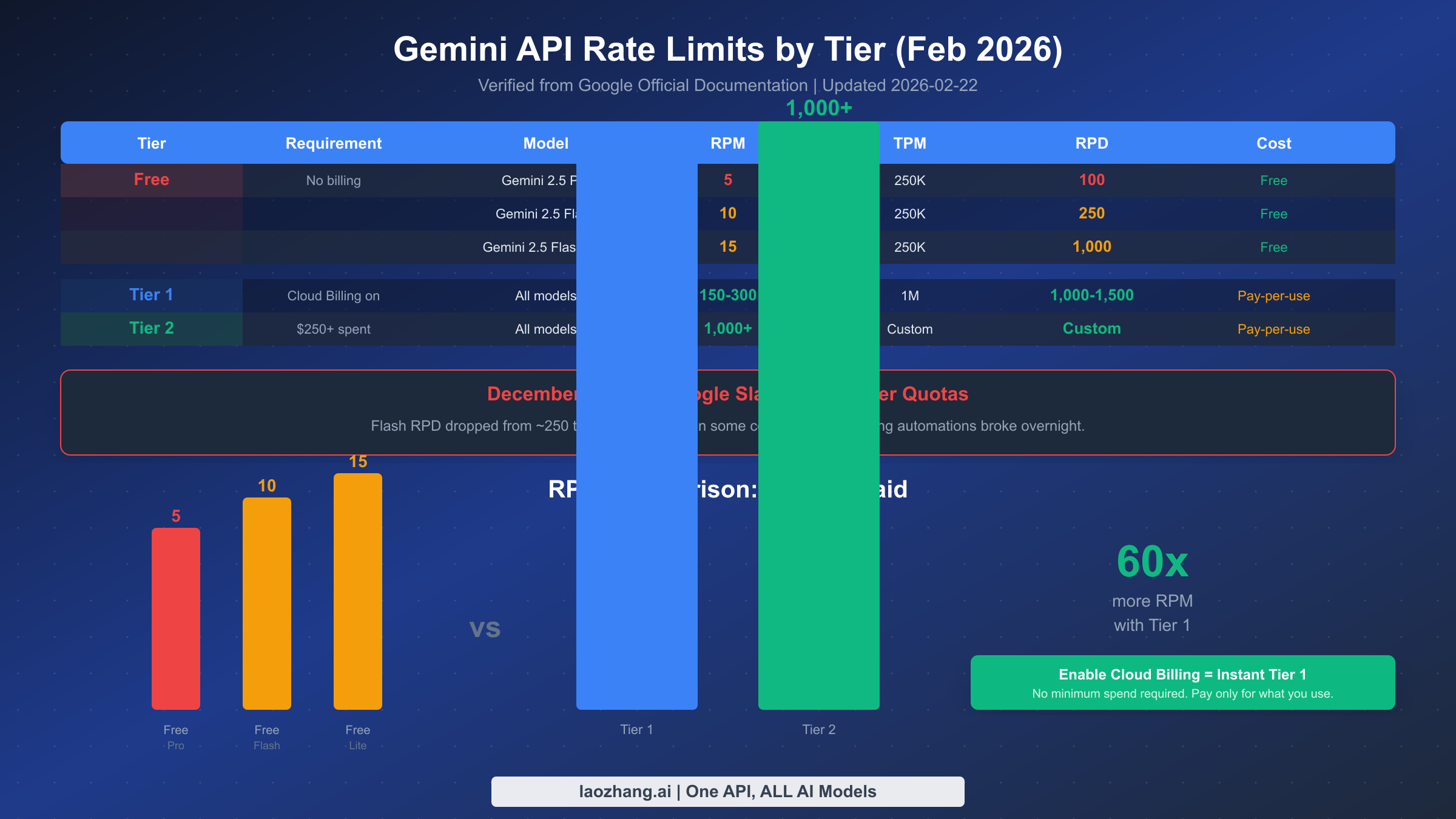
Understanding Google's tiered quota system is essential for planning your API usage and avoiding unexpected capacity errors. The system changed significantly in late 2025 and early 2026, and many articles online still reference outdated numbers. The data below is verified from Google's official AI Studio documentation as of February 19, 2026.
Google organizes Gemini API access into four tiers: Free, Tier 1, Tier 2, and Tier 3. Each tier comes with progressively higher rate limits and costs money only on a pay-per-use basis after the free tier. The progression is designed so that as your spending increases, Google automatically unlocks higher limits, but the transition between tiers is not always instant and depends on your billing history over a 30-day rolling window.
The free tier requires no billing setup at all and is available in eligible countries. As of February 2026, it provides Gemini 2.5 Pro at 5 RPM and 100 RPD, Gemini 2.5 Flash at 10 RPM and 250 RPD, and Gemini 2.5 Flash-Lite at 15 RPM and 1,000 RPD. All free tier models share a 250,000 TPM limit. These numbers represent a substantial reduction from pre-December 2025 levels, when the Flash model alone offered approximately 250 RPD in some configurations. The reduction caught many developers off guard and is a major reason why capacity error reports surged in early 2026.
Tier 1 is accessible to anyone with active Cloud Billing enabled on their Google Cloud project, with no minimum spend requirement. This tier provides 150-300 RPM depending on the model, 1,000,000 TPM, and 1,000-1,500 RPD. The jump from free to Tier 1 represents a 30-60x increase in RPM quota, making it the single most impactful change you can make if you are experiencing rate limit errors on the free tier. Pricing follows Google's standard pay-per-use model: for example, Gemini 2.5 Flash costs $0.30 per million input tokens and $2.50 per million output tokens (ai.google.dev/pricing, February 2026). For a typical chatbot sending 500-token prompts and receiving 1,000-token responses, this works out to approximately $0.0028 per conversation turn, which means a dollar buys you roughly 350 interactions.
Tier 2 requires a cumulative spend of more than $250 over a 30-day period and provides 1,000+ RPM with custom TPM and RPD limits. Tier 3 requires more than $1,000 in spend over 30 days and offers the highest available limits. Both higher tiers are primarily relevant for production applications with significant traffic, and Google works with these customers on custom capacity planning. For a complete guide to Gemini API free tier rate limits including country eligibility and billing setup instructions, see our dedicated free tier guide.
| Tier | Requirement | RPM | TPM | RPD | Cost |
|---|---|---|---|---|---|
| Free | No billing | 5-15 | 250K | 100-1,000 | Free |
| Tier 1 | Cloud Billing on | 150-300 | 1M | 1,000-1,500 | Pay-per-use |
| Tier 2 | $250+ spend / 30 days | 1,000+ | Custom | Custom | Pay-per-use |
| Tier 3 | $1,000+ spend / 30 days | Highest | Custom | Custom | Pay-per-use |
One frequently overlooked detail is that rate limits are applied per project, not per API key. This means that if you have multiple applications sharing the same Google Cloud project, they all draw from the same quota pool. Creating separate projects for separate applications ensures that a burst of traffic from one application does not starve the others of their allocation. This simple organizational change can prevent many unexpected rate limit errors.
Fixing "No Capacity Available" Server Errors (HTTP 503)
Type B (429 MODEL_CAPACITY_EXHAUSTED) and Type C (503 No Capacity Available) errors are fundamentally different from rate limit errors because they indicate a problem on Google's infrastructure rather than with your usage. When Google's servers cannot handle the total demand from all users for a particular model, even developers with plenty of remaining quota will receive these errors. This section covers what to do when the problem is on Google's side, which is a scenario most troubleshooting guides either ignore entirely or conflate with rate limiting.
The first thing to understand about server-side capacity errors is that they are typically transient and regional. Google's Gemini infrastructure is distributed across multiple data centers, and capacity constraints often affect specific regions or model versions rather than the entire service globally. A 503 error for gemini-2.5-pro might resolve within minutes if it was caused by a temporary spike in demand, or it might persist for hours if there is a broader infrastructure issue. The February 16, 2026 incident reported on the google-gemini GitHub repository is a good example of the latter, where the gemini-2.5-pro model was unavailable for several hours before Google resolved the underlying infrastructure problem.
When you encounter a Type B or Type C error, your immediate response should be to check Google's AI Studio status page and the Google Cloud Status Dashboard. These pages report known outages and their expected resolution times. If there is no reported outage, the problem is likely localized capacity pressure that will resolve on its own. In either case, implementing an intelligent retry strategy that differentiates between user-side rate limits and server-side capacity issues is crucial. For rate limits (Type A), short retries with exponential backoff work well because the limit refreshes quickly. For capacity issues (Types B and C), longer retry intervals of 30-60 seconds are more appropriate because the constraint is physical server availability rather than a quota counter.
Switch to a different model variant. The most effective immediate fix for capacity errors is trying a lighter model. If gemini-2.5-pro returns a capacity error, try gemini-2.5-flash instead. Google provisions significantly more compute capacity for Flash models because they require fewer resources per request, so Flash rarely experiences the same capacity constraints as Pro. For many applications, the quality difference between Pro and Flash is smaller than developers expect, particularly for straightforward tasks like text classification, summarization, and structured data extraction.
Try a different model generation. Google simultaneously serves multiple generations of its Gemini models. If 2.5 Pro is at capacity, try 2.0 Flash or even the newer 3.0 Flash Preview. The capacity allocation for each model generation is independent, so a constraint on one version does not necessarily affect others. This approach works particularly well if your application does not depend on features unique to a specific model version.
Implement a health check and failover. For production applications that cannot tolerate any downtime, implement a periodic health check that sends a minimal test request to your primary model every 30-60 seconds. When the health check fails with a capacity error, automatically route new requests to your fallback provider or model. When the health check succeeds again, gradually shift traffic back to the primary model. This pattern provides near-zero downtime even during extended Google capacity issues and is especially important for customer-facing applications where API errors directly translate into lost revenue or degraded user experience.
It is also worth noting that capacity errors sometimes provide hints about when recovery is expected. Some 429 responses include a Retry-After header that tells you how many seconds to wait before trying again. While this header is not always present, when it is, respecting it rather than retrying sooner will give you the best chance of getting a successful response on your next attempt. Parsing this header and feeding it into your retry logic is a small improvement that makes a meaningful difference in recovery time during capacity events.
Alternative Solutions When Google's Servers Are Overloaded
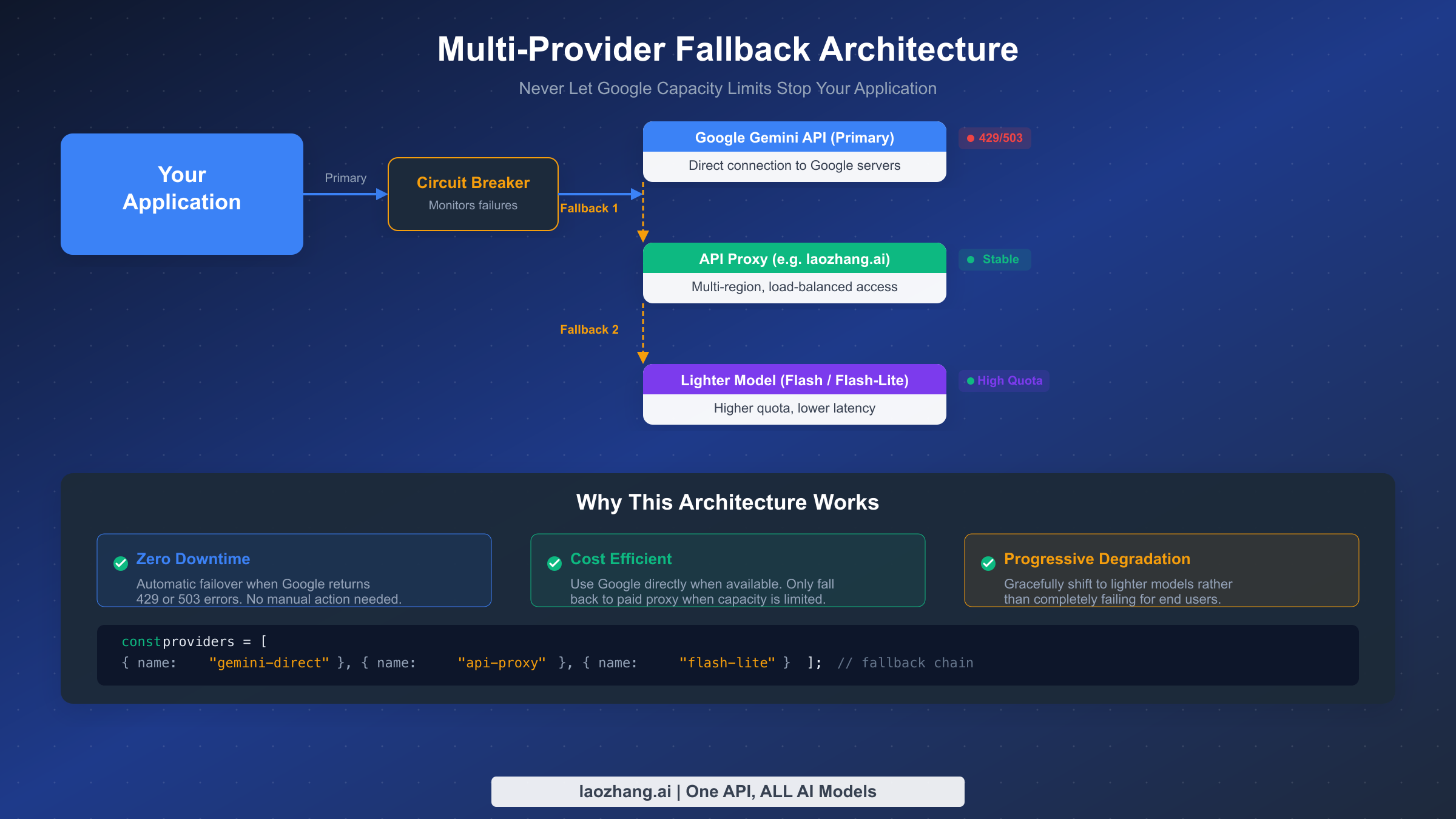
When Google's servers are genuinely overloaded and none of the standard fixes resolve your issue, you need alternative ways to keep your application running. This section covers practical alternatives that experienced developers use when they cannot afford any downtime, ranging from API proxy services that provide a different access path to Google's models, to multi-provider architectures that eliminate single points of failure entirely.
API proxy services offer a fundamentally different approach to the capacity problem. Instead of connecting directly to Google's API endpoints, you route your requests through an intermediary service that maintains its own pool of API credentials, load balances across multiple regions, and handles retries on your behalf. Services like laozhang.ai aggregate access across multiple accounts and regions, which means that when one endpoint hits a capacity limit, the proxy automatically routes your request to another endpoint with available capacity. The key advantage is that you get stable, uninterrupted access to Google's models without having to build and maintain the multi-region infrastructure yourself. The trade-off is a small additional per-request cost compared to direct API access, but for applications where reliability matters more than minimizing every fraction of a cent in API costs, this trade-off is worthwhile. You can review the API documentation at docs.laozhang.ai to understand the integration process, which typically requires changing only the base URL in your API client configuration.
Multi-provider fallback architecture is the most robust approach and one that enterprise teams increasingly adopt. Rather than depending exclusively on Google's Gemini models, design your application to work with multiple LLM providers and automatically failover between them. A typical fallback chain might look like this: try Gemini Pro first (lowest cost, best quality for your use case), if it fails with a capacity error try an API proxy service, and if that also fails fall back to a lighter model like Gemini Flash-Lite which has the highest available capacity. This approach requires defining a provider interface that abstracts away the differences between APIs, but the one-time setup cost pays for itself the first time a capacity outage would have otherwise taken your application offline.
// Simple multi-provider fallback implementation
const providers = [
  { name: "gemini-direct", model: "gemini-2.5-pro", baseUrl: "https://generativelanguage.googleapis.com" },
  { name: "api-proxy", model: "gemini-2.5-pro", baseUrl: "https://api.laozhang.ai" },
  { name: "flash-fallback", model: "gemini-2.5-flash-lite", baseUrl: "https://generativelanguage.googleapis.com" }
];

async function generateWithFallback(prompt) {
  for (const provider of providers) {
    try {
      const response = await callProvider(provider, prompt);
      return { response, provider: provider.name };
    } catch (error) {
      if (error.status === 429 || error.status === 503) {
        console.log(`${provider.name} failed (${error.status}), trying next...`);
        continue;
      }
      throw error; // Non-capacity errors should not trigger fallback
    }
  }
  throw new Error("All providers exhausted");
}
Regional request distribution is another technique that works particularly well for applications with a global user base. Google's Gemini API capacity is allocated by region, so capacity constraints in the US West region might not affect the Europe or Asia Pacific regions. By deploying your application across multiple regions and routing API requests through the nearest regional endpoint, you reduce the likelihood of hitting a regional capacity ceiling and also improve latency for your users.
Building Resilient Applications That Survive Capacity Limits
Moving beyond reactive fixes, this section covers the architectural patterns that production applications use to survive Google's capacity limits without any user-visible impact. These patterns require more upfront engineering but provide a fundamentally more reliable foundation for applications that cannot tolerate intermittent failures.
The circuit breaker pattern is the most important architectural pattern for API resilience. A circuit breaker monitors the failure rate of your API calls and, when failures exceed a threshold, "opens" the circuit to stop sending requests to the failing endpoint. This prevents your application from wasting time on requests that will inevitably fail, and gives the upstream service time to recover. After a configurable timeout, the circuit breaker enters a "half-open" state where it allows a single test request through. If that request succeeds, the circuit closes and normal operation resumes. If it fails, the circuit stays open for another timeout period. This pattern is particularly effective for handling Type B and Type C capacity errors because it automatically detects when Google's servers are under pressure and redirects traffic without requiring manual intervention.
import time
from enum import Enum

class CircuitState(Enum):
    CLOSED = "closed"       # Normal operation
    OPEN = "open"           # Failing, skip requests
    HALF_OPEN = "half_open" # Testing if service recovered

class CircuitBreaker:
    def __init__(self, failure_threshold=3, recovery_timeout=60):
        self.state = CircuitState.CLOSED
        self.failure_count = 0
        self.failure_threshold = failure_threshold
        self.recovery_timeout = recovery_timeout
        self.last_failure_time = 0

    def can_execute(self):
        if self.state == CircuitState.CLOSED:
            return True
        if self.state == CircuitState.OPEN:
            if time.time() - self.last_failure_time > self.recovery_timeout:
                self.state = CircuitState.HALF_OPEN
                return True
            return False
        return True  # HALF_OPEN allows one test request

    def record_success(self):
        self.failure_count = 0
        self.state = CircuitState.CLOSED

    def record_failure(self):
        self.failure_count += 1
        self.last_failure_time = time.time()
        if self.failure_count >= self.failure_threshold:
            self.state = CircuitState.OPEN
Request queuing with priority levels ensures that when capacity is constrained, your most important requests get served first. Implement a priority queue that categorizes incoming requests by urgency: real-time user interactions get high priority, background batch processing gets low priority, and monitoring or analytics requests get the lowest priority. When the circuit breaker detects capacity pressure, the queue automatically starts dropping low-priority requests while continuing to serve high-priority ones. This degradation is graceful and invisible to your end users, who continue to receive responses while less critical background tasks are deferred.
Monitoring and alerting should track three distinct metrics: your own quota utilization (percentage of RPM, TPM, and RPD consumed), Google's service availability (success rate of your API calls), and response latency (which often increases before capacity errors occur). Set up alerts that trigger before you hit hard limits, not after. For example, alert when your RPM usage exceeds 80% of your quota so you have time to scale, optimize, or activate fallback providers before your application starts failing. Google Cloud's built-in monitoring tools can track quota utilization, and services like Prometheus or Datadog can aggregate the broader metrics into actionable dashboards.
Capacity planning is the proactive counterpart to reactive error handling. Analyze your historical API usage patterns to identify peak hours, growth trends, and seasonal spikes. If your application's traffic is growing by 20% month over month, calculate when you will exceed your current tier's limits and plan your upgrade accordingly. For applications with predictable peak times like morning hours in a specific timezone, consider implementing request smoothing that pre-fetches or caches commonly requested content before the peak period to reduce real-time API pressure.
Response caching is an often-overlooked strategy that can dramatically reduce your API usage without any quality trade-off. Many applications send identical or near-identical prompts repeatedly, such as classifying similar documents, generating standard responses for common questions, or extracting structured data from templates with the same format. By implementing a cache layer that stores API responses keyed by a hash of the prompt and model parameters, you can serve repeated requests instantly from cache rather than hitting the API. Even a simple in-memory cache with a 15-minute TTL can reduce API calls by 20-40% for many workloads, and a persistent cache backed by Redis or a similar store can achieve even higher hit rates. The key is to cache at the right granularity: cache the full response for identical prompts, but invalidate appropriately when your system prompt or model version changes.
Graceful degradation messaging ensures that even when all fallback strategies fail, your end users get a helpful experience rather than a cryptic error page. Design your application to display a clear, non-technical message explaining that the AI feature is temporarily unavailable and will automatically retry. Include a visible indicator showing that the system is working on recovering, and if appropriate, offer a manual retry button. This human-centered approach to error handling turns what would be a frustrating dead end into a momentary pause, preserving user trust and preventing abandonment during capacity events.
Frequently Asked Questions
Why does Google limit server capacity for Gemini?
Google's Gemini models run on specialized TPU (Tensor Processing Unit) and GPU hardware that is expensive to provision and takes months to deploy. Each request to a large model like Gemini 2.5 Pro requires significant compute resources, and the total available capacity is finite. Google uses rate limits and tiered access to ensure fair distribution of this finite resource across millions of developers. The capacity constraints you experience reflect the reality that demand for Gemini models currently exceeds Google's available infrastructure, particularly for the Pro tier models which require more compute per request. As Google continues to build out its AI infrastructure across more data centers worldwide, these constraints are expected to ease gradually, but they remain a significant challenge for developers building production applications in early 2026.
How long do capacity errors typically last?
Type A (rate limit) errors resolve as soon as your quota resets, which happens every minute for RPM and every 24 hours for RPD. Type B (capacity exhausted) errors are more variable and can last anywhere from 30 seconds to several hours depending on overall demand. Type C (503 no capacity) errors during a confirmed outage typically resolve within 1-4 hours based on historical incidents. For example, the November 2025 capacity issues on the official developer forum persisted intermittently for several weeks before Google "pushed a fix" on December 18, 2025. The best strategy is to never depend on a specific recovery time and instead architect your application to handle extended capacity constraints through the fallback patterns described in this guide.
Does upgrading to a paid tier guarantee no capacity errors?
No. Upgrading to Tier 1 or higher eliminates Type A (rate limit) errors by giving you dramatically higher quotas, but it does not protect against Type B (capacity exhausted) or Type C (503) errors because those are server-side issues that affect all users regardless of tier. However, paid tier users do receive priority access during capacity constraints, meaning they are less likely to experience Type B errors than free tier users. Multiple developers on the Google AI developer forum have confirmed that Tier 1 accounts experienced 429 errors in November 2025 despite their usage being under 1% of their stated quota, which demonstrates that capacity issues can affect even paying customers. For critical production workloads, combining a paid tier with the multi-provider fallback architecture described earlier in this guide provides the most reliable solution available today.
Is there a way to check current Google API capacity status?
Google does not provide a real-time capacity dashboard specifically for the Gemini API. Your best sources for status information are the Google Cloud Status Dashboard for official outage reports, the Google AI Developer Forum for community reports, and the google-gemini GitHub repository issues section for specific model availability problems. For real-time monitoring of your own application's experience, implement the health check pattern described in this guide that sends a minimal test request every 30-60 seconds to detect capacity issues before they impact your users. Many teams also monitor social media channels like Reddit's r/Bard and r/GoogleGemini subreddits where developers often report capacity issues in real time, sometimes hours before official acknowledgment.
What is the cheapest way to avoid capacity errors?
The cheapest approach combines three strategies that work together. First, enable Cloud Billing to get Tier 1 access, which costs nothing upfront and only charges for actual usage based on Google's pay-per-use pricing. Second, use Gemini 2.5 Flash instead of Pro for any task where the quality difference is acceptable, since Flash has higher quotas and lower per-request costs ($0.30 vs $2.00-$4.00 per million input tokens, ai.google.dev/pricing, February 2026). Third, implement exponential backoff with jitter in your client code to handle the occasional rate limit hit gracefully rather than immediately failing. This combination gives most developers a reliable experience at minimal cost, and for the vast majority of development and small-scale production workloads, the total monthly API bill stays well under $10.
Sources4
External pages this guide links to, in the order they appear. Last updated Feb 22, 2026.
Sources4
External pages this guide links to, in the order they appear. Last updated Feb 22, 2026.