Gemini 3 Pro Image Batch API Discount: Save 50% and Retrieve Your Images
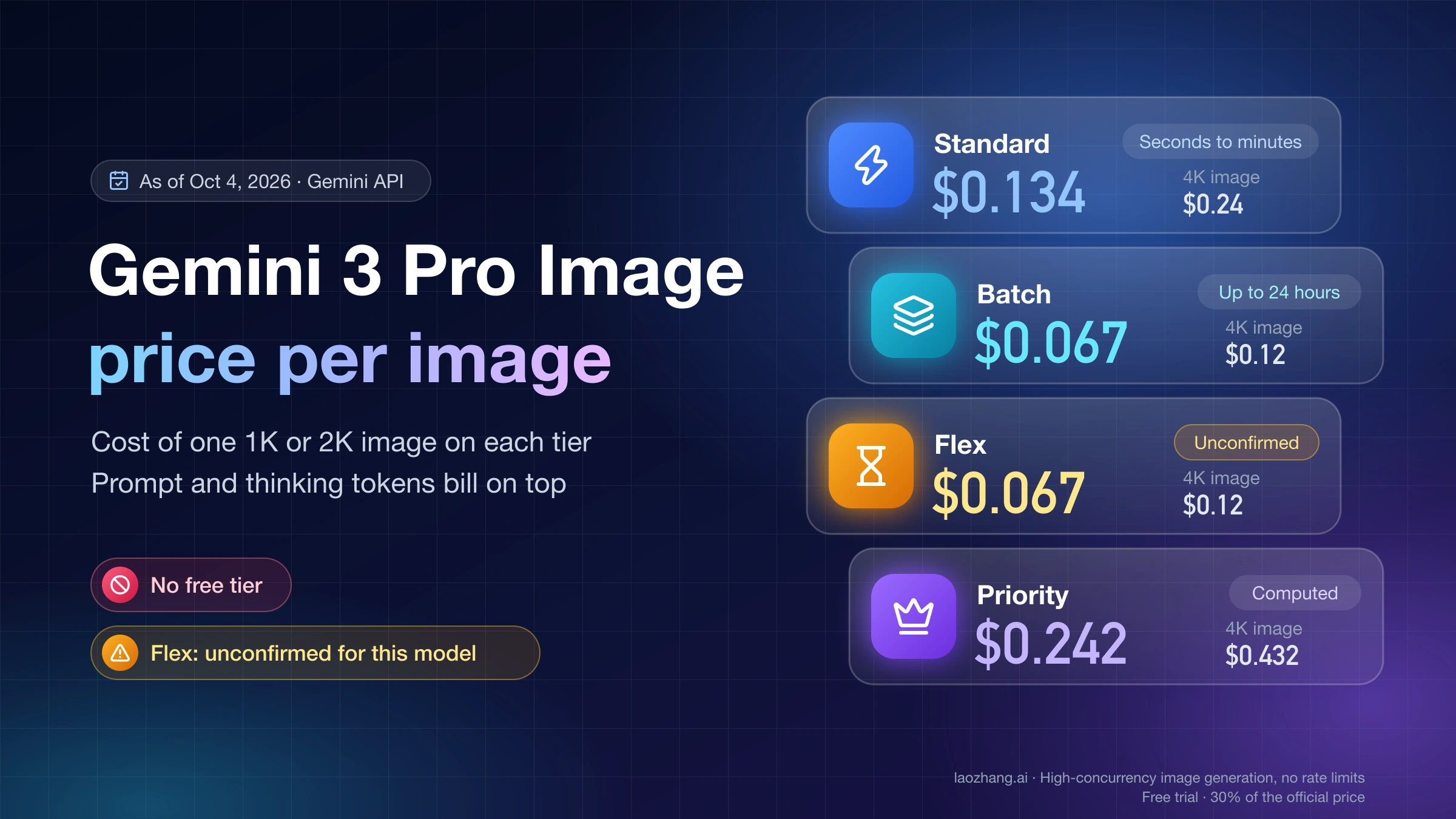
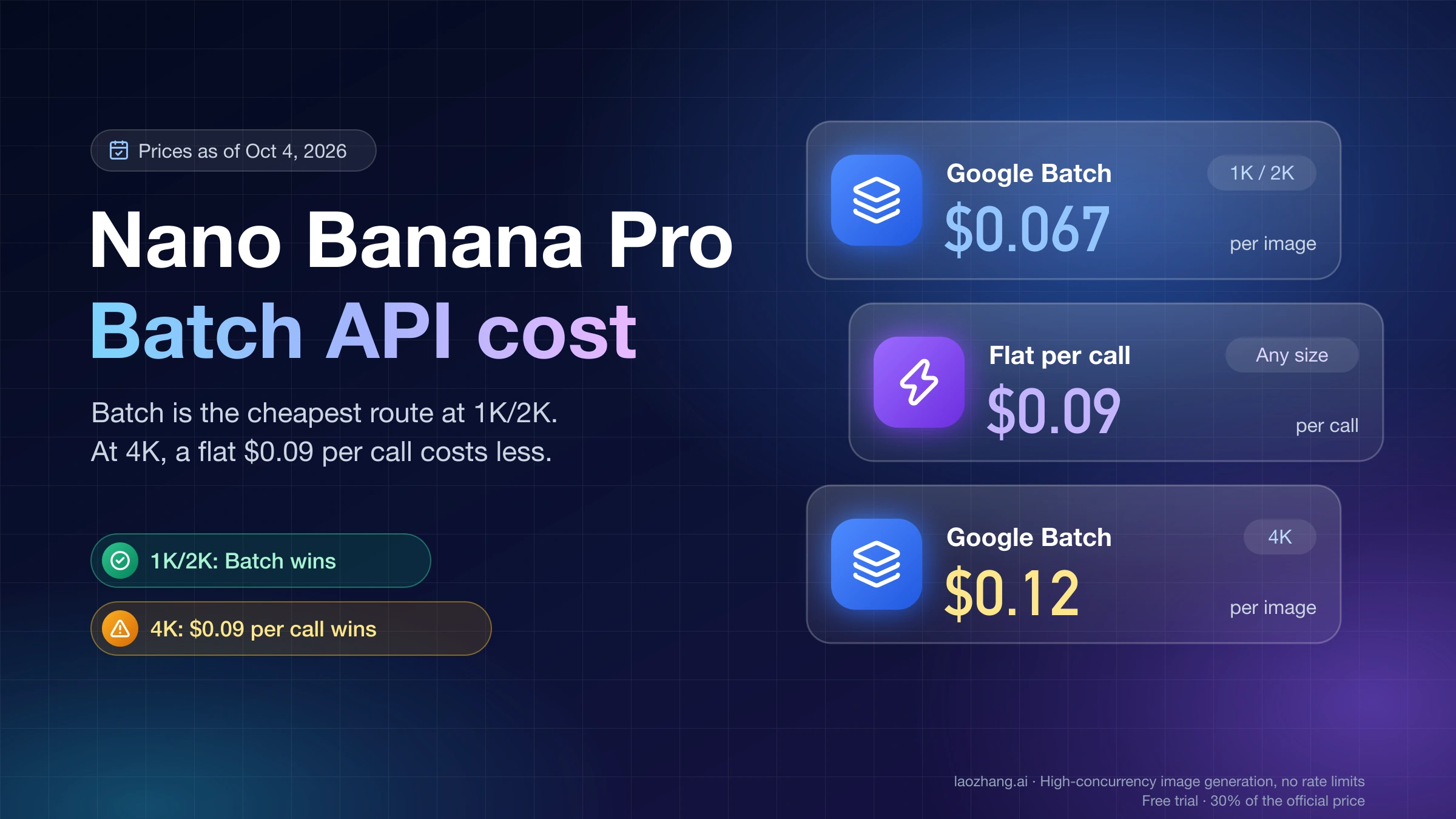
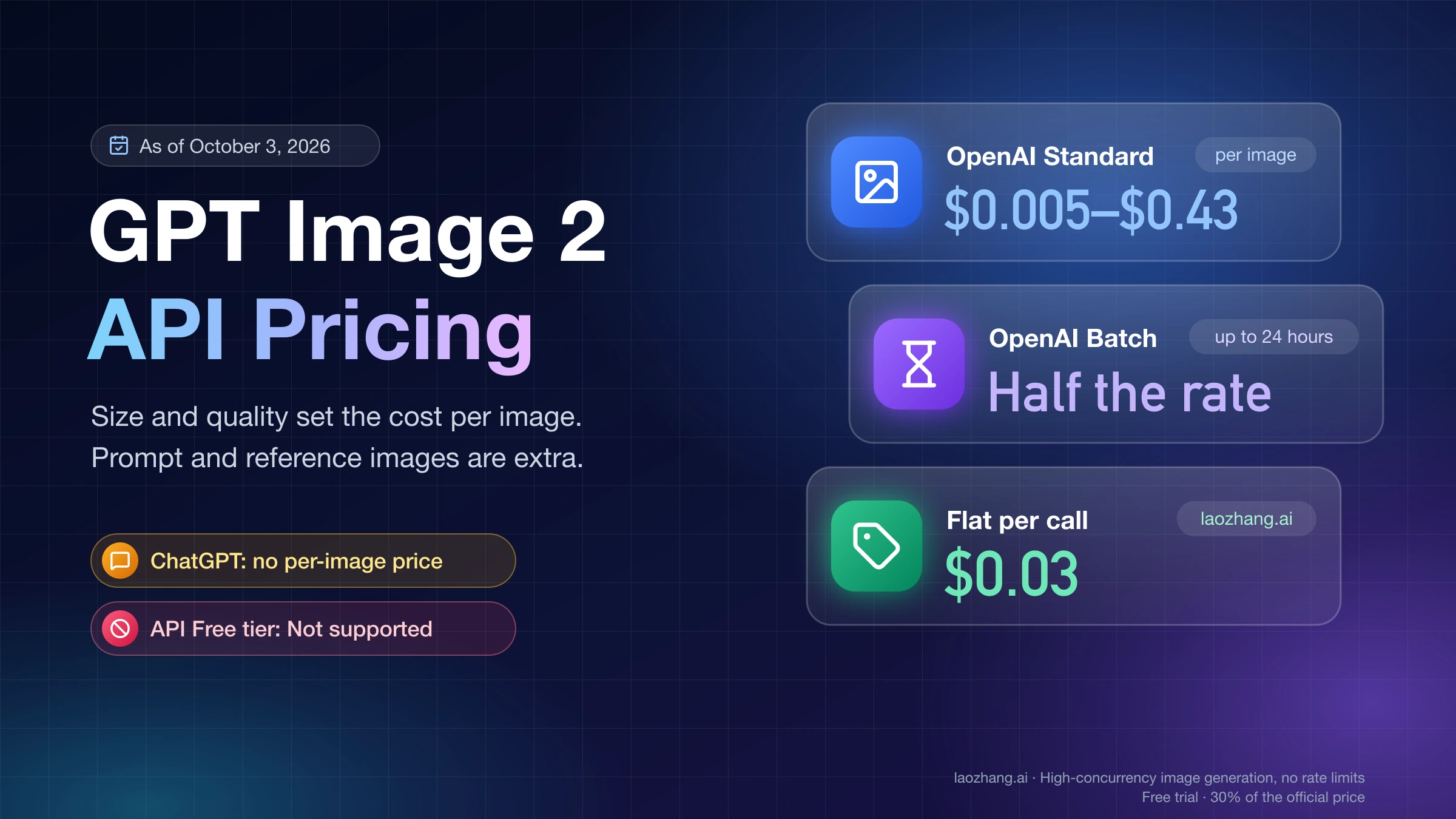
The official Batch API cuts Gemini 3 Pro Image output prices to $0.067 for 1K/2K and $0.12 for 4K, before input and thinking charges. Use it for nonurgent work, budget for all billed tokens, and match downloaded images to their request keys.
On this page
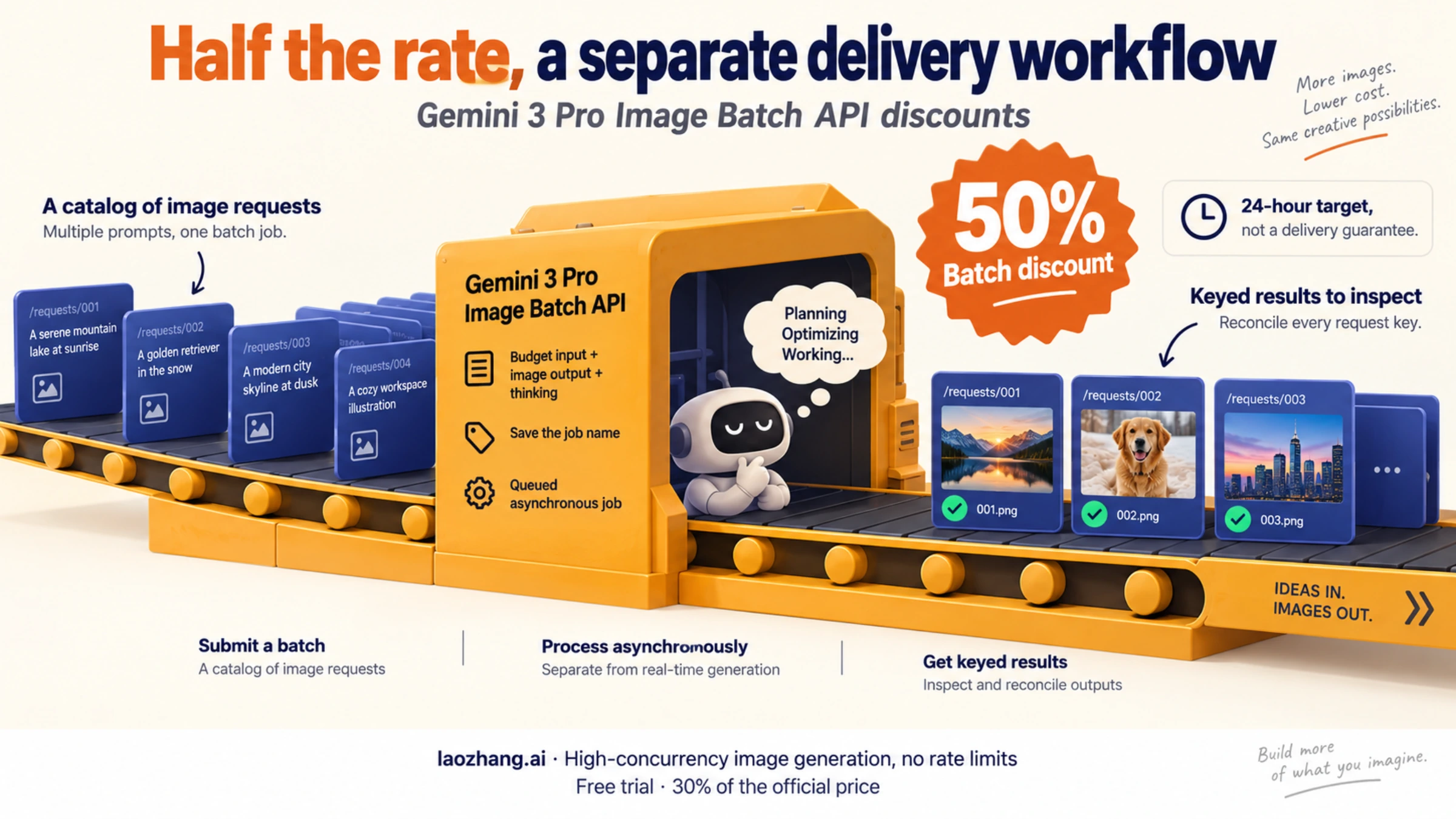
The Gemini 3 Pro Image Batch API offers a 50% discount against equivalent Standard API processing. Google's displayed image-output prices are $0.067 for 1K/2K and $0.12 for 4K. Input, reference images, and text/thinking output add to the bill. Batch is a good fit when images can arrive asynchronously; Google's target turnaround is 24 hours, rather than a guaranteed deadline. These are the Gemini Developer API's current prices and Batch terms, checked October 6, 2026.
For a scheduled catalog update or an illustration backlog, the practical workflow is: prepare requests with unique keys, submit once, save the returned job name, wait for a terminal state, then download and inspect each result. A completed job does not necessarily give you one usable image for every request. The examples below keep those two outcomes separate.
Understanding the Gemini 3 Pro Image Batch API Discount
Batch changes how requests are scheduled and billed. It does not require you to switch to a cheaper image model. Nano Banana Pro's current stable model ID is gemini-3-pro-image, and its model page explicitly supports Batch. Some Batch documentation examples still use the older preview ID; the examples here use the current stable ID.
| Billed component | Standard | Batch |
|---|---|---|
| 1K or 2K image output, Google's displayed equivalent | $0.134/image | $0.067/image |
| 4K image output | $0.24/image | $0.12/image |
| Text input | $2 per million tokens | $1 per million tokens |
| Reference-image input | Approximately $0.0011/image | Approximately $0.0006/image |
| Text and thinking output | $12 per million tokens | $6 per million tokens |
Source: Google's Gemini 3 Pro Image pricing table and footnotes. Image-output amounts exclude the other components. Google lists 560 input tokens per reference image, 1,120 output tokens for 1K/2K, and 2,000 for 4K.
Keep rounding consistent when planning volume. Multiplying 1,120 image tokens by the Standard image rate of $120 per million gives $0.1344; halving it gives $0.0672 for Batch. Google's table displays $0.134 and $0.067. Both describe the same pricing schedule, but multiplying the rounded display figure by thousands of images slightly understates the token-based estimate. All volume calculations below use $0.1344/$0.0672 for 1K/2K and $0.24/$0.12 for 4K.
Moving from 4K to 2K reduces Batch image-output cost from $0.12 to $0.0672, a 44% reduction, if 2K meets your delivery requirements. Moving from 2K to 1K does not reduce this model's listed image-output charge. Choose resolution for the actual output you need.
Do not add a caching discount to this calculation. The model capability table says caching, Flex, and Priority are unsupported, although the generic pricing page includes Flex and Priority rows. A price row alone does not establish that the model accepts that processing option.
Real Savings Calculator — Costs at Every Volume
For image output alone, the monthly saving is straightforward:
Standard output cost = 1K/2K images × $0.1344 + 4K images × $0.24
Batch output cost = 1K/2K images × $0.0672 + 4K images × $0.12| Images per month | Standard, all 1K/2K | Batch, all 1K/2K | Batch, all 4K |
|---|---|---|---|
| 100 | $13.44 | $6.72 | $12.00 |
| 500 | $67.20 | $33.60 | $60.00 |
| 1,000 | $134.40 | $67.20 | $120.00 |
| 5,000 | $672.00 | $336.00 | $600.00 |
| 10,000 | $1,344.00 | $672.00 | $1,200.00 |
| 50,000 | $6,720.00 | $3,360.00 | $6,000.00 |
These are hypothetical output-only budgets at the published rates, assuming the stated number of generated images. They exclude inputs, text/thinking, tools, revisions, taxes, and any additional billed attempts. They are not invoices or a promise that a project can generate that volume.
At 5,000 2K images per month, image output alone would cost $8,064 annually on Standard or $4,032 on Batch: $4,032 saved. For a mixed monthly workload of 800 2K and 200 4K images, Batch output would be 800 × $0.0672 + 200 × $0.12 = $77.76.
Add reference images and thinking to the estimate
A fuller Batch estimate is:
Batch cost ≈ image-output cost
           + prompt text tokens × $1 / 1,000,000
           + reference-image count × 560 × $1 / 1,000,000
           + text/thinking output tokens × $6 / 1,000,000
           + applicable tool charges and other billed attempts
Reference-image cost uses Google's approximate token allocation. For example, assume 1,000 requests each generate one 2K image, contain 150 prompt tokens and two reference images, and produce 400 billed text/thinking tokens. The last number is a planning assumption, not a measured model average.
| Component | Calculation | Estimated Batch cost |
|---|---|---|
| Image output | 1,000 × $0.0672 | $67.20 |
| Prompt text | 150,000 × $1 / 1,000,000 | $0.15 |
| Reference images | 2,000 × 560 × $1 / 1,000,000 | $1.12 |
| Text/thinking | 400,000 × $6 / 1,000,000 | $2.40 |
| Total, before tools and extra attempts | Sum of the above | $70.87 |
Under the same assumptions, Standard would cost $141.74. The model's thinking process is always enabled; hiding its reasoning does not eliminate billed thinking tokens. Use returned usage information and settled billing records to replace assumptions with your workload's actual costs.
Also measure cost per usable image, not just cost per request. If that hypothetical $70.87 spend delivers 900 images that pass your checks, the cost is $70.87 ÷ 900 ≈ $0.0787 per usable image, before any further work. A response containing text, an unusable image, or an item-level error belongs in your accounting even though it does not increase the usable-image count. The cited documentation does not establish a blanket refund rule for every failure or no-image outcome.
The examples do not enable Search grounding. The pricing table's Standard grounding terms should not be assumed to make every tool free in Batch; confirm the applicable tool charges before adding tools to a production job.
Step-by-Step Batch Image Generation Guide
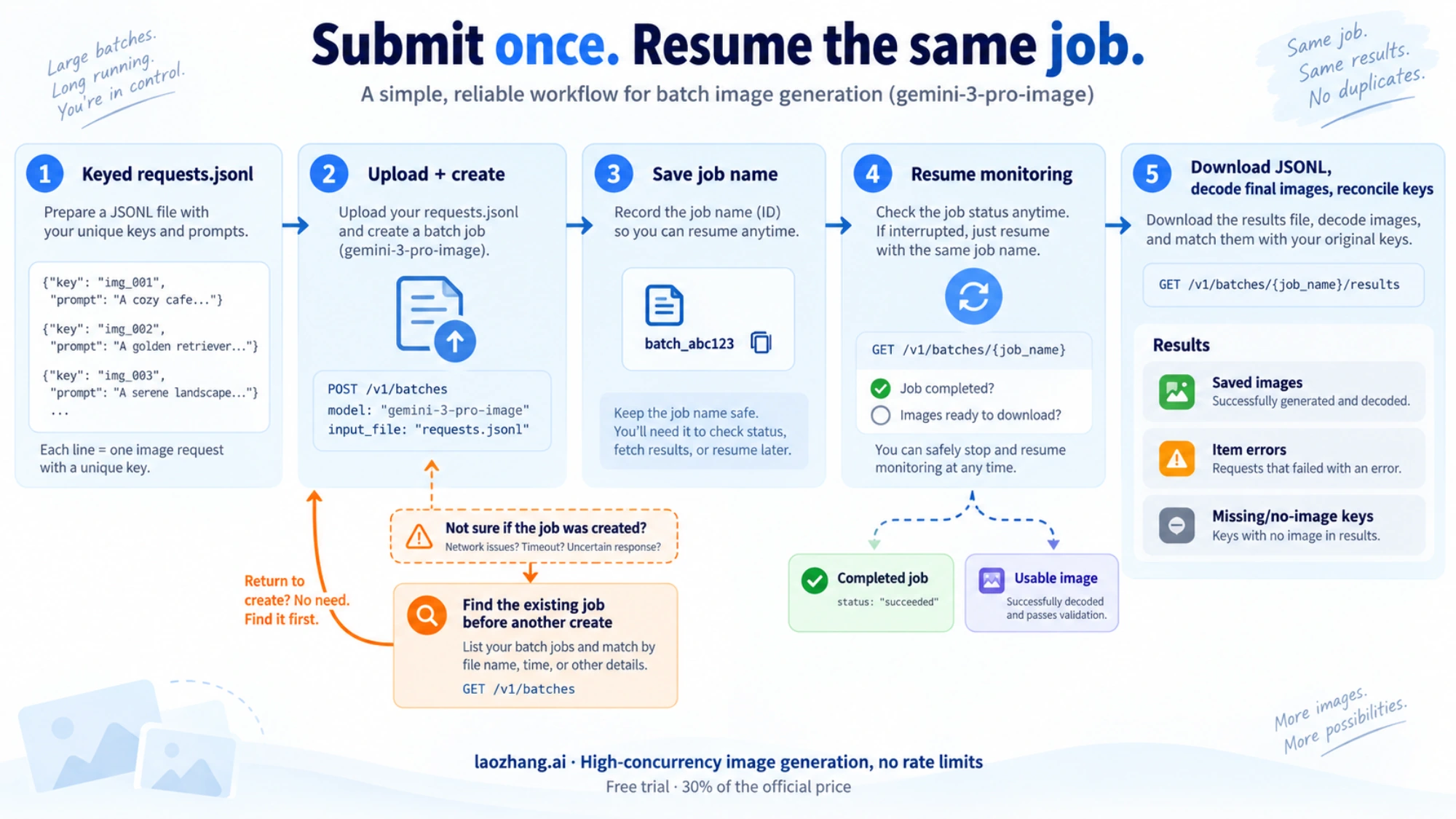
Use the file workflow for larger image workloads. Google allows JSONL input files up to 2 GB and recommends them for image generation; inline requests are intended for smaller batches under 20 MB. Each file line needs a key and a valid request object. The key is how you associate the response with the original request. See Google's input-file format and image Batch examples.
The Python examples assume a paid Gemini Developer API project, authorized access to this model, and a current google-genai SDK. Configure credentials in your own environment; do not put keys in the request file. SDK-dependent code below is adapted from the documented interface. We checked Python syntax and the offline request/result helpers, but did not execute the SDK, submit a job, measure generation speed, or verify a live bill.
1. Prepare keyed JSONL requests
Save this as make_requests.py. It uses only Python's standard library and writes two sample requests to requests.jsonl.
import json
from pathlib import Path

prompts = {
    "catalog-vase-front": "Studio product photo of a blue ceramic vase, front view, white backdrop",
    "catalog-vase-side": "Studio product photo of a blue ceramic vase, side view, white backdrop",
}

with Path("requests.jsonl").open("w", encoding="utf-8") as output:
    for key, prompt in prompts.items():
        row = {
            "key": key,
            "request": {
                "contents": [{"role": "user", "parts": [{"text": prompt}]}],
                "generationConfig": {
                    "responseModalities": ["TEXT", "IMAGE"],
                    "imageConfig": {"imageSize": "2K", "aspectRatio": "1:1"},
                },
            },
        }
        output.write(json.dumps(row) + "\n")
Run python make_requests.py locally, inspect the file, and keep it alongside the job record. Each key must be unique within the file and stable enough to identify the intended asset. These two independent requests do not promise consistent vase identity; reference images and an appropriate editing workflow are separate creative requirements.
For raw GenerateContentRequest JSON, use the camel-case fields above. Python SDK inline requests instead place settings in config, with response_modalities and image_config. Do not paste one shape into the other. responseModalities explicitly includes IMAGE; leaving modalities empty defaults to text. Gemini 3 Pro Image supports 1K, 2K, and 4K; the generic ImageConfig reference includes options for other models that should not be copied indiscriminately.
2. Upload once, submit once, and save the job name
Save this as submit_batch.py. It records the input filename, a unique display name, and the uploaded file name before calling create. On a returned response, it saves the batch name to submission.json.
import json
import os
import uuid
from pathlib import Path
from google import genai
from google.genai import types

record_path = Path("submission.json")
record = {
    "input": "requests.jsonl",
    "display_name": "catalog-" + uuid.uuid4().hex,
    "model": "gemini-3-pro-image",
    "phase": "prepared",
}

def save_record():
    temporary = record_path.with_suffix(".tmp")
    with temporary.open("w", encoding="utf-8") as handle:
        json.dump(record, handle, indent=2)
        handle.flush()
        os.fsync(handle.fileno())
    temporary.replace(record_path)

# Prevent an accidental rerun over an unresolved submission.
with record_path.open("x", encoding="utf-8") as handle:
    json.dump(record, handle, indent=2)

client = genai.Client()
uploaded = client.files.upload(
    file=record["input"],
    config=types.UploadFileConfig(
        display_name=record["display_name"], mime_type="jsonl"
    ),
)
record.update(uploaded_file=uploaded.name, phase="create_about_to_start")
save_record()

try:
    job = client.batches.create(
        model=record["model"],
        src=uploaded.name,
        config={"display_name": record["display_name"]},
    )
    print("Returned job name:", job.name, flush=True)
    record.update(job_name=job.name, phase="created")
    save_record()
except Exception:
    print("Submission needs reconciliation. Do not rerun create blindly.")
    raise
The upload MIME type is jsonl, and src is the uploaded file's name string, not the File object. These details follow the documented file-based image workflow.
Batch create is not idempotent: submitting the same input twice creates two jobs. The local record prevents an ordinary rerun, but cannot make a network call and a filesystem write one atomic transaction. If create times out—or the process crashes before it saves the returned name—check the recent batch jobs and match the saved display name before deciding whether to submit again. If you find the job, save its name and resume it. A lost response is not evidence that no job exists.
3. Resume the saved job and download the result file
Save this as collect_batch.py. It reads the existing record; it never creates another job. A 30-minute local polling window keeps the process bounded. Run it again later with the same record if the job is still pending.
import json
import time
from pathlib import Path
from google import genai

record = json.loads(Path("submission.json").read_text(encoding="utf-8"))
job_name = record["job_name"]
client = genai.Client()
terminal = {
    "JOB_STATE_SUCCEEDED", "JOB_STATE_FAILED",
    "JOB_STATE_CANCELLED", "JOB_STATE_EXPIRED",
}
deadline = time.monotonic() + 30 * 60

while True:
    job = client.batches.get(name=job_name)
    state = job.state.name
    print(job_name, state, flush=True)
    if state in terminal:
        break
    if time.monotonic() >= deadline:
        raise SystemExit("Still processing. Resume this job later; no cancellation sent.")
    time.sleep(min(60, max(0, deadline - time.monotonic())))

if state != "JOB_STATE_SUCCEEDED":
    raise SystemExit(f"Job ended as {state}; inspect its status/error before retrying.")
if not job.dest or not job.dest.file_name:
    raise SystemExit("No result file found; inspect the job destination.")

content = client.files.download(file=job.dest.file_name)
Path("results.jsonl").write_bytes(content)
print("Saved results.jsonl; inspect individual results next.")
The SDK exposes the file destination as job.dest.file_name; client.files.download returns bytes containing UTF-8 JSONL. This differs from an inline job's job.dest.inlined_responses, and from REST operation examples using metadata/response envelopes. Choose one interface throughout instead of mixing those field paths. The official result-download example documents the file flow.
A polling or network error does not justify creating a replacement job. Keep submission.json and resume the named job once the connection is available. The local timeout stops waiting; it does not stop Google from processing or prove that charges have stopped.
4. Decode final image parts and account for missing results
Save this standard-library helper as extract_images.py. It reads the original keyed input and downloaded JSONL. It saves supported image types, skips thinking parts, records item errors and malformed image data, and reports keys without usable image bytes. It does not contact Google or create retries.
import base64
import binascii
import json
from pathlib import Path

expected = {}
for line in Path("requests.jsonl").read_text(encoding="utf-8").splitlines():
    if line.strip():
        row = json.loads(line)
        if row["key"] in expected:
            raise ValueError("Duplicate input key")
        expected[row["key"]] = row

output = Path("batch-images")
output.mkdir(exist_ok=True)
extensions = {"image/png": ".png", "image/jpeg": ".jpg", "image/webp": ".webp"}
seen, saved, issues = set(), {}, []

for number, line in enumerate(
    Path("results.jsonl").read_text(encoding="utf-8").splitlines(), 1
):
    if not line.strip():
        continue
    try:
        row = json.loads(line)
    except json.JSONDecodeError:
        issues.append({"line": number, "reason": "invalid_json"})
        continue
    key = row.get("key")
    if key not in expected or key in seen:
        issues.append({"line": number, "key": key, "reason": "unknown_or_duplicate_key"})
        continue
    seen.add(key)
    status = row.get("status") or {}
    status_error = bool(status) and (not isinstance(status, dict) or status.get("code", 0) != 0)
    if row.get("error") or status_error:
        issues.append({"key": key, "reason": "item_status", "detail": row})
        continue
    response = row.get("response") or {}
    paths = []
    for candidate in response.get("candidates") or []:
        for part in (candidate.get("content") or {}).get("parts") or []:
            if part.get("thought"):
                continue
            image = part.get("inlineData") or {}
            extension = extensions.get(image.get("mimeType"))
            if not extension or not image.get("data"):
                continue
            try:
                data = base64.b64decode(image["data"], validate=True)
            except (ValueError, TypeError, binascii.Error):
                issues.append({"key": key, "reason": "invalid_base64"})
                continue
            if not data:
                continue
            # Use numeric filenames so arbitrary keys cannot become paths.
            path = output / f"row-{number:06d}-{len(paths):02d}{extension}"
            path.write_bytes(data)
            paths.append(str(path))
    if paths:
        saved[key] = paths
    else:
        issues.append({"key": key, "reason": "no_final_image", "detail": response})

report = {
    "saved": saved,
    "missing_result_keys": sorted(set(expected) - seen),
    "keys_without_saved_images": sorted(set(expected) - set(saved)),
    "issues": issues,
}
Path("result-report.json").write_text(json.dumps(report, indent=2), encoding="utf-8")
print(f"Saved image bytes for {len(saved)} of {len(expected)} request keys.")
Run python extract_images.py, then inspect result-report.json and open the saved images. This checks that final image bytes were present; it is not a visual-quality check or a full image-file validator. A text-only response, safety block, corrupt file, or image that fails your creative requirements still needs attention.
The downloaded raw JSON contains Base64 in inlineData.data, which is decoded once here. SDK image parts are a different representation: for inline responses, Google's Python example uses part.as_image(). Do not Base64-decode an SDK byte array a second time. In either flow, match results by key, not by their position in a list.
Advanced Batch Processing — Monitoring, Errors, and Optimization
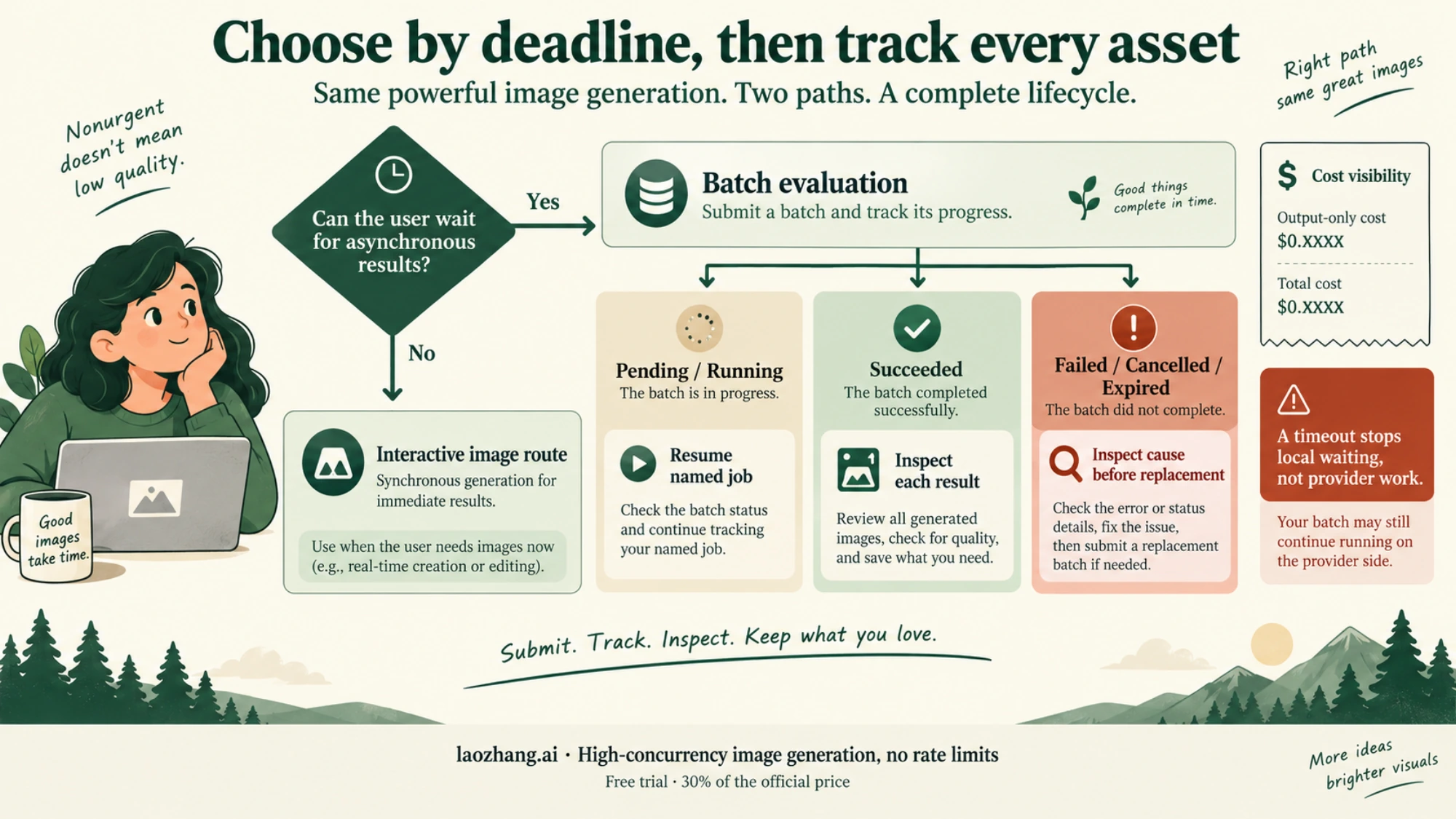
The job lifecycle and the asset lifecycle need separate tracking. The documented terminal states are SUCCEEDED, FAILED, CANCELLED, and EXPIRED, with the JOB_STATE_ prefix in code. A successful job can include item-level failures, and an item without an error can still lack a final image.
| What you observe | Next action |
|---|---|
PENDING or RUNNING | Keep the job name; resume monitoring later. |
SUCCEEDED | Download results, reconcile keys, save images, and inspect them. |
| One request has an error or no final image | Keep the original request and result; decide whether its cause warrants correction or retry. |
| A key is absent or duplicated | Reconcile the downloaded results before assuming an asset must be regenerated. |
| Create returned no reliable job name | Check recent jobs against the saved submission record before another create. |
FAILED, CANCELLED, or EXPIRED | Inspect the job's details and billing context before planning replacement work. |
Google says jobs left pending or running expire after 48 hours without results, and successful results remain downloadable for six weeks. Retrieve them promptly and retain your own outputs. Cancellation stops processing new requests; it is not documented as a blanket reversal of all charges. See Batch lifecycle and best practices.
Retry only the keys you have decided need another attempt. Preserve successful assets, fix invalid request settings rather than replaying them, and cap both attempts and spend. A batch-wide success counter cannot replace inspecting individual responses. For broader accounting when a timeout leaves charges unsettled, use a spend guard that keeps uncertain costs reserved.
For scale, the Batch limit documentation lists 100 concurrent jobs, a 2 GB input-file limit, 20 GB file storage, and model-specific queued-token limits shared across active jobs. Actual project limits can vary. The quota table's preview-model entry does not establish a guaranteed quota for the stable ID, and additional keys in the same project do not create independent project capacity.
Split work according to what you can monitor, retrieve, and recover within your deadline. There is no established universal image count at which Batch becomes worthwhile: two nonurgent requests qualify just as naturally as a catalog of thousands, while a single image needed during an interactive session may require Standard processing. Do not turn the 24-hour target into a next-day delivery guarantee.
Frequently Asked Questions
Does Batch produce lower-quality images than Standard?
Batch uses the same selected Gemini 3 Pro Image model, which supports both image generation and Batch. The discount does not establish a different quality tier. It also does not promise pixel-identical outputs or a measured quality success rate; inspect your generated assets against the same requirements.
Is the $0.067 Batch price the total cost of a 2K image?
No. It is Google's rounded image-output equivalent. The token-based figure is $0.0672, and input, reference images, text/thinking, tools, and additional billed attempts can increase the total. Google's pricing table and footnotes define the components. Your useful-image cost also depends on how many results you can actually use.
Is there a free Batch tier for Gemini 3 Pro Image?
Google lists the Free Tier as unavailable for this model's Standard and Batch API pricing. Consumer-app access or an AI Studio experiment should not be budgeted as a recurring free API allowance. Check the model-specific price table for your intended API route.
How long should I wait for Batch images?
Google targets 24 hours, with timing dependent on workload and service conditions. Jobs still pending or running after 48 hours expire. These are documented Batch timing rules, not measured turnaround times from this guide. Keep a delivery buffer and use an interactive route when the user cannot wait.
Can I submit a small batch without uploading a JSONL file?
Yes, inline requests are supported for smaller batches under 20 MB. In Python, use each request's SDK config and attach its identifying key through metadata, for example:
inline_request = {
    "contents": [{"parts": [{"text": "A studio photo of a blue ceramic vase"}]}],
    "config": {
        "response_modalities": ["TEXT", "IMAGE"],
        "image_config": {"image_size": "2K", "aspect_ratio": "1:1"},
    },
    "metadata": {"key": "vase-inline-01"},
}
# With an already configured client, pass src=[inline_request] to batches.create.
# Save the returned job name as in the file workflow.
This is an input fragment, not a second complete submission script. Retrieve inline results through job.dest.inlined_responses, retain the returned metadata key, check errors, skip thinking parts, and save final image parts using the SDK's part.as_image() method. Use the file workflow when you want a persisted JSONL input and downloadable JSONL output.
Sources6
External pages this guide links to, in the order they appear. Last updated Oct 7, 2026.
Sources6
External pages this guide links to, in the order they appear. Last updated Oct 7, 2026.
- 1.Gemini Developer API's current pricesai.google.dev/gemini-api/docs/pricing
- 2.Batch termsai.google.dev/gemini-api/docs/batch-api
- 3.model page explicitly supports Batchai.google.dev/gemini-api/docs/models/gemini-3-pro-image
- 4.thinking process is always enabledai.google.dev/gemini-api/docs/image-generation
- 5.ImageConfig referenceai.google.dev/api/generate-content
- 6.Batch limit documentationai.google.dev/gemini-api/docs/rate-limits