Claude Code Subagents Documentation: Official Docs, Safe Templates, and When to Use Them
Use the official subagents docs as the contract, then choose the right Claude Code route and start with a project-level helper that has narrow tools and clear stop rules.
On this page
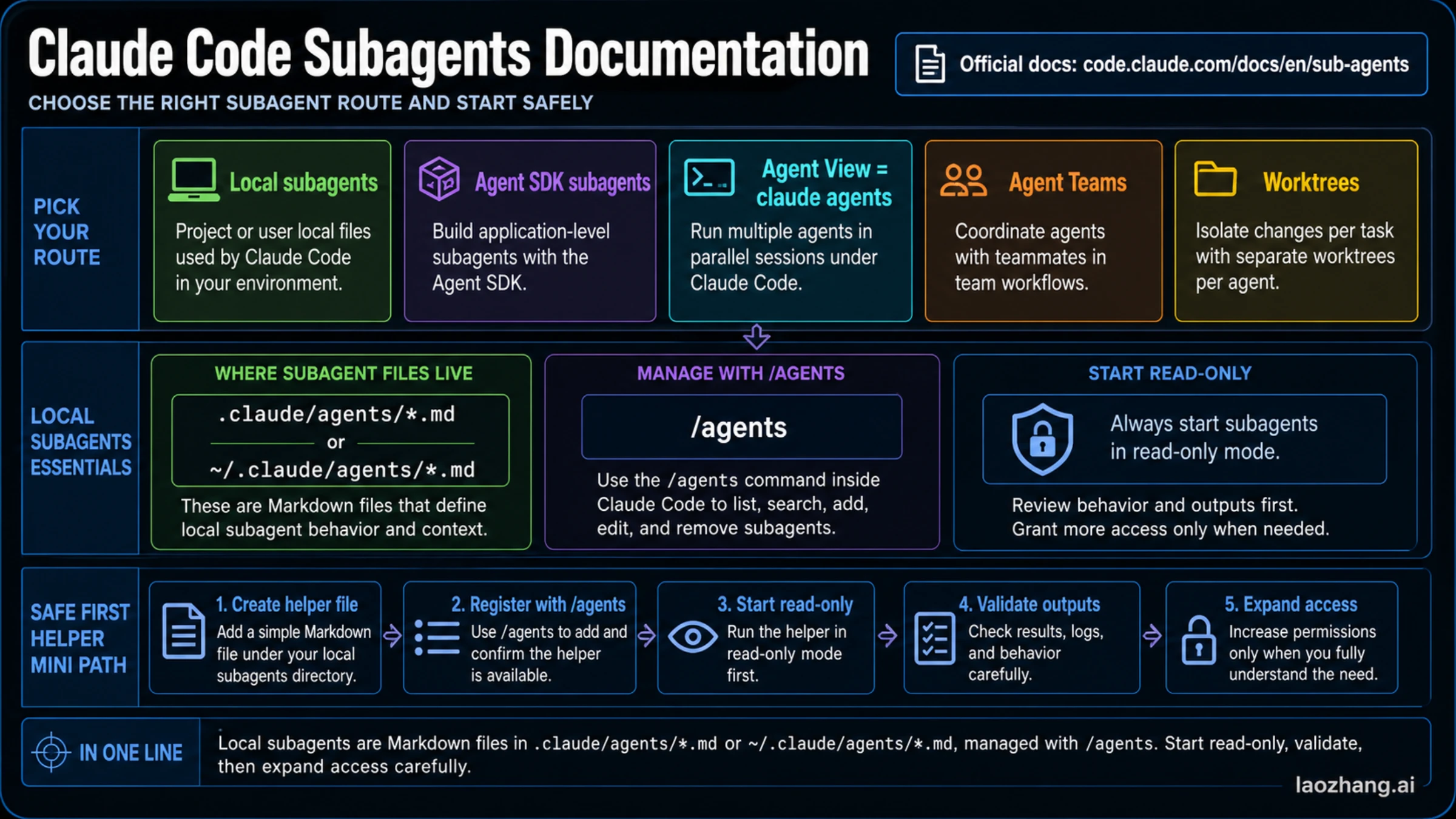
As of May 19, 2026, the current Claude Code subagents docs are at https://code.claude.com/docs/en/sub-agents; use that page as the contract, then start only when the job is a focused helper inside one Claude Code session.
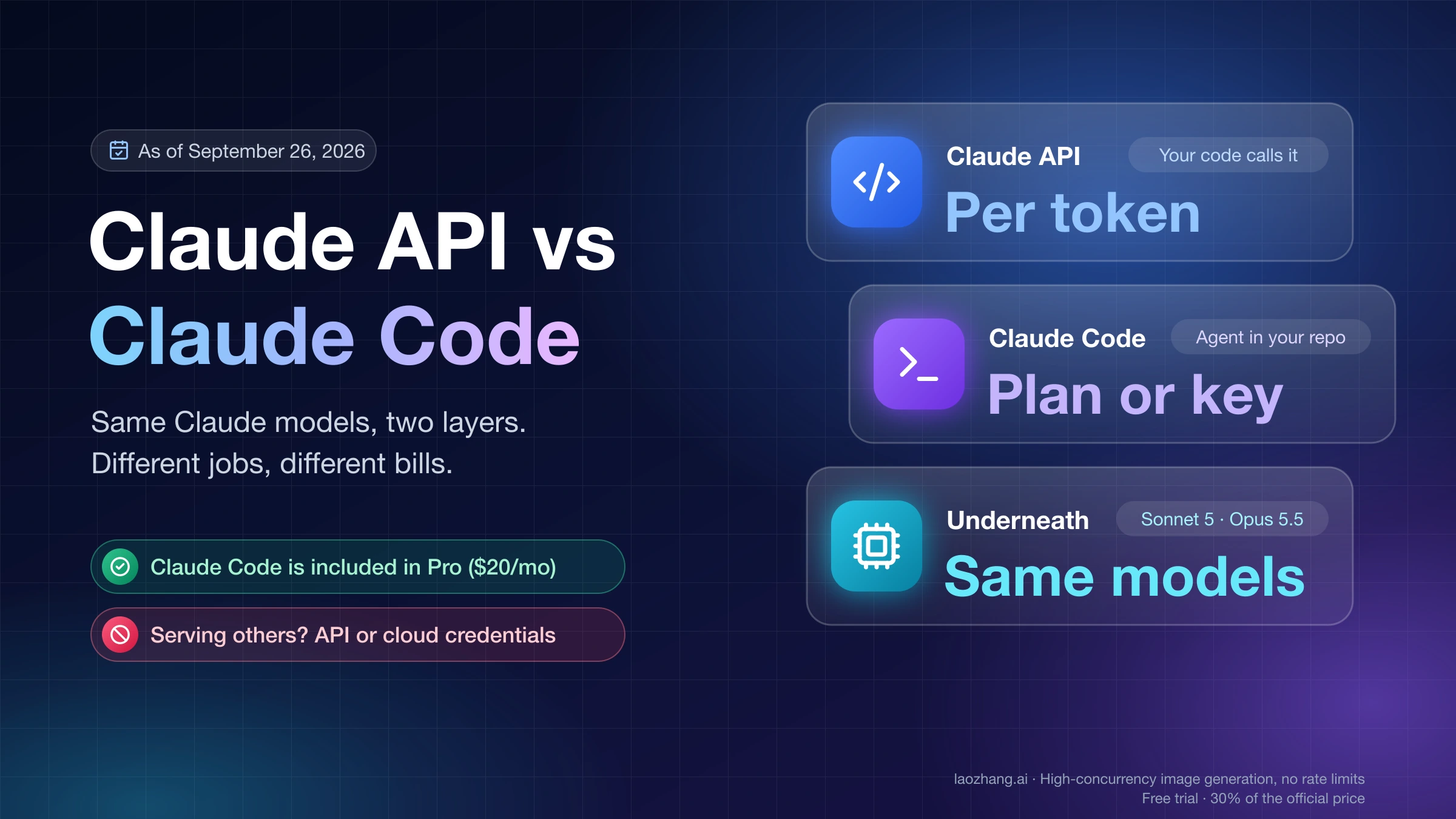
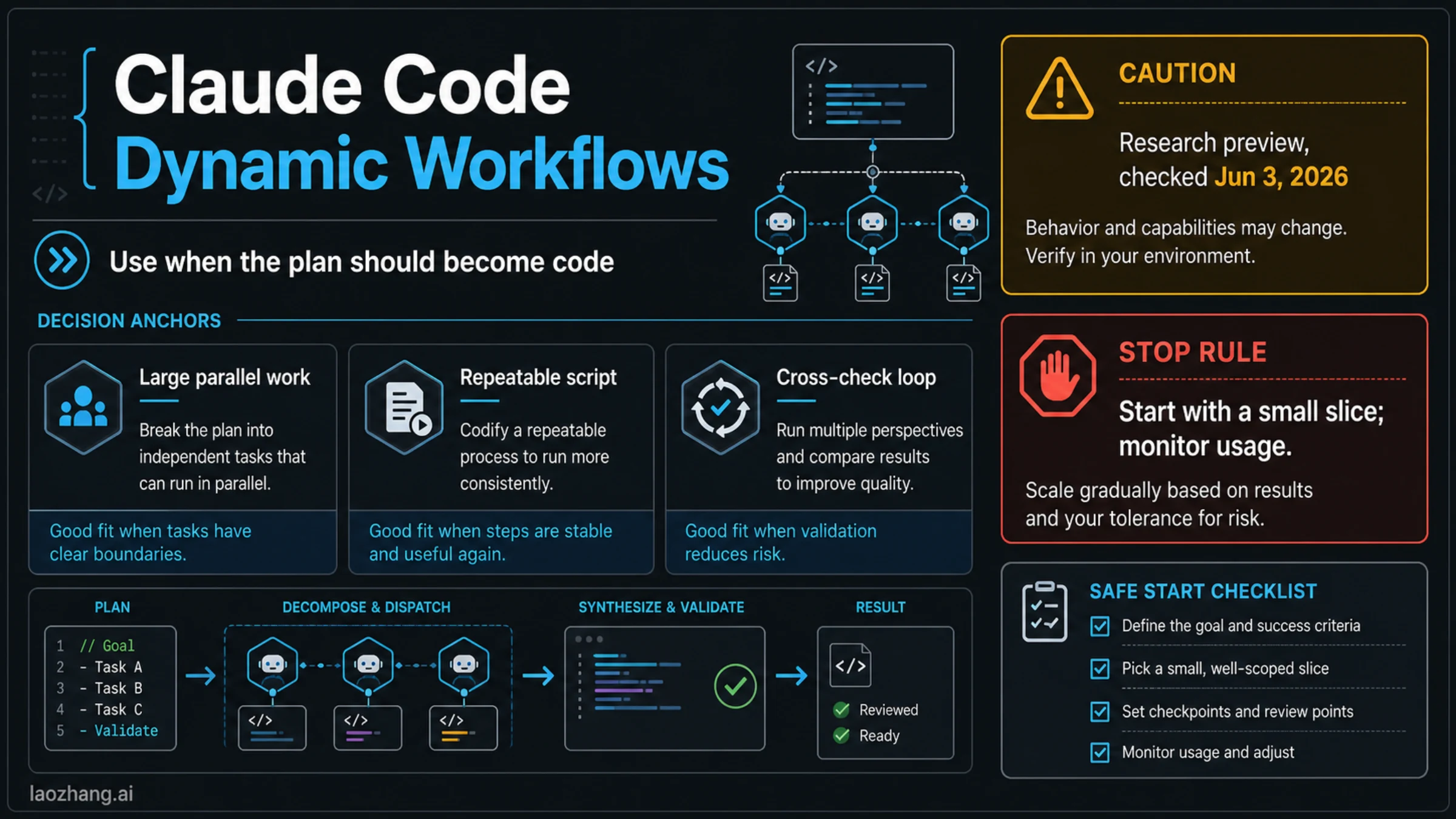
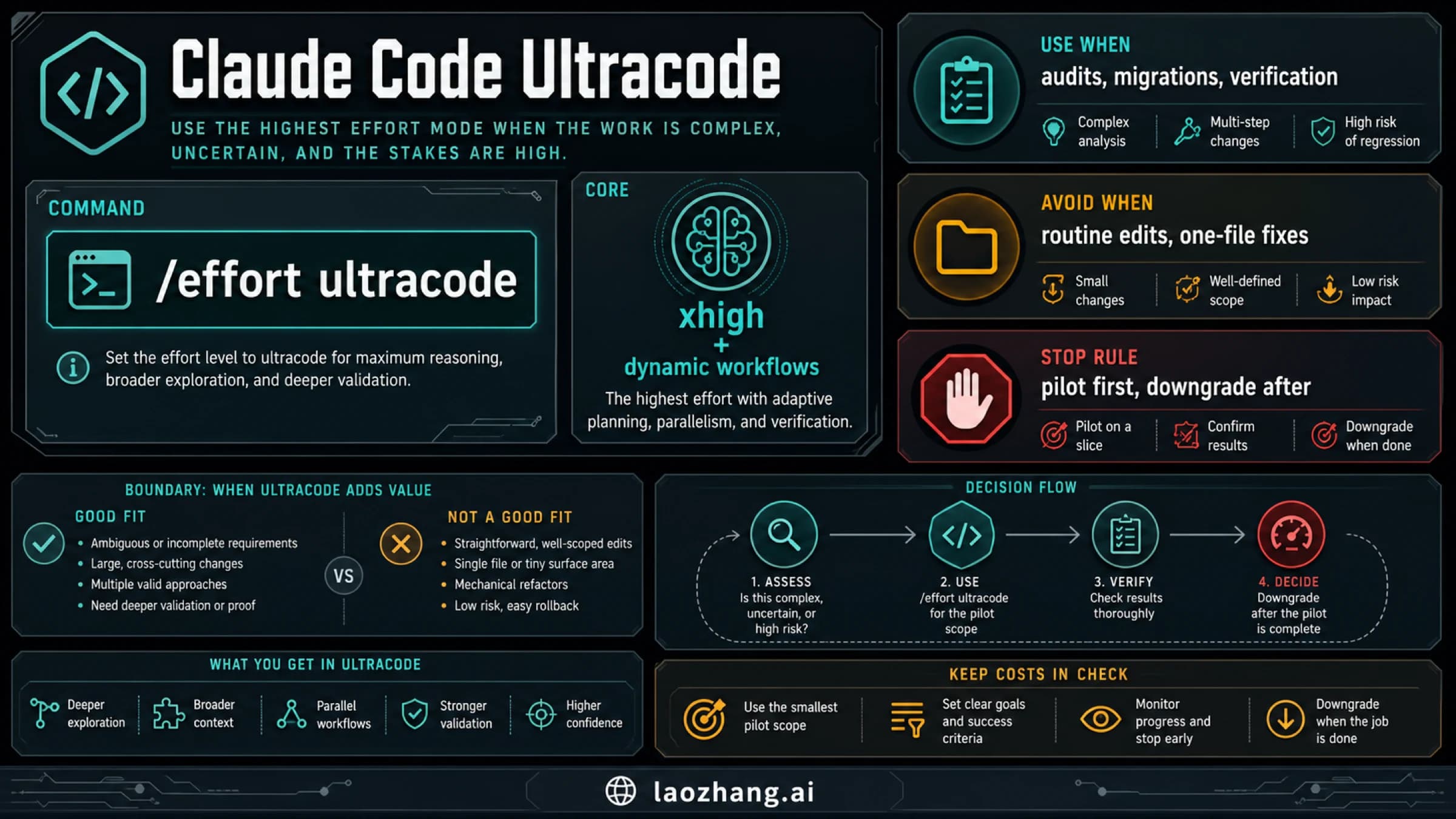
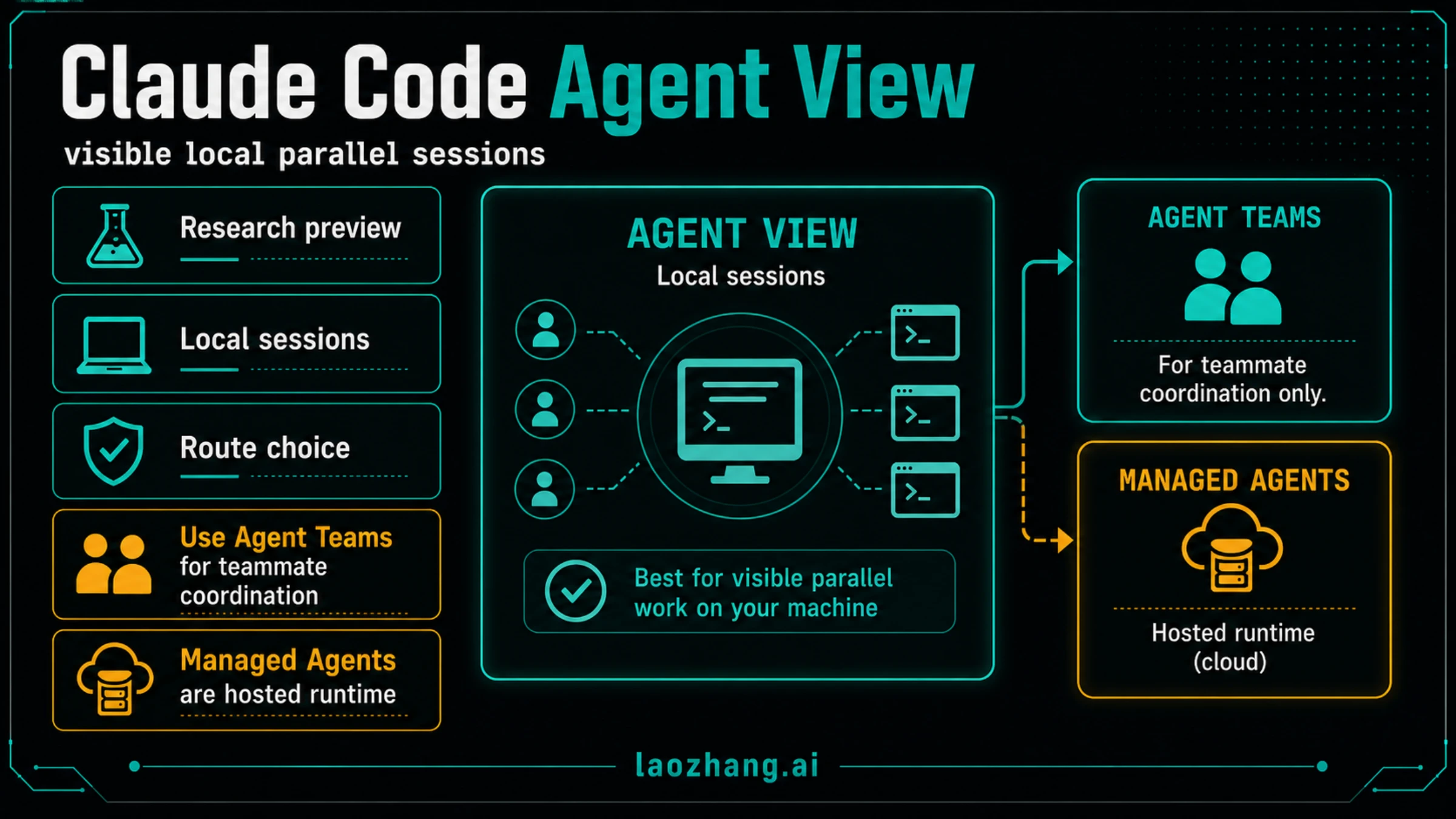
A local subagent is not the same as an Agent SDK runtime, Agent View dashboard, Agent Teams workflow, or a worktree strategy. Use subagents when a bounded side task can run in separate context and return a concise result; use another route when you need application-level agents, visible parallel sessions, teammate coordination, or isolated file edits.
| If you need... | Start here | Current boundary |
|---|---|---|
| The official contract for local Claude Code subagents | code.claude.com/docs/en/sub-agents | Checked on May 19, 2026; recheck volatile fields and behavior before publishing team standards. |
| A focused helper inside one Claude Code session | /agents or .claude/agents/*.md | Best for review, research, testing, or summarization with a narrow outcome. |
| Subagents inside an application runtime | Agent SDK subagents docs | Separate SDK route, not the normal local Claude Code helper setup. |
| Several visible local Claude Code sessions | claude agents / Agent View | Use when you need a dashboard for parallel sessions, not when you only need one scoped helper. |
| Multiple edit tracks touching code | Worktrees first | Do not let helpers compete for the same files without isolation and ownership. |
Safe first action: create one project-level read-only helper in .claude/agents/, give it a precise description, allow only read/search tools, test it on one small review task, and expand permissions only after the output is correct. Stop if the task touches the same files as another worker, ownership is unclear, or the helper needs broad tools before it has proved useful.
Fast Answer
Claude Code subagents are task-specific assistants that Claude Code can delegate to while keeping a separate context. The useful version of that sentence is narrower: a subagent should have one job, a clear description, limited tools, and a return shape that helps the main conversation make a decision.
The official docs are still the place to verify field names and behavior. The practical job is the companion layer: choose the right route, write a safe first helper, and avoid subagents when the work belongs somewhere else.
Start with this decision path:
- Use the official Claude Code subagents docs for the contract.
- Use a local subagent only when the task has a bounded outcome.
- Put team-shared helpers in
.claude/agents/; put personal reusable helpers in~/.claude/agents/. - Manage helpers with
/agentsinside Claude Code. - Keep the first helper read-only unless it must change files.
The date matters because Claude Code docs, built-in agents, permission modes, foreground/background behavior, and parallel-work surfaces are changing quickly. The facts below were checked against Anthropic's current code.claude.com docs, Anthropic's subagents blog, and Anthropic Academy on May 19, 2026. Recheck the official docs before turning any example here into a company standard.
Route Board: Local Subagents, SDK Subagents, and Agent View
The first choice is not the template. It is the route.
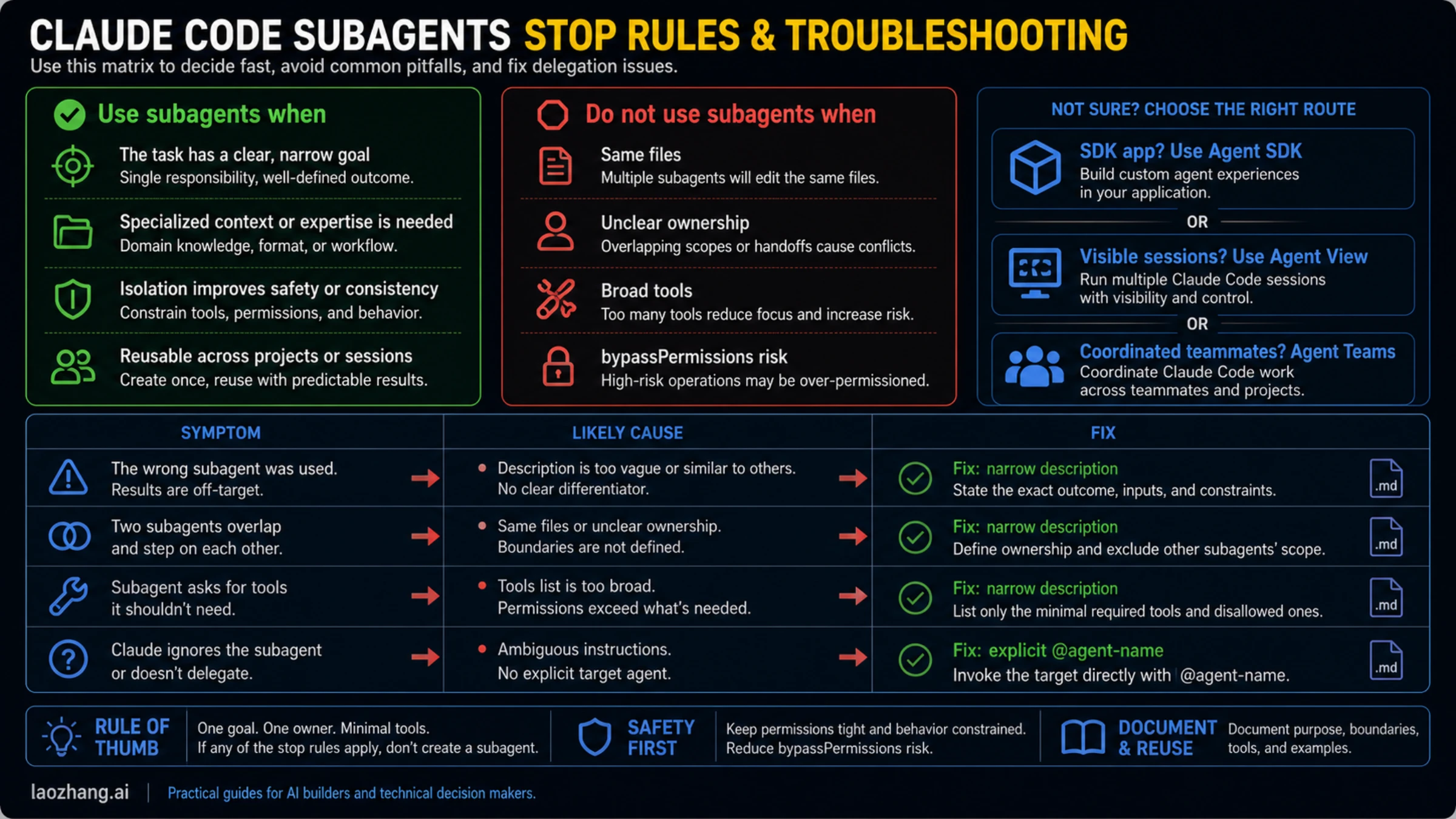
| Route | Use it when | Do not use it when |
|---|---|---|
| Claude Code local subagents | A focused helper should run inside one Claude Code workflow and return concise findings. | You need a product runtime, a visible dashboard for several sessions, or teammate coordination. |
| Agent SDK subagents | You are building an application where subagents are defined and invoked through SDK options. | You only want a local .claude/agents/*.md helper for repo work. |
| Agent View | You want visible local background sessions opened with claude agents. | You only need one helper inside the current session. |
| Agent Teams | You are deliberately testing Anthropic's teammate-coordination path. | You just want safer review, research, or testing delegation. |
| Worktrees | Multiple workers need isolated file changes. | A single helper can answer the question without editing. |
| Skills or MCP | The helper needs reusable workflow knowledge or external tool/data access. | A plain local subagent with clear instructions is enough. |
This split prevents the most common wrong start. A developer searches for subagents, sees "agents" language everywhere, and creates a broad "developer-agent" file that tries to review, edit, test, plan, and manage the project. That is not a useful subagent. It is a second generalist conversation with extra confusion.
Use subagents for bounded work: code review, test gap analysis, migration risk scanning, documentation research, log summarization, or a fresh read of a pull request. If the work needs visible parallel sessions, read the Claude Code Agent View guide. If it needs teammate coordination, read the Claude Code Agent Teams guide. If it needs reusable workflow knowledge rather than delegated execution, the Claude Code skills guide is the better follow-up.
Create a Safe First Subagent
A safe first subagent should be boring. Make it project-level, read-only, and useful for a task that appears repeatedly.
Claude Code supports two normal local locations:
| Scope | Path | Best use |
|---|---|---|
| Project | .claude/agents/*.md | Team-shared behavior committed with the repo. |
| User | ~/.claude/agents/*.md | Personal helpers reused across projects. |
For a repo team, start with project scope. It makes the helper visible in review, keeps behavior versioned, and avoids a situation where every developer has a slightly different local helper.
Use /agents in Claude Code when you want the guided management surface. Use a Markdown file when you want reviewable, explicit behavior in the repo. Both routes should produce the same basic shape: YAML frontmatter followed by a Markdown system prompt.
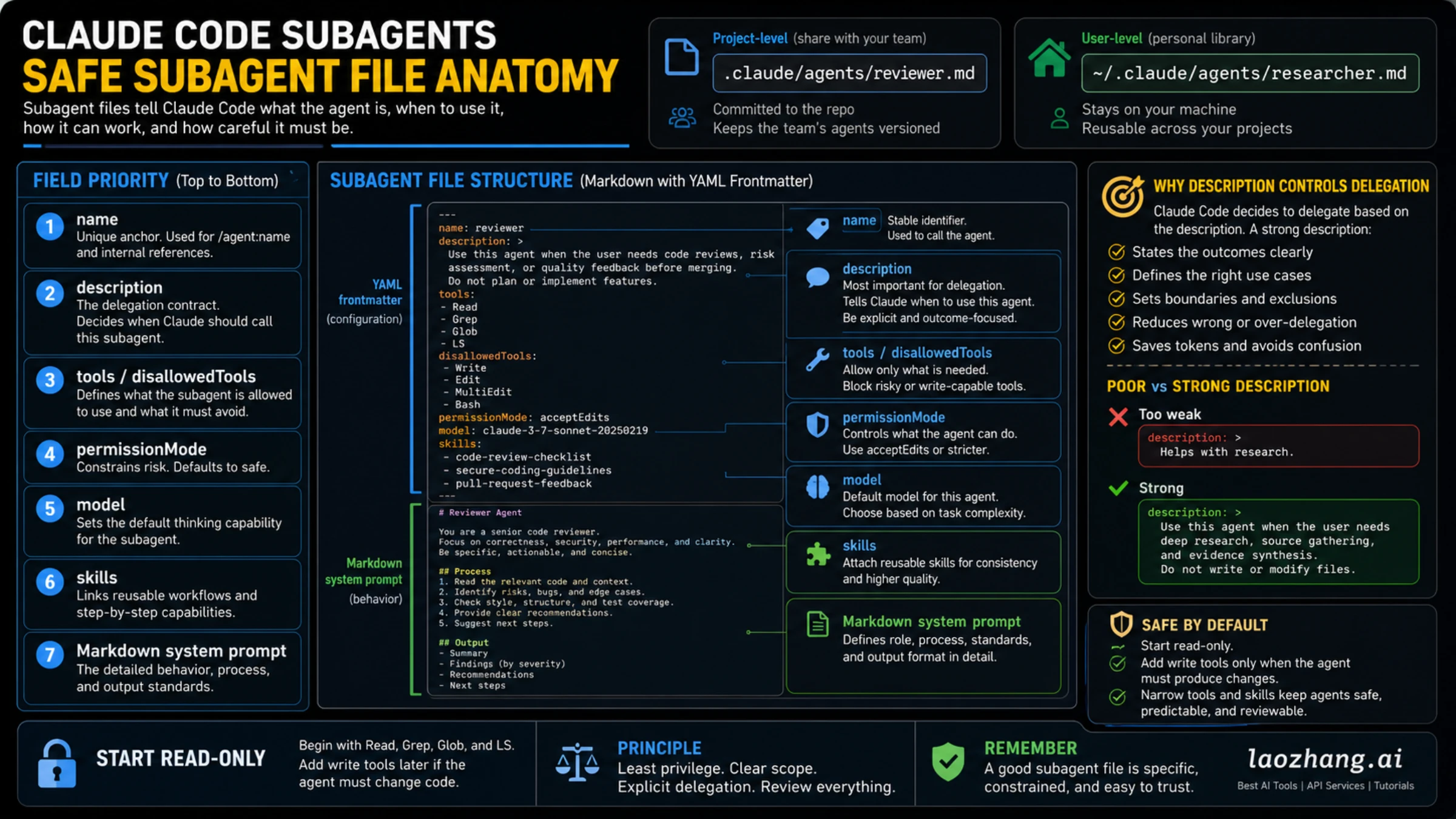
Here is a deliberately conservative starter helper:
---
name: code-review-scout
description: Use this subagent when you need a read-only review of code changes for risks, missing tests, unclear ownership, or unsafe edits. Do not use it for implementation.
tools:
  - Read
  - Grep
  - Glob
  - LS
disallowedTools:
  - Write
  - Edit
  - MultiEdit
  - Bash
permissionMode: default
maxTurns: 8
---

You are a read-only code review scout.

Your job is to inspect the relevant files and return findings that help the main Claude Code conversation decide what to do next.

Process:
1. Identify the changed or relevant files.
2. Look for correctness, security, performance, test coverage, and ownership risks.
3. Do not modify files.
4. Do not propose broad refactors unless a concrete bug or maintainability risk requires it.
5. Return a concise report with severity, file references, and next action.

Output:
- Findings ordered by severity.
- Evidence for each finding.
- Missing tests or verification gaps.
- One safe next action.
This is not the most powerful possible subagent. That is the point. It has a clear trigger, no write tools, a short turn budget, and a return contract. Once it produces useful reports, you can create a separate edit-capable helper for a narrower job. Do not turn the review helper into an all-purpose builder.
Field Decisions That Matter
The description field is not metadata filler. It is the delegation trigger. Claude Code uses it to decide when a subagent fits the task, so a vague description creates either under-use or wrong use.
| Field | Safe default | When to change it |
|---|---|---|
name | Stable, lowercase, task-specific. | Change only when the old name misroutes users or conflicts with another helper. |
description | Outcome-focused and explicit about when not to use it. | Tighten it whenever Claude picks the wrong subagent or ignores the right one. |
tools | Start with read/search tools. | Add write or shell tools only for a helper whose job cannot work read-only. |
disallowedTools | Block risky tools in broad helpers. | Use it when an otherwise useful helper must never edit, run shell commands, or touch certain capabilities. |
permissionMode | Keep the default or strict mode unless you know the risk. | Escalate only after you understand foreground/background behavior and approval flow. |
model | Use the official docs' current model guidance or leave the default. | Pin a model only when task complexity or cost discipline requires it. |
maxTurns | Keep early helpers short. | Increase only when the helper has a narrow task and reliably returns useful output. |
skills | Leave empty for the first helper. | Add skills when the subagent needs a reusable workflow, not just more text. |
The practical order is also important. Fix the description before adding tools. Add tools before changing permission mode. Change permission mode only after the helper has proved useful under narrower conditions. That sequence keeps capability growth tied to observed need rather than excitement.
The same logic applies to skills, memory, hooks, and MCP. A subagent can benefit from reusable knowledge or external tools, but those surfaces solve different problems. If the helper needs a repeatable procedure, consider a skill. If it needs external data or tool access, consider MCP and review the Claude Code MCP servers guide. If it needs deterministic enforcement, a hook may be cleaner than a larger prompt.
Invocation and Runtime Behavior
Subagents are useful only if you understand how Claude Code calls them and what happens after they start.
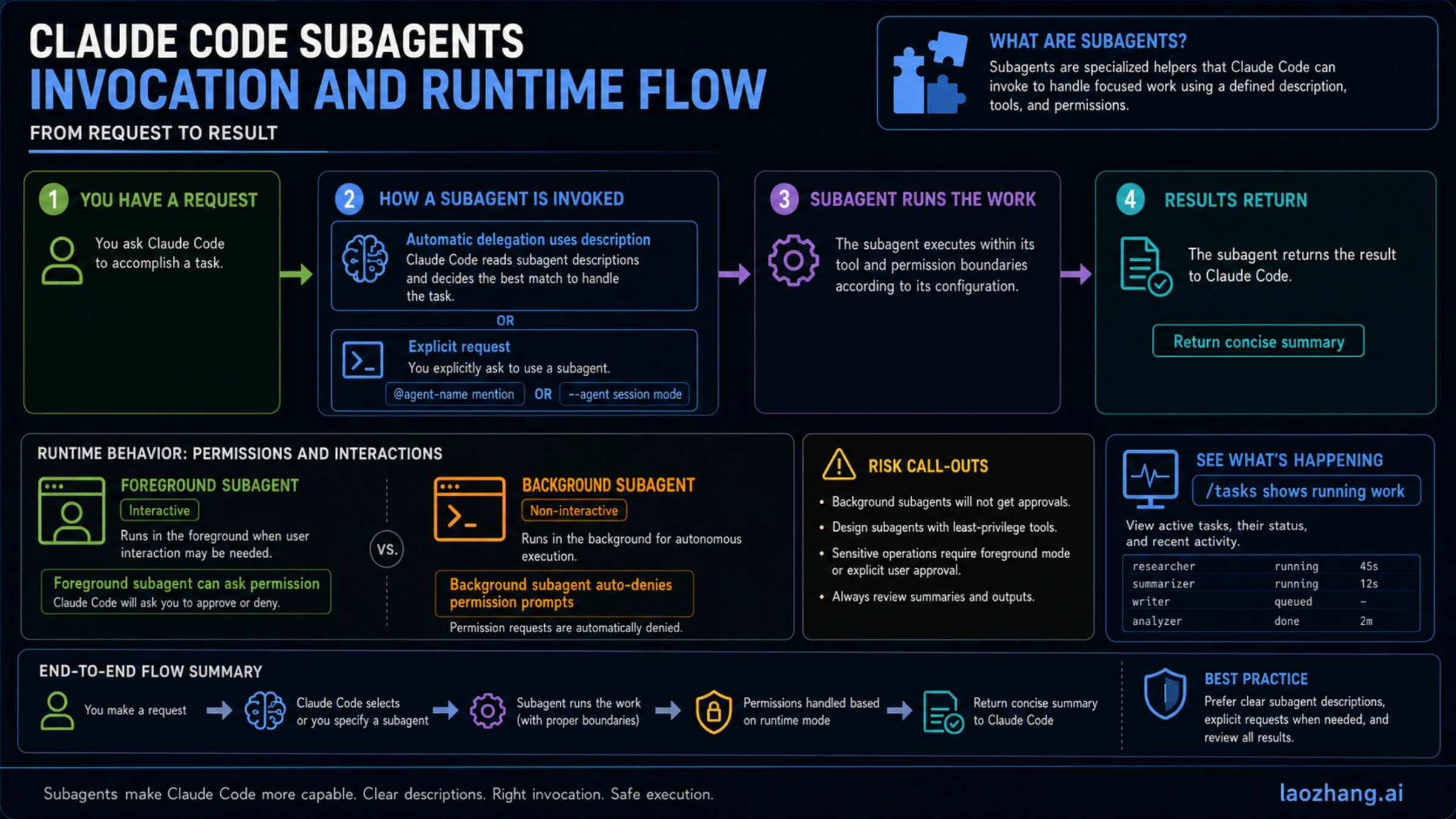
There are four common invocation patterns:
| Pattern | What it means | Best use |
|---|---|---|
| Automatic delegation | Claude Code chooses a subagent because the task matches its description. | Mature helpers with very clear descriptions. |
| Natural-language request | You ask Claude Code to use a named or described helper. | First tests and one-off review runs. |
@ mention | You explicitly target a subagent by name where the current docs support that syntax. | Avoiding ambiguity when several helpers overlap. |
--agent or setting route | You make a subagent the session-wide default. | Narrow sessions where one specialist should own the whole run. |
The safer first test is explicit: ask Claude Code to use the helper on a small task and return a concise report. Automatic delegation becomes useful after the description has been tuned against real use. Session-wide routes should wait until you are confident the specialist is the right default.
Foreground and background behavior also change the risk profile. Foreground subagents can pass permission prompts through to you. Background subagents run concurrently while the main conversation continues, but tool calls that would require permission are auto-denied. That means a background helper should be especially clear about tools, stop conditions, and what to return when it cannot continue safely.
If you use background subagents, watch active work instead of forgetting it exists. The official docs describe task inspection surfaces, and the practical rule is simple: do not start more background helpers than you can review. A completed summary still needs a human or main-session review before you trust it.
Practical Patterns That Work
Strong subagents isolate bounded side work and return a decision-ready result. Weak subagents imitate broad job titles.
Good first patterns:
code-review-scout: read-only review of changed files, risks, and missing tests.docs-researcher: source gathering and evidence synthesis without modifying files.test-gap-auditor: maps expected behavior to missing or weak tests.migration-risk-reader: reads a migration plan and flags coupling, rollback, and sequencing risks.release-note-checker: compares merged changes with release notes and identifies omissions.
These work because the input, boundary, and output are clear. A code review scout does not implement. A docs researcher does not invent facts. A test-gap auditor does not rewrite the test suite unless a separate edit-capable helper exists.
Weak first patterns:
super-developerbackend-agentfullstack-helperfix-everythingsenior-engineer
Those names are not wrong because they sound broad. They are wrong because they do not tell Claude when to delegate, what the helper owns, what tools are safe, or what result should come back.
If you need multiple helpers, separate them by outcome rather than persona. "Reviews API auth diff for security risk" is better than "security expert." "Summarizes official docs and lists volatile claims" is better than "research guru." The more concrete the outcome, the less review debt the subagent creates.
Troubleshooting Delegation
Most subagent failures come from ambiguity, permissions, or the wrong route. Fix those before adding more agents.
| Symptom | Likely cause | Fix |
|---|---|---|
| Claude does not use the subagent automatically. | The description is too vague or overlaps with another helper. | Rewrite description with trigger, outcome, exclusions, and example tasks. |
| Claude uses the wrong subagent. | Two helpers claim the same job. | Split ownership and add "do not use when..." language. |
| The helper asks for tools it should not need. | The task is not actually read-only, or the tool list is too broad. | Narrow the job or create a separate edit-capable helper. |
| Background work stalls or returns less than expected. | Permission prompts were auto-denied or inputs were incomplete. | Retry in foreground or lower the tool/permission requirement. |
| Output is long but not useful. | The prompt asks for activity instead of a decision. | Require severity, evidence, file references, and one next action. |
| Multiple helpers step on the same files. | Ownership was split by enthusiasm rather than file boundary. | Stop, move to worktrees or one session, and review diffs before continuing. |
Do not treat these as reasons to install a third-party catalog immediately. Public subagent examples can be useful references, but they drift and may assume different permissions, project layouts, or Claude Code versions. Copy the idea only after translating it into your route, file scope, tool policy, and stop rule.
If the problem is quota or plan limits rather than helper design, read the Claude Code rate limit guide or Claude daily limit guide before you multiply background work. More helpers can consume more context, review time, and model capacity.
Stop Rules
Use subagents when they reduce context noise and return clearer decisions. Do not use them just because "multi-agent" sounds advanced.
Stop and stay in one Claude Code session when:
- The task requires one continuous reasoning chain.
- Two helpers would edit or judge the same files at the same time.
- Ownership cannot be written in one sentence.
- The helper needs broad write, shell, or bypass-style permissions before proving value.
- The expected output is a single final judgment rather than comparable findings.
- You are in a dirty worktree and have not understood existing changes.
- The task belongs to Agent View, Agent Teams, Agent SDK, MCP, or worktrees instead.
The hardest stop rule is overlapping edits. If two helpers need the same files, either serialize the work or isolate it with worktrees. A subagent's separate context does not automatically make its file operations safe. It only gives you another bounded worker whose output still needs review.
Also be cautious with bypassPermissions-style shortcuts. They may be appropriate in tightly controlled automation, but they are the wrong default for a first helper. The safe sequence is narrow description, minimal tools, ordinary permission mode, explicit review, then gradual expansion.
FAQ
Where is the official Claude Code subagents documentation?
The current official page is https://code.claude.com/docs/en/sub-agents, checked on May 19, 2026. Use that page for current field names, invocation behavior, permission modes, built-in agent notes, background behavior, and examples.
Are Claude Code subagents and Agent SDK subagents the same thing?
No. Local Claude Code subagents are Markdown helpers managed through /agents or files under .claude/agents/ and ~/.claude/agents/. Agent SDK subagents are the programmatic route for applications that define and invoke subagents through SDK options.
What is the difference between /agents and claude agents?
/agents is the Claude Code management surface for subagents inside a session. claude agents opens Agent View, the separate local dashboard route for visible background sessions. The names are close enough to confuse readers, so keep them separate in workflow docs.
Should the first subagent live in project scope or user scope?
For team repo work, use .claude/agents/ first so the helper is reviewable and versioned. Use ~/.claude/agents/ for personal helpers that should follow you across projects.
Should I let a subagent edit files?
Not at first. Start read-only for review, research, and test-gap analysis. Add write tools only after the helper has a narrow job, reliable output, and a clear ownership boundary.
Can a subagent use skills, memory, hooks, or MCP?
Yes, but treat those as separate capability choices. Skills add reusable workflow knowledge, memory adds persistent context, hooks enforce deterministic rules, and MCP connects external tools or data. Add them only when the helper's job truly needs that layer.
Why is my subagent not being called automatically?
The most common cause is a vague or overlapping description. Rewrite it with a precise trigger, expected outcome, exclusions, and examples. Then test explicit invocation before expecting automatic delegation to be reliable.
Should I download a big set of third-party subagents?
Usually not as the first move. Third-party catalogs can teach patterns, but the official docs should own the contract and your local helper should match your repo, tools, permissions, and review process.
Bottom Line
The best Claude Code subagents documentation workflow is official-docs-first and route-aware. Link the current docs, choose local subagents only for focused helper work, and keep Agent SDK, Agent View, Agent Teams, worktrees, skills, and MCP in their own lanes.
Create one narrow project-level helper, keep it read-only, test it on a small task, and review the output. If that helper saves context and returns sharper decisions, grow it carefully. If the work is coupled, ambiguous, broad-permission, or better served by another Claude Code route, do not create a subagent yet.