ChatGPT Pro 的 Codex quota reset 怎么查:Usage 面板、/status、Pro 5x/20x 与 credits
ChatGPT Pro 的 Codex 额度更高,但不是无限使用。先用 Codex Usage 面板和 /status 看 reset 窗口,再分开处理 credits 与 API key。
文章目录
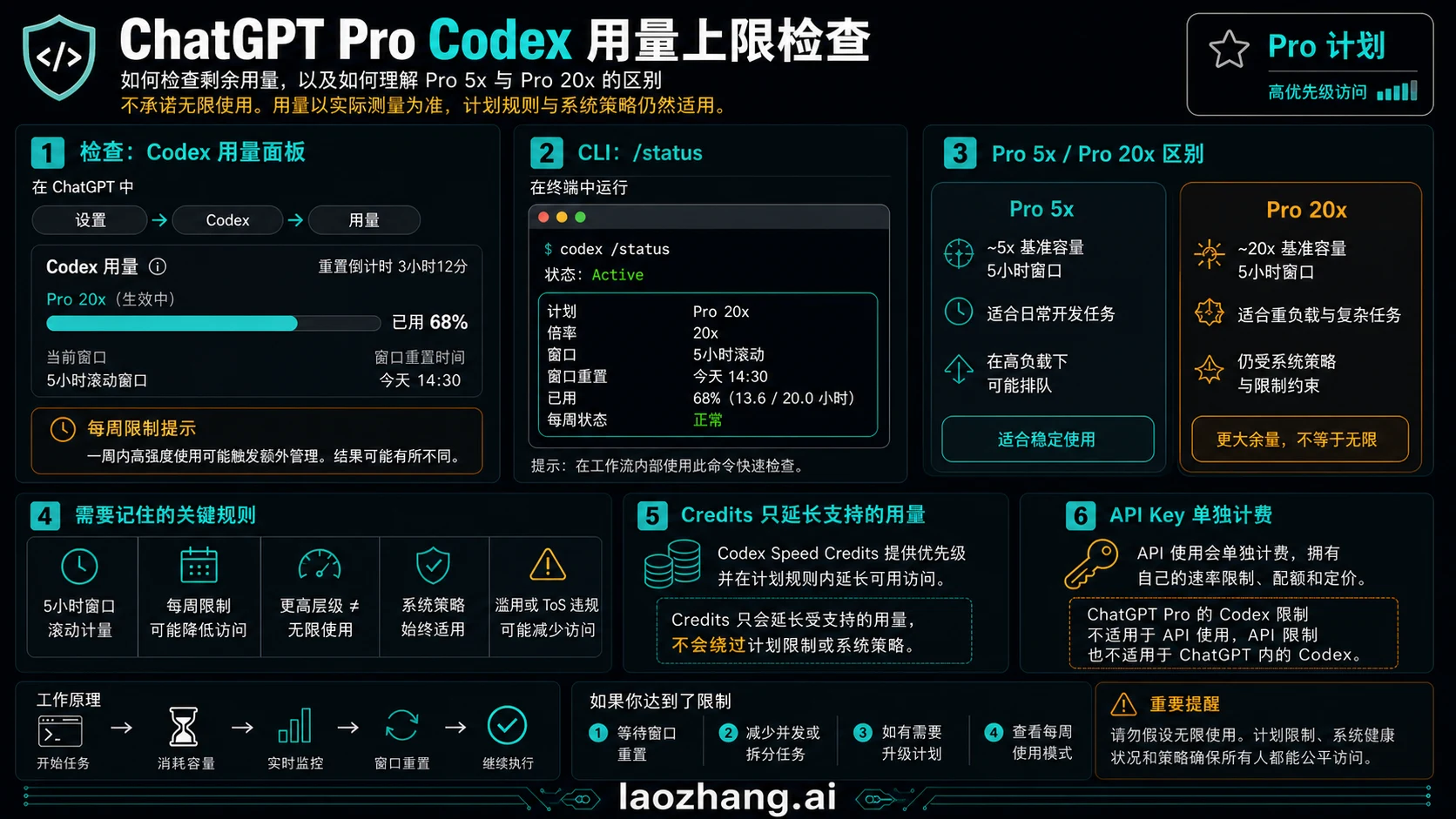
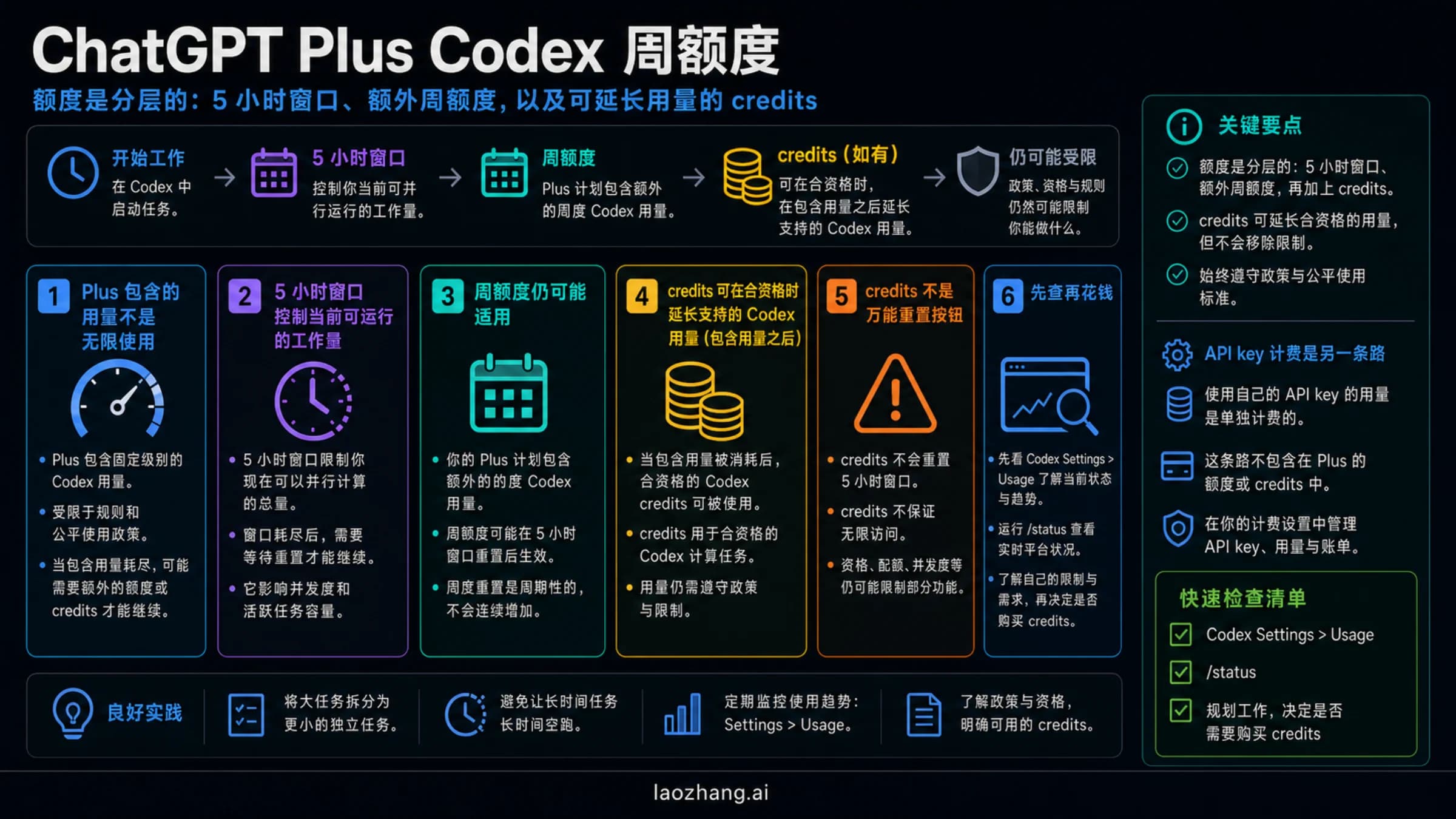
ChatGPT Pro 会给 Codex 更高的使用余量,但它不是无限使用。先打开 Codex Usage 面板或 limit banner,再在当前 Codex CLI 会话里运行 /status,最后分别判断可见 reset 窗口、周限制、credits 和 API key 计费边界。
截至 2026 年 6 月 1 日,OpenAI 的 Codex 计划说明把 Pro 5x 和 Pro 20x 描述为更高额度的计划形态,而不是不受限制的模式。模型、任务规模、本地或云端执行、code review、fast mode 和图像相关任务都会改变消耗速度。
快速答案:先看正确的 reset 入口
Usage 面板或 limit banner 是账户侧证据,适合看剩余额度、reset 时间、credits 和限制提示。/status 是当前 CLI 会话证据,适合看当前模型、配置和上下文压力。两个入口回答的问题不同,不能互相替代。
| 问题 | 先看哪里 | 能证明什么 | 不能证明什么 |
|---|---|---|---|
| Codex quota right now | Codex Usage / limit banner | account-side availability and reset | API-key spend |
| Active CLI state | /status | model, config, context pressure | full account history |
| Pro 5x or Pro 20x | ChatGPT plan / Codex pricing | included plan shape | unlimited access |
| Compatible overflow | credits panel | paid continuation path | all policy boundaries |
| API spend | OpenAI Platform Usage | API organization billing | ChatGPT Pro subscription pool |
更完整的计划表见 Codex usage limits;token 与 context 读数见 Codex token usage。
Codex quota reset 要分成两类看
| reset 问题 | 去哪里看 | 应该怎样判断 |
|---|---|---|
| 当前 5 小时窗口是否受限 | Codex Usage 面板或 limit banner | 如果显示 reset 时间,就按这个窗口等待、降模型、拆任务或使用兼容 credits。 |
| 是否碰到周限制或循环限制 | Usage 面板、计划状态和近期任务记录 | 单个短窗口正常,不代表周限制一定没有压力。 |
| 终端会话本身是否异常 | 当前 CLI 会话里的 /status | 它能确认模型、配置、上下文和 token 状态,但不是完整订阅账本。 |
| 是否走了 API 计费 | OpenAI Platform Usage 和 API billing | API key 的消耗不属于 ChatGPT Pro 订阅额度。 |
最值得保留的排查记录是四项:计划形态、页面显示的 reset 文案、当前任务类型、是否出现 credits 或 API billing。缺少这些信息时,“Pro quota reset 不对”通常还不足以定位问题。
Pro 5x / Pro 20x: high headroom, not unlimited mode
Pro 5x 和 Pro 20x 应该理解成更高的计划形态,而不是无限模式。真正要判断的是哪个工作模式正在消耗内含池:local CLI、cloud task、code review、fast mode、image work 和共享 agentic usage 都会影响账户实时状态。OpenAI 仍把 5 小时窗口和可能的周限制写进计划边界。
OpenAI 帮助中心和 Codex pricing 页都把 Pro 的 2x/boost 促销限定到 2026 年 5 月 31 日。今天已经是 2026 年 6 月 1 日,除非你的实时账户面板显示了新的活动,否则不要再把 5 月的促销倍数带入预算或团队排期。
Usage dashboard and /status together
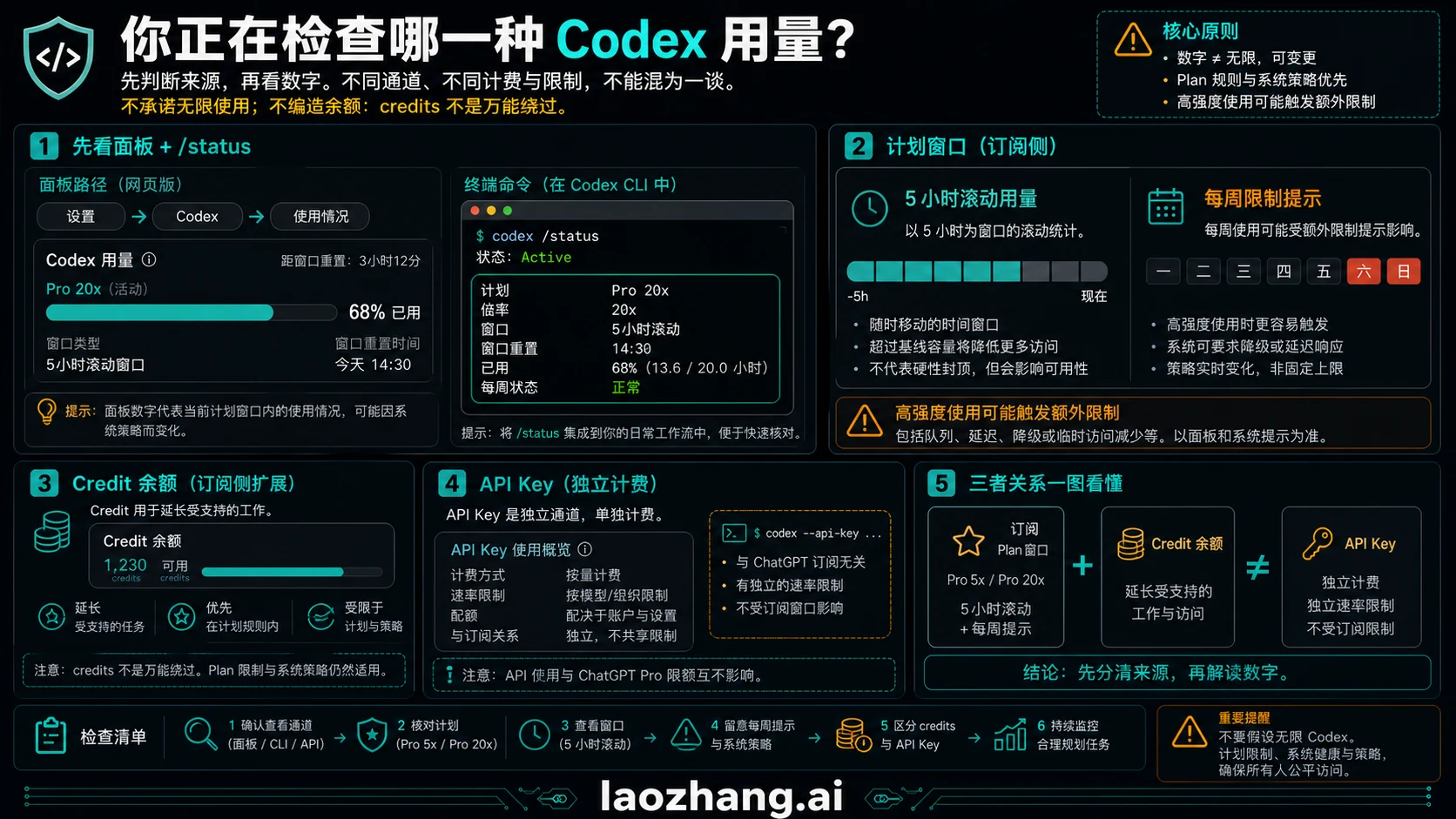
Usage 面板或 limit banner 是账户侧证据,适合看剩余额度、reset 时间、credits 和限制提示。/status 是当前 CLI 会话证据,适合看当前模型、配置和上下文压力。两个入口回答的问题不同,不能互相替代。
/status做决定前至少记录四项:当前计划形态、页面显示的 reset 文案、消耗来自 local CLI / cloud / code review / API key 哪一路,以及页面是否提供 credits。否则一个百分比或 reset 时间很容易被误读。
Why a Pro limit can arrive early
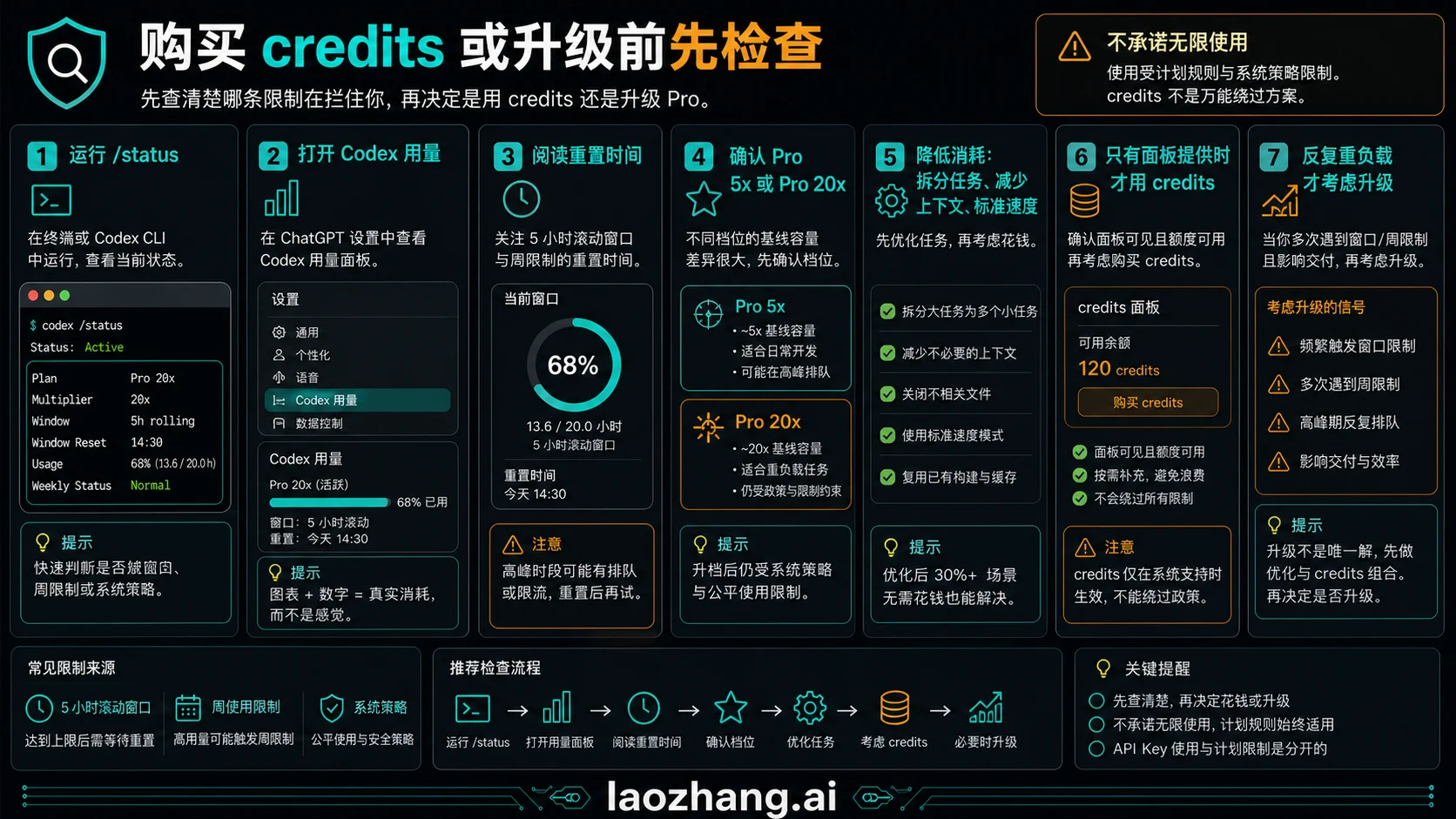
Pro 用户最容易误判的地方,是把公开计划倍数当成实际账户余额。长时间云端任务、大范围重构、频繁 review、fast mode 或连续高强度会话,都可能让限制比预期更早出现。
- Model and mode can change burn rate.
- Local and cloud work can share the same short window.
- Large refactors and review loops are heavier than quick edits.
- Weekly pressure can matter even when one window looks normal.
- Shared agentic features can draw from the included pool.
实际排查时,先把当前任务写成一句话:是在终端继续一个本地会话,还是在 Codex 云端跑任务,还是在做 code review,还是通过 API key 调用模型。任务类型不同,应该看的入口也不同。很多误判不是额度真的异常,而是把 CLI 会话状态、订阅剩余额度和 API 计费放在同一张表里比较。
如果团队多人共用判断口径,建议在工单或内部记录里保留三项信息:截图中的 Usage 状态、/status 输出的当前会话状态,以及当时使用的模型和模式。这样后续追问时可以区分是 5 小时窗口、周限制、fast mode 消耗,还是 API 侧账单问题。
Credits, API key, and the boundary
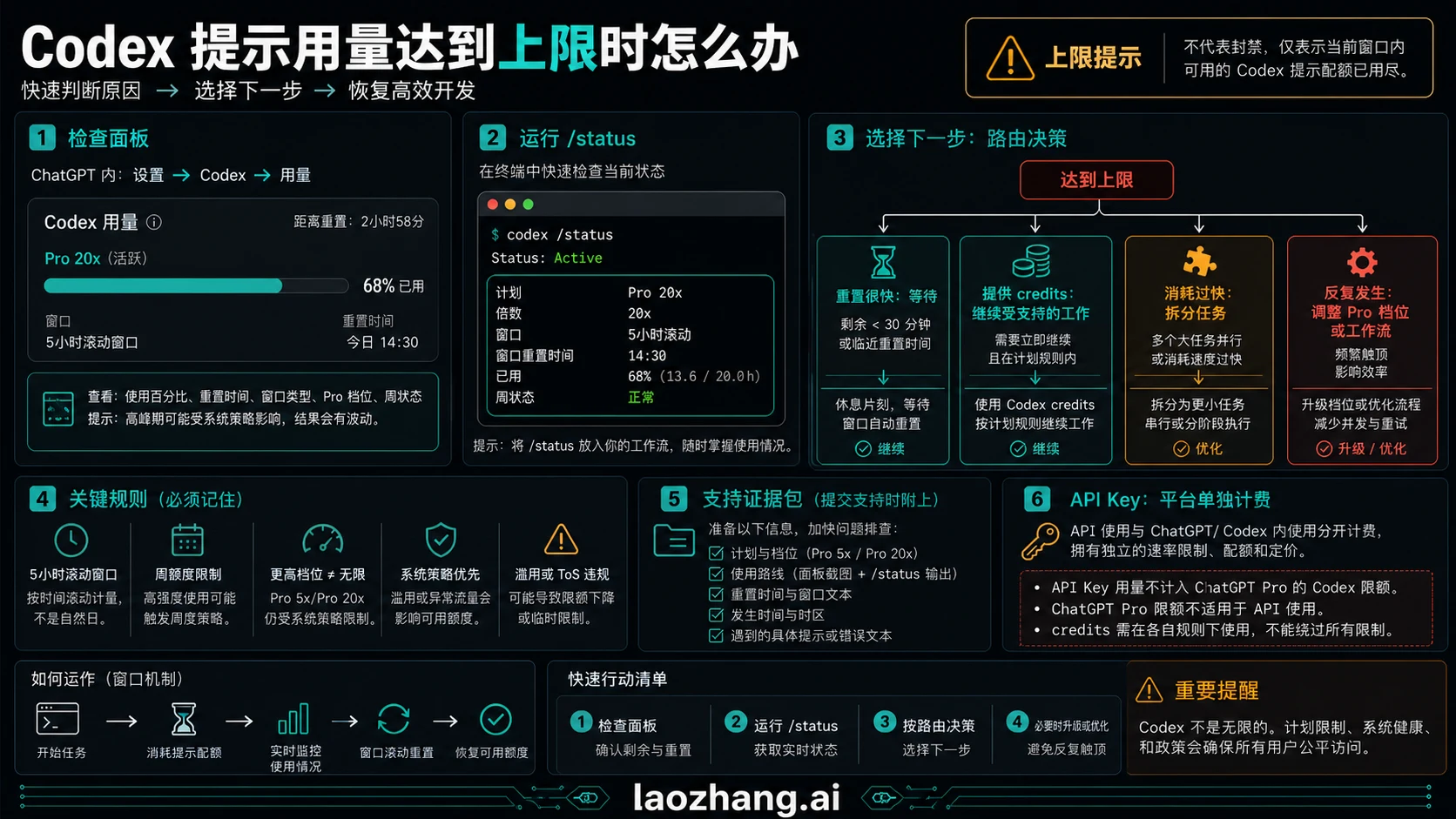
credits 可以让兼容的 Codex 工作在内含额度用完后继续,但它不是绕过所有计划规则的工具。API key 也不是同一个池子;API key 的消耗属于 OpenAI Platform 计费,不能和 ChatGPT Pro 的订阅额度混成一本账。
For API/subscription separation see Codex API key vs subscription. For Plus-side comparison use Plus Codex weekly credits as a boundary, not as a Pro answer.
Decision table after a limit
| 看到的情况 | 可能含义 | 下一步 |
|---|---|---|
| dashboard shows reset | included pool is constrained | wait, downshift, or split work |
| credits option appears | compatible overflow may exist | buy only when work belongs in ChatGPT/Codex |
/status looks fine but dashboard is blocked | session state differs from account allowance | trust dashboard for plan availability |
| API usage rises | API billing lane is active | inspect Platform Usage |
| fast mode or review burns quickly | work mode is heavier | reduce concurrency or schedule reset windows |
常见问题
ChatGPT Pro 的 Codex 是无限的吗?
不是。Pro 额度更高,尤其是 Pro 5x 和 Pro 20x,但仍然有窗口、周限制、模型相关消耗、credits 和策略边界。
在哪里看 Pro 的 Codex 剩余额度?
先看 ChatGPT 里的 Codex Usage 面板或 limit banner;当前 CLI 会话再用 /status。购买 credits 或升级前,先记录计划形态、reset 文案、任务类型和 API/credits 分流。
ChatGPT Pro Codex quota 多久 reset?
OpenAI 对 Codex 写的是 5 小时窗口,并且可能有周限制。你真正应该执行的是账户 Usage 面板或 limit banner 当前显示的 reset 时间,而不是套用一个所有账户通用的公开时钟。
/status 能代表整个 Pro 账户吗?
不能。它更适合当前 CLI 会话,不是账户级订阅面板,也不是 API 账单。
credits 能让 Codex 无限使用吗?
不能。credits 是兼容任务的付费延展,不会跳过计划、政策或系统负载边界。
API key 会消耗 ChatGPT Pro 的 Codex 额度吗?
API key 走 Platform 计费和 API 限制;ChatGPT 登录走订阅和 Codex credits。