ChatGPT Pro Codex quota reset 확인: Usage, /status, Pro 5x/20x, credits
ChatGPT Pro는 Codex 여유를 크게 늘리지만 무제한은 아닙니다. Usage와 /status로 reset을 확인하고 credits와 API key를 분리합니다.
목차
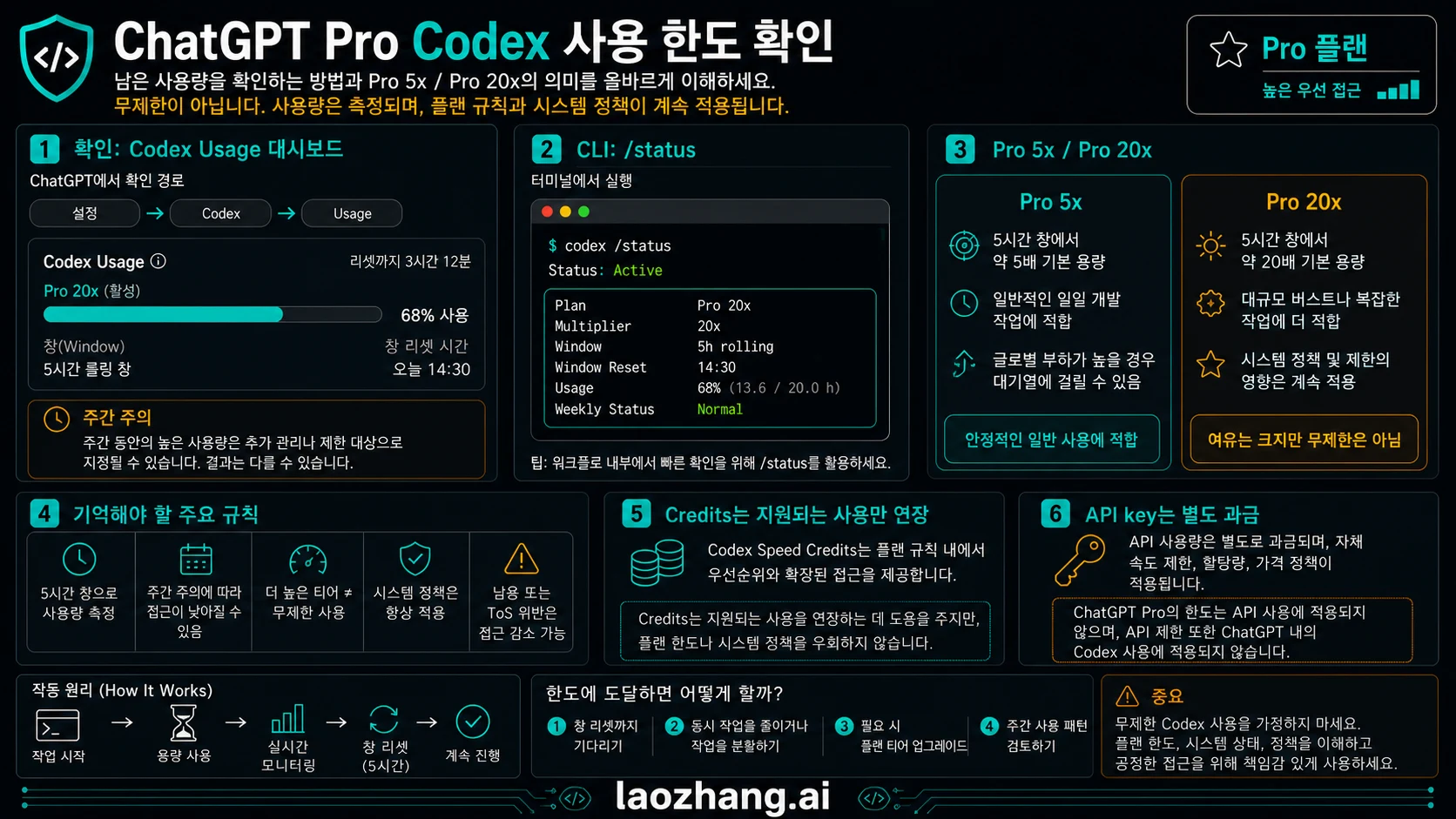
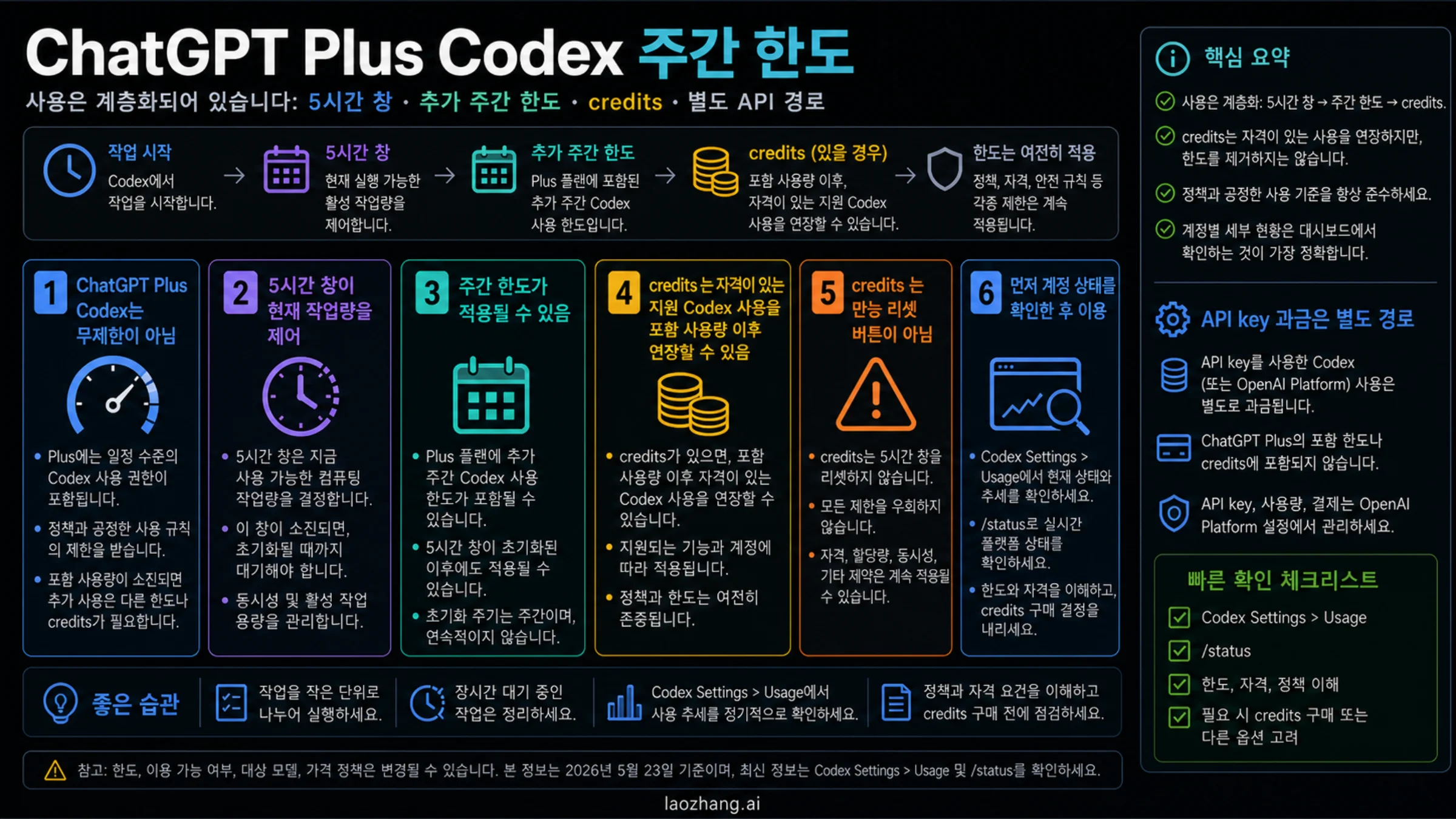
ChatGPT Pro는 Codex 여유를 크게 늘리지만 무제한은 아닙니다. 먼저 Codex Usage 패널 또는 limit banner를 열고, 현재 Codex CLI 세션에서 /status를 실행한 뒤, 보이는 reset window, 주간 압박, credits, API key 경계를 따로 읽어야 합니다.
2026년 6월 1일 기준 OpenAI 설명은 Pro 5x와 Pro 20x를 더 큰 포함 사용량 형태로 다룹니다. 모델, 작업 크기, local 또는 cloud 실행, code review, fast mode, image work가 소모 속도를 바꿉니다.
빠른 답: 먼저 reset 표면을 고르기
Usage 패널 또는 limit banner는 계정 쪽 증거입니다. 남은 사용량, reset, credits, 사용할 수 있는 선택지를 확인합니다. /status는 현재 CLI 세션 증거입니다. 모델, 설정, 컨텍스트 압박, 실행 상태를 확인하는 데 맞습니다.
| 질문 | 먼저 볼 곳 | 증명하는 것 | 증명하지 못하는 것 |
|---|---|---|---|
| Codex quota right now | Codex Usage / limit banner | account-side availability and reset | API-key spend |
| Active CLI state | /status | model, config, context pressure | full account history |
| Pro 5x or Pro 20x | ChatGPT plan / Codex pricing | included plan shape | unlimited access |
| Compatible overflow | credits panel | paid continuation path | all policy boundaries |
| API spend | OpenAI Platform Usage | API organization billing | ChatGPT Pro subscription pool |
전체 플랜 표는 Codex usage limits를, token/context meter는 Codex token usage를 참고하세요.
Codex quota reset 읽는 법
| reset 질문 | 확인 위치 | 안전한 해석 |
|---|---|---|
| 현재 5시간 창이 제한됐나 | Codex Usage 또는 limit banner | reset time이 보이면 그 창을 기다리거나, 모델을 낮추거나, 작업을 나누거나, 호환 credits를 사용합니다. |
| 주간 또는 cyclic limit인가 | Usage, plan state, 최근 task history | 한 짧은 창이 정상이어도 주간 압박이 없다는 뜻은 아닙니다. |
| CLI 세션 자체 문제인가 | 활성 대화 안의 /status | model, configuration, token/context state를 확인하지만 subscription ledger 전체는 아닙니다. |
| API billing을 쓰고 있나 | OpenAI Platform Usage와 API billing | API key 작업은 ChatGPT Pro subscription pool을 쓰지 않습니다. |
기록해야 할 네 가지는 plan shape, 보이는 reset wording, work mode, credits/API billing 여부입니다. 이 정보가 없으면 "Pro quota reset이 이상하다"는 말만으로는 진단하기 어렵습니다.
Pro 5x / Pro 20x: high headroom, not unlimited mode
Pro 5x와 Pro 20x는 plan shape로 읽어야 하며 unlimited mode가 아닙니다. 어떤 플랜이 더 큰지도 중요하지만, 어떤 work mode가 포함 사용량을 쓰는지가 더 중요합니다. Local CLI, cloud tasks, code review, fast mode, image work, shared agentic usage는 live account state에 영향을 줍니다.
OpenAI는 Pro의 2x/boost promotion을 2026년 5월 31일까지의 date-bound 혜택으로 설명합니다. 오늘은 2026년 6월 1일이므로, live account panel에 새 offer가 보이지 않는 한 5월 promotion multiplier를 6월 계획에 넣지 마세요.
Usage dashboard and /status together
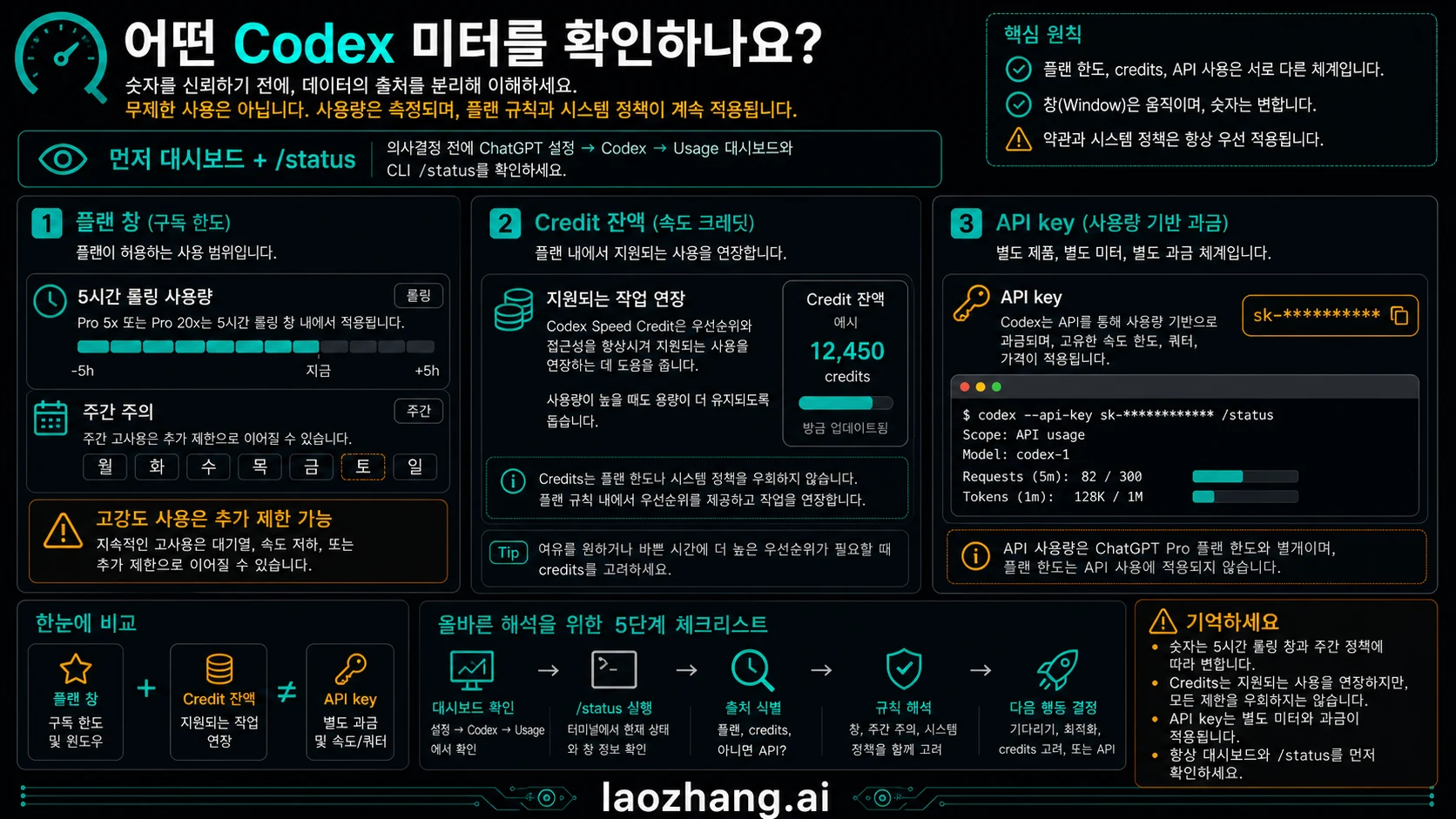
Usage 패널 또는 limit banner는 계정 쪽 증거입니다. 남은 사용량, reset, credits, 사용할 수 있는 선택지를 확인합니다. /status는 현재 CLI 세션 증거입니다. 모델, 설정, 컨텍스트 압박, 실행 상태를 확인하는 데 맞습니다.
/status결정 전에 네 가지를 기록하세요. active plan shape, 보이는 reset wording, 소모를 만든 work mode, credits 제공 여부입니다. 이 기록이 없으면 percentage나 reset time을 쉽게 오해할 수 있습니다.
Why a Pro limit can arrive early
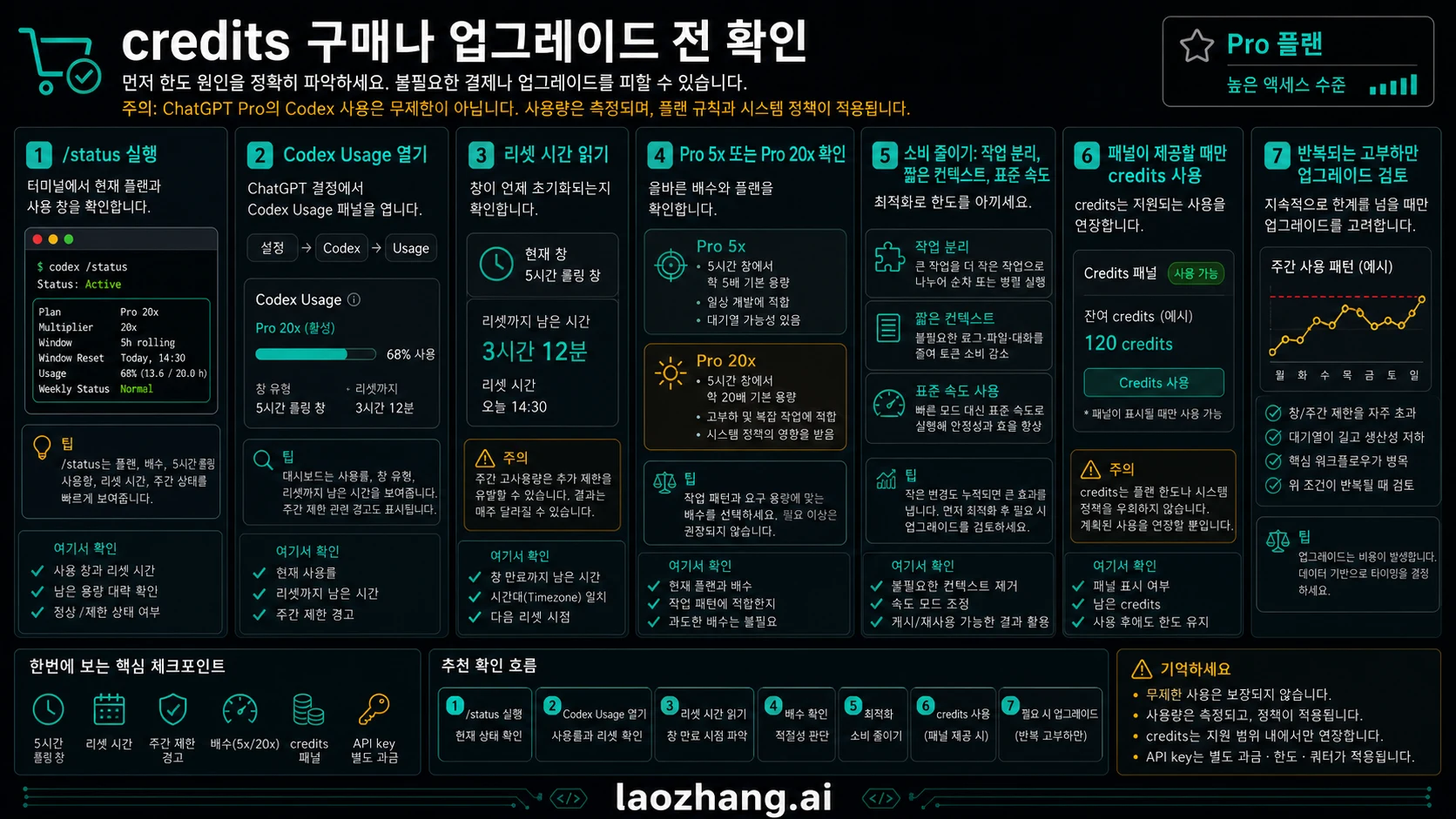
Pro 한도가 예상보다 빨리 온 것처럼 보일 때는 공개 배수만 보고 실제 작업 모드를 보지 않은 경우가 많습니다. 긴 cloud task, 큰 refactor, review loop, fast mode, 연속 고강도 작업은 포함량을 빠르게 소모합니다.
- Model and mode can change burn rate.
- Local and cloud work can share the same short window.
- Large refactors and review loops are heavier than quick edits.
- Weekly pressure can matter even when one window looks normal.
- Shared agentic features can draw from the included pool.
실무에서는 현재 작업을 먼저 분류해야 합니다. 로컬 CLI 세션인지, cloud task인지, code review인지, API key 호출인지에 따라 확인할 표면이 달라집니다. 로컬 세션은 /status, 구독 잔량은 Usage 패널, API 비용은 OpenAI Platform을 봐야 합니다. 이 순서를 지키면 정상적인 CLI 상태와 소진된 계정 풀을 잘못 비교하는 일이 줄어듭니다.
한도에 걸렸다면 세 가지를 기록하세요. Usage 패널의 상태, /status의 현재 세션 상태, 그리고 사용한 모델과 mode입니다. fast mode, 큰 모델, 여러 review loop, 긴 cloud run은 메시지 수보다 빠르게 포함 사용량을 소모할 수 있습니다.
Credits, API key, and the boundary
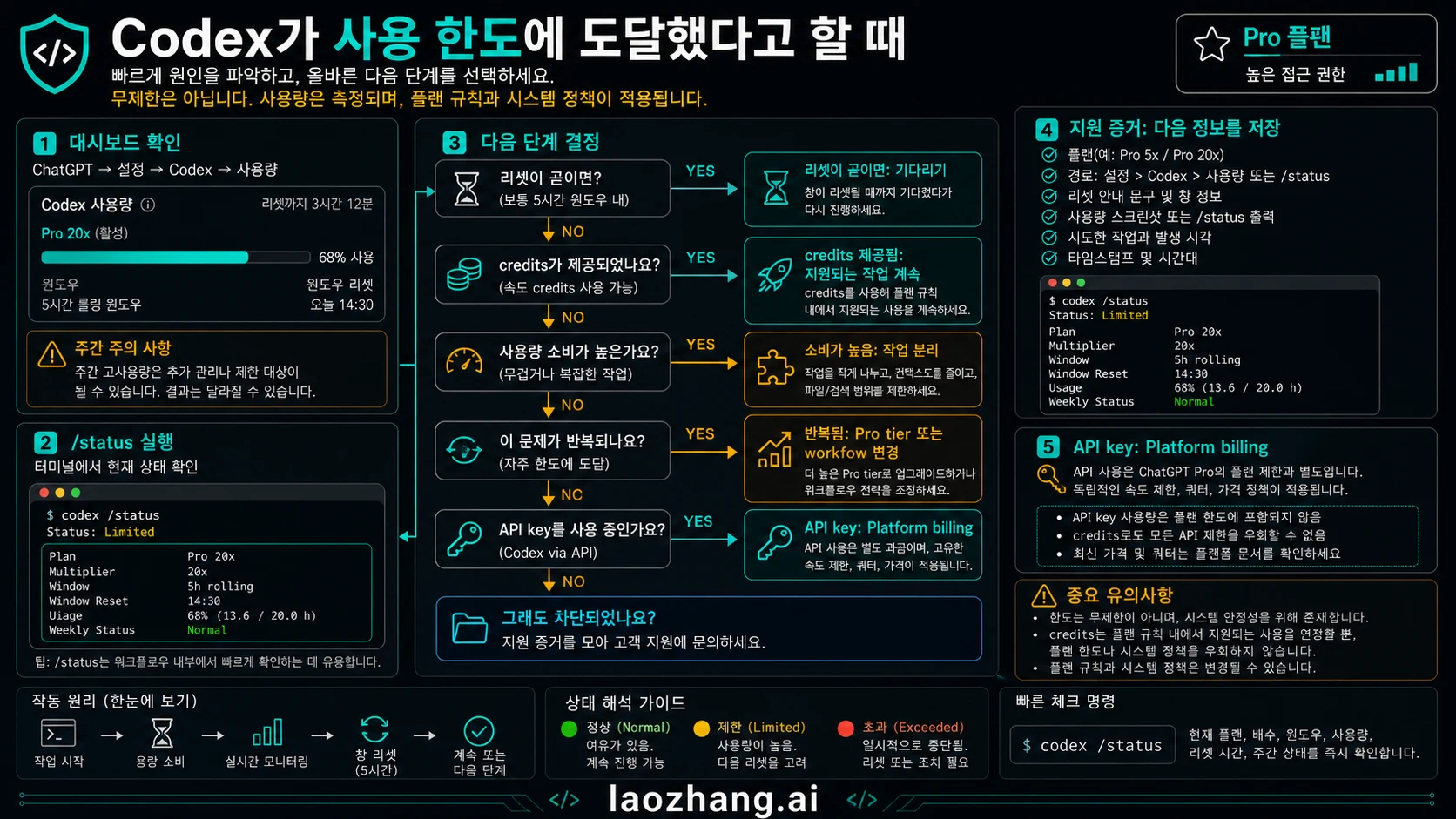
credits는 호환되는 Codex 작업을 계속하기 위한 유료 확장 수단입니다. 모든 플랜 규칙을 우회하지는 않습니다. API key 사용은 OpenAI Platform billing에 속하며 ChatGPT Pro 구독 잔량과 다릅니다.
For API/subscription separation see Codex API key vs subscription. For Plus-side comparison use Plus Codex weekly credits as a boundary, not as a Pro answer.
Decision table after a limit
| 보이는 상태 | 의미 | 다음 행동 |
|---|---|---|
| dashboard shows reset | included pool is constrained | wait, downshift, or split work |
| credits option appears | compatible overflow may exist | buy only when work belongs in ChatGPT/Codex |
/status looks fine but dashboard is blocked | session state differs from account allowance | trust dashboard for plan availability |
| API usage rises | API billing lane is active | inspect Platform Usage |
| fast mode or review burns quickly | work mode is heavier | reduce concurrency or schedule reset windows |
자주 묻는 질문
ChatGPT Pro의 Codex는 무제한인가요?
아닙니다. Pro 5x와 Pro 20x는 더 큰 여유를 주지만 시간 창, 주간 경계, credits, 정책은 계속 적용됩니다.
Pro의 Codex 남은 사용량은 어디서 보나요?
ChatGPT의 Codex Usage 패널 또는 limit banner를 먼저 봅니다. 현재 CLI 세션은 /status로 봅니다. credits 구매 전에는 plan shape, reset wording, work mode, API/credits lane을 기록하세요.
ChatGPT Pro Codex quota는 얼마나 자주 reset되나요?
OpenAI는 Codex 한도를 5시간 창과 가능한 주간 한도로 설명합니다. 실제로 따라야 하는 reset은 내 Codex Usage 또는 limit banner에 표시된 시간이며, 모든 계정에 같은 공개 시계가 아닙니다.
/status가 Pro 계정 전체 한도를 보여주나요?
아닙니다. /status는 현재 CLI 세션용이며 구독 전체 대시보드나 API billing이 아닙니다.
credits가 Codex를 무제한으로 만들까요?
아닙니다. credits는 호환 작업을 연장하지만 플랜 규칙, 정책, 시스템 조건을 없애지 않습니다.
API key가 ChatGPT Pro Codex 한도를 쓰나요?
API key는 Platform billing과 API limits 쪽입니다. ChatGPT sign-in은 구독과 Codex credits 쪽입니다.