Assistants APIからResponses APIへの移行手順:終了後の履歴・ツール・運用
Assistants APIはすでに終了しています。手元に保存した設定と履歴を移し、関数の実行結果までResponsesへ返す仕組みを作って切り替えます。障害時は動作確認済みのResponses版や受付保留へ戻します。
目次
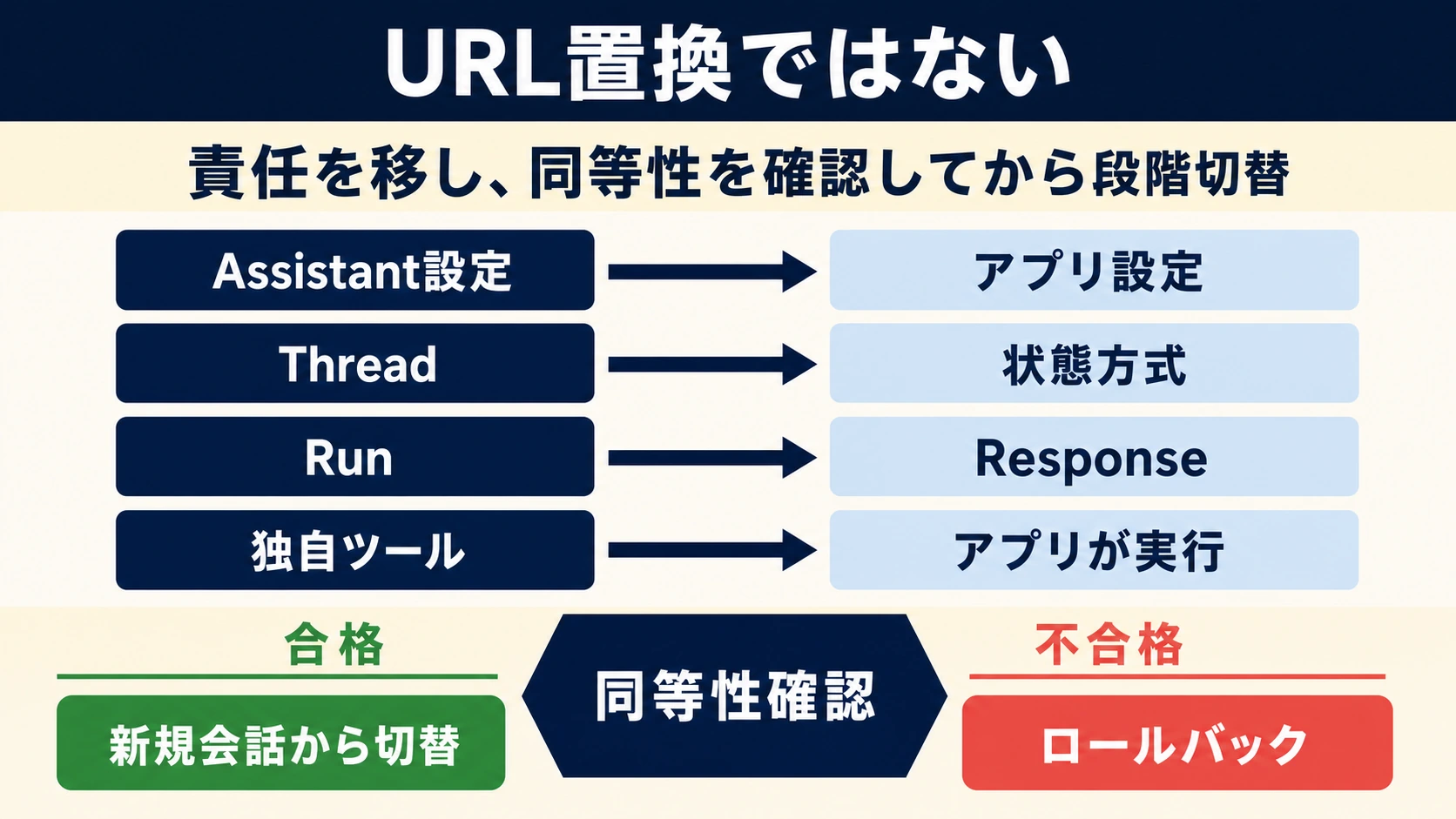
Assistants APIからResponses APIへ移行するには、アプリが保存しているAssistantの設定と会話履歴を取り出し、Responsesへの入力、関数実行、状態保存を自分のアプリでつなぎ直します。Assistant IDを別のIDへ置き換えるだけでは移行できません。
2026年10月6日時点で、Assistants APIは2026年8月26日に終了済みです。旧Threadからメッセージを取得するAPIも使えません。これから移行する場合、履歴の元データは自社DB、エクスポート、バックアップなどにある保存済みメッセージです。旧APIを動かしながら比較したり、障害時にAssistantsへ戻したりする手順は成立しません。公式移行ガイドにも、この制約が明記されています。
一方、reusable Prompt objectsとv1/promptsの終了予定日は2026年11月30日です。こちらはAssistantsの終了とは別です。長期運用する移行先では、指示文、モデル設定、ツール定義をアプリのコードや管理下の設定ファイルへ移します。Prompt objectsからの移行方法に沿えば、近く終了する機能への依存を避けられます。
以下は公式OpenAI API向けの手順です。具体例には架空の配送照会を使います。コードの検証範囲は合成データによるオフライン実行であり、SDK、実モデル、本番データを使ったAPI試験ではありません。
保存済みの設定と履歴から再開できる範囲を決める
最初に確認するのは、旧IDの一覧ではなく、復元に必要な内容が手元にあるかです。Assistantの指示文と関数定義、Threadのメッセージ本文、添付の実体または参照情報、過去の関数実行結果を、それぞれ探します。
| 手元にあるもの | 移行時にできること | 足りない場合の対応 |
|---|---|---|
| 指示文・モデル設定・ツールの定義 | 版を付けてResponsesのリクエスト設定へ移す | ソース管理や設定バックアップから復元し、担当者が業務要件を確認する |
| 会話の本文と順序 | 新しい会話へ必要な履歴を渡す | 旧会話は復元できない旨を表示し、新規会話として開始する |
| 添付・引用元・検索対象の文書 | 権限と現存性を確認して再接続する | 参照切れを明示し、元ファイルを再取得できるまで検索や継続を止める |
| 実行済み関数の結果・業務取引ID | 過去の結果として参照し、再実行を防ぐ | 処理の成否が不明な操作を自動でやり直さず、業務側の記録と照合する |
asst_・thread_・run_のIDだけ | 旧記録との対応を残す | IDだけから本文や設定を復元できるとは考えない |
復元した設定では、旧Assistantのinstructionsを新しい各リクエストのinstructionsへ、モデルをmodelへ、関数や検索の設定をtoolsへ移します。構造化出力を使っていた場合は、旧response_formatをそのまま送らず、Responsesのtext.formatにtype: "json_schema"、name、schema、strictを設定します。Responses移行ガイドが項目ごとの違いを説明しています。
設定の版と会話の版は分けて管理します。例えば、会話レコードには自社の会話キー、利用者・組織の識別子、旧Thread ID、状態の保存方式、使用する設定の版を記録します。旧IDは監査用の対応情報です。IDを受け取っただけで、その会話を閲覧・再開する権限があるとは判断しません。
会話状態は「誰が履歴を持つか」で選ぶ
同じ会話の途中で方式を混ぜないよう、保存期間と復旧要件から選びます。移行直後の履歴変換を細かく制御したいなら、アプリ側でItemsを保持して毎回渡す方式が扱いやすくなります。
| 方式 | 向いている用途 | 実装上の注意 |
|---|---|---|
| アプリ側で履歴を再送 | 自社DBの保存・削除規則で管理する会話、旧履歴の変換 | 入力と出力のItemsを型ごとに保持する。表示用テキストだけでは継続できない |
previous_response_id | 利用可能な直前のResponseにつなぐ直列の会話 | 前回のinstructionsは引き継がれない。次のリクエストにも設定する |
| Conversation | 端末やジョブをまたいで続く会話 | 保存済みItemsが先行入力になり、完了後に今回の入力・出力が追加される。全履歴を毎回重ねて送らない |
previous_response_idとconversationは併用できません。前者は利用可能なResponseがあることを前提とし、恒久的な履歴バックアップの代わりにはなりません。Responses作成リファレンスと会話状態のガイドで、選んだ方式のパラメータを確認してください。
保存期間にも違いがあります。通常のResponseオブジェクトはデフォルトで30日間保存されますが、ConversationとそのItemsにはこの30日の期限がなく、削除するまで保持されます。ConversationはZDRの対象ではありません。また、store: falseはResponseオブジェクトの保存を抑える指定であり、標準の不正利用監視ログ、ファイル、検索用ストアまで一括で保存しない指定ではありません。データ管理の公式説明に照らし、アプリ側の保存・削除とサービス側の保存を別々に確認します。
previous_response_idを使ってリクエスト本文が短くなっても、チェーン内の過去の入力トークンは課金対象です。長い履歴は、残す事実と参照先を決めて整理します。要約後も元の記録を保存し、注文番号、利用者の訂正、未解決の条件などが失われていないかを確認します。会話方式を変えるだけで安くなるとは限りません。
旧Threadの履歴を変換する:添付や未完了処理は黙って捨てない
保存済み履歴は、順序を確定し、移せる内容を判別してからResponsesのinputへ変換します。旧メッセージ一覧の保存順が新しいものからだった場合は、アプリが持つ作成日時と順序情報で古いものから並べます。同時刻のレコードも、元の連番などで順序を確定してください。
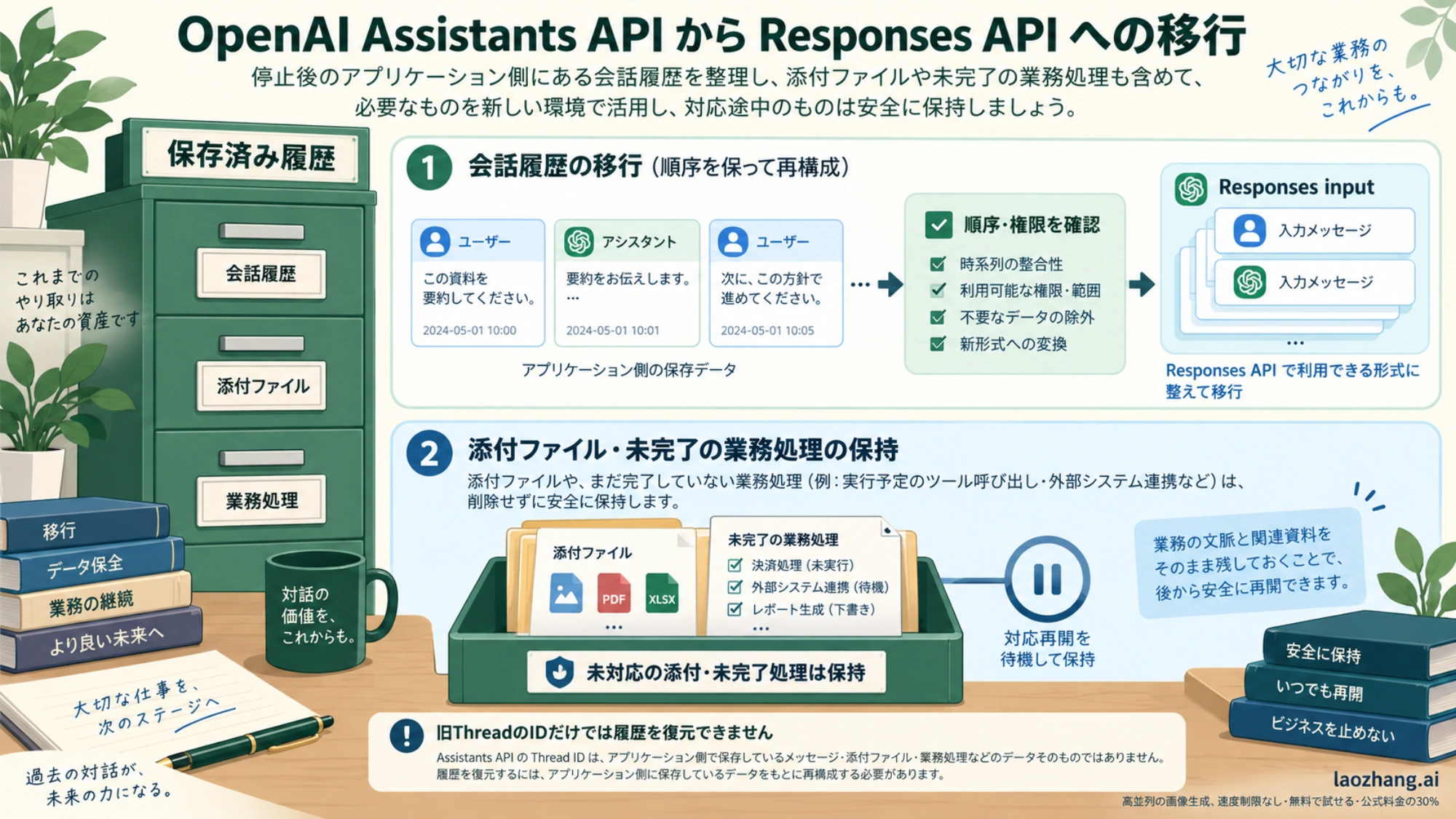
次のコードは、本文だけの旧会話を移すための小さな変換器です。入力はアプリが用意する正規化済みの保存形式であり、旧APIから取得するコードではありません。添付・引用注釈・未完了の関数処理がある会話は、この変換器では継続を止めます。
from copy import deepcopy


def archive_to_input(archive, tenant_id):
    if archive["tenant_id"] != tenant_id:
        raise PermissionError("別組織の会話は移行できません")
    if archive.get("pending_actions"):
        raise ValueError("未完了処理の成否を業務記録で確認してください")

    messages = archive["messages"]
    seqs = [m["seq"] for m in messages]
    if len(seqs) != len(set(seqs)):
        raise ValueError("会話の順序を一意に決められません")

    items = []
    for message in sorted(messages, key=lambda m: m["seq"]):
        if message["role"] not in {"user", "assistant"}:
            raise ValueError("この形式では扱えない発話があります")
        if message.get("attachments") or message.get("annotations"):
            raise ValueError("添付・引用を扱う変換処理が必要です")
        parts = message["content"]
        if not parts or any(p.get("type") != "text" for p in parts):
            raise ValueError("テキスト以外の履歴を確認してください")
        text = "\n".join(p["text"] for p in parts)
        if not text.strip():
            raise ValueError("空の発話を確認してください")
        items.append({"role": message["role"], "content": text})
return items実際の保存形式がtext.valueなどなら、前段の読み込み処理で上の形式へ変換します。元の保存データを上書きせず、元IDと変換結果の対応を残してください。変換済みレコードの公開は、組織・会話ごとのロックとDBトランザクションで一度だけ行い、同じ旧会話から二つの新しい会話が生まれることを防ぎます。
添付付きの会話では、ファイルの内容とアクセス権を確認し、Responsesで利用できる入力やFile Searchの文書へ対応付けます。過去の引用は表示用に残し、新しい回答で根拠として使うときは現行の文書を検索し直します。対応できない部分を保持したまま読み取り専用にし、ユーザーに確認して新規会話を始める方法もあります。
過去の関数呼び出しと結果を保持している場合は、履歴の型変換と業務処理の実行を切り離します。対応が確実な呼び出し・結果の組を文脈として移すか、確認済みの業務結果を明示した履歴へ整理します。保存された呼び出しをdispatcherへ流して再実行してはいけません。以下の実装でも、関数を実行する対象は新しいResponseが返したItemsだけです。
新しいResponses会話が返すoutputは、messageだけとは限りません。関数呼び出し、検索、reasoningなどのItemsが含まれます。手動再送では完全な出力を保持し、reasoningの不透明な情報やassistantメッセージのphaseを落とさないようにします。Pythonの公式例はresponse.output全体を追加し、現在のJavaScript例はtoResponseInputItemsを使っています。旧履歴のテキストからreasoningを作り直すことはできません。会話状態のガイドとreasoningの引き継ぎが根拠です。
Runを関数の実行ループへ置き換える
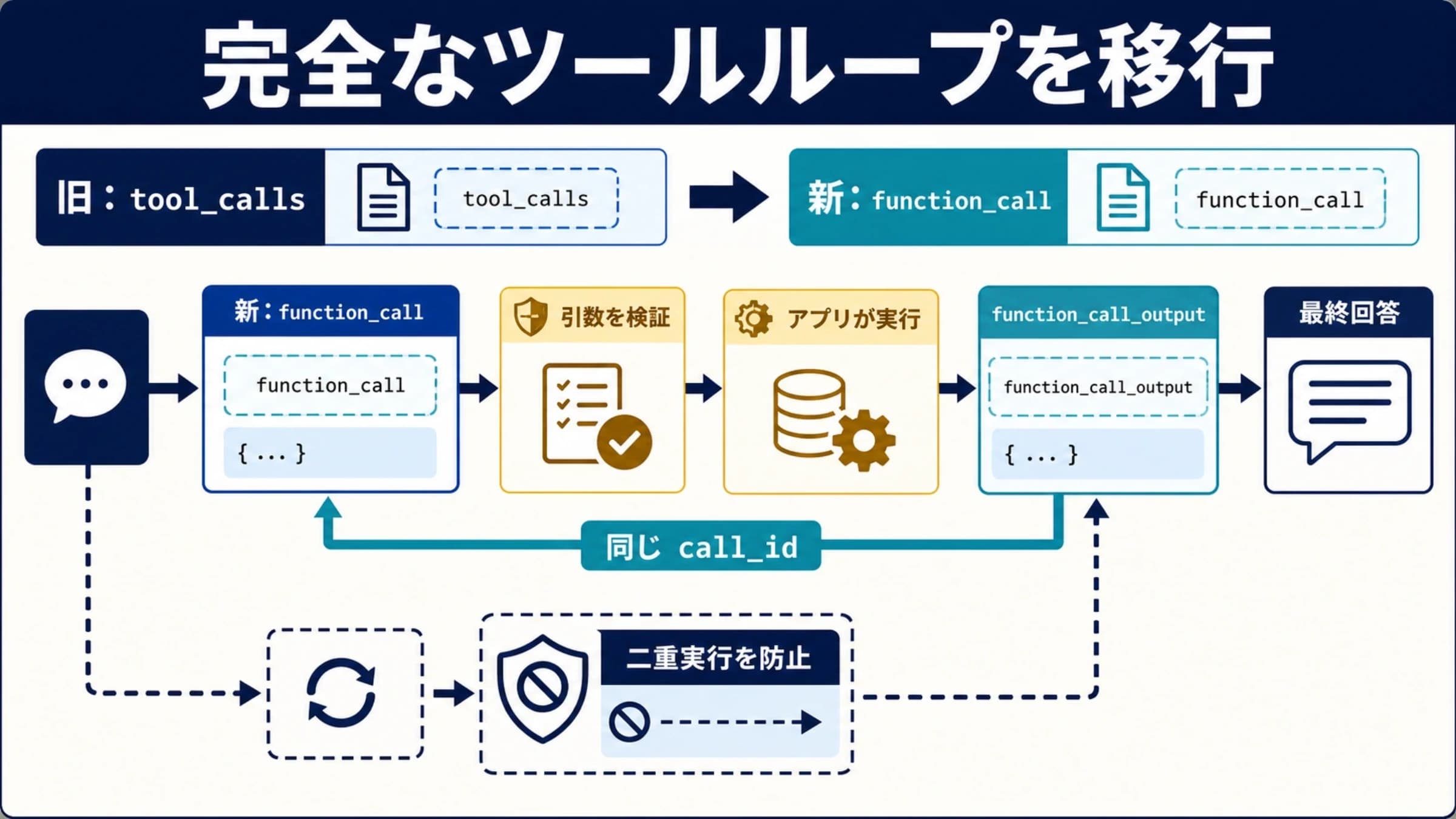
旧requires_actionの処理は、Responsesから届くfunction_callをアプリで実行し、function_call_outputを送り返すループへ移します。結果の対応キーはcall_idです。Item自身のid、例えばfc_…を代わりに使いません。
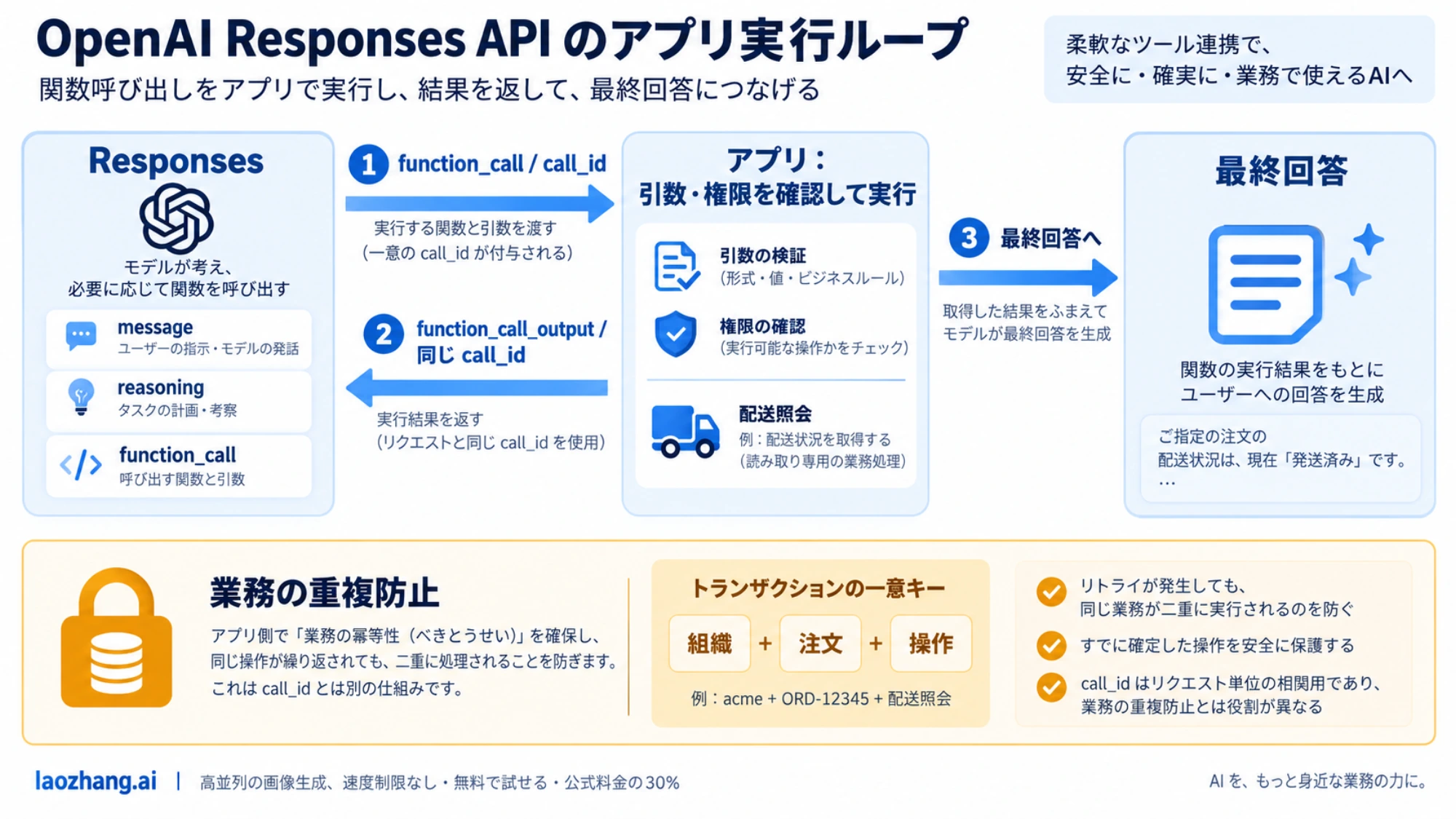
関数定義はtools内でname、parameters、strictを並べる形です。strict: trueを明示する場合、各objectにadditionalProperties: falseを設定し、すべてのpropertiesをrequiredに含めます。任意項目はnullを許容する形で表現できます。strictを省略するとResponsesは互換なスキーマへの正規化を試みますが、できない場合はbest effortのstrict: falseへ戻ります。省略を理由に引数検証を外さないでください。関数呼び出しの公式仕様に基づく注意点です。
以下は、保存済みの会話から配送状況を照会する実装例です。API接続はrequest(payload)として注入し、配送データも引数で渡します。この分離により、同じ処理を合成応答で確認してから、アプリの接続層へ組み込めます。例の関数は読み取り専用です。
import json

DELIVERY_TOOL = {
    "type": "function",
    "name": "lookup_delivery",
    "description": "ログイン中の組織に属する配送状況を取得します。",
    "strict": True,
    "parameters": {
        "type": "object",
        "properties": {"tracking_id": {"type": "string"}},
        "required": ["tracking_id"],
        "additionalProperties": False,
    },
}


def delivery_answer(request, model, saved_items, user_text,
                    tenant_id, deliveries, max_responses=6):
    history = deepcopy(saved_items)
    history.append({"role": "user", "content": user_text})
    completed_calls = {}

    for _ in range(max_responses):
        response = request({
            "model": model,
            "instructions": (
                "日本語で答えてください。配送状況はlookup_deliveryの"
                "結果を使い、見つからない配送は推測しないでください。"
            ),
            "tools": [DELIVERY_TOOL],
            "input": deepcopy(history),
            "store": False,
            "parallel_tool_calls": False,
        })
        if response.get("status") != "completed":
            raise RuntimeError("生成が正常完了していません")

        output = response["output"]
        history.extend(deepcopy(output))
        calls = [x for x in output if x["type"] == "function_call"]
        if not calls:
            texts = []
            for item in output:
                if item["type"] != "message":
                    continue
                if item.get("phase") not in {None, "final_answer"}:
                    continue
                for part in item.get("content", []):
                    if part["type"] == "refusal":
                        raise RuntimeError("回答が拒否されました")
                    if part["type"] == "output_text":
                        texts.append(part["text"])
            answer = "\n".join(texts).strip()
            if not answer:
                raise RuntimeError("最終回答がありません")
            return {"answer": answer, "items": history}

        for call in calls:
            if call["name"] != "lookup_delivery":
                raise ValueError("許可していない関数です")
            args = json.loads(call["arguments"])
            if (not isinstance(args, dict)
                    or set(args) != {"tracking_id"}
                    or not isinstance(args["tracking_id"], str)
                    or not args["tracking_id"].strip()):
                raise ValueError("配送番号の引数が不正です")
            call_id = call["call_id"]
            if not isinstance(call_id, str) or not call_id:
                raise ValueError("call_idがありません")
            tracking_id = args["tracking_id"]
            signature = (call["name"], tracking_id)
            if call_id in completed_calls:
                old_signature, result = completed_calls[call_id]
                if signature != old_signature:
                    raise ValueError("同じcall_idの内容が変わっています")
            else:
                # 認証済みtenant_idで絞り、モデルから組織IDを受け取りません。
                status = deliveries.get((tenant_id, tracking_id))
                result = {
                    "tracking_id": tracking_id,
                    "status": status if status is not None else "not_found",
                }
                completed_calls[call_id] = (signature, result)
            history.append({
                "type": "function_call_output",
                "call_id": call_id,
                "output": json.dumps(result, ensure_ascii=False),
            })
    raise RuntimeError("関数ループの上限に達しました")
parallel_tool_calls: falseは関数呼び出しを0件または1件に制限する指定であり、毎回必ず1件呼ぶ指定ではありません。コードは0件の最終回答を扱い、複数件を受け取った場合も一件ずつ処理する形にしています。実際の本番実装では、接続層にタイムアウトを設け、生成と関数実行を合わせた処理時間にも上限を持たせます。関数呼び出しのガイドが、呼び出しから結果返却までの流れを示しています。
読者の既存Python SDK接続へつなぐ場合、requestには「client.responses.create(**payload)の結果をmodel_dump(mode="json")で辞書化して返す関数」を渡せます。クライアントの初期化、認証、利用モデル、SDKバージョンと対応するパラメータは自分の環境で確認してください。上の例はこの接続層を実行した結果ではありません。
返り値のitemsは次の会話に使い、answerは表示に使います。本番DBへの保存は、会話の版番号を照合して更新します。二つのリクエストが同じ履歴から同時に進まないよう、会話単位で順序を制御してください。失敗したターンは完了扱いにせず、Response ID、設定の版、呼び出しと結果、失敗段階を別の処理記録に残します。
課金・送信・登録の関数には業務上の重複防止が必要
call_idはモデルとの結果対応に使うキーです。同じ注文処理を別のResponseが別のcall_idで求めた場合まで、重複を防ぐものではありません。上のメモリ内辞書も、プロセス再起動後の保証にはなりません。
更新系の関数では、認証済みの組織ID、注文ID、操作種別などから、アプリが承認済み操作を識別する永続キーを作ります。DBの一意制約や外部サービスの冪等キーで一度だけ確定し、再試行では保存済みの結果を返します。確定前後のタイムアウトでは、業務側の記録を照合してから再開します。モデルのスキーマ検証と利用者の権限確認は、それぞれ別の仕事です。
合成応答で履歴とcall_idの接続を確かめる
次を前の二つのコードの後に置くと、標準ライブラリだけで実行できます。合成した1回目の応答が関数を要求し、2回目が返却結果を確認して最終回答を返します。これはAPIへ接続するテストではありません。
archive = {
    "tenant_id": "company_a",
    "pending_actions": [],
    "messages": [
        {"seq": 1, "role": "user",
         "content": [{"type": "text", "text": "配送番号はJP-104です。"}]},
        {"seq": 2, "role": "assistant",
         "content": [{"type": "text", "text": "JP-104について承りました。"}]},
    ],
}
requests = []


def fixture_request(payload):
    requests.append(payload)
    if len(requests) == 1:
        assert payload["input"][0]["content"] == "配送番号はJP-104です。"
        return {"status": "completed", "output": [{
            "type": "function_call", "id": "fc_fixture",
            "call_id": "call_fixture", "name": "lookup_delivery",
            "arguments": '{"tracking_id":"JP-104"}',
        }]}
    assert len(requests) == 2
    returned = payload["input"][-1]
    assert returned["type"] == "function_call_output"
    assert returned["call_id"] == "call_fixture"
    assert json.loads(returned["output"])["status"] == "配達中"
    return {"status": "completed", "output": [{
        "type": "message", "role": "assistant", "phase": "final_answer",
        "content": [{"type": "output_text", "text": "JP-104は配達中です。"}],
    }]}


result = delivery_answer(
    fixture_request, "fixture-only",
    archive_to_input(archive, "company_a"), "現在の状況を教えてください。",
    "company_a", {("company_a", "JP-104"): "配達中"},
)
print(result["answer"])期待する表示はJP-104は配達中です。です。この確認では、保存済みの発話が残り、関数の引数を解釈し、元のcall_idで結果を返し、最終回答まで進めることを確かめます。実モデルがその関数を選ぶか、SDKがリクエストを受け付けるか、旧システムと同じ業務品質になるかは、別途確認が必要です。
File Searchは文書・権限・引用を一緒に移す
File Searchを使っていた場合は、旧AssistantやThreadの紐付けだけを保存して終わりにしません。新しいリクエストが検索すべきvector_store_idsを、ログイン中の組織と対象製品からアプリ側で決めます。既存ストアを再利用するなら、現在も存在し、必要な文書を利用できることを確認します。再作成が必要なら、利用権限のある元文書からインデックスを作り、ファイルの準備状態がcompletedになるまで待ちます。File Searchの公式手順は、この準備を前提としています。
リクエストの関係する部分は次の形です。IDは説明用の仮値であり、実在するストアではありません。
{
  "tools": [
    {
      "type": "file_search",
      "vector_store_ids": ["vs_authorized_example"],
      "filters": {
        "type": "in",
        "key": "category",
        "value": ["current_policy"]
      }
    }
  ],
  "include": ["file_search_call.results"]
}categoryは、この例ではファイルに設定済みの属性です。フィルター値を利用者の自由入力から無制限に受け取るのではなく、権限に基づいてアプリが設定します。複数組織の文書がある場合は、組織ごとのストア分離や適切な属性・フィルターを設計し、別組織の文書が結果に出ないことを確認してください。
File SearchはOpenAIが実行する組み込みツールなので、配送照会のようなfunction_call_outputをアプリで作る必要はありません。検索結果はデフォルトでは返らず、上のincludeで取得できます。回答のfile citationも、元の文書と照合します。検索結果の取得とメタデータフィルターが仕様上の根拠です。
確認する質問は、正しい現行文書で答えられるもの、古い版に似た記述があるもの、根拠のないもの、別組織の文書でしか答えられないものを含めます。期待するファイルID、引用箇所、回答内容を保存し、検索なし・結果なし・権限外を区別します。結果が空なのに一般知識で規約を埋めた場合は、業務上の不合格として扱います。
ストリーミングと長時間処理を移行する
UIでは、旧Runのイベント名をResponsesのイベント名へ機械的に置き換えるだけでは足りません。response.output_text.deltaは表示用の増分、response.function_call_arguments.deltaは引数の断片です。断片を受け取った段階では関数を実行しません。完成した引数を受け取り、JSON・権限・処理状態を確認してから実行します。イベント処理の移行説明と関数のストリーミング仕様を基準にします。
画面に文字が出たことと、業務処理の完了も分けます。Responseの完了と最終回答を確認し、failed、incomplete、error、接続断はそれぞれ未完了として扱います。実行済みの更新操作があるなら、画面の再接続で同じ操作をやり直さないよう、処理記録から再開します。
接続を長時間維持したくない生成にはbackground: trueを検討できます。Response IDをジョブに保存し、queuedまたはin_progressの間は取得して状態を確認します。それ以外の状態になったことは終了を意味しますが、成功したとは限りません。完了状態と結果を別に確認してください。実行中のbackground処理はresponses.cancelで取り消せますが、すでに確定した返金や送信まで取り消すものではありません。backgroundの公式説明が処理の仕様です。
backgroundのストリームを再開するには、作成時点でstream: trueを指定し、イベントのsequence_numberを保存してstarting_afterで続きから取得します。新しく生成を開始する再試行と、同じ生成の表示を再開する処理を区別します。
保存条件も選択に影響します。現行文書では、ZDRプロジェクトのbackgroundはstore: falseで動作し、ポーリング用に約10分間ディスクへ一時保存します。MAMではbackgroundのstore省略またはfalseで一時保存期間後に削除され、明示的なtrueなら通常の保存期間に従います。foregroundの省略・trueは通常の保存条件です。「ZDRだから一時保存もない」「backgroundには常にstore trueが必要」とは判断できません。顧客との約束が一時保存を認めない場合は、その条件に合う処理方式を選んでください。データ管理のResponses欄にも条件があります。
段階切り替えと、終了後に使える復旧先
比較相手は、保存済みの業務結果か、すでに動作確認できているResponsesの版です。終了したAssistantsを本番で再実行する比較ではありません。配送照会なら「同じ組織・配送番号から同じ状態を取得したか」、規約検索なら「同じ有効な文書を根拠に回答したか」で判定します。文章が一字一句同じかより、業務の成否を見ます。
切り替え前に、設定の版、履歴変換結果、関数名・引数・結果、検索ファイルと引用、最終状態、トークン使用量、関数や検索の利用量、処理時間を記録します。更新系の比較では保存済み結果や副作用のない代替関数を使い、同じ送信・登録・課金を二つの版で実行しないようにします。
まず検証用の利用者で新しい版を動かし、その後、組織や新規会話の単位で対象を増やします。対象数と観測期間は自社の処理量から決めます。一つの会話では、状態方式と設定の版を固定し、ターンの途中で異なる履歴形式へ往復させません。
障害時の戻し先は、次のように具体的に用意します。
| 状況 | 取り得る復旧動作 |
|---|---|
| 新しい設定だけで回答品質が落ちた | 検証済みのResponses設定へ戻し、次のターンから適用する |
| 関数の認可漏れ・重複実行が見つかった | 対象の更新関数を停止し、業務記録を照合して必要な訂正を行う |
| 履歴変換で添付や状態が欠けた | 旧記録を読み取り専用で保持し、変換を修正するまで継続を止める |
| 検索基盤や生成が利用できない | 受付を保留・キューへ移すか、根拠を固定した案内や担当者対応へ切り替える |
別のResponses版へ戻す場合も、現在のItemsと設定の互換性を確認します。元の会話を消してから原因を調べるのではなく、保存規則に沿って処理記録を残します。Assistants APIは復旧先に含めません。
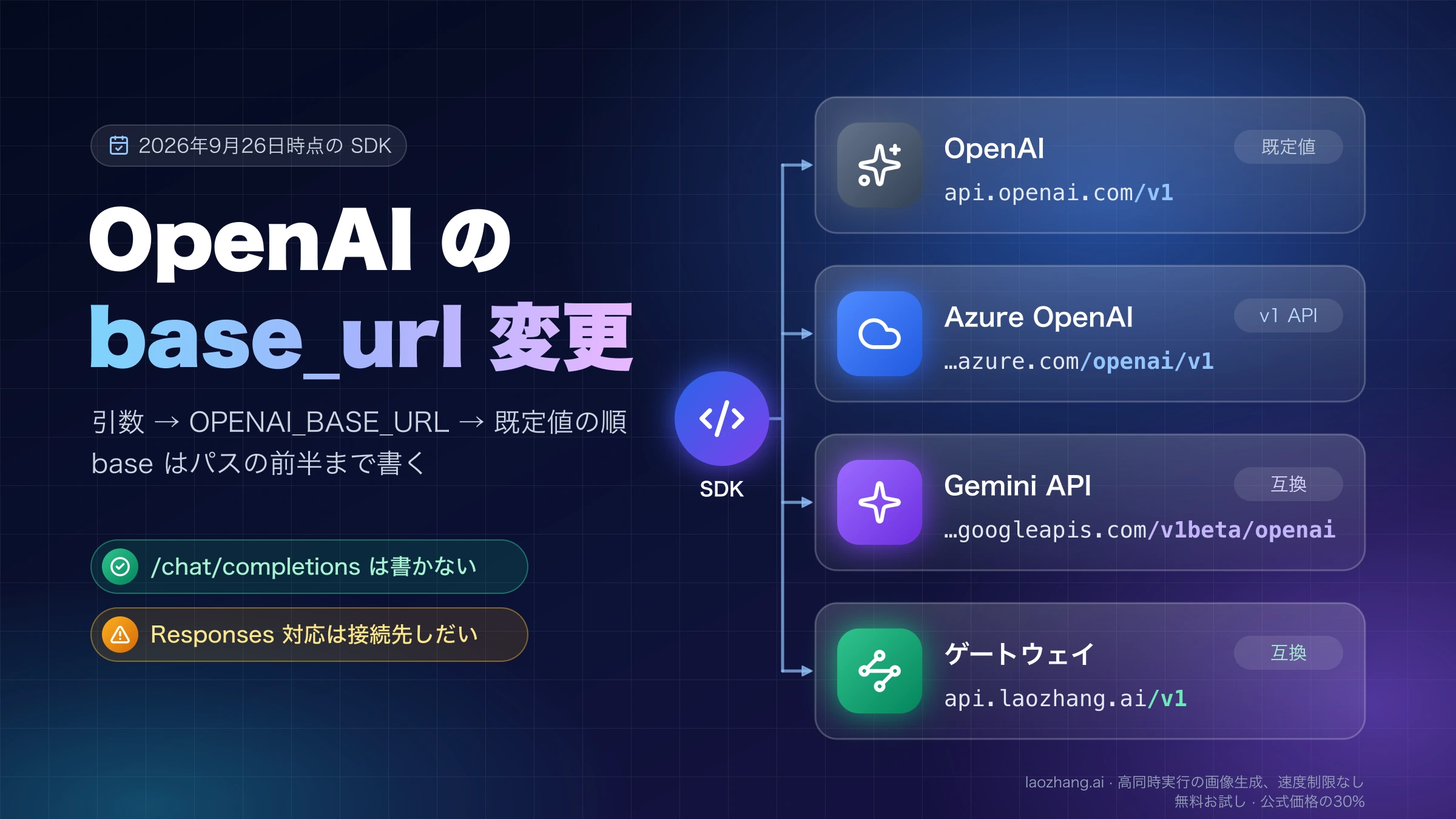
切り替え完了の判断は、必須業務の成功、組織間の分離、関数結果の対応、履歴の継続、検索の根拠、失敗時の受付と復旧が確認できた時点です。HTTP 200や文字の表示だけでは完了としません。接続先を変更する必要がある場合は、OpenAIのbase_urlの優先順位とパスの書き方も確認してください。互換サービスを使う場合のConversations、File Search、イベント、保存条件は、接続できることとは別に検証します。
移行時によく迷う点
Thread IDだけ残っている場合、会話履歴を戻せますか?
IDだけから復元できるとは言えません。現在の公式移行ガイドは、旧Threadのメッセージ取得APIが使えないため、アプリが保存済みのメッセージを使うよう案内しています。まず自社DBやエクスポートを確認し、本文がなければ新規会話として再開します。欠けた履歴を生成で埋めないでください。公式の履歴移行説明が根拠です。
Assistantを必ずPrompt objectへ変換する必要がありますか?
ありません。reusable Prompt objectsも2026年11月30日に終了予定です。指示文、変数の組み立て、モデルとツールの設定をアプリへ移し、Responsesへ直接渡す方針を取れます。移行ガイドに残るAssistantからPromptへの対応表と、恒久的な移行先を区別してください。Prompt objectsの終了予定と移行先を確認できます。
関数を実行できたのに回答が返らない場合、何を確認しますか?
実行結果を、元のcall_idを持つfunction_call_outputとして次のResponsesリクエストへ返したかを確認します。手動管理なら、呼び出しを含む完全な出力Itemsも必要です。その後に追加の関数呼び出しが来ることがあるため、最終回答までループを続けます。上限に達した場合や生成が未完了の場合は、回答成功とは扱いません。関数呼び出しの流れに沿って確認します。
移行に失敗したら旧Assistantsへ切り戻せますか?
現在は切り戻せません。Assistants APIは2026年8月26日に終了しています。動作確認済みのResponses版、更新を止めた安全な受付、保留キュー、担当者対応のいずれかを、実際に使える復旧先として用意します。旧APIの利用可能性については公式移行ガイドを基準にしてください。
参考資料10
本文で参照している外部ページを、登場順に並べています。最終更新日:2026年10月6日。
参考資料10
本文で参照している外部ページを、登場順に並べています。最終更新日:2026年10月6日。
- 1.公式移行ガイドdevelopers.openai.com/api/docs/assistants/migration
- 2.Prompt objectsからの移行方法developers.openai.com/api/docs/guides/prompting/migrate-from-prompt-object
- 3.Responses移行ガイドdevelopers.openai.com/api/docs/guides/migrate-to-responses
- 4.Responses作成リファレンスdevelopers.openai.com/api/reference/resources/responses/methods/create
- 5.会話状態のガイドdevelopers.openai.com/api/docs/guides/conversation-state
- 6.データ管理の公式説明developers.openai.com/api/docs/guides/your-data
- 7.reasoningの引き継ぎdevelopers.openai.com/api/docs/guides/reasoning
- 8.関数呼び出しの公式仕様developers.openai.com/api/docs/guides/function-calling
- 9.File Searchの公式手順developers.openai.com/api/docs/guides/tools-file-search
- 10.backgroundの公式説明developers.openai.com/api/docs/guides/background