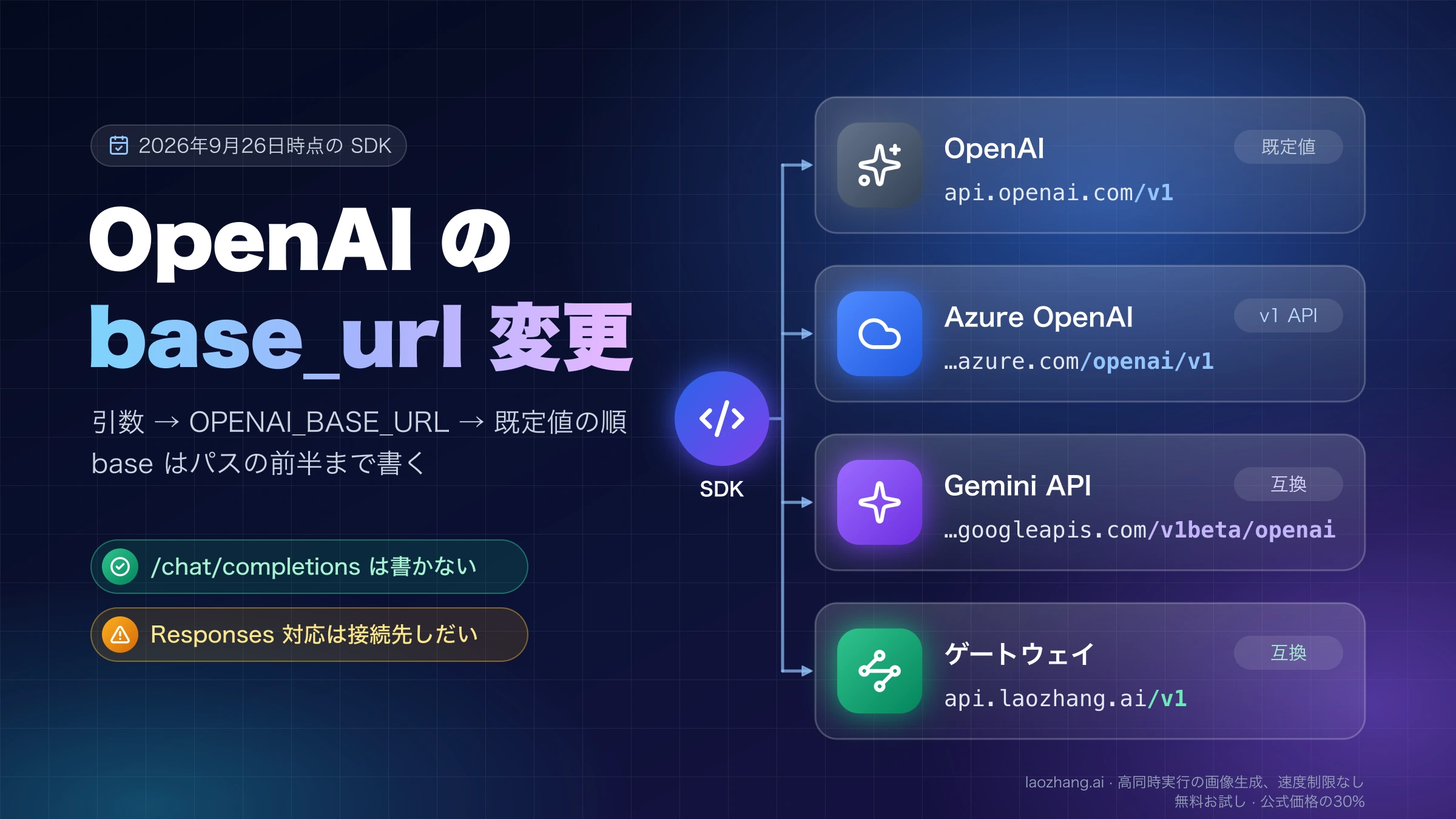
Chat CompletionsからResponses APIへ関数呼び出しを移行:call_idと承認の実装
function_callのidではなく、元のcall_idをfunction_call_outputへ返します。承認済みの引数だけをアプリで実行し、結果を履歴へ追加して最終回答まで進めるJavaScriptループを、APIに接続しないテスト付きで実装します。
目次
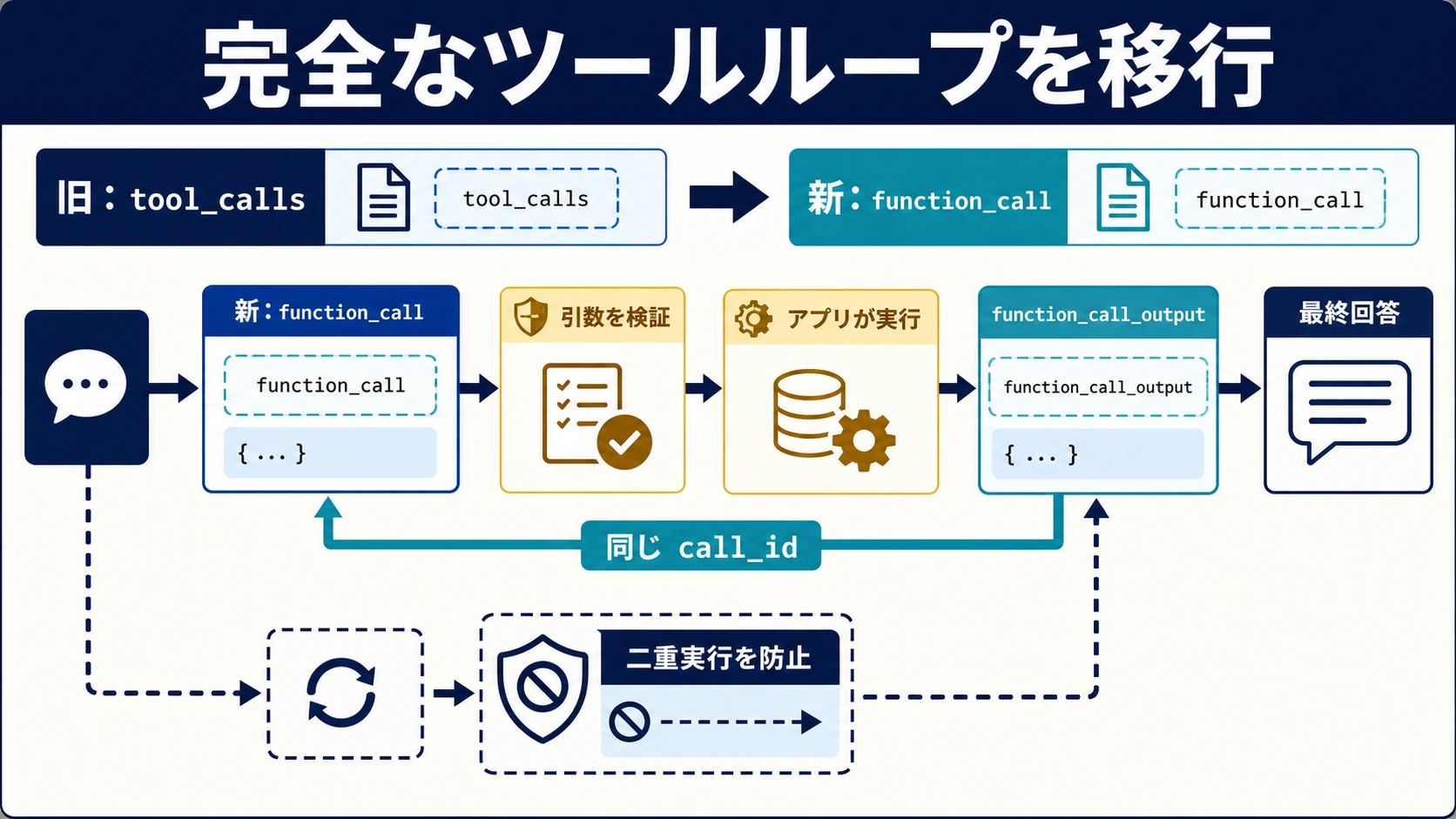
Chat Completionsの関数呼び出しをResponses APIへ移すには、messagesをinputに替えるだけでは足りません。返された全出力Itemを保存し、function_callの引数をアプリで検証・承認して実行し、その結果を元のcall_idで返すところまで移します。次の応答にも関数呼び出しがあれば繰り返し、呼び出しがなく、実行結果と最終回答がそろった時点で終了します。
function_call.idは出力Itemの識別子、function_call.call_idは呼び出しと結果を結ぶ識別子です。どちらも、利用者の承認や「予約が一度だけ作られた」という業務上の証明にはなりません。公式の関数呼び出しガイドでも、独自関数を実行するのはアプリ側です。
以下では架空の会議室予約をJavaScriptで実装します。自己テストはNode.jsの標準機能と合成応答だけで動き、APIキーもOpenAI SDKも不要です。実APIへ接続する分岐は別に用意しますが、この記事で確認したのはオフラインのアプリ処理です。SDKでの受理、実際のモデル応答、本番の予約システムへの書込みは検証していません。
60秒で確認する二つのID
移行後の入出力は、次のように対応します。
| Chat Completions | Responses API | アプリで変える処理 |
|---|---|---|
messages | input | メッセージに加え、型付きのItemを保持する |
choices[].message.tool_calls | output[]内のfunction_call | 先頭だけでなく全Itemから抽出する |
tools[].function.nameなど | tools[].nameなど | functionの入れ子を外す |
role: "tool"とtool_call_id | type: "function_call_output"とcall_id | 元の呼び出しIDで結果を返す |
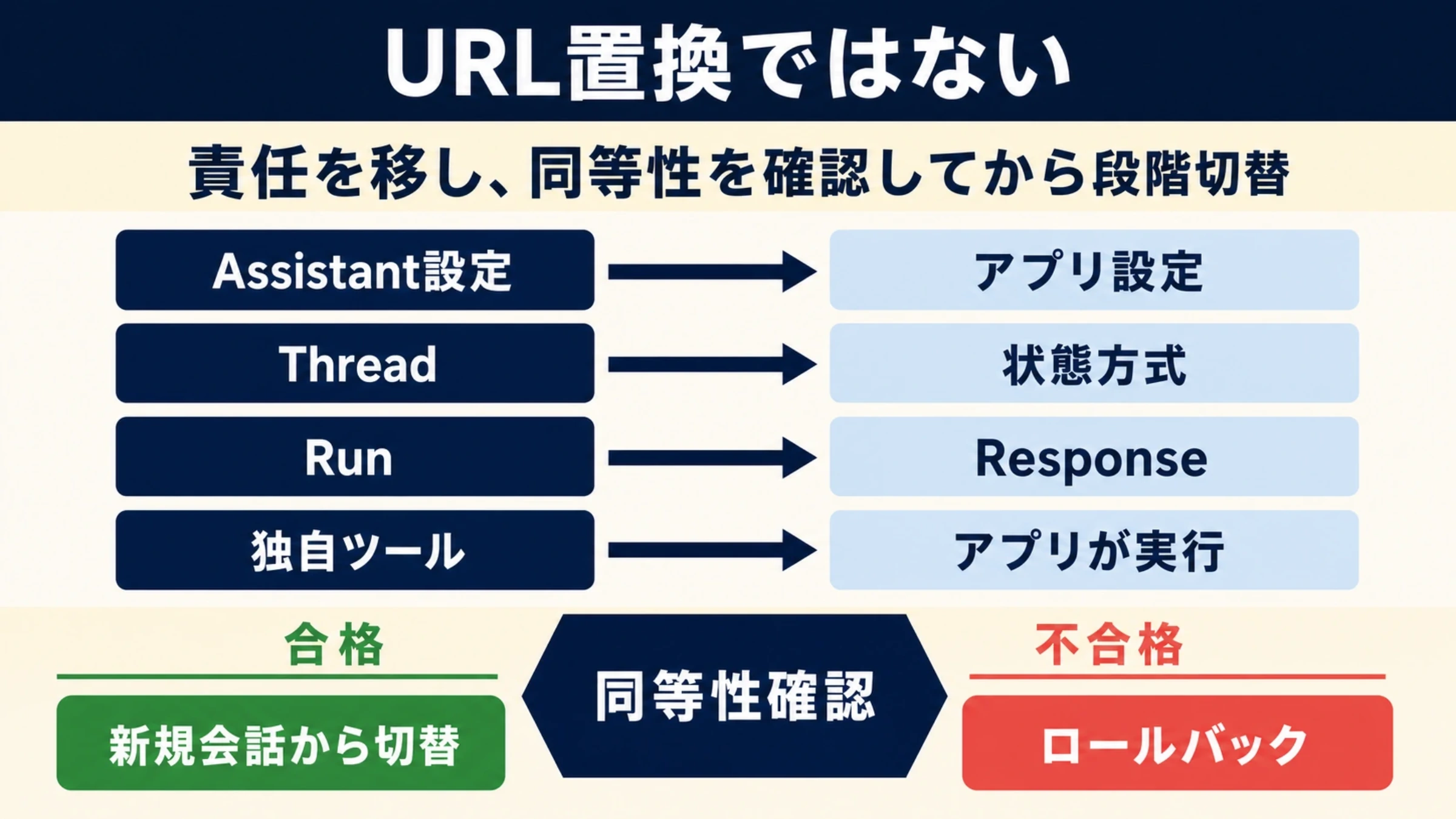
これは公式移行ガイドの標準的な独自関数の移行です。Chat Completions自体は引き続きサポートされています。Assistantsからの復旧やOpenAIが実行する組込みツールとは、作業範囲が異なります。
{
  "type": "function_call",
  "id": "fc_demo_7",
  "call_id": "call_demo_42",
  "name": "book_room",
  "arguments": "{\"room\":\"nagoya-a\",\"slot\":\"2026-10-09T10:00+09:00\"}"
}この呼び出しへの返却例は次のとおりです。fc_demo_7や配列番号を結果のIDとして使いません。
{
  "type": "function_call_output",
  "call_id": "call_demo_42",
  "output": "{\"ok\":true,\"data\":{\"reservationId\":\"demo-1\"}}"
}argumentsも通常のoutputもJSONオブジェクトそのものではなく文字列です。画像・ファイルを含む結果には別の対応形式がありますが、この予約例はJSON文字列だけを返します。応答にテキストがあるからといって、関数呼び出しがないとは限りません。
schemaを移す前に承認境界を決める
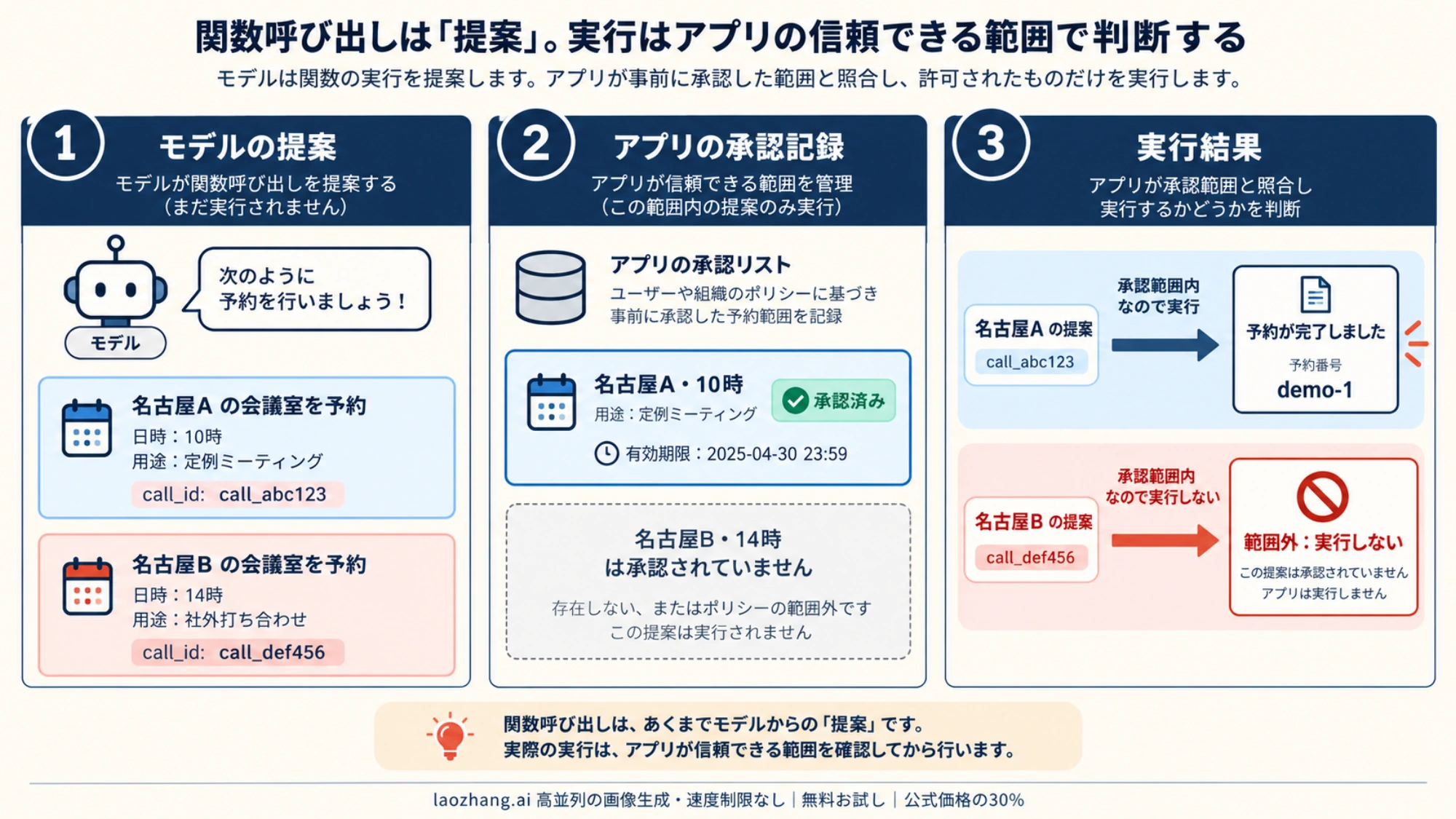
予約対象は名古屋A室、2026年10月9日10時の枠とします。承認ID・会社ID・有効期限は、モデルに生成させず、認証済みのサーバー状態から取得します。モデルが名古屋B室を提案しても、schemaにB室が含まれることと、利用者がB室を承認したことは別です。
strict: trueを指定する場合は、schemaの各objectにadditionalProperties: falseを置き、全propertyをrequiredに含めます。任意の値を表すなら、必要に応じてnullを許容する設計にします。それでもアプリ側の検証と承認照合は残します。
Responsesでstrictを省略した場合、常に非strictになるわけではありません。 現行の仕様では、可能ならschemaをstrictに正規化し、対応できない場合はbest-effortのstrict: falseになります。明示的なstrict: trueで非対応schemaを渡す場合は拒否されます。Chat Completionsの非strict既定値をそのまま期待せず、意図を明示してください。strict modeの仕様
最終JSONの形だけを固定したい場合は、予約関数を作る理由にはなりません。Structured OutputsとFunction Callingの選び方で、最終出力の形式とアプリの作業を分けて考えられます。
承認ゲート付きの完全JavaScriptループ
次の全文をbooking-loop.mjsとして保存してください。bookRoomは架空の予約をメモリー内に作る実装で、省略したdispatcherや未定義の業務関数はありません。
executeは関数名、JSONの形、値、承認範囲と期限を確認します。同じ応答とcall_idの再送は同じPromiseに合流させ、別のcall_idで同じ承認済み予約が届いても業務キーで結果を再利用します。これらはこのアプリの設計であり、APIの「一度だけ実行」保証ではありません。
import assert from "node:assert/strict";

export const tools = [{
  type: "function",
  name: "book_room",
  description: "承認された部屋と時間で、会議室を予約する",
  strict: true,
  parameters: {
    type: "object",
    properties: {
      room: { type: "string", enum: ["nagoya-a", "nagoya-b"] },
      slot: { type: "string", enum: ["2026-10-09T10:00+09:00"] }
    },
    required: ["room", "slot"],
    additionalProperties: false
  }
}];

// 架空の承認。実際には認証済みサーバー状態から渡す。
export const approval = Object.freeze({
  tenant: "demo-company", approvalId: "approval-42", approved: true,
  expiresAt: Date.parse("2026-10-09T09:00+09:00"),
  room: "nagoya-a", slot: "2026-10-09T10:00+09:00"
});

class Blocked extends Error {}

export function createBookingApp(trusted, clock = () => Date.now()) {
  const calls = new Map();
  const operations = new Map();
  let writes = 0;

  async function bookRoom(args) {
    const key = JSON.stringify([
      trusted.tenant, trusted.approvalId, args.room, args.slot
    ]);
    if (!operations.has(key)) {
      // Promiseをawaitする前に登録する。架空DBへの書込みは1回。
      operations.set(key, Promise.resolve().then(() => {
        writes += 1;
        return { reservationId: `demo-${writes}`, ...args };
      }));
    }
    return operations.get(key);
  }

  const handlers = new Map([["book_room", bookRoom]]);

  function validate(call) {
    if (!handlers.has(call.name)) throw new Blocked("unknown_function");
    let args;
    try { args = JSON.parse(call.arguments); }
    catch { throw new Blocked("invalid_json"); }
    if (!args || typeof args !== "object" || Array.isArray(args) ||
        Object.keys(args).sort().join(",") !== "room,slot" ||
        !["nagoya-a", "nagoya-b"].includes(args.room) ||
        args.slot !== "2026-10-09T10:00+09:00") {
      throw new Blocked("invalid_arguments");
    }
    if (!trusted.approved || clock() >= trusted.expiresAt ||
        args.room !== trusted.room || args.slot !== trusted.slot) {
      throw new Blocked("approval_mismatch_or_expired");
    }
    return args;
  }

  async function execute(responseId, call) {
    if (typeof call.call_id !== "string" || !call.call_id ||
        typeof call.name !== "string" || typeof call.arguments !== "string") {
      throw new Error("invalid_call_item");
    }
    if ((call.status && call.status !== "completed") || call.async ||
        call.namespace != null || call.caller != null) {
      throw new Error("unsupported_call_variant");
    }
    const key = JSON.stringify([responseId, call.call_id]);
    const fingerprint = JSON.stringify([call.name, call.arguments]);
    const old = calls.get(key);
    if (old) {
      if (old.fingerprint !== fingerprint) throw new Error("call_id_conflict");
      return old.pending;
    }
    const pending = Promise.resolve().then(async () => {
      try {
        const args = validate(call);
        const data = await handlers.get(call.name)(args);
        return { ok: true, data };
      } catch (error) {
        if (error instanceof Blocked) return { ok: false, code: error.message };
        // 実backendのtimeout等は結果不明。成功にも未実行にも変換しない。
        throw error;
      }
    });
    calls.set(key, { fingerprint, pending });
    return pending;
  }
  return { execute, writeCount: () => writes };
}

export async function runMigration({ createResponse, replayOutput, app, model }) {
  const input = [{ role: "user", content: "承認済みの名古屋Aを予約してください。" }];
  const instructions = "book_roomで予約し、結果が拒否なら予約済みと説明しないこと。";
  const receipts = new Map();
  for (let round = 0; round < 6; round += 1) {
    const response = await createResponse({
      model, instructions, input: structuredClone(input), tools,
      parallel_tool_calls: false, store: false
    });
    if (response.status !== "completed" || !Array.isArray(response.output)) {
      throw new Error(`response_not_completed:${response.status}`);
    }
    if (response.output.some(item => item.type === "message" &&
        item.content?.some(part => part.type === "refusal"))) {
      throw new Error("model_refusal");
    }
    const functionCalls = response.output.filter(item => item.type === "function_call");
    input.push(...replayOutput(response.output));
    if (functionCalls.length === 0) {
      const text = response.output.filter(item => item.type === "message" &&
        item.role === "assistant" && (!item.phase || item.phase === "final_answer"))
        .flatMap(item => item.content ?? [])
        .filter(part => part.type === "output_text").map(part => part.text).join("\n");
      const results = [...receipts.values()];
      if (!text.trim() || results.length === 0 || results.some(result => !result.ok)) {
        throw new Error("no_confirmed_booking_or_final_answer");
      }
      return { text, receipts: results, writes: app.writeCount() };
    }
    const sent = new Set();
    for (const call of functionCalls) {
      const result = await app.execute(response.id, call);
      const key = JSON.stringify([response.id, call.call_id]);
      receipts.set(key, result);
      if (!sent.has(call.call_id)) {
        input.push({ type: "function_call_output", call_id: call.call_id,
          output: JSON.stringify(result) });
        sent.add(call.call_id);
      }
    }
  }
  throw new Error("round_limit_reached");
}

const makeCall = (callId, overrides = {}) => ({
  type: "function_call", id: `item-${callId}`, call_id: callId,
  name: "book_room", arguments: JSON.stringify({ room: approval.room, slot: approval.slot }),
  ...overrides
});

async function selfTest() {
  const app = createBookingApp(approval, () => Date.parse("2026-10-07T12:00+09:00"));
  let requests = 0;
  const createResponse = async request => {
    requests += 1;
    if (requests === 1) return {
      id: "response-demo-1", status: "completed", output: [
        { type: "reasoning", id: "reasoning-demo", encrypted_content: "synthetic" },
        makeCall("call-demo-1")
      ]
    };
    const result = request.input.find(item => item.type === "function_call_output");
    assert.equal(result.call_id, "call-demo-1");
    assert.notEqual(result.call_id, "item-call-demo-1");
    assert.equal(JSON.parse(result.output).data.reservationId, "demo-1");
    assert(request.input.some(item => item.type === "reasoning"));
    assert(request.instructions);
    return { id: "response-demo-2", status: "completed", output: [{
      type: "message", role: "assistant", phase: "final_answer",
      content: [{ type: "output_text", text: "予約番号demo-1を確認しました。" }]
    }] };
  };
  const result = await runMigration({ createResponse, replayOutput: structuredClone,
    app, model: "offline-fixture" });
  assert.equal(result.writes, 1);
  const replay = await Promise.all([
    app.execute("response-demo-1", makeCall("call-demo-1")),
    app.execute("response-demo-1", makeCall("call-demo-1")),
    app.execute("response-demo-3", makeCall("call-demo-3"))
  ]);
  assert(replay.every(item => item.ok));
  assert.equal(app.writeCount(), 1);
  const denied = await app.execute("response-demo-4", makeCall("call-denied", {
    arguments: JSON.stringify({ room: "nagoya-b", slot: approval.slot })
  }));
  assert.equal(denied.ok, false);
  assert.equal(app.writeCount(), 1);
  const invalid = await app.execute("response-demo-5", makeCall("call-bad", {
    arguments: "{"
  }));
  assert.equal(invalid.code, "invalid_json");
  await assert.rejects(app.execute("response-demo-1", makeCall("call-demo-1", {
    arguments: "{}"
  })), /call_id_conflict/);
  console.log("PASS: offline loop / call_id / replay / approval / invalid JSON");
}

if (process.argv.includes("--self-test")) {
  await selfTest();
} else if (process.argv.includes("--api")) {
  // この分岐だけが実APIへ接続する。自己テストではimportも初期化もしない。
  const { default: OpenAI } = await import("openai");
  const { toResponseInputItems } = await import("openai/lib/responses/ResponseInputItems");
  const model = process.env.OPENAI_MODEL;
  if (!model) throw new Error("OPENAI_MODEL is required");
  const client = new OpenAI();
  const app = createBookingApp(approval);
  const result = await runMigration({
    createResponse: request => client.responses.create(request),
    replayOutput: toResponseInputItems, app, model
  });
  console.log(JSON.stringify(result, null, 2));
}
最初にAPIへ接続しない自己テストを実行します。
node --check booking-loop.mjs
node booking-loop.mjs --self-test期待する表示はPASS: offline loop / call_id / replay / approval / invalid JSONです。テスト内のsyntheticなreasoning Itemと最終文は、履歴保持と終了判定を調べるための架空データです。実際の暗号化reasoningやモデルの応答ではありません。
実APIへ進む場合は、検証用環境でopenaiパッケージ、利用可能な関数対応モデル、バックエンドのキーを準備してから、明示的に--apiを付けます。この分岐はAPI料金が発生し得ます。自己テストの成功だけで実行を開始したことにはなりません。
OPENAI_MODEL="利用環境で確認したモデルID" node booking-loop.mjs --api上の例の承認期限は固定です。別の日に試すなら、架空の予約枠と承認期限を一緒に更新してください。実業務では、コードを書き換えて承認したことにせず、認証された承認記録を渡します。
現行の会話状態ガイドのJavaScript例は、openai/lib/responses/ResponseInputItemsのtoResponseInputItemsで出力を次の入力へ変換しています。API分岐はこのhelperを使い、自己テストは形を変えない複製を使います。後者はhelperの実行やSDK型の互換性を検証しません。利用中のSDKでimport先と入出力を別途確認してください。
出力をoutput_textだけに戻すと、関数呼び出し、reasoning、assistantメッセージのphaseなどが失われます。output_textはSDKのテキスト集約用の便利な値で、履歴全体ではなく、raw RESTに必ず存在するトップレベルフィールドでもありません。上の例は最終テキストをmessage Itemから取り出し、commentaryを最終回答として採用しません。
replay testが守る範囲
二つの台帳は、役割と寿命が異なります。
| 台帳 | キーの例 | 防げる重複 | この実装の限界 |
|---|---|---|---|
| 呼び出し台帳 | response.idとcall_id | 同じ呼び出しの重複処理 | プロセス再起動で消える |
| 業務台帳 | 会社・承認ID・部屋・時間 | 新しい呼び出しIDで同じ予約が来る場合 | メモリー内だけ。同じ部屋の別承認による競合は扱わない |
この例ではPromiseをawaitする前に登録するため、同時に届いた同一処理も結果を共有します。同じ呼び出しIDのまま関数名や引数が変わった場合は、以前の結果を黙って使わず停止します。
本番では、業務台帳を永続化し、開始前に一意制約付きのpendingを確保します。外部予約システムの冪等キーと結果照会を使い、予約と台帳更新の間で落ちた場合を照合します。別の承認IDでも同じ部屋・時間が重なる問題は、予約先の制約やトランザクションで防ぎます。メモリーのMapだけでは、複数workerをまたぐ予約を一度に限定できません。
timeoutは「予約されなかった」という意味ではありません。 外部処理後に通信だけ切れた場合もあるため、結果不明の処理は自動で再実行せず、予約先と台帳を照合します。コードが既知の引数拒否をok: falseで返し、予期しないhandler例外を投げたまま止めるのも、この区別のためです。
parallel_tool_calls: falseは、モデルの1ターンを0件または1件の呼び出しに制限します。関数の利用や成功を保証せず、業務の冪等性も付与しません。複数呼び出しを許可する構成に変える場合は、全件に元のcall_idで結果を返し、アプリ側で競合・同時実行数・失敗を管理します。tool choiceと並列呼び出し
状態継続と復旧を選ぶ
初期移行では、既存の履歴保存方法と復旧手順を維持できる方式を選びます。リクエストを短くすることと、事故時に状態を戻せることは別です。
| 方式 | 次の要求に渡すもの | 復旧前に確認すること |
|---|---|---|
| 手動のItem再送 | 完全な関連履歴と保存済み関数結果 | reasoning・phase・元のIDを保持できるか |
previous_response_id | 前の応答IDと新しい入力 | そのサービスで前の応答が利用可能か。instructionsは毎回送る |
| Conversation | Conversationの識別子と新しい入力 | 共有範囲、アクセス権、保持と削除、復旧手順 |
previous_response_idはHTTPでも使え、conversationとは同じ要求で併用できません。Conversationは完了後に入力と出力が自動で追加されます。同じ履歴を全件再送しながら、その履歴を参照するIDも渡す設計は避けます。連鎖した過去の入力トークンも課金対象なので、要求本文が短いことから文脈の費用が無料になるとは判断できません。会話状態ガイド、createの仕様
上のコードはstore: falseで手動再送します。現在のガイドでは暗号化reasoningが既定で返り、include: ["reasoning.encrypted_content"]も明示的な指定として使えます。返された関連Itemを捨てずに保持することが大切です。
store: falseは通常のResponse保存を無効にする設定で、組織をZero Data Retentionへ加入させたり、自社やゲートウェイのログを消したりする設定ではありません。通常の保存済みResponseは既定の30日保持を基準としますが、機能や設定による例外があり、ConversationのItemには同じ30日のTTLがありません。保持条件が移行判断に関わる場合は、利用組織と機能についてOpenAIのデータ管理仕様を確認します。
失敗時の復旧では「モデルの状態」と「業務の実行結果」を別々に戻します。保存済みの成功結果は台帳から再利用し、元の呼び出しへ対応する結果として返します。前の応答IDが使えない場合は、採用したサービスの復旧条件に従い完全な履歴から再開します。WebSocketの接続内キャッシュとHTTPの保存状態を同一視しません。
streamingではdoneより前に承認しない
ストリームでは、関数引数がresponse.function_call_arguments.deltaで分割されます。途中のJSONを予約処理へ渡してはいけません。完了イベントと呼び出しItemを対応させてから、通常の検証・承認・実行へ渡します。
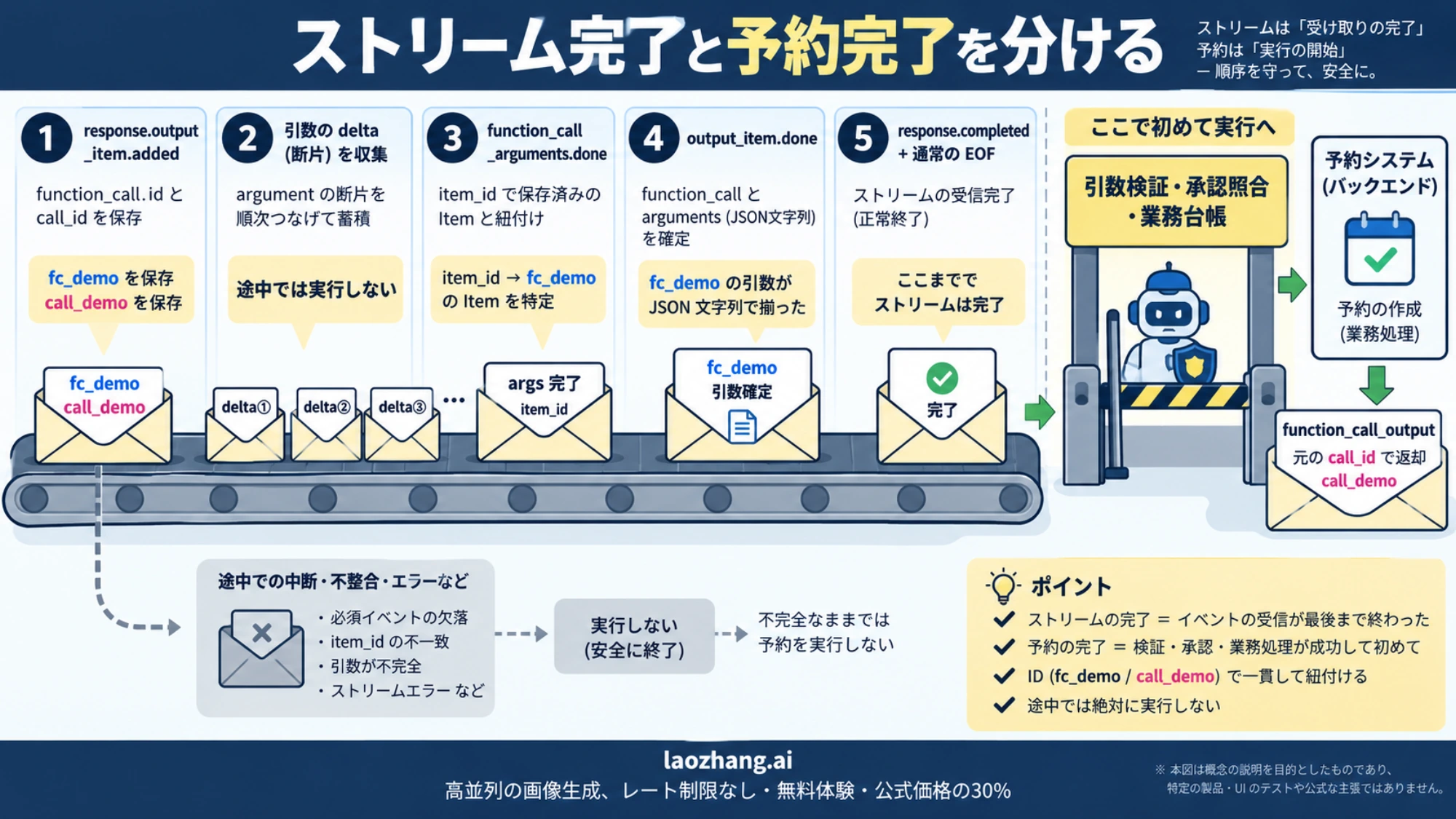
現行のresponse.function_call_arguments.doneに含まれるのは、arguments、item_id、output_index、sequence_number、typeです。現行schemaにはcall_idや完全なItemのフィールドはありません。 call_idはresponse.output_item.addedなどの実際の関数呼び出しItemから保存し、response.output_item.doneで確定したItemと照合します。arguments.doneのschema、output_item.doneのschema
次は、型付きイベントの非同期イテラブルを受け取る独立した補助関数です。HTTPのSSEを自前で解析するコードではありません。途中のdeltaでは実行せず、関数Itemの完了とresponse.completed、その後の正常な読み取り終了がそろってから応答を返す、慎重なアプリ側の方針です。stream-calls.mjsとして保存できます。
export async function completedStream(events) {
  const pending = new Map();
  const sequences = new Map();
  let completed;
  for await (const event of events) {
    const serial = JSON.stringify(event);
    if (sequences.has(event.sequence_number)) {
      if (sequences.get(event.sequence_number) !== serial) {
        throw new Error("stream_sequence_conflict");
      }
      continue;
    }
    sequences.set(event.sequence_number, serial);
    if (["error", "response.failed", "response.incomplete"].includes(event.type)) {
      throw new Error(`stream_stopped:${event.type}`);
    }
    if (event.type === "response.output_item.added" && event.item.type === "function_call") {
      if (!event.item.id || !event.item.call_id || pending.has(event.item.id)) {
        throw new Error("invalid_stream_call");
      }
      pending.set(event.item.id, {
        callId: event.item.call_id, name: event.item.name,
        index: event.output_index, args: null, item: null
      });
    }
    if (event.type === "response.function_call_arguments.done") {
      const entry = pending.get(event.item_id);
      if (!entry || entry.index !== event.output_index) throw new Error("unmatched_arguments");
      entry.args = event.arguments;
    }
    if (event.type === "response.output_item.done" && event.item.type === "function_call") {
      const entry = pending.get(event.item.id);
      if (!entry || entry.index !== event.output_index || entry.args === null ||
          entry.callId !== event.item.call_id || entry.name !== event.item.name ||
          entry.args !== event.item.arguments ||
          (event.item.status && event.item.status !== "completed")) {
        throw new Error("inconsistent_completed_item");
      }
      entry.item = event.item;
    }
    if (event.type === "response.completed") {
      if (completed || event.response.status !== "completed") throw new Error("invalid_completion");
      const calls = event.response.output.filter(item => item.type === "function_call");
      if (calls.length !== pending.size || calls.some(call => {
        const entry = pending.get(call.id);
        return !entry?.item || entry.callId !== call.call_id ||
          entry.name !== call.name || entry.args !== call.arguments;
      })) throw new Error("incomplete_call_collection");
      completed = event.response;
    }
  }
  if (!completed) throw new Error("stream_ended_without_completion");
  return completed;
}
ストリーミングを追加する際は、transport側でこの関数を使って完成したResponseを得てから、同じrunMigrationへ渡します。引数のdone、Responseのcompleted、アプリの予約完了、利用者への最終結果はそれぞれ別の出来事です。
この補助関数は切断時の自動再接続を行いません。response.failed、response.incomplete、error、completedなしのEOFで停止します。途中の切断で新しい要求を始める場合も、業務台帳を参照して、すでに成功した予約を再実行しないようにします。Responsesのストリーミングガイド
stagingで落とすべきnegative cases
自己テストは「自作の循環が合成応答で動く」確認です。公開前の実SDK・実API・予約backendの確認では、次の失敗を入口から利用者向け結果まで追います。成功文が表示されたことだけを合格条件にしません。
| 試す入力・失敗 | 合格条件 |
|---|---|
結果にItemのidを入れる | 元のcall_idとの不一致を検出する |
| 同じ呼び出しの再送・同時再送 | handlerの実行が増えず同じ結果になる |
| 新しい応答IDとcall IDで同じ予約 | 業務台帳から成功結果を再利用する |
| 未承認、期限切れ、別室、追加property、壊れたJSON、未知関数 | 実行前に拒否され、書込みが増えない |
| handler例外・timeout | 拒否と結果不明を区別し、不明な予約を自動でやり直さない |
| 複数の関数呼び出し | すべてに個別の元のcall_idで結果が返る |
failed、incomplete、cancelled、未完了、拒否、空出力 | 部分テキストを予約成功として採用しない |
| phase付きmessage、reasoning、関数Itemの再送 | 必要なメタデータを保ち、commentaryだけで終了しない |
| 引数deltaだけ、arguments.doneだけ、途中EOF、イベント重複 | 未完成の呼び出しを実行せず、不整合を検出する |
| worker再起動、予約後に台帳更新が失敗 | 永続記録と予約先を照合し、結果を復元する |
この記事のオフライン確認では、全文の文法とJSON、fake transportでの循環、同時再送、承認拒否、未完了・空出力・拒否、合成ストリームの対応と中断を調べました。実SDKのimport、APIサーバーの受理、実モデルのID生成、プロセスをまたぐ冪等性や本番復旧の合格を示すものではありません。
実運用の記録には、応答ID、呼び出しID、承認ID、検証判定、業務キー、実行結果、利用者へ渡した結果を対応させます。APIキーや不要な機密引数を記録する必要はありません。モデルの説明と台帳が食い違ったら、予約番号とbackendの記録を正として調査します。
releaseとrollback
まず検証環境の限られた予約枠で、新旧の経路を比較します。両方へ同じ本番の書込み要求を同時送信する比較は避け、共通fixtureや隔離された対象で、承認判定、結果の対応、書込み件数、最終回答を確認してください。
経路の移行、モデルの変更、並列化、ストリーミングは別々に切り替えます。未知のcall_id、承認外の実行、重複予約、未完了の誤受理が出たら、新しい経路を停止して台帳と予約先を照合します。
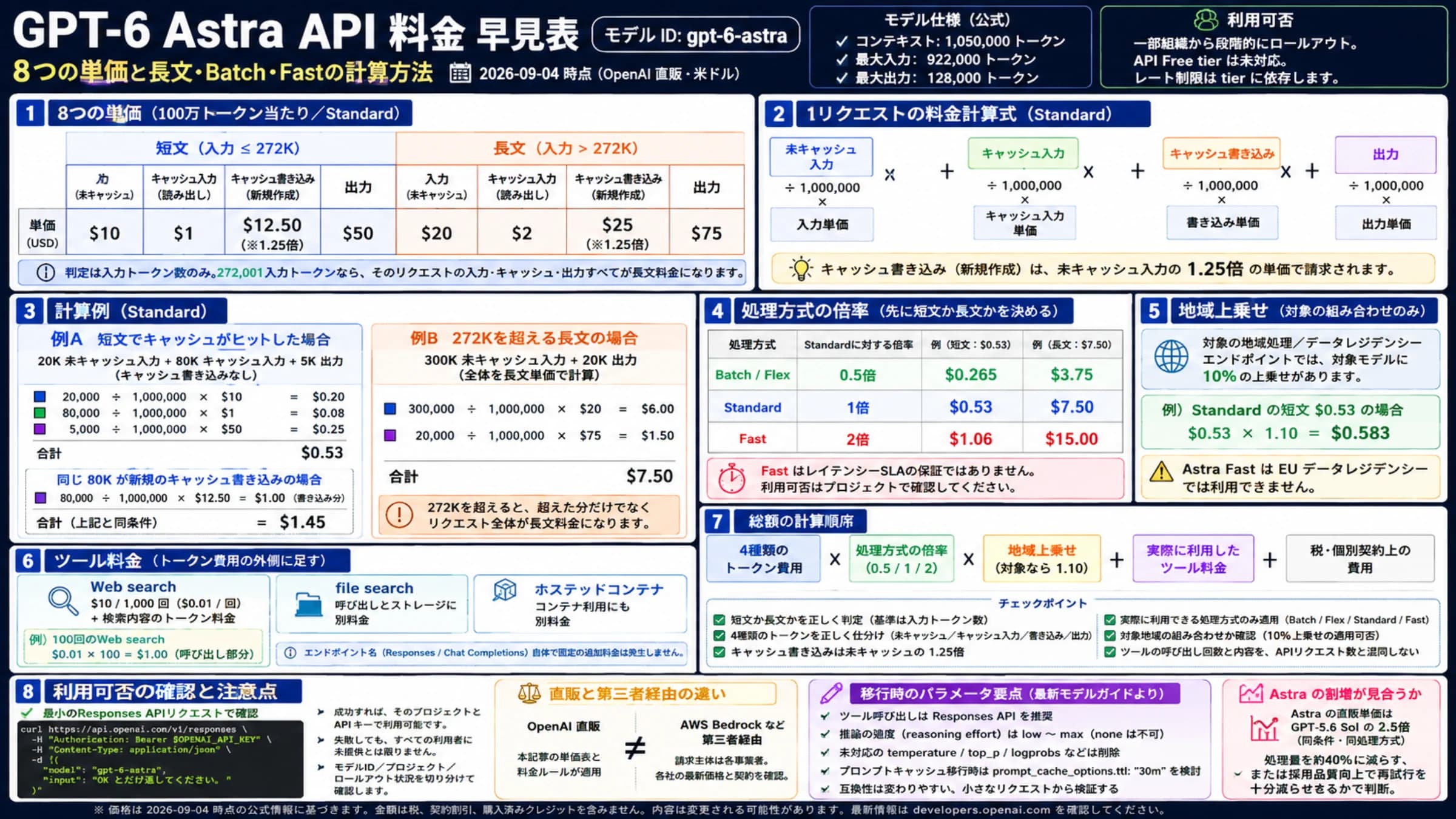
rollback先は「Chat CompletionsというAPI名」ではなく、確認済みのモデル・経路・設定・履歴の組合せです。 2026年10月7日時点の公式資料では、GPT-6 AstraとGPT-6.1 Solの関数呼び出しはResponsesが必要です。GPT-6 Sol/LunaのChatでの関数呼び出しにはreasoning_effort: noneの条件があります。Responsesのreasoning.effortへの変更や、reasoning有効時の非対応samplingパラメーターも確認します。新しいモデルを選んだ後に、APIだけChatへ戻せるとは限りません。現行モデルのAPI対応条件
業務台帳は新旧経路で共有し、成功済みの予約を戻し先から再発行しません。移行だけが目的なら、既存モデルと実効設定が対応している限り維持し、モデル選定まで同時に変える必要はありません。
Azureや互換ゲートウェイを使う場合は、実際の送信先を確認してから状態ID・イベント・モデル名の対応を調べます。OpenAIの仕様と提供先独自の期限やpathを混ぜないために、base_urlの優先順位とパスの書き方で経路を特定できます。接続の準備が未完なら、OpenAI APIキーの発行から最初の応答までを先に確認してください。
よくある疑問
call_idさえ合っていれば承認済みですか?
いいえ。call_idは呼び出しと返却結果の対応を示します。実行権限はアプリが持つ承認記録と引数を照合し、成功はhandlerの結果と業務記録で確認します。関数呼び出しの生成自体は作業の実行ではありません。関数呼び出しガイド
previous_response_idを使うとinstructionsは省略できますか?
省略できません。前の応答のトップレベルinstructionsは引き継がれないため、各要求で送ります。HTTPでの連鎖も対応していますが、利用中のサービスで前の状態が参照できるか確認してください。会話状態ガイド
max_tool_callsで予約回数や料金を制限できますか?
できません。max_tool_callsが制限するのは組込みツールの呼び出しです。独自関数の循環回数、実行期限、同時実行数、業務の件数はアプリで制限します。max_output_tokensには可視出力とreasoningの両方が含まれます。コードの6回という上限もデモ用の選択で、料金上限ではありません。createの仕様
ストリームが切れたら予約をやり直せばよいですか?
まず予約の結果を確認します。引数が完了する前ならこの実装では実行しませんが、handler実行後の切断では予約が成功している場合があります。成功結果を台帳から再利用し、結果不明なら予約先へ照会してから再開します。通信のEOFだけでは、Responseや予約の完了を判断できません。
参考資料8
本文で参照している外部ページを、登場順に並べています。最終更新日:2026年10月8日。
参考資料8
本文で参照している外部ページを、登場順に並べています。最終更新日:2026年10月8日。
- 1.公式の関数呼び出しガイドdevelopers.openai.com/api/docs/guides/function-calling
- 2.公式移行ガイドdevelopers.openai.com/api/docs/guides/migrate-to-responses
- 3.会話状態ガイドdevelopers.openai.com/api/docs/guides/conversation-state
- 4.createの仕様developers.openai.com/api/reference/resources/responses/methods/create
- 5.OpenAIのデータ管理仕様developers.openai.com/api/docs/guides/your-data
- 6.arguments.doneのschemadevelopers.openai.com/api/reference/resources/responses/streaming-events
- 7.Responsesのストリーミングガイドdevelopers.openai.com/api/docs/guides/streaming-responses
- 8.現行モデルのAPI対応条件developers.openai.com/api/docs/guides/latest-model