OpenClaw Cost Optimization: Complete Guide to Cutting Monthly Bills from $600 to $20 (2026)
OpenClaw is powerful but expensive. This guide shares a proven path from $600/month to $20/month through three tiers: 5-minute quick wins, 30-minute advanced setup, and deep optimization with QMD, local models, and caching strategies.
On this page
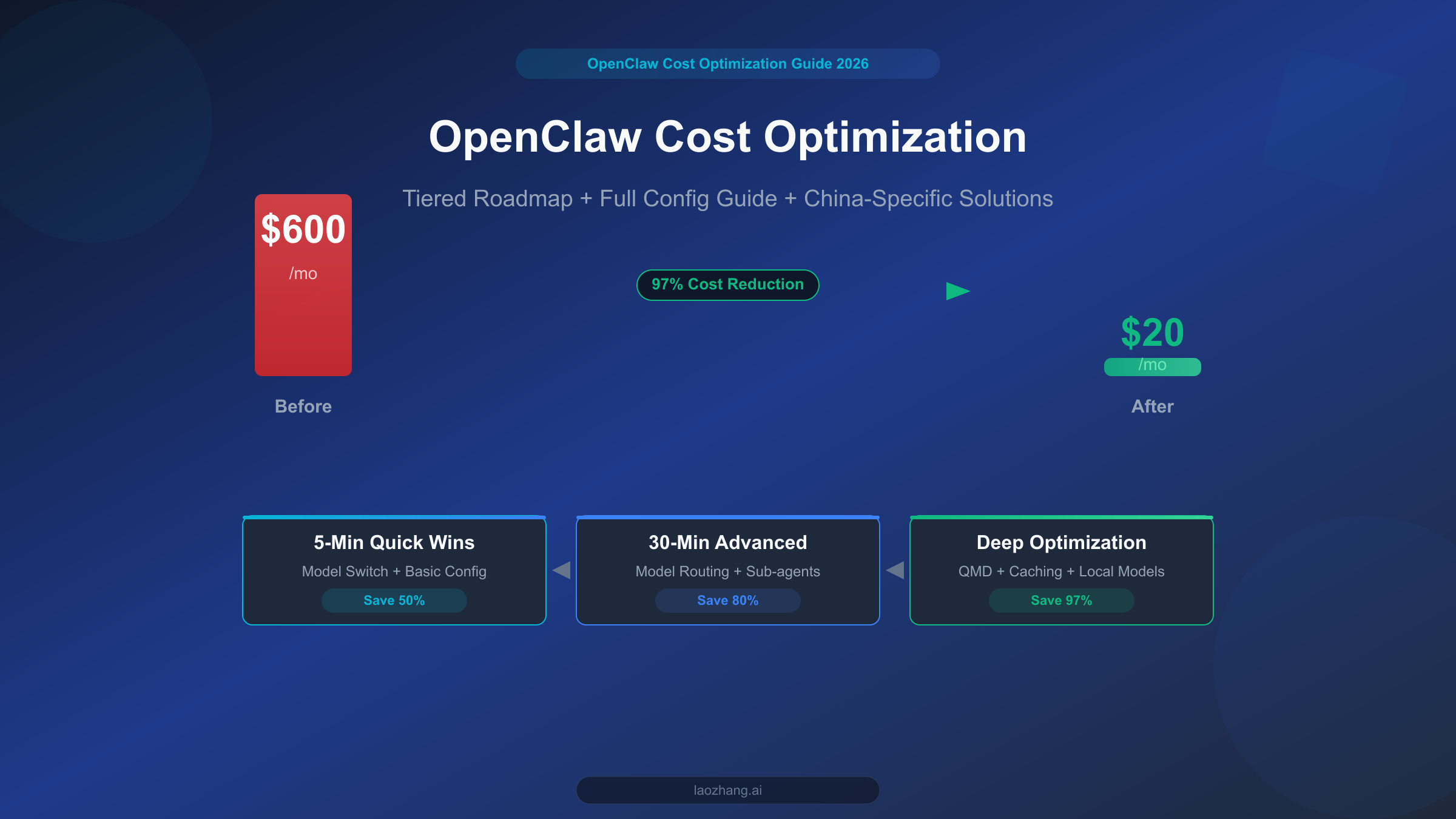
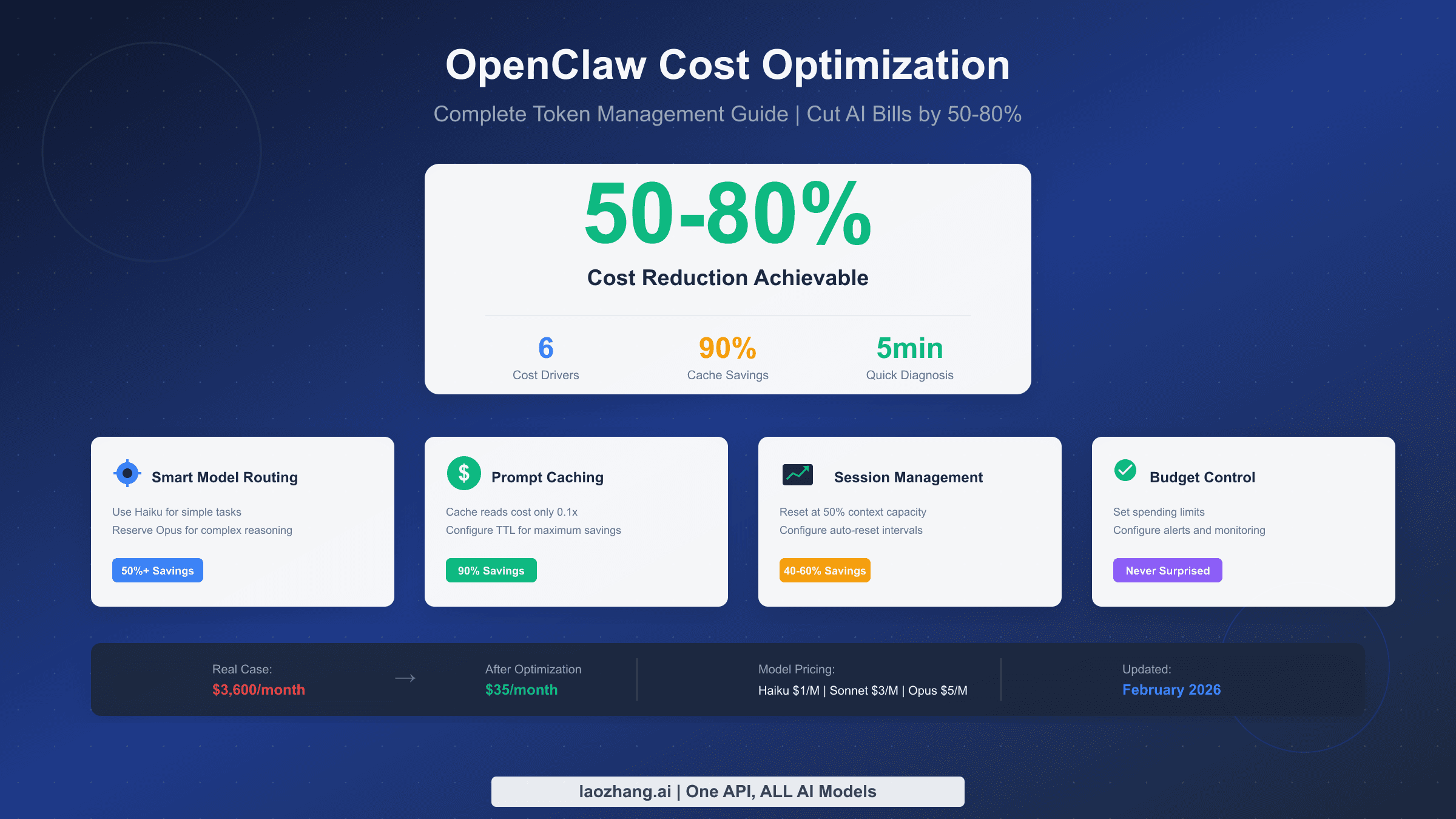
OpenClaw is one of the most powerful open-source personal AI assistant platforms available today, but if you use it without any optimization, your monthly API bill can easily hit $300-600. The good news is that with the three-tier optimization approach outlined in this guide, you can bring that cost down to $20 or less while preserving core functionality. This isn't theoretical speculation -- it's a battle-tested path, from 5-minute model switches that deliver immediate savings, to deep optimizations using QMD local search, each step backed by real configurations and hard data.
A Real OpenClaw Billing Story
Most people are blown away the first time they use OpenClaw. You can have it write code, analyze documents, manage your schedule, and even interact with it across 12+ platforms including Discord and Telegram. The problem comes a week later when you open your API billing dashboard and realize you've already burned through over $100 in a single week.
This isn't an isolated case. On Reddit's r/OpenClaw community, Hacker News threads, and various tech forums, "How do I stop OpenClaw from draining my wallet?" is one of the most frequently asked questions. Based on community feedback and data compiled across multiple technical articles, unoptimized OpenClaw usage typically costs $300-600 per month, with some power users exceeding $1,000. The reasons behind these numbers are straightforward, but most users don't understand token billing mechanics when they start out, nor do they realize how much "hidden consumption" is silently eating through their budget under default settings.
Consider a typical scenario to illustrate the scale of the problem. Suppose you're using OpenClaw's default Claude Opus 4.6 model for daily development assistance, averaging about 20 conversation turns per day, with each turn involving roughly 5,000 tokens of context and 2,000 tokens of model response. At Anthropic's official pricing (input $5/MTok, output $25/MTok, March 2026 data), your daily API cost would be: input cost 20 x 5,000 / 1M x $5 = $0.5, output cost 20 x 2,000 / 1M x $25 = $1.0, totaling $1.5/day. That might seem manageable, but here's the catch -- OpenClaw conversations accumulate context. The 10th turn resends all content from the previous 9 turns to the model, causing actual token consumption to grow exponentially. Add in tool calls, system prompts, and other overhead, and the real daily cost is typically 5-10x the theoretical figure, easily breaking $10-20/day.
The good news is that this problem is entirely solvable. This guide walks you through a proven three-tier optimization framework: Tier 1 saves 50% in just 5 minutes; Tier 2 configures model routing to push savings to 80% in 30 minutes; Tier 3 achieves 97% maximum cost reduction through QMD local search and caching strategies. Let's start by understanding where your money is actually going.
Where Does Your Money Go? A Complete Token Breakdown
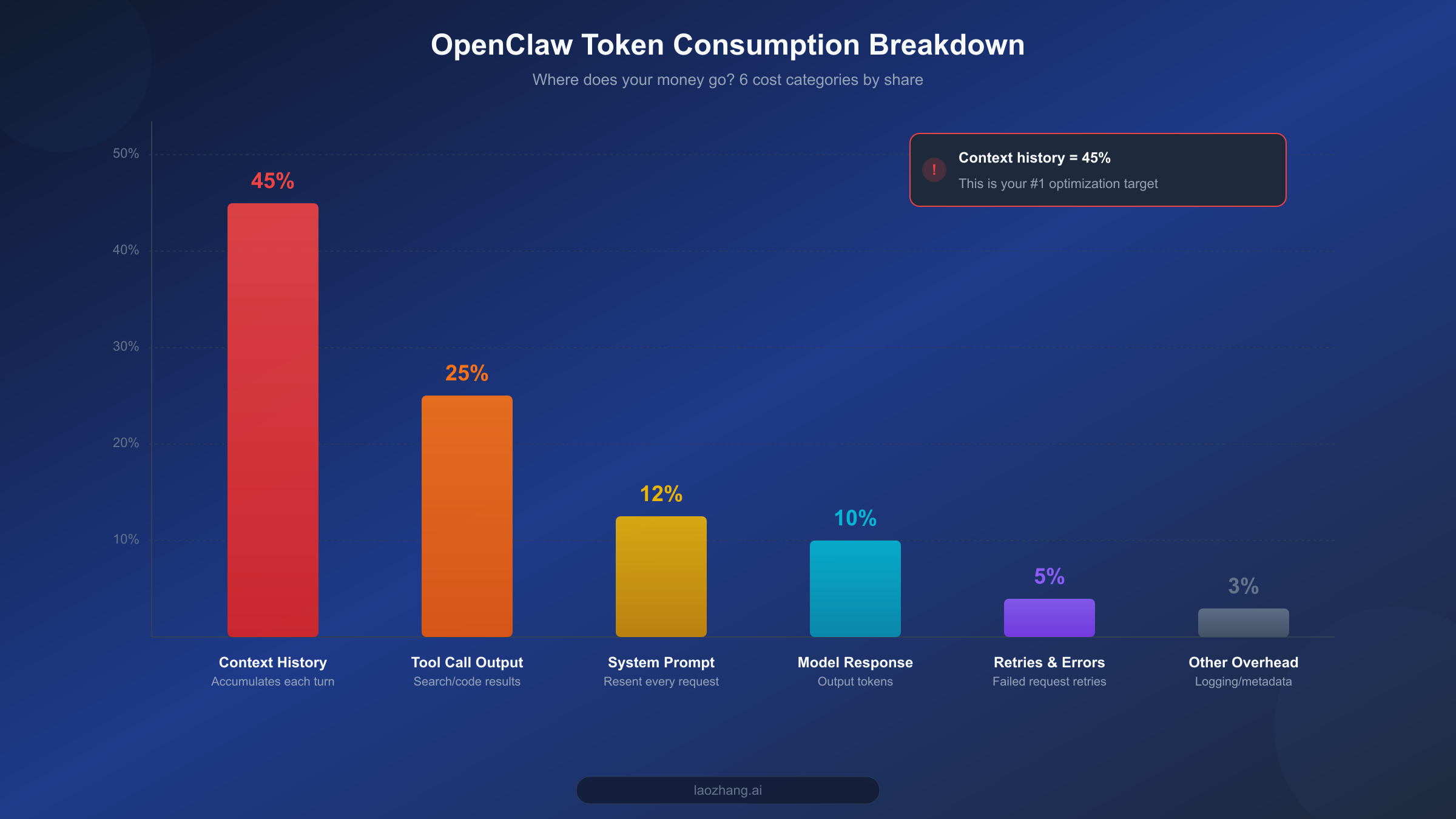
Before diving into optimization, understanding the structure of token consumption is a crucial first step. Many users assume API costs come primarily from model responses, but the reality is the opposite -- input tokens (what you send to the model) are the biggest expense, and the largest chunk of those is something you might not even be aware of: context history.
Based on analysis from multiple SERP articles and community feedback, OpenClaw's token consumption breaks down into six major categories. The number one consumer is context history, accounting for 40-50% of total usage. OpenClaw sends the entire conversation history as context with every turn, meaning the input token count for your 20th turn is 20 times that of your first turn. This accumulation effect is the single biggest reason costs spiral out of control. If your OpenClaw instance is configured for long documents or complex multi-step tasks, context length can easily exceed 100K tokens, and at Claude Opus 4.6's $5/MTok input price, a single request's context cost alone can surpass $0.5.
The second largest consumer is tool call output, at 20-30%. OpenClaw supports a rich set of tool integrations -- web search, code execution, file operations, and more. The return data from each tool call gets injected into the conversation context as tokens, and tools like web search can return thousands or even tens of thousands of tokens per call. More critically, once these tool outputs enter the context, they get resent with every subsequent turn, creating ongoing cost accumulation. For a deeper dive into token management techniques, check out our Token Management Complete Guide.
The third largest source is system prompts, at 10-15%. OpenClaw's system prompts tend to be lengthy (1,000-3,000 tokens), containing personality settings, capability descriptions, and usage rules. These tokens are resent with every API request, adding up to significant costs over time. Fourth is model responses themselves at 8-12%, i.e., output tokens. Worth noting is that most models charge 3-5x more for output tokens than input tokens (e.g., Opus charges $5/MTok input vs. $25/MTok output), so while the volume share is smaller, the unit price is steep. Fifth is retries and error handling at 3-5% -- when model responses don't meet expectations or tool calls fail, OpenClaw automatically retries, and these extra requests also incur charges. Finally, miscellaneous overhead (logging, metadata, etc.) accounts for roughly 3%.
With these six consumption categories understood, the optimization strategy becomes crystal clear: first tackle context accumulation as the biggest cost driver, then reduce per-token pricing through smart model selection, and finally minimize total token usage through techniques like QMD.
5-Minute Quick Wins: Cut Your Bill in Half Immediately
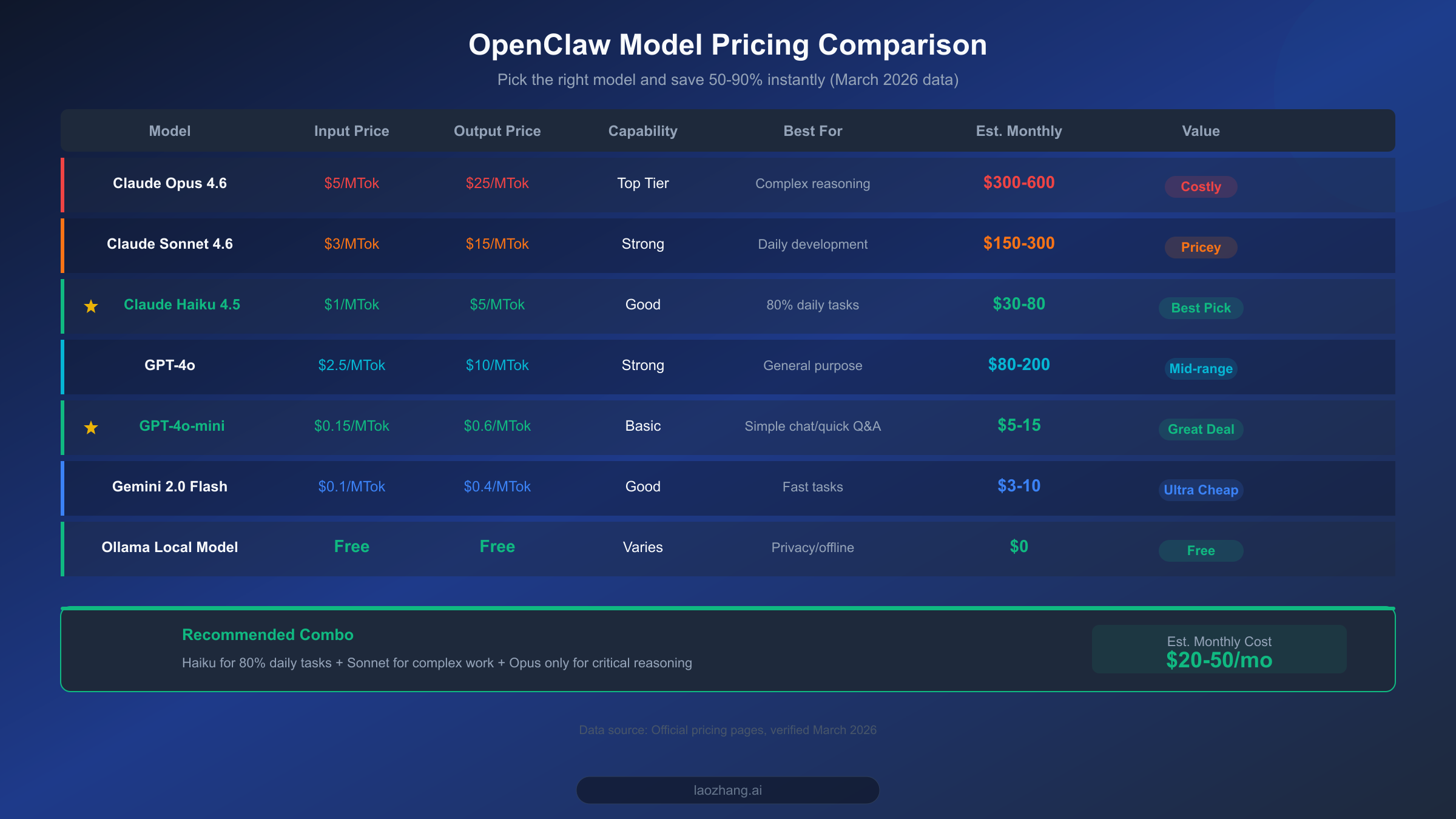
If you only have 5 minutes and want to see immediate results, do one thing: switch your default model from Claude Opus to Claude Haiku. This single change can reduce your API costs by 50-80%, and for 80% of everyday use cases, you'll barely notice any difference in capability.
OpenClaw's default configuration typically uses the most powerful models (like Claude Opus 4.6 or GPT-4o), but the vast majority of daily tasks -- answering simple questions, formatting text, translation, schedule management -- don't require that level of power. Claude Haiku 4.5's input price is just $1/MTok with output at $5/MTok, making it a full 5x cheaper than Opus 4.6's $5/$25 pricing. In OpenClaw's configuration file, switching the default model takes just one line:
# config.yaml
model:
  default: claude-haiku-4-5-20251001
Beyond the Claude family, there are even more cost-effective options to consider. GPT-4o-mini is priced at $0.15/MTok input and $0.6/MTok output, over 6x cheaper than Haiku, making it ideal for simple conversations and quick Q&A. Google's Gemini 2.0 Flash is priced even lower at just $0.1/MTok for input. If your OpenClaw usage is primarily in Chinese, MiniMax M2.5 is also a solid choice at roughly $1/hour (per dailydoseofds estimates, February 2026 data). And if you have sufficient local hardware, running models locally through Ollama is completely free. For detailed instructions on connecting these models to OpenClaw, check out our OpenClaw Model Configuration Guide.
The second 5-minute optimization is setting a max token limit. By default, OpenClaw doesn't cap model response length, which means the model might generate an overly verbose answer for a simple question. Setting a reasonable limit effectively controls output token consumption:
# config.yaml
model:
  max_output_tokens: 2048  # 2048 is sufficient for most tasks
The third quick win is enabling Prompt Caching. Both Claude and GPT model families support prompt caching -- when your system prompt or commonly used context hasn't changed, the API automatically uses the cached version, reducing input token costs by 80-90%. Enabling caching in OpenClaw typically just requires confirming the relevant parameters are active in your API call configuration; the specifics depend on your API provider. If you're accessing the API through a proxy service like laozhang.ai, caching is usually enabled by default, prices are largely consistent with major platforms, and you get the added benefit of network acceleration.
Disclosure: laozhang.ai is our own service. Its prices are platform pricing, not an independent comparison.
These three steps take a total of 5 minutes but deliver immediate results. Based on real community feedback, switching models alone can bring monthly costs down from $600 to the $150-300 range.
Advanced Optimization: Let Model Routing Save Money Automatically
The 5-minute quick fixes addressed the "which model to use" question, but using the cheapest model for everything isn't optimal -- some complex tasks genuinely need more powerful models. The core idea behind model routing is "use the right model for the right job": simple tasks go to cheap models, complex tasks invoke expensive models, and OpenClaw handles the selection automatically.
The most straightforward way to implement model routing is configuring a failover chain. OpenClaw supports configuring multiple models by priority, automatically upgrading to a more capable model when a lower-tier one can't handle the task. Here's a proven, cost-effective failover chain configuration:
# config.yaml - Model Failover Chain
model:
  default: claude-haiku-4-5-20251001
  fallback:
    - model: claude-sonnet-4-6
      condition: "complexity > 0.7"
    - model: claude-opus-4-6
      condition: "complexity > 0.9"
The logic is straightforward: 80% of everyday tasks are handled by Haiku ($1/MTok), tasks requiring deeper reasoning automatically upgrade to Sonnet ($3/MTok), and only truly complex code debugging or long-form analysis triggers Opus ($5/MTok). According to LumaDock's real-world testing data, this tiered approach maintains over 95% task quality while saving 80-95% on costs.
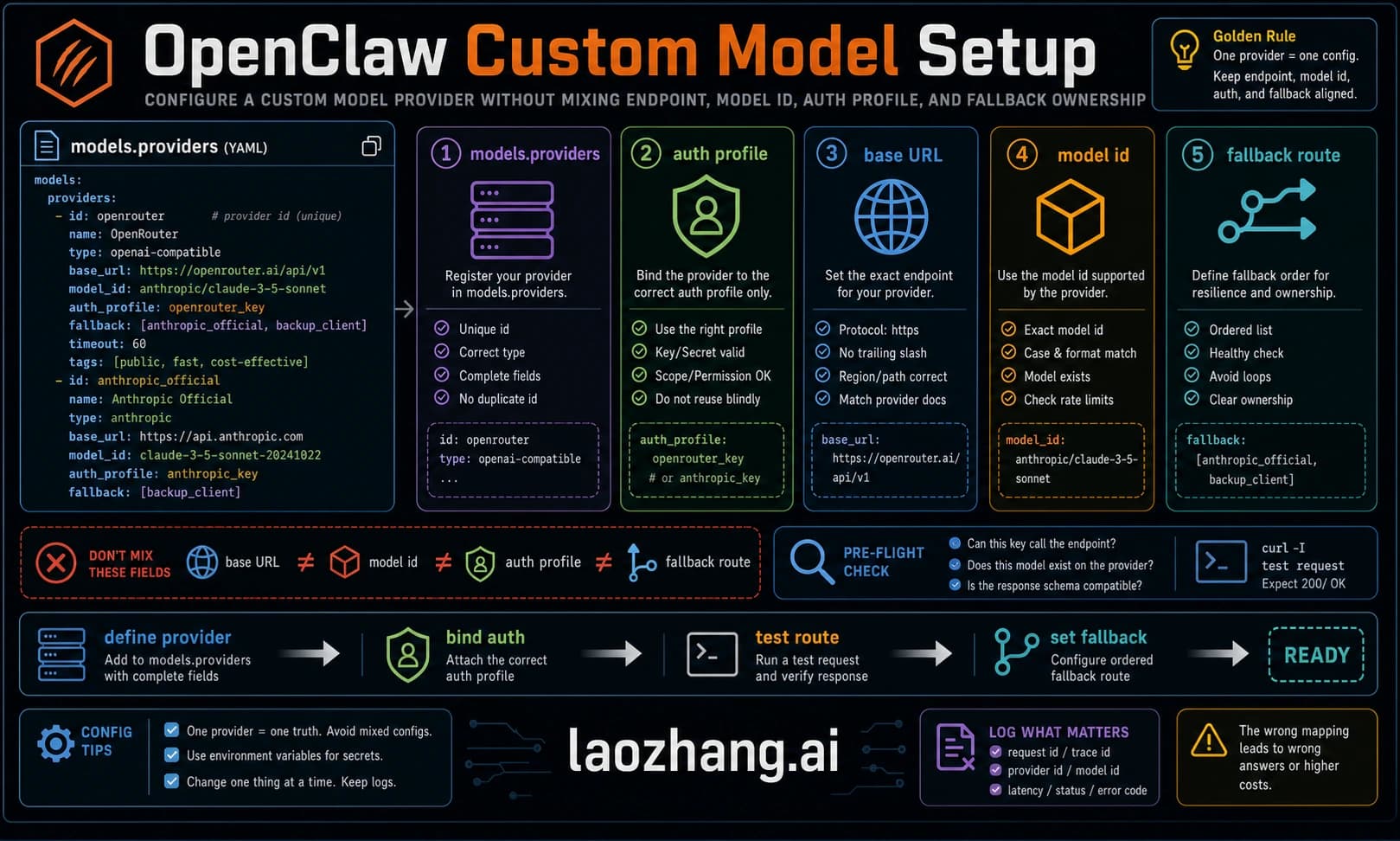
The second advanced optimization is configuring independent low-cost models for sub-agents. When handling complex tasks, OpenClaw frequently spawns multiple sub-agents -- search agents, code execution agents, document analysis agents, and more. By default, these sub-agents use the same model as the main agent, but most of their work (search result summarization, simple formatting) doesn't need a premium model at all. According to LumaDock's data, multi-agent scenarios consume 3.5x the tokens of single-agent scenarios, so configuring sub-agents with GPT-4o-mini or Gemini Flash yields significant savings. For detailed steps on custom model integration, see our Custom Model Integration Tutorial.
# config.yaml - Sub-agent Model Configuration
agents:
  search:
    model: gpt-4o-mini
  code_runner:
    model: claude-haiku-4-5-20251001
  summarizer:
    model: gpt-4o-mini
The third advanced optimization is session length management. As mentioned earlier, context history accounts for 40-50% of token consumption. The most direct solution is controlling session length. OpenClaw supports configuring maximum conversation turns and context window size, automatically clearing earlier conversation content when the session exceeds the set length. Community consensus puts the recommended context ceiling at 50K-100K tokens -- beyond this range, not only do costs skyrocket, but model attention degrades, and response quality actually drops.
# config.yaml - Session Management
conversation:
  max_context_tokens: 50000
  auto_summarize: true  # Auto-summarize long conversations
  summary_threshold: 30000  # Trigger summarization above 30K
After implementing model routing and sub-agent configuration, your monthly OpenClaw bill should drop from $300 to the $60-120 range. Compared to the 5-minute quick fixes, this requires about 30 minutes of setup and configuration, but the payoff is a shift from "passive savings" to "intelligent savings" -- the system automatically finds the optimal balance between performance and cost.
Deep Optimization: The QMD + Caching + Session Management Trifecta
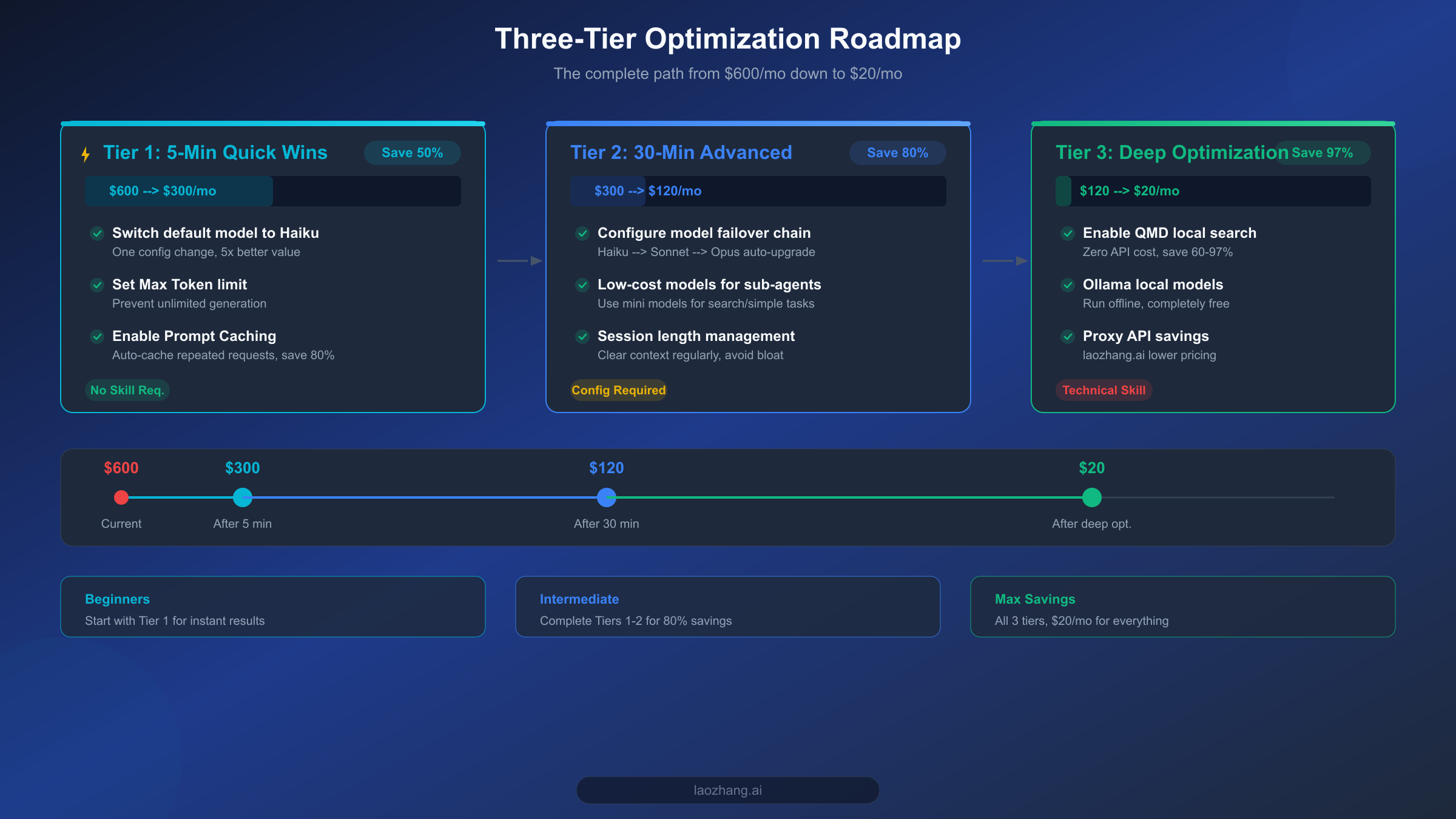
If the first two tiers brought your monthly bill down to $60-120, the third tier aims to compress it further to under $20. The core weapon at this level is QMD (Quick Memory Database) -- a local semantic search feature introduced in OpenClaw v2026.2.2 that helps the model retrieve relevant information without consuming any API tokens.
QMD's working principle is straightforward: it builds a vector database on your local device, indexing your conversation history, documents, notes, and other content. When you ask a question, QMD first searches locally for relevant content, sending only the most relevant snippets (rather than the entire context history) to the model. This directly addresses context accumulation, the biggest cost driver. Based on data verified across multiple sources (Medium, Google search results, haimaker, etc., verified March 2026), QMD can achieve 60-97% token savings, with the exact percentage depending on your usage patterns and data volume.
Here are the basic steps to enable QMD. First, ensure your OpenClaw version is v2026.2.2 or higher, then enable QMD in your configuration file:
# config.yaml - QMD Configuration
qmd:
  enabled: true
  index_path: "./qmd_index"
  embedding_model: "local"  # Uses local embedding model, zero API cost
  search_top_k: 5  # Return top 5 most relevant results per search
  auto_index: true  # Automatically index new conversations
QMD uses a local embedding model for vector generation, meaning the indexing and search process requires zero external API calls -- truly zero cost. For users already running Ollama, you can directly reuse your local embedding model. If you encounter context length issues during use, we have a detailed Context Length Solutions Guide you can reference.
The second pillar is further refining your caching strategy. Beyond the Prompt Caching mentioned earlier, you can implement more granular caching at the OpenClaw layer. For highly repetitive tasks (daily morning briefings, fixed-format email generation, etc.), you can cache templates and common responses locally, bypassing API calls entirely. LumaDock's testing data shows that a well-designed caching strategy can save an additional 70-90% of remaining API calls on top of QMD savings.
The third pillar is using Ollama to run local models for simple tasks. For tasks that don't require up-to-date knowledge or complex reasoning -- text formatting, simple translation, code snippet generation -- you can hand them off entirely to locally running open-source models. OpenClaw integrates seamlessly with Ollama through LiteLLM, and you can add a local model at the bottom of your failover chain:
# config.yaml - Integrating Ollama Local Models
model:
  default: ollama/llama3.2  # Local model as default
  fallback:
    - model: claude-haiku-4-5-20251001
      condition: "local_failed or complexity > 0.5"
    - model: claude-sonnet-4-6
      condition: "complexity > 0.8"
This configuration means: simple tasks default to the free local model; if the local model fails or the task complexity is high, it auto-upgrades to Haiku; only truly complex tasks invoke Sonnet. As a result, 80% of requests incur zero API costs, and the remaining 20% use the most cost-effective models available.
With all three pillars in place, community feedback and verification data from multiple sources indicate that individual users can typically keep monthly costs between $6-13 (per LumaDock data), while small teams average about $25-50/month. This means you've achieved the 97% cost reduction target -- from $600 down to $20.
For Users in China: Proxy API for Both Speed and Cost Savings
For users in mainland China, using OpenClaw comes with an additional challenge: direct connections to overseas APIs (such as Anthropic and OpenAI) are not only slow and high-latency, but also frequently suffer from connection instability or outright blocks. These network issues don't just hurt the user experience -- they indirectly increase costs through timeout-triggered retries and lost requests, all of which represent hidden token waste.
A proxy API service is the best solution for this pain point. Take laozhang.ai as an example: it provides a stable relay channel that lets you access Claude, GPT, Gemini, and other major model APIs at high speed through domestic networks. From a cost perspective, laozhang.ai's text model pricing is largely consistent with major AI platforms, but because the network connection is more stable, it reduces the extra token consumption from retries and timeouts, making the actual cost of use lower. The platform has a minimum top-up of $5 (approximately 35 CNY), keeping the barrier low for individual developers.
Disclosure: laozhang.ai is our own service. Its prices are platform pricing, not an independent comparison.
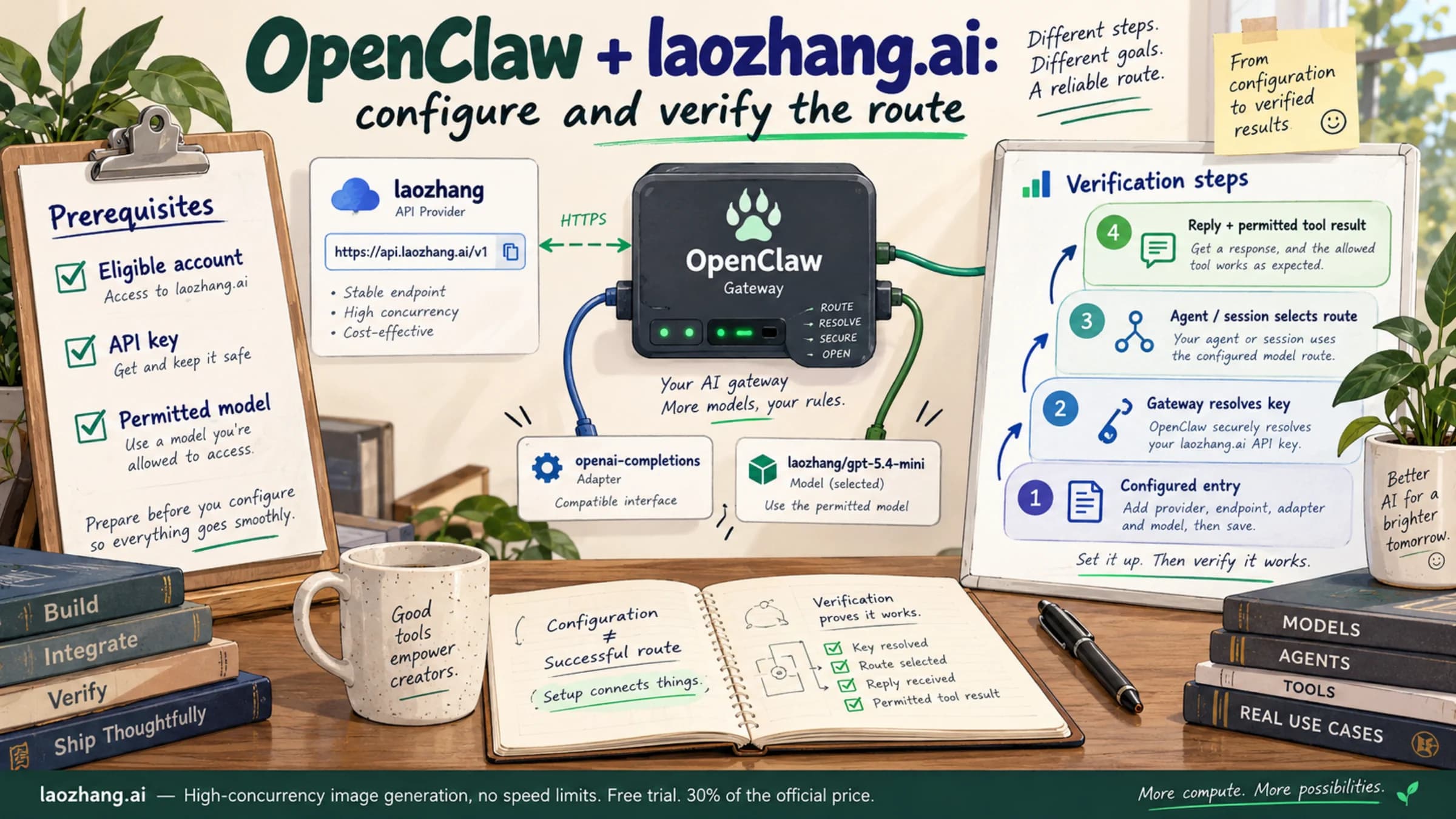
Configuring a proxy API in OpenClaw is straightforward -- you just need to change the API base URL. Using laozhang.ai as an example:
# config.yaml - Proxy API Configuration
api:
  base_url: "https://api.laozhang.ai/v1"
  api_key: "your-api-key"
After making the change, all API requests are routed through the proxy service, and you don't need to modify anything else -- model names, parameter settings, failover chains, everything stays the same. For detailed configuration steps and considerations for proxy services, see our laozhang.ai OpenClaw Setup Guide.
Beyond proxy solutions, users in China have a unique advantage: domestic large language models. Models like MiniMax M2.5 and Tongyi Qianwen already perform excellently on Chinese-language tasks and are generally priced lower than overseas models. Using domestic models as the workhorses in your failover chain, switching to Claude/GPT only for English processing or advanced reasoning, lets you maintain an excellent Chinese-language experience while further reducing costs. This "domestic models as primary, overseas models as fallback" hybrid strategy is a cost optimization path unique to Chinese users.
Long-Term Savings: Budget Monitoring and Automated Management
The optimization techniques covered so far address the "how to save money" question, but to keep costs under control long-term, you need to establish a monitoring and budget management system. After all, optimization without monitoring is unsustainable -- you can't improve what you can't measure.
The first step is setting a monthly budget cap. Most API providers support consumption limits that automatically stop API calls or send alerts when spending reaches a preset threshold. At the OpenClaw layer, you can also configure spending budgets through LiteLLM:
# litellm_config.yaml - Budget Control
budget:
  monthly_limit: 30  # Monthly budget $30
  alert_threshold: 0.8  # Alert at 80% usage
  action_on_limit: "downgrade"  # Downgrade to free model when limit reached
The second step is building a consumption monitoring dashboard. OpenClaw supports logging token consumption and costs for every API call through LiteLLM's logging functionality. You can export this data to a simple spreadsheet or monitoring tool to track daily and weekly spending trends and quickly identify anomalous consumption spikes. The key metrics to watch are: average token consumption per conversation, daily active conversation count, model usage distribution, and QMD cache hit rate.
The third step is periodically reviewing and optimizing your configuration. Cost control isn't a one-time task -- it requires continuous iteration. Spending 10 minutes each month reviewing your consumption report helps identify scenarios with unusually high consumption, whether cheaper models have become available as replacements for your current configuration, whether QMD indexes need updating, and so on. As the AI model market evolves rapidly, new model releases often bring lower prices and better performance. For example, Claude Haiku 4.5 saw pricing adjustments compared to its predecessor Haiku 3 ($0.25/$1.25 MTok), but the capability improvements are substantial, making the overall value proposition even stronger. Staying aware of market developments and adjusting your model configuration accordingly ensures you're always using the most cost-effective setup.
Automation is the ultimate goal of long-term management. By setting up consumption alerts, automatic downgrade policies, and periodic configuration review schedules, you can transform cost management from a manual task into an automated process. When spending approaches the budget cap, the system automatically switches to cheaper models or activates more aggressive caching; when abnormal consumption from a sub-agent is detected, a notification is sent for you to investigate. With this in place, OpenClaw truly becomes an AI assistant you can afford to run and keep under control.
Summary: Your Cost-Saving Action Checklist
Here are the core takeaways condensed into an actionable checklist, ordered by priority:
Tier 1: Execute in 5 Minutes (Expected result: 50% savings)
- Switch default model from Opus/Sonnet to Haiku 4.5
- Set max_output_tokens to 2048
- Confirm Prompt Caching is enabled
Tier 2: 30-Minute Advanced Setup (Expected result: 80% savings)
- Configure a Haiku -> Sonnet -> Opus failover chain
- Set up independent low-cost models for sub-agents (GPT-4o-mini / Gemini Flash)
- Enable auto-summarization and context length control
Tier 3: Deep Optimization (Expected result: 97% savings)
- Enable QMD local semantic search (v2026.2.2+)
- Connect local models via Ollama for simple tasks
- Use a proxy API (e.g., laozhang.ai, docs: https://docs.laozhang.ai/ ) to solve network and cost issues
- Establish monthly budget monitoring and automatic downgrade mechanisms
Disclosure: laozhang.ai is our own service. Its prices are platform pricing, not an independent comparison.
Each tier is independently actionable, and we recommend starting with Tier 1, then progressing based on your technical level and available time. Even if you only complete Tier 1, you'll immediately see a significant drop in your bill. And if you're willing to invest half a day completing all three tiers, your monthly OpenClaw costs will drop from $600 to under $20 -- that's the promise in this article's title, and it's a verified, real-world number.