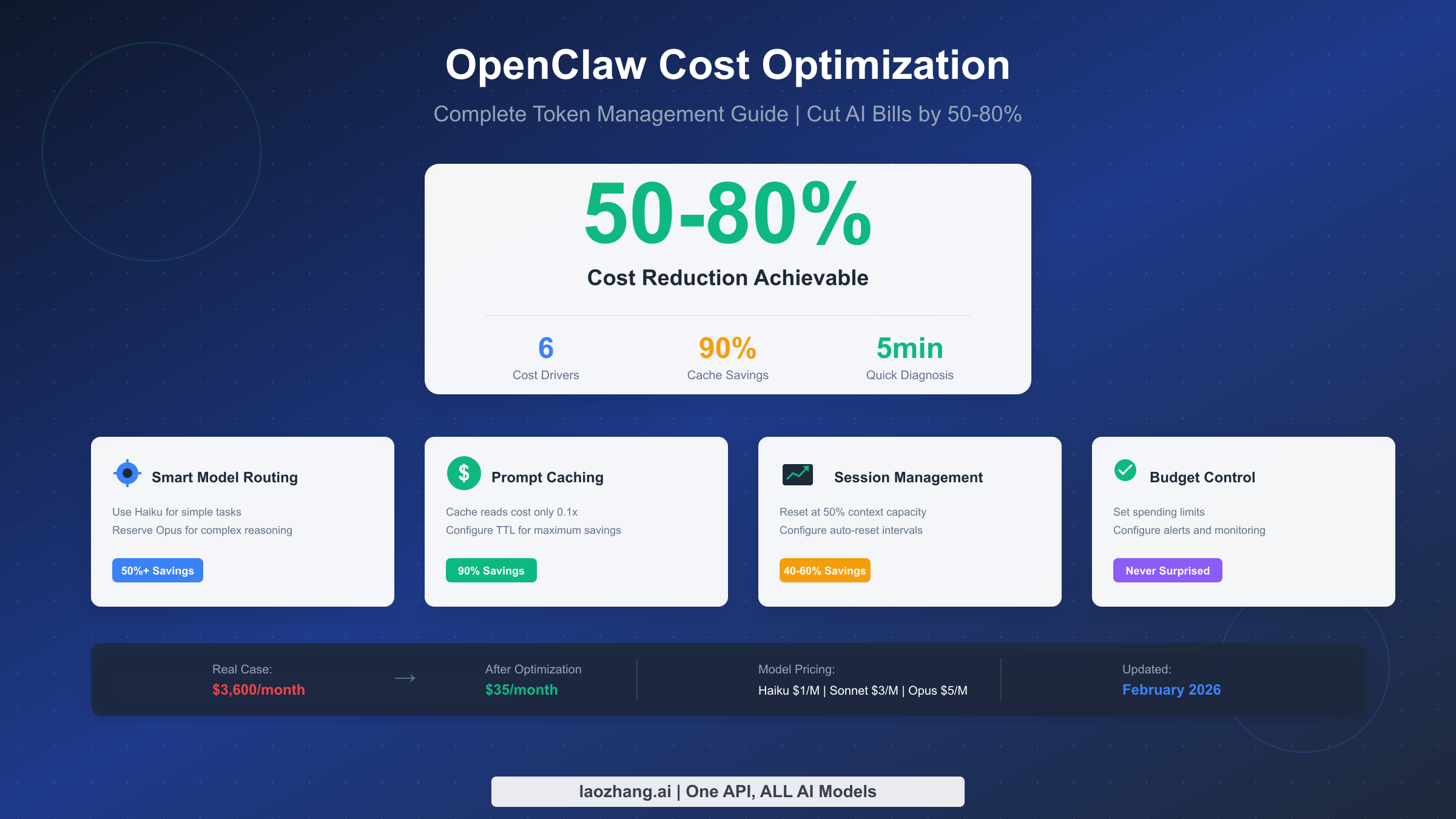
OpenClaw users often face unexpectedly high API bills, with some reporting costs exceeding $3,600 per month from uncontrolled token consumption. The open-source AI assistant has become incredibly popular with over 135,000 GitHub stars, but its token consumption speed catches many users off guard. This comprehensive guide reveals the 6 main cost drivers—from context accumulation consuming 40-50% of your tokens to misconfigured heartbeats draining your budget silently—and provides actionable strategies to reduce your OpenClaw costs by 50-80%. You'll get complete configuration templates for smart model routing, prompt caching, and budget controls, all updated for February 2026.
TL;DR - Cost Optimization Cheat Sheet
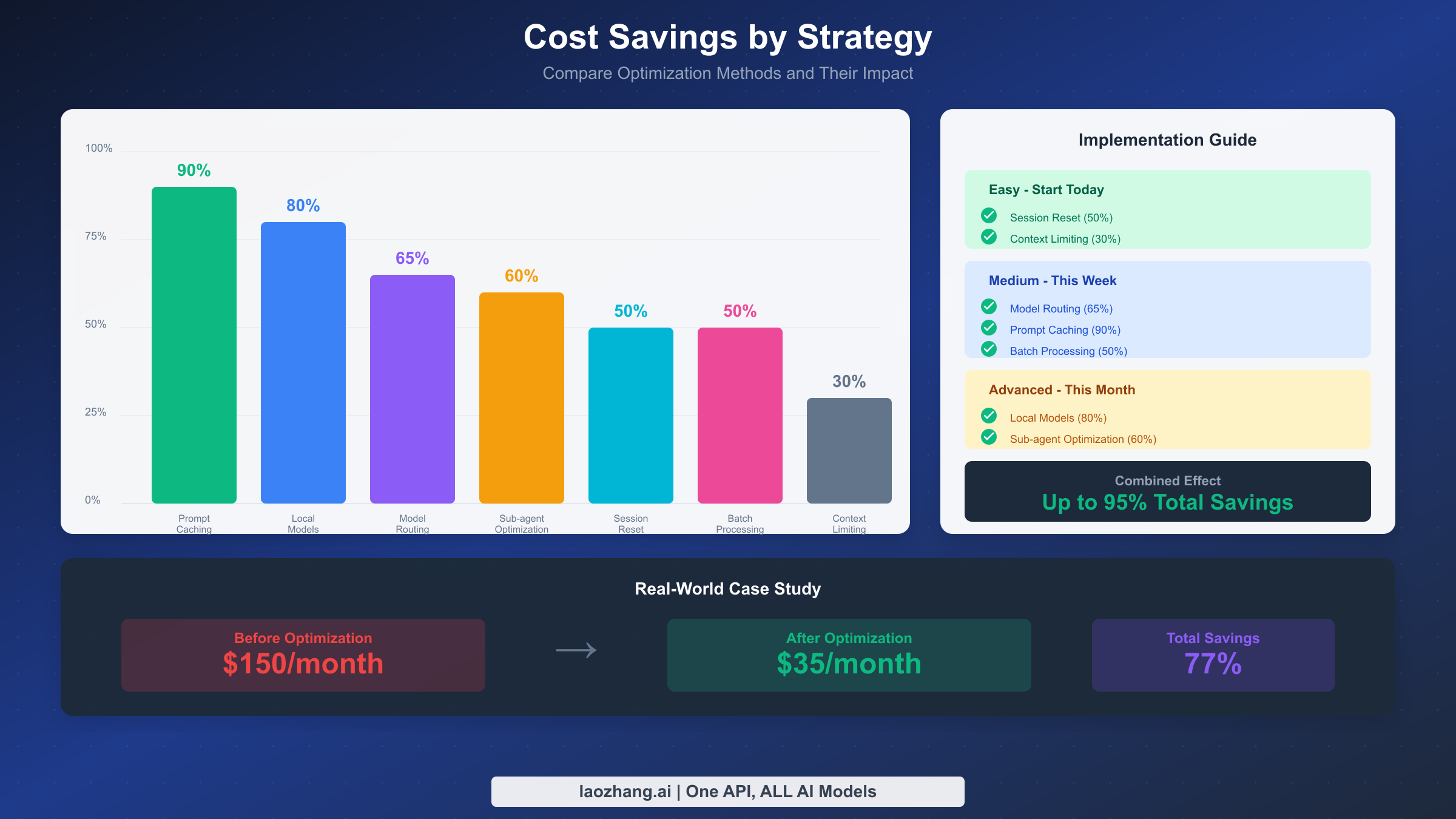
Before diving into the details, here's your quick reference for the most impactful cost-saving strategies. Implementing just the top three can cut your monthly bill by 50% or more.
Immediate Actions (Today)
- Run
/statusto check your current token usage and cost estimates - Set spending limits in your provider's console to prevent bill shock
- Start new sessions for new tasks instead of continuing long conversations
High-Impact Strategies (This Week)
- Configure model routing: Haiku for simple tasks, Sonnet for coding, Opus only when needed
- Enable prompt caching with TTL aligned to your heartbeat interval
- Set automatic session reset at 50% context capacity
Advanced Optimizations (This Month)
- Deploy local models via LM Studio for zero-cost simple completions
- Configure sub-agents to use cheaper models than your main session
- Implement batch processing for non-urgent tasks (50% discount)
Quick Navigation: Token Breakdown | Model Routing | Caching | Budget Control
Quick Diagnosis - Why Your Bill Is So High
If you've just received an unexpectedly high bill, don't panic. Follow this 5-minute diagnostic process to identify exactly where your tokens are going and which optimization will have the biggest impact.
The first step is understanding your current state. Open OpenClaw and run the /status command. This gives you an emoji-rich status card showing your session model, context usage percentage, last response's input/output tokens, and estimated cost. If you're using an API key directly (not OAuth), you'll see dollar amounts that help you understand the immediate financial impact.
For a deeper investigation, run /context detail to see exactly how many tokens each file and tool is consuming in your current session. This often reveals surprising culprits—a single large JSON output from a directory listing or config schema dump might be occupying 20% of your context window. These tool outputs get stored in your session history and resent with every subsequent request, compounding costs exponentially.
The context accumulation problem is the number one cost driver, responsible for 40-50% of typical token usage. Every time you chat with OpenClaw, all historical messages are saved in JSONL files within the .openclaw/agents.main/sessions/ directory. With every new request, OpenClaw sends this entire conversation history to the AI model. One user reported their session context occupying 56-58% of a 400K token window—that's roughly 230,000 tokens being resent with every single message.
Check your heartbeat configuration next. Run openclaw config get heartbeat to see your current settings. If heartbeat is triggering too frequently—say every 5 minutes—and each trigger carries your full session context, you might be burning through tokens even when you're not actively using OpenClaw. One user discovered their automated email check, set to run every 5 minutes, had burned through $50 in a single day.
Finally, examine your model selection. If you're using Claude Opus for every interaction, including simple status checks and quick questions, you're paying 5x more than necessary. The diagnosis often reveals that 70-80% of interactions could be handled by cheaper models without any quality degradation.
Understanding Token Consumption - The 6 Cost Drivers
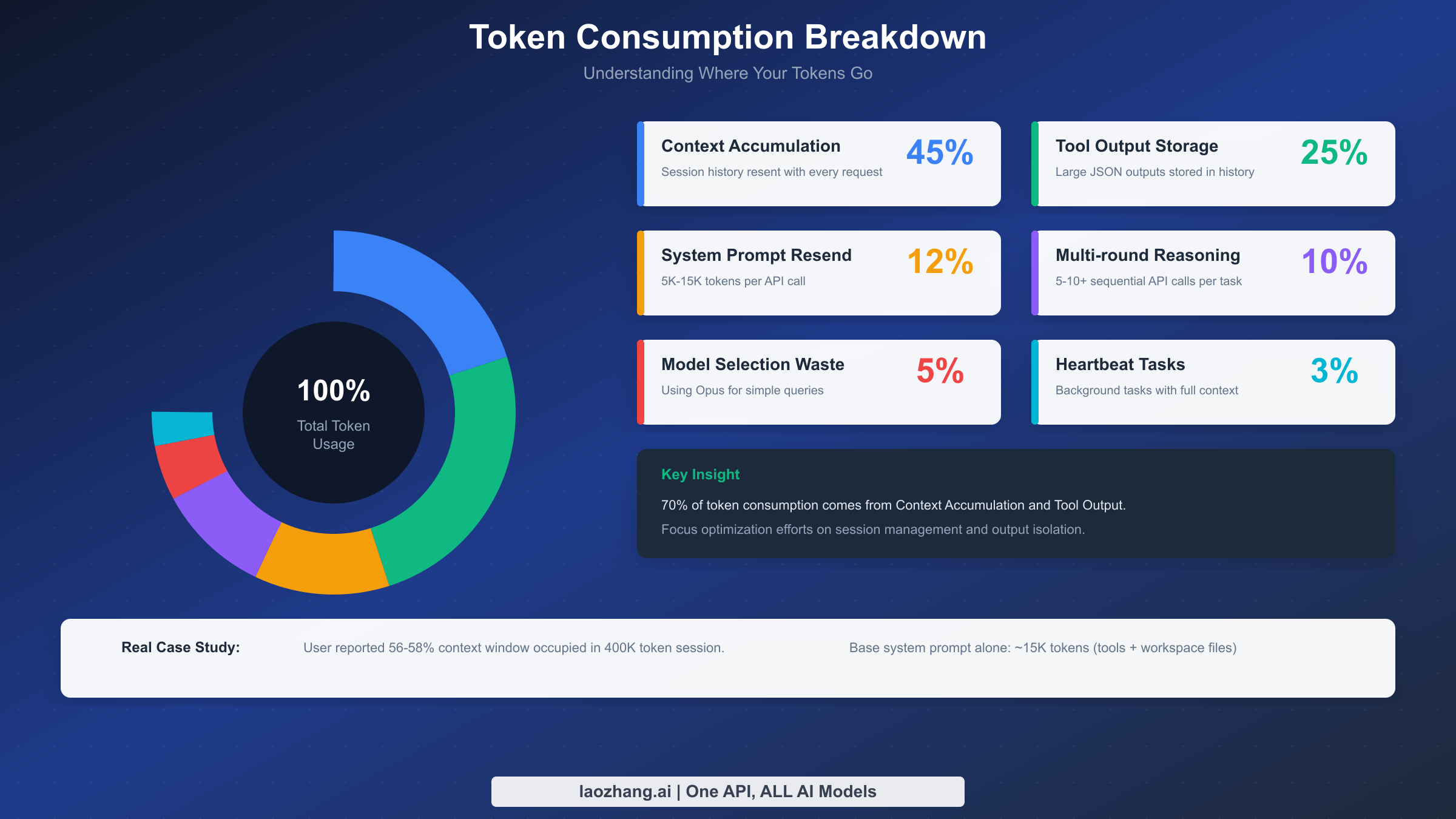
Understanding where your tokens actually go is essential for effective optimization. Based on analysis of real-world OpenClaw usage patterns, here are the six main cost drivers ranked by typical impact.
Context Accumulation (40-50% of consumption) represents the largest drain on your token budget. Every message in your conversation history gets resent with each new request. This includes not just your questions and AI responses, but also all tool outputs, file contents, and intermediate results. The problem compounds over time—a 20-message conversation might seem short, but if each message averages 500 tokens and includes tool outputs, you could easily hit 50,000 tokens of context that gets resent with every new interaction.
The base system prompt alone contributes approximately 15,000 tokens before you even start chatting. This includes the 23 tool definitions with their schemas, your workspace files like AGENTS.md and SOUL.md, skill descriptions, self-update instructions, time and runtime metadata, and safety headers. There's no escaping this overhead, but understanding it helps you plan your token budget more effectively.
Tool Output Storage (20-30%) is the second largest cost driver and often the most surprising to users. When you run commands that produce large outputs—like config.schema, status --all, directory listings, or file reads—these outputs get stored in your session history. They're not just displayed once and discarded; they become part of your persistent context that gets resent with every subsequent request. A single directory traversal of a large project could add 10,000+ tokens to your ongoing context.
System Prompt Resend (10-15%) happens because complex system prompts must be included with every API call. While prompt caching can dramatically reduce this cost (we'll cover that in detail later), the cache expires after 5 minutes by default. If your interactions are spaced more than 5 minutes apart, you're paying full price for the entire system prompt each time.
Multi-round Reasoning (10-15%) refers to complex tasks that require multiple sequential API calls, each carrying the full context. When OpenClaw needs to research, draft, revise, and finalize a response, it might make 5-10 API calls for a single user request. Each call includes the entire conversation history plus the growing chain of intermediate results.
Improper Model Selection (5-10%) is pure waste that's entirely preventable. Claude Opus costs $5 per million input tokens and $25 per million output tokens. Claude Haiku costs just $1/$5. Using Opus to answer "what time is it?" or check a simple status wastes 5x the necessary resources.
Heartbeat and Background Tasks (5-10%) can silently drain your budget if misconfigured. The heartbeat feature allows OpenClaw to proactively wake up and execute scheduled tasks, but every heartbeat trigger is a full API call carrying the complete session context. Misconfigured automated triggers can cost more than your actual productive work.
Smart Model Routing - The 50%+ Cost Cutter
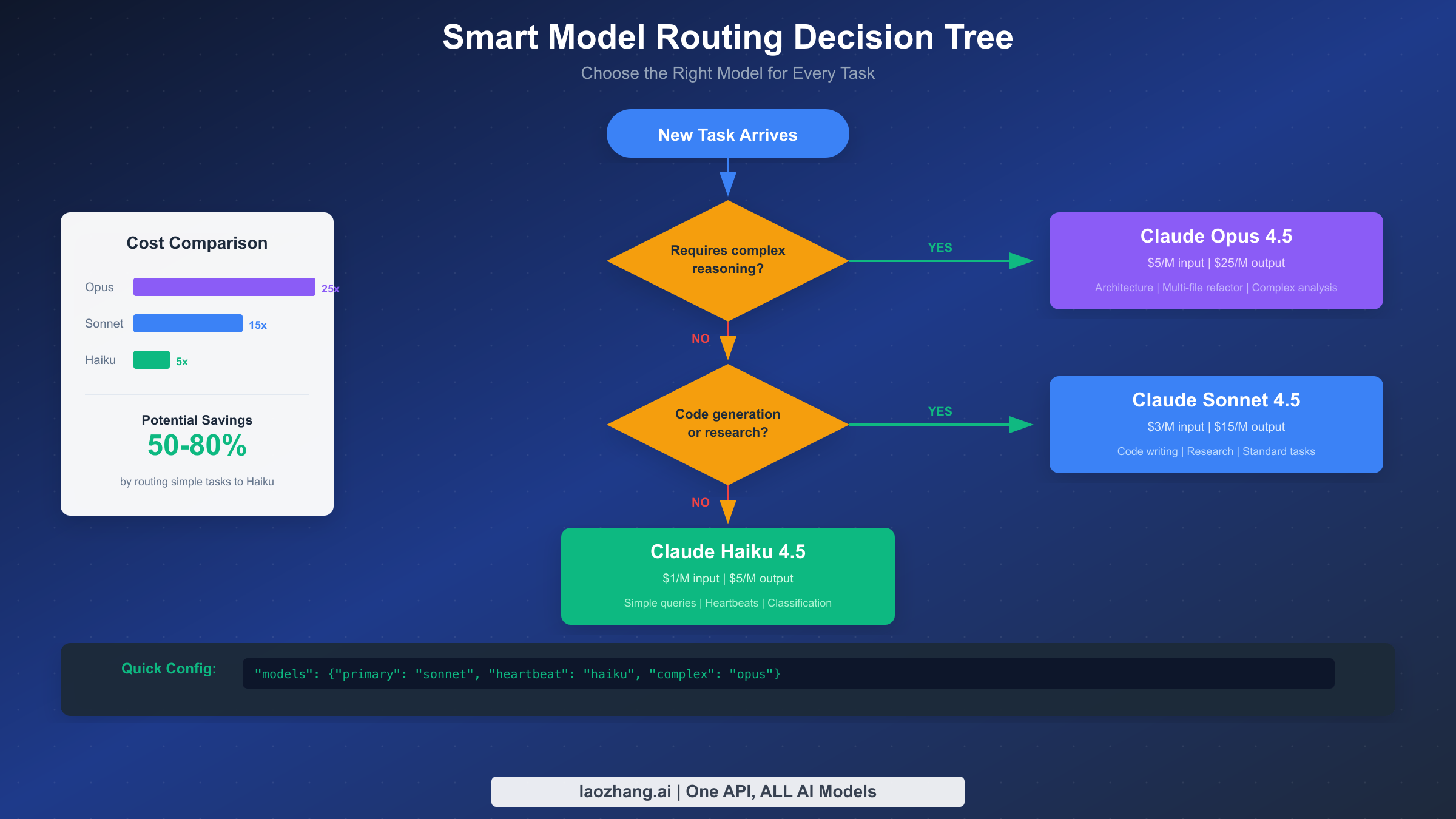
Smart model routing is the single most impactful optimization you can implement, capable of slashing costs by 50% or more while maintaining the quality you need for critical tasks. The fundamental insight is simple: not every task deserves your most expensive model.
The three-tier approach matches model capability to task complexity. Claude Opus 4.5 at $5/$25 per million tokens delivers exceptional reasoning for architecture decisions, multi-file refactoring, and complex analysis. Claude Sonnet 4.5 at $3/$15 handles most daily work excellently—code generation, research, standard tasks. Claude Haiku 4.5 at $1/$5 is perfect for simple queries, heartbeats, classification, and quick lookups. Using Haiku instead of Opus for simple tasks means paying 5x less for identical results.
Here's a complete configuration template for your ~/.openclaw/openclaw.json that implements smart model routing:
json{
  "agent": {
    "model": {
      "primary": "anthropic/claude-sonnet-4-5"
    },
    "models": {
      "anthropic/claude-sonnet-4-5": { "alias": "sonnet" },
      "anthropic/claude-opus-4-5": { "alias": "opus" },
      "anthropic/claude-haiku-4-5": { "alias": "haiku" }
    }
  },
  "heartbeat": {
    "model": "anthropic/claude-haiku-4-5",
    "interval": 55
  },
  "subagent": {
    "model": "anthropic/claude-haiku-4-5"
  }
}
This configuration uses Sonnet as your primary model for balanced performance, routes all heartbeats to the cheap Haiku model, and spawns sub-agents on Haiku by default. You can override to Opus anytime for complex tasks using /model opus without restarting your session.
The CLI commands for managing your routing are straightforward. Run openclaw models fallbacks list to see your current fallback chain. Add fallbacks with openclaw models fallbacks add openai/gpt-4o to create resilience across providers. If Anthropic is rate-limited, OpenClaw automatically switches to your fallback. This ties directly to rate limit handling—proper fallback configuration prevents both downtime and unexpected costs from retry loops.
Real-world savings from model routing are substantial. Light users typically drop from $200/month to $70/month (65% savings). Power users see reductions from $943/month to $347/month, saving roughly $600 monthly. Heavy users report going from $2,750/month to around $1,000/month—over $1,700 in monthly savings.
Prompt Caching Strategy - Unlock 90% Savings
Prompt caching is the most powerful cost optimization available, offering up to 90% savings on repeated context. Anthropic's caching system stores frequently-used prompt prefixes so you don't pay full price for resending them with every request.
The economics are compelling. Writing to the 5-minute cache costs 1.25x the base input price. Writing to the 1-hour cache costs 2x. But reading from cache costs only 0.1x—that's a 90% savings on cached content. For a typical session with 15,000 tokens of system prompt, caching that content means paying $0.015 per request instead of $0.15. Over hundreds of interactions, this adds up to serious money.
Cache hit rates vary by content type. Static context like system instructions and tool descriptions achieves 95%+ hit rates since they rarely change. Semi-static context such as user profiles and preferences hits 60-80% depending on how often they're modified. Dynamic context like real-time data typically sees 0-20% hit rates and shouldn't be relied upon for caching benefits.
The key to maximizing cache benefits is aligning your heartbeat interval with your cache TTL. If your cache TTL is set to 1 hour, configure your heartbeat interval to 55 minutes. This ensures the heartbeat fires just before the cache expires, keeping it warm across idle periods. Without this alignment, you might experience cache misses that force expensive re-caching of the entire prompt.
To enable cache-TTL pruning, add this to your configuration:
json{
  "cache": {
    "ttl": 3600,
    "pruning": true
  },
  "heartbeat": {
    "interval": 55,
    "model": "anthropic/claude-haiku-4-5"
  }
}
This configuration tells OpenClaw to prune the session once the cache TTL has expired, then reset the cache window so subsequent requests can reuse the freshly cached context instead of re-caching the full history. Combined with routing heartbeats to Haiku, you minimize both the caching cost and the per-heartbeat cost.
For production deployments, monitor your cache hit rates using /usage full which shows cache utilization statistics. If you're seeing hit rates below 80% on your system prompt, investigate whether something is invalidating the cache prematurely—perhaps a workspace file that changes frequently, or a tool output that's being included in the cached portion.
Heartbeat and Background Tasks - Stop the Silent Drain
The heartbeat feature transforms OpenClaw from a passive assistant into a proactive agent that can wake up and perform scheduled tasks. But this power comes with a cost trap that catches many users off guard.
Every heartbeat trigger is a full API call. If your heartbeat is set to fire every 5 minutes and your session context is 50,000 tokens, you're burning 50,000 input tokens every 5 minutes—600,000 tokens per hour—just to keep the assistant "awake." At Opus pricing, that's $3 per hour in pure heartbeat overhead. One user reported burning $50 in a day just from misconfigured email checking every 5 minutes.
The fix is straightforward: route heartbeats to your cheapest model. There's rarely a need for Opus-level reasoning to check if an email has arrived or if a file has changed. Haiku handles these tasks perfectly at 1/5th the cost. Configure this in your settings with the heartbeat model override shown earlier.
Consider your heartbeat interval carefully. The default might be too aggressive for your use case. If you're checking for events that only happen a few times per day, a 30-minute or 60-minute interval is plenty. Match the interval to your actual needs rather than defaulting to maximum responsiveness.
For tasks that don't require immediate attention, disable heartbeat entirely during idle periods. You can toggle it with openclaw config set heartbeat.enabled false when you're stepping away, then re-enable when you return. This completely eliminates background token consumption.
If you do need frequent heartbeats, combine them with aggressive cache optimization. The heartbeat should ideally hit a warm cache for the system prompt, minimizing the incremental cost to just the task-specific tokens. The 55-minute heartbeat with 60-minute cache TTL pattern mentioned earlier achieves this balance.
Session and Context Management - The Reset Habit
Effective session management prevents the context accumulation problem that drives 40-50% of typical costs. The solution is developing the habit of starting fresh sessions at the right moments.
The general recommendation is to start a new session when context exceeds 50% capacity. You can check this anytime with /status which shows your current context utilization. When you see that percentage climbing above 50%, it's time to consider a reset. Definitely reset immediately if response times start lagging noticeably—that's a sign the model is struggling with excessive context.
For expensive models like Claude Opus, adopt an even more aggressive strategy. Open a new session after completing each independent task. The reasoning depth that makes Opus valuable for complex problems also makes it expensive to maintain long contexts. Complete your complex task, get your result, then start fresh.
OpenClaw provides multiple methods to reset your session. The simplest is running /new or /reset directly in your conversation. This immediately creates a new sessionId for your current sessionKey, starting a fresh conversation record file.
For automatic management, configure daily resets:
json{
  "session": {
    "reset": {
      "dailyTime": "04:00"
    }
  }
}
This triggers an automatic session renewal at 4:00 AM local time every day, ensuring you never accumulate more than 24 hours of context.
Even better is idle-based reset for natural workflow breaks:
json{
  "session": {
    "reset": {
      "idleMinutes": 30
    }
  }
}
When your session is idle for more than 30 minutes, the next message triggers a fresh session automatically. This matches natural work patterns—when you step away for lunch or attend a meeting, you return to a clean slate.
Combine these strategies for maximum effect. Use the 30-minute idle timeout for natural breaks, plus the 4:00 AM daily reset as a safety net. Monitor your context usage with /status and manually reset when tackling different projects within a single work session. This combination typically achieves 40-60% savings compared to letting sessions grow indefinitely.
Budget Control and Monitoring - Never Get Surprised
Preventing unexpected bills requires proactive budget control and monitoring. The strategies here don't reduce your cost per interaction, but they ensure you're never caught off guard by runaway spending.
Setting spending limits is essential. Every major AI provider offers spending controls in their billing console. For Anthropic, visit console.anthropic.com/billing to set monthly and daily limits. A typical approach is setting a monthly limit at your expected budget plus 20% buffer, with a daily limit at roughly 1/20th of that (assuming some variation in daily usage). When you hit these limits, API calls fail rather than accumulating unexpected charges—you can investigate and adjust before costs spiral.
Ensure your API keys are configured correctly before relying on spending limits. A misconfigured key might route requests through unexpected billing paths.
For real-time monitoring, establish a daily check routine:
bash# Morning check: view yesterday's usage
openclaw usage --yesterday

# Throughout day: quick status checks
/status

# Enable per-response tracking
/usage full
The /usage full command appends a per-response usage footer to every reply, keeping costs visible without manual checking. This awareness naturally encourages cost-conscious behavior.
Third-party tools provide additional visibility. The open-source clawdbot-cost-monitor on GitHub tracks spending in real-time across all models, providing dashboards and alerts that go beyond what's available in provider consoles.
Create a simple alert system by checking your spending programmatically. Here's a shell script that sends an alert if daily spending exceeds a threshold:
bash#!/bin/bash
DAILY_LIMIT=10  # dollars
CURRENT=$(openclaw usage --today --format json | jq '.cost')
if (( $(echo "$CURRENT > $DAILY_LIMIT" | bc -l) )); then
  echo "OpenClaw spending alert: $CURRENT today" | mail -s "Budget Warning" you@example.com
fi
Run this via cron hourly during your work hours. Combined with provider-side limits, you have defense in depth against unexpected charges.
Cost Comparison - Direct API vs Aggregator Platforms
Beyond optimizing your usage patterns, the choice of how you access AI APIs impacts your costs. Three main options exist: direct API access, aggregator platforms, and subscription plans.
Direct API access through providers like Anthropic and OpenAI gives you the listed prices—$3/$15 for Sonnet, $5/$25 for Opus. You get full control, direct support relationship, and access to all features immediately upon release. However, you pay list price with no volume discounts unless you're spending at enterprise scale.
Aggregator platforms like laozhang.ai offer consolidated access to multiple AI providers through a single API endpoint. The benefits include unified billing across providers, potential cost savings through volume aggregation, simplified provider switching for fallback chains, and built-in reliability features. For teams using multiple models from different providers, the operational simplification alone may justify the platform fee.
Some users explore free tier options like Gemini's API for cost-insensitive tasks, routing expensive queries to paid services while handling simple requests through free allocations.
Subscription plans represent another alternative. Anthropic's Claude Pro and Max plans offer substantial fixed-rate usage that may deliver better value than pay-per-token for consistent heavy users. However, these subscriptions cannot be used with OpenClaw's API-based architecture—they're only valid for the Claude.ai web interface.
The cost comparison for a typical power user consuming 50 million tokens monthly:
| Access Method | Monthly Cost | Notes |
|---|---|---|
| Direct Anthropic (Sonnet) | $225 | List price |
| With optimizations | ~$80 | After routing + caching |
| Aggregator platform | ~$180 | Varies by platform |
| With optimizations | ~$65 | Combined savings |
The key insight is that optimization strategies compound regardless of access method. Whether you're using direct APIs or going through an aggregator, implementing model routing, caching, and session management dramatically reduces your effective cost per useful output.
FAQ - Common Questions Answered
Why does OpenClaw use so many tokens compared to ChatGPT?
The difference stems from architecture. ChatGPT conversations are managed server-side with optimized context handling. OpenClaw sends your full conversation history with every request, plus tool definitions, workspace files, and safety headers. This transparency and control comes at the cost of higher token usage. The optimization strategies in this guide help you regain efficiency while keeping OpenClaw's flexibility.
Can I use Claude Pro subscription with OpenClaw?
No. Claude Pro and Max subscriptions only work through the Claude.ai web interface. OpenClaw requires API access, which is billed separately per-token. This is a common source of confusion—having a Pro subscription doesn't reduce your OpenClaw costs.
How do I know if prompt caching is working?
Run /usage full to see cache hit statistics in your response footers. You should see cache read percentages above 80% for your system prompt during normal use. If rates are lower, check that your cache TTL is appropriate and that nothing is invalidating the cache between requests.
What's the minimum budget to use OpenClaw productively?
Most users can operate productively on $20-40/month with proper optimization. This assumes primarily using Haiku and Sonnet, with occasional Opus for complex tasks. Without optimization, the same usage pattern might cost $100-200/month. The optimizations in this guide aren't just for heavy users—they make OpenClaw accessible to everyone.
Should I use batch processing for everything?
Batch processing offers 50% discount but requires 24-hour processing windows. It's ideal for non-urgent tasks like bulk analysis, content generation backlogs, or research that doesn't need immediate results. Interactive work should use standard processing—the responsiveness is worth the premium.
How often should I reset my session?
For expensive models (Opus), reset after each major task. For standard usage (Sonnet), reset when context exceeds 50% or after 2-3 hours of active use. Configure automatic idle-based reset at 30-60 minutes so natural work breaks trigger fresh sessions automatically.