OpenClaw Best Model Selection Guide: Claude vs GPT vs Gemini vs DeepSeek (2026)
OpenClaw supports Claude, GPT, Gemini, DeepSeek, and over a dozen AI models. Claude Sonnet 4.6 ($3/$15/M tokens) is the best starting point for most users, while DeepSeek V3.2 ($0.28/$0.42) suits budget-conscious scenarios. This article compares 9 mainstream models on price, performance, and configuration, and provides a 3-tier routing strategy to save 65-80% on API costs.
On this page
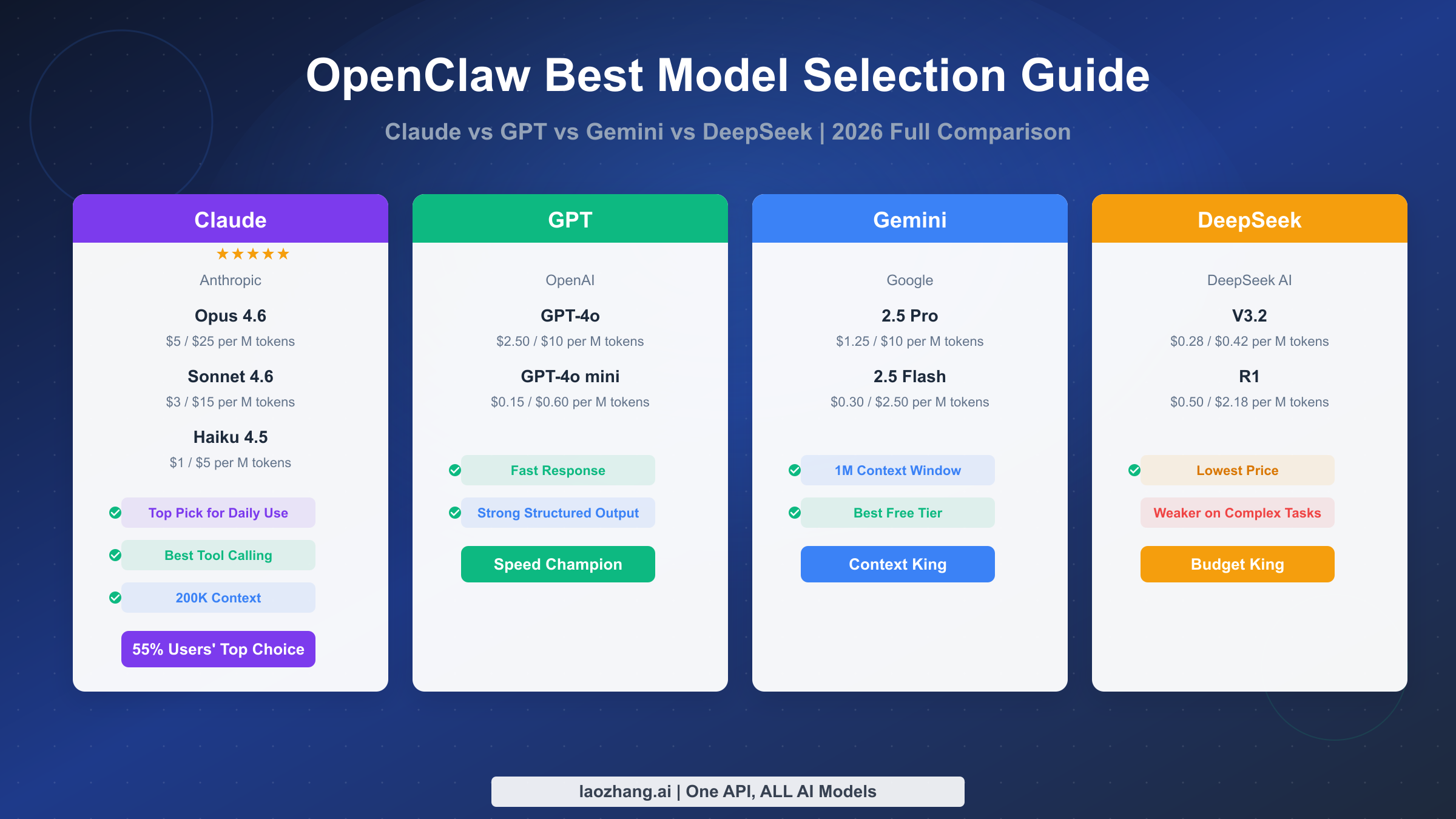
OpenClaw supports Claude, GPT, Gemini, DeepSeek, and over a dozen AI models, but with so many options, the most common question users face is: which model should I use? Claude Sonnet 4.6 (input $3, output $15/M tokens) is the best starting point for most everyday scenarios, while DeepSeek V3.2 (input $0.28, output $0.42/M tokens) offers the best value when budget is tight. Based on data verified in March 2026, this article compares 9 mainstream models on price, performance, and practical configuration to help you make the right choice.
What Is OpenClaw? Why Model Selection Defines Your Experience
OpenClaw is an open-source personal AI assistant platform driven by the community, built to let users connect to major model providers through their own API keys within a unified interface for daily tasks, coding, content creation, and complex reasoning. Unlike closed platforms run by a single vendor such as ChatGPT or Claude.ai, OpenClaw's standout feature is its multi-model architecture -- you can freely switch between Anthropic's Claude, OpenAI's GPT, Google's Gemini, DeepSeek's open-source models, and even locally deployed Llama models via Ollama, all managed through the unified provider/model configuration format (e.g., anthropic/claude-sonnet-4-6).
Model selection is critical to the OpenClaw experience because different models vary significantly in reasoning capability, response speed, tool-calling reliability, and price. As a practical example, if your primary need is handling emails, answering questions, and managing calendars, using Claude Opus 4.6 (output price $25/M tokens) is like driving a Ferrari to the grocery store -- wildly overpowered and unnecessarily expensive. Claude Sonnet 4.6 or GPT-4o can handle these tasks perfectly well, bringing your monthly cost down from $200 to $15-30. Conversely, if you need multi-file architecture refactoring or complex multi-step reasoning, a lightweight model like DeepSeek V3.2 may be cheap but could fall short on output quality. OpenClaw's SaaS version officially launched on February 28, 2026 (GitHub repository github.com/openclaw/openclaw), with browser-based access that further lowers the entry barrier.
This guide is currently the most comprehensive OpenClaw model selection reference available. While the English-speaking community has published several comparison articles, they generally lack coverage of API proxy solutions and localization tips relevant to users in different regions. In the sections that follow, we will help you find the ideal model combination across three dimensions: price, performance, and use case.
2026 Price Comparison of 9 Mainstream Models
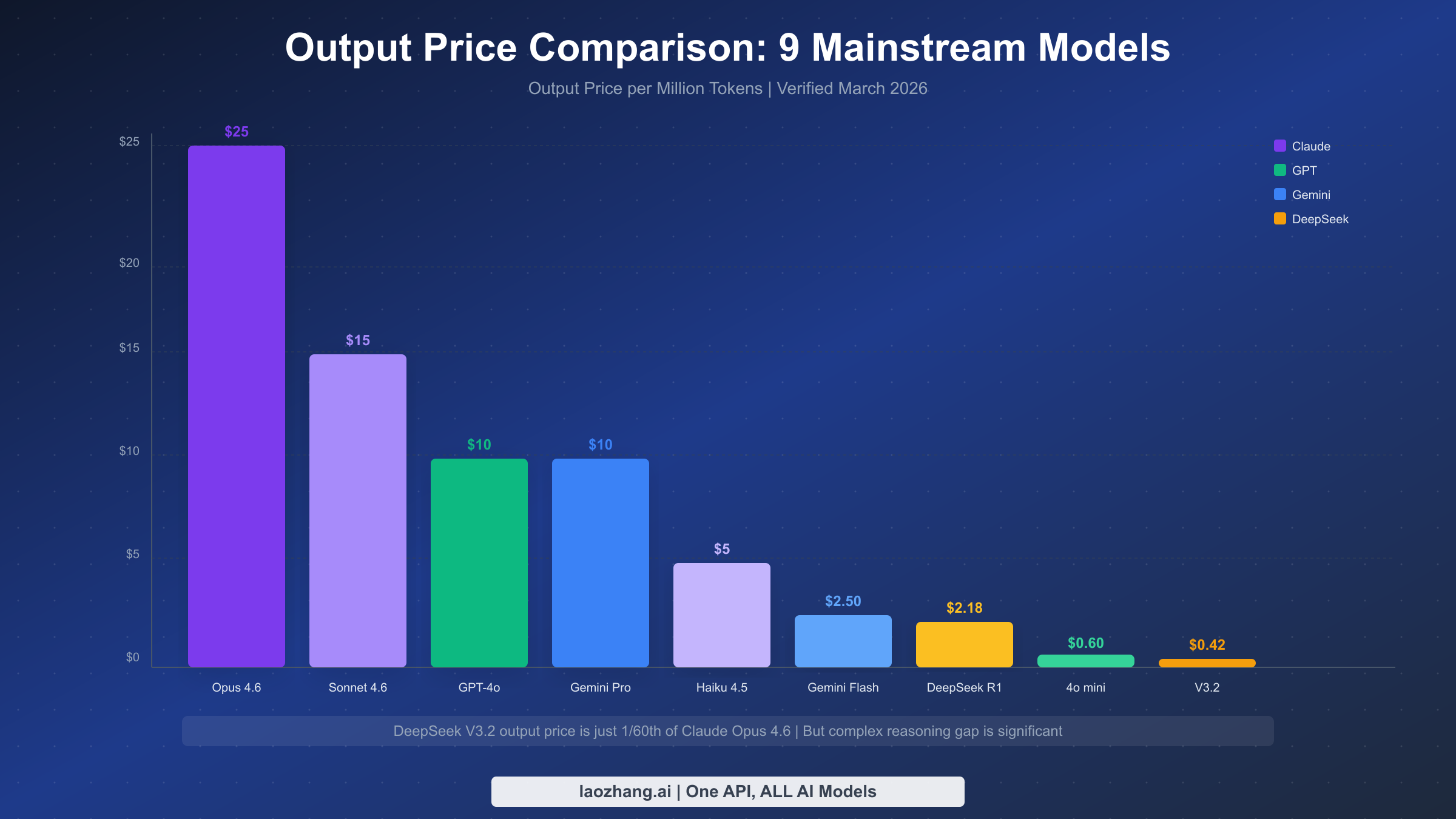
When choosing an AI model, price is often the first filter. The table below consolidates the latest pricing data for the 9 mainstream models supported by OpenClaw, all verified as of March 7, 2026, sourced from each provider's official pricing page. One important note: AI model pricing uses an "input/output" dual-price structure -- text you send to the model is billed at the input rate, while the model's generated response is billed at the output rate. Since output prices are typically 2-5x higher than input prices, the output price is the key factor affecting your monthly cost.
| Model | Provider | Input Price | Output Price | Context Window | Est. Monthly Cost |
|---|---|---|---|---|---|
| Claude Opus 4.6 | Anthropic | $5/M | $25/M | 200K | $80-200 |
| Claude Sonnet 4.6 | Anthropic | $3/M | $15/M | 200K | $15-50 |
| Claude Haiku 4.5 | Anthropic | $1/M | $5/M | 200K | $3-15 |
| GPT-4o | OpenAI | $2.50/M | $10/M | 128K | $10-40 |
| GPT-4o mini | OpenAI | $0.15/M | $0.60/M | 128K | $1-5 |
| Gemini 2.5 Pro | $1.25/M | $10/M | 1M | $10-40 | |
| Gemini 2.5 Flash | $0.30/M | $2.50/M | 1M | $2-10 | |
| DeepSeek R1 | DeepSeek | $0.50/M | $2.18/M | 64K | $3-15 |
| DeepSeek V3.2 | DeepSeek | $0.28/M | $0.42/M | 64K | $2-8 |
The table reveals a staggering price spread: the most expensive model, Claude Opus 4.6, has an output price nearly 60x that of the cheapest, DeepSeek V3.2. But cheaper does not always mean better value -- DeepSeek V3.2 delivers excellent cost efficiency for simple classification and basic Q&A, yet shows significant gaps in accuracy and completion quality compared to Opus on tasks requiring deep reasoning. The monthly cost estimates are based on a typical personal user scenario of 10-30 tasks per day; your actual spend depends on usage frequency and token consumption per conversation. For a detailed pricing analysis of the Claude model family, see the Claude Opus 4.6 Pricing and Subscription Guide.
For users who need a unified access point for all these models, API proxy platforms like laozhang.ai aggregate Claude, GPT, Gemini, DeepSeek, and more, with text model pricing consistent with major platforms while eliminating the hassle of overseas payment and network configuration. You can sign up and get free credits to try it out (details at https://docs.laozhang.ai/ ).
Disclosure: laozhang.ai is our own service. Its prices are platform pricing, not an independent comparison.
In-Depth Review of Five Model Families
Now that you understand pricing, the next step is understanding each model family's core strengths and boundaries. The models supported by OpenClaw fall into five families, each with its own "personality." Choosing the right family matters more than fixating on a specific version.
Claude Family (Anthropic)
Claude is the most popular model family in the OpenClaw community, with roughly 55% of active users setting Claude as their default. This is no accident -- Claude's tool-calling reliability is the strongest among all models, which is critical for an AI assistant like OpenClaw that frequently invokes external tools. Opus 4.6 is the most powerful reasoning model available today, ideal for architecture design, security audits, and complex multi-step tasks. Sonnet 4.6 maintains high quality while cutting costs to 60% of Opus, making it the best balance for daily work. Haiku 4.5 is suited for background batch processing and simple classification tasks. The Claude family's uniform 200K context window means you can process large codebases or lengthy documents in a single conversation. If you want to learn more about using Opus in OpenClaw, check out the Complete Guide to Using Claude Opus 4.6 with OpenClaw.
GPT Family (OpenAI)
GPT-4o is OpenAI's flagship multimodal model, with its biggest advantages being fast response times and strong structured output capabilities. If your workflow requires the model to quickly return structured data in JSON format, GPT-4o's reliability edges out other models slightly. GPT-4o mini is one of the most cost-effective lightweight models on the market, with an output price of just $0.60/M tokens, suitable for high-frequency, low-complexity task scenarios. That said, the GPT family is slightly less consistent than Claude when it comes to tool calling, occasionally producing parameter format errors.
Gemini Family (Google)
Gemini's core competitive advantages come down to two things: massive context windows and free tier quotas. Gemini 2.5 Pro supports up to 1 million tokens of context -- 5x that of Claude -- making it the only viable option when you need to analyze an entire code repository or extremely long documents in a single conversation. Gemini 2.5 Flash delivers excellent speed at a lower price point, suitable for scenarios requiring fast responses. Google AI Studio also provides quite generous free usage quotas, making it an excellent starting point for budget-conscious users.
DeepSeek Family
DeepSeek is an open-source model developed by a Chinese team, with ultra-low pricing as its biggest advantage. V3.2's output price of just $0.42/M tokens -- 1/60th of Claude Opus -- makes it ideal for batch processing of simple tasks. R1 is DeepSeek's reasoning-enhanced variant, excelling in mathematical and logical reasoning with an output price of $2.18/M tokens, still far below comparable Claude or GPT models. It is worth noting that DeepSeek models show noticeably lower stability and accuracy than Claude when handling complex multi-step tool-calling tasks, making them better suited as supplementary rather than primary models.
Local Models (Ollama)
For users with strict data privacy requirements or the need for offline usage, OpenClaw supports connecting to locally deployed open-source models via Ollama, such as Llama 3.3 (70B and 7B versions). Local models incur zero API costs, but require your own hardware -- running a 70B parameter model needs at least 48GB of RAM (dedicated GPU recommended), while a 7B parameter model runs smoothly with 16GB. Local models cannot match the reasoning capabilities of cloud-based Opus or GPT-4o, but they are perfectly adequate for simple text processing and code completion tasks, and your data never leaves your local machine.
Zero-Cost Approach: How to Use OpenClaw for Free
A limited budget does not mean you cannot use OpenClaw. By strategically combining free resources, you can experience OpenClaw's core features at zero cost. There are currently three main free-use paths, each with its own applicable scenarios and limitations.
The first approach leverages free API credits from various providers. Google's Gemini API through AI Studio currently offers the most generous free tier, including limited free calls to Gemini 2.5 Flash and 2.5 Pro. OpenAI provides new users with a certain amount of free API credits, typically enough for initial exploration. Anthropic occasionally offers free trial credits as well, though availability is limited. Configuring these free API keys in OpenClaw is straightforward -- simply enter the corresponding provider's API key in settings and select a supported free model to get started.
The second approach is deploying local models. Running Llama 3.3 7B or other lightweight open-source models locally via Ollama makes API costs completely free. Configuration is also straightforward: after installing Ollama, set the provider to ollama in OpenClaw and specify the local model name (e.g., ollama/llama3.3). The prerequisite is that your computer has at least 16GB of RAM, and you need to accept the reasoning limitations of local models. For everyday Q&A, document summarization, and simple code generation, a local 7B model's performance is already acceptable.
The third approach is a hybrid strategy: use the free Gemini API for most daily tasks, and switch to a paid model only when stronger reasoning is needed. This approach can keep your monthly cost under $5 while covering over 90% of use cases. OpenClaw's multi-model switching makes implementing this hybrid strategy seamless -- you can switch providers at any time during a conversation to use different models.
Scenario-Based Recommendations: Model Decision Matrix
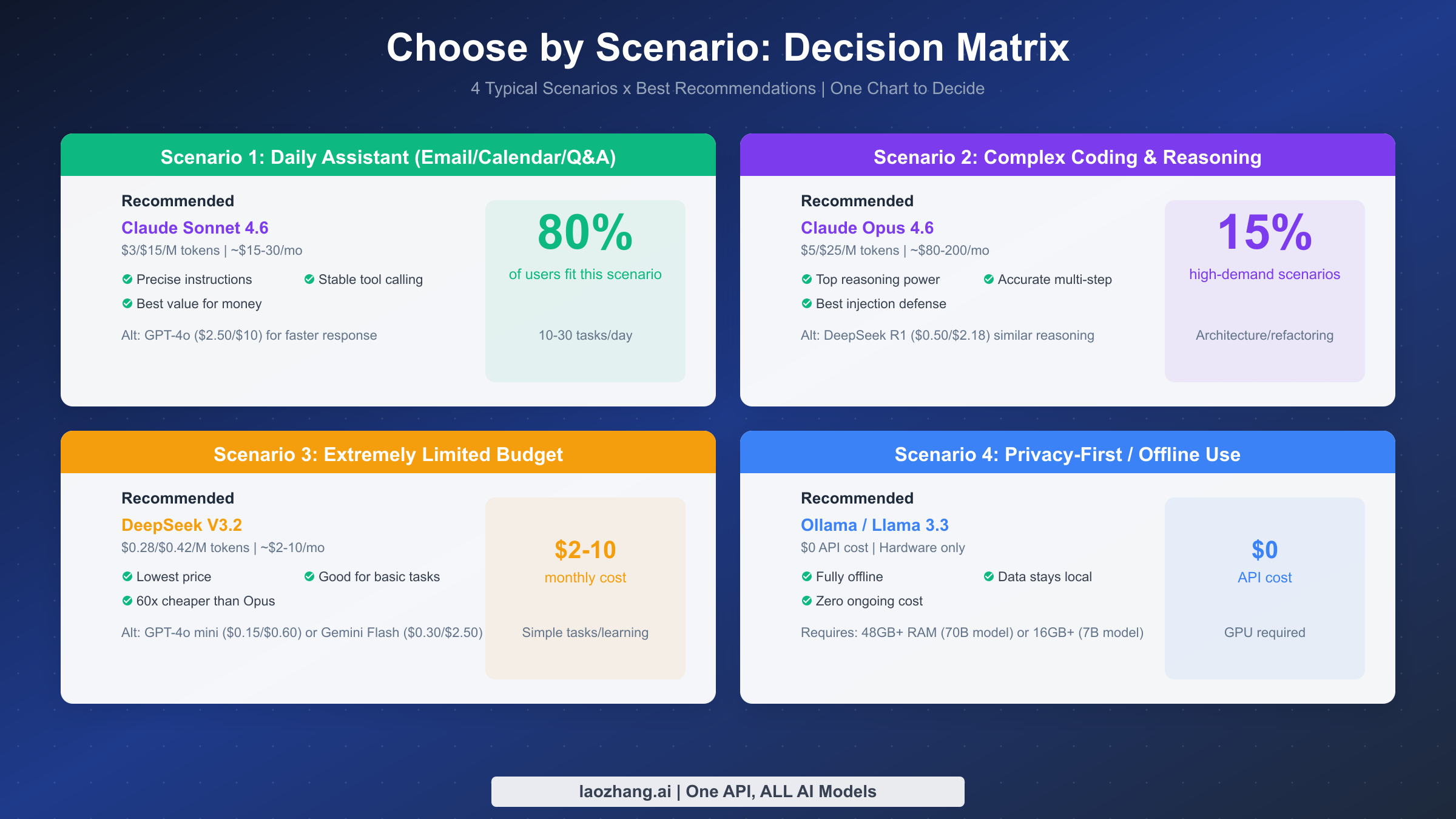
Now that you know each model's pricing and characteristics, the most practical question is: which model fits my use case? The following four typical scenarios cover over 95% of OpenClaw user needs, each with a clear recommended model and alternatives.
Scenario 1: Daily Assistant (Email, Calendar, Q&A) -- Recommended: Claude Sonnet 4.6
This is the primary use case for 80% of users. Daily assistant tasks are characterized by high frequency, moderate complexity, and a need for reasonable response speed. Claude Sonnet 4.6 performs most evenly in this scenario: precise instruction understanding, stable tool calling, and a competitive output price of $15/M tokens among mid-tier models. Based on 10-30 tasks per day, the estimated monthly cost is $15-30. If you prioritize response speed, GPT-4o ($2.50/$10) is a worthy alternative -- its structured output capability particularly shines in calendar management and data organization tasks.
Scenario 2: Complex Coding and Deep Reasoning -- Recommended: Claude Opus 4.6
When you need architecture design, multi-file refactoring, security audits, or complex multi-step reasoning, Claude Opus 4.6 is the most reliable choice available. It also leads all models in prompt injection resistance, which is especially important for automated tasks that process untrusted input. While Opus's output price reaches $25/M tokens, for these high-value tasks, the rework cost from a single flawed architecture decision far exceeds the model price difference. If budget is limited but you still need strong reasoning, DeepSeek R1 ($0.50/$2.18) is an intriguing alternative -- its mathematical reasoning and logical analysis performance approaches Opus-level quality at just 1/12th the price.
Scenario 3: Extremely Limited Budget -- Recommended: DeepSeek V3.2
If your monthly AI budget is under $10, DeepSeek V3.2 is the most pragmatic choice. An output price of $0.42/M tokens means even heavy daily use rarely pushes monthly costs past $8. V3.2 delivers satisfactory results for basic Q&A, text summarization, and simple code generation. While it clearly falls behind Claude or GPT on complex reasoning tasks, it is more than sufficient for students on a budget or light users. Alternatives include GPT-4o mini ($0.15/$0.60, faster response) and Gemini 2.5 Flash ($0.30/$2.50, larger context).
Scenario 4: Privacy-First or Offline Use -- Recommended: Ollama + Llama 3.3
For enterprise users handling sensitive data or those who need AI in environments without internet access, locally deploying Llama 3.3 via Ollama is the only viable option. API costs are zero and data never leaves your machine, but hardware is required: the 70B parameter model needs 48GB+ RAM, while the 7B model needs 16GB+. Local model reasoning cannot match cloud-based top-tier models, but it can handle document processing, code completion, and basic conversations adequately.
Multi-Model Routing in Practice: One Configuration to Save 70%
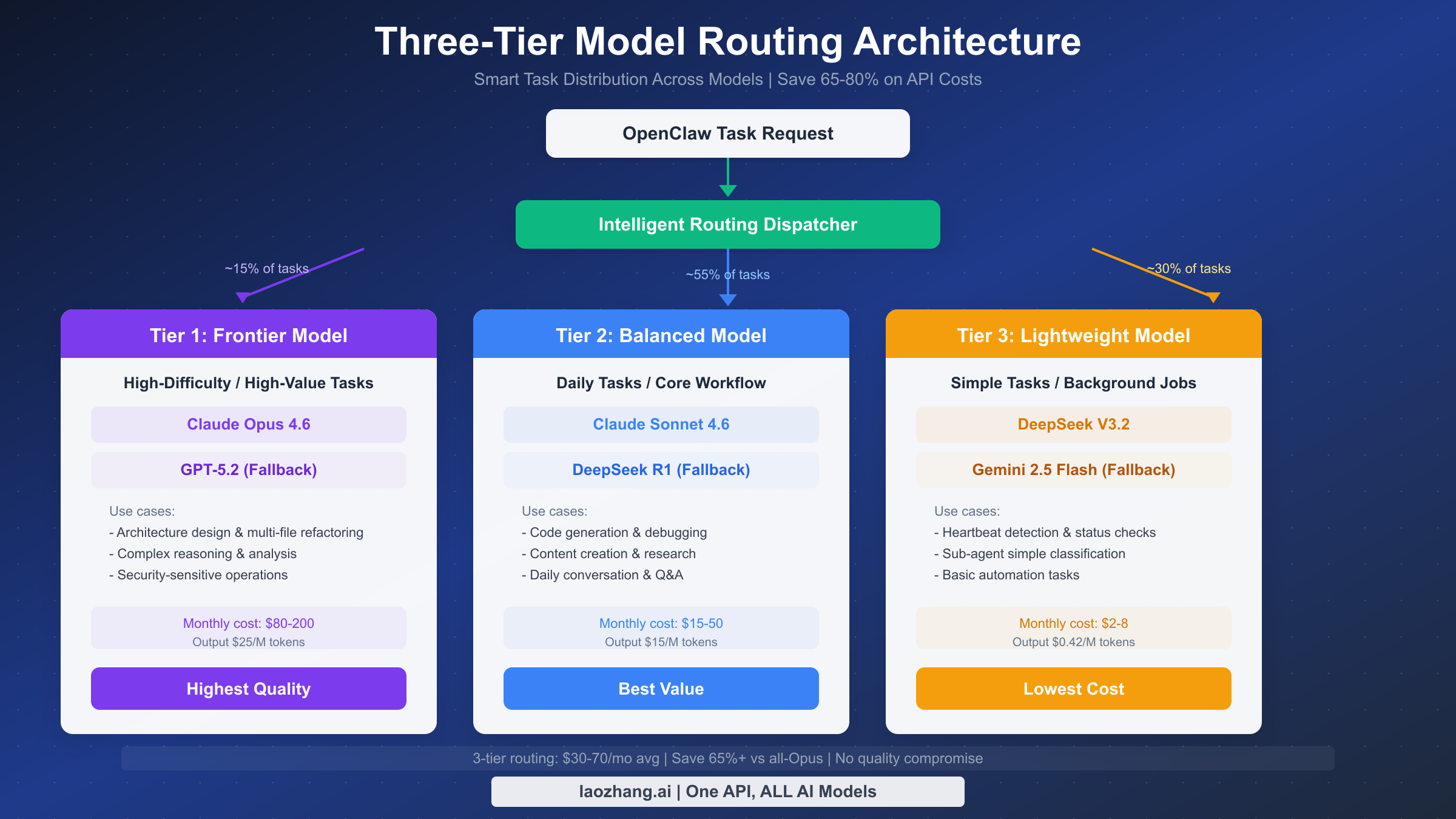
The scenario-based recommendations above solve the "which model" question, but true cost optimization experts do not stick to a single model -- they dynamically switch models based on task complexity. This is the core idea behind multi-model routing: assign the right task to the right model, ensuring both quality and cost efficiency.
The three-tier routing architecture is a community-validated best practice that divides all tasks into three levels, each mapped to a different model. Tier 1 is the frontier model (about 15% of tasks), using Claude Opus 4.6 for architecture design, multi-file refactoring, and security-sensitive operations. Tier 2 is the balanced model (about 55% of tasks), using Claude Sonnet 4.6 for everyday code generation, content creation, and general Q&A. Tier 3 is the lightweight model (about 30% of tasks), using DeepSeek V3.2 for heartbeat detection, simple classification, and basic automation. With this layered approach, monthly costs can drop from $200+ (using only Opus) to $30-70, saving over 65% while maintaining nearly identical task completion quality.
Configuring multi-model routing in OpenClaw is not complicated. Here is a typical three-tier routing configuration example:
{
  "models": {
    "tier1_frontier": {
      "provider": "anthropic",
      "model": "claude-opus-4-6",
      "usage": "Architecture design, security audits, complex reasoning"
    },
    "tier2_balanced": {
      "provider": "anthropic",
      "model": "claude-sonnet-4-6",
      "usage": "Everyday coding, content creation, general Q&A"
    },
    "tier3_budget": {
      "provider": "deepseek",
      "model": "deepseek-v3",
      "usage": "Simple classification, status checks, batch processing"
    }
  },
  "default": "tier2_balanced"
}
In practice, you can assign default models to different workspaces or projects in OpenClaw's settings, or manually switch providers during a conversation. A more advanced approach is to use OpenClaw's custom model configuration to preset model rules for specific task types. For detailed instructions on custom model configuration, see the OpenClaw Custom Model Configuration Guide. If you want to learn more about token consumption monitoring and cost control techniques, check out the Complete Guide to OpenClaw Token Management and Cost Optimization.
It is important to emphasize that the core of a routing strategy is not "use the cheapest model possible" but rather "match the most suitable model to each task." Assigning a deep-reasoning architecture task to a lightweight model may cost less per call, but if subpar quality forces repeated revisions, the total cost could end up higher. A good routing strategy finds the optimal balance between quality and cost.
API Proxy Solutions and Cost Optimization Tips
For users who face challenges accessing Anthropic, OpenAI, or Google APIs directly -- whether due to network restrictions or overseas payment barriers -- API proxy platforms offer an effective solution. These platforms deploy servers overseas to interface with provider APIs, then forward requests through accessible domains so users only need to point OpenClaw's API endpoint (base URL) to the proxy platform.
Take laozhang.ai as an example -- it is one of the more widely used API proxy platforms, aggregating Claude, GPT, Gemini, DeepSeek, and other mainstream models, with text model pricing largely consistent with major platforms. Configuring laozhang.ai in OpenClaw is simple: first register an account on laozhang.ai and obtain an API key (sign up to receive free credits, minimum top-up $5), then modify the base URL in OpenClaw's model configuration to laozhang.ai's API endpoint and enter the corresponding API key. Once configured, you can seamlessly use all supported models in OpenClaw without worrying about connectivity issues.
Disclosure: laozhang.ai is our own service. Its prices are platform pricing, not an independent comparison.
Beyond solving access issues, proxy platforms offer an additional benefit: unified billing and management. Instead of registering accounts, binding payment methods, and managing credits separately across Anthropic, OpenAI, Google, and DeepSeek, you can top up on a single platform to access all models -- significantly reducing management complexity in practice. The complete API documentation for laozhang.ai is available at https://docs.laozhang.ai/.
For cost optimization beyond the multi-model routing strategy discussed earlier, consider these additional tips: using APIs during off-peak hours typically yields faster responses and higher success rates; setting appropriate max_tokens parameters prevents unnecessary token consumption; and implementing simple caching mechanisms at the application layer for repetitive queries can significantly reduce API call frequency.
Frequently Asked Questions
What is the most recommended model for OpenClaw?
For most users, Claude Sonnet 4.6 is the most recommended default model. It strikes the best balance between instruction understanding, tool-calling stability, and output quality, with a monthly cost of $15-30 that is reasonable for individual users. If your primary need is complex coding and architecture design, consider setting Sonnet 4.6 as your default and manually switching to Opus 4.6 for high-difficulty tasks as needed.
Are DeepSeek models good in OpenClaw?
Both DeepSeek V3.2 and R1 work properly in OpenClaw, and their price advantage is substantial. V3.2 is well-suited for simple tasks and budget-constrained scenarios, while R1 excels in mathematical reasoning. However, DeepSeek models are less stable than Claude in complex multi-step tool-calling tasks, occasionally producing format errors or missing parameters. It is best to use DeepSeek as a supplementary model rather than your primary one.
Can I use multiple models simultaneously in OpenClaw?
Yes. Multi-model support is a core design principle of OpenClaw. You can configure different default models for different workspaces and switch models at any time during a conversation. This is the foundation of the multi-model routing strategy -- dynamically selecting the most suitable model based on task complexity within the same workflow.
Is the quality of free models sufficient?
It depends on your needs. Google Gemini's free tier performs well for everyday Q&A and document summarization, and locally deployed Llama 3.3 7B can handle basic code completion and text generation. However, if you need complex reasoning, multi-step tool calling, or high-quality content creation, free models have clear limitations. The recommended strategy is to use free models for simple tasks and switch to paid models for critical tasks, keeping your monthly cost within $5-10.
How can I estimate my monthly API cost?
A simple estimation method: count how many AI conversations you have per day and how many rounds each conversation averages. Using Claude Sonnet 4.6 as an example, each conversation round consumes roughly 1,000-3,000 output tokens (depending on response length). With 20 conversations per day averaging 3 rounds each, daily output is approximately 120,000 tokens, or about 3.6M tokens per month, corresponding to a cost of roughly $54. With a multi-model routing strategy that offloads 30% of simple tasks to DeepSeek V3.2, the monthly cost can drop to around $35.
Do users need a VPN to use OpenClaw?
Using OpenClaw itself does not require one, but directly calling overseas APIs (such as Anthropic or OpenAI) requires a stable network connection. The solution is to use an API proxy platform like laozhang.ai, which forwards API requests through locally accessible domains, allowing you to use all models without additional network tools.