Every Nano Banana Pro Error Fixed: Complete Troubleshooting Guide for 429, 503, IMAGE_SAFETY and More (2026)

A
25 min readAI Image Generation

Getting errors with Nano Banana Pro? This comprehensive guide covers every error code — 429 rate limits, 503 overload, IMAGE_SAFETY blocks, 500 internal errors, and 400/403 client issues — with verified fixes, production-ready code, and a systematic debugging workflow updated for February 2026.

Every Nano Banana Pro Error Fixed: Complete Troubleshooting Guide for 429, 503, IMAGE_SAFETY and More (2026)

Nano Banana Pro errors can halt your AI image generation workflow without warning, but every single one of them has a fix. Rate limit errors (HTTP 429) account for roughly 70% of all Nano Banana Pro failures according to developer community reports as of February 2026, followed by server overload errors (503/502) at about 15%, authentication issues (403) at approximately 8%, and a mix of safety filters, internal errors, and bad requests making up the remaining 7%. This guide walks you through identifying your exact error, understanding why it happens at the infrastructure level, and applying the right fix — with production-ready code you can copy directly into your project.

TL;DR

Every Nano Banana Pro error falls into one of five categories, and each has a clear resolution path. If you see a 429 error, you have hit your rate limit — wait 60 seconds for RPM resets or check your daily quota, which resets at midnight Pacific Time. A 503 or 502 error means Google's servers are overloaded — schedule your requests during off-peak hours between 00:00 and 06:00 UTC when error rates drop below 8%. The IMAGE_SAFETY error triggers when Google's non-configurable output filter blocks your generated image, even for legitimate content — rephrasing your prompt with explicit art style declarations resolves this about 70-80% of the time. 500 and 504 errors indicate server-side failures — implement exponential backoff starting at 1 second and doubling up to 32 seconds. Finally, 400 and 403 errors are client-side issues you can fix immediately by verifying your API key, checking request format, and ensuring your region supports the free tier. Bookmark this page — you will likely need it again.

Quick Error Identification — Find Your Fix in 30 Seconds

Nano Banana Pro error diagnosis flowchart showing decision tree for identifying 429, 503, IMAGE_SAFETY, and other errors

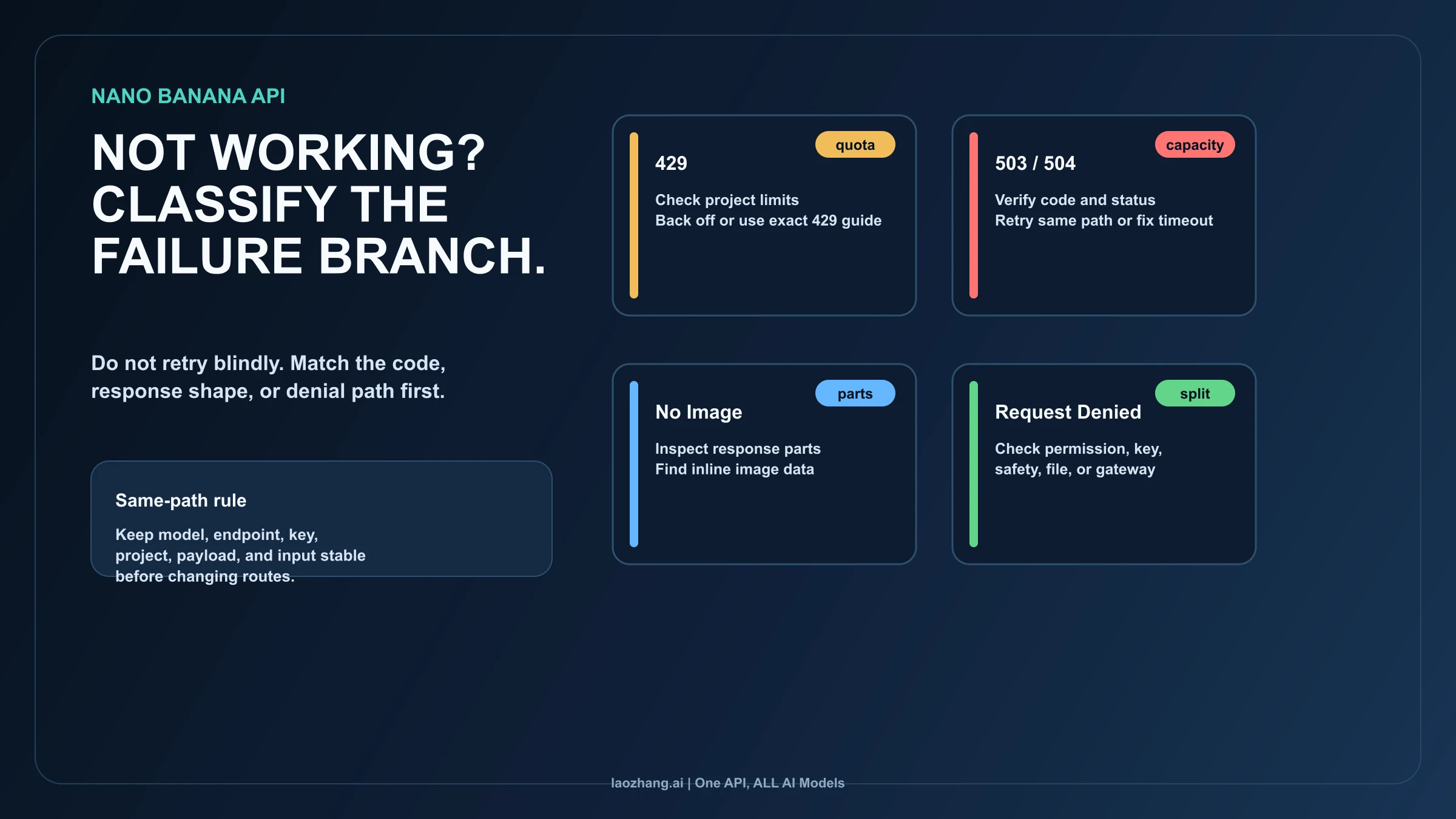
Before diving into detailed solutions, you need to identify exactly which error you are dealing with. The fastest path to a fix starts with matching the error message you see on screen to one of the five categories below. Whether you are working through the Gemini API, Google AI Studio, or a third-party platform like fal.ai, the underlying error types remain the same — only the presentation differs slightly.

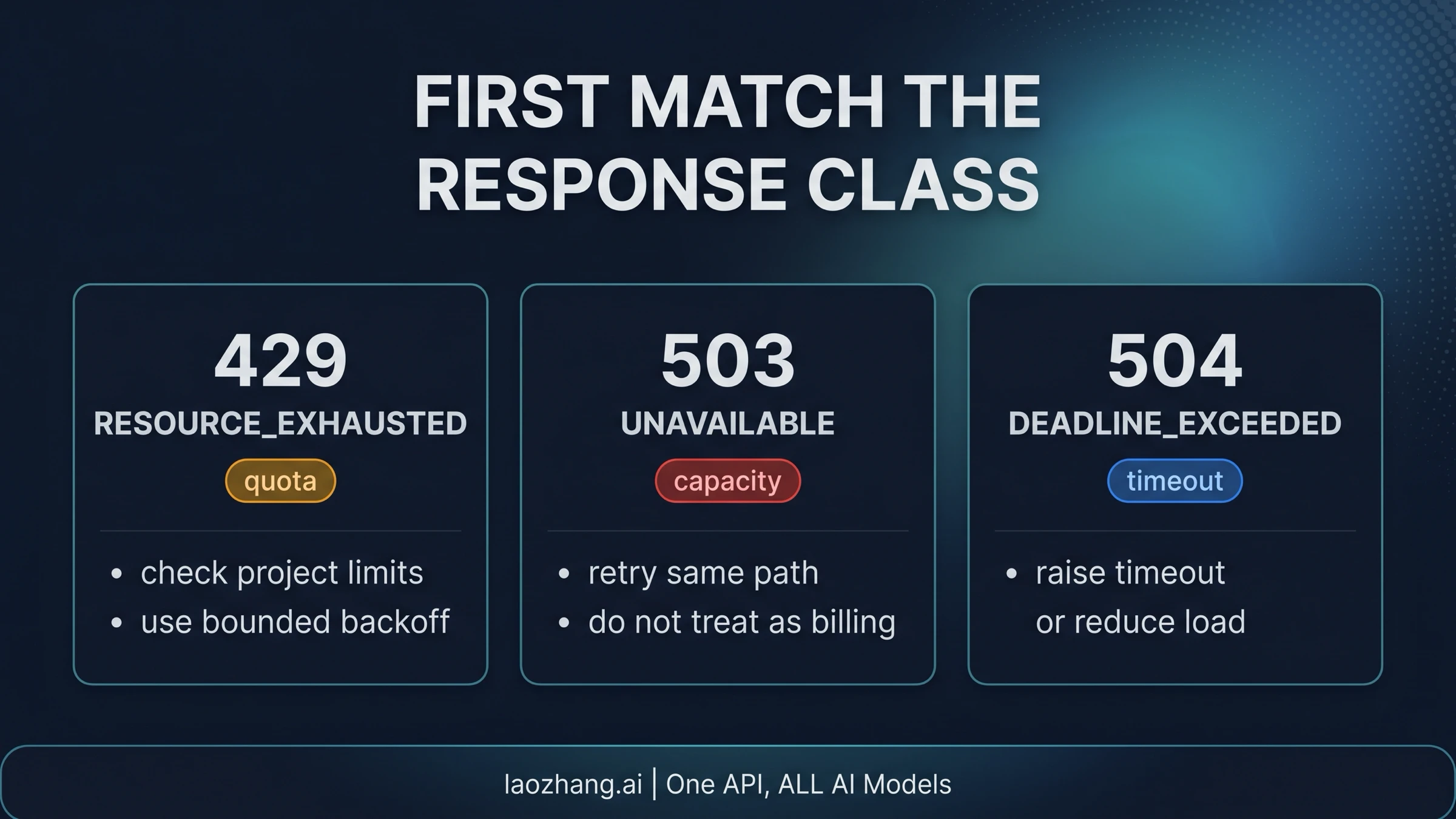
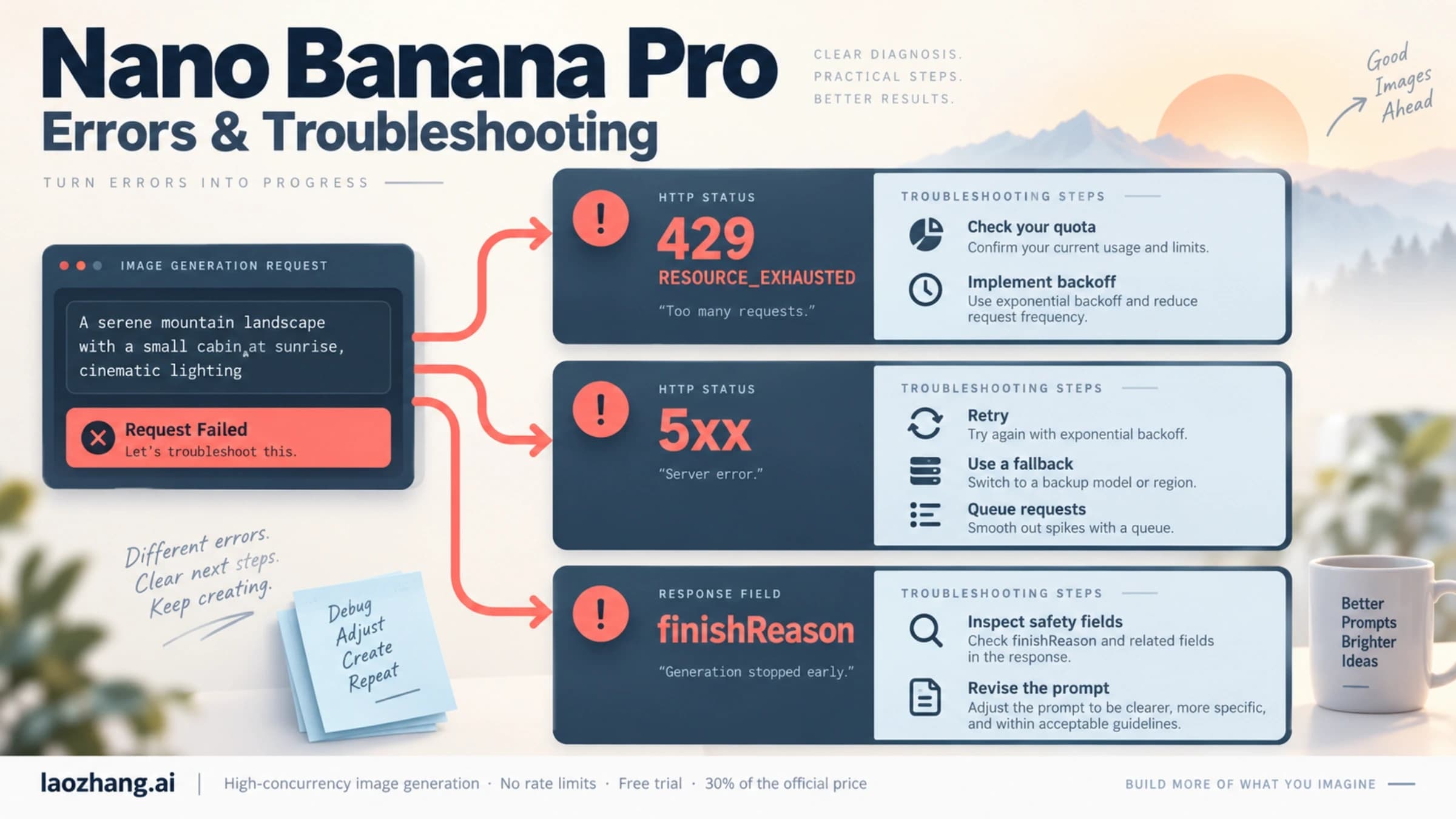
If your error response contains RESOURCE_EXHAUSTED or HTTP status 429, you are dealing with a rate limit error. This is by far the most common issue, and the fix is straightforward — jump to the Rate Limit section below. If you see UNAVAILABLE, SERVICE_UNAVAILABLE, or HTTP 503 or 502, the problem is on Google's end, and the Server Overload section has your solution. If the response mentions IMAGE_SAFETY, SAFETY, or shows finishReason: "SAFETY" in the API response, you have triggered a content filter — the IMAGE_SAFETY section explains exactly what is happening and how to work around it. For INTERNAL errors or HTTP 500 and 504 timeouts, check the Internal Errors section. Everything else — INVALID_ARGUMENT (400), PERMISSION_DENIED (403), NOT_FOUND (404) — falls into client errors that you can fix on your side immediately.

Here is what the actual API error response looks like for the most common error, so you can match it against what you are seeing:

json
{ "error": { "code": 429, "message": "Resource has been exhausted (e.g. check quota).", "status": "RESOURCE_EXHAUSTED" } }

If your error message does not match any of these patterns, check whether you are receiving an HTML error page instead of JSON — this typically indicates a network-level issue, a proxy configuration problem, or a regional restriction. Network-level errors often present as generic timeout messages or connection refused errors that do not include Google's standard error JSON structure. If you are behind a corporate firewall or VPN, the intermediary may be blocking requests to Google's API endpoints, producing misleading error messages that look unrelated to the Gemini API. Try the same request from a different network environment to rule out local infrastructure issues. If the error persists across networks, the Client Errors section below covers the remaining diagnostic steps.

Rate Limit Errors (429 RESOURCE_EXHAUSTED) — Why 70% of Errors Are This

Bar chart showing Nano Banana Pro error distribution with 429 rate limits at 70 percent

Rate limit errors dominate Nano Banana Pro troubleshooting for a simple reason: Google enforces strict quotas across multiple dimensions simultaneously, and exceeding any single one triggers the 429 response. Understanding these dimensions is the key to both fixing the immediate error and preventing it from recurring. The Gemini API measures your usage across RPM (requests per minute), RPD (requests per day), TPM (tokens per minute), and IPM (images per minute), and each dimension has its own threshold depending on your account tier.

The immediate fix is deceptively simple: wait. RPM limits reset every 60 seconds, so if you have sent too many requests in the current minute, pausing for one minute resolves the issue automatically. Daily limits (RPD) reset at midnight Pacific Time — not UTC, not your local timezone, but specifically Pacific Time. This distinction matters because if you are in Europe or Asia and your application assumes a UTC midnight reset, you will miscalculate your remaining quota and trigger unnecessary errors.

The deeper question is whether your current tier provides enough headroom for your use case. Free tier users get approximately 2 images per minute and around 50 requests per day for image generation models. That means even moderate usage during a creative session will hit the wall quickly. If you are building anything beyond a personal project, the free tier's constraints will frustrate you constantly.

Gemini API tier comparison showing Free, Tier 1, and Tier 2 rate limits for image generation

Should you upgrade? Here is a practical decision framework. If you are hitting 429 errors multiple times per hour during normal usage, upgrading to Tier 1 at $19.99 per month gives you roughly 10 IPM and 250 RPD — a 5x improvement. If you are running a production application that serves multiple users, Tier 2 or higher with 20+ IPM and 1000+ RPD is essential. The math on this is straightforward: a developer spending two hours debugging rate limit errors costs more in productive time than one month of a paid tier. For a detailed breakdown of all Gemini tier limits and how to upgrade, check out our comprehensive Gemini API rate limits guide.

One aspect that almost no troubleshooting guide covers is billing for failed requests. When you receive a 429 error, the request was rejected before any computation occurred, which means you are not charged for rate-limited requests. The same applies to 503 errors — Google does not bill for requests that their servers could not process. This means you can safely implement retry logic without worrying about accumulating charges from failed attempts. However, if your request was partially processed and then timed out (504), billing behavior may differ — check your usage dashboard in Google AI Studio to verify.

If you are consistently running into rate limits and want a simpler solution, API proxy services like laozhang.ai aggregate quota across multiple accounts, effectively giving you higher throughput at approximately $0.05 per image without managing tier upgrades yourself. This is particularly useful during peak usage periods when even paid tier limits feel restrictive. You can also explore our dedicated 429 error deep-dive for advanced rate limit management strategies, or compare the free versus paid tier limits in detail.

Here is a Python implementation of proper retry logic for 429 errors that you can drop directly into your project:

python
import time import random from google import genai def generate_with_retry(client, prompt, max_retries=5): """Generate image with exponential backoff for rate limits.""" for attempt in range(max_retries): try: response = client.models.generate_content( model="gemini-2.0-flash-exp", contents=prompt ) return response except Exception as e: if "429" in str(e) or "RESOURCE_EXHAUSTED" in str(e): wait = min(2 ** attempt + random.uniform(0, 1), 64) print(f"Rate limited. Waiting {wait:.1f}s (attempt {attempt+1})") time.sleep(wait) else: raise raise Exception("Max retries exceeded for rate limit errors")

Server Overload Errors (503/502) — When Google Cannot Keep Up

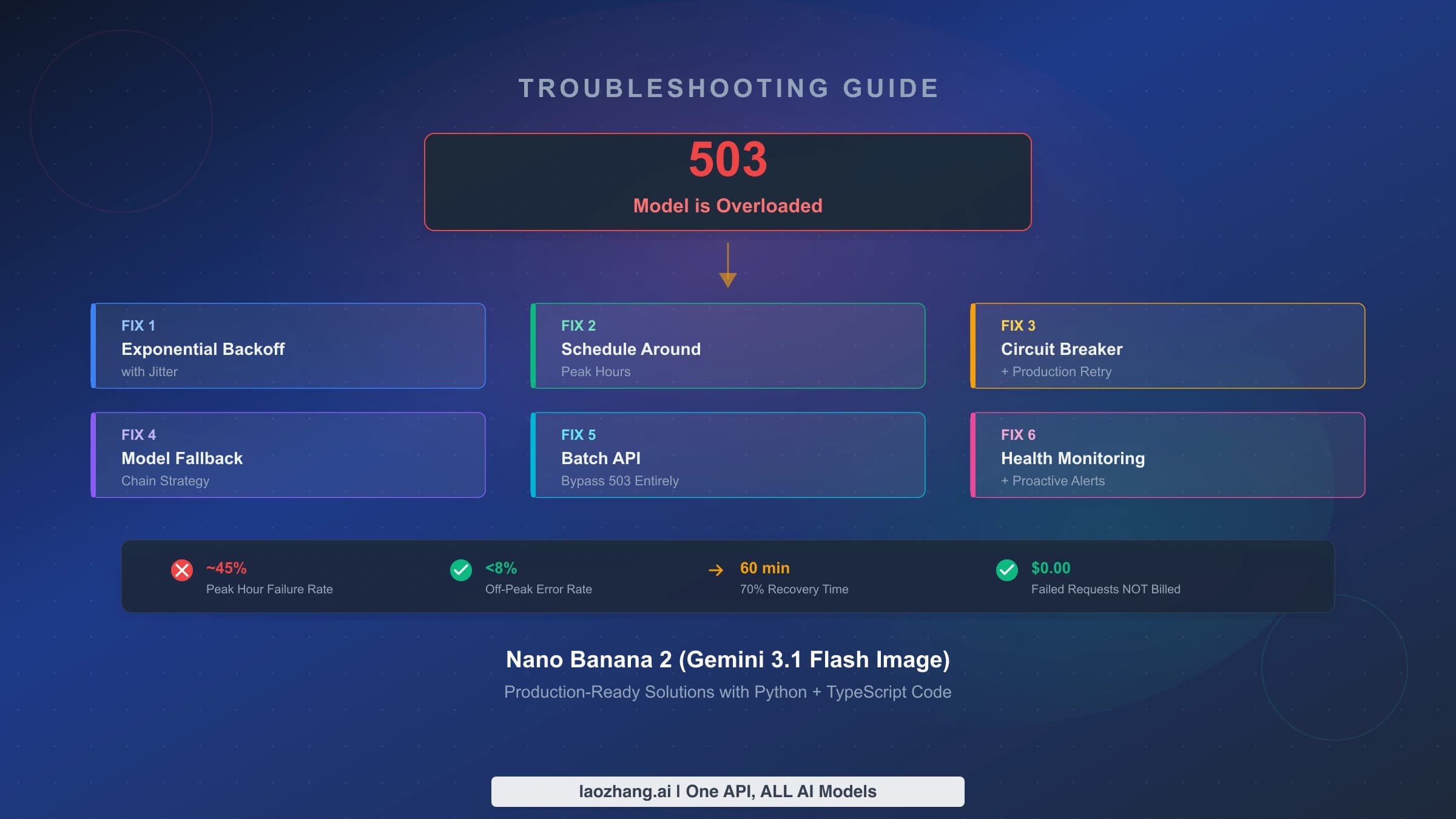
Server overload errors tell you something fundamentally different from rate limits: the problem is not with your usage pattern but with Google's infrastructure capacity. When you receive a 503 UNAVAILABLE or 502 Bad Gateway error, it means the Nano Banana Pro model's compute resources are saturated across all users globally. This distinction matters because the fix is entirely different — no amount of API key changes or request modifications will help. You need to wait for capacity to free up, or route your request differently.

The timing pattern for 503 errors is remarkably predictable. Based on developer community reports from late 2025 through early 2026, peak error rates occur between 10:00 and 14:00 UTC, when both American morning users and European afternoon users are active simultaneously. During these windows, up to 45% of API calls can return 503 errors. In contrast, the 00:00 to 06:00 UTC window consistently shows error rates below 8%. If your application can tolerate batch processing rather than real-time generation, scheduling image generation jobs during off-peak hours is the single most effective strategy for eliminating 503 errors entirely.

The situation became notably worse in the second half of 2025 when Nano Banana Pro's popularity surged beyond Google's provisioned capacity. In January 2026, several developers reported API response times jumping from the typical 20-40 second range to 180 seconds or longer before eventually timing out with a 503. Google has acknowledged the capacity constraints, noting that the Gemini image generation models remain in a Pre-GA (Pre-General Availability) stage with limited compute resources that are dynamically managed based on global demand.

The production-ready approach is a model fallback strategy. Rather than retrying the same overloaded model repeatedly, you should configure your application to automatically switch to an alternative model when 503 errors persist. The recommended fallback chain is: try Nano Banana Pro first for best quality, fall back to Gemini Flash for faster processing with slightly lower image quality, and optionally fall back to a third-party service as a last resort. Here is how this looks in practice:

python
def generate_with_fallback(prompt, client): """Try primary model, fall back on 503 errors.""" models = [ "gemini-2.0-flash-exp", # Primary: best quality "gemini-2.0-flash", # Fallback: faster, still good ] for model in models: try: response = client.models.generate_content( model=model, contents=prompt ) return response, model except Exception as e: if "503" in str(e) or "UNAVAILABLE" in str(e): print(f"{model} overloaded, trying next...") continue raise raise Exception("All models unavailable — try again in 5-10 minutes")

For applications where timing flexibility exists, implementing a request queue with off-peak scheduling can virtually eliminate 503 errors. The key insight is that 503 errors are transient and infrastructure-dependent — they resolve on their own when server load decreases, and no action on your part can force a faster resolution beyond waiting or rerouting.

It is worth noting that 503 errors behave differently across Gemini model variants. The image generation models (which Nano Banana Pro relies on) are significantly more susceptible to overload than the text-only Gemini models, because image generation requires substantially more GPU compute per request. A single image generation call consumes roughly 10-50x more compute than a text response of equivalent length, which explains why image endpoints hit capacity limits while text endpoints remain responsive. This is why you might see successful text completions from the Gemini API while simultaneously receiving 503 errors for image requests — the two workloads compete for different resource pools within Google's infrastructure.

IMAGE_SAFETY Errors — When Your Content Gets Unfairly Blocked

The IMAGE_SAFETY error is arguably the most frustrating Nano Banana Pro error because it blocks perfectly legitimate content. Unlike rate limits or server errors that have clear technical causes, safety filter triggers often feel arbitrary — you might generate the same subject successfully ten times and then get blocked on the eleventh attempt. Understanding why this happens requires knowing how Gemini's safety system actually works, because it is more complex than most developers realize.

Google implements a two-layer safety filtering system for image generation. Layer 1 consists of configurable safety settings that evaluate your input prompt before generation begins. These cover four harm categories: harassment, hate speech, sexually explicit content, and dangerous content. You can adjust Layer 1 thresholds through the API by setting safety_settings to BLOCK_NONE for each category, and this is often the first fix developers try. Layer 2 is a non-configurable output filter that scans the generated image after creation — this is where IMAGE_SAFETY errors originate. No API setting can disable Layer 2, because Google enforces it at the infrastructure level for all users, all tiers, all the time.

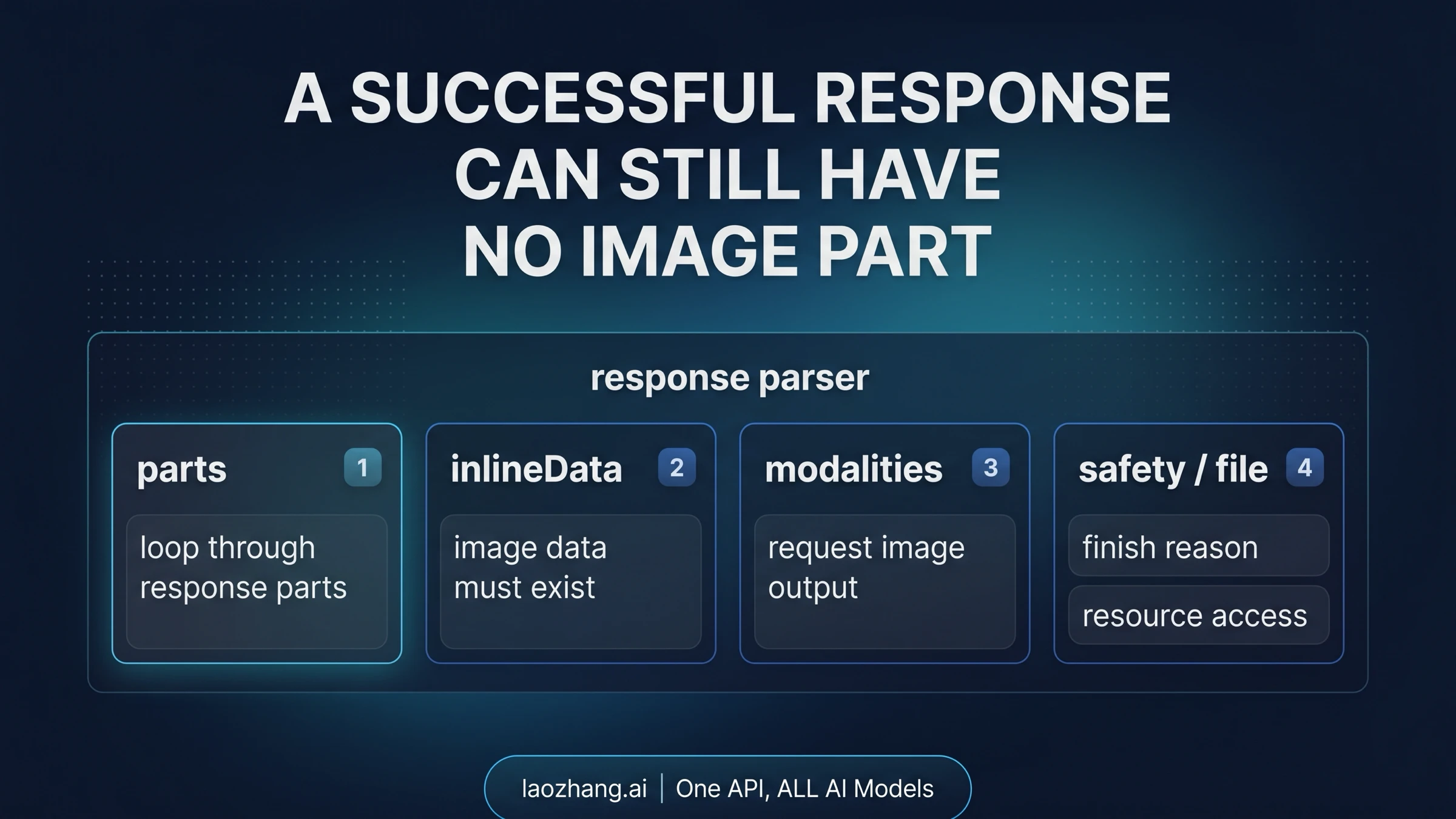
The practical implication is stark: when you see finishReason: "SAFETY" in your API response, you need to determine which layer triggered the block. If the response includes safetyRatings with HIGH probability scores for specific HARM_CATEGORY entries, you are hitting Layer 1 — and you can fix this by adjusting your safety settings configuration. If the response simply returns an IMAGE_SAFETY flag without detailed harm category ratings, you have hit Layer 2's output filter, and the only workaround is modifying your prompt.

Google has publicly acknowledged that their safety filters "became way more cautious than intended," causing false positives on content that is clearly editorial, educational, or artistic in nature. Ecommerce product photography, historical imagery, and portrait photographs are particularly prone to false triggers. The realistic success rate for prompt engineering workarounds on borderline content sits at approximately 70-80%, according to developer experience reports.

Prompt engineering strategies that actually work follow three principles. First, add explicit art style declarations — prompts that specify "digital illustration," "watercolor painting," or "technical diagram" trigger safety filters far less frequently than prompts requesting photorealistic output. Second, provide scene context that clarifies your intent — describing the setting, purpose, and artistic framing removes ambiguity that the filter might interpret negatively. Third, because image generation is stochastic, simply retrying the same prompt can sometimes produce a passing image on subsequent attempts without any prompt changes at all.

For a more comprehensive approach to navigating content filters, including specific prompt transformation examples and advanced techniques, see our guide on avoiding Nano Banana Pro content filters. It covers the nuances of Layer 1 configuration and Layer 2 workarounds in much greater detail.

When IMAGE_SAFETY blocks persist despite prompt modifications, you need to make an honest assessment: some content categories will always be blocked, and no amount of prompt engineering will change that. CSAM-related content is permanently blocked with zero workarounds — this is appropriate and required by law. If your use case fundamentally requires content types that Nano Banana Pro consistently refuses to generate, switching to a different image generation service with different content policies is a more productive path than endless prompt iteration.

Internal Errors (500) and Other Server Failures (504)

Internal server errors and timeouts represent a different failure mode than overload errors, even though they both originate on Google's side. A 500 INTERNAL error means something unexpected broke within Google's processing pipeline — it could be a bug, a configuration issue, or a transient infrastructure failure that affected your specific request. A 504 DEADLINE_EXCEEDED error means your request was accepted and processing started, but it took longer than the allowed timeout window to complete.

The distinction between 500 and 503 errors matters for your retry strategy. A 503 error reliably indicates capacity issues and will likely resolve in minutes as load shifts. A 500 error is less predictable — it might resolve immediately on retry, or it might indicate a deeper issue that persists for hours. The practical approach is to retry 500 errors with exponential backoff (starting at 1 second, doubling up to 32 seconds, with a maximum of 5 attempts), and if errors persist after all retries, wait at least 15 minutes before trying again. Repeatedly hammering a 500 error with rapid retries wastes your time and does not help Google resolve the underlying issue faster.

Timeout errors (504) have a specific common cause: generating high-resolution or complex images that exceed the processing time allocation. In January 2026, developers reported that 4K image generation requests were particularly susceptible to 504 timeouts, with processing times ballooning from the normal 20-40 seconds to 180 seconds or more before the deadline was exceeded. If you are consistently hitting 504 errors, consider reducing image complexity or resolution in your request, or increasing the client-side timeout setting in your HTTP library. Google's official troubleshooting documentation recommends adjusting the client timeout as the primary fix for 504 errors.

The official Google documentation also notes an important nuance for Gemini 3-series models: keeping the temperature parameter at its default value of 1.0 is strongly recommended. Lowering temperature below 1.0 can cause looping behavior or degraded performance in newer models, which may manifest as 500 errors or unexpectedly long processing times that result in 504 timeouts. If you have customized the temperature setting, reverting it to the default is worth trying before pursuing other fixes.

Client Errors (400/403) — Fixing What Is on Your Side

Client errors are the most straightforward to diagnose and fix because the problem lies entirely in your request or configuration, not in Google's infrastructure. A 400 INVALID_ARGUMENT error means your request body is malformed — perhaps a missing required field, an invalid parameter value, or a JSON syntax issue. A 403 PERMISSION_DENIED error means your API key is incorrect, expired, or lacks the necessary permissions for the Gemini API.

For 400 errors, the fix starts with validating your request against the official API reference. Common causes include: sending an image generation request to a text-only model endpoint, using a model identifier that does not exist or has been deprecated, including parameters that the current API version does not support, and providing image inputs in unsupported formats. The error response usually includes a descriptive message field that pinpoints the exact issue — read it carefully before trying random fixes.

One frequently overlooked cause of 400 errors is the FAILED_PRECONDITION variant, which specifically means that the free tier is unavailable in your region without billing enabled. Google restricts free-tier Gemini API access in certain countries, and attempting to use the API from these regions without a paid plan returns a 400 error rather than the 403 you might expect. If you are seeing this error and you are located outside the United States, enabling a paid plan in Google AI Studio often resolves it immediately.

For 403 errors, follow this verification sequence. First, confirm your API key is valid and has not been revoked by checking it in Google AI Studio. Second, verify the key has not been exposed publicly — if Google detects a key in a public repository or website, they automatically revoke it for security. Third, ensure the Generative Language API is enabled in your Google Cloud project. Fourth, if you are using a service account, verify the IAM permissions include the necessary roles for Gemini API access. For a related walkthrough on obtaining and configuring your API key correctly, our guide on how to get a Nano Banana Pro API key covers the entire setup process.

A 404 NOT_FOUND error in the Gemini API context typically means you are referencing a model that does not exist at the endpoint you are calling. Model names change as versions evolve — make sure you are using the current model identifier. As of February 2026, the image-capable model identifiers include gemini-2.0-flash-exp and variants. Check the official models page for the latest available identifiers.

Building Error-Resilient Applications

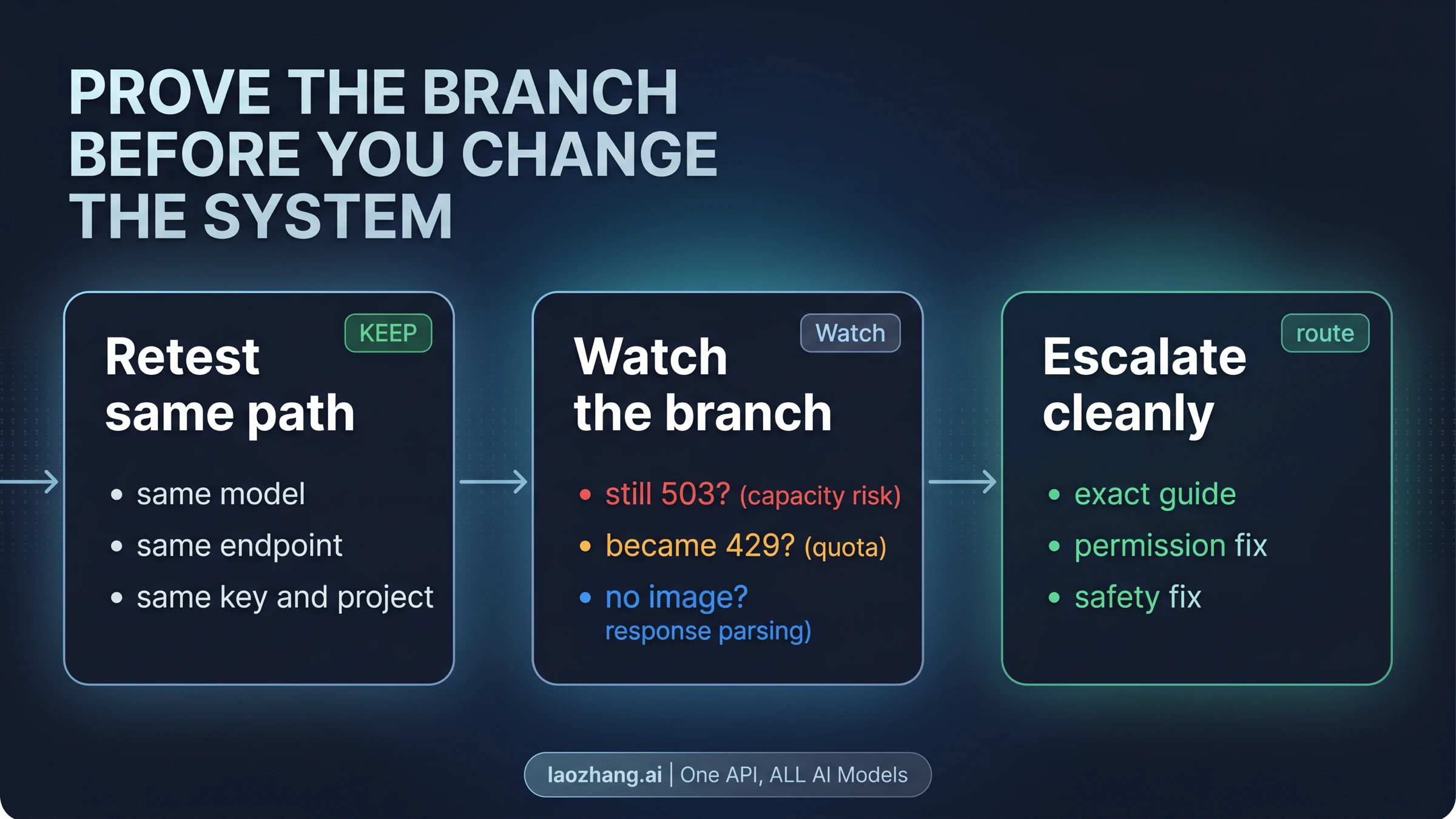
If you have made it through the individual error fixes above, you understand how each error works in isolation. The next step is building an application that handles all of them gracefully without manual intervention. Production-grade error handling for Nano Banana Pro requires combining three patterns: exponential backoff with jitter for transient errors, model fallback chains for capacity issues, and circuit breaker logic for persistent failures.

The following Python class implements all three patterns in a single reusable component. You can drop this into your project and call resilient_generate() instead of the raw API call. It handles rate limits with proper backoff, automatically switches to fallback models when the primary is overloaded, and stops retrying when it detects persistent failures to avoid wasting time and resources.

python
import time import random from google import genai class ResilientImageGenerator: """Production-ready Nano Banana Pro wrapper with full error handling.""" def __init__(self, api_key): self.client = genai.Client(api_key=api_key) self.models = [ "gemini-2.0-flash-exp", # Primary "gemini-2.0-flash", # Fallback ] self.consecutive_failures = 0 self.circuit_open_until = 0 def generate(self, prompt, max_retries=5): # Circuit breaker check if time.time() < self.circuit_open_until: remaining = int(self.circuit_open_until - time.time()) raise Exception(f"Circuit open. Retry in {remaining}s") for model in self.models: for attempt in range(max_retries): try: response = self.client.models.generate_content( model=model, contents=prompt ) self.consecutive_failures = 0 return response, model except Exception as e: err = str(e) if "429" in err or "RESOURCE_EXHAUSTED" in err: wait = min(2**attempt + random.uniform(0, 1), 64) time.sleep(wait) elif "503" in err or "UNAVAILABLE" in err: break # Try next model elif "500" in err or "INTERNAL" in err: wait = min(2**attempt + random.uniform(0, 1), 32) time.sleep(wait) elif "SAFETY" in err: raise # Don't retry safety blocks else: raise # All models failed self.consecutive_failures += 1 if self.consecutive_failures >= 3: self.circuit_open_until = time.time() + 300 raise Exception("All models and retries exhausted")

The circuit breaker pattern deserves special attention. After three consecutive complete failures across all models, the code stops attempting requests for 5 minutes. This prevents your application from burning through API calls and rate limit quota during extended outages. The circuit resets automatically after the cooldown period, so normal operation resumes without manual intervention. In production systems, you should log every circuit breaker activation to your monitoring platform — if the circuit opens frequently (more than twice per day), it signals a systemic issue that may require architectural changes like adding a message queue between your application and the API, or provisioning a secondary image generation provider.

For monitoring in production, track these four metrics at minimum: total requests per minute, error rate by category (429/503/500/SAFETY), average response time, and circuit breaker state. Alerting on error rate spikes above 20% gives you early warning of service degradation before your users notice. Most developers discover their error handling gaps only during actual incidents — implementing structured logging and monitoring from day one ensures you have the data you need to diagnose and resolve issues quickly.

For Node.js developers, the equivalent pattern follows the same principles. Categorize each error type, apply the appropriate response (wait for rate limits, switch model for overload, stop for safety blocks), and track failure patterns for circuit breaker logic. The retry delays, model fallback order, and circuit breaker thresholds should all be configurable through environment variables rather than hardcoded, allowing you to tune behavior in production without redeploying your application.

When Nothing Works — Alternatives and Next Steps

Sometimes, despite following every fix in this guide, the errors persist. This is not a failure on your part — it reflects the reality that Nano Banana Pro remains in a Pre-GA stage with inherent reliability limitations that are outside any individual developer's control. Knowing when to stop debugging and pivot to alternatives is a genuinely valuable skill.

Signs that you should stop trying the same approach: your error has persisted for more than 30 minutes across multiple retry cycles, you are seeing PROHIBITED_CONTENT rather than IMAGE_SAFETY (indicating the content category itself is blocked, not a false positive), or multiple error types are occurring simultaneously (suggesting a broader service degradation). In these situations, continuing to retry wastes your time without improving the outcome.

Alternative API providers offer a practical fallback. Services like laozhang.ai provide access to the same Gemini image generation models through aggregated infrastructure at approximately $0.05 per image, often with higher effective rate limits since quota is pooled across accounts. For production applications, having a secondary provider configured and ready to activate during primary outages is standard practice. You can explore affordable Gemini image API alternatives for a detailed comparison of providers, pricing, and reliability metrics.

Escalation paths within Google's ecosystem include: reporting persistent issues through the Google AI Developer Forum where Google staff actively monitor threads, checking the Google Cloud Status Dashboard for ongoing incidents affecting Gemini services, and if you are on a paid tier, submitting a support ticket through Google Cloud Console for priority assistance.

The long-term outlook is positive — Google continues to invest in expanding Nano Banana Pro's infrastructure, and each major release has improved both capacity and error rates. The transition from experimental to production-grade infrastructure is ongoing, with Google's engineering team actively working on dedicated capacity allocation for image generation workloads. But until the model reaches General Availability status with guaranteed SLAs and published uptime commitments, building your application with error resilience and provider redundancy baked in is not just good practice — it is essential for any application where image generation reliability matters to your users.

FAQ

Why does Nano Banana Pro keep saying "overloaded" even when I am only making a few requests?

The 503 "overloaded" error is not about your individual usage — it reflects global server capacity. When millions of users hit the Nano Banana Pro API simultaneously, the servers reach capacity regardless of how few requests you personally send. The most reliable fix is scheduling your requests during off-peak hours (00:00 to 06:00 UTC), when error rates drop below 8% based on community data from early 2026.

How do I fix the IMAGE_SAFETY error for legitimate content?

Google uses a two-layer safety system. Layer 1 (configurable) can be adjusted by setting safety_settings to BLOCK_NONE in your API call. Layer 2 (non-configurable) scans the generated image and cannot be disabled. For Layer 2 blocks, rephrase your prompt with explicit art style declarations like "digital illustration" or "watercolor painting," add scene context, and retry — the stochastic nature of generation means the same prompt may pass on subsequent attempts. Success rate for borderline content is approximately 70-80%.

Am I charged for failed API requests that return errors?

No. Requests that return 429 (rate limit), 503 (overload), or 400/403 (client errors) are not billed because no generation occurred. Google only charges for requests that complete successfully and return a generated image. However, if a request was partially processed before failing with a 500 or 504 timeout, billing behavior may differ for partially completed operations — check your Google AI Studio usage dashboard to verify. This means you can implement aggressive retry logic with confidence: even if your code retries a failed request dozens of times, you will only be charged for the one successful attempt that finally returns an image.

What are the current Nano Banana Pro rate limits for free tier users?

As of February 2026, free tier users get approximately 2 images per minute (IPM), 15 requests per minute (RPM), and around 50 requests per day (RPD) for image generation models. These limits reset at midnight Pacific Time for daily quotas and every 60 seconds for per-minute quotas. Note that Google adjusted quotas on December 7, 2025, so limits you remember from earlier may no longer be accurate. The key detail many developers miss is that these limits are enforced per API key and per project simultaneously — if you have multiple API keys in the same Google Cloud project, they share the same quota pool rather than having independent limits.

Should I upgrade to a paid tier to avoid rate limit errors?

It depends on your usage pattern and the type of errors you are encountering. If you hit 429 errors more than a few times per hour during normal use, the $19.99/month Tier 1 plan gives you 10 IPM and 250 RPD — a 5x improvement that eliminates most rate limit issues for small to medium projects. For production applications serving multiple users, Tier 2 or higher is worth the investment for its 20+ IPM and 1000+ RPD allocations. However, upgrading does not help with 503 server overload errors or IMAGE_SAFETY blocks, which are caused by entirely different factors — server capacity and content filtering respectively. Before upgrading, check whether your errors are genuinely 429 rate limits or whether they are 503 overload errors being misidentified, as the fix for each is fundamentally different.

What is the difference between a 503 error and a 429 error?

A 429 error means you personally have exceeded your allocated quota — it is triggered by your usage pattern and resolves in 60 seconds (for RPM limits) or at midnight Pacific Time (for daily limits). You can prevent 429 errors by upgrading your tier or spacing out your requests. A 503 error means Google's servers are overloaded across all users globally — it is not caused by your usage and resolves when overall server demand decreases. No tier upgrade will fix 503 errors because the issue is not your quota but Google's infrastructure capacity. The fix strategies are completely different: for 429, wait or upgrade your tier; for 503, schedule requests during off-peak hours (00:00-06:00 UTC) or implement model fallback logic to try alternative Gemini models automatically.

Share:

laozhang.ai

One API, All AI Models

AI Image

Gemini 3 Pro Image

$0.05/img
80% OFF
AI Video

Sora 2 · Veo 3.1

$0.15/video
Async API
AI Chat

GPT · Claude · Gemini

200+ models
Official Price
Served 100K+ developers
|@laozhang_cn|Get $0.1