LLM Agent API Spend Kill Switch: Stop Runaway Costs Before the Provider Call
Block the next unaffordable model request before dispatch: reserve its maximum cost against the shared run budget, reconcile the billable result, and keep budget stops terminal across retries and helpers.
On this page
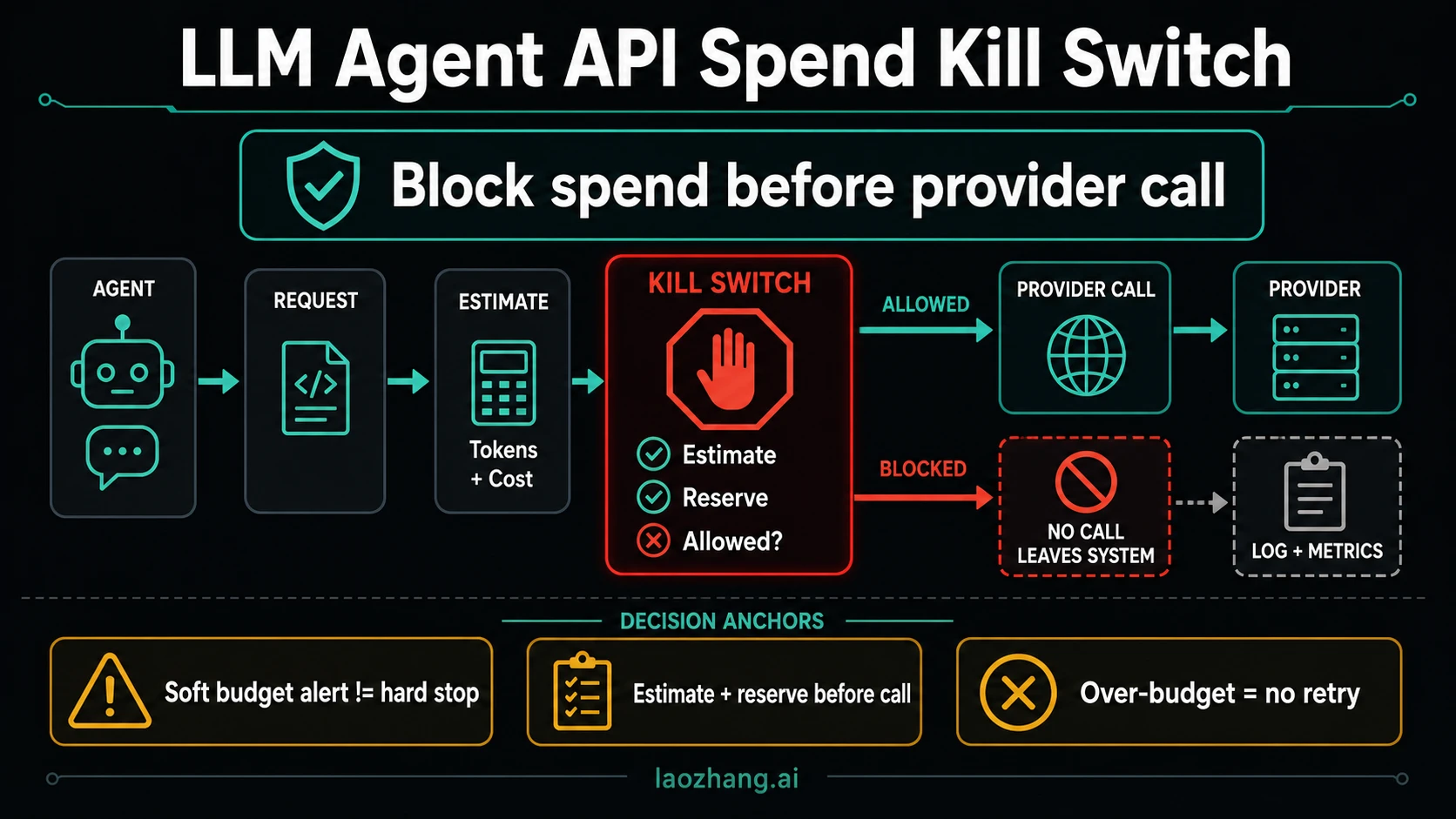
To stop runaway LLM agent costs, put a spend gate before every paid request, including retries, helper agents, fallback models, and tools that call a model internally. The gate must check and reserve the next request's maximum cost in one atomic operation. If that reservation would exceed the shared budget, it rejects the request and the runner ends the paid task.
The admission rule is:
settled cost + outstanding reservations + next request ceiling <= budget capThis protects the next dispatch only when the ceiling covers everything the request can bill and every paid route uses the same accounting authority. Provider limits and gateway budgets add useful backstops, but their delay and measurement rules matter. They do not automatically turn your local budget into an exact, instantaneous invoice cap.
What is required to implement a spend kill switch?
You need an enforcement point the agent cannot bypass, a trusted budget identity, conservative request pricing, and a ledger that reserves before execution. You also need a caller that treats a budget rejection as terminal. A prompt asking the model to spend less supplies none of those guarantees.
Choose the enforcement point by tracing who can send the next billable request. An internal proxy works when all workers use it. A runtime wrapper works when it controls every model invocation and paid tool. A gateway can provide shared policy, but confirm its accounting behavior before relying on it for strict admission.
Keep the provider credentials and budget policy outside model-controlled arguments. The server resolves the task's budget, authenticated owner, allowed route, price schedule, and output limit. A planner may propose work; it cannot choose a cheaper-looking estimate, reset the budget, attach a fresh identity, or select an unrestricted emergency key.
| Path | Required budget behavior |
|---|---|
| Planner and helper agents | Charge the original task budget, even if helpers have additional child limits |
| SDK or application retry | Reserve separately for each possible paid attempt, or reserve the bounded entire retry group before it starts |
| Model fallback | Resolve and price the actual alternate route before dispatch; preserve the parent cap |
| Embeddings, images, search, and paid tools | Account for their billable units and fees through the same authority |
| Resumed workflow or new trace ID | Reattach the existing task ledger; do not grant a fresh allowance automatically |
For multiple budgets, such as task, user, and organization caps, admission must satisfy all applicable limits. Reserve their balances together using a storage design that can enforce that invariant. Sequential checks against independent balances can leave partial reservations or permit a race.
An iteration or token limit is still useful: it bounds the work you need to price. If the agent repeats successful tools or cannot recognize completion, also use the agent tool-loop guide for execution guards and recovery from uncertain writes. A spending gate contains the cost; it does not establish that the task made progress.
Calculate a ceiling before dispatch
A safe reservation uses an upper bound for the resolved request, rather than the agent's hoped-for cost. Bound the input and output, pin the route and pricing version, and include cache writes, cache reads, images, audio, provider tools, gateway fees, or other charges that apply to that route. If one component is unpriced or unbounded, refuse that route until policy supplies a defensible ceiling.
For a hypothetical text-only route, assume USD prices of $2 per million input tokens and $10 per million output tokens. With at most 6,000 input tokens and 2,000 output tokens, the ceiling is:
(6,000 × $2 + 2,000 × $10) / 1,000,000 = $0.032Those prices and limits are illustrative, not a current model quote. The example excludes tools and other fees because its fake route has none. A real adapter must establish the input bound for the exact serialized request and constrain billable output using that provider's documented request controls. Character counts are not a general token bound, and an output setting cannot cap unrelated paid tool activity.
Suppose the run cap is $0.05 and completed usage totals $0.03. A new request with a $0.032 ceiling must be blocked: $0.062 is above the cap. Predicting that the model will probably answer for $0.005 is insufficient. It can proceed only if an allowed request shape has a smaller verified ceiling or an authorized policy change increases the budget.
Use integer monetary units, with conservative rounding at the relevant billing precision. Store the currency and price version with the reservation. Do not silently combine different currencies, or equate tokens that do not count toward throughput limits with tokens that are free to bill.
Implement reserve, call, reconcile
The ledger holds a reservation while a request is in flight. After a trusted usage record arrives, replace that reservation with the actual charge. If usage is uncertain, keep the hold and stop further work pending reconciliation.
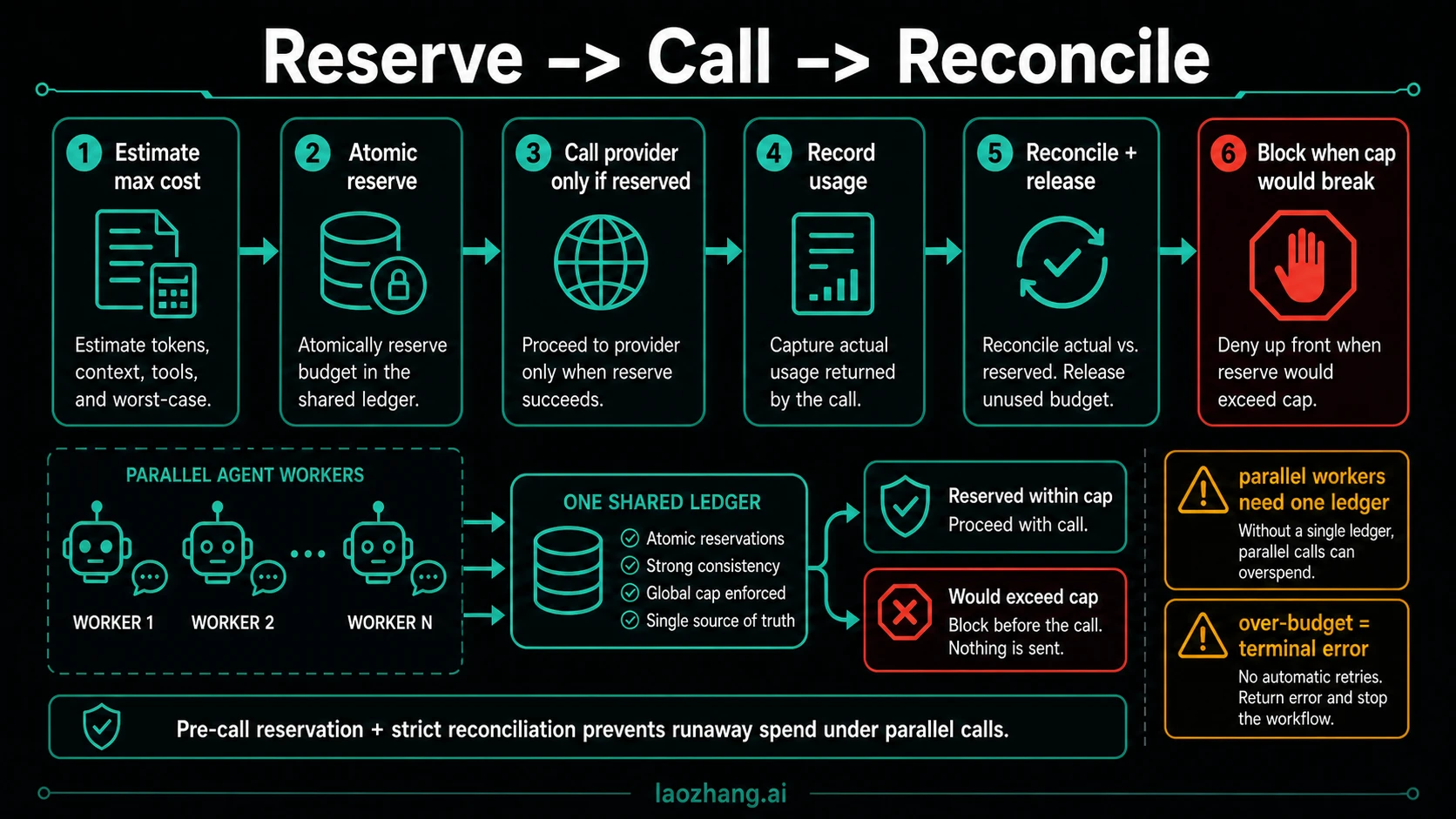
The runnable Python example below uses only the standard library and a fake provider. Save it as spend_guard.py and run python3 spend_guard.py. Its lock serializes admission and settlement for threads sharing one Ledger object in one process. It is not a durable, distributed ledger or a real provider integration.
The application creates the ledger and fixed quote. The fake route accepts only the literal input demo, so it does not pretend to tokenize arbitrary prompts. All amounts are integer micro-USD: 1,000,000 units equal $1. The fixed quote produces the hypothetical $0.032 ceiling above; the fake provider returns a synthetic $0.015 charge.
from dataclasses import dataclass
from hashlib import sha256
from threading import Lock


class Stop(RuntimeError):
    pass


@dataclass(frozen=True)
class Quote:
    route: str = "fake-text-v1"
    max_input: int = 6000
    max_output: int = 2000
    input_rate: int = 2       # Hypothetical micro-USD per token.
    output_rate: int = 10

    @property
    def ceiling(self):
        return self.max_input * self.input_rate + self.max_output * self.output_rate


class Ledger:
    def __init__(self, run_id, period, cap):
        if type(cap) is not int or cap <= 0:
            raise ValueError("positive integer cap required")
        self.run_id, self.period, self.cap = run_id, period, cap
        self.actual, self.held, self.stopped = 0, 0, None
        self.records, self.lock = {}, Lock()

    def reserve(self, attempt, binding, ceiling):
        with self.lock:
            if attempt in self.records:
                prior = self.records[attempt]
                if prior["binding"] != binding:
                    self.stopped = "attempt_conflict"
                raise Stop(self.stopped or "duplicate_attempt")
            if self.stopped:
                raise Stop(self.stopped)
            if type(ceiling) is not int or ceiling <= 0:
                self.stopped = "unknown_price"
                raise Stop(self.stopped)
            if self.actual + self.held + ceiling > self.cap:
                self.stopped = "over_budget"
                raise Stop(self.stopped)
            self.held += ceiling
            self.records[attempt] = dict(binding=binding, ceiling=ceiling,
                                         state="inflight", cost=None)

    def unknown(self, attempt):
        with self.lock:
            rec = self.records[attempt]
            if rec["state"] != "settled":
                rec["state"] = "unknown"
                self.stopped = self.stopped or "usage_unknown"

    def settle(self, attempt, binding, cost):
        with self.lock:
            rec = self.records[attempt]
            if rec["binding"] != binding or type(cost) is not int or cost < 0:
                self.stopped = "invalid_settlement"
                raise Stop(self.stopped)
            if rec["state"] == "settled":
                if rec["cost"] != cost:
                    self.stopped = "settlement_conflict"
                    raise Stop(self.stopped)
                return  # Same receipt applied twice: no additional charge.
            self.held -= rec["ceiling"]
            self.actual += cost
            rec.update(state="settled", cost=cost)
            if cost > rec["ceiling"]:
                self.stopped = "estimate_breached"
            # Settlement never clears a previous terminal stop.


class Guard:
    def __init__(self, ledger, provider):
        self.ledger, self.provider, self.quote = ledger, provider, Quote()

    def call(self, attempt, body):
        # This fake route accepts one fixed input; no real tokenization is claimed.
        if body != "demo":
            raise Stop("unsupported_input")
        q, ledger = self.quote, self.ledger
        binding = sha256(repr((ledger.run_id, ledger.period, q, body)).encode()).hexdigest()
        ledger.reserve(attempt, binding, q.ceiling)
        try:
            result, cost = self.provider(body, q)
            ledger.settle(attempt, binding, cost)
            if ledger.stopped:
                raise Stop(ledger.stopped)
            return result
        except Exception:
            ledger.unknown(attempt)
            raise


def fake_provider(body, quote):
    return "fake result", 15000  # $0.015, synthetic usage only.


if __name__ == "__main__":
    ledger = Ledger("job-17", "demo-period", 50000)  # $0.05 USD.
    guard = Guard(ledger, fake_provider)
    for attempt in ("a1", "a2", "a3"):
        try:
            print(attempt, guard.call(attempt, "demo"))
        except Stop as error:
            print(attempt, "terminal:", error)
            break
    print("actual:", ledger.actual, "held:", ledger.held)
The output is:
a1 fake result
a2 fake result
a3 terminal: over_budget
actual: 30000 held: 0
After two completed calls, the ledger has spent $0.03. The third request needs another $0.032 reservation and is rejected before the fake provider runs. The stop stays set even if a caller invents a new attempt ID. The runner catches the terminal result, returns completed or partial work, and exits; it must not recreate Ledger to continue.
The request binding covers the run, period, fixed route and quote, and exact fake input. Reusing an attempt ID never causes a second dispatch. Reuse with different input is a conflict. A real adapter should similarly bind each reservation to the authenticated budget owner, exact operation, resolved route, bounded payload, and price version. Treat the ID as an attempt identity, not a promise of provider-side exactly-once execution.
Settlement is idempotent for the same attempt, binding, and charge. A conflicting receipt stops the ledger. If actual usage exceeds the reserved ceiling, the code records the true charge and freezes future admission. That exposes an estimation failure; it cannot retroactively undo the request or honestly claim the invoice remained below the cap.
What must change for multiple workers or restarts?
Move admission and settlement into shared durable storage, retaining request uniqueness and the budget period. The comparison and reservation must commit together. A separate GET followed by SET, or a check in one service followed by an update in another, is vulnerable to concurrent admission.
Redis documents atomic Lua script execution, which can support conditional balance updates. That primitive does not make a provider HTTP request part of the same transaction, prove durable recovery, or guarantee rollback of partial writes after a script error. Validate before mutating, design persistence and failure recovery explicitly, and account for deployment-specific storage behavior.
Persist the reservation before dispatch. A crash between reservation and dispatch requires recovery to determine whether it was sent. A crash after dispatch but before settlement leaves an unresolved charge. Retain that reservation, correlate the provider request or billing record, and settle the original period. Starting a new monthly row must not erase old in-flight obligations or misattribute late usage.
Keep timeouts and unknown usage from reopening the budget
A timeout, cancelled stream, closed browser, or provider exception does not prove the request was free. The provider may have accepted and performed work before the response disappeared.
| Observed state | Accounting action | Runner action |
|---|---|---|
| Gate rejects before dispatch | No new reservation or provider call | Return terminal budget stop |
| Trusted transport proves it was never sent | Release that exact reservation once | Retry only if policy permits and a new attempt is admitted |
| Request may have been sent; charge unknown | Keep its hold and mark it unresolved | Stop paid work and reconcile |
| Final trusted usage is known | Replace the hold with the actual charge once | Continue only if the run remains open and the next request passes admission |
| Actual cost exceeds the ceiling | Record the full charge and freeze admission | Investigate pricing or request bounds before recovery |
The demonstration deliberately keeps all provider exceptions unresolved; it does not include a transport proof for safe release. For later reconciliation, retrieve the record's original binding and call settle with the verified charge. Clearing the hold does not clear the terminal stop. The operator still has to decide whether the task should resume.
Give reservations an age for monitoring, but do not release unknown charges merely because a TTL expired. Otherwise the same unpaid-looking balance can be reused while older requests are still billable. A stuck hold is an availability problem to investigate; deleting it without evidence creates an accounting problem.
Which provider and gateway budgets actually stop traffic?
As of October 6, 2026, OpenAI supports both spend alerts and enforced hard spend limits for organizations and projects. The distinction is whether Enforce a hard limit is enabled: alerts notify while traffic continues; hard limits reject affected requests. Organization caps apply across projects, while project caps apply to traffic billed to that project. Enforcement propagates asynchronously, so tracked spend can slightly exceed the configured amount. OpenAI's approved monthly usage limit is a separate control. OpenAI spend limits
Cloudflare AI Gateway checks applicable spend rules before forwarding a request, but records the current request's cost after completion. Its spend tracking is eventually consistent and based on best-effort price estimates; a concurrent burst can exceed the configured limit. Treat this as a useful gateway backstop rather than proof of worst-case reservation for every in-flight call. A cheaper fallback remains paid work and needs its own admission against the shared parent budget. Cloudflare spend limits
LiteLLM documents proxy, team, team-member, user, and virtual-key budgets, including multiple time windows. Their meaning depends on scope and deployed version. In v1.95, team-key calls no longer enforce the internal user's personal budget; use the documented team-member budget when that is the intended restriction. A budget reset changes tracked allowance, not an existing bill. The budget documentation does not establish an atomic, zero-overshoot invoice guarantee. LiteLLM budgets and rate limits
LiteLLM's agent session budgets are a different mechanism: session spend accumulates after successful responses and is checked before subsequent calls. The documented default counter TTL is one hour. A trace-based session counter therefore does not replace a persistent parent budget across restarts, new trace IDs, and uncertain usage. Verify configuration placement against your deployed version; the guide describes both key metadata and agent parameters, so it should not be copied as a verified configuration without that check. LiteLLM agent iteration budgets
Do not retry every 429—or classify every 400 as bad input
Inspect the provider's structured error and applicable scope before deciding whether to retry. These budget errors require a restored allowance, not a tighter retry loop:
| Response | Meaning and next action |
|---|---|
OpenAI 429 with organization_spend_limit_exceeded or project_spend_limit_exceeded | Configured hard spend limit reached. Stop that route until the relevant authorized change propagates or the monthly cycle resets. |
Anthropic 429, rate_limit_error, with details.error_code: enforced_spend_limit_reached | Organization service-tier spend cap reached. Unlike an ordinary throughput limit, this response has no retry-after; stop until allowance is restored. |
Anthropic 400, invalid_request_error, saying the specified API or workspace usage limit was reached | A user-set spend limit was reached. Repeating the unchanged request does not restore budget. |
| Ordinary provider request/token rate limit | Use its documented backoff only when retry policy allows it; each potentially paid attempt still needs budget admission. |
The OpenAI codes come from its spend-limit guide. Anthropic documents the distinct spend and rate-limit responses, including a separate Claude Code workspace check that can return a 429 with retry-after. Do not generalize that exception into a rule that all budget-related 429s are transient.
Your own admission error should carry an explicit domain reason such as over_budget, the affected scope, and retryable: false. HTTP status alone is too ambiguous to drive the agent. A retryable transport or rate-limit error permits only a bounded, authorized retry after accounting for the preceding attempt's billing state.
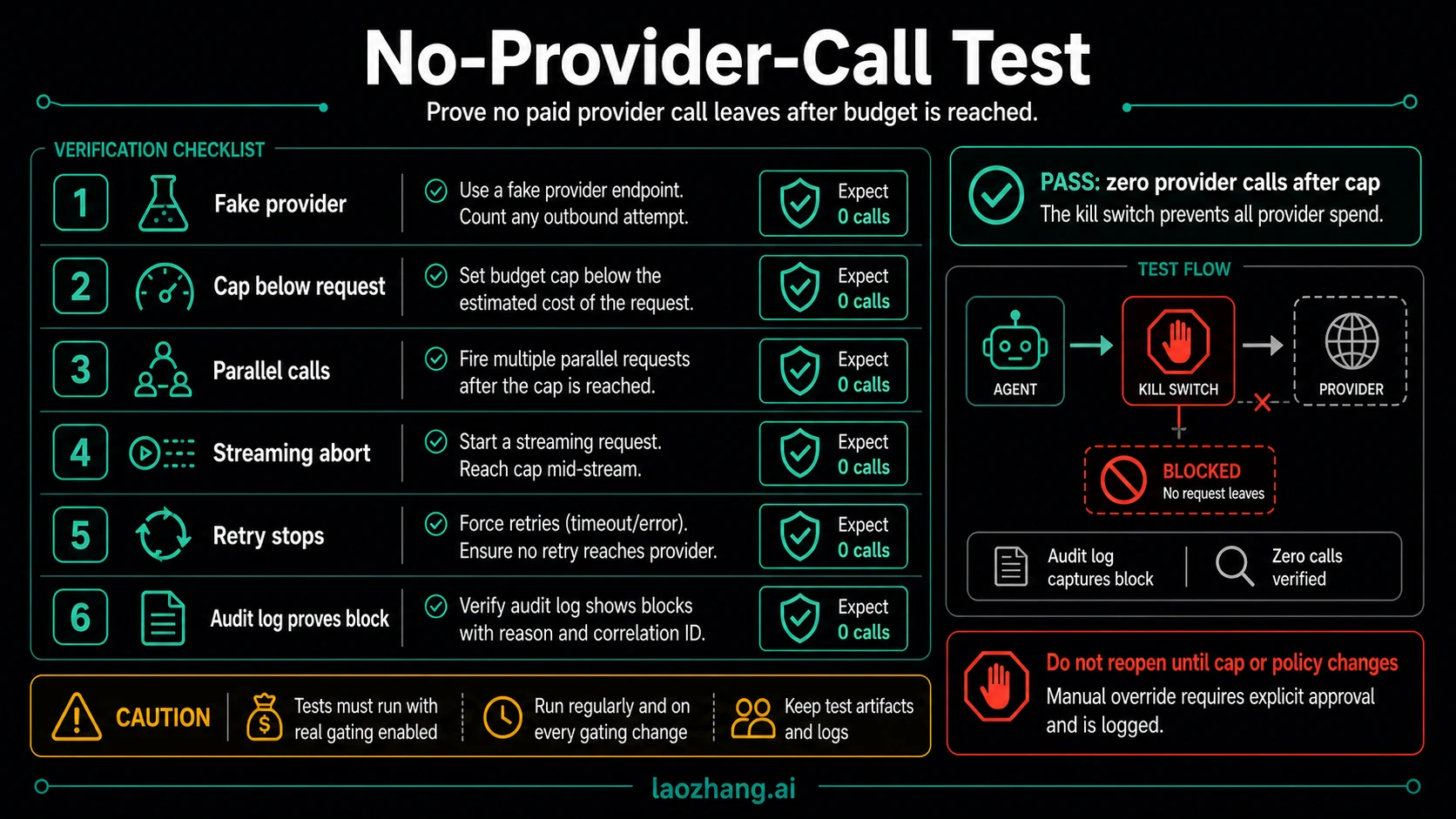
Test the dispatch boundary with an offline provider
We executed the exact Python code above with synthetic charges and fake providers. The checks exercised shared-object thread contention, blocked dispatch, attempt conflicts, unknown outcomes, and repeated settlement. No SDK, real model request, external ledger, or provider billing experiment was involved.
| Offline scenario | Observed result |
|---|---|
| $0.05 cap, two $0.015 settlements, then a $0.032 reservation | Third attempt blocked; provider counter remained at two |
| Four threaded attempts, $0.10 cap, each holding $0.032 until released | Three admitted; fourth blocked before the fake provider; terminal stop persisted after settlement |
| Same attempt submitted again | No second provider dispatch |
| Attempt ID reused with a different binding | Conflict set the stop before any second admission |
| Fake provider raised after entry | Full hold remained; next attempt was blocked as usage_unknown |
| Same verified settlement submitted twice | Actual spend changed once; a different charge for that receipt was rejected |
| Fake charge exceeded the ceiling | True charge recorded; future admission frozen |
| Late settlement for an unknown record | Original hold reconciled; terminal state stayed set |
These tests establish those branches in one live Python process. They do not establish cross-process atomicity, crash recovery, trustworthy provider usage, cancellation, or invoice precision. Before integration, reproduce the same assertions against your actual routing and storage design. Count requests at the provider adapter; a “blocked” log is not evidence of containment if a fallback or background retry still dispatched.
Close the run, or resume it with an explicit decision
When the kill switch fires, stop scheduling paid work and preserve the original ledger. Return the completed output or a useful partial result, together with the stop reason, remaining task, and any unresolved attempt IDs. Allow already admitted work to settle; do not describe in-flight cancellation as a refund.
For example: “Two responses completed. The next request was blocked because its $0.032 ceiling exceeded the remaining $0.02. No unresolved charges remain. The task is incomplete; permitted next actions are to return these results or request an approved budget change.” If usage is unknown, identify the attempt awaiting reconciliation and exclude blind retry from the recovery choices.
A legitimate resume requires trusted authority to approve the new allowance or a narrower request shape, record the reason and scope, and attach a linked execution to the same accounting history. Record who approved it, the effective cap, currency, expiry or budget period, and the unresolved obligations. A human saying “continue” should not silently create another full budget.
Switching model, opening a new session, clearing a spend counter, or spawning a helper is not budget approval. When no valid allowance remains, close the task. If the remaining budget can fund a permitted smaller request, decide that outside the stopped planner and readmit through the same gate.
Frequently asked questions
Is an OpenAI project budget enough to stop runaway agent costs?
An enforced OpenAI project hard limit can stop traffic billed to that project; a spend alert alone cannot. Hard-limit propagation can still allow slight overshoot, and it does not cover calls billed elsewhere. For per-task admission, keep a request-before-dispatch reservation gate across all paid routes. OpenAI spend limits
Can a cheap fallback continue after the budget is reached?
Only if trusted policy permits it and its own conservative reservation fits every applicable budget. A model-specific cap may leave room in a shared task budget; an exhausted parent task budget does not. Changing the provider or API key must not bypass the original spending authority.
Does stopping a stream release its reservation?
No. Keep the reservation until trusted usage or reliable transport evidence establishes the charge. Client disconnection does not establish that provider work stopped. The demonstration freezes new admission whenever its fake provider fails without a settled cost.
Can sub-agents have independent budgets?
Yes, as additional restrictions. They still consume the parent's task budget. Otherwise a parent can exhaust its allowance and keep spending through children, fresh sessions, or new trace IDs.
Does this code guarantee that the invoice never exceeds the cap?
No. It atomically admits bounded reservations within one shared in-memory ledger, and its fake tests verify that scope. An invoice guarantee additionally needs complete pricing bounds, authoritative settlement, durable accounting, and control of every billable route. If a charge exceeds its reservation, the example reports the real cost and stops future requests.
Sources6
External pages this guide links to, in the order they appear. Last updated Oct 7, 2026.
Sources6
External pages this guide links to, in the order they appear. Last updated Oct 7, 2026.
- 1.atomic Lua script executionredis.io/docs/latest/develop/programmability/eval-intro
- 2.OpenAI spend limitsdevelopers.openai.com/api/docs/guides/spend-limits
- 3.Cloudflare spend limitsdevelopers.cloudflare.com/ai-gateway/features/spend-limits
- 4.LiteLLM budgets and rate limitsdocs.litellm.ai/docs/proxy/users
- 5.LiteLLM agent iteration budgetsdocs.litellm.ai/docs/a2a_iteration_budgets
- 6.spend and rate-limit responsesplatform.claude.com/docs/en/api/rate-limits