Google AI Studio has quietly become one of the most powerful free tools for AI image generation in 2026, yet most users dramatically underestimate what they can access without paying a single dollar. The platform offers multiple image generation models — including Nano Banana, Nano Banana Pro, and Imagen 4 — each with different capabilities and free tier allowances. As of February 2026, the AI Studio web interface allows you to generate between 500 and 1,000 images per day using the Gemini 2.5 Flash Image model at absolutely no cost, making it significantly more generous than competitors like ChatGPT's free tier, which caps image generation at roughly 2-3 images daily.
What You Actually Get for Free in Google AI Studio
The single biggest misconception about Google AI Studio's free image generation is the belief that you're limited to just 3 images per day. This number gets repeated across blogs and forums, but it tells only a fraction of the story. The "3 images per day" limit specifically applies to Nano Banana Pro (the premium image model based on gemini-3-pro-image-preview) when accessed through the consumer Gemini app. Google AI Studio, the developer-facing platform at aistudio.google.com, operates on an entirely different quota system that is far more generous for most users.
When you open Google AI Studio in your browser, you have access to multiple image generation models, each with its own free tier allowance. The most generous of these is the Gemini 2.5 Flash Image model, internally known as Nano Banana. This model produces quality images at impressive speed, and its free tier allows hundreds of generations per day through the AI Studio web interface. The exact number is dynamic — Google adjusts it based on server demand — but users consistently report generating 500 to 1,000 images before hitting the daily reset at midnight Pacific Time. If you need to understand the full scope of what Gemini models offer for free, our comprehensive Gemini API free tier guide breaks down every model's quotas in detail.
Understanding the distinction between Nano Banana and Nano Banana Pro is essential for anyone looking to maximize their free usage. Nano Banana (gemini-2.5-flash-image) is optimized for speed and efficiency — it generates images quickly and is ideal for iterative work, social media content, and general-purpose visuals. Nano Banana Pro (gemini-3-pro-image-preview), on the other hand, is Google's premium image model capable of producing 2K and even 4K resolution outputs with remarkably accurate text rendering inside images. While Nano Banana Pro delivers superior quality for professional work, its free tier through the Gemini app is severely limited, and API access requires a paid billing account at minimum. For a detailed comparison of Nano Banana Pro free versus paid limits, including exactly what each tier unlocks, we've published a dedicated analysis.
Beyond the Gemini-native models, Google AI Studio also provides access to the Imagen 4 family — dedicated text-to-image models available in Fast, Standard, and Ultra tiers. Imagen 4 excels at photorealistic outputs and follows prompts with high fidelity. While Imagen 4 is primarily an API-accessible model, it's available for testing within AI Studio's playground at no cost during the preview period. Together, these models give free users an exceptionally broad toolkit for AI image generation, spanning from quick iterative drafts to high-fidelity final outputs.
Complete Free Tier Limits — Every Access Method Explained
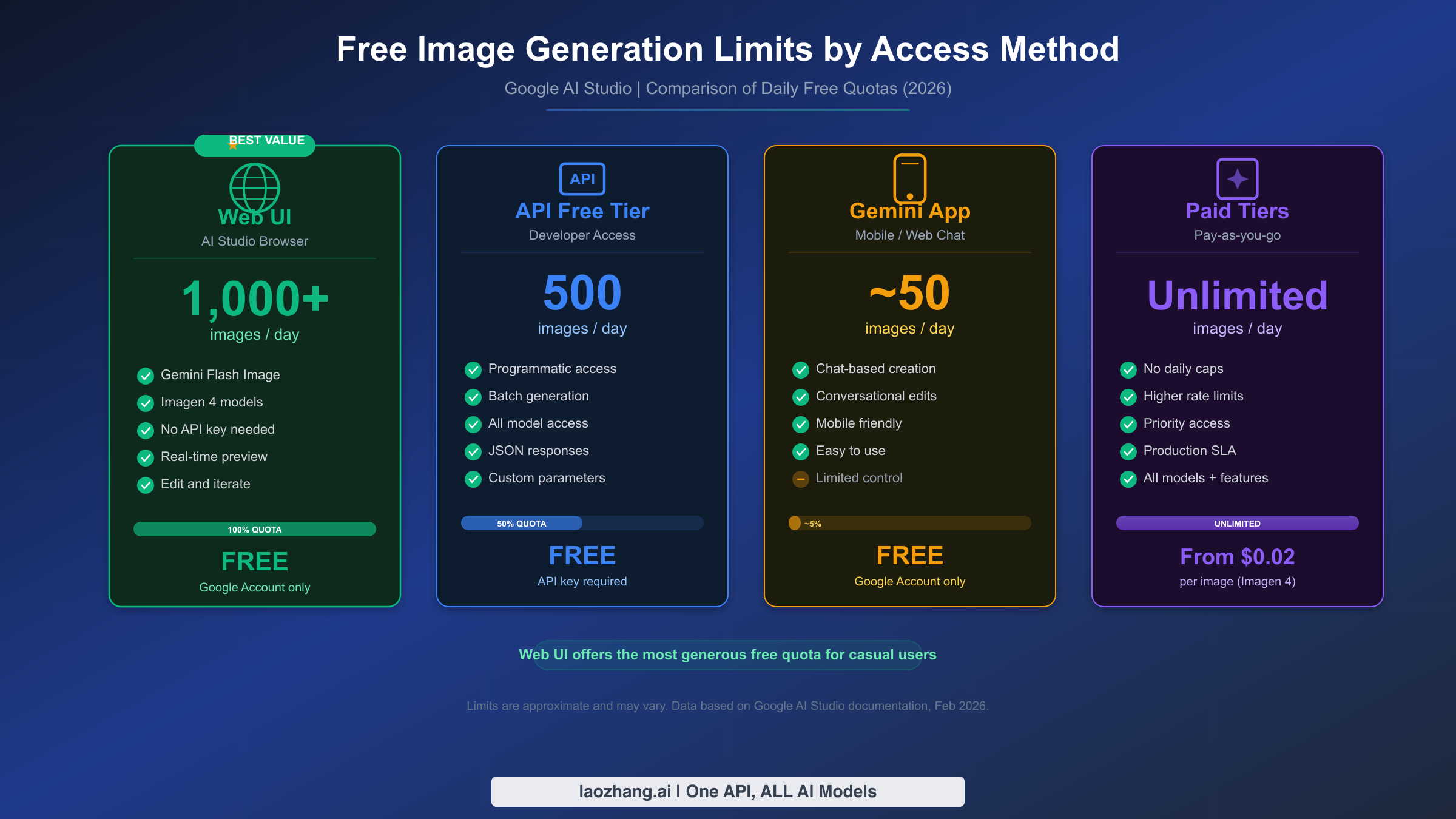
One of the most frustrating aspects of Google's free image generation is that limits vary dramatically depending on how you access the service. The same Google account can produce wildly different numbers of images depending on whether you're using the AI Studio web interface, the Gemini Developer API, or the consumer Gemini app. Understanding these differences is the key to getting the most out of your free access.
The AI Studio web interface at aistudio.google.com represents the most generous free access point. When you select the Gemini 2.5 Flash Image model and generate images directly in the browser, you benefit from Google's prototype-tier quotas, which are designed to encourage experimentation. These quotas allow between 500 and 1,000 image generations per day, with a rate limit of approximately 10-15 requests per minute. The daily counter resets at midnight Pacific Time (8:00 AM UTC), so timing your usage around this reset can effectively double your available quota within a 24-hour work session.
| Access Method | Model Available | Daily Free Limit | Rate Limit | Resolution |
|---|---|---|---|---|
| AI Studio Web UI | Gemini 2.5 Flash Image (Nano Banana) | 500-1,000/day | ~15 RPM | Up to 1K |
| Gemini Developer API (Free) | Gemini 2.5 Flash Image | Up to 500 RPD | 10 RPM | Up to 1K |
| Gemini Developer API (Free) | Gemini 3 Pro Image | 0 (billing required) | 0 IPM | N/A |
| Gemini App (Free) | Nano Banana Pro | ~3/day | Limited | Up to 1K |
| Gemini App (AI Plus $7.99/mo) | Nano Banana Pro | 50/day | Higher | Up to 2K |
| Gemini App (AI Pro $19.99/mo) | Nano Banana Pro | 100/day | Higher | Up to 2K |
| Gemini App (AI Ultra $249.99/mo) | Nano Banana Pro | 1,000/day | Highest | Up to 4K |
The Gemini Developer API offers a middle ground between the generous web UI and the restrictive consumer app. With a free API key (no billing required), you can make up to 500 requests per day using the Gemini 2.5 Flash Image model. This programmatic access opens up powerful possibilities — batch generation, automated workflows, and integration with your own applications. However, be aware that Gemini 3 Pro Image (Nano Banana Pro) is completely unavailable on the API free tier; it requires at minimum a Tier 1 billing account, which means enabling a payment method even if you plan to stay within free limits. For the complete rate limits breakdown across all models and tiers, including the December 2025 quota reductions, we've documented every detail.
It's worth noting that Google reduced free tier quotas significantly on December 7, 2025, with some models seeing 50-80% cuts in daily allowances (as reported by multiple developer community sources, including Google's own developer forums). The current limits reflected in the table above represent the post-reduction quotas as of February 2026, sourced from official Google documentation at ai.google.dev.
How to Generate Free Images Step by Step
Getting started with free image generation in Google AI Studio takes less than two minutes, and you don't need any technical knowledge or credit card. The process is straightforward whether you prefer the visual web interface or want to set up programmatic API access for more flexibility and higher quotas.
Getting Started with the Web Interface
The fastest path to your first free AI-generated image begins at aistudio.google.com. Sign in with any Google account — personal Gmail accounts work perfectly, and there is no verification or approval process. Once you're in, you'll see the main prompt interface with a model selector at the top. Click the model dropdown and select "Gemini 2.5 Flash" with the image generation capability enabled. Some users may also see it labeled as "Nano Banana" in certain interface versions.
Type your image prompt in the text field. For best results, be specific about the subject, style, composition, and mood you want. A prompt like "A modern minimalist workspace with a laptop showing code, warm afternoon light through large windows, photorealistic style" will produce significantly better results than simply "workspace photo." Once you submit, the model typically generates an image within 3-7 seconds. You can continue the conversation to request modifications — "make the light cooler and add a coffee cup on the desk" — leveraging the model's multi-turn editing capability.
The web interface also supports image-to-image editing. Upload an existing image and describe the changes you want, such as "change the background to a beach sunset" or "remove the person on the left." This conversational editing workflow sets Google's offering apart from many competitors that require separate tools for text-to-image and image editing tasks.
Setting Up API Access for Higher Limits
For users comfortable with code, the Gemini Developer API provides higher free quotas and automation capabilities. Start by visiting aistudio.google.com and clicking "Get API Key" in the left sidebar. Google will generate a free API key instantly — no billing setup required for the free tier. Save this key securely; you'll need it for all API calls.
Here's a minimal Python example to generate your first image via the API:
pythonimport google.generativeai as genai
from PIL import Image
from io import BytesIO
import base64

genai.configure(api_key="YOUR_API_KEY_HERE")

model = genai.GenerativeModel("gemini-2.5-flash-preview-image-generation")

response = model.generate_content(
    "Generate a professional blog header image showing AI and creativity merging together, digital art style",
    generation_config=genai.GenerationConfig(
        response_modalities=["image", "text"]
    )
)

# Extract and save the image
for part in response.candidates[0].content.parts:
    if part.inline_data:
        img_data = base64.b64decode(part.inline_data.data)
        img = Image.open(BytesIO(img_data))
        img.save("generated_image.png")
        print(f"Image saved: {img.size}")
For developers who prefer curl or want to integrate with existing workflows, the REST API works with any HTTP client. The step-by-step API key setup guide covers additional configuration options including safety settings, aspect ratios, and resolution parameters. Google supports aspect ratios including 1:1, 16:9, 9:16, 3:2, 4:3, and several others, giving you flexibility for different use cases from social media posts to website banners.
Prompt Engineering Tips for Better Results
The quality of your generated images depends heavily on how you craft your prompts, and mastering a few key techniques will dramatically improve your output. Start by structuring your prompts with four key components: subject (what you want to see), style (photorealistic, illustration, watercolor, etc.), composition (framing, perspective, focal point), and mood (lighting, atmosphere, color palette). A well-structured prompt like "A golden retriever sitting in a sunlit café, overhead view, warm tones with soft bokeh background, photorealistic photography style" consistently outperforms vague requests like "dog in café."
Google's Gemini models also respond well to negative prompts — explicitly stating what you don't want in the image. Adding phrases like "no text overlays, no watermarks, no distorted hands" helps the model avoid common AI image generation artifacts. For iterative refinement, leverage the multi-turn conversation feature: generate an initial image, then send follow-up instructions like "keep the same composition but change the lighting to golden hour" or "zoom out to show more of the background." This conversational approach lets you fine-tune results without wasting quota on entirely new generations.
When generating images for specific platforms, match your aspect ratio to the target format from the start. Use 1:1 for Instagram posts, 16:9 for YouTube thumbnails and blog headers, 9:16 for Stories and TikTok, and 4:3 for presentations. Setting the correct aspect ratio upfront avoids the need to crop or regenerate, saving both time and quota.
7 Strategies to Maximize Your Free Image Quota
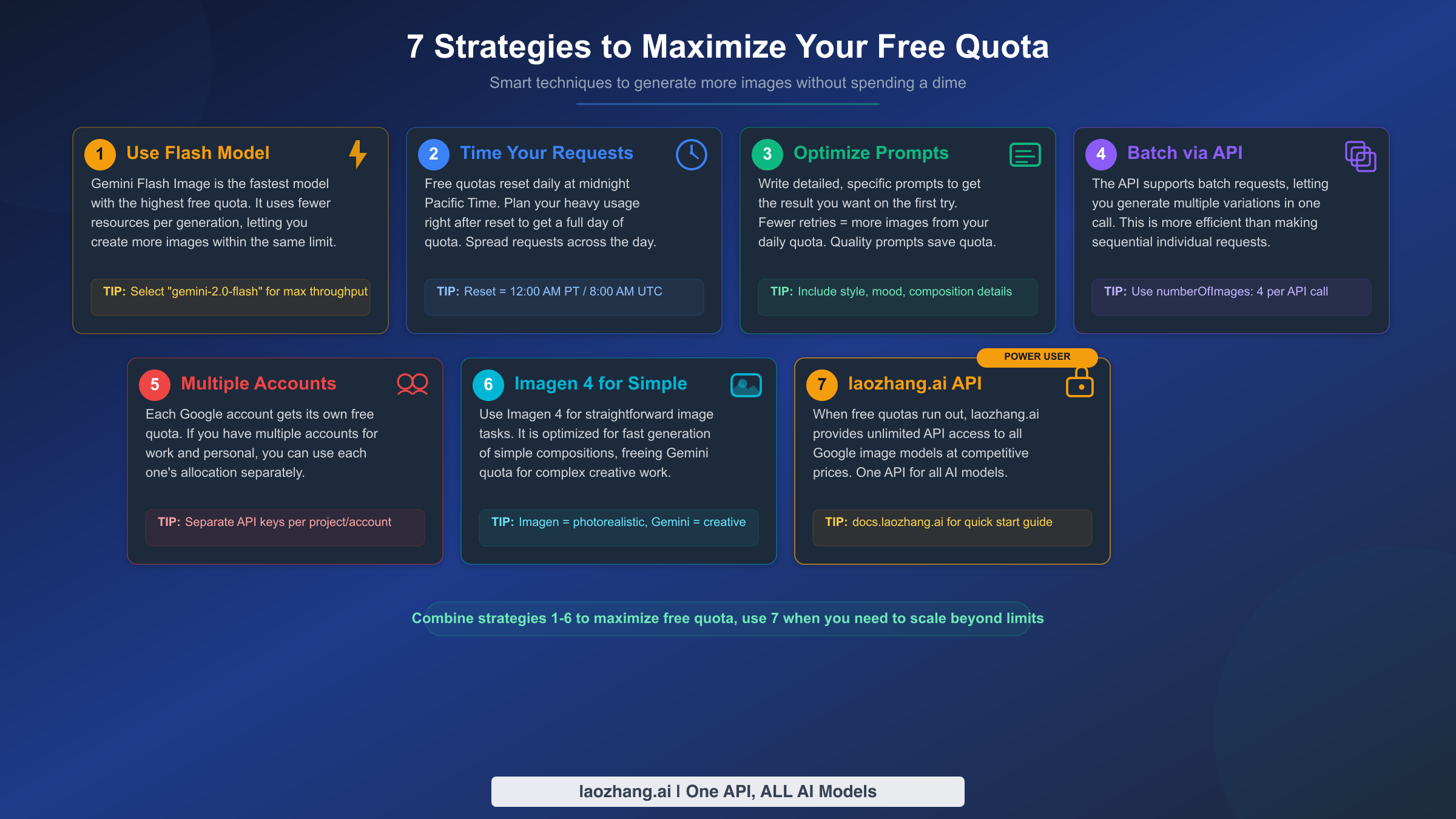
Getting hundreds of free images per day is already generous, but smart usage strategies can stretch your free quota even further. These techniques come from hands-on testing and developer community discussions, and they work regardless of whether you're using the web interface or the API.
Strategy 1: Default to the Flash Model for Speed and Quota
The Gemini 2.5 Flash Image model offers the highest free tier quota among all Google image generation models. Unless you specifically need the superior text rendering or 4K resolution of Nano Banana Pro, Flash should be your default choice. It generates images in 3-5 seconds compared to Pro's 7-10 seconds, and its free quota is roughly 100x more generous. For most use cases — blog illustrations, social media graphics, concept art, and product mockups — Flash produces results that are more than adequate.
Strategy 2: Time Your Requests Around the Midnight Pacific Reset
All Google AI Studio free tier quotas reset at midnight Pacific Time (8:00 AM UTC, 4:00 PM Beijing Time). If you're working on a project that requires many images, plan your most intensive generation sessions to straddle this reset. Generate your batch in the evening Pacific Time, and you'll have a fresh quota available just hours later. For users in Asian or European time zones, this reset timing actually works favorably since it falls during business hours.
Strategy 3: Write Better Prompts to Reduce Retries
Every failed or unsatisfactory generation still counts against your quota. Investing time in prompt craftsmanship pays dividends when you're working within free limits. Include specific details about composition ("centered subject, rule of thirds"), lighting ("soft diffused natural light"), style ("watercolor illustration" or "photorealistic"), and negative constraints ("no text, no watermarks"). The difference between a vague prompt and a detailed one often means getting the right image on the first try instead of the fifth, effectively multiplying your useful output by 5x.
Strategy 4: Leverage the API for Batch Operations
The API free tier allows up to 500 requests per day, and unlike the web interface, you can script automated generation workflows. Write a simple Python loop to generate dozens of variations from a base prompt, automatically saving each result. This is particularly powerful for creating image sets — multiple blog headers, social media series, or A/B testing variations. The programmatic approach also lets you systematically explore prompt variations without manually typing each one.
Strategy 5: Use Multiple Google Accounts Strategically
Google AI Studio's free tier is tied to individual Google accounts, and there's nothing in Google's terms preventing you from using multiple accounts for legitimate testing and experimentation. If you have personal and work Google accounts, each gets its own independent quota. This approach works best for distinct projects — use one account for personal creative work and another for business content generation.
Strategy 6: Try Imagen 4 for Specific Use Cases
Imagen 4 Fast is Google's dedicated text-to-image model and excels at photorealistic outputs with strong prompt adherence. At $0.02 per image on the paid tier, it's also the cheapest API option — but more importantly, it has its own separate quota allocation in AI Studio's playground. When your Gemini Flash quota runs low, switching to Imagen 4 within the same AI Studio session gives you access to additional free generations. The model is particularly strong for product photography-style images, architectural visualizations, and nature scenes.
Strategy 7: Consider API Alternatives for Unlimited Access
When free tier limits genuinely aren't enough for your workflow, API proxy services offer a cost-effective middle ground before committing to Google's subscription tiers. Services like laozhang.ai aggregate multiple AI model APIs — including Gemini image models — under a single endpoint with pay-as-you-go pricing and no daily rate limits. This approach makes sense for users who need predictable, unlimited access without the $19.99/month Google AI Pro commitment, especially if your monthly image volume is moderate.
Google AI Studio vs Free Alternatives — Which Gives You More?
Google AI Studio isn't the only platform offering free AI image generation, but the landscape varies significantly in terms of daily limits, image quality, and what you can actually do without paying. Understanding where each platform excels helps you choose the right tool — or better yet, combine multiple platforms to maximize your total free output.
| Platform | Free Daily Limit | Image Quality | Text in Images | API Access | Key Limitation |
|---|---|---|---|---|---|
| Google AI Studio (Flash) | 500-1,000 | Good | Basic | Yes (500 RPD) | Lower res than Pro |
| Google AI Studio (Pro) | 3 | Excellent | Superior | Paid only | Very low free quota |
| ChatGPT Free | 2-3 | Excellent | Good | No | Extremely limited |
| Bing Image Creator | ~15 | Good | Poor | No | Microsoft account required |
| Leonardo AI Free | 150 tokens/day (~30 images) | Good | Limited | Limited | Token-based system |
| Adobe Firefly Free | 25 credits/month | Very Good | Good | No | Monthly not daily |
| Stable Diffusion (local) | Unlimited | Variable | Poor | Self-hosted | Requires GPU hardware |
Google AI Studio's free tier dominates in raw volume — 500-1,000 daily images far exceeds any competitor's free offering. For a deeper analysis of how different AI image platforms compare on features and API capabilities, our full AI image generation API comparison for 2026 covers 15+ platforms with benchmark data.
The practical strategy for most users is to combine platforms based on their strengths. Use Google AI Studio's Flash model for high-volume work where quantity matters more than maximum quality — batch generation for social media, blog illustrations, and concept exploration. Switch to ChatGPT or Nano Banana Pro's 3 free daily images when you need the highest quality output for hero images, marketing materials, or anything that demands premium polish. For photorealistic work specifically, Imagen 4 within AI Studio and Bing Image Creator both deliver strong results at no cost.
Where Google AI Studio truly stands apart from alternatives is its API access. No other platform provides free programmatic image generation at this scale. ChatGPT's API requires a paid account, Leonardo's free API is heavily limited, and Midjourney doesn't offer an API at all. If your workflow involves automation, batch processing, or integration with custom tools, Google AI Studio is effectively the only serious free option in 2026.
Quality-wise, the landscape is more nuanced than daily limits alone suggest. ChatGPT's image generation (powered by GPT Image 1) produces arguably the most versatile results for creative and artistic prompts, with excellent text rendering and style consistency. Google's Nano Banana Pro matches this quality tier but is limited to 3 free images daily in the consumer app. The Flash model generates good but not exceptional images — perfectly suitable for blogs, social media, and product concepts, but noticeably behind Pro-tier models for marketing materials and hero imagery. Bing Image Creator, powered by DALL-E, delivers solid photorealistic results and doesn't require any account verification, making it the easiest entry point for complete beginners. The optimal free workflow, based on testing across all platforms, is to use Google AI Studio Flash for volume work and exploration, then switch to ChatGPT or Bing for your 2-3 highest-priority images that need premium quality.
When to Upgrade — Cost-Per-Image Analysis Across All Tiers
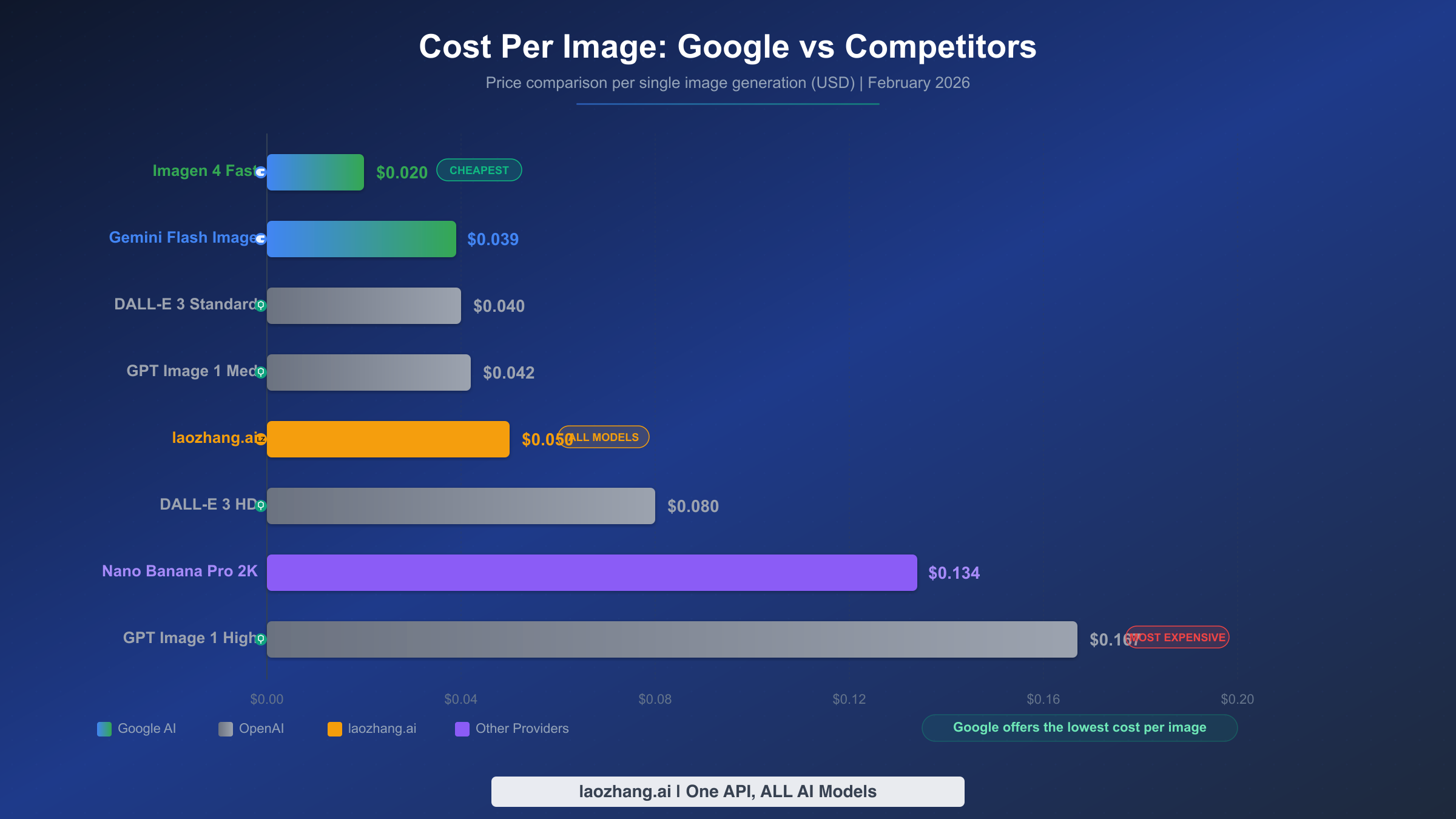
Knowing when free limits aren't enough — and choosing the most cost-effective upgrade path — requires looking at the actual cost per image across every available option. Google offers four subscription tiers plus direct API billing, and competing services add even more choices to the mix. The right choice depends on your volume, quality requirements, and whether you need consumer-app convenience or API flexibility.
For users who primarily generate images through the Gemini consumer app, the subscription tiers present a clear value ladder. At the free tier, you get just 3 Nano Banana Pro images per day, which is insufficient for any regular use. Google AI Plus at $7.99 per month (as of February 2026, per 9to5google.com) unlocks 50 images daily, bringing the effective cost to roughly $0.005 per image if you use the full daily allocation — remarkably cheap. Google AI Pro at $19.99 per month provides 100 images daily at an effective cost of $0.007 per image, plus access to the full 1-million-token context window and other premium features. These subscription costs include 2K resolution Nano Banana Pro images with accurate text rendering, making them excellent value for professional use.
The API billing path tells a different story, and for many users, it's more cost-effective than subscriptions. The Gemini 2.5 Flash Image model charges just $0.039 per image through the standard API, and the batch API cuts this further to $0.0195 per image — among the lowest prices in the industry. Nano Banana Pro's API pricing of $0.134 per 2K image and $0.24 per 4K image is more premium but still competitive with OpenAI's GPT Image 1 High at $0.167 per image (per ai.google.dev/gemini-api/docs/pricing, February 2026). For high-volume users, Google's batch API offers a genuine 50% discount that no subscription tier can match.
| Pricing Option | Cost/Image | Best For | Minimum Commitment |
|---|---|---|---|
| AI Studio Free (Flash) | $0.00 | Testing, low volume | None |
| Google AI Plus ($7.99/mo) | ~$0.005 | Regular personal use | Monthly subscription |
| Google AI Pro ($19.99/mo) | ~$0.007 | Professional workflow | Monthly subscription |
| Gemini Flash API | $0.039 | Automated pipelines | Pay-as-you-go |
| Gemini Flash Batch API | $0.0195 | High-volume batch | Pay-as-you-go |
| Imagen 4 Fast API | $0.02 | Photorealistic images | Pay-as-you-go |
| Nano Banana Pro API (2K) | $0.134 | Premium quality | Tier 1 billing |
| laozhang.ai API | ~$0.05 | Multi-model access | Pay-as-you-go |
For developers and businesses that need flexible, high-volume image generation without committing to a specific platform, API aggregation services offer a practical alternative. Platforms like laozhang.ai provide access to multiple image generation models through a unified OpenAI-compatible API, typically at prices competitive with or below official API rates, and without the per-day rate limits that constrain even paid Google API tiers. This approach is particularly valuable when you need to switch between models based on the task — using Gemini Flash for quick drafts and Nano Banana Pro for final outputs — without managing multiple API keys and billing accounts.
API Integration for Higher Free Limits
The Gemini Developer API unlocks significantly higher free tier quotas than the web interface alone, and integrating it into your workflow is straightforward even if you're not a full-time developer. The free tier supports up to 500 image requests per day through the API, and the code required is minimal — often just 10-15 lines for basic image generation.
Beyond the basic Python example shown earlier, here's how to generate images with specific aspect ratios and save them programmatically using curl, which works on any operating system with no additional software installation:
bashcurl -X POST \
  "https://generativelanguage.googleapis.com/v1beta/models/gemini-2.5-flash-preview-image-generation:generateContent?key=YOUR_API_KEY" \
  -H "Content-Type: application/json" \
  -d '{
    "contents": [{
      "parts": [{"text": "A minimalist logo design for a tech startup, clean vector style, blue and green colors, white background"}]
    }],
    "generationConfig": {
      "responseModalities": ["image", "text"],
      "imageGenerationConfig": {
        "aspectRatio": "1:1"
      }
    }
  }' | python3 -c "
import sys, json, base64
resp = json.load(sys.stdin)
for part in resp['candidates'][0]['content']['parts']:
    if 'inlineData' in part:
        with open('output.png', 'wb') as f:
            f.write(base64.b64decode(part['inlineData']['data']))
        print('Image saved as output.png')
"
For users who need to integrate Gemini image generation into existing OpenAI-compatible workflows, the process becomes even simpler using proxy-compatible endpoints. Many developers already have code built around the OpenAI API format, and services that support the same API schema — including Google's own compatibility layer and third-party proxies — allow you to switch between models by simply changing the endpoint URL and API key. This flexibility means you can experiment with Google's free image generation without rewriting your existing image pipeline.
The API also supports advanced features that aren't available through the web interface alone. You can specify exact aspect ratios (including 21:9 for cinematic content), set safety filter levels, include up to 14 reference images for style-guided generation with the Pro model, and enable Google Search grounding to generate images based on real-time information. These capabilities, combined with the 500 daily free requests, make the API the most powerful free image generation tool available to developers in 2026.
For teams already using the OpenAI API format in their codebase, migrating to Google's image generation is remarkably simple through OpenAI-compatible proxy endpoints. Instead of rewriting your entire image pipeline, you can change the base URL and API key while keeping the same request/response format. This approach works particularly well when you want to A/B test different models — running the same prompts through both OpenAI and Google endpoints to compare quality and cost. Platforms like laozhang.ai support this unified API pattern, routing requests to the optimal model based on your configuration without requiring separate SDK integrations for each provider.
One important consideration for API users: Google's tier progression system significantly impacts what you can access. The free tier provides generous quotas for the Flash model but locks out Pro entirely. Tier 1 requires only an enabled billing account (you can add a credit card without spending anything), but the real quota jump happens at Tier 2, which demands $250 in cumulative spending plus a 30-day waiting period (per ai.google.dev/gemini-api/docs/rate-limits, February 2026). For developers who need immediate high-volume access without waiting for tier progression, third-party API services offer immediate access to all model tiers through a single account.
Frequently Asked Questions
Can I use images generated in Google AI Studio for commercial purposes?
Google's terms of service for AI Studio allow you to use generated images in commercial projects, provided the content doesn't violate their usage policies regarding harmful, deceptive, or infringing material. All images generated through Google's models include invisible SynthID watermarks — digital signatures that identify the image as AI-generated — but these watermarks don't restrict usage rights. However, you should be aware that on the free tier, Google explicitly states that your prompts and generated content may be used to improve their models, which means your creative concepts could influence future model outputs (per Google AI Studio Terms of Service).
Does Google AI Studio require a credit card for free image generation?
No credit card is required for the AI Studio web interface or the free tier Gemini Developer API. You only need a standard Google account. A credit card is required if you want to upgrade to Tier 1 API access (needed for Nano Banana Pro) or subscribe to Google AI Plus/Pro/Ultra plans. The free tier has no trial period or expiration — it's permanently free within the daily quota limits.
What's the maximum image resolution on the free tier?
The free tier through AI Studio's web interface and the Gemini 2.5 Flash Image API supports images up to 1024x1024 pixels (1K resolution). Higher resolutions — 2K (2048x2048) and 4K (4096x4096) — are exclusive to Nano Banana Pro, which requires either a paid subscription or API billing. For most digital use cases including blogs, social media, and web design, 1K resolution is more than sufficient.
Will the free tier be reduced or removed in the future?
Google has historically adjusted free tier quotas — most recently in December 2025, when several model quotas were reduced by 50-80% (per Google AI developers forum, December 2025). While there's no guarantee the current free limits will remain permanently, Google has strong incentives to maintain free access: it drives developer adoption of the Gemini ecosystem, generates training data (on the free tier), and establishes Google AI Studio as the default platform for AI experimentation. The free tier has been available since AI Studio's launch and has survived multiple pricing restructurings.
How does image quality compare between Nano Banana (Flash) and Nano Banana Pro?
Nano Banana (Flash) produces good quality images suitable for most casual and semi-professional applications. It handles compositions, styles, and basic text adequately. Nano Banana Pro delivers noticeably superior results in three areas: text rendering accuracy (critical for images with words, logos, or signs), fine detail preservation (hair, textures, complex patterns), and resolution (up to 4K). For hero images, marketing materials, or any application where quality is paramount, Pro is worth the upgrade. For volume work, blog illustrations, and iterative exploration, Flash is the pragmatic choice.
What image formats and sizes does Google AI Studio support?
Generated images are returned in PNG format by default through both the web interface and API. The web interface automatically displays and allows download of generated images. Through the API, images are returned as base64-encoded data that you decode and save in your preferred format. The free tier supports images up to 1024x1024 pixels in various aspect ratios (1:1, 2:3, 3:2, 3:4, 4:3, 4:5, 5:4, 9:16, 16:9, and 21:9), giving you flexibility for everything from square social media posts to ultrawide cinematic formats. Higher resolutions of 2K (2048x2048) and 4K (4096x4096) are available through Nano Banana Pro's paid API tiers.
Is there a watermark on free-tier generated images?
Images generated through the free tier do not have visible watermarks. However, all images created by Google's AI models include an invisible SynthID digital watermark — a machine-readable signature embedded in the image data that identifies it as AI-generated. This watermark is imperceptible to humans and doesn't affect image quality or usability, but it can be detected by specialized tools. Google implements SynthID across all tiers, including paid subscriptions and API access, as part of their responsible AI deployment practices.
How does Google use my prompts and generated images on the free tier?
On the free tier, Google's terms state that your prompts, uploaded images, and generated outputs may be used to improve Google's AI models. This data can be reviewed by human annotators as part of quality improvement processes. If your work involves sensitive, proprietary, or confidential visual content, consider using a paid API tier where Google offers stronger data handling guarantees — paid API calls include a commitment not to use your data for model training. For most personal and general business use, the free tier's data policy is comparable to other free AI services including ChatGPT's free tier and Bing Image Creator.