Claude Code Statusline Setup: Routes, Fields, Scripts, and Fixes
Choose the right Claude Code statusline route, test the script with mock JSON, add context, cost, and git fields safely, and fix blank or stale output.
On this page
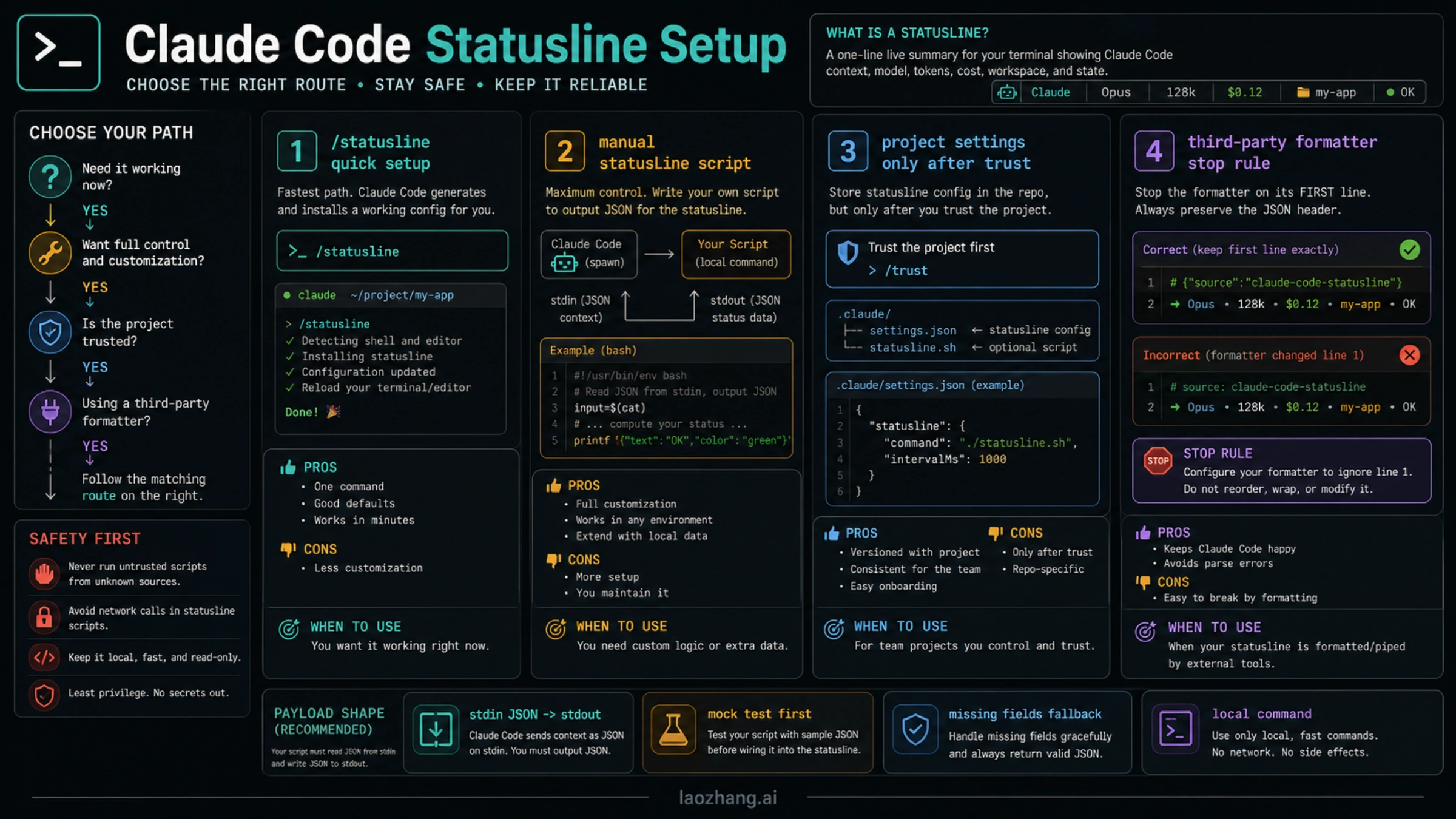
A Claude Code statusline is a local command: Claude Code sends session JSON to stdin, and whatever your command prints to stdout becomes the line at the bottom of the interface. Use /statusline when you want a quick personal setup, use manual statusLine settings when you need a reviewable script, and use project settings only after the command is safe for every teammate.
The safe order is route, command contract, settings scope, then display fields. The statusline can show model, directory, git branch, context usage, cost estimates, and eligible rate-limit data, but every field should be treated as optional until your script handles missing or null values.
| Route | Use it when | First proof |
|---|---|---|
/statusline | You want Claude Code to generate a personal first version | The line appears and the generated script is readable |
Manual statusLine | You need a reviewed command, team conventions, or controlled fallbacks | The command works with mock JSON outside Claude Code |
| Project settings | The same non-secret behavior should apply to a repo | Every teammate can run the command path safely |
| Third-party formatter | Styling, themes, or richer layout justify a dependency | Source, install scope, and local execution are acceptable |
What The Claude Code Statusline Actually Does
The statusline is not a terminal prompt theme and it is not an API call. It is a command hook inside Claude Code's interface. Claude Code starts your configured command, sends a JSON object on stdin, reads stdout, and renders that output as the visible status line.
That design has three practical consequences.
First, a statusline command runs locally. It can call git, read files, or run a script in your home directory. That is useful, but it also means a shared project setting can execute local shell behavior for anyone who trusts the project.
Second, the script should be boringly defensive. The JSON object can include model, workspace, git, cost, context, session, version, output style, vim, agent, worktree, and rate-limit data, but not every field appears for every account, version, or route. A good script prints useful fallback text instead of crashing.
Third, stdout is the product surface. Debug logs, stack traces, and warnings should go to stderr while you develop. The rendered line should stay short, stable, and fast.
Start With /statusline When You Need A First Version
If you just need a working personal statusline, run the slash command inside Claude Code:
/statuslineDescribe what you want in plain language. A good first request is intentionally simple:
Show model, current directory, git branch, context percentage, and estimated cost. Keep it one line and handle missing fields.Claude Code can generate and install the script for you. After it works, open the generated file and read it before you reuse it in a project. You are approving a local command, not just changing a color theme.
Use this route when you are exploring. Do not treat the generated result as a team standard until it has been shortened, tested with mock input, and reviewed for local paths, slow commands, and secrets.
Use Manual statusLine When Control Matters
Manual setup is better when you want repeatability. The setting is a command object, usually in a Claude Code settings file:
{
  "statusLine": {
    "type": "command",
    "command": "~/.claude/statusline/statusline.js",
    "refreshInterval": 5
  }
}
The important fields are the command type and command path. refreshInterval is optional. Use it only when part of your line needs a periodic refresh, such as clock-like data or cached external state. Claude Code already updates the line around interface events, and very frequent refreshes make slow scripts more painful.
Keep the command path stable. For personal use, a path under ~/.claude/ is fine. For a team project, prefer a repo script only if it is safe, reviewed, executable, and does not depend on one person's home directory.
Test The Script With Mock JSON Before Enabling It
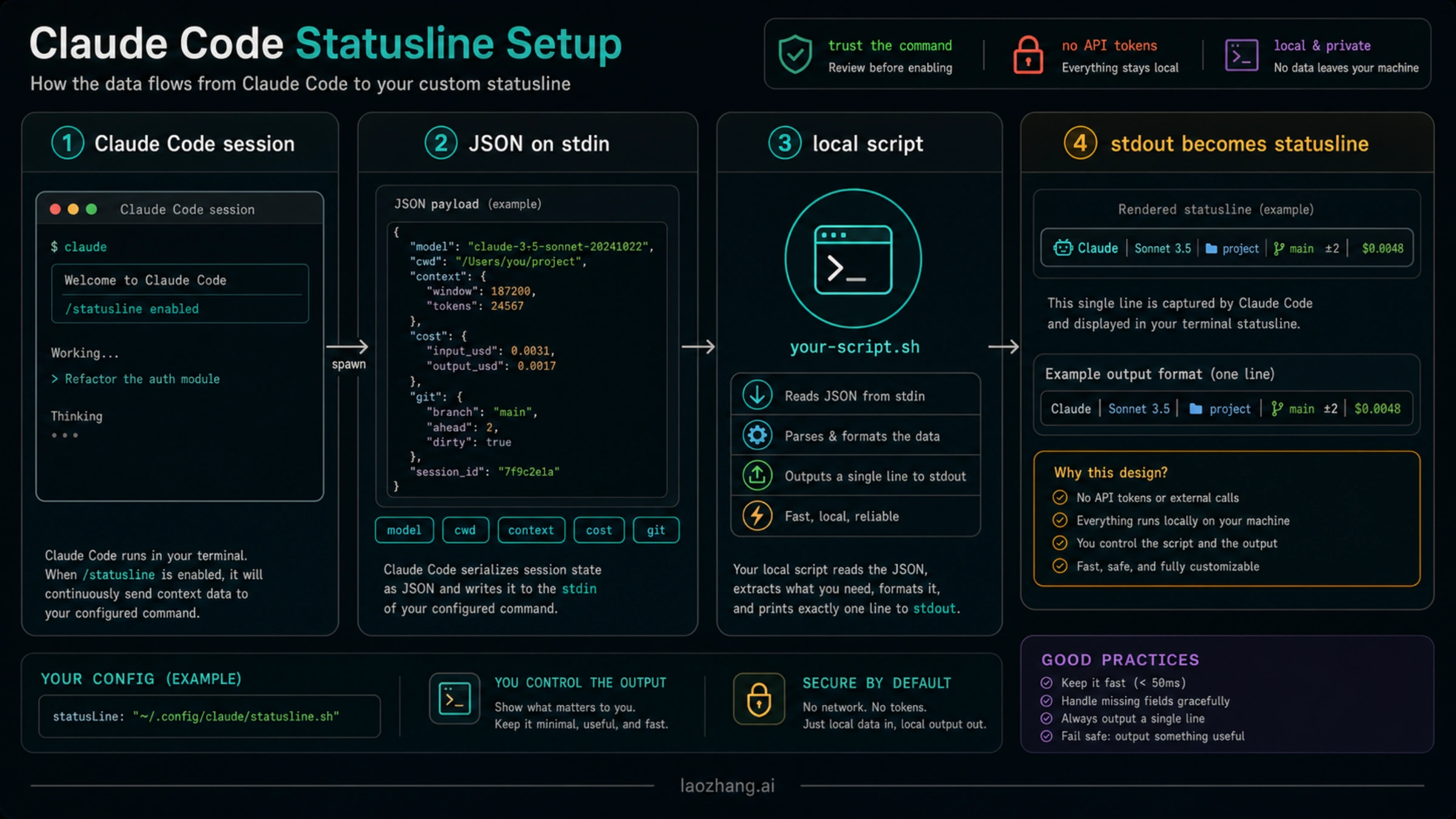
Here is a small Node.js starter script that treats fields as optional and keeps stdout clean:
#!/usr/bin/env node

let input = "";
process.stdin.setEncoding("utf8");
process.stdin.on("data", (chunk) => {
  input += chunk;
});

process.stdin.on("end", () => {
  let data = {};
  try {
    data = input.trim() ? JSON.parse(input) : {};
  } catch (error) {
    console.error(`statusline JSON parse failed: ${error.message}`);
  }

  const model = data.model?.display_name || data.model?.id || "model?";
  const cwd = data.workspace?.current_dir || data.cwd || "";
  const dir = cwd ? cwd.split("/").filter(Boolean).pop() : "workspace?";
  const branch = data.git?.branch ? `git:${data.git.branch}` : "git:-";
  const context =
    typeof data.context_window?.percentage === "number"
      ? `ctx:${Math.round(data.context_window.percentage)}%`
      : "ctx:?";
  const cost =
    typeof data.cost?.total_cost_usd === "number"
      ? `$${data.cost.total_cost_usd.toFixed(2)} est`
      : "$? est";

  process.stdout.write(`${model} | ${dir} | ${branch} | ${context} | ${cost}`);
});
Save it as ~/.claude/statusline/statusline.js, make it executable, and test it without Claude Code first:
chmod +x ~/.claude/statusline/statusline.js

printf '%s' '{
  "model": {"display_name": "Claude Sonnet"},
  "workspace": {"current_dir": "/Users/me/project"},
  "git": {"branch": "main"},
  "context_window": {"percentage": 42},
  "cost": {"total_cost_usd": 0.18}
}' | ~/.claude/statusline/statusline.js
The expected shape is one clean stdout line:
Claude Sonnet | project | git:main | ctx:42% | $0.18 estIf this command fails outside Claude Code, fix the script first. Claude Code cannot make a broken local command safe.
Choose Fields That Help You Work
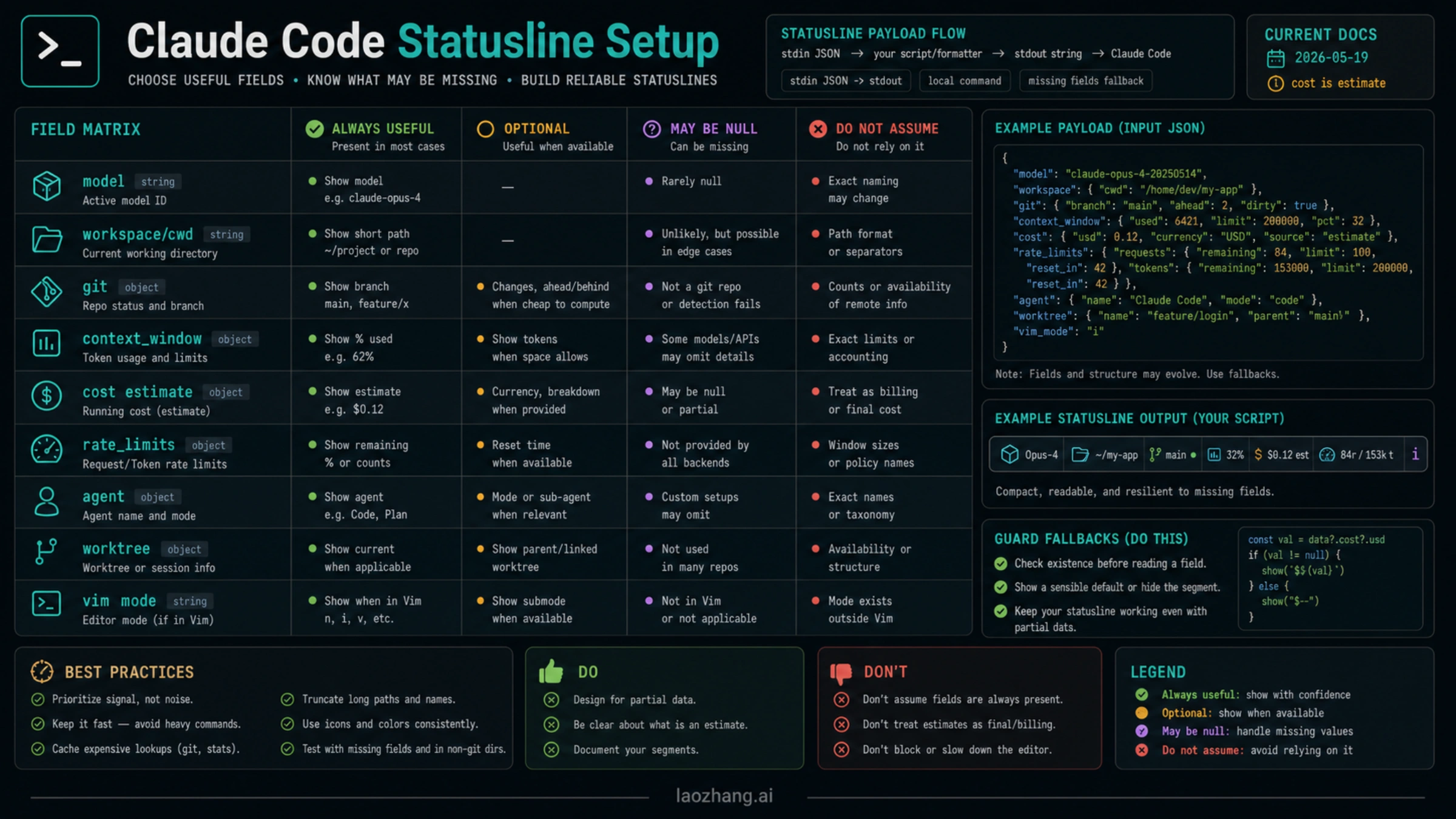
A statusline should reduce context switching. It should not become a crowded dashboard that you stop reading. Start with fields that answer a live coding question.
| Field group | Useful display | Caveat |
|---|---|---|
| Model | Current model name or short id | Keep it short; long names crowd the line |
| Workspace | Directory or workspace name | Prefer basename, not a full path |
| Git | Branch, dirty state, worktree signal | Cache expensive git checks in large repos |
| Context window | Percentage or remaining signal | Field shape can change; always guard missing values |
| Cost | Session estimate | Treat as an estimate, not billing truth |
| Rate limits | Remaining/reset data when exposed | Not every route or account exposes it |
| Session/version | Session id, app version, output style | Useful for debugging, noisy for daily use |
| Agent/worktree/vim | Mode-specific state | Show only when your workflow depends on it |
Do not display everything just because the JSON can include it. A good line usually has one identity segment, one location segment, one state segment, and one risk segment:
Sonnet | api-docs | main* | ctx:42% | $0.18 estThe asterisk after the branch can mark dirty state. The context and cost segments are risk signals. If you only need two of those, delete the rest.
Pick The Right Settings Scope
Claude Code settings can live in multiple scopes. The statusline setting should live where its command is safe.
| Scope | Good use | Risk |
|---|---|---|
| User settings | Personal statusline under your home directory | Other machines will not have the same path |
| Local project settings | Machine-specific repo behavior | Easy to forget when debugging a teammate's setup |
| Shared project settings | Team standard that runs from repo-owned scripts | Must not execute unsafe or secret-dependent commands |
| Managed settings | Organization policy | Too heavy for personal display preferences |
| Command-line/session override | Temporary experiments | Not durable enough for documentation |
For a team, prefer this pattern:
{
  "statusLine": {
    "type": "command",
    "command": "./.claude/statusline/statusline.js"
  }
}
Then commit the script only if it is reviewed like code. It should avoid secrets, private endpoints, network calls, machine-specific paths, and high-latency work. It should also fail closed with a simple line rather than throwing.
Keep Updates Fast
Statusline commands are meant to be lightweight. If your script runs git status, reads package metadata, checks a remote API, and computes a large summary on every update, the interface will feel worse.
Use three rules:
- Prefer fields Claude Code already sends over recomputing them.
- Cache expensive shell checks, especially git status in large repositories.
- Use
refreshIntervalonly when a value needs time-based refresh.
A simple local script should usually finish quickly enough that you never notice it. If the line is stale or slow, measure the script directly:
time printf '{}' | ~/.claude/statusline/statusline.jsIf that is slow outside Claude Code, shrink the script. If it is fast outside Claude Code but stale inside Claude Code, inspect trust, hooks, path, and update triggers next.
Windows And Terminal Rendering Notes
On Windows, shell and path behavior are usually the failure source. Keep commands explicit. If you use Git Bash, PowerShell, WSL, or Node, test the exact command through the same shell Claude Code will use.
Use cross-platform scripts when possible. Node and Python are easier to keep consistent than complex shell one-liners. If you need colors or links, check terminal support. ANSI colors can work well; OSC 8 hyperlinks depend on terminal support and may render as plain text.
Keep the first working version plain. Add powerline glyphs, colors, or links only after the line works without them.
When A Third-Party Formatter Is Worth It
Third-party statusline tools can save time when you want themes, powerline layouts, richer field formatting, or ready-made usage displays. They are optional accelerators, not the core contract.
Use a formatter only when these checks pass:
| Check | Why it matters |
|---|---|
| Source and maintainer are acceptable | The formatter runs as a local command |
| Install scope is clear | Global tools can affect many projects |
| It reads official stdin JSON | Private or brittle usage endpoints age poorly |
| It handles missing fields | Your route may not expose every field |
| It stays fast | The statusline runs repeatedly |
| It is easy to disable | Debugging should not require rewriting the whole setup |
If you cannot explain what the formatter executes, keep your own small script.
Troubleshooting Blank, Skipped, Or Stale Output
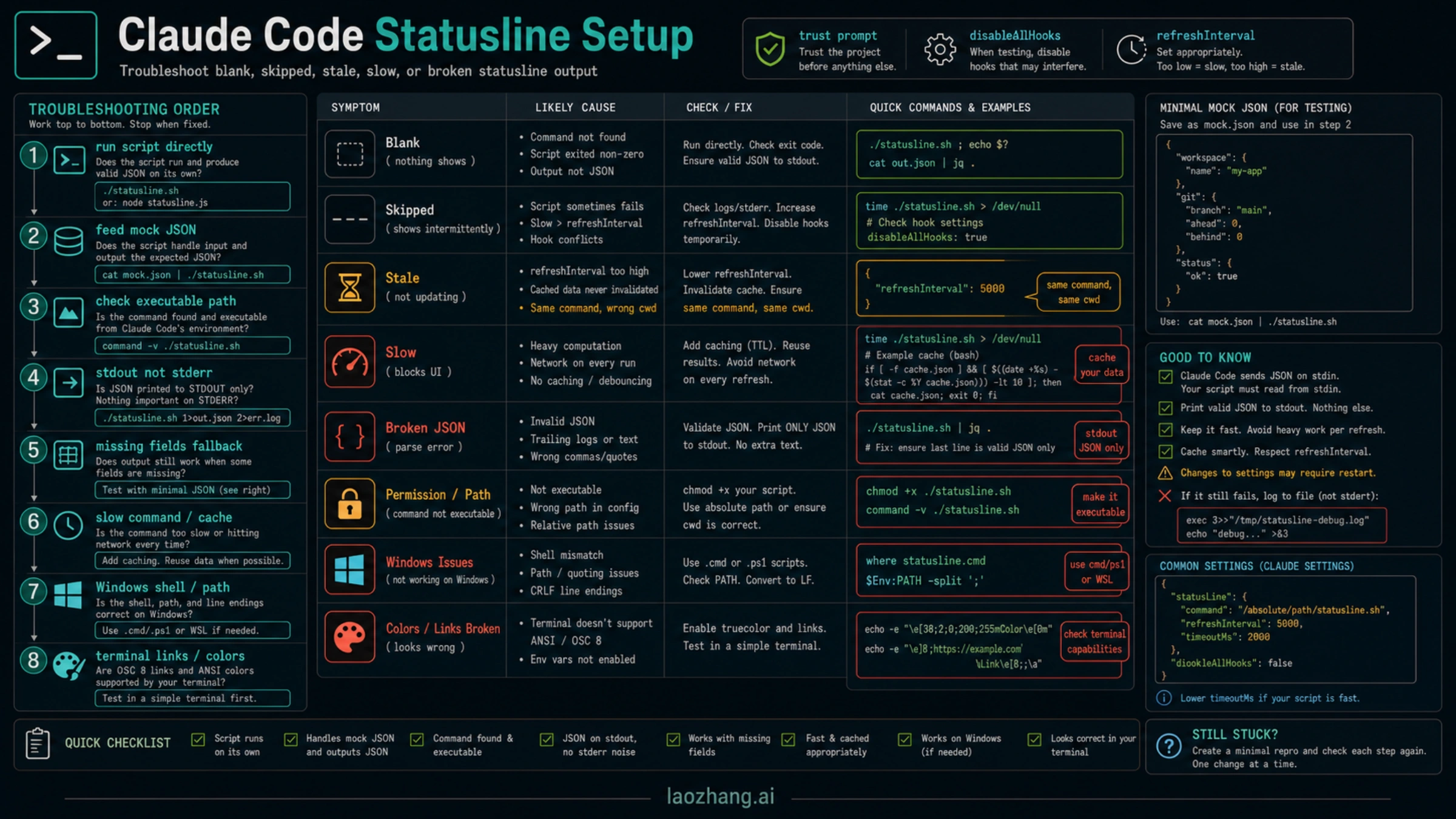
Debug in this order:
| Symptom | Fast proof | Fix |
|---|---|---|
| No line appears | Run the command directly | Fix path, executable bit, or interpreter |
| Line appears outside Claude Code only | Feed mock JSON and inspect trust prompts | Approve trusted project command or move to user scope |
| Output is blank | Check stdout vs stderr | Print the final status to stdout only |
Output says undefined or crashes | Use mock JSON with missing fields | Add fallbacks for optional fields |
| Line is stale | Remove slow work and check refresh needs | Cache or use a bounded refreshInterval |
| Line is skipped | Run Claude Code with debug output | Fix command failure, trust, or hooks configuration |
| Works on macOS but not Windows | Test the same shell and path | Use explicit interpreter and platform-safe paths |
| Colors or links look wrong | Test plain text first | Add terminal-specific rendering last |
If you use disableAllHooks, remember that it can affect hook-like behavior you expected to run. Treat it as part of the diagnostic surface, not as a random toggle.
Internal Claude Code Setup Links
If statusline setup is your first Claude Code customization, these related guides help keep the surrounding workflow clean:
- Install and launch the CLI with the Claude Code install guide.
- Separate credential ownership with the Claude Code API configuration guide.
- Understand billing route differences with the Claude Code API key vs subscription billing guide.
- Extend workflow context after the interface is stable with Claude Code memory.
- Add reusable workflow extensions with Claude Code best skills.
FAQ
Is statusline the same as statusLine?
Use statusline as the common developer phrase and /statusline as the slash command. Use statusLine for the JSON settings key. They point at the same feature area but are not interchangeable in code.
Does a Claude Code statusline use API tokens?
The statusline command itself runs locally and does not consume API tokens. It can display cost or context data that Claude Code provides, but printing that data is not an extra model request.
Can the statusline show rate limits?
It can display rate-limit data when Claude Code exposes that data for the active route or account. Do not assume rate_limits is always present. Your script should hide or fall back when it is absent.
Should I commit a statusline script to the project?
Only if it is safe for every teammate. Shared scripts should be reviewed, fast, non-secret, path-safe, and easy to disable. Personal home-directory scripts belong in user or local settings.
Why does my statusline show undefined?
Your script assumes a field exists. Feed the script mock JSON with that field missing, then add optional chaining and fallback text. The line should degrade to ctx:? or git:-, not throw.
What is the best first statusline?
Use a short line: model, workspace basename, git branch, context percentage if present, and cost estimate if present. Add richer styling only after those fields work reliably.