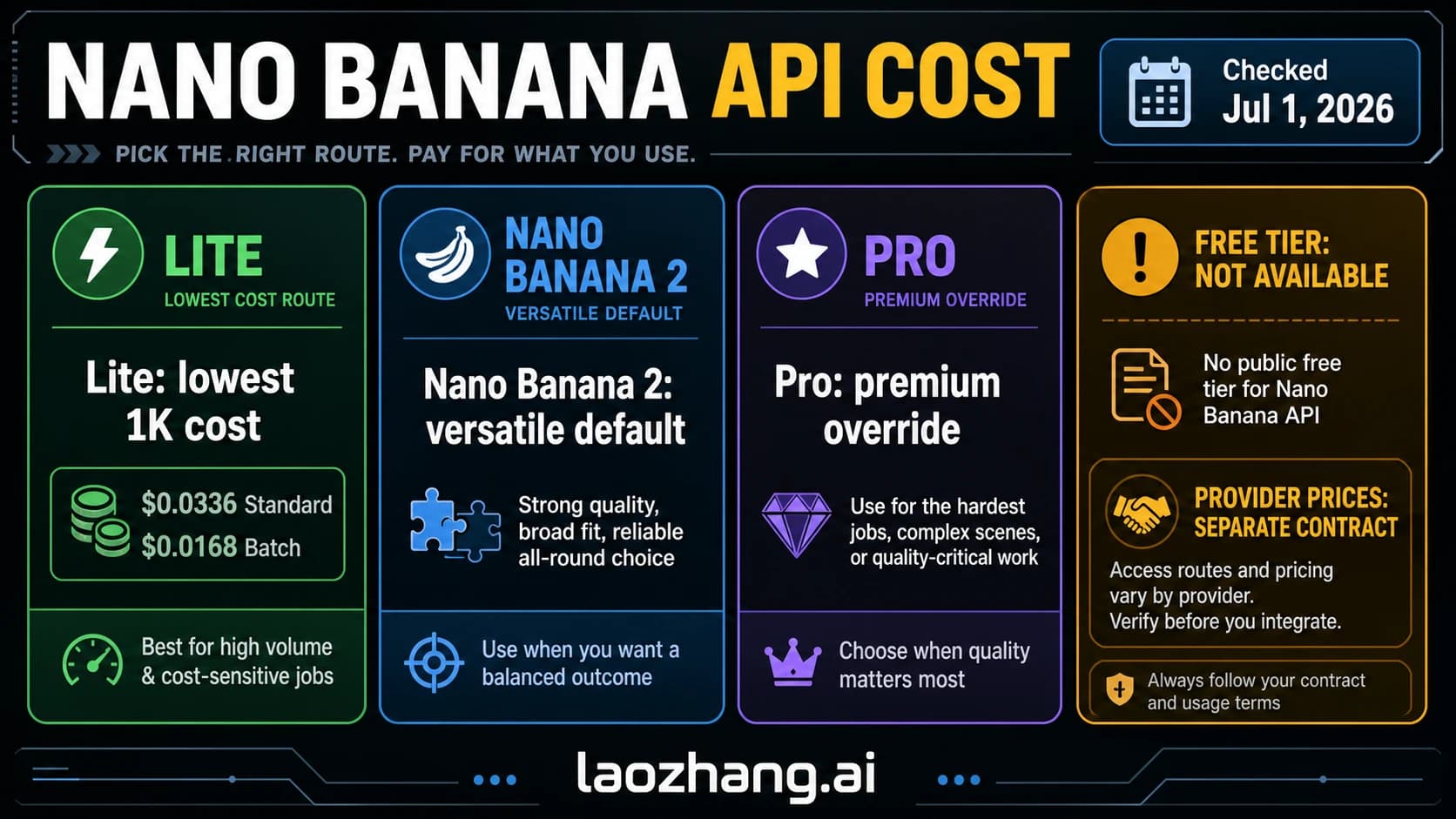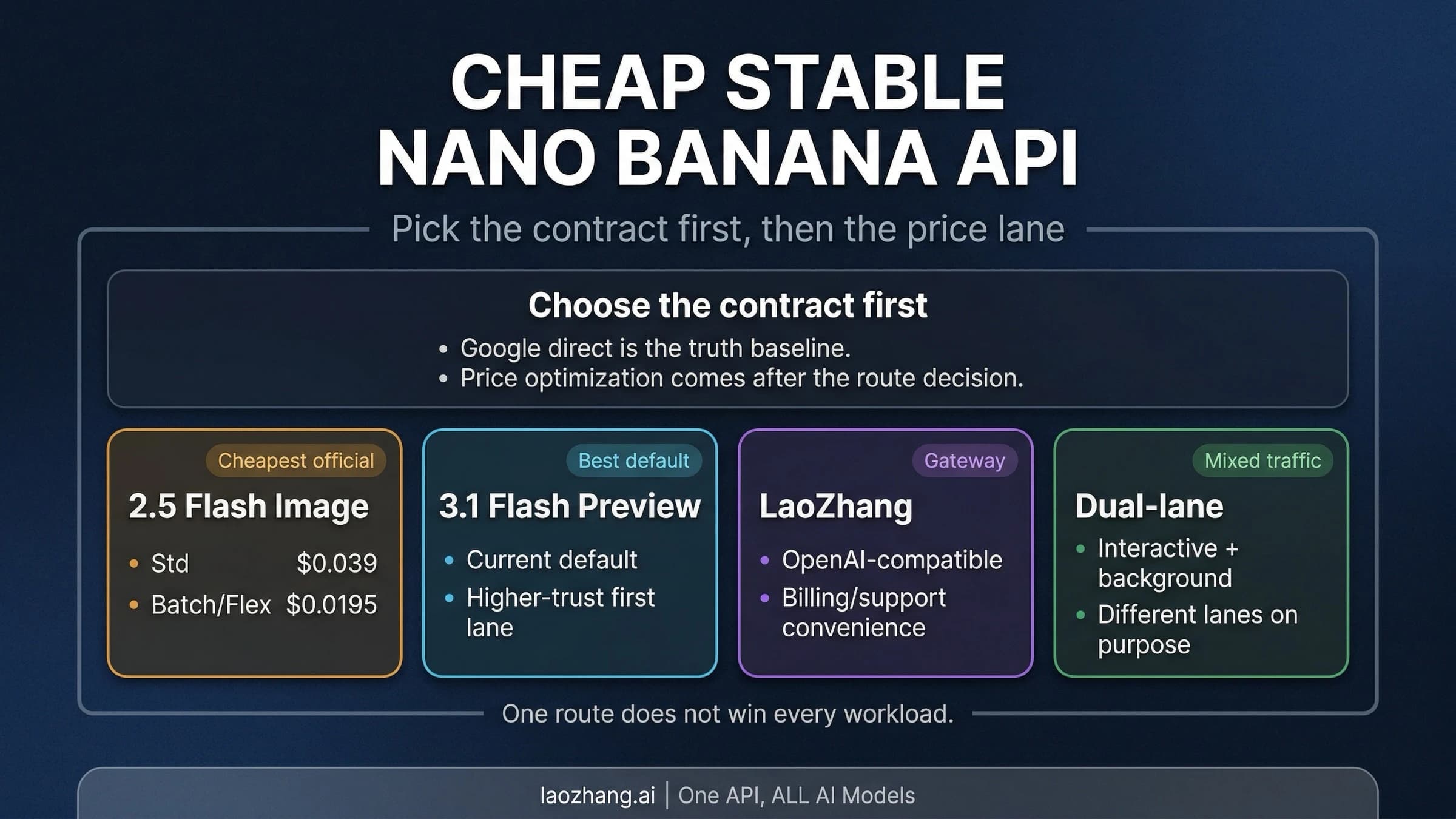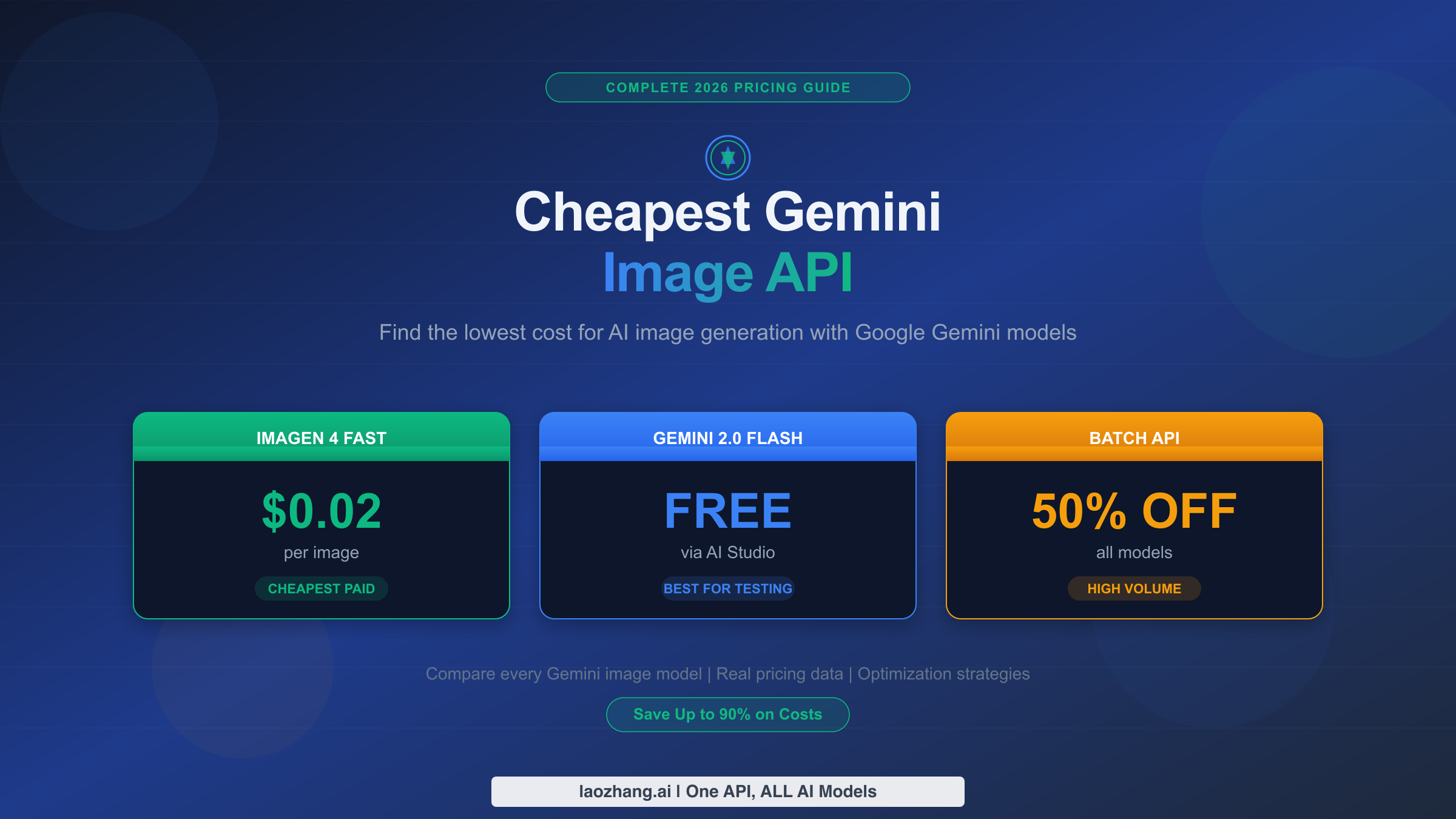
Google's Imagen 4 Fast API generates images at just $0.02 each, making it the cheapest official Gemini image generation option as of February 2026. But that's far from the only way to save money. Between the completely free Google AI Studio tier, the Batch API's automatic 50% discount, and third-party providers offering Nano Banana Pro at $0.05 per image, developers have more cost-saving options than ever before. This guide maps out every pricing path so you can find the one that matches your budget and volume needs.
TL;DR
If you're in a hurry, here's the quick answer to "what's the cheapest Gemini image generation API?"
| Option | Cost Per Image | Best For |
|---|---|---|
| Google AI Studio (Gemini 2.0 Flash) | $0.00 (Free) | Testing, prototypes, low volume |
| Imagen 4 Fast | $0.02 | Production, best value official |
| Gemini 2.5 Flash (Batch) | $0.0195 | Non-urgent bulk generation |
| Gemini 2.5 Flash (Standard) | $0.039 | Real-time, balanced quality/cost |
| Gemini 3 Pro Image (1K-2K) | $0.134 | Premium quality, text rendering |
| Gemini 3 Pro Image (4K) | $0.24 | Ultra-high resolution output |
The cheapest paid option is Imagen 4 Fast at $0.02 per image. For zero-cost generation, Google AI Studio's free tier supports Gemini 2.0 Flash image generation with daily limits. If you can wait up to 24 hours for results, the Batch API cuts any model's price by 50%.
Complete Gemini Image API Pricing — Every Model, Every Tier
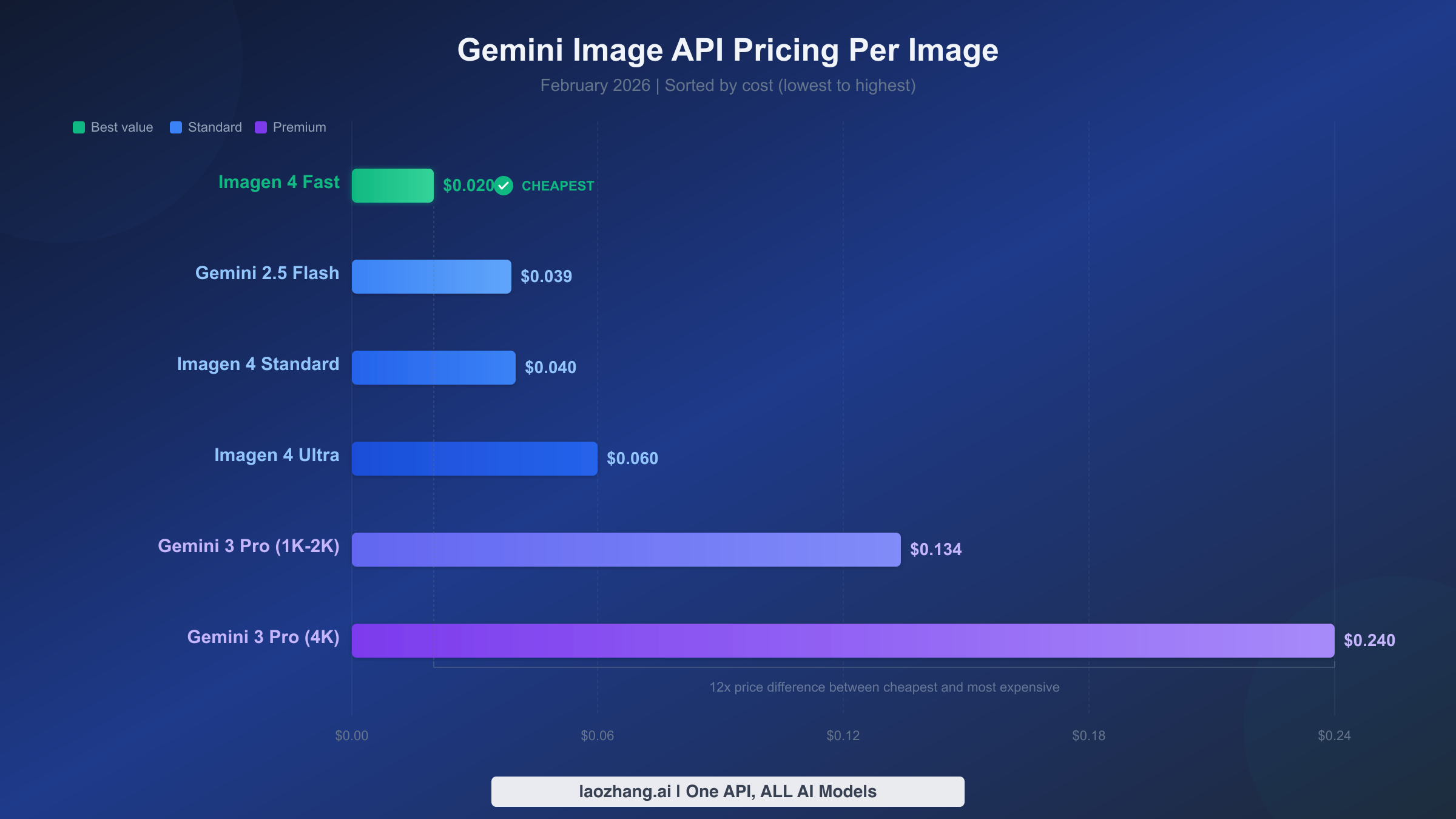
Understanding Gemini image generation pricing requires knowing that Google offers two distinct product families for image generation through its API: the Gemini multimodal models (which generate images as part of conversational AI) and the Imagen models (dedicated image generation engines). Each family contains multiple models at different price points, and the difference between the cheapest and most expensive option is a factor of 12x. Getting this distinction right is the first step to optimizing your costs.
The Gemini multimodal image models combine text understanding with image generation. Gemini 2.5 Flash Image (also known as Nano Banana) is the workhorse option at $0.039 per 1024x1024 image, consuming 1,290 output tokens per generation (Google AI pricing page, February 2026). Its bigger sibling, Gemini 3 Pro Image (known as Nano Banana Pro), delivers superior quality with advanced reasoning capabilities and text rendering. However, it comes at a significantly higher price: $0.134 per image at 1K-2K resolution and $0.24 per image at 4K resolution. The Pro model supports up to 14 reference images for character consistency and can generate images in resolutions up to 4096x4096 pixels, which justifies its premium pricing for professional use cases.
On the Imagen side, Google offers three tiers of its fourth-generation dedicated image model. Imagen 4 Fast leads as the cheapest official option at $0.02 per image — that's 49% less than Gemini 2.5 Flash and 85% less than Gemini 3 Pro. Imagen 4 Standard sits at $0.04 per image, while Imagen 4 Ultra tops out at $0.06 per image for the highest quality output. All Imagen models generate 1024x1024 images by default (Google AI pricing page, February 2026).
Here's the complete pricing matrix with all models side by side:
| Model | API Name | Price/Image | Batch Price | Resolution | Quality |
|---|---|---|---|---|---|
| Imagen 4 Fast | imagen-4-fast | $0.02 | N/A | 1024x1024 | Good |
| Gemini 2.5 Flash Image | gemini-2.5-flash-image | $0.039 | $0.0195 | 1024x1024 | Good+ |
| Imagen 4 Standard | imagen-4-standard | $0.04 | N/A | 1024x1024 | Better |
| Imagen 4 Ultra | imagen-4-ultra | $0.06 | N/A | 1024x1024 | Best (Imagen) |
| Gemini 3 Pro Image (1K-2K) | gemini-3-pro-image-preview | $0.134 | $0.067 | Up to 2048x2048 | Premium |
| Gemini 3 Pro Image (4K) | gemini-3-pro-image-preview | $0.24 | $0.12 | Up to 4096x4096 | Premium+ |
One critical nuance: input tokens are charged separately from output. When you send a text prompt to any Gemini image model, the input costs approximately $0.0011 per request (560 tokens). This is negligible for most use cases but adds up at very high volumes — roughly $1.10 per thousand image generations on the input side alone.
The token-based pricing model can be confusing for developers accustomed to flat per-image rates from services like Midjourney or DALL-E. Here's how it works in practice: Google charges based on the number of output tokens consumed when generating an image, not a fixed per-image fee. For Gemini 2.5 Flash, each 1024x1024 image consumes exactly 1,290 output tokens at a rate of $0.30 per million output tokens, which works out to $0.039 per image. For Gemini 3 Pro Image, the output token count varies by resolution: 1,120 tokens for 1K-2K images and 2,000 tokens for 4K images, with output priced at $0.12 per million tokens. Understanding this token math is essential for accurate cost projections — it also means that if Google adjusts its per-million-token rates, your per-image cost changes automatically.
Another pricing consideration worth noting is the aspect ratio flexibility. All Gemini image models support nine different aspect ratios (1:1, 2:3, 3:2, 3:4, 4:3, 4:5, 5:4, 9:16, 16:9, and 21:9), and the cost remains the same regardless of which ratio you choose. This matters because wider or taller images don't cost more than square ones — a 16:9 landscape image at 1K resolution costs the same $0.039 as a 1:1 square with Gemini 2.5 Flash. For applications generating images in multiple formats (social media thumbnails, blog headers, vertical stories), this flat pricing across ratios is a meaningful advantage over competitors that charge by pixel count.
Free Image Generation — How to Start Without Spending a Cent
For developers who want to experiment without committing any budget, Google provides several genuinely free paths to Gemini image generation. The most accessible is Google AI Studio, which offers free API access to supported models with daily rate limits. As of February 2026, Gemini 2.0 Flash is available completely free of charge in Google AI Studio for all available regions (Google AI pricing page, February 2026). This means you can generate images at absolutely zero cost, though you'll face rate limits that prevent high-volume production use.
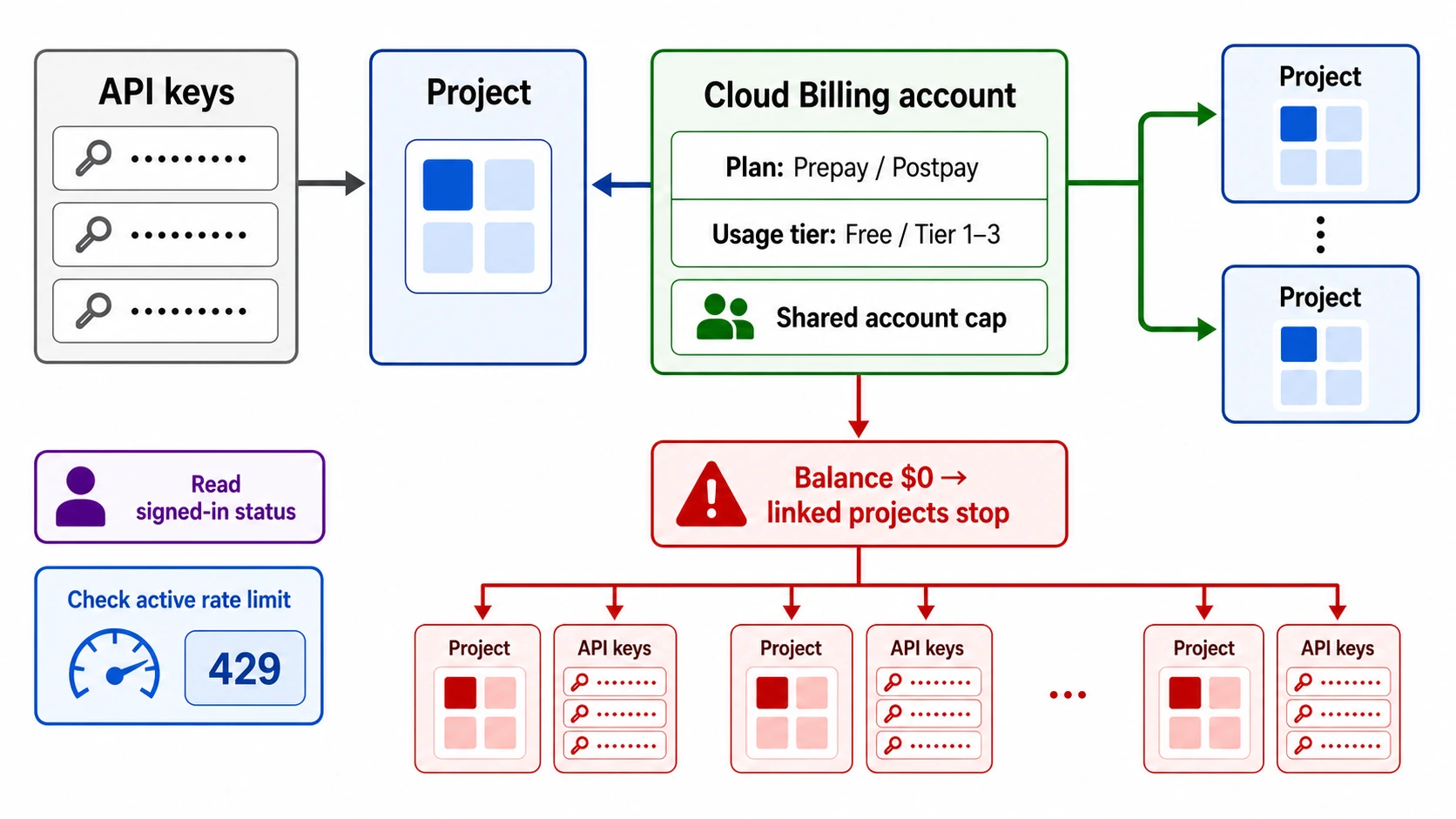
The free tier's practical limitations deserve careful attention, particularly after Google's December 2025 quota reduction. Prior to December 7, 2025, free tier users enjoyed substantially higher limits, but Google cut daily request allowances significantly across all models. For image-specific generation using the Imagen model, free tier users are limited to just 2 images per minute (IPM), which makes batch image generation virtually impossible without upgrading (Google rate limits page, February 2026). If you need more than a handful of images per day for testing, you'll hit these walls quickly. For a deeper dive into these constraints, check out our complete guide to Gemini API free tier limits.
Beyond the API free tier, Google's subscription plans offer another angle. Google AI Pro at $19.99 per month includes 100 Nano Banana Pro images per day (roughly 3,000 per month), while Google AI Ultra at approximately $30 per month bumps that to 1,000 images per day (IntuitionLabs comparison, February 2026). For developers generating fewer than 3,000 images per month, the AI Pro subscription can actually be cheaper than API pay-per-use pricing — $19.99 flat versus $39 at Imagen 4 Standard rates for the same volume. However, subscription access comes through the consumer interface, not the API, which limits integration options.
The sweet spot for free usage is prototyping and development. During the build phase of your application, the free tier provides enough capacity to test prompt engineering, validate image quality, and iterate on your integration code before committing to paid API access. Once you move to production, switching to a paid tier is straightforward since the API endpoints and parameters remain identical.
It's also worth noting what "free" means in terms of commercial rights. Images generated through Google's API — whether on the free tier or paid — come with full commercial usage rights. There are no additional licensing fees or attribution requirements for using Gemini-generated images in your products, marketing materials, or client deliverables. This is consistent across all Google AI image generation models and represents an important cost advantage over services that require separate commercial licenses. The only restriction is Google's standard content policy, which prohibits generating certain categories of harmful or deceptive content. For legitimate business use cases, the free tier is a genuinely no-strings-attached starting point that lets you validate your entire use case before investing in paid capacity.
Monthly Cost Calculator — What 100 to 100,000 Images Actually Costs
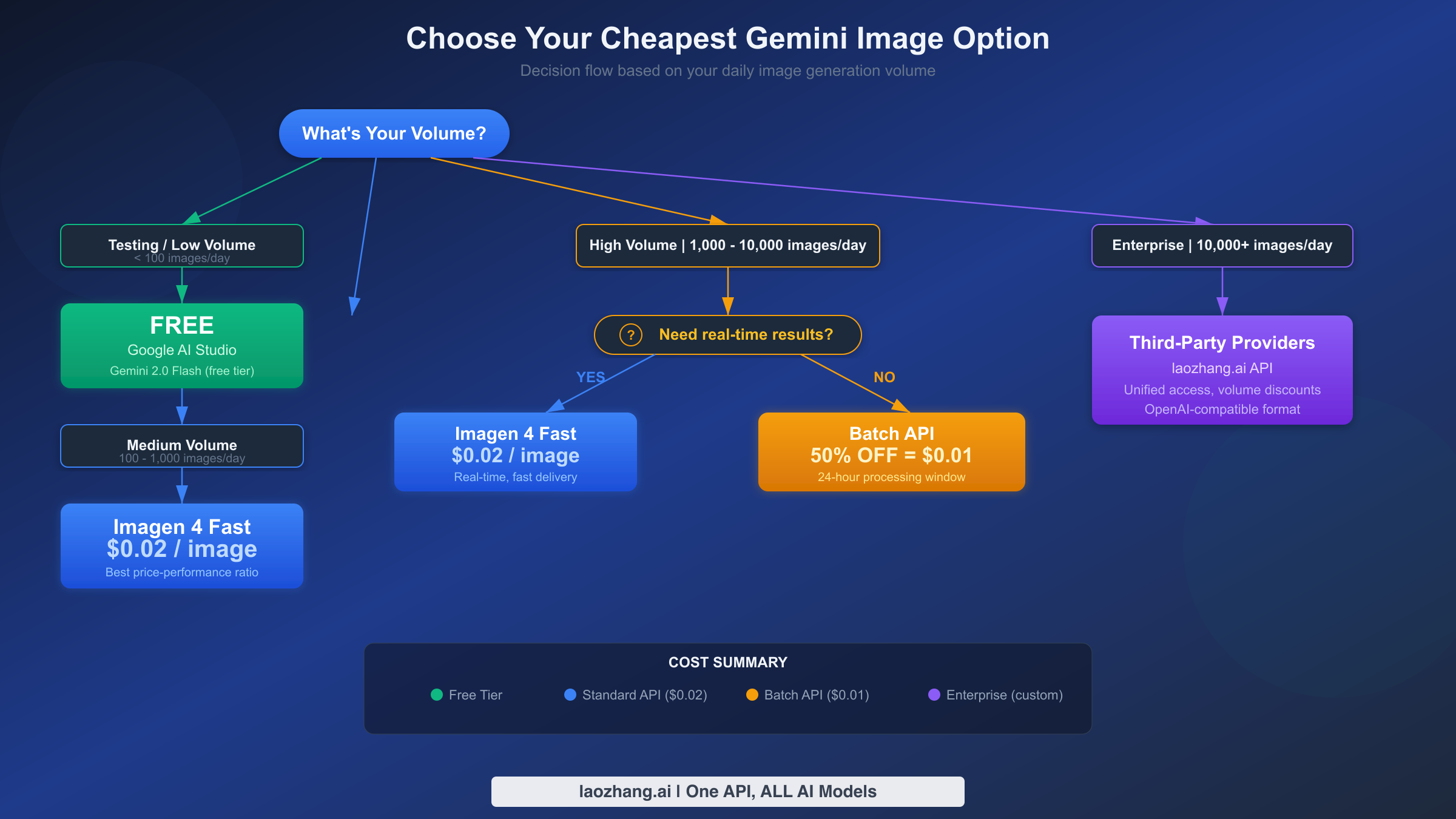
Raw per-image prices only tell part of the story. What developers actually need to know is what their monthly bill will look like at their expected volume. The following tables break down costs across four common volume tiers, covering every major Gemini image generation model and including the Batch API discount where available.
Low Volume: 100 images/month
| Model | Standard Cost | Batch Cost | Annual Total |
|---|---|---|---|
| Imagen 4 Fast | $2.00 | N/A | $24 |
| Gemini 2.5 Flash | $3.90 | $1.95 | $23.40 (batch) |
| Imagen 4 Standard | $4.00 | N/A | $48 |
| Gemini 3 Pro (1K) | $13.40 | $6.70 | $80.40 (batch) |
Medium Volume: 1,000 images/month
| Model | Standard Cost | Batch Cost | Annual Total |
|---|---|---|---|
| Imagen 4 Fast | $20 | N/A | $240 |
| Gemini 2.5 Flash | $39 | $19.50 | $234 (batch) |
| Imagen 4 Standard | $40 | N/A | $480 |
| Gemini 3 Pro (1K) | $134 | $67 | $804 (batch) |
High Volume: 10,000 images/month
| Model | Standard Cost | Batch Cost | Annual Total |
|---|---|---|---|
| Imagen 4 Fast | $200 | N/A | $2,400 |
| Gemini 2.5 Flash | $390 | $195 | $2,340 (batch) |
| Imagen 4 Standard | $400 | N/A | $4,800 |
| Gemini 3 Pro (1K) | $1,340 | $670 | $8,040 (batch) |
Enterprise Volume: 100,000 images/month
| Model | Standard Cost | Batch Cost | Annual Total |
|---|---|---|---|
| Imagen 4 Fast | $2,000 | N/A | $24,000 |
| Gemini 2.5 Flash | $3,900 | $1,950 | $23,400 (batch) |
| Imagen 4 Standard | $4,000 | N/A | $48,000 |
| Gemini 3 Pro (1K) | $13,400 | $6,700 | $80,400 (batch) |
A few patterns stand out from these numbers. At enterprise volume (100,000+ images/month), the difference between Imagen 4 Fast and Gemini 3 Pro 4K is staggering: $2,000 versus $24,000 per month. Choosing the wrong model at scale can mean an extra $264,000 per year in unnecessary spending. The Batch API also becomes increasingly attractive at higher volumes — at 100,000 images per month with Gemini 2.5 Flash, batch processing saves $23,400 annually compared to standard pricing. For applications where 24-hour turnaround is acceptable (content pipelines, marketing asset generation, dataset creation), the Batch API is essentially free money.
The crossover point between models is worth understanding for budget planning. If you're generating 1,000 images per month and need the quality of Gemini 3 Pro but can't afford $134 monthly, the batch option at $67 brings it closer to what you'd pay for 1,000 images with Imagen 4 Standard ($40). The quality premium of Gemini 3 Pro in batch mode is only 67% more than Imagen 4 Standard — a reasonable markup for significantly better image quality, text rendering, and the ability to use reference images for character consistency.
For teams just starting with Gemini image generation, a practical budgeting approach is to begin with the free tier for development, allocate $20-50 per month for initial production deployment with Imagen 4 Fast, and scale up to Gemini 2.5 Flash or batch processing as your user base grows. Most applications don't need Gemini 3 Pro until they reach a maturity level where image quality becomes a competitive differentiator — and by that point, the revenue should comfortably support the higher per-image cost.
5 Proven Ways to Cut Your Gemini Image API Costs Up to 80%
Paying the standard per-image rate is the most expensive way to use Gemini's image generation capabilities. Every strategy below has been verified against Google's current pricing structure and can be combined for maximum savings. The potential reduction ranges from 50% with a single technique to over 80% when stacking multiple approaches.
Strategy 1: Use the Batch API for 50% Instant Savings
Google's Batch API applies a flat 50% discount to all token prices in exchange for a 24-hour processing window instead of real-time results. For image generation workloads that don't require instant output — content pipelines, marketing materials, dataset creation — this is the single most impactful cost reduction available. Gemini 2.5 Flash drops from $0.039 to $0.0195 per image, and Gemini 3 Pro (1K-2K) drops from $0.134 to $0.067.
Here's a working Python example for batch image generation:
pythonimport google.generativeai as genai
import json

genai.configure(api_key="YOUR_API_KEY")

# Create batch request file
requests = []
for i, prompt in enumerate(your_prompts):
    requests.append({
        "custom_id": f"img-{i}",
        "model": "gemini-2.5-flash-image",
        "contents": [{"parts": [{"text": prompt}]}],
        "generationConfig": {
            "responseModalities": ["IMAGE"],
        }
    })

# Submit batch job (processes within 24 hours)
batch = genai.batches.create(
    model="gemini-2.5-flash-image",
    requests=requests
)
print(f"Batch ID: {batch.name}, Status: {batch.state}")
The batch approach is ideal for any workflow where you can queue image generation requests and process results asynchronously. E-commerce product images, social media content calendars, and AI training datasets are all prime candidates. In real-world production, many teams find that 60-80% of their image generation workload can shift to batch processing without affecting user experience. A content management system, for instance, can queue all article illustrations during off-peak hours and have them ready for editors the next morning — at half the cost of generating them in real time.
The batch processing window of up to 24 hours might sound long, but Google typically processes batch jobs much faster. In practice, most batch requests complete within 2-6 hours, though there's no guaranteed SLA for faster delivery. The 50% discount applies uniformly to all token costs, including both input and output tokens, making the savings consistent regardless of prompt complexity or image resolution. For teams generating more than 5,000 images per month, the batch API alone can justify the engineering effort of implementing asynchronous processing.
Strategy 2: Choose the Right Model for Your Quality Needs
Not every image needs Gemini 3 Pro at 4K resolution. Imagen 4 Fast at $0.02 per image delivers solid quality for thumbnails, previews, and social media content. Gemini 2.5 Flash at $0.039 handles most general-purpose needs. Reserve Gemini 3 Pro ($0.134-$0.24) exclusively for use cases that genuinely require premium quality: professional marketing materials, print-ready assets, or images requiring precise text rendering. This single decision can reduce your costs by 85% without visible quality loss for most applications.
Strategy 3: Optimize Resolution Selection
Gemini 3 Pro's pricing varies dramatically with resolution. A 1K image at $0.134 versus a 4K image at $0.24 represents a 79% markup for four times the pixels. Unless your application specifically requires 4096x4096 output (large-format printing, detailed zoom functionality), defaulting to 1K or 2K resolution cuts costs significantly. Many web applications display images at 800-1200 pixels wide, making even 1K resolution more than sufficient.
Strategy 4: Use Third-Party API Providers
For developers processing high volumes, third-party API aggregators can offer meaningful savings over Google's official pricing, particularly for Gemini 3 Pro Image. Services like laozhang.ai provide access to Nano Banana Pro (Gemini 3 Pro Image) through an OpenAI-compatible API endpoint. The advantage of aggregators goes beyond raw pricing: simplified billing across multiple AI providers, no minimum commitments or upfront fees, and the ability to switch between models (Gemini, GPT, Stable Diffusion) without managing separate API credentials for each. For teams already using OpenAI's API format, the migration is essentially a base URL change — the request and response structure remain identical.
Third-party providers are particularly valuable when you need access to Gemini 3 Pro Image at scale. While Google's official price for Nano Banana Pro at 1K-2K resolution is $0.134 per image, aggregators often offer competitive rates while handling rate limit management, automatic retries, and model failover behind the scenes. This means your application gets higher effective availability without building complex retry logic yourself. The tradeoff is that you're introducing a dependency on a third-party service, so it's worth evaluating uptime guarantees and data handling policies before committing production traffic.
Strategy 5: Implement Smart Caching and Prompt Optimization
If your application generates similar images repeatedly (product variations, template-based content, localized versions of the same visual), caching generated images eliminates redundant API calls entirely. A simple hash of the prompt text can serve as a cache key, stored alongside the image URL or base64 data in your database or CDN. For applications with even moderate prompt overlap, caching can reduce effective API costs by 20-40% without any service-side changes.
Beyond caching, prompt optimization itself affects cost indirectly. Shorter, more precise prompts generate better results on the first attempt, reducing the need for re-generation (which doubles your cost). Gemini 3 Pro Image's "Thinking" mode generates up to two interim images internally to test composition before delivering the final result — these interim images are included in the output token count. Writing clear, specific prompts that minimize the need for thinking iterations keeps your effective cost closer to the per-image baseline. Experimenting with prompt templates and saving the most effective ones as reusable assets is a simple but powerful way to control costs as your application scales.
Gemini vs OpenAI — Which Image API Is Actually Cheaper?
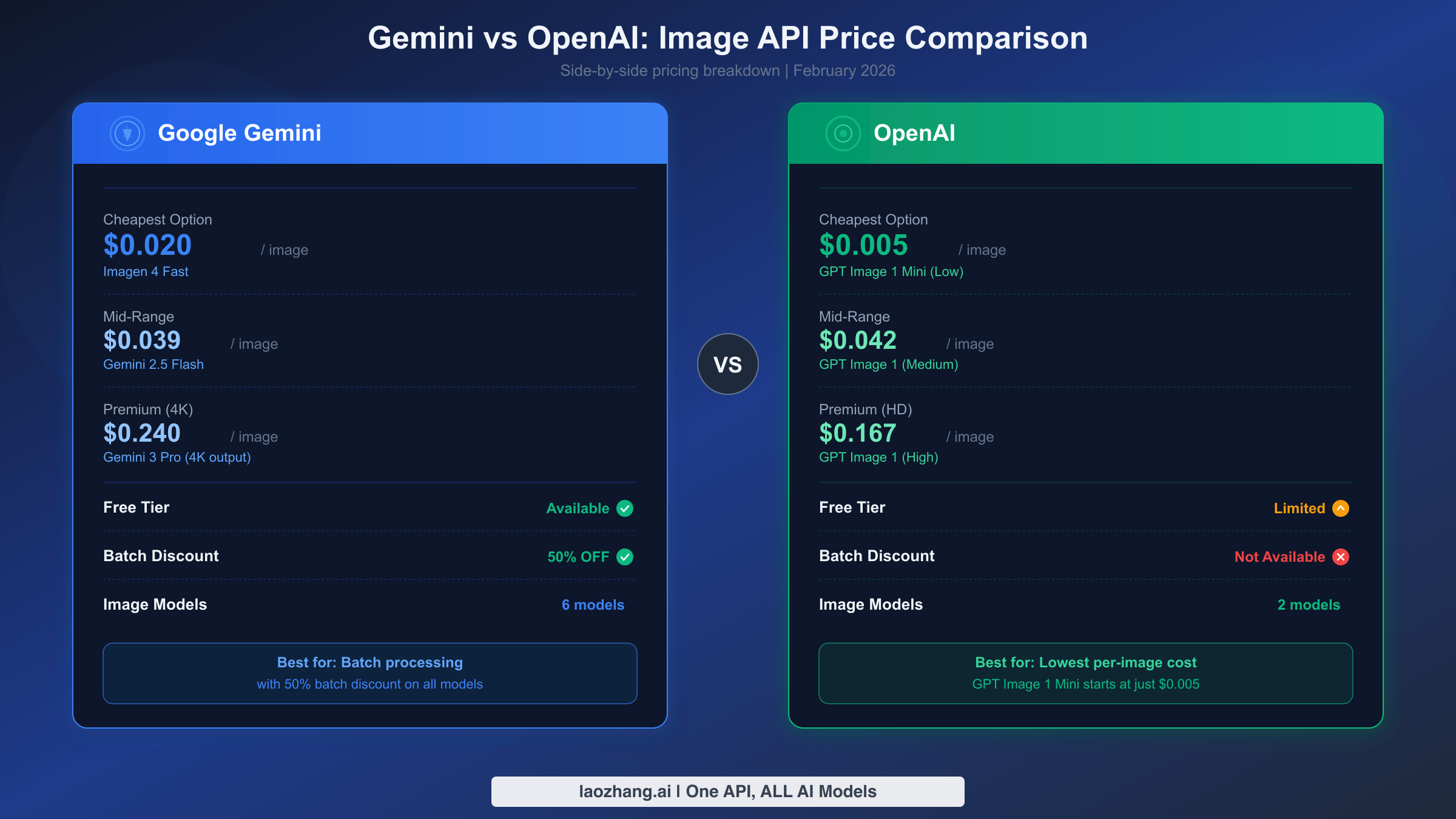
Developers choosing between Google and OpenAI for image generation face a nuanced pricing landscape. Neither platform is universally cheaper — the winner depends on your specific quality tier, volume, and whether you can use batch processing. Here's how the numbers actually compare as of February 2026.
At the budget end, OpenAI's GPT Image 1 Mini at low quality costs just $0.005 per image, making it the cheapest option across both platforms (IntuitionLabs comparison, February 2026). Google's cheapest option, Imagen 4 Fast at $0.02, is 4x more expensive at the absolute bottom of the price range. However, quality at OpenAI's "low" setting is significantly reduced — images are suitable for placeholders and previews but not production content.
| Tier | Google Best Price | OpenAI Best Price | Winner |
|---|---|---|---|
| Ultra-cheap | Imagen 4 Fast: $0.02 | GPT Image 1 Mini (Low): $0.005 | OpenAI |
| Budget | Imagen 4 Fast: $0.02 | GPT Image 1 Mini (Med): $0.011 | OpenAI |
| Mid-range | Gemini 2.5 Flash: $0.039 | GPT Image 1 (Low): $0.011 | OpenAI |
| Standard | Gemini 2.5 Flash: $0.039 | GPT Image 1 (Med): $0.042 | |
| Premium | Gemini 3 Pro (1K): $0.134 | GPT Image 1 (High): $0.167 | |
| Ultra-premium | Gemini 3 Pro (4K): $0.24 | GPT Image 1 (High): $0.167 | OpenAI |
The comparison becomes more interesting when you factor in batch processing. Google's Batch API discount (50% off) has no direct equivalent from OpenAI. This means Gemini 2.5 Flash in batch mode at $0.0195 per image undercuts OpenAI's GPT Image 1 at low quality ($0.011 is still cheaper, but the quality gap narrows significantly). For medium-quality production images, Google's batch pricing offers the best value proposition on the market.
Google also wins on free tier accessibility. Google AI Studio provides free access to Gemini 2.0 Flash for image generation with daily limits, while OpenAI's free ChatGPT tier limits users to roughly 2-3 images per day through the consumer interface with no API access. For developers who need API-level free testing, Google is the clear choice. If you're evaluating both platforms more broadly, our comprehensive AI image API comparison covers additional providers including Stable Diffusion and DALL-E.
Beyond pricing, several technical differences influence the cost-effectiveness calculation. Google's Gemini models support multi-turn conversational image generation, meaning users can iteratively refine images through follow-up prompts without starting from scratch. OpenAI's GPT Image 1 also supports editing, but through a different paradigm. Google's support for up to 14 reference images in a single request (6 object references + 5 human references) is unmatched by OpenAI, making Gemini 3 Pro the clear choice for character consistency workflows — a capability you'd need expensive workarounds to replicate on OpenAI's platform.
The free tier difference is also strategically important. Google provides API-level free access through Google AI Studio, letting developers test their full integration pipeline at zero cost. OpenAI's free tier is limited to ChatGPT's consumer interface with no API access, forcing developers to spend money from day one of integration work. For startups and indie developers evaluating both platforms, this makes Google the lower-risk starting point — you can build and test your entire image generation feature before spending a single dollar.
The practical recommendation: use OpenAI GPT Image 1 Mini for ultra-cheap, lower-quality needs (social media thumbnails, chat avatars). Use Google Imagen 4 Fast or Gemini 2.5 Flash (batch) for production-quality images at scale. Use Gemini 3 Pro only when you need 4K resolution or advanced features like reference image consistency and text rendering. For the most comprehensive analysis covering additional providers including Stable Diffusion, Midjourney, and DALL-E, our best AI image models comparison goes deeper into quality benchmarks beyond just pricing.
Which Gemini Image Model Should You Use? (Decision Guide)
Choosing from six different image generation models sounds overwhelming, but your use case narrows the field quickly. The decision comes down to three factors: quality requirements, latency tolerance, and budget constraints. Here's a practical framework based on common developer scenarios.
For hobby projects and personal apps, start with Google AI Studio's free tier using Gemini 2.0 Flash. You pay nothing, the quality is decent for non-commercial use, and you can prototype your entire image pipeline without spending a cent. When you're ready to go beyond testing limits, step up to Imagen 4 Fast at $0.02 per image — the cheapest paid option that still delivers production-acceptable quality.
For startups and SaaS applications generating 1,000-10,000 images per month, Gemini 2.5 Flash strikes the ideal balance. At $0.039 per image (or $0.0195 with batch processing), it provides better quality than Imagen 4 while keeping costs manageable. The model supports conversational image generation, meaning users can iteratively refine results through multi-turn interactions — a valuable feature for consumer-facing applications. For more context on how rate limits affect your production planning, see our Gemini API rate limits guide.
For enterprise and professional use requiring the highest quality output, Gemini 3 Pro Image is the only option. Its advanced reasoning capabilities, support for up to 14 reference images, and 4K resolution output justify the premium pricing for professional marketing, e-commerce product photography, and brand asset creation. Use batch processing wherever possible to cut the per-image cost to $0.067 (1K-2K) or $0.12 (4K). For detailed benchmarks on Gemini 3 Pro's capabilities and response times, check our Gemini 3 Pro Image pricing and speed test.
For high-volume content pipelines (AI-generated datasets, automated marketing, content farms), the Batch API is non-negotiable. Combine Gemini 2.5 Flash with batch processing for the lowest cost per quality ratio at $0.0195 per image with 24-hour turnaround. If your volume exceeds 50,000 images per month, third-party providers through platforms like laozhang.ai can further reduce costs through aggregated pricing while maintaining the same model access.
One frequently overlooked consideration is the migration cost between models. Google's API design makes it relatively painless to switch between Imagen and Gemini models — the endpoint changes, but the authentication, SDKs, and response handling remain consistent. This means you can start with the cheapest option (Imagen 4 Fast at $0.02) and upgrade to Gemini 2.5 Flash or Gemini 3 Pro later without rewriting your integration. The practical advice is to build your application with a model parameter that you can change through configuration rather than code, giving you the flexibility to optimize costs as your needs evolve without engineering overhead.
Here's a quick-reference decision matrix:
| Scenario | Recommended Model | Cost/Image | Monthly Budget (1K imgs) |
|---|---|---|---|
| Testing/Prototype | Free tier (Gemini 2.0 Flash) | $0.00 | $0 |
| Hobby/Personal | Imagen 4 Fast | $0.02 | $20 |
| Startup (real-time) | Gemini 2.5 Flash | $0.039 | $39 |
| Startup (batch OK) | Gemini 2.5 Flash Batch | $0.0195 | $19.50 |
| Professional | Gemini 3 Pro (1K-2K) | $0.134 | $134 |
| Professional (batch) | Gemini 3 Pro Batch | $0.067 | $67 |
| Enterprise 4K | Gemini 3 Pro (4K) | $0.24 | $240 |
Getting Started — Generate Your First Image in 5 Minutes
Setting up Gemini image generation takes just a few steps. Here's a complete walkthrough using Python, the most common language for AI API integration. The same principles apply to JavaScript, Go, and Java through Google's official SDKs.
First, get your API key from Google AI Studio. Navigate to the API keys section, click "Create API Key," and select your Google Cloud project. The key is active immediately with free tier access.
Install the Google Generative AI SDK:
bashpip install google-generativeai
Generate your first image with this minimal Python script:
pythonimport google.generativeai as genai
import base64

genai.configure(api_key="YOUR_API_KEY")

# Use Imagen 4 Fast for cheapest generation ($0.02/image)
model = genai.GenerativeModel("imagen-4-fast")

response = model.generate_images(
    prompt="A serene mountain landscape at sunset with reflections in a lake",
    number_of_images=1
)

# Save the generated image
for i, image in enumerate(response.images):
    with open(f"output_{i}.png", "wb") as f:
        f.write(image._pil_image.tobytes())
    print(f"Image saved: output_{i}.png")
For Gemini multimodal image generation (conversational style):
pythonmodel = genai.GenerativeModel("gemini-2.5-flash-image")

response = model.generate_content(
    "Create an image of a modern tech startup office with natural lighting",
    generation_config=genai.GenerationConfig(
        response_modalities=["TEXT", "IMAGE"]
    )
)

# Extract image from response
for part in response.candidates[0].content.parts:
    if hasattr(part, 'inline_data'):
        image_data = base64.b64decode(part.inline_data.data)
        with open("gemini_output.png", "wb") as f:
            f.write(image_data)
        print("Image saved: gemini_output.png")
Both examples produce 1024x1024 images. The Imagen model is faster and cheaper ($0.02 vs $0.039), while the Gemini model supports multi-turn conversations for iterative refinement. Choose based on whether you need simple prompt-to-image generation or interactive image editing capabilities.
A few practical tips for your first integration: always set responseModalities explicitly when using Gemini models for image generation. Without specifying ["IMAGE"] or ["TEXT", "IMAGE"], the model defaults to text-only output and won't generate images regardless of your prompt. All generated images include a SynthID watermark embedded by Google for identification purposes — this is invisible to humans but detectable by automated tools, and it cannot be disabled through the API. The watermark does not affect image quality for visual purposes.
For production deployments, implement proper error handling around the image generation call. Common failure modes include rate limit errors (429 status codes, especially on the free tier), content policy rejections (the model refuses prompts that violate Google's usage policies), and occasional 503 overloaded errors during peak demand. A simple exponential backoff retry with 3 attempts handles most transient failures gracefully. If you're building a user-facing application, consider generating images asynchronously and displaying a loading state rather than blocking the user interface, since generation typically takes 3-15 seconds depending on the model and current server load.
Frequently Asked Questions
Is Gemini image generation API free?
Partially. Google AI Studio provides free access to Gemini 2.0 Flash for image generation with daily rate limits. After the December 2025 quota reduction, free tier limits are 2 images per minute for the Imagen model. For production use requiring higher volumes, you'll need to upgrade to a paid tier where the cheapest option is Imagen 4 Fast at $0.02 per image.
What is the cheapest way to generate images with Gemini API?
For paid usage, Imagen 4 Fast at $0.02 per image is the cheapest official option. For zero cost, use the free tier in Google AI Studio. For the best cost-per-quality ratio, Gemini 2.5 Flash with the Batch API at $0.0195 per image delivers good quality at half the standard price — you just need to accept up to 24-hour processing time.
How does Gemini image API pricing compare to DALL-E?
OpenAI's cheapest option (GPT Image 1 Mini at low quality) starts at $0.005 per image, cheaper than Google's cheapest at $0.02. However, Google offers a free tier and a 50% batch discount that OpenAI lacks. At medium-to-premium quality tiers, Google is generally cheaper: Gemini 3 Pro at $0.134 versus GPT Image 1 High at $0.167. For a detailed comparison across all image AI providers, see our AI image generation API comparison guide.
Can I use the Batch API for image generation?
Yes. The Batch API supports both Gemini 2.5 Flash Image and Gemini 3 Pro Image. Submit your image generation requests as a batch job, and Google processes them within a 24-hour window at a flat 50% discount on all token prices. This is the most cost-effective approach for non-real-time image generation workflows.
What resolution options are available and how do they affect pricing?
Imagen 4 models generate 1024x1024 images at a flat rate. Gemini 2.5 Flash also generates 1024x1024 images. Gemini 3 Pro Image supports 1K (1024x1024), 2K (2048x2048), and 4K (4096x4096) resolutions, with pricing increasing at the 4K tier: $0.134 for 1K-2K versus $0.24 for 4K. Always use the smallest resolution that meets your needs — the 4K premium is 79% higher than 1K-2K for pixels most users won't notice on screen.
Which model has the best quality for the price?
Gemini 2.5 Flash Image offers the best quality-to-price ratio for most use cases at $0.039 per image ($0.0195 with batch). It generates conversational-style images with good quality, supports multi-turn refinement, and handles most commercial needs. Step up to Gemini 3 Pro only when you need precise text rendering, character consistency across multiple images, or 4K resolution output.