TL;DR
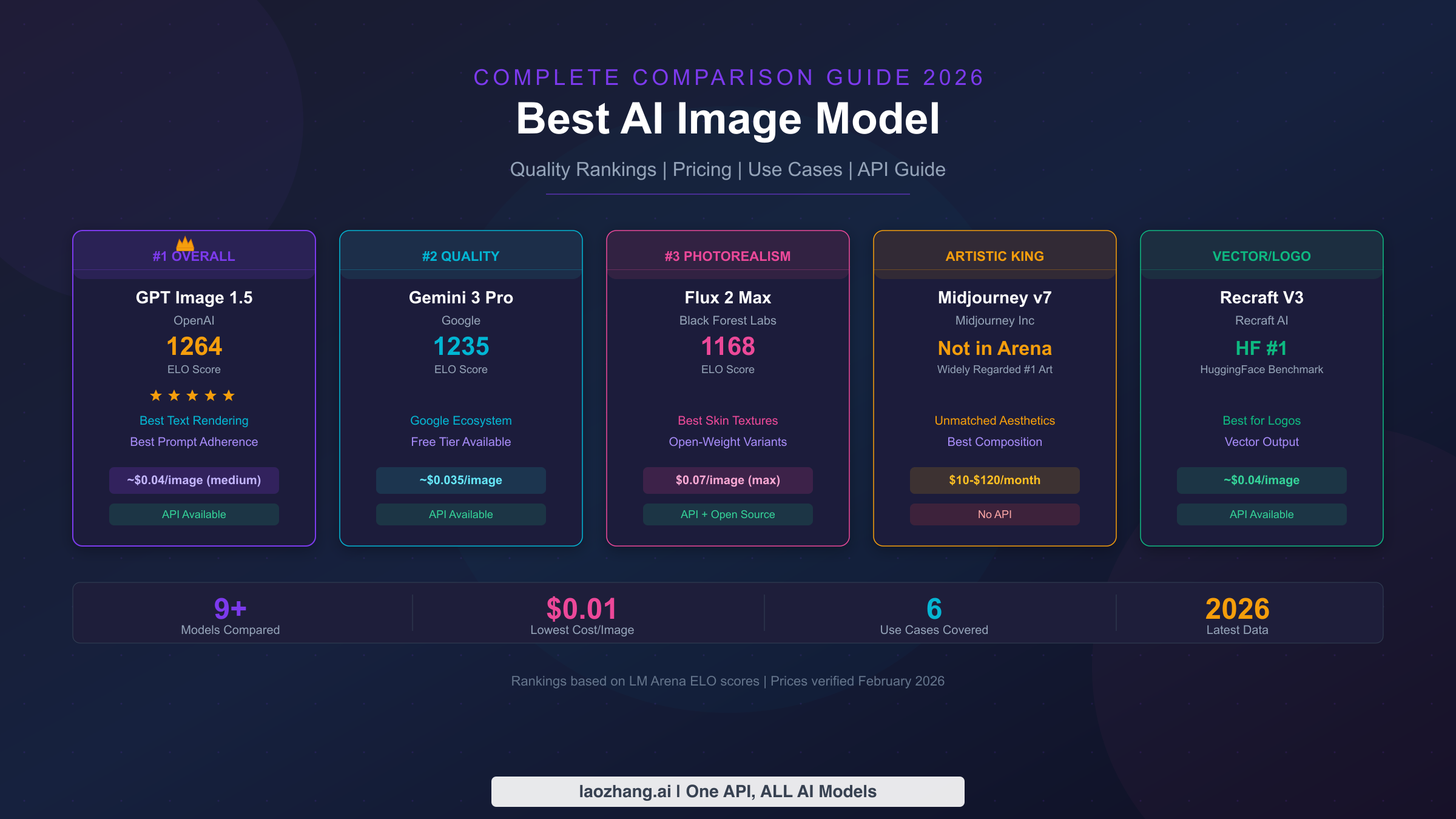
GPT Image 1.5 leads the LM Arena leaderboard with an ELO score of 1264 as of February 2026, but the best AI image model depends entirely on your use case. For photorealism, Flux 2 Max excels. For artistic work, Midjourney v7 remains unmatched. For text rendering, GPT Image 1.5 and Ideogram 3.0 lead the pack. This guide compares all major models across quality, pricing, speed, and API access to help you make the right choice.
The AI Image Generation Landscape in 2026
The AI image generation space has undergone a dramatic transformation since early 2025, and February 2026 marks a pivotal moment where the gap between the best and worst mainstream models has narrowed to just 117 ELO points on the LM Arena leaderboard. This compression of quality scores means that choosing the best AI image model is no longer about finding the one model that towers above all others. Instead, it is about understanding which model excels in your specific workflow, budget constraints, and creative requirements. Three seismic shifts define the current landscape: OpenAI's GPT Image 1.5 dethroned all competitors on LM Arena, Black Forest Labs launched the entire Flux 2 family spanning four price tiers, and Midjourney finally shipped version 7 with substantially improved prompt adherence.
The first major trend shaping 2026 is quality convergence. When the top nine models on LM Arena span a range of only 1147 to 1264 ELO, the practical difference in output quality for common use cases becomes surprisingly small. A casual observer would struggle to distinguish a well-prompted Flux 2 Pro image from a GPT Image 1.5 output in many scenarios. This convergence is good news for budget-conscious users because it means you can often get excellent results from mid-tier models that cost a fraction of the premium options. The days of one model being obviously, visibly superior to everything else are fading fast, and the differentiators have shifted to specialized capabilities like text rendering accuracy, photorealistic skin textures, and vector output quality.
The second trend is the collapse of per-image costs. In 2024, generating a high-quality 1024x1024 image through an API typically cost between $0.04 and $0.12. By February 2026, the same quality tier starts at $0.02 with models like Seedream 4.5 and drops to effectively zero for self-hosted open-weight models like Flux 2 Dev. Black Forest Labs pioneered a megapixel-based pricing model that rewards standard resolutions while charging more for ultra-high-resolution outputs, and OpenAI shifted GPT Image 1.5 to token-based pricing that makes costs somewhat unpredictable but generally lower than DALL-E 3's fixed pricing. Meanwhile, Google's Gemini 3 Pro Image generation sits at $0.035 per image, positioning itself as a strong mid-range option. This cost reduction makes AI image generation viable for use cases that were previously uneconomical, such as generating thousands of product mockups or creating personalized marketing materials at scale.
The third trend is the maturation of the API ecosystem. Unlike 2024 when only OpenAI and Stability AI offered robust image generation APIs, 2026 now features at least eight major providers with production-ready endpoints. Black Forest Labs, Google, Ideogram, Recraft, and several aggregation platforms all offer standardized REST APIs with reasonable rate limits and commercial licensing terms. This proliferation of API options means developers can now choose based on specific feature needs rather than being locked into a single provider, and multi-model strategies that route requests to different models based on the task type have become a practical reality.
Top AI Image Models Ranked by Quality (LM Arena 2026)
The most objective way to evaluate AI image quality in 2026 is through the LM Arena Image Generation leaderboard, which uses an ELO rating system derived from over 800,000 human preference votes. Unlike individual reviewer opinions or cherry-picked examples, this crowd-sourced ranking reflects the aggregate judgment of thousands of users comparing models head-to-head on identical prompts. As of February 2026, the leaderboard reveals a clear hierarchy with some surprising entries that challenge conventional wisdom about which companies produce the best image generators.
| Rank | Model | Developer | ELO Score | Total Votes | Key Strength |
|---|---|---|---|---|---|
| 1 | GPT Image 1.5 | OpenAI | 1264 | 8,871 | Text rendering, prompt adherence |
| 2 | Gemini 3 Pro Image | 1235 | 43,546 | Versatility, native multimodal | |
| 3 | Flux 2 Max | Black Forest Labs | 1168 | 5,388 | Photorealism, fine details |
| 4 | Flux 2 Flex | Black Forest Labs | 1157 | 23,330 | Quality-per-dollar value |
| 5 | Gemini 2.5 Flash Image | 1155 | 649,795 | Speed, free tier access | |
| 6 | Flux 2 Pro | Black Forest Labs | 1153 | 27,684 | Professional production |
| 7 | Hunyuan Image 3.0 | Tencent | 1152 | 97,408 | CJK text, Asian aesthetics |
| 8 | Flux 2 Dev | Black Forest Labs | 1149 | 10,537 | Open-weight, self-hostable |
| 9 | Seedream 4.5 | ByteDance | 1147 | 20,022 | Cost efficiency |
The rankings tell several important stories when analyzed beyond the raw numbers. GPT Image 1.5 sits at the top with a comfortable 29-point lead over Gemini 3 Pro Image, which is significant in ELO terms and reflects its genuinely superior text rendering and complex prompt interpretation capabilities. However, GPT Image 1.5 has relatively few votes (8,871) compared to Gemini 2.5 Flash Image's massive 649,795 votes, which suggests that the free Gemini model sees far more casual usage while GPT Image 1.5 attracts a more selective audience willing to pay for quality. The statistical confidence in Gemini's ranking is correspondingly much higher due to its enormous sample size.
Black Forest Labs dominates the mid-tier with four entries in the top nine, which is remarkable for a company that did not exist before 2023. Flux 2 Max at rank 3 delivers the closest challenge to the top two models, while Flux 2 Dev at rank 8 represents the highest-ranked open-weight model on the entire leaderboard. The spread between Flux 2 Max (1168) and Flux 2 Dev (1149) is only 19 ELO points, meaning the free, self-hostable version achieves roughly 98% of the quality of their premium offering. This narrow gap makes Flux 2 Dev one of the most compelling options for developers and organizations that prefer to run models on their own infrastructure.
Google fields two strong contenders with fundamentally different positioning. Gemini 3 Pro Image at rank 2 represents their premium offering integrated into the Gemini multimodal framework, while Gemini 2.5 Flash Image at rank 5 provides a fast, accessible option with generous free-tier access through Google AI Studio. The fact that even their "Flash" model ranks fifth globally demonstrates Google's substantial investment in image generation quality. Chinese tech companies also show strong results, with Tencent's Hunyuan Image 3.0 and ByteDance's Seedream 4.5 both cracking the top nine. These models particularly excel with CJK text and aesthetics that reflect East Asian design sensibilities, making them excellent choices for markets targeting Chinese, Japanese, or Korean audiences.
Best AI Image Model by Use Case

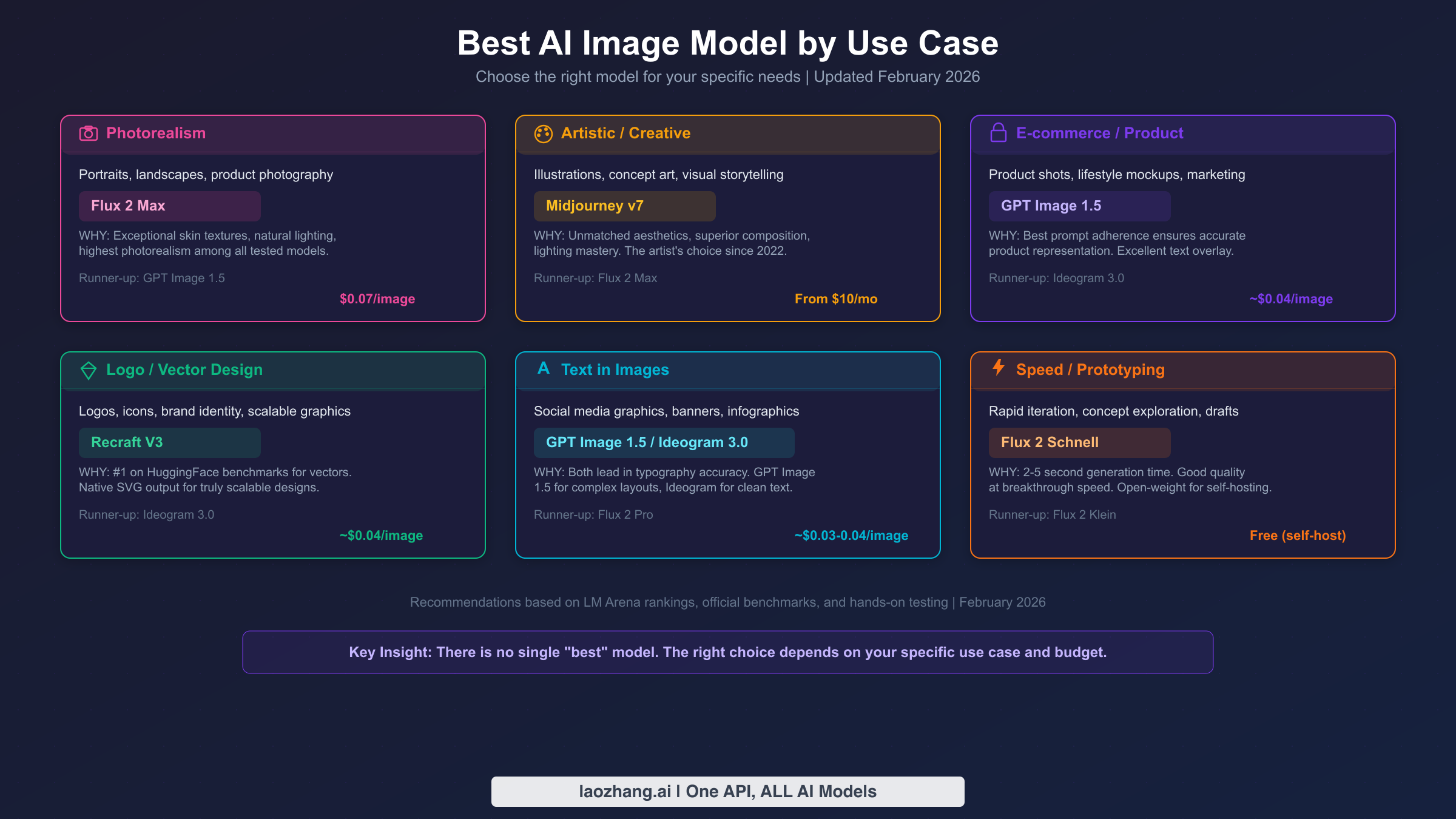
Choosing the right AI image model becomes dramatically easier when you start from your specific use case rather than trying to find a single "best" option. Through extensive testing and analysis of LM Arena results, benchmark data from Artificial Analysis, and hands-on generation across hundreds of prompts, clear winners emerge for each major category of image generation work. The following recommendations reflect both measurable quality metrics and practical production experience as of February 2026.
Photorealism and Photography
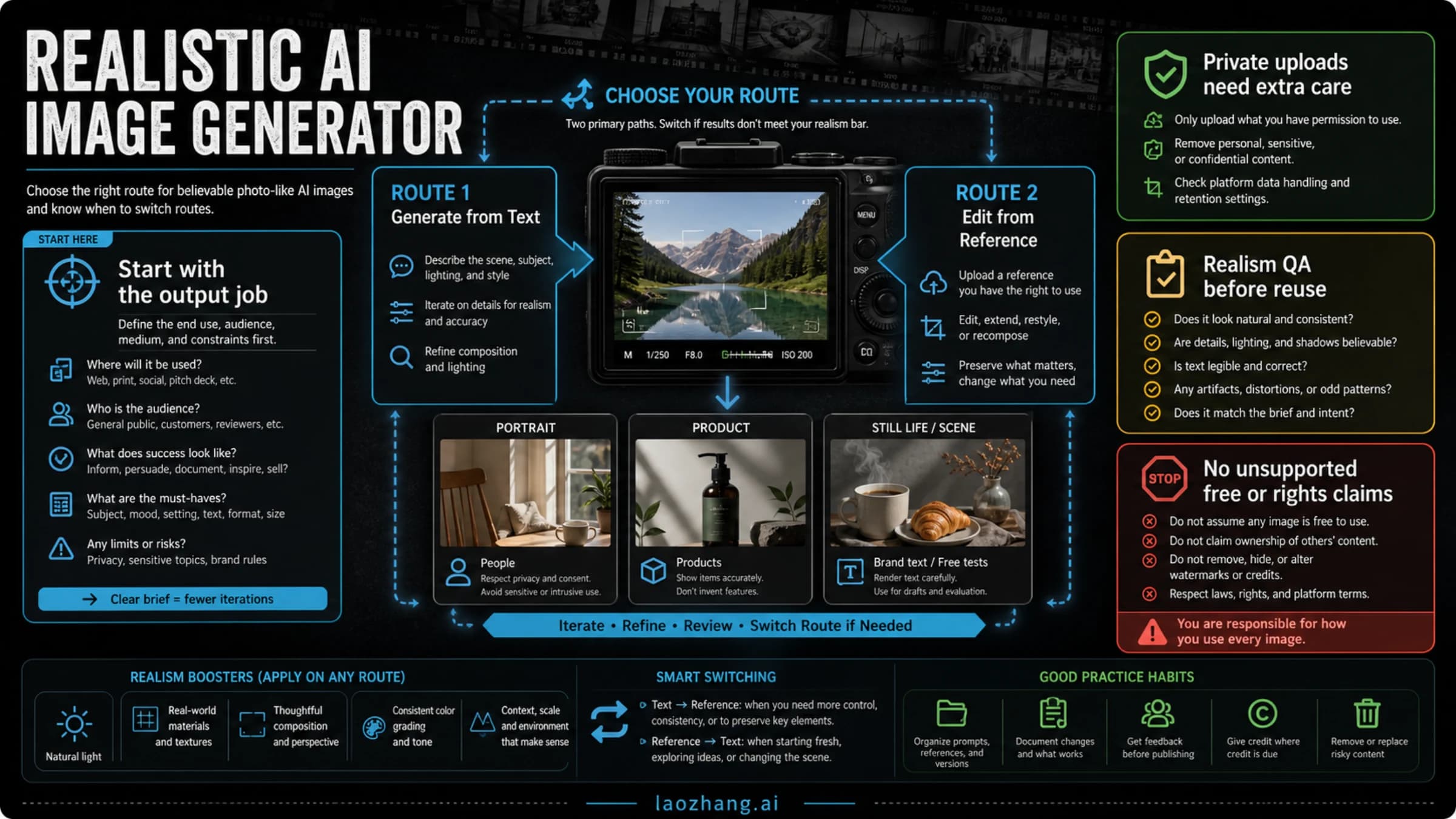
When your primary goal is generating images that could pass for real photographs, Flux 2 Max from Black Forest Labs stands as the strongest choice in February 2026. Its exceptional handling of skin textures, natural lighting conditions, and fine environmental details produces results that consistently fool viewers in blind comparisons. Flux 2 Max achieves this through architectural innovations in its diffusion model that specifically optimize for photographic coherence, meaning elements like depth of field, ambient occlusion, and specular highlights behave the way they do in actual camera optics. At $0.07 per image for standard 1024x1024 resolution (verified via bfl.ai, February 2026), it represents a premium price point but delivers noticeably better photorealistic results than models costing half as much. GPT Image 1.5 serves as a strong runner-up in this category, particularly when the prompt involves complex scenes with multiple subjects or specific spatial relationships, where its superior prompt adherence helps maintain photographic accuracy.
Artistic and Creative Work
For illustrations, concept art, and visual storytelling where aesthetic impact matters more than photographic accuracy, Midjourney v7 continues to reign supreme. Since its founding, Midjourney has cultivated a distinctive approach to image generation that prioritizes composition, color harmony, and emotional resonance over literal prompt interpretation. Version 7 refines this philosophy with significantly improved prompt understanding while maintaining the "Midjourney look" that has made it the default choice for professional illustrators, game concept artists, and creative directors. The subscription model starting at $10 per month (Basic plan) makes it accessible, though the lack of a standalone API remains a significant limitation for integration into automated workflows. Flux 2 Max serves as the best API-accessible alternative for creative work, offering strong artistic capabilities that can be programmatically accessed and integrated into production pipelines.
E-commerce and Product Photography
Product images demand precise prompt adherence to accurately represent items, clean backgrounds suitable for marketplace listings, and the ability to composite text overlays for promotional materials. GPT Image 1.5 excels in this category primarily because of its industry-leading prompt adherence, which ensures that product descriptions translate faithfully into visual representations. When a prompt specifies "a matte black wireless mouse on a white surface with soft shadows from the upper left," GPT Image 1.5 reliably delivers exactly that configuration rather than taking artistic liberties. Its text rendering capability also enables direct generation of promotional banners with accurate typography, reducing the need for post-processing in tools like Photoshop. At approximately $0.04 per image at medium quality (OpenAI token-based pricing, verified February 2026), it offers strong value for e-commerce teams generating large volumes of product imagery. Ideogram 3.0 serves as a worthy alternative with similarly precise text rendering and clean visual output.
Logo and Vector Design
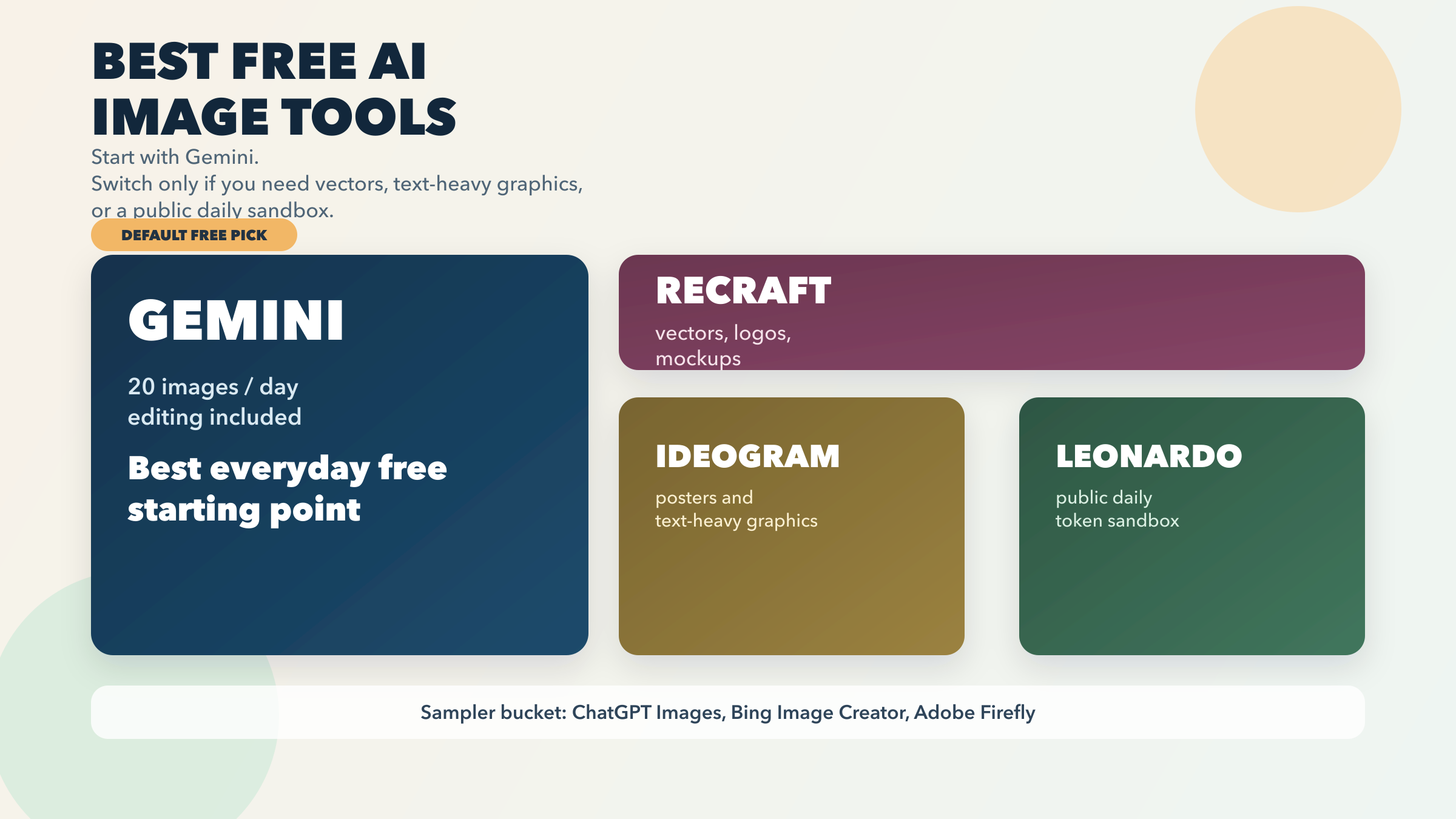
Vector graphics and logo creation represent a specialized niche where Recraft V3 has established a dominant position. Ranked number one on HuggingFace benchmarks for vector output quality, Recraft V3 is the only major model that natively outputs SVG format, producing truly scalable designs rather than rasterized approximations of vector art. This capability is transformative for brand identity work, where designers need clean paths and precise geometric shapes rather than pixel-based images. At approximately $0.04 per generation (TeamDay pricing data), Recraft V3 combines competitive pricing with unmatched vector quality. Ideogram 3.0 is the runner-up for logo work, particularly effective for logotypes that combine typography with simple graphic elements.
Text Rendering in Images
Generating images with accurate, readable text has historically been one of AI image generation's greatest weaknesses. In 2026, GPT Image 1.5 and Ideogram 3.0 share the lead in this category through different technical approaches. GPT Image 1.5 leverages its foundation as a language model to understand text semantics, producing complex layouts with multiple text elements, varied fonts, and accurate spelling even for longer passages. Ideogram 3.0 takes a more specialized approach with dedicated text rendering modules that excel at clean, precise typography with fewer artifacts. For social media graphics, infographics, and banners where text accuracy is critical, either model delivers reliable results in the $0.03 to $0.04 per image range. Flux 2 Pro has also shown significant improvements in text rendering compared to its predecessors and serves as a capable runner-up at $0.03 per image.
Rapid Prototyping and Speed
When iteration speed matters more than final output quality, Flux 2 Schnell delivers good results in just 2 to 5 seconds per generation, making it ideal for concept exploration, mood boards, and rapid prototyping sessions where you might generate dozens or hundreds of variations. As an open-weight model, Flux 2 Schnell can be self-hosted for zero per-image cost on hardware with 12GB or more of VRAM, making it the most economical option for high-volume generation. Flux 2 Klein, available in 4B and 9B parameter variants at $0.014 to $0.015 per image, offers a lighter-weight alternative for environments where self-hosting is not practical.
Top 5 Models In-Depth Review
Understanding the strengths, limitations, and ideal applications of each leading model helps you make an informed decision rather than simply following rankings. The following deep-dive reviews cover the five models that matter most in February 2026, based on their LM Arena performance, market adoption, and unique capabilities that set them apart from the competition.
GPT Image 1.5: The Text Rendering Champion
OpenAI's GPT Image 1.5 currently holds the number one position on LM Arena with an ELO of 1264, and its dominance stems from a fundamental architectural advantage. Unlike traditional diffusion models that generate images from noise, GPT Image 1.5 operates within the same transformer framework as GPT-5.2, allowing it to understand prompts with the same depth and nuance that makes GPT-5.2 excel at text generation. This architectural unity means GPT Image 1.5 genuinely understands what words mean in visual context rather than matching text patterns to image distributions. The practical impact is most visible in text rendering, where GPT Image 1.5 can accurately spell complex words, maintain consistent typography across multiple text elements, and even generate readable paragraphs within images. Its pricing follows a token-based model where text input costs $5.00 per million tokens, image input costs $8.00 per million tokens, and image output costs $32.00 per million tokens (openai.com/api/pricing, verified February 2026). For a standard 1024x1024 image, this works out to approximately $0.04 at medium quality and $0.17 at high quality, making the cost highly dependent on quality settings and prompt complexity. The main limitation is generation speed at 10 to 20 seconds per image, which is slower than most Flux variants.
Flux 2 Max and Flux 2 Pro: The Photorealism Powerhouse
Black Forest Labs has built the most comprehensive model lineup in the industry with the Flux 2 family, and understanding the differences between Max, Pro, Flex, and Dev variants is essential for optimizing both quality and cost. Flux 2 Max represents their premium tier at $0.07 per megapixel for the first megapixel (bfl.ai/pricing, verified February 2026), delivering the highest photorealistic quality available through any API. It excels at natural skin textures, environmental lighting, and fine-grained details like fabric weaves and material reflections. Flux 2 Pro at $0.03 per megapixel offers what may be the single best value proposition in the market, achieving ELO 1153 at just 43% of the Max tier's cost. For most professional production work where the images will be viewed at web resolution, the visual difference between Max and Pro is negligible. Flux 2 Flex at $0.05 per megapixel positions itself between Max and Pro with strong image-to-image editing capabilities, while Flux 2 Dev is the open-weight variant that can be self-hosted entirely for free. For a detailed comparison of Flux 2 variants with GPU-specific benchmarks, see our Nano Banana Pro vs Flux 2 detailed comparison.
Midjourney v7: The Artist's Choice
Midjourney has maintained its position as the preferred tool for creative professionals since 2022, and version 7 reinforces this reputation with dramatically improved prompt adherence while preserving the distinctive aesthetic quality that defines the Midjourney brand. Where other models optimize for literal accuracy, Midjourney optimizes for visual impact. A prompt for "a lonely lighthouse on a stormy coast" will produce results with cinematic lighting, dramatic cloud formations, and compositional framing that looks like it was shot by a professional landscape photographer rather than generated by a computer. This artistic sensibility is not easily quantifiable on benchmarks, which is why Midjourney does not always rank highest on automated evaluation systems despite being the overwhelming preference among professional artists and art directors. The subscription pricing ranges from $10 per month for the Basic plan with approximately 200 minutes of GPU time, up to $120 per month for the Mega plan with 60 hours, working out to roughly $0.015 to $0.05 per image depending on usage patterns (cross-referenced from imagine.art and cometapi.com, February 2026). The critical limitation remains the absence of a production API, restricting automated workflows.
Ideogram 3.0: Precision Typography
Ideogram carved out its niche by solving the text-in-image problem earlier and more completely than most competitors, and version 3.0 maintains this lead with specialized rendering modules that produce clean, artifact-free typography in dozens of languages and scripts. Where GPT Image 1.5 approaches text rendering through language model comprehension, Ideogram 3.0 uses dedicated text pathway processing that excels at precise character rendering, consistent baselines, and accurate kerning. This technical difference makes Ideogram 3.0 particularly strong for graphic design applications where text is a primary visual element rather than an annotation. At approximately $0.03 to $0.04 per image through API access (WaveSpeedAI data), Ideogram 3.0 offers competitive pricing for its specialized capabilities. Its broader image generation quality is solid though not exceptional, ranking below the LM Arena top nine for non-text-heavy prompts.
Recraft V3: The Vector Specialist
Recraft V3 occupies a unique position in the AI image generation landscape as the only major model with native SVG output capability, ranking first on HuggingFace benchmarks for vector and logo generation quality. For designers working on brand identity, icon sets, or any graphics that need to scale from favicon to billboard without quality loss, Recraft V3 eliminates the traditional workflow of generating a raster image and then manually tracing it into vectors. Its SVG output contains clean paths, logical groupings, and minimal unnecessary nodes, producing files that are immediately usable in professional design tools like Figma, Illustrator, and Sketch. At approximately $0.04 per generation (TeamDay pricing data), Recraft V3 is priced competitively despite its specialized capabilities. The model's raster output quality for general photography and illustration tasks is decent but falls short of Flux 2 and GPT Image 1.5 on photorealism benchmarks, so it is best reserved for its vector strengths rather than used as a general-purpose generator.
Pricing & Real Cost Comparison

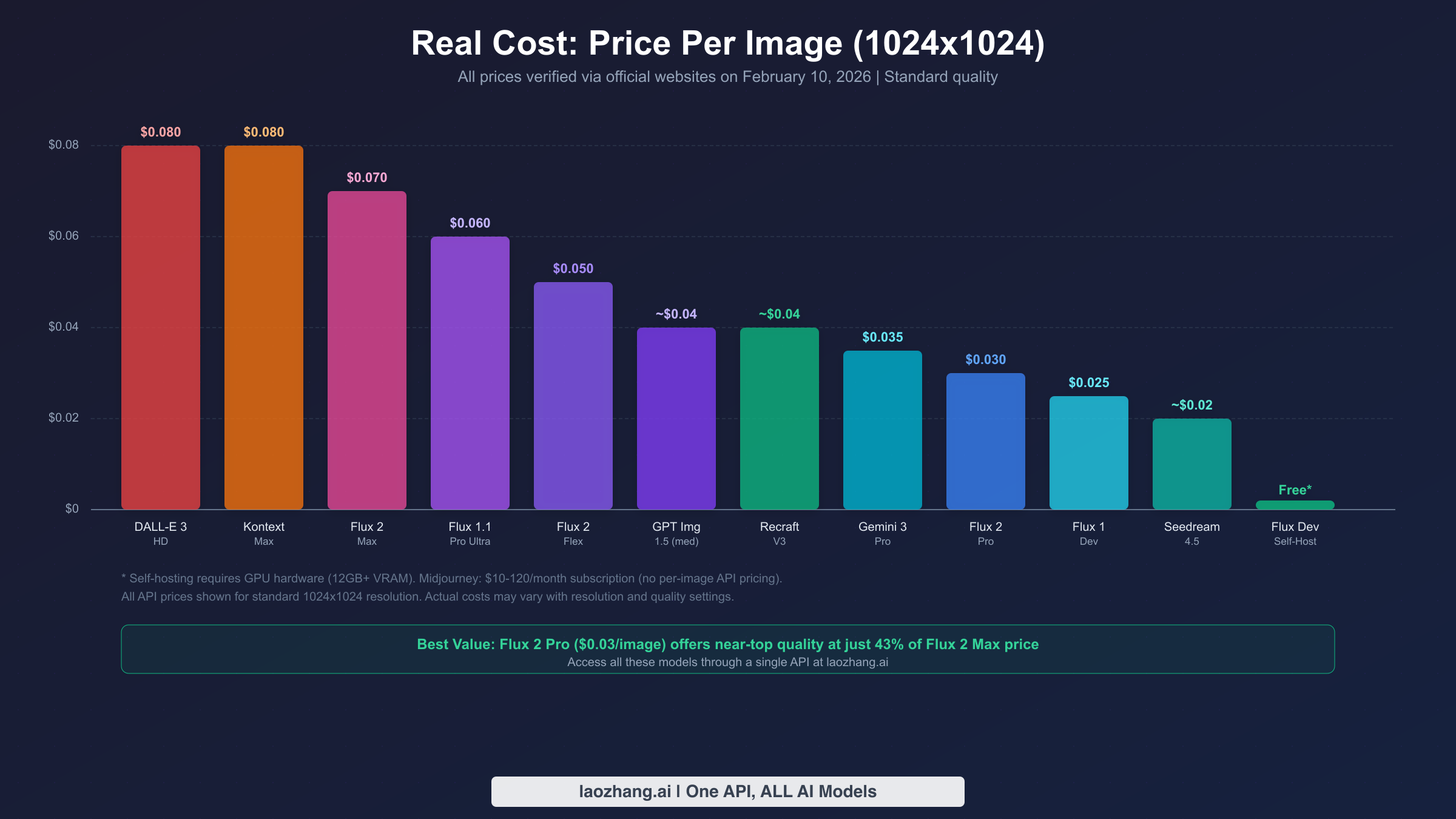
Understanding the true cost of AI image generation in 2026 requires cutting through three fundamentally different pricing models that make apples-to-apples comparison surprisingly difficult. OpenAI uses token-based pricing where costs depend on prompt length and quality settings. Black Forest Labs charges per megapixel with tiered rates for different model variants. Midjourney sells monthly subscriptions with GPU time allocations. And open-weight models like Flux 2 Dev can be self-hosted for zero per-image cost, though hardware investment is required. The table below normalizes all pricing to a single, comparable metric: the cost to generate one standard 1024x1024 image, with all prices verified through official sources as of February 2026.
| Model | Price per Image (1024x1024) | Pricing Model | Verified Source |
|---|---|---|---|
| DALL-E 3 HD | $0.080 | Fixed per image | OpenAI docs |
| Kontext Max | $0.080 | Fixed per image | bfl.ai/pricing |
| Flux 2 Max | $0.070 | Per megapixel | bfl.ai/pricing |
| Flux 1.1 Pro Ultra | $0.060 | Fixed per image | bfl.ai/pricing |
| Flux 2 Flex | $0.050 | Per megapixel | bfl.ai/pricing |
| GPT Image 1.5 (medium) | ~$0.040 | Token-based | openai.com/api/pricing |
| Recraft V3 | ~$0.040 | Per image | TeamDay data |
| Gemini 3 Pro | $0.035 | Per image | Google AI docs |
| Flux 2 Pro | $0.030 | Per megapixel | bfl.ai/pricing |
| Flux 1 Dev | $0.025 | Per image | bfl.ai/pricing |
| Seedream 4.5 | ~$0.020 | Per image | WaveSpeedAI data |
| Flux Dev (self-host) | Free* | Hardware cost only | Open-weight license |
The pricing landscape reveals a clear value hierarchy that does not perfectly correlate with quality rankings. Flux 2 Pro at $0.030 per image delivers ELO 1153 quality, which is only 15 points below Flux 2 Max at $0.070 per image. That means you pay 133% more for a roughly 1.3% improvement in quality, making Flux 2 Pro arguably the single best value proposition in the entire market. Similarly, GPT Image 1.5 at approximately $0.040 per image at medium quality offers the highest-ranked model on LM Arena at a price point that is cheaper than several lower-ranked alternatives. The catch is that GPT Image 1.5's token-based pricing means costs can spike significantly for high-quality settings or complex prompts, potentially reaching $0.17 or more per image.
For teams generating images at scale, the cost differences compound rapidly. A workflow producing 10,000 images per month would cost $700 with Flux 2 Max, $300 with Flux 2 Pro, and effectively $0 with self-hosted Flux 2 Dev (after hardware investment). The break-even point for self-hosting typically arrives at around 5,000 to 8,000 images per month when using a cloud GPU instance, or much sooner with owned hardware. For a deeper analysis of cost-efficient image API options, check out our guide to affordable Gemini image API access. API aggregation platforms like laozhang.ai also offer unified access to multiple models through a single endpoint, often with volume discounts that can reduce per-image costs by 10 to 30 percent compared to direct API access. This approach is particularly valuable for teams that need to route different types of requests to different models based on the specific task.
Midjourney's subscription model creates an entirely different cost dynamic. The Basic plan at $10 per month provides approximately 200 minutes of GPU time, which translates to roughly 200 standard-quality images. The Pro plan at $60 per month with 30 hours of GPU time works out to approximately $0.02 per image when fully utilized, making it one of the cheapest options on a per-image basis for users who consistently generate at high volume. However, the subscription model carries waste risk for users with variable generation needs, and the absence of an API means Midjourney's pricing is only relevant for manual, interactive generation workflows.
API Access & Developer Guide

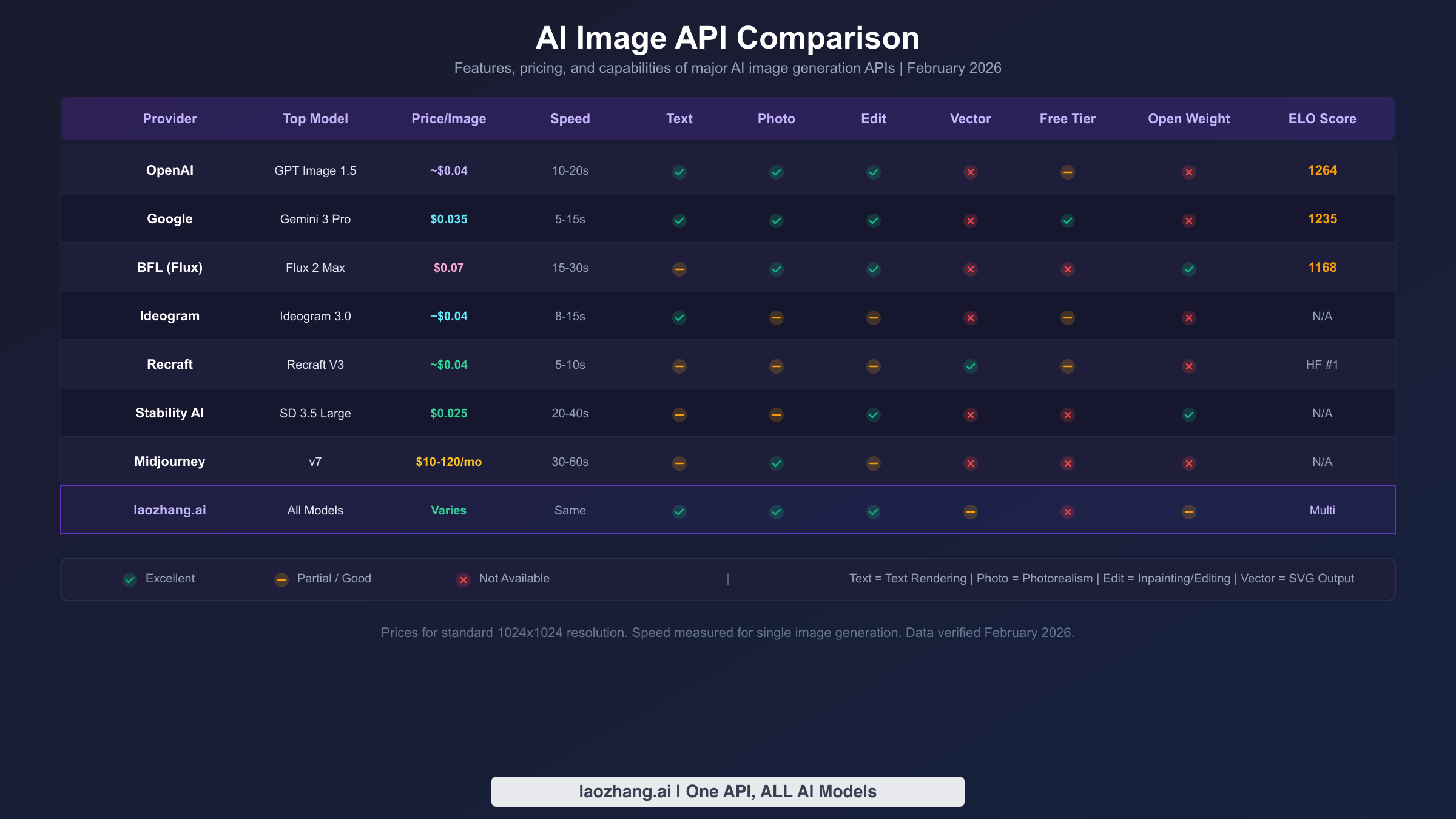
For developers integrating AI image generation into applications, the choice of API provider involves factors beyond raw image quality. Reliability, speed, rate limits, feature breadth, and documentation quality all impact the development experience and production stability. The February 2026 landscape offers more robust API options than ever before, with at least eight providers offering production-ready image generation endpoints. The following analysis examines each major API from a developer's perspective, focusing on practical integration considerations rather than marketing claims.
OpenAI's image generation API has evolved significantly with the transition from DALL-E 3's simple per-image pricing to GPT Image 1.5's token-based system. The new model integrates into the same Chat Completions API used for text generation, meaning you send image generation requests alongside text prompts in a unified conversation format. This architectural simplicity is a major advantage for teams already using OpenAI's text APIs, as no separate SDK or endpoint configuration is required. Generation speed averages 10 to 20 seconds per image, with rate limits varying by tier. The primary consideration is cost predictability, as the token-based model makes it harder to forecast monthly expenses compared to fixed per-image pricing.
Black Forest Labs provides the most comprehensive API for pure image generation, with dedicated endpoints for each Flux 2 variant. Their API follows a straightforward REST pattern with simple authentication and consistent response formats across all model tiers. Generation speed is competitive, with Flux 2 Pro completing requests in 15 to 30 seconds and the lightweight Schnell variant returning results in 2 to 5 seconds. The megapixel-based pricing is transparent and predictable, and the API supports both synchronous and webhook-based asynchronous generation patterns. Documentation quality is excellent, with clear code examples in Python, JavaScript, and curl.
Google's Gemini Image API offers tight integration with the broader Gemini ecosystem, making it attractive for applications already using Gemini for text or multimodal tasks. Gemini 3 Pro Image generation at $0.035 per image provides a strong mid-range option, and Google AI Studio offers a generous free tier for development and testing. For more details on Gemini's image API capabilities, including performance benchmarks and latency measurements, see our detailed Gemini 3 Pro Image API pricing and speed test.
For developers who need access to multiple models through a single integration point, API aggregation platforms eliminate the need to maintain separate SDKs and authentication credentials for each provider. laozhang.ai provides unified access to GPT Image 1.5, Flux 2 variants, Gemini Image, and other models through a single OpenAI-compatible API endpoint. This approach dramatically simplifies multi-model architectures where you route different request types to different models. For example, you might send text-heavy design requests to GPT Image 1.5 for its typography strength, photorealistic portraits to Flux 2 Max, and rapid prototyping requests to Flux 2 Schnell, all through the same API call format with only the model parameter changing.
| Provider | Best Model | Speed | Rate Limit | Free Tier | Key Feature |
|---|---|---|---|---|---|
| OpenAI | GPT Image 1.5 | 10-20s | Tier-based | Limited | Unified text+image API |
| Black Forest Labs | Flux 2 Max | 15-30s | Standard | None | Full model lineup |
| Gemini 3 Pro | 8-15s | Generous | Yes | Multimodal integration | |
| Ideogram | Ideogram 3.0 | 5-10s | Standard | Limited | Best text rendering |
| Recraft | Recraft V3 | 8-15s | Standard | None | Native SVG output |
| Stability AI | SD 3.5 | 10-20s | Standard | Limited | Broad model access |
| laozhang.ai | Multi-model | Varies | Standard | Yes | All models, one API |
Open-Source Models: Worth Self-Hosting?
The open-weight AI image generation ecosystem has reached a maturity point in 2026 where self-hosting is no longer a fringe pursuit for enthusiasts but a legitimate production strategy for organizations with the right infrastructure. The quality gap between the best open models and their commercial counterparts has shrunk to the point where the decision to self-host is primarily economic and operational rather than quality-driven. However, the hardware requirements, operational complexity, and ongoing maintenance costs deserve honest evaluation before committing to self-hosting.
Flux 2 Dev represents the current gold standard for open-weight image generation, ranking eighth on LM Arena with an ELO of 1149. This places it just 19 ELO points below the commercial Flux 2 Max and only 2 points below its sibling Flux 2 Pro, making it arguably the most capable open model ever released for image generation. Running Flux 2 Dev requires a GPU with at least 12GB of VRAM for standard inference at 1024x1024 resolution, with 24GB recommended for comfortable headroom and higher resolutions. On an NVIDIA RTX 4090, generation takes approximately 8 to 15 seconds per image, while cloud GPU instances on providers like Lambda Labs or RunPod cost roughly $0.50 to $1.00 per hour, translating to about $0.002 to $0.005 per image when running at capacity.
| Model | Min VRAM | Recommended GPU | Speed (1024x1024) | Quality (ELO) | License |
|---|---|---|---|---|---|
| Flux 2 Dev | 12GB | RTX 4090 / A100 | 8-15s | 1149 | Open-weight |
| Flux 2 Schnell | 8GB | RTX 3080+ | 2-5s | ~1100 est. | Apache 2.0 |
| SD 3.5 Large | 8GB | RTX 3080+ | 20-40s | ~1080 est. | Stability Community |
| Hunyuan 3.0 | 16GB | RTX 4090 / A100 | 15-25s | 1152 | Tencent Open |
The break-even analysis for self-hosting depends heavily on volume. If you generate fewer than 2,000 images per month, API access at $0.025 to $0.03 per image through Flux 2 Pro or Flux 1 Dev costs only $50 to $60 monthly, which is almost certainly cheaper than maintaining any GPU infrastructure. At 5,000 to 10,000 images per month, a dedicated cloud GPU instance becomes competitive. And at 50,000 or more images per month, the economics overwhelmingly favor self-hosting, as the marginal cost per image approaches zero. For a hands-on comparison of self-hosting performance across different GPU configurations, our Nano Banana Pro vs Flux 2 detailed comparison provides specific throughput benchmarks and cost-per-image calculations.
Stable Diffusion 3.5 Large and Tencent's Hunyuan Image 3.0 round out the notable open-weight options. SD 3.5 Large runs on as little as 8GB VRAM but generates images more slowly than Flux variants and ranks lower on quality benchmarks. Its primary advantage is the mature ecosystem of community fine-tunes, ControlNet integrations, and ComfyUI workflows that have been built over years of Stable Diffusion development. Hunyuan 3.0 ranks seventh on LM Arena (ELO 1152) and is particularly strong at generating images with CJK text and Asian-influenced aesthetics, making it an excellent self-hosting choice for applications targeting East Asian markets. The operational reality of self-hosting involves more than just running inference. You need to handle model updates, manage GPU memory, implement request queuing for concurrent users, and monitor for quality regressions, all of which add engineering overhead that is invisible in API pricing.
How to Choose: 3-Step Decision Framework
After analyzing rankings, pricing, features, and use cases across more than a dozen AI image models, the decision ultimately reduces to three sequential questions that narrow the field quickly and reliably.
Step 1: What is your primary use case? This single question eliminates approximately 70% of options immediately. If you need photorealistic images, Flux 2 Max or Flux 2 Pro are your top candidates. If you are creating art or illustrations, Midjourney v7 is the default choice with Flux 2 Max as the API-accessible alternative. For text-heavy designs, GPT Image 1.5 and Ideogram 3.0 lead. For logos and vectors, Recraft V3 has no serious competitor. For rapid prototyping, Flux 2 Schnell or Flux 2 Klein offer unmatched speed. Starting from use case rather than brand name or ranking position ensures you evaluate models on the dimensions that actually matter for your work, rather than being swayed by aggregate quality scores that may not reflect performance on your specific task type.
Step 2: What is your monthly volume and budget? Volume determines whether API access, subscription, or self-hosting makes economic sense. For fewer than 1,000 images per month, any API at $0.03 to $0.07 per image keeps total costs under $70, making convenience and quality the primary selection criteria. For 1,000 to 10,000 images per month, cost optimization becomes meaningful and models like Flux 2 Pro at $0.03 per image offer the best quality-per-dollar ratio. For volumes exceeding 10,000 images per month, self-hosting Flux 2 Dev or using an aggregation platform with volume discounts can reduce per-image costs by 50% or more compared to standard API pricing.
Step 3: Do you need API access? This question determines whether Midjourney is a viable option for your workflow. If you need programmatic generation for automated pipelines, batch processing, or application integration, Midjourney is eliminated regardless of its quality advantages, and your choices narrow to models with production APIs. If you only need interactive generation through a web interface, Midjourney's subscription model offers excellent value and unmatched artistic quality. This seemingly simple question eliminates one of the most popular models in the market and is often the most decisive factor in the selection process.
Frequently Asked Questions
What is the best AI image generator right now? GPT Image 1.5 ranks highest on LM Arena with an ELO of 1264 (February 2026), but the best choice depends on your use case. Flux 2 Max excels at photorealism, Midjourney v7 leads in artistic quality, and Recraft V3 dominates vector and logo generation.
Is Midjourney still the best for art? Yes, Midjourney v7 remains the preferred choice among professional artists and creative directors for its distinctive aesthetic quality and compositional intelligence. However, Flux 2 Max now provides comparable artistic results with full API access, making it the better choice for automated workflows.
What is the cheapest good AI image model? Flux 2 Pro at $0.03 per image offers the best quality-per-dollar ratio among API-accessible models, ranking sixth on LM Arena (ELO 1153) at less than half the cost of higher-ranked alternatives. For zero marginal cost, Flux 2 Dev can be self-hosted on hardware with 12GB or more of VRAM.
Which AI image model has the best text rendering? GPT Image 1.5 and Ideogram 3.0 share the lead for text accuracy in generated images. GPT Image 1.5 handles complex multi-text layouts better, while Ideogram 3.0 produces cleaner single-line typography with fewer artifacts.
Can open-source AI image models compete with paid ones? Flux 2 Dev (open-weight, ELO 1149) ranks just 19 points below the commercial Flux 2 Max (ELO 1168) on LM Arena, demonstrating that open models have effectively closed the quality gap for most practical applications. The trade-off is operational complexity and hardware requirements rather than output quality.