If a ChatGPT trial, promotion, or subscription turned into a charge you did not expect, first identify who billed you. A web charge from chatgpt.com, an Apple receipt, a Google Play order, an API/platform invoice, a duplicate subscription, and an unknown card merchant can require different refund routes, so do not start by sending the same message everywhere.
Build a small evidence packet before you ask for a refund: receipt or invoice, charge date and amount, account email, order or transaction ID, promotion or checkout screenshots if relevant, and only the card last four when payment proof is needed. Refund routes and timing were checked on June 17, 2026, but eligibility is conditional and policies change, so keep renewal cancellation, refund requests, and bank disputes as separate actions.
| If the charge came from | Start with this owner | Evidence to prepare first |
|---|---|---|
| chatgpt.com or a web invoice | OpenAI Help Center while logged into the charged account | account email, receipt, charge date and amount, plan screen, support case details |
| Apple App Store receipt | Apple Report a Problem | Apple receipt, Apple Account, item name, subscription status |
| Google Play order | Google Play refund path or OpenAI Help Center as directed by current policy | Google order ID, account email, charge date, subscription screen |
| API or platform invoice | OpenAI Platform billing support | organization/account, invoice, credit or usage details |
| duplicate or still-Free subscription | compare accounts and stores before requesting a refund | receipts, login method, Apple Hide My Email relay, restore-purchase state, card last four |
| unknown or unauthorized card charge | bank or card issuer first, plus OpenAI evidence if the charge names OpenAI | transaction date, amount, merchant label, card last four, fraud report reference |
Start with the billing owner
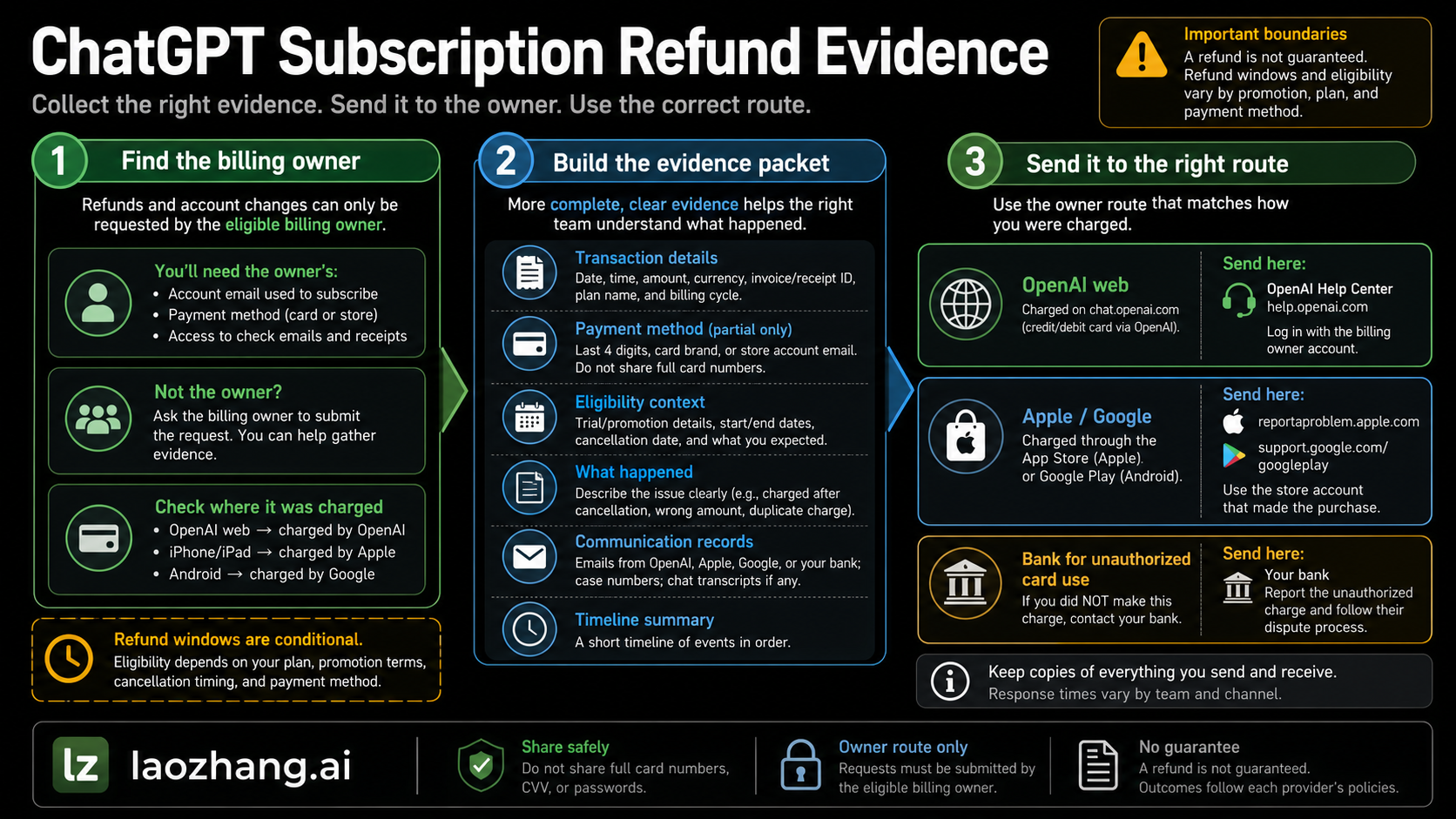
The fastest refund request is the one sent to the party that can actually see the charge. OpenAI's current refund help page says the process depends on how you signed up: web subscriptions and some Google Play cases use OpenAI Help Center chat, Apple subscriptions are handled by Apple, and country-specific consumer-law rights may add separate refund routes. OpenAI's billing-settings page also separates ChatGPT subscriptions from API Platform billing, which matters if the charge is for API credits, prepaid balance, or organization usage rather than ChatGPT Plus, Pro, Go, or another ChatGPT plan.
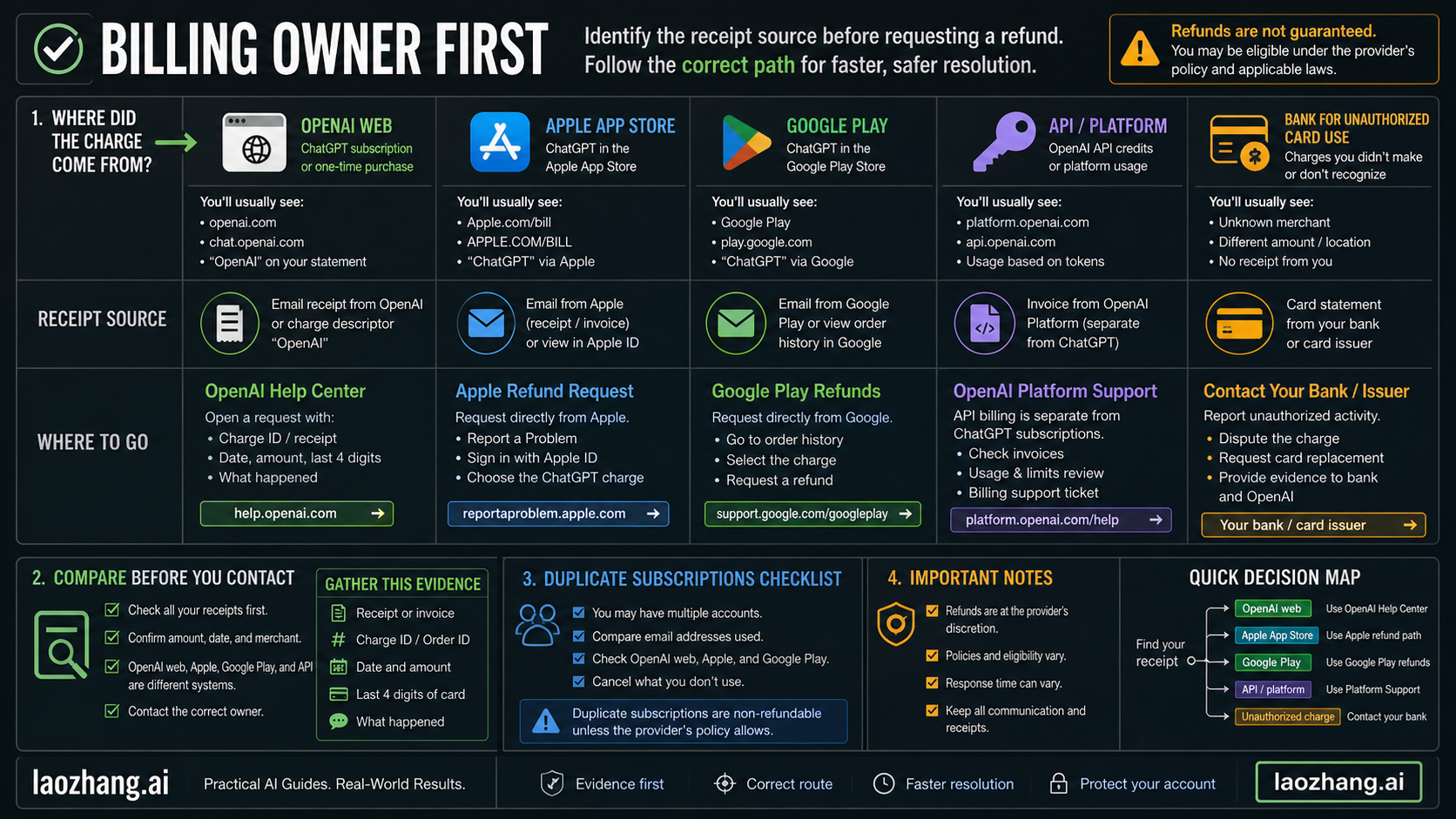
Use the receipt source, not the product name alone, as your owner signal:
| Evidence signal | Likely owner | What it changes |
|---|---|---|
| Email receipt from OpenAI or a web invoice in ChatGPT billing settings | OpenAI ChatGPT web billing | OpenAI can usually match the account and subscription directly. |
| Apple receipt or "Apple.com/bill" style card label | Apple | OpenAI can explain the app subscription, but Apple's refund system owns the purchase. |
| Google Play order ID or Play Store subscription screen | Google Play and/or OpenAI Help Center, depending on the current path shown to you | You may need the Google order ID plus the OpenAI account email. |
| Platform invoice, organization credit purchase, or usage billing | OpenAI Platform billing | Treat it as an API billing issue, not a ChatGPT subscription refund. |
| Two receipts for the same period from different stores or accounts | Duplicate subscription route | Prove both account paths before asking for one charge to be refunded. |
| Card charge you do not recognize and no matching account receipt | Bank or card issuer first | Treat it as possible unauthorized activity and preserve transaction details. |
This owner split prevents two common mistakes. The first is asking OpenAI to refund an Apple transaction that Apple controls. The second is treating a normal promo renewal as card fraud before you have checked the checkout terms, the account, and the store receipt. A bank dispute can be the right move for a truly unauthorized card charge, but it should not be the first default for a subscription that renewed under terms you may be able to document and challenge through the billing owner.
Build the refund evidence packet
Your evidence packet should be small enough for support to read quickly and complete enough to prove the account, charge, route, and mismatch. Do not send a folder full of unrelated screenshots. Send the minimum facts that let the billing owner reproduce the charge.
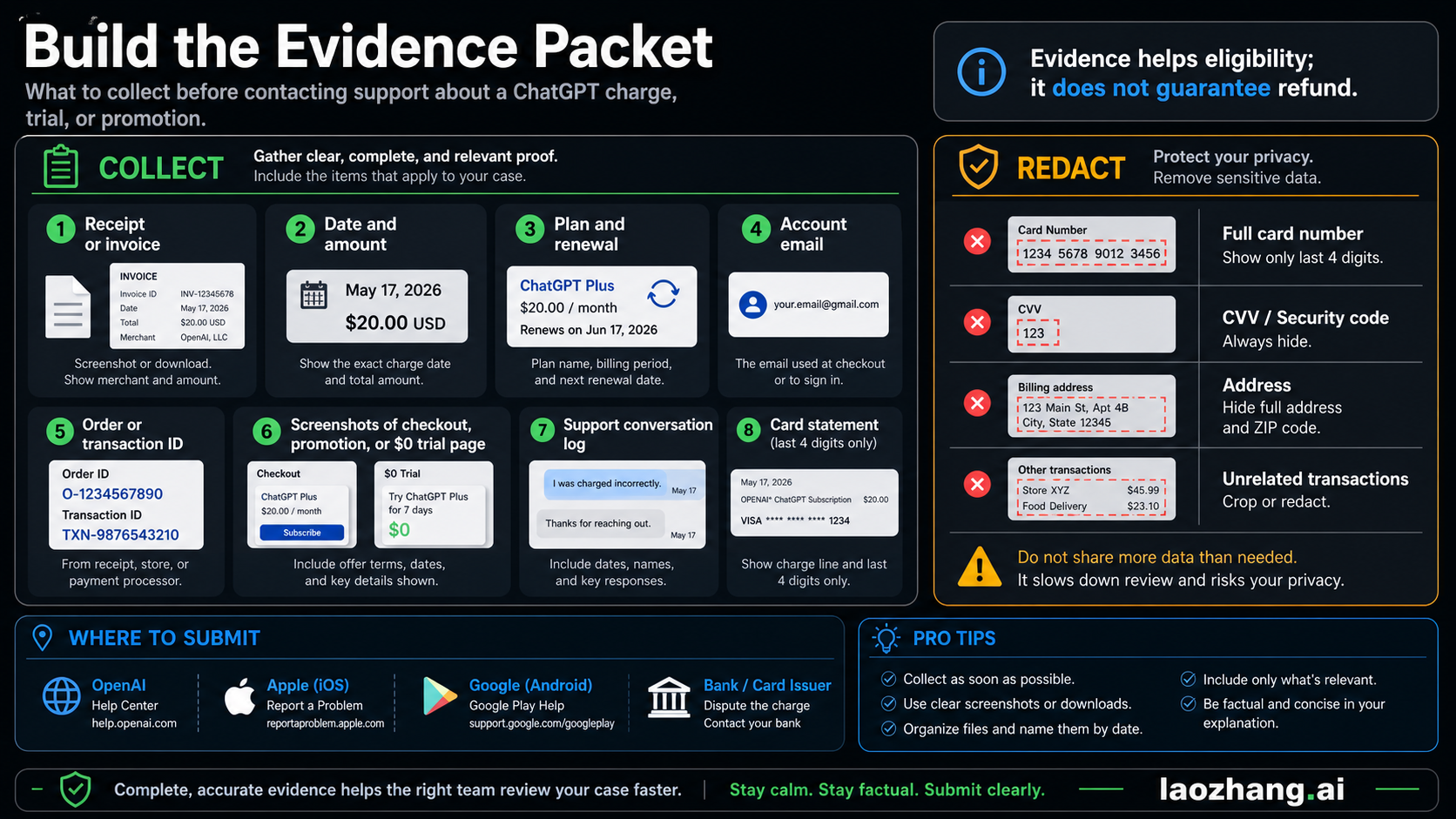
Collect these items before opening the refund request:
| Evidence item | Why it matters | Privacy boundary |
|---|---|---|
| Receipt, invoice, or store order confirmation | Shows the owner, item, date, and amount | Keep the full receipt if it is submitted through the official owner route; redact unrelated purchases. |
| Charge date, amount, currency, and merchant label | Helps support find the transaction | Do not expose unrelated transactions from your card statement. |
| ChatGPT account email and login method | Proves which account support should inspect | Include Apple Hide My Email relay if you used it. |
| Order ID, transaction ID, invoice number, or support case ID | Connects the request to an exact record | Keep IDs exact; do not paraphrase them. |
| Current plan or subscription screen | Shows whether the subscription is active, canceled, still-Free, or duplicated | Hide unrelated account details. |
| Promo, referral, free-trial, or checkout screenshots | Useful when a $0.00 or trial page did not match the charge | Include timestamped screenshots if you have them. |
| Cancellation confirmation, if already canceled | Separates renewal prevention from refund eligibility | Save the confirmation email or screen. |
| Card statement line, only if needed | Helps verify an unknown or unauthorized charge | Use card last four only. Never share full card number, CVV, full billing address, or photos of the card. |
The support request should be written in facts, not anger. A concise evidence packet is easier to approve or route than a long complaint. If you have no receipt, say that directly and provide the merchant label, date, amount, card last four, and any account emails that might be linked. If you have multiple accounts, list them as possibilities rather than pretending you already know which one was charged.
If a trial or promotion renewed into a paid subscription
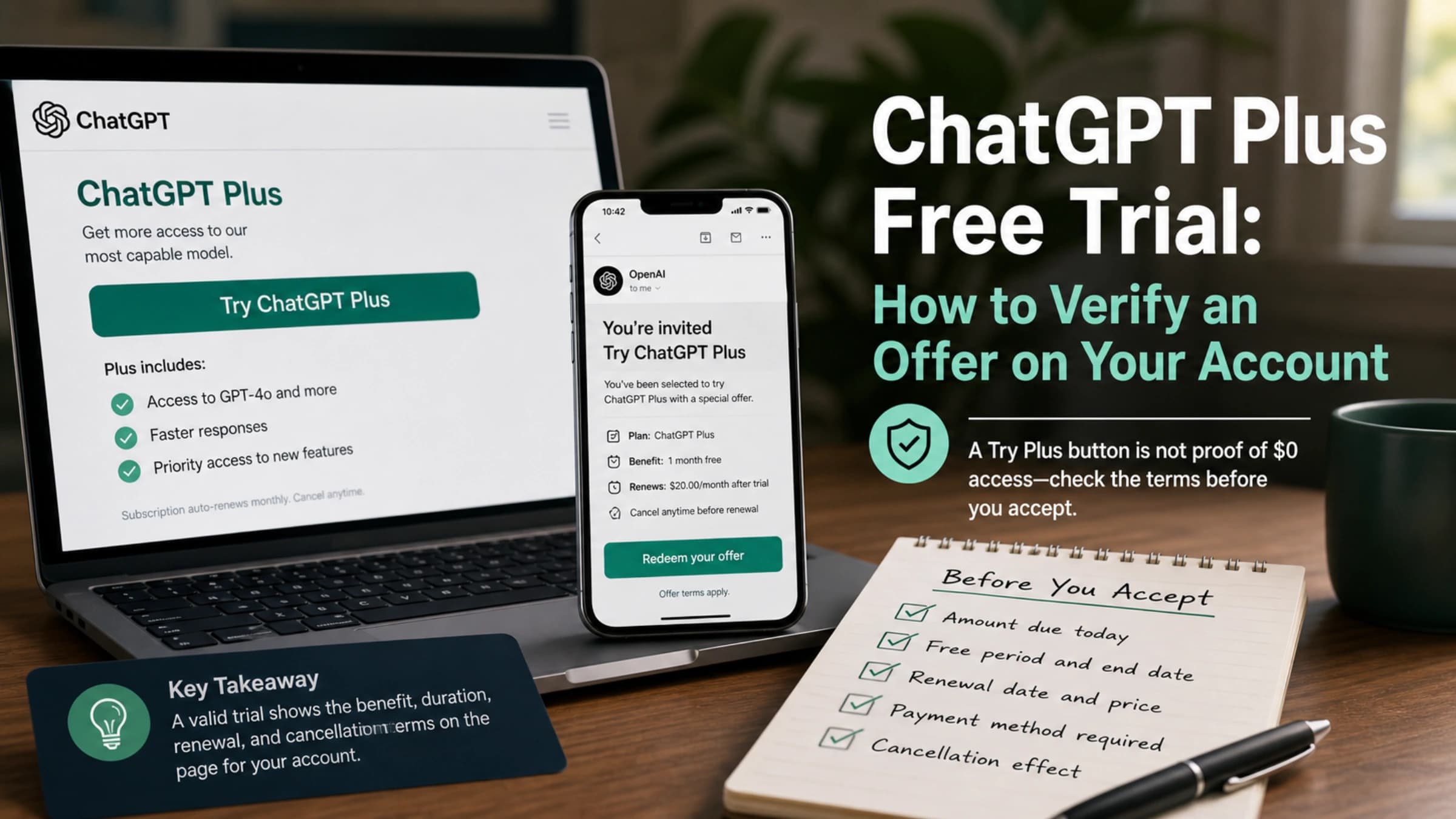
A trial or promotion charge is usually a documentation problem before it is a refund problem. OpenAI's promotional-subscription help says free or limited-duration trials can be campaign-specific, some require a valid payment method, and a subscription may auto-renew into a paid plan unless it is canceled before the trial or promotion ends. OpenAI's Plus promotion page also tells users to cancel at least 24 hours before renewal to avoid an unwanted charge.
That means your evidence should prove what you saw at checkout and what happened afterward:
| Trial or promo fact | Evidence to collect |
|---|---|
| The page said the first period was free or discounted | screenshot of the offer, invite, referral, or checkout page |
| The checkout showed $0.00 but you were charged | screenshot of the checkout total plus the charge receipt |
| You canceled before renewal | cancellation confirmation and renewal date shown before cancellation |
| You were charged after the promo window | promo terms, renewal date, receipt, and subscription screen |
| You were never eligible for the promo | campaign email or referral page, account email, and support explanation |
Keep the argument narrow. "I expected this to stay free forever" is weak if the checkout explained auto-renewal. "The checkout showed $0.00 on June 15, but my card was charged $20 on June 16, and I attached the checkout screenshot and receipt" is much stronger. If your real question is whether ChatGPT Plus has a public trial at all, use the separate ChatGPT Plus free trial guide for availability context, then return here for refund evidence.
Cancel renewal separately from the refund request. Cancellation prevents another billing period; it does not automatically refund the period already charged. If you need step-by-step cancellation context, the ChatGPT subscription cancellation guide is the safer companion page.
If the charge came from ChatGPT web
For a web subscription, start from the ChatGPT account that you believe was charged. OpenAI's current refund page says web users should use the Help Center chat while logged into the charged account, and accidental purchases are generally eligible if you contact OpenAI within 14 days of the charge. OpenAI also says eligible web refunds usually process within 5-7 business days, but that is not a guarantee of approval.
Prepare the web request like this:
- Sign in to the ChatGPT account that shows the subscription or receipt.
- Open billing settings and capture the current plan, renewal date, and invoice or receipt if available.
- Start the Help Center chat from that account, not from a random browser session.
- Attach or summarize the receipt, charge date, amount, account email, and reason the charge was unexpected.
- Save the support case ID, transcript, and any refund decision.
If the account has been deleted, locked, or inaccessible, lead with that constraint. Provide every email you might have used, the charge date, amount, merchant label, and card last four. Do not create a second refund ticket with a different story unless support asks you to; duplicate tickets make it harder to follow the decision trail.
For EU, UK, and Turkey consumers, OpenAI's refund page and regional terms describe additional 14-day cancellation or prorated-refund rights for certain paid subscriptions. Treat those as country-specific eligibility facts, not as a global promise. Quote the exact country route shown on the official page when you submit the request.
If the receipt is from Apple or Google Play
Apple and Google Play receipts are not just payment proofs. They are route selectors.
For Apple, OpenAI's Apple-subscription help says App Store subscriptions are managed by Apple, deleting a ChatGPT account on the web does not cancel the Apple subscription, and refund requests go through Apple's own system. Apple's refund page says to use reportaproblem.apple.com, choose "Request a refund," select a reason and item, and wait for Apple's update. Apple also notes that pending charges cannot be refunded until the receipt is available, so search your email for the Apple receipt before you assume there is no record.
For Google Play, preserve the Google order ID and the Google account that made the purchase. Google Play's refund policy says many app, in-app, and subscription purchases are not automatically refundable, but refund eligibility depends partly on time since purchase; within 48 hours you may be able to request through Google Play, and after 48 hours Google often points users toward the developer. OpenAI's ChatGPT refund page also gives a Help Center route for Google Play ChatGPT subscriptions, so follow the current path shown to you and attach the Google order details.
Use this platform checklist:
| Platform | Submit through | Evidence to attach or keep ready |
|---|---|---|
| Apple App Store | Apple Report a Problem | Apple receipt, Apple Account, item name, charge date, subscription status, Apple case update |
| Google Play | Google Play refund path and/or OpenAI Help Center as directed | Google order ID, Google account, OpenAI account email, charge date, amount, subscription screen |
| ChatGPT web | OpenAI Help Center while logged in | OpenAI receipt, account email, plan screen, charge date, amount, support case ID |
Do not blur these routes in your message. "I was charged for ChatGPT" is not enough. "The receipt is from Apple for ChatGPT Plus on June 16, and Apple Account X owns the subscription" is route-ready.
If you were charged but still see Free, or you see duplicate charges
"Charged but still on Free" usually means one of three things: you are logged into the wrong account, the subscription belongs to an app-store identity that does not match your visible ChatGPT email, or there are duplicate subscriptions across web and mobile stores. OpenAI's Plus help specifically tells users in this situation to verify the same authentication method, check Apple Hide My Email relay addresses, restore purchases, log out and back in, and contact support with a receipt or card last four.
Work through the account mismatch before asking for a refund:
- Check whether you normally sign in with email/password, Google, Microsoft, Apple, or another method.
- If you used Apple, inspect whether Hide My Email created a relay address that differs from your normal email.
- Check ChatGPT billing settings on web, then Apple subscriptions, then Google Play subscriptions.
- Search email for OpenAI, Apple, and Google Play receipts around the charge date.
- If mobile purchase restoration is available in the app, try it before assuming the purchase failed.
- If two active subscriptions exist, document both receipts and ask the owner of the extra charge how to handle the duplicate.
The strongest duplicate-charge request includes both sides of the duplication. For example: "I have an OpenAI web receipt for Plus on account A and an Apple receipt for the same ChatGPT subscription period on Apple Account B. I need help canceling the duplicate route and requesting a refund for one charge." That is much easier to investigate than "ChatGPT charged me twice."
If the charge looks unauthorized
An unauthorized charge is different from a promo renewal, duplicate subscription, or forgotten trial. If you do not recognize the account, never signed up, cannot find a receipt, or see multiple suspicious transactions, contact your bank or card issuer immediately. OpenAI's unauthorized-charge help also says support may investigate and asks for transaction dates, amounts, and card information; use the card last four, not a full card number.
Keep the evidence factual:
| Unauthorized-charge signal | Next action |
|---|---|
| No matching OpenAI, Apple, or Google receipt | Ask the bank or issuer to inspect the transaction and preserve the merchant label. |
| Several unknown OpenAI-labeled charges | Report the pattern to the bank and keep dates, amounts, and card last four. |
| You suspect account compromise | Change passwords, review sign-in methods, revoke suspicious sessions where available, and contact support from the account you control. |
| The bank asks whether you contacted the merchant | Save your OpenAI, Apple, or Google support case ID and response. |
Do not post card screenshots in public forums. Do not send full card numbers in ordinary support messages. Do not wait for a normal subscription refund route if the card is actively being used without permission. In a true unauthorized-charge case, the bank can protect the payment instrument while OpenAI or the platform investigates the merchant-side record.
Submit the request without losing the case trail
Once the evidence packet is ready, submit through the owner route and keep a clean record of what happened. This is where many readers lose leverage: they cancel in one place, request a refund in another, open a bank dispute in a third, and then cannot explain the sequence.
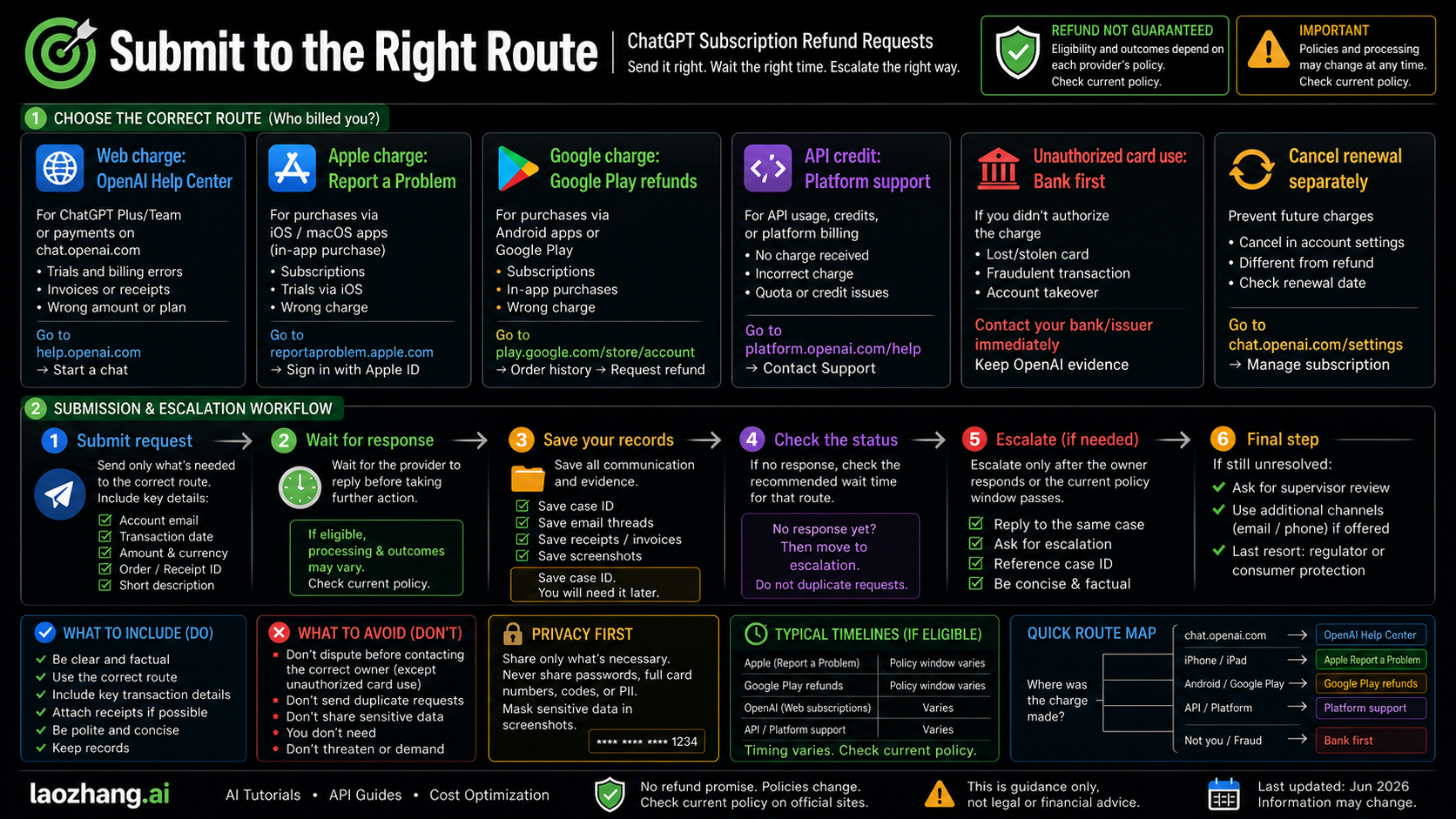
Use this message as a starting point, then adjust it to the route:
textSubject: Refund request for unexpected ChatGPT subscription charge

Hello, I am requesting review of an unexpected ChatGPT subscription charge.

Billing owner shown by my receipt: [OpenAI web / Apple / Google Play / API Platform / unknown card charge]
Account email or store account: [email or store account]
Charge date and amount: [date, amount, currency]
Order ID, invoice, or transaction ID: [ID if available]
Current subscription state: [active / canceled / still Free / duplicate / unknown]
Why I believe the charge needs review: [trial or promo mismatch, accidental purchase, duplicate subscription, wrong account, unauthorized charge, or other concise reason]
Evidence attached or available: [receipt, subscription screen, checkout screenshot, cancellation confirmation, card statement with only last four visible]

Please let me know whether this charge is eligible for refund through this route or whether it must be handled by another billing owner.
After submission, save the case ID, confirmation email, receipt, and the exact date you contacted support. If the owner rejects the request, read the reason before escalating. A rejection because Apple owns the transaction means you need Apple's route, not a louder OpenAI ticket. A rejection because the charge is outside the refund window may still leave consumer-law or bank options in some regions, but the facts need to match that route. A rejection because the charge cannot be found usually means you need better account, receipt, or card-last-four evidence.
Keep the stop rules simple:
| Situation | Do this next |
|---|---|
| You have not canceled renewal yet | Cancel through the same owner route so another period does not start. |
| You submitted to the wrong owner | Move the evidence packet to the right owner and mention the first case ID. |
| The owner says the charge cannot be found | Recheck account email, login method, Apple relay, Google account, receipt, and card last four. |
| The charge is unauthorized | Work with the bank or card issuer first, then keep merchant support records. |
| The policy window or country rule is unclear | Quote the official page shown to you and ask support to confirm eligibility. |
FAQ
Can I get a refund for a ChatGPT subscription charge?
Maybe, but it depends on the billing owner, timing, country rules, and why the charge happened. OpenAI says accidental web purchases are generally eligible if you contact support within 14 days, while Apple and Google Play have their own refund systems and policies. Treat eligibility as conditional until the owner confirms it.
What evidence should I send first?
Start with the receipt or invoice, charge date, amount, account email, order or transaction ID, current subscription screen, and any checkout or promo screenshot that proves the mismatch. For payment verification, use only the card last four when needed. Do not send full card numbers, CVV, card photos, or unrelated statement history.
What if a ChatGPT trial or promo renewed automatically?
Collect the promo terms, checkout screenshot, renewal date, receipt, and cancellation status. OpenAI's promo help says some trials require payment methods and may auto-renew unless canceled before the end of the trial or promo. A refund request is stronger when it points to a concrete mismatch, such as a $0.00 checkout that was followed by a paid charge.
Should I ask OpenAI or Apple for an App Store refund?
Start with Apple if the receipt came from Apple. OpenAI can help you understand ChatGPT account state, but Apple's refund system owns App Store purchases. Keep the Apple receipt, Apple Account, item name, charge date, and subscription status ready.
What if Google Play charged me?
Keep the Google Play order ID, Google account, OpenAI account email, charge date, and subscription screen. Google may offer a direct refund path within a short window, while OpenAI's current ChatGPT refund page also gives a Help Center path for Google Play subscriptions. Follow the route currently shown to you and keep both records if you use both systems.
I paid but ChatGPT still says Free. What should I do before requesting a refund?
Check whether you used the same sign-in method, whether Apple Hide My Email created a relay address, whether the app-store subscription needs restoration, and whether the charge belongs to another account. Then contact support with the receipt, account emails, subscription screen, and card last four if needed.
When should I contact my bank?
Contact your bank or card issuer immediately if the charge appears unauthorized, you cannot match it to any account or receipt, or your card appears to be used without permission. For ordinary auto-renewals, trial renewals, or duplicate subscriptions, start with the billing owner first unless there is active fraud risk.
Does canceling ChatGPT automatically refund the charge?
No. Cancellation prevents future renewal through that owner route, but it does not automatically refund a previous charge. Cancel renewal and submit the refund request as separate actions, then save both confirmations.