ChatGPT Plus to Business Migration: Chat History and Memory Risk Checklist
Treat Plus-to-Business as a workspace data migration. Inventory chats, memories, GPTs, Projects, and files before merging, then verify access immediately after.
On this page
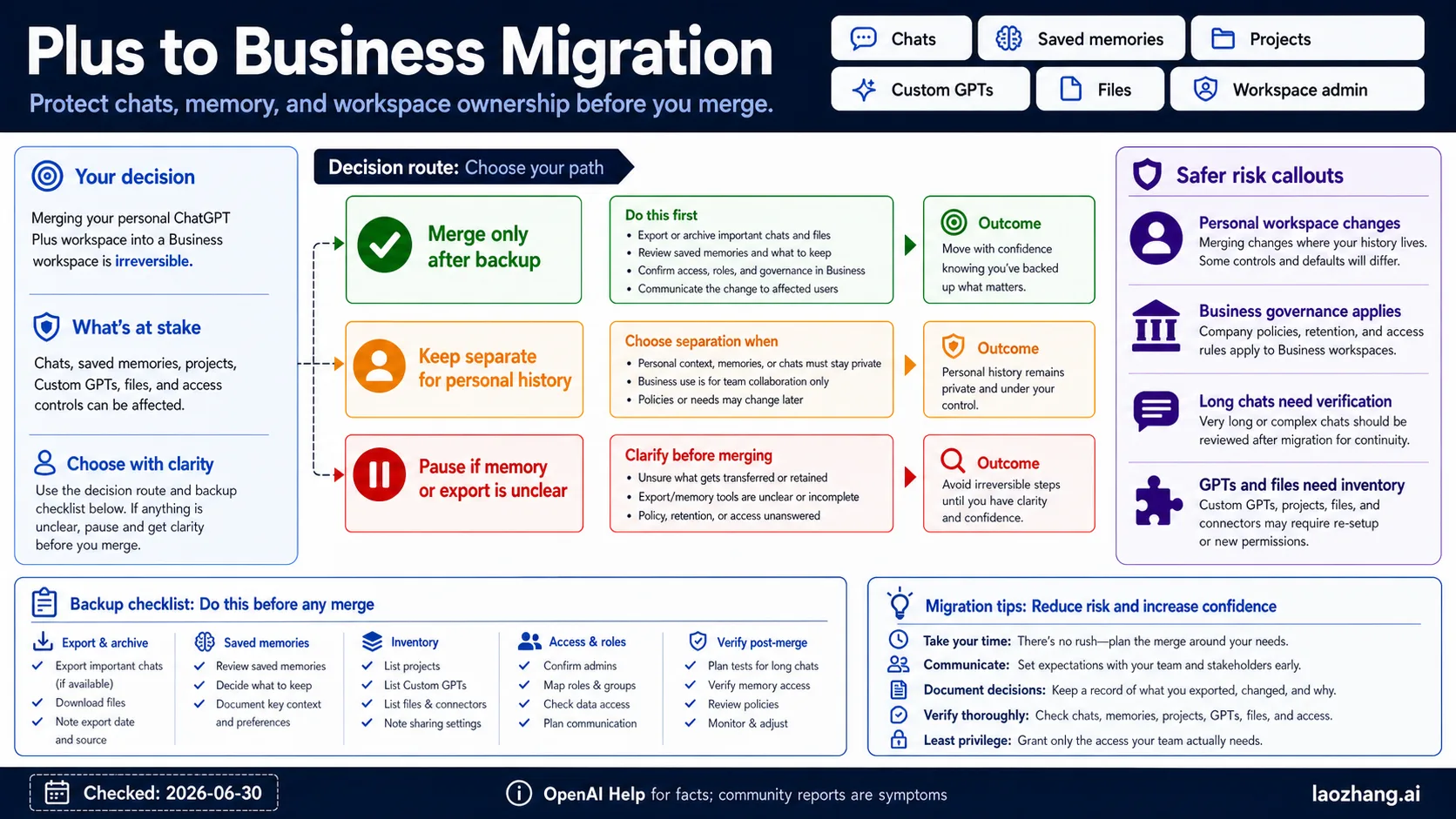
If you are moving from ChatGPT Plus to Business, treat the move like a workspace data migration before you click any merge or invite flow. Your visible chats, saved memories, past-chat context, Custom GPTs, Projects, files, connectors, roles, and workspace ownership do not all carry the same risk.
Use three routes. Merge only when team governance is acceptable and your important personal data has been exported or inventoried where available. Keep Plus and Business separate when personal history, private memory, or old experiments should remain outside a Business-governed workspace. Pause if you cannot clearly answer what happens to chat history, saved memories, GPTs, Projects, files, admin ownership, or post-migration support evidence.
Checked June 30, 2026: migration claims are bounded by current OpenAI Help pages for workspace migration, memory, export, and enterprise privacy. Community reports are treated only as symptoms to plan around, not as policy.
Before-click stop rule: if export, memory settings, workspace admin, or long-chat continuity is unclear, do not merge yet. Inventory first, then verify every critical surface immediately after migration.
Fast Answer: Merge, Keep Separate, Or Pause
Start with the workspace decision, not the billing button. The important question is not only whether Business has better team governance. It is whether your personal ChatGPT history should become part of a Business-governed workspace at all.
OpenAI's workspace lifecycle and migration Help page is the current owner for personal-to-Business merge behavior. Reopen that page and the live workspace UI before action, because migration language, seat behavior, and admin controls can change.
| Route | Use it when | Do first | Risk you are accepting |
|---|---|---|---|
| Merge after backup | The chats, GPTs, Projects, files, and memories are acceptable inside the Business governance boundary | Export or archive important material where available, inventory settings, and confirm the target workspace owner | Personal workspace behavior may change under Business policy and admin ownership |
| Keep separate | Personal conversations, saved memories, experiments, or private files should remain outside a team workspace | Use the Business workspace for team work only and keep personal work in the personal workspace | Some context or artifacts will not be shared with the team by default |
| Pause and clarify | You cannot explain what happens to chat history, saved memory, reference-chat-history context, GPTs, Projects, files, or ownership | Ask the workspace admin, check export options, and record current settings before any merge | Waiting is safer than making an irreversible or hard-to-recover move without evidence |
The fastest safe answer is: do not merge until you have a written inventory of what matters and a post-migration verification plan. A clean merge is useful. A merge that leaves you unable to prove what moved is not.
Migration Surface Matrix
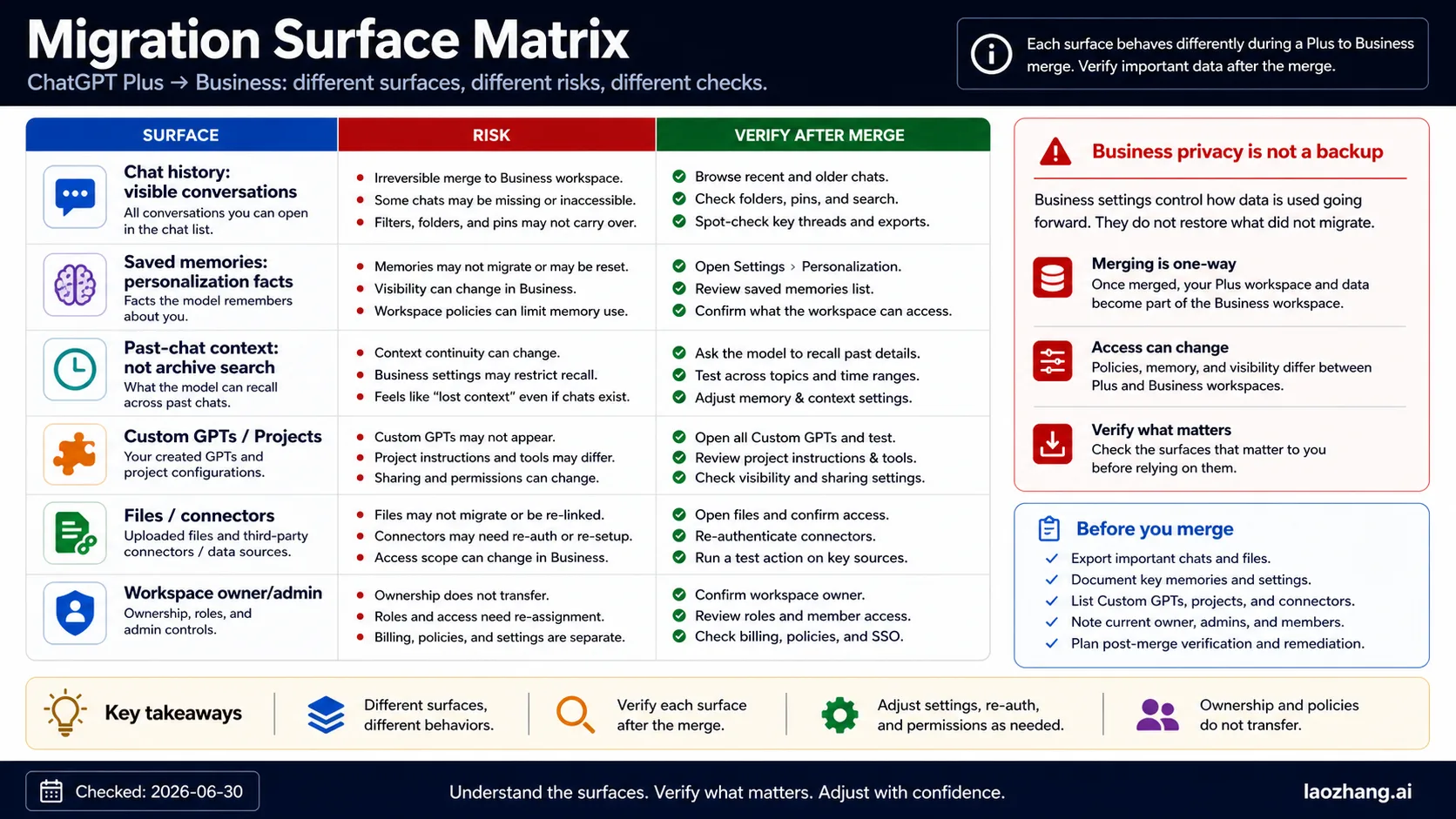
Do not test migration with one successful chat. ChatGPT has multiple surfaces, and they can fail or change in different ways. Treat each row below as its own item in the migration plan.
| Surface | What it means | Before merge | After merge |
|---|---|---|---|
| Chat history | Conversations visible in the sidebar, search, folders, or pinned areas | Export where available; list critical chat titles and dates | Search known titles, open old long chats, and test continuity |
| Saved memories | Durable facts or preferences stored by ChatGPT memory | Review OpenAI's Memory FAQ; delete or edit sensitive memories first | Check whether memory is enabled, visible, and behaving as expected |
| Past-chat context | ChatGPT's ability to refer to prior conversations when the setting allows it | Decide whether old personal context should influence Business work | Test a benign recall prompt and inspect memory/reference settings |
| Custom GPTs | GPTs you created, used, or configured | Inventory names, instructions, actions, files, and sharing status | Confirm visibility, ownership, actions, and file access |
| Projects | Project spaces, project files, and project instructions | List projects that matter and record key instructions | Open each important project and verify files, instructions, and sharing |
| Uploaded files | Files attached to chats, GPTs, or Projects | Download irreplaceable files and record where they are attached | Confirm old file references and new upload permissions |
| Connectors and actions | Third-party integrations, GPT actions, or workspace connectors | Record configured systems and credentials owner | Reauthorize or disable anything that changed owner or scope |
| Roles and workspace owner | Admins, members, groups, seat type, and workspace ownership | Confirm who controls the Business workspace | Verify your role, seat type, group, and data visibility |
| Export and retention | The route used to export personal or workspace data | Use the consumer export path before merge if available | Ask the workspace owner/admin about Business export and retention policy |
The key split is chat history is not saved memory, and saved memory is not the same as past-chat context. A chat can remain visible while a saved memory changes. A memory can exist while an old conversation is hard to retrieve. A Business privacy boundary can change data handling without acting as a backup.
Pre-Migration Backup Checklist
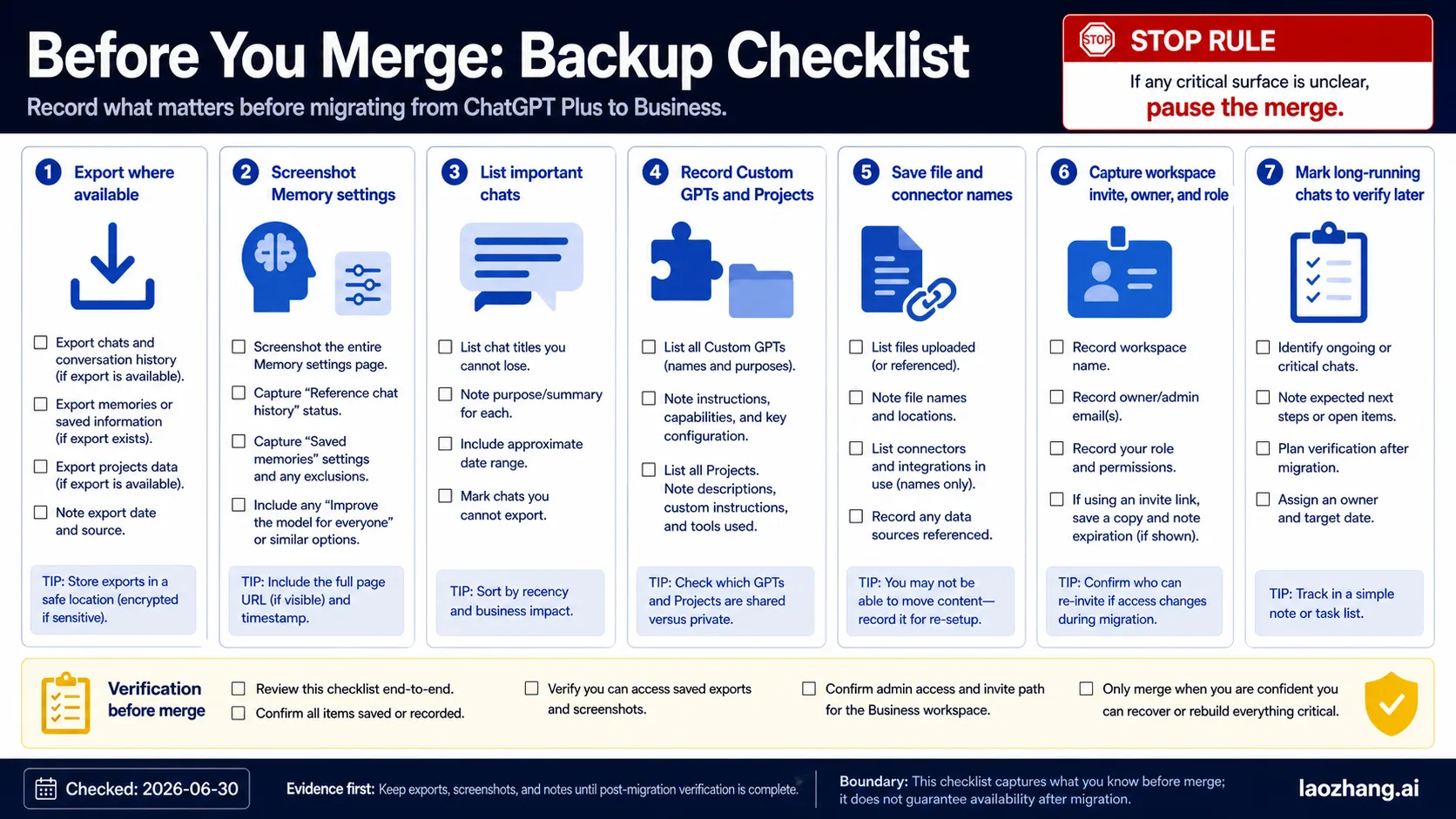
Run this checklist before the merge, not after a missing-history incident.
- Export or archive personal data where available. OpenAI's data export Help page is the baseline for personal ChatGPT export. If your workspace already sits under Business controls, ask the owner/admin whether export is available to you or only to workspace admins.
- List critical conversations. Record chat titles, dates, unusual attachment names, and why each conversation matters. Long, old, or compliance-sensitive chats deserve explicit test cases after migration.
- Review saved memories. Open memory settings and remove sensitive personal facts that should not influence Business work. The Memory FAQ separates saved memories from chat-history context controls, so check both.
- Inventory GPTs and Projects. Record Custom GPT names, instructions, actions, files, project instructions, and shared collaborators. A GPT that worked in a personal workspace may need permission, connector, or ownership review after a Business move.
- Download irreplaceable files. If a file cannot be recreated, keep a local copy before the merge. Do not assume a file attached to a chat, GPT, or Project will be easy to recover from the target workspace.
- Record workspace facts. Screenshot or write down workspace name, target Business owner, admin contact, your role, seat type, group membership, and any planned seat changes.
- Tell affected collaborators. If other users rely on a GPT, Project, shared link, or file, tell them what may change and when you will verify access.
For account-access risk outside a Business merge, keep a separate backup habit. The ChatGPT account deactivation backup checklist covers evidence that is useful when the problem is account access, appeal, or recovery rather than workspace migration.
What Business Changes
Business is not just a price tier. It changes the governance boundary.
OpenAI's enterprise privacy page explains that Business data has a different privacy and training boundary than consumer ChatGPT. That is useful for team work, but it is not the same as recoverability. A privacy promise does not prove that every personal chat, saved memory, GPT, Project, or file will remain accessible in the way you expect after a workspace move.
Expect these practical changes:
- workspace admins and owners matter more than personal-account habits
- company policy, retention, connectors, and access controls can apply
- sharing settings and visibility may need review
- files, GPT actions, and Projects can require reauthorization
- seat type can affect what you should verify after migration
- export routes can differ between personal and Business contexts
This is why the safest merge plan has two separate documents: an inventory before migration and a verification log after migration. The inventory says what should exist. The verification log says what you actually found.
Memory Is Not Chat History
Chat history is the visible record of conversations. Saved memories are durable facts or preferences ChatGPT stores for personalization. Past-chat context is the model's ability to use prior conversations as context when the relevant setting allows it. Those three behaviors touch each other, but they are not the same control.
Use this cleanup sequence:
- Open memory settings in the personal workspace.
- Review saved memories and remove personal facts that should not cross into Business work.
- Check whether reference to chat history is enabled or disabled.
- Open several old chats that matter and record their titles.
- After migration, inspect the same memory settings and rerun a harmless recall test.
Do not test memory with sensitive material. Use a harmless fact such as a preferred formatting style or a fake project nickname. The goal is to verify behavior, not to push private context into a new workspace.
If memory is unavailable, disabled, or different in the Business workspace, do not assume data loss. Treat it as a setting, role, rollout, or policy question until the workspace owner and OpenAI Help agree on the current behavior.
Post-Migration Verification
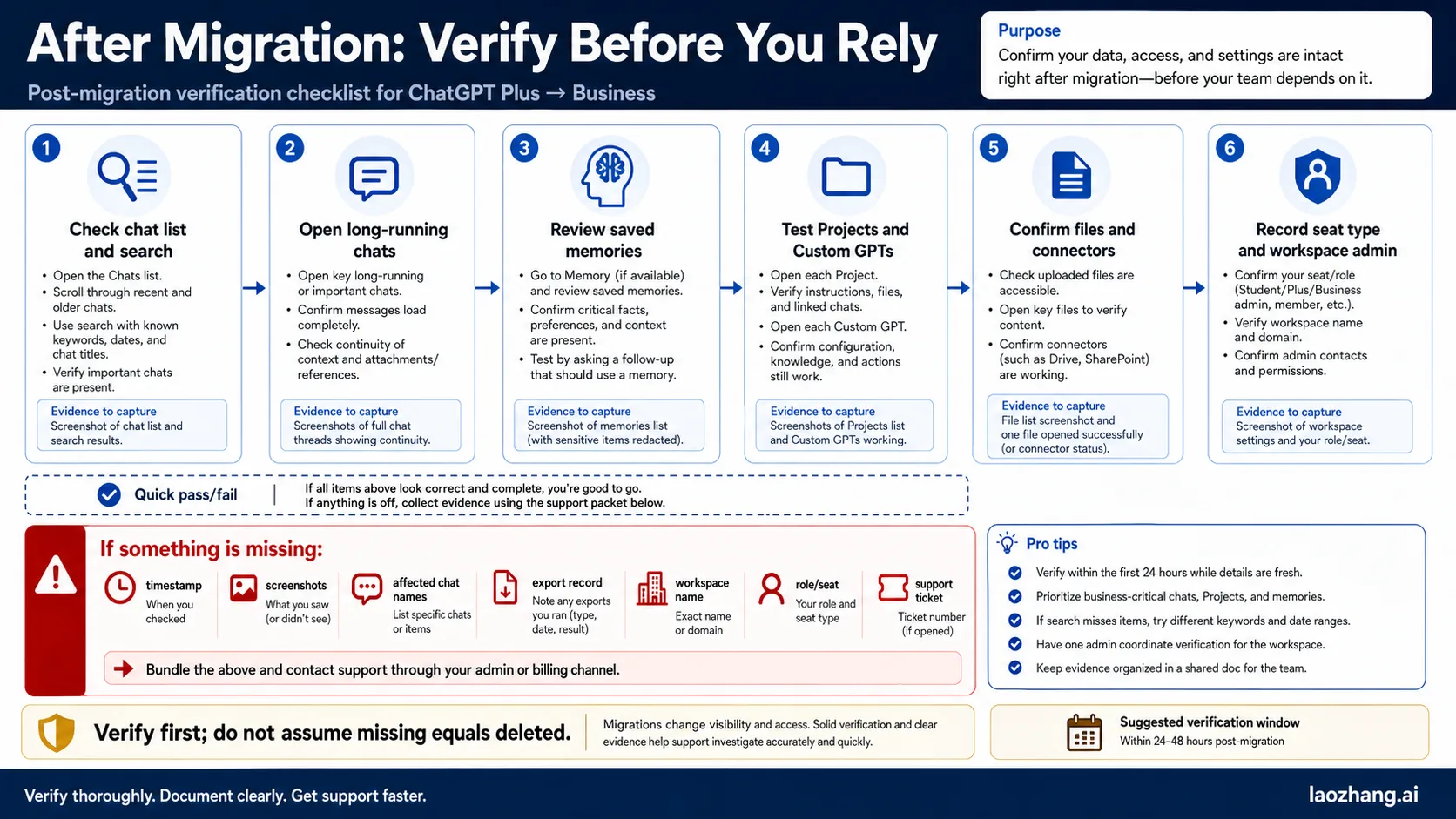
The first hour after migration is for verification, not for new work.
| Check | What to do | Evidence to keep |
|---|---|---|
| Sidebar and search | Search known old chat titles and open long conversations | Screenshots of found and missing items |
| Chat continuity | Scroll older long chats and test whether context loads correctly | Chat title, date, missing range, and error text |
| Saved memory | Open memory settings and compare with the pre-merge list | Before/after memory list or notes |
| Past-chat context | Run a harmless recall test and inspect settings | Prompt, output, setting state |
| GPTs | Open important Custom GPTs and test instructions, actions, files, and sharing | GPT name, owner, error, missing action |
| Projects | Open key Projects and confirm files, instructions, and collaborators | Project name, file list, missing item |
| Files and connectors | Open linked files and test connectors or actions | Connector name, authorization state, error text |
| Role and seat | Confirm workspace, role, group, and seat type | Workspace name, role, admin contact |
Do the checks while the old inventory is still fresh. If everything works, keep the log for a few days. If something is missing, do not keep clicking around until the situation becomes hard to describe. Capture evidence first.
If Something Is Missing
Missing-history reports are stressful because the reader often lacks proof. Build a support packet before opening a ticket or escalating to the workspace admin.
Include:
- workspace name and whether the issue began after a personal-to-Business merge
- approximate merge time and time zone
- personal email and Business workspace email if they differ
- your role and seat type before and after migration
- affected chat titles, dates, and whether they are long or old conversations
- whether search, sidebar, direct URL, folders, or pinned areas behave differently
- before/after screenshots of memory settings and key surfaces
- export request date, export delivery status, and file name if available
- names of missing GPTs, Projects, files, connectors, or actions
- exact error messages without paraphrase
Escalate in the right order. Workspace ownership and role questions usually start with the Business admin. Product behavior, missing data, and export issues may need OpenAI support. Legal or retention questions belong to the organization's responsible owner, not to a blog checklist or a support forum.
Community reports are useful because they name symptoms: missing conversations, changed visibility, long-chat access, memory confusion, and uncertainty after seat changes. They should not be treated as proof of current OpenAI policy. Use them to decide what to verify, then use official OpenAI surfaces and your own evidence to escalate.
FAQ
Will my ChatGPT Plus chat history transfer to Business?
Do not rely on a general yes/no answer. OpenAI's current workspace migration Help page is the authority for merge behavior, and the live UI should be rechecked before action. Treat important chats as data to inventory and verify, especially old or long conversations.
Will saved memories transfer when I move to Business?
Saved memory is a separate surface from chat history. Review memory settings before migration, remove personal facts that should not influence Business work, then check memory settings again after migration. Availability and behavior can depend on workspace policy, role, rollout, and settings.
Should I export ChatGPT data before merging into Business?
Yes, where export is available and the data matters. Use OpenAI's export Help page for the personal export path, then ask the Business workspace owner/admin about any Business export or retention path. Export is not a substitute for post-migration verification, but it gives you a recovery reference.
Is Business privacy the same as a backup?
No. Business changes the governance and privacy boundary, but it does not prove that every chat, memory, GPT, Project, file, or connector will remain accessible in the exact way you expect. Back up or inventory first, then verify.
Can I keep Plus and Business separate?
Often that is the safest route when personal history should remain personal. Use Business for team work and keep sensitive personal conversations, old experiments, or private memory outside the Business workspace unless there is a clear reason to merge.
What should I check immediately after migration?
Search known chat titles, open long conversations, inspect saved memory and past-chat-context settings, test important GPTs, open Projects, verify uploaded files, test connectors, and confirm your workspace role and seat type.
What if chats disappear after upgrading to Business?
Stop and collect evidence. Record affected titles, dates, workspace name, role, merge time, screenshots, export status, and exact error text. Ask the Business admin about role and workspace state, then contact OpenAI support with the packet.
Can deleting a chat delete memory too?
Do not treat chat deletion and memory deletion as the same action. OpenAI's Memory FAQ explains separate memory controls. Review saved memories directly when the goal is to remove durable personalization data.
Does an admin see all my old personal chats after a merge?
Do not assume either total privacy or total admin visibility. The relevant answer depends on the live Business workspace controls, policies, roles, and OpenAI's current admin documentation. If admin visibility is the concern, keep personal history separate until the workspace owner gives a clear answer.
What is the safest one-hour plan?
Before the merge, export or inventory important data and record settings. During the merge, do not change seat type or roles until the move is complete. After the merge, verify chats, memory, GPTs, Projects, files, connectors, and workspace role before starting new work.
Bottom line: ChatGPT Plus to Business migration is safest when handled as a workspace data audit. Back up or inventory first, merge only when Business governance is acceptable, keep personal history separate when privacy matters, and verify every critical surface immediately after the move.