Why ChatGPT and Gemini Break Text, Colors, and Worksheet Layouts
ChatGPT and Gemini can draft worksheet-style images, but exact text, color-coded boxes, and grids need a repair workflow: classify the damage, choose the right owner, and verify the final asset.
On this page
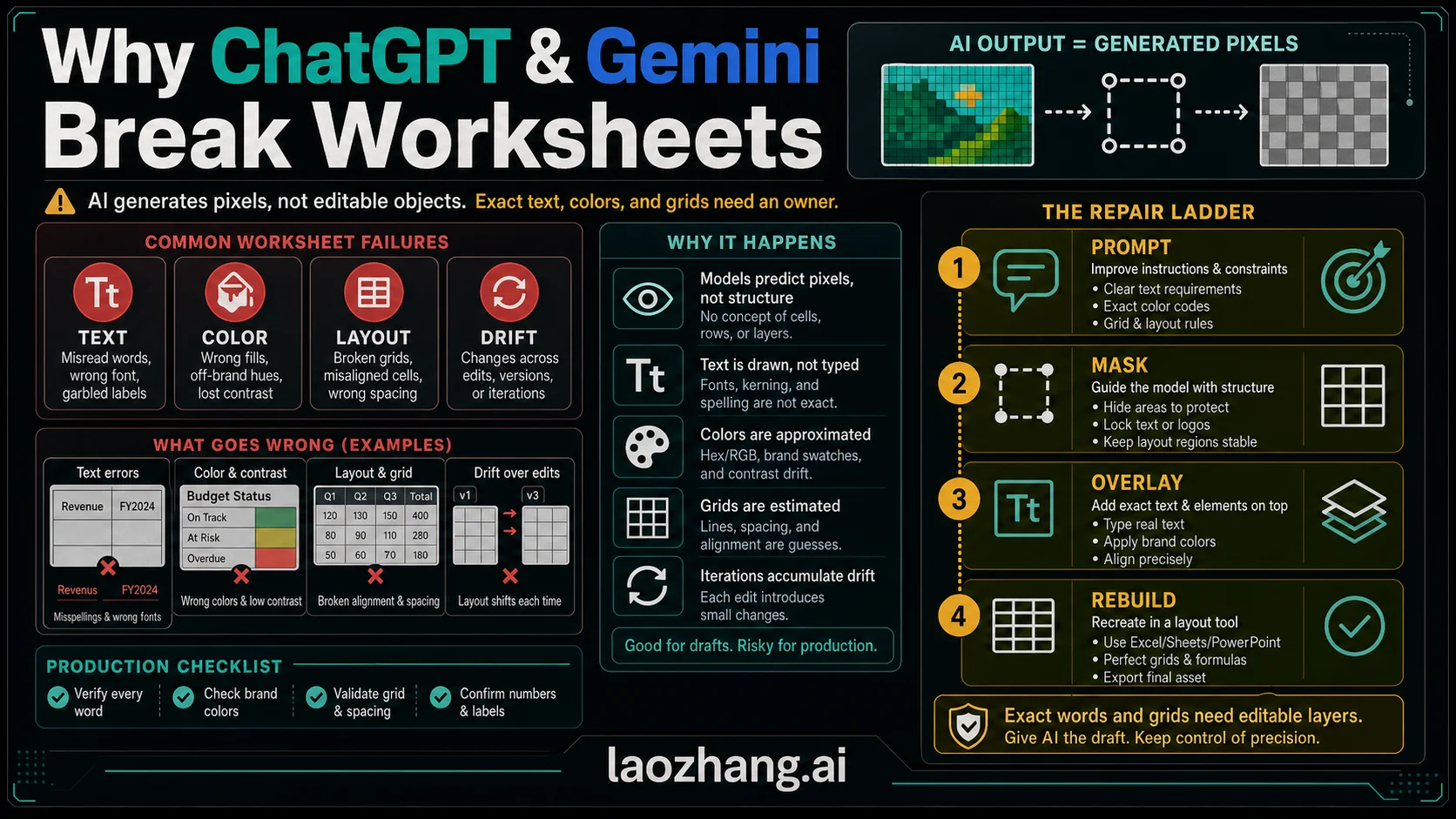
ChatGPT and Gemini can make a worksheet-style image look almost finished, then damage the exact parts you need to trust: the wording, the color-coded boxes, or the grid. The reason is simple enough to act on: image generation produces pixels, not a locked spreadsheet, slide, or editable worksheet file.
Do not start by asking which model is better. First classify the break, then move the fragile part to the right owner.
| What broke | What it usually means | First repair route | Stop rule |
|---|---|---|---|
| Broken text | The model treated wording as visual texture instead of source-of-truth copy. | Shorten labels, use larger text, then add exact copy in an editable text layer. | Stop prompting when spelling errors move around instead of disappearing. |
| Color artifacts | The palette, fill edge, or compression halo is no longer controlled. | Define swatches, separate labels from fills, and check contrast at final size. | Stop when brand colors or meaning-coded colors are inconsistent. |
| Worksheet layout drift | The output is imitating a grid, not preserving real rows, columns, margins, or print boundaries. | Rebuild the grid in a spreadsheet, slide, or design tool, then use AI for background or illustration only. | Stop when cells, alignment, or spacing must be exact. |
| Iteration drift | Each edit changes a different part of the image. | Use a reference image or mask for small edits, or rebuild the asset in layers. | Stop when a new fix breaks an older correct area. |
The practical rule is: let AI draft the look, but keep exact text, color tokens, and worksheet geometry in editable layers when accuracy matters.
The Fast Answer
ChatGPT, OpenAI GPT Image routes, Gemini, and Gemini image-generation routes are built to generate or edit images. That is different from preserving a document model with real cells, locked text boxes, named swatches, or layout constraints. OpenAI's current image generation guide supports image generation and editing through its Image API and image generation through the Responses API, but it also lists limitations around precise text placement, text clarity, consistency, and layout-sensitive composition. Google's Gemini image-generation docs support text-to-image and image-editing workflows, while Google's prompting guidance still emphasizes precise instructions, iteration, and preservation requests rather than a guarantee that every dense layout will stay exact.
That boundary explains why the same prompt can produce a convincing worksheet at thumbnail size and still fail when you zoom in. The model may know that a grammar worksheet has boxes, labels, arrows, colors, and a grid. It may not preserve the exact sentence, the exact shade, or the exact cell spacing across every edit. The more the image behaves like a document, the more you need a document owner.
Use this split:
| If the job needs... | Let the image model own... | Let an editor, worksheet, or design tool own... |
|---|---|---|
| A quick concept | background, style, icons, rough grouping | final copy and export settings |
| A classroom worksheet | visual theme, example illustration, section mood | rows, answer boxes, numbering, print margins |
| A color-coded explainer | broad composition and icon style | actual palette, contrast, labels, and legends |
| A client handout | draft layout ideas | final typography, brand colors, approval copy |
| A same-prompt model test | one controlled generation per route | scoring rubric and side-by-side proof |
The mistake is treating a good-looking raster output as if it were a spreadsheet. It is not. It is a picture of a worksheet-like thing.
Diagnose The Damage Before You Prompt Again
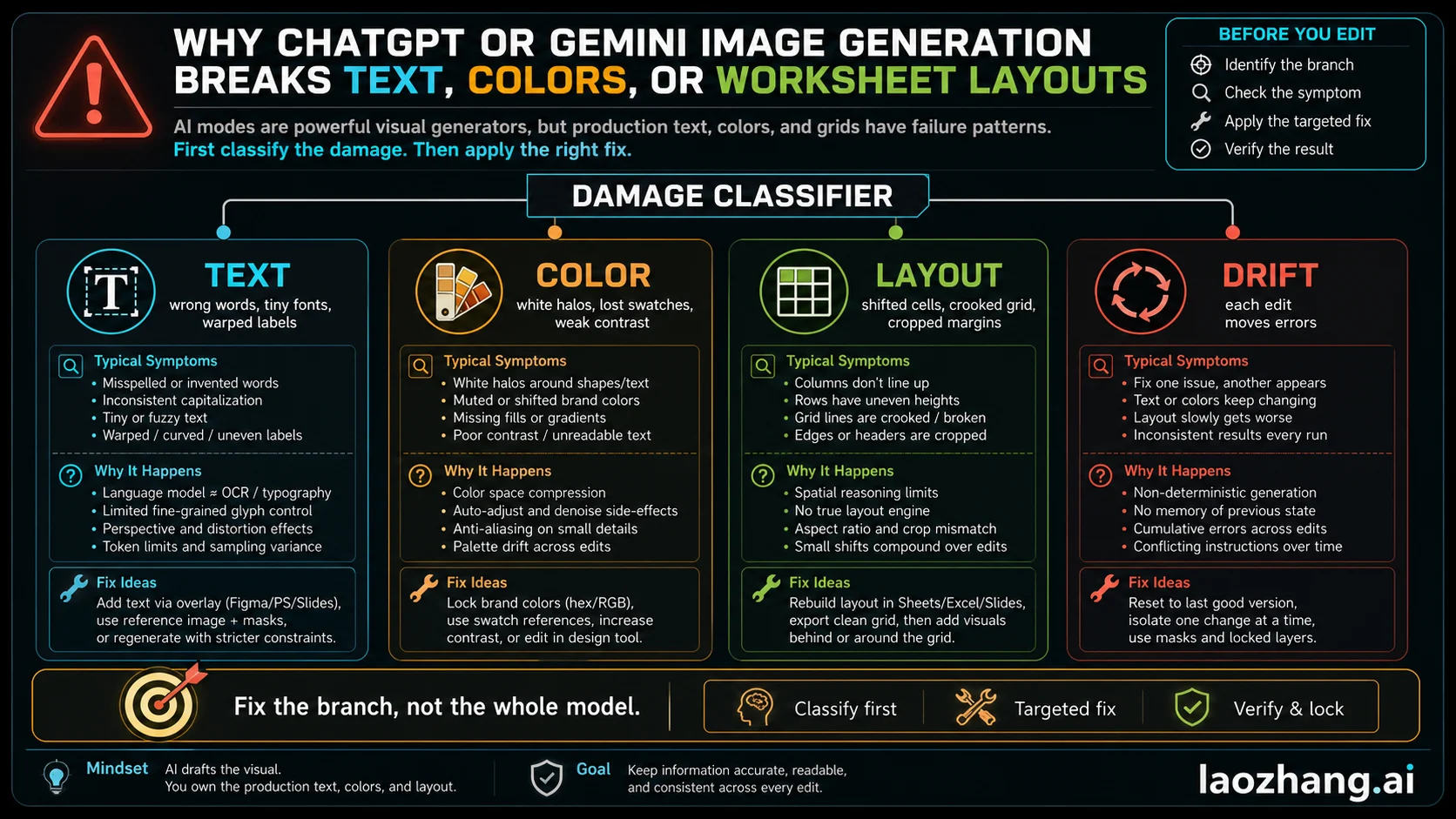
Most failed AI worksheet images fall into four buckets. The fix changes by bucket, so a second broad prompt is usually the slowest repair.
| Damage type | Visible symptom | Why prompting alone often fails | Better first move |
|---|---|---|---|
| Text damage | misspellings, missing letters, strange glyphs, cut-off labels, mismatched capitalization | The model is drawing text into pixels, so small repeated characters are fragile. | Use fewer words, larger labels, or add final text outside the image model. |
| Color damage | white strips on colored boxes, halos, tint shifts, muddy gradients, inconsistent category colors | The palette is part of the generated image, not a locked design token. | Specify swatches and contrast, then verify with a real palette or editor. |
| Layout damage | crooked grids, uneven rows, merged cells, drifting margins, columns that do not align | The model approximates grid geometry visually; it does not maintain spreadsheet constraints. | Rebuild exact rows and columns in a layout, slide, or spreadsheet tool. |
| Iteration drift | fixing one label changes another box, face, chart, or border | Multi-turn edits can reinterpret the whole image or nearby areas. | Use a mask/reference for a small edit, or stop and rebuild in layers. |
This is also why "try Gemini instead" or "try ChatGPT instead" is not a repair plan. Different routes can behave differently, and a same-prompt test is useful when you are choosing a workflow. But if the fragile part is exact copy, brand color, or grid geometry, switching models does not change the owner of that precision.
Why Text Breaks
Text in a generated image has two jobs: it must look like typography, and it must carry exact language. Image models are much better at the first job than the second when the text is dense, small, repeated, or embedded in a busy layout. A big poster title may survive. A worksheet with twenty answer boxes, tiny instructions, and repeated labels is a different contract.
Use a tiered text strategy:
| Text type | Safe inside image generation? | Better workflow |
|---|---|---|
| One short heading | Often acceptable if large and simple | Ask for a short title, then proof at final size. |
| Section labels | Sometimes acceptable | Keep labels short, use high contrast, and verify every label. |
| Full worksheet instructions | Risky | Keep source-of-truth copy in the document or slide editor. |
| Answers, legal copy, medical copy, prices, dates, or names | Do not rely on generated pixels | Add exact text in editable layers after generation. |
| Translated or multilingual text | High risk | Write the locale text first, then place it in the final design tool. |
If you want ChatGPT or Gemini to create a worksheet concept, ask for blocks such as "large empty answer boxes", "short section labels", or "space reserved for final instructions." Then put the exact instructions into the real document. That one change removes most of the pain because the model no longer has to be a typesetter and a copy editor at the same time.
For poster-style or API-driven image jobs, the broader route choice still matters. If you are deciding between OpenAI image routes and Gemini-family image routes for developer work, keep that comparison separate from this worksheet repair job. A useful next read is GPT Image 2 API for OpenAI-side integration boundaries and Gemini image model comparison for Gemini-family route choices.
Why Color Boxes Get White Strips, Halos, Or Wrong Fills
Color failures feel different from text failures because the letters may be correct while the visual meaning is wrong. In a color-coded worksheet, a red box, green highlight, or blue answer region is not decoration. It is part of the instruction system. If the model introduces white gaps around text, changes a shade in one box, or compresses a fill into a muddy gradient, the worksheet can become harder to use even when the wording is readable.
Treat colors as design tokens:
| Color problem | What to check | Repair |
|---|---|---|
| White strips around text on colored boxes | Is the model trying to preserve readability by creating a fake label background? | Separate the text layer from the color fill, or ask for empty colored boxes and add labels later. |
| Wrong category color | Did the prompt name colors loosely, such as "bright" or "pastel"? | Use explicit swatches, simple names, and a legend. |
| Low contrast | Does the text still read at final export size? | Increase contrast in an editor instead of regenerating the whole image. |
| Halo or compression edge | Did the export or background blend create artifacts? | Export from a clean source file and avoid tiny text over textured fills. |
| Color drift after an edit | Did the model reinterpret the whole palette? | Use a mask for the edited region or rebuild the color blocks manually. |
The prompt can help, but it should not be your only control. Say "four flat color blocks with no texture, no gradients, no glow, and no text inside the blocks" if you plan to add labels later. If the colored areas already carry exact meaning, rebuild them as real shapes in a slide or design editor and use the AI image as a background or reference.
Why Worksheet Layouts Drift
Worksheet layout is the hardest part because it looks simple but depends on constraints. A real worksheet has rows, columns, equal spacing, print margins, answer boxes, alignment, reading order, and often a teacher's expectation that students can write in specific places. A generated image can imitate that structure without preserving the underlying geometry.
This is the layout stop rule: if a human will print, fill, grade, translate, or reuse the worksheet, do not leave the grid as generated pixels.
Use the model for:
- a visual theme
- icons or small illustrations
- a background style
- section mood
- rough grouping ideas
Use a layout, slide, spreadsheet, or document tool for:
- final rows and columns
- answer boxes
- ruled lines
- page margins
- print size
- actual typography
- final export settings
That division is not anti-AI. It is how you keep the fast creative part without giving away the part that must be inspectable.
The Repair Ladder
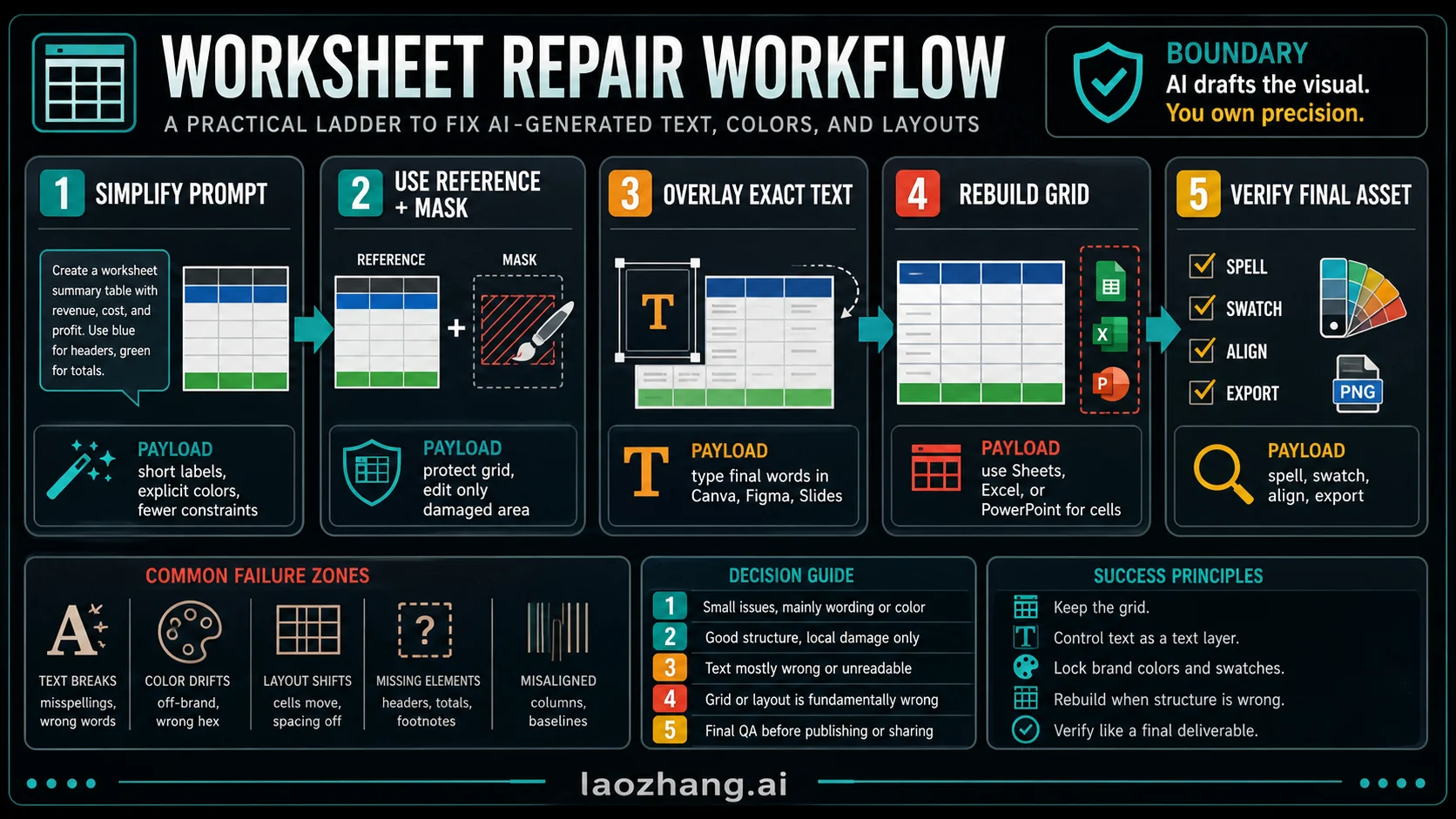
Use the least destructive repair that can solve the visible damage.
| Step | Use it when | What to do | Move on when... |
|---|---|---|---|
| Simplify the prompt | The image is close but overloaded. | Reduce text, remove extra requirements, ask for larger labels and cleaner groups. | The same kind of error keeps moving around. |
| Add a reference | The composition is right in an earlier version. | Upload or attach the best version and ask the model to preserve structure. | The edit still changes unrelated parts. |
| Use a mask or selected area | Only one region needs repair. | Edit the damaged box, label, or color area rather than regenerating the full image. | The local edit creates nearby artifacts. |
| Overlay exact text | The design is usable but copy is wrong. | Export the image without final text or with placeholder text, then add exact text in a real editor. | The text must remain editable or translatable. |
| Rebuild the worksheet layer | Rows, cells, margins, or print boundaries matter. | Recreate the grid in a spreadsheet, slide, document, or design tool. | The visual is now a controlled source file. |
| Final proof | The asset looks finished. | Check spelling, contrast, swatches, grid, crop, export size, and print size. | It passes at the size where people will use it. |
The ladder matters because every regeneration has a cost. It can improve the broken region while changing a region that was already correct. Once the errors move around, stop treating the model as the final layout tool.
ChatGPT, Gemini, API Routes, And Editors Are Different Surfaces
The name on the model is not the whole workflow. ChatGPT app behavior, OpenAI Image API behavior, the Responses API image-generation tool, Gemini app behavior, Gemini API behavior, and third-party editors can expose different controls. Some routes make masking easier. Some make batch testing easier. Some make output size or aspect ratio more explicit. Some keep a better conversation trail. None of that turns a raster image into a locked worksheet file.
When comparing ChatGPT and Gemini, test the same source text and the same layout constraints:
| Test item | Why it matters |
|---|---|
| Same source copy | Otherwise you are testing prompt quality, not model behavior. |
| Same aspect ratio | Worksheet geometry changes when the canvas changes. |
| Same density | A sparse flyer and dense worksheet are different jobs. |
| Same export target | A social image, PDF handout, and printed worksheet need different checks. |
| Same scoring rubric | Count spelling errors, color errors, grid errors, and unrelated drift separately. |
If you need production volume, API logging, or same-prompt model tests, an API route can help you compare outputs more cleanly. If you need one classroom handout, a normal design or document tool may be the better precision layer after the image draft. The correct route is the one that gives the fragile part an owner.
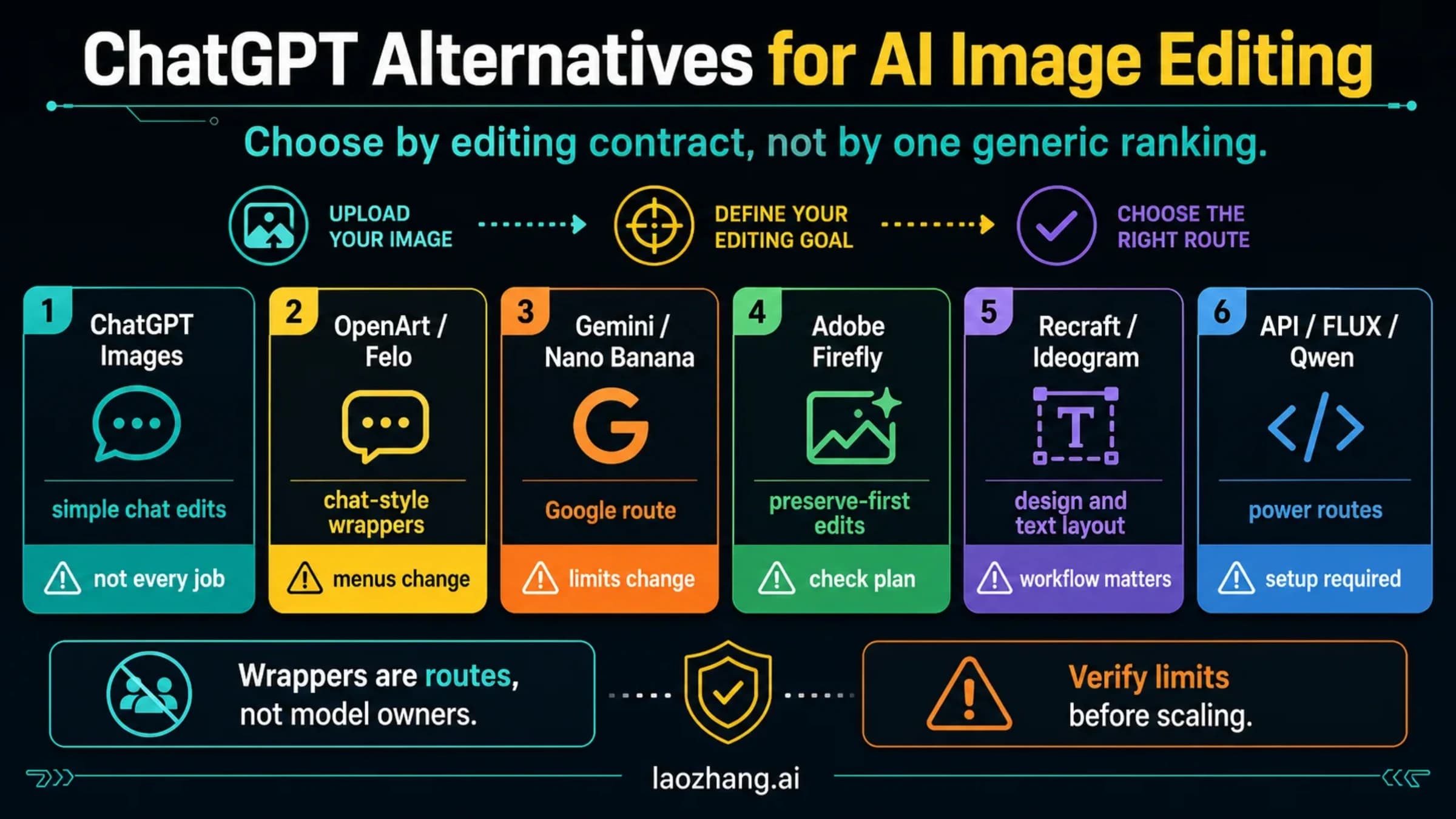
For broader image-editing tool selection, use Image to Image AI Generator. For ChatGPT-specific image feature context, use ChatGPT Images 2.0. Use those only after the immediate text, color, and worksheet-layout repair job is clear.
Final Proof Before You Publish Or Share
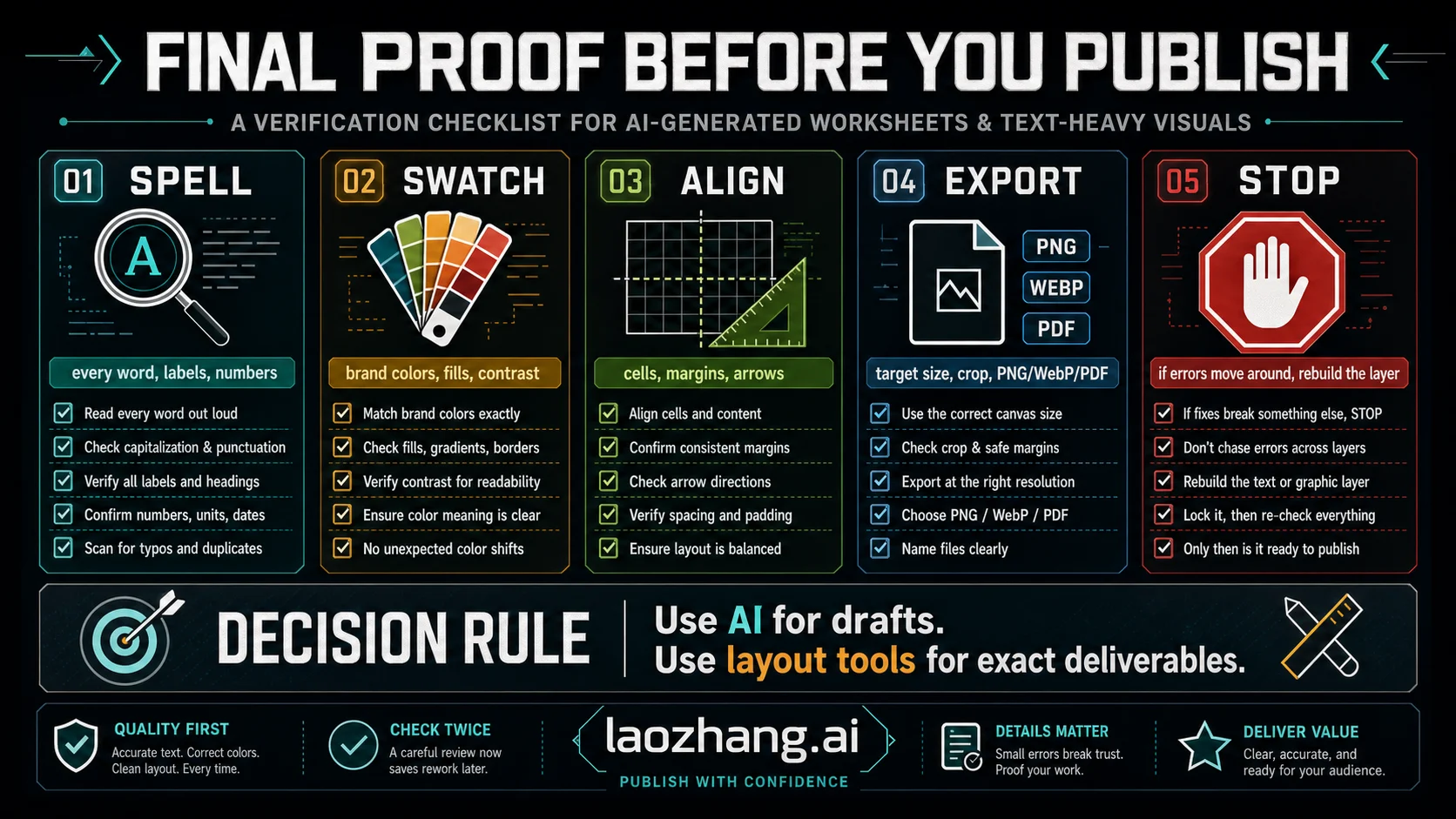
Proof the final asset where it will be used. A worksheet that looks fine in a chat preview can fail in a PDF, classroom printout, LMS upload, or phone screenshot.
Use this checklist:
| Check | Pass condition | If it fails |
|---|---|---|
| Text | Every word, number, accent mark, and punctuation mark is correct at final size. | Move text into an editable layer and re-export. |
| Color | Color-coded meaning is consistent across all boxes, legends, and examples. | Lock swatches in an editor and rebuild fills. |
| Layout | Rows, columns, answer areas, margins, and reading order are aligned. | Rebuild the worksheet grid in a layout or spreadsheet tool. |
| Crop | Nothing important is cut off on the final canvas. | Adjust page size before another model edit. |
| Export | PNG, PDF, or other format matches the use case. | Export from the source file, not from a chat preview. |
| Reuse | The source text and layout can be revised later. | Keep an editable master file. |
The final question is not "Did the AI make something attractive?" It is "Can someone use this without guessing what the worksheet meant?" If the answer is no, the repair is not done.
FAQ
Why does ChatGPT image generation break text?
It breaks text when the model has to render exact language as pixels, especially if the text is small, repeated, dense, or mixed with icons and colored boxes. Short large labels may work. Final instructions, answers, names, numbers, and translated text should stay in an editable text layer.
Why does Gemini image generation change colors or boxes?
Gemini image generation can produce and edit visual compositions, but a colored box in a generated image is still part of the raster output. If the color has instructional or brand meaning, define the palette, keep labels separate from fills, and verify the final output in an editor.
Is Gemini better than ChatGPT for worksheets?
Sometimes one route handles a prompt better than another, but model switching is not the main fix for exact worksheets. Test the same source copy, aspect ratio, density, and scoring rubric if you want a fair comparison. For exact text, color tokens, and grid geometry, the safer answer is still an editable layer.
Can I make an AI worksheet safely?
Yes, if you split ownership. Let ChatGPT or Gemini draft the visual idea, illustration style, background, or broad grouping. Put final wording, answer boxes, color-coded labels, and print geometry into a worksheet, slide, document, or design tool.
When should I stop prompting?
Stop when errors move around instead of shrinking, when fixing one box breaks another, when exact copy matters, or when the layout needs real rows and columns. At that point, use the AI image as a concept layer and rebuild the precise worksheet elements elsewhere.
Should I use the API instead of the app?
Use an API route when you need repeatable same-prompt tests, logging, model comparison, or production integration. Use the app when you need quick visual exploration. Use a layout or document tool when the final output must preserve text, colors, and worksheet geometry.