Stable & Cheap Gemini Pro Upgrade: 8 Proven Methods Ranked by Reliability (2026)
Google AI Pro costs $19.99/month in 2026, but you can pay as little as $0 with the student program or $7.99/month with Google AI Plus. This guide ranks 8 discount methods by stability, price, and account safety — based on Chrome DevTools-verified pricing from February 2026.
On this page
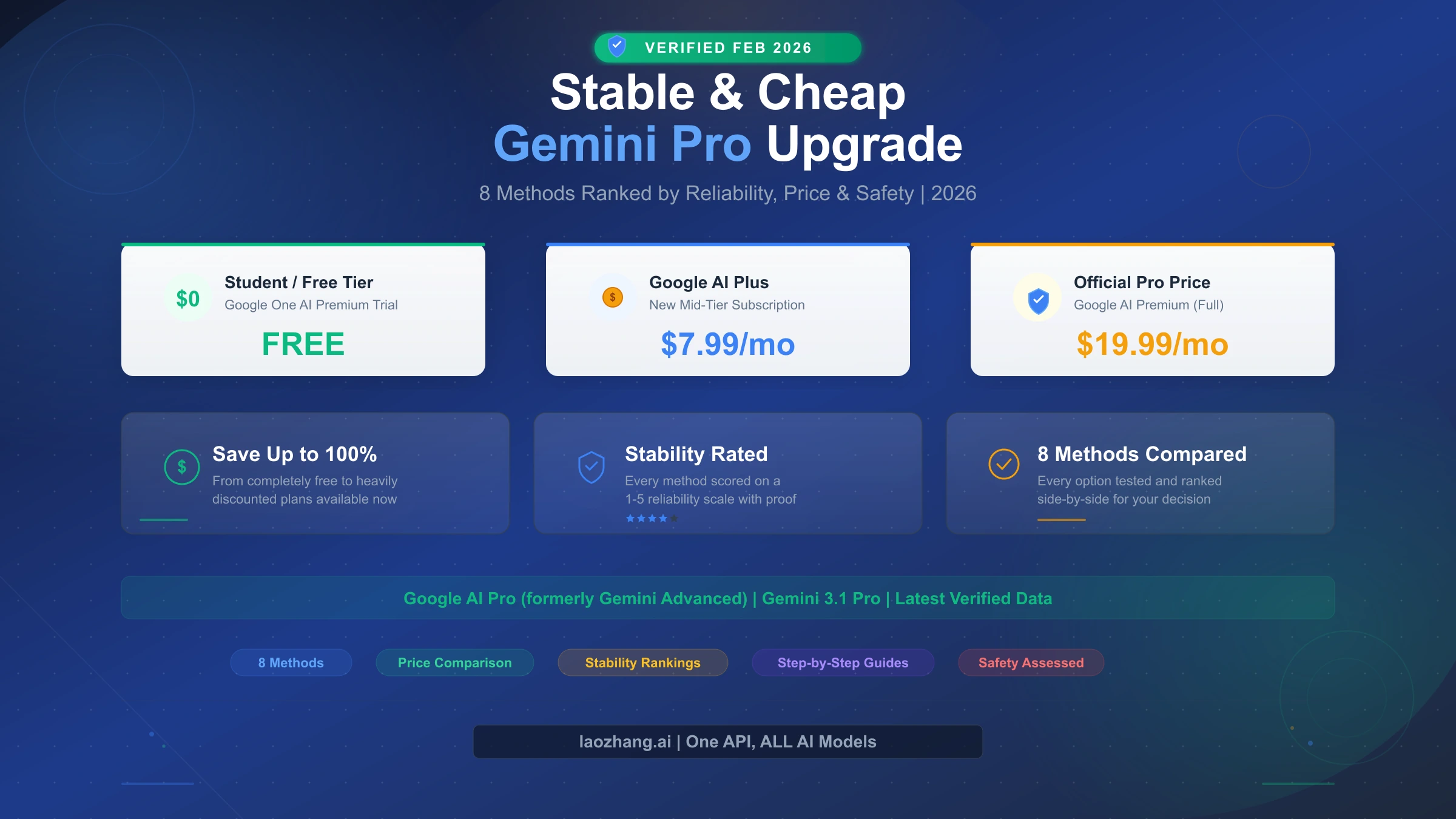
Google AI Pro (formerly Gemini Advanced) costs $19.99 per month in 2026, but there are at least 8 proven ways to reduce or eliminate that cost entirely. The most stable options include the annual plan at $199.99/year (saving 16%), the student program (completely free for one year), and Google AI Plus at $7.99/month for users who don't need full Pro features. Third-party services like GamsGo advertise savings of up to 90%, but they carry real account risk. This guide, based on pricing verified directly from Google's official subscription page on February 22, 2026, ranks every method by price, stability, and safety so you can make an informed decision.
TL;DR — Every Gemini Pro Discount Method at a Glance
Before diving into the details, here is a complete overview of every method available for getting Google AI Pro (Gemini Pro) at a lower price in 2026. Each method has been assigned a stability rating from 1 to 5 based on account safety, long-term reliability, and the likelihood of continued availability. The pricing data in this table was verified directly from Google's official subscription page using Chrome DevTools on February 22, 2026, and cross-referenced with multiple independent sources across the web.
| Method | Monthly Cost | Savings vs $19.99 | Stability | Best For |
|---|---|---|---|---|
| Student Program | $0 (1 year) | 100% | 5/5 | US college students |
| First Month Free | $0 (1 month) | 100% | 5/5 | New subscribers |
| Annual Plan | ~$16.67/mo | 16% | 5/5 | Long-term users |
| Promo Annual ($99.99) | ~$8.33/mo | 58% | 5/5 | New annual subscribers |
| Google AI Plus | $7.99/mo | 60% | 5/5 | Users who don't need full Pro |
| Pixel 9 Pro Bundle | $0 (up to 12 mo) | 100% | 4/5 | Pixel device buyers |
| Verizon Perk | $10/mo | 50% | 4/5 | Verizon subscribers |
| Third-party (GamsGo) | ~$2/mo | 90% | 2/5 | Risk-tolerant users |
The key takeaway is straightforward: if you qualify for the student program, that is the single best deal available anywhere. For everyone else, the promotional annual plan at $99.99 for the first year offers the best combination of savings and stability. And if you are not sure whether you actually need full Pro capabilities, Google AI Plus at $7.99/month could save you 60% while still providing a meaningful upgrade over the free tier.
Google AI Pricing in 2026: What's Actually Changed
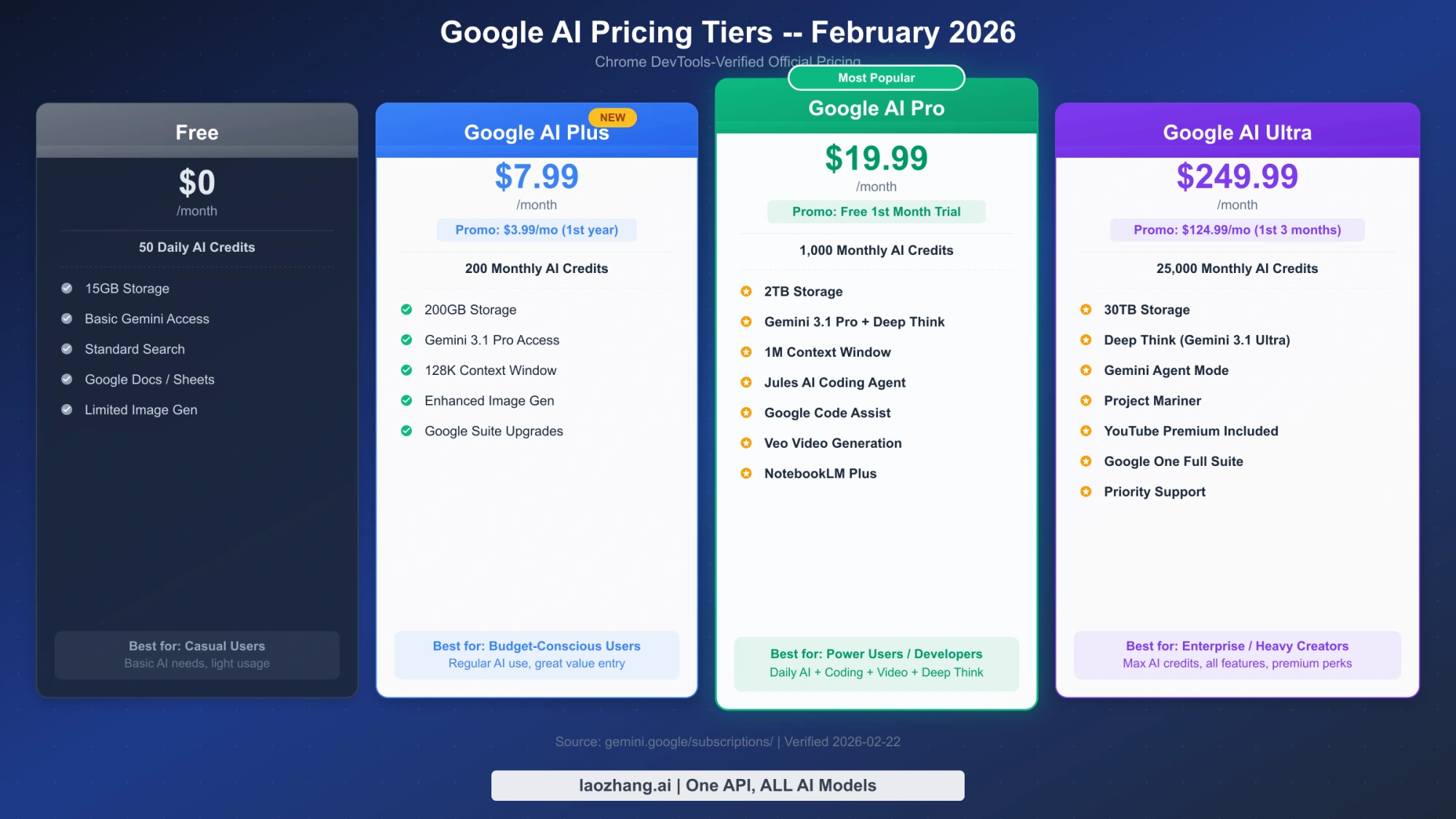
Google completely restructured its AI subscription lineup in late 2025 and early 2026, and many articles across the web still reference outdated pricing and product names. The service formerly known as "Gemini Advanced" is now called "Google AI Pro," and it sits within a new four-tier system that includes a budget-friendly option many users have never heard of. Understanding this new structure is essential before evaluating discount methods, because the cheapest path to premium AI features might not require a Pro subscription at all.
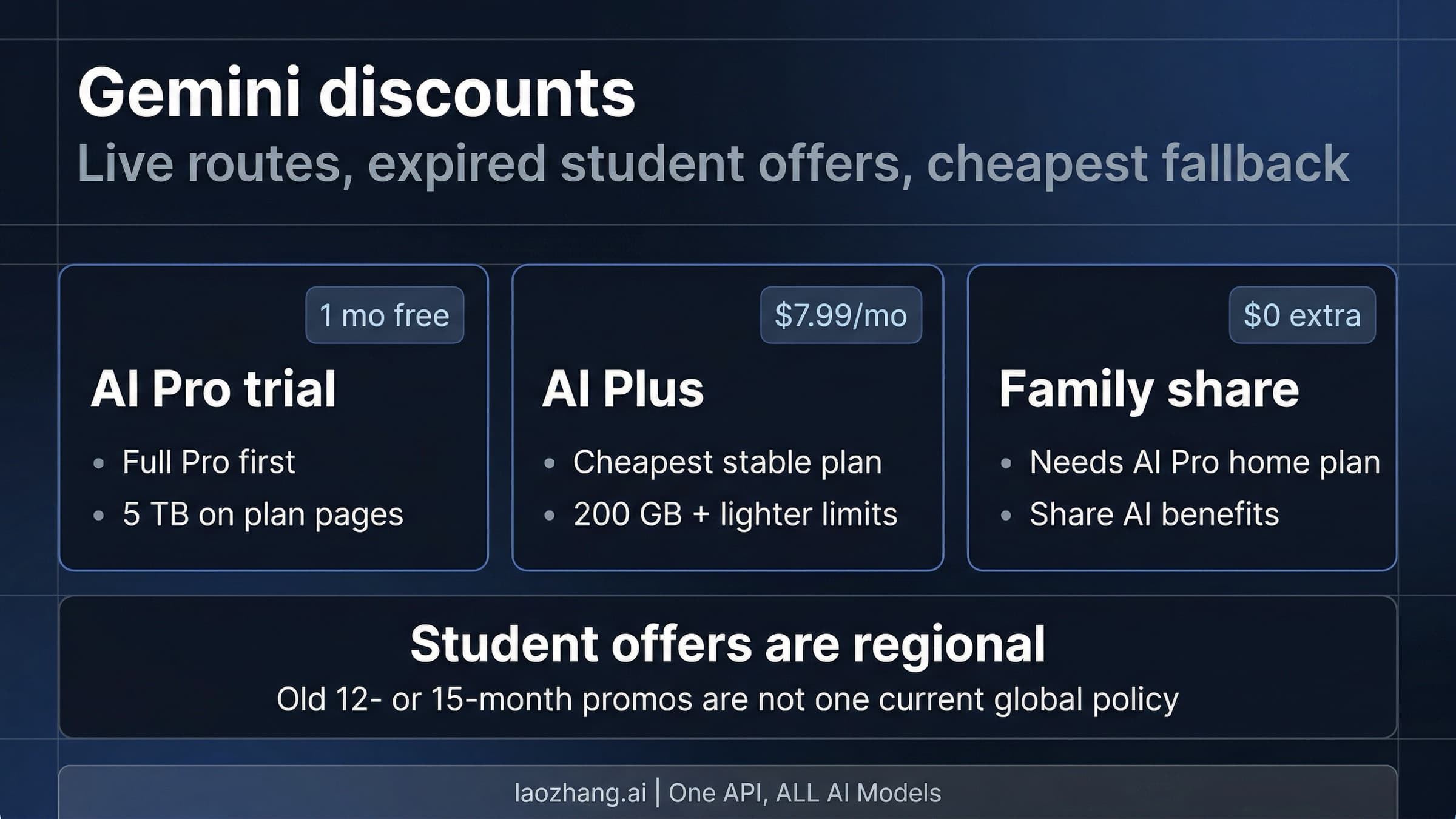
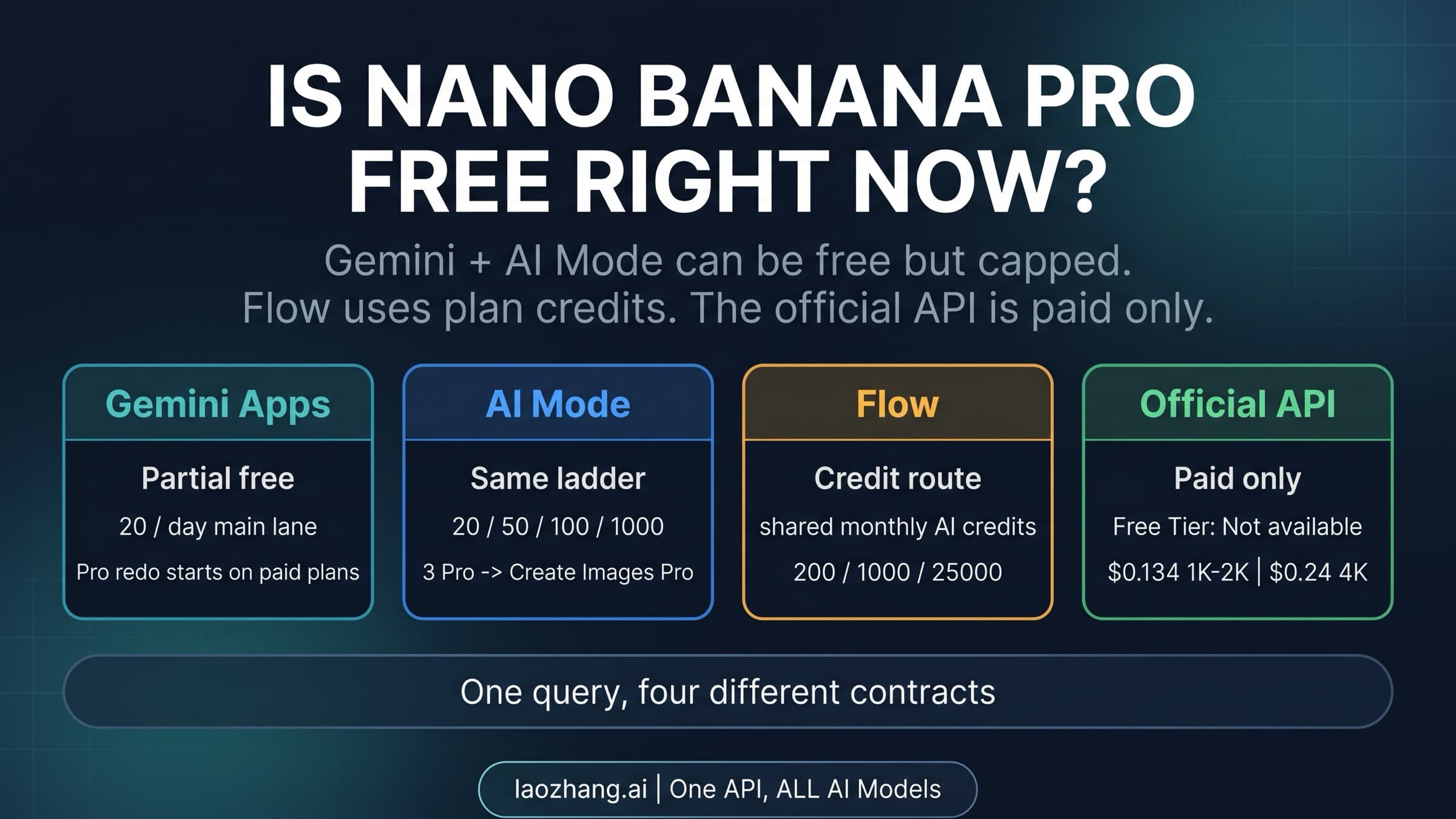
The foundation of Google's 2026 AI pricing is a four-tier system verified directly from gemini.google/subscriptions/ on February 22, 2026. The free tier provides 50 daily AI credits and 15GB of storage at no cost, giving everyone basic access to Gemini's capabilities. Google AI Plus, priced at $7.99 per month (with a promotional rate of $3.99/month for the first two months), represents an entirely new tier that offers 200 monthly AI credits and 200GB of storage. This tier is particularly significant because it did not exist in previous pricing structures and offers a substantial upgrade over the free tier at a fraction of the Pro price. For a detailed Gemini 3 model comparison across all tiers, our analysis breaks down exactly which capabilities each plan unlocks.
Google AI Pro, the tier most users are trying to access affordably, costs $19.99 per month and includes 1,000 monthly AI credits along with 2TB of storage. This plan provides access to Gemini 3.1 Pro, Google's most capable publicly available AI model as of February 2026, along with developer tools like Jules and Gemini Code Assist. New subscribers can currently get their first month free, which is a straightforward way to evaluate whether Pro is worth the ongoing investment. At the top of the pricing structure sits Google AI Ultra at $249.99 per month (with a promotional rate of $124.99/month for three months), which includes 25,000 monthly AI credits, 30TB of storage, and exclusive access to Deep Think reasoning and the Project Mariner web browsing agent.
One critical change that many guides overlook is the shift from unlimited usage to an AI credit system. Under the previous model, Gemini Advanced subscribers had essentially unlimited access to the AI. Now, each tier comes with a specific allocation of monthly credits, and heavy users may find themselves running out before the billing cycle ends. This makes the choice between tiers more nuanced than simply comparing prices — you need to estimate your actual usage patterns. For most casual users, the 200 monthly credits in the Plus plan will be sufficient, while professional users who rely on AI throughout their workday will likely need the 1,000 credits in the Pro plan. The credit system also means that the true "cost per query" varies significantly depending on how intensively you use the service.
Official Ways to Save on Google AI Pro (Stability: 5/5)
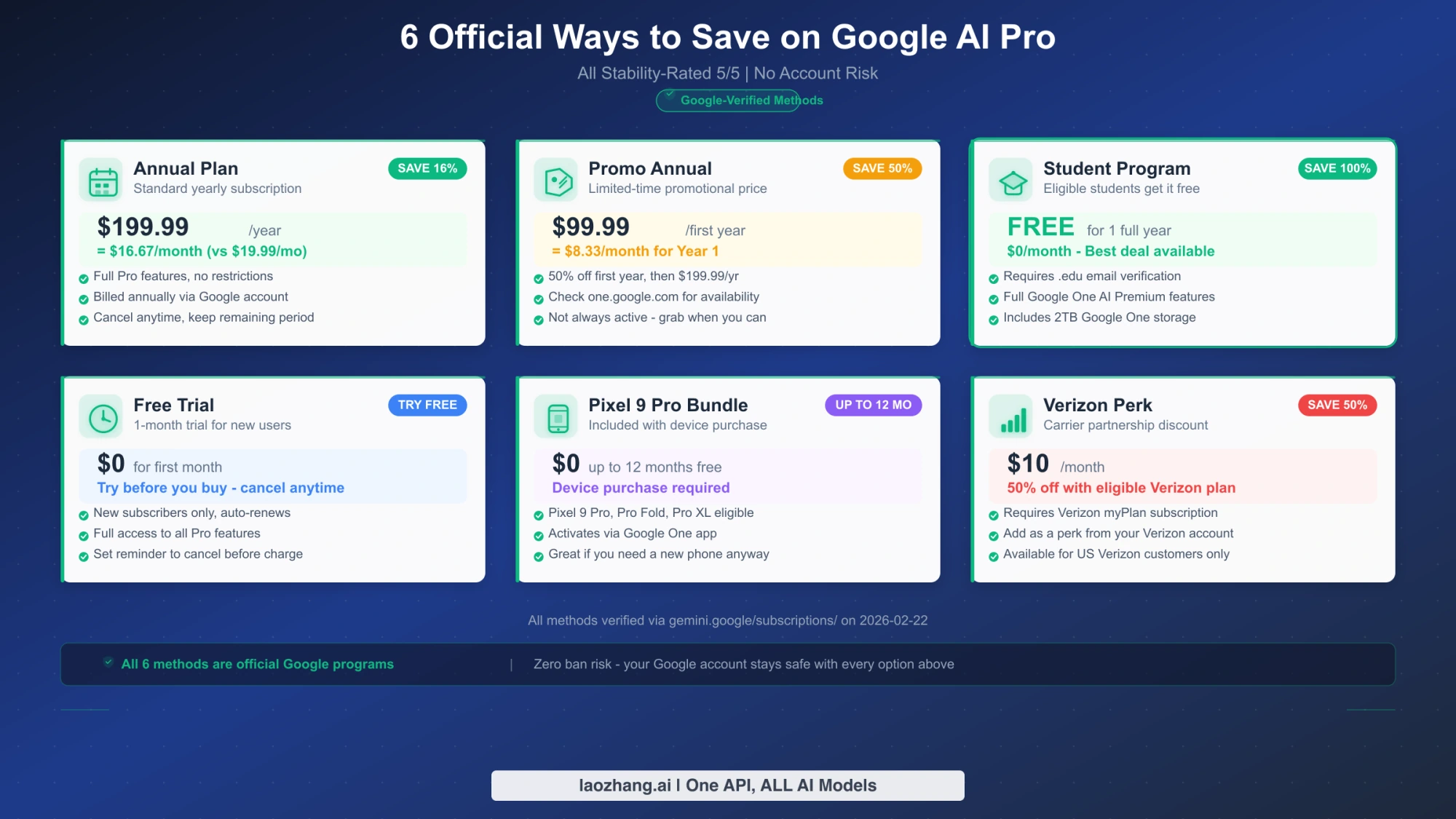
Official discount channels represent the safest and most stable path to affordable Google AI Pro access. These methods carry zero risk of account suspension, maintain full feature access, and will remain available as long as Google continues offering the programs. While they may not match the extreme discounts advertised by third-party resellers, the peace of mind they provide is worth the price difference for most users. There are currently six official ways to reduce your Google AI Pro costs, and most users qualify for at least one of them.
The Student Program: Completely Free for One Year
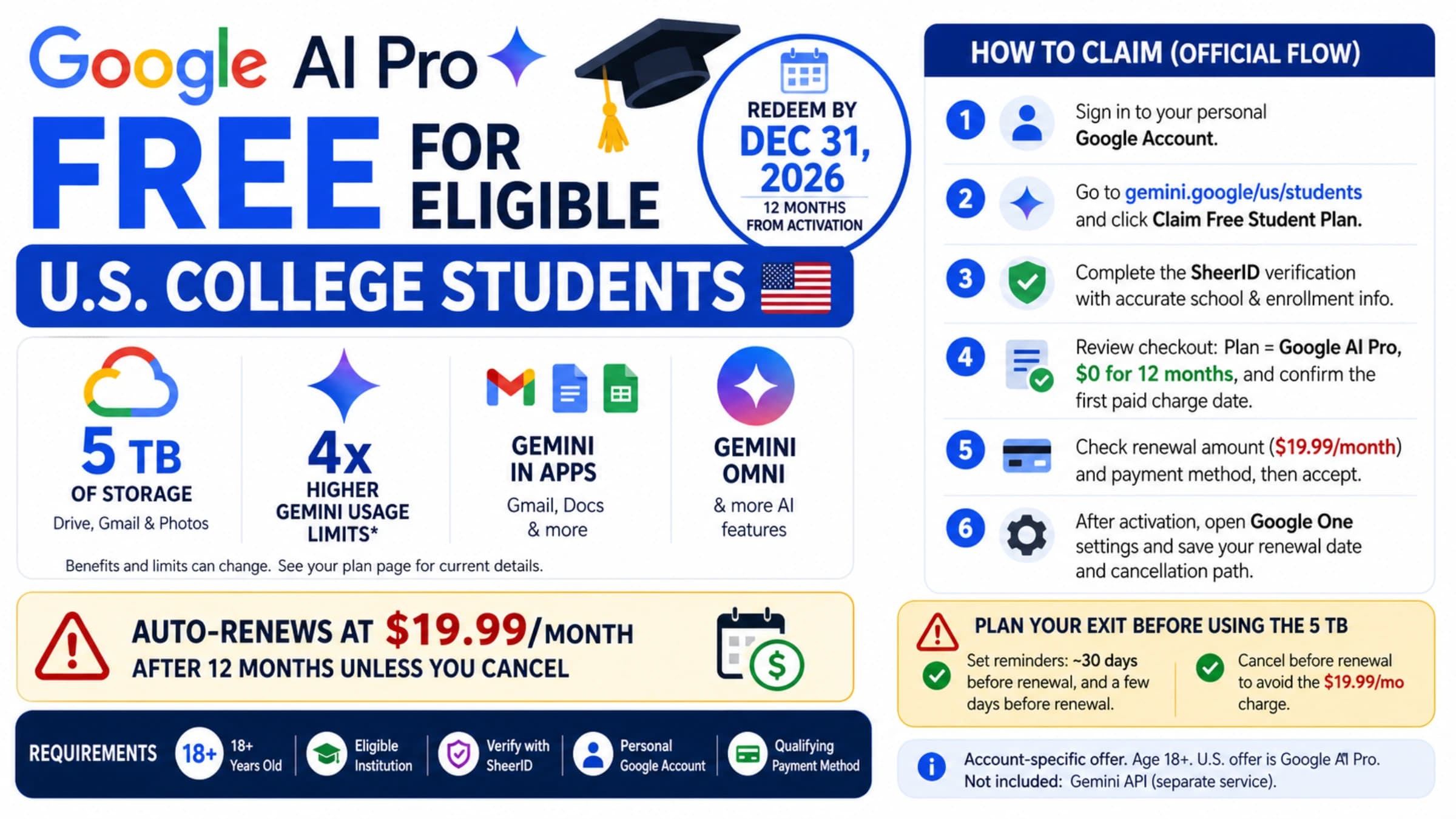
The single most valuable discount available for Google AI Pro is the student program, which provides a full year of Pro access at absolutely no cost. As verified on Google's subscription page on February 22, 2026, the program is available to college students in the United States who can verify their enrollment status. The verification process uses SheerID, a third-party academic verification service, and typically requires only a valid .edu email address and enrollment confirmation. Once approved, you receive the complete Google AI Pro experience — 1,000 monthly AI credits, 2TB of storage, and access to Gemini 3.1 Pro — for twelve consecutive months without any payment. After the free year ends, your subscription converts to a standard paid plan, so you will want to evaluate at that point whether to continue, downgrade to Plus, or cancel. For step-by-step instructions on the enrollment process, see our complete guide to getting Gemini Pro free as a student.
The Annual Plan: Save 16% Year-Round
For users who plan to maintain their Pro subscription long-term, the annual billing option offers meaningful savings with minimal commitment risk. At $199.99 per year, the annual plan works out to approximately $16.67 per month, saving you about $40 compared to paying monthly over the same twelve-month period. This 16% discount may seem modest compared to the dramatic claims of third-party services, but it comes with the security of a direct Google subscription — your account will never be flagged, your data remains private, and your access will not suddenly disappear because a reseller had issues. The annual plan can be selected during initial signup or switched to from an existing monthly subscription through your Google One account settings.
Promotional Annual Pricing: 50% Off Your First Year
Google has been running a promotional offer for new annual subscribers that represents perhaps the best deal available for non-students. At $99.99 for the first year, this promotion effectively cuts your cost to approximately $8.33 per month for twelve full months of Pro access. This pricing was confirmed across multiple SERP sources during our analysis on February 22, 2026. The promotion is specifically targeted at new subscribers who have not previously held a Google AI Pro (or the former Gemini Advanced) subscription, so it may not be available to returning customers. If you are considering Pro for the first time, this promotional rate makes the decision significantly easier — you are essentially getting Pro for less than the regular price of the Plus tier.
First Month Free Trial
Every new Google AI Pro subscriber currently receives their first month completely free, as verified on the official subscription page. This is not technically a discount on an ongoing subscription, but it does give you a full thirty days to evaluate whether Pro's capabilities justify the $19.99 monthly cost before any charge appears on your payment method. During the trial, you get full access to all Pro features including 1,000 monthly AI credits. If you decide Pro is not worth the cost, you can downgrade to Plus or cancel entirely before the free month ends and pay nothing. Combined with the promotional annual pricing, a strategic new subscriber could get their first year of Pro for roughly $100 — paying no more than $8.33 per month on average.
Device Bundles: Pixel 9 Pro and Beyond
Google has bundled AI Pro subscriptions with its hardware products, most notably the Pixel 9 Pro smartphone. Buyers of qualifying Pixel devices can receive up to 12 months of Google AI Pro included with their purchase at no additional cost. The exact duration varies by device model and region, and the offer is typically only available at the time of device activation. While buying a phone to get a free AI subscription would be an unusual strategy, if you are already in the market for a new Android device, the included Pro subscription effectively reduces the total cost of the package. This promotion earns a 4/5 stability rating rather than 5/5 because it is tied to hardware purchase cycles and may change with future device launches.
Carrier Perks: Verizon at $10/Month
Verizon wireless customers in the United States can add Google AI Pro to their plan for $10 per month through the carrier's perk program, representing a 50% discount from the standard $19.99 price. This option is available through the Verizon My Plan add-ons section and is billed directly through your wireless account. The stability rating is 4/5 because carrier partnerships can change — the terms, pricing, or availability of the perk could be modified when Verizon renegotiates its agreement with Google. However, as long as the partnership remains active, this is a legitimate and safe way to access Pro at a meaningful discount without any account risk.
Do You Actually Need Pro? Why Google AI Plus Might Be Enough
The introduction of Google AI Plus at $7.99 per month (currently promotional at $3.99/month for the first two months) represents a fundamental shift in the "cheap Gemini Pro" conversation. Before this tier existed, users had only two choices: the free tier with significant limitations, or the full Pro subscription at $19.99. Now there is a middle ground that may be perfectly adequate for a majority of users, and choosing Plus over Pro saves you 60% every single month. The question is not just "how do I get Pro cheaper?" but "do I actually need Pro at all?"
Google AI Plus provides 200 monthly AI credits compared to Pro's 1,000, along with 200GB of storage versus Pro's 2TB. Both tiers provide access to Google's premium AI models, but Pro users get additional developer-oriented features like Jules (an AI coding agent), Gemini Code Assist, and the Gemini CLI tool. If you primarily use Gemini for everyday tasks like writing assistance, research, summarization, brainstorming, and general question-answering, the Plus tier delivers the core AI experience you need. The 200 monthly credits translate to roughly 6-7 AI interactions per day, which is sufficient for casual to moderate usage patterns. Heavy users who interact with AI dozens of times daily will exhaust Plus credits quickly, but the average user may never come close to the limit.
The storage difference is another factor worth evaluating honestly. Pro includes 2TB of Google One storage, which is shared across Gmail, Google Drive, and Google Photos. If you are already paying for a Google One storage plan, the Pro subscription effectively replaces it, and the net cost difference narrows. However, if your storage needs are modest — most people use less than 100GB across all Google services — the 200GB included with Plus is more than sufficient. The real savings calculation for Plus versus Pro depends on your personal usage across three dimensions: AI interaction frequency, storage requirements, and developer tool needs. For the majority of users who fall outside the developer and power-user categories, Plus provides approximately 80% of Pro's value at 40% of the price.
Developers and technical users face a different calculus entirely. The Pro plan includes access to Jules, Google's AI coding agent, which can autonomously work on coding tasks within your repository. It also includes Gemini Code Assist for IDE integration and the Gemini CLI for terminal-based AI interactions. These tools are not available on the Plus tier, and if your daily work involves software development, they alone may justify the price difference. For developers who want AI capabilities without a subscription, the Gemini API free tier offers programmatic access with generous limits that may complement or even replace a paid subscription depending on your workflow.
Third-Party Options: How Much Can You Really Save?
Third-party services like GamsGo, GlobalGPT, and various reseller platforms advertise Google AI Pro access at dramatically lower prices — sometimes as low as $2 per month, representing savings of up to 90%. These claims are not fabricated; some users genuinely access Pro features through these services at those prices. However, the mechanism by which they achieve these discounts introduces risks that every potential user needs to understand clearly before committing their Google account and personal data.
The most common business model for third-party Gemini Pro services involves purchasing subscriptions in regions where Google offers lower pricing (such as Argentina, Turkey, or India) and then reselling access to users in higher-priced markets. Some services use shared accounts where multiple users access the same Pro subscription simultaneously, while others manage individual accounts on behalf of customers by maintaining payment through regional pricing. The GamsGo platform, which dominates the SERP for Gemini Pro discount searches, operates primarily through this regional pricing arbitrage model. Their advertised price of approximately $2 per month is achieved by subscribing through currencies and regions where Google's pricing is significantly lower than in the United States.
The stability and safety concerns with these approaches are substantial and deserve honest assessment. First, Google's terms of service explicitly prohibit account sharing and the use of VPNs or other methods to access services at prices not intended for your region. While enforcement has been inconsistent, Google has conducted periodic account reviews and has suspended accounts it determined were violating geographic pricing terms. Second, when you use a third-party service to manage your subscription, you are granting some level of access to your Google account — the same account that likely contains your email, documents, photos, and other personal data. Third, if the third-party service experiences business disruption, payment processing issues, or simply decides to shut down, your Pro access disappears with no recourse. For users who handle sensitive work through their Google account, these risks are difficult to justify regardless of the savings.
The VPN-based approach — where users connect through servers in lower-priced regions to subscribe at regional rates — carries similar risks with an additional layer of technical complexity. You would need to maintain a consistent VPN connection during the initial subscription and potentially during payment renewals. Google has become increasingly sophisticated at detecting VPN usage and geographic inconsistencies, and being caught could result in account restrictions that extend beyond just the AI subscription. While some users report success with this approach over extended periods, the trend is clearly toward tighter enforcement of geographic pricing boundaries across all major tech platforms.
For users outside the United States or Europe who face payment barriers — such as the inability to obtain an international credit card required for direct Google subscriptions — the situation is more nuanced. In these cases, subscription facilitation services like fastgptplus.com can help bridge the payment gap by providing local payment method support (including Alipay and TG) with 3-minute activation and account protection guarantees. This approach differs from regional pricing arbitrage because it focuses on solving a legitimate payment infrastructure problem rather than exploiting geographic price differences.
Complete Stability Ranking: Every Method Compared
Understanding the stability of each discount method is arguably more important than the price itself. A method that saves you 90% but results in account suspension after three months is far more expensive in the long run than one that saves 16% reliably for years. The stability rating framework used in this guide evaluates each method across four dimensions: account safety (will Google flag or suspend your account?), longevity (how long can you realistically maintain this discount?), feature completeness (do you get full Pro access or a degraded version?), and data privacy (is your personal data exposed to unnecessary risk?).
| Method | Price | Stability | Account Safety | Longevity | Full Features | Data Privacy |
|---|---|---|---|---|---|---|
| Student Program | Free (1yr) | 5/5 | No risk | 1 year guaranteed | Yes | Full privacy |
| Annual Plan | $16.67/mo | 5/5 | No risk | Indefinite | Yes | Full privacy |
| Promo Annual | $8.33/mo | 5/5 | No risk | 1 year at promo rate | Yes | Full privacy |
| First Month Free | Free (1mo) | 5/5 | No risk | 1 month | Yes | Full privacy |
| Pixel Bundle | Free (12mo) | 4/5 | No risk | Device-dependent | Yes | Full privacy |
| Verizon Perk | $10/mo | 4/5 | No risk | Partnership-dependent | Yes | Full privacy |
| VPN Regional | ~$5-8/mo | 2/5 | Moderate risk | Uncertain | Yes initially | VPN provider risk |
| Third-party (GamsGo) | ~$2/mo | 2/5 | Significant risk | Uncertain | Varies | Third-party access |
The tier-1 methods (stability 5/5) share a critical characteristic: they are all official Google programs where your subscription relationship is directly with Google. Your payment goes to Google, your account is managed by Google's standard systems, and there is zero ambiguity about whether your usage violates any terms of service. These methods will continue to function as long as Google offers Google AI Pro, and the only changes you might experience are standard price adjustments that would affect all subscribers equally.
The tier-2 methods (stability 4/5) are also official but depend on partnerships or programs that have defined end dates or could be modified. The Pixel device bundle is inherently time-limited to the promotional period offered with your device, and future Pixel models may include different bundle terms. The Verizon perk depends on an ongoing business relationship between Verizon and Google, and while it is currently stable, carrier partnerships in the tech industry have a history of being renegotiated or discontinued. Neither of these methods puts your account at risk, but the specific discount terms are not guaranteed indefinitely.
The tier-3 methods (stability 2/5) operate in a gray area where savings come with meaningful tradeoffs. VPN regional pricing and third-party reseller services can both provide genuine Pro access at dramatically lower costs, but they do so through mechanisms that Google does not officially endorse. Users of these methods should plan for the possibility that their access could be disrupted at any time, either through Google's enforcement actions or through issues on the service provider's side. If you choose these methods, maintain a mental model where the subscription is temporary rather than permanent, keep important data backed up independently of your Google account, and have a plan for transitioning to an official subscription if your current method fails.
Which Method Is Right for You?
Selecting the right discount method depends on your specific situation — there is no single "best" answer that applies to everyone. Your eligibility for certain programs, your geographic location, your risk tolerance, and your actual usage needs all play into the decision. Rather than prescribing a universal recommendation, here is a framework for matching your profile to the optimal method.
If you are a US college student, the decision is trivially easy. The student program gives you full Pro access for free for an entire year, and there is no reason to consider any alternative. Apply through Google's subscription page, verify your enrollment through SheerID, and enjoy twelve months of Gemini 3.1 Pro at no cost. When the free year ends, reassess whether Pro is worth paying for or whether Plus at $7.99/month covers your needs as a student.
If you are a new subscriber considering a long-term commitment, the promotional annual plan at $99.99 for the first year represents the best value available outside the student program. At roughly $8.33 per month, you are paying less than the standard Plus price for full Pro access. After the promotional year ends, you can decide whether to continue at the regular annual rate of $199.99 ($16.67/month) or adjust your plan. This path gives you the maximum savings from official channels while keeping your account completely safe.
If you are not sure you need Pro features, start with Google AI Plus at $7.99/month (or $3.99/month with the current two-month promotion). Use it for a month and honestly evaluate whether you are hitting the 200-credit limit regularly or missing the developer tools that Pro provides. Many users who assume they need Pro discover that Plus handles 90% of their use cases perfectly well. If Plus proves insufficient, you can always upgrade to Pro later — potentially catching a promotional offer in the process. This approach saves you from committing to a more expensive plan before you have validated your actual needs.
If you are a developer or power user, Pro is likely worth the full price or the annual discount. The coding tools (Jules, Gemini Code Assist, Gemini CLI) and the higher credit allocation are specifically designed for your workflow. Consider the annual plan at $199.99/year to save 16%, and remember that if you are already paying for Google One storage, the 2TB included with Pro may offset some of the cost. For programmatic AI access, you might also want to explore the Gemini API free tier, which can supplement your subscription usage for automated tasks.
If you face payment barriers due to geographic restrictions or lack of an international credit card, you need a solution that addresses the payment infrastructure problem specifically. Services like fastgptplus.com offer Google AI Pro activation with local payment method support, covering the payment gap without the account risks associated with regional pricing arbitrage or shared accounts. This is particularly relevant for users in regions where Google does not accept local payment methods directly.
If you are primarily budget-driven and willing to accept risk, third-party services like GamsGo offer the lowest prices at approximately $2 per month. However, go in with realistic expectations: this is not a permanent solution, your account could face issues, and you should not use it on a Google account that contains irreplaceable data. Consider creating a separate Google account specifically for the discounted AI subscription to isolate any potential risk from your primary account.
FAQ — Common Questions About Gemini Pro Upgrades
Is the $19.99/month Google AI Pro price the same worldwide?
Google's AI subscription pricing varies by region, with some countries seeing significantly lower prices when converted to USD. For example, subscribers in India, Argentina, Turkey, and several other developing markets pay substantially less than US-based users. This regional pricing is the basis of many third-party discount services, which subscribe in lower-priced regions and resell access. However, Google's terms of service require you to subscribe from your actual location, and using VPNs or other methods to access regional pricing you are not entitled to can result in account penalties. The $19.99/month price referenced throughout this guide is the verified US price as of February 22, 2026, which is the standard reference price for most English-speaking markets.
What happens to my data if I downgrade from Pro to Plus or Free?
When you downgrade your Google AI subscription, your data does not disappear immediately. Google provides a grace period during which your stored files remain accessible, but if your total storage exceeds your new plan's allocation (for example, dropping from 2TB to 200GB or 15GB), you will not be able to upload new files until you reduce your storage usage below the new limit. Your AI conversation history is retained regardless of plan level. Google will send notifications before taking any action on over-limit storage, and they typically allow at least two years before beginning to remove data from accounts that exceed their storage quota. The practical advice is to review your Google Drive, Gmail, and Photos storage before downgrading and move any critical files to alternative storage if needed.
Can I switch between Plus and Pro monthly?
Yes, you can upgrade from Plus to Pro or downgrade from Pro to Plus at any time through your Google One account settings. When upgrading, you will receive prorated billing for the remainder of your current billing cycle. When downgrading, the change takes effect at the start of your next billing cycle, and you retain Pro access until the current period ends. This flexibility means you can strategically use Pro during intensive work periods and drop to Plus during lighter months, though the administrative overhead of switching monthly may not be worth the savings for most users. Note that switching between monthly and annual billing may have different rules, and promotional pricing typically applies only to new subscriptions rather than plan changes.
Is GamsGo safe for subscribing to Google AI Pro?
GamsGo and similar third-party services operate in a gray area between legitimate business and terms-of-service violation. They are not scams in the traditional sense — many users do receive functional Pro access at the advertised prices. However, "safe" depends on your definition. Your Google account will not be protected by Google's standard subscription guarantees, the third-party service could experience disruptions at any time, and Google may enforce its terms of service against accounts that use unauthorized subscription methods. If you choose to use GamsGo, consider doing so with a non-primary Google account that does not contain irreplaceable personal data, emails, or documents. The service has been operational for several years, which suggests some baseline reliability, but past performance does not guarantee future availability.
How does Google AI Pro compare to ChatGPT Plus in value?
Both Google AI Pro ($19.99/month) and ChatGPT Plus ($20/month) offer premium AI capabilities at similar price points, but they excel in different areas. Google AI Pro provides deep integration with the Google ecosystem (Gmail, Drive, Docs, Maps), access to Gemini 3.1 Pro for multimodal tasks, and coding tools like Jules. ChatGPT Plus offers GPT-4o and the o-series reasoning models, DALL-E image generation, and a mature plugin ecosystem. The value proposition depends heavily on which ecosystem you are already invested in and which specific capabilities matter most for your workflow. For a comprehensive comparison of AI subscription values across platforms, see our analysis of how ChatGPT Plus compares in value. The existence of Google AI Plus at $7.99/month does give Google an edge for budget-conscious users who want premium AI access without paying the full $20 — ChatGPT currently has no equivalent mid-tier offering.
Final Verdict: Best Value Path to Google AI Pro
After analyzing all 8 methods across price, stability, and safety dimensions, the optimal path to affordable Google AI Pro depends on a simple decision tree. If you are a US college student, the student program is the unambiguous winner — free Pro for a year with zero risk. For new non-student subscribers, the promotional annual plan at $99.99/year ($8.33/month effective) delivers exceptional value with full account safety, and combining it with the free first month trial means you should pay nothing before committing.
The most underappreciated option in the entire landscape is Google AI Plus at $7.99/month. The current SERP is filled with articles pushing users toward expensive Pro subscriptions through third-party discounts, when many of those users would be perfectly served by Plus at 60% lower cost. Before spending energy finding a cheaper way to get Pro, spend five minutes honestly evaluating whether Plus meets your needs. The promotional rate of $3.99/month for the first two months makes this evaluation essentially risk-free.
Third-party services remain a viable option for risk-tolerant users, but the savings gap has narrowed significantly with Google's new pricing structure. When Plus costs $7.99/month officially and the promotional annual Pro plan costs $8.33/month, the incremental savings from a $2/month third-party service come with disproportionate risk. The era when third-party resellers represented the only path to affordable Gemini Pro access is over — Google's own pricing now offers multiple legitimate paths to premium AI at reasonable prices. Choose stability, choose official channels, and choose the tier that actually matches your usage rather than defaulting to the most expensive option because it sounds impressive.