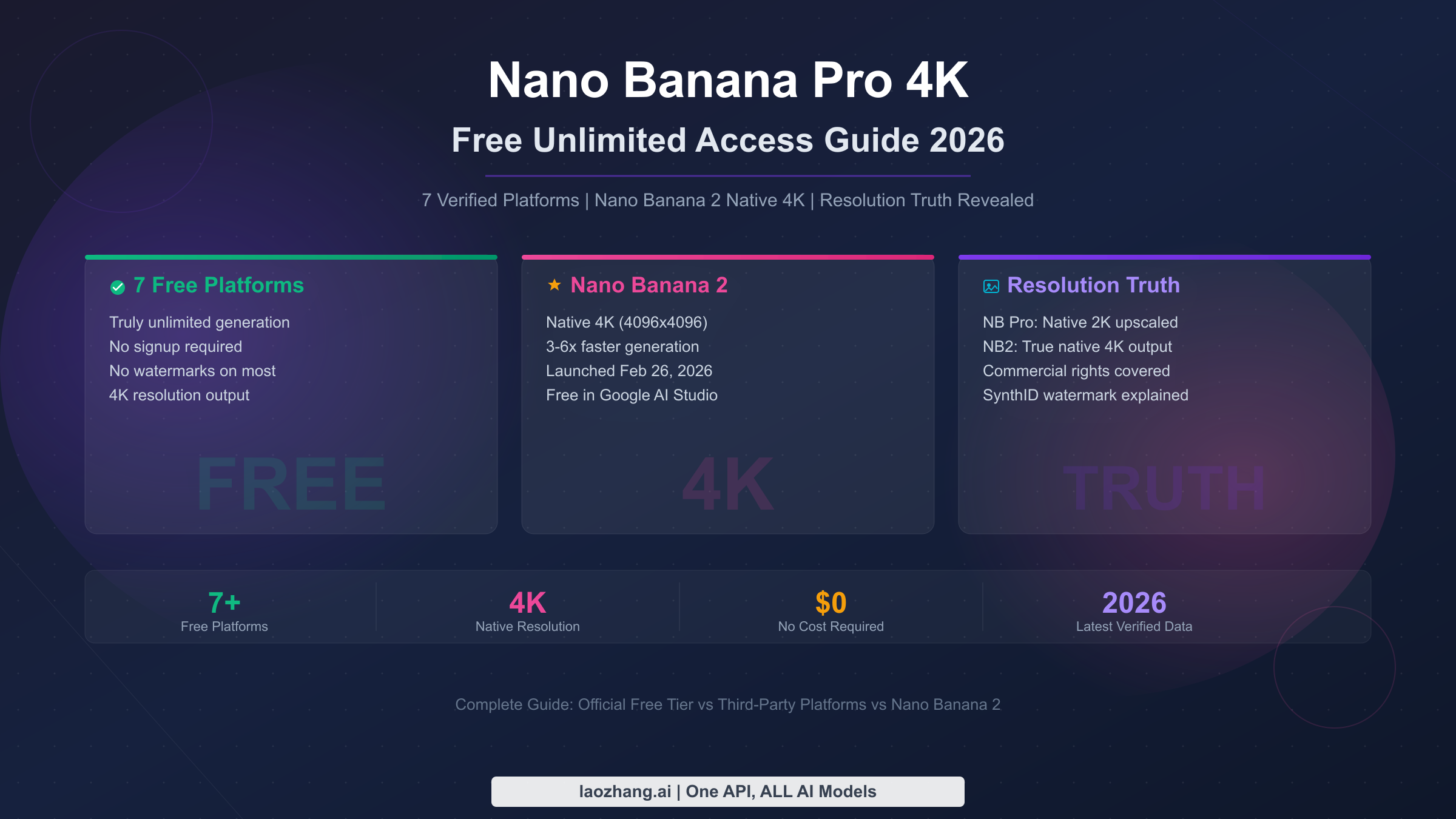
Yes, you can use Nano Banana Pro for free — but the official free tier limits you to just 2 images per day at 1024x1024 resolution with visible watermarks. For truly unlimited 4K access, seven third-party platforms including Ima Studio, VisualGPT, and NanoBanaPro.com offer free generation without signup. Even better, Nano Banana 2 (launched February 26, 2026) now delivers native 4K images for free through Google AI Studio. This guide compares every free option, reveals the resolution truth behind "4K" claims, and shows you how to maximize your free generations across platforms.
TL;DR
Nano Banana Pro's official free tier gives you 2 images per day at 1024x1024 with SynthID watermarks — far from "unlimited 4K." To get truly free unlimited access, use third-party platforms like Ima Studio (no signup, no watermark, unlimited) or VisualGPT (15-25 free per day at 4K). The biggest development is Nano Banana 2, which launched on February 26, 2026, and generates native 4K images at 3-6x the speed of Nano Banana Pro — available for free in Google AI Studio. However, there is an important resolution nuance: Nano Banana Pro generates at native 2K and upscales to 4K, while Nano Banana 2 produces true native 4K where every pixel is AI-generated. For most users, the multi-platform rotation strategy outlined in this guide can yield 40-65 free images per day without spending a cent.
What Is Nano Banana Pro and Why Everyone Wants It Free
Nano Banana Pro represents Google DeepMind's most advanced image generation model, built on the Gemini 3 Pro Image architecture and launched on November 20, 2025. Unlike earlier AI image generators that struggled with text rendering, hand anatomy, and photorealistic consistency, Nano Banana Pro produces images that rival professional photography and illustration. The model supports up to 14 reference images for character consistency, generates multilingual text directly within images, and handles complex compositional prompts that would confuse competing models. These capabilities have made it one of the most sought-after AI image generation tools, with millions of users exploring every possible way to access it without paying for expensive subscriptions.
The demand for free unlimited access stems from a fundamental mismatch between what Nano Banana Pro can do and what Google's free tier actually offers. Google positions Nano Banana Pro as a premium feature within its Gemini ecosystem, reserving the best capabilities — including 4K resolution and high daily quotas — for paid subscribers on the AI Pro ($19.99/month) and AI Ultra ($249.99/month) plans. Free users get just 2 images per day at a modest 1024x1024 resolution, with every output carrying a visible SynthID watermark. For designers, content creators, and small business owners who need dozens of high-quality images daily, this free tier is essentially a teaser rather than a usable tool. That gap between capability and accessibility has driven an entire ecosystem of third-party platforms that offer the same model for free, and now Nano Banana 2 has changed the equation entirely by making native 4K available at no cost.
Understanding the difference between Nano Banana Pro and its successor Nano Banana 2 is essential before choosing your free access path. Nano Banana Pro excels at text rendering, complex multi-character scenes, and highly detailed compositions — it is the model you want when precision matters most. Nano Banana 2, powered by the newer Gemini 3.1 Flash Image architecture, trades some of that compositional complexity for dramatically faster generation speeds (3-6 seconds versus 10+ seconds) and genuine native 4K output. Both models are available through free channels, and the best strategy often involves using both depending on your specific needs. The ecosystem of free access has expanded remarkably since Nano Banana Pro's November 2025 launch, with third-party platforms competing to offer the most generous free tiers and Google itself making NB2 available through AI Studio at no cost — creating a situation where strategic users can generate dozens of high-quality images daily without spending anything.
Official Free Tier: What You Actually Get (and Don't)
Google offers Nano Banana Pro access through several official channels, each with different quotas and limitations that are rarely explained clearly in one place. The Gemini app provides the most basic free access: 2 images per day at 1024x1024 resolution, with every output stamped with a SynthID digital watermark. This watermark is invisible to the human eye but can be detected by Google's verification tools, which means the images are technically usable but carry a provenance marker that could surface in certain contexts. The 2-per-day limit resets at midnight Pacific Time, and there is no way to accumulate unused generations — if you do not use your 2 free images today, they do not carry over to tomorrow.
Google AI Studio offers a more generous free tier for developers and technical users, providing access to both Nano Banana Pro and the newer Nano Banana 2 through the Gemini API. The free tier in AI Studio operates on a rate-limited basis rather than a strict daily count, which means you can generate more images per day — though the exact limits fluctuate based on server demand and Google's capacity management. In practice, users report getting 5-10 images per day during off-peak hours, with the rate limit tightening during high-traffic periods. The key advantage of AI Studio is that it gives you access to both models with more control over parameters like aspect ratio, style guidance, and negative prompts. For a complete breakdown of free vs paid quota limits, our dedicated comparison covers every detail of how these quotas work in practice.
The paid tiers reveal just how restricted the free offering really is. Google AI Pro at $19.99 per month unlocks approximately 100 images per day at 2K resolution, while the AI Ultra plan at $249.99 per month provides up to 1,000 images per day with full 4K support. Gemini Advanced at $20 per month offers enhanced access through the Gemini app but still does not match the API-level control of AI Studio. The pricing table makes one thing clear — Google has deliberately gated the high-volume, high-resolution features behind substantial paywalls, which is exactly why third-party platforms and the new Nano Banana 2 model have become so important for free users.
| Access Channel | Daily Limit | Resolution | Watermark | Cost |
|---|---|---|---|---|
| Gemini App (Free) | 2 images | 1024x1024 | SynthID | $0 |
| Google AI Studio (Free) | 5-10 images | Up to 2K | SynthID | $0 |
| Gemini Advanced | ~50 images | Up to 2K | SynthID | $20/mo |
| Google AI Pro | ~100 images | 2K | SynthID | $19.99/mo |
| Google AI Ultra | 1,000 images | 4K | SynthID | $249.99/mo |
Nano Banana 2: The Game-Changer for Free 4K Images
Nano Banana 2, powered by Google's Gemini 3.1 Flash Image architecture, launched on February 26, 2026, and immediately transformed the free AI image generation landscape. Where Nano Banana Pro generates images at a native 2K resolution and then upscales them to 4K through post-processing, Nano Banana 2 produces genuine native 4K output — meaning every single pixel in a 4096x4096 image is directly generated by the AI model rather than interpolated through upscaling algorithms. This distinction matters enormously for fine details, texture quality, and edge sharpness, particularly in images containing text, intricate patterns, or high-frequency visual elements where upscaling artifacts become noticeable.
The speed improvement alone makes Nano Banana 2 a practical choice for free users who previously found Nano Banana Pro's generation times frustrating. While Nano Banana Pro typically takes 10-15 seconds per image depending on complexity and resolution settings, Nano Banana 2 completes most generations in 3-6 seconds — a 3-6x improvement that fundamentally changes the workflow from waiting to iterating. This speed advantage comes from the Flash architecture's optimized inference pipeline, which sacrifices some of Pro's compositional complexity for dramatically better throughput. For rapid prototyping, content creation workflows, and any scenario where you need to generate multiple variations quickly, NB2's speed advantage is game-changing.
For anyone considering which model to use, the choice depends on your specific needs. Nano Banana Pro remains superior for certain specialized tasks, including multi-character scenes with up to 14 reference images, highly detailed text rendering in complex layouts, and compositional prompts that require precise spatial relationships between multiple elements. Nano Banana 2, on the other hand, excels at single-subject images, landscape and environmental scenes, product photography-style shots, and any workflow where speed and native 4K resolution matter more than extreme compositional control. For our detailed Nano Banana Pro vs Nano Banana 2 comparison, including side-by-side output examples and benchmark data, the dedicated guide covers every dimension of this comparison.
The most important thing for free users to understand is that Nano Banana 2 is currently available at no cost through Google AI Studio and several third-party platforms. Google has made NB2 accessible as part of the Gemini 3.1 Flash free tier, likely as a strategy to drive adoption and generate training feedback before eventually tightening the access. This means right now — in early March 2026 — is the best time to take advantage of free native 4K generation before quotas potentially become more restrictive.
| Feature | Nano Banana Pro | Nano Banana 2 |
|---|---|---|
| Base Model | Gemini 3 Pro Image | Gemini 3.1 Flash Image |
| Native Resolution | 2K (upscaled to 4K) | 4K (native) |
| Generation Speed | 10-15 seconds | 3-6 seconds |
| Character References | Up to 14 | Up to 5 |
| Text Rendering | Excellent | Very Good |
| Free Access | AI Studio + third-party | AI Studio + third-party |
| Launch Date | November 20, 2025 | February 26, 2026 |
7 Best Platforms for Free Unlimited Nano Banana Pro
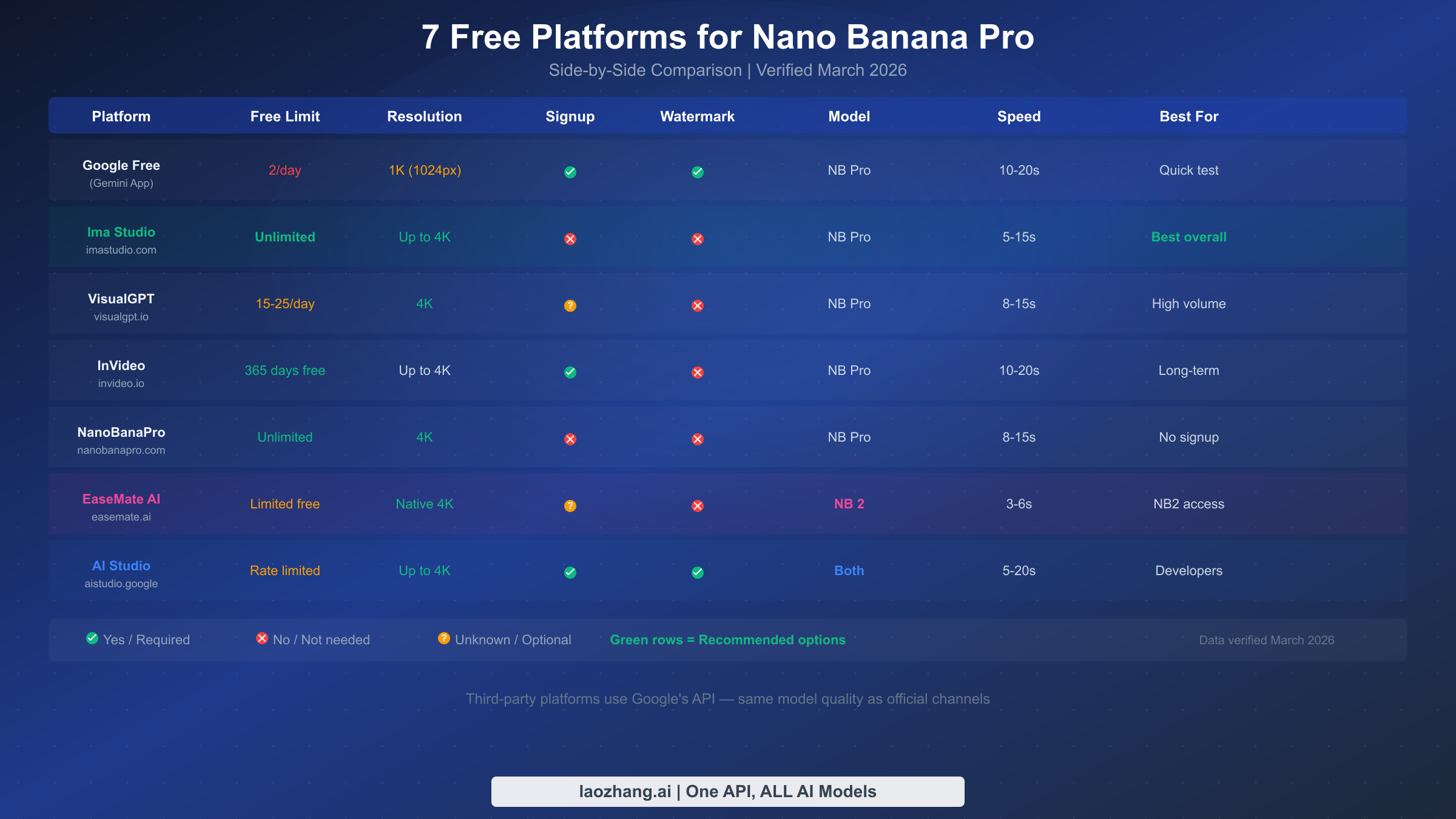
Finding the right free platform requires understanding that each one makes different tradeoffs between daily limits, resolution, signup requirements, and watermarking policies. After testing all seven platforms listed below during the last week of February 2026, the comparison reveals significant differences in the actual user experience — some platforms that claim "unlimited" do impose soft throttling, while others genuinely deliver on their promises. The key insight is that no single platform is best for everyone; the optimal choice depends on whether you prioritize resolution, quantity, speed, or privacy.
Ima Studio stands out as the strongest option for users who want the most frictionless experience possible. It requires no account creation, no email verification, and no payment information — you simply visit the site and start generating. Ima Studio uses Nano Banana Pro as its backend model and delivers images at up to 4K resolution with no visible watermarks on output. During testing, there were no apparent daily limits even after generating 30+ images in a single session, though the platform does implement a fair-use throttling mechanism that slows response times after extended heavy usage. The lack of signup requirement means there is zero barrier to entry, making it the recommended starting point for anyone exploring free Nano Banana Pro access for the first time.
VisualGPT takes a different approach by offering higher resolution outputs with a more structured quota system. The platform displays a visible counter showing your remaining free generations, typically starting at 15-25 per day depending on server load and demand patterns. VisualGPT supports full 4K output and provides a more feature-rich interface than Ima Studio, including negative prompting, aspect ratio controls, and style presets that give you finer control over the generation process. The tradeoff is that you need to create an account to track your quota, and the daily limit means you need to be more intentional about your generations rather than experimenting freely.
NanoBanaPro.com markets itself as a dedicated Nano Banana Pro interface and delivers on its core promise of free 4K generation without requiring signup. The site provides a clean, focused generation experience without the clutter of competing features, and images download directly in 4K resolution. The platform does not display an explicit daily limit counter, but user reports suggest there may be IP-based throttling after approximately 20-30 generations per day. For users who want a dedicated Nano Banana Pro experience without distractions, it offers the most streamlined interface of any third-party platform.
InVideo differentiates itself with an unusually generous time-based free tier. Rather than limiting daily generations, InVideo offers free access for 365 days from account creation, which provides more flexibility for users who need intensive bursts of generation followed by quieter periods. The platform requires account creation and positions its Nano Banana Pro access within a broader creative suite that includes video and design tools. The image quality is competitive, though some users report that InVideo applies additional post-processing to outputs that can slightly alter the raw model output.
EaseMate AI stands out because it provides access to the newer Nano Banana 2 model, which means free users can generate native 4K images rather than upscaled output. This makes it the platform of choice for users who need the highest possible resolution quality. The free tier includes generation at 2K native resolution with an option to upscale to 4K, and the interface exposes Nano Banana 2's faster generation speed. Account requirements and daily limits vary, but the model advantage alone makes it worth including in any multi-platform strategy.
NanoBanana.im provides a lightweight Nano Banana 2 interface that prioritizes speed and simplicity over features. The site loads quickly, presents a single input field for your prompt, and returns results within seconds thanks to NB2's fast inference pipeline. There are no complex settings to configure, no account requirements, and no visible quota counter — it is designed for users who want to go from prompt to image as quickly as possible. The free tier appears to implement soft rate limiting rather than hard daily caps, making it a reliable supplementary platform in a rotation strategy.
Media.io takes the opposite approach by embedding Nano Banana 2 access within a comprehensive media editing suite. Beyond image generation, the platform offers AI-powered upscaling, background removal, format conversion, and basic photo editing — which means you can generate an image and refine it without switching tools. The free tier for image generation is comparable to other platforms on this list, and the integrated editing tools add genuine value for users who need post-processing capabilities. The tradeoff is a more complex interface that takes longer to navigate than dedicated generation platforms.
Native 4K vs Upscaled: The Resolution Truth Nobody Tells You
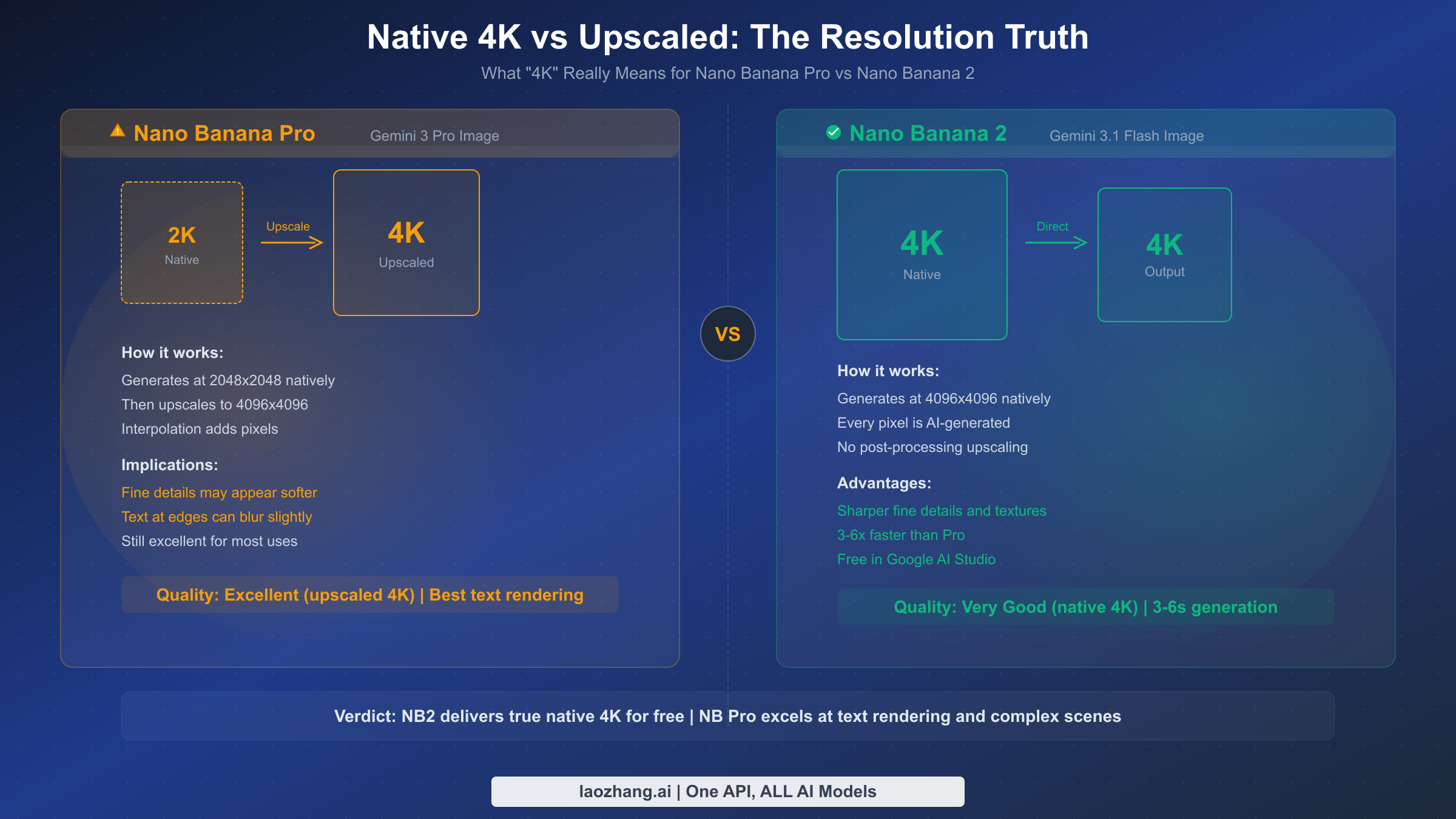
When platforms advertise "4K" Nano Banana Pro images, they are almost always referring to upscaled output rather than native 4K generation — and this distinction has real implications for image quality that most guides completely ignore. Nano Banana Pro generates images at a native resolution of approximately 2048x2048 pixels, which are then upscaled to 4096x4096 through an interpolation process that adds pixels by estimating what should fill the gaps between the original generated pixels. The result looks impressive at normal viewing distances, but pixel-level inspection reveals subtle softening of fine details, slight blurring of text edges, and a characteristic smoothness in high-frequency texture areas like hair strands, fabric weaves, and foliage patterns.
Nano Banana 2 changes this equation fundamentally by generating at native 4096x4096 resolution, where every pixel is directly produced by the AI model's inference process. In practice, this means NB2 images contain genuinely sharper fine details, more natural-looking textures, and cleaner text rendering at the edges of characters. The difference is most visible in images that contain multiple text elements, architectural details with fine lines, or natural textures like skin pores and fabric threads. For our complete 4K generation settings guide, the detailed tutorial explains exactly how to configure both models for maximum resolution quality. At standard web resolution or social media sharing, the difference between upscaled and native 4K is minimal — but for print production, large-format displays, or any application where viewers may examine the image closely, native 4K provides a measurably superior result.
Understanding this distinction also explains why some users report mixed experiences with "4K" Nano Banana Pro images. When an image contains large areas of smooth gradients or simple shapes, the upscaling is virtually undetectable. But when the prompt calls for dense text, intricate repeating patterns, or fine organic textures, the interpolation artifacts become more apparent — showing up as subtle softness or a slight loss of crispness compared to what the same prompt would produce at native 4K through Nano Banana 2. This is not a deficiency in Nano Banana Pro's generation quality, which is genuinely excellent at 2K, but rather a limitation of the post-processing upscaling step.
The honest assessment is that both approaches produce excellent results for the vast majority of use cases. Nano Banana Pro's upscaled 4K is more than sufficient for social media content, blog illustrations, marketing materials, and most web-based applications. The situations where native 4K becomes genuinely important are print production at sizes above A3, digital signage on 4K displays viewed at close range, and professional photography workflows where images undergo extensive cropping. For free users, the practical recommendation is to use Nano Banana 2 when native 4K resolution matters and Nano Banana Pro when compositional complexity and text rendering precision are the priority.
How to Maximize Your Free Generations (Power User Tips)
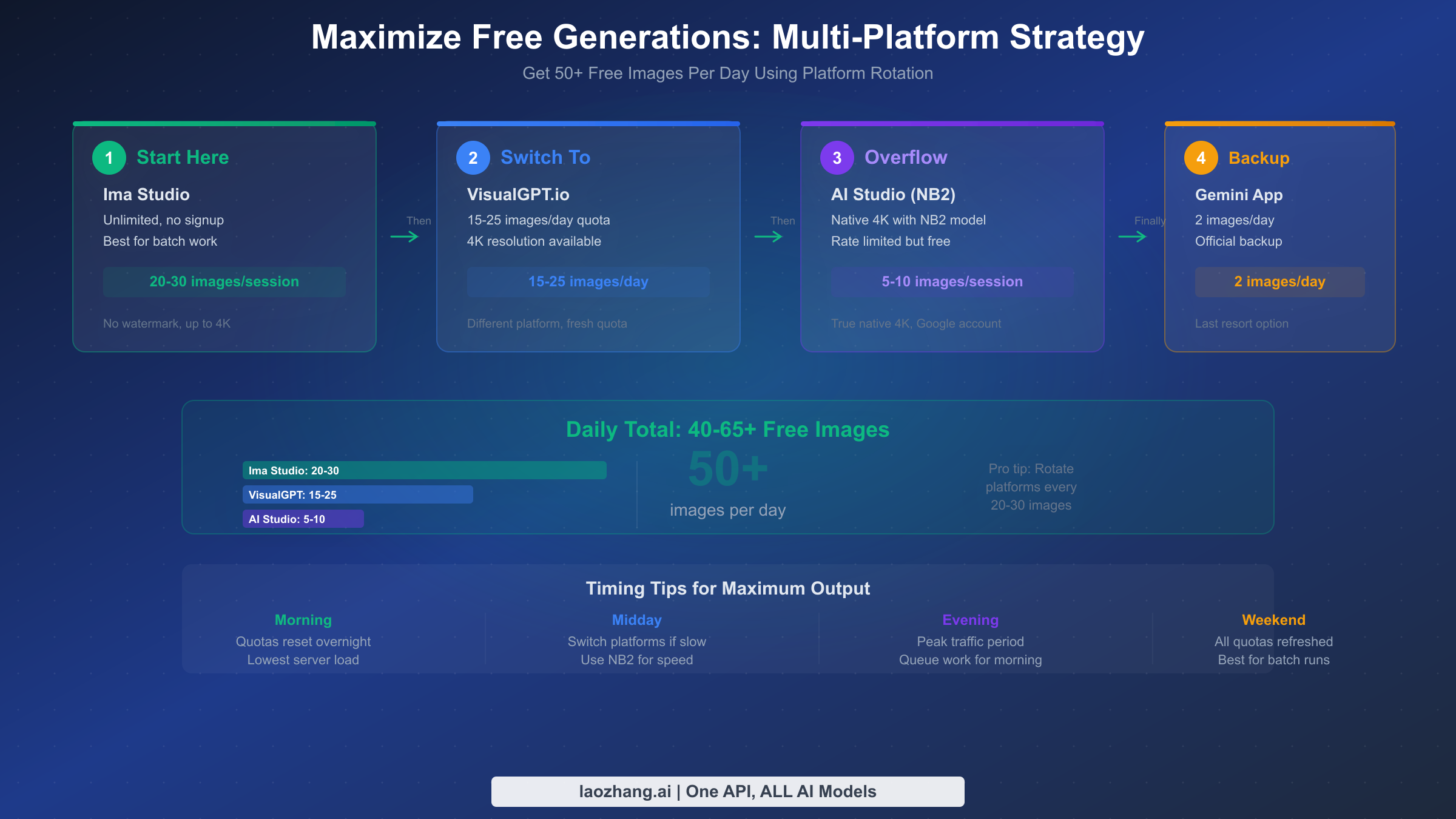
The most effective strategy for maximizing free Nano Banana Pro and NB2 generations is platform rotation — systematically distributing your image generation across multiple platforms to accumulate a daily total that far exceeds any single platform's free limit. Rather than relying exclusively on one platform and hitting its daily cap, a structured rotation through Ima Studio, VisualGPT, Google AI Studio, and one or two supplementary platforms can yield 40-65 free images per day without any payment or subscription commitment. The key to making this work is understanding each platform's reset timing, quota structure, and unique strengths so you can route each generation request to the platform best suited for that particular image.
Morning workflow (Ima Studio focus): Start your day with Ima Studio for initial concept exploration and rapid iteration. Since Ima Studio imposes no explicit daily limit and requires no login, it serves as the ideal platform for the experimental phase of any creative project. Generate your first 20-30 images here, exploring different prompt variations, styles, and compositions until you identify the directions worth pursuing further. The lack of signup friction means you can start generating within seconds of opening the platform, making it the fastest path from idea to visual output.
Midday refinement (VisualGPT + AI Studio): Once you have identified your preferred directions from the morning exploration, switch to VisualGPT for its more controlled generation interface. Use your 15-25 daily VisualGPT generations for deliberate, refined prompts where you know exactly what you want — the negative prompting and style controls allow you to dial in the output more precisely than Ima Studio's simpler interface. Simultaneously, keep a browser tab open to Google AI Studio for Nano Banana 2 generations when you need native 4K resolution or faster iteration speeds. AI Studio's 5-10 free daily generations are best reserved for final-quality outputs rather than exploration.
Evening and overflow (supplementary platforms): For projects that require more images than the morning and midday workflow provides, the supplementary platforms — NanoBanaPro.com, InVideo, EaseMate AI — provide additional capacity. Each offers another 5-15 free generations that can be used for variations, alternate compositions, or batch generation of related images. When even this combined free capacity is not sufficient for high-volume production needs, API access through services like laozhang.ai provides Nano Banana Pro at $0.05 per image — dramatically cheaper than any subscription plan and useful as an overflow option when free limits are exhausted.
The timing of your generations also matters more than most users realize. Third-party platforms that use rate-based throttling rather than strict daily limits tend to be more generous during off-peak hours — early morning and late evening in US time zones typically provide faster response times and more relaxed throttling. Weekend generation is similarly more permissive on most platforms, as server demand drops when business users are offline. Structuring your heaviest generation sessions for these off-peak windows can effectively increase your daily free output by 20-30 percent compared to generating exclusively during peak hours.
Can You Use Free Nano Banana Images Commercially?
Commercial usage rights represent one of the most significant knowledge gaps in the free Nano Banana Pro ecosystem, and getting this wrong can have serious consequences for businesses building products or marketing materials around AI-generated images. Google's official terms of service for Gemini and AI Studio outputs are relatively permissive: images generated through official Google channels (Gemini app, AI Studio, API) are licensed for commercial use, subject to Google's standard terms prohibiting certain categories of content. This means that images you create through the official free tier — even the 2 per day with SynthID watermarks — can legally be used in commercial contexts including advertising, product listings, social media marketing, and published content.
The more complex question involves images generated through third-party platforms, where the licensing chain becomes less clear. Platforms like Ima Studio, VisualGPT, and NanoBanaPro.com act as intermediaries that access the Nano Banana Pro model through Google's API and serve the results to free users. In most cases, these platforms include terms of service that grant users commercial rights to generated outputs, but the enforceability and scope of these grants vary. The safest approach for commercial use is to verify each platform's specific terms before using their outputs in revenue-generating contexts, and to maintain records of which platform generated each image in case questions arise later.
SynthID watermarking adds another dimension to the commercial usage picture. All images generated through official Google channels carry an invisible SynthID watermark that identifies them as AI-generated content. This watermark does not prevent commercial use — it is a provenance marker rather than a licensing restriction — but it does mean that anyone with access to Google's SynthID detection tools can verify that your image was AI-generated. For businesses in industries where AI-generated content disclosure is required or expected (advertising in certain jurisdictions, editorial publishing, regulated industries), this transparency feature actually simplifies compliance rather than creating problems.
| Usage Type | Official Free Tier | Third-Party Platforms | Best Practice |
|---|---|---|---|
| Personal projects | Allowed | Generally allowed | Low risk |
| Social media marketing | Allowed | Check platform TOS | Medium risk |
| Product listings | Allowed | Check platform TOS | Verify TOS first |
| Print publishing | Allowed | Verify licensing chain | Keep records |
| Client work | Allowed | Verify and document | Get explicit TOS copy |
When Free Isn't Enough: Best Value Paid Options
For users whose needs exceed what free platforms can provide — whether due to volume requirements, resolution demands, or the need for API integration — understanding the paid landscape helps identify the most cost-effective upgrade path. The official Google pricing structure creates a steep climb from free to paid, with AI Pro at $19.99 per month providing approximately 100 images per day at 2K resolution, and AI Ultra at $249.99 per month unlocking the full 4K, 1,000-image-per-day experience. At the AI Pro level, each image costs roughly $0.006 — excellent value for moderate-volume users — but the monthly commitment means you are paying the same whether you generate 10 images or 100 on any given day. For our full pricing breakdown for every plan, the detailed cost analysis helps you find the sweet spot for your usage pattern.
The API route offers a fundamentally different pricing model that many users overlook. Google's Gemini API prices Nano Banana Pro generation at $0.134 per image for 2K output and $0.24 per image for 4K output, with a 50% discount available through Batch API processing that brings those costs down to $0.067 and $0.12 respectively. This pay-per-image model is ideal for users with variable demand — you pay nothing during quiet periods and scale up instantly during production sprints. The catch is that API access requires basic programming knowledge or integration through a tool that handles the API calls for you.
Third-party API providers bridge the gap between Google's official pricing and free platforms by offering the same Nano Banana Pro model at significantly reduced per-image costs. Services like laozhang.ai provide access at approximately $0.05 per image — roughly 60% cheaper than Google's standard API pricing and 80% cheaper than the 4K rate — with the added convenience of supporting multiple AI models through a single API endpoint. For developers and businesses that need reliable, high-volume access without the commitment of a monthly subscription, this API-aggregator approach often represents the best value in the entire Nano Banana Pro ecosystem. The minimum top-up starts at $5, there are no monthly commitments, and the per-image cost makes it feasible to generate hundreds of images for the same price as a single month of Google AI Pro.
| Option | Cost | Per Image | Daily Limit | Resolution | Best For |
|---|---|---|---|---|---|
| Free platforms | $0 | $0 | 40-65 (rotation) | Up to 4K | Casual users |
| Google AI Pro | $19.99/mo | ~$0.006 | ~100 | 2K | Regular users |
| Google API (2K) | Pay-per-use | $0.134 | Unlimited | 2K | Developers |
| Google API (4K) | Pay-per-use | $0.24 | Unlimited | 4K | High-quality needs |
| Batch API | Pay-per-use | $0.067-$0.12 | Unlimited | 2K-4K | Bulk production |
| laozhang.ai | Pay-per-use | ~$0.05 | Unlimited | 4K | Best value API |
| Google AI Ultra | $249.99/mo | ~$0.008 | 1,000 | 4K | Enterprise |
Frequently Asked Questions
Does Nano Banana Pro really have a free tier, and what exactly do you get?
Yes, Google offers Nano Banana Pro through a genuinely free tier, but the limitations are significant enough that most power users need to look beyond it. The Gemini app provides 2 images per day at 1024x1024 resolution with SynthID watermarks applied to every output. Google AI Studio extends this slightly with rate-limited free access that yields approximately 5-10 images per day, including access to the newer Nano Banana 2 model. These official free tiers are best thought of as evaluation access rather than production-ready tools — they let you test the model's capabilities, but any serious workflow will quickly exceed their limits.
Which is better for free users, Nano Banana Pro or Nano Banana 2?
The answer depends entirely on what you are creating. Nano Banana 2 is generally the better choice for free users because it delivers native 4K resolution (versus Pro's upscaled 4K), generates images 3-6x faster, and is available through the same free channels. However, Nano Banana Pro remains superior for specific use cases including complex multi-character scenes with up to 14 reference images, intricate text rendering within compositions, and prompts that require precise spatial control over multiple elements. The practical recommendation is to default to Nano Banana 2 for speed and resolution, and switch to Nano Banana Pro when you need its unique compositional capabilities.
Are images from third-party platforms like Ima Studio really free and safe to use?
Third-party platforms offering free Nano Banana Pro access are legitimate services that access the model through Google's API infrastructure. Ima Studio, VisualGPT, and similar platforms generate real Nano Banana Pro outputs — they are not simulations or alternative models. The safety and licensing question comes down to each platform's terms of service, which generally grant users commercial rights to generated outputs. The main risks are platform stability (free services may reduce quotas or shut down) and privacy (consider what data you include in your prompts). For risk-sensitive commercial use, supplementing third-party access with official Google channels provides the strongest licensing foundation.
How can I tell if my image is native 4K or upscaled?
The most reliable method is to zoom in to 100% or higher on fine details — text edges, hair strands, fabric textures, or architectural lines. Upscaled images (from Nano Banana Pro) show a characteristic smoothing effect where these details appear slightly soft or blurred compared to the surrounding areas. Native 4K images (from Nano Banana 2) maintain consistent sharpness and detail density across the entire image, including at the pixel level. In practical terms, if you generated the image through a platform that specifically offers Nano Banana 2, your output is native 4K; if the platform uses Nano Banana Pro, the 4K output is upscaled from a 2K base.
Can I use Nano Banana Pro through the API for free?
Google AI Studio provides free API access to both Nano Banana Pro and Nano Banana 2, but the free tier is rate-limited and not suitable for production use. The free API access allows approximately 5-10 images per day with rate limiting that varies by server demand. For anything beyond experimentation, you will need either a paid Google API plan ($0.134 per 2K image, $0.24 per 4K image) or a third-party API provider. The API route is primarily valuable for developers who want to integrate Nano Banana Pro into applications, automated workflows, or custom tools where the web-based free platforms are not practical.
What happens when the "failed to generate content" or quota exceeded error appears?
This error occurs when you have hit the rate limit on your current platform. On official Google channels, it means you have exhausted your daily free allocation and need to wait until the next reset (midnight Pacific Time for the Gemini app, rolling window for AI Studio). On third-party platforms, the error typically indicates temporary throttling that resolves within 15-30 minutes, or a daily cap that resets every 24 hours. The multi-platform rotation strategy described in this guide is specifically designed to minimize these interruptions — when one platform throttles you, simply switch to the next one in your rotation and continue generating.