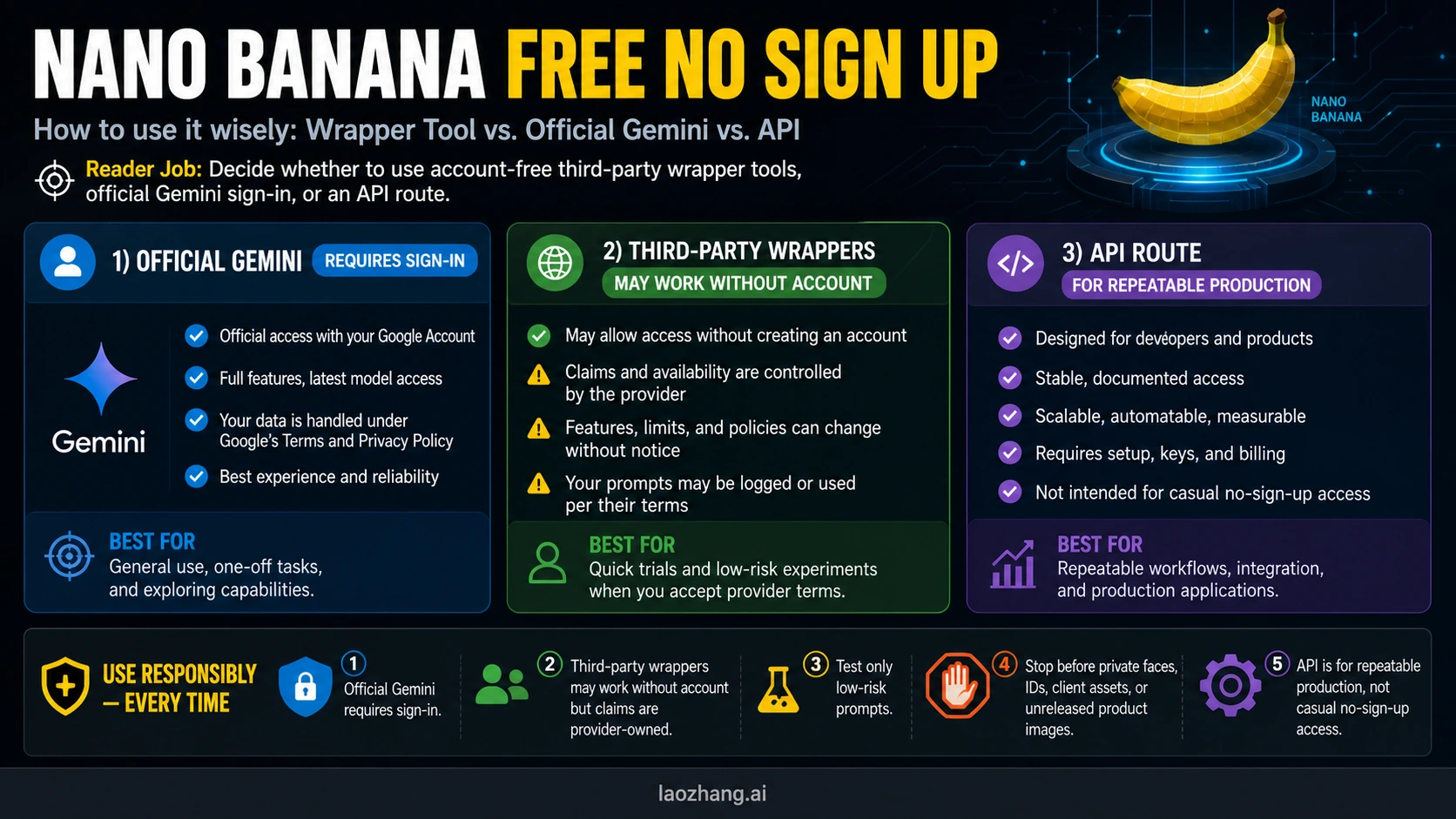
Official Gemini is not a no-sign-up Nano Banana route: it requires a Google sign-in. If you only need a quick low-risk test, third-party wrapper tools may let you generate or edit without creating an account, but their free, unlimited, download, and model-label claims are provider-owned and can change without warning.
Start with the route table below. Use wrappers only with fictional or public-safe prompts, switch to official Gemini for personal or sensitive images, and use an API route when the job needs repeatability, logging, billing control, or integration.
Checked May 7, 2026: the Google-owned path still needs sign-in, while visible no-account promises come from third-party wrapper pages. Do not upload private faces, IDs, client assets, unreleased product images, or confidential text to an unknown wrapper just to avoid a login.
Quick Route Table
| Route | Account status | What you can trust | What to verify before using it | Best use |
|---|---|---|---|---|
| Official Gemini Apps | Sign-in required for image generation | Google-owned interface, Google terms, Nano Banana 2 image creation, 1K download without an AI plan and 2K with a Google AI plan | Country, account age, plan, quota, and whether Pro redo is available on your plan | Personal prompts, sensitive images, low-risk creative work that still needs a known owner |
| Third-party wrapper pages | May advertise no account | Only the provider's own page copy and the flow you test today | Whether generation, download, repeat use, watermark, model label, and privacy terms survive past the first prompt | Fast experiments with fictional prompts |
| Public no-account tool pages | Usually claim free, no signup, or instant generation | Their public landing-page claim, not a Google contract | Whether they use Nano Banana, Gemini image models, a relay, or a different editor underneath | Trying several low-risk prompts quickly |
| Gemini API / AI Studio API | Key, billing, and setup required for image output models | Google's published developer pricing and model names | Paid tier, model ID, image size, batch/flex mode, rate limits, and logging | Repeatable production, integration, and cost control |
| Skip or wait | No account and no upload | Your data stays private | Whether you really need this image enough to accept the route risk | Private faces, IDs, client work, unreleased assets |
The fastest practical answer is: try a wrapper only if your prompt is safe to make public. If the image involves a real person, a customer file, a private document, a brand asset under NDA, or anything you would not paste into an unknown website, the no-sign-up shortcut is the wrong route.
What "No Sign Up" Has To Mean
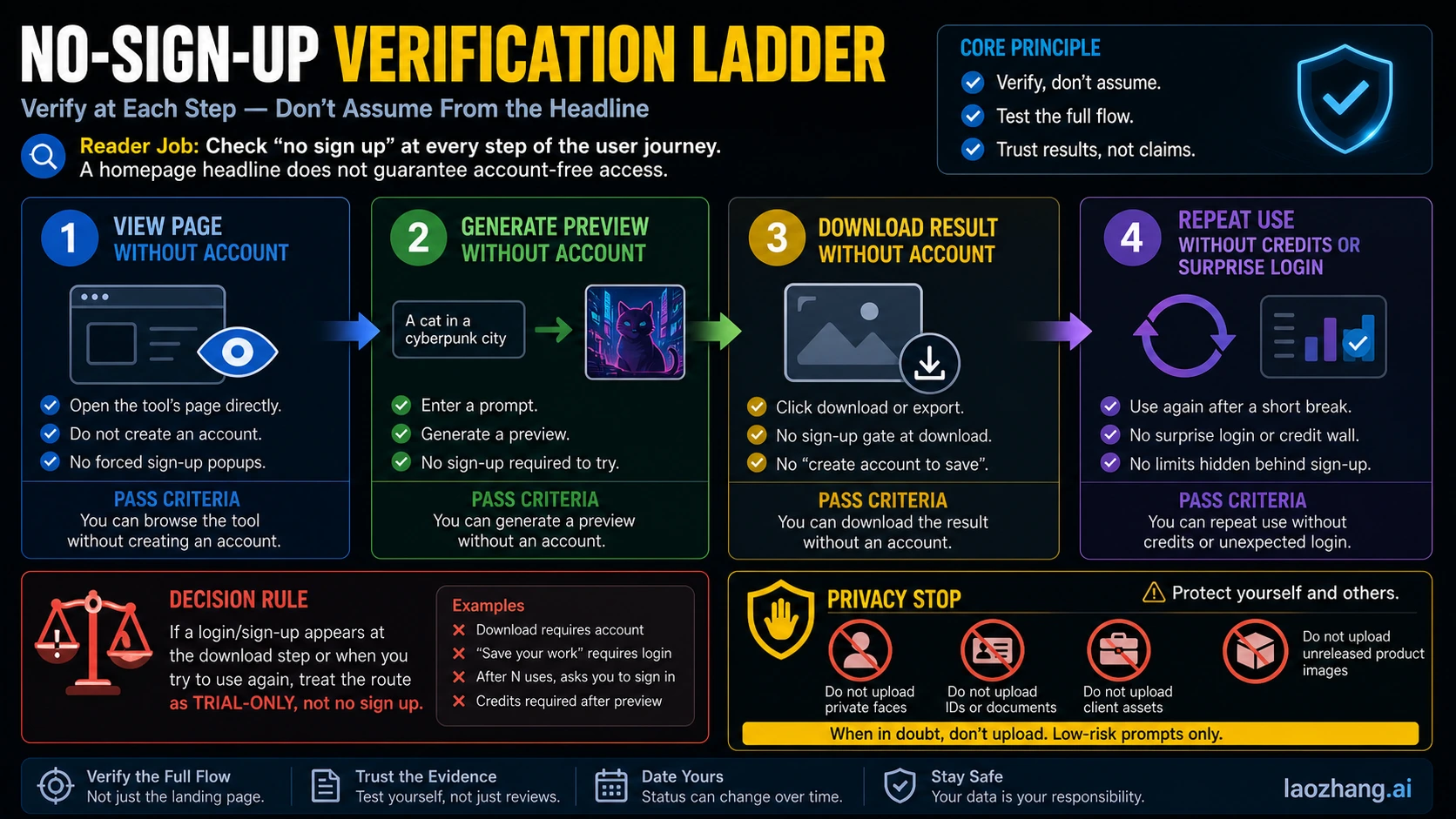
"No sign up" is not a single yes-or-no property. A site can let you open the page without an account, then require login after generation. It can let you generate a preview, then ask for credits at download. It can let you make one image, then block the second attempt behind a sign-up wall. For this decision, that distinction matters more than the model name.
Use this four-step test before you trust any Nano Banana wrapper:
| Step | Pass condition | If it fails |
|---|---|---|
| Open the page | You can reach the generator or editor without creating an account | It is not a no-sign-up route |
| Generate a preview | A low-risk prompt renders without login | Treat the page as marketing only |
| Download the result | Export works without account creation, surprise credits, or a hidden paywall | It is a preview-only trial |
| Repeat once | A second safe prompt works without a new wall | Use it only for one-off testing |
The important part is the sequence. A landing-page badge that says "free" or "no signup" is not enough. The route only earns that label if the full flow works: page, prompt, preview, download, and at least one repeated attempt.
For the first prompt, avoid anything personal. A useful test is something like: "a fictional yellow ceramic robot watering a tiny greenhouse, product mockup style, no text." It checks whether the tool can render an image without exposing private data. It also avoids the common trap of using your own face or a client product photo as the first upload.
If you are testing multiple wrappers, keep a simple scorecard:
opened without accountgenerated previewdownloaded fileasked for login latershowed clear limitsshowed clear model labelshowed privacy or data-use terms
That scorecard is more useful than a ranked list of tool names, because wrapper behavior can change faster than a static list can stay current.
The Official Gemini Boundary
Google's own Gemini Apps Help is clear about the account boundary. The sign-in help page says some web-app features can be used without signing in, but additional features and saved activity require a Google Account. The image-generation help page is stricter for this task: to generate images with Gemini Apps, you must be signed in to Gemini Apps.
That is why "Nano Banana free no sign up" should not be answered as "use official Gemini without an account." The official route is often the safer route, but it is not the literal no-sign-up route for image generation.
Google also separates consumer app access from developer access. In Gemini Apps, Nano Banana 2 is the image creation and editing path, and Google says downloads are 1K without a Google AI plan and 2K with a Google AI plan. The same help page says Nano Banana Pro is a paid-subscriber redo path after creating an image with Nano Banana 2. Those are app-surface rules, not wrapper rules.
For developers, the current Gemini API pricing page lists gemini-3.1-flash-image-preview and gemini-3-pro-image-preview under paid image output rows with the free tier marked as not available for those image outputs. That does not mean every Gemini API feature is paid; it means direct image generation with those preview image models is not the same thing as a casual free, no-account web generator.
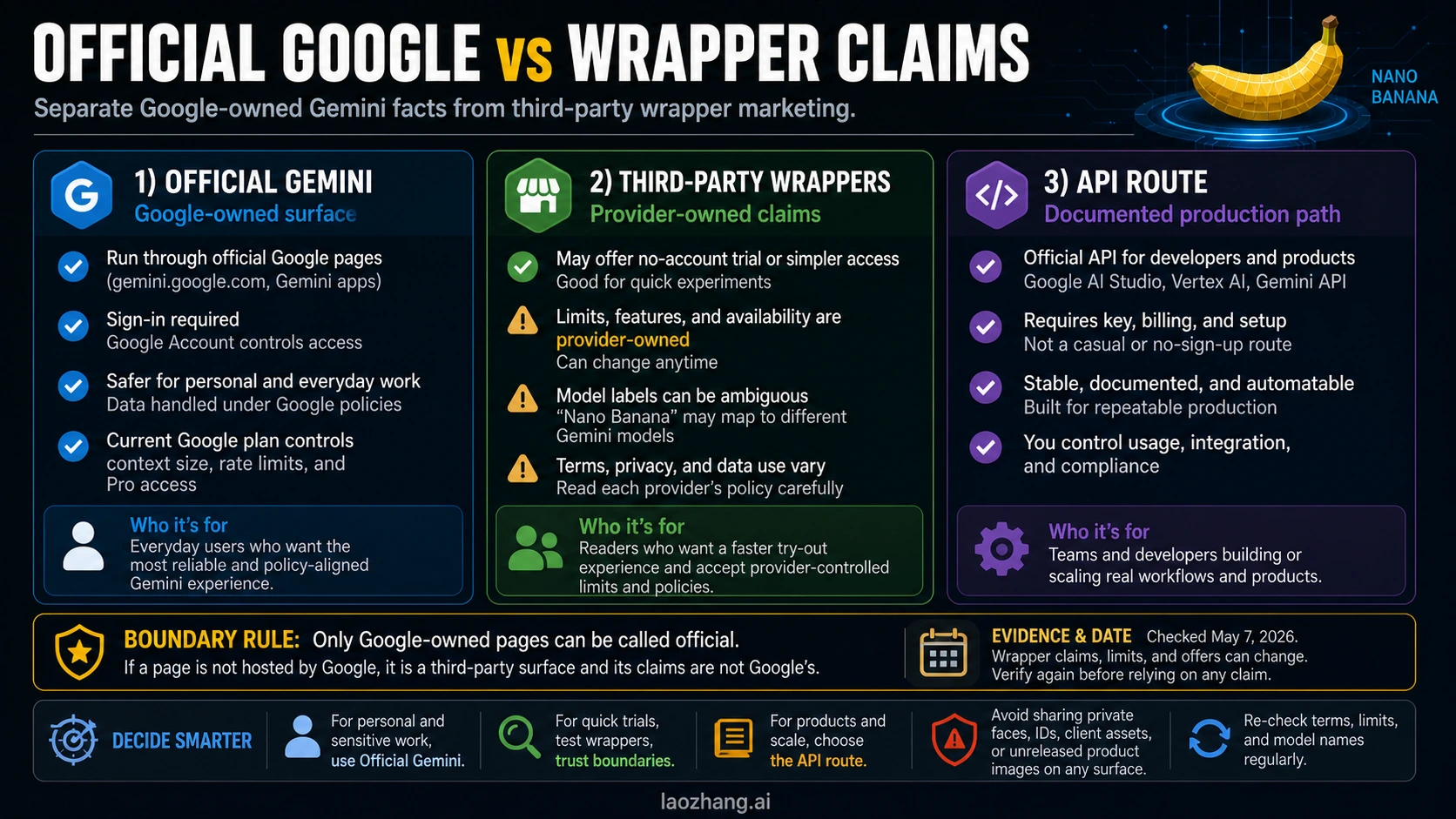
The clean contract split is:
| Surface | Owner | Account or setup | What the claim can mean |
|---|---|---|---|
| Gemini Apps | Sign-in required for image generation | Official consumer image creation and editing | |
| Nano Banana Pro redo in Gemini | Paid subscriber route | Higher-quality regeneration after Nano Banana 2 | |
| Gemini API image models | Google developer platform | API key, billing, and setup | Documented production access with paid image output |
| Wrapper sites | Provider | May be no account, trial, credit-based, or paid | Provider-defined access that may use Google models, relays, or other tooling |
Once you keep these lanes separate, most misleading claims become easier to reject. "Official" means Google-owned. "No signup" means the flow you tested needs no account at the relevant step. "Free" means the exact route has no charge for the action you are taking now; it does not mean unlimited, permanent, commercial-safe, private, or official. Treat the provider's terms and the flow you personally tested as the contract, not the badge in the hero area.
Which Wrapper Routes Are Worth Trying?
No-account Nano Banana routes are usually tool-first: generator pages, editor pages, no-login landing pages, and generic free image generator pages. Common public examples include EaseMate, Flaq AI, NoteGPT, ImgUpscaler, nanobanana2.com, nano-banana.kr, and broader image-editor pages. The useful interface is a prompt box first, not a model history lesson.
But the tool list you should trust is not the one with the most names. It is the one that tells you what each promise does and does not prove. A wrapper row should be read like this:
| Wrapper claim | What it might mean | What it does not prove |
|---|---|---|
| Free | You may get a trial, daily quota, or limited output | It does not prove unlimited use, commercial rights, or no watermark |
| No sign up | You may open or generate without an account | It does not prove download or repeat use works without login |
| Nano Banana | The provider may route to a Gemini image model or use the term as a market label | It does not prove Google owns the surface |
| 4K | The provider may offer a high-resolution export or upscale | It does not prove official free 4K from Gemini |
| Private | The provider may state a privacy policy | It does not prove your upload is safe for client or identity documents |
If you only want a quick creative test, use wrappers in a low-risk order. First test text-to-image with a fictional object. Then test a simple edit on a non-sensitive stock-like image you made yourself. Only after the page survives download and repeat-use checks should you consider whether it is worth using again.
Do not start by uploading your face, your child's face, a passport, a client product photo, a design under NDA, a private room, a medical image, or a screenshot with internal data. The value of no sign up is speed, not trust.
How To Test A No-Sign-Up Tool Safely
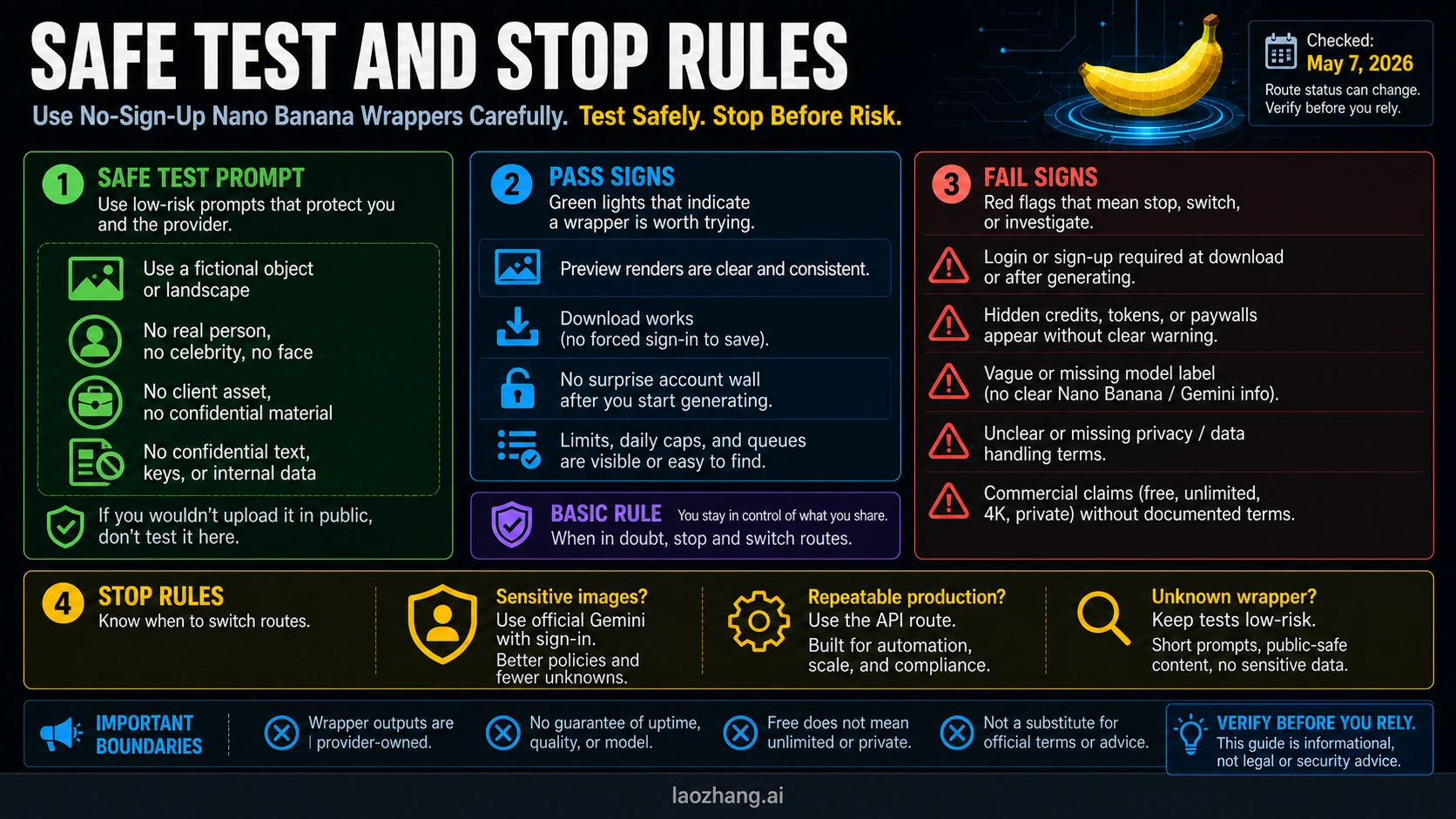
Use this small test protocol:
- Open the tool in a browser profile that is not already signed into unrelated services.
- Use a fictional text-only prompt with no personal data.
- Generate one image and wait for the preview.
- Try to download the output.
- Run one more safe prompt to check repeat behavior.
- Read the visible limit, credit, watermark, and privacy language before doing anything valuable.
Stop immediately if the route asks for login only after you have generated the preview. That is not necessarily malicious, but it means the headline did not describe the full job. Also stop if the page hides credits, does not name the model clearly, gives no privacy terms, claims commercial safety without terms, or asks for access to cloud files or photos without a clear reason.
For practical use, think in three buckets:
- Low-risk experiments: wrapper route is acceptable if the full no-account flow works.
- Personal or sensitive images: official Gemini is better even though it requires sign-in.
- Team or production workflow: use an API route where keys, logging, billing, retries, and terms are under your control.
That last bucket is where many "free no sign up" requests go wrong. If you are building a product, a marketing pipeline, or an automated image workflow, you do not actually want an anonymous wrapper. You want a repeatable contract.
When Free Is Not The Right Goal
Free access is useful when the cost of a bad route is low. It is not useful when the hidden cost is privacy risk, unclear licensing, unstable output, or a workflow you cannot reproduce tomorrow.
Choose official Gemini when:
- the image contains a real person, a private place, or personal context
- you want the provider to be Google, not an unknown wrapper operator
- you need a predictable consumer workflow
- you can tolerate Google sign-in
- 1K or 2K downloads are enough for the job
Choose a developer API route when:
- you need to call the model from an app, script, or pipeline
- you need to log prompts and outputs
- you need retry behavior, rate-limit handling, or cost tracking
- you need to separate test, staging, and production usage
- you need a documented model ID and a billing record
Choose a wrapper only when:
- the prompt is safe to expose
- speed matters more than ownership certainty
- you are comparing rough creative behavior
- you are willing to lose access if the provider changes limits
- you have verified the full no-account flow yourself
If your real question is broader than no-sign-up access, use the related guides instead. The broad free-access map is covered in Is Nano Banana Free?. The 4K and free-vs-paid boundary is covered in Nano Banana 2 4K Free. The model-family overview is in Nano Banana AI Image Generator. API pricing and free-tier reality are separated in Nano Banana API Pricing: Free vs Pro.
A Practical Decision Rule
Use this rule when you are in a hurry:
| If your job is... | Use this route | Why |
|---|---|---|
| Try one silly or fictional prompt right now | A no-account wrapper that passes the full flow | Fastest path with low consequence |
| Edit or generate something personal | Official Gemini Apps | Known owner and Google account boundary |
| Compare outputs from several tools | Wrappers with a scorecard | You are testing route behavior, not trusting a final asset |
| Build repeated image generation into a workflow | Gemini API or another documented API route | You need keys, billing, logs, and predictable terms |
| Upload sensitive or client-owned material | Do not use an unknown wrapper | No-login convenience is not worth the data risk |
The real promise is not "here is one magic free site." The useful answer is a route choice. No-account wrappers can satisfy quick-test intent, but official Gemini and API routes win whenever trust, privacy, or repeatability matters.
FAQ
Can I use Nano Banana free with no sign up?
You can often test Nano Banana-style tools through third-party wrapper pages without creating an account, but official Gemini image generation is not a no-sign-up route. Treat no-account wrappers as low-risk trials, not as Google's official access path.
Is there an official Gemini no-login image generator?
Not for the image-generation job covered here. Google's Gemini Apps sign-in help says some web-app features can work without sign-in, but the Gemini image-generation help page says you must be signed in to generate images with Gemini Apps.
Are no-sign-up Nano Banana wrappers actually using Google's model?
Maybe, but the provider has to prove that through its own documentation. A wrapper can use Google models, a provider relay, an editor pipeline, or looser market language. Unless the surface is owned by Google, do not call it official.
Is "free unlimited Nano Banana" real?
Do not treat it as real unless the route proves the full flow: generation, download, repeat use, visible limits, and terms. Most "unlimited" claims are marketing language, temporary promotions, hidden-credit systems, or rate-limited trials.
Can I upload private photos to a no-sign-up wrapper?
You should not. Use fictional prompts and public-safe images only. For private faces, IDs, client assets, unreleased products, internal screenshots, or confidential text, use an official or controlled route with terms you can review.
When should I use the API instead?
Use the API when you need repeatable production access, a documented model ID, billing records, logs, retries, rate-limit handling, or integration into another app. API access is not the casual no-sign-up route; it is the controlled route.
What should I recheck after May 7, 2026?
Recheck the Gemini Apps sign-in requirement, the Gemini Apps image download rules, the Gemini API image-model pricing rows, and the wrapper's own generation, download, credit, model-label, watermark, and privacy behavior. A wrapper can change those details without changing its headline.
Sources Checked
- Google Gemini Apps Help: What you need to sign in to Gemini Apps
- Google Gemini Apps Help: Generate & edit images with Gemini Apps
- Google AI for Developers: Gemini API pricing