Nano Banana 2 Not Working? 7 Fixes That Actually Work (2026)
Nano Banana 2 (gemini-3.1-flash-image-preview) fails for a handful of predictable reasons. This guide identifies which error you have — 429 quota exhaustion, IMAGE_SAFETY content filtering, server overload, or API parameter mistakes — and gives you the exact fix steps for both Gemini app users and API developers.
On this page
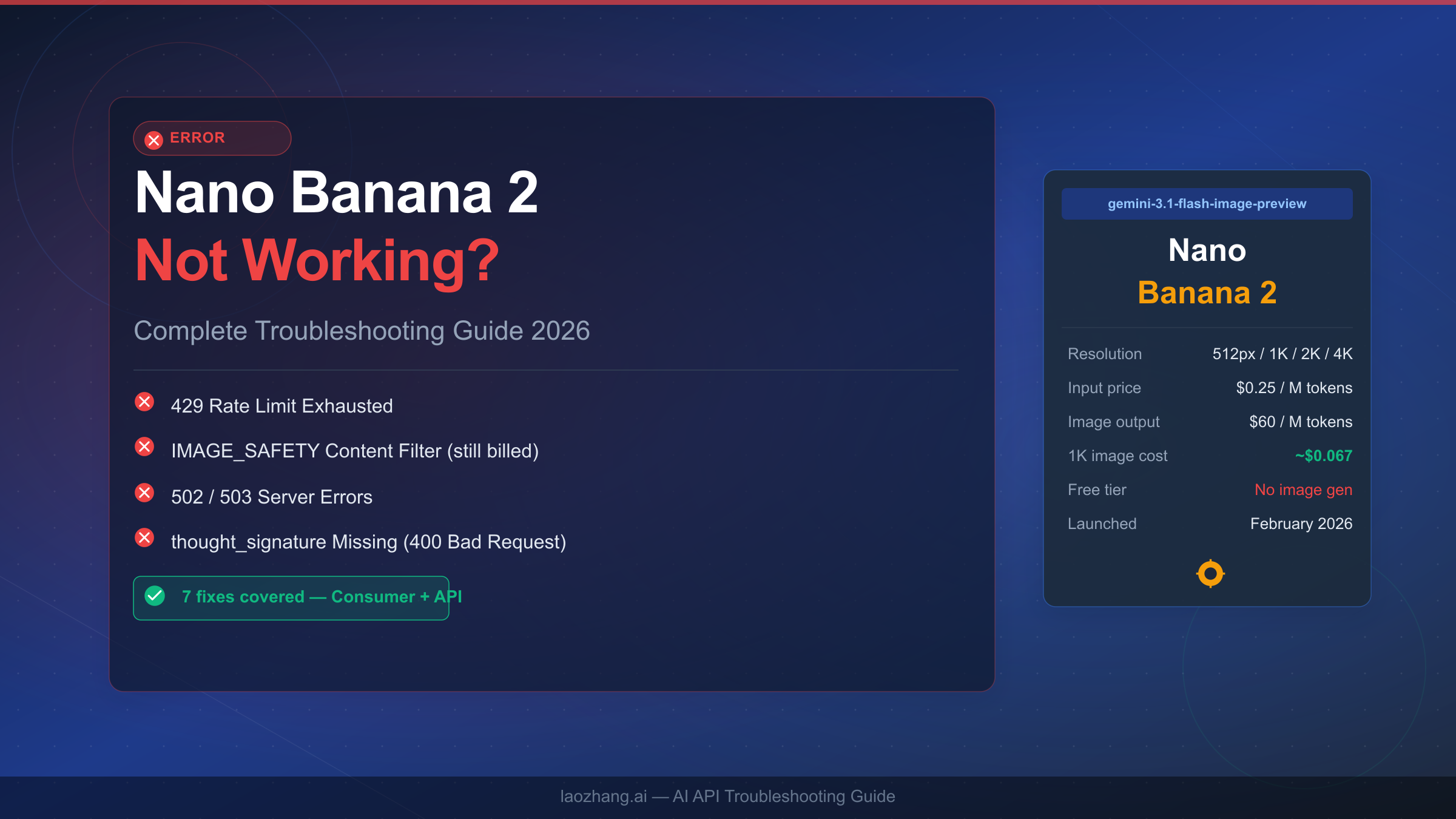
Nano Banana 2 stops generating images for a handful of predictable reasons. Most failures fall into four buckets: you have exhausted your daily quota, the Google server is overloaded (especially between 10:00 and 14:00 UTC), your prompt triggered the IMAGE_SAFETY content filter, or — for developers — a missing thought_signature parameter is breaking your multi-turn API calls. The symptom table in this article will route you directly to your fix in under thirty seconds.
TL;DR — Symptom Quick-Finder
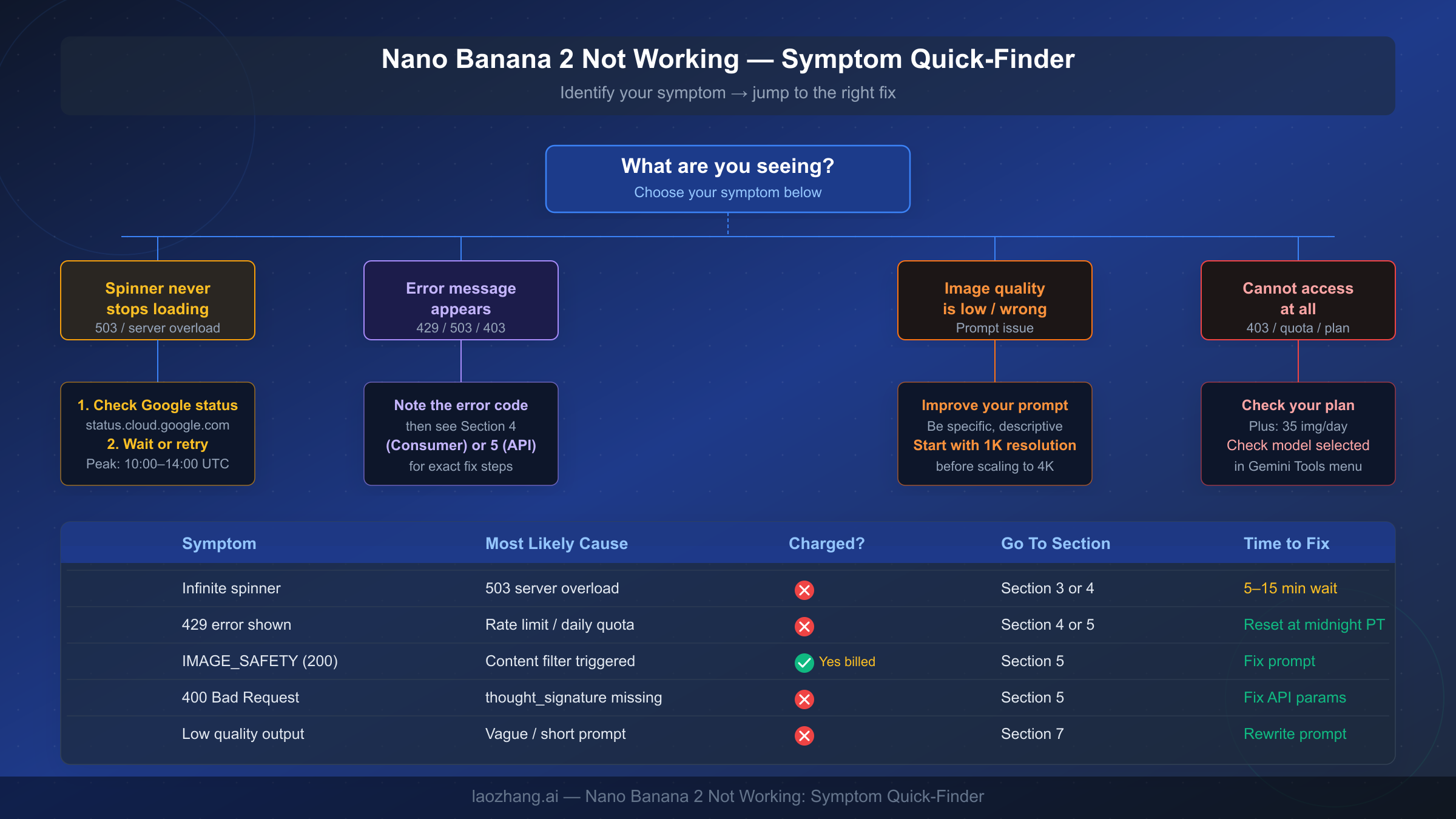
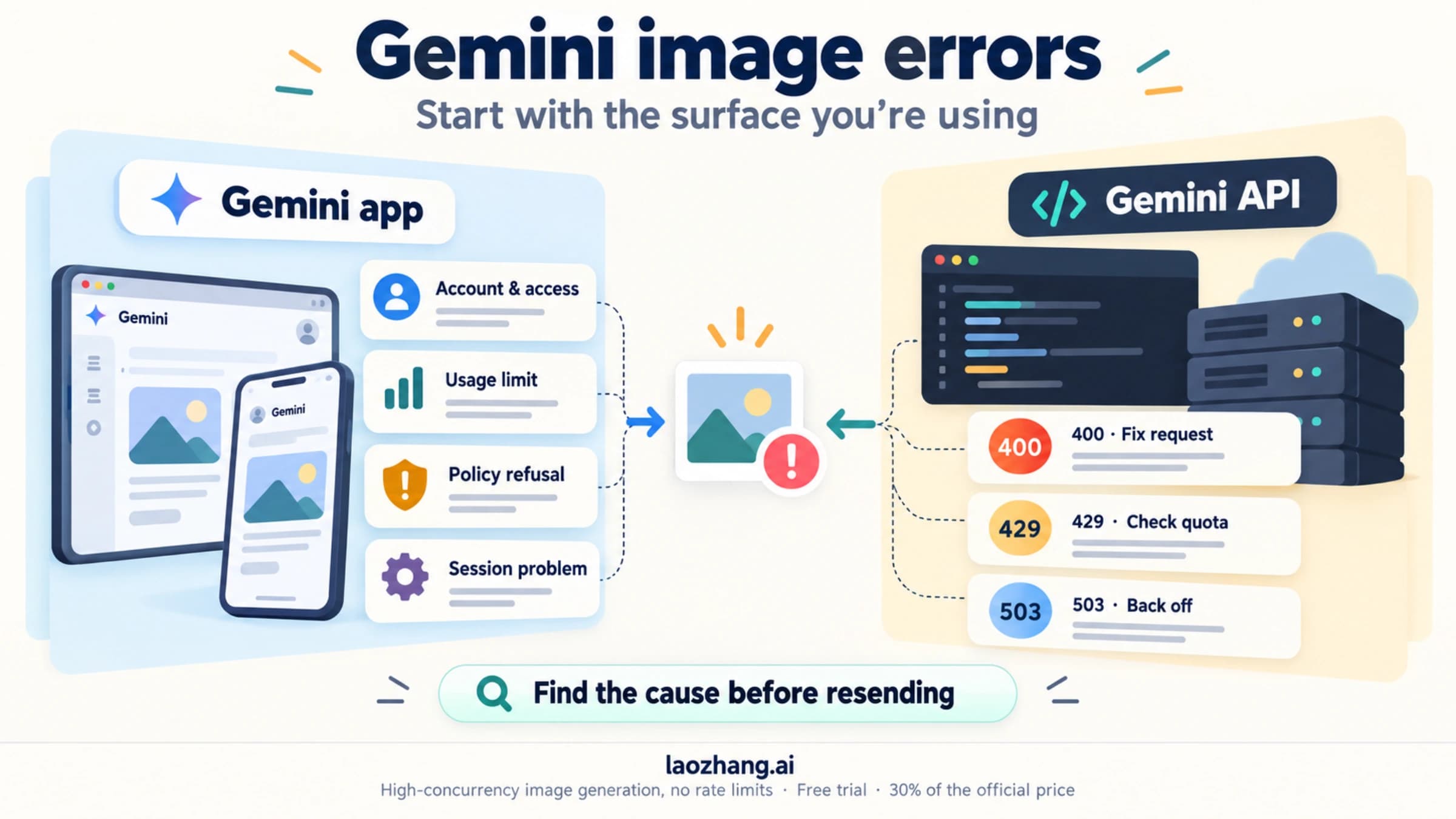
The fastest path to a fix is identifying what you actually see on screen. Most Nano Banana 2 failures give you a clear signal, but that signal is easy to misread.
If the spinner keeps running without ever producing an image, the most likely cause is a 503 server overload during peak traffic hours rather than anything you did wrong. Google's infrastructure is under the most strain between 10:00 and 14:00 UTC, and retrying five minutes later solves the problem in the majority of cases. You do not need to change your prompt, clear your cache, or restart your browser first.
If you see an explicit error code — a 429, a 403, or a 400 — the fix is different for each one and covered in detail in sections four and five below. The most important thing to note up front is that a 200 OK response with no image is not a success: it means IMAGE_SAFETY content filtering fired, and Google charges you the token cost even though you received nothing. This is the most frequently misunderstood error in the entire Nano Banana ecosystem.
| Symptom | Most Likely Cause | Charged? | Go To |
|---|---|---|---|
| Spinner never stops | 503 server overload | No | Section 3 or 4 |
| Error: 429 shown | Rate limit / daily quota | No | Section 4 or 5 |
| 200 OK, no image | IMAGE_SAFETY filter | Yes | Section 5 |
| Error: 400 Bad Request | Missing thought_signature | No | Section 5 |
| Error: 403 Forbidden | Invalid API key / region | No | Section 5 |
| Low quality output | Vague or short prompt | No | Section 7 |
| Cannot access at all | Plan / quota / model selection | No | Section 4 |
What Is Nano Banana 2 and How It Differs from Nano Banana Pro
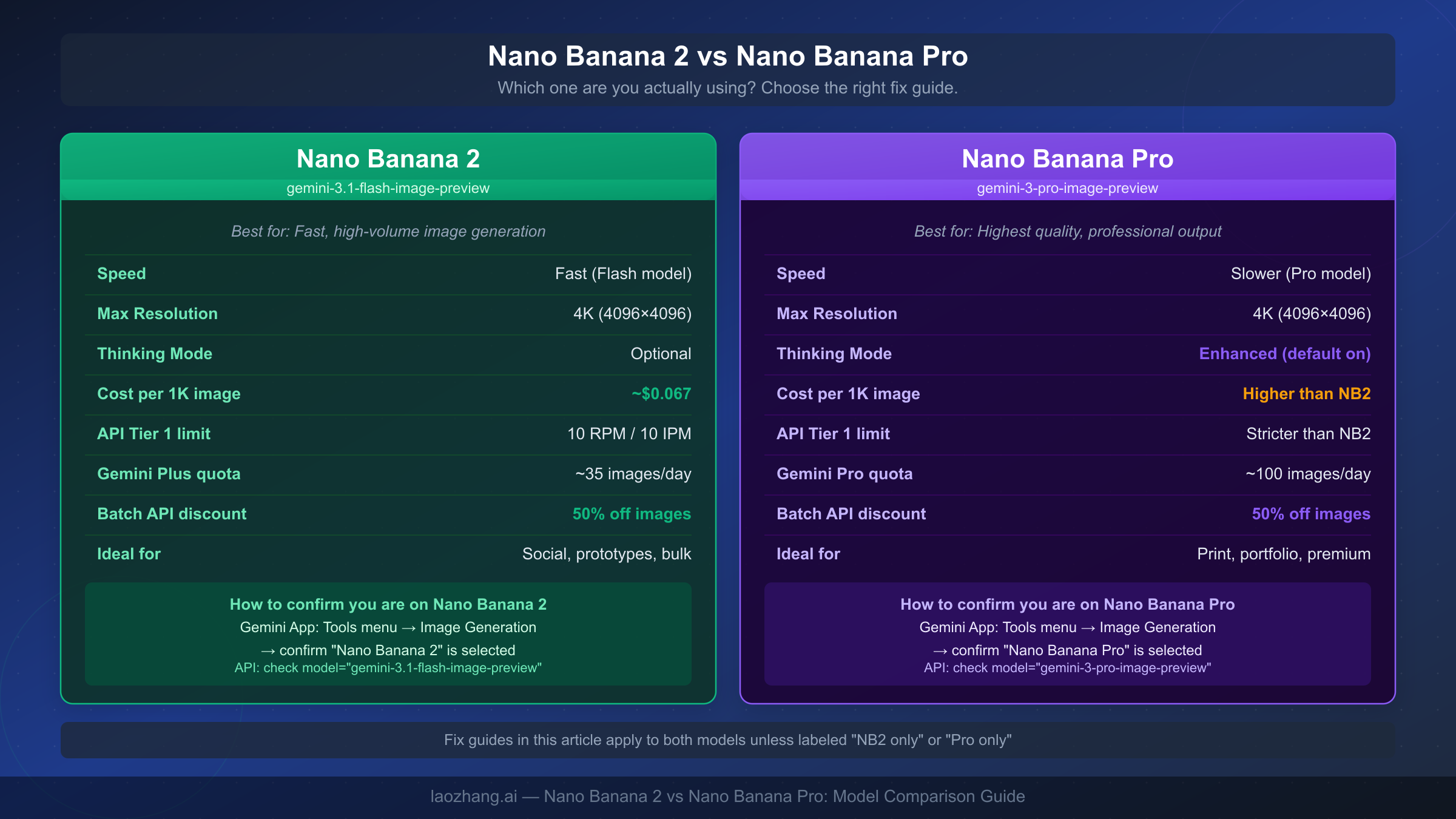
Before you spend time debugging the wrong thing, it is worth confirming which model you are actually using. Google released three distinct Nano Banana models in early 2026, and the fix steps differ significantly between them.
Nano Banana 2 carries the official model ID gemini-3.1-flash-image-preview. It launched in February 2026 as Google's speed-optimized image generation model, built on the Gemini 3.1 Flash architecture. It produces images at 512px, 1K, 2K, and 4K resolutions and supports multiple aspect ratios. Pricing is $0.25 per million input tokens and $60 per million image output tokens, which works out to approximately $0.067 per 1K-resolution image and $0.151 per 4K image (verified at ai.google.dev/pricing, March 2026). The Batch API discount of 50% applies to image output tokens, making bulk generation significantly cheaper. The free tier does not include image generation — you must be on a paid API tier.
Nano Banana Pro uses model ID gemini-3-pro-image-preview. It is Google's quality-maximized model, slower than Nano Banana 2 but designed for professional-grade output where photorealism and detail density matter more than throughput. It defaults to enhanced thinking mode. Pricing is higher than Nano Banana 2. For a detailed head-to-head breakdown, see our detailed comparison of Nano Banana Pro vs Nano Banana 2.
Original Nano Banana is gemini-2.5-flash-image — the fastest and cheapest of the three, with lower maximum resolution than Nano Banana 2.
To confirm which model you are currently using in the Gemini app: navigate to the Tools menu, select Image Generation, and check that "Nano Banana 2" is explicitly selected. The app does not always default to the newest model, and users frequently find themselves running the original Nano Banana when they intended to use Nano Banana 2. In API calls, verify your request includes model: "gemini-3.1-flash-image-preview" — not gemini-2.5-flash-image or any Pro variant.
The reason this distinction matters for troubleshooting is that the rate limits, quota structures, and common error patterns differ between models. A 429 on Nano Banana 2 resets differently than a 429 on Nano Banana Pro, and the IMAGE_SAFETY behavior is documented separately for each. This guide covers Nano Banana 2 specifically unless a section is labeled "applies to all models."
Is It Google or Is It You? How to Diagnose the Root Cause
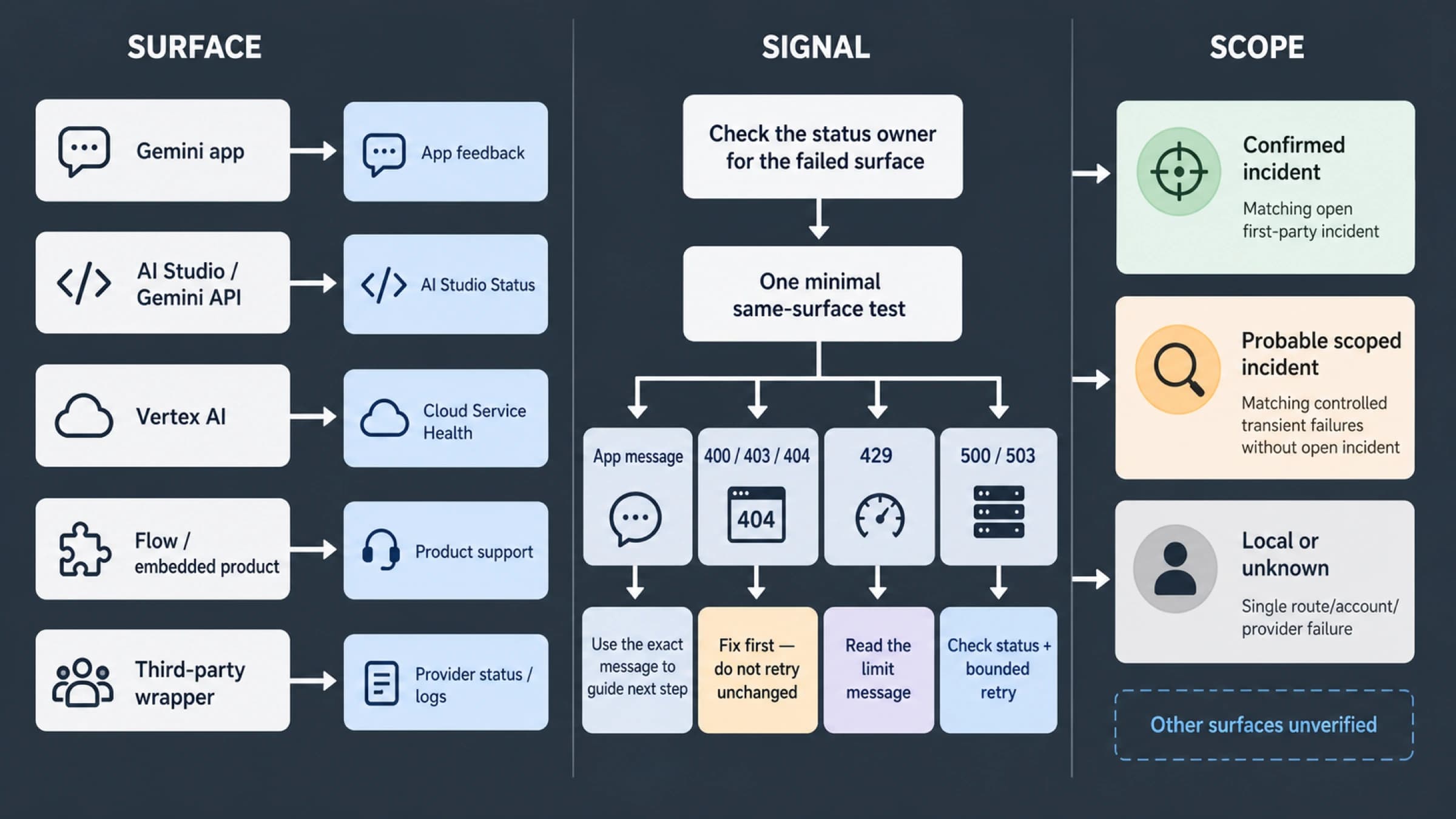
When Nano Banana 2 stops working, users almost universally blame their own prompt first. The reality is that server-side failures account for a much larger share of failures than prompt problems, especially during the periods when Google's infrastructure is under peak load. Before you spend time rewriting your prompt or troubleshooting your API key, a two-step diagnostic will tell you in under a minute whether the problem is on Google's side or yours.
Step one: check the Google Cloud status page. Navigate to status.cloud.google.com and look at the Vertex AI and AI Platform rows. If either shows a yellow or red indicator, Google is experiencing a service disruption and no amount of prompt editing will fix your problem. Wait for the incident to resolve. Google also posts real-time updates at ai.google.dev during significant outages.
Step two: test with a minimal prompt. If Google's status page shows green, the problem is local. Send a request with the simplest possible prompt — "a red apple on a white background, 1K resolution" — using your API key or the Gemini app interface. If this works, the issue is with your original prompt (likely IMAGE_SAFETY or prompt quality). If this also fails with the same error, the problem is your authentication, your API tier configuration, or your quota status.
The timing of the failure is a useful diagnostic signal. If Nano Banana 2 worked fine earlier today but stopped around 10:00 UTC, a 503 server overload during peak hours is the most probable explanation. The heavy usage window runs from approximately 10:00 to 14:00 UTC based on data from aifreeapi.com (March 2026), which aligns with overlapping US East Coast and European peak usage. If the failure happened at midnight Pacific time, it is more likely a daily rate limit reset issue — see the quota information in section four.
For developers, a third diagnostic is particularly useful: capture the full response body when you receive an error. The error.message field almost always includes the specific sub-reason for a 429 failure, distinguishing between RPM exhaustion, IPM exhaustion, and RPD exhaustion — each of which requires a different response strategy.
Fixing Nano Banana 2 in the Gemini App — Consumer Guide
Most Gemini app users who search "Nano Banana 2 not working" fall into one of three scenarios: the image count resets at midnight and they did not realize they had hit the daily limit, they are accidentally on the wrong model, or they triggered IMAGE_SAFETY filtering without understanding what that means. This section covers all three, plus the less-common account-level and browser issues.
Scenario 1: You have hit your daily image quota
Gemini Plus subscribers receive approximately 35 Nano Banana 2 images per day, and Gemini Pro subscribers receive approximately 100 (figures from dzine.ai, March 2026). The count resets at midnight Pacific time (UTC-8 in winter, UTC-7 in summer). If you have been actively generating images throughout the day and the feature suddenly stops producing output without showing an error message, the most likely explanation is quota exhaustion.
There is no way to extend your daily quota within the same billing period — you either wait for the midnight reset or upgrade your subscription plan. Check your remaining quota by navigating to your Gemini account settings and looking at the Usage section. The UI does not always surface this proactively, which is why many users diagnose this incorrectly.
For information about whether Nano Banana 2 is accessible on the free tier, see our guide on Nano Banana 2 free tier access.
Scenario 2: Wrong model selected
The Gemini app's model selector can silently fall back to an older model if Nano Banana 2 is experiencing capacity issues. Open the Tools menu, select Image Generation, and explicitly verify the "Nano Banana 2" option is highlighted. If the app shows a different model, select Nano Banana 2 manually and try again. If the app grays out the Nano Banana 2 option, that model is temporarily at capacity — this is Google's load balancing in action, and waiting five to fifteen minutes usually resolves it.
Scenario 3: IMAGE_SAFETY content filter in the Gemini app
The IMAGE_SAFETY filter is more aggressive in the consumer Gemini app than in the API, because the app uses stricter content policies to protect general audiences. If you see a message like "I cannot create that image" or if the generation spinner completes but produces nothing (in the API this would show as a 200 with no image), your prompt triggered the filter.
The fix is to rephrase your prompt with more neutral, specific language. Filters consistently trip on ambiguous phrasing around human figures, real-world locations, licensed characters, and violent or mature themes — even in abstract or artistic contexts. Replacing subjective adjectives with objective descriptions usually resolves the issue.
Other common consumer-side fixes:
Clearing your browser cache and reloading the Gemini app resolves authentication token expiry issues that can cause repeated generation failures. If you use Nano Banana 2 via a mobile app, force-closing the app and reopening it often clears a stuck session state. Signing out and back in refreshes your session token and resolves the majority of "model not responding" issues that do not have an obvious error code attached to them.
Fixing Nano Banana 2 API Errors — Developer Guide
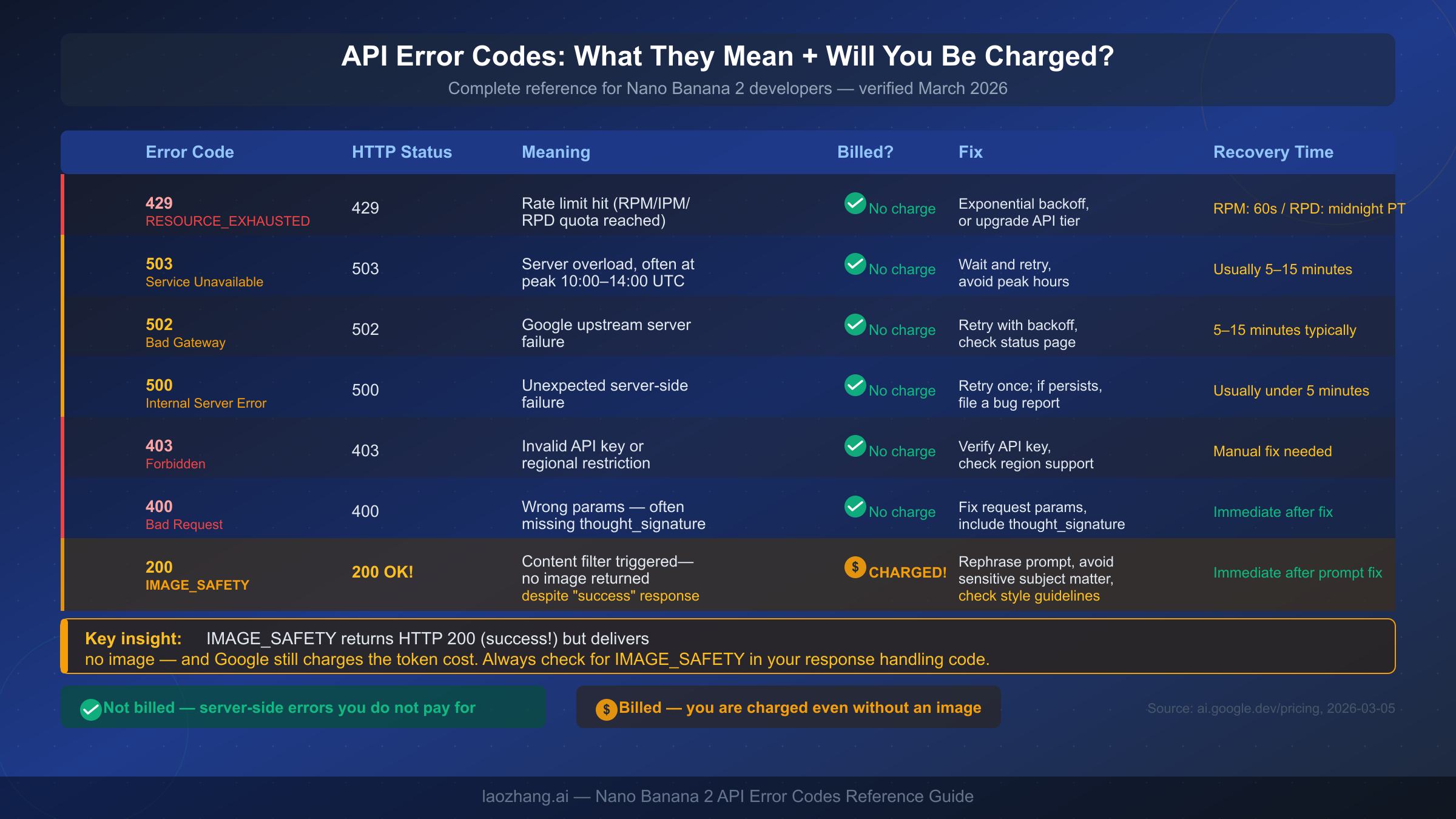
API developers encounter a different set of failure modes than consumer app users. The most important concept to internalize before debugging is the billing behavior: errors that originate on Google's infrastructure (429, 502, 503, 500) do not result in a charge, while errors that originate from your request being processed (most notably IMAGE_SAFETY) do charge your account even when you receive no image. Understanding this distinction should directly influence your retry and error-handling logic.
429 RESOURCE_EXHAUSTED — Rate Limit Exceeded
The 429 error accounts for approximately 70% of all developer-facing Nano Banana 2 failures based on community reports. It appears when you exceed any of three limits: requests per minute (RPM), images per minute (IPM), or requests per day (RPD). The three limits are tracked independently, and the correct recovery strategy depends on which one you hit.
Tier 1 API access allows 10 RPM, 10 IPM, and 1,000 RPD. Tier 2 raises these to 30/30/5,000. Tier 3 provides 60/60/10,000 (all figures from aifreeapi.com, March 2026, cross-referenced against Google AI Studio documentation). Limits are enforced per project, not per API key, which catches many developers off guard when they rotate keys expecting a fresh quota.
The error.message field in the 429 response will specify whether you hit the RPM, IPM, or RPD limit. RPM and IPM limits reset after 60 seconds — implement exponential backoff with jitter starting at one second and capping around 32 seconds. RPD limits reset at midnight Pacific time; there is no workaround other than waiting or upgrading your tier. For detailed rate limit handling strategies, see our article on how to handle RESOURCE_EXHAUSTED errors.
For production workloads where 429 errors are causing failures, consider using laozhang.ai's API aggregation layer (docs.laozhang.ai), which routes Nano Banana 2 requests across multiple Google projects and substantially reduces 429 frequency without requiring you to manage multiple API keys yourself. The per-image cost runs approximately 25% below official pricing through volume aggregation.
Disclosure: laozhang.ai is our own service. Its prices are platform pricing, not an independent comparison.
400 Bad Request — Missing thought_signature
The 400 error has a single dominant cause in Nano Banana 2: omitting the thought_signature field in multi-turn conversation requests. This is a developer trap that is not clearly documented in Google's quick-start guides.
When Nano Banana 2 uses its extended thinking mode, the model's response includes a thought_signature field in the response body. If you make a follow-up request in the same conversation thread — for example, asking Nano Banana 2 to revise a generated image — your next request must include the thought_signature from the previous response. Omitting it causes an immediate 400 Bad Request.
Here is the difference in practice:
// Incorrect: follow-up request missing thought_signature
const response = await model.generateContent({
  contents: [{
    role: "user",
    parts: [{ text: "Make the background blue instead" }]
  }]
});

// Correct: include thought_signature from previous response
const response = await model.generateContent({
  contents: [
    {
      role: "model",
      parts: [
        { text: previousResponseText },
        { thought_signature: previousThoughtSignature } // Required
      ]
    },
    {
      role: "user",
      parts: [{ text: "Make the background blue instead" }]
    }
  ]
});
Single-turn requests (a fresh generation without conversation history) do not require thought_signature and will not trigger this error.
200 OK with IMAGE_SAFETY — The Billing Trap
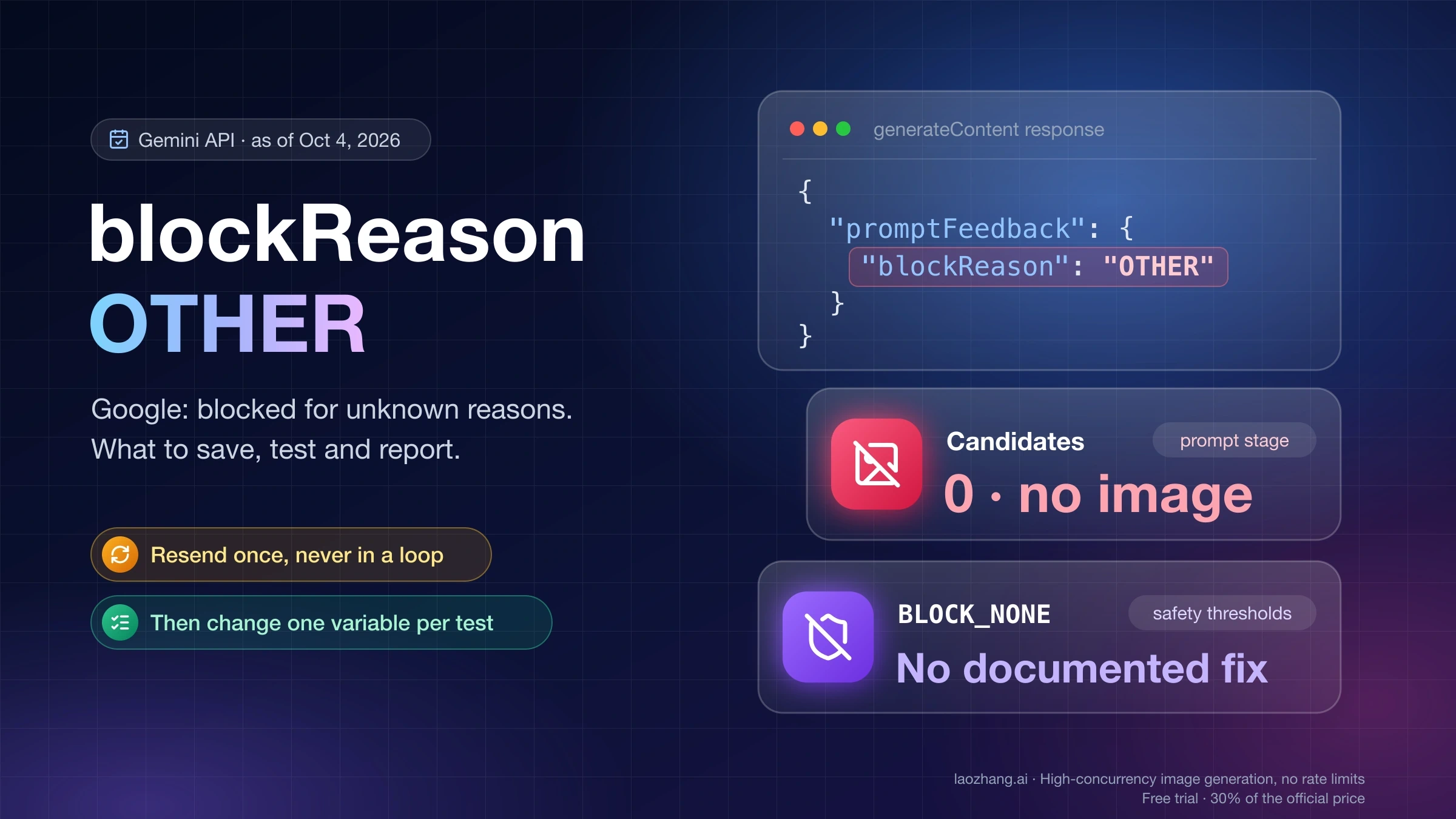
A response code of 200 with no image in the payload means IMAGE_SAFETY content filtering fired. Unlike 429 or 503 errors, this does not mean the request failed at the infrastructure level — Google processed your prompt, applied content analysis, determined it violated safety guidelines, and deliberately returned an empty response. The token cost is charged regardless.
This matters enormously for retry logic. If you automatically retry on any response that lacks an image, you will be charged multiple times for the same filtered content. Your error handling code should specifically check the response for IMAGE_SAFETY status before deciding whether to retry.
const result = await model.generateContent(request);
const candidate = result.response.candidates[0];

if (candidate.finishReason === "IMAGE_SAFETY") {
  // Do NOT retry — content was filtered, charge already incurred
  // Fix the prompt before retrying
  console.error("IMAGE_SAFETY: prompt triggered content filter");
  return null;
}
For a deeper dive into which prompt patterns consistently trigger the filter and how to interpret the safety rating categories, see our article on safety filter behavior across Nano Banana models.
502 and 503 — Server-Side Failures
Both 502 Bad Gateway and 503 Service Unavailable are transient server-side failures that do not reflect any problem with your request. You are not charged. The correct response is exponential backoff: wait one second, retry; if that fails, wait two seconds, retry; continue doubling up to a cap of around 32 seconds. Most 503 errors resolve within five to fifteen minutes. If 502 or 503 errors are occurring consistently rather than transiently, check the Google Cloud status page — extended outages are rare but do happen, and no amount of retrying will resolve them faster.
403 Forbidden — Key or Region Issues
A 403 almost always indicates either an invalid API key or a regional restriction. Verify your API key is active in Google AI Studio and has the Gemini API enabled. If your key is valid, the Nano Banana 2 model may not be available in your Google account's region — image generation support varies by geography. Using a third-party API aggregation service provides one straightforward workaround for region-blocked accounts.
When Nano Banana 2 Keeps Failing — Stable Alternatives
If you are experiencing persistent 429 rate limit failures in production — not occasional spikes but consistent failures at scale — the architectural cause is almost always that a single Google project's rate limits are insufficient for your traffic volume. The multi-level rate limit structure (RPM, IPM, and RPD all enforced independently) makes it easy to hit a ceiling even when your overall request volume seems low.
The most direct solution is upgrading your API tier. Moving from Tier 1 to Tier 2 triples your RPM and IPM allowance (10 to 30) and quintuples your RPD (1,000 to 5,000). Moving to Tier 3 doubles Tier 2's limits again. Contact Google Cloud support to request a tier upgrade for your project.
For workloads that need more than Tier 3 allows, or for teams that need reliability without the overhead of managing multiple Google projects themselves, laozhang.ai's API gateway is worth evaluating. The service aggregates Nano Banana 2 requests across a pool of projects, providing effectively no per-project rate caps at the application layer. Pricing runs approximately 25% below official Google rates through aggregation economics, and a single API key handles any volume you throw at it. The documentation and a test endpoint are available at docs.laozhang.ai.
Disclosure: laozhang.ai is our own service. Its prices are platform pricing, not an independent comparison.
Another angle worth considering: if your use case permits it, the Batch API significantly changes the economics and the rate limit picture. Batch API requests are not subject to the same RPM and IPM limits as synchronous requests, and the 50% discount on image output tokens makes bulk generation substantially cheaper. The trade-off is latency — batch requests complete asynchronously rather than in real time. For applications that pre-generate images rather than generating on demand, this is an excellent option.
Prompt Fixes That Resolve 80% of Nano Banana 2 Problems
A significant portion of Nano Banana 2 failures that users attribute to "the model not working" are actually caused by prompts that the model cannot execute well — either because they trigger IMAGE_SAFETY filtering or because they are too vague to produce consistent, high-quality results. Improving your prompting technique resolves these failures without any API changes.
The most effective structural change you can make is switching from adjective-heavy subjective descriptions to noun-heavy objective descriptions. Subjective language ("beautiful," "dramatic," "intense") is processed inconsistently by Nano Banana 2. Objective language ("a woman in a red coat standing in front of a brick wall, soft natural light from camera left, shallow depth of field, Canon 35mm equivalent") gives the model concrete parameters to execute.
Before / After examples:
Weak prompt: "A beautiful sunset with vivid colors over the ocean" Strong prompt: "Golden-hour sunset over the Pacific Ocean, orange and purple clouds reflected on calm water, wide-angle perspective, photorealistic, 4K resolution"
Weak prompt: "A cool robot character" Strong prompt: "A chrome humanoid robot in a clean warehouse environment, brushed metal texture, ambient light from overhead fluorescents, centered composition, white background"
The iterative resolution workflow is worth adopting if you regularly generate images at 4K resolution. Start your generation at 1K (1024×1024) to confirm the composition and content are correct before committing to a more expensive 4K render. A 1K image costs approximately $0.067 compared to $0.151 for a 4K image. Testing at 1K first and scaling up only when satisfied roughly halves your per-iteration cost when you need to refine a concept through multiple attempts.
When IMAGE_SAFETY fires consistently on a specific subject matter, the most reliable fix is to approach the same subject from a different angle. If a prompt about "abandoned buildings" keeps triggering the filter, try reframing as "architectural photography of mid-century industrial structures" — the subject is identical but the framing signals documentary intent rather than something more ambiguous. Similarly, replacing people-centric language with setting-centric language frequently unlocks prompts that otherwise hit the safety filter.
For prompts that involve a human subject, specifying the photographic context explicitly (studio portrait, editorial photograph, architectural rendering, medical illustration) helps the model understand the intended use case and reduces false-positive safety filter activations.
FAQ
Does Nano Banana 2 work with free accounts?
No. The Nano Banana 2 image generation capability requires a paid API tier or a Gemini Plus or Gemini Pro consumer subscription. The free API tier does not include image generation for any of the Nano Banana models. If you are trying to access Nano Banana 2 on a free account and seeing a 403 error, this is the cause.
Why does Nano Banana 2 say "image generation failed" even though I have credits?
This phrasing almost always indicates one of two things: your daily image quota is exhausted (which is separate from your credit balance), or the IMAGE_SAFETY content filter fired. Having API credits does not guarantee that you have remaining image generation quota for the current day. Check your usage in the Google AI Studio dashboard. If your quota shows remaining capacity, re-examine your prompt for content that might be triggering the safety filter.
How do I know if Nano Banana 2 or Nano Banana Pro is better for my use case?
Use Nano Banana 2 when generation speed and per-image cost matter more than absolute maximum quality — social media, prototyping, high-volume generation, and applications where "good enough" quality is genuinely good enough. Use Nano Banana Pro when you are generating final assets that will appear in professional contexts — print, packaging, editorial, or client deliverables where the extra quality investment is justified by the output requirements. Nano Banana Pro's enhanced thinking mode produces noticeably more coherent composition and finer detail at the cost of slower generation and higher pricing.
Will I be charged if Nano Banana 2 returns an error?
It depends on the error type. Server-side failures — 429, 502, 503, 500 — do not result in a charge because Google's infrastructure did not successfully process your request. However, IMAGE_SAFETY (which returns HTTP 200) does result in a charge because Google processed your prompt, applied content analysis, and deliberately chose not to return an image. This is the only Nano Banana 2 "error" state that incurs a cost, and it is the most important one to handle explicitly in your application code.
Is there a way to increase my Nano Banana 2 rate limit?
For API users, your rate limit tier can be upgraded by contacting Google Cloud support. Moving from Tier 1 to Tier 2 triples your per-minute limits and quintuples your daily limit. Tier 3 provides a further doubling of Tier 2 limits. For consumer Gemini app users, upgrading from Gemini Plus to Gemini Pro increases your daily image generation quota from approximately 35 to approximately 100 images. There is no option to purchase additional quota within a given subscription tier — the upgrade must happen at the plan level.
Sources2
External pages this guide links to, in the order they appear. Last updated Mar 5, 2026.
Sources2
External pages this guide links to, in the order they appear. Last updated Mar 5, 2026.