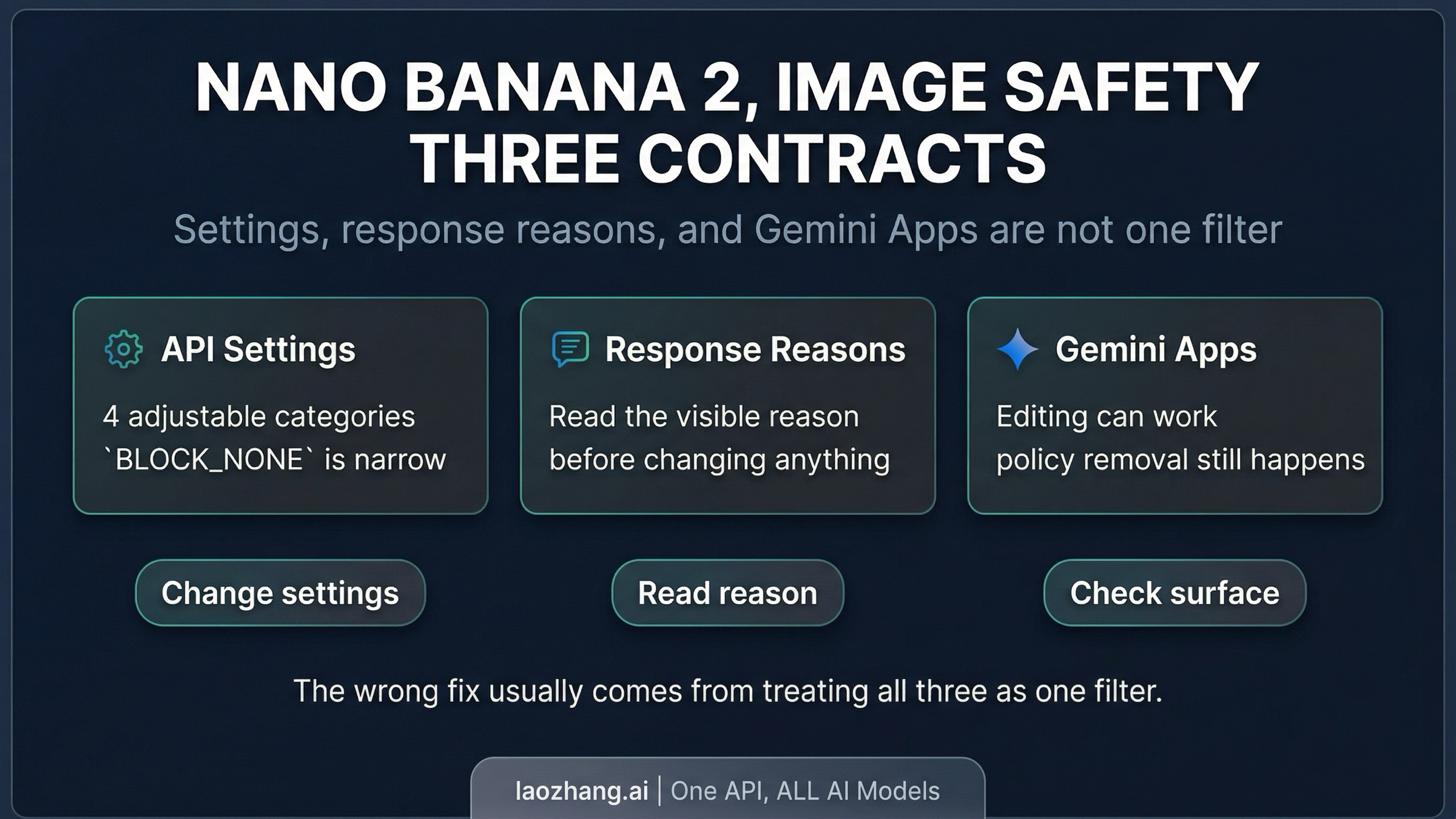
In Nano Banana 2, image safety does not name one switch. In the Gemini API, part of it is the adjustable prompt-side safety system. Part of it is the harder response layer that can surface reasons such as OTHER, PROHIBITED_CONTENT, and IMAGE_SAFETY. And in Gemini Apps there is another product-level removal layer on top. Most debugging goes wrong because those three decisions get treated as one filter.
If you only remember one rule, remember this: BLOCK_NONE is a narrow control, not a master switch. It can change four prompt-side categories in the Gemini API. It cannot rewrite Google's built-in core protections, and it does not explain why an image that looked fine in Gemini Apps later disappears or why an API response still routes into a harder block.
The fastest route is identifying which contract fired:
- If the outcome changes when you change
safetySettings, you are probably in the adjustable contract. - If the API exposes a visible reason such as
SAFETY,OTHER,PROHIBITED_CONTENT, orIMAGE_SAFETY, treat that reason as your routing signal. - If the same task behaves differently in Gemini Apps, treat the app shell as a separate enforcement surface rather than a perfect mirror of the API.
Evidence note: This article uses current Google Gemini API docs, the Gemini Apps help page, the Gemini 3.1 Flash Image model card, and live developer complaint threads checked on April 3, 2026. Direct Google capture was blocked in this environment, so live search observations were documented with fallback evidence instead of pretending a clean Google scrape succeeded.
What image safety actually means in Nano Banana 2
Nano Banana 2 is the Gemini API model gemini-3.1-flash-image-preview. Google positions it as the fast, higher-throughput image model in the Gemini family. That matters because many pages still borrow safety language from older Nano Banana or Nano Banana Pro coverage and then treat the new model as if it were just a stricter version of the same behavior. That is not a safe shortcut.
The cleaner mental model is that image safety in Nano Banana 2 can point to three different contracts.
The first contract is the adjustable prompt-side safety system in the Gemini API. Google documents four categories you can tune: harassment, hate speech, sexually explicit content, and dangerous content. This is the layer developers usually mean when they talk about safetySettings.
The second contract is the harder block and response layer in the API itself. The public schema documents reasons such as SAFETY, OTHER, PROHIBITED_CONTENT, and IMAGE_SAFETY. Those are not four names for the same thing. They are different route signals telling you whether you should inspect settings, rewrite the prompt, treat the request as unsupported, or stop trying to solve the problem with the wrong lever.
The third contract is the product shell in Gemini Apps. Google's help documentation currently shows image generation, uploaded-image editing, image combination, and personalized-image examples in Gemini Apps, but it also warns that images may be removed for policy reasons. So the app is not well described as "just the API with a nicer interface." It is a different surface with different user-facing behavior.
Once you separate those three contracts, the confusion around Nano Banana 2 gets smaller very quickly. You stop asking why the safety filter feels random and start asking the only question that actually matters: which layer just made the decision?
What safety settings can change, and what they cannot
The most common wrong assumption around Nano Banana 2 safety is that BLOCK_NONE acts like an off switch for the model. The current Gemini API safety documentation does not support that reading.
What the docs do support is narrower and more useful. In the Gemini API, adjustable safety settings cover four prompt-side categories:
HARASSMENTHATE_SPEECHSEXUALLY_EXPLICITDANGEROUS_CONTENT
That means BLOCK_NONE can be the right move when your request is being caught by one of those configurable thresholds. It is not meaningless. But it is not universal either.
Google also says core harms stay blocked outside those adjustable settings. So if you lower or disable the configurable thresholds and the problem does not move, that is a strong signal that you were never in the adjustable layer to begin with. At that point, continuing to tweak safetySettings is just a slower way to learn nothing.
This is why a lot of Nano Banana 2 debugging threads go in circles. One person says, "I already set everything to BLOCK_NONE." Another person replies, "Then Google must be hiding some secret extra filter." The more defensible conclusion is simpler: the request likely crossed from the configurable layer into a different contract that BLOCK_NONE was never supposed to control.
The practical consequence is straightforward. Use safetySettings only when the observed failure actually matches the adjustable prompt-side layer. If the response surface is telling you something else, believe the routing signal instead of treating every rejection as a settings problem.
How to read SAFETY, OTHER, PROHIBITED_CONTENT, and IMAGE_SAFETY
Nano Banana 2 becomes much easier to operate once you read the visible reason as a next-step instruction instead of as a vague rejection label.
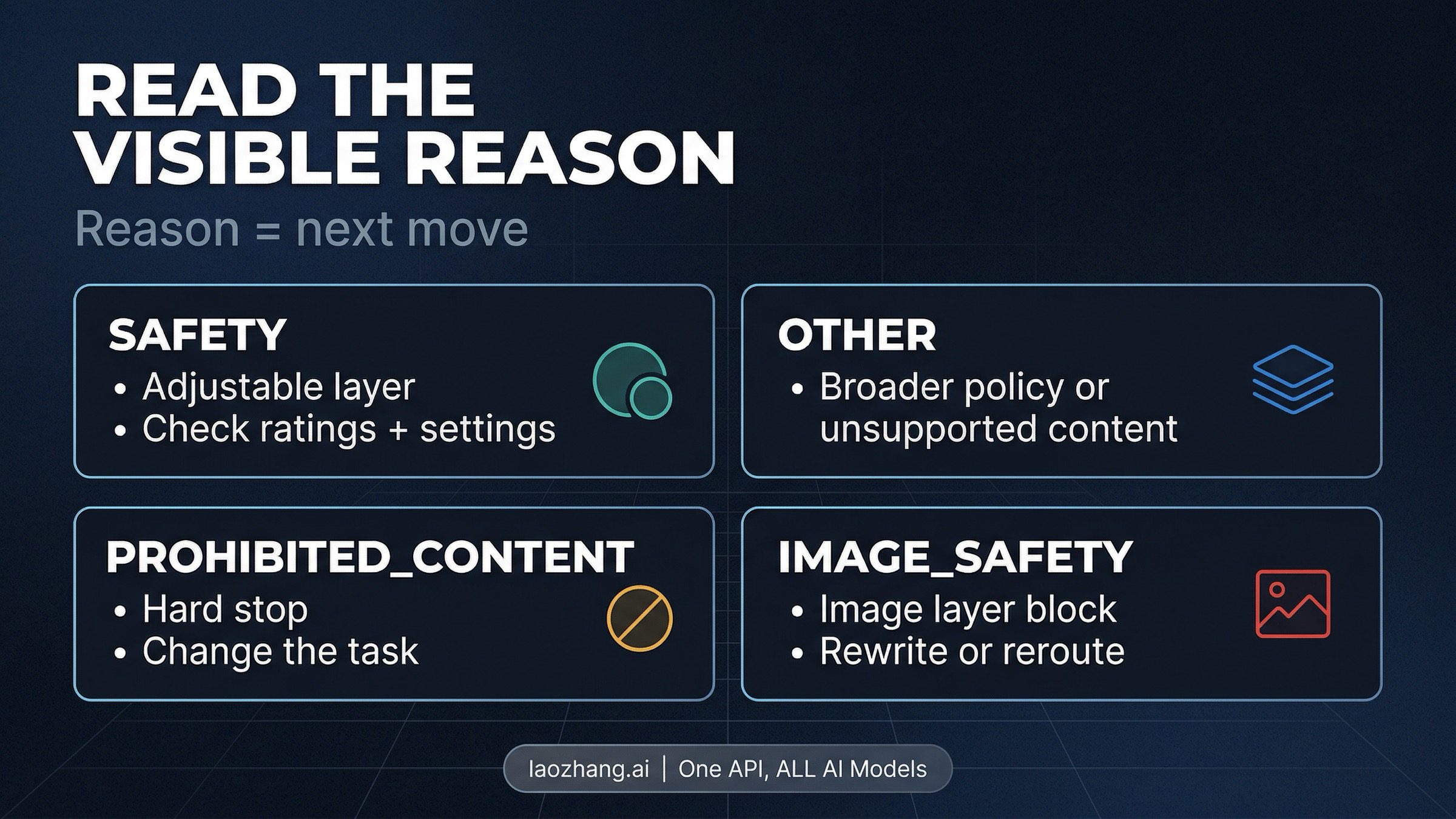
In current Gemini API docs, Google publicly documents block reasons such as SAFETY, OTHER, PROHIBITED_CONTENT, and IMAGE_SAFETY. In image-generation integrations you may see these or closely related response-layer reasons in the body. Treat the visible reason as a routing instruction.
| Visible reason | What it usually tells you | What to do next |
|---|---|---|
SAFETY | The request hit the configurable safety system. | Inspect safetyRatings, compare them against your current safetySettings, and decide whether the request really belongs in the four adjustable categories. |
OTHER | The request may have crossed a broader policy or unsupported-content line. Google's troubleshooting guide explicitly says BlockedReason.OTHER can indicate Terms of Service or otherwise unsupported content. | Stop treating it as a narrow threshold problem. Re-scope the request, simplify it, or accept that the task may not belong on this surface. |
PROHIBITED_CONTENT | You are in a harder policy zone, not a mild false-positive zone. | Do not keep retrying the same idea with tiny wording changes. Change the task materially or stop. |
IMAGE_SAFETY | The image-generation safety layer blocked the output. | Rewrite the prompt, change framing, change style, or move to a narrower troubleshooting path. Do not assume a settings toggle will fix it. |
The important part is the last column. These reason names are valuable because they route you toward different actions.
If you see SAFETY, the docs give you a legitimate settings path. If you see OTHER, Google is already telling you that the problem can live outside the adjustable categories. If you see PROHIBITED_CONTENT, the right move is usually to stop forcing the same request through marginal rewrites. And if you see IMAGE_SAFETY, you are generally looking at an image-generation block, not proof that the API settings were misconfigured.
There is still one limit you should keep in mind: Google does not publish a detailed public trigger taxonomy for every IMAGE_SAFETY or OTHER case. So you should not pretend those labels reveal a secret internal rulebook. They are route markers, not full explanations. Use them to choose the next move, not to invent more certainty than the documentation gives you.
Why benign prompts still fail
One reason Nano Banana 2 safety feels opaque is that legitimate use cases can still run into friction. Current complaint threads in Google's developer forum describe false positives on fashion, lifestyle, and other non-NSFW image requests. Google's model card for Gemini 3.1 Flash Image also says its evaluations continue to reduce both false positives and false negatives, which is another way of admitting the balance is still being tuned.
The right reading of that evidence is neither "the model is broken" nor "all complaints are user error." The stronger reading is that the public contract remains incomplete.
For example, a benign reference-image edit can still fail even when the user is not obviously asking for sexual, hateful, or violent content. A clothing description can be interpreted more aggressively than the user expects. A realistic portrait edit can feel routine in one surface and fail in another. None of that proves a hidden official list of forbidden prompt categories. It proves that operational friction exists beyond the neat public taxonomy.
That distinction matters. Once users start treating forum rumors as if they were official policy, the debugging process gets worse. They overfit to folklore, not evidence. They talk about "secret rules" with more confidence than the docs justify, then keep hammering away with tiny prompt edits that do not address the real issue.
A better workflow is to log the exact failure, simplify the request, and make one deliberate change at a time. Change the framing from identity- or body-centric language to task- or scene-centric language. Reduce ambiguity. If the request involves people, ask whether the job is truly photorealistic generation, an editorial-style illustration, or a safer reference transform. And if the request keeps failing after the obvious prompt cleanup, consider that the honest answer may be not supported here right now, not "I just haven't found the magic wording yet."
Gemini Apps vs Gemini API
A lot of bad safety advice comes from flattening Gemini Apps and Gemini API into the same behavior.
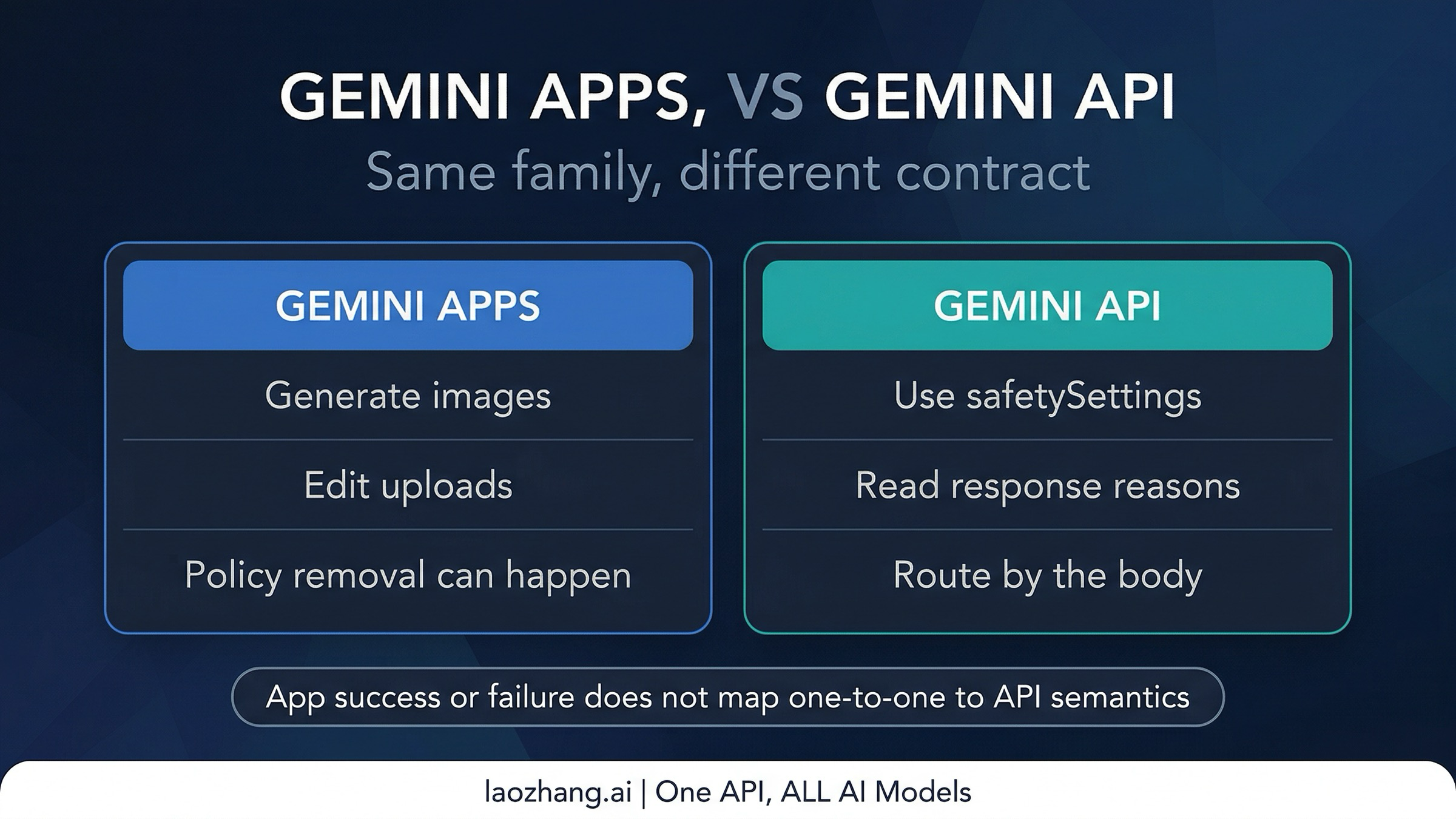
The official Gemini Apps help documentation does not support that simplification. Google currently describes Nano Banana 2 in Gemini Apps as a surface that can generate images, edit uploaded images, combine images, and handle personalized-image scenarios such as placing yourself into different scenes. That alone is enough to reject the blanket claim that Nano Banana 2 simply does not allow people images.
At the same time, the same help surface also warns that generated images may be removed when Google's systems detect a possible policy issue. That is the crucial caveat. App-level support for a capability does not mean every request will pass, and an app-level removal is not the same thing as a documented API response reason.
This is why cross-surface anecdotes are so misleading. Someone can say, "I got this to work in Gemini," and another person can say, "The API blocked the same concept," and both reports can be true without contradicting one another. The shell, the moderation path, the user-facing messaging, and the enforcement timing are not identical.
For operators, the consequence is practical. If your real task is consumer-style editing or personalized image manipulation, Gemini Apps may be the better reference surface for what is currently supported. If your real task is production API integration, you need to reason from documented API contracts, not from app screenshots and forum anecdotes. Those are related signals, but they are not interchangeable.
When to reroute instead of retry
The most useful habit in Nano Banana 2 safety work is knowing when another retry is a waste of time.
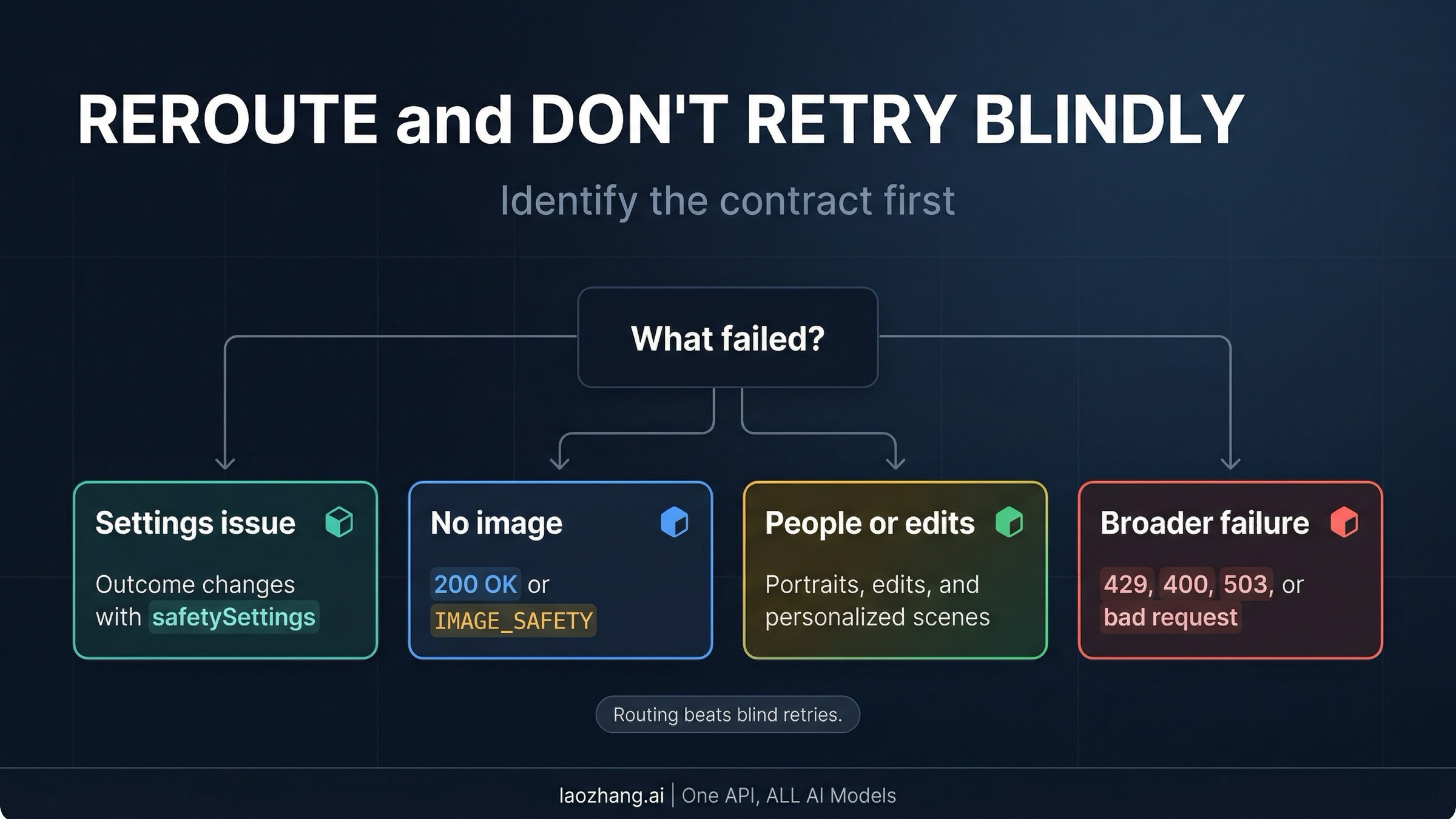
If you are getting a 200 OK with no usable image or a visible IMAGE_SAFETY outcome in the response path, go to the narrower guide on Nano Banana 2 returns 200 OK but no image. That is a specific operational failure mode with its own debugging logic.
If the failure mix includes quota exhaustion, malformed requests, or other broader reliability problems rather than a clearly safety-specific block, route yourself to the wider Nano Banana 2 not working guide. Safety analysis will not fix a 429, a bad parameter, or a temporary service problem.
If the real question is whether Nano Banana 2 can reliably handle people, portraits, or personalized edits, the better route is the narrower page on Gemini image generation people restrictions. That article focuses on the human-image part of the policy story instead of making this page carry the whole burden.
And if your job is less "decode Google's safety contracts" and more "ship image generation behind one stable app or API layer," the relevant move may be choosing a broader tooling surface such as Nano Banana AI image generator. That does not remove Google's underlying policy decisions inside the model, but it can reduce the operational mess around provider switching and fallback routing.
The larger point is that the right next step is often routing, not one more retry. Nano Banana 2 image safety becomes much more manageable once you stop treating every block as a prompt-writing puzzle and start treating it as a contract-identification problem.
FAQ
Does BLOCK_NONE disable all Nano Banana 2 safety filters?
No. Current Google Gemini API docs support a narrower reading: BLOCK_NONE changes the configurable thresholds for four prompt-side categories. It does not remove Google's built-in core protections, and it does not collapse app-level policy handling into the same rule set.
Does image safety mean Nano Banana 2 cannot handle people images at all?
No. The current Gemini Apps help page explicitly describes personalized-image and image-editing uses that involve people. The safer statement is that human-image requests sit in a more sensitive zone, and behavior can differ across Gemini Apps and Gemini API.
Is every blocked IMAGE_SAFETY response billed?
Treat processed image-generation blocks as potentially billable unless the official surface says otherwise. Google publishes the current token-based pricing for Nano Banana 2, but during this research pass it did not provide a clean public statement covering every possible IMAGE_SAFETY case in one sentence. That is why this article avoids making a universal billing claim stronger than the official docs support.
What is the simplest way to debug Nano Banana 2 image safety?
Identify the contract first. Ask whether you are dealing with adjustable API safety settings, a harder API response reason, or Gemini Apps policy behavior. If you cannot name the layer, the rest of the debugging process is mostly guesswork.
Nano Banana 2 does not have one image-safety filter. It has several enforcement contracts that share one misleading phrase. Once you separate them, most wasted retries disappear.