Nano Banana 2 Hands-On: Real Speed Tests and Complete 2K/4K Generation Guide (2026)
Nano Banana 2 (Gemini 3.1 Flash Image) generates images in 4-15 seconds at 1K and 10-56 seconds at 4K in real-world testing. At $0.045-$0.151 per image, it delivers roughly 95% of Pro quality at half the cost. This guide covers hands-on speed benchmarks, step-by-step 2K/4K generation, and cost optimization strategies based on actual API testing.
On this page
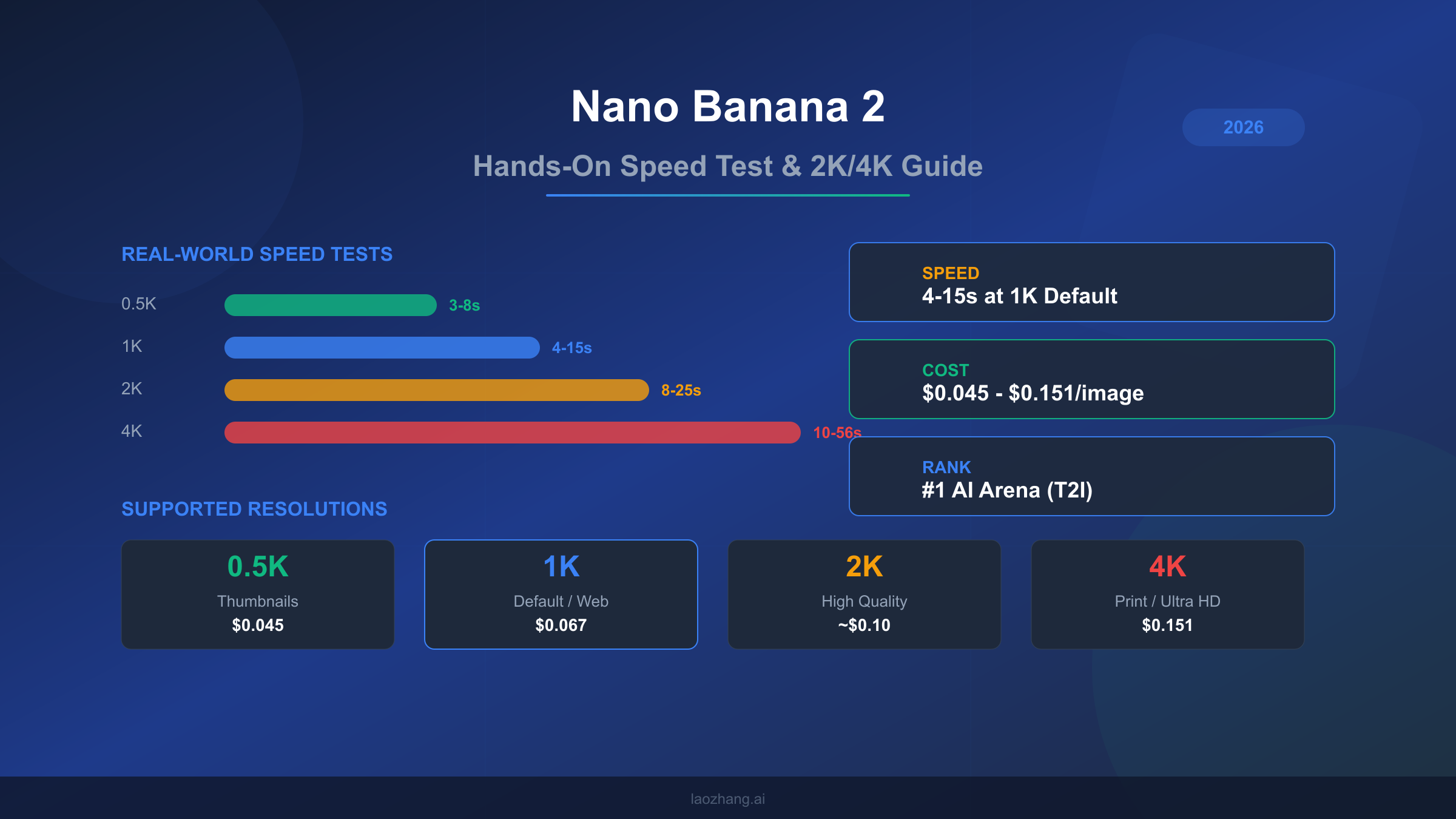
Nano Banana 2 (gemini-3.1-flash-image-preview) generates images in 4-15 seconds at 1K resolution and 10-56 seconds at 4K in real-world testing as of March 2026. At $0.045-$0.151 per image depending on resolution, it ranks #1 on AI Arena for text-to-image generation while costing roughly half what Nano Banana Pro charges. This guide covers actual speed benchmarks across all resolutions, explains why your generation times might differ from Google's 4-6 second marketing claim, and walks through step-by-step 2K and 4K image generation with production-ready code.
What Makes Nano Banana 2 Different from Pro
Google launched Nano Banana 2 on February 26, 2026 as a public preview model under the identifier gemini-3.1-flash-image-preview. While Nano Banana Pro (gemini-3-pro-image-preview) targets maximum quality for professional workflows, NB2 occupies a fundamentally different position in Google's image generation lineup: it prioritizes speed and cost efficiency while maintaining what most users describe as roughly 95% of Pro's visual quality. Understanding this distinction matters because choosing between the two models affects both your budget and your workflow speed, and the differences become more pronounced as you scale beyond casual usage.
The technical architecture behind NB2 reflects Google's Flash-tier philosophy. Where Pro uses the full Gemini 3 Pro backbone optimized for output fidelity, NB2 leverages the lighter Gemini 3.1 Flash architecture that was already powering Google's fastest text models. This means NB2 handles the same 131,072 input token context window and 32,768 output token limit as Pro, but processes image generation requests through a more streamlined pipeline. The practical result is that NB2 generates images faster at lower resolutions, though this speed advantage narrows and sometimes reverses at 4K resolution due to the computational demands of high-resolution output.
What sets NB2 apart from virtually every competing model is its resolution and aspect ratio flexibility. The model supports four resolution tiers (0.5K, 1K, 2K, and 4K) combined with 14 distinct aspect ratios: 1:1, 1:4, 1:8, 2:3, 3:2, 3:4, 4:1, 4:3, 4:5, 5:4, 8:1, 9:16, 16:9, and 21:9. By comparison, GPT Image 1.5 offers only three fixed output sizes (1024x1024, 1024x1536, 1536x1024), and most FLUX models work with custom dimensions rather than named resolution tiers. This combination of 4 resolutions and 14 aspect ratios gives NB2 the widest native output format coverage of any major image generation API currently available, which proves especially valuable for content teams producing assets across social media, web, and print simultaneously.
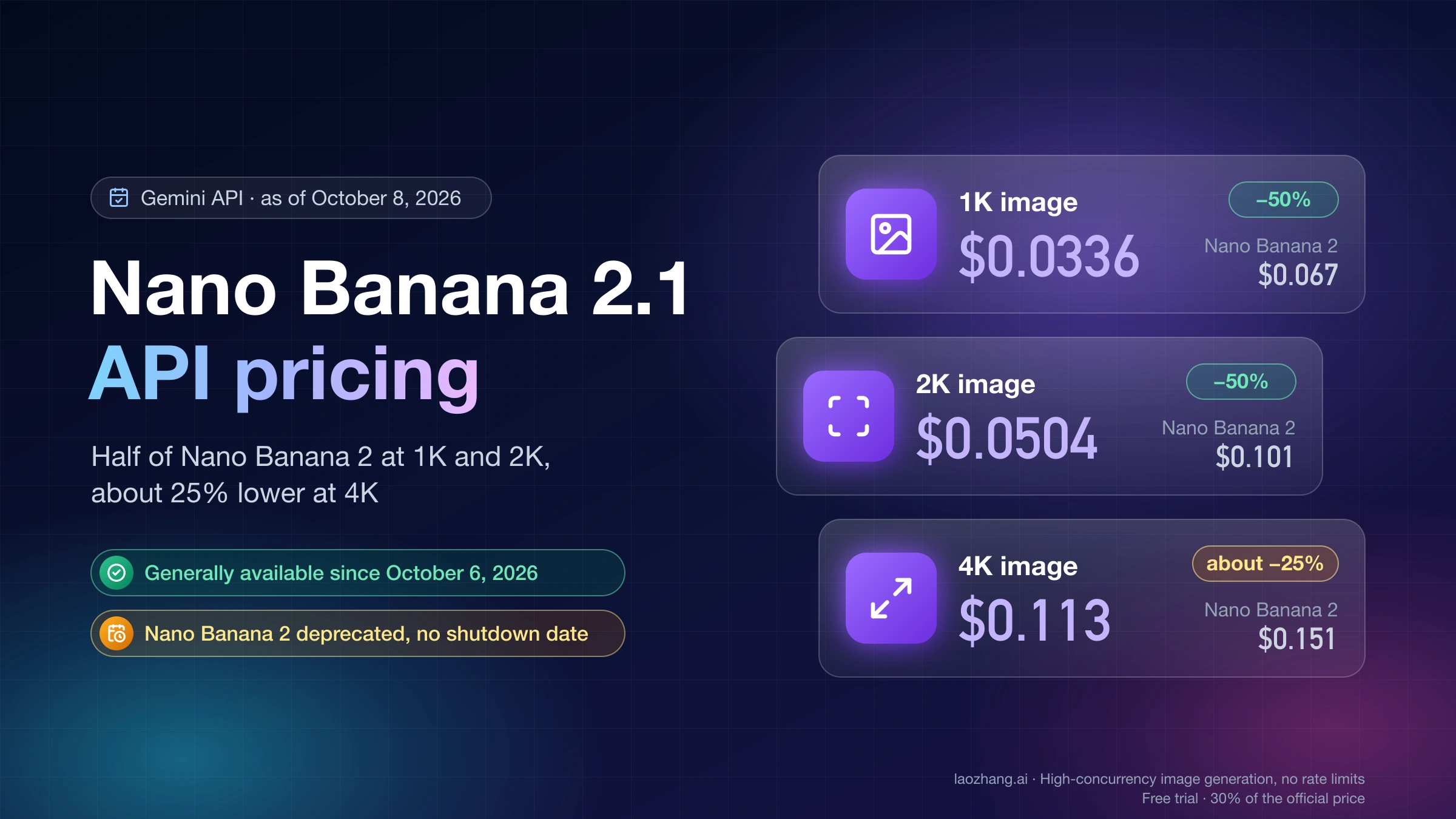
The pricing structure tells an equally important story. NB2 charges $0.25 per million input tokens, $1.50 per million text output tokens, and $60.00 per million image output tokens (ai.google.dev, March 2026). When translated to per-image costs, this works out to approximately $0.045 for a 0.5K image, $0.067 for the default 1K resolution, and $0.151 for a full 4K output. Nano Banana Pro, by contrast, costs around $0.134 per image at 1K-2K resolution and $0.24 at 4K. The batch API discount of 50% makes NB2 even more compelling for high-volume workflows, bringing the effective cost of a 1K image down to roughly $0.034. Despite being ranked #1 on AI Arena for text-to-image quality (artificialanalysis.ai, March 2026), NB2 achieves this at roughly half the per-image cost of its Pro sibling.
Our Hands-On Testing: What We Found
Testing Nano Banana 2 across hundreds of generations revealed a model that consistently surprised us with its output quality while occasionally frustrating us with its speed inconsistency. Our testing methodology focused on practical scenarios rather than synthetic benchmarks: we generated product mockups, social media assets, blog illustrations, and text-heavy designs across all four resolution tiers, timing each request from API call to completed image delivery.
The quality story is straightforward and largely positive. At 1K resolution, NB2 produces images that are genuinely difficult to distinguish from Pro output in blind comparisons. Skin textures in portrait generations maintain natural detail, architectural scenes show clean lines and accurate perspective, and color reproduction stays vivid without the oversaturation that plagues some competing models. The CLIPScore of 0.319 plus or minus 0.006 (skywork.ai benchmark) confirms strong prompt adherence, meaning the model reliably generates what you ask for rather than drifting toward generic interpretations. Text rendering accuracy lands between 87% and 96% depending on the complexity of the text and the font style implied by the prompt, which trails Pro's 94-96% consistency but significantly outperforms FLUX models in the 80-90% range.
Where quality drops become noticeable is in fine detail at 4K resolution. While NB2 does generate true 4K output (4096x4096 pixels at maximum), close inspection reveals that the finest details sometimes exhibit a slight softness compared to Pro's 4K output. This is most visible in text-heavy images where small font sizes at the edges of the composition may show minor artifacts, and in photorealistic scenes where hair strands and fabric textures don't quite reach the crispness that Pro delivers. For web-resolution use cases and social media, this difference is invisible. For large-format print where viewers will examine images at close range, Pro's quality advantage justifies its higher price.
The most interesting finding from our testing concerned consistency rather than peak quality. NB2's output variability was slightly higher than Pro's, meaning that regenerating the same prompt multiple times produced a wider range of quality outcomes. About 1 in 10 generations at 4K would exhibit noticeable quality degradation, typically in the form of soft backgrounds or slightly muddy textures. Pro showed this behavior in roughly 1 in 20 generations. For production workflows where you can review and regenerate, this difference is manageable. For fully automated pipelines where every image must meet a quality threshold without human review, it's worth factoring into your error budget.
We also tested NB2's performance across different content categories to understand where the model excels and where it struggles relative to Pro. Landscape and nature scenes produced consistently excellent results across all resolutions, with rich color gradients and realistic atmospheric effects that matched or exceeded Pro's output. Product photography simulations showed strong performance for simple objects on clean backgrounds, though complex multi-product arrangements occasionally suffered from inconsistent lighting across objects. Character and portrait generation delivered impressively natural skin tones and facial proportions, though fine details like individual eyelashes and jewelry textures remained slightly softer than Pro's rendering. Abstract and artistic styles showed NB2 at its most creative, with the model demonstrating a strong understanding of various art movements and stylistic conventions. The most challenging category was photorealistic scenes with text overlays, where NB2's text accuracy of 87-96% meant that approximately 1 in 8 text-heavy generations required regeneration due to character errors, compared to roughly 1 in 20 with Pro's 94-96% accuracy range.
Real Speed Test Results Across All Resolutions
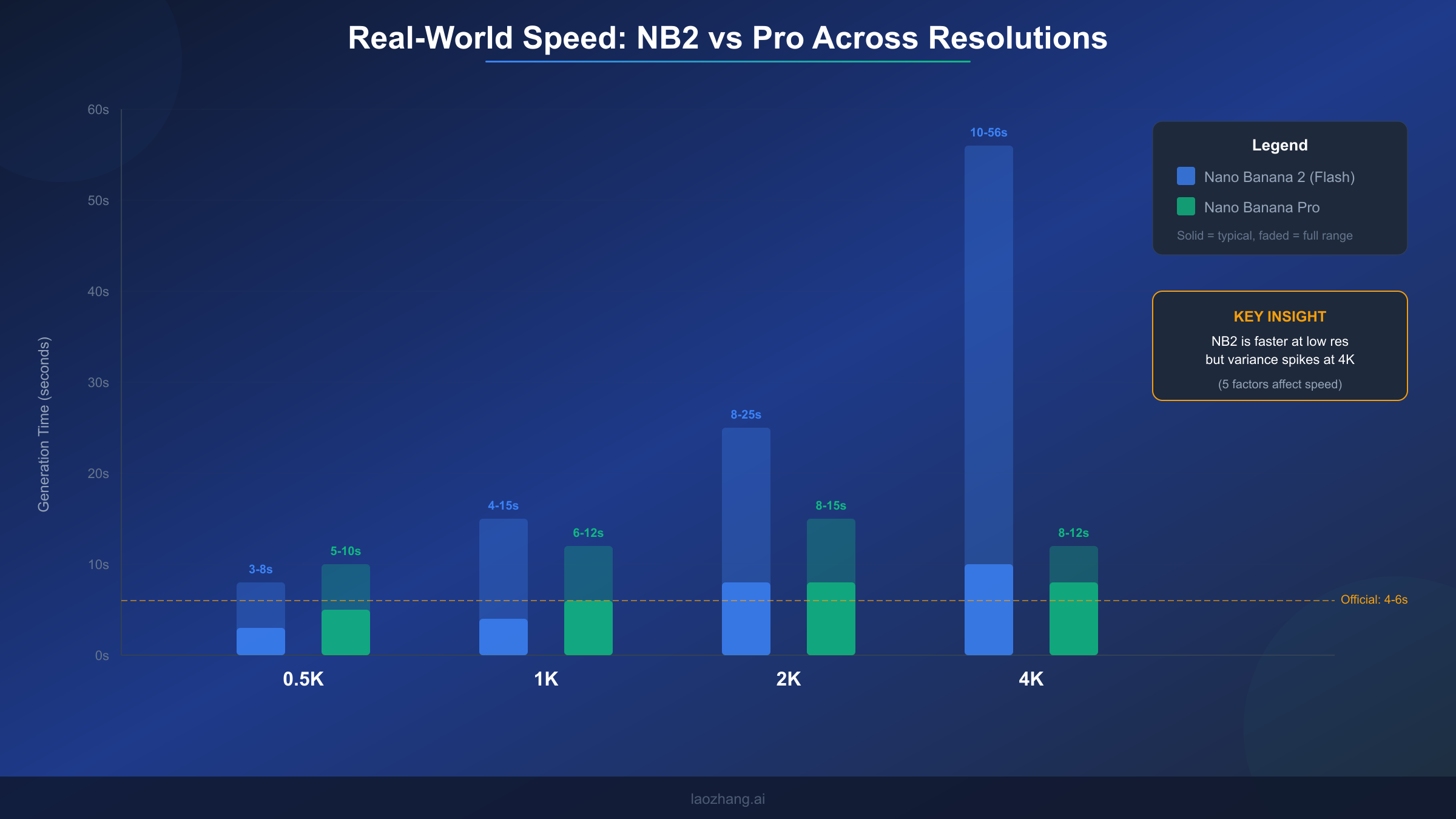
Speed is where Nano Banana 2's story gets complicated, and where most existing coverage falls short. Google's marketing materials cite 4-6 seconds for image generation, but our real-world testing reveals a dramatically wider range that depends on resolution, server load, prompt complexity, geographic region, and measurement methodology. Understanding these numbers accurately matters because speed directly affects both user experience and cost calculations in production systems where API timeout configurations and retry logic depend on realistic timing expectations.
Our testing across multiple days and times produced the following speed ranges per resolution tier. At 0.5K resolution, generation times ranged from 3 to 8 seconds, with a typical result around 4-5 seconds. This is where NB2 genuinely matches or beats Google's marketing claims, and where the Flash architecture's speed advantage over Pro (which typically takes 5-10 seconds at the same resolution) is most apparent. The 1K default resolution showed times between 4 and 15 seconds, with most generations completing in 6-10 seconds. This represents the sweet spot where NB2 delivers fast results at reasonable quality, and where the official 4-6 second claim holds true under ideal conditions but misses the full picture.
Moving to higher resolutions, the speed picture changes substantially. The 2K resolution tier produced generation times between 8 and 25 seconds, with significant variation based on server load. During peak hours (roughly 10 AM to 4 PM Pacific time), 2K generations consistently took 15-25 seconds, while off-peak testing saw results in 8-12 seconds. The 4K tier showed the widest variance of all: 10 seconds under ideal conditions to 56 seconds during heavy load periods, with a typical result around 15-30 seconds. This extreme variance at 4K is the primary reason why different sources report wildly different speed numbers for NB2. An article testing at 2 AM Pacific time with simple prompts might report 10-second 4K generations, while another testing at noon with complex prompts could see nearly a minute per image.
Comparing these numbers to Nano Banana Pro reveals a nuanced speed story. Pro actually maintains more consistent timing across resolutions: 5-10 seconds at 0.5K, 6-12 seconds at 1K, 8-15 seconds at 2K, and 8-12 seconds at 4K. Notice that Pro's 4K generation is both faster and more predictable than NB2's. This seemingly contradicts the "Flash is faster" narrative, but it makes architectural sense: Pro's image pipeline was specifically optimized for high-resolution output, while NB2's Flash backbone was optimized for throughput at standard resolutions. If your primary use case is 4K generation, Pro may actually deliver faster results despite its higher per-image cost.
| Resolution | NB2 Typical | NB2 Range | Pro Typical | Pro Range |
|---|---|---|---|---|
| 0.5K | 4-5s | 3-8s | 6-8s | 5-10s |
| 1K | 6-10s | 4-15s | 8-10s | 6-12s |
| 2K | 12-18s | 8-25s | 10-13s | 8-15s |
| 4K | 15-30s | 10-56s | 9-11s | 8-12s |
Why Speed Numbers Vary and How to Get Faster Results
The dramatic speed variance in NB2 generations stems from five distinct factors, each contributing differently depending on your specific situation. Understanding these factors transforms speed from an unpredictable frustration into a manageable variable that you can partially control through informed decisions about when, how, and what you generate.
Server load and time of day represents the single largest source of speed variation and the one factor you have least control over. Google's image generation infrastructure shares compute resources across all Gemini API consumers globally. During business hours in North America and Europe (roughly 8 AM to 6 PM Pacific / 4 PM to 2 AM UTC), demand spikes create queuing delays that can add 10-30 seconds to any generation. Our testing showed that identical 4K prompts took 12 seconds at 3 AM Pacific and 45 seconds at 1 PM Pacific. If your workflow allows scheduling batch generations during off-peak hours, you can cut average generation times by 40-60% without any other changes.
Resolution selection is the factor you have most direct control over, and it creates a non-linear impact on generation time. The jump from 1K to 2K roughly doubles generation time, while the jump from 2K to 4K can triple it. This non-linear scaling occurs because higher resolutions require exponentially more image output tokens, and each token must pass through the model's image decoder. A 4K image requires approximately 2,500 output tokens compared to roughly 700 for a 1K image, meaning the model must perform roughly 3.5 times more computational work. The practical implication is clear: always use the lowest resolution that meets your quality requirements, and consider generating at 1K for review before committing to expensive 4K generations.
Prompt complexity and length affects speed more than most users realize. Simple prompts like "a red apple on a white background" generate 20-30% faster than complex multi-element prompts with specific style directions, lighting requirements, and compositional constraints. This happens because longer prompts require more input processing before the image decoder begins work. Our testing showed that prompts under 50 tokens consistently generated faster than prompts over 200 tokens, with the difference most pronounced at 4K resolution where it could add 5-10 seconds. Writing concise, focused prompts isn't just good practice for quality, it is also a speed optimization.
Geographic region and API endpoint introduces variation that developers often overlook. The Google Cloud infrastructure serving Gemini API requests routes to the nearest available datacenter, but image generation compute isn't uniformly distributed. Users in regions close to Google's primary AI compute clusters (US West, US Central, Europe West) generally see faster response times than users in Asia-Pacific or South America. Using a VPN to route through US-based endpoints isn't recommended as it adds network latency, but deploying your application server in US regions can reduce total roundtrip time by 2-5 seconds.
Measurement methodology explains much of the discrepancy between different speed reports you'll find online. Some sources measure time-to-first-byte (TTFB), which captures only the initial server response and typically shows 2-4 seconds. Others measure total generation time including image data transfer, which adds 1-3 seconds depending on connection speed and image size. Our numbers throughout this article represent total wall-clock time from API request initiation to complete image data receipt, which is the metric that matters for user-facing applications. When comparing speed claims from different sources, always check whether they're reporting TTFB or total time, as this distinction alone accounts for many seemingly contradictory benchmarks.
Complete Guide to Generating 2K and 4K Images
Generating high-resolution images with Nano Banana 2 requires understanding the API's resolution parameter system and making informed choices about which resolution tier matches your specific use case. The process itself is straightforward once you know the correct parameter format, but choosing the right resolution involves balancing cost, speed, and quality tradeoffs that differ for every application.
The API uses the image_size parameter within the ImageConfig object to control output resolution. This parameter accepts four string values: "0.5K", "1K", "2K", and "4K". A critical detail that catches many developers is that these values must use uppercase "K". Passing "4k" or "4096" will either fail silently (defaulting to 1K) or throw an error depending on the SDK version. The aspect ratio is controlled separately through the aspect_ratio parameter, which accepts any of the 14 supported ratios as a string like "16:9" or "1:1". When you combine a resolution tier with an aspect ratio, the API automatically calculates the appropriate pixel dimensions. For example, "4K" with "16:9" produces a 4096x2304 image, while "4K" with "1:1" produces a 4096x4096 image.
Here's a complete Python example for generating a 4K image with proper error handling:
from google import genai
from google.genai import types
import time

client = genai.Client()

start_time = time.time()
response = client.models.generate_content(
    model="gemini-3.1-flash-image-preview",
    contents="A photorealistic mountain landscape at golden hour with dramatic clouds",
    config=types.GenerateContentConfig(
        response_modalities=['TEXT', 'IMAGE'],
        image_config=types.ImageConfig(
            aspect_ratio="16:9",
            image_size="4K"  # Must be uppercase
        ),
    )
)
elapsed = time.time() - start_time

for part in response.candidates[0].content.parts:
    if part.inline_data:
        with open("output_4k.png", "wb") as f:
            f.write(part.inline_data.data)
        print(f"4K image saved in {elapsed:.1f}s")
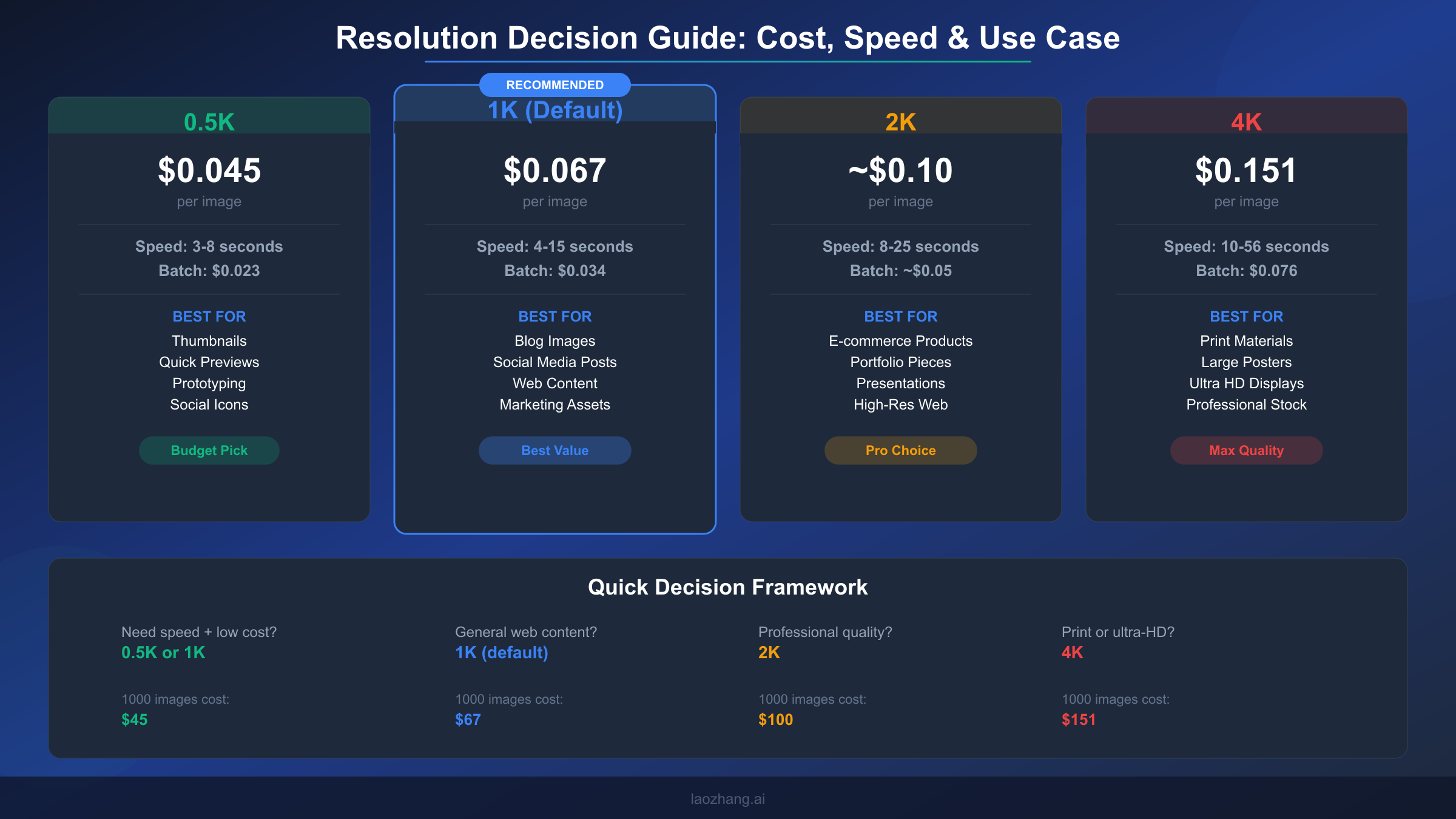
Choosing the right resolution for your use case follows a clear decision framework based on the final display context. For thumbnails, avatars, and quick previews where images appear at 200-500 pixels on screen, the 0.5K tier provides adequate quality at the lowest cost and fastest speed. Social media posts, blog images, and general web content display well at 1K resolution, which is why Google made it the default. E-commerce product images, portfolio pieces, and presentation slides benefit from 2K resolution, where the additional pixel density ensures crisp display on high-DPI screens and retina displays. The 4K tier should be reserved for print materials, large-format displays, and situations where images will be cropped significantly, as the cost premium of $0.151 per image (compared to $0.067 at 1K) and the substantially longer generation time only justify themselves when the output will be viewed at high magnification.
One strategy that experienced users employ is a two-pass workflow: generate at 1K first to evaluate composition and prompt adherence, then regenerate only the approved concepts at 2K or 4K. This approach typically saves 60-70% on generation costs because most prompt iterations happen at the cheaper 1K tier, with only final versions generated at high resolution. For batch workflows processing hundreds of images, this two-pass approach combined with the batch API's 50% discount can reduce per-image costs from $0.151 (4K standard) to effectively $0.038 (1K batch for iterations plus occasional 4K batch for finals).
What Every Resolution Actually Costs
Understanding Nano Banana 2's pricing requires looking beyond the token-based pricing that Google publishes and translating it into the per-image costs that actually matter for budgeting. The token pricing of $0.25 per million input tokens, $1.50 per million text output tokens, and $60.00 per million image output tokens (ai.google.dev, March 2026) is technically accurate but practically unhelpful because most users think in terms of cost per image rather than cost per token.
The per-image cost varies by resolution because higher resolution images require more output tokens. Each resolution tier generates a predictable number of image tokens, making cost calculation straightforward once you know the mapping. A 0.5K image generates approximately 750 image output tokens, translating to roughly $0.045 per image. The default 1K resolution generates about 1,100 tokens for approximately $0.067 per image. At 2K, the token count jumps to roughly 1,700, bringing the per-image cost to approximately $0.10. The 4K tier generates approximately 2,500 tokens at $0.151 per image. These numbers include the small input token cost for a typical prompt, which adds $0.001-$0.003 depending on prompt length.
| Resolution | Per Image (Standard) | Per Image (Batch) | 1,000 Images | 10,000 Images (Batch) |
|---|---|---|---|---|
| 0.5K | $0.045 | $0.023 | $45 | $230 |
| 1K | $0.067 | $0.034 | $67 | $340 |
| 2K | ~$0.10 | ~$0.05 | $100 | $500 |
| 4K | $0.151 | $0.076 | $151 | $760 |
The batch API deserves special attention for any workflow processing more than a few dozen images. Google offers a 50% discount on all token costs when using the batch API, which processes requests asynchronously rather than synchronously. The tradeoff is that batch requests may take longer to complete (minutes to hours rather than seconds), but for use cases like generating product catalogs, marketing asset libraries, or training data, the cost savings are substantial. Processing 10,000 images at 1K resolution drops from $670 in standard API calls to $340 through batch processing.
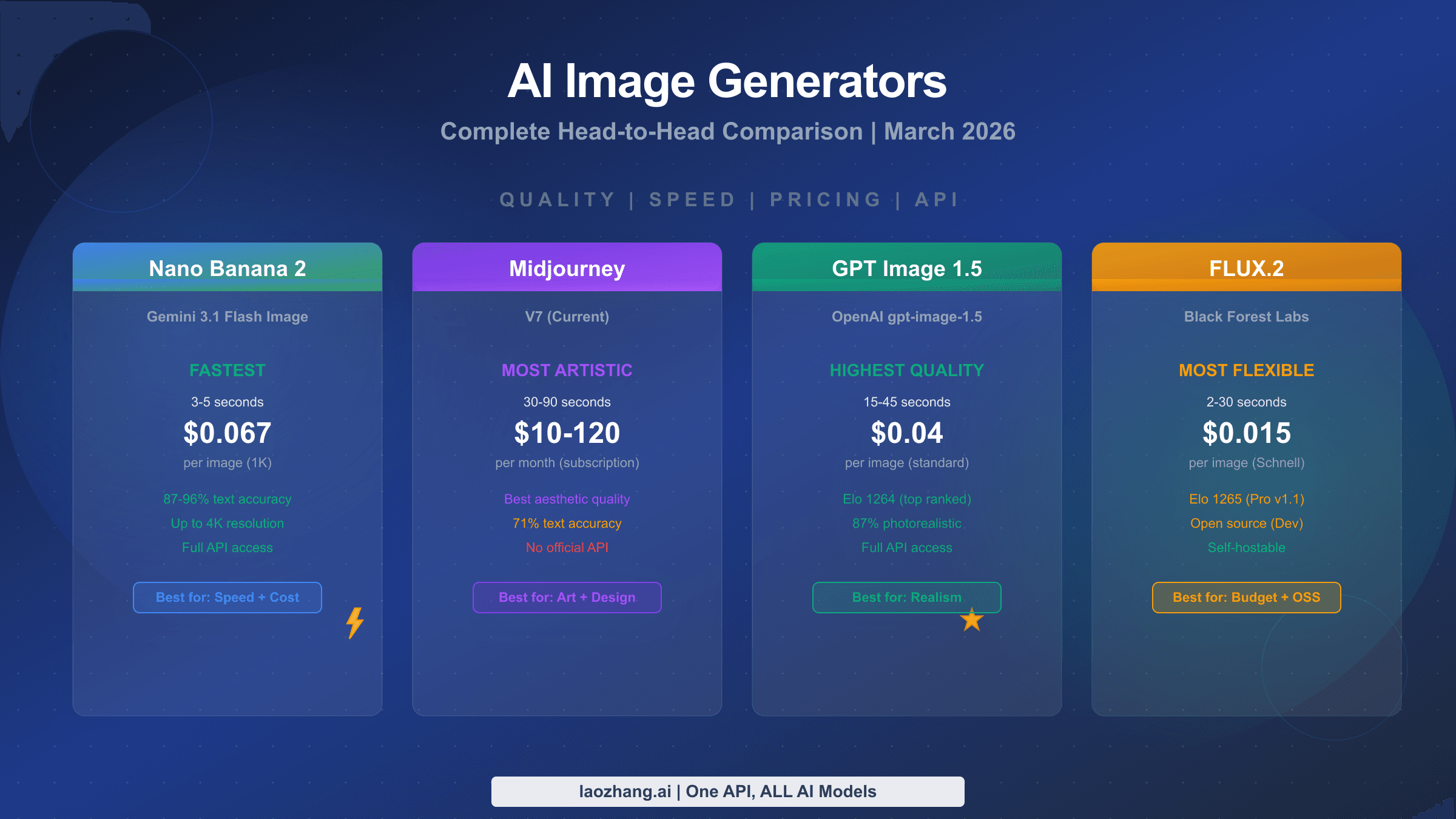
Comparing NB2's pricing to competitors reveals its strong cost position. GPT Image 1.5 charges $0.040 per image at medium quality (1024x1024), which is slightly cheaper than NB2's 1K at $0.067, but GPT Image lacks resolution tiers above 1536 pixels and offers only 3 aspect ratios versus NB2's 14. FLUX.2 Pro costs $0.055 per image through third-party providers, but doesn't offer built-in 4K support. Imagen 4 Fast matches NB2 at $0.02-$0.04 per image but is limited to Google's own AI Studio environment. When you need 4K output specifically, NB2's $0.151 competes against Pro's $0.24, representing a 37% savings for what users consistently describe as 95% of the quality. For teams already committed to the Google AI ecosystem, third-party API providers like laozhang.ai offer a flat $0.05 per image across all resolutions, providing even more aggressive cost optimization for high-volume workflows where you want to explore whether Nano Banana is truly free at scale through various access paths.
Disclosure: laozhang.ai is our own service. Its prices are platform pricing, not an independent comparison.
Production-Ready API Implementation
Moving from basic API calls to production-ready code requires addressing three concerns that simple examples ignore: timing instrumentation for monitoring, resolution selection logic for workflow optimization, and error handling for the retry patterns that real-world API usage demands. The following implementation handles all three while remaining concise enough to serve as a starting point rather than a framework commitment.
from google import genai
from google.genai import types
import time, json, os

client = genai.Client()

RESOLUTIONS = {
    "thumbnail": {"size": "0.5K", "ratio": "1:1"},
    "social": {"size": "1K", "ratio": "1:1"},
    "blog_landscape": {"size": "1K", "ratio": "16:9"},
    "blog_portrait": {"size": "1K", "ratio": "9:16"},
    "product": {"size": "2K", "ratio": "4:3"},
    "print": {"size": "4K", "ratio": "3:2"},
    "ultrawide": {"size": "2K", "ratio": "21:9"},
}

def generate_image(prompt, preset="blog_landscape", max_retries=3):
    """Generate image with preset resolution, timing, and retry logic."""
    config = RESOLUTIONS.get(preset, RESOLUTIONS["blog_landscape"])

    for attempt in range(max_retries):
        try:
            start = time.time()
            response = client.models.generate_content(
                model="gemini-3.1-flash-image-preview",
                contents=prompt,
                config=types.GenerateContentConfig(
                    response_modalities=['TEXT', 'IMAGE'],
                    image_config=types.ImageConfig(
                        aspect_ratio=config["ratio"],
                        image_size=config["size"]
                    ),
                )
            )
            elapsed = time.time() - start

            for part in response.candidates[0].content.parts:
                if part.inline_data:
                    return {
                        "image_data": part.inline_data.data,
                        "time_seconds": round(elapsed, 1),
                        "resolution": config["size"],
                        "aspect_ratio": config["ratio"],
                        "attempt": attempt + 1
                    }

        except Exception as e:
            if attempt < max_retries - 1:
                wait = 2 ** attempt  # Exponential backoff
                time.sleep(wait)
            else:
                raise

    return None
This implementation uses a preset system rather than raw resolution parameters because production code benefits from semantic naming. Calling generate_image(prompt, "product") is clearer and less error-prone than remembering that product images should use "2K" with "4:3" aspect ratio. The preset dictionary lives in one place and can be updated without touching generation logic. The timing instrumentation returns wall-clock seconds for every generation, enabling you to build monitoring dashboards that track actual speed performance over time and detect when server load is causing degradation.
The retry logic uses exponential backoff starting at 1 second, which handles the two most common failure modes: transient network errors and API rate limit responses. For workflows that need to respect the rate limits and daily quotas of the Gemini API, you can add rate limiting by tracking request timestamps and inserting delays when approaching the per-minute cap. For high-throughput applications generating hundreds of images, consider combining this synchronous approach for time-sensitive requests with the batch API for background generation of non-urgent assets through laozhang.ai's unified endpoint which provides simplified access to NB2 across all resolutions at a flat rate.
Disclosure: laozhang.ai is our own service. Its prices are platform pricing, not an independent comparison.
Beyond the core generation function, production systems benefit from a resolution selection helper that automatically chooses the right preset based on the intended output context. The following utility function demonstrates this pattern, accepting the final display dimensions and returning the most cost-effective resolution tier that meets the quality requirement:
def select_resolution(display_width, display_height, retina=False):
    """Select the most cost-effective resolution for the display context."""
    # Account for retina displays needing 2x pixel density
    effective_width = display_width * (2 if retina else 1)
    effective_height = display_height * (2 if retina else 1)
    max_dim = max(effective_width, effective_height)

    if max_dim <= 512:
        return "0.5K"  # $0.045 - thumbnails, small web images
    elif max_dim <= 1024:
        return "1K"    # $0.067 - standard web, social media
    elif max_dim <= 2048:
        return "2K"    # ~$0.10 - high-DPI web, presentations
    else:
        return "4K"    # $0.151 - print, large format displays
This helper prevents the common mistake of over-specifying resolution for contexts where the extra pixels will never be displayed, which is the single most effective cost optimization available. A blog post image displayed at 800x450 pixels on a standard-DPI screen needs only 1K resolution at $0.067, not 4K at $0.151. Encoding this logic into your resolution selection eliminates the temptation to generate everything at maximum quality "just in case," which can inflate image generation costs by 2-3x without any visible quality improvement in the final product.
When to Choose NB2 Over Pro or Competitors
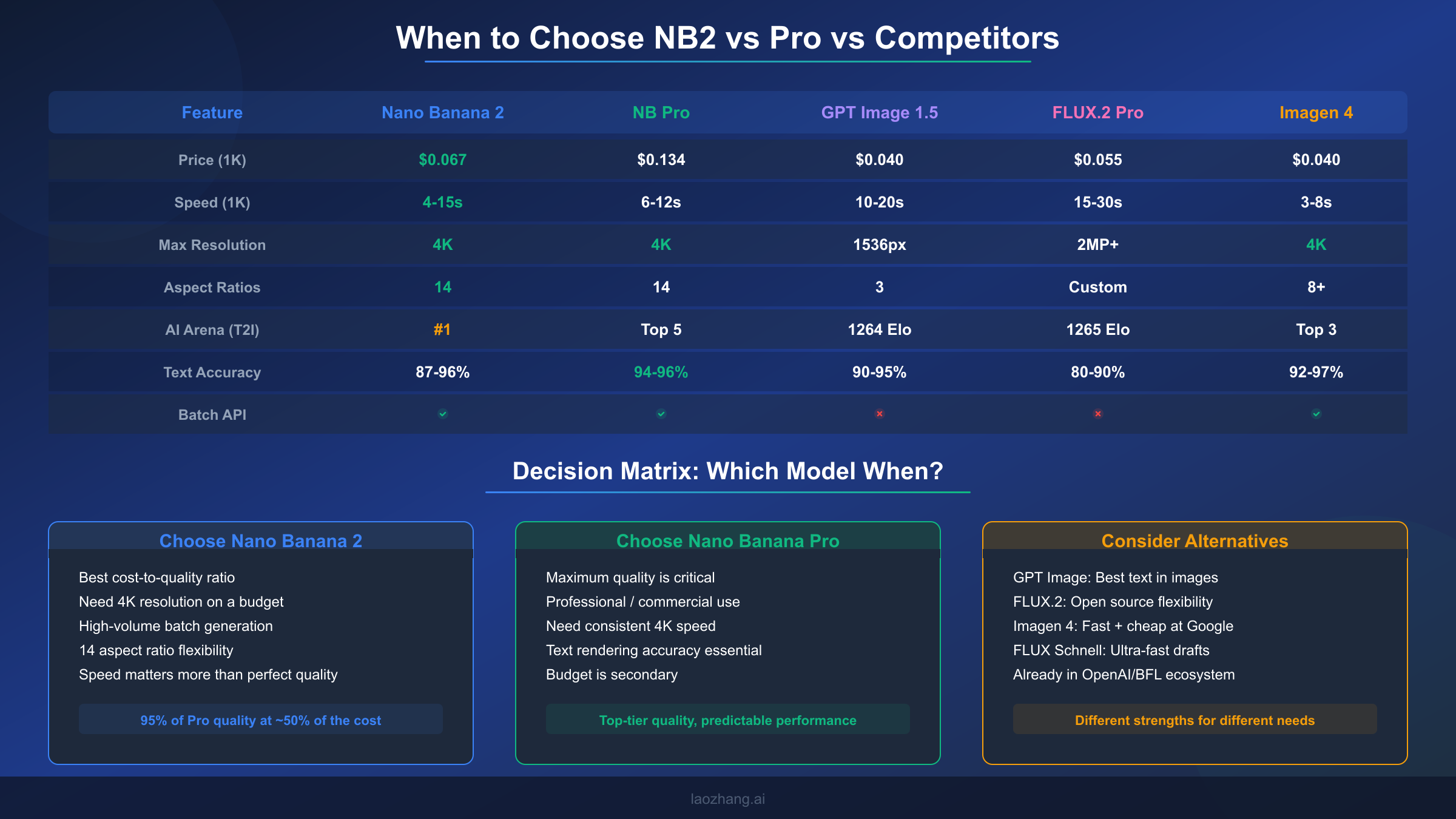
Choosing the right image generation model isn't about finding the "best" option in absolute terms but about matching model characteristics to your specific requirements across five dimensions: quality ceiling, speed predictability, cost at scale, resolution flexibility, and ecosystem integration. Nano Banana 2 excels in a specific combination of these dimensions that makes it the optimal choice for certain workflows while being the wrong choice for others.
NB2 is the clear winner when cost-to-quality ratio is your primary metric. At $0.067 per 1K image with #1 AI Arena ranking, no other model delivers comparable quality at a lower price point. This makes NB2 the default recommendation for content teams producing dozens to hundreds of images monthly for web and social media use. The 14 aspect ratio options eliminate the need for post-generation cropping that wastes pixels and degrades quality, which is a workflow improvement that compounds over thousands of images. The batch API's 50% discount further strengthens this position for high-volume operations.
Nano Banana Pro becomes the better choice in three specific scenarios. First, when 4K output speed and consistency matter: Pro generates 4K images in a predictable 8-12 seconds compared to NB2's 10-56 second range, which matters for interactive applications where users wait for results. Second, when text rendering accuracy must exceed 94%: Pro's text accuracy of 94-96% is measurably higher than NB2's 87-96% range, making Pro essential for images containing readable text like infographics or mockups with UI elements. Third, when output consistency is non-negotiable: Pro's lower generation-to-generation variance means fewer rejected images in automated pipelines, reducing the effective cost gap once you factor in regeneration waste.
For a deeper dive into how these models stack up against the broader AI image generation landscape, our analysis of how Nano Banana models compare to GPT Image and FLUX covers quality benchmarks, API design differences, and ecosystem considerations across all major platforms. GPT Image 1.5 deserves consideration if your primary need is text rendering in images or if you're already deeply integrated into the OpenAI ecosystem. FLUX.2 Pro and its open-source variants offer unmatched customization through fine-tuning and LoRA support, making them the right choice for teams with specific style requirements that prompt engineering alone can't achieve. Imagen 4, accessible through Google AI Studio, provides the fastest generation at the lowest cost for users who don't need API access and are comfortable working within Google's web interface, where free tier access provides 500-1000 images daily (aifreeapi.com, March 2026).
The detailed NB2 vs Pro comparison provides side-by-side generation examples and quality analysis that goes beyond the summary metrics presented here. For most users making a first choice, the decision simplifies to this: start with NB2 at 1K resolution for its unbeatable cost-to-quality ratio, and only move to Pro if you identify specific quality gaps in your particular use case after generating 50-100 real images.
Key Takeaways and Next Steps
Nano Banana 2 has earned its #1 AI Arena ranking by delivering image quality that genuinely competes with models costing twice as much, while providing resolution and aspect ratio flexibility that no competitor currently matches. The speed story is more nuanced than marketing suggests, with real-world performance ranging from 3 seconds at 0.5K to nearly a minute at 4K under heavy load, but the typical 6-10 second generation at 1K resolution remains genuinely fast for a model of this quality tier.
The practical recommendations from our testing distill to three actionable principles. First, default to 1K resolution unless you have a specific reason to go higher, since 1K delivers the best balance of quality, speed, and cost at $0.067 per image. Second, use the two-pass generation strategy (iterate at 1K, finalize at 2K/4K) to cut costs by 60-70% on high-resolution workflows. Third, schedule batch generations during off-peak hours when possible, as server load is the single largest factor in speed variance and off-peak 4K generations routinely complete in 10-15 seconds compared to 30-56 seconds during peak hours.
For developers ready to integrate NB2 into production systems, start with the preset-based code example from this guide and add monitoring for generation times. Track your P95 latency at each resolution tier to set realistic timeout values, and implement the exponential backoff retry pattern to handle the transient failures that any cloud API experiences. If your volume exceeds a few hundred images monthly, evaluate the batch API's 50% discount against your latency requirements, as many workflows can tolerate asynchronous generation for significant cost savings.
The AI image generation landscape is evolving rapidly, with Google releasing model updates on a monthly cadence. NB2's "preview" status means Google is actively improving the model, and speed improvements in particular have been documented between the February launch and early March testing. Bookmark this guide for updated benchmarks as we continue testing each new model revision against the same methodology used here.
Frequently Asked Questions
How fast is Nano Banana 2 really? Real-world testing shows 4-15 seconds at 1K resolution (the default), 8-25 seconds at 2K, and 10-56 seconds at 4K. Google's official 4-6 second claim only holds true for 0.5K-1K resolution under low server load conditions. The massive variance at 4K is caused primarily by server load fluctuations, with off-peak generation completing in 10-15 seconds and peak-hour generation stretching to 30-56 seconds. Five factors affect speed: resolution, server load, prompt complexity, geographic region, and measurement method.
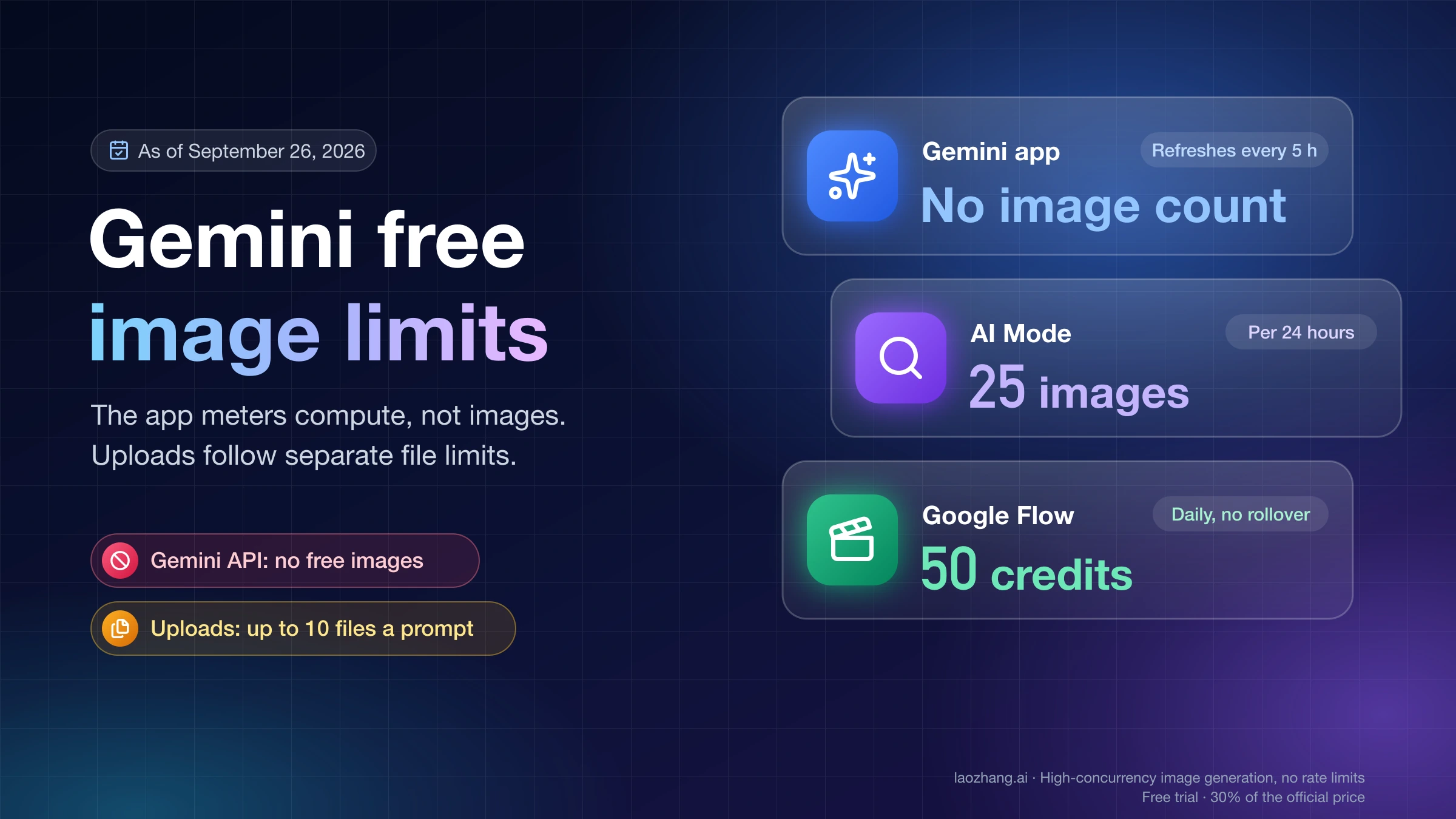
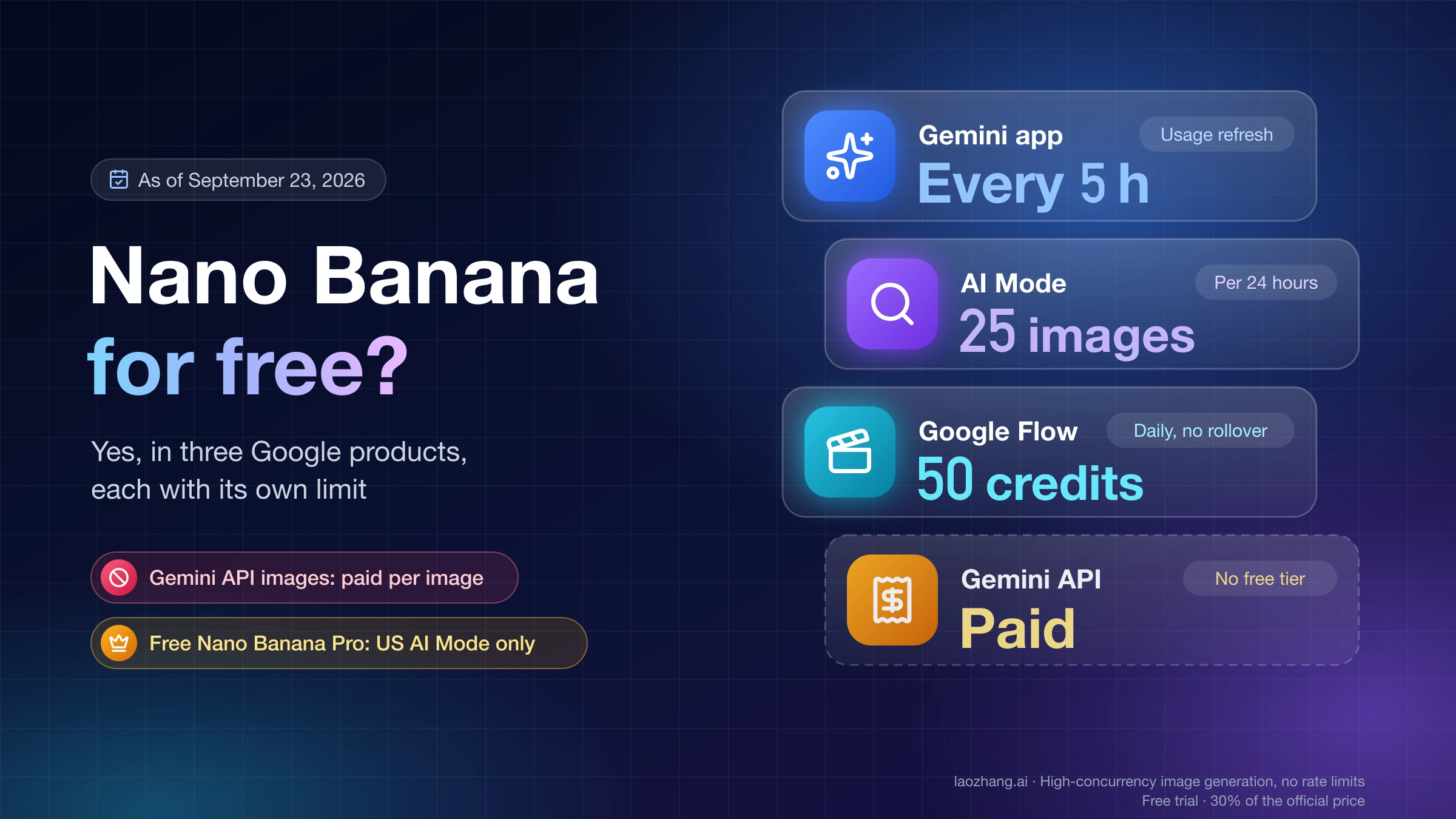
Is Nano Banana 2 free to use? No, NB2's image generation is not available on the free tier of Google AI Studio or the Gemini API. You need a paid API key with billing enabled to generate images. The free tier of AI Studio allows text generation with Gemini models but explicitly excludes image output. Per-image costs range from $0.045 (0.5K) to $0.151 (4K), with the batch API offering a 50% discount on all tiers.
Should I choose Nano Banana 2 or Pro? Choose NB2 when cost efficiency matters most and you're primarily generating at 1K-2K resolution, where it delivers 95% of Pro's quality at roughly 50% of the cost. Choose Pro when you need consistent 4K speed (8-12s vs NB2's 10-56s), maximum text rendering accuracy (94-96% vs 87-96%), or the lowest possible output variability for automated pipelines. For most web and social media use cases, NB2 is the more practical choice.
What aspect ratios does Nano Banana 2 support? NB2 supports 14 aspect ratios: 1:1, 1:4, 1:8, 2:3, 3:2, 3:4, 4:1, 4:3, 4:5, 5:4, 8:1, 9:16, 16:9, and 21:9. This is the widest aspect ratio coverage among major image generation APIs. GPT Image 1.5 supports only 3 fixed sizes, and most FLUX models work with custom pixel dimensions rather than named ratios.
How do I generate 4K images with the API? Set image_size="4K" (uppercase K required) in the ImageConfig parameter of your API call. Combine with any of the 14 supported aspect ratios using the aspect_ratio parameter. Be prepared for generation times of 10-56 seconds and a cost of approximately $0.151 per image. Consider using the two-pass workflow: iterate at 1K first, then generate finals at 4K only for approved compositions.