Gemini Image Generation: Fix Every Error, Understand Limits, Remove Watermarks (2026)

A
24 min readGemini Image

The definitive guide to every Gemini image generation problem in 2026. Covers all error codes (429 with its 4 different causes, IMAGE_SAFETY, blockReason OTHER, 503, silent failures), rate limits across 5 models and 3 tiers (including the free tier's 0 IPM reality), and both watermark types (visible Gemini logo and invisible SynthID). Includes production-ready code fixes, a complete quota comparison table, and practical removal solutions.

Gemini Image Generation: Fix Every Error, Understand Limits, Remove Watermarks (2026)

Gemini offers five different image generation models in 2026, each with different error behaviors, rate limits, and watermark policies. Whether you are hitting a 429 RESOURCE_EXHAUSTED error that appears identical for four completely different problems, struggling to understand why the free tier API generates zero images, or trying to figure out why your generated images have a Gemini sparkle logo that your client does not want, this guide covers every issue in one place. All data is verified against the official ai.google.dev pricing and rate-limits documentation as of March 2026.

TL;DR

  • The 429 error has 4 different causes that look identical: no billing enabled (free tier has 0 IPM for image generation since December 2025), RPM burst limit, daily RPD quota, and the "ghost 429" bug affecting recently upgraded accounts.
  • Five models, three tiers, wildly different limits. Imagen 4 Fast ($0.02/image) has free tier availability. Gemini 3.1 Flash Image ($0.067/image) and Gemini 3 Pro Image ($0.134/image) have 0 IPM on free tier. Tier 1 starts at just enabling billing. Tier 2 needs $250+ cumulative spend.
  • IMAGE_SAFETY and blockReason are two different things. IMAGE_SAFETY blocks the output image after generation. blockReason SAFETY blocks the prompt before generation (configurable). blockReason OTHER is a non-configurable policy filter you cannot bypass.
  • Two watermarks, two realities. The visible Gemini sparkle logo can be removed with tools or avoided entirely by using the API. The invisible SynthID watermark is embedded during pixel generation and cannot be removed without destroying the image.
  • Best free option: Use Imagen 4 Fast through AI Studio (free tier available) or enable billing for $0 to unlock Tier 1 for Gemini models.

Every Gemini Image Error Explained

Gemini image error diagnosis table mapping 8 error codes to causes, severity, and fixes

The single most confusing aspect of Gemini image generation is that the same error code can mean completely different things depending on your account configuration. Understanding the actual cause behind each error is the difference between fixing the problem in seconds and wasting hours on the wrong solution. Based on analysis of the official Gemini API documentation, Google developer forum reports, and production logging from multiple applications, here is what each error actually means and how to fix it.

429 RESOURCE_EXHAUSTED: The Four-Headed Problem

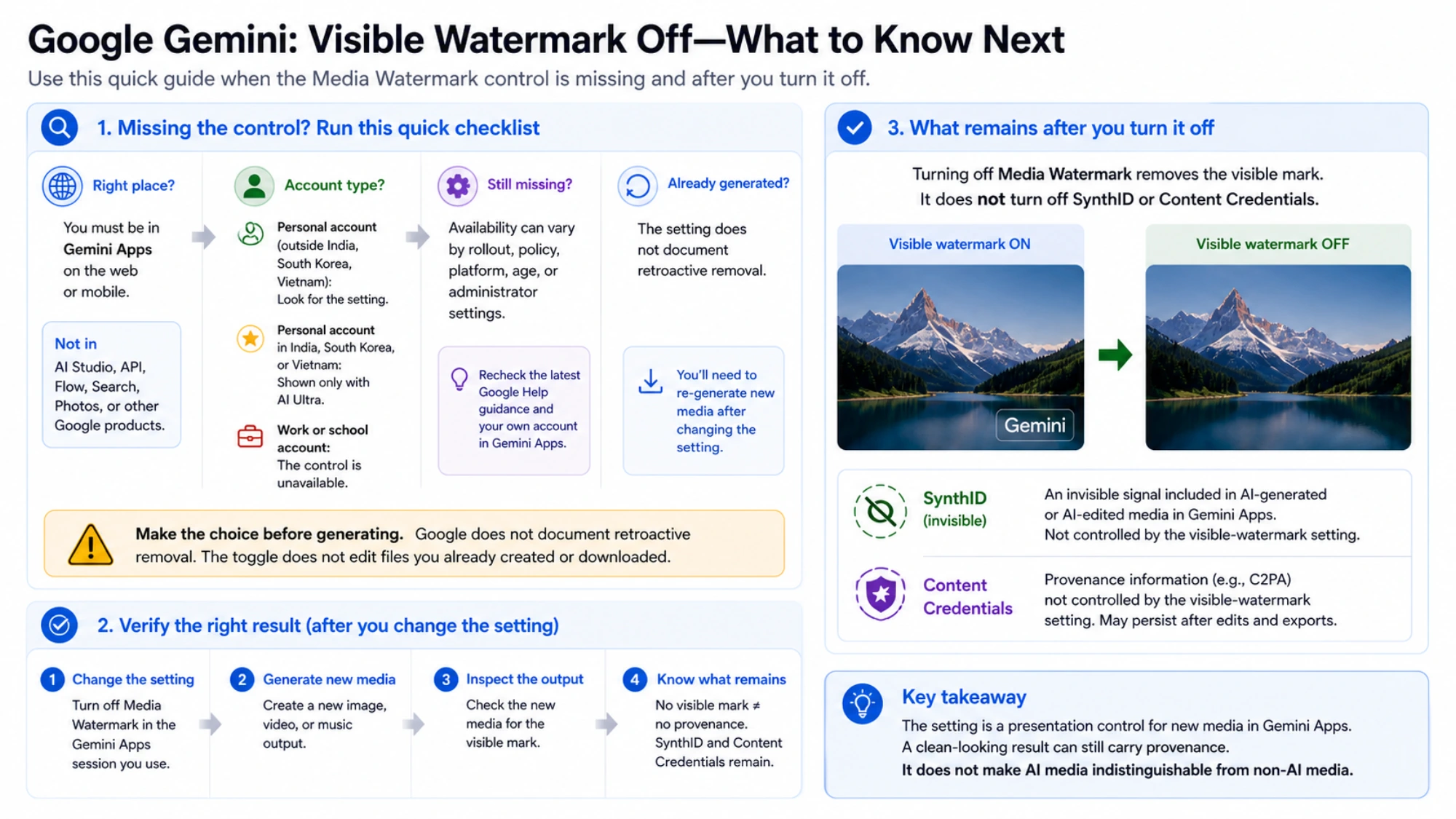
The 429 error is by far the most common Gemini image generation error, and it is also the most misleading. Google returns the identical RESOURCE_EXHAUSTED status code for four fundamentally different problems, and the fix for each one is completely different. The first and most common cause is that your project is on the free tier, which has had exactly zero images per minute (0 IPM) for Gemini image models since December 7, 2025. This means that if you have not enabled billing on your Google Cloud project, every single image generation request will fail with a 429, regardless of whether you have made zero requests or a thousand. The fix is straightforward: enable billing in the Google Cloud Console, even if you set a $0 spending limit. Simply having billing active moves you to Tier 1, which unlocks image generation capabilities. You can learn more about the full picture of Gemini image 429 errors and their solutions in our dedicated troubleshooting guide.

The second cause is a burst rate limit, where you have exceeded the per-minute request cap for your tier. Tier 1 allows 15 requests per minute for most models, so sending 16 requests within a 60-second window triggers this error. The fix is exponential backoff with jitter — start with a 2-second delay and double it on each retry, up to 60 seconds, with a random variation of 25% to prevent synchronized retry storms across multiple clients. The third cause is the daily quota exhaustion, where you have hit the RPD (requests per day) limit. Tier 1 allows 1,500 RPD for Flash Image models, and this resets at midnight Pacific Time. If your application generates images throughout the day without tracking consumption, you can exhaust this quota faster than expected, especially since each retry also counts against the daily limit.

The fourth and most frustrating cause is the "ghost 429" bug, a server-side issue with Google's quota tracking system that primarily affects accounts recently upgraded from Free to Tier 1. During the first 24 to 48 hours after enabling billing, the quota enforcement system may incorrectly calculate your usage, returning 429 errors even when you are well within your limits. The temporary workaround, documented across multiple Google developer forum threads, is to switch to a different model variant — if you are using gemini-3.1-flash-image-preview, try gemini-3-pro-image-preview or vice versa, as this often bypasses the affected quota enforcement path. In most cases, waiting 24 to 48 hours resolves the issue as quota propagation completes.

IMAGE_SAFETY and Safety Filters: Layer 1 vs Layer 2

Safety-related errors in Gemini image generation operate on a two-layer system that most developers conflate into a single problem. Layer 1 consists of configurable safety settings that you control through the safety_settings parameter in your API request. When a prompt triggers a Layer 1 block, you receive a blockReason: SAFETY in the response, and you can resolve it by adjusting the threshold for specific harm categories (Harassment, Hate Speech, Sexually Explicit, Dangerous Content) down to BLOCK_NONE or OFF. For Gemini 2.5 and newer models, the default safety threshold is already set to OFF, meaning most Layer 1 blocks only occur with explicit safety configuration. Understanding the nuances of blockReason OTHER and non-configurable safety filters is essential for production applications.

Layer 2, however, is a completely different story. When you see blockReason: OTHER or finishReason: IMAGE_SAFETY, you have hit a non-configurable policy enforcement filter that cannot be bypassed through any API parameter. Layer 2 enforces copyright protection (generating images of copyrighted characters or logos), famous person restrictions (realistic images of identifiable real people), and mandatory child safety protections. No amount of safety_settings adjustment will change a Layer 2 block — the only solution is to fundamentally rephrase your prompt to avoid the protected content. For legitimate use cases that are being incorrectly blocked, you can report false positives through the Google AI Developer Forum, though response times vary significantly.

Silent Failures and Text-Only Responses

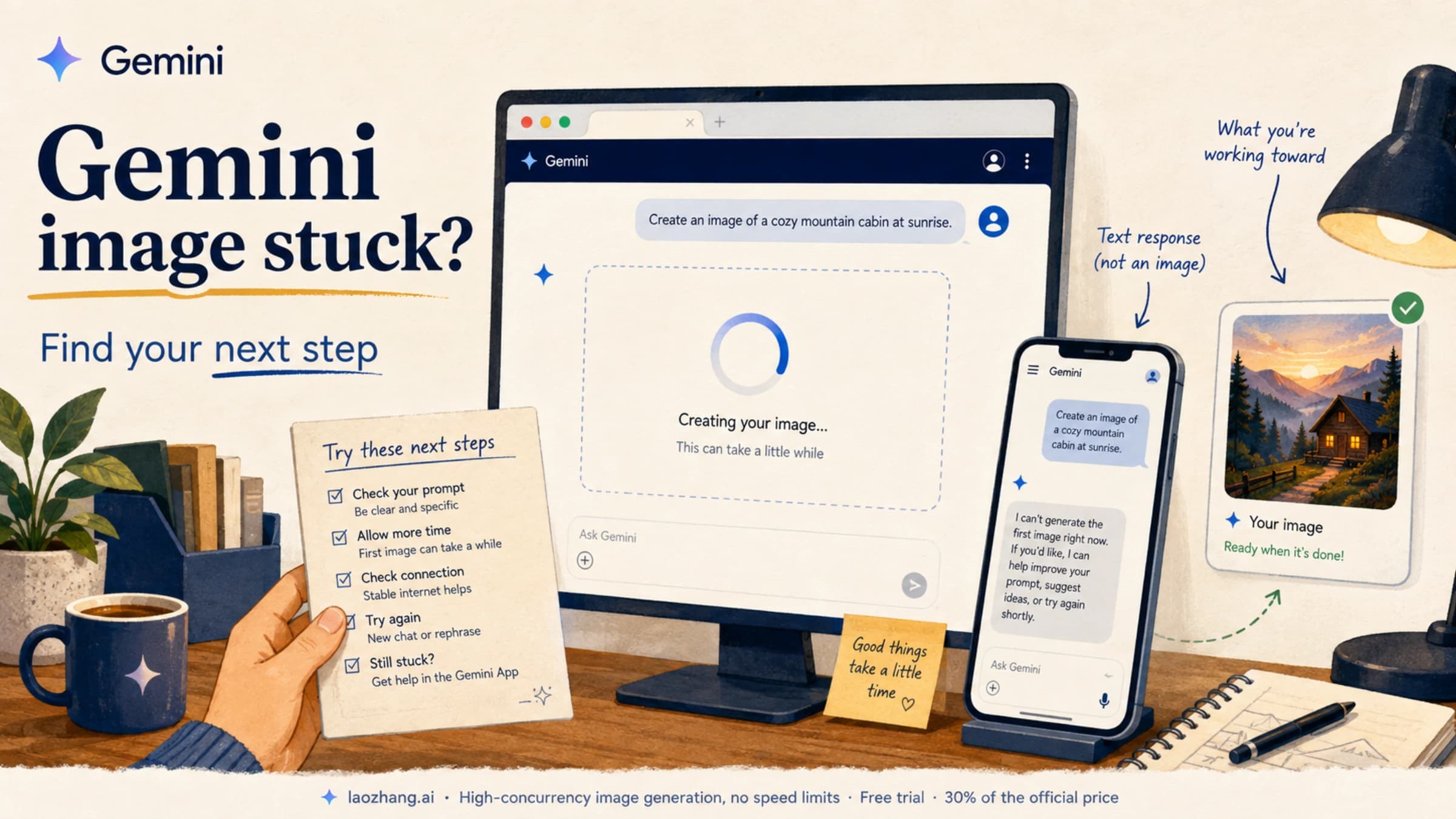
Perhaps the most confusing error is not an error at all. When Gemini returns finishReason: STOP with only text content and no image, the model has decided not to generate an image but has not thrown an explicit error. This typically happens with ambiguous prompts that the model interprets as text-only requests, prompts that are too vague for image generation, or prompts where the model determines it cannot create a satisfactory image. The fix is to add an explicit image generation instruction to your prompt — prefix it with "Generate an image of..." or "Create a photorealistic image showing..." to signal your intent clearly. Model Name Errors: A Surprisingly Common Pitfall

Before you even encounter rate limits or safety filters, an incorrect model identifier will cause your request to fail with a 404 Not Found or an "Invalid model name" error. Google's naming convention for image generation models is inconsistent across documentation, and copy-pasting model names from outdated tutorials is one of the most common sources of errors for new developers. The correct model identifiers as of March 2026 are: gemini-3.1-flash-image-preview for the Flash Image model (not gemini-flash-image or gemini-3.1-flash-preview-image), gemini-3-pro-image-preview for the Pro Image model (not gemini-pro-image or gemini-3-pro-preview-image), and imagen-4-fast, imagen-4-standard, or imagen-4-ultra for the Imagen 4 family. The older gemini-2.5-flash-image identifier still works but routes to the previous generation model with different pricing and capabilities. Always verify your model identifier against the official models page at ai.google.dev/gemini-api/docs/models before debugging other potential causes of request failures.

The 503 SERVICE_UNAVAILABLE error is simpler to diagnose: Google's servers are at capacity. During peak hours (roughly 9 AM to 5 PM Pacific Time), failure rates for image generation can reach approximately 45% based on community reports from December 2025 through February 2026. The solution is to retry during off-peak hours (2 to 7 AM Pacific) or use a relay service that maintains its own queue management and retries.

Rate Limits and Quotas: Every Model, Every Tier

Gemini image rate limits comparison by model and tier showing free, Tier 1, and Tier 2 quotas

Understanding the rate limit system requires knowing that Google operates three independent quota dimensions simultaneously: RPM (requests per minute) controls burst throughput, RPD (requests per day) controls daily volume, and IPM (images per minute) specifically gates image generation output. Hitting any one of these limits triggers a 429 error, and the error message does not tell you which limit you hit. For a deeper exploration of all Gemini API tiers, check our complete rate limits guide.

The free tier is the source of most confusion. While Google advertises free access to Gemini models with generous request limits (up to 500 RPD for some models), the image generation quota (IPM) for Gemini models is set to zero on the free tier. This means you can send text prompts for free, but any request that attempts to generate an image will fail with a 429 error. The exception is Imagen 4, which does have limited free tier availability through AI Studio, though the exact daily limit fluctuates and Google has not published official numbers. Community testing suggests approximately 500 Imagen 4 requests per day are available on the free tier, but this number varies by region, account age, and time of day. The Gemini App (consumer interface at gemini.google.com) offers a separate pool of approximately 100 free image generations per day, and these are independent from the API and AI Studio quotas. If you want to maximize your free Gemini image generation quota, our dedicated guide covers every trick for stacking these independent pools.

The December 2025 quota cuts represent the most dramatic change to Gemini's free tier in its history. Before December 7, 2025, the free API tier allowed limited image generation with Gemini models. After that date, Google set the IPM to exactly zero for all Gemini image models on the free tier, while simultaneously tightening Gemini 2.5 Flash's daily request limits from approximately 250 RPD to just 20 — a 92% reduction. These cuts appear to reflect Google's strategy of moving serious image generation users to paid tiers while maintaining generous free access for text-only workloads.

Tier 1 unlocks when you simply enable billing on your Google Cloud project. You do not need to make any actual payment — activating a billing account with a valid credit card is sufficient. Tier 1 provides 15 RPM and 1,500 RPD for the Flash Image model, and 2 RPM and 50 RPD for the Pro Image model. The significant disparity between these two models reflects their different target use cases: Flash for high-volume generation at lower cost, Pro for occasional high-quality generation. Tier 2 requires $250 or more in cumulative spending over at least 30 days, after which limits increase dramatically to 2,000 RPM and 50,000 RPD for Flash, and 1,000 RPM and 10,000 RPD for Pro. The Batch API deserves special mention because it operates on a separate quota pool with an automatic 50% discount on token pricing, making it ideal for non-time-sensitive bulk generation.

The practical implication of this tiered system is that the cheapest path to meaningful image generation starts with Imagen 4 Fast at $0.02 per image (which has some free tier availability), graduates to Gemini 3.1 Flash Image at $0.067 per image once you enable billing, and only reaches Gemini 3 Pro Image at $0.134 per image when you specifically need its superior quality for professional applications.

One frequently overlooked strategy for maximizing effective quotas is to use multiple access methods simultaneously. The Gemini App (consumer interface), the AI Studio web UI, and the Developer API all operate on completely independent quota pools. This means that a developer who exhausts their API daily quota can still generate images through the AI Studio web interface using the same Google account. While this is not a scalable production strategy, it provides a useful escape valve during development and testing when you want to conserve your API quota for production traffic. Additionally, different Gemini image models have independent quotas — hitting the rate limit on gemini-3.1-flash-image-preview does not affect your quota for gemini-3-pro-image-preview or imagen-4-fast, making model rotation a viable strategy for sustained throughput when a single model's limits are insufficient.

How to Fix Gemini Image Errors

Production applications need error handling that distinguishes between the different 429 causes and responds appropriately to each one. The following Python implementation demonstrates an error handler that covers the most common failure modes, including exponential backoff with jitter for rate limits, billing detection for free tier blocks, and model fallback for persistent failures.

python
import time import random import google.generativeai as genai def generate_image_with_retry(prompt, model_name="gemini-3.1-flash-image-preview", max_retries=5, base_delay=2.0): """Generate image with comprehensive error handling.""" fallback_models = [ "gemini-3.1-flash-image-preview", "gemini-3-pro-image-preview", "imagen-4-fast" ] for attempt in range(max_retries): try: model = genai.GenerativeModel(model_name) response = model.generate_content( f"Generate an image: {prompt}", generation_config={"response_mime_type": "image/png"} ) # Check for safety blocks if response.prompt_feedback and response.prompt_feedback.block_reason: reason = response.prompt_feedback.block_reason if str(reason) == "OTHER": raise Exception("Layer 2 policy block - rephrase prompt") else: raise Exception(f"Safety block: {reason} - adjust safety_settings") # Check for image in response for part in response.candidates[0].content.parts: if hasattr(part, 'inline_data') and part.inline_data: return part.inline_data.data # Image bytes raise Exception("No image in response - add explicit image instruction") except Exception as e: error_str = str(e) if "429" in error_str or "RESOURCE_EXHAUSTED" in error_str: delay = base_delay * (2 ** attempt) * (1 + random.random() * 0.25) delay = min(delay, 60) print(f"Rate limited (attempt {attempt+1}). Waiting {delay:.1f}s...") time.sleep(delay) elif "503" in error_str: # Server overloaded - try fallback model current_idx = fallback_models.index(model_name) if model_name in fallback_models else -1 if current_idx < len(fallback_models) - 1: model_name = fallback_models[current_idx + 1] print(f"Server overloaded. Switching to {model_name}") else: time.sleep(base_delay * (2 ** attempt)) else: raise # Non-retryable error raise Exception(f"Failed after {max_retries} retries")

Beyond the retry logic, a critical implementation detail that catches many developers is the response parsing structure. Unlike text generation where response.text gives you the complete output in a single string, image generation responses embed the generated image as inline_data within a Part object nested inside candidates[0].content.parts. Accessing the image data requires iterating through parts and checking for the inline_data attribute, which is absent entirely when the model returns text instead of an image. Attempting to access response.text on an image response will raise an error, and attempting to access image data on a text-only response will return None without any helpful error message. The code above handles both cases explicitly, which is essential for any production implementation.

For safety settings configuration, the key insight is that adjusting these settings only affects Layer 1 (configurable) safety filters and has no effect on Layer 2 (policy enforcement). The following configuration relaxes Layer 1 filters to their minimum while respecting the Layer 2 boundaries that cannot be changed.

python
from google.generativeai.types import HarmCategory, HarmBlockThreshold safety_settings = { HarmCategory.HARM_CATEGORY_HARASSMENT: HarmBlockThreshold.BLOCK_NONE, HarmCategory.HARM_CATEGORY_HATE_SPEECH: HarmBlockThreshold.BLOCK_NONE, HarmCategory.HARM_CATEGORY_SEXUALLY_EXPLICIT: HarmBlockThreshold.BLOCK_NONE, HarmCategory.HARM_CATEGORY_DANGEROUS_CONTENT: HarmBlockThreshold.BLOCK_NONE, } model = genai.GenerativeModel(model_name, safety_settings=safety_settings)

Gemini Image Watermarks: Visible Logo, SynthID, and Removal

Comparison of two Gemini watermark types: visible sparkle logo vs invisible SynthID

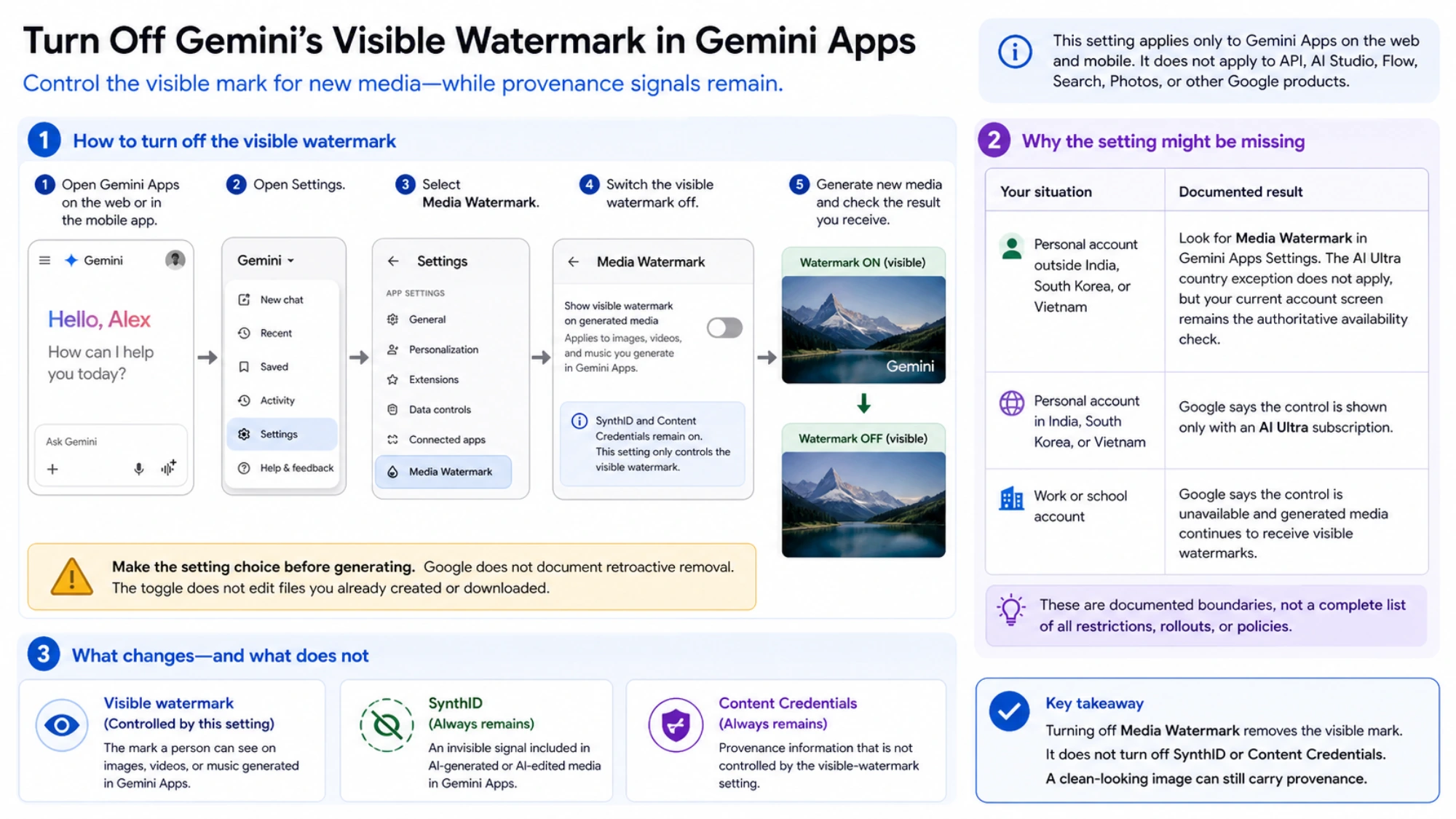
Every image generated by Google's Gemini models carries two distinct types of watermarks, and understanding the fundamental difference between them is crucial for anyone using Gemini images commercially. The first is a visible watermark — the familiar Gemini sparkle logo that appears in the corner of images generated through AI Studio and the Gemini app. The second is SynthID, an invisible watermark developed by Google DeepMind that is embedded in every Gemini-generated image regardless of how it was created or what subscription tier you use.

The Visible Watermark: Easy to Handle

The visible Gemini watermark is a semi-transparent logo overlay, typically 48 by 48 or 96 by 96 pixels, positioned in one of the bottom corners of the generated image. It is applied as a post-processing step to images generated through the Gemini web app and AI Studio, but critically, it is not applied to images generated through the API. This means the simplest way to get clean images without the visible watermark is to use the API directly, either through your own integration or through a relay service. For images already generated with the visible watermark, several open-source tools implement a Reverse Alpha Blending algorithm that precisely removes the overlay without affecting the underlying image content. Tools like GeminiWatermarkTool on GitHub achieve pixel-perfect removal because the watermark is applied with a known alpha transparency pattern that can be mathematically reversed.

SynthID: The Watermark That IS the Image

SynthID is fundamentally different from a traditional watermark. Rather than being an overlay applied after image generation, SynthID operates during the generation process itself. Google DeepMind's Tournament Sampling algorithm subtly biases every pixel choice during image creation using a private cryptographic key. The result is an image that looks identical to an unwatermarked version but contains a statistical signature detectable by Google's verification tools. This distinction matters because it means that SynthID cannot be "removed" in any meaningful sense — the watermark is not a separate layer or pattern added to the image, but rather an inherent property of how the image was generated. Every pixel in the image carries a trace of the watermark. Some tools claim to disrupt SynthID through pixel perturbation, but this typically degrades image quality without reliably eliminating the watermark, since the statistical bias is distributed across the entire image rather than concentrated in any detectable region.

For practical purposes, SynthID has no impact on the visual quality of generated images and does not affect their commercial usability. It exists primarily as a provenance tool for AI-generated content detection, and no major commercial licensing agreement currently prohibits the use of images containing SynthID watermarks. The concern about SynthID is largely theoretical rather than practical, and for the vast majority of use cases, you can treat SynthID-marked images exactly as you would unwatermarked images.

Watermark Policies by Access Method

The watermark behavior varies significantly depending on how you access Gemini image generation, and understanding these differences can save you both time and money. Images generated through the Gemini consumer app (gemini.google.com) always carry the visible sparkle watermark, regardless of whether you are on a free, Pro ($19.99/month), or even Ultra ($249.99/month) subscription. Images generated through AI Studio also carry the visible watermark. However, images generated through the Developer API (ai.google.dev) are delivered without any visible watermark — the API output is clean. This means that the most cost-effective way to get watermark-free images is not to pay for an Ultra subscription at $249.99/month, but rather to use the API at $0.02 to $0.134 per image depending on the model and resolution you choose. For developers building applications, this is the standard approach, and for non-developers who need occasional watermark-free images, relay services provide API access through simpler interfaces without requiring any code.

Which Gemini Image Model to Choose

Google currently offers five image generation models through its APIs, and choosing the right one depends on your specific requirements for quality, speed, cost, and reliability. Gemini 3 Pro Image (gemini-3-pro-image-preview) delivers the highest quality output at $0.134 per image at 1K resolution, scaling up to $0.24 at 4K. It supports up to 14 input images for editing tasks and produces the most photorealistic results, but its rate limits on Tier 1 are restrictive (just 2 RPM and 50 RPD), making it unsuitable for high-volume applications without Tier 2 access. Gemini 3.1 Flash Image (gemini-3.1-flash-image-preview) is the workhorse model at half the cost ($0.067 per image at 1K) with much higher rate limits (15 RPM, 1,500 RPD on Tier 1). It generates images faster and handles most use cases adequately, though quality is noticeably lower than Pro for detailed photographic content.

Imagen 4 is the budget option, available in three sub-tiers: Fast ($0.02/image), Standard ($0.04/image), and Ultra ($0.06/image). Imagen 4 does not support text-to-image with the same level of prompt understanding as the Gemini models but excels at specific tasks like background removal, inpainting, and style transfer. Crucially, Imagen 4 is the only model family with any free tier API availability, making it the entry point for developers who cannot immediately enable billing. For most developers building production applications, the recommended strategy is to use Gemini 3.1 Flash Image as the primary model for its balance of cost and quality, fall back to Imagen 4 Fast during rate limit periods or server overloads, and reserve Gemini 3 Pro Image for premium use cases where quality justifies the 2x price premium.

When evaluating reliability alongside cost, it is worth noting that server overload (503) errors are not evenly distributed across models. Community reports from December 2025 through February 2026 indicate that the Pro Image model has higher peak-hour failure rates (around 45%) compared to Flash Image (approximately 30%) and Imagen 4 (approximately 15%), likely because Pro Image requires more computational resources per request. For time-sensitive applications, building a fallback chain that starts with your preferred model and degrades gracefully to cheaper, more available alternatives significantly improves the user experience. The code example in the error handling section above demonstrates exactly this pattern, cycling through Flash, Pro, and Imagen 4 models in order of quality until one succeeds.

The resolution dimension adds another layer to the cost-quality calculation. Gemini 3.1 Flash Image supports four resolutions — 0.5K ($0.045), 1K ($0.067), 2K ($0.101), and 4K ($0.151) — while Gemini 3 Pro Image supports 1K ($0.134), 2K ($0.134, same cost), and 4K ($0.240). An interesting optimization is that Pro Image charges the same price for 1K and 2K, making 2K the obviously superior choice for Pro Image users who do not need 4K. For Flash Image, the jump from 1K to 2K adds only $0.034 per image, which is often worth it for commercial applications where image quality matters.

Cost-Effective Alternatives and API Relay Services

When Gemini's native rate limits, server reliability, or error rates become bottlenecks for your application, relay services provide an alternative access path that can mitigate several of these issues simultaneously. Services like laozhang.ai offer OpenAI-compatible APIs that route to Gemini image generation models through their own infrastructure, providing benefits like built-in retry logic across multiple Google Cloud projects, higher effective rate limits through request distribution, automatic model fallback during outages, and a unified API that works across Gemini, GPT, and other providers. For Gemini image generation specifically, relay services often charge a flat rate per image (around $0.05 at laozhang.ai, per their documentation) regardless of resolution, which can be more economical than the native token-based pricing for 2K and 4K images.

The Batch API is another cost optimization path worth considering for non-time-sensitive workloads. Google's Batch API provides an automatic 50% discount on all token pricing, reducing Flash Image costs from $0.067 to approximately $0.034 per image at 1K resolution, and Imagen 4 Fast from $0.02 to just $0.01 per image — making it the cheapest AI image generation option available from any major provider. The trade-off is that batch jobs can take up to 24 hours to complete and have a limit of 100 concurrent jobs, so this approach works best for background processing, content pipelines, and bulk generation workflows rather than interactive applications.

For teams that need to generate thousands of images daily across multiple projects, the most resilient architecture combines a relay service for real-time interactive requests (where latency matters) with the Batch API for background processing (where cost matters). This hybrid approach ensures that user-facing features always receive images within seconds through the relay service's retry infrastructure, while batch processing tasks like catalog generation, social media content creation, or dataset preparation run at the lowest possible cost through the Batch API. The overall cost per image in a hybrid architecture typically falls between $0.025 and $0.05, depending on the real-time to batch ratio, which compares favorably to the $0.067 standard API price for Flash Image or the $0.134 standard price for Pro Image at default resolution.

FAQ

Why does my Gemini image generation return only text with no image?

This is a silent failure where the model decides not to generate an image without throwing an explicit error. The most common cause is an ambiguous prompt that the model interprets as a text-only request. To fix this, always include an explicit image generation instruction such as "Generate a photorealistic image of..." at the beginning of your prompt. Also verify that you are using an image-capable model (gemini-3.1-flash-image-preview or gemini-3-pro-image-preview) and that your request includes the correct response_mime_type parameter for image output. If the model consistently refuses to generate images for a specific prompt, it may be hitting a Layer 2 safety filter without returning an explicit error code.

Can I use Gemini-generated images commercially without removing the SynthID watermark?

Yes. SynthID is an invisible watermark that has no impact on image quality or visual appearance. There is currently no legal requirement to disclose the presence of SynthID in commercially used images, and Google's terms of service for the Gemini API grant you a license to use generated images for commercial purposes. The visible Gemini sparkle watermark, however, should be removed or avoided (by using the API) for professional and commercial applications. Always review Google's current Generative AI terms of service for the most up-to-date usage rights.

What is the cheapest way to generate images with Gemini in 2026?

The absolute cheapest option is Imagen 4 Fast through the Batch API at approximately $0.01 per image after the 50% batch discount. For real-time generation, Imagen 4 Fast at $0.02 per image is the cheapest, followed by Gemini 3.1 Flash Image at $0.067 per image. If you need free generation, AI Studio provides limited daily quotas for Imagen 4 at no cost, and the Gemini App allows approximately 100 free image generations per day through the consumer interface, though these have visible watermarks and lower resolution limits.

How do I check which rate limit tier my Google Cloud project is on?

Visit the Google AI Studio dashboard at aistudio.google.com, navigate to your project settings, and check the billing status. Free tier projects show no billing account linked. Tier 1 projects have billing enabled but less than $250 cumulative spend. Tier 2 and above show in the quota settings page at console.cloud.google.com, under IAM and Admin, then Quotas. You can also check programmatically by sending a test request and examining the rate limit headers in the response.

Why do I get a 429 error immediately after enabling billing?

This is likely the "ghost 429" bug that affects accounts recently upgraded from Free to Tier 1. Google's quota tracking system can take 24 to 48 hours to fully propagate billing status changes across all servers. The workaround is to switch to a different model variant temporarily or wait for the propagation to complete. If the issue persists beyond 48 hours, verify that your billing account is active and that the credit card on file has not been declined.

What is the difference between blockReason SAFETY and blockReason OTHER?

These represent two completely different filtering systems. blockReason SAFETY is a Layer 1 filter that you can configure using the safety_settings parameter in your API request. You can relax or disable these filters by setting thresholds to BLOCK_NONE or OFF. blockReason OTHER is a Layer 2 policy enforcement filter that cannot be configured, relaxed, or bypassed by any means. Layer 2 enforces copyright protection, famous person restrictions, and child safety rules. When you encounter blockReason OTHER, the only solution is to fundamentally change your prompt to avoid the protected content category. Attempting to "trick" the system with rephrased versions of the same intent will typically still trigger the Layer 2 filter, as it operates on semantic understanding rather than keyword matching.

How do I handle Gemini image errors in a production application?

The most important principle for production error handling is to never treat all 429 errors the same way. Check your billing status first (the most common cause of persistent 429s is simply not having billing enabled). Implement exponential backoff with jitter for burst rate limits, starting at 2 seconds and doubling up to 60 seconds. Track daily consumption to predict when you will hit RPD limits. Build a model fallback chain (Flash to Imagen 4 to Pro) so that individual model outages do not crash your application. And always log the full error response including any finishReason and blockReason fields, as these contain the diagnostic information needed to determine whether an error is transient (retry) or permanent (rephrase prompt or change approach).

Share:

laozhang.ai

One API, All AI Models

AI Image

Gemini 3 Pro Image

$0.05/img
80% OFF
AI Video

Sora 2 · Veo 3.1

$0.15/video
Async API
AI Chat

GPT · Claude · Gemini

200+ models
Official Price
Served 100K+ developers
|@laozhang_cn|Get $0.1