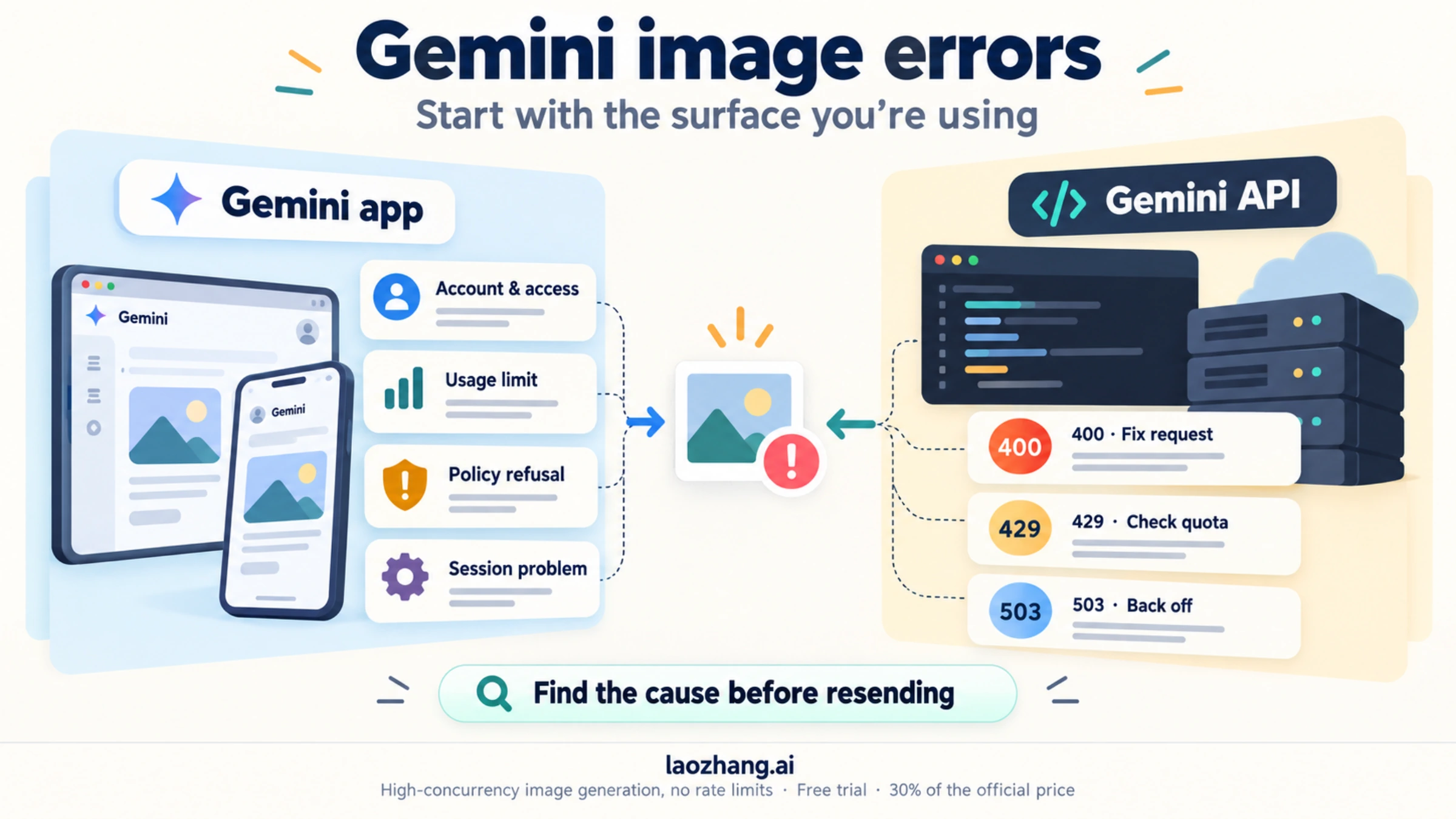
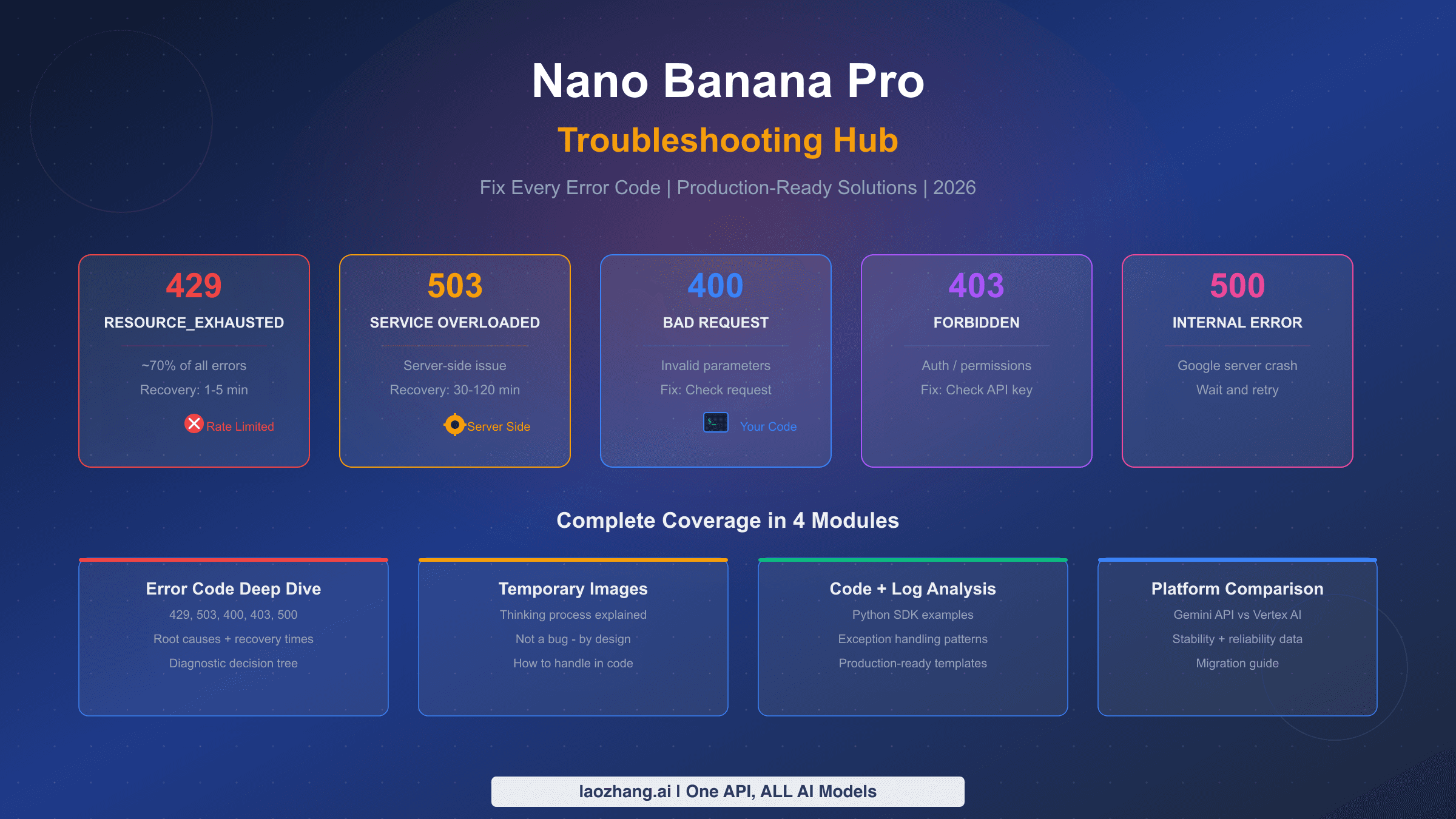
Gemini image API errors fall into three categories: 429 rate limits (caused by billing limit zero, IPM exceeded, Ghost Bug, or Dynamic Shared Quota), silent generation failures (wrong endpoint, responseModalities misconfiguration, or billing not enabled), and parameter issues (imageConfig ignored, case-sensitive image_size, missing TEXT in responseModalities). Start by checking your GCP Console quota dashboard, then verify billing is enabled — the free tier IPM has been 0 since December 7, 2025. Use the correct /v1beta/ endpoint with responseModalities: ["TEXT", "IMAGE"].
TL;DR
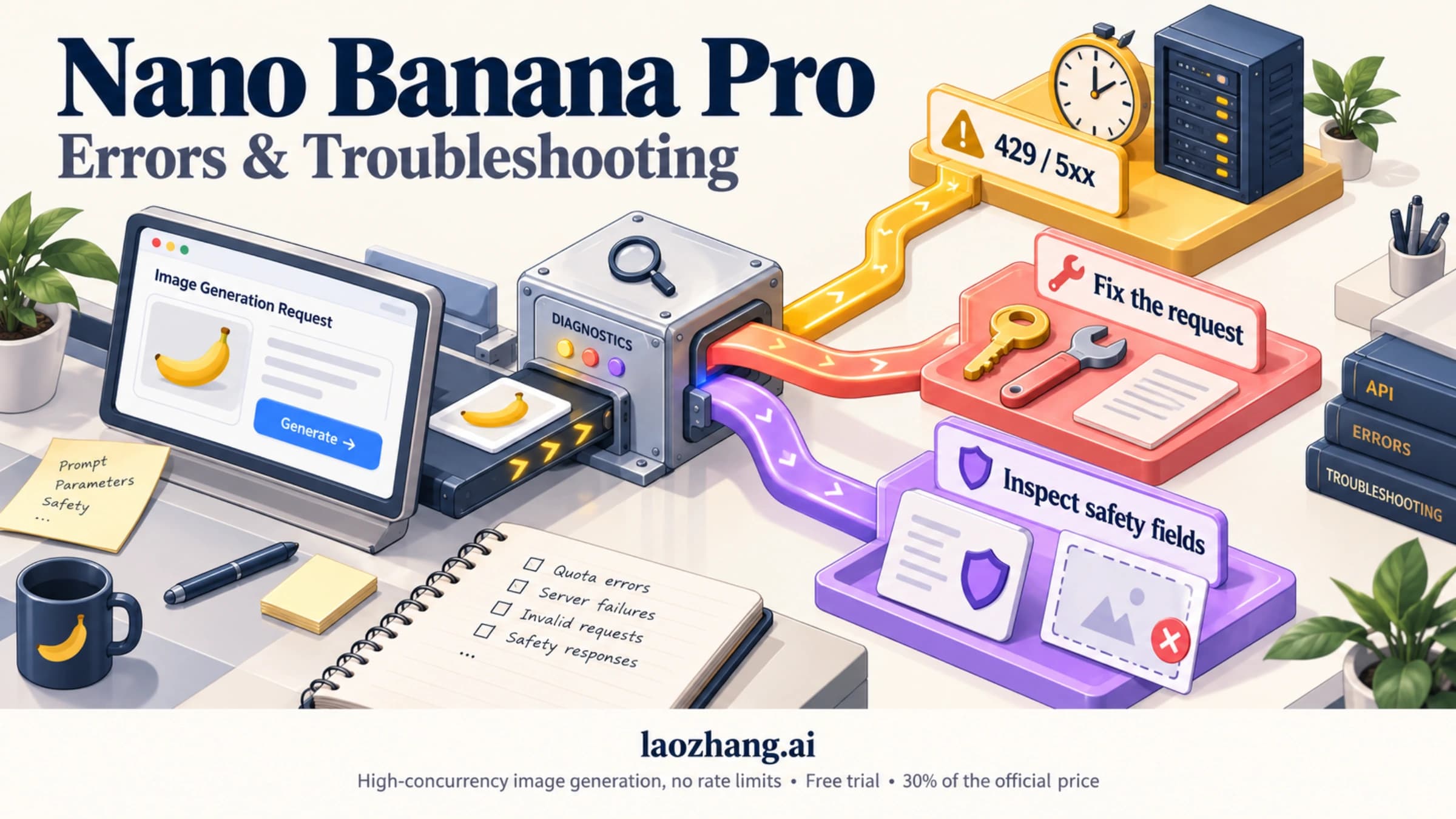
Three error categories, three diagnostic paths. 429 errors have four distinct root causes that each require a different fix — don't just "wait and retry" without identifying which type you have. Silent failures (HTTP 200 with no image in the response) are almost always a responseModalities misconfiguration. Parameter failures (settings accepted but ignored) typically involve case sensitivity in image_size or imageConfig being stripped by middleware. Check billing first, then endpoint, then parameters — in that order.
Understanding Gemini Image API Errors: A Diagnostic Map
When Gemini image generation breaks, developers typically face one of three distinct failure modes, and they require completely different diagnostic approaches. The first failure mode is a hard error — your API call returns HTTP 429 or HTTP 400, the request is rejected before any generation begins. The second is a silent failure where your call succeeds with HTTP 200, but the response contains no image data. The third is a configuration failure where images generate successfully, but the output doesn't match what you configured — wrong resolution, wrong aspect ratio, or completely different settings than what you specified.
Understanding which failure mode you're in is the critical first step. Misidentifying it leads developers down the wrong diagnostic path, wasting hours. The table below maps each error type to its HTTP status, gRPC status code, and the chapter in this guide that covers it.
| Error Type | HTTP Status | gRPC Status | Typical Symptom | Fix Chapter |
|---|---|---|---|---|
| Billing limit = 0 | 429 | RESOURCE_EXHAUSTED | Free tier, no images | Chapter 2 |
| IPM rate limit | 429 | RESOURCE_EXHAUSTED | Generates, then fails | Chapter 2 |
| Ghost 429 Bug | 429 | RESOURCE_EXHAUSTED | After billing upgrade | Chapter 2 |
| Dynamic Shared Quota | 429 | RESOURCE_EXHAUSTED | Preview model traffic | Chapter 2 |
| Wrong responseModalities | 200 | — | Empty parts[] array | Chapter 3 |
| Wrong endpoint | 404/400 | NOT_FOUND | Unsupported operation | Chapter 3 |
| Wrong model name | 400 | INVALID_ARGUMENT | Model not found | Chapter 3 |
| Billing not enabled | 400 | FAILED_PRECONDITION | Explicit error message | Chapter 3 |
| image_size case error | 200 | — | Wrong resolution output | Chapter 4 |
| imageConfig stripped | 200 | — | Config silently ignored | Chapter 4 |
| Missing TEXT modality | 200 | — | Empty response | Chapter 4 |
For general Gemini API errors that aren't image-specific, our general Gemini API error troubleshooting guide covers the full range of non-image errors. This article focuses exclusively on the three error categories that are unique to image generation — errors that general Gemini API guides don't address. The Image API has its own quota dimension (IPM — Images Per Minute), its own required parameters, and its own model endpoints that don't apply to text generation.
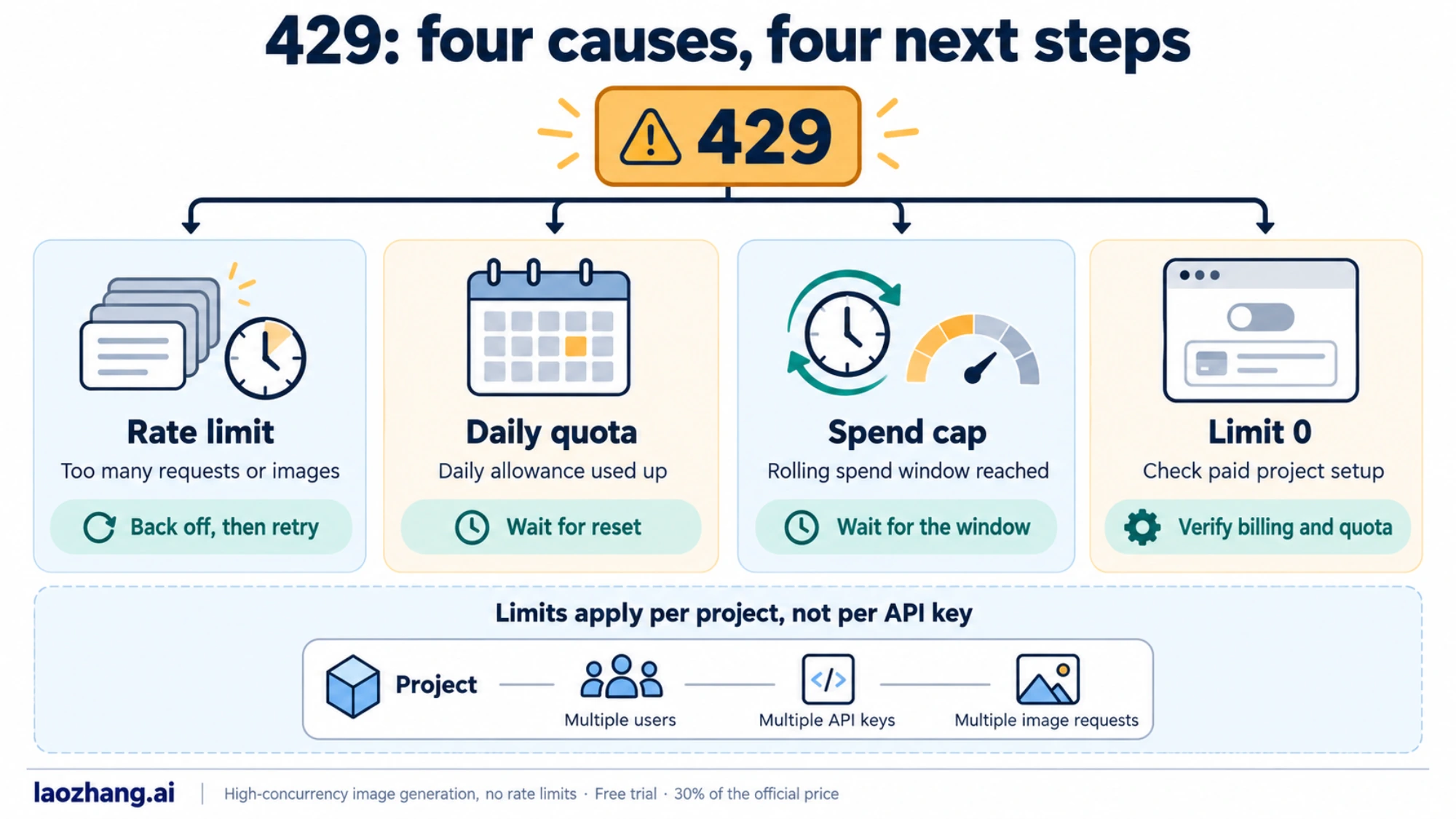
The most important diagnostic principle is this: never assume a 429 error is just a "rate limit" to wait out. Four completely different root causes produce identical 429 responses, and waiting is only the correct response for one of them. Similarly, never assume a successful HTTP 200 response means your image was generated — the 200 can mask a configuration error that produces an empty response.
The 429 Error: Four Root Causes, Four Different Fixes

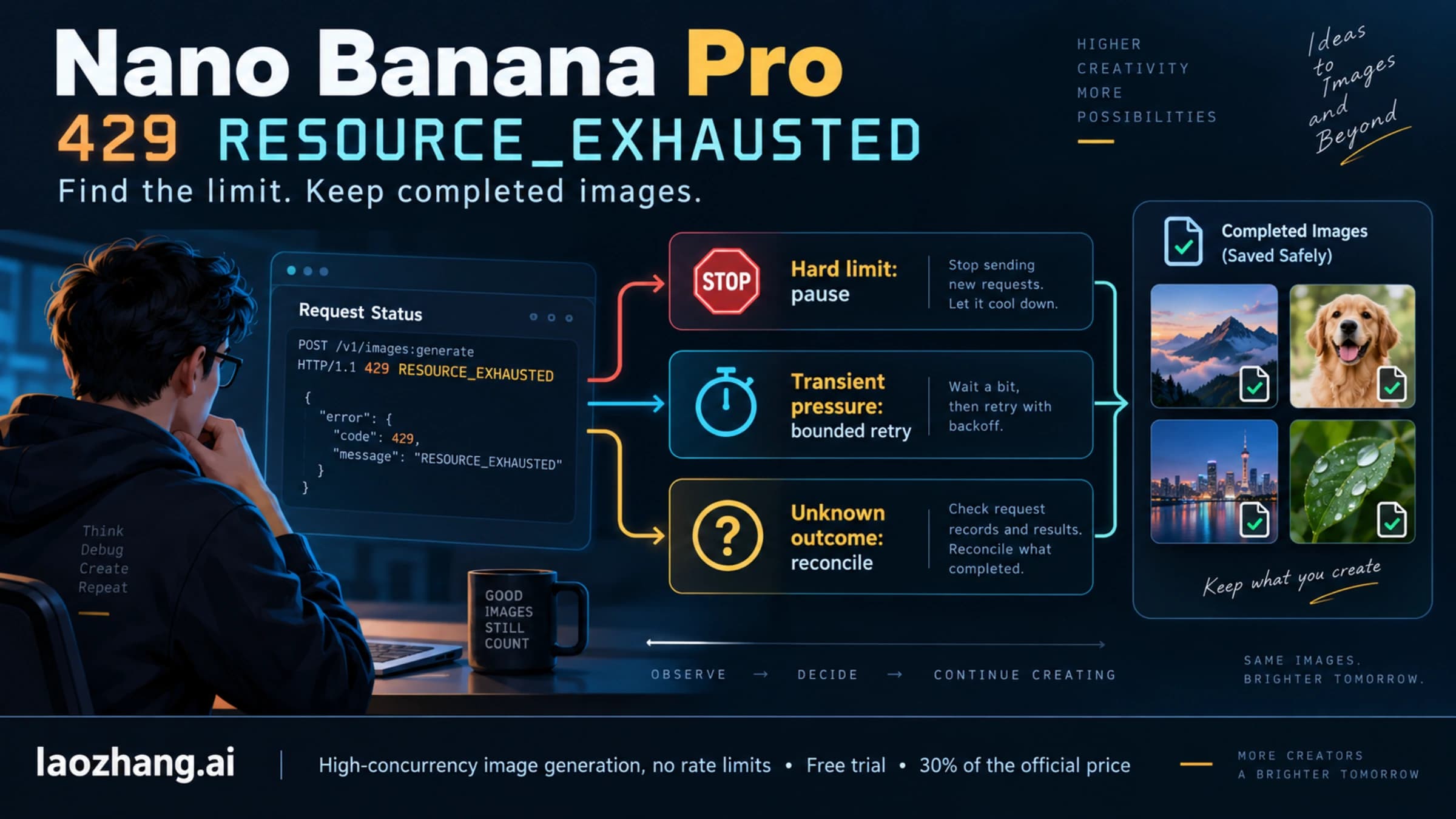
The 429 RESOURCE_EXHAUSTED error is the most common Gemini image API error, but it's misleading because it looks identical regardless of which of four completely different problems triggered it. Every Gemini image developer encounters it, and almost every resource online treats it as a single problem — "you exceeded your rate limit." That framing leads to wasted time, because the four root causes have four completely different fixes, and applying the wrong fix doesn't help.
Root Cause 1: Billing limit = 0 (Free Tier)
The most common cause of 429 for new developers is the simplest one: the free tier has had a per-image quota (IPM) of exactly zero since December 7, 2025 (verified against Firebase AI Logic documentation, 2026-03-16). This means free tier accounts cannot generate any images through the API — not a low limit, zero. When you hit this, the 429 doesn't tell you "you exceeded your limit," it tells you that your limit is already at zero.
To verify this is your issue, navigate to GCP Console → APIs & Services → Generative Language API → Quotas and Limits. Filter for "image" and look at the IPM (Images Per Minute) quota. If it shows 0, you're in Root Cause 1. The fix is to enable billing on your Google Cloud project and upgrade to at least Paid Tier 1. Note that enabling billing alone doesn't always immediately restore your quota — there can be a propagation delay of 15-30 minutes.
Root Cause 2: IPM Rate Limit Exceeded (Paid Tier)
Once billing is enabled, you have a per-minute image generation quota. As of the verified data from our detailed Gemini image 429 rate limit guide, Paid Tier 1 supports approximately 10 IPM (Images Per Minute), and Paid Tier 2 approximately 20 IPM. These are separate from RPM (Requests Per Minute) — image models have their own distinct IPM quota that applies specifically to image generation calls.
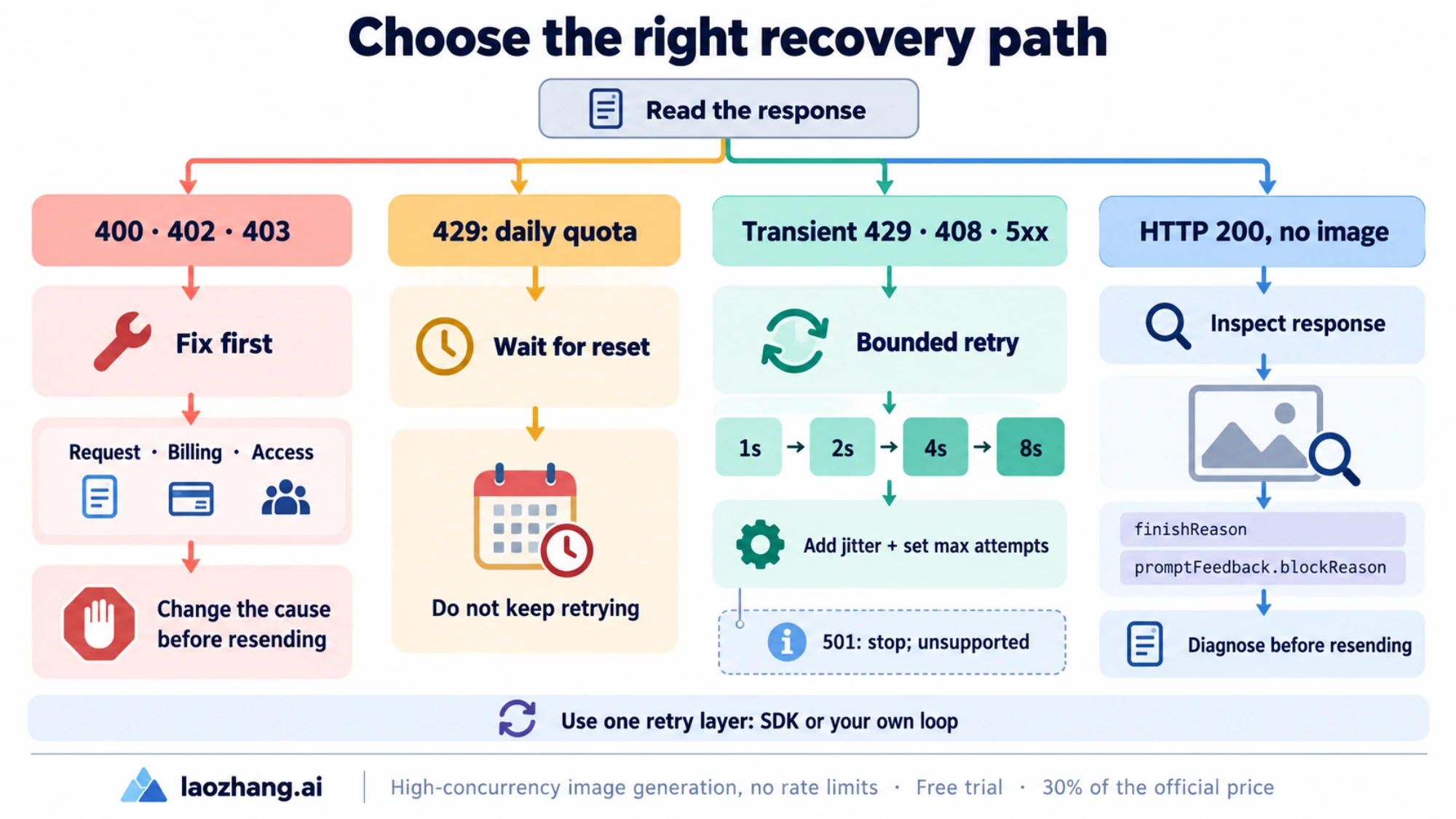
The diagnostic tell for Root Cause 2 is pattern: your application works fine initially, then starts getting 429 errors after generating several images in quick succession. The GCP Console quota dashboard will show your current usage approaching or hitting the IPM limit. The fix is exponential backoff — start with a 2-second delay after the first 429, doubling with each retry (2s, 4s, 8s, 16s). Batch processing jobs should pre-calculate the delay needed to stay within IPM limits rather than hitting the limit and backing off reactively.
Root Cause 3: Ghost 429 Bug (February 2026)
This bug affects accounts that recently upgraded their billing tier. The symptom is that 429 errors persist even after successful billing upgrade — GCP Console shows a non-zero IPM quota, billing is enabled, but image generation still returns 429. Google confirmed this as a known issue in the AI Developers Forum in February 2026. The bug affects the account-level quota enforcement layer, where the new quota allocation isn't correctly propagated.
The temporary workaround is to switch to a different model variant. If you're using gemini-3.1-flash-image-preview, try switching to gemini-2.5-flash-image or vice versa. In many cases this bypasses the affected quota enforcement path. Additionally, waiting 24-48 hours often resolves it as the quota propagation completes. If the bug persists, filing a support ticket with Google Cloud explicitly referencing the February 2026 Ghost 429 issue accelerates resolution.
For 503 overloaded errors which can look similar, see our guide on how to fix 503 overloaded errors.
Root Cause 4: Dynamic Shared Quota (Preview Models)
Preview models — gemini-3.1-flash-image-preview and gemini-3-pro-image-preview — don't use per-project quota allocation the way production models do. Instead, they use what Google calls Dynamic Shared Quota, where the available capacity is shared across all users of the preview model globally, and 429 errors occur when global system congestion is high, regardless of your individual usage level. Google confirmed this behavior in a January 29, 2026 support thread on support.google.com.
This is the only root cause where waiting genuinely is the right response. The 429 isn't because you did anything wrong — it's because the global preview model capacity is temporarily constrained. Exponential backoff with longer delays (start at 5 seconds instead of 2) works here. For production applications with reliability requirements, the correct architectural response is to use a production model like gemini-2.5-flash-image or to use Vertex AI with provisioned throughput, which gives you dedicated capacity rather than shared.
Here's a complete exponential backoff implementation that identifies which type of 429 you're seeing:
pythonimport time import google.generativeai as genai def generate_image_with_backoff(prompt: str, max_retries: int = 5) -> dict: """Generate image with exponential backoff for 429 errors.""" client = genai.GenerativeModel("gemini-3.1-flash-image-preview") for attempt in range(max_retries): try: response = client.generate_content( contents=prompt, generation_config={ "responseModalities": ["TEXT", "IMAGE"], } ) return response except Exception as e: error_str = str(e) if "429" not in error_str and "RESOURCE_EXHAUSTED" not in error_str: raise # Not a rate limit error if attempt == max_retries - 1: raise # Exhausted retries # Exponential backoff: 2s, 4s, 8s, 16s, 32s delay = 2 ** (attempt + 1) print(f"429 on attempt {attempt + 1}, waiting {delay}s...") time.sleep(delay) raise Exception("Max retries exceeded")
Image Generation Returns Nothing: Fixing Silent Failures
Silent failures are the most frustrating Gemini image error type because they give you no actionable feedback. Your API call returns HTTP 200 (success), the response is valid JSON, but when you look for the image data, the parts array is empty or contains only text. No exception is thrown, no error message explains what went wrong. This category of failure has four distinct causes, and each requires a different investigation.
The Most Common Cause: responseModalities Misconfiguration
The most frequent silent failure comes from a single missing word in your configuration. The Gemini Image API requires responseModalities to include both "TEXT" and "IMAGE" — including only ["IMAGE"] results in a successful HTTP 200 response with an empty parts array. No error is thrown. The API accepts the request, processes it, and returns nothing useful without telling you why.
This requirement is documented in the official Gemini image generation docs (ai.google.dev/gemini-api/docs/image-generation, verified 2026-03-16), but many developers encounter this because examples from non-official sources show ["IMAGE"] alone, or they assume that specifying "IMAGE" modality is sufficient since that's what they want. The correct configuration:
pythongeneration_config = { "responseModalities": ["TEXT", "IMAGE"], # Both required "imageConfig": { "image_size": "1K" # Note: uppercase K } }
Why is TEXT required? The Gemini image models are multimodal by design — they generate a text response alongside the image (typically a description or caption). The API is built around this dual-output model, and attempting to suppress the text output by omitting TEXT from responseModalities causes the entire response to fail rather than returning image-only output. There's no current way to get image-only output without also including TEXT in the modalities list.
Wrong API Endpoint
Some developers integrate Gemini image generation through OpenAI-compatible clients or use the /v1/ endpoint instead of /v1beta/. The Gemini Image Generation API requires the /v1beta/ endpoint path. Requests to the OpenAI-compatible endpoint (/v1/images/generations) or the stable /v1/ path return either 404 errors or explicit "unsupported operation" messages.
The correct endpoint structure is:
POST https://generativelanguage.googleapis.com/v1beta/models/{model-name}:generateContent
If you're using an OpenAI-compatible library with Gemini, ensure you've configured the base URL correctly. Many developers using openai Python library with Gemini change the base_url to point at Gemini's servers, but if they point at the /v1/ path, image models won't be reachable.
Wrong Model Name
The three current Gemini image models have specific names that must be used exactly as documented. At time of writing (verified against ai.google.dev, 2026-03-16), the current model names are:
gemini-3.1-flash-image-preview— Fast generation, Preview modelgemini-3-pro-image-preview— High quality, Preview modelgemini-2.5-flash-image— Efficient, stable model
Common mistakes include using gemini-2.5-flash-preview-image (wrong suffix order), gemini-flash-image (missing version), or older model names that have been deprecated. Model name errors typically return a 400 INVALID_ARGUMENT or 404 NOT_FOUND — they don't usually produce the silent 200 response. But they do cause failed generation with a different error signature than rate limits.
Billing Not Enabled: The 400 You Might Mistake for a Configuration Error
When billing isn't enabled and you're beyond the free tier's zero-quota limit, you might expect a clear error. The Gemini Image API actually returns HTTP 400 with gRPC status FAILED_PRECONDITION and a message that includes "billing." This is distinct from the 429 you'd get if billing were enabled but quota exhausted. The FAILED_PRECONDITION status means a precondition for the operation hasn't been met — in this case, the precondition is that billing must be enabled to use the image generation API at all.
If you see FAILED_PRECONDITION in your error response, the fix is always to enable billing in GCP Console, not to adjust your API parameters. This error won't be resolved by changing your responseModalities or imageConfig.
Parameters That Silently Fail: imageConfig & responseModalities

Parameter failures are a special category of Gemini image API frustration because the API accepts your request without complaint, generates an image, and returns it — but the image doesn't match your specifications. You asked for 2K resolution and got 512px. You set an aspect ratio and got 1:1. You configured imageConfig and it had no effect. The API didn't reject your parameters; it just ignored them.
The image_size Case Sensitivity Trap
The image_size parameter within imageConfig is case-sensitive in a non-obvious way. The valid values use uppercase "K" — "512", "1K", "2K", "4K". Using lowercase "1k" doesn't produce an error; it silently falls back to the default resolution (512px). This means you can write what looks like correct code, test it, and never realize your resolution setting is being ignored.
This specific issue was verified against official Gemini API documentation (ai.google.dev, 2026-03-16). The trap is particularly insidious for developers coming from lowercase-convention languages or APIs where string values aren't case-sensitive. There's no warning in the response that your "1k" was invalid — the image just comes out smaller than expected.
The full list of valid image_size values is: "512", "1K", "2K", "4K". The aspect ratio parameter (aspect_ratio) accepts "1:1", "3:4", "4:3", "9:16", "16:9" — these are case-insensitive and use colon notation.
Why responseModalities Must Include TEXT
As mentioned in the silent failures section, responseModalities must include both "TEXT" and "IMAGE". But there's an additional nuance around parameter ordering. The responseModalities array should list "TEXT" first and "IMAGE" second — while the API currently accepts either order, the documented order is ["TEXT", "IMAGE"], and deviating from this may cause issues in future API versions. It's a small thing, but production code should follow the documented convention.
python"responseModalities": ["TEXT", "IMAGE"] # Accepted but not recommended "responseModalities": ["IMAGE", "TEXT"] # WRONG - silently returns empty response "responseModalities": ["IMAGE"] # WRONG - no images even requested "responseModalities": ["TEXT"]
imageConfig Being Stripped by Middleware
This is the most subtle parameter failure mode. When using middleware layers like LiteLLM to proxy Gemini API calls, the imageConfig parameter is often stripped from the request before it reaches the Gemini API. LiteLLM GitHub issue #18656 documents this behavior — LiteLLM normalizes parameters to its internal format, and imageConfig doesn't survive this normalization.
The symptom: your images generate, but resolution and aspect ratio settings have no effect. The fix is to bypass middleware for Gemini image generation and use the native HTTP API directly. If you must use LiteLLM or similar tools for your infrastructure, you'll need to route image generation requests directly while routing text generation through the middleware.
Here's how to call the API directly, bypassing any middleware:
pythonimport requests import base64 def generate_image_direct(prompt: str, api_key: str, size: str = "1K") -> bytes: """Direct HTTP call to Gemini Image API — bypasses middleware.""" url = "https://generativelanguage.googleapis.com/v1beta/models/gemini-3.1-flash-image-preview:generateContent" headers = {"Content-Type": "application/json"} params = {"key": api_key} payload = { "contents": [{"parts": [{"text": prompt}]}], "generationConfig": { "responseModalities": ["TEXT", "IMAGE"], "imageConfig": { "image_size": size, # Must be "512", "1K", "2K", or "4K" "aspect_ratio": "16:9" # Optional } } } response = requests.post(url, json=payload, headers=headers, params=params) response.raise_for_status() data = response.json() for part in data["candidates"][0]["content"]["parts"]: if "inlineData" in part: return base64.b64decode(part["inlineData"]["data"]) raise ValueError("No image data in response — check responseModalities config")
Note that generationConfig wraps imageConfig in the direct HTTP payload. Some SDK versions use a flat generation_config dict, but the native REST API uses the nested structure shown above. This is another source of parameter confusion — the SDK interface doesn't always match the underlying HTTP request structure.
Checking Your Quota: The GCP Console Diagnostic Guide
Understanding your quota situation is essential for diagnosing 429 errors, but many developers don't know where to find accurate quota information or what the numbers mean. The GCP Console has the authoritative data, but navigating to it isn't obvious.
Finding Your Image Generation Quota
The exact navigation path in GCP Console (verified 2026-03-16):
- Go to console.cloud.google.com
- Select your project from the dropdown at the top
- Navigate to APIs & Services → Generative Language API
- Click Quotas and System Limits in the left sidebar
- In the filter bar, type "image" to filter for image-specific quotas
The quota view shows multiple dimensions. For image generation, the critical one is IPM (Images Per Minute) — this is the dimension that Gemini image generation is throttled against. Don't confuse it with RPM (Requests Per Minute), which governs text generation calls and isn't the binding constraint for image API calls.
Understanding the Quota Dimensions
Gemini image models have three quota dimensions:
| Dimension | What It Limits | Typical Scope |
|---|---|---|
| RPM (Requests Per Minute) | API calls per minute | Shared with text models |
| RPD (Requests Per Day) | API calls per day | Preview models: 1,500/day |
| IPM (Images Per Minute) | Images generated per minute | Image-specific; most critical |
As of December 7, 2025, the free tier IPM is 0 — meaning free accounts cannot generate any images through the API. This was a change from the previous free tier which allowed limited image generation. If you upgraded before this date and have a grandfathered quota, the GCP Console will show your current allowance. If you created an account or first enabled the API after December 7, 2025, your IPM will be 0 until you enable billing.
For Paid Tier 1 accounts (billing enabled, below Tier 2 thresholds), verified data from our SERP analysis (wentuo.ai, Firebase docs, 2026-03-16) shows approximately 10 IPM. Paid Tier 2 (higher usage volume) provides approximately 20 IPM. Vertex AI with Provisioned Throughput gives dedicated quota negotiated with Google, removing the shared-pool constraints.
Interpreting the Quota Dashboard
The quota dashboard shows current usage as a percentage of limit. A reading of "100%" means you've hit the limit for that time window. Important: quota resets are rolling windows, not fixed clock minutes. Your IPM quota is calculated over a rolling 60-second window, so if you generated 10 images at 12:00:00 and are at Paid Tier 1 (10 IPM limit), you won't be able to generate more until 12:01:00.
If you see quota at 0% but still getting 429s, that's a strong diagnostic signal for either the Ghost 429 Bug (Root Cause 3 from Chapter 2) or a quota propagation issue after a recent billing change. In that case, wait 15-30 minutes for quota changes to propagate, and if the issue persists beyond a few hours, check the Ghost 429 guidance in Chapter 2.
Choosing the Right Tier for Gemini Image Generation
The tier you use has major implications for both cost and reliability, especially for production applications. Understanding the trade-offs helps you make the right infrastructure decision rather than discovering limitations under production load.
| Tier | IPM | RPM | RPD | Best For |
|---|---|---|---|---|
| Free | 0 | 10 | 1,500 | Learning only (no images) |
| Paid Tier 1 | ~10 | 10 | 1,500 | Light production use |
| Paid Tier 2 | ~20 | 20+ | 3,000+ | Moderate production |
| Vertex AI | Negotiated | Negotiated | Negotiated | High-volume production |
Preview Models vs. Production Models
The gemini-3.1-flash-image-preview and gemini-3-pro-image-preview models are preview models — they run on Dynamic Shared Quota and don't offer the same reliability guarantees as production models. For Gemini image generation capabilities, only gemini-2.5-flash-image is a stable (non-preview) model at the time of this writing.
For production use cases, this matters in two ways. First, preview model 429s can happen even when you're within your personal quota — they reflect global congestion, not your usage. Second, preview models can be deprecated or have their behavior changed without the full deprecation notice that production models receive. If you're building something that needs to run reliably for months, the stable model is a better foundation even if it has slightly different capabilities. For a full breakdown of what the preview models offer, see our guide on Gemini 3.1 Flash Image Preview model capabilities.
When to Consider Alternative API Providers
If you need higher throughput than the AI Studio tiers provide but aren't ready to set up a full Vertex AI integration, third-party API aggregators like laozhang.ai offer Gemini image models with different rate limit structures. These can be useful for development, testing, or supplementing your primary API access during peak usage. The aggregator approach adds a network hop and shouldn't be your primary production infrastructure for critical applications, but it can serve as a useful fallback when your primary quota is exhausted.
For production-scale image generation, Vertex AI with Provisioned Throughput is the correct long-term solution — you negotiate dedicated capacity rather than competing with other users on shared pool quotas.
Production-Ready Error Handling Code

Production Gemini image generation needs to handle all three error categories systematically. The code below provides a complete Python implementation with proper error classification, exponential backoff, parameter validation, and empty-response detection.
pythonimport time import base64 import requests from typing import Optional from dataclasses import dataclass # Valid parameter constants (from official docs, verified 2026-03-16) VALID_IMAGE_SIZES = {"512", "1K", "2K", "4K"} VALID_ASPECT_RATIOS = {"1:1", "3:4", "4:3", "9:16", "16:9"} GEMINI_IMAGE_ENDPOINT = ( "https://generativelanguage.googleapis.com/v1beta/models/" "{model}:generateContent" ) @dataclass class ImageGenerationError(Exception): """Base class for Gemini image generation errors.""" message: str error_type: str # "rate_limit", "billing", "parameter", "empty_response" retryable: bool def validate_image_config(image_size: str, aspect_ratio: Optional[str] = None): """Validate imageConfig parameters before API call.""" if image_size not in VALID_IMAGE_SIZES: raise ImageGenerationError( message=f"Invalid image_size '{image_size}'. Valid values: {VALID_IMAGE_SIZES}. " f"Note: case-sensitive — use '1K' not '1k'.", error_type="parameter", retryable=False ) if aspect_ratio and aspect_ratio not in VALID_ASPECT_RATIOS: raise ImageGenerationError( message=f"Invalid aspect_ratio '{aspect_ratio}'. Valid: {VALID_ASPECT_RATIOS}", error_type="parameter", retryable=False ) def classify_error(response_or_exception) -> ImageGenerationError: """Classify API error into actionable categories.""" if isinstance(response_or_exception, requests.Response): status = response_or_exception.status_code try: body = response_or_exception.json() error_msg = str(body.get("error", {}).get("message", "")) grpc_status = body.get("error", {}).get("status", "") except Exception: error_msg = response_or_exception.text grpc_status = "" else: error_msg = str(response_or_exception) status = 500 grpc_status = "" if status == 429 or "RESOURCE_EXHAUSTED" in grpc_status: return ImageGenerationError( message=f"Rate limit exceeded: {error_msg}", error_type="rate_limit", retryable=True ) elif "FAILED_PRECONDITION" in grpc_status or "billing" in error_msg.lower(): return ImageGenerationError( message="Billing not enabled. Enable billing in GCP Console.", error_type="billing", retryable=False # Retrying won't help — fix billing first ) elif "INVALID_ARGUMENT" in grpc_status or status == 400: return ImageGenerationError( message=f"Invalid parameter: {error_msg}", error_type="parameter", retryable=False ) else: return ImageGenerationError( message=f"Unexpected error ({status}): {error_msg}", error_type="unknown", retryable=False ) def generate_image( prompt: str, api_key: str, model: str = "gemini-3.1-flash-image-preview", image_size: str = "1K", aspect_ratio: Optional[str] = None, max_retries: int = 5, initial_backoff: float = 2.0 ) -> bytes: """ Generate image with full error handling. Returns raw image bytes (PNG format). Raises ImageGenerationError with retryable flag for caller to handle. """ # Validate parameters before making API call validate_image_config(image_size, aspect_ratio) url = GEMINI_IMAGE_ENDPOINT.format(model=model) headers = {"Content-Type": "application/json"} params = {"key": api_key} image_config = {"image_size": image_size} if aspect_ratio: image_config["aspect_ratio"] = aspect_ratio payload = { "contents": [{"parts": [{"text": prompt}]}], "generationConfig": { "responseModalities": ["TEXT", "IMAGE"], # Both required "imageConfig": image_config } } last_error = None for attempt in range(max_retries): try: response = requests.post( url, json=payload, headers=headers, params=params, timeout=60 ) if not response.ok: error = classify_error(response) if not error.retryable: raise error last_error = error backoff = initial_backoff * (2 ** attempt) print(f"Attempt {attempt + 1}: {error.error_type}, retrying in {backoff}s") time.sleep(backoff) continue # HTTP 200 — check for actual image data data = response.json() candidates = data.get("candidates", []) if not candidates: raise ImageGenerationError( message="No candidates in response. Check model name and quota.", error_type="empty_response", retryable=False ) parts = candidates[0].get("content", {}).get("parts", []) for part in parts: if "inlineData" in part: return base64.b64decode(part["inlineData"]["data"]) # 200 OK but no image data — common config error raise ImageGenerationError( message=( "HTTP 200 but no image in response. " "Verify responseModalities includes both 'TEXT' and 'IMAGE'. " "Check you're using /v1beta/ endpoint." ), error_type="empty_response", retryable=False ) except ImageGenerationError: raise # Don't retry non-retryable errors except requests.RequestException as e: last_error = classify_error(e) if attempt < max_retries - 1: backoff = initial_backoff * (2 ** attempt) time.sleep(backoff) raise last_error or ImageGenerationError( message="Max retries exceeded", error_type="rate_limit", retryable=True ) # Usage example if __name__ == "__main__": try: image_bytes = generate_image( prompt="A serene mountain lake at sunset", api_key="YOUR_API_KEY", model="gemini-3.1-flash-image-preview", image_size="1K", aspect_ratio="16:9" ) with open("output.png", "wb") as f: f.write(image_bytes) print("Image saved to output.png") except ImageGenerationError as e: print(f"Error type: {e.error_type}") print(f"Message: {e.message}") print(f"Retryable: {e.retryable}") if e.error_type == "billing": print("Action: Enable billing at console.cloud.google.com/billing") elif e.error_type == "parameter": print("Action: Fix parameters — check image_size casing and aspect_ratio format") elif e.error_type == "empty_response": print("Action: Add 'TEXT' to responseModalities and verify /v1beta/ endpoint")
JavaScript/Node.js Version
javascriptconst fetch = require('node-fetch'); const VALID_IMAGE_SIZES = new Set(['512', '1K', '2K', '4K']); async function generateImage(prompt, apiKey, options = {}) { const { model = 'gemini-3.1-flash-image-preview', imageSize = '1K', aspectRatio = null, maxRetries = 5, } = options; if (!VALID_IMAGE_SIZES.has(imageSize)) { throw new Error(`Invalid imageSize '${imageSize}'. Use: ${[...VALID_IMAGE_SIZES].join(', ')}`); } const url = `https://generativelanguage.googleapis.com/v1beta/models/${model}:generateContent?key=${apiKey}`; const imageConfig = { image_size: imageSize }; if (aspectRatio) imageConfig.aspect_ratio = aspectRatio; const payload = { contents: [{ parts: [{ text: prompt }] }], generationConfig: { responseModalities: ['TEXT', 'IMAGE'], imageConfig, }, }; for (let attempt = 0; attempt < maxRetries; attempt++) { const response = await fetch(url, { method: 'POST', headers: { 'Content-Type': 'application/json' }, body: JSON.stringify(payload), }); if (response.status === 429) { if (attempt === maxRetries - 1) throw new Error('Max retries exceeded (429)'); const delay = Math.pow(2, attempt + 1) * 1000; await new Promise(r => setTimeout(r, delay)); continue; } if (!response.ok) { const body = await response.json(); const status = body?.error?.status || ''; if (status === 'FAILED_PRECONDITION') { throw new Error('Billing not enabled. Enable billing in GCP Console.'); } throw new Error(`API error ${response.status}: ${JSON.stringify(body?.error)}`); } const data = await response.json(); const parts = data?.candidates?.[0]?.content?.parts || []; const imagePart = parts.find(p => p.inlineData); if (!imagePart) { throw new Error( 'HTTP 200 but no image data. Check responseModalities includes TEXT and IMAGE.' ); } return Buffer.from(imagePart.inlineData.data, 'base64'); } }
For high-concurrency production scenarios where you need to handle multiple models and fallback strategies, API aggregators like laozhang.ai's image endpoint can serve as a fallback when your primary quota is exhausted. The aggregator handles rate limiting internally, which simplifies your error handling code when the primary API is throttled.
Frequently Asked Questions
Why does my Gemini image API call return HTTP 200 but no image?
The most common cause is responseModalities set to ["IMAGE"] instead of ["TEXT", "IMAGE"]. The Gemini image API requires both TEXT and IMAGE modalities — omitting TEXT causes the API to return an empty response without an error. Check your generationConfig and ensure it includes both values. If that's correct, verify you're using the /v1beta/ endpoint, not /v1/ or the OpenAI-compatible endpoint.
How do I fix Gemini image API 429 errors after upgrading to a paid plan?
First check how recently you upgraded. If it was within the last 24-48 hours, you may be affected by the Ghost 429 Bug (a known issue from February 2026 where new billing activations don't immediately propagate quota). Try switching to a different model variant temporarily. If the 429 persists beyond 48 hours with a non-zero quota shown in GCP Console, file a support ticket referencing the quota propagation issue. Also verify in GCP Console that your IPM (Images Per Minute) quota is actually non-zero — billing enabled doesn't automatically mean your image quota is set to a non-zero value.
Why is my imageConfig setting being ignored?
Two common causes: case sensitivity or middleware stripping. For case sensitivity, check that your image_size value uses uppercase K — "1K" not "1k". For middleware stripping, if you're routing through LiteLLM or a similar proxy layer, imageConfig may be stripped before reaching the Gemini API. The fix is to make direct HTTP calls to the Gemini API for image generation rather than going through the proxy.
What's the difference between IPM and RPM quota for Gemini image models?
RPM (Requests Per Minute) limits how many API calls you can make per minute and applies to all Gemini models. IPM (Images Per Minute) is image-specific and limits how many individual images can be generated per minute. One API call can generate multiple images if numberOfImages is set greater than 1, and each image counts against your IPM quota individually. The IPM quota is typically the binding constraint for image generation — you'll hit IPM before RPM in most usage patterns.
Is it safe to use Gemini preview image models in production?
Preview models (gemini-3.1-flash-image-preview, gemini-3-pro-image-preview) use Dynamic Shared Quota, meaning they can return 429 errors due to global congestion even when you're within your personal quota limits. They're fine for development and light production use, but for applications with SLA requirements, use the stable gemini-2.5-flash-image model or Vertex AI with Provisioned Throughput. Preview models can also be changed or deprecated with less notice than production models.
Conclusion and Next Steps
Gemini image API errors are genuinely confusing because different problems produce identical-looking symptoms. A 429 can mean your free tier has zero quota, or your paid quota is exhausted, or you've hit a known bug, or you're experiencing global congestion — and each scenario needs a completely different response. An empty HTTP 200 can mean parameter misconfiguration, wrong endpoint, or middleware interference.
The diagnostic sequence that works across all error types: check billing first (GCP Console → APIs & Services → Generative Language API → Quotas), then verify your parameters (responseModalities: ["TEXT", "IMAGE"], image_size: "1K" uppercase), then confirm your endpoint (/v1beta/ not /v1/). Most issues resolve at one of these three checkpoints.
For production applications, build error classification into your code from the start — distinguishing retryable 429s from non-retryable billing errors and parameter errors saves operational pain later. The complete code example in Chapter 7 provides this classification out of the box.
If you're consistently hitting quota limits and need more throughput without the complexity of Vertex AI provisioning, consider reviewing your batch generation strategy to stay within IPM limits, or exploring whether the Tier 2 quota thresholds meet your requirements. The quota structure is designed to scale with usage — what starts as a limit becomes manageable once you understand which dimension is the binding constraint for your workload.