Cheapest Gemini Image API in 2026: Save 85%+ with These 5 Proven Strategies
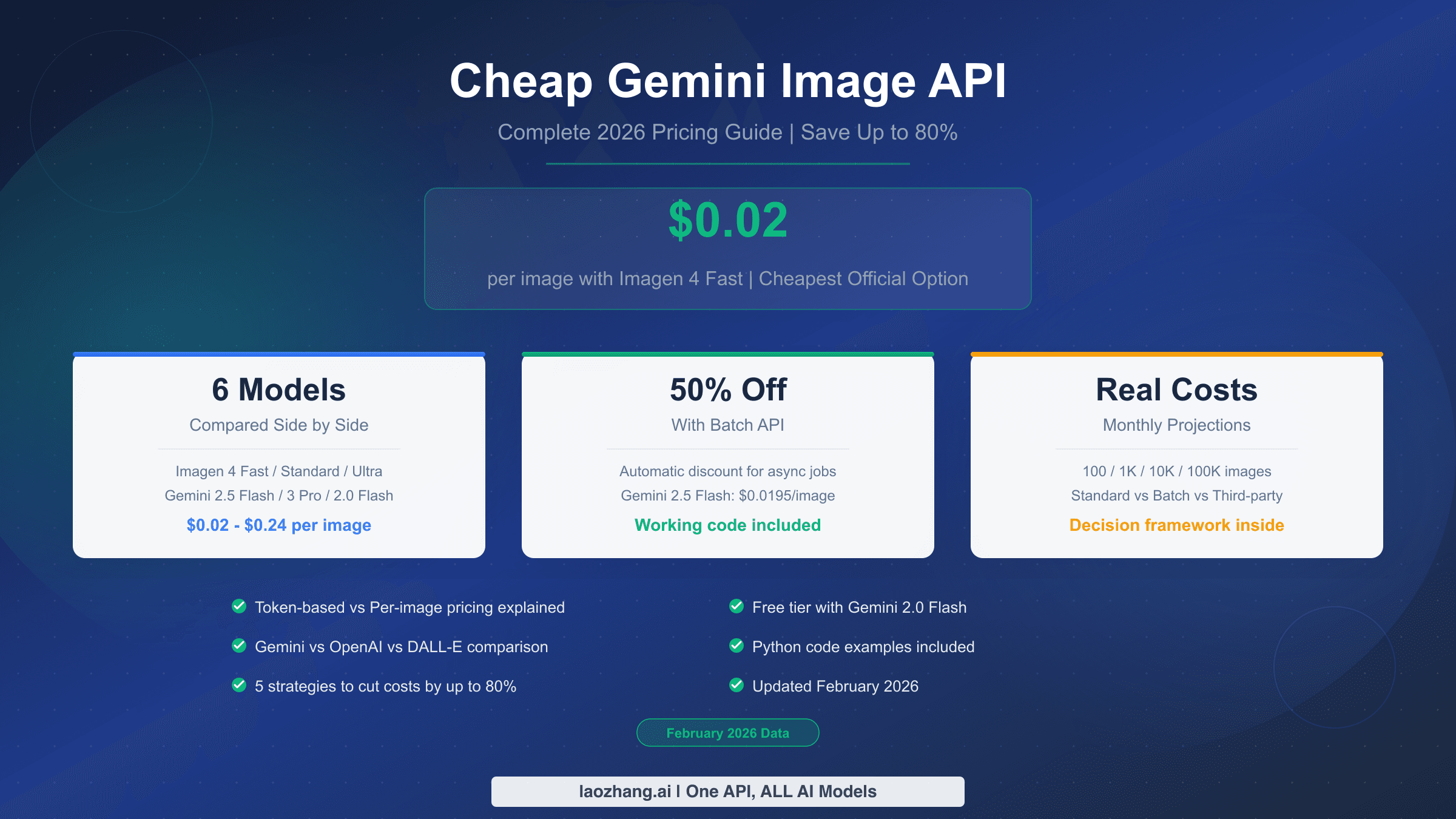
Google now offers seven different image generation models through its API, with prices spanning from $0.02 to $0.24 per image. This guide compares every option in March 2026 — from Imagen 4 Fast at $0.02/image to Batch API discounts of 50% — and reveals five strategies that can cut your image generation bill by up to 92%. Includes hidden cost analysis, a decision matrix by volume, and working code examples.
On this page
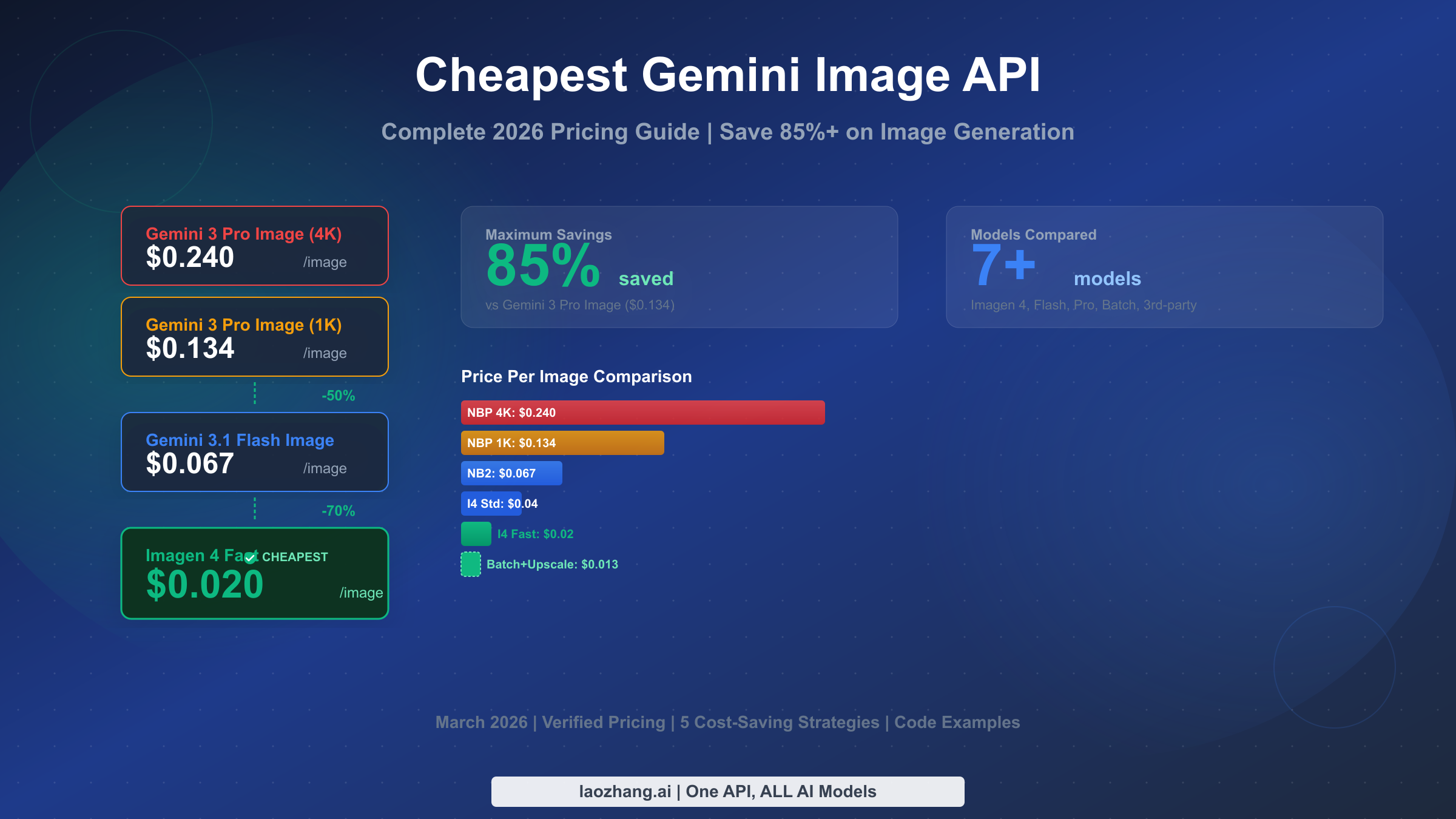
Google's Imagen 4 Fast API generates images at just $0.02 each, making it the cheapest official Gemini image generation option as of March 2026. Combined with the Batch API's automatic 50% discount, you can push that cost down to $0.01 per image — a 92% reduction compared to Gemini 3 Pro Image's $0.134 per image at standard resolution. This guide walks through every available model, reveals hidden costs most articles ignore, and provides five concrete strategies to minimize your spending without sacrificing the quality your application needs.
TL;DR
Here is what you need to know about Gemini image API pricing in March 2026. The cheapest official option is Imagen 4 Fast at $0.02 per image, which is 85% cheaper than Gemini 3 Pro Image at $0.134. You can stack savings by using the Batch API (50% off), generating at lower resolutions and upscaling ($0.003), or routing through third-party providers like laozhang.ai at a flat $0.05 per image regardless of resolution. The optimal model depends entirely on your volume and quality requirements — a hobby project generating 500 images per month faces completely different economics than an enterprise processing 100,000 images monthly. The decision matrix later in this article will help you pick the right combination for your specific situation.
Disclosure: laozhang.ai is our own service. Its prices are platform pricing, not an independent comparison.
Every Gemini Image API Model and What It Costs in March 2026
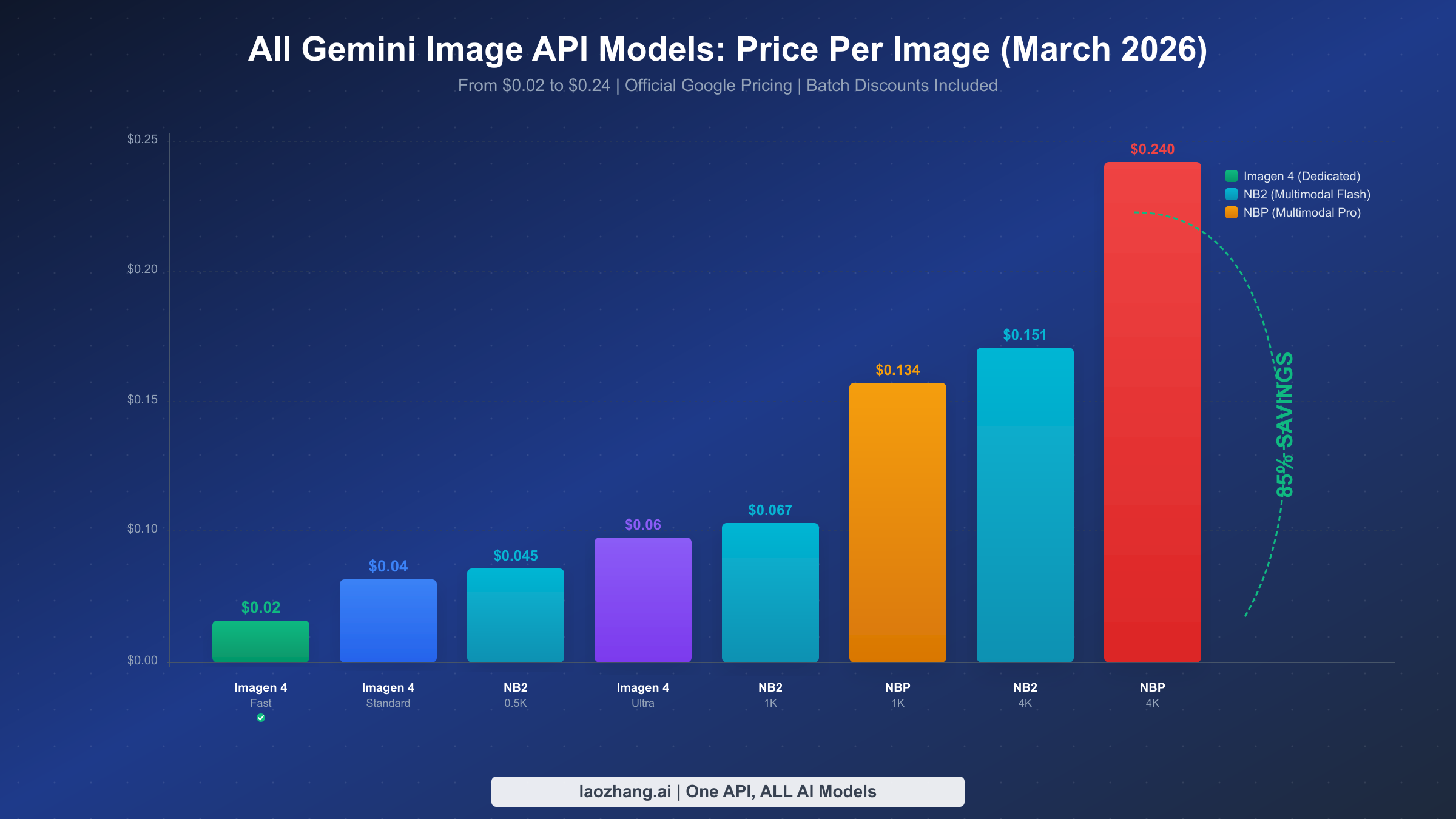
Google's image generation ecosystem has grown remarkably complex over the past year, with seven distinct models now available through different API endpoints. Understanding what each model offers — and more importantly, what it costs — is the foundation of any cost optimization strategy. The pricing table below consolidates data verified directly against the official Google AI for Developers pricing page and Vertex AI pricing documentation, both last updated within the past week as of March 2026.
The models fall into two architectural categories that directly impact both pricing and capability. Imagen 4 (Fast, Standard, and Ultra) is a dedicated image generation model optimized purely for visual output. It uses flat per-image pricing, which makes budgeting straightforward. Gemini native image models (3.1 Flash Image and 3 Pro Image, also known by their codenames Nano Banana 2 and Nano Banana Pro) are multimodal large language models that generate images as part of conversational interactions. These use token-based pricing, which means your cost varies by resolution and prompt complexity.
| Model | Type | Price/Image (1K) | Price/Image (4K) | Batch Price | Best For |
|---|---|---|---|---|---|
| Imagen 4 Fast | Dedicated | $0.02 | N/A (max 2K) | $0.01 | High-volume, budget apps |
| Imagen 4 Standard | Dedicated | $0.04 | N/A (max 2K) | $0.02 | Balanced quality/cost |
| Imagen 4 Ultra | Dedicated | $0.06 | N/A (max 2K) | $0.03 | Best dedicated quality |
| Gemini 3.1 Flash Image (NB2) | Multimodal | $0.067 | $0.151 | $0.034 | Multimodal + editing |
| Gemini 3 Pro Image (NBP) | Multimodal | $0.134 | $0.240 | $0.067 | Best quality + text rendering |
| Imagen 4 + Upscale (combo) | Dedicated + Post | $0.023 (upscaled to 4K) | $0.023 | $0.013 | 4K output on budget |
| Third-party (laozhang.ai) | Proxy | $0.05 | $0.05 | N/A | Flat rate; platform says no per-key RPM or concurrency cap |
Disclosure: laozhang.ai is our own service. Its prices are platform pricing, not an independent comparison.
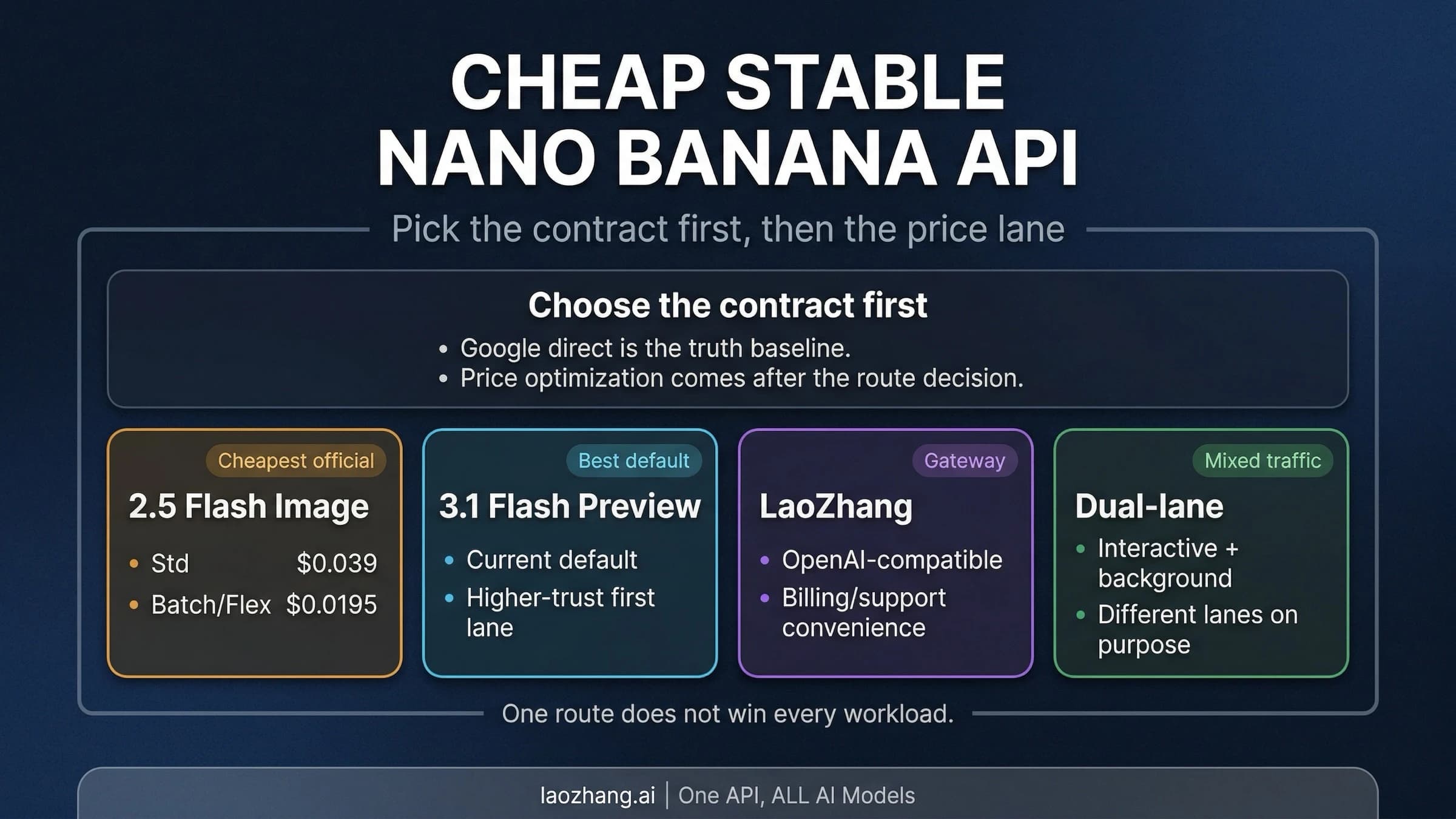
Several pricing details deserve special attention. First, Imagen 4 models have a maximum native resolution of 2K (2048x2048), which means you cannot directly generate 4K images with them. If you need 4K output, you either use the multimodal Gemini models at higher cost or combine Imagen 4 with Google's upscaling API at $0.003 per operation (ai.google.dev/pricing, verified March 2026). Second, the Batch API discount of 50% applies to all paid models and processes requests asynchronously — typically within minutes for small batches, but potentially hours during peak demand. Third, the free tier in Google AI Studio provides 500 to 1,000 images per day depending on server load, but this is limited to the web UI and does not support programmatic API access for image generation. For a broader comparison that includes non-Google options, our AI image API comparison for 2026 covers GPT Image 1.5, FLUX.2, and Grok Imagine alongside the Gemini models.
Imagen 4 vs Gemini Native Image Generation: What Is the Difference?
The distinction between Imagen 4 and Gemini's native image generation confuses many developers, partly because Google markets them through overlapping channels and uses overlapping terminology. A search for "Gemini image generation" surfaces results about both model families without clearly distinguishing them, leading to situations where developers choose the wrong model and overpay by 5x or more. Understanding the architectural difference is essential for making the right cost decision, because the cheapest option is not always the best option for every use case.
Imagen 4 is a dedicated text-to-image model that was purpose-built for image generation. When you send it a text prompt, it generates an image — that is its only function. It does not understand conversation context, cannot edit existing images through dialogue, and does not support multi-turn interactions. What it lacks in flexibility, it makes up for in cost efficiency and speed. Imagen 4 Fast typically returns results in 2 to 4 seconds, making it suitable for real-time applications where users expect near-instant feedback. The flat per-image pricing ($0.02 to $0.06) also makes budgeting completely predictable — you know exactly what each request will cost before you send it.
Gemini's native image generation works fundamentally differently. Models like Gemini 3 Pro Image (internally codenamed Nano Banana Pro) and Gemini 3.1 Flash Image (Nano Banana 2) are multimodal large language models that happen to generate images as one of their capabilities. This means you can have a conversation with the model, ask it to generate an image, then ask it to modify that image, all within a single context window. The model understands what it previously generated and can iterate on it. This conversational editing capability is something Imagen 4 simply cannot do. For a detailed head-to-head comparison of image quality across these models and their competitors, see our Gemini Flash vs GPT Image vs FLUX comparison.
The trade-off is straightforward. If you need pure text-to-image generation at the lowest possible cost — thumbnails, product shots, marketing visuals where you provide a complete prompt — Imagen 4 Fast at $0.02 per image is the clear winner. If you need conversational editing, multi-turn refinement, or the ability to generate images that incorporate understanding from a text conversation, the Gemini native models justify their higher price. The 94-96% text rendering accuracy of Gemini 3 Pro Image (spectrumailab benchmark, March 2026) also makes it significantly better for images containing readable text, where Imagen 4 tends to produce less accurate typography.
There is one more distinction that matters for developers building multilingual applications. Gemini 3 Pro Image handles non-Latin scripts — Chinese characters, Japanese kanji, Korean hangul, Arabic text — significantly better than Imagen 4, which was primarily trained on Latin-script text rendering. If your application needs to generate images with embedded CJK text or other complex scripts, the Gemini native models are effectively your only viable option within Google's ecosystem, and the price premium is justified by the dramatically higher accuracy on these scripts. For Latin-only text requirements, or for images that contain no text at all, this advantage is irrelevant and Imagen 4 remains the cost-optimal choice.
Five Strategies to Cut Your Gemini Image API Bill by 80%+
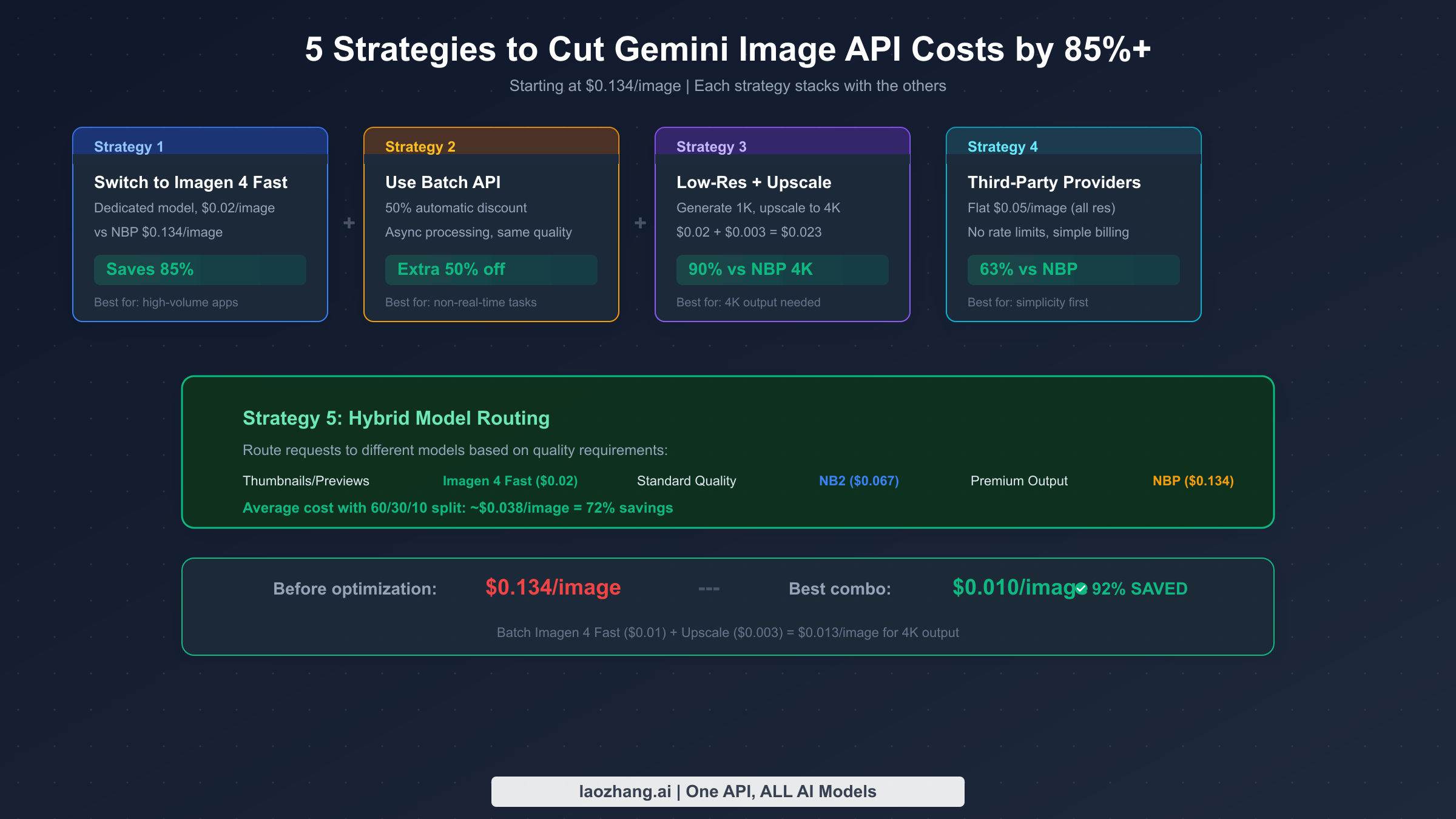
Most developers start with whichever model Google's documentation highlights most prominently — usually Gemini 3 Pro Image at $0.134 per image — and never investigate cheaper alternatives. The strategies below are ordered from simplest to most sophisticated, and they can be combined for maximum savings. A developer currently spending $134 per month on 1,000 images through Gemini 3 Pro Image could reduce that bill to under $15 by applying the first two strategies alone.
Strategy 1: Switch to Imagen 4 Fast for simple generation tasks. This is the single highest-impact change you can make. Imagen 4 Fast costs $0.02 per image versus $0.134 for Gemini 3 Pro Image — an 85% reduction with zero code complexity. The quality is sufficient for most production applications that do not require text rendering or conversational editing. For batch processing workflows where images are generated ahead of time rather than on-demand, our batch API cost optimization guide walks through the complete setup process including queue management and error handling.
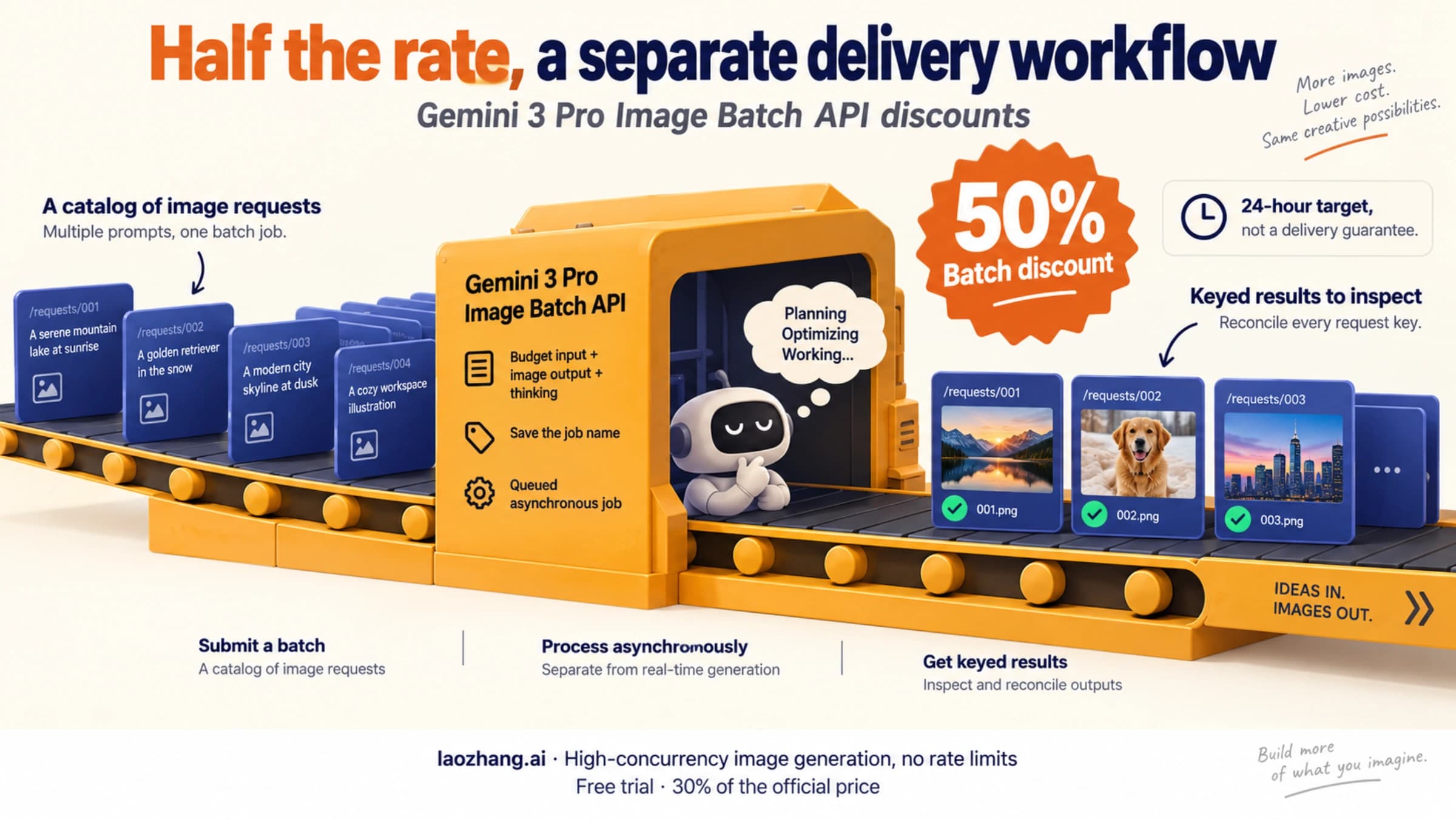
Strategy 2: Enable Batch API processing for non-real-time workloads. Google's Batch API automatically applies a 50% discount to any supported model. Imagen 4 Fast drops from $0.02 to $0.01 per image. Gemini 3.1 Flash Image drops from $0.067 to $0.034. The only requirement is that your application can tolerate asynchronous processing — you submit a batch of requests and receive results minutes to hours later. For applications like nightly content generation, catalog image creation, or marketing asset pipelines, this is pure savings with no quality trade-off. The Batch API processes requests through the same models with identical output quality, just on a lower-priority queue that Google can schedule more efficiently.
Strategy 3: Generate at lower resolution and upscale. This strategy is rarely discussed but can be remarkably effective. Imagen 4 Fast generates a 1K (1024x1024) image for $0.02. Google's upscaling API can enlarge that to 4K for $0.003 per operation (IntuitionLabs, March 2026 pricing data). The total cost of a 4K image via this path is $0.023 — compared to $0.240 for a native 4K image from Gemini 3 Pro Image. That represents a 90% savings on 4K output. The upscaled result will not be identical to a natively generated 4K image, as upscaling algorithms cannot add detail that was not in the original, but for many use cases the difference is imperceptible to end users. This approach works best for images with clear subjects and less fine detail — product shots, landscapes, and diagrams tend to upscale well, while highly detailed illustrations with small text may show artifacts.
Strategy 4: Route through third-party API providers. Services like laozhang.ai offer access to Gemini image models at a flat $0.05 per image regardless of resolution, with simplified billing; the platform states that its API keys have no RPM or concurrency cap. This is 63% cheaper than the official Gemini 3 Pro Image pricing and offers the advantage of a single unified API that aggregates multiple AI models. The trade-off is that you introduce a third-party dependency into your infrastructure. For applications where simplicity and predictable pricing outweigh the need for direct Google API access, this can be an attractive middle ground — cheaper than NBP, and the requests do not count against your own Google project quota. If you have experienced rate limiting issues, our guide on handling Gemini image API rate limits covers both prevention strategies and recovery patterns.
Disclosure: laozhang.ai is our own service. Its prices are platform pricing, not an independent comparison.
Strategy 5: Implement hybrid model routing based on quality requirements. This is the most sophisticated approach and delivers the best overall cost-to-quality ratio. Instead of using a single model for all image generation, you build a routing layer that sends each request to the most cost-effective model based on the specific quality requirements of that request. Thumbnails and preview images route to Imagen 4 Fast ($0.02). Standard-quality production images route to Gemini 3.1 Flash Image ($0.067). Premium images that require text rendering or conversational editing route to Gemini 3 Pro Image ($0.134). With a typical distribution of 60% low-quality, 30% standard, and 10% premium requests, the weighted average cost drops to approximately $0.038 per image — a 72% reduction from the flat NBP rate. This approach requires more engineering effort to implement but pays for itself quickly at scale.
The Hidden Costs Nobody Talks About
Every pricing guide you will find online — including the one Google publishes — shows you the per-image or per-token cost and stops there. In production, the actual cost per successfully delivered image is meaningfully higher than the headline rate, and understanding these hidden costs is critical for accurate budget planning. This section covers the cost components that most guides overlook entirely, based on real-world usage patterns reported by developers in production environments.
Failed requests represent the most commonly underestimated cost. When a Gemini image generation request fails due to content safety filters (the IMAGE_SAFETY or PROHIBITED_CONTENT finish reasons), you are still billed for the input tokens that were processed before the generation was blocked. Google does not refund the input processing cost for requests that fail at the output stage. Depending on your prompt content and the model's safety filter sensitivity, failure rates can range from 2% for generic product images to 15% or higher for prompts involving people, fashion, or anything the model's March 2026 tightened safety policies might flag. At a 10% failure rate, your effective cost per successful image increases by approximately 11% — $0.02 becomes $0.022 for Imagen 4 Fast, and $0.134 becomes $0.149 for Gemini 3 Pro Image.
Infrastructure costs add another layer that is invisible in per-image pricing comparisons. If you are accessing the API through Google Cloud, you are paying for the compute resources that run your API client, the network egress for downloading generated images (which at 1K resolution average about 200KB to 500KB each), and the Cloud Storage or equivalent service you use to store those images. For a pipeline processing 10,000 images per month, these infrastructure costs typically add $5 to $20 per month depending on your architecture and region. This is a fixed overhead that is negligible at high volume but can represent 10% or more of your total cost at low volume.
Rate limit management creates indirect costs that are easy to overlook. Google imposes both RPM (requests per minute) and IPM (images per minute) limits that vary by model and account tier. When your application hits a rate limit, it either needs to retry (adding latency and additional API calls for exponential backoff) or queue requests (requiring infrastructure for queue management). The retry pattern is particularly expensive because each retry attempt may consume additional input tokens if the request was partially processed before being rate-limited. Building robust rate limit handling — including circuit breakers, queue systems, and monitoring — requires engineering time that should be factored into the total cost of ownership. For most teams, the engineering cost of rate limit management exceeds the actual API costs during the first few months of implementation.
Monitoring and observability costs represent yet another hidden expense. To maintain visibility into your image generation pipeline, you need logging for every request and response, metrics dashboards to track success rates and latency, and alerting for anomalous spending patterns. Google Cloud's operations suite (formerly Stackdriver) is not free — Cloud Logging charges $0.50 per GB of log data ingested after the first 50 GB per month, and Cloud Monitoring charges for custom metrics. A pipeline generating 10,000 images per month with detailed request and response logging can easily generate 1-2 GB of log data monthly, adding $0.50 to $1.00 to your costs. This is trivial in isolation but adds up alongside the other hidden costs.
The bottom line is that your real cost per image in production is typically 15% to 30% higher than the headline per-image price when you account for failures, infrastructure, rate limit overhead, and monitoring. For budget planning purposes, multiply the nominal per-image cost by 1.2 to get a more realistic estimate. A project budgeted at $200 per month using the nominal rate of $0.02 per image (10,000 images) should actually budget $240 to account for these hidden costs. This buffer becomes even more important during periods of high demand, when Google's infrastructure experiences increased load and failure rates can temporarily spike above their usual baseline.
Decision Matrix: Which Model Fits Your Budget and Quality Needs?
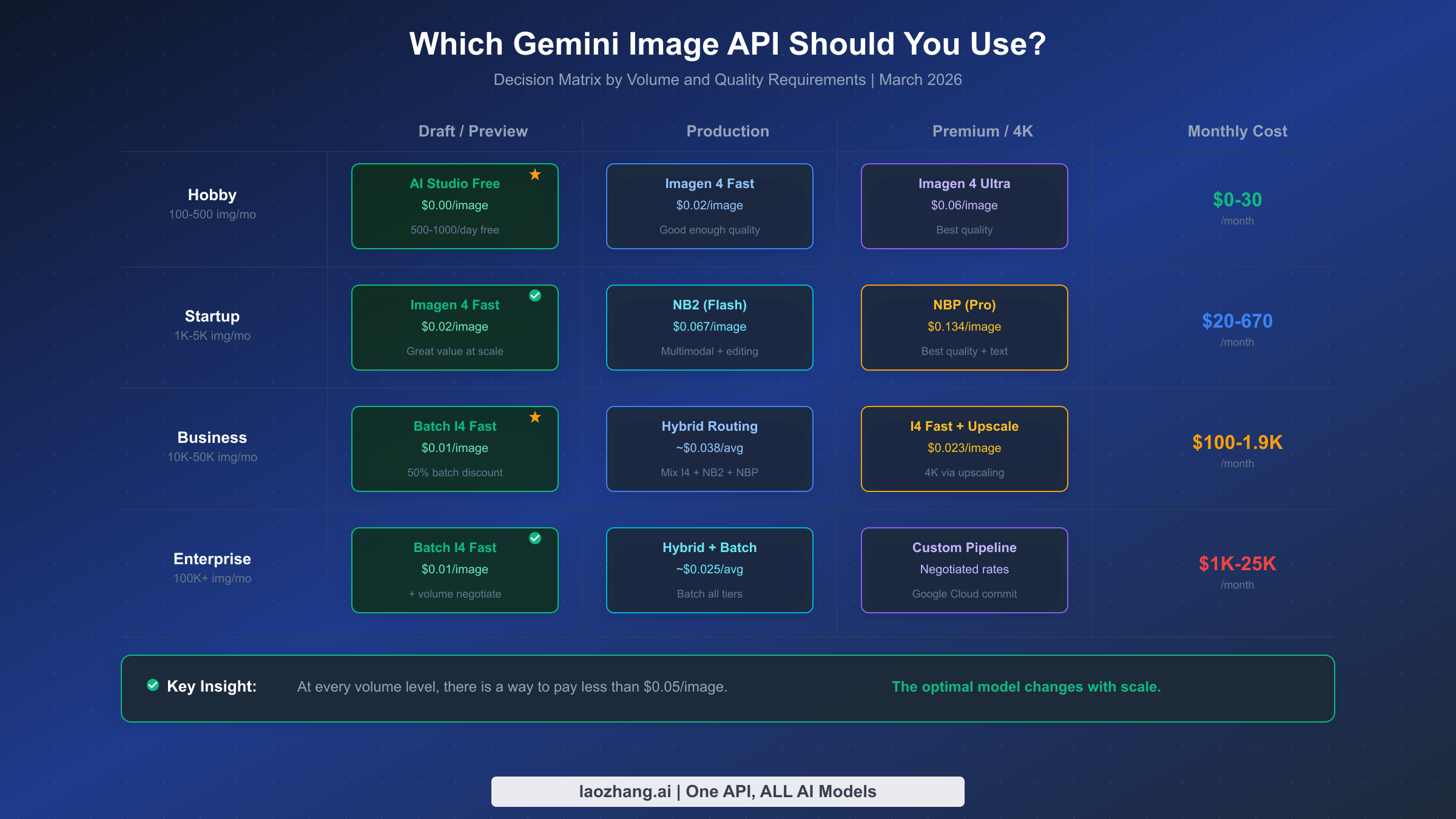
Choosing the right model is not a one-size-fits-all decision — it depends on your monthly volume, your quality requirements, and whether your application needs real-time or asynchronous processing. The matrix below maps common usage scenarios to their optimal model configurations and estimated monthly costs. All cost estimates include a 20% buffer for the hidden costs discussed in the previous section.
For hobby and side projects generating 100 to 500 images per month, the Google AI Studio free tier is the obvious starting point. You can generate 500 to 1,000 images per day at zero cost through the web interface. When you outgrow the free tier or need programmatic access, Imagen 4 Fast at $0.02 per image keeps your monthly bill between $2 and $10 — less than a cup of coffee. At this volume, the hidden costs are negligible and you should not overcomplicate your architecture with batch processing or hybrid routing.
Startups and small teams generating 1,000 to 5,000 images per month face the first meaningful pricing decision. At this scale, Imagen 4 Fast remains the most cost-effective option for basic generation at $20 to $100 per month. If you need multimodal capabilities (image editing, conversational refinement), Gemini 3.1 Flash Image at $0.067 per image offers the best balance of capability and cost, bringing your monthly bill to $67 to $335. Only resort to Gemini 3 Pro Image ($0.134/image) for the subset of images that require premium text rendering or the highest visual fidelity, and consider the hybrid routing strategy to keep your average cost closer to $0.04 per image.
Business applications processing 10,000 to 50,000 images per month should invest in batch processing and hybrid routing. The Batch API brings Imagen 4 Fast down to $0.01 per image, meaning 10,000 images costs just $100 per month before hidden cost buffer. A hybrid approach mixing batch Imagen 4 Fast (60%), batch Gemini 3.1 Flash Image (30%), and on-demand Gemini 3 Pro Image (10%) averages approximately $0.025 per image, or $250 to $1,250 per month depending on volume. At this scale, the engineering investment in building a quality-based routing layer pays for itself within one to two months.
Enterprise deployments exceeding 100,000 images per month should negotiate directly with Google Cloud for committed use discounts, which can reduce prices by an additional 20% to 40% beyond the standard rate. At this volume, even small per-image savings compound significantly — a $0.005 reduction per image saves $500 per month at 100,000 images. The batch-only Imagen 4 Fast price of $0.01 per image means 100,000 images costs $1,000 per month, making AI image generation remarkably affordable even at scale.
One pattern that is gaining traction among companies operating at the business and enterprise tiers is maintaining accounts with multiple providers simultaneously. By running Imagen 4 for the bulk of generation, a Gemini native model for premium requests, and a third-party provider as a fallback when Google's rate limits or safety filters block requests, teams achieve both cost optimization and reliability. The third-party fallback is particularly valuable during Google Cloud outages or during periods when the safety filters are temporarily more aggressive than usual — rather than failing entirely, the system degrades gracefully to an alternative provider. This multi-provider architecture typically adds 10% to 15% to infrastructure complexity but can improve overall availability from 99.5% to 99.9% or higher.
Real Monthly Cost Examples for Common Use Cases
Abstract pricing tables are useful for comparison, but they do not tell you what your actual monthly bill will look like. These three scenarios, based on real production workloads, illustrate how the strategies above translate into concrete budget numbers. Each scenario includes the hidden cost buffer of 20% discussed earlier.
A SaaS product with user-generated content typically needs about 3,000 images per month — a mix of user avatars, content thumbnails, and feature images. Using the hybrid routing strategy, the breakdown looks like this: 1,800 thumbnails through batch Imagen 4 Fast at $0.01 each ($18), 900 content images through Gemini 3.1 Flash Image at $0.067 ($60.30), and 300 premium feature images through Gemini 3 Pro Image at $0.134 ($40.20). The subtotal is $118.50, plus a 20% hidden cost buffer brings the realistic monthly budget to $142. Compare this to the naive approach of running everything through Gemini 3 Pro Image: 3,000 images at $0.134 equals $402 plus buffer equals $482. The hybrid approach saves $340 per month, or $4,080 per year.
An e-commerce platform generating product images might process 15,000 images per month across multiple categories. With the batch-plus-upscale strategy: 12,000 standard product shots through batch Imagen 4 Fast at $0.01 ($120), then upscaled to 4K for $0.003 each ($36), plus 3,000 lifestyle images through batch Gemini 3.1 Flash Image at $0.034 ($102). Subtotal $258, with buffer $310 per month. The same volume through Gemini 3 Pro Image at standard rates would cost $2,010 plus buffer equals $2,412. The optimized approach delivers 87% savings.
A marketing agency producing campaign assets might generate 500 high-quality images per month, all requiring premium visual fidelity and text rendering. In this case, there is less room for cost optimization because quality is the primary concern. Running everything through Gemini 3 Pro Image at $0.134 costs $67 plus buffer equals $80 per month. This is a situation where the premium model justifies its cost — $80 per month for 500 professional-quality images is extraordinarily affordable compared to stock photography at $5 to $50 per image or hiring a professional photographer at $500 or more per shoot. The key insight here is that cost optimization matters most at scale; at low volume with high quality requirements, the premium model is the right choice and the absolute dollar amount is still modest.
It is worth noting how dramatically these costs have fallen over the past year. In early 2025, generating 1,000 images through the best available APIs cost approximately $400 to $800 per month. Today, using Imagen 4 Fast with the Batch API, that same volume costs just $10 — a reduction of 95% or more. This trend shows no signs of slowing down, with Google, OpenAI, and emerging competitors like ByteDance's Seedream 5.0 Lite at $0.035 per image all competing aggressively on price. The practical implication for developers is that image generation costs are becoming negligible relative to other infrastructure expenses, and the optimization effort should be proportional to your actual spending. If your total image generation bill is under $50 per month, the time spent implementing complex optimization strategies may exceed the money saved.
Getting Started with the Cheapest Option
The fastest way to start generating images at the lowest possible cost is through the Imagen 4 Fast model via Google's Gemini API. The following Python code demonstrates a complete working example that you can run immediately after setting up your Google AI API key.
import google.generativeai as genai
from PIL import Image
import io

# Configure with your API key
genai.configure(api_key="YOUR_API_KEY")

# Use Imagen 4 Fast for cheapest generation ($0.02/image)
imagen = genai.ImageGenerationModel("imagen-4-fast")

# Generate a single image
result = imagen.generate_images(
    prompt="A professional product photo of a modern wireless headphone on white background",
    number_of_images=1,
    aspect_ratio="1:1",
)

# Save the result
for i, image in enumerate(result.images):
    img = Image.open(io.BytesIO(image._pil_image.tobytes()))
    img.save(f"output_{i}.png")
    print(f"Image saved: output_{i}.png")
For the Batch API (50% discount), you need to use the Google Cloud client library instead of the generative AI SDK. Batch requests are submitted as JSON files to a Cloud Storage bucket, processed asynchronously, and the results are written back to another bucket. The setup requires a Google Cloud project with billing enabled, but the 50% discount more than compensates for the additional complexity. A complete batch processing pipeline — including error handling, retry logic, and result retrieval — is covered in our batch API cost optimization guide with production-ready code examples.
For developers who prefer Node.js, the equivalent setup using the Google AI JavaScript SDK is equally straightforward. The key difference is that the JavaScript SDK uses a promise-based API and returns images as base64-encoded strings rather than PIL Image objects, which you can then decode and write to disk or pipe directly to a CDN upload endpoint.
const { GoogleGenerativeAI } = require("@google/generative-ai");
const fs = require("fs");

const genAI = new GoogleGenerativeAI("YOUR_API_KEY");

async function generateImage() {
  const model = genAI.getGenerativeModel({ model: "imagen-4-fast" });
  const result = await model.generateImages({
    prompt: "A professional product photo of a modern wireless headphone on white background",
    numberOfImages: 1,
  });

  for (const [i, image] of result.images.entries()) {
    const buffer = Buffer.from(image.data, "base64");
    fs.writeFileSync(`output_${i}.png`, buffer);
    console.log(`Image saved: output_${i}.png`);
  }
}

generateImage();
When implementing your generation pipeline, there are three technical details that will save you debugging time. First, always check the finish_reason in the API response before attempting to access the generated image. A finish_reason of SAFETY, IMAGE_SAFETY, or PROHIBITED_CONTENT means no image was generated, and trying to access the image data will raise an exception in most SDKs. Second, implement exponential backoff for 429 (rate limit) responses starting at 1 second with a maximum of 32 seconds — Google's rate limits use a token bucket algorithm that refills quickly, so most rate limit situations resolve within a few seconds. Third, if you are using the Python google-genai SDK, be aware of a known bug where accessing finish_reason on a blocked response can cause the SDK to hang indefinitely. Wrap any finish_reason access in a timeout handler to prevent your pipeline from stalling.
Frequently Asked Questions
Is there a free tier for Gemini image generation via API?
Google AI Studio provides a free tier that allows 500 to 1,000 image generations per day through the web interface, with the exact limit varying based on server load (aifreeapi.com, March 2026). However, this free tier applies only to the web UI — programmatic API access for image generation requires a paid Google Cloud account. The free API tier that exists for text-based Gemini models does not extend to image generation endpoints. For developers who need free programmatic image generation, the only viable path is to use the free tier within the daily limits and build a wrapper that interacts with AI Studio's interface, though this approach is fragile and not recommended for production use.
How does Imagen 4 quality compare to Gemini 3 Pro Image?
Imagen 4 Ultra and Gemini 3 Pro Image produce images of comparable visual quality for most subjects, but they excel in different areas. Gemini 3 Pro Image achieves 94-96% text rendering accuracy (spectrumailab benchmark) and supports multi-turn editing, making it superior for images containing readable text or requiring iterative refinement. Imagen 4 models are faster (2-4 seconds versus 8-12 seconds for NBP at 4K) and more cost-effective, but their text rendering is noticeably less accurate. For applications where the image content does not include text — product photography, illustrations, landscapes — Imagen 4 Fast or Standard provides equivalent perceived quality at a fraction of the cost.
Can I use multiple models together in the same application?
Yes, and this is actually the recommended approach at any meaningful scale. The hybrid routing strategy described in Strategy 5 uses multiple models within the same application, routing each request to the most cost-effective model based on the quality requirements of that specific image. This requires maintaining API access to multiple models and building a routing layer in your application code, but the engineering effort is modest — a simple if/else based on a quality parameter is sufficient for most implementations. The Gemini API SDK supports all models through the same authentication mechanism, so you do not need separate credentials or billing accounts.
What happens if my request is blocked by safety filters?
When a request is blocked by Google's content safety system, you are still billed for the input tokens that were processed before the block was triggered. The response will include a finish_reason of SAFETY, IMAGE_SAFETY, or PROHIBITED_CONTENT depending on which filter layer caught the content. As of March 2026, Google has tightened these filters for celebrity likenesses, financial information overlays, and implicitly suggestive content. There is no way to bypass the Layer 2 (policy/terms) filters regardless of your safety settings configuration. For fashion and apparel photography where false positives are common, using product-first language in your prompts (describing the garment rather than the person wearing it) can significantly reduce the block rate.
Are third-party API providers reliable for production use?
Third-party providers like laozhang.ai aggregate access to multiple AI models through a single API endpoint, offering simplified billing. Requests do not count against your own Google project quota; the provider's own limits apply instead, and laozhang.ai states it sets no per-key RPM or concurrency cap. The reliability depends on the specific provider — established services with documented uptime SLAs and transparent pricing can be suitable for production use, while newer or undocumented services carry more risk. The primary trade-off is introducing a dependency on a third party for a critical part of your infrastructure. For applications where simplicity, flat pricing, and staying off your own Google quota outweigh the need for direct vendor relationships, third-party providers can be an effective cost optimization lever. You can test image generation quality and speed at images.laozhang.ai before committing.