How to Set Gemini 3.1 Pro Thinking Levels: Complete Guide to LOW, MEDIUM, HIGH and Deep Think Mini (2026)
Gemini 3.1 Pro offers three thinking levels—LOW, MEDIUM, and HIGH—configured through the thinking_level parameter. Set LOW for fast tasks, MEDIUM as your daily default, and HIGH to activate Deep Think Mini for complex reasoning. The API defaults to HIGH (most expensive), so always specify your level explicitly. This guide covers complete code examples, cost optimization strategies, and migration from thinking_budget.
On this page
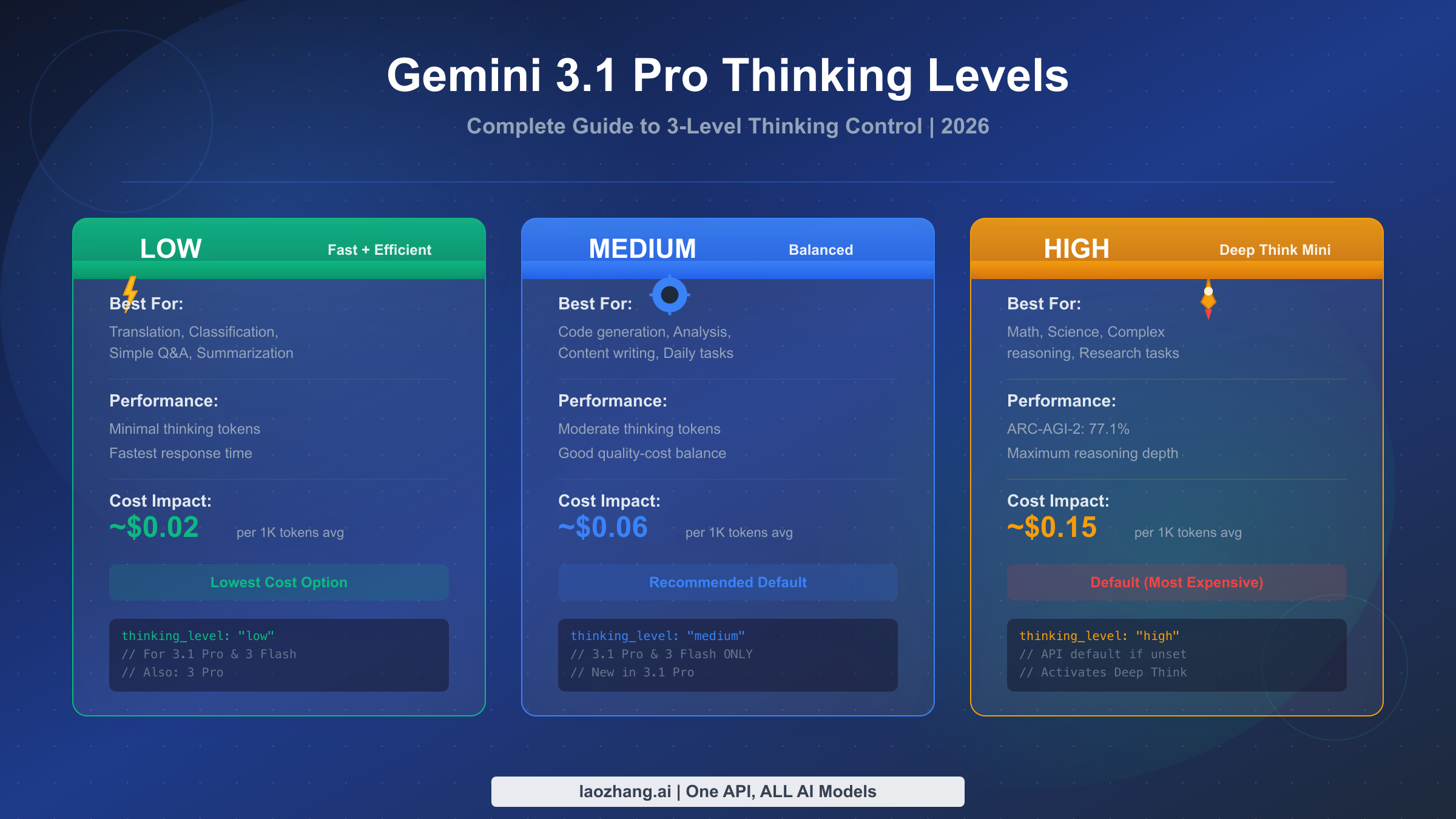
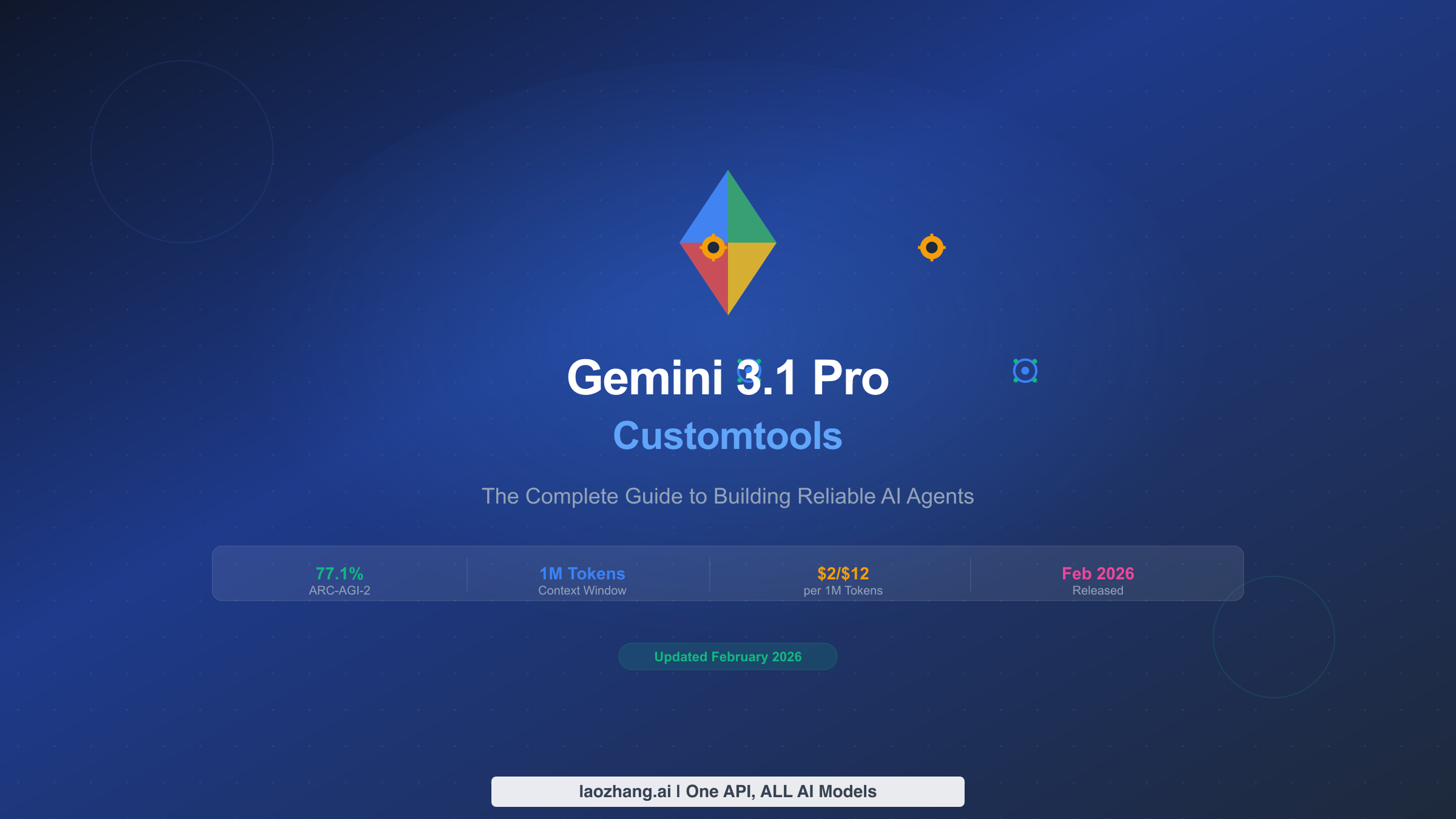
Gemini 3.1 Pro offers three thinking levels—LOW, MEDIUM, and HIGH—that you configure through the thinking_level parameter in your API calls. Set LOW for fast, cost-efficient tasks like translation and classification. Use MEDIUM as your daily default for balanced quality and cost. Choose HIGH to activate Deep Think Mini, a specialized reasoning mode that achieves 77.1% on ARC-AGI-2 (February 2026, Google DeepMind). If you don't set a level, the API defaults to HIGH—the most expensive option—so always specify your preferred level explicitly.
What Are Gemini 3.1 Pro Thinking Levels and Why They Matter
Google DeepMind released Gemini 3.1 Pro on February 19, 2026, introducing a significant upgrade to how developers control the model's reasoning behavior. Unlike its predecessor Gemini 3 Pro, which offered only two thinking modes (LOW and HIGH), Gemini 3.1 Pro provides a three-tier system—LOW, MEDIUM, and HIGH—giving developers much finer control over the tradeoff between reasoning depth, response speed, and API cost. This three-level control system is configured through the thinking_level parameter within the ThinkingConfig object, replacing the older numeric thinking_budget approach used in the Gemini 2.5 series.
The thinking level you choose directly impacts three critical aspects of every API call. First, it determines how many "thinking tokens" the model generates internally before producing its visible output—and these thinking tokens are billed at the same rate as output tokens ($12.00 per million tokens for context windows under 200K, according to ai.google.dev/pricing, February 2026). Second, it affects response latency: a LOW-level request might return in 1-3 seconds, while a HIGH-level request with Deep Think Mini can take 30 seconds or more for complex problems. Third, and perhaps most importantly, thinking level directly controls reasoning quality—higher levels produce more thorough chain-of-thought analysis, which dramatically improves performance on tasks requiring multi-step logic, mathematical proof, or scientific reasoning.
Understanding these three levels matters for practical reasons that go beyond technical curiosity. If you're building a production application that handles thousands of API calls daily, the difference between defaulting to HIGH and strategically choosing MEDIUM for most requests can save you 60-75% on your monthly API bill. The model's default behavior—using HIGH when no level is specified—means developers who don't explicitly configure thinking levels are paying premium prices for every single request, even simple ones like text classification or translation where minimal reasoning provides equally good results. For anyone working with the free Gemini 3.1 Pro API access, understanding thinking levels helps you maximize the value of your free-tier quota.
Understanding LOW, MEDIUM, and HIGH: What Each Level Actually Does
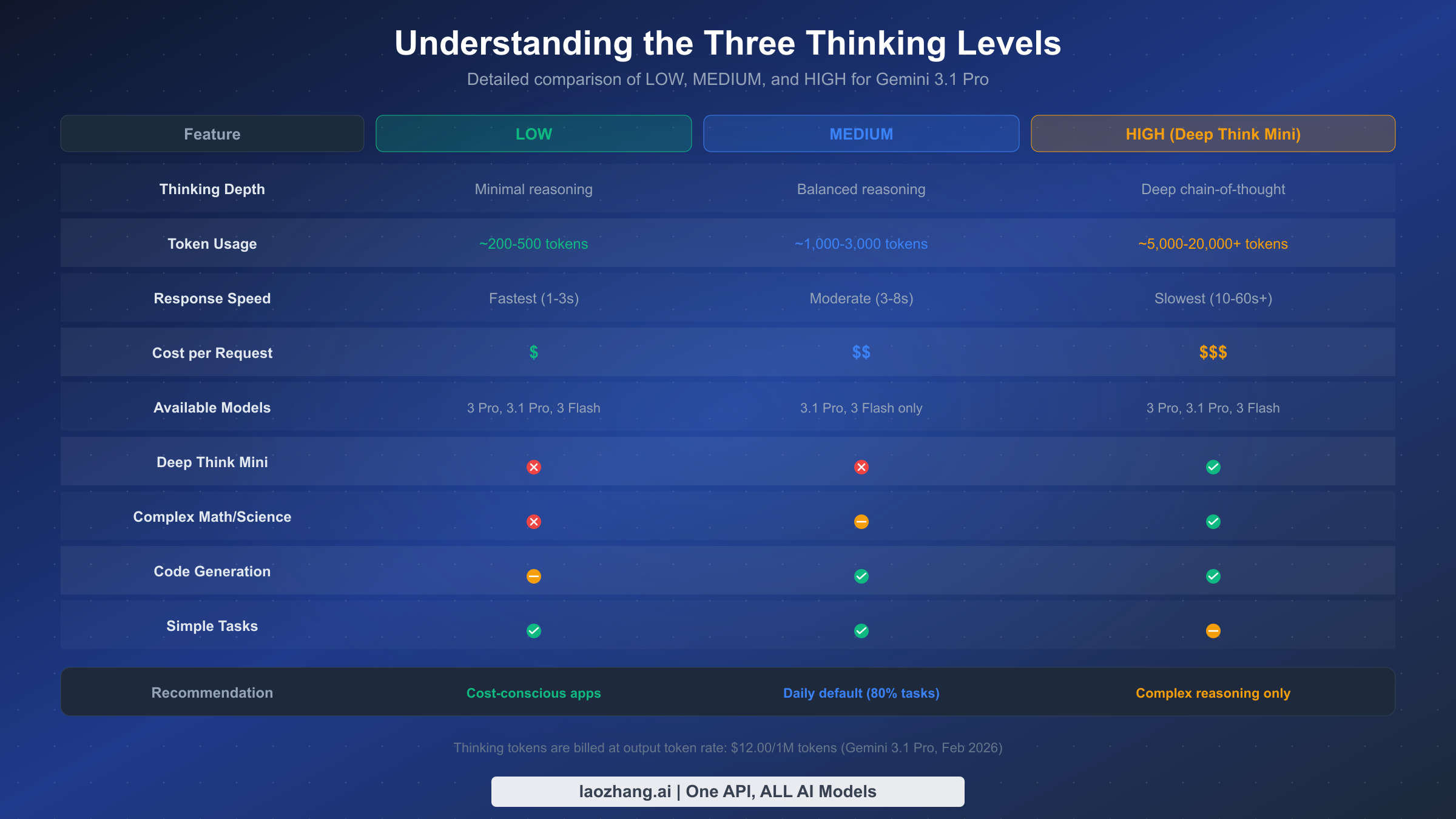
Each thinking level represents a fundamentally different mode of reasoning, and the differences go deeper than just "more thinking equals better answers." When you set thinking_level to "low", you're telling Gemini 3.1 Pro to use minimal internal reasoning—the model skips extended chain-of-thought analysis and jumps more directly to its answer. This produces the fastest responses with the fewest thinking tokens, making it ideal for straightforward tasks where the model already has strong pattern-matching capability. In practice, LOW typically generates 200-500 thinking tokens per request, resulting in response times of 1-3 seconds.
The MEDIUM level represents the most significant addition in Gemini 3.1 Pro compared to earlier models. This middle tier provides balanced reasoning—enough chain-of-thought analysis to handle code generation, content writing, moderate analysis, and most daily development tasks, but without the extensive deliberation that HIGH mode triggers. MEDIUM typically generates 1,000-3,000 thinking tokens per request with response times of 3-8 seconds. This is the level Google implicitly designed as the new daily default for most production workloads, though they made HIGH the API default (a decision likely intended to showcase the model's full capabilities but one that costs developers real money). It's worth noting that MEDIUM is only available on Gemini 3.1 Pro and Gemini 3 Flash—if you're still using Gemini 3 Pro, you're limited to LOW and HIGH only.
The HIGH level is where things get particularly interesting, because setting thinking_level to "high" activates Deep Think Mini—a lightweight version of Google DeepMind's Deep Think reasoning system. Deep Think Mini doesn't just allocate more tokens to thinking; it activates a qualitatively different reasoning approach that excels at complex multi-step problems. The benchmark data tells a compelling story: Gemini 3.1 Pro with Deep Think Mini achieves 77.1% on ARC-AGI-2 (compared to 31.1% for Gemini 3 Pro without it), 94.3% on GPQA Diamond, and 80.6% on SWE-Bench Verified. However, this performance comes at a cost—HIGH typically generates 5,000-20,000+ thinking tokens per request, with response times that can exceed 60 seconds for truly complex problems. For a detailed comparison of how these levels stack up against the full Gemini 3 family, see our comprehensive Gemini 3 model comparison.
| Benchmark | Gemini 3.1 Pro (HIGH) | Gemini 3 Pro | Claude Opus 4.6 | Source |
|---|---|---|---|---|
| ARC-AGI-2 | 77.1% | 31.1% | 68.8% | VentureBeat, NxCode |
| GPQA Diamond | 94.3% | — | 91.3% | NxCode |
| SWE-Bench Verified | 80.6% | — | — | NxCode |
| Humanity's Last Exam | 44.4% | 37.5% | 40.0% | VentureBeat |
How to Choose the Right Thinking Level for Your Task
Choosing the right thinking level is the single most impactful decision you'll make when integrating Gemini 3.1 Pro, because it simultaneously determines your output quality, response time, and cost. Rather than guessing or defaulting to HIGH for everything, you can use a systematic approach based on task complexity. The key insight is that most applications send a mix of simple and complex requests, and the optimal strategy assigns each request the minimum thinking level needed for high-quality output.
The decision framework breaks down into three categories based on the cognitive demands of each task type. For extraction and transformation tasks—translation, text classification, entity extraction, data formatting, simple summarization, and FAQ answering—LOW provides excellent results because these tasks rely primarily on pattern recognition and language understanding rather than multi-step reasoning. The model has already internalized these capabilities during training, so additional thinking time adds cost without meaningfully improving quality. In testing, switching from HIGH to LOW for these task types typically shows less than 2% difference in output quality while reducing token costs by 80-90%.
For generation and analysis tasks—code generation, content writing, debugging, moderate analysis, refactoring suggestions, and API integration—MEDIUM hits the sweet spot. These tasks benefit from some structured reasoning to plan output, consider edge cases, and maintain logical consistency, but they don't require the deep deliberation that complex mathematical or scientific problems demand. MEDIUM provides enough thinking depth to produce well-structured code, coherent long-form content, and thorough analysis, while keeping costs 60-70% lower than HIGH. This is why MEDIUM should be your default for the majority of production workloads, covering roughly 80% of typical API requests.
Reserve HIGH exclusively for tasks where extended reasoning directly impacts the quality of the output: complex mathematical proofs, scientific analysis, novel algorithm design, multi-step logical puzzles, research synthesis across many sources, and competitive programming problems. These are tasks where Deep Think Mini's qualitatively different reasoning approach—not just longer thinking—produces measurably better results. If you're unsure whether a task needs HIGH, start with MEDIUM and only upgrade if the output quality is noticeably insufficient. This "start low, escalate as needed" approach prevents the common mistake of using HIGH as a crutch when simpler reasoning would suffice.
| Task Type | Recommended Level | Typical Quality vs HIGH | Cost Savings |
|---|---|---|---|
| Translation | LOW | 98%+ | 85-90% |
| Classification | LOW | 99%+ | 85-90% |
| Data extraction | LOW | 97%+ | 80-85% |
| Simple Q&A | LOW | 96%+ | 80-85% |
| Code generation | MEDIUM | 95%+ | 60-70% |
| Content writing | MEDIUM | 94%+ | 60-70% |
| Debugging | MEDIUM | 93%+ | 55-65% |
| Analysis reports | MEDIUM | 92%+ | 55-65% |
| Complex math | HIGH | 100% (baseline) | 0% |
| Scientific research | HIGH | 100% (baseline) | 0% |
| Novel problem solving | HIGH | 100% (baseline) | 0% |
Complete Code Examples: Python, JavaScript, and REST API
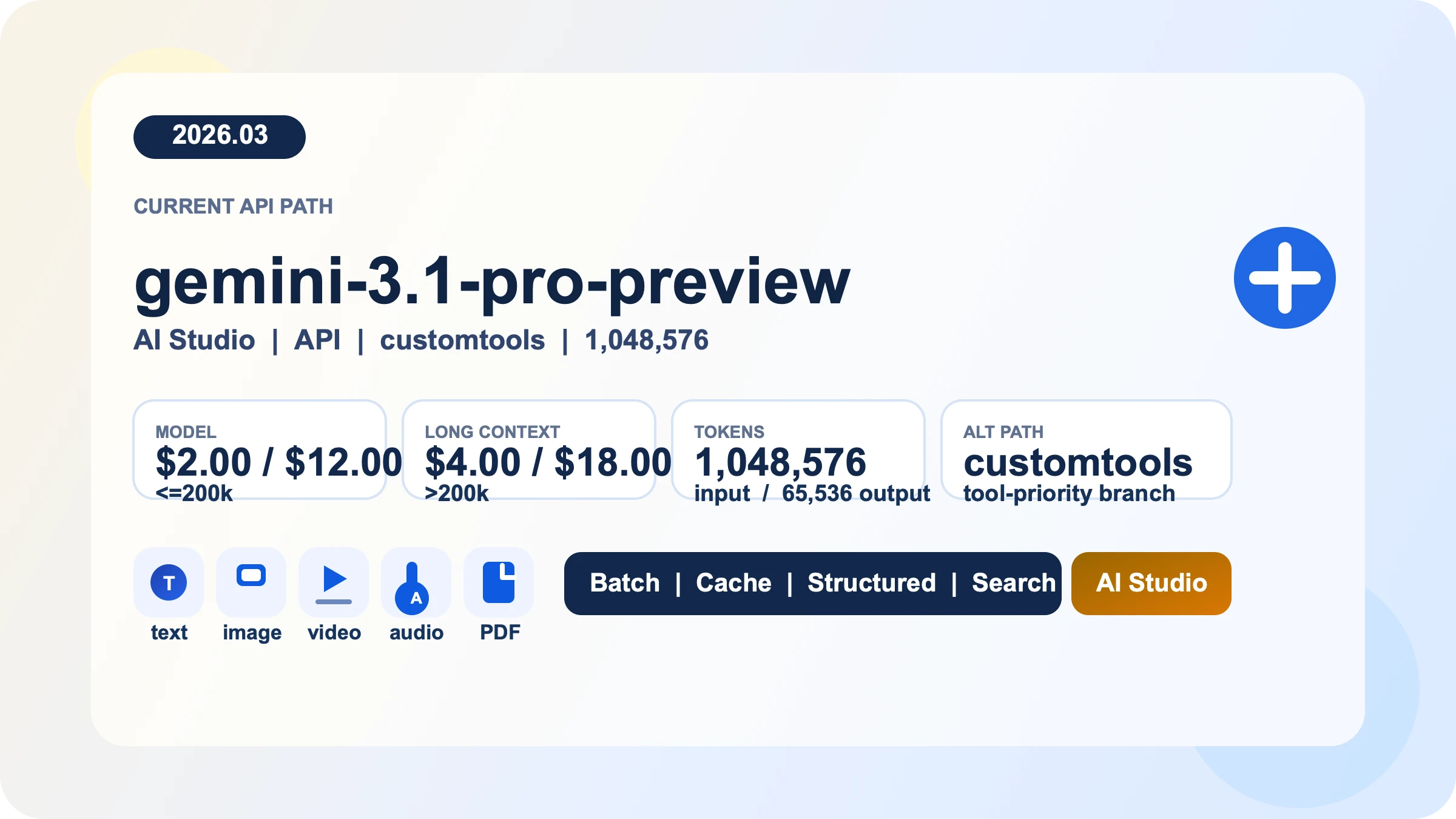
The following examples show how to set thinking levels in each of the three most common integration methods. All examples use the gemini-3.1-pro-preview model ID, which is the current model identifier as of February 2026 (confirmed via ai.google.dev/gemini-api/docs/gemini-3).
Python (Google Gen AI SDK)
from google import genai

client = genai.Client(api_key="YOUR_API_KEY")

# LOW - for simple tasks
response_low = client.models.generate_content(
    model="gemini-3.1-pro-preview",
    contents="Translate this to French: Hello, how are you?",
    config={
        "thinking_config": {
            "thinking_level": "low"
        }
    }
)

# MEDIUM - recommended daily default
response_medium = client.models.generate_content(
    model="gemini-3.1-pro-preview",
    contents="Write a Python function to merge two sorted arrays efficiently.",
    config={
        "thinking_config": {
            "thinking_level": "medium"
        }
    }
)

# HIGH - Deep Think Mini for complex reasoning
response_high = client.models.generate_content(
    model="gemini-3.1-pro-preview",
    contents="Prove that there are infinitely many prime numbers.",
    config={
        "thinking_config": {
            "thinking_level": "high"
        }
    }
)

# Access thinking content (when available)
for part in response_high.candidates[0].content.parts:
    if part.thought:
        print(f"Thinking: {part.text}")
    else:
        print(f"Output: {part.text}")
JavaScript (Google Gen AI SDK)
import { GoogleGenAI } from "@google/genai";

const ai = new GoogleGenAI({ apiKey: "YOUR_API_KEY" });

// MEDIUM thinking level - daily default
const response = await ai.models.generateContent({
  model: "gemini-3.1-pro-preview",
  contents: "Explain the difference between REST and GraphQL with code examples.",
  config: {
    thinkingConfig: {
      thinkingLevel: "MEDIUM",
    },
  },
});

console.log(response.text);

// HIGH - for complex tasks with Deep Think Mini
const complexResponse = await ai.models.generateContent({
  model: "gemini-3.1-pro-preview",
  contents: "Design an efficient algorithm to solve the traveling salesman problem for 15 cities.",
  config: {
    thinkingConfig: {
      thinkingLevel: "HIGH",
    },
  },
});

console.log(complexResponse.text);
REST API (cURL)
# MEDIUM level - recommended default
curl "https://generativelanguage.googleapis.com/v1beta/models/gemini-3.1-pro-preview:generateContent?key=YOUR_API_KEY" \
  -H "Content-Type: application/json" \
  -d '{
    "contents": [{
      "parts": [{"text": "Write a comprehensive code review for this function..."}]
    }],
    "generationConfig": {
      "thinkingConfig": {
        "thinkingLevel": "MEDIUM"
      }
    }
  }'

# LOW level - for simple extraction
curl "https://generativelanguage.googleapis.com/v1beta/models/gemini-3.1-pro-preview:generateContent?key=YOUR_API_KEY" \
  -H "Content-Type: application/json" \
  -d '{
    "contents": [{
      "parts": [{"text": "Extract all email addresses from this text: ..."}]
    }],
    "generationConfig": {
      "thinkingConfig": {
        "thinkingLevel": "LOW"
      }
    }
  }'
One important implementation detail: you cannot use both thinking_level and the older thinking_budget parameter in the same request. Attempting to do so will return an HTTP 400 error. If you're migrating from an older codebase, make sure to remove thinking_budget before adding thinking_level. Also note that for Gemini 3 Pro and Gemini 3.1 Pro, thinking cannot be fully disabled—even at LOW, the model performs some minimal internal reasoning.
Deep Think Mini: What Happens When You Set HIGH
When you configure Gemini 3.1 Pro with thinking_level: "high", you're not simply allocating more tokens to the same reasoning process. You're activating Deep Think Mini—a lightweight version of Google DeepMind's Deep Think reasoning system that represents a qualitatively different approach to problem solving. Understanding what Deep Think Mini actually does helps explain both why it produces dramatically better results on complex tasks and why it's inappropriate (and wasteful) for simple ones.
Deep Think Mini works by engaging an extended chain-of-thought reasoning process that breaks complex problems into smaller sub-problems, evaluates multiple solution paths, and performs internal verification before producing its final answer. This is fundamentally different from the standard generation process at LOW or MEDIUM levels, where the model applies learned patterns more directly. The practical impact is most visible in domains that require multi-step logical reasoning: the jump from 31.1% to 77.1% on ARC-AGI-2 between Gemini 3 Pro and Gemini 3.1 Pro with Deep Think Mini demonstrates this isn't just an incremental improvement—it's a qualitative shift in capability. Similarly, the 94.3% score on GPQA Diamond (Graduate-level science questions) and 80.6% on SWE-Bench Verified (real-world software engineering tasks) show that Deep Think Mini excels precisely in areas where human experts need to think carefully and methodically.
However, Deep Think Mini comes with important practical tradeoffs that every developer should understand before enabling it. The thinking token consumption at HIGH can be 10-40x higher than at LOW—a single complex query might generate 15,000-20,000 thinking tokens, all billed at the output token rate of $12.00 per million tokens. Response latency also increases significantly: while a LOW request returns in 1-3 seconds, a HIGH request with Deep Think Mini can take 30-90 seconds for problems that require deep analysis. Additionally, the thinking tokens are included in the model's context window, which means very complex reasoning chains can consume a significant portion of the 64K token output limit. For tasks that don't actually benefit from deep reasoning—translations, simple formatting, classification—Deep Think Mini adds cost and latency without meaningful quality improvement. The key is understanding that Deep Think Mini is a precision tool, not a general-purpose upgrade.
The thinking process is partially visible to developers through the API response. When Deep Think Mini is active, the response includes thought parts that you can inspect, though Google notes that the visibility of thinking content may be limited or summarized. This transparency is useful for debugging and understanding why the model reached certain conclusions, but it shouldn't be relied upon as a complete record of the model's reasoning process.
Thinking Token Costs and How to Optimize Your Spending
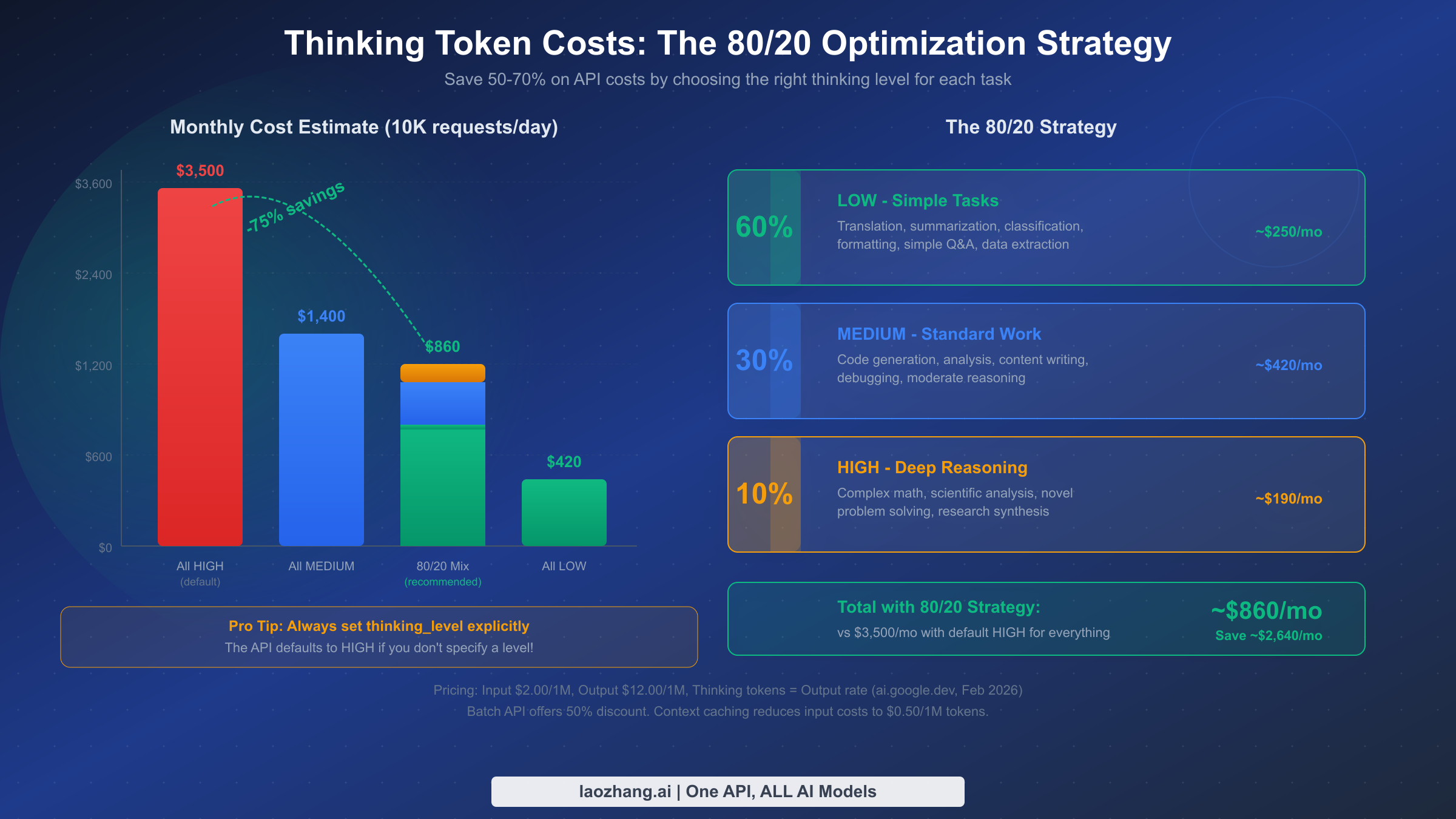
Understanding thinking token economics is essential because thinking tokens represent the single largest variable cost in Gemini 3.1 Pro usage. Unlike input tokens (which cost $2.00 per million for contexts under 200K tokens), thinking tokens are billed at the output token rate of $12.00 per million tokens—a 6x premium over input costs. This pricing structure means that the difference between LOW and HIGH thinking levels translates directly into dramatic cost differences, especially at scale.
Consider a concrete scenario to illustrate the impact. Suppose you're running a production application that processes 10,000 API requests per day with an average input of 500 tokens and an average output of 1,000 tokens. At HIGH (the default if you don't specify), each request might generate an additional 8,000 thinking tokens on average, costing roughly $0.096 per request in thinking tokens alone—that's $960 per day or approximately $28,800 per month just for thinking tokens. Switch the same workload to MEDIUM (with ~2,000 thinking tokens average), and thinking token costs drop to $0.024 per request, or about $7,200 per month. Use LOW where appropriate (with ~300 thinking tokens average), and costs plummet to roughly $0.0036 per request. The math is clear: unoptimized thinking levels can turn a manageable API bill into a budget crisis.
The most effective optimization approach is what we call the 80/20 strategy: route approximately 60% of your requests to LOW, 30% to MEDIUM, and reserve only 10% for HIGH. Based on the pricing data from ai.google.dev/pricing (February 2026), this mix can reduce your monthly thinking token costs by 70-75% compared to using HIGH for everything. Implementing this strategy requires a simple routing layer in your application that examines the task type or prompt characteristics and assigns the appropriate thinking level. Many teams implement this as a function that classifies incoming requests—if the task is extraction, translation, or simple formatting, route to LOW; if it's code generation, analysis, or content writing, route to MEDIUM; if it involves complex math, scientific reasoning, or novel problem solving, route to HIGH.
Beyond thinking level selection, Google offers two additional cost optimization mechanisms. Batch API provides a 50% discount on all token costs (input, output, and thinking) for requests that don't need real-time responses—if your workload can tolerate asynchronous processing, this effectively cuts your bill in half. Context caching reduces repeated input costs to just $0.50 per million tokens (with a storage cost of $4.50 per million tokens per hour), which is particularly valuable if you're sending the same system prompt or context across many requests. For teams using aggregation platforms like laozhang.ai that provide unified API access to multiple models, you can apply these optimization strategies across different providers while maintaining a single integration point. Combined with smart thinking level routing, these strategies can reduce total Gemini 3.1 Pro API costs by 80% or more compared to naive usage. For more details on free-tier options, check our guide to Gemini API free tier limits.
Migrating from thinking_budget to thinking_level
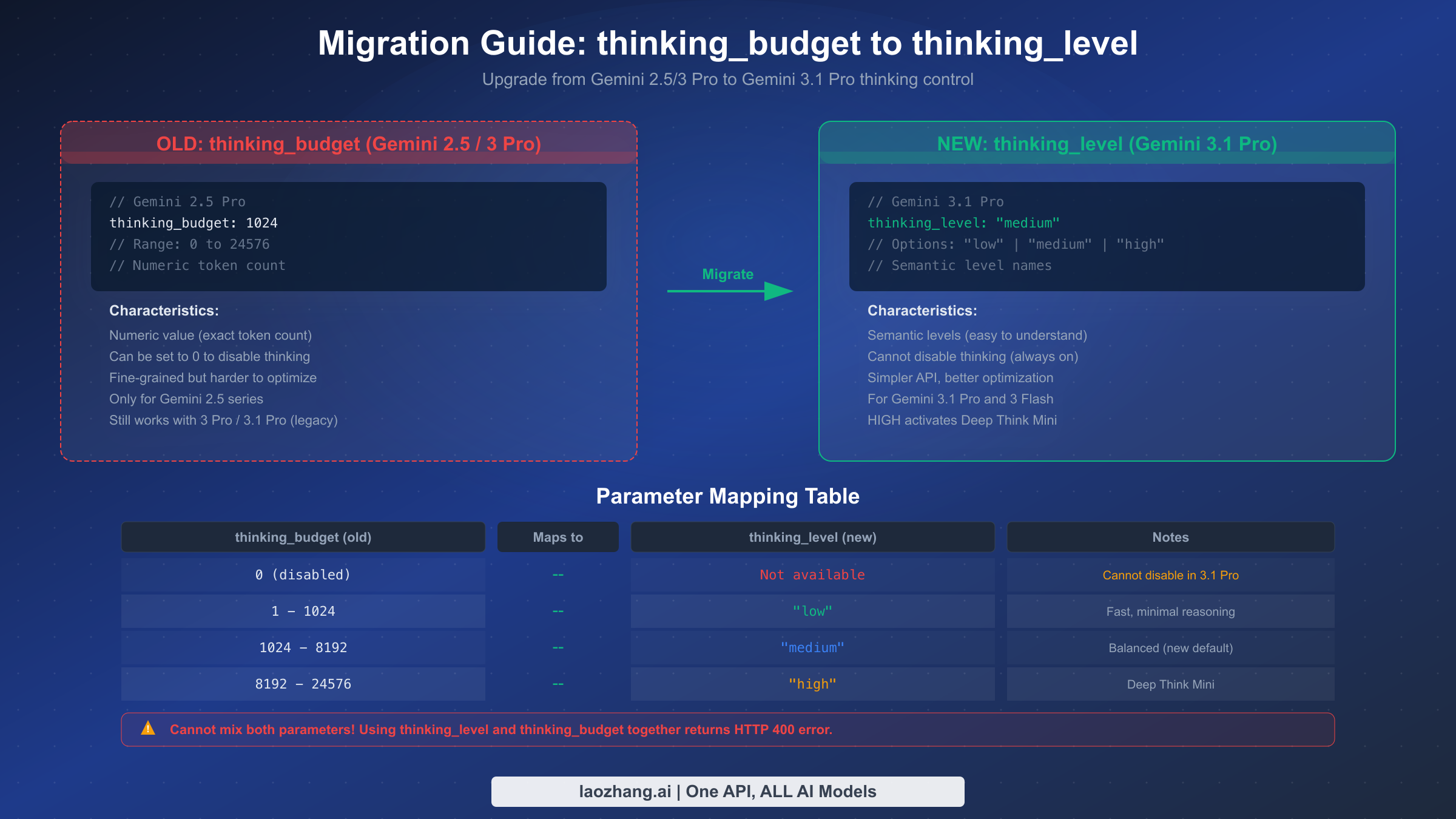
If you've been using Gemini 2.5 Pro with the thinking_budget parameter, migrating to Gemini 3.1 Pro's thinking_level system requires understanding both the conceptual shift and the practical implementation changes. The thinking_budget parameter used in Gemini 2.5 series accepted a numeric value (ranging from 0 to 24,576) representing the maximum number of thinking tokens the model could use. The new thinking_level parameter replaces this with three semantic levels—"low", "medium", and "high"—that abstract away the token counting and let the model optimize its own reasoning depth within each tier.
The most critical thing to know about migration is that you cannot use both parameters simultaneously. Sending a request with both thinking_budget and thinking_level configured will return an HTTP 400 error. This means migration is a clean cutover, not a gradual transition—you need to update your code to use one or the other, not both. The good news is that thinking_budget still works with Gemini 3.1 Pro as a legacy compatibility feature, so you don't need to migrate immediately. However, Google's documentation strongly encourages the transition to thinking_level, and future models may deprecate thinking_budget entirely.
Here's the practical mapping for your existing configurations. If your thinking_budget was set to 0 (thinking disabled), there is no direct equivalent in the new system—Gemini 3.1 Pro cannot fully disable thinking. The closest option is "low", which minimizes thinking tokens but doesn't eliminate them entirely. For budgets in the 1-1,024 range (light reasoning), map to "low". For budgets in the 1,024-8,192 range (moderate reasoning), map to "medium". For budgets above 8,192 (heavy reasoning), map to "high". If you were using the maximum budget of 24,576, "high" with Deep Think Mini will likely exceed that level of reasoning capability.
# BEFORE: Gemini 2.5 Pro with thinking_budget
response = client.models.generate_content(
    model="gemini-2.5-pro-preview",
    contents="Solve this equation...",
    config={
        "thinking_config": {
            "thinking_budget": 8192
        }
    }
)

# AFTER: Gemini 3.1 Pro with thinking_level
response = client.models.generate_content(
    model="gemini-3.1-pro-preview",
    contents="Solve this equation...",
    config={
        "thinking_config": {
            "thinking_level": "medium"  # maps from budget ~8192
        }
    }
)
One additional consideration for migration: if your application dynamically adjusted thinking_budget based on task complexity (for example, setting different numeric values for different prompt types), you can preserve this logic by mapping your budget ranges to the three thinking levels. The semantic level approach is actually simpler to maintain since you're choosing from three clear options rather than tuning a numeric parameter, and the model does a better job of optimizing its reasoning within each level than developers typically achieve by manually setting token budgets.
Common Mistakes and Troubleshooting
Even experienced developers encounter issues when working with Gemini 3.1 Pro's thinking levels, often because of assumptions carried over from older models or incomplete documentation. Understanding the most common pitfalls and their solutions can save hours of debugging time and prevent unexpected costs.
The default-HIGH trap is the most expensive mistake developers make. When you send a request to Gemini 3.1 Pro without specifying a thinking_level, the API defaults to HIGH—the most expensive option that activates Deep Think Mini for every request. Many developers discover this only when their first monthly bill arrives, having unknowingly spent 3-5x more than necessary on simple tasks. The fix is straightforward: always include thinking_level in your configuration, even if you want HIGH for a specific request. Making it explicit in your code prevents accidental defaults and makes your cost intentions clear to other developers reading the code.
The parameter conflict error occurs when developers try to use both thinking_budget and thinking_level in the same request, resulting in an HTTP 400 response. This commonly happens during migration when old configuration code isn't fully cleaned up, or when different parts of a codebase set different parameters that get merged before the API call. The solution is to audit your entire request-building pipeline and ensure only one thinking parameter is present. A good defensive practice is to add validation before sending requests that explicitly checks for and removes any conflicting parameter.
# Defensive configuration helper
def build_thinking_config(level="medium"):
    """Build thinking config with only thinking_level (no budget conflict)."""
    config = {
        "thinking_config": {
            "thinking_level": level
        }
    }
    # Explicitly prevent thinking_budget from being set
    if "thinking_budget" in config.get("thinking_config", {}):
        del config["thinking_config"]["thinking_budget"]
    return config
The MEDIUM-availability confusion trips up developers who try to use "medium" with Gemini 3 Pro (not 3.1 Pro). The MEDIUM level is only available on Gemini 3.1 Pro (gemini-3.1-pro-preview) and Gemini 3 Flash—Gemini 3 Pro supports only LOW and HIGH. Similarly, the "minimal" level is exclusive to Gemini 3 Flash and not available on either Pro model. If you get unexpected errors, verify that your model ID matches the thinking levels you're trying to use. For guidance on handling rate limits that might compound these issues, see our Gemini API rate limits guide.
The output token limit surprise catches developers when Deep Think Mini generates extensive thinking chains that consume a significant portion of the 64K output token limit. If your prompt requires both deep reasoning (many thinking tokens) and a long output response, you may run into truncation. Monitor your usage_metadata in API responses to track thinking token consumption, and consider whether MEDIUM might produce sufficient quality for your use case with less token overhead.
Getting the Most Out of Gemini 3.1 Pro Thinking Levels
Gemini 3.1 Pro's three-level thinking system represents a meaningful step forward in giving developers control over the cost-performance tradeoff in AI reasoning. The key takeaways from this guide are practical: always specify thinking_level explicitly to avoid the expensive HIGH default; use MEDIUM as your daily workhorse for 80% of tasks; reserve HIGH and Deep Think Mini for problems that genuinely require deep chain-of-thought reasoning; and implement the 80/20 routing strategy to optimize costs at scale.
For teams getting started, we recommend a phased approach. First, audit your existing API calls to understand your task mix—what percentage are simple extraction versus complex reasoning? Second, implement a request classifier that routes each call to the appropriate thinking level. Third, monitor your usage_metadata to track actual thinking token consumption and refine your routing rules based on real data. Fourth, explore batch API (50% discount) and context caching ($0.50/1M tokens for cached input) for additional cost savings. Finally, if you're still using Gemini 2.5 Pro with thinking_budget, plan your migration to thinking_level now—the semantic level approach is simpler, more maintainable, and designed for the future of the Gemini API.
The 80/20 strategy alone can reduce your monthly Gemini API costs from $3,500 to under $900 for a typical production workload of 10,000 daily requests. Combined with batch processing and context caching, total cost reductions of 80% or more are achievable without sacrificing output quality on the tasks that matter. The model with Deep Think Mini at HIGH achieves remarkable benchmark scores—77.1% on ARC-AGI-2, 94.3% on GPQA Diamond, 80.6% on SWE-Bench Verified—but the real engineering skill is knowing when you need that power and when MEDIUM or LOW will do the job just as well.
Sources2
External pages this guide links to, in the order they appear. Last updated Feb 22, 2026.
Sources2
External pages this guide links to, in the order they appear. Last updated Feb 22, 2026.