Claude 4.6 Agent Teams: The Complete Guide to Multi-Agent Coding in 2026
Claude 4.6 Agent Teams is a groundbreaking experimental feature that lets you coordinate multiple AI coding agents working in parallel. This guide covers everything from architecture to setup, real-world use cases, cost analysis, and best practices for multi-agent collaboration.
On this page
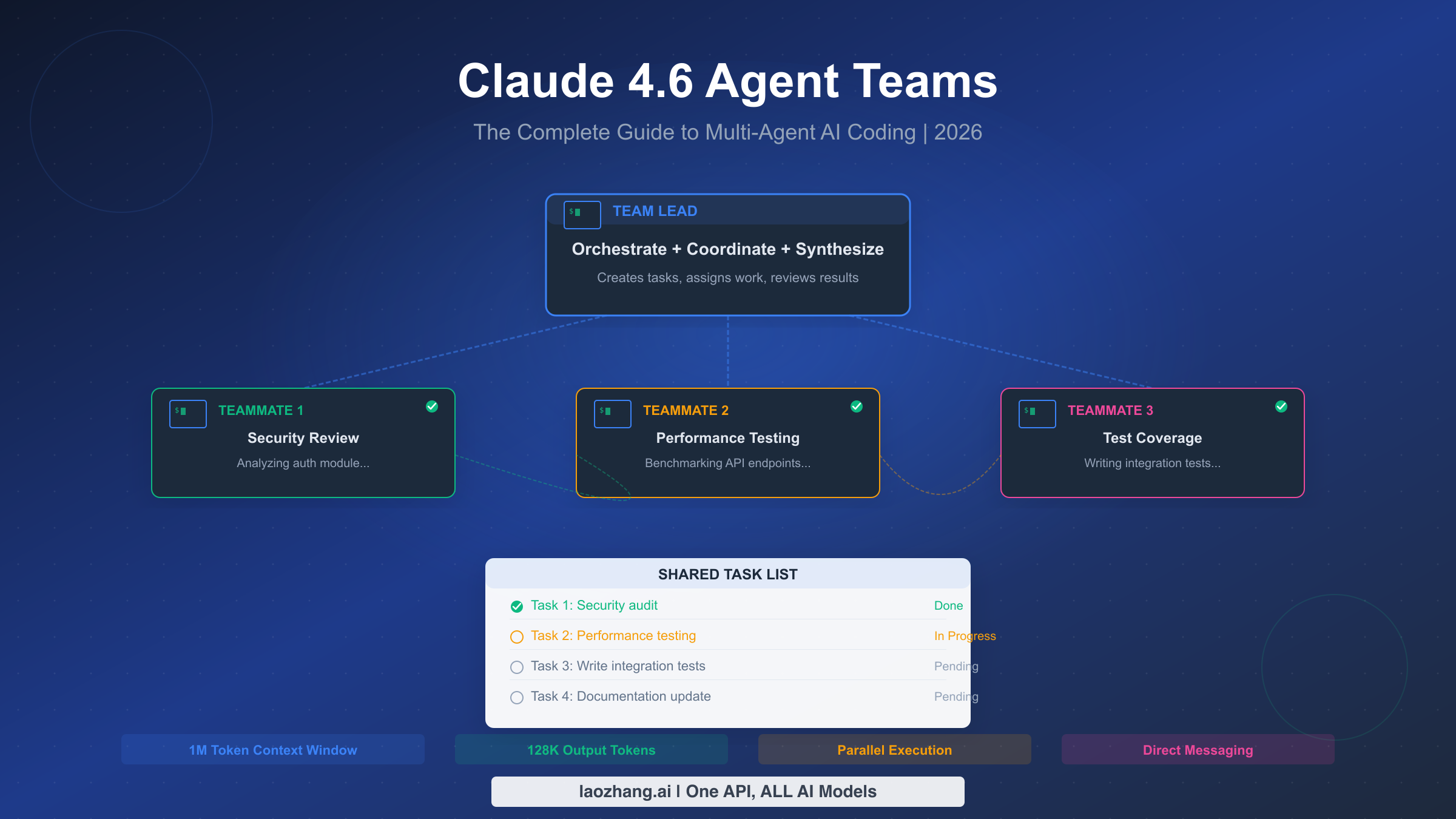
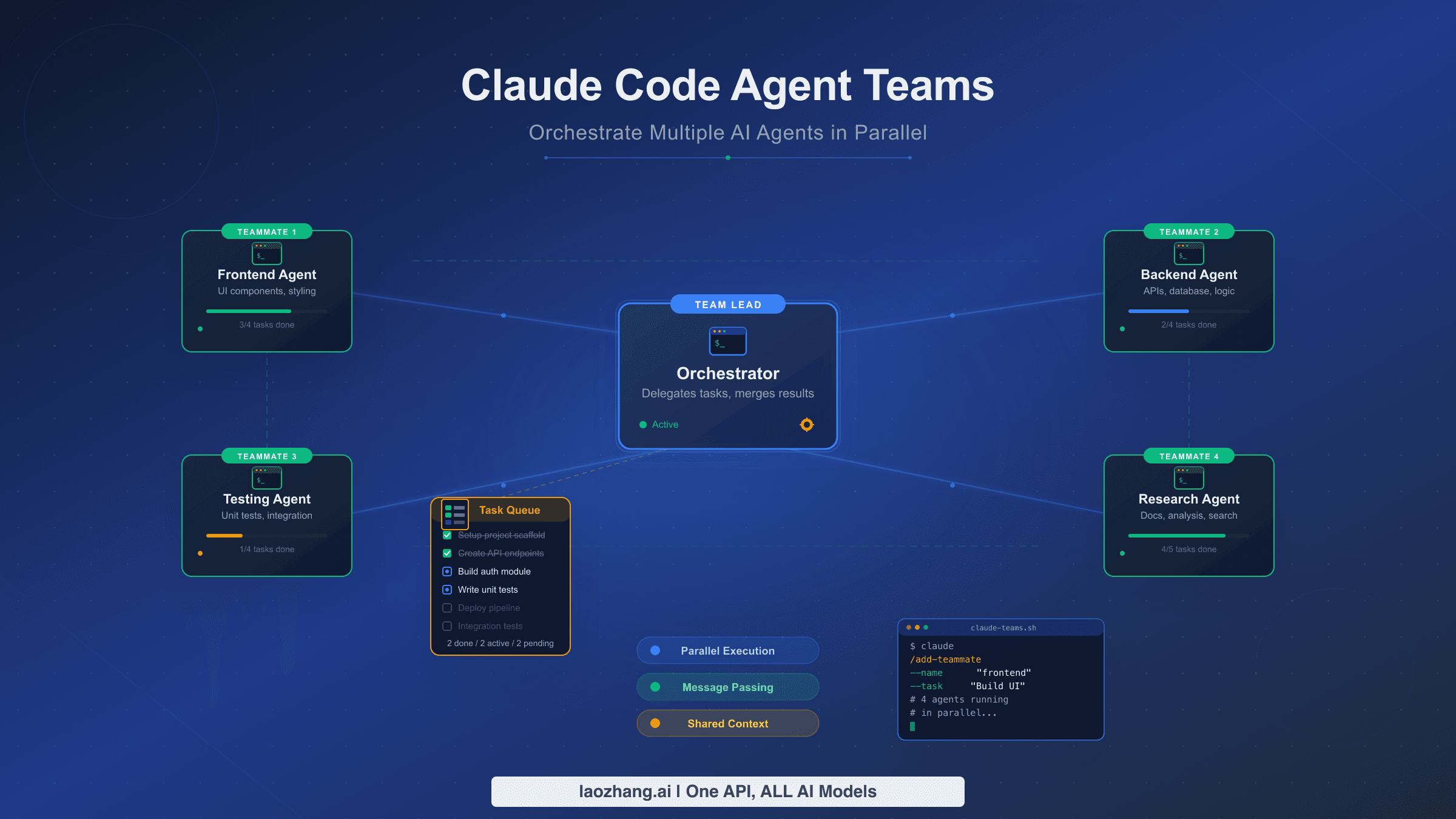
Claude 4.6 Agent Teams is a new experimental feature in Claude Code that lets you coordinate multiple AI coding agents working in parallel on the same project. Released on February 5, 2026 alongside Claude Opus 4.6, Agent Teams enable one session to act as a team lead while spawning independent teammates that communicate directly, share a task list, and self-coordinate. Anthropic's engineering team proved the concept by building an entire C compiler with 16 agents — producing 100,000 lines of Rust code that compiled the Linux 6.9 kernel, all for approximately $20,000 in API costs.
TL;DR
Agent Teams let one Claude Code session act as a "team lead" that spawns multiple independent "teammate" sessions. Each teammate gets its own context window, tools, and can communicate directly with other teammates through a mailbox system. They coordinate through a shared task list where tasks have statuses, dependencies, and ownership. You enable the feature by setting CLAUDE_CODE_EXPERIMENTAL_AGENT_TEAMS=1 in your environment or settings.json. The key trade-off is clear: Agent Teams use 3-4x more tokens than a single session, but they can turn hours of sequential work into minutes of parallel execution. Use them for complex, multi-file projects where teammates need to collaborate and communicate — not for simple tasks where a single session or subagents will do.
What Are Agent Teams and How Do They Actually Work?
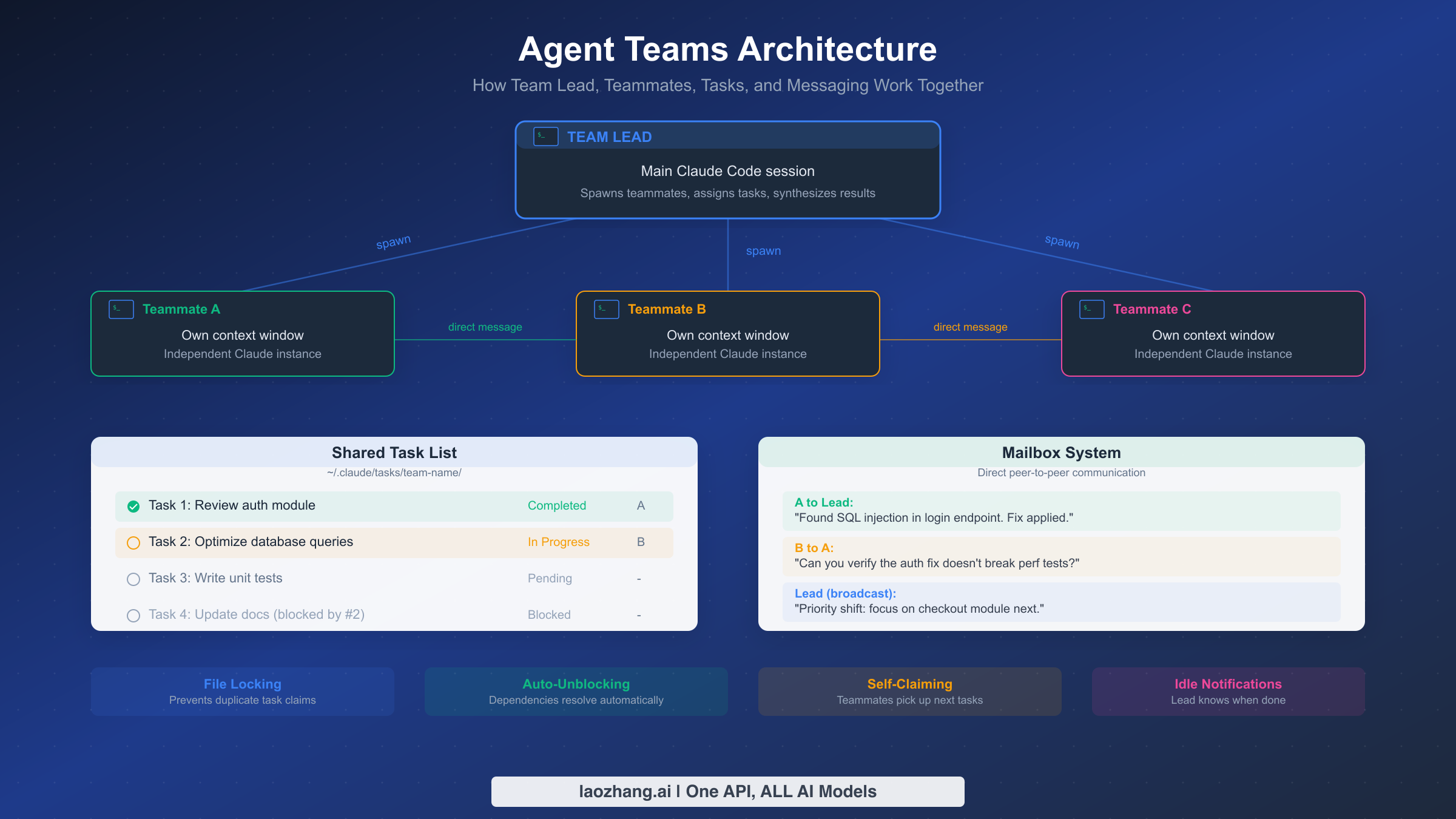
Understanding the architecture behind Agent Teams is essential before using them effectively. Unlike subagents — which are lightweight workers that report results back to a parent session and then disappear — Agent Teams create persistent, independent Claude instances that can talk to each other, claim tasks autonomously, and coordinate their work through shared infrastructure. This distinction matters because it determines when Agent Teams add value versus when they add unnecessary cost and complexity.
The architecture revolves around four interconnected components that work together to enable genuine multi-agent collaboration. The Team Lead is your main Claude Code session. When you describe a complex task, the team lead analyzes it, breaks it down into subtasks, creates a team using the TeamCreate tool, and spawns teammates using the Task tool with a team_name parameter. The team lead retains full access to all tools and serves as the orchestrator — it assigns initial tasks, monitors progress through task list updates, handles inter-agent conflicts, and synthesizes final results. In delegate mode (activated with Shift+Tab), the team lead restricts itself to coordination-only tools, forcing it to delegate all implementation work to teammates rather than doing it directly.
Teammates are independent Claude Code processes, each with their own context window, tool access, and conversation history. When a teammate is spawned, it receives a detailed prompt describing its role and initial task. It can read and write files, run commands, search the codebase, and — critically — send messages to other teammates or the team lead. Each teammate operates autonomously within its assigned scope, and after completing a turn (an API round-trip), it goes idle and sends an automatic notification to the team lead. This idle state is normal and expected — the teammate is simply waiting for new instructions or a new task to claim.
The Shared Task List lives at ~/.claude/tasks/{team-name}/ and serves as the coordination backbone. Tasks have subjects, descriptions, statuses (pending, in_progress, completed), ownership, and dependency relationships. When a teammate finishes a task, it marks it as completed and checks the task list for the next available work. Tasks can block other tasks, so completing a foundational task automatically unblocks downstream work. This self-claiming behavior means teammates don't sit idle waiting for the lead to assign work — they proactively pick up the next unblocked, unowned task, preferring lower IDs first.
The Mailbox System enables direct peer-to-peer communication between any agents on the team. A teammate can send a direct message to another teammate using SendMessage with the recipient's name, or the team lead can broadcast a message to all teammates simultaneously. Messages are delivered automatically — when a teammate is idle and receives a message, it wakes up and processes it. This enables scenarios like a security reviewer asking a performance tester to verify that a fix doesn't break benchmarks, or a team lead redirecting priorities mid-task. The system also supports structured interactions like shutdown requests and plan approval workflows, where teammates in plan mode must get lead approval before implementing changes.
What makes this architecture genuinely different from subagents is the persistence and inter-agent communication. Subagents are fire-and-forget: you launch one, it does a focused task, reports back, and its context is gone. Agent Teams maintain state across turns, build on each other's work, and can have multi-round conversations. The trade-off is token cost — each teammate consumes its own context window, and inter-agent messages add overhead. For the right kind of problem, though, this overhead pays for itself many times over.
Two additional technical capabilities make Agent Teams particularly powerful for long-running projects. Context compaction automatically summarizes earlier conversation history when a teammate's context window fills up, allowing sessions to run for hours without hitting token limits. Claude Opus 4.6 supports up to 1 million tokens of context in beta (anthropic.com/news/claude-opus-4-6, February 5, 2026), which means each teammate can maintain a substantial working memory. Plan approval mode adds a quality gate where teammates work in a read-only planning phase first, sending their proposed implementation plan to the team lead for review before making any changes. This is invaluable for high-stakes codebases where you want human-in-the-loop (or lead-in-the-loop) oversight of every significant change.
Agent Teams vs Subagents vs Single Sessions — A Clear Decision Framework
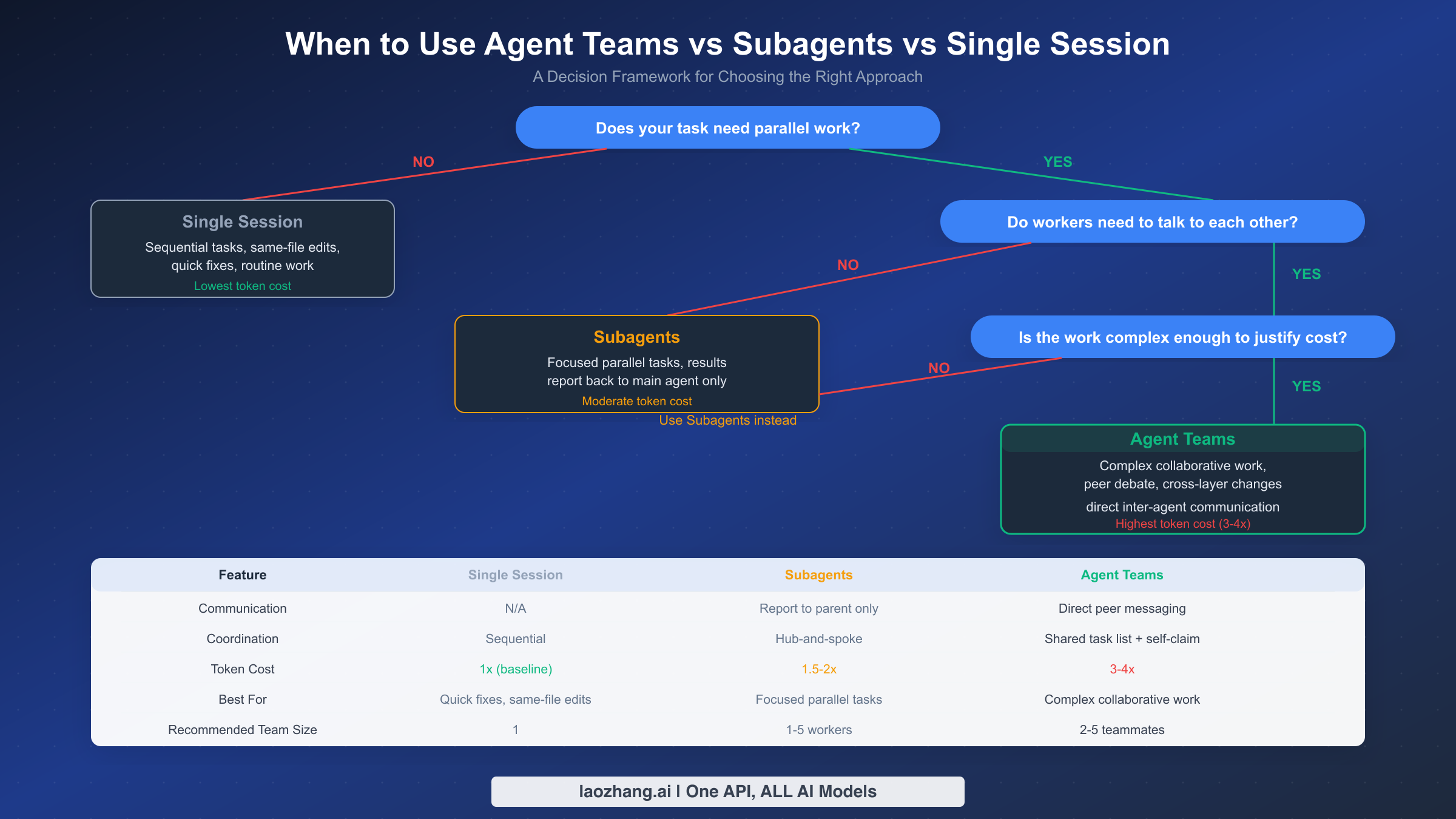
Choosing the right approach saves both time and money. The decision comes down to three questions that progressively narrow your options, and understanding this framework prevents you from over-engineering simple tasks or under-resourcing complex ones.
Question 1: Does your task need parallel work? If you are fixing a typo, updating a single function, or making changes that naturally flow in sequence within the same files, a single Claude Code session is the right choice. Single sessions have the lowest token cost (the baseline), zero coordination overhead, and are perfectly suited for the majority of daily coding tasks. Sequential work does not benefit from parallelism — in fact, adding agents to sequential work just multiplies cost without saving time.
Question 2: Do workers need to talk to each other? This is the critical fork between subagents and Agent Teams. Subagents work in a hub-and-spoke pattern: they receive a task from the parent, execute it independently, report results back, and terminate. They cannot communicate with sibling subagents. If your parallel tasks are truly independent — like running tests across three different modules, searching for a pattern in five directories simultaneously, or generating documentation for separate components — subagents are the better choice. They cost 1.5-2x a single session (less than Agent Teams) and are simpler to manage.
Agent Teams become the right choice when workers genuinely need to coordinate. Consider a scenario where you are adding a new API endpoint: one teammate writes the backend handler, another writes the frontend component, and a third writes integration tests. The test writer needs to know the API contract from the backend developer. The frontend developer needs to match the response schema. If the backend developer discovers a schema change is needed, both the frontend developer and test writer need to know immediately. This kind of cross-cutting coordination is exactly what Agent Teams' direct messaging and shared task list enable.
Question 3: Is the work complex enough to justify the cost? Agent Teams consume 3-4x the tokens of a single session because each teammate maintains its own context window and inter-agent communication adds overhead. For a task that would take a single session 10 minutes, spending 3x the tokens to save 5 minutes may not be worth it. Agent Teams shine when the time savings are substantial — turning 2 hours of sequential work into 30 minutes of parallel execution, for example — or when the complexity genuinely requires multiple perspectives working together.
| Feature | Single Session | Subagents | Agent Teams |
|---|---|---|---|
| Communication | N/A | Report to parent only | Direct peer messaging |
| Coordination | Sequential | Hub-and-spoke | Shared task list + self-claim |
| Token Cost | 1x (baseline) | 1.5-2x | 3-4x |
| Best For | Quick fixes, same-file edits | Focused parallel tasks | Complex collaborative work |
| Team Size | 1 | 1-5 workers | 2-5 teammates |
| Persistence | Full session | Task-scoped | Full session per teammate |
| When to Choose | Default choice for most work | Independent parallel tasks | Cross-cutting changes needing coordination |
For a practical rule of thumb: start with a single session. If you find yourself context-switching between unrelated parts of the codebase and wishing you could work on them simultaneously, consider subagents. If those parallel workers would benefit from talking to each other — because their changes interact, share interfaces, or need coordinated testing — then Agent Teams are worth the investment. For a deeper comparison between Claude Opus and Sonnet models and which to choose for your agents, see our dedicated comparison guide.
Setting Up Agent Teams — From Zero to Your First Team in Minutes
Getting Agent Teams running takes about two minutes. The feature is experimental and disabled by default, so you need to explicitly opt in. Here is the complete setup process with every step you will encounter.
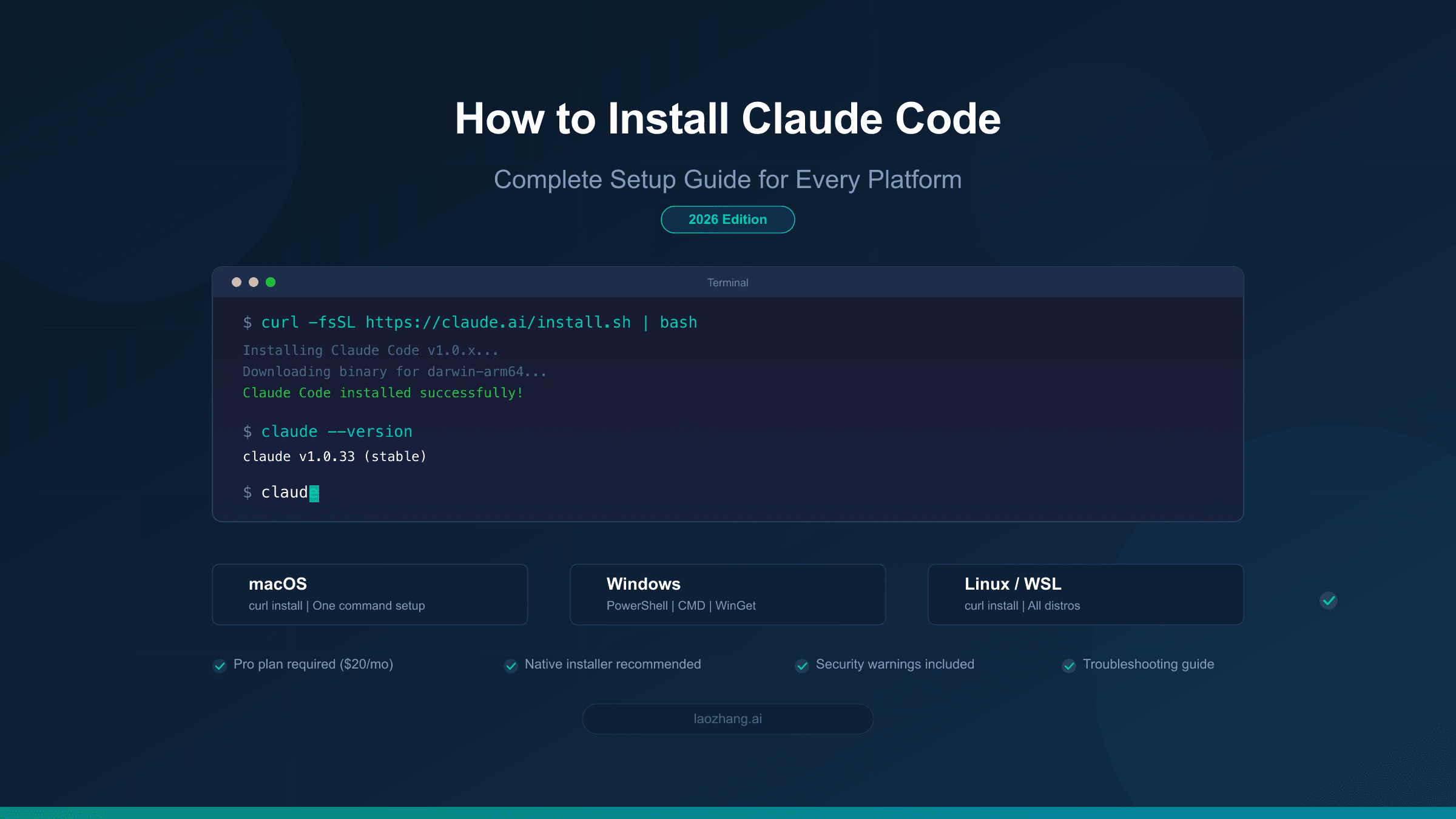
Step 1: Verify your Claude Code version. Agent Teams require Claude Code 1.0.34 or later (released February 5, 2026). Check your version by running:
claude --versionIf you need to update, run claude update or reinstall via npm install -g @anthropic-ai/claude-code.
Step 2: Enable the experimental feature flag. You have three options for enabling Agent Teams, and the choice depends on whether you want it enabled globally, per-project, or temporarily.
For global enablement across all projects, add the setting to your user configuration:
claude settings set env.CLAUDE_CODE_EXPERIMENTAL_AGENT_TEAMS 1For per-project enablement, add it to your project's .claude/settings.json:
{
  "env": {
    "CLAUDE_CODE_EXPERIMENTAL_AGENT_TEAMS": "1"
  }
}
For one-time session enablement, export the environment variable before launching Claude Code:
export CLAUDE_CODE_EXPERIMENTAL_AGENT_TEAMS=1
claude
Step 3: Configure your display mode. Agent Teams support two display modes that determine how you see teammate activity. The default in-process mode shows all teammate output inline in your terminal. You navigate between teammates using Shift+Up/Down arrow keys, and each teammate's output is color-coded. This works in any terminal and requires no additional setup.
The split-pane mode gives each teammate its own terminal pane using tmux or iTerm2. If you use tmux, Claude Code automatically creates split panes. For iTerm2, it opens new tabs. To enable split-pane mode:
{
  "agentTeams": {
    "display": "split-pane"
  }
}
Split-pane mode is particularly useful for teams with 3+ teammates where inline output becomes difficult to follow.
Step 4: Optimize your CLAUDE.md for teams. This step is optional but significantly improves team coordination. Add a section to your project's CLAUDE.md that specifies file ownership boundaries and shared conventions:
## Agent Teams Guidelines
- Backend code lives in /src/api/ — assign to backend teammate
- Frontend code lives in /src/components/ — assign to frontend teammate
- Tests live in /tests/ — assign to test teammate
- Shared types are in /src/types/ — coordinate changes through team lead
Step 5: Launch your first team. Start Claude Code normally and describe a task that benefits from parallelism. For example:
I need to refactor the authentication module. Please create an agent team:
- Teammate 1: Review the current auth code and identify security issues
- Teammate 2: Write comprehensive unit tests for the existing auth flow
- Teammate 3: Research best practices for JWT token rotation

Use delegate mode so you focus on coordination.
Claude Code will create a team, spawn teammates, create a task list, and begin assigning work. You will see teammate output appear in your terminal (or in separate panes if using split-pane mode). The team lead coordinates the work, and teammates will claim tasks, complete them, and move to the next available task automatically.
Step 6: Monitor and interact. While the team works, you can interact with the team lead at any time. Ask for status updates, redirect priorities, or add new tasks. The team lead can broadcast messages to all teammates or send targeted messages to specific ones. When all tasks are complete, the team lead synthesizes the results and the teammates are shut down gracefully.
The entire process from enabling the feature to seeing your first team in action takes under five minutes. The learning curve is gentle because you interact with the team lead using natural language — the same way you interact with a regular Claude Code session.
Five Real-World Use Cases with Ready-to-Use Prompts
Agent Teams excel in scenarios where multiple concerns intersect and benefit from parallel exploration. Here are five proven use cases with prompts you can adapt to your own projects. Each prompt is designed to be copied directly into Claude Code and modified for your specific codebase.
Use Case 1: Full-Stack Feature Development. When building a feature that spans the API layer, frontend components, and tests, Agent Teams let you develop all three layers simultaneously. The backend teammate can establish the API contract early, and the frontend and test teammates can start building against that contract while the backend implementation continues.
Build a user profile editing feature. Create an agent team with 3 teammates:

1. "backend": Implement PUT /api/users/:id endpoint with validation,
   add database migration for new fields (bio, avatar_url, social_links)
2. "frontend": Build ProfileEditor React component with form validation,
   image upload preview, and optimistic updates
3. "tests": Write integration tests covering happy path, validation errors,
   auth failures, and concurrent edit conflicts

Use delegate mode. Backend should share the API contract with frontend
and tests teammates as soon as it's defined.
Use Case 2: Codebase Security Audit. Security audits benefit enormously from parallelism because different vulnerability categories require different analysis approaches. One teammate can focus on injection vulnerabilities while another examines authentication flows and a third reviews dependency versions.
Perform a comprehensive security audit of this codebase. Create an agent team:

1. "injection-reviewer": Scan all user input handlers for SQL injection,
   XSS, command injection, and path traversal. Check every route handler.
2. "auth-reviewer": Review authentication flow, session management,
   token handling, password hashing, and rate limiting implementation.
3. "deps-reviewer": Audit package.json dependencies for known CVEs,
   check for outdated packages, and verify lock file integrity.

Each reviewer should document findings with severity, location,
and recommended fix. Share critical findings with other teammates
immediately.
Use Case 3: Multi-Module Refactoring. Large refactoring efforts that touch multiple modules simultaneously are where Agent Teams provide the most dramatic time savings. Without Agent Teams, you would need to refactor each module sequentially, maintaining mental context about cross-module dependencies. With Agent Teams, each teammate owns a module and communicates interface changes to others in real time.
Refactor our payment processing system from callbacks to async/await.
Create an agent team with 4 teammates:

1. "payment-core": Refactor /src/payments/processor.ts and related files
2. "webhook-handler": Refactor /src/webhooks/ to use async/await
3. "billing-service": Refactor /src/billing/ service layer
4. "integration-tests": Update all payment-related tests as interfaces change

Important: When any teammate changes a shared interface in /src/types/payment.ts,
immediately notify all other teammates. Billing depends on payment-core completing
the PaymentResult type changes first.
Use Case 4: Documentation and Code Alignment. When documentation has drifted from implementation, Agent Teams can systematically verify and update documentation in parallel. One teammate reads the code while another reads the docs, and they compare notes to identify discrepancies.
Our API documentation has drifted from the actual implementation.
Create an agent team:

1. "code-reader": Go through every route in /src/routes/, document the
   actual request/response schemas, required headers, and error codes
2. "doc-updater": Read /docs/api/, compare with code-reader's findings,
   and update documentation to match reality
3. "example-generator": Generate working curl examples for every endpoint
   based on code-reader's schemas, verify each one actually works

Code-reader should share findings with doc-updater and example-generator
progressively as each route is analyzed.
Use Case 5: Performance Investigation and Fix. Performance problems often have multiple contributing factors. Agent Teams let you investigate database queries, application code, and infrastructure configuration simultaneously, then cross-reference findings.
Our /api/dashboard endpoint takes 8 seconds to load. Investigate and fix.
Create an agent team:

1. "db-analyst": Profile all database queries triggered by the dashboard
   endpoint. Identify N+1 queries, missing indexes, and slow joins.
2. "code-profiler": Analyze the application code path from route handler
   to response. Find unnecessary computations, blocking operations,
   and memory inefficiencies.
3. "cache-architect": Design a caching strategy for the dashboard data.
   Consider what can be cached, appropriate TTLs, and cache invalidation.

Share findings between teammates — db-analyst's slow query list informs
cache-architect's strategy, and code-profiler's findings may reveal
why certain queries are being called unnecessarily.
These prompts demonstrate the common pattern for effective Agent Teams usage: clear teammate roles, well-defined boundaries, explicit coordination instructions, and tasks that genuinely benefit from parallel execution and inter-agent communication.
Best Practices — Task Design, File Ownership, and Team Management
The difference between a productive Agent Team and a chaotic one comes down to how you design tasks, manage file boundaries, and handle coordination. These best practices are drawn from Anthropic's own engineering experience building a C compiler with 16 agents (Anthropic Engineering Blog, February 2026) and the patterns documented in the official Agent Teams documentation.
Design tasks around clear ownership boundaries. The single most impactful practice is ensuring each teammate owns a distinct set of files or directories. When two teammates modify the same file simultaneously, you get merge conflicts, lost work, and wasted tokens as agents resolve conflicts that should not have existed in the first place. The official documentation emphasizes this: structure your tasks so that file-level ownership is clear before the team starts working. If a file genuinely needs changes from multiple teammates, designate one teammate as the owner and have others communicate their needs through messages.
Size tasks appropriately — not too big, not too small. Tasks that are too large defeat the purpose of parallelism because one teammate becomes a bottleneck. Tasks that are too small create excessive coordination overhead as the team lead spends more time assigning tasks than teammates spend completing them. The sweet spot is tasks that take a single agent 10-30 minutes of focused work. For the C compiler project, Anthropic found that organizing work around compiler passes (lexer, parser, type checker, code generator) provided natural boundaries that matched this sizing principle.
Use dependencies to enforce ordering without micromanagement. The task list supports blockedBy relationships that prevent a task from being claimed until its dependencies are complete. Use these instead of having the team lead manually sequence work. For example, if integration tests depend on both the API endpoint and the frontend component being complete, create the test task with blockedBy pointing to both the API and frontend tasks. When those tasks complete, the test task automatically unblocks and the next available teammate claims it.
Start with 2-3 teammates and scale up only when needed. Anthropic's C compiler project used 16 agents, but that was for a two-week, $20,000 effort on a 100,000-line codebase. For most development tasks, 2-3 teammates provide the best balance of parallelism and coordination overhead. Each additional teammate adds to the token cost and increases the communication surface area. Add teammates only when you have genuinely independent work streams that would benefit from additional parallelism.
Use delegate mode for complex orchestration. When you activate delegate mode (Shift+Tab), the team lead restricts itself to coordination tools only — it cannot read files, edit code, or run commands directly. This forces all implementation work to flow through teammates, which produces better task decomposition and clearer ownership. The team lead focuses on what it does best: breaking down problems, assigning work, resolving conflicts, and synthesizing results. Delegate mode is particularly effective for large teams (4+ teammates) where the lead's coordination role is critical.
Let teammates self-claim tasks instead of micro-assigning. The shared task list supports autonomous task claiming — when a teammate finishes its current task, it checks the list for the next available unblocked task and claims it. This is more efficient than having the team lead assign every task because it eliminates the round-trip delay of the teammate reporting completion and the lead selecting the next assignment. Set up your tasks with clear descriptions and dependencies, and trust the self-claiming mechanism to keep everyone productive.
Monitor through the task list, not constant polling. Resist the urge to ask for status updates every few minutes. The task list is the source of truth — check it when you need to understand progress. Teammates automatically notify the team lead when they go idle (which happens after every turn), so you will know when work completes. Excessive polling wastes the team lead's context window on status-checking rather than coordination.
Structure your CLAUDE.md for multi-agent awareness. Your project's CLAUDE.md file is read by every teammate when they start, making it the most effective way to communicate project conventions, architecture decisions, and file ownership rules to the entire team. Include sections that specify which directories belong to which roles, what shared interfaces exist and how to coordinate changes to them, and any project-specific testing or linting requirements. A well-structured CLAUDE.md dramatically reduces the number of inter-agent messages needed for coordination because teammates already understand the project's conventions before they start working.
Handle graceful shutdown explicitly. When all tasks are complete, the team lead should send shutdown requests to each teammate using the SendMessage tool with type: "shutdown_request". This gives teammates a chance to finalize any in-progress work, save state, and confirm they are ready to shut down. Avoid abruptly closing the session, which can leave orphaned processes or incomplete task states. After all teammates have acknowledged the shutdown, use TeamDelete to clean up team configuration and task list files.
How Much Do Agent Teams Actually Cost? Real Numbers Inside
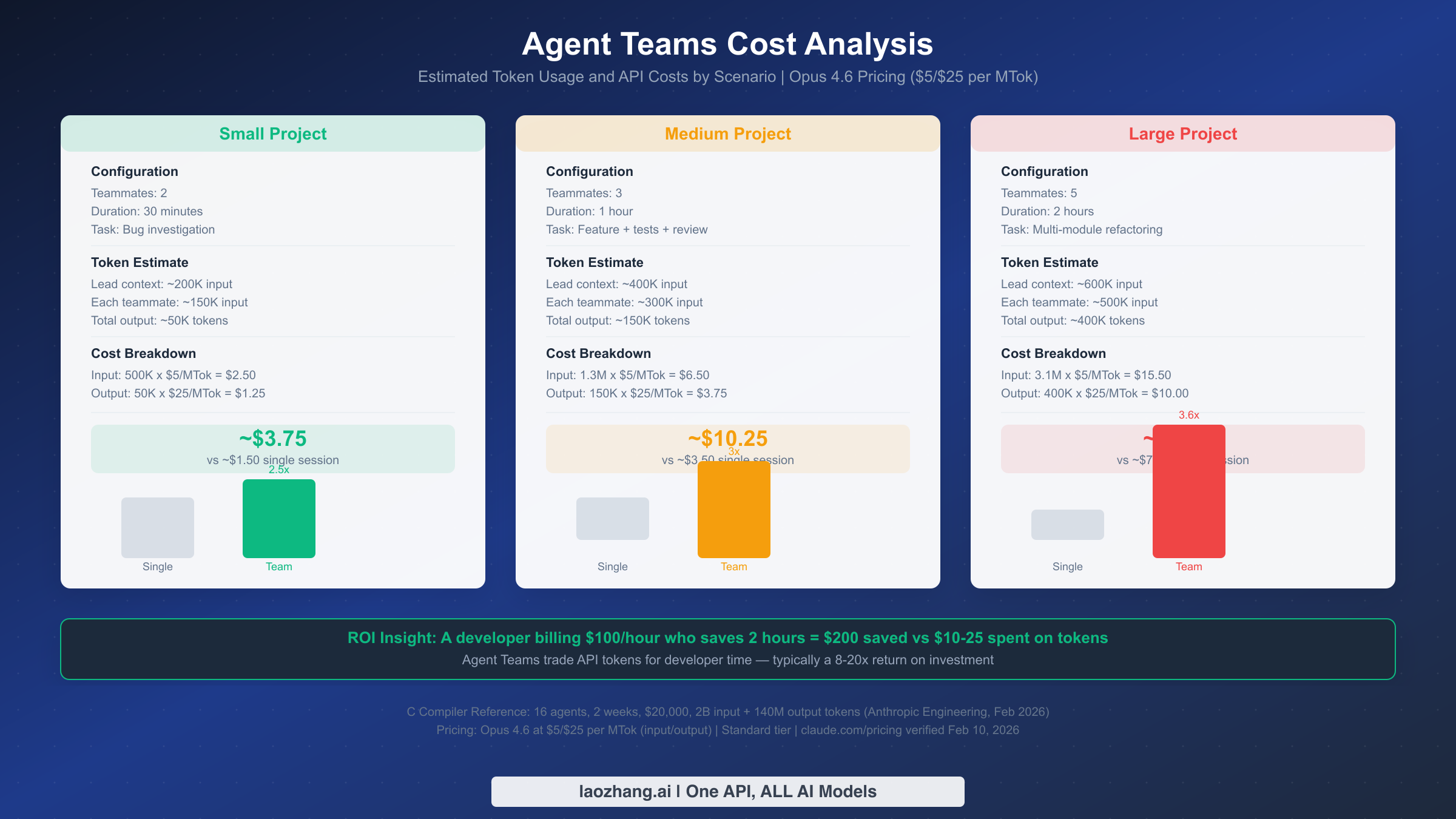
Cost is the most common concern developers have about Agent Teams, and understandably so — running multiple Claude instances in parallel multiplies your token usage. Here are concrete numbers based on Claude Opus 4.6 pricing ($5 per million input tokens, $25 per million output tokens, as verified on claude.com/pricing, February 10, 2026) and realistic usage patterns.
Scenario 1: Small Project (2 teammates, 30 minutes). A typical small task might be investigating a bug across two related modules. The team lead's context grows to approximately 200,000 input tokens as it coordinates work and receives teammate reports. Each of the two teammates processes about 150,000 input tokens each for their focused investigations, and the total output across all agents is roughly 50,000 tokens for findings, code analysis, and recommendations.
The cost breakdown: 500,000 input tokens at $5/MTok equals $2.50, plus 50,000 output tokens at $25/MTok equals $1.25, for a total of approximately $3.75. A comparable single session investigating the same bug sequentially would cost roughly $1.50, making the Agent Team about 2.5x the single-session cost. The time savings, however, could be significant — investigating two modules in parallel cuts the wall-clock time nearly in half.
Scenario 2: Medium Project (3 teammates, 1 hour). A feature implementation with backend, frontend, and tests running in parallel. The team lead accumulates about 400,000 input tokens over the hour as it coordinates three active teammates and handles task transitions. Each teammate processes approximately 300,000 input tokens for their focused development work, and total output reaches about 150,000 tokens of generated code, tests, and documentation.
Cost breakdown: 1.3 million input tokens at $5/MTok equals $6.50, plus 150,000 output tokens at $25/MTok equals $3.75, for a total of approximately $10.25. The single-session equivalent would be about $3.50, making the team roughly 3x the cost. But a feature that takes 2-3 hours sequentially completing in under an hour represents a meaningful productivity gain for any developer whose time is worth more than $10 per hour.
Scenario 3: Large Project (5 teammates, 2 hours). A major refactoring effort touching multiple modules simultaneously. The team lead's context reaches approximately 600,000 input tokens with extensive coordination across five active teammates. Each teammate processes about 500,000 input tokens for their module-level work, and total output approaches 400,000 tokens of refactored code, new tests, and updated documentation.
Cost breakdown: 3.1 million input tokens at $5/MTok equals $15.50, plus 400,000 output tokens at $25/MTok equals $10.00, for a total of approximately $25.50. The sequential equivalent would be roughly $7.00, making the team about 3.6x the single-session cost. At this scale, the time savings become dramatic — work that might take an entire day sequentially completes in 2 hours.
The ROI perspective matters most. A developer billing at $100/hour who saves 2 hours through Agent Teams has saved $200 against a $10-25 token cost. Even at more conservative estimates, the return on investment typically falls in the 8-20x range. The C compiler project at the extreme end — $20,000 in tokens, but it produced 100,000 lines of working Rust code in 2 weeks with 16 agents processing 2 billion input tokens and 140 million output tokens (Anthropic Engineering Blog, February 2026). That same work would have taken a human team significantly longer.
Cost optimization strategies. The most effective way to reduce Agent Team costs is to use them only when the task genuinely requires parallel coordination. For tasks where subagents suffice (independent parallel work without inter-agent communication), use subagents at 1.5-2x cost instead of Agent Teams at 3-4x. You can also reduce costs by using Sonnet 4.5 ($3/$15 per MTok) for teammate roles that don't require Opus-level reasoning. Finally, prompt caching can significantly reduce costs for repeated operations — cached input reads cost only $0.50/MTok versus $5.00/MTok for Opus 4.6.
For detailed pricing across all Claude models and subscription tiers, see our Claude Opus 4.6 pricing and subscription details.
Troubleshooting — When Agent Teams Don't Work as Expected
Even well-designed Agent Teams can encounter issues. Here are the most common problems, their root causes, and specific fixes based on the official documentation and real-world usage patterns.
Problem: Teammates edit the same file and create conflicts. This is the most frequent issue and usually stems from task design rather than a bug. When two teammates modify the same file, one of them will encounter a conflict when trying to write their changes. The fix is prevention: redesign your tasks so each teammate owns distinct files. If shared file edits are unavoidable, designate one teammate as the file owner and have others communicate their needed changes through messages. The team lead can then sequence these changes.
Problem: A teammate goes idle and does not pick up new tasks. Teammates go idle after every turn — this is normal behavior. When a teammate goes idle, it means it has completed its current turn and is waiting for input. If you send it a message or assign it a task, it will wake up and continue working. The issue arises when all tasks are either completed, in progress by other teammates, or blocked. Check the task list: if pending tasks exist but have unresolved blockedBy dependencies, the teammate cannot claim them. Resolve the blocking tasks first, or remove the dependency if it is no longer needed.
Problem: Agent Teams are not available in your Claude Code. Verify three things. First, confirm your Claude Code version is 1.0.34 or later with claude --version. Second, verify the experimental flag is set by running claude settings list and checking for CLAUDE_CODE_EXPERIMENTAL_AGENT_TEAMS. Third, check that you are using a plan that supports Agent Teams — it requires API access with sufficient rate limits for multiple concurrent sessions. If you are on a rate-limited plan, multiple teammates may trigger throttling.
Problem: Team lead tries to do everything instead of delegating. Without delegate mode, the team lead may attempt to implement tasks directly instead of assigning them to teammates. Activate delegate mode by pressing Shift+Tab, which restricts the lead to coordination-only tools. Alternatively, include explicit instructions in your prompt: "You are the coordinator. Do not write code directly. Assign all implementation work to teammates."
Problem: Excessive token usage on a simple task. If your task completed but cost significantly more than expected, you likely used Agent Teams where subagents or a single session would have sufficed. Review the decision framework from earlier in this guide. Agent Teams add overhead for team creation, task list management, and inter-agent communication. For truly independent parallel tasks, subagents at 1.5-2x cost are more efficient than Agent Teams at 3-4x.
Problem: Teammates lose context after long sessions. Each teammate has its own context window, and long sessions trigger context compaction — where earlier messages are summarized to free up space. If a teammate seems to forget earlier decisions, this is likely the cause. The fix is to keep critical information in files (CLAUDE.md, task descriptions) rather than relying on conversational context. You can also structure longer projects into phases, shutting down and re-creating the team between phases with updated task descriptions that include relevant context from the previous phase.
Problem: Split-pane display mode not working. Split-pane mode requires either tmux or iTerm2. If you are using a different terminal, fall back to the default in-process mode. For tmux, ensure it is installed (brew install tmux on macOS) and that you are running Claude Code inside a tmux session. For iTerm2, ensure you have version 3.4 or later and that Claude Code has permission to control the terminal through AppleScript.
Problem: Rate limiting with multiple teammates. When running 3+ teammates simultaneously, each one makes independent API calls. If you are on a rate-limited API tier, these concurrent requests can trigger throttling, causing teammates to slow down or fail. The solution is to either upgrade your API tier to support higher concurrency, reduce the number of simultaneous teammates, or stagger teammate spawning so they do not all start at the same moment. You can also use hooks (configured in your Claude Code settings) to add rate limiting logic that queues requests when approaching your tier's limit.
Problem: Tasks getting stuck in "blocked" state. Sometimes a circular dependency accidentally forms where Task A blocks Task B and Task B blocks Task A. Neither task can be claimed. The fix is to have the team lead inspect the task list, identify the cycle, and remove one of the dependency links using TaskUpdate to clear the blockedBy field. To prevent this, plan your dependency graph before creating tasks and verify that it forms a directed acyclic graph — no loops allowed.
Start Building with Agent Teams Today
Agent Teams represent a fundamental shift in how developers interact with AI coding assistants — moving from a single conversation to orchestrating a collaborative team. The technology is experimental but functional, and the patterns established by Anthropic's C compiler project demonstrate that multi-agent coordination can tackle projects of genuine complexity.
Here is your action plan for getting started. First, enable Agent Teams with a single settings command and try the simplest possible team: two teammates working on two independent parts of your codebase. Observe how they communicate, claim tasks, and coordinate through the shared task list. Once you are comfortable with the basics, graduate to three-teammate teams with interdependent tasks that require cross-agent communication. Use delegate mode to enforce clean separation between coordination and implementation.
The key insight from this guide is knowing when not to use Agent Teams. Most daily coding tasks are better served by a single session. Independent parallel tasks should use subagents. Reserve Agent Teams for the situations where inter-agent communication and shared task coordination genuinely accelerate your work — and when they do, the ROI is substantial.
Start small, measure your costs, and scale up as you develop intuition for task design and team management. The feature is experimental today, but the multi-agent collaboration pattern it enables is likely to become a standard part of AI-assisted development workflows in the near future. Getting hands-on experience now puts you ahead of that curve.
Official Claude Code documentation and updates are available at code.claude.com.