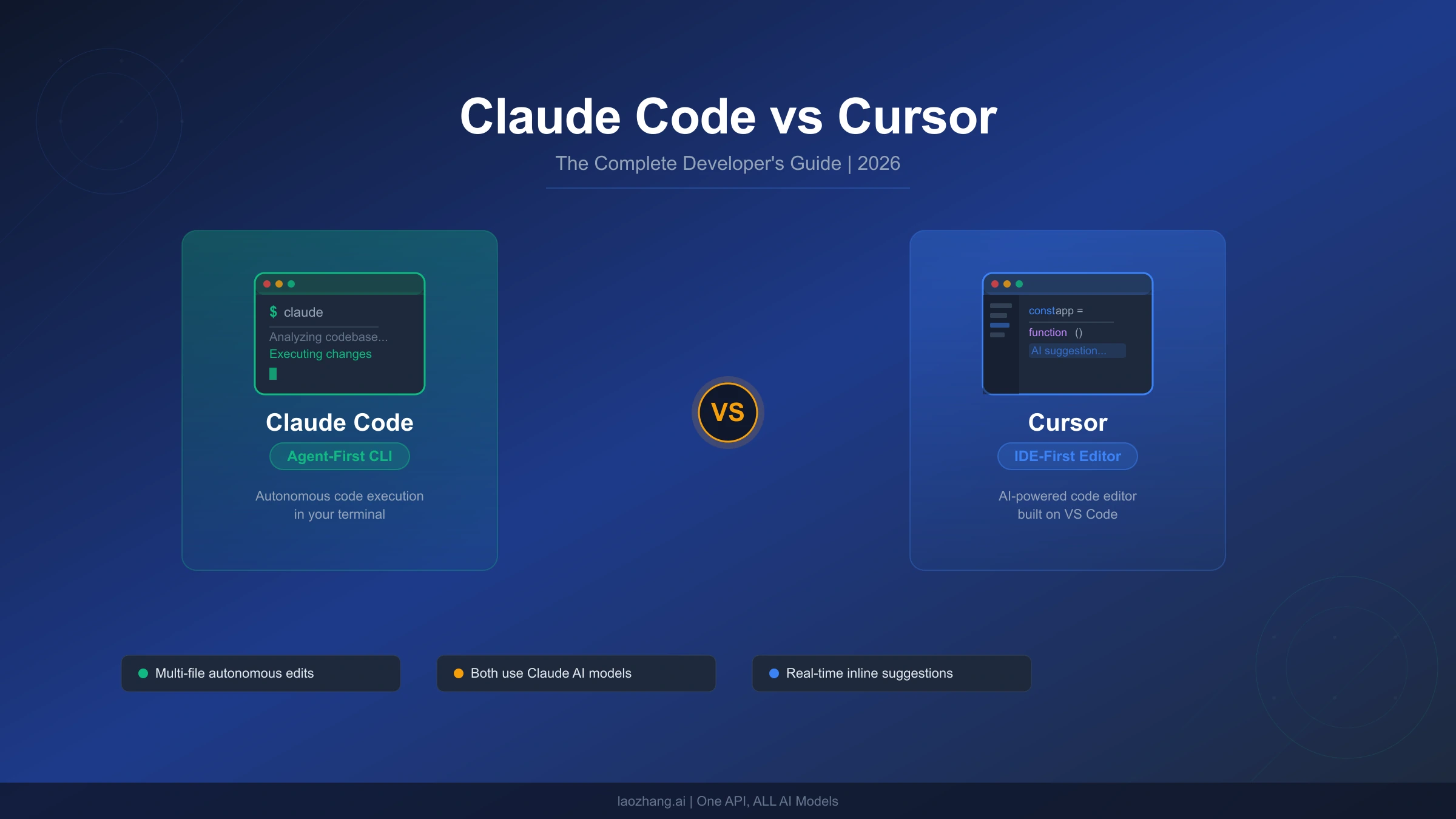
Claude Code and Cursor represent two fundamentally different philosophies for AI-assisted software development, yet both occupy the same $20-to-$200-per-month price range. Independent testing shows Claude Code uses 5.5x fewer tokens than Cursor for identical tasks, while Cursor completes simple edits 12% faster. Rather than declaring a winner, this guide explains exactly when each tool excels — and why a growing number of senior developers maintain subscriptions to both.
TL;DR
| Dimension | Claude Code | Cursor |
|---|---|---|
| Approach | Agent-first (terminal CLI) | IDE-first (VS Code fork) |
| Best For | Complex multi-file tasks, autonomous operations | Daily editing, real-time suggestions, quick fixes |
| Pricing | Free / $20 Pro / $100 Max / $200 Max 20x | Free / $20 Pro / $60 Pro+ / $200 Ultra |
| Token Efficiency | 33K tokens per task (5.5x fewer) | 188K tokens per task |
| Context Window | Full 200K tokens usable | 70-120K effective (truncated) |
| Multi-Model | Claude models only | OpenAI, Google, Anthropic, custom |
| Speed (Simple Tasks) | Baseline | 12% faster |
| Code Rework | 30% less rework | Baseline |
| Installation | curl -fsSL https://claude.ai/install.sh | bash | Download from cursor.com |
| Bottom Line | Best for output quality on complex work | Best daily driver for speed and flow |
The Fundamental Architecture Difference
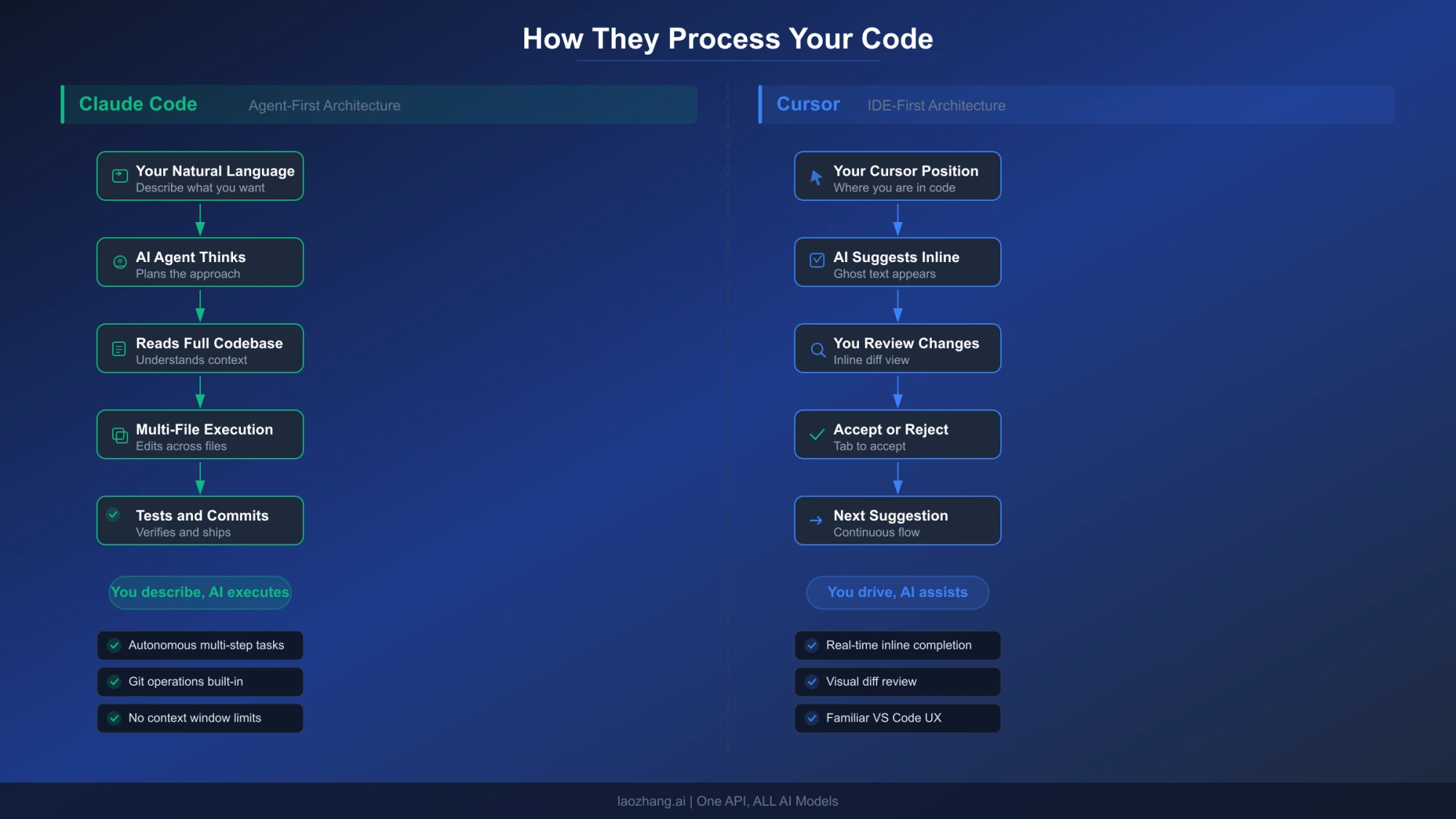
The most common mistake developers make when comparing Claude Code and Cursor is treating them as direct competitors offering the same thing in different packaging. They are not. The tools reflect two opposing theories about how AI should participate in software development, and understanding this distinction is essential before evaluating features, pricing, or benchmarks.
Claude Code operates as an autonomous agent. When you give Claude Code a task — say, refactoring authentication logic across twelve files — it reads your entire codebase, formulates a plan, executes changes across multiple files simultaneously, runs your test suite, and commits the result to Git with a descriptive message. You describe the destination; Claude Code drives the car. Anthropic built it as a command-line tool precisely because the terminal is where autonomous operations happen naturally. There is no editor tab to flip between, no inline diff to approve line-by-line. You review the output after the agent has finished its work.
Cursor operates as an intelligent co-pilot inside your editor. When you write code in Cursor, the AI watches your cursor position, understands the file context, and offers completions, suggestions, and inline edits in real time. You remain in control of every keystroke. Cursor enhances the traditional coding experience rather than replacing it. Built as a fork of Visual Studio Code, it preserves the IDE workflow that millions of developers already know, while layering AI assistance on top. Every suggestion appears as an inline diff that you accept or reject before it touches your code.
This architectural difference explains nearly every behavioral difference between the tools. Claude Code excels at tasks where you want the AI to take the wheel entirely: large-scale refactoring, debugging complex cross-file issues, setting up new projects from scratch, and generating comprehensive test suites. Cursor excels at tasks where you want the AI to amplify your existing speed: writing new functions, fixing small bugs, exploring unfamiliar codebases, and iterating quickly on implementations. As one developer on the Cursor community forum noted, the relationship is analogous to a self-driving car versus an advanced cruise control system. Both get you to the destination, but the driving experience differs fundamentally.
One subtlety worth noting is that this distinction has begun to blur in 2026. Both tools have added features that encroach on the other's territory. Claude Code now integrates with VS Code and JetBrains IDEs as an extension, not just the terminal. Cursor has introduced background agents and autonomous "Composer" workflows that can execute multi-step operations. But the core design philosophy — who is in the driver's seat — remains the primary differentiator. If you find yourself spending more time describing what you want than writing code, Claude Code aligns with your workflow. If you want AI suggestions woven into the act of writing code itself, Cursor is the natural fit. For those curious about how Claude Code compares to other coding tools, the architectural distinction remains the defining factor across the ecosystem.
Code Quality, Speed, and Token Efficiency
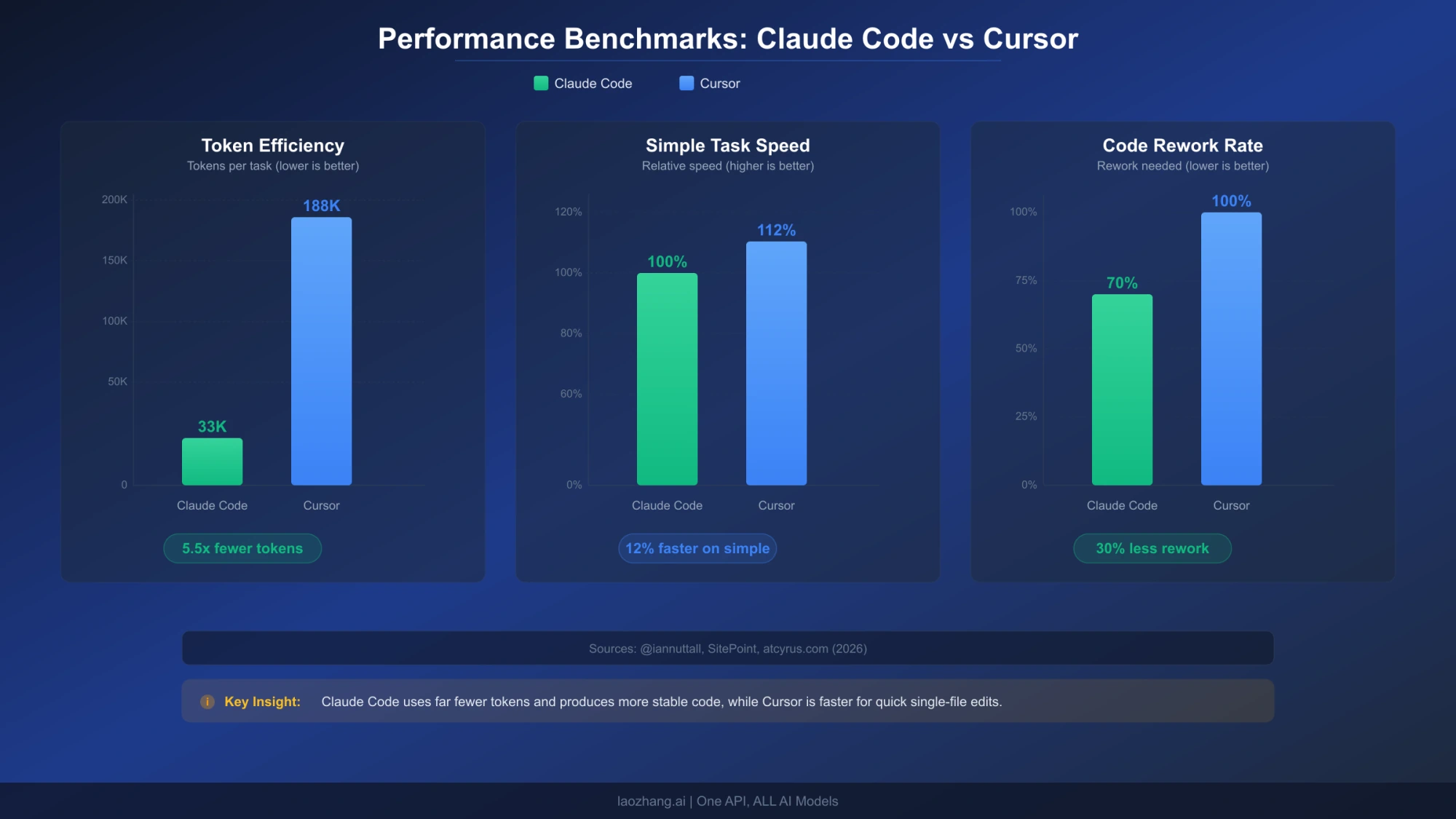
Numbers tell a more honest story than marketing copy. Several independent tests published in early 2026 provide quantifiable data on how Claude Code and Cursor perform under controlled conditions, and the results reveal that each tool wins in different categories.
Token Efficiency: The 5.5x Gap
The most widely cited benchmark comes from developer Ian Nuttall, whose test gained significant traction on X with nearly 200,000 views. He gave the same task — implementing a complete feature across multiple files — to Claude Code with Opus, Cursor Agent with GPT-5, and OpenAI Codex with GPT-5. Claude Code completed the task using approximately 33,000 tokens with zero errors. Cursor Agent consumed roughly 188,000 tokens, encountered several errors along the way, but eventually completed the task. That is a 5.5x difference in token consumption for the same deliverable.
Why does this matter beyond an abstract efficiency metric? Because tokens translate directly to cost and rate limit consumption. If you are on a credit-based plan — which Cursor adopted in June 2025 — every token counts against your monthly pool. Claude Code's architectural efficiency means your subscription dollars stretch further on complex tasks. The agent approach sends your codebase context once, reasons about the full picture, and executes changes in a single orchestrated pass. Cursor's interactive approach, by contrast, sends context with each suggestion cycle, each inline completion, and each follow-up edit, accumulating tokens rapidly across many small exchanges.
Speed: Cursor Wins on Simple Tasks
A SitePoint developer benchmark from March 2026 found that Cursor's median completion time for simple tasks was 12% faster than Claude Code's. This makes intuitive sense. For a quick function implementation or a targeted bug fix, Cursor's real-time suggestion loop — you type, it predicts, you accept — has less overhead than Claude Code's approach of reading context, planning, and then executing. Cursor is optimized for the rapid micro-interactions that characterize daily coding. Claude Code, by contrast, invests more upfront time in understanding the full picture before making changes, which pays dividends on complex tasks but introduces latency on simple ones.
Code Rework: Claude Code Gets It Right the First Time
Multiple sources report that Claude Code produces approximately 30% less code rework compared to Cursor. According to an in-depth comparison published on atcyrus.com, Claude Code tends to get implementations right on the first or second iteration, whereas Cursor's output frequently requires additional rounds of refinement. This is a natural consequence of the architectural difference: Claude Code's agentic approach reads the full codebase before generating changes, reducing the likelihood of conflicts, missing imports, or broken dependencies. Cursor's inline approach generates suggestions based on a narrower context window, which can lead to technically correct but contextually incomplete solutions that need adjustment.
The practical implication is significant for complex projects. If a feature touches eight files with intricate dependencies, Claude Code's initial output is more likely to compile and pass tests without manual intervention. With Cursor, you may need to iterate through several rounds of suggestions, manually resolving conflicts between files that the AI suggested changes for independently. For solo developers working on ambitious features, the reduced rework cycle can easily save an hour per complex task.
It is worth noting that both tools continue to improve in this dimension. Cursor's recent introduction of background agents and multi-file Composer workflows has narrowed the rework gap for structured tasks, though the underlying architecture still constrains how much context each suggestion carries. Claude Code's extended thinking capabilities allow it to reason through complex implementations step by step before generating code, further reducing the probability of errors in the initial output. The trajectory suggests both tools will continue converging on quality, but the fundamental architecture — full-codebase agent versus per-file co-pilot — means Claude Code will likely maintain its edge on tasks requiring holistic understanding.
One practical metric that developers often overlook is the total time from task start to verified completion, including all rework cycles. A task that Claude Code completes in one pass in 8 minutes may look slower than Cursor's first suggestion in 3 minutes, but if Cursor's output requires two more rounds of 3-minute iterations to fix dependency issues, the total time becomes 9 minutes — making both tools roughly equivalent in total completion time for that task. Where Claude Code consistently saves time is on tasks above a certain complexity threshold, typically those that touch more than five files or require understanding of cross-cutting architectural patterns. Below that threshold, Cursor's faster iteration cycle delivers genuine time savings.
Context Windows: What 200K Tokens Actually Means
Both Claude Code and Cursor advertise large context windows, but the real-world experience differs substantially. Understanding what these numbers mean in practice is critical for choosing the right tool for your codebase size.
Claude Code delivers its full 200,000-token context window consistently. When it reads your codebase, it ingests files, understands inter-file relationships, and maintains that understanding throughout the session. For a typical TypeScript project, 200K tokens translates to roughly 500-700 files of moderate size, or the entirety of a mid-sized application including configuration, tests, and source code. Claude Code can hold the complete mental model of your project in a single session.
Cursor advertises a 200K context window but users consistently report an effective limit between 70,000 and 120,000 tokens. Multiple threads on the Cursor community forum and Reddit's r/cursor describe hitting performance degradation, internal truncation, and lost context well before reaching the advertised limit. The gap exists because Cursor applies internal safeguards that truncate context to maintain response speed — a reasonable trade-off for an interactive tool where response latency matters, but frustrating when you need the AI to understand a complex codebase holistically.
What does this mean in practice? Consider a project with 200 source files. Claude Code can likely ingest the entire project and reason about cross-cutting concerns — how a database schema change ripples through repositories, services, and API handlers. Cursor, working within its effective 70-120K window, handles the files you are actively editing and their immediate dependencies, but may miss implications three or four layers of abstraction away. For small-to-medium projects (under 100 files of active code), this difference is negligible. For large monorepos or complex microservice architectures, it becomes the deciding factor.
The practical advice is straightforward: if your daily work involves projects that fit comfortably within 100K tokens of relevant context, Cursor's effective window is sufficient and its speed advantage applies. If you regularly work on projects that require understanding hundreds of interconnected files — enterprise applications, complex frameworks, large open-source contributions — Claude Code's full context window provides a material advantage that directly reduces bugs and rework.
There is an additional dimension worth considering: context persistence across sessions. Claude Code maintains awareness of your project through its CLAUDE.md configuration file and hooks system, allowing it to "remember" project conventions, custom commands, and architectural decisions between sessions. This persistent context effectively extends beyond the per-session token window by embedding institutional knowledge directly into the tool's operating instructions. Cursor offers a similar but lighter-weight mechanism through its .cursorrules file, which can specify project-level prompts and conventions. Both approaches reduce the need to re-explain your project's patterns in every interaction, but Claude Code's implementation is deeper — supporting custom slash commands, pre-commit hooks, and multi-file rule hierarchies that build a more complete picture of your project over time.
For teams, context window limitations compound. When five developers are all querying the same codebase through Cursor, each developer's context window operates independently with no shared understanding. Claude Code's team plans include features like shared CLAUDE.md files that establish consistent context across all team members' sessions, reducing the "but it works on my machine" problem that emerges when different developers get different AI suggestions based on different context windows.
The Real Cost: Beyond Subscription Prices
Both Claude Code and Cursor offer tiers ranging from free to $200 per month, but the pricing structures differ enough to make direct comparison misleading without examining usage patterns.
Subscription Tiers Side by Side
Claude Code uses a straightforward multiplier system. The Pro plan at $20 per month provides a baseline allocation of usage, measured in compute hours via a 5-hour rolling window and weekly caps. The Max 5x plan at $100 per month delivers five times the Pro allocation. The Max 20x plan at $200 per month delivers twenty times. For teams, Standard seats cost $25 per month ($20 annually) with Pro-level access, and Premium seats cost $125 per month ($100 annually) with 5x access. For developers who want to manage costs precisely, Claude Code's API pricing — $3 per million input tokens and $15 per million output tokens for Sonnet 4.6 — offers pay-as-you-go flexibility.
Cursor switched to a credit-based system in June 2025, where every paid plan includes a monthly credit pool equal to the subscription price in dollars. The Pro plan at $20 per month gives you $20 worth of credits that deplete based on which AI model you use. The Pro+ plan at $60 per month provides $60 in credits. The Ultra plan at $200 per month provides the largest credit pool with priority access. Teams pricing is $40 per user per month. The credit system means your effective usage depends heavily on which models you select — premium models like GPT-5 burn credits faster than lighter alternatives.
The Real Cost Per Task
Subscription prices tell only half the story. Consider a typical complex task: implementing a new feature that touches ten files. Based on the token efficiency data, Claude Code uses approximately 33K tokens while Cursor uses approximately 188K tokens for the same work. At API rates, Claude Code's task cost is roughly $0.50-$1.00 in tokens, while Cursor's equivalent consumption represents $2.00-$5.00 in credit value depending on the model selected. Over a month of heavy development (20-30 complex tasks), the accumulated difference can offset subscription pricing.
For an engineer earning $100 per hour, the real cost equation includes productivity. If Claude Code's autonomous approach saves 30 minutes per complex task (due to less rework and manual intervention), that is $50 of recovered time. Over 20 tasks, that is $1,000 in productivity gains — dwarfing the $80-$180 difference between a Cursor Pro and Claude Code Max subscription.
Team Pricing Scenarios
For teams, the math changes depending on usage patterns. A team of five developers on Cursor Teams ($40/user/month) pays $200 per month total. The same team on Claude Code Team Standard ($25/user/month) pays $125 per month — actually cheaper per seat. However, if the team needs heavy usage (Premium seats at $125/user/month), the cost jumps to $625 per month. The decision depends on whether your team does primarily interactive editing (Cursor advantage) or complex autonomous tasks (Claude Code advantage).
Understanding Rate Limits and Hidden Costs
Both tools impose usage limits that can interrupt your workflow at inopportune moments, and understanding these constraints is essential for realistic cost planning. Claude Code uses a dual-layer system: a 5-hour rolling window that handles burst usage, and a 7-day weekly ceiling that caps total compute hours. On the Pro plan, you can expect roughly 40-80 hours of Sonnet-equivalent usage per week, which translates to approximately 6-12 hours of focused daily coding depending on task complexity. The Max 5x plan extends this to 140-280 weekly hours, which is effectively unlimited for most individual developers.
Cursor's credit system creates a different constraint. Your monthly credit pool depletes based on which AI model you choose for each interaction. Premium models like Claude Opus or GPT-5 consume credits faster than lighter models like GPT-4o-mini. This means a developer who defaults to premium models might exhaust their Pro plan's $20 credit pool by mid-month, while a developer who strategically uses lighter models for simple completions and reserves premium models for complex tasks could stretch the same credits through the entire billing period. The credit system is transparent about real-time balance, but requires active management that subscription-based pricing does not.
Hidden costs also emerge from productivity patterns. If Cursor's rate limits force you to downgrade to slower models mid-sprint, the loss of suggestion quality can create friction that outweighs the subscription savings. Similarly, if Claude Code's weekly cap resets while you are in the middle of a major refactoring session, you face a choice between waiting for reset or upgrading to a higher tier. Planning your subscription tier based on your heaviest-usage weeks rather than average weeks prevents these disruptions from impacting delivery timelines.
For more details on managing Claude Code's usage constraints effectively, see our guide on managing Claude Code rate limits.
The Power Move: Using Claude Code and Cursor Together
Here is the insight that most comparison articles miss entirely: the most productive developers in 2026 are not choosing between Claude Code and Cursor. They are using both, assigning each tool to the tasks it handles best. This is not a hedge or a compromise — it is a deliberate workflow optimization.
When to Reach for Claude Code
Claude Code earns its keep on tasks where you want to describe a goal and receive a complete implementation. These include initial project scaffolding, where you describe the architecture and let the agent generate the directory structure, configuration files, and boilerplate across dozens of files. Large-scale refactoring is another sweet spot: renaming a core abstraction that touches fifty files, migrating from one ORM to another, or converting a callback-based codebase to async/await. Complex debugging sessions benefit from Claude Code's ability to read the entire codebase, trace call chains across files, and identify root causes that span multiple modules. CI/CD pipeline creation, comprehensive test suite generation, and documentation writing are additional tasks where the agent approach excels.
When to Reach for Cursor
Cursor excels at the moment-to-moment experience of writing code. When you are implementing a function and want intelligent completion that understands your project's patterns, Cursor's real-time suggestions keep you in flow state. Quick bug fixes where you know which file needs changing benefit from Cursor's inline diff preview — you see exactly what will change before it happens. Exploring unfamiliar codebases is another strength: Cursor's chat interface lets you ask questions about specific code blocks without leaving the editor. Rapid prototyping, where you are iterating quickly on implementation details, benefits from Cursor's low-latency suggestion loop.
A Practical Dual-Tool Workflow
A concrete daily workflow might look like this. Morning: use Claude Code to tackle the complex ticket from yesterday's sprint planning — a new authentication flow that requires changes across the API layer, middleware, database schema, and three frontend components. Describe the requirements, let Claude Code generate the implementation, review the output, and iterate if needed. Afternoon: switch to Cursor for the smaller tasks — fixing a CSS alignment issue, adding a validation check to a form handler, implementing a straightforward CRUD endpoint. The context switching is minimal because each tool lives in its own environment: Claude Code in the terminal, Cursor in the editor.
The combined cost of Cursor Pro ($20) and Claude Code Pro ($20) is $40 per month — the same as a single Cursor Teams seat. For developers whose time is worth $50-$150 per hour, the productivity gains from using the right tool for each task type easily justify the dual subscription. The developers who report the highest satisfaction in community discussions are typically those who have stopped trying to make one tool do everything and instead leverage each tool's architectural strengths.
There are also integration possibilities that amplify the dual-tool approach. Claude Code can operate as a VS Code extension, meaning you can technically run both Cursor's AI assistance and Claude Code within the same editor environment, switching between Cursor's inline suggestions and Claude Code's autonomous agent depending on the task at hand. Some developers report using Cursor for file navigation and code exploration during the morning, identifying the changes needed, and then handing the complex implementation to Claude Code in the afternoon. Others reverse the pattern: using Claude Code to scaffold a new feature at the start of the week, then spending the rest of the week refining and polishing with Cursor's interactive assistance. The specific workflow matters less than the principle of matching tool to task.
One practical consideration for the dual approach: both tools access Claude models, but through different authentication paths. Cursor accesses Claude via its own API agreements, while Claude Code uses your direct Anthropic subscription or API key. This means usage on one does not count against the other's limits. You effectively get two separate pools of AI compute, which is particularly valuable during heavy development sprints when a single tool's rate limits might become constraining.
Which Tool Fits Your Workflow? A Developer Profile Guide
Rather than offering a generic recommendation, here is a framework based on common developer profiles. Find the description that best matches your daily work and follow the recommendation.
The Solo Indie Developer builds and maintains full-stack applications alone. You handle everything from database design to frontend polish, often switching between deep architectural work and small UI tweaks throughout the day. Recommendation: Start with Cursor Pro ($20/mo) for daily development speed, add Claude Code Pro ($20/mo) when you tackle complex refactoring or project setup. The $40 combined cost is your best value. Your primary bottleneck is implementation speed across a wide range of tasks, and the dual approach covers both quick fixes and heavy lifting.
The Startup CTO or Tech Lead writes less code directly but makes architectural decisions, reviews pull requests, and occasionally implements complex features or debugging sessions. You need tools that handle high-complexity tasks efficiently because your coding time is limited and high-value. Recommendation: Claude Code Max ($100/mo). Your coding sessions are fewer but more complex — exactly the workload where Claude Code's autonomous approach and full context window deliver the strongest ROI. The reduced rework means your limited coding hours produce more reliable output.
The Enterprise Developer works within a large codebase with strict coding standards, extensive test requirements, and formal review processes. You rarely greenfield entire features but frequently modify existing systems with many dependencies. Recommendation: Claude Code Max ($100/mo) for the context window advantage. Enterprise codebases routinely exceed 100K tokens of relevant context, where Cursor's effective window falls short. The ability to reason about cross-cutting concerns across hundreds of files is not a luxury but a necessity in enterprise environments.
The Junior or Learning Developer is building skills and wants AI assistance that teaches as it helps. You benefit from seeing suggestions in context and understanding why certain patterns are used. Recommendation: Cursor Pro ($20/mo). The inline suggestion format teaches through demonstration — you see the AI's reasoning applied to your specific code in real time. Claude Code's autonomous approach, while powerful, can feel opaque to developers still building mental models of how code structures interact.
The Full-Stack Freelancer juggles multiple client projects simultaneously, switching contexts frequently and prioritizing delivery speed. You need tools that minimize ramp-up time on unfamiliar codebases and maximize billable output. Recommendation: Both tools — Cursor Pro ($20/mo) for daily editing across client projects, Claude Code Pro ($20/mo) for rapid project onboarding and complex deliverables. When a new client sends you a codebase you have never seen, Claude Code can read the entire project and explain the architecture in minutes. When you are making targeted changes to a familiar project, Cursor keeps you moving fast.
The common thread across all profiles is that the "right" tool depends on where you spend the majority of your coding time. Developers who primarily create — building new features, writing fresh code, designing systems — tend to gravitate toward Claude Code because creation benefits from the agent's ability to hold a complete mental model and execute a coherent vision across many files. Developers who primarily modify — fixing bugs, refining implementations, improving existing code — tend to prefer Cursor because modification benefits from inline visibility and rapid iteration cycles. Most developers do both, which is why the dual-tool approach consistently outperforms single-tool devotion in practice.
Getting Started and Final Verdict
Getting started with either tool takes less than five minutes. For Claude Code, the recommended installation method is the native installer:
bash# macOS / Linux / WSL
curl -fsSL https://claude.ai/install.sh | bash

# Windows (PowerShell)
irm https://claude.ai/install.ps1 | iex

# Alternative: Homebrew
brew install --cask claude-code
Claude Code requires a Claude Pro, Max, Team, or Enterprise subscription, or a Claude Console API account. For a complete walkthrough, see our detailed installation guide for Claude Code.
For Cursor, download the installer from cursor.com. It replaces or runs alongside your existing VS Code installation, importing your extensions, themes, and keybindings automatically. Cursor's free Hobby tier provides limited AI requests that let you evaluate the tool before committing to Pro. The transition from VS Code to Cursor is designed to be seamless — your muscle memory, keyboard shortcuts, and workspace configurations carry over without modification.
Both tools benefit from initial configuration that tailors the AI to your project's conventions. For Claude Code, creating a CLAUDE.md file in your project root establishes persistent context about your codebase architecture, coding standards, and preferred patterns. This file acts as a briefing document that the agent reads before every session, eliminating the need to re-explain your project structure each time. For Cursor, the equivalent is a .cursorrules file that can specify language preferences, formatting standards, and project-specific prompts. Investing fifteen minutes in this initial setup dramatically improves the relevance of AI suggestions from both tools across all subsequent interactions.
For developers evaluating both tools, a practical approach is to run a one-week trial with each on your actual codebase. Use Cursor for your regular workload in week one, tracking how many tasks you complete and how much rework is required. Use Claude Code for the same type of workload in week two with the same tracking. The direct comparison on your own projects, with your own coding patterns, provides more actionable insight than any external benchmark. Most developers who run this experiment end up keeping both subscriptions, having discovered firsthand which tasks each tool handles best.
The Final Verdict
There is no universal winner in the Claude Code versus Cursor comparison, and anyone claiming otherwise is oversimplifying. The tools solve different problems at different layers of the development workflow.
Claude Code is the stronger tool for autonomous, complex operations. Its full 200K context window, 5.5x token efficiency, and 30% reduction in code rework make it the better choice when you need the AI to take ownership of multi-file, multi-step tasks. It is the tool you want for the hardest 20% of your development work.
Cursor is the stronger tool for interactive, real-time coding assistance. Its 12% speed advantage on simple tasks, familiar VS Code interface, multi-model support, and credit-based pricing flexibility make it the better daily driver for the 80% of development work that consists of incremental edits, quick fixes, and steady implementation.
The smartest choice in 2026 is to recognize that these tools complement rather than compete. At a combined cost of $40 per month for both Pro tiers, using the right tool for each task type delivers productivity gains that far exceed the subscription investment. The developers reporting the highest satisfaction are not those who found the "best" tool — they are those who stopped searching for a single solution and started leveraging each tool's unique architectural strengths.
If you are starting fresh and can only pick one, let your primary work pattern decide. Spend most of your day writing and editing code line by line? Cursor. Spend most of your day describing features and reviewing AI-generated implementations? Claude Code. Spend your day doing both? Get both. At the price of a few coffees per month, you gain access to two fundamentally different AI capabilities that together cover the full spectrum of modern software development. The real competitive advantage in 2026 is not which AI tool you use — it is whether you have learned to delegate the right tasks to the right AI, freeing your human judgment for the decisions that actually require it.